

PeopleGuru er et velkjent system for styring av humankapital, utviklet for mellomstore organisasjoner.
Det hjelper bedrifter med å håndtere hele medarbeiderreisen, fra rekruttering og introduksjon til lønn, tidsregistrering, personalgoder og resultatstyring.
Selv om det absolutt er en verdifull løsning, er det langt fra det eneste alternativet på markedet. Derfor lønner det seg å undersøke flere løsninger for å sikre at du får det beste produktet for dine behov.
Med utgangspunkt i min egen erfaring som tidligere HR-spesialist skal jeg gå gjennom mine anbefalinger av de beste PeopleGuru-alternativene for å forenkle HR-funksjonene dine.
Hva er PeopleGuru?
I bunn og grunn er PeopleGuru en programvare for HR og lønn, utviklet for å håndtere medarbeiderinformasjon og lønnsprosesser effektivt.
Det markedsføres som en alt-i-ett-HCM-plattform, og brukes ofte av bedrifter som ønsker å effektivisere HR og lønn uten å trenge separate systemer for hver funksjon.
Funksjoner som selvbetjening for medarbeidere, lønnskjøring og samsvarsadministrasjon støtter teamets daglige HR-drift.
Alt i alt hjelper PeopleGuru deg med å forenkle HR-oppgaver og håndtere arbeidsstyrken mer effektivt.
Hvorfor du kan stole på våre programvareanbefalinger
6,700+
Reviews
20
Industry experts
16+
Evaluation factors
14
Years
Teamet vårt har testet og anmeldt programvare siden 2012. Vi er selv HR-eksperter, så vi vet hvor vanskelig og hvor viktig det er å velge riktig programvare.
I denne guiden har vi vurdert verktøyene gjennom praktisk testing og uavhengig research og gitt dem poeng ut fra våre utvelgelseskriterier. Vi bygger også på innsikt fra ledende eksperter i bransjen og erfarne HR-eksperter.
Anmeldelsene våre bygger på vår egen redaksjonelle vurdering. De er ikke et salgsargument.
Ekspertanmeldere:
- Phil GrayCOO
 Kim BehnkeHR Tech Editor & Analyst
 Josh BarkerPeople Ops Manager

Sammenligningstabell for PeopleGuru-alternativer
Denne sammenligningstabellen fremhever prisopplysninger for mine beste PeopleGuru-alternativer.
Sorted by: Default
| Tool | Starting Price | Website | |
|---|---|---|---|
Best for 24/7 HR and payroll support | 4.6 out of 5 | $79/user/month Free demo available | Website |
Best for global HR | 4.8 out of 5 | $5/user/month Free demo available | Website |
Best for simplifying HR tasks for SMBs | 4.6 out of 5 | Pricing upon request Free demo available | Website |
Best for data-driven HR insights | 4.4 out of 5 | Pricing upon request Free demo available | Website |
Best for small to medium-sized businesses | Not rated | $10.25/user/month 7-day free trial + free demo available | Website |
Best for industry-specific HR solutions | Not rated | $6/user/month Free demo available | Website |
Best for integrated HR, IT, and finance | 4.9 out of 5 | $8/user/month 14-day free trial + free demo available | Website |
Best for global workforce management | 4.7 out of 5 | $20/user/month Free demo available | Website |
Best for user-friendly mobile access | 4.3 out of 5 | Pricing upon request Free demo available | Website |
Best for payroll process automation | 4.5 out of 5 | Pricing upon request Free demo available | Website |


Anmeldelser av de beste PeopleGuru-alternativene
Nedenfor finner du mine detaljerte sammendrag av de beste PeopleGuru-alternativene som kom med på kortlisten min. I anmeldelsene mine får du en detaljert gjennomgang av de viktigste funksjonene, fordelene & ulempene, integrasjonene og ideelle bruksområdene for hvert verktøy, slik at du kan finne det beste alternativet for deg.
 Best for 24/7 HR and payroll support
- Free demo available
- From $79/user/month
Visit WebsiteCustomer Rating:4.6/5
Justworks displays its PEO Plus plan pricing, billing details, and bank account information on the plan and billing settings page. Justworks PEO is a professional employer organization platform that bundles payroll, benefits administration, compliance, and HR tools in one place—making it a strong fit for small and mid-sized businesses that want enterprise-grade benefits access without building a full in-house HR function.
Who Is Justworks Best For?
Justworks PEO is a strong fit for small and mid-sized businesses that want to offload payroll, compliance, and benefits administration to a single provider with round-the-clock human support.
Why I Picked Justworks
I've included Justworks in my top picks because its 24/7 human support is the kind of safety net that matters most when payroll or benefits questions can't wait until Monday morning. I particularly like that PEO customers get phone and chat access to real people around the clock, plus HR consulting baked in, so you're never navigating compliance issues alone. The platform also handles multi-state payroll tax filings and W-2s under its IRS-certified PEO structure, which removes a significant administrative burden for growing teams.
Justworks Key Features
- Multi-state payroll processing: Run payroll across multiple states with automated federal, state, and local tax filings, W-2s, and 1099s handled under Justworks' IRS-certified PEO structure.
- Benefits enrollment and administration: Manage open enrollment, qualifying life events, and carrier connections for medical, dental, vision, HSA/FSA, 401(k), and supplemental benefits.
- Employee directory and org chart: View and manage a real-time employee directory and org chart with department, office, and reporting relationships for all visible employees and U.S.-based contractors.
- AI Report Builder: Generate custom payroll and workforce reports by submitting a written request, then refine, save, and download results as CSV or XLSX files.
Justworks Integrations
Justworks lists 30 integrations, including marketplace integrations with Greenhouse Recruiting, Lever, JazzHR, Culture Amp, 15Five, QuickBooks, NetSuite, Xero, and Sage Intacct. A Partner API is available for custom integrations.
Pros and Cons
Pros:
- Employee records and org charts support workforce visibility
- Reviewers praise centralized payroll and benefits administration
- 24/7 human support for urgent payroll questions
Cons:
- Reviewers cite limited reporting and benefits choice
- Timecards lack clock-in, break, and scheduling tools
Learn more about Justworks:
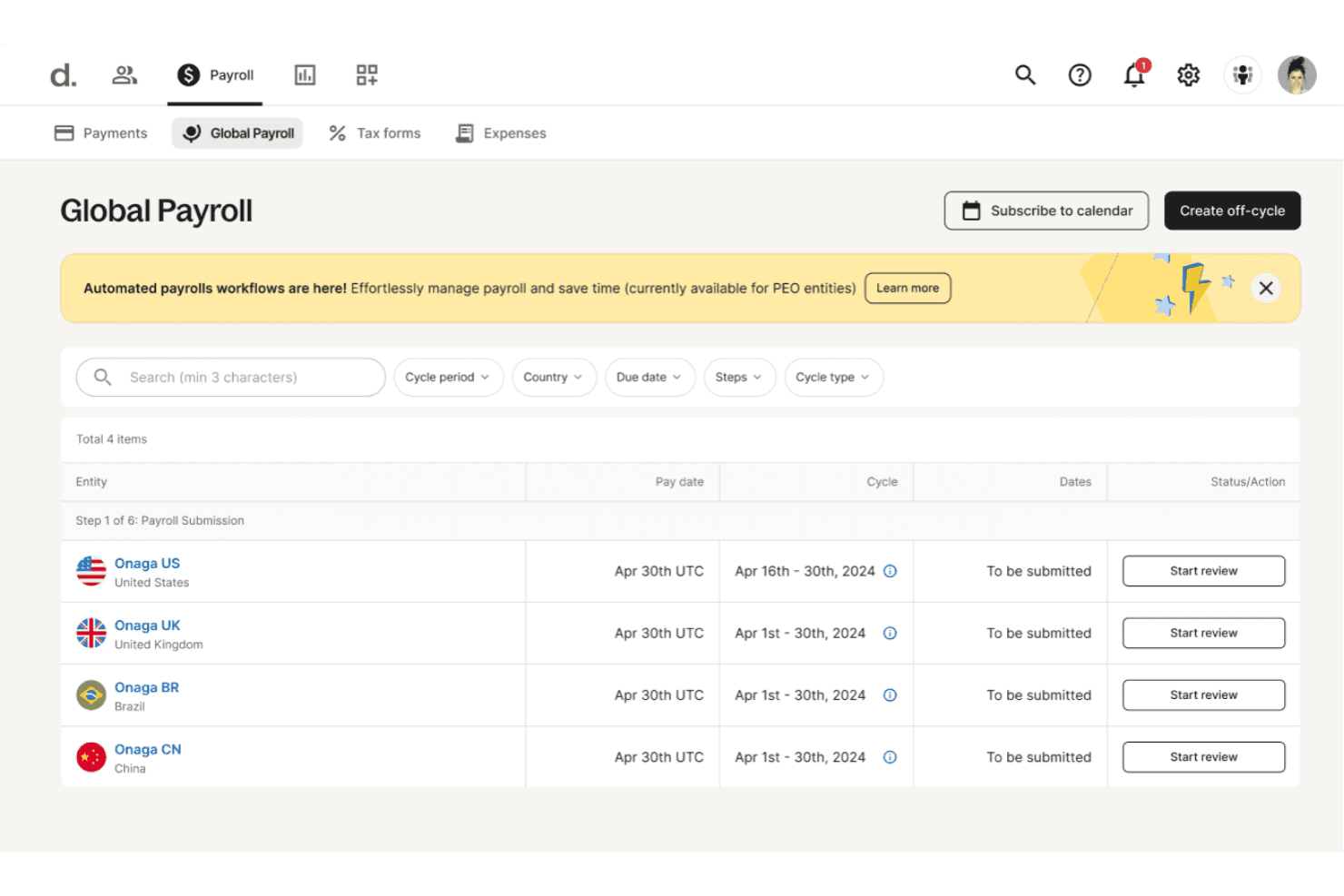
Deel HR manages global payroll cycles across multiple countries in one view. Deel HR is a global HRIS built for organizations managing employees, contractors, and EOR workers across multiple countries, centralizing workforce records, org structure, time off, and people analytics in one place.
Who Is Deel HR Best For?
Deel HR is a strong fit for HR teams managing employees, contractors, and EOR workers across multiple countries from a single system of record.
Why I Picked Deel HR
I picked Deel HR for its global HR muscle, specifically because it holds employee, contractor, and EOR worker records across 150+ countries in a single system. I particularly like how it logs every profile and contract change with a full audit trail, capturing who changed what, when, and why. Its configurable time-off and time-tracking policies adapt to local rules by country and worker type, which removes a lot of manual overhead when you're managing a distributed workforce.
Deel HR Key Features
- Employee self-service portal: Workers can request and approve items, view the org chart, access job levels, and retrieve company policies directly from their profile.
- Workflow automation: Automates onboarding sequences and employee changes using personalized emails, assigned tasks, conditional logic, and filters.
- Approval policy builder: Lets admins configure multi-level approval chains for time off, time tracking, and data changes, with substitute approvers and automated reminders.
- People analytics dashboards: Generates reports on headcount, attrition, cost, and org structure, with filtering, grouping, and visualization options that can be saved and shared.
Deel HR Integrations
Deel HR has a documented marketplace integration with AccessOwl for syncing worker profiles and lifecycle dates to provision or revoke SaaS access. It also provides APIs and real-time webhooks for custom workforce-data and lifecycle-event integrations.
Pros and Cons
Pros:
- Reviewers praise centralized records and clear navigation
- Detailed change histories support HR accountability
- Global worker records across 150+ countries
Cons:
- Benefits administration workflows aren’t documented
- HRIS-only setup exports payroll to providers
 3Best for simplifying HR tasks for SMBs
GoCo
- Free demo available
- Pricing upon request
Visit WebsiteCustomer Rating:4.6/5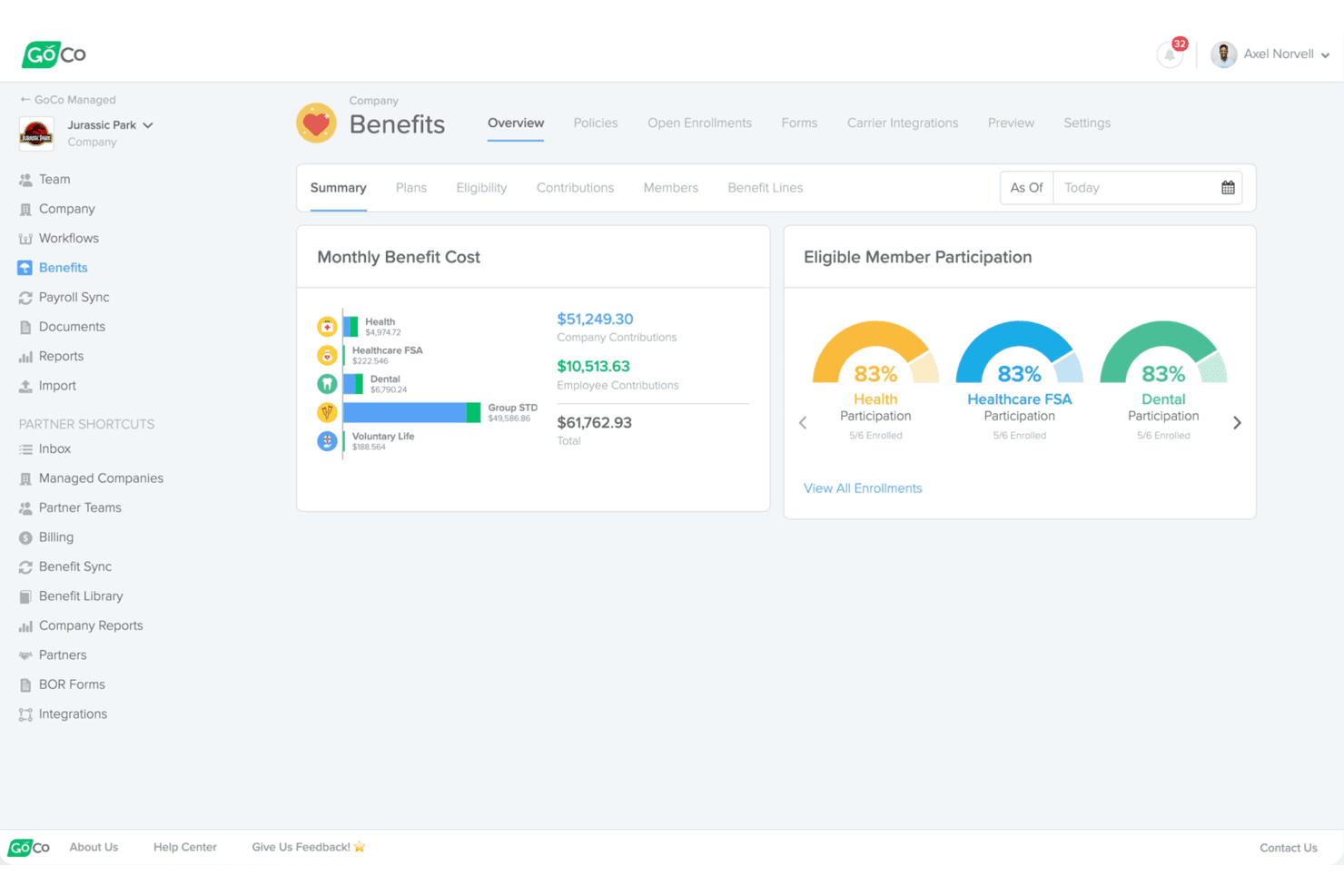
GoCo gives employers a clear view of benefits costs and participation. GoCo is an HR platform built for small and mid-sized businesses that pulls core HR, payroll, benefits, time tracking, and compliance into one place, making it a practical option if you're managing people operations without a large HR team.
Who Is GoCo Best For?
GoCo is a strong fit for small and mid-sized businesses that need a single platform to manage HR, payroll, benefits, and time tracking without a large HR team behind it.
Why I Picked GoCo
I picked GoCo as one of the best because it pulls HR, payroll, benefits, and time tracking into a single platform that small HR teams can actually manage without specialist headcount behind them. I especially like how Magic Docs turns static paperwork into fillable, signable forms, and how onboarding workflows can be scoped by role or department so new hires aren't wading through irrelevant steps. The Benefit Sync Dashboard is another feature I find genuinely useful, grouping enrollment changes into a checklist that keeps benefit processing visible without requiring a dedicated benefits administrator.
GoCo Key Features
- Benefit Sync Dashboard: Groups benefits enrollment, disenrollment, and change tasks into a checklist with filters, notes, attachments, and a task history timeline.
- Magic Docs: Converts static documents into customizable, fillable forms that employees can complete and sign electronically.
- Configurable workflows: Builds task lists from scratch or templates, with steps sequenced and scoped by role, department, or employment stage.
- Employee self-service portal: Lets employees review and update their own information, access pay stubs, submit time-off requests, and view benefits enrollment options.
GoCo Integrations
GoCo offers 100+ marketplace integrations, including ADP Workforce Now, Paychex, QuickBooks Online, Greenhouse, JazzHR, Google Workspace, Slack, and Zapier. Its OpenAPI supports custom integrations across employee, payroll, time, time-off, and workflow data.
Pros and Cons
Pros:
- Configurable workflows tailor tasks by role
- Simplifies benefits enrollment and onboarding paperwork
- Centralizes employee records and self-service updates
Cons:
- Some local tax handling requires manual intervention
- Payroll errors and W-2 issues reported
Learn more about GoCo: Best for data-driven HR insights
- Free demo available
- Pricing upon request
Visit WebsiteCustomer Rating:4.4/5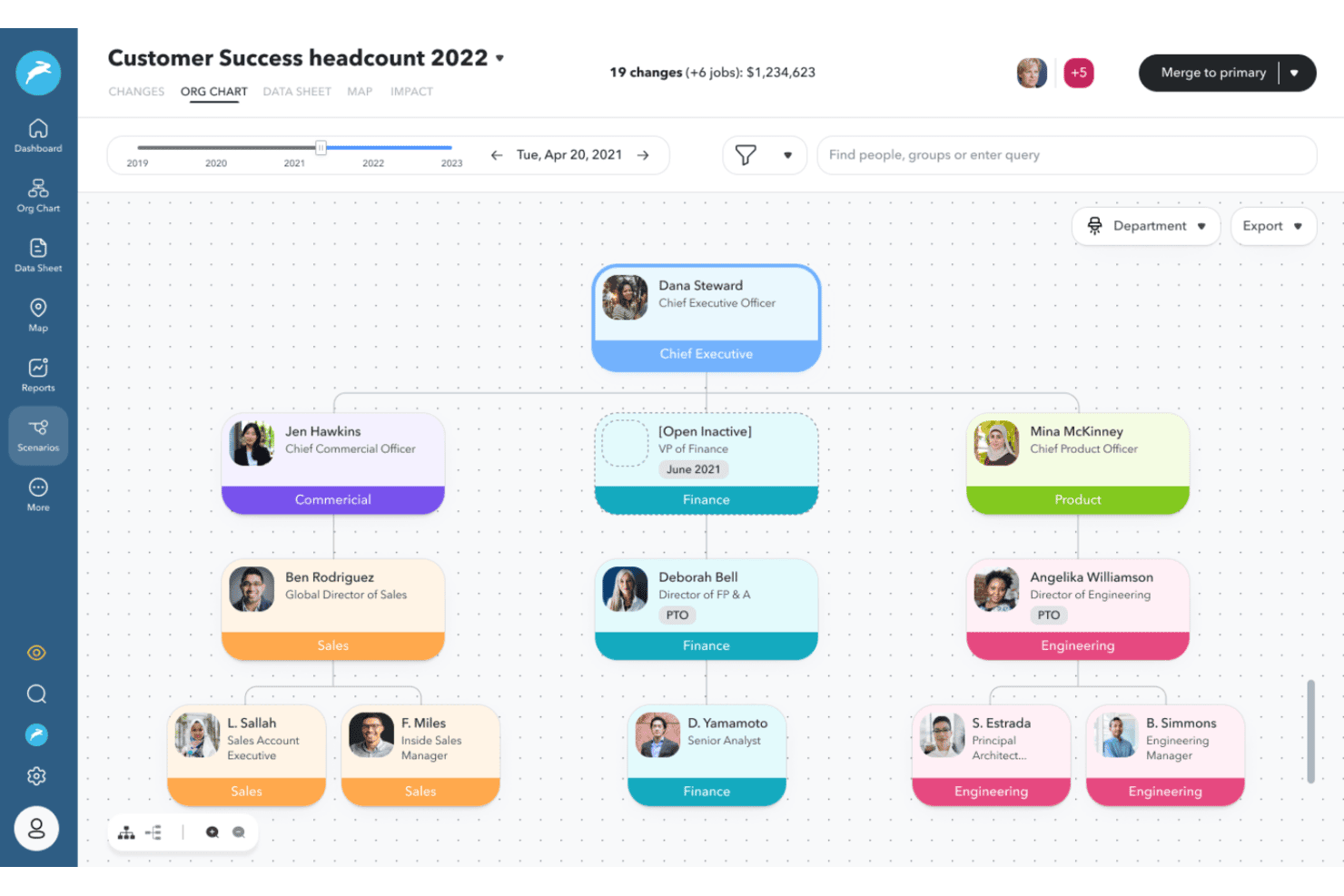
ChartHop visualizes org structures with real-time headcount scenarios. ChartHop is a people analytics and workforce planning platform that connects your HR, payroll, and business data into a living org model—making it a strong fit for HR directors and HRIS admins who need deeper workforce visibility and headcount planning tools than a traditional HCM provides.
Who Is ChartHop Best For?
ChartHop is a strong fit for HR directors and HRIS admins who need deep workforce visibility, headcount planning, and org analytics layered on top of an existing payroll system.
Why I Picked ChartHop
I picked ChartHop as one of the best because it turns your workforce data into a living, queryable org model rather than a static record system. I especially like how its configurable dashboards let you slice headcount, attrition, and compensation data in real time, so you can walk into a planning meeting with actual numbers instead of last week's export. Ask ChartHop's natural-language interface lets me query that same data conversationally, which speeds up the kind of ad hoc analysis that usually takes hours to build manually.
ChartHop Key Features
- Headcount scenario planning: Model proposed org changes visually, then assess budget and demographic impact before any decisions are finalized.
- Performance management suite: Run 360-degree, peer, and upward reviews using configurable templates, with completion tracking and reminder workflows built in.
- Employee engagement surveys: Configure recurring or journey-based surveys with anonymous response options and break down results by department, team, or other data points.
- 100+ HR and payroll integrations: Connect ChartHop to systems like Workday, ADP Workforce Now, Greenhouse, and Paylocity to pull workforce data into a single org model.
ChartHop Integrations
ChartHop offers integrations with 100+ systems, including ADP Workforce Now, Paylocity, Workday, BambooHR, Greenhouse, Ashby, Slack, Google Sheets, Excel, and Salesforce. Its REST API and webhooks support custom integrations.
Pros and Cons
Pros:
- Org charts clarify reporting lines across teams
- Scenario planning reveals budget impact before approvals
- Workforce dashboards support headcount decisions
Cons:
- Benefits and attendance tools stop short
- No native pay runs for payroll replacement
Learn more about ChartHop: Best for small to medium-sized businesses
- 7-day free trial + free demo available
- From $10.25/user/month
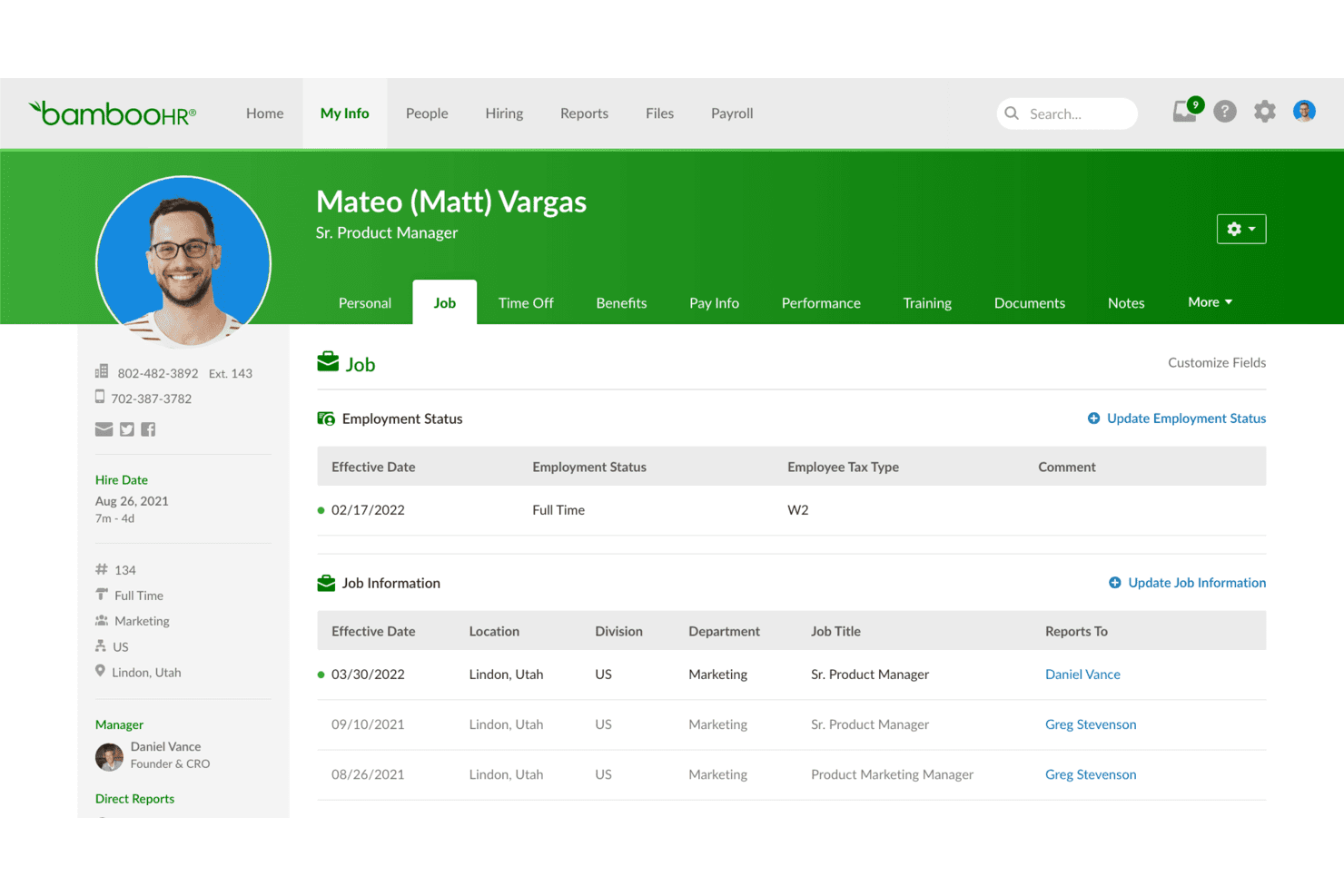
BambooHR displays employee job history and employment status details. BambooHR is an HR platform that centralizes employee records, hiring, onboarding, payroll, and time tracking—making it a practical fit for HR teams that want to consolidate people data and reduce manual admin work without managing a complex enterprise system.
Who Is BambooHR Best For?
BambooHR is a strong fit for HR teams at small to mid-sized companies that want to consolidate employee records, hiring, onboarding, and time-off management without the complexity of an enterprise system.
Why I Picked BambooHR
I picked BambooHR as one of the best PeopleGuru alternatives because it centralizes employee records, hiring, onboarding, and time-off management in a single system that small to mid-sized teams can actually manage without a dedicated IT function. I particularly like how the applicant tracking flows directly into onboarding checklists, so candidate data transfers to employee records the moment someone is hired. The Bamboo AI assistant also lets my team ask natural-language questions about workforce data and pull charts without building reports from scratch.
BambooHR Key Features
- Bamboo AI workforce assistant: Answers natural-language questions about workforce data and generates charts directly within the platform.
- On-demand pay: Lets eligible employees access a portion of their already-earned wages before payday.
- Compensation planning and salary benchmarking: Provides collaborative worksheets for compensation cycles and integrates Mercer salary benchmarks for pay decisions.
- REST API and webhooks: Enables programmatic access to employee records and delivers real-time HTTP notifications when specified employee data changes.
BambooHR Integrations
BambooHR offers 150+ pre-built integrations, including native connections with QuickBooks Online, Xero, NetSuite, and Sage Intacct. Its REST API and webhooks support custom integrations and employee-data updates.
Pros and Cons
Pros:
- Employees can self-serve pay and time-off
- Centralized employee files reduce scattered paperwork
- Candidate records transfer directly into onboarding
Cons:
- Shifts cannot cross calendar days or be edited by employees
- Applicant tracking data lacks custom reports
Learn more about BambooHR:
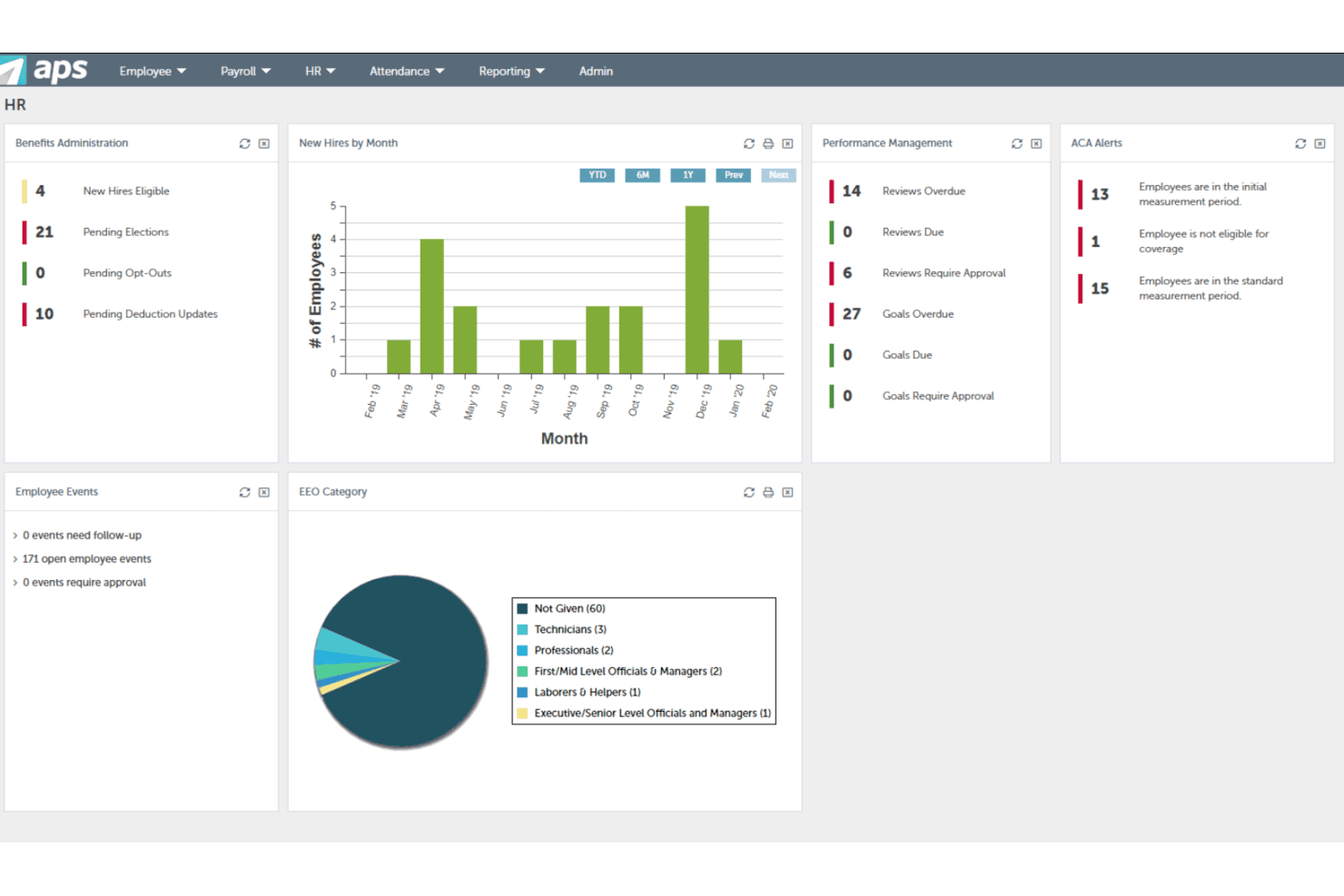
APS centralizes HR metrics across benefits, hiring, and performance. APS is a unified HCM platform built for U.S.-based businesses that want to bring payroll, HR, time tracking, benefits, and compliance into a single connected system—with particular depth for industries like healthcare where role-specific pay, licensing, and compliance demands are high.
Who Is APS Best For?
APS is a strong fit for U.S.-based organizations in regulated industries like healthcare, where role-specific pay, licensing tracking, and compliance requirements demand more than a generic HCM platform.
Why I Picked APS
I picked APS as one of the best because it goes deeper on industry-specific compliance than most HCM platforms. For healthcare teams, that means tracking licenses, certifications, and continuing education by role or department, with alerts when expirations are approaching. APS also handles role-specific pay rates, multiple pay codes, and shift rules natively, so PRN staff and contract workers don't require manual workarounds to pay correctly.
APS Key Features
- Payroll tax filing: APS files and pays federal, state, and local payroll taxes across all 50 states, with automatic error alerts before each payroll run.
- Employee self-service portal: Employees can access pay stubs, tax forms, benefits, PTO balances, and schedules from one portal or the mobile app.
- ACA eligibility and reporting: APS tracks average hours and full-time-equivalent status, then generates and e-files Forms 1094-C and 1095-C on your behalf.
- Configurable time-card approvals: Managers can set up multi-step time-card approval workflows with automated alerts for missed punches and overtime thresholds.
APS Integrations
APS lists 102 integrations and 240 solutions overall, including QuickBooks, Sage Intacct, Employee Navigator, 401GO, Verified First, Indeed, and ZipRecruiter. Its documented REST API and Enterprise Integration Platform support custom connections through API access or XML files over secure SFTP.
Pros and Cons
Pros:
- Dedicated support earns reviewer praise
- Connected payroll, HR, attendance, and benefits
- Healthcare role-based pay and license tracking
Cons:
- Mobile clock-in workflows can frustrate staff
- Cross-location reports can require workarounds
Learn more about APS: Best for integrated HR, IT, and finance
- 14-day free trial + free demo available
- From $8/user/month (billed annually)
Visit WebsiteCustomer Rating:4.9/5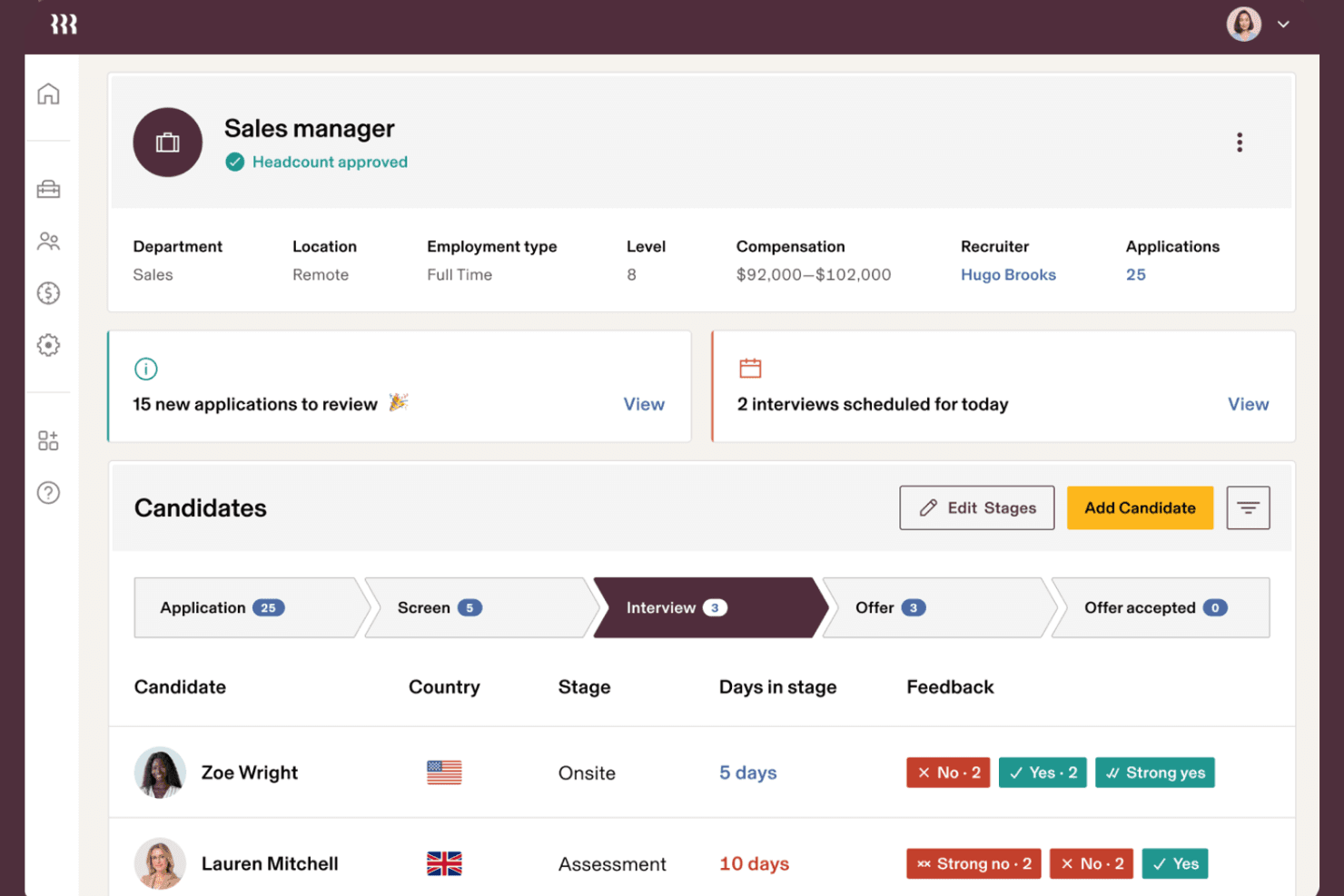
Rippling tracks candidate pipeline stages and interview feedback in one view. Rippling is an AI-native HCM platform that unifies employee records, payroll, benefits, time tracking, and talent management in one system—making it a strong fit for HR teams that need connected data and automated workflows across the full employee lifecycle.
Who Is Rippling Best For?
Rippling suits HR, IT, and finance teams that need a single platform to manage the full employee lifecycle without stitching together separate systems.
Why I Picked Rippling
I picked Rippling as one of the best because it's the rare platform that genuinely unifies HR, IT, and finance without requiring separate systems. What I find most compelling is how employee record changes propagate automatically across connected apps, so updating a department or manager doesn't create downstream inconsistencies. I also appreciate how benefits enrollment, payroll deductions, and time approvals all stay in sync natively, which eliminates the manual reconciliation that trips up most HR teams running disconnected tools.
Rippling Key Features
- AI-assisted scheduling: Builds draft staffing schedules using sales forecasts and workforce data, then routes them to managers for approval before they go live.
- Configurable permission profiles: Lets admins define exactly who can view, edit, or approve specific data, with profiles that update automatically when employee attributes change.
- ACA and COBRA automation: Tracks ACA eligibility, generates and files Forms 1094-C and 1095-C, and triggers COBRA enrollment notices after qualifying events.
- Performance review cycles: Supports customizable review cycles, 9-box calibration grids, goal tracking, and compensation recommendations synced to payroll at cycle close.
Rippling Integrations
Rippling reports 600+ out-of-the-box integrations, including native LinkedIn, Indeed, Slack, and Zendesk integrations. Its REST APIs for HRIS, time, talent, and data support custom integrations.
Pros and Cons
Pros:
- Approved hours flow into payroll
- ACA and COBRA tasks receive automation
- Employee changes sync across HR workflows
Cons:
- Support access and response times vary
- Workforce reports can be hard to interpret
 Best for global workforce management
- Free demo available
- From $20/user/month (billed annually)
Visit WebsiteCustomer Rating:4.7/5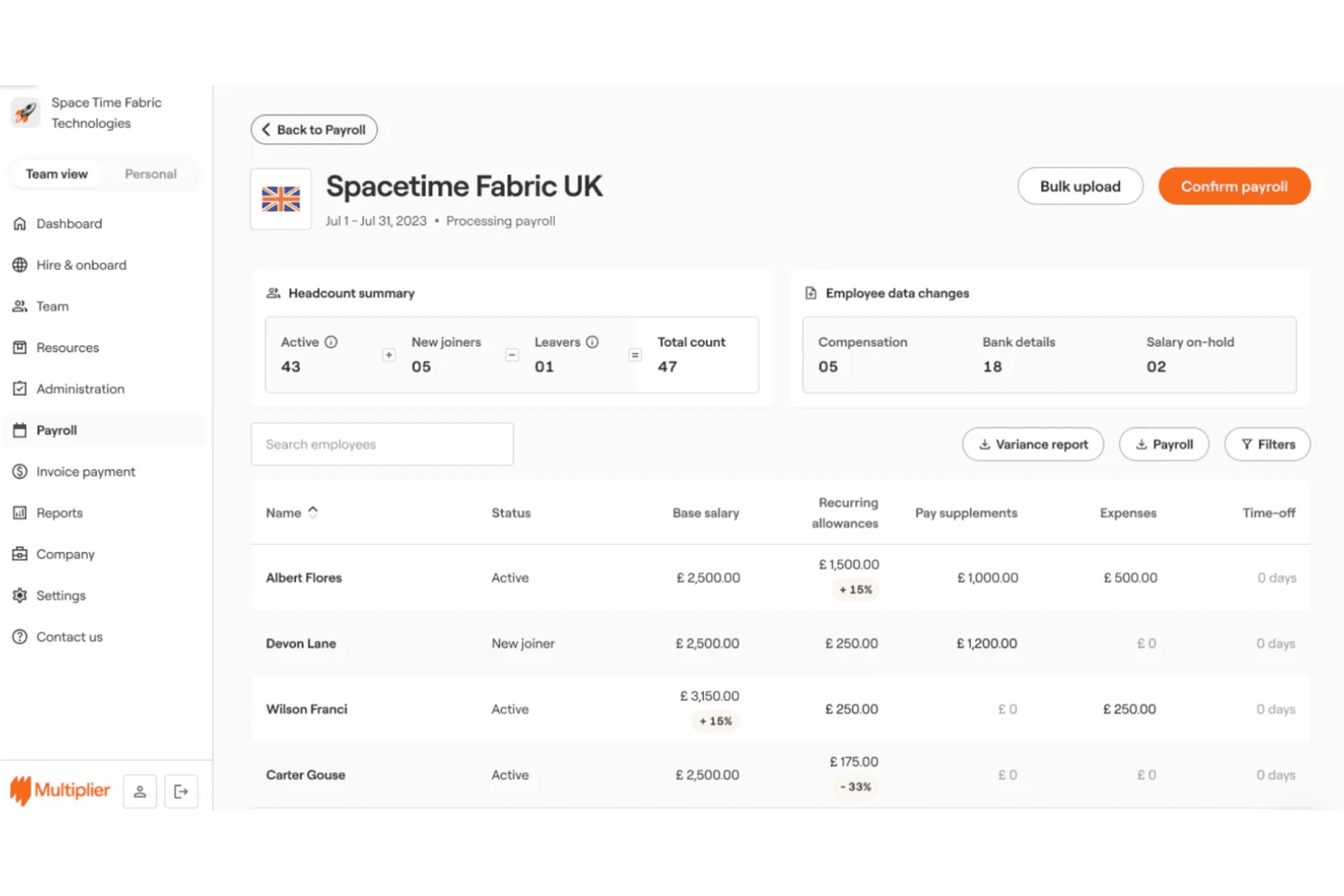
Multiplier lets users review and confirm UK payroll with headcount and salary data. Multiplier is a global payroll platform built for teams managing employees across multiple countries, centralizing multi-entity payroll processing, statutory compliance, and local-currency payments in one place.
Who Is Multiplier Best For?
Multiplier suits payroll teams managing employees across multiple countries who need compliant, local-currency payroll processing without building out entities in each jurisdiction.
Why I Picked Multiplier
I've included Multiplier in my top picks because it's purpose-built for teams running payroll across multiple countries, which is exactly where PeopleGuru falls short. I appreciate how it centralizes multi-entity payroll processing across 160+ countries, with entity-level cut-off dates and pay components configured separately per jurisdiction. My team can review a consolidated payroll summary across all entities before each cycle closes, then confirm salaries paid in 120+ local currencies with statutory taxes and contributions calculated automatically.
Multiplier Key Features
- Local-currency salary payments: Disburse employee salaries in 120+ local currencies via bank transfer, direct debit, or crypto.
- Statutory benefits setup: Configure statutory benefits and deductions per jurisdiction as part of each payroll cycle.
- Payroll expense adjustments: Automatically adjust payroll calculations to account for approved team expenses.
- Payslip management: Publish payslips directly to employees or push them to your connected HRMS after each pay cycle closes.
Multiplier Integrations
Multiplier offers a marketplace integration with Paycor for bidirectional employee, compensation, time-off, and bank-detail syncing. It also provides an API for custom integrations.
Pros and Cons
Pros:
- Consolidated reports show entity-level payroll costs
- Reviewers praise local payroll expertise
- Centralizes payroll across multiple countries
Cons:
- Reviewers cite limited reporting depth and customization
- Some reviewers report delayed or incorrect pay
Learn more about Multiplier: Best for user-friendly mobile access
- Free demo available
- Pricing upon request
Visit WebsiteCustomer Rating:4.3/5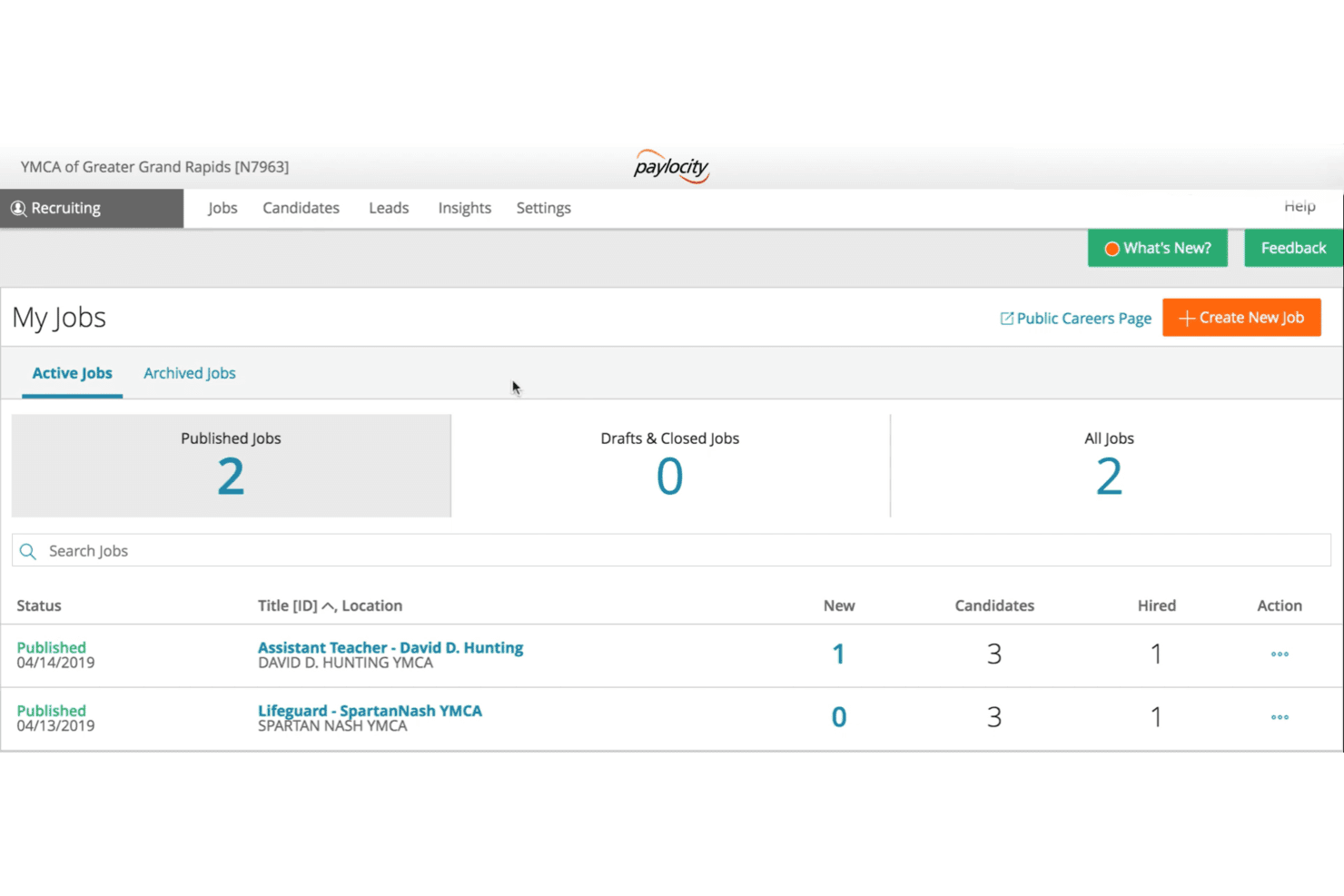
Paylocity lets recruiters track active job listings and candidates. Paylocity is a full-suite HR and payroll platform that brings together employee records, benefits administration, time tracking, and talent management in one system—making it a strong fit for HR teams that need to manage multi-state workforces without juggling disconnected tools.
Who Is Paylocity Best For?
Paylocity is a strong fit for mid-sized organizations that need a unified HR and payroll platform their entire workforce—from frontline employees to HR admins—can navigate without much hand-holding.
Why I Picked Paylocity
I picked Paylocity as one of the best because its mobile app genuinely covers ground most HR platforms leave to desktop. Frontline employees can clock in with geofencing, complete preboarding paperwork, and request earned wages before payday, all from their phones. Managers can approve timecards, review journal entries for performance conversations, and monitor direct reports without logging into a browser.
Paylocity Key Features
- Guided payroll workflow: Step-by-step payroll submission with 40+ built-in audits that flag issues like pay spikes and missing deductions before you run payroll.
- Benefits Guided Setup: Configurable enrollment experience with step-by-step employee guidance, cost breakdowns, and automated EDI file generation for carriers.
- Configurable HR workflows: Template-based or custom workflows with triggers, demographic filters, and audit-trail reporting for processes like offboarding and pay-rate changes.
- AI Assistant: An in-platform assistant that answers policy and compliance questions, pulls live HR data, and links users to relevant records or workflows.
Paylocity Integrations
Paylocity offers hundreds of Marketplace integrations, including Greenhouse, Checkr, Microsoft Entra, Google Workspace, and Okta. It also supports custom integrations through APIs, code recipes, developer documentation, EDI, and SFTP.
Pros and Cons
Pros:
- New hires complete onboarding paperwork before day one
- Payroll reconciliation and off-cycle checks feel straightforward
- Employees can clock in through mobile geofencing
Cons:
- Implementation errors can disrupt payroll or PTO setup
- Custom reports can miss needed fields
 10Best for payroll process automation
Paycom
- Free demo available
- Pricing upon request
Visit WebsiteCustomer Rating:4.5/5
Paycom streamlines HR tasks with employee-managed payroll features. Paycom is a comprehensive HR and payroll software solution for businesses of all sizes, offering key functionalities like payroll management, talent acquisition, and HR management. It's widely used by HR professionals across various industries, including education, healthcare, and retail.
Why it's a good PeopleGuru alternative: Paycom offers unique features like Beti®, enabling employees to manage their own payroll, which significantly reduces administrative workload. Tools such as applicant tracking and onboarding help streamline HR processes.
The platform emphasizes automation and security, providing a seamless experience for managing HR tasks. Additionally, the mobile app enhances user convenience, making Paycom a versatile option for efficient payroll management.
Standout features & integrations:
Features include applicant tracking, onboarding, and performance management. You can manage benefits administration and compliance support efficiently. The platform provides real-time ROI tracking through Direct Data Exchange®.
Integrations include QuickBooks, Xero, ADP, SAP, Workday, Oracle, BambooHR, Ceridian, Gusto, and TriNet.
Pros and Cons
Pros:
- Real-time ROI tracking
- Automated time-off management
- Employee self-service payroll
Cons:
- Complex customization options
- Initial setup cost
Andre PeopleGuru-alternativer
Her er noen flere PeopleGuru-alternativer som ikke kom med på kortlisten min, men som likevel er verdt å undersøke:
- 11UKGBest for comprehensive workforce management
- 12PaycorBest for employee development focus
- 13Cornerstone OnDemandBest for talent management solutions
- 14DayforceBest for real-time payroll processing
- 15NetchexBest for comprehensive employee benefits
- 16Patriot SoftwareBest for small business payroll
- 17CriterionBest for mid-market HR solutions
How I Evaluate PeopleGuru Alternatives
I evaluate every platform against two layers: the baseline must-haves—like native payroll, benefits enrollment, and time tracking—and the differentiators that determine real fit.
Core Functionality (Table Stakes For This List)
When I'm selecting tools for my list, I rank each one on a scale from 0 (does not offer the functionality) to 5 (excels in this area) for each core functionality listed below. Then, I calculate the tool's total score into a percentage. Each tool needs to achieve a minimum total score of 75% to be considered for inclusion.
- Core HR Management: I look for a centralized employee database that handles the full hire-to-exit lifecycle, including org charts, document storage, and custom fields for tracking job history.
- Payroll Processing: Each platform's payroll engine should handle tax filing, direct deposit, deductions, and multi-jurisdiction compliance without requiring a separate third-party tool.
- Benefits Administration: I evaluate how the platform manages open enrollment, carrier connections, and eligibility rules—especially whether employees can compare and elect plans on their own.
- Time & Attendance Tracking: The tool should connect time tracking and PTO approvals directly to payroll, so managers aren't manually reconciling hours across disconnected systems.
- Talent Management: I check for applicant tracking, onboarding workflows, and performance review tools that tie back to the employee record rather than living in a siloed module.
- Employee Self-Service Portal: Employees should be able to view pay stubs, request time off, update personal details, and enroll in benefits from a mobile-friendly portal.
Once I have a list of tools that meet this criteria, I consider what sets each platform apart.
Differentiating Factors (What Sets Vendors Apart)
Here's how I compare and contrast different vendors:
Standout Features
I look for configurable workflow builders that let HR teams adjust approval chains and onboarding sequences without submitting IT tickets. Compliance automation is another differentiator—platforms that auto-generate ACA or EEO-1 filings save hours of manual reporting each cycle. I also evaluate whether a platform includes a built-in LMS, since tying training completion and certifications directly to employee records eliminates the need for a standalone learning tool.
Beyond Features
Pricing transparency matters a lot in this space. I check whether vendors clearly break out per-employee-per-month costs versus bundling implementation fees and module add-ons into opaque quotes. Integration depth is another priority—an HCM platform should connect natively with your accounting system, 401(k) provider, and identity tools like Okta or Azure AD. I also evaluate implementation support, since migrating historical payroll data and running parallel payroll cycles requires hands-on guidance that not every vendor provides.
Hvorfor se etter et PeopleGuru-alternativ?
Selv om PeopleGuru er et godt valg for HR- og lønnsprogramvare, finnes det flere grunner til at noen brukere ser etter alternative løsninger.
Det kan hende du ser etter et PeopleGuru-alternativ av følgende grunner:
1. Begrenset tilpasning eller integrasjoner
Hvis bedriften din bruker andre spesialiserte verktøy (som Salesforce, Slack eller nisjepregede regnskapsplattformer), kan det hende at PeopleGuru ikke integreres like sømløst som større plattformer som Workday eller ADP. Tilpassede arbeidsflyter eller svært spesifikke krav til samsvar kan være vanskeligere å konfigurere.
2. Brukergrensesnitt (UI) og brukeropplevelse (UX)
Noen brukere rapporterer at brukergrensesnittet virker utdatert eller mindre intuitivt sammenlignet med mer moderne verktøy (som Gusto, BambooHR eller Rippling). Selvbetjeningsfunksjonene for medarbeidere er for eksempel kanskje ikke like elegante eller mobilvennlige.
3. Skaleringsutfordringer
Det egner seg ofte best for mellomstore organisasjoner. Hvis du vokser raskt eller planlegger internasjonal ekspansjon, kan du trenge mer robuste globale funksjoner.
4. Kundestøttens responstid
Avhengig av abonnementet ditt har enkelte brukere nevnt blandede erfaringer med kundestøtten – langsommere svartider eller mindre praktisk hjelp med oppstart enn forventet.
5. Manglende dybde i enkelte moduler
Det tilbyr en bred samling funksjoner, men alle er kanskje ikke like dyptgående eller avanserte. For eksempel:
- Resultatstyring kan mangle avansert måloppfølging eller tilbakemeldingsfunksjoner.
- Rekruttering konkurrerer kanskje ikke med frittstående systemer for kandidatsporing, som Greenhouse eller Lever.
PeopleGuru – viktige funksjoner
Her er noen av de viktigste funksjonene i PeopleGuru, slik at du kan sammenligne hva alternative løsninger tilbyr:
- Selvbetjening for ansatte: Gjør det mulig for teamet ditt å få tilgang til og oppdatere sine egne opplysninger, noe som reduserer administrativt arbeid.
- Planlegging: Hjelper deg med å administrere ansattes skift og arbeidsplaner på en effektiv måte.
- Lønn: Effektiviserer lønnskjøringen for å sikre korrekte og punktlige utbetalinger.
- Talentanskaffelse: Støtter rekrutteringsarbeidet ditt med verktøy for håndtering av stillingsannonser og søknader.
- Introduksjon av nyansatte: Forenkler introduksjonsprosessen for nyansatte med automatiserte arbeidsflyter.
- Administrasjon av personalgoder: Administrerer personalgoder og sikrer samsvar med regelverket.
- Samsvar: Holder teamet ditt i tråd med juridiske krav og bransjestandarder.
- Rapportering og analyse: Gir innsikt i HR-data, slik at du kan ta velinformerte beslutninger.
- Mål for digital transformasjon: Fokuserer på å bli papirløs og øke medarbeiderengasjementet gjennom teknologi.