

10 beste programvarer for personalstyring i helsesektoren i 2026

Kortliste over den beste programvaren for bemanningsstyring i helsesektoren


Programvare for bemanningsstyring i helsesektoren hjelper deg med å sette opp bemanningsplaner, følge med på arbeidstimer og håndtere samsvar med regelverk på sykehus, klinikker og pleieinstitusjoner. Hvis du leter etter måter å forbedre bemanningen, kontrollere arbeidskraftkostnader og redusere utfordringer med turnusplanlegging på, kan den riktige plattformen for bemanningsstyring utgjøre hele forskjellen. Nedenfor finner du mine anbefalinger for den beste programvaren for bemanningsstyring i helsesektoren, slik at du kan sammenligne de beste alternativene, se unike styrker og avgjøre hvilket verktøy som passer behovene dine for bemanningsplanlegging og optimalisering av pasientbehandlingen.
Hvorfor du kan stole på våre programvareanbefalinger
Teamet vårt har testet og anmeldt programvare siden 2012. Vi er selv HR-eksperter, så vi vet hvor vanskelig og hvor viktig det er å velge riktig programvare.
I denne guiden har vi vurdert verktøyene gjennom praktisk testing og uavhengig research og gitt dem poeng ut fra våre utvelgelseskriterier. Vi bygger også på innsikt fra ledende eksperter i bransjen og erfarne HR-eksperter.
Anmeldelsene våre bygger på vår egen redaksjonelle vurdering. De er ikke et salgsargument.
Ekspertanmeldere:
Sammenligningstabell for programvare for bemanningsstyring i helsesektoren
Denne sammenligningstabellen oppsummerer prisdetaljene for mine beste utvalgte programmer for bemanningsstyring i helsesektoren:
| Tool | Best For | Trial Info | Price | ||
|---|---|---|---|---|---|
| 1 | Best for managing mobile and deskless teams | Free plan available | From $29/month (billed annually) | Website | |
| 2 | Best for credential-based shift scheduling | Free demo available | Pricing upon request | Website | |
| 3 | Best as AI for business | Free demo available | From $8/user/month | Website | |
| 4 | Best for tiered internal-to-agency labor sourcing | Free demo available | Pricing upon request | Website | |
| 5 | Best for fast healthcare shift scheduling | 14-day free trial + free demo available | From $5/user/month | Website | |
| 6 | Best for integrated HR and payroll workflows | Free demo available | Pricing upon request | Website | |
| 7 | Best for credentialing and staff training | Free demo available | Pricing upon request | Website | |
| 8 | Best for healthcare staffing agency support | Free demo available | From $99/user/month | Website | |
| 9 | Best for high-volume workforce scheduling flexibility | Free demo available | Pricing upon request | Website | |
| 10 | Best for system-wide resource optimization | Free demo available | Pricing upon request | Website |
Anmeldelser av den beste programvaren for bemanningsstyring i helsesektoren
Nedenfor finner du mine detaljerte sammendrag av den beste programvaren for bemanningsstyring i helsesektoren som kom med på kortlisten min. Anmeldelsene mine gir et detaljert innblikk i funksjonene, de beste bruksområdene og integrasjonene til hver plattform, slik at du kan finne den beste løsningen for deg.
Best for managing mobile and deskless teams
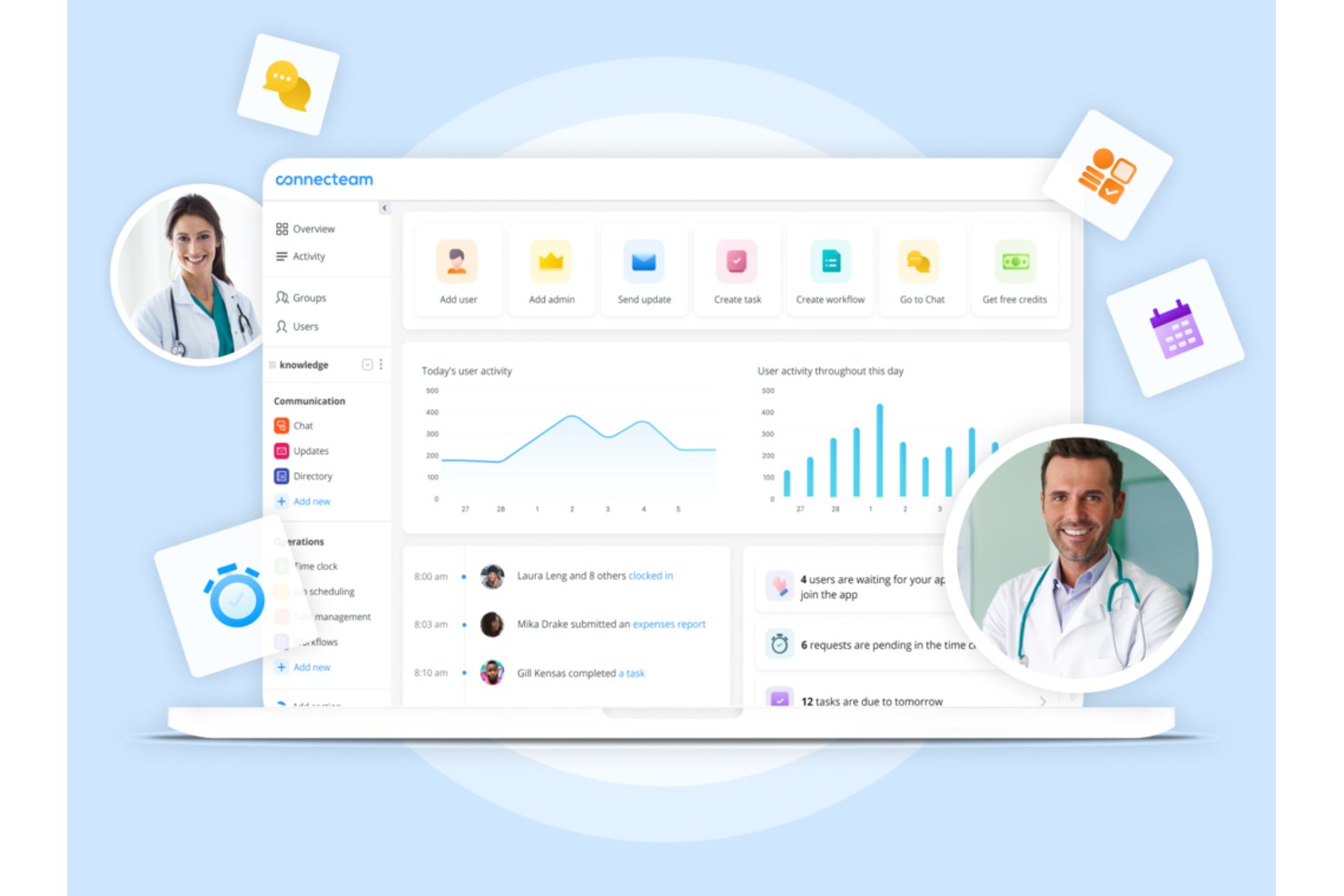
Connecteam is a mobile-first workforce management platform that combines shift scheduling, time tracking, team communication, and HR tools for frontline and deskless healthcare staff.
Who Is Connecteam Best For?
It's a strong fit for small-to-mid-sized healthcare operations, like home care agencies and clinics, that need a simple mobile app to manage non-clinical staff.
Why I Picked Connecteam
I picked Connecteam because its mobile-first design genuinely solves the coordination problem that home care agencies and small clinics face daily. Scheduling a home care worker, confirming their GPS clock-in at a patient's address, and sending a HIPAA-compliant message about a shift change all happen inside one app. I especially like the auto-scheduling feature, which builds full shift schedules around staff availability and roles without manual back-and-forth.
Connecteam Key Features
- Custom forms and checklists: Build digital forms and checklists for staff to complete via mobile.
- HIPAA-compliant messaging: Exchange sensitive team or scheduling information securely within the app.
- Document management: Store, share, and update policy documents, certificates, and onboarding files in one place.
- Task management: Assign tasks to individuals or teams with real-time status tracking for better coordination.
Connecteam Integrations
Connecteam offers native integrations with Gusto, QuickBooks, Paychex, ADP, and Xero for payroll, and provides an API for custom integrations.
Pros and Cons
Pros:
- Built-in HIPAA-compliant team messaging included
- GPS-verified clock-ins confirm remote staff locations
- Mobile-first scheduling suits deskless clinical staff
Cons:
- Lacks credential and license expiration tracking
- No acuity-based staffing or census forecasting
New Product Updates from Connecteam

Connecteam Expands Break and Timesheet Controls
Connecteam adds flexible break thresholds, personalized policies, auto-end options, a centralized exceptions report, and improved timesheet issue visibility to help teams manage breaks and timesheets more effectively. For more information, visit Connecteam’s official site.
 .
.
Best for credential-based shift scheduling
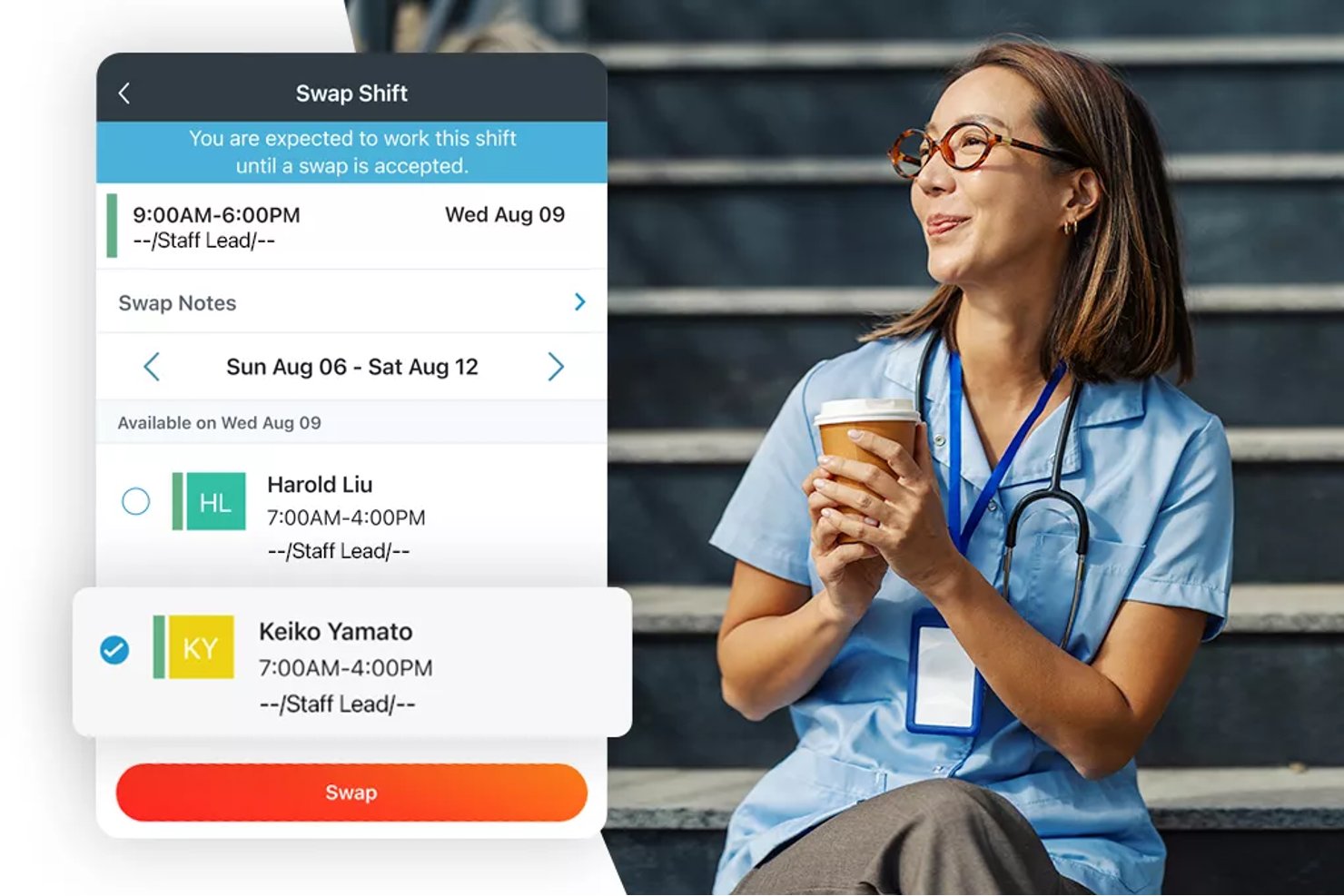
Paylocity is an HR and workforce management platform that combines shift scheduling, credential and certification tracking, time and attendance, and labor cost visibility for healthcare organizations.
Who Is Paylocity Best For?
Paylocity suits healthcare organizations that need to tie shift scheduling directly to credential and certification records across multiple locations.
Why I Picked Paylocity
I picked Paylocity as one of the best because it connects credential records directly to the scheduling workflow, which is exactly what healthcare teams need to stay compliant without manual cross-checking. Managers can schedule staff by certification, skill, or license and validate those credentials at the point of shift assignment. The Compliance Dashboard also auto-tracks skill expiration dates, so gaps surface before they become a scheduling problem.
Paylocity Key Features
- AI shift recommendations: The scheduling engine generates shift suggestions using historical company trends and individual employee data to help managers fill coverage gaps.
- Multi-method time collection: Employees can clock in via time clock, kiosk tablet, web app, or mobile app, with options for biometric recognition and geofencing.
- Attendance dashboard: The Quick View dashboard surfaces real-time attendance status, overtime hours, time-card corrections, and pending time-off requests in one place.
- Budget and labor forecasting: Managers can set budget parameters and input projected data to forecast staffing needs and calculate rates, premiums, and overtime payments automatically.
Paylocity Integrations
Paylocity offers 350+ Marketplace integrations, including OnShift and SmartLinx, for healthcare scheduling, time tracking, and labor management. It also provides APIs and webhooks for custom integrations.
Pros and Cons
Pros:
- Shows overtime alongside workforce metrics
- Tracks expiring licenses and certifications
- Schedules span multiple locations and rotating shifts
Cons:
- Timesheet and payroll discrepancies require correction
- Shift task and staffing-count details are limited
New Product Updates from Paylocity

Paylocity Adds Candidate Engagement and Talent Rediscovery Agents
Paylocity adds Candidate Engagement and Talent Rediscovery Agents to automate candidate outreach, scheduling, and re-engagement. This helps recruiting teams move candidates through hiring faster. For more information, visit Paylocity’s official site.
 .
.
Best as AI for business
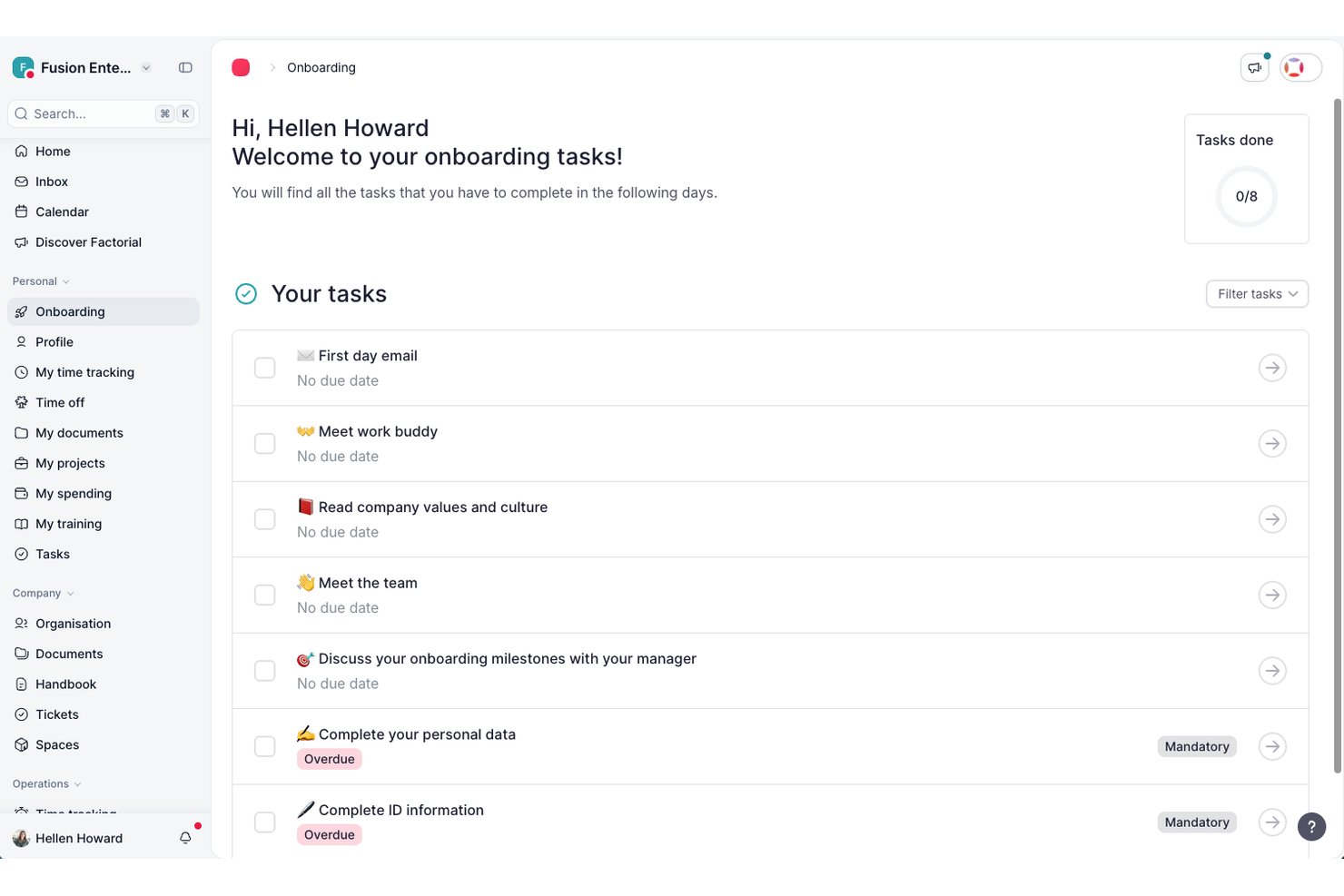
Factorial is an AI-driven HR platform that brings time tracking, shift management, absence management, payroll coordination, and employee document tools together under one system.
Who Is Factorial Best For?
Factorial suits HR teams at small to mid-sized businesses that want AI assistance across everyday operations—from scheduling and reporting to answering employee policy questions.
Why I Picked Factorial
I've included Factorial in my top picks because its AI-driven approach handles the kind of day-to-day workforce admin that eats up time in healthcare settings, from auto-generating timetables to answering employee policy questions on the spot. Factorial One, its AI agent, can analyze scheduling data and produce reports without requiring a manual pull. Shift swap requests and timesheet approvals also run through the platform, keeping coordination visible in one place.
Factorial Key Features
- Time-off request and approval workflow: Employees submit leave requests with dates and reasons, and managers can approve or reject them from desktop or mobile.
- Geofencing-based clock-in: Employees clock in and out using location-based geofencing, ensuring time is only tracked at approved work sites.
- Trend Analytics cost tracking: Monitors workforce costs over time and compares planned versus actual spend across reporting periods.
- Legal e-signature for HR documents: Lets teams request legally binding digital signatures on contracts, payslips, and other employee documents.
Factorial Integrations
Factorial offers marketplace integrations with a3innuva Nómina, DATEV LODAS, Sage 200, Microsoft Power BI, Slack, Google Workspace, and Okta. It also supports custom integrations through its API and Zapier.
Pros and Cons
Pros:
- Shift swaps keep schedule changes visible
- Reviewers praise mobile hours and leave tracking
- AI answers policy questions and creates reports
Cons:
- No patient-ratio or skill-mix scheduling
- No credential tracking or expiration alerts

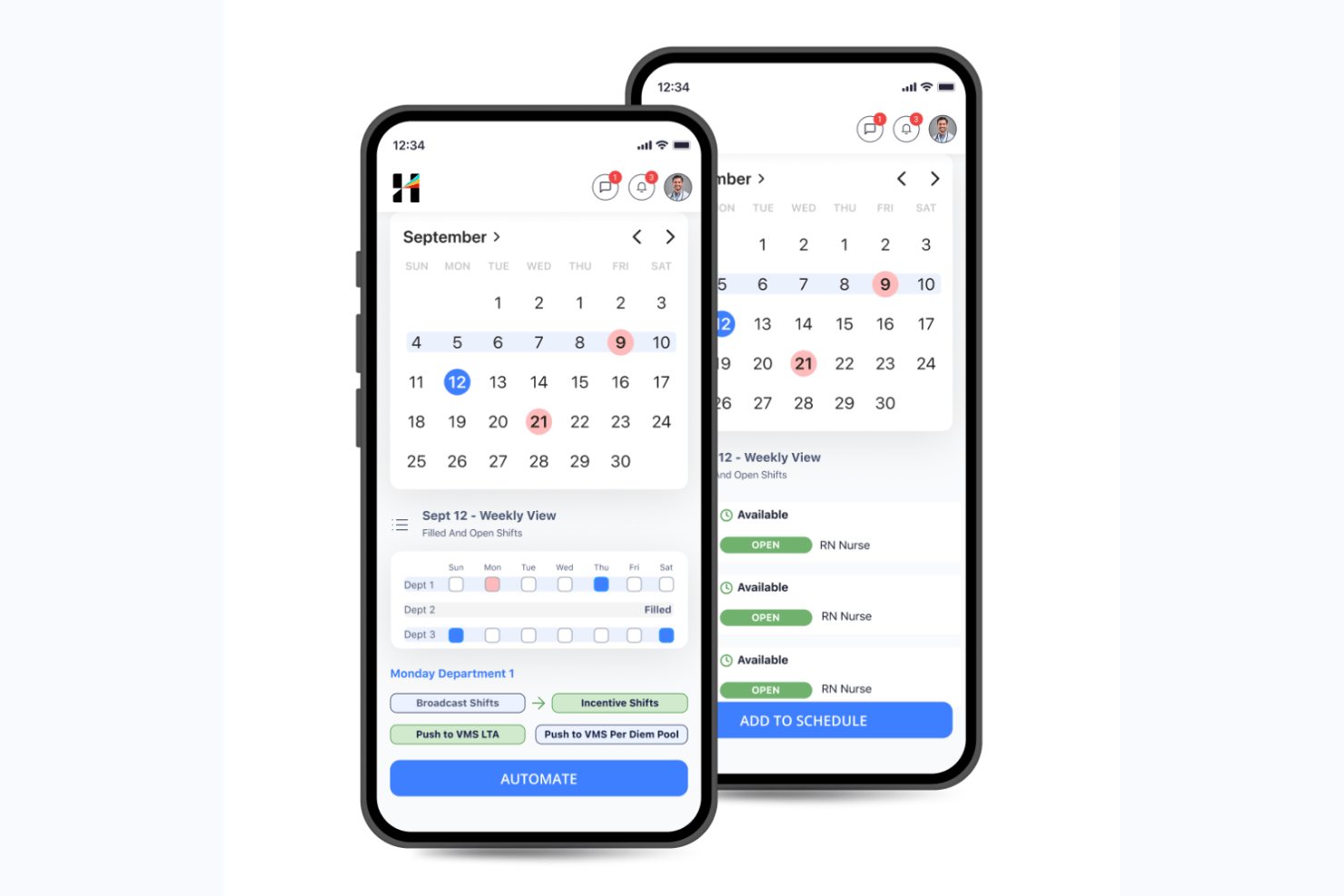
Hallmark Health Care Solutions is an AI-native healthcare workforce management platform that combines clinical staff scheduling, demand forecasting, float pool management, a built-in vendor management system, and credential tracking in a single suite.
Who Is Hallmark Health Care Solutions Best For?
Hallmark Health Care Solutions is a strong fit for large hospital systems and health networks that need to manage complex, multi-tier staffing workflows across internal float pools, agency vendors, and on-demand labor channels.
Why I Picked Hallmark Health Care Solutions
I picked Hallmark Health Care Solutions because its tiered labor sourcing workflow is unlike anything else I've seen in this category. The Internal Resource Pool (IRP) module prioritizes your own float staff first, then escalates to its built-in VMS (connected to 750+ agencies), and finally routes to CareRev's on-demand nurse marketplace. One client grew their IRP to 110+ nurses and avoided $2.3M in agency spend using exactly this structure.
Hallmark Health Care Solutions Key Features
- AI-enabled shift matching: Automatically assigns open shifts to qualified staff based on credentials, availability, cost, and compliance rules.
- Demand forecasting: Projects staffing needs at the unit and service line level using census, length-of-stay, callout, and seasonal trend data.
- AI bill rate intelligence: Predicts and compares contract labor bill rates across vendors, units, and regions to support rate negotiation and cost control.
- Executive insights dashboard: Translates workforce data into C-suite-level visibility, connecting compensation decisions to margin, attrition risk, and patient outcomes.
Hallmark Health Care Solutions Integrations
Hallmark Health Care Solutions integrates with Epic, Workday, UKG, Oracle PeopleSoft, Paycom, OnBase, Imprivata OneSign, symplr Payer, and CareRev. Software Advice lists 24 integration providers in total.
Pros and Cons
Pros:
- Dedicated credentialing support for healthcare compliance
- AI-powered demand forecasting and cost controls
- Tiered internal-to-agency labor sourcing workflow
Cons:
- Minimal public user reviews available
- Custom pricing requires direct sales contact

Deputy
Best for fast healthcare shift scheduling
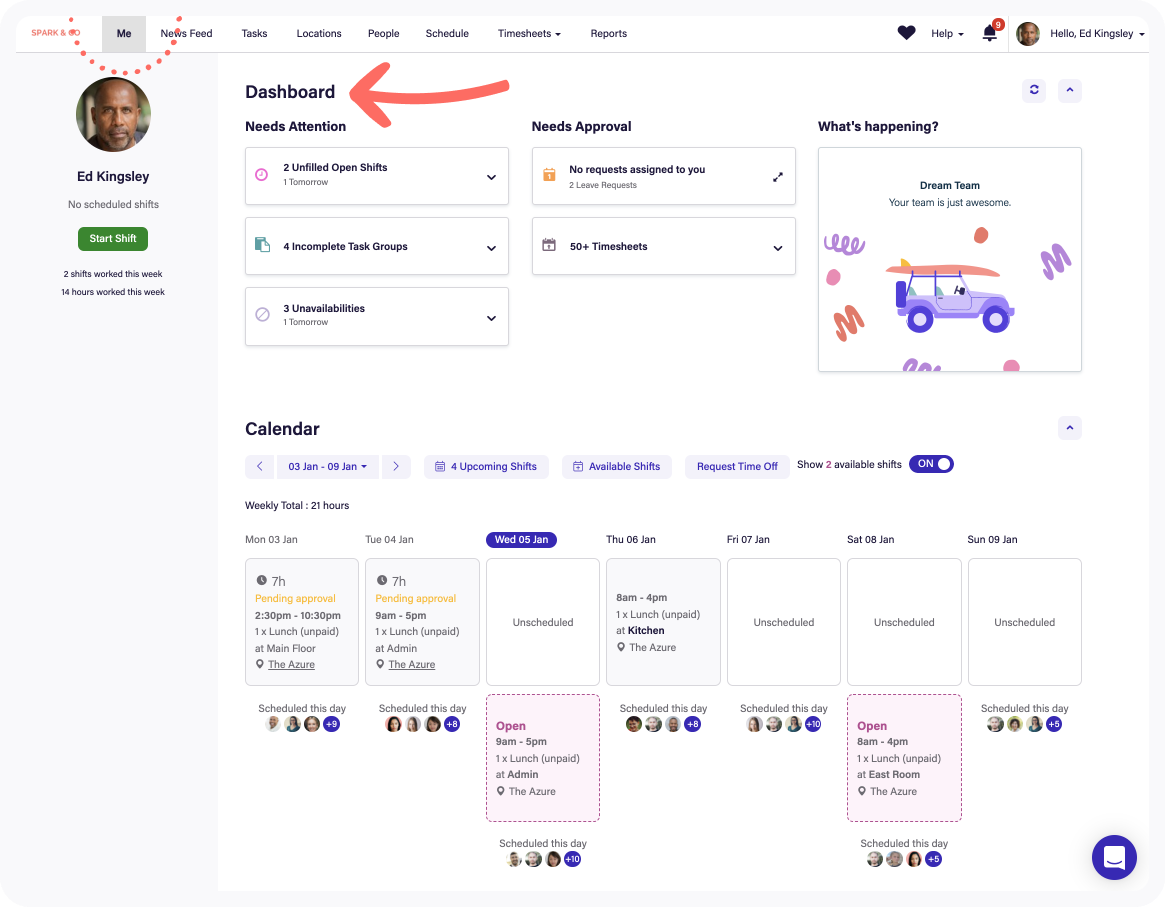
Deputy is a healthcare workforce management software that provides employee scheduling, shift allocation, timesheets, leave management, and mobile app access tools designed for fast-paced healthcare environments.
Who Is Deputy Best For?
Nurse managers and healthcare facility operators need a user-friendly system to manage large shift-based teams across multiple locations.
Why I Picked Deputy
I picked Deputy as one of the best because I can build and publish shift schedules for my hospital in minutes, notify caregivers instantly with mobile alerts, and use built-in compliance management checks that flag potential staffing violations as I schedule.
Deputy Key Features
- Task management: Assign and track daily responsibilities for staff during shifts.
- Fatigue and break planning: Plan required breaks and monitor compliance with healthcare labour rules.
- Time clock with biometric verification: Secure staff check-ins using facial recognition or PIN on kiosk devices.
- Leave management: Submit, approve, and track vacation or sick leave requests digitally.
Deputy Integrations
Integrations include Square, ADP, Gusto, BambooHR, QuickBooks, Clover, Dropbox, EdApp, Epos Now, and HiBob.
Pros and Cons
Pros:
- Built-in timesheets with biometric verification
- Auto-fills shifts using AI demand forecasting
- Support shift swapping in mobile app
Cons:
- No built-in enterprise resource planning tools
- Limited support for complex hospital hierarchies

Oracle
Best for integrated HR and payroll workflows
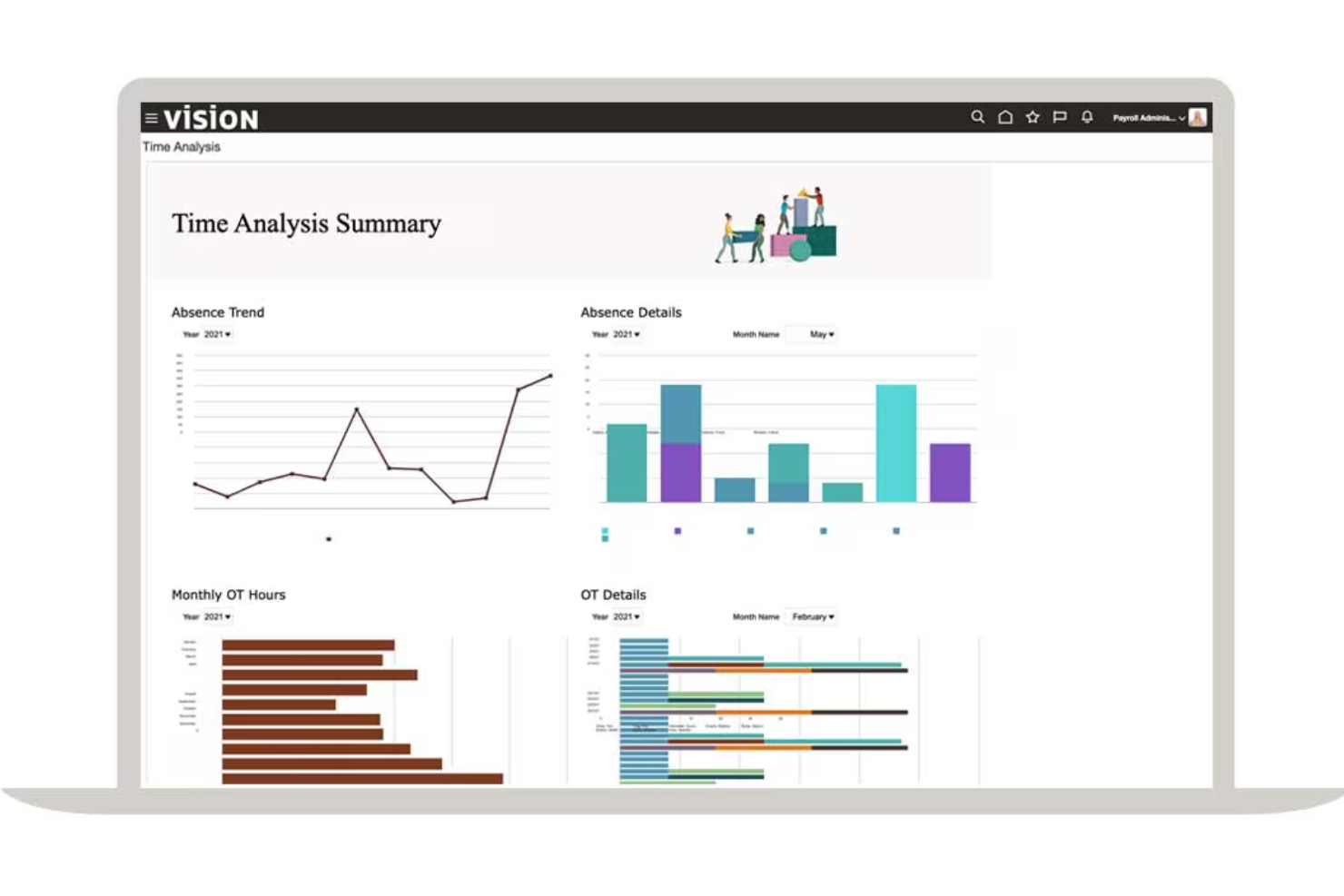
Oracle is a cloud-based healthcare workforce management software offering HR, payroll, time tracking, scheduling, and workforce analytics in a single unified platform.
Who Is Oracle Best For?
Large healthcare provider organizations need centralized HR, payroll, and workforce management on an enterprise scale.
Why I Picked Oracle
I picked Oracle because I can connect HR, payroll, and workforce scheduling in one platform, run unified workflows for healthcare roles, and use prebuilt compliance and payroll features for hospitals and clinics.
Oracle Key Features
- Mobile access: Staff and managers can handle scheduling and approvals from mobile devices.
- Advanced analytics: Access dashboards and reports on workforce trends and productivity.
- Shift bidding: Employees can view and bid for open shifts directly in the platform.
- Absence management: Track time off, sick leave, and FMLA compliance in one system.
Oracle Integrations
Integrations include Accu-Time Systems, dormakaba Workforce Solutions, Grosvenor Technology, and TCP Software.
Pros and Cons
Pros:
- Global financial and payroll data consolidation
- Flexible workforce analytics and reporting tools
- Centralized control of HR, payroll, and scheduling
Cons:
- Requires ongoing system maintenance
- User interface lacks healthcare-specific terminology
Best for credentialing and staff training
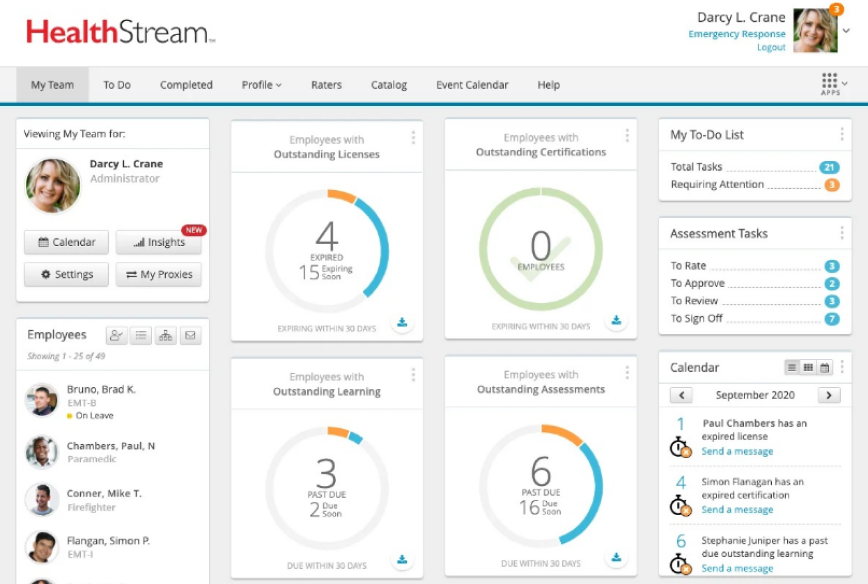
HealthStream is a healthcare workforce management platform with tools for credentialing, regulatory compliance management, learning management, policy tracking, and employee competency management.
Who Is HealthStream Best For?
Hospitals, health systems, and clinics need to centralize staff training, certifications, and ongoing compliance for their healthcare workforce.
Why I Picked HealthStream
I picked HealthStream as one of the best because I rely on its dedicated modules for verifying staff credentials, managing mandatory healthcare training, and tracking licenses and certifications in real time.
HealthStream Key Features
- Course authoring tool: Create and customize online training modules for healthcare staff.
- Competency assessment platform: Measure and document workforce competencies in clinical and non-clinical roles.
- Policy management module: Distribute, track, and attest to critical workplace policies and procedures.
- Mobile learning app: Allow employees to access coursework and assignments on smartphones and tablets.
HealthStream Integrations
Integrations include ADP, Cornerstone OnDemand, HireRight, AvoMD, EBSCO DynaMed, Workday, Adobe Sign, DocuSign, Zoom, and Instamed.
Pros and Cons
Pros:
- Customizable assessments for healthcare competencies
- Automated tracking of staff continuing education
- Clinical course library for healthcare staff
Cons:
- No test environment for training configurations
- Limited self-service options

Bullhorn
Best for healthcare staffing agency support
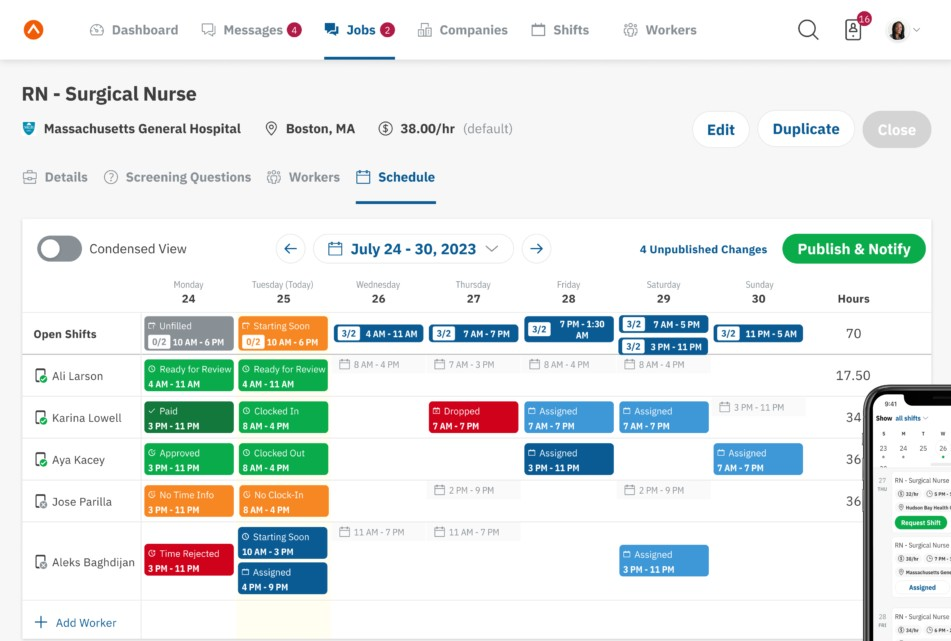
Bullhorn is a healthcare staffing and workforce management platform that lets agencies handle candidate sourcing, credential tracking, shifts, time capture, and client engagement in one system.
Who Is Bullhorn Best For?
Healthcare staffing agencies manage temporary clinical and allied staff placements across multiple organizations.
Why I Picked Bullhorn
I picked Bullhorn as one of the best because I can track credentials, manage placements, and automate candidate engagement—all tailored for healthcare staffing agencies juggling high-volume temp roles and client site coordination.
Bullhorn Key Features
- Shift scheduling dashboard: Lets you visualize, assign, and update shift rosters in real time.
- Mobile app access: Staffing teams and candidates can manage placements from any device.
- Custom reporting tools: Build reports on workforce activity and agency KPIs.
- Integrated time capture: Staff use digital tools for logging and verifying shift hours.
Bullhorn Integrations
Integrations include Xero, LinkedIn, 1218 Global, 3B for Salesforce, Actonomy, and ADP WOTC.
Pros and Cons
Pros:
- Support for per diem workforce management
- Built-in shift fulfillment and vacancy management
- Unified recruitment and placement pipeline management
Cons:
- Complex onboarding for administrators
- No offline data entry mode
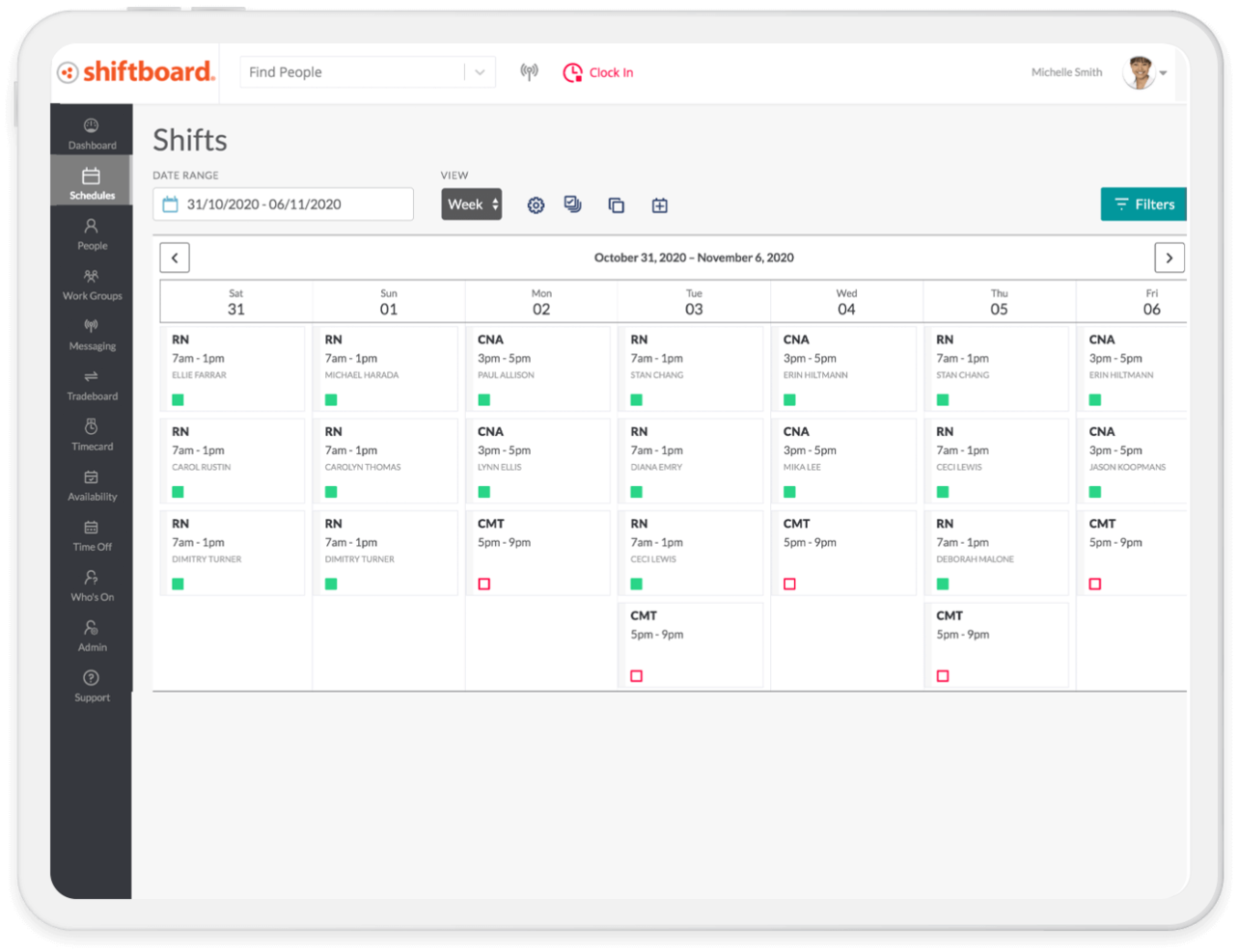
Shiftboard is a cloud-based healthcare workforce management software that provides flexible employee scheduling, shift management, communication tools, and real-time staffing oversight for organizations with large, dynamic workforces.
Who Is Shiftboard Best For?
Large healthcare organizations and staffing agencies that need complex shift management and mobile-friendly scheduling for variable, high-volume workforces.
Why I Picked Shiftboard
I picked Shiftboard because I can set complex rules for open shifts, last-minute changes, and overtime restrictions all in one interface. In my experience, its high-volume staffing capabilities handle fluctuating demand and dynamic schedule changes effectively.
Shiftboard Key Features
- Credential tracking: Track staff certifications, credentials, and renewal dates directly in the platform.
- Mobile shift notifications: Notify employees of new shifts, changes, and approvals via mobile alerts.
- Automated shift assignments: Fill open shifts automatically based on qualifications, preferences, and availability.
- Time-off management: Enable employees to request, view, and manage time-off from the self-service portal.
Shiftboard Integrations
Integrations include UKG, Workday, ADP, Oracle PeopleSoft, SAP, Infor, Microsoft Dynamics, Salesforce, Workato, and PlanetTogether.
Pros and Cons
Pros:
- Real-time mobile notifications for shift updates
- Self-service shift bidding for hourly workers
- Flexible shift patterns for fluctuating staffing needs
Cons:
- Limited automated reporting options
- Interface is not optimized for mobile

Infor is an integrated healthcare workforce management platform designed to help organizations handle labour forecasting, scheduling, time tracking, resource allocation, and analytics in complex health systems.
Who Is Infor Best For?
Mid-to-large healthcare networks looking to manage workforce resources, optimize scheduling, and coordinate staffing across multiple care sites.
Why I Picked Infor
I picked Infor as one of the best because I can coordinate healthcare professionals and float pools across multiple hospital departments, use data-driven analytics for workforce planning, and manage the labour costs and resource allocation system-wide from a single all-in-one interface.
Infor Key Features
- Clinical mobility tools: Mobile tools that enable staff to view schedules and manage tasks remotely.
- Time and attendance tracking: Automated capture of employee work hours and attendance data.
- Compliance management: Monitors license expirations and regulatory requirements for staff.
- Self-service employee portal: Allows staff to request time off, update availability, and view pay statements.
Infor Integrations
Integrations include Shopify, DocuSign, Salesforce, Marketo, ServiceNow, Zoom, ShipEngine, Twilio, Microsoft Dynamics 365, and ADP.
Pros and Cons
Pros:
- Supports compliance and credential tracking
- Integrates staffing and supply management
- Advanced labour forecasting and analytics features
Cons:
- High hardware requirements
- System setup can be time-consuming
Annen programvare for bemanningsstyring i helsesektoren
Her er noen flere alternativer for programvare for bemanningsstyring i helsesektoren som ikke kom med på kortlisten min, men som likevel er verdt å se nærmere på:
- Symplr
For overseeing contingent healthcare talent
- Workforce Software
For real-time data visualization
- PerfectServe
For clinical team collaboration
- Qgenda
For physician scheduling automation
- Rippling
For unified HR, payroll, and shift data
- Hubstaff
For real-time activity and location tracking
- Paycor
For talent acquisition automation
- Legion
For AI-powered labour forecasting
- Paychex
For customizable payroll and HR bundles
- Sling
For multi-location shift coordination


How I Evaluate Healthcare Workforce Management Software
I evaluate these platforms on two levels: the baseline requirements a tool must meet—like 24/7 clinical scheduling and credential tracking—and the differentiators that make one the right fit.
Core Functionality (Table Stakes For This List)
When I'm selecting tools for my list, I rank each one on a scale from 0 (does not offer the functionality) to 5 (excels in this area) for each core functionality listed below. Then, I calculate the tool's total score into a percentage. Each tool needs to achieve a minimum total score of 65% to be considered for inclusion.
- Clinical Shift Scheduling: I look for scheduling tools built around 24/7 healthcare operations, including self-scheduling, shift swaps, and role-based rules that match RNs to specific units or departments.
- Credential & License Tracking: Each tool should track clinical licenses, certifications, and training expirations so managers can spot gaps before a nurse with a lapsed BLS cert gets scheduled.
- Time & Attendance Management: I evaluate how well a platform handles complex healthcare pay scenarios like shift differentials, weekend premiums, and overtime calculations across variable shift lengths.
- Demand-Based Staffing Forecasts: Forecasting tools should tie staffing recommendations to real patient demand signals like census counts or acuity levels rather than relying on static templates alone.
- Healthcare Compliance Rules: I check whether the platform can enforce specific labor rules like mandated nurse-to-patient ratios, rest-between-shift requirements, and union contract provisions.
- Float Pool & Open Shift Management: The tool should support internal float pool deployment and open shift bidding so staffing coordinators can fill gaps from within before turning to external agencies.
Once I have a list of tools that meet the criteria, I consider what sets each platform apart.
Differentiating Factors (What Sets Vendors Apart)
Here's how I compare and contrast different vendors:
Standout Features
EMR/EHR integration is a major differentiator. Platforms that pull patient census and acuity data from systems like Epic or Cerner give staffing coordinators real-time demand signals instead of guesswork. I also look for a built-in vendor management system, which lets teams manage agency and travel nurse contracts alongside internal staff in one place. Predictive analytics dashboards add another layer, surfacing overtime trends and turnover risk before they become costly problems.
Beyond Features
HIPAA compliance and HITRUST certification matter here because these platforms often handle sensitive employee health data alongside patient-linked scheduling information. I also evaluate how well a tool scales across facility types—a platform that works for a single hospital may struggle in a multi-site health system with centralized and unit-level scheduling needs. Implementation support is another key factor. Migrating from legacy systems like Kronos or homegrown spreadsheets requires healthcare-specific consultants who understand clinical workflows.
Slik velger du programvare for bemanningsstyring i helsesektoren
Det er lett å gå seg vill i lange funksjonslister og kompliserte prismodeller. For å hjelpe deg med å holde fokus mens du går gjennom den unike prosessen din for valg av programvare, får du her en sjekkliste over faktorer du bør ha i tankene:
| Faktor | Hva bør du vurdere? |
|---|---|
| Skalerbarhet | Kan programvaren vokse i takt med institusjonen eller systemet ditt – håndtere flere ansatte, lokasjoner eller roller uten at arbeidsflytene bryter sammen eller kostnadene blir uoverkommelige? |
| Integrasjoner | Kobler den seg sømløst til lønns-, HRIS-, EHR- eller tidsregistreringssystemene dine? Finnes det viktige helseverktøy som ikke støttes eller krever manuelle omveier? |
| Tilpasningsmuligheter | Hvor enkelt kan du justere arbeidsflyter, planleggingsregler og rapportering slik at de passer med interne protokoller og fagforenings- eller lovkrav? |
| Brukervennlighet | Kan ledere og ansatte raskt lære seg og pålitelig bruke systemet uten omfattende opplæring eller mange supportsaker? Prøv demonstrasjoner eller prøveperioder for å teste dette. |
| Implementering og innføring | Hva er den typiske tidsplanen for innføring? Er migrering, opplæring av ansatte og oppsett av retningslinjer inkludert, eller må du håndtere dette selv? |
| Kostnad | Hva er kostnadene per ansatt eller for tillegg utover listeprisen? Finnes det minimumskrav, supportavgifter eller bindinger som kan endre beregningen av avkastningen på investeringen? |
| Sikkerhetstiltak | Hvordan beskytter verktøyet PHI, ivaretar personvern og håndhever tilgangskontroller? Se etter HIPAA eller andre relevante sertifiseringer. |
| Etterlevelseskrav | Hjelper plattformen deg med å oppfylle statlige og føderale arbeidslover, fagforeningskrav, regler for turnusplanlegging og interne revisjonsbehov? |
Hva er programvare for bemanningsstyring i helsesektoren?
Programvare for arbeidsstyring i helsesektoren er et digitalt verktøy som hjelper helseorganisasjoner med å sette opp bemanningsplaner, følge med på oppmøte, administrere fravær og overholde arbeidslover og bransjestandarder. Disse systemene sentraliserer data om arbeidsstyrken og bruker automatisering til å håndtere rutinemessige administrative oppgaver. Ved å bruke en plattform for arbeidsstyring blir det enklere for helseinstitusjoner å sette riktig personell på jobb til riktig tid, slik at helsepersonell kan opprettholde høy standard på pasientbehandlingen.
Funksjoner
Når du velger programvare for arbeidsstyring i helsesektoren, bør du se etter følgende viktige funksjoner:
- Bemanningsplanlegging og skiftplanlegging: Opprett, automatiser og administrer komplekse bemanningsplaner samtidig som du tar hensyn til bemanningsdekning, kvalifikasjoner og ønsker for skift.
- Registrering av arbeidstid og oppmøte: Registrer nøyaktige inn- og utstemplingstidspunkter, følg med på om skiftene overholdes, og synkroniser timelister med lønnssystemet for korrekt lønnsutbetaling.
- Administrasjon av permisjoner og fravær: Automatiser forespørsler, godkjenninger og opptjening av ferie, sykefravær og annet fravær, slik at du sikrer tilstrekkelig bemanning og bedre planlegging av arbeidsstyrken.
- Etterlevelsesstyring: Håndhev arbeidslover, kontroll av kvalifikasjoner og fagforeningsregler ved å flagge brudd og gi varsler i sanntid under planleggingen.
- Mobil tilgang: Gi helsepersonell tilgang til arbeidsplaner, mulighet til å bytte skift og meldingsfunksjoner i en mobilapp, noe som forbedrer kommunikasjonen og medarbeiderengasjementet.
- Lønnsintegrasjon: Koble data om arbeidsstyrken til lønnssystemer for å beregne lønn, følge med på overtid og effektivisere lønnskjøringen.
- Oppfølging av kvalifikasjoner og sertifiseringer: Registrer og følg med på når lisenser, kvalifikasjoner eller opplæring utløper, og få varsler slik at personellet fortsatt oppfyller kravene.
- Analyse og rapportering: Bruk datadrevne oversikter til å følge med på nøkkeltall som arbeidskraftskostnader, medarbeideravgang og prognosetrender.
- Sikker meldingsutveksling: Gjør det mulig for ledere og ansatte i førstelinjen å kommunisere direkte og i samsvar med HIPAA-kravene i programvaren.
- Oppgaveadministrasjon: Tildel og bekreft gjennomføringen av daglige kliniske oppgaver eller administrative arbeidsflyter i hvert skift.
Fordeler
Implementering av programvare for arbeidsstyring i helsesektoren gir flere fordeler for teamet og virksomheten din. Her er noen av fordelene du kan se frem til:
- Mer nøyaktige arbeidsplaner: Automatisert skiftplanlegging sikrer at riktig klinisk personell settes opp, samtidig som manuelle feil og mangler i bemanningsdekningen reduseres.
- Bedre etterlevelse: Innebygde regler og varsler hjelper deg med å følge arbeidslover, fagforeningsbestemmelser og krav til kvalifikasjoner uten rutinemessige manuelle kontroller.
- Raskere lønnskjøring: Integrert tidsregistrering og koblinger til lønnssystemer reduserer det administrative arbeidet og forkorter lønnssyklusene.
- Bedre ressursfordeling: Analyse og rapportering i sanntid hjelper ledere med å ta datadrevne bemanningsbeslutninger og kontrollere arbeidskraftskostnadene.
- Økt medarbeidertilfredshet: Selvbetjeningsfunksjoner gjør det mulig for helsepersonell å be om ledige skift eller se arbeidsplaner når det passer dem.
- Mindre overtid og belastning: Smarte planleggingsverktøy fordeler skiftene rettferdig, følger med på arbeidstiden og bidrar til å forebygge utbrenthet blant de ansatte.
- Sentralisert oppfølging av kvalifikasjoner: Automatiserte varsler og oppfølging reduserer risikoen for at teammedlemmenes autorisasjoner eller sertifiseringer utløper.
Kostnader og priser
Ved valg av programvare for arbeidsstyring i helsesektoren er det viktig å forstå de ulike prismodellene og abonnementene som er tilgjengelige. Kostnadene varierer avhengig av funksjoner, teamstørrelse, tilleggstjenester og mer. Tabellen nedenfor oppsummerer vanlige abonnementer, gjennomsnittsprisene deres og typiske funksjoner som er inkludert i programvareløsninger for arbeidsstyring i helsesektoren:
Sammenligningstabell for programvare for arbeidsstyring i helsesektoren
| Abonnementstype | Gjennomsnittspris | Vanlige funksjoner |
|---|---|---|
| Gratis abonnement | $0 | Grunnleggende planlegging, begrenset tilgang for ansatte og kun visning på mobil. |
| Personlig abonnement | $5-$10/bruker/måned | Avansert planlegging, mobil innstempling, fraværsadministrasjon og grunnleggende rapportering. |
| Bedriftsabonnement | $10-$25/bruker/måned | Etterlevelsesstyring, integrasjoner, lønnseksport, oppfølging av kvalifikasjoner, analyse og sikker meldingsutveksling. |
| Enterprise-abonnement | $25+/bruker/måned | Tilpassede arbeidsflyter, API-tilgang, ubegrenset brukerstøtte, avansert sikkerhet og skreddersydd oppstart og implementering. |
Vanlige spørsmål om programvare for bemanningsstyring i helsesektoren
Her er noen svar på vanlige spørsmål om programvare for bemanningsstyring i helsesektoren:
Hvilke typer helseorganisasjoner bruker programvare for bemanningsstyring?
Sykehus, klinikker, langtidsinstitusjoner, hjemmesykepleietjenester og polikliniske sentre bruker alle en løsning for bemanningsstyring til å håndtere bemanningsplanlegging, lønn og samsvarsoppfølging. Disse verktøyene hjelper helseorganisasjoner med å opprettholde høye standarder for kvalitet i behandlingen ved å sikre at de riktige helsepersonellene er på plass til enhver tid.
Kan programvare for bemanningsstyring i helsesektoren integreres med andre HR- eller lønnssystemer?
Ja, de fleste løsninger er utviklet for å kunne integreres med HRIS-, EHR- og lønnssystemer. Dette gjør det mulig for helseinstitusjoner å synkronisere datadrevet innsikt og redusere manuell dataregistrering eller rapporteringsfeil, noe som forbedrer den samlede driftseffektiviteten.
Hvordan bidrar programvare for bemanningsstyring til samsvar med regelverket?
Disse systemene varsler om konflikter i bemanningsplanen, overvåker overtid for å kontrollere arbeidskostnadene og holder oversikt over sertifiseringer og godkjenninger. Ved å opprettholde logger som er klare for revisjon, kan tjenesteleverandører overholde arbeidslovgivning og tariffavtaler samtidig som de fokuserer på pasientbehandling.
Finnes det mobilapper for ledere og ansatte?
Ja, nesten alle plattformer tilbyr en brukervennlig mobilapp. Disse verktøyene gir selvbetjeningsfunksjoner for teammedlemmer, slik at helsepersonell enkelt kan se arbeidsplaner, bytte vakter og oppdatere tilgjengeligheten sin i sanntid. Denne fleksibiliteten forbedrer medarbeideropplevelsen og bidrar til bedre stabilitet blant helsepersonellet.
Hvor raskt kan en ny organisasjon komme i gang med en plattform for bemanningsstyring?
Oppsettet tar vanligvis alt fra én uke for mindre team til flere måneder for store helsesystemer. Tidsrammen avhenger av behovene ved implementeringen, datamigreringen og kompleksiteten i de eksisterende arbeidsflytene.
Hvilke sikkerhetsstandarder bør jeg se etter i programvare for bemanningsstyring i helsesektoren?
Du bør se etter en alt-i-ett-plattform for helsesektoren som bruker sterk kryptering, tilbyr rollebasert tilgangskontroll og overholder HIPAA eller andre relevante personvern- og datasikkerhetsforskrifter for å beskytte den sensitive informasjonen til helsepersonell.