

De 10 beste programvarene for lønnshåndtering for detaljhandlere i 2026

Kortliste over den beste programvaren for lønnshåndtering for detaljhandelen


Hvorfor du kan stole på våre programvareanbefalinger
Teamet vårt har testet og anmeldt programvare siden 2012. Vi er selv HR-eksperter, så vi vet hvor vanskelig og hvor viktig det er å velge riktig programvare.
I denne guiden har vi vurdert verktøyene gjennom praktisk testing og uavhengig research og gitt dem poeng ut fra våre utvelgelseskriterier. Vi bygger også på innsikt fra ledende eksperter i bransjen og erfarne HR-eksperter.
Anmeldelsene våre bygger på vår egen redaksjonelle vurdering. De er ikke et salgsargument.
Ekspertanmeldere:
Sammenligningstabell for programvare for lønnshåndtering for detaljhandelen
Denne sammenligningstabellen oppsummerer prisdetaljene for mine utvalgte programmer for lønnshåndtering for detaljhandelen:
| Tool | Best For | Trial Info | Price | ||
|---|---|---|---|---|---|
| 1 | Best for hourly payroll with native time tracking | 30-day free trial | From $50/month | Website | |
| 2 | Best for hourly teams with integrated scheduling | 14-day free trial + free plan available | From $30/location/month | Website | |
| 3 | Best for payroll automation and integrations | Free demo available | Pricing upon request | Website | |
| 4 | Best for automated tax filings and hourly payroll | Free demo available | From $49/month + $6/person/month | Website | |
| 5 | Best for customizable workforce payroll workflows | Free demo available | Pricing upon request | Website | |
| 6 | Best for one-click timesheet-to-payroll syncing | 14-day free trial + free demo available | From $5/user/month | Website | |
| 7 | Best for complex shift and pay rate structures | Free demo available | Pricing upon request | Website | |
| 8 | Best for retail tip and commission integration | Not available | From $35/month + $6/person/month | Website | |
| 9 | Best for unified payroll and workforce management | Free demo available | Pricing upon request | Website | |
| 10 | Best for real-time payroll and compliance updates | Free demo available | Pricing upon request | Website |


Anmeldelser av programvare for lønnshåndtering for detaljhandelen
Nedenfor finner du mine detaljerte sammendrag av de beste systemene for lønnshåndtering for detaljhandelen som kom med på kortlisten. Anmeldelsene mine gir en detaljert oversikt over funksjonene, integrasjonene og brukstilfellene for hvert system, slik at du kan finne det beste for deg.

TimeTrex
Best for hourly payroll with native time tracking
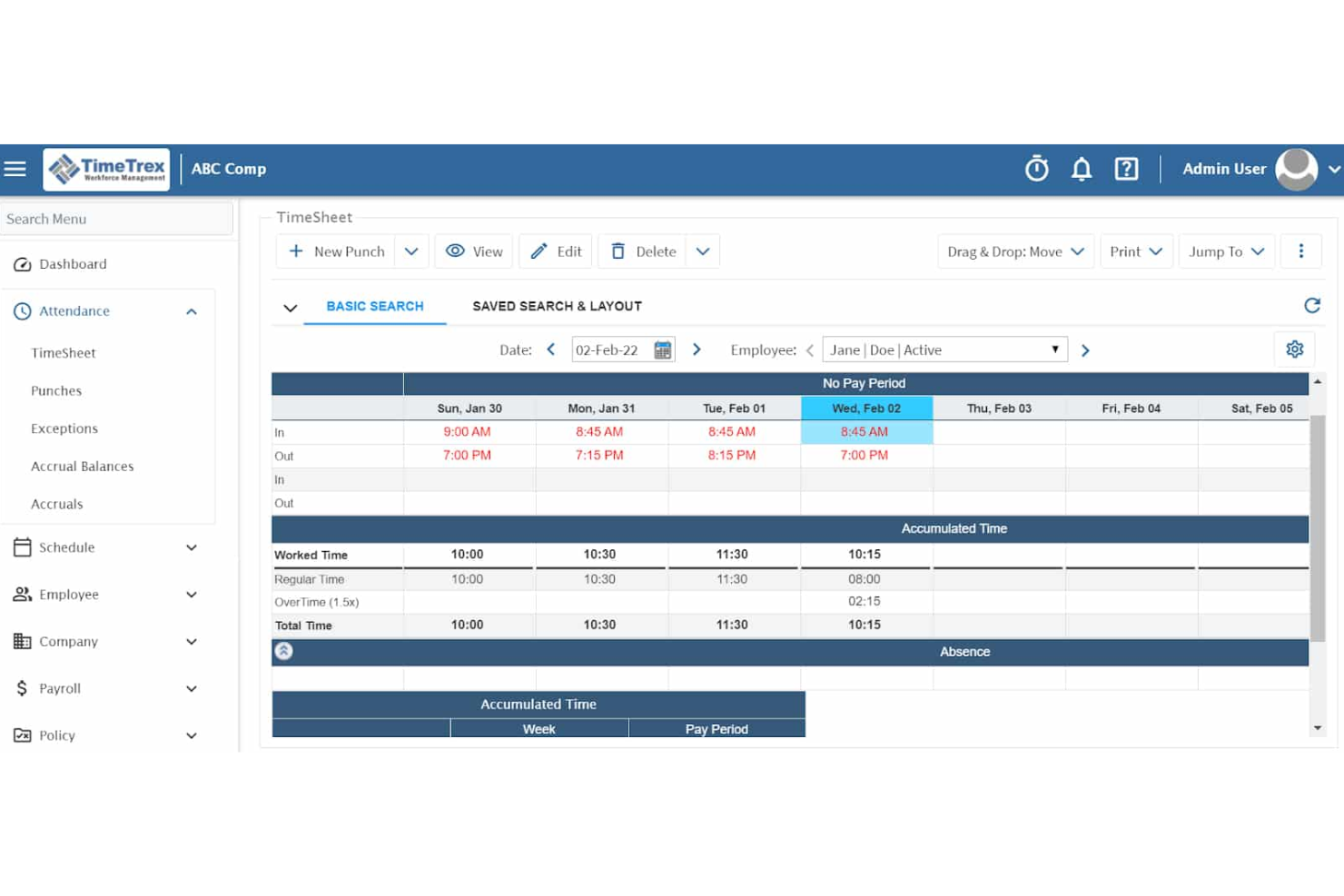
TimeTrex is an open-source payroll platform that combines hourly payroll processing, time and attendance tracking, scheduling, and HR management in a single system.
Who is TimeTrex Best For?
TimeTrex is a strong fit for retail businesses that need hourly payroll tightly integrated with time and attendance tracking, especially those open to deploying an open-source solution.
Why I Picked TimeTrex
I picked TimeTrex as one of the best because its open-source architecture lets retail businesses run hourly payroll without depending on a third-party vendor's pricing or roadmap. What I really like is how time and attendance data flows directly into payroll, so clock-in records from a retail floor automatically calculate wages, overtime, and shift differentials. The built-in scheduling module ties into that same data, keeping labor costs visible before payroll even runs.
TimeTrex Key Features
- Employee self-service portal: Employees can view pay stubs, update personal details, and submit time-off requests directly through the platform.
- Accrual tracking: The system automatically tracks vacation, sick leave, and other accrued time off based on your configured policies.
- Multi-location support: TimeTrex lets you manage payroll and HR data across multiple store locations from a single account.
- Built-in reporting: Generate payroll summaries, labor cost breakdowns, and compliance reports without exporting data to a separate tool.
TimeTrex Integrations
TimeTrex offers native integrations with payroll, HR, and accounting platforms, including ADP, Intuit QuickBooks, Sage, Paychex, Ceridian, Surepay, CompuPay, Tyler Technologies, Vensure Employer Services, and Accero. It also provides an API for custom integrations and connects with the IRS and US state tax authorities for automated tax compliance.
Pros and Cons
Pros:
- Scheduling links directly to labor cost data
- Native time tracking syncs with payroll
- Open-source approach reduces vendor lock-in
Cons:
- Initial open-source setup may require IT help
- Interface looks dated compared to competitors
New Product Updates from TimeTrex
TimeTrex Redesigns Workforce Management With New Payroll, Scheduling, and AI Tools
TimeTrex redesigns its workforce management experience with new dashboards, scheduling and timesheet tools, a rebuilt payroll workflow, and expanded AI assistance. These updates give teams more flexible ways to manage schedules, payroll, reporting, and employee data. For more information, visit TimeTrex’s official site.
 .
.
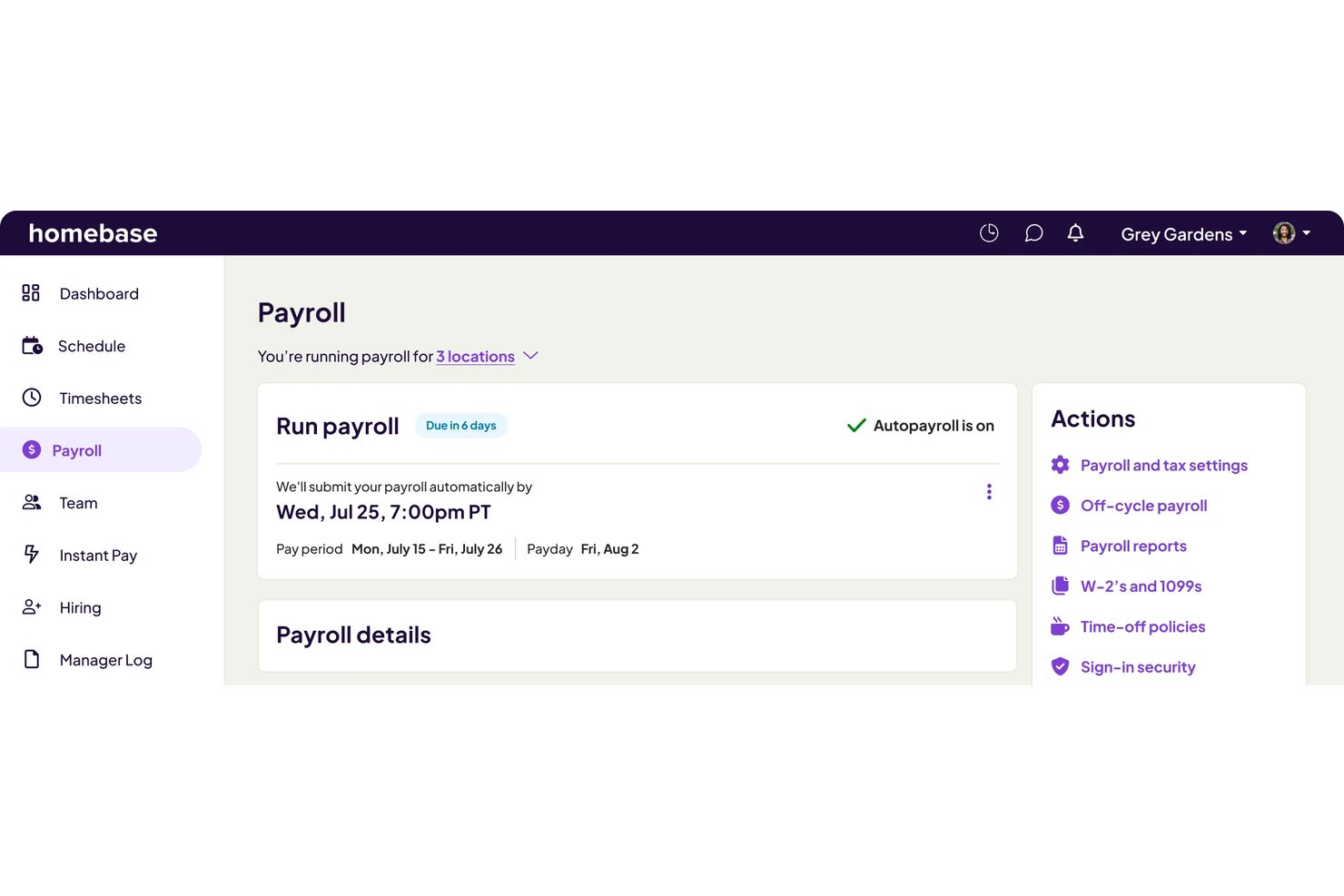
Homebase is a payroll and workforce management platform built for hourly teams, combining time tracking, scheduling, and full-service payroll processing with automated tax filing and tip management.
Who is Homebase Payroll Best For?
Homebase Payroll is a natural fit for small retail businesses that run on hourly, shift-based schedules and need payroll tied directly to their time tracking.
Why I Picked Homebase Payroll
Homebase earns its spot on my shortlist because scheduling, time tracking, and payroll all live in one place. When a shift changes, the updated hours flow directly into the next payroll run without manual entry. I particularly like the AI Payroll Assistant, which flags timecard issues like missed punches before they hit the paycheck. The built-in Tip Manager handles tip pooling and distribution directly within the payroll run.
Homebase Payroll Key Features
- Multi-location payroll processing: Run payroll for multiple store locations across different states in a single system.
- W-2 and 1099 generation: Automatically generate and distribute year-end tax forms for both employees and contractors.
- Employee self-onboarding: Allow new hires to complete onboarding documents, including W-4s and I-9s, directly from their own device.
- Mobile payroll access: Run payroll and approve timesheets from any device with the Homebase mobile app.
Homebase Payroll Integrations
Homebase Payroll offers native integrations with Square, Clover, Toast, QuickBooks, Gusto, and Shopify. An API is available for custom integrations.
Pros and Cons
Pros:
- Built-in time clock reduces manual hour entry
- Tip pooling calculated within the payroll workflow
- Scheduling syncs directly into each payroll run
Cons:
- Not well-suited for large enterprise retailers
- Reporting tools lack depth for multi-location retailers

Rippling
Best for payroll automation and integrations
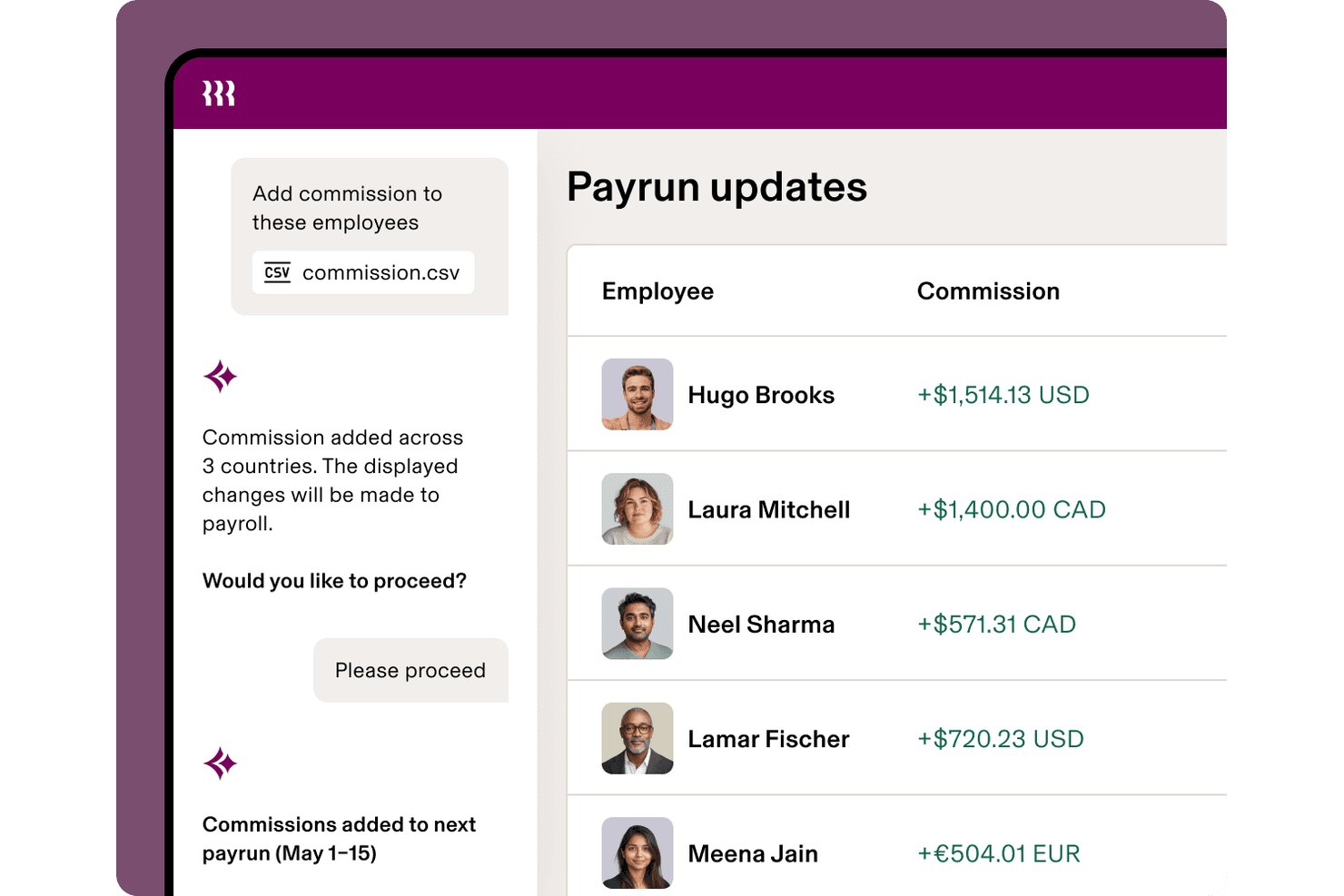
Rippling is a workforce management platform that combines payroll, time and attendance, scheduling, and HR into a single system, with automated tax filing across all 50 U.S. states and payroll processing for hourly, salaried, and multi-location retail teams.
Who is Rippling Best For?
Rippling is a strong fit for mid-sized retailers managing payroll across multiple store locations who need HR, scheduling, and time tracking unified in one platform.
Why I Picked Rippling
I picked Rippling as one of the best because its payroll automation goes deeper than most platforms in this space. Every HR data change, from a new hire to a pay rate update, syncs automatically into the next pay run without manual re-entry. I also use the pay-run comparison tool to spot discrepancies in gross pay and deductions before payroll closes, and with 500+ integrations connecting time clocks, scheduling tools, and accounting systems, hourly clock data feeds directly into payroll runs.
Rippling Key Features
- Unified employee record: Manage employee data, roles, and pay rates across all store locations from a single profile.
- Automated tax calculation and filing: Handles federal, state, and local payroll tax submissions and year-end form generation.
- Mobile clock-in and scheduling: Includes built-in time tracking with mobile and kiosk options for hourly retail teams.
- Location-based payroll reporting: Generate payroll reports by store location, department, or role using customizable templates.
Rippling Integrations
Rippling offers over 600 native integrations, including QuickBooks, NetSuite, Slack, Google Workspace, Xero, Deputy, ADP, Okta, and Microsoft 365. An API is available for custom integrations.
Pros and Cons
Pros:
- Bulk onboarding built for seasonal hiring
- Supports shift differential pay rates natively
- Automated pay runs sync with HR changes
Cons:
- Support response times can be inconsistent
- Initial platform setup requires significant time
New Product Updates from Rippling

Rippling Expands Automated Compliance With AI Workflows
Rippling expands Automated Compliance with multi-framework support, AI workflows, an audit portal, and trust centers. These updates help GRC teams manage compliance work and audits. For more information, visit Rippling’s official site.

Gusto
Best for automated tax filings and hourly payroll
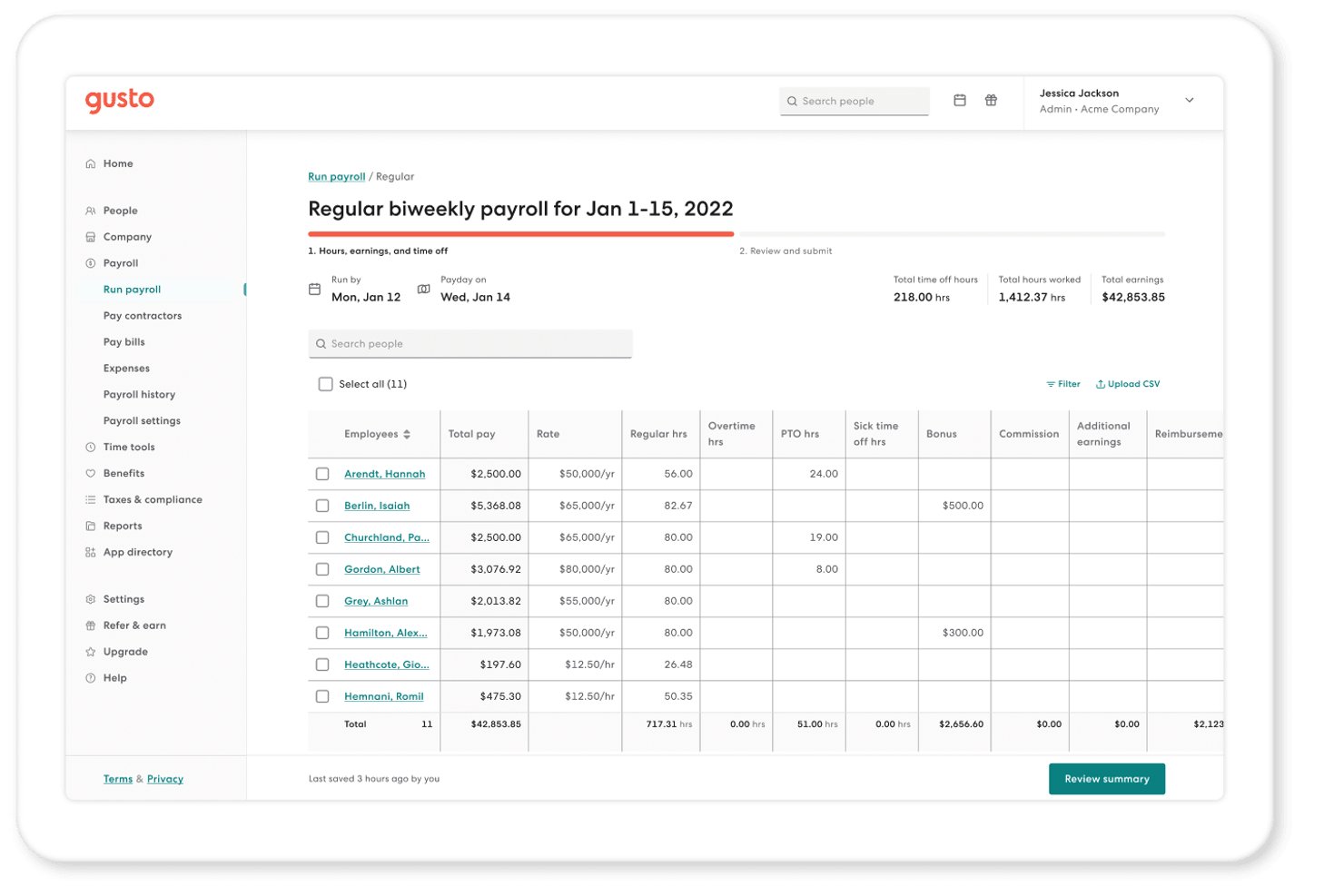
Gusto is a payroll platform built for small and mid-size businesses that handles hourly and salaried payroll runs, automated tax filings, time tracking, benefits administration, and contractor payments across all 50 US states.
Who is Gusto Best For?
Gusto is a strong fit for US-based retail shop owners and payroll administrators managing hourly workforces across one or a handful of store locations.
Why I Picked Gusto
Gusto earns its spot on my shortlist because of how it handles tax filings for hourly retail teams. Every time I run payroll, Gusto calculates and files federal, state, and local taxes with the right agencies automatically, and that's included on every plan, not sold as a separate add-on. I also like the geolocation-enabled time tracking, which lets hourly store staff clock in and out with location verification built in. AutoPilot lets me schedule payroll to run on a fixed cycle without requiring manual initiation each period.
Gusto Key Features
- POS system integrations: Connects with popular retail POS platforms like Clover for syncing sales and labor data.
- Multi-state payroll support: Processes payroll and calculates taxes for employees working across different states and locations.
- Bulk employee onboarding: Lets you onboard seasonal and part-time staff quickly with digital offer letters and automated W-4/I-9 collection.
- Workers’ comp pay-as-you-go: Enables retailers to manage workers' compensation policies with automated, per-pay-cycle premium calculations.
Gusto Integrations
Gusto offers over 150 native integrations, including Clover, 7shifts, Homebase, QuickBooks, Xero, Hubstaff, Deputy, and When I Work. An API is available for custom integrations.
Pros and Cons
Pros:
- Fast bulk onboarding for seasonal hires
- AutoPilot runs payroll on a fixed schedule
- Automated federal, state, and local tax filing
Cons:
- Multi-location cost center reporting is basic
- Limited retail-specific labor compliance alerting
New Product Updates from Gusto
Gusto Adds Solo Advisory Tools and Mobile Money Features
Gusto adds Solo S-Corp Advisory Tools and Gusto Money on Mobile for tax guidance, invoicing, and bill payments. These updates help accountants advise solopreneurs and let users manage business finances from their phones. For more information, visit Gusto’s official site.

Best for customizable workforce payroll workflows
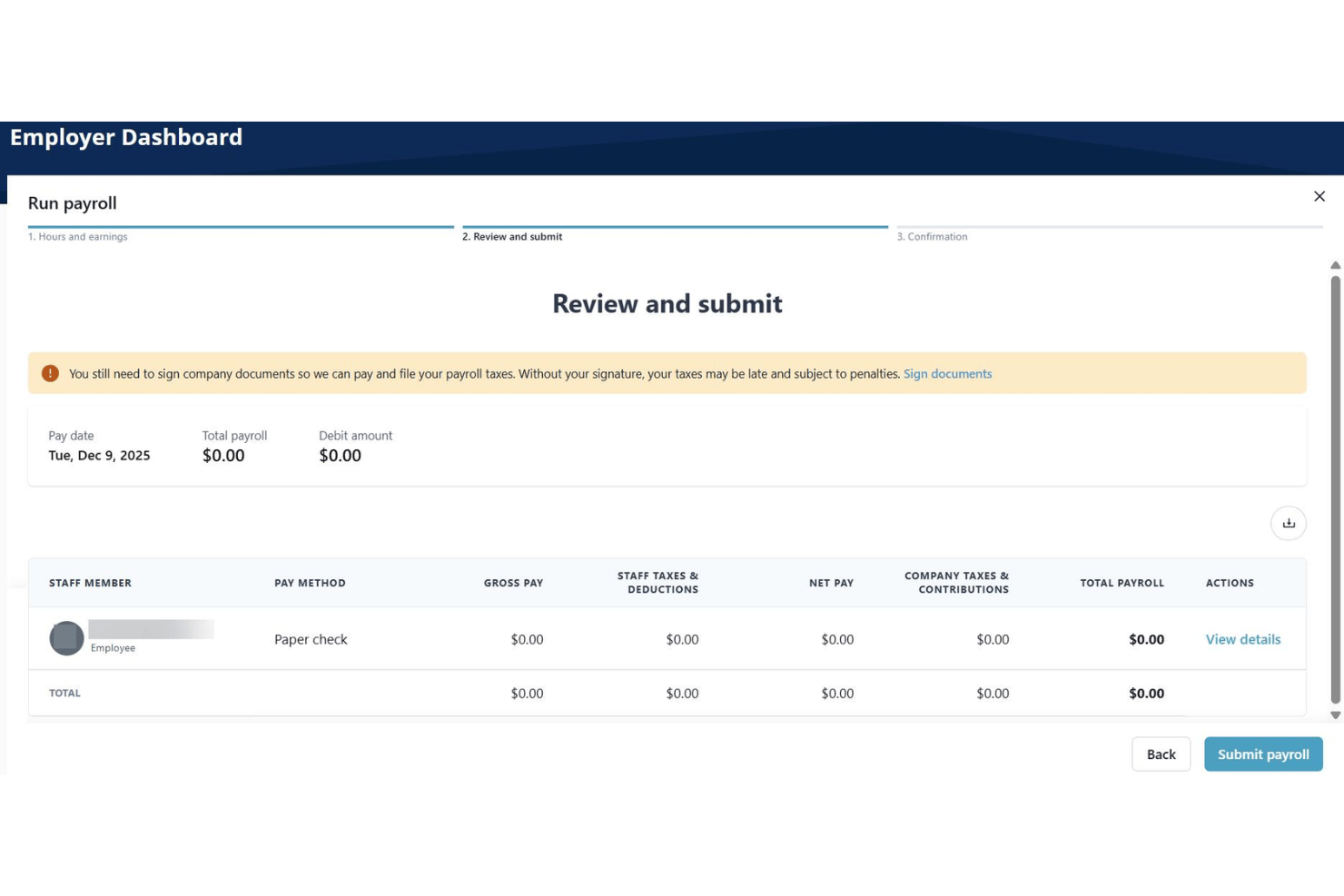
Paylocity is a unified HCM and payroll platform that handles hourly and shift-based pay, multi-location tax filing, time and labor integration, and highly configurable pay workflows for retail and variable-schedule workforces.
Who is Paylocity Best For?
Paylocity is a strong fit for mid-market retailers operating across multiple store locations who need a single platform to unify payroll, HR, and workforce management.
Why I Picked Paylocity
I picked Paylocity as one of the best because the depth of its payroll workflow configuration is genuinely rare in the retail space. I can define custom check types, build pay rules for shift differentials, and configure PTO accruals down to granular edge cases. The Payroll Readiness Dashboard then runs 40+ automated audits before each submission, flagging anomalies like unexpected pay spikes across store locations before they become costly errors.
Paylocity Key Features
- Multi-location tax geolocation: Automatically applies the correct tax setup for each employee based on their work location.
- Square POS integration: Syncs workforce and payroll data directly with Square to pull hours and sales.
- Payroll readiness dashboard: Flags anomalies and runs 40+ payroll audits before processing.
- Employee mobile self-service: Lets hourly employees clock in, request time off, and access pay information from their phones.
Paylocity Integrations
Paylocity offers native integrations with Square, 7shifts, QuickBooks, Kronos, ADP, NetSuite, and Microsoft 365. An open API is available for custom integrations.
Pros and Cons
Pros:
- Supports multi-state tax across store locations
- Built-in payroll audit flags before submission
- Highly configurable pay rules for shift workers
Cons:
- Mobile app has limited manager functionality
- Reporting customization requires extra configuration effort
New Product Updates from Paylocity

Paylocity Expands Expense and Purchase Request Tools
Paylocity adds connected personal cards, smarter expense categorization, and a streamlined purchase request experience. This reduces manual entry and helps finance teams manage expenses and approvals more efficiently. For more information, visit Paylocity’s official site.
 .
.
Deputy
Best for one-click timesheet-to-payroll syncing
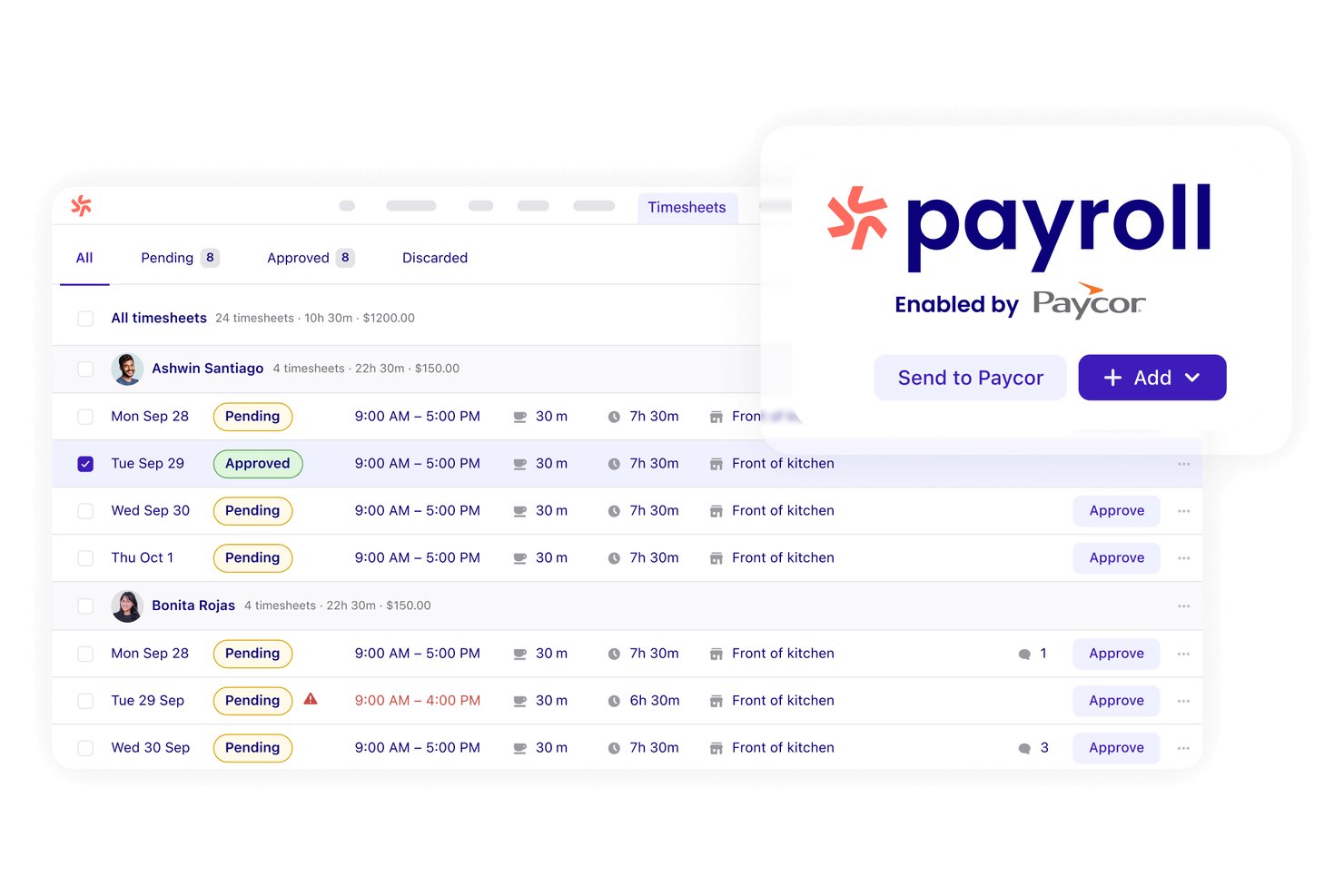
Deputy is a workforce management platform for shift-based businesses that combines employee scheduling, time tracking, and timesheet approvals with direct integrations into 300+ payroll systems.
Who is Deputy Best For?
Deputy is a strong fit for multi-location retailers managing large hourly workforces who need scheduling, time tracking, and payroll sync handled in one platform.
Why I Picked Deputy
Deputy earns its spot on my shortlist because the one-click timesheet-to-payroll sync with Paycor is the real deal. Once I approve timesheets in Deputy, pay rates, shift data, and leave records push directly to Paycor in a single action. I also like that pay rates are built into every shift from the start, so overtime and penalty rates surface automatically before a payroll run, not after.
Deputy Key Features
- Advanced scheduling automation: Automatically builds optimized shift schedules based on sales forecasts and labor budgets.
- Labor law compliance alerts: Flags scheduling conflicts related to breaks, overtime, and retail-specific labor regulations.
- Mobile shift management: Lets managers and staff swap shifts, request time off, and view schedules from any mobile device.
- Multi-location support: Organizes teams, pay centers, and reporting for multiple stores with configurable location hierarchies.
Deputy Integrations
Deputy offers native integrations with Paycor, Gusto, QuickBooks, Xero, ADP, Shopify, Square, Lightspeed, Oracle, and more, with an open API available for custom integrations.
Pros and Cons
Pros:
- Predictive scheduling compliance built into platform
- Penalty rates auto-apply to retail shifts
- One-click timesheet approval syncs shift data
Cons:
- Mobile clock-in can misread employee location
- Payroll features depend on third-party processors

Netchex
Best for complex shift and pay rate structures
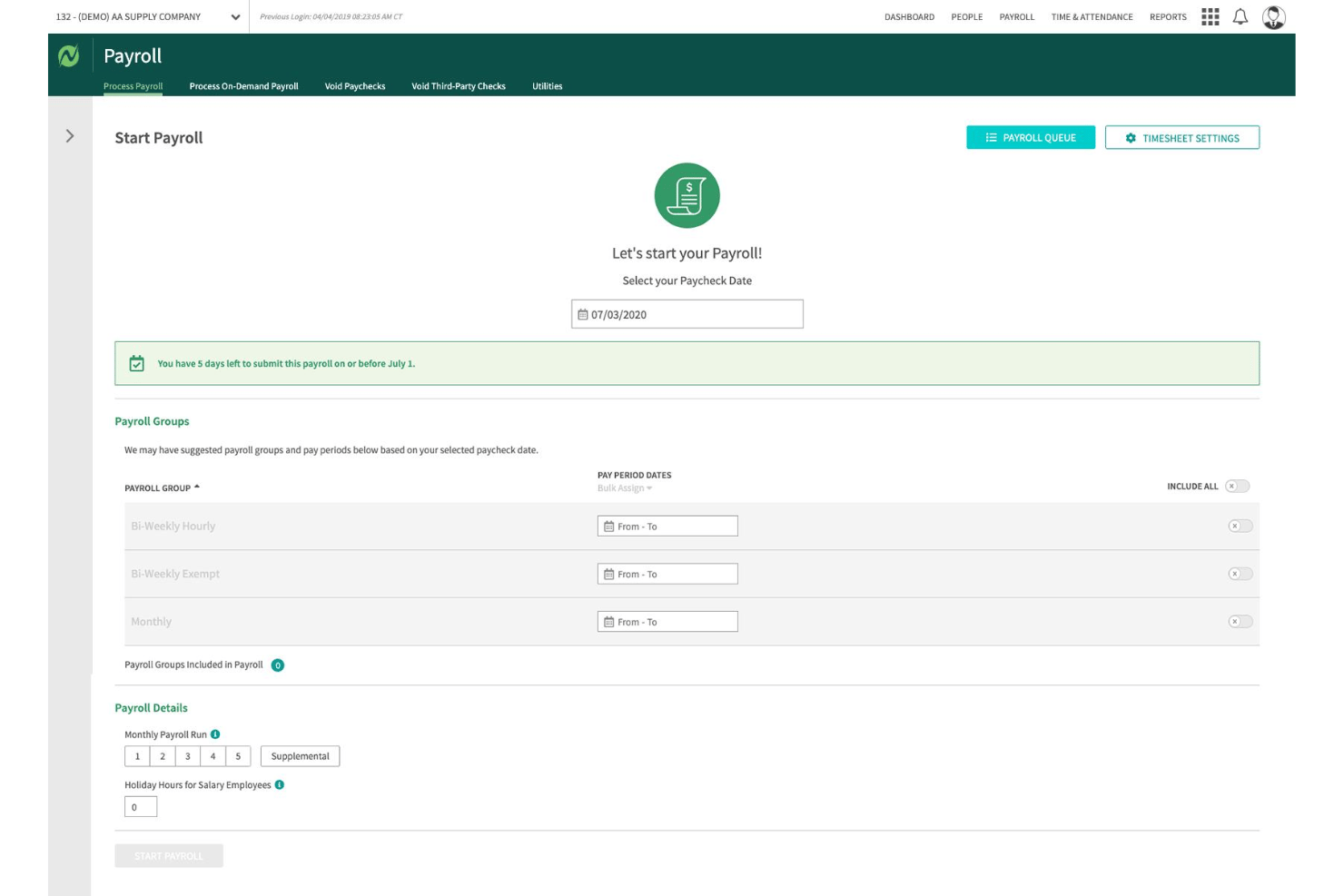
Netchex is a payroll and HR platform built for hourly-heavy workforces, handling shift-based pay, multi-location tax filing, time and attendance, benefits, and onboarding in one system.
Who is Netchex Best For?
Netchex fits mid-sized retail and restaurant businesses with 50–1,000 employees running multiple locations, variable schedules, and hourly-dominant workforces.
Why I Picked Netchex
I picked Netchex as one of the best because it handles the kind of pay complexity that trips up most payroll tools. When employees work multiple job codes at different pay rates in the same week, Netchex's shift differential engine keeps calculations accurate without manual correction. I also like its ACT tool, which automatically adjusts tax withholding based on each employee's work location, which matters when staff rotate across store locations.
Netchex Key Features
- POS integration suite: Connects with 14+ retail and restaurant POS systems to sync time, tip, and sales data directly into payroll.
- Earned wage access: Lets employees access a portion of earned pay between pay cycles through direct integration.
- Custom reporting builder: Offers custom payroll and compliance reports exportable to PDF, Excel, and CSV for stores and regions.
- Mobile self-service clock-in: Allows employees to clock in and out from any location using mobile devices with geofencing controls.
Netchex Integrations
Netchex offers native integrations with POS systems like PAR Brink, NCR, Oracle MICROS, Toast, Revel, Clover, Aloha, and Restaurant365, plus QuickBooks for accounting. An API is available for custom integrations.
Pros and Cons
Pros:
- Automated tax handling across multiple store locations
- Built-in shift differential pay calculations
- Supports multiple pay rates per single employee
Cons:
- Onboarding takes longer than competing platforms
- Report customization requires significant setup time
Best for retail tip and commission integration
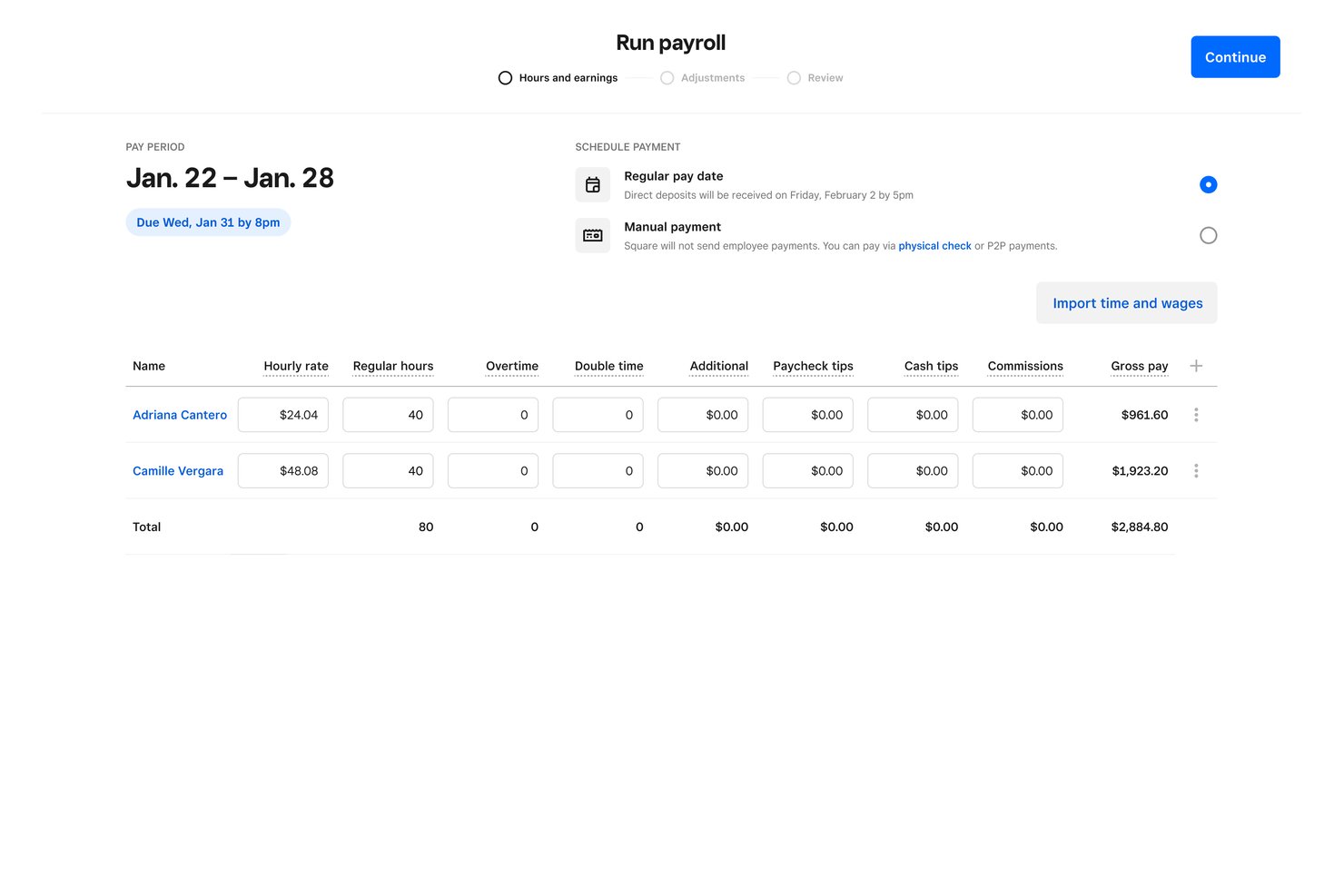
Square Payroll is a payroll management solution built around the Square ecosystem, with native POS-connected timecard imports, tip pooling, commission tracking, and multi-jurisdiction tax filing for hourly and shift-based retail teams.
Who is Square Payroll Best For?
Square Payroll is a natural fit for small and mid-sized retail businesses already running their operations on Square POS.
Why I Picked Square Payroll
I picked Square Payroll because the tip and commission handling is genuinely native to the retail workflow. Tip eligibility is configured per job title, and tips pool per shift directly from Square POS data, eliminating end-of-day manual reconciliation. Commission rates, flat or tiered, are set once and automatically calculated per transaction, then pulled into payroll without any extra steps.
Square Payroll Key Features
- Multi-jurisdiction tax calculation: Automatically applies the correct tax rates when staff work across different store locations.
- Digital pay stubs and split deposits: Allows employees to access digital pay stubs and divide deposits across multiple bank accounts.
- Automated federal and state tax filing: Submits payroll taxes and year-end forms without manual entry or extra fees.
- Square Team App integration: Lets staff clock in, view schedules, and manage personal details from their own devices.
Square Payroll Integrations
Square Payroll offers native integrations with Square POS, Square Team App, QuickBooks Online, and connects with Zapier. An API is available for custom integrations.
Pros and Cons
Pros:
- Multiple pay rates per employee supported
- Same-day direct deposit for hourly staff
- Tip pooling and commissions calculated automatically
Cons:
- Payroll reporting options are fairly limited
- Customer support response times are often slow

UKG Pro
Best for unified payroll and workforce management
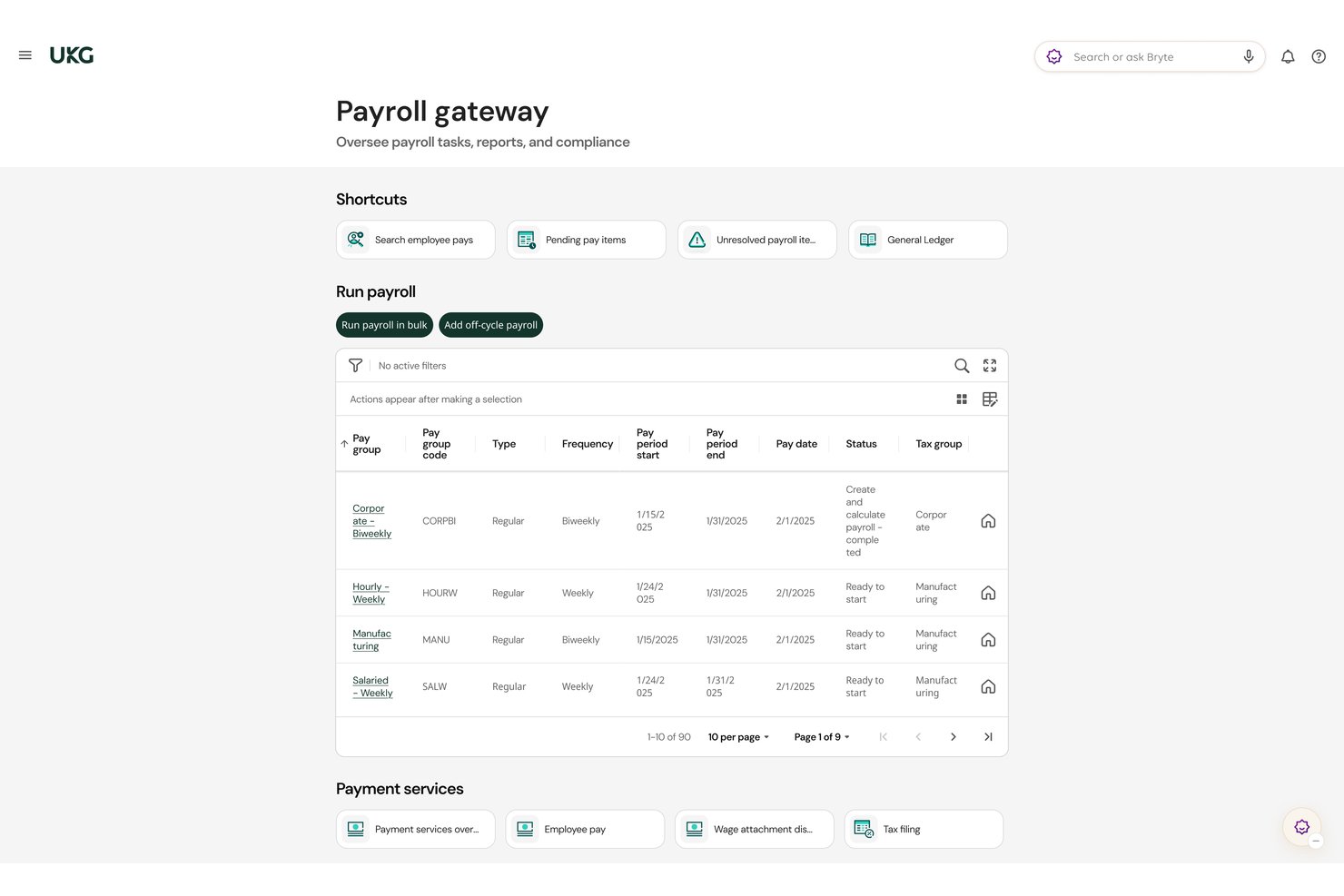
UKG Pro is an HCM platform that combines payroll processing, time and attendance, workforce scheduling, and labor compliance tools built for large, shift-based retail workforces operating across multiple locations.
Who is UKG Pro Best For?
UKG Pro is a strong fit for mid-market to enterprise retailers managing large hourly workforces across multiple store locations.
Why I Picked UKG Pro
UKG Pro earns its spot on my shortlist because payroll and workforce management live in one native suite, not bolted together via integration. I particularly like that preconfigured pay rules enforce predictive scheduling laws and meal/break penalties automatically across every store location. Continuous payroll processing with Bryte AI also flags missing hours or tax setup issues before a run closes, which matters a lot when you're paying hundreds of hourly workers across many locations.
UKG Pro Key Features
- Automated tip and commission calculations: Supports calculation, tax withholding, and payroll entry for tips, commissions, and retail incentive pay.
- Shift differential pay management: Automatically applies premium pay rates for nights, weekends, and holidays based on pre-set scheduling rules.
- Multi-location tax and cost center tracking: Assigns correct state and local tax rates and GL codes for employees working across different store locations.
- Bulk onboarding for seasonal hires: Optimizes holiday or event-driven hiring with quick onboarding tools and mass employee data import.
UKG Pro Integrations
UKG Pro offers native integrations with iCIMS, Beekeeper, Procore (via Flexspring), Jobvite, and Cornerstone OnDemand. An open API and UKG Marketplace are available for custom integrations and additional connections.
Pros and Cons
Pros:
- Scales well across high-turnover retail workforces
- Handles shift differential pay automatically
- Native predictive scheduling compliance built in
Cons:
- Reporting customization requires IT or admin support
- Long implementation timeline for large retail operations
Dayforce
Best for real-time payroll and compliance updates
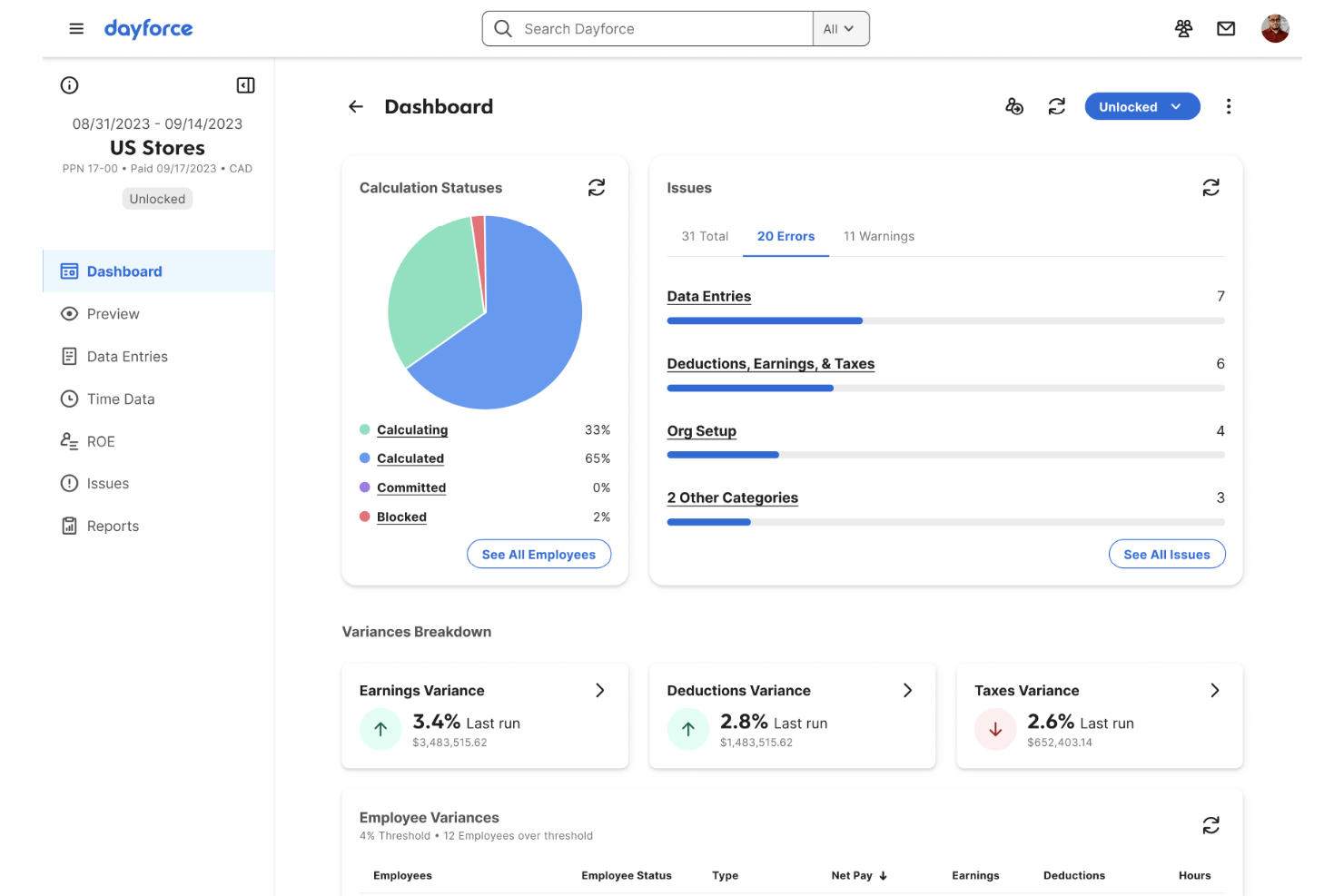
Dayforce is a unified HCM and payroll platform that combines continuous real-time payroll processing, workforce management, scheduling, time tracking, and multi-jurisdiction tax compliance in a single system built for enterprise and mid-market retailers.
Who is Dayforce Best For?
Dayforce is a strong fit for mid-market and enterprise retailers with 1,000+ employees managing multi-location payroll, frontline shift workers, and complex multi-jurisdiction compliance.
Why I Picked Dayforce
Dayforce earns its spot on my shortlist because of its continuous payroll calculation engine, which recalculates pay as shift hours are captured rather than at the end of a pay cycle. I love that compliance rule updates are monitored by Dayforce's own team and pushed into the platform automatically, keeping multi-state retailers current on minimum wage and predictive scheduling law changes. Dayforce Wallet also lets frontline workers access earned wages after each shift.
Dayforce Key Features
- Shift differential pay: Configure premium pay rates for night, weekend, or holiday shifts to meet retail wage policies.
- Automated multi-state tax management: Instantly applies accurate federal, state, and local tax rates for each store location worked.
- Built-in workforce scheduling: Create, manage, and edit employee schedules alongside payroll in one platform.
- Bulk seasonal onboarding: Quickly onboard and rehire large groups of hourly or seasonal staff with e-verification and rehire workflows.
Dayforce Integrations
Dayforce offers native integrations with platforms like Workday, Oracle, SAP SuccessFactors, ADP, and UKG, and provides an API for custom integrations.
Pros and Cons
Pros:
- Dayforce Wallet enables same-day earned wage access
- Built-in predictive scheduling law compliance tracking
- Real-time payroll recalculates with each shift
Cons:
- Custom reporting often requires IT involvement
- Complex implementation for smaller retail operations
Annen programvare for lønnshåndtering for detaljhandelen
Her er noe mer programvare for lønnshåndtering for detaljhandelen som ikke kom med på kortlisten min, men som likevel er verdt å se nærmere på:
- Paychex Flex
For multi-state tax compliance
- Paycor
For mobile payroll and on-demand pay
- ADP Workforce Now
For integrated time and payroll analytics
- QuickBooks Payroll
For integrated payroll with accounting sync
- OnPay
For managing multi-location staff payroll
- Justworks Payroll
For compliance support in retail employment
- Patriot Payroll
For simple hourly payroll processing
- Workstream
For high-volume seasonal workforce onboarding


How I Evaluate Payroll Management Software for Retailers
I evaluate payroll tools for retailers in two layers: the baseline must-haves like shift differentials and tax filing, and the differentiators like tip handling and POS sync.
Core Functionality (Table Stakes For This List)
When I'm selecting tools for my list, I rank each one on a scale from 0 (does not offer the functionality) to 5 (excels in this area) for each core functionality listed below. I then calculate the tool's total score into a percentage, using 65% as a benchmark to help assess its overall fit for the list.
- Hourly & Shift Payroll: I check whether a platform handles split shifts, multiple pay rates per employee, and variable schedules—like a cashier who also picks up weekend stock shifts at a different rate.
- Time & Attendance Integration: Native connections to time clocks, POS systems, and scheduling tools matter here, so worked hours flow into payroll runs without manual re-entry.
- Multi-Location Payroll: I evaluate how each tool handles jurisdiction-specific tax rules and wage calculations when employees work across different store locations or transfer between them.
- Overtime & Tip Handling: Retail teams deal with tip pooling, commission splits, and blended overtime rates. I look for automated calculations that account for these layered pay structures.
- Tax Filing & Compliance: Each tool should automate federal, state, and local filings and generate year-end forms. I look at how far automation extends beyond basic tax calculations.
- Retail Labor Law Compliance: I look for built-in support for predictive scheduling rules, meal and break penalties, and minor labor restrictions that retail employers commonly encounter.
Once I have a list of tools that meet the criteria, I consider what sets each platform apart.
Differentiating Factors (What Sets Vendors Apart)
Here's how I compare and contrast different vendors:
Standout Features
Tip and commission handling is a key differentiator. I look for automated tip pooling, commission splits, and tax withholding that don't require manual calculations after each shift. Shift differential pay also matters for retailers running overnight restocks or holiday sales events where premium rates apply. I evaluate seasonal workforce scaling too, checking for bulk onboarding and rehire workflows that keep payroll moving during hiring surges without creating bottlenecks.
Beyond Features
Integration with the retail tech stack is a big one. I check whether payroll connects directly to POS platforms like Shopify or Square and syncs with scheduling tools so hours and sales data feed in automatically. Scalability matters just as much—retail headcount swings during peak seasons, so I evaluate whether pricing adapts to fluctuating employee counts without penalties. I also look at total cost of ownership, including whether year-end filings and multi-location support come bundled or cost extra.
Slik velger du programvare for lønnshåndtering for detaljhandelen
Lurer du på hvilken programvare for lønnshåndtering som tåler detaljhandelens høysesonger, endringer i skift og stadig nye regler for etterlevelse? Slik kan du fokusere søket ditt:
| Hvis prioriteten din er … | Prioriter … |
|---|---|
| Problemfri lønnskjøring for timelønnede team | Innebygd håndtering av skifttillegg og tips |
| Drift av flere butikker eller franchiser | Automatisert støtte for skatter og lønnsregler på tvers av lokasjoner |
| Raske ansettelser i forbindelse med høytider eller sesonger | Masseinntak og raske arbeidsflyter for gjenansettelser |
| Færre feil ved dataoverføringer | Direkte integrasjoner med POS- og planleggingsplattformer |
| Å være klar for revisjon og overholde regelverket | Innebygd etterlevelse av arbeidsregler for detaljhandelen med skjemagenerering |
Slik vurderer du kortlisten din
- Test scenarier for skiftlønn: Kjør en lønnsberegning i sanntid med flere satser og roller for en eksempeluke.
- Be om dokumentasjon på POS-integrasjoner: Be om en liste over aktive integrasjoner med kassesystemer og planleggingsverktøy for detaljhandelen, ikke bare en generell integrasjonsside.
- Krev tydelighet rundt jurisdiksjoner: Be om eksempler på lønnsrapporter som viser beregnede skatter for ansatte som arbeider på flere lokasjoner eller i flere delstater.
- Kontroller arbeidsflytene for introduksjon: Start en tidsstyrt test der du legger til fem sesongansatte, og be om rapporter som viser hvordan papirarbeidet spores.
- Avgjør om fleksibilitet eller dybde er viktigst: Velg mellom alt-i-ett-verktøy for lønn med dyp POS-synkronisering og modulære systemer som er bedre egnet for kompleks regelverksetterlevelse på tvers av mange butikker.
Hva er programvare for lønnshåndtering for detaljhandelen?
Programvare for lønnshåndtering for detaljhandelen er spesialiserte programvareløsninger som automatiserer lønnsberegninger, skatteinnrapportering og regelverksetterlevelse for timelønnede team og skiftbaserte team i detaljhandelen. Disse systemene håndterer komplekse arbeidsplaner, overtidsberegning, fordeling av tips og krav som gjelder på tvers av flere lokasjoner og jurisdiksjoner, noe som gjør lønnskjøringen mer nøyaktig og mindre tidkrevende. Lønnsplattformer for detaljhandelen støtter også rask introduksjon av sesongansatte og integreres med kassasystemer og planleggingsverktøy for å optimalisere innsamlingen av lønnsdata.
Funksjoner
Når du velger programvare for lønnshåndtering for forhandlere, bør du se etter følgende viktige funksjoner:
- Timelønn og skiftlønn: Beregner nøyaktig lønn for timebaserte, deltids- eller skiftbaserte stillinger, inkludert delte skift og varierende lønnssatser for ulike roller eller tidspunkter.
- Integrasjon for tid og oppmøte: Importerer sømløst inn- og utstemplingsdata fra tilkoblede systemer for tidsregistrering, kassasystemer eller vaktplanlegging direkte til lønnssystemet.
- Støtte for flere lokasjoner: Håndterer lønn på tvers av flere butikker eller regioner, og bruker lokale lønnsregler, skatter og rapportering automatisk for hver lokasjon.
- Håndtering av overtid og tips: Automatiserer overtid, tipspooling, tipsfradrag og provisjonsbehandling – noe som reduserer feil og oppfyller komplekse lønnskrav som er vanlige i varehandelen.
- Automatisert skatterapportering: Beregner og sender inn lokale, regionale og føderale lønnsskatter, og genererer nødvendige rapporter samt varsler om skattefrister eller feil.
- Overholdelse av arbeidsregler i varehandelen: Sikrer at jurisdiksjonsspesifikke arbeidslover for varehandelen følges, inkludert forutsigbar vaktplanlegging, bøter for manglende pauser og måltider samt arbeidsbegrensninger for mindreårige ansatte.
- Masseansettelser og gjenansettelser: Støtter rask ansettelse og dokumentverifisering for sesongarbeidere eller ansatte i virksomheter med høy utskifting, og gjør det enkelt å legge til eller gjenansette dusinvis av medarbeidere samtidig.
- Selvbetjeningsportal for ansatte: Lar ansatte i varehandelen få tilgang til lønnsslipper, oppdatere personopplysninger og administrere skatteskjemaer på en sikker måte på nettet eller via en mobilapp.
- Synkronisering av POS og vaktplaner: Synkroniserer med kassasystemer og systemer for bemanningsplanlegging for å hente inn salgsdata og planlagte arbeidstimer, slik at du får et helhetlig bilde av arbeidskostnadene.
- Tilpasset rapportering: Tilbyr skreddersydde rapporter etter butikk, rolle eller team, slik at ledere kan analysere arbeidskostnader, overtidstrender og etterlevelse i hele virksomheten.
Fordeler
Implementering av programvare for lønnshåndtering for forhandlere gir flere fordeler for teamet og virksomheten din. Her er noen av fordelene du kan se frem til:
- Nøyaktige lønnsberegninger: Automatiserte lønnsmotorer reduserer feil og sikrer at betaling for timer, overtid og tips beregnes i henhold til hver rolle og hvert skift.
- Optimalisert etterlevelse: Innebygde funksjoner for etterlevelse av arbeidslover, skatteregler og vaktplanlegging hjelper forhandlere med å oppfylle jurisdiksjonsspesifikke krav uten konstant manuell oppfølging.
- Raskere onboarding og gjenansettelser: Verktøy for masseansettelser og arbeidsflyter for dokumentverifisering gjør det raskt og enkelt å ta inn sesongarbeidere eller ansatte i virksomheter med høy utskifting.
- Tidsbesparende integrasjoner: Direkte tilkoblinger til POS-, vaktplanleggings- og tidsregistreringssystemer eliminerer dobbeltregistrering og holder lønnsinformasjonen oppdatert.
- Fleksibel håndtering av flere lokasjoner: Sentralisert lønnshåndtering støtter flere butikker eller regioner og håndterer skatter, lønnsregler og rapportering for hver lokasjon.
- Myndiggjorte medarbeidere: Selvbetjeningsportaler lar ansatte få sikker tilgang til lønnsslipper, oppdatere personopplysninger og administrere skattedokumenter hvor som helst.
- Bedre innsikt i arbeidskraften: Tilpasset rapportering gir ledere oversikt over bemanningskostnader, overtid og trender i vaktplanlegging, slik at de kan ta velinformerte beslutninger.
Kostnader og priser
Valg av programvare for lønnshåndtering for forhandlere krever en forståelse av de ulike prismodellene og abonnementene som er tilgjengelige. Kostnadene varierer basert på funksjoner, teamstørrelse, tillegg og mer. Tabellen nedenfor oppsummerer vanlige abonnementer, gjennomsnittsprisene deres og typiske funksjoner som er inkludert i programvare for lønnshåndtering for forhandlere:
Sammenligningstabell for abonnementer på programvare for lønnshåndtering for forhandlere
| Abonnementstype | Gjennomsnittspris | Vanlige funksjoner |
|---|---|---|
| Gratisabonnement | $0 | Grunnleggende lønnsberegninger, selvbetjening for ansatte og begrenset rapportering. |
| Personlig abonnement | $5–$15/bruker/måned | Timelønn og skiftlønn, grunnleggende skatteberegninger, integrasjoner for tidsregistrering og enkle verktøy for onboarding. |
| Bedriftsabonnement | $20–$40/bruker/måned | Støtte for flere lokasjoner, automatisert etterlevelse, tipshåndtering, avanserte integrasjoner og masseansettelser. |
| Enterprise-abonnement | $50+/bruker/måned | Avansert etterlevelse av arbeidslover, tilpasset rapportering, POS-integrasjoner, dedikert brukerstøtte og API-tilgang. |
Vanlige spørsmål om lønnshåndteringsprogramvare for detaljhandlere
Her er noen svar på vanlige spørsmål om lønnshåndteringssystemer for detaljhandlere:
Hvordan håndterer lønnshåndteringsprogramvare for detaljhandlere betaling av tips og provisjoner?
De fleste lønnssystemer for detaljhandelen beregner, fordeler og trekker skatt på tips og provisjoner automatisk basert på POS-data og rolle. Dette eliminerer manuelle regneark og hjelper virksomheter med å overholde lønnslovgivningen.
Kan disse systemene håndtere lønn på tvers av flere butikksteder?
Ja, mange lønnshåndteringssystemer for detaljhandlere støtter drift på flere lokasjoner og bruker automatisk riktige lønnssatser og skatter for hver butikk eller jurisdiksjon.
Hva slags integrasjoner bør detaljhandlere forvente med lønnsprogramvare?
Se etter innebygde integrasjoner med POS-systemer, verktøy for vaktplanlegging og regnskapsplattformer, slik at arbeidstimer, salg og lønnsdata flyter sømløst uten manuelle opplastinger.
Hjelper lønnshåndteringsprogramvare for detaljhandlere med sesongansettelser og avslutning av arbeidsforhold?
Ja, de beste plattformene tilbyr massevis av funksjoner for introduksjon av ansatte og rask gjenansettelse, slik at sesongansatte kan legges til eller fjernes fra lønnssystemet med minimalt bryderi.
Hvordan bidrar disse systemene til å opprettholde samsvar med arbeidslovgivningen?
Lønnsprogramvare som er utviklet for detaljhandelen, inkluderer vanligvis regelmotorer for overtidsarbeid, pauser, arbeidsbegrensninger for mindreårige og prediktiv vaktplanlegging for å bidra til samsvar med regelverk i utvikling.