

10 Best AI HR Management Software Reviewed in 2026

10 Best AI HR Management Software Shortlist


Working in HR often means juggling recruitment, engagement, and compliance simultaneously, and it can become overwhelming quickly. AI management software helps lighten the load by automating repetitive tasks, analyzing data, and supporting informed decisions.
After years of testing and reviewing HR software, I’ve learned what truly helps teams save time and work more efficiently. In this article, I’ll walk you through the best AI management tools that can simplify your HR processes and make your daily workload easier to handle.
Why Trust Our Software Recommendations
Our team has been testing and reviewing software since 2012. As HR experts ourselves, we know how difficult—and important—it is to choose the right software.
For this guide, we evaluated tools using hands-on testing and independent research, scoring tools using our selection criteria. We also draw on insights from industry thought leaders and practicing HR experts.
Our reviews reflect our human editorial judgment, not a sales pitch.
Expert reviewers:
AI Management Software Comparison Table
This comparison table summarizes pricing details for my top AI management software selections:
| Tool | Best For | Trial Info | Price | ||
|---|---|---|---|---|---|
| 1 | Best as AI for business | Free demo available | From $8/user/month | Website | |
| 2 | Best for AI-powered multi-country HR management | Free demo available | From $5/user/month | Website | |
| 3 | Best for creating custom employee portals | Free plan available | From $9/user/month (billed annually) | Website | |
| 4 | Best for AI-powered pulse checks on employee sentiment | Free demo available | Pricing upon request | Website | |
| 5 | Best for AI-powered people management | Free demo available | From $4,999/year | Website | |
| 6 | Best for AI-powered workforce planning insights | Free demo available | Pricing upon request | Website | |
| 7 | Best for teams needing AI workforce insights | Free demo available | Pricing upon request | Website | |
| 8 | Best for AI-assisted global compliance | 30-day free trial + free demo | Pricing upon request | Website | |
| 9 | Best for AI-automated HR queries | Free demo available | Pricing upon request | Website | |
| 10 | Best for AI onboarding tools | Free demo available | Pricing upon request | Website |

Best AI Management Software Review
Below are my detailed summaries of the best AI management software that made it onto my shortlist. My reviews offer a detailed look at the key features, pros & cons, integrations, and ideal use cases of each tool to help you find the best one for you.

Best as AI for business
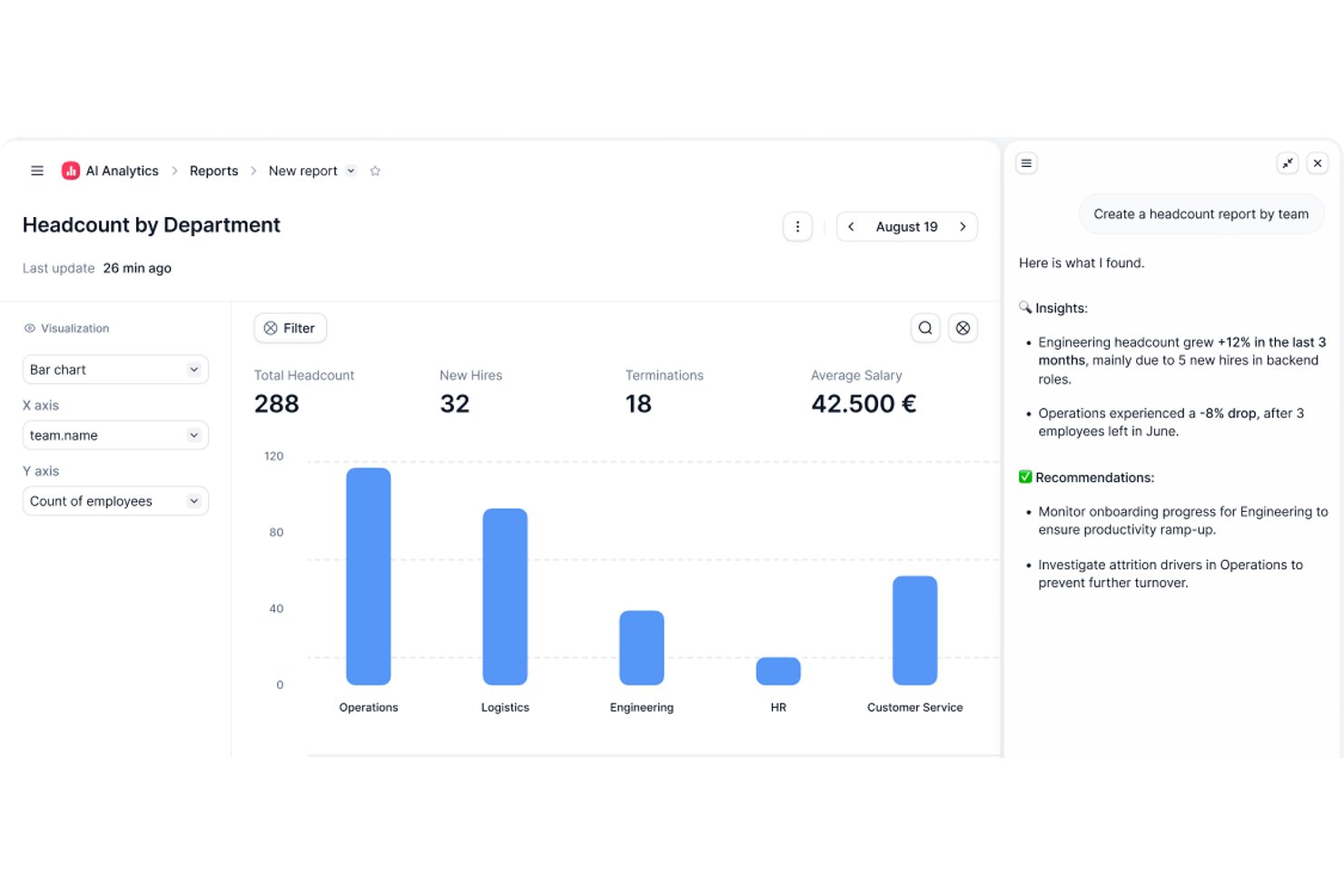
Factorial is an AI-powered HR and business management platform that covers HR, finance, and IT operations—handling tasks like scheduling, reporting, document management, and employee policy queries through its built-in AI agent, One.
Who Is Factorial Best For?
Factorial is a strong fit for HR teams at growing small and mid-sized businesses that want a single platform to handle HR, finance, and IT operations alongside an AI assistant.
Why I Picked Factorial
I picked Factorial as one of the best because it's built around the idea of AI handling the operational busywork that slows HR teams down every day. Its built-in AI agent, One, can plan timetables, generate reports from live data, and answer employee questions about company policies directly from the handbook. I especially like how One connects across HR, finance, and IT in a single platform, so there's no switching between tools to get a full picture.
Factorial Key Features
- AI-assisted candidate screening: One can screen candidates, call applicants, and draft job descriptions directly within the recruitment workflow.
- Expense capture with OCR: AI-powered OCR extracts receipt details automatically and fills expense fields when employees submit expenses.
- Performance reviews and 9-box grid: Teams can run 180- and 360-degree reviews and use a 9-box grid to assess talent and identify development opportunities.
- Shift scheduling automation: Managers can build automated, bulk, and rotating shift schedules and notify employees of last-minute changes.
Factorial Integrations
Factorial offers marketplace integrations with Microsoft Business Central, Google Workspace, Slack, Microsoft Azure, Microsoft Power BI, LinkedIn, Recruitee, and Okta. It also provides a public API, webhooks, SDKs, and access to hundreds of tools through Zapier.
Pros and Cons
Pros:
- Leave approvals and onboarding cut admin work
- AI helps plan timetables and generate reports
- One answers policy questions from company handbooks
Cons:
- Limited AI governance and model oversight
- Complex workflows can require workarounds

Deel HR
Best for AI-powered multi-country HR management

Deel is a global payroll and compliance platform designed for businesses managing remote teams across various countries. It simplifies international hiring by managing payroll, taxes, and compliance, with AI-driven features to improve accuracy and efficiency.
Why I picked Deel: It automates global payroll compliance using AI capabilities for automated tax calculations, compliance alerts, and continuous regulatory monitoring. Its AI capabilities focus on ensuring compliance with international payroll regulations. Deel's AI-driven analytics help you understand payroll trends and optimize payment processes. These features ensure your team can manage international payroll with confidence and ease.
Standout Features & Integrations:
Features include AI-supported compliance alerts, automated invoice generation, and global payroll processing across 150+ countries. It also has customizable contract templates, automated invoicing, and a user-friendly dashboard.
Integrations include QuickBooks, Xero, Netsuite, BambooHR, Gusto, Rippling, Greenhouse, Lever, Slack, and Workday.
Pros and Cons
Pros:
- Customizable contract templates
- Automated tax calculations
- AI-driven compliance checks
Cons:
- Fewer integration options than competitors
- Limited offline functionality
New Product Updates from Deel HR

Deel Expands Stablecoin Wallet to 80+ Countries
Deel expands its Stablecoin Wallet to 80+ countries with dollar-backed balances and optional rewards. This gives eligible contractors more ways to hold and manage earnings inside Deel. For more information, visit Deel’s official site.
 .
.
Best for creating custom employee portals
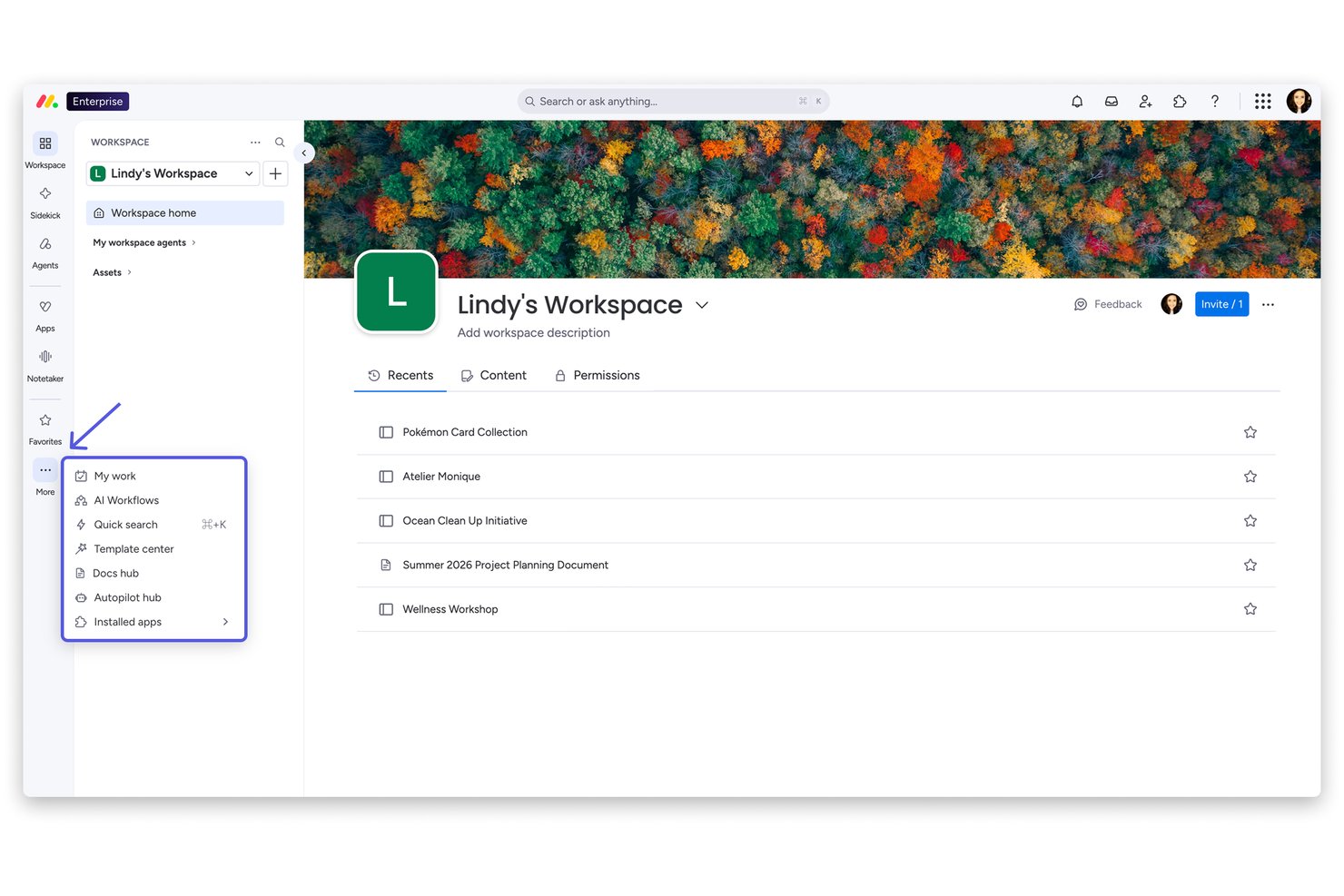
monday AI Workspace is a flexible work management platform that uses AI agents, workflow automation, and customizable boards to support HR processes like recruitment, onboarding, and employee management.
Who Is monday AI Workspace Best For?
It's a strong fit for HR operations teams at mid-sized companies that need to build and manage custom workflows without a dedicated HR software suite.
Why I Picked monday AI Workspace
monday AI Workspace earns its spot on my shortlist because of how far you can push its customization for HR use cases. I particularly like the Vibe app builder, which lets me turn a specific HR need (like a new hire portal or a policy request hub) into a working custom app without writing a single line of code. Paired with AI columns that automate repetitive data entry directly within boards, I can build portals that actively process work, not just display it.
monday AI Workspace Key Features
- AI-powered meeting notetaker: Automatically creates actionable summaries from HR meetings and syncs notes into workflows.
- Time tracking and attendance tools: Enables HR teams to monitor employee hours and attendance directly from custom boards.
- Sidekick AI assistant: Offers context-aware suggestions and can run automated HR tasks through conversational prompts.
- Custom automation builder: Lets users create multi-step automated actions for HR processes, including candidate screening and onboarding.
Monday AI Workspace Integrations
Monday AI Workspace offers native integrations with Slack, Google Workspace, Microsoft Teams, Zoom, Outlook, Asana, GitHub, and Salesforce. It also supports Zapier and provides an API for custom integrations.
Pros and Cons
Pros:
- Workflow templates for HR ticketing and requests
- AI automations handle high-volume onboarding tasks
- Custom portal builder supports complex HR processes
Cons:
- Lacks native payroll and benefits management
- No predictive analytics for attrition or engagement
New Product Updates from monday AI Workspace
monday AI Workspace Adds Human Approval Routing
monday AI Workspace adds a human-in-the-loop approval block to AI Workflows, sending approval requests and routing workflow paths based on responses. For more information, visit monday AI Workspace's official site.

Best for AI-powered pulse checks on employee sentiment

Paylocity is a cloud-based HR and payroll software tailored for small to medium-sized businesses. It provides tools for payroll processing, talent management, and benefits administration, with AI capabilities to improve user experience and decision-making.
Why I picked Paylocity: It offers a user-friendly interface that simplifies HR tasks. The AI-driven analytics provide insights into workforce trends and help you make informed HR decisions. Paylocity's automation features reduce manual workload, allowing your team to focus on strategic activities. Additionally, its AI tools facilitate employee engagement and feedback collection.
Standout Features & Integrations:
Features include automated payroll processing, customizable reports, and employee self-service portals. These features help your team manage HR functions efficiently and keep employees informed.
Integrations include QuickBooks, Xero, Salesforce, ADP, BambooHR, Slack, Gusto, Wrike, Microsoft Teams, and Google Workspace.
Pros and Cons
Pros:
- Easy-to-use interface
- Automation reduces manual tasks
- AI-driven workforce analytics
Cons:
- Lack of pricing transparency
- Limited options for non-standard employees
New Product Updates from Paylocity

Paylocity Expands Expense and Purchase Request Tools
Paylocity adds connected personal cards, smarter expense categorization, and a streamlined purchase request experience. This reduces manual entry and helps finance teams manage expenses and approvals more efficiently. For more information, visit Paylocity’s official site.
 .
.
Workleap
Best for AI-powered people management

Workleap is an AI-driven talent management platform designed for small to medium-sized businesses. It focuses on employee engagement, performance management, and AI-driven people insights across HR workflows.
Why I picked Workleap: It excels in providing small businesses with tailored AI solutions for talent management. The platform offers AI-generated insights to improve employee engagement and performance tracking. Its customizable performance reviews and compensation management tools are ideal for businesses looking to maintain equitable pay structures.
Standout Features & Integrations:
Features include AI summaries of engagement data, customizable performance review cycles, and compensation analytics supported by market benchmarks. real-time engagement insights, customizable performance management reviews, and pulse surveys to detect early signs of disengagement.
Integrations include QuickBooks, Slack, Microsoft Teams, BambooHR, Gusto, Greenhouse, Lever, Xero, Google Workspace, and ADP.
Pros and Cons
Pros:
- User-friendly interface
- Customizable performance reviews
- AI-driven engagement insights
Cons:
- Advanced customization may require additional setup
- Full functionality requires technical knowledge

Workday
Best for AI-powered workforce planning insights

Workday is a cloud-based financial and human capital management software designed for medium to large enterprises. It helps organizations with workforce planning, talent management, and financial analysis, offering AI-driven insights to improve operational efficiency.
Why I picked Workday: It excels in providing real-time analytics, offering users immediate insights into workforce trends. Workday's AI features include predictive analytics that help forecast HR needs and optimize talent management strategies. The platform's machine learning capabilities improve data-driven decision-making by identifying patterns and anomalies. Its real-time data processing ensures your team can make timely and informed decisions.
Standout Features & Integrations:
Features include AI-supported talent management, real-time workforce analytics, and performance insights embedded across HR and finance workflows, intuitive workforce planning tools, all in one talent management solutions, and detailed financial reporting capabilities.
Integrations include Salesforce, Microsoft Azure, Slack, ServiceNow, Okta, ADP, SAP, Oracle, IBM, and Google Workspace.
Pros and Cons
Pros:
- Complete financial reporting
- Predictive analytics for HR needs
- Real-time data processing
Cons:
- Customization requires technical support
- Feature overload causes navigation issues

UKG
Best for teams needing AI workforce insights

UKG is a complete human capital management solution tailored for businesses of all sizes. It focuses on workforce management, payroll, and HR service delivery, offering AI-driven tools to optimize employee experiences and operational efficiency.
Why I picked UKG: It provides AI capabilities that improve workforce management. The AI-driven scheduling tools help your team to optimize shift planning and reduce labor costs. Its predictive analytics offer insights into workforce trends and employee productivity. Additionally, UKG's AI-powered chatbots assist in automating routine HR queries, freeing up your team's time for more strategic tasks.
Standout Features & Integrations:
Features include advanced workforce analytics, time and attendance tracking, and employee self-service portals. The mobile app gives employees access to time tracking and timely notifications for action items related to HR.
Integrations include ADP, SAP, Oracle, Microsoft Azure, Salesforce, Workday, Kronos, SuccessFactors, Clickup, Google Workspace, and Slack.
Pros and Cons
Pros:
- Employee self-service portals
- Predictive workforce analytics
- AI-driven scheduling tools
Cons:
- Require ongoing training
- Limited reporting and HR process tools


SAP SuccessFactors HCM is a cloud-based human capital management solution tailored for businesses seeking to improve HR processes. It primarily serves enterprises aiming to manage global compliance and simplify HR activities with AI-driven insights.
Why I picked SAP SuccessFactors HCM: The tool excels in offering AI capabilities that assist in global compliance management. It features AI-assisted writing and translation tools that simplify communication across multilingual teams. The platform's AI-driven analytics provide insights into compliance risks and employee engagement trends, providing the data necessary for multiple stakeholders to anticipate workforce needs and optimize HR strategies.
Standout Features & Integrations:
Features include complete employee self-service options, AI-driven performance management, and advanced talent acquisition tools. These features are designed to empower your team to manage tasks efficiently and make informed decisions.
Integrations include SAP ERP, Microsoft Teams, LinkedIn, Slack, Concur, Docusign, SuccessFactors Learning, Kronos, Google Workspace, and Salesforce.
Pros and Cons
Pros:
- Predictive workforce analytics
- Multilingual support with AI translation
- AI-driven compliance insights
Cons:
- Upper tiers lack pricing transparency
- Maintenance requires additional resources


Leena AI is an AI-powered HR assistant designed to simplify HR processes for mid-sized to large enterprises. It focuses on automating employee queries, onboarding, and policy management, offering value through its AI-driven support and insights.
Why I picked Leena AI: It specializes in automating HR queries, making it efficient for large teams. The platform's AI chatbots handle routine employee questions, reducing your HR team's workload. Its AI-driven onboarding tools ensure a smooth experience for new hires. Additionally, Leena AI offers analytics that help you improve employee engagement and satisfaction.
Standout Features & Integrations:
Features include automated policy management, real-time query resolution, and onboarding assistance. It also connects with leading project management tools to keep work aligned across operations and HR.
Integrations include SAP SuccessFactors, Trello, Workday, BambooHR, ADP, Microsoft Teams, Slack, Google Workspace, Salesforce, and Kronos.
Pros and Cons
Pros:
- Automated policy management
- Efficient onboarding tools
- AI-driven query resolution
Cons:
- Requires initial setup and training
- May not cover all complex queries


Humaans is a modern HR software solution aimed at startups and small businesses. It focuses on simplifying team management, onboarding, and employee data management, with AI features that improve operational efficiency.
Why I picked Humans: It offers intuitive team management capabilities, making it ideal for small businesses. The platform's AI-driven onboarding tools help your team simplify new hire processes. Its automated reminders ensure compliance and keep employee records up-to-date. Additionally, AI analytics provide insights into team dynamics and performance.
Standout Features & Integrations:
Features include automated document management, customizable onboarding workflows, centralized employee data storage, and delegating tasks that would otherwise require manual follow-ups by AI agents.
Integrations include Slack, Google Workspace, Microsoft Teams, BambooHR, QuickBooks, Xero, Lever, Greenhouse, Zoom, and Okta.
Pros and Cons
Pros:
- Centralized data management
- Automated compliance reminders
- Intuitive onboarding process
Cons:
- Limited customization
- Lacks advanced reporting options
Other AI Management Software
Here are some additional AI management software options that didn’t make it onto my shortlist, but are still worth checking out:
- Praisidio
For AI-driven employee retention analytics
- Rippling
For unified automation across HR and IT
- HR Acuity
For analyzing employee relations with AI
- Paycom
For integrated payroll and HR data
- ClearCo
For talent acquisition
- Leapsome
For continuous feedback
- Lattice
For performance reviews
- Sloneek
For small team management


How I Evaluate AI Management Software
Every tool on this list has to deliver real AI value for HR teams—not just bolt a chatbot onto a legacy HRIS. I split my evaluation into two layers: the core functionality a tool needs to make the list, and the differentiators that set one apart.
Core Functionality (Table Stakes For This List)
When I'm selecting tools for my list, I rank each one on a scale from 0 (does not offer the functionality) to 5 (excels in this area) for each core functionality listed below. Then, I calculate the tool's total score into a percentage. Each tool needs to achieve a minimum total score of 65% to be considered for inclusion.
- AI-Powered Workflow Automation: I look for AI that actually handles multi-step HR tasks—like auto-routing onboarding checklists or triaging employee requests—rather than simple rule-based triggers.
- Predictive People Analytics: The platform should surface forward-looking insights, such as flagging flight-risk employees or forecasting hiring needs, with clear reasoning behind each prediction.
- Natural Language Interface: Whether it's a chatbot answering benefits questions or a copilot drafting offer letters, I evaluate how well the conversational AI handles real HR queries beyond scripted FAQs.
- Intelligent Talent Matching: I check whether the AI can meaningfully match candidates to roles or recommend internal moves based on skills, not just keyword overlap on a resume.
- HR Data Integration: A tool needs to connect with the systems HR teams already use—HRIS, ATS, payroll—so its AI models work from real, up-to-date people data rather than siloed inputs.
- Responsible AI Governance: Bias audits, explainability features, and compliance controls matter here. I look for tools that document how their models make decisions and support regulatory requirements.
Once I have a list of tools that meet this criteria, I consider what sets each platform apart.
Differentiating Factors (What Sets Vendors Apart)
Here's how I compare and contrast different vendors:
Standout Features
A skills intelligence graph is a big differentiator—I look for platforms that map employee competencies and skill adjacencies to drive internal mobility and succession planning. Sentiment and engagement AI also matter, especially tools that analyze pulse surveys or collaboration signals to flag burnout before it turns into attrition. I check whether a platform offers a generative AI copilot that can draft job descriptions, review summaries, or policy documents directly within HR workflows.
Beyond Features
AI governance and compliance posture is one of the first things I evaluate—I want to see published bias audit reports and clear documentation on how models make decisions, especially for hiring. Data privacy matters just as much; I check whether a vendor offers data residency options and transparent policies on whether customer data trains shared models. I also consider implementation support, since rolling out AI in HR requires change management resources like training programs and prompt libraries to drive adoption.
How to Choose AI Management Software
It’s easy to get bogged down in long feature lists and complex pricing structures. To help you stay focused as you work through your unique software selection process, here’s a checklist of factors to keep in mind:
| Factor | What to Consider |
| Scalability | Can the software grow with your business? Consider if the tool can handle an increasing number of users or data without performance issues. |
| Integrations | Does it integrate with your existing systems like payroll or CRM? Check for compatibility with tools your team already uses to avoid disruptions. |
| Customizability | Can you tailor the software to fit your workflows? Look for options to modify dashboards, reports, and settings to match your company's processes. |
| Ease of Use | Is the interface intuitive for your team? Evaluate if users can navigate efficiently without extensive training or frequent support. |
| Implementation and Onboarding | How long will it take to set up and train your team? Assess the resources needed for a smooth transition and if the vendor offers support during this phase. |
| Cost | Are there hidden fees or variable costs? Ensure you understand the total cost, including setup fees, monthly charges, and potential costs for additional features. |
| Security Safeguards | Does the software protect sensitive data? Verify that it meets industry standards for data encryption and user access controls to keep information secure. |
| Support Availability | Is help accessible when needed? Check if the vendor offers 24/7 support and through which channels, like chat, email, or phone, to ensure assistance is always nearby. |
What Is AI Management Software?
AI management software is a category of tools that use artificial intelligence to automate and improve HR functions. These tools are typically used by HR professionals, managers, and team leaders to improve decision-making and operational efficiency.
Predictive analytics, AI-driven chatbots, and automated data processing help with optimizing recruitment, managing employee queries, and analyzing workforce trends. Overall, these tools provide valuable insights and automation that save time and improve HR outcomes.
Features of AI Management Software
When selecting AI management software, keep an eye out for the following key features:
- Predictive analytics: Uses AI to forecast workforce trends and help plan for future HR needs.
- AI-driven chatbots: Automate routine HR queries, saving time and reducing workload for HR teams.
- Automated onboarding: Simplifies the onboarding process with AI tools that guide new hires through the necessary steps.
- Real-time data processing: Provides immediate insights and analytics for quick decision-making.
- Customizable dashboards: Allow users to tailor data displays to meet specific business needs and preferences.
- Employee engagement analytics: Analyzes engagement data to identify areas for improvement and boost morale.
- Compliance management: Uses AI to monitor and ensure adherence to industry regulations and standards.
- Automated performance tracking: Tracks employee performance metrics and provides insights for reviews and development.
- Data security features: Protects sensitive HR data with encryption and access controls.
- Integration capabilities: Connects easily with existing HR and business systems to improve functionality.
Benefits of AI Management Software
Implementing AI management software provides several benefits for your team and your business. Here are a few you can look forward to:
- Improved decision-making: AI-driven analytics provide insights that help make informed HR decisions quickly.
- Time savings: Automated processes reduce manual tasks, freeing up time for strategic activities.
- Improved compliance: AI tools monitor and ensure adherence to regulations, reducing compliance risks.
- Better employee engagement: Analytics identify engagement issues, allowing you to address them proactively.
- Increased efficiency: AI features like chatbots and automated onboarding simplify HR functions.
- Cost reduction: Automating routine tasks reduces operational costs associated with manual HR processes.
- Scalability: AI tools can grow with your business, handling increased data and user demands effortlessly.
Costs and Pricing of AI Management Software
Selecting AI management software requires an understanding of the various pricing models and plans available. Costs vary based on features, team size, add-ons, and more. The table below summarizes common plans, their average prices, and typical features included in AI management software solutions:
Plan Comparison Table for AI Management Software
| Plan Type | Average Price | Common Features |
| Free Plan | $0 | Basic analytics, limited user support, and essential HR functions. |
| Personal Plan | $5-$1,000/user/month | Advanced analytics, AI-driven chatbots, and automated onboarding tools. |
| Business Plan | $70-$2,000/user/month | Customizable dashboards, integration capabilities, and enhanced security measures. |
| Enterprise Plan | $100-$10,000/user/month | Full AI capabilities, dedicated support, and complete compliance management. |
AI Management Software FAQs
Here are some answers to common questions about AI management software:
How do I assess the scalability of an AI management software?
To assess scalability, consider whether the software can handle increased data and users as your business grows. Look for features like cloud-based infrastructure and flexible pricing plans that adjust with usage. Ask vendors for case studies or references from similar-sized companies that have successfully scaled their operations using the software.
Can AI management software integrate with existing HR systems?
Yes, most AI management tools offer integration capabilities. Check for compatibility with your current systems, like payroll, CRM, and communication tools. Vendors typically provide APIs or pre-built connectors. Ask for a demo to see how integrations work and ensure a smooth transition.
What should I consider regarding data security in AI management software?
Prioritize software with strong data encryption, user access controls, and compliance with regulations like GDPR. Ask vendors about their security certifications and data protection measures. Consider conducting a security audit or consulting an expert to ensure the software meets your company’s security requirements.
How can AI management software help with employee engagement?
AI tools can analyze engagement data to identify trends and areas for improvement. Features like sentiment analysis and feedback tools provide insights into employee satisfaction. Use these insights to implement changes that improve morale and productivity, such as adjusting workloads or enhancing communication channels.
Is it possible to customize AI management software to fit our specific needs?
Yes, many AI management solutions offer customization options. Look for software that lets you modify dashboards, reports, and workflows to match your processes. Customization may require technical expertise, so verify the level of support offered by the vendor for these tasks.