

10 Best AI Org Design Tools Reviewed in 2026

Best AI Org Design Tools Shortlist


Organizational design is one of those challenges that looks simple on paper but feels endlessly complex in practice. Between keeping teams aligned, optimizing headcount, and staying compliant with ever-changing regulations, it can feel like you’re trying to solve a puzzle that keeps shifting.
That’s where AI-driven org design tools come in. They help you visualize structures, identify inefficiencies, and make smarter decisions backed by real data. With the right platform, you can model new team configurations, forecast future needs, and spot skill gaps before they become roadblocks.
I’ve personally tested and reviewed a range of these tools to find the ones that actually deliver. In this article, you’ll find my top picks for AI org design software — complete with insights into their standout features, best-fit use cases, and how they can support your team whether you’re scaling up, restructuring, or simply trying to work smarter.
Why Trust Our Software Recommendations
Our team has been testing and reviewing software since 2012. As HR experts ourselves, we know how difficult—and important—it is to choose the right software.
For this guide, we evaluated tools using hands-on testing and independent research, scoring tools using our selection criteria. We also draw on insights from industry thought leaders and practicing HR experts.
Our reviews reflect our human editorial judgment, not a sales pitch.
Expert reviewers:
AI Org Design Tools Comparison Table
This comparison table summarizes pricing details for my top AI org design tool selections:
| Tool | Best For | Trial Info | Price | ||
|---|---|---|---|---|---|
| 1 | Best for org insights that inform design | Free demo available | From $5/user/month | Website | |
| 2 | Best for creative teams | Free plan available | From $16/user/month | Website | |
| 3 | Best for hiring teams | Free demo available | From $299/month | Website | |
| 4 | Best for brainstorming & idea mapping | Free trial available | From $0/month | Website | |
| 5 | Best for data compliance | Free demo available | Pricing upon request | Website | |
| 6 | Best for diagram variety | Free plan available | From $6.58/month | Website | |
| 7 | Best for role clarity | 22-day free trial | From $72/month for 3 users (billed annually) | Website | |
| 8 | Best for legal professionals | Free trial available | From $5/month | Website | |
| 9 | Best for collaborative team events | Free plan + 14-day free trial available | From $8/user/month (billed annually) | Website | |
| 10 | Best for visual collaboration | Free plan + 7-day free trial available | From $9/month (billed annually) | Website |

Best AI Org Design Tool Reviews
Below are my detailed summaries of the best AI org design tools that made it onto my shortlist. My reviews offer a detailed look at the key features, pros & cons, integrations, and ideal use cases of each tool to help you find the best one for you.

Deel HR
Best for org insights that inform design
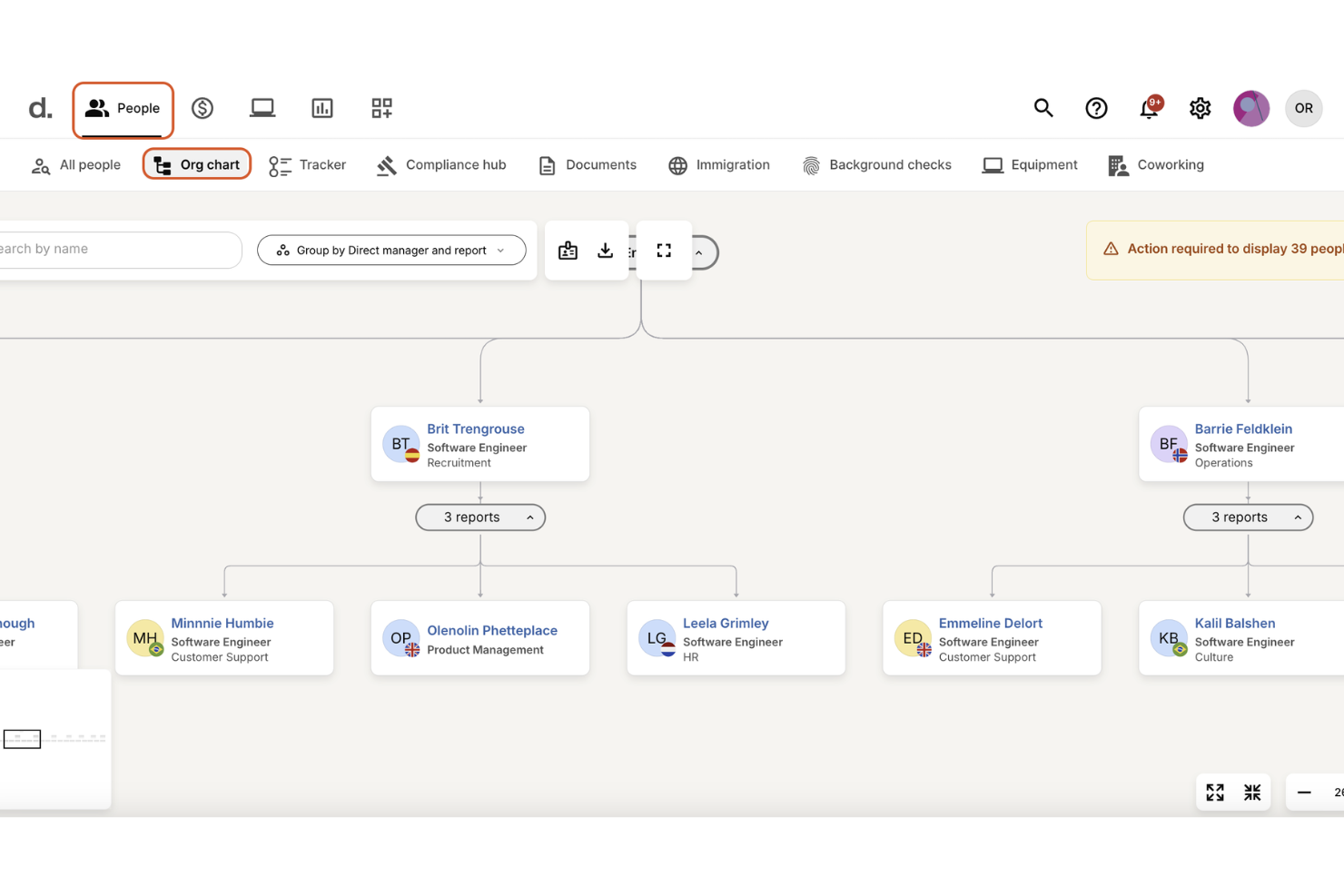
Building a well-structured organization becomes simpler when you have an AI assistant that understands your team’s data and global employment rules. With Deel AI, you get an always-on expert that can surface workforce insights, flag compliance considerations, and answer HR questions instantly, helping you shape org structures grounded in real information rather than assumptions. If you’re redesigning teams, expanding globally, or trying to understand how roles and policies interact across regions, Deel gives you clarity right when you need it.
Why I Picked Deel
I picked Deel because its AI is directly tied to your workforce data and global compliance intelligence, offering context-aware guidance as you build or refine your org structure. You can ask questions about team composition, policies, or payroll impact, and Deel AI pulls from its expert-built Knowledge Hub to give you accurate answers in seconds. I appreciate how it surfaces real-time insights where you're working — such as summaries and key data on org pages — so you can make decisions without switching between tools. For teams managing distributed or international org design, these capabilities reduce uncertainty and anchor decisions in transparent, localized information.
Deel Key Features
In addition to its AI capabilities, I also found several other features beneficial for organizational design:
- Org charts: Visualize company structure, roles, and reporting relationships to understand how teams connect across regions.
- Workflow automation: Trigger lifecycle workflows — onboarding, relocations, promotions, and more — based on data changes that influence org structure.
- People analytics: Analyze workforce patterns, headcount, and costs to inform restructuring or hiring decisions.
- Roles, permissions & approval flows: Configure how responsibilities and decision rights are distributed throughout the organization.
Deel Integrations
Integrations include Slack, QuickBooks, Xero, Greenhouse, BambooHR, Okta, Gusto, Rippling, Workday, and ADP.
Pros and Cons
Pros:
- Compliance reminders appear when employees relocate or roles shift
- Org charts visualize roles and reporting lines across locations
- AI provides instant org insights directly tied to workforce data
Cons:
- Complex restructures still require external legal or HR validation
- Org modeling lacks scenario simulation found in dedicated design tools
New Product Updates from Deel HR

Deel Expands Stablecoin Wallet to 80+ Countries
Deel expands its Stablecoin Wallet to 80+ countries with dollar-backed balances and optional rewards. This gives eligible contractors more ways to hold and manage earnings inside Deel. For more information, visit Deel’s official site.
 .
.
FigJam
Best for creative teams

FigJam is an online collaborative whiteboard tool designed for creative teams who need to brainstorm and plan visually. It caters to designers, product teams, and educators by enabling visual collaboration and interactive workshops.
Why I picked FigJam: It's perfect for creative teams with its intuitive interface and real-time collaboration. You can sketch, share ideas, and iterate quickly with your team. FigJam's extensive library of templates and interactive components helps facilitate creative processes. This makes it easy for your team to bring ideas to life visually.
Standout features & integrations:
Features include an intuitive sketching tool that lets you draw and annotate ideas with ease. The real-time collaboration feature allows your team to work together on boards simultaneously. FigJam also offers a library of interactive components to enhance your brainstorming sessions.
Integrations include Slack, Microsoft Teams, Zoom, Google Drive, Dropbox, Jira, Asana, Trello, Microsoft Office 365, and Confluence.
Pros and Cons
Pros:
- Ideal for visual brainstorming
- Supports interactive components
- Intuitive sketching tools
Cons:
- Can be overwhelming for new users
- Limited offline capabilities

Workable is an AI-powered HR platform that connects hiring, onboarding, and organizational management in one system. It uses AI to optimize workforce structure, from sourcing and placing the right talent to maintaining real-time org charts and tracking performance, time, and payroll data across the employee lifecycle.
Why I picked Workable: The features can help organizations design and evolve their workforce using AI insights. The platform automatically parses resumes, identifies strong metrics and skill gaps, and matches candidates to roles that fit organizational needs. Once hired, employees are integrated into a live HR information system that updates role histories, compensation, and team structure dynamically, useful for leaders managing growth or restructuring.
Standout features & integrations:
Features include an AI content engine that generates job descriptions, salary bands, and interview kits matched with dynamic organizational chart creation that reflects real-time employee data. Managers can track performance through 360° reviews and use reporting structures and org chart tools to analyze workforce composition and productivity trends.
Integrations include LinkedIn, Indeed, Google Workspace, Microsoft Office 365, Slack, BambooHR, ADP, Xero, Zoom, and Greenhouse.
Pros and Cons
Pros:
- Customizable evaluation tools
- 360° performance and review tools
- Dynamic org chart and HR data hub
Cons:
- Requires internet for full functionality
- Limited customization in lower plans


MyMap.AI helps teams visualize and organize information automatically using AI. It generates mind maps, flowcharts, and org charts from text or prompts, helping users analyze ideas, summarize research, and plan projects visually.
Why I picked MyMap.AI: It uses generative AI to convert written or structured input into organized visual maps. You can summarize documents, map workflows, or create organizational structures in seconds. It’s useful for educators, researchers, and teams that need to organize complex information quickly.
Standout features & integrations:
Features include AI-generated mind maps, auto-structured org charts, and flowchart visualization. It supports various use cases such as summarizing essays, mapping relationships, or illustrating project hierarchies.
Integrations include Google Maps, ArcGIS, Tableau, Power BI, QGIS, Mapbox, Salesforce, Microsoft Excel, Dropbox, and Slack.
Pros and Cons
Pros:
- Supports creative brainstorming
- Visual task boards
- Combines mind mapping and task management
Cons:
- Requires internet for full use
- Limited advanced features


Nakisa helps enterprises design and visualize complex organizational structures with built-in compliance and AI-driven insights. Its platform combines workforce analytics, data governance, and intelligent modeling to support secure, compliant org design at scale.
Why I picked Nakisa: It integrates compliance standards with AI-powered organizational design. Its Decision Intelligence platform uses agentic artificial intelligence to support scenario modeling, while built-in audit controls, role-based access, and data encryption ensure compliance with ISO, SOC, and GDPR standards. Nakisa’s visual design tools make it easier to plan future structures confidently.
Standout features & integrations:
Features include org modeling, compliance reporting, audit-ready data exports, and access-controlled design environments. Nakisa’s Decision Intelligence layer helps simulate structural changes and analyze their impact in real time.
Integrations include SAP, Oracle, Workday, SuccessFactors, Microsoft Teams, Slack, Salesforce, LinkedIn, BambooHR, and ADP.
Pros and Cons
Pros:
- Secure data handling
- Secure role-based data management
- Audit-ready compliance features
Cons:
- Requires technical configuration
- Complex initial setup


Edraw.AI is a versatile diagramming tool designed for professionals needing a wide range of diagram types. It caters to educators, IT professionals, and project managers by offering tools for creating flowcharts, mind maps, and organizational charts.
Why I picked Edraw.AI: It excels in providing diverse diagram options, making it ideal for teams needing variety. You can create everything from simple flowcharts to complex network diagrams. Edraw.AI's library of templates and symbols supports a wide range of industries and use cases. This variety helps your team visualize data and processes effectively.
Standout features & integrations:
Features include a vast library of templates that cover different diagram types, from business to technical diagrams. The tool offers a drag-and-drop interface, which simplifies the creation process. Edraw.AI also supports vector graphics for high-quality diagrams.
Integrations include Microsoft Office, Google Workspace, Dropbox, OneDrive, Box, PDF, Visio, and HTML.
Pros and Cons
Pros:
- Supports vector graphics
- Extensive template library
- Wide range of diagram options
Cons:
- Needs internet for full functionality
- Limited customization for complex diagrams


Functionly is an AI-powered organizational design platform that helps teams visualize structures, clarify responsibilities, and align roles with strategic goals. It combines automated data integration with AI-driven modeling tools to reveal how roles, reporting lines, and accountabilities connect across your organization.
Why I picked Functionly: It uses AI to turn complex org data into clear, adaptable role maps. Its AI assistant identifies overlaps, skill gaps, and accountability gaps, then suggests structural changes that fix or alternative designs. Scenario planning allows HR leaders and executives to model restructures, test different workforce setups, and forecast headcount and costs before making changes, making it ideal for companies focused on clarity and adaptability in workforce design.
Standout features & integrations:
Features include OrgPilot AI for automated design recommendations, dynamic org charts that update in real time, and templates for industry-specific structures and roles. Its integration of data sources keeps org charts automatically in sync with live HR and payroll systems, reducing manual updates. Teams can collaborate on multiple scenarios, compare options, and track reporting depth, spans, and accountability metrics.
Integrations include BambooHR, ADP, Gusto, Zenefits, QuickBooks, Google Workspace, Microsoft 365, Slack, Asana, and Trello.
Pros and Cons
Pros:
- Easy team structure visualization
- AI-driven org and role mapping
- Flexible templates for different org models
Cons:
- Not suitable for very small teams
- Limited customization in basic plans


Lexchart uses AI to automatically create detailed hierarchy and company structure charts. It helps users map organizational and legal entity relationships across complex corporate structures, making it ideal for firms that manage multiple entities or need clear ownership visibility.
Why I picked Lexchart: It combines AI-driven chart generation with secure data handling. It automates legal entity and hierarchy mapping, helping professionals visualize complex structures quickly. Law firms, finance teams, and compliance officers can use it to clarify relationships between subsidiaries, partners, and stakeholders.
Standout features & integrations:
Features include AI-powered chart creation, legal entity mapping, secure data encryption, and multi-factor authentication for controlled access. Users can export charts in PDF, PNG, or SVG formats and collaborate by sharing editable or view-only versions.
Integrations include Clio, PracticePanther, MyCase, NetDocuments, iManage, Dropbox, Google Drive, OneDrive, Box, and SharePoint.
Pros and Cons
Pros:
- Visualizes legal relationships
- Customizable templates
- Handles large, complex structures
Cons:
- Advanced features may need training
- May require domain knowledge
Miro
Best for collaborative team events

Miro is an AI-enabled visual workspace designed to facilitate collaborative team events such as strategy workshops, retrospectives, and design sessions. It helps distributed teams plan, align, and co-create organizational initiatives in real time– from defining structure and priorities to mapping future workflows.
Why I picked Miro: It’s built for teams that rely on collaboration to design and refine organizational systems. Its AI tools turn visual brainstorming into structured insights, making workshops more productive. Facilitators can run interactive sessions with real-time co-editing, AI summaries, and live voting, while templates support org mapping, decision frameworks, and transformation planning.
Standout features & integrations:
Features include AI-powered facilitation tools (like Sidekicks for summarizing and restructuring content), real-time collaboration, and prebuilt org chart templates for workshops, strategy alignment, and org planning. Miro supports hybrid teams through voting, timers, and breakout-style participation controls.
Integrations include Slack, Microsoft Teams, Zoom, Google Drive, Dropbox, Jira, Asana, Trello, Microsoft Office 365, and Confluence.
Pros and Cons
Pros:
- ISO 42001-certified AI security and compliance
- Extensive library of org and workshop templates
- Strong facilitation tools (voting, timers, breakout flows)
Cons:
- May lag with large boards
- Can be overwhelming for new users
New Product Updates from Miro
Miro Adds Japan Data Residency for Enterprise Customers
Miro has introduced Japan data residency for enterprise customers, offering in-region storage for production data, backups, and metadata, plus in-region compute infrastructure. For more information, visit Miro's official site.

Lucidchart
Best for visual collaboration

Lucidchart is a cloud-based diagramming tool that helps teams visualize processes, company structure, and workflows. Its AI features let users generate diagrams, brainstorm ideas, and summarize visuals automatically. The platform supports both Lucidchart (diagramming) and Lucidspark (ideation) in one platform.
Why I picked Lucidchart: It combines traditional diagramming with AI automation and team-based features. Users can use org chart tools for flow charts, and project diagrams instantly from text prompts, making it useful for teams managing Agile workflows or visualizing data-driven structures and strategic planning
Standout features & integrations:
Features include intelligent diagramming, which helps you create clear visuals with ease. The AI-powered diagram generation speeds up your workflow by suggesting layouts. Data linking ensures your diagrams are always up-to-date with the latest information. AI-powered diagram generation from text input and collaborative AI for brainstorming and sorting out ideas and initiatives are also strong features.
Integrations include Google Workspace, Microsoft 365, BambooHR, Salesforce, Slack, Atlassian, AWS, Dropbox, GitHub, and Box.
Pros and Cons
Pros:
- Revision history available
- Easy data linking
- Strong diagramming capabilities
Cons:
- Advanced features require paid plans
- Limited offline access


How I Evaluate AI Org Design Tools
Every tool on this list needs to deliver real AI value—not just a chatbot bolted onto a static org chart builder, but AI that actually generates, optimizes, and pressure-tests organizational structures. I split my evaluation into core functionality every tool must have to qualify and differentiating factors that separate the best fits from the rest.
Core Functionality (Table Stakes For This List)
When I'm selecting tools for my list, I rank each one on a scale from 0 (does not offer the functionality) to 5 (excels in this area) for each core functionality listed below. Then, I calculate the tool's total score into a percentage. Each tool needs to achieve a minimum total score of 65% to be considered for inclusion.
- AI-Driven Org Modeling: I look for AI that goes beyond autofill—it should generate and recommend structures based on inputs like headcount targets, functional groupings, and strategic goals.
- Scenario Simulation: Each tool should let you build multiple "what-if" restructures and compare them side by side, with AI surfacing cost and headcount impacts across scenarios.
- Interactive Org Visualization: Real-time, drag-and-drop org charts matter here. I check whether changes to reporting lines or team groupings update the visual instantly.
- Workforce Structure Analytics: Strong tools surface spans of control, layering depth, and cost distribution with AI-generated flags on structural inefficiencies worth addressing.
- HRIS Data Integration: I evaluate whether the tool connects to platforms like Workday, SuccessFactors, or BambooHR to pull live employee and reporting data without manual uploads.
- Skills & Role Mapping: The tool should use AI to tie skills and competencies to roles within proposed structures, helping you spot capability gaps before a reorg goes live.
Once I have a list of tools that meet the criteria, I consider what sets each platform apart.
Differentiating Factors (What Sets Vendors Apart)
Here's how I compare and contrast different vendors:
Standout Features
Predictive attrition modeling is a big differentiator—I want to see AI that flags retention risks within a proposed structure before leadership signs off. Benchmarking intelligence adds another layer, letting you validate spans and layers against industry norms rather than gut instinct. I also look for collaborative workspaces where HR, finance, and executives can co-edit and comment on scenarios together, which speeds up alignment during time-sensitive reorgs.
Beyond Features
AI transparency matters a lot in this space. When HR leaders present a reorg to the C-suite, they need to explain why the AI recommended a specific structure—so I check whether the tool provides clear reasoning behind its suggestions. Data security is equally important since restructuring plans contain sensitive headcount and compensation details; I look for SOC 2 Type II compliance and role-based access controls. Implementation speed also factors in, especially for orgs navigating urgent M&A timelines where a months-long setup isn't realistic.
How to Choose an AI Org Design Tool
It’s easy to get bogged down in long feature lists and complex pricing structures. To help you stay focused as you work through your unique software selection process, here’s a checklist of factors to keep in mind:
| Factor | What to Consider |
|---|---|
| Scalability | Will the tool grow with your team? Consider if it can handle more users and larger org structures as your company expands. Look for tools that can scale without performance issues. |
| Integrations | Does it work with your existing systems? Check if it integrates with HR systems, communication tools, and any software you already use to avoid workflow disruptions. |
| Customizability | Can you tailor it to your needs? Ensure the tool allows you to customize charts and layouts to fit your specific organizational structure and branding. |
| Ease of use | Is it user-friendly for everyone? Look for intuitive interfaces that require minimal training. A steep learning curve can slow down adoption by your team. |
| Implementation and onboarding | How easy is it to get started? Evaluate the onboarding process, available training resources, and support during implementation. Smooth onboarding can speed up user adoption. |
| Cost | Is it within your budget? Compare pricing plans and consider the total cost of ownership, including hidden fees. Ensure it fits your budget without compromising functionality. |
| Security safeguards | How secure is your data? Ensure the tool complies with data protection regulations and offers features like encryption and access controls to protect sensitive information. |
What Are AI Org Design Tools?
AI org design tools are software solutions that help organizations create and manage their organizational structures. HR professionals, team managers, and business leaders generally use these tools to ensure clarity in roles and improve team alignment.
Features like organizational chart creation, role assignment, and collaboration tools help with visualizing structures, managing changes, and enhancing team communication. Overall, these tools provide valuable insights and efficiencies in managing and evolving organizational frameworks.
Features
Here are the core features any great AI org design tools software should have:
- Organizational chart creation: Helps visualize team structures and hierarchies, making it easy to understand reporting lines and organizational dynamics.
- Role assignment: Enables clear role definitions and assignments, helping to ensure everyone knows their responsibilities.
- Collaboration tools: Facilitate teamwork by allowing multiple users to work on organizational designs simultaneously.
- Customizable templates: Offers pre-designed templates that can be tailored to fit specific organizational needs and branding.
- Scenario planning: Allows users to test different organizational structures and strategies before implementing changes.
- Real-time updates: Keeps organizational charts current by automatically reflecting changes as they occur.
- Data integration: Connects with existing HR and business systems to pull in accurate and up-to-date information.
- Access controls: Provides security by allowing admins to control who can view or edit organizational data.
- Visualization tools: Enhance understanding by providing graphical representations of complex data and structures.
- Training resources: Offers tutorials, guides, and support to ensure users can effectively utilize all features.
Benefits
Implementing AI org design tools provides several benefits for your team and your business. Here are a few you can look forward to:
- Improved clarity: Clearly defined roles and responsibilities help ensure everyone knows their tasks and where they fit within the organization.
- Enhanced collaboration: Real-time collaboration tools allow teams to work together efficiently on organizational designs, improving communication and teamwork.
- Informed decision-making: Scenario planning and data integration provide insights that help you make better strategic decisions about your organizational structure.
- Increased efficiency: Automated updates and customizable templates save time by reducing manual work and simplifying the design process.
- Better alignment: Visualization tools help align team goals with organizational objectives, ensuring everyone is working towards the same outcomes.
- Security assurance: Access controls protect sensitive information by allowing you to manage who can view or edit organizational data.
- Easy adaptation: The ability to quickly adjust structures and strategies keeps your organization agile and responsive to changes.
Costs and Pricing
Selecting AI org design tools requires an understanding of the various pricing models and plans available. Costs vary based on features, team size, add-ons, and more. The table below summarizes common plans, their average range in prices, and typical features included in AI org design tools solutions:
Plan Comparison Table for AI Org Design Tools
| Plan Type | Average Price | Common Features |
|---|---|---|
| Free Plan | $0 | Basic chart creation, limited templates, and community support. |
| Personal Plan | $3-$25/user/month | Expanded templates, role assignments, basic integrations, and email support. |
| Business Plan | $8-$300/user/month | Advanced charting, real-time collaboration, custom branding, and priority support. |
| Enterprise Plan | $15-$500/user/month | Full integrations, scenario planning, advanced security features, and dedicated account management. |
FAQs
Here are some answers to common questions about AI org design tools:
What is the primary purpose of AI org design tools?
The primary purpose of AI org design tools is to help organizations visualize and manage their structure. These tools allow you to create organizational charts, define roles, and understand reporting hierarchies. They’re useful for restructuring, managing changes, and ensuring everyone knows their responsibilities. This can enhance communication and efficiency within your team.
Can AI org design tools integrate with other software?
Yes, many AI org design tools can integrate with other software. They often connect with HR systems, communication platforms, and data management tools. This integration streamlines data flow and ensures your organizational charts are up-to-date. Look for tools that offer integrations with the specific systems your team already uses.
Are AI org design tools suitable for small businesses?
Yes, AI org design tools can be suitable for small businesses. They help clarify team roles and improve communication, which is crucial for growing organizations. Look for tools that offer flexible pricing and scalability options, so they can grow with your business. Some tools even offer features specifically designed for smaller teams.
How do I choose the right AI org design tool for my team?
Choosing the right AI org design tool involves assessing your team’s needs and budget. Consider factors like scalability, ease of use, and integration capabilities. Test a few options through free trials or demos to see which fits best. Make sure the tool aligns with your existing workflows and future growth plans.