

10 Best Applicant Tracking Systems for Trades in 2026

Best Applicant Tracking Systems for Trades Shortlist


Applicant tracking systems for trades are hiring platforms designed to help skilled trade businesses organize job postings, screen applicants, and manage recruiting from first contact to offer. If you’re trying to fill field, shop, or skilled labour roles, you know how tough it is to find reliable talent fast without letting strong candidates slip through the cracks.
The right tool gives you structure, saves time, and helps you compete for great people—without making hiring another full-time job. In this guide, you’ll find targeted recommendations and highlights to help you choose the best system for your trade hiring needs.
Why Trust Our Software Recommendations
Our team has been testing and reviewing software since 2012. As HR experts ourselves, we know how difficult—and important—it is to choose the right software.
For this guide, we evaluated tools using hands-on testing and independent research, scoring tools using our selection criteria. We also draw on insights from industry thought leaders and practicing HR experts.
Our reviews reflect our human editorial judgment, not a sales pitch.
Expert reviewers:
Applicant Tracking Systems for Trades Comparison Table
The table below compares pricing details for my top applicant tracking system selections for trades.
| Tool | Best For | Trial Info | Price | ||
|---|---|---|---|---|---|
| 1 | Best for automated candidate communication | 7-day free trial + free demo available | From $99/month (billed annually) | Website | |
| 2 | Best for user-friendly hiring pipelines | 14-day free trial | From $157/month (billed annually) | Website | |
| 3 | Best for hiring process control in growing teams | Free demo available | From $350/month | Website | |
| 4 | Best for collaborative candidate evaluations | Free demo available | From $14,995/year (billed annually) | Website | |
| 5 | Best for integrated sourcing and onboarding | Free demo available | Pricing upon request | Website | |
| 6 | Best for job kiosk hiring for field workers | Free trial available | Pricing upon request | Website | |
| 7 | Best for mobile-first communications | Free demo available | Pricing upon request | Website | |
| 8 | Best for construction applicant tracking | Free demo available | Pricing upon request | Website | |
| 9 | Best for quick setup and process customization | 14-day free trial available + free demo available | From $29.99/month | Website | |
| 10 | Best with automated outreach to skilled labour | Free demo available | From $500/month (billed annually) | Website |
Best Applicant Tracking Systems for Trades Reviews
Below are my detailed summaries of the best applicant tracking systems for trades that made it onto my shortlist. My reviews offer a detailed look at the features, best use cases, and integrations of each system to help you find the best one for you.
AvaHR
Best for automated candidate communication
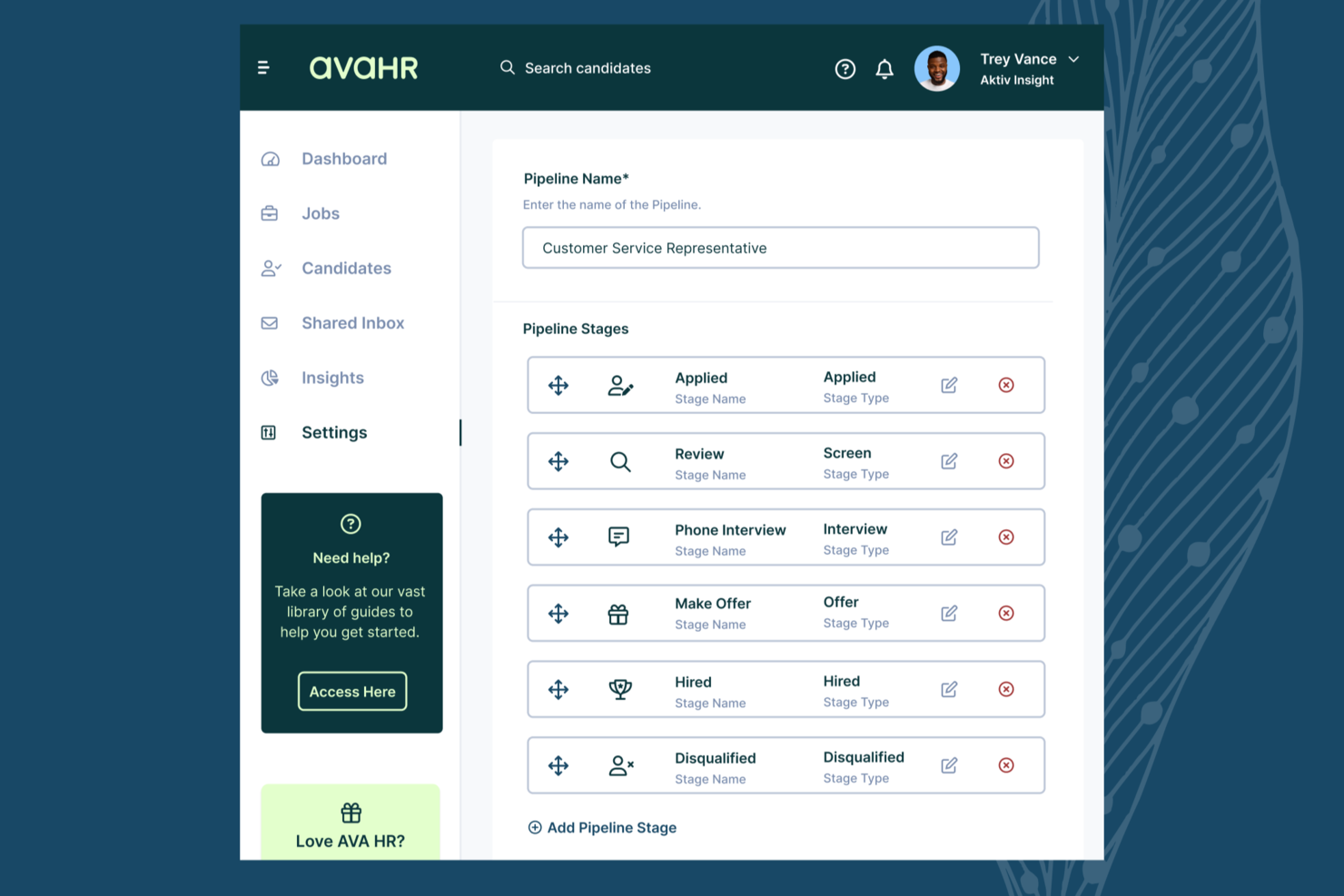
AvaHR is an applicant tracking system created specifically for trades businesses such as HVAC, electrical, and plumbing companies, with job board distribution, candidate communication tools, custom screening questionnaires, and hiring pipeline management.
Who Is AvaHR Best For?
AvaHR works well for small to mid-sized trades contractors hiring skilled field workers in industries such as HVAC, electrical, plumbing, and restoration.
Why I Picked AvaHR
I've included AvaHR in my top picks because its automated candidate communication tools are genuinely well-suited to how trades hiring works. Pipeline stage triggers let you automatically send texts or emails when a candidate moves to a new hiring stage, so a field candidate who applies for an HVAC tech role gets an interview confirmation the moment you move them forward—no manual follow-up needed. I also like that you can build SMS templates for each stage, which matters in trades where candidates rarely check email but respond to texts within minutes.
AvaHR Key Features
- One-click job board distribution: Post open roles to 100+ job boards at once, including niche and premium sites, from a single dashboard.
- Culture profiles: Build a branded hiring page with photos and videos to highlight job sites, trucks, and team culture for prospective field hires.
- Employee referral tracking: Log and track employee referrals within the platform to ensure the right person receives credit for a referred hire.
- AI candidate scoring: Rank applicants based on fit so the strongest candidates appear at the top of your pipeline.
AvaHR Integrations
AvaHR connects with a range of apps through Zapier, including Gusto, BambooHR, Checkr, Slack, Google Calendar, Calendly, Salesforce, HubSpot, Microsoft Teams, and ADP Workforce Now.
Pros and Cons
Pros:
- Set up hiring pipelines tailored to role or location
- Create custom application forms with required and optional fields
- Post to 100+ job boards with one click
Cons:
- Custom candidate search filters are not available
- Fillable PDF forms cannot be uploaded
Best for user-friendly hiring pipelines

Breezy HR is a cloud-based applicant tracking system for trades that offers drag-and-drop pipeline management, automated candidate sourcing, customizable workflows, and team collaboration tools for hiring.
Who Is Breezy HR Best For?
Breezy HR suits small and mid-sized trade businesses looking for straightforward recruiting tools and collaborative hiring workflows.
Why I Picked Breezy HR
I picked Breezy HR because I can visualize every stage of my trade hiring process with its drag-and-drop pipeline builder, set up automated candidate stage progressions, and run interview scheduling within one organized dashboard.
Breezy HR Key Features
- Job board posting: Publish openings to dozens of popular job boards.
- Candidate questionnaires: Build custom screening forms for applicants.
- Team scorecards: Allow your hiring team to rate candidates on set criteria.
- Background check integration: Order background checks directly from candidate profiles.
Breezy HR Integrations
Breezy HR offers native integrations with Google Workspace, Microsoft 365, Slack, BambooHR, ADP, Zapier, Indeed, Checkr, and LinkedIn. An API is available for custom integrations.
Pros and Cons
Pros:
- Automated job posting to major job boards
- Built-in text messaging for candidate outreach
- Drag-and-drop hiring stage customization
Cons:
- Limited layout personalization in the career portal
- Offer letter templates require manual editing

JazzHR
Best for hiring process control in growing teams
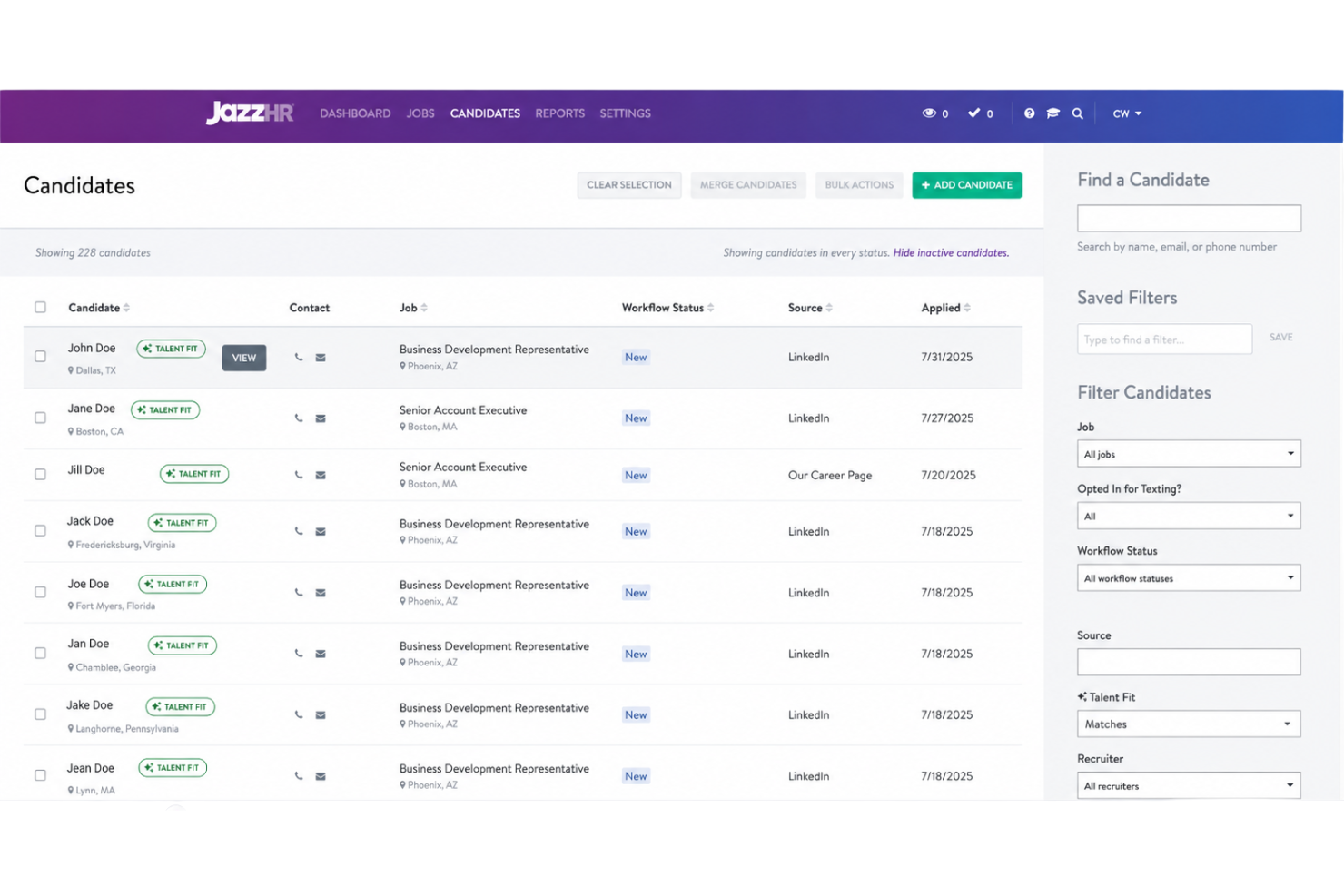
JazzHR is an applicant tracking system designed for small and midsize trade businesses, offering job posting, interview scheduling, candidate pipeline management, and tools for customizable hiring workflows.
Who Is JazzHR Best For?
JazzHR suits growing trade businesses and HR teams that need detailed process control for volume hiring and role-based workflow customization.
Why I Picked JazzHR
I picked JazzHR as one of the best because I can map custom approval workflows, lock down hiring permissions by user role, and set tailored job templates for multiple trades positions as our team grows.
JazzHR Key Features
- Candidate texting: Message candidates directly from within the platform.
- Job board syndication: Post openings to dozens of job boards in one step.
- Resume parsing: Extracts candidate information for detailed review.
- Interview feedback forms: Collect structured feedback from interview teams.
JazzHR Integrations
Integrations include LinkedIn, Indeed, Glassdoor, Monster, Google Workspace, Slack, Zoom, ADP, Paycor, and QuickBooks.
Pros and Cons
Pros:
- Easy applicant tracking for high-volume positions
- Workflow automation for candidate screening and emails
- Customizable hiring pipelines for different trade roles
Cons:
- Limited built-in analytics without an extra module
- Manual setup required for permission management

Best for collaborative candidate evaluations
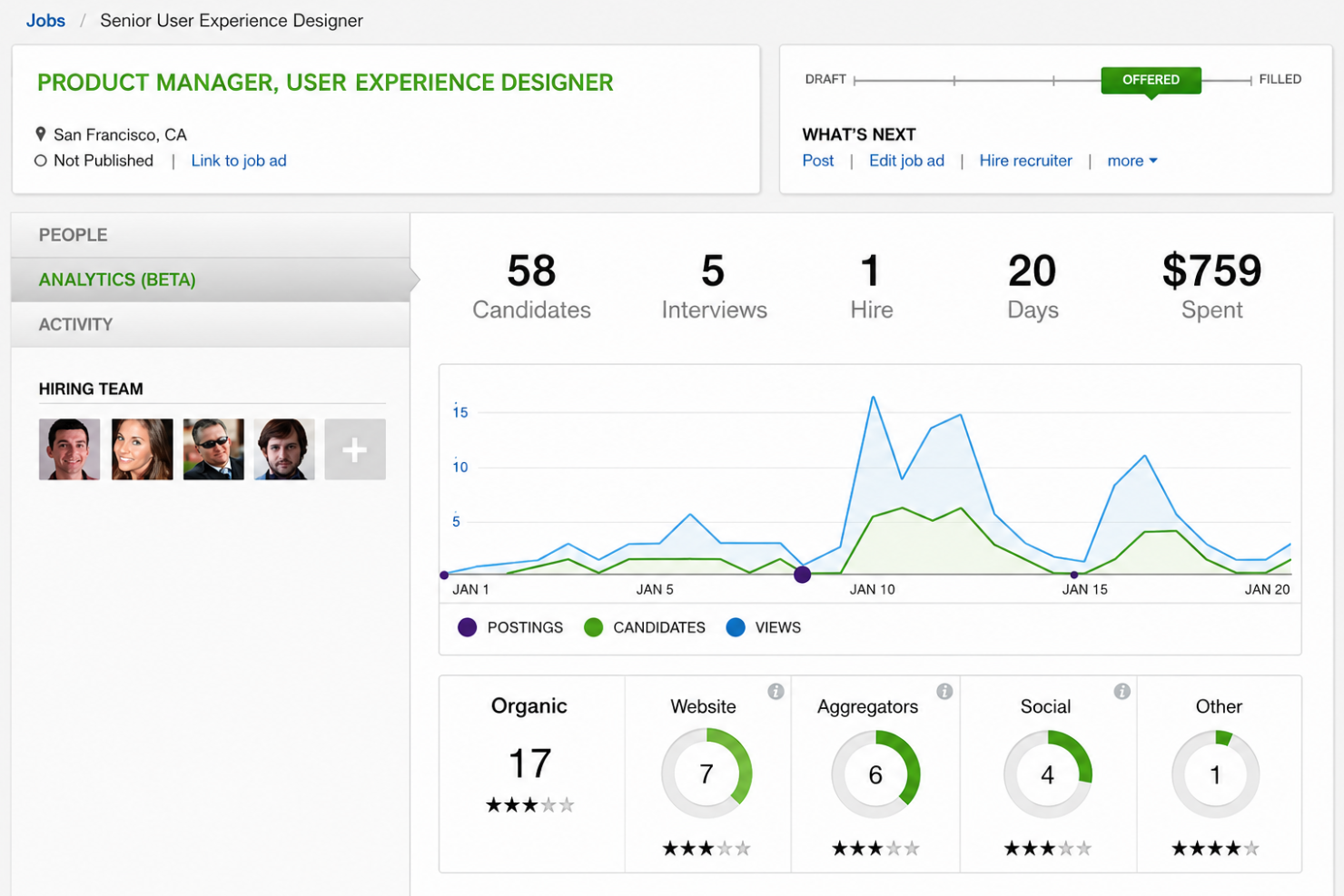
SmartRecruiters is an applicant tracking system that lets teams manage job postings, source candidates, organize interviews, gather feedback, and collaborate on hiring workflows in one centralized platform.
Who Is SmartRecruiters Best For?
SmartRecruiters fits midsize to large organizations with distributed hiring teams that need structured collaboration in candidate evaluation and feedback.
Why I Picked SmartRecruiters
I picked SmartRecruiters as one of the best because I can assign hiring team members to shared candidate scorecards, set up structured evaluation steps, and aggregate interview feedback in real time. That helps us make consensus-driven hiring decisions.
SmartRecruiters Key Features
- Custom careers site builder: Design company-branded career pages without coding.
- Job board posting: Post jobs to hundreds of sites in one step.
- Offer management tools: Generate, send, and track digital job offers.
- Candidate self-scheduling: Let candidates pick their own interview times.
SmartRecruiters Integrations
SmartRecruiters offers native integrations with LinkedIn, Indeed, Glassdoor, Google Hire, Slack, DocuSign, SAP SuccessFactors, ADP, Gmail, and Outlook, and provides an API for custom integrations.
Pros and Cons
Pros:
- Structured rating and comment capture on candidates
- Centralized feedback collection for interview panels
- Assign multiple reviewers with role-based permissions
Cons:
- Limited search filtering on historical applicants
- Workflow automations require admin configuration
Jobvite
Best for integrated sourcing and onboarding

Jobvite is an applicant tracking platform for trade businesses that covers candidate sourcing, job posting, recruitment marketing, interview management, automated screening, and onboarding workflows.
Who Is Jobvite Best For?
Jobvite is a strong choice for large and mid-sized trade businesses that need advanced candidate sourcing and onboarding in one platform.
Why I Picked Jobvite
I picked Jobvite as one of the best because I can source candidates from multiple channels, automate talent pipelines, and move new hires straight into onboarding without leaving the platform. That integrated approach improves process consistency for trades hiring.
Jobvite Key Features
- Job requisition templates: Build and customize requisitions for different roles and departments.
- Mobile recruiting app: Access candidate pipelines and manage hiring tasks on the go.
- Automated interview scheduling: Coordinate and confirm interviews with candidates and interviewers automatically.
- Analytics and reporting dashboards: Track recruiting metrics with pre-built and custom visual reports.
Jobvite Integrations
Jobvite offers native integrations with LinkedIn, Indeed, Glassdoor, Google Hire, Microsoft Outlook, ADP, Workday, and DocuSign. An API is available for custom integrations.
Pros and Cons
Pros:
- Built-in offer letter and e-signature management
- Strong automated screening and candidate ranking tools
- Customizable workflow templates for skilled labour hiring
Cons:
- Requires formal software training
- Integration requires developer support
Arcoro
Best for job kiosk hiring for field workers
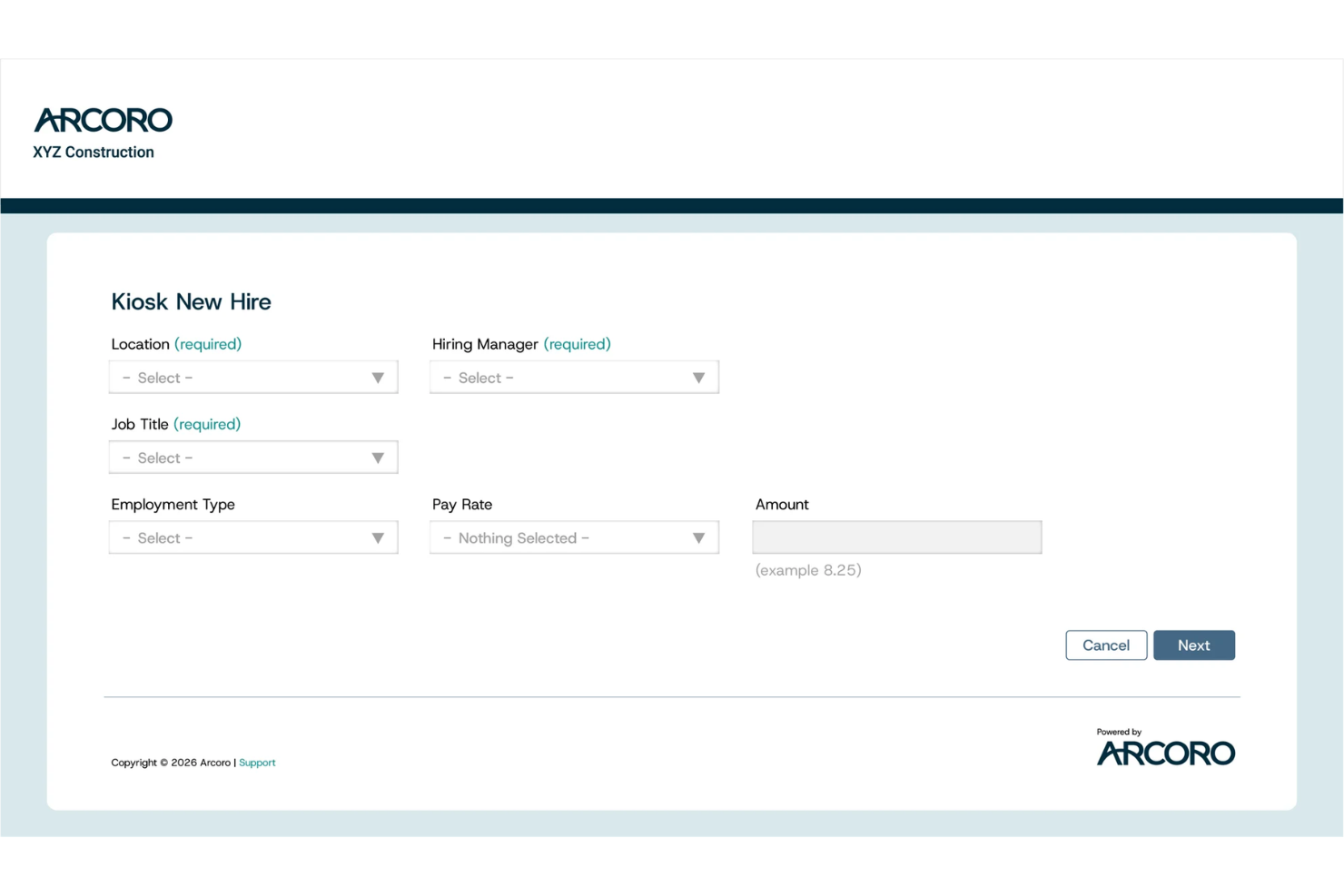
Arcoro is an applicant tracking system purpose-built for trades, giving hiring teams tools for job kiosks, applicant organization, compliance, and workflow automation within a single platform.
Who Is Arcoro Best For?
Arcoro is a solid fit for construction and trade businesses hiring large field teams, especially those needing kiosk-based application workflows.
Why I Picked Arcoro
I picked Arcoro as one of the best because I like having job kiosk workflows for on-site applications, plus compliance tracking and automated task assignments that make high-volume field hiring much more manageable.
Arcoro Key Features
- Mobile application support: Let candidates apply and complete onboarding directly from mobile devices.
- Custom hiring workflows: Configure step-by-step recruiting processes for different roles and locations.
- Job board posting integrations: Share job listings to multiple boards directly from the platform.
- EEO and OFCCP reporting: Generate compliance reports required for federal contract and construction hiring.
Arcoro Integrations
Arcoro offers native integrations with Sage 300 CRE, Procore, Viewpoint Vista, QuickBooks, and several payroll and HRIS systems. An API is available for custom integrations.
Pros and Cons
Pros:
- Automated communication with applicants at each stage
- Built-in compliance reporting for federal contractors
- Kiosk mode simplifies onsite candidate applications
Cons:
- Navigation requires a learning period
- Mobile interface sometimes lags on older devices


Paradox is an applicant tracking system for trades that offers automated job posting, conversational application flows, screening, scheduling, and candidate management through AI-powered chat and mobile interfaces.
Who Is Paradox Best For?
Paradox fits hourly workforce recruiters and hiring managers in industries like retail, hospitality, and skilled trades who prioritize mobile-first, high-volume candidate engagement.
Why I Picked Paradox
I picked Paradox as one of the best because I can connect with trade candidates instantly through conversational SMS and mobile chat, automate basic screening on any device, and let candidates schedule interviews without email back-and-forth.
Paradox Key Features
- Automated job requisition workflows: Manage role approvals and postings through customizable digital flows.
- Dynamic careers pages: Build mobile-optimized job sites that update automatically from open positions.
- Reference check automation: Collect and process candidate references with interactive mobile forms.
- Analytics dashboards: Track hiring metrics and messaging engagement in real time.
Paradox Integrations
Paradox offers native integrations with Workday, UKG, SAP SuccessFactors, Oracle, ADP, iCIMS, Greenhouse, and Lever and provides an API for custom integrations.
Pros and Cons
Pros:
- Automation for bulk hiring and trades-specific roles
- Fast scheduling through text message conversations
- Conversational AI supports real-time candidate screening
Cons:
- Onboarding workflows require manual setup
- Reporting lacks custom query support
hh2
Best for construction applicant tracking

hh2 is an applicant tracking system designed for construction teams, offering tools for posting jobs, collecting applications, managing candidate pipelines, and coordinating hiring documentation.
Who Is hh2 Best For?
hh2 suits construction companies needing to centralize applicant tracking, job postings, and onboarding workflows across multiple field projects.
Why I Picked hh2
I picked hh2 as one of the best because I can link applicant tracking directly to ongoing construction projects, filter candidates by project or location, and manage hiring documentation that aligns with our current builds—making daily field hiring easier to coordinate.
hh2 Key Features
- Job posting management: Publish job listings to a branded careers page from within the system.
- Custom application forms: Build application forms tailored to unique construction roles and requirements.
- Collaborative applicant notes: Let multiple team members add notes and feedback to candidate profiles.
- Document storage: Store applicant resumes, certifications, and onboarding forms in organized candidate records.
hh2 Integrations
Integrations include Sage Intacct, Sage 300 Construction, Sage 100 Construction, Acumatica, Viewpoint Spectrum, Foundation, Viewpoint Vista, ComputerEase, and CMiC.
Pros and Cons
Pros:
- Bulk upload features for resumes and forms
- Customizable construction-focused application workflows
- Tracks applicant status at the project level
Cons:
- Limited export options for applicant data
- No built-in multilingual application support
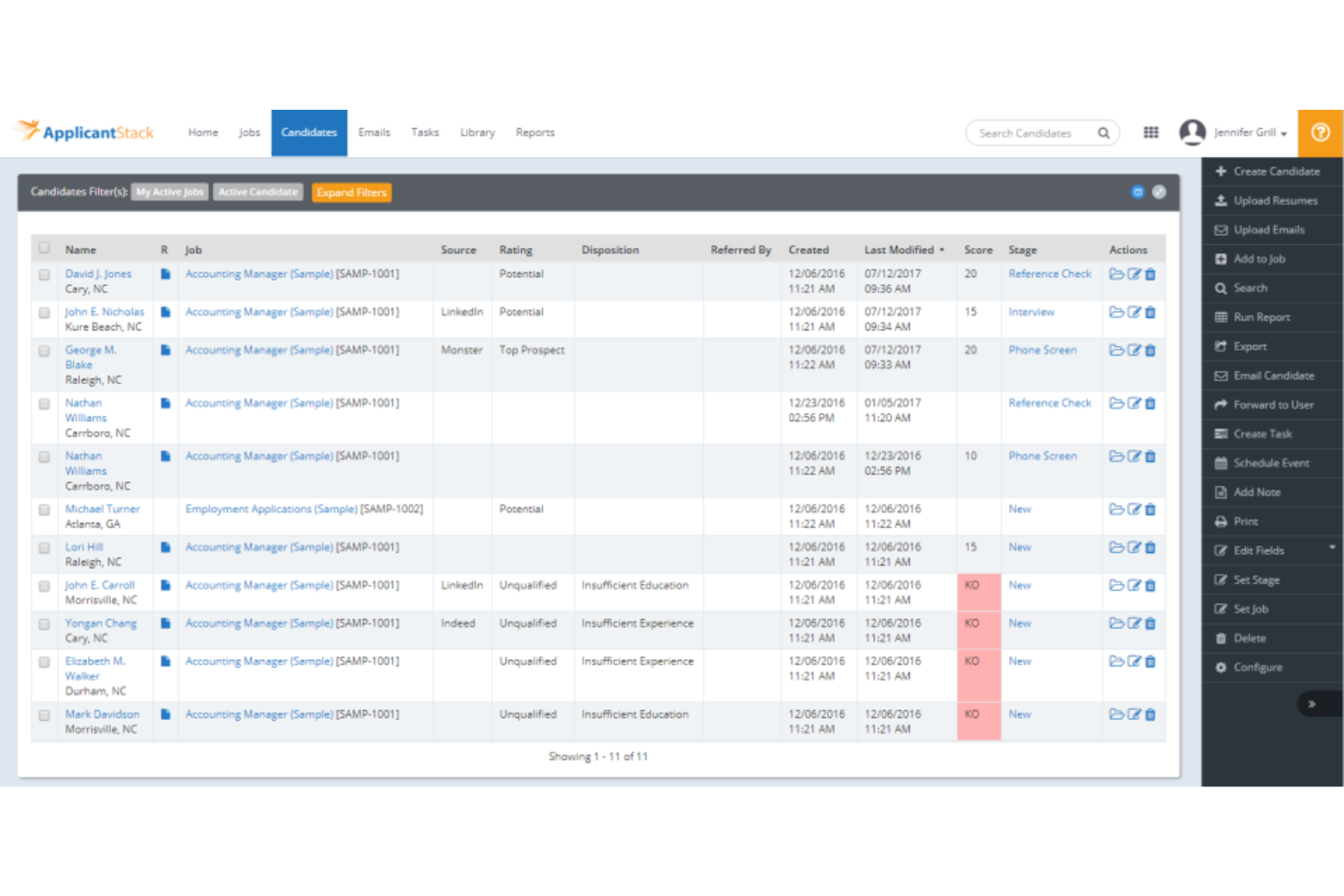
ApplicantStack is an applicant tracking system for trades that provides job posting, resume management, candidate communication, interview scheduling, and configurable workflow tools for both recruiting and onboarding.
Who Is ApplicantStack Best For?
ApplicantStack suits HR managers at small to midsize trade businesses who need a fast-to-launch applicant tracking system with customizable recruitment workflows.
Why I Picked ApplicantStack
I picked ApplicantStack because I can launch new job postings in just a few clicks, adapt application workflows for different trade roles, and quickly configure custom screening questionnaires to support trade-specific hiring processes.
ApplicantStack Key Features
- Automated email templates: Communicate with candidates using customizable message templates.
- Interview scheduling calendar: Coordinate interviews with candidates and team members directly inside the platform.
- Resume parsing: Import and organize applicant resumes automatically for faster review.
- EEO and compliance tracking: Track equal employment opportunity data and support reporting for regulatory compliance.
ApplicantStack Integrations
ApplicantStack offers native integrations with Checkr, ZipRecruiter, BambooHR, Google Calendar, Outlook, Indeed, Monster, and QuickBooks, and provides an API for custom integrations.
Pros and Cons
Pros:
- Built-in applicant communication and interview scheduling
- Fast job board distribution and posting
- Customizable hiring workflows for diverse trade roles
Cons:
- Reporting tools lack visual dashboards
- Lacks passive candidate discovery

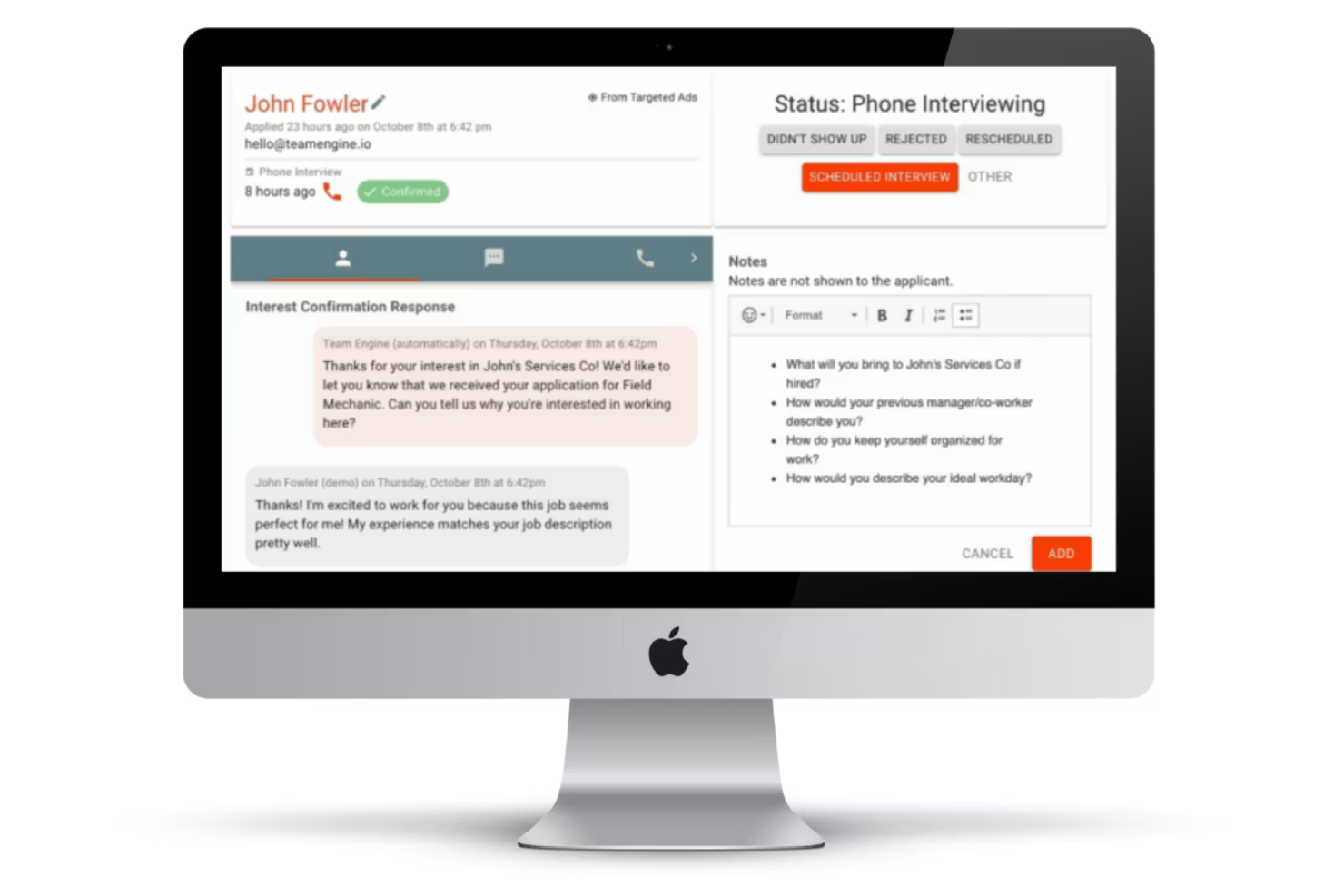
Team Engine is an applicant tracking system for skilled labour and trades that offers automated outreach, text-based communication, application management, and screening tools built specifically for field hiring teams.
Who Is Team Engine Best For?
Team Engine fits hiring managers and HR in field service, construction, and skilled trades who need to coordinate outreach with blue-collar candidates at scale.
Why I Picked Team Engine
I picked Team Engine as one of the best because I can automate text and email outreach to skilled candidates, set up personalized follow-ups for field roles, and manage responses from a shared team inbox.
Team Engine Key Features
- Applicant texting history: View complete text message histories with every applicant in one thread.
- Automated resume scoring: Screen applicants automatically based on predefined skill or certification keywords.
- Referral program management: Launch and track employee referral initiatives within the platform.
- Team notes and tagging: Add collaborative notes and tags to candidates for easier handoffs between hiring managers.
Team Engine Integrations
Integrations include Indeed, ZipRecruiter, Craigslist, Facebook, Instagram, and Google.
Pros and Cons
Pros:
- Provides compliance tools for federal contractors
- Tracks employee referrals inside the platform
- Automated texting speeds up field hiring
Cons:
- Limited reporting customization options
- No built-in job board syndication
Other Applicant Tracking Systems For Trades
Here are some additional applicant tracking systems for trades options that didn’t make it onto my shortlist, but are still worth checking out:
- Skillit
For sourcing craft professionals
- Workable
For AI-powered passive candidate sourcing
- Zoho Recruit
For cross-business platform compatibility
- Teamtailor
For advanced employer branding tools
- Pinpoint
For parallel multi-location hiring
- Rippling
For managing global workforce data
- Deel Payroll
For multi-currency payroll support
- ClearCo
For unified talent management
- Paycor
For flexible workflows by industry
- BambooHR
For in-house customer support


How I Evaluate Applicant Tracking Systems for Trades
I split my evaluation into two layers: baseline criteria a tool must hit—like mobile apply, credential tracking, and trades job board syndication—and differentiators that separate the best options.
Core Functionality (Table Stakes For This List)
When I'm selecting tools for my list, I rank each one on a scale from 0 (does not offer the functionality) to 5 (excels in this area) for each core functionality listed below. Then, I calculate the tool's total score into a percentage. Each tool needs to achieve a minimum total score of 55% to be considered for inclusion.
- Trades Job Distribution: I check whether a tool can syndicate postings to trades-specific boards like ConstructionJobs or iHireConstruction, not just generic sites like Indeed or LinkedIn.
- Mobile Candidate Application: Most tradespeople apply from their phones between jobs, so I look for text-to-apply, QR code scanning, and short-form flows that skip account creation.
- Applicant Pipeline Management: A plumbing contractor hiring across six service areas has different needs than a GC staffing one site, so I evaluate multi-pipeline and bulk-action support.
- Credential & Compliance Tracking: Structured fields for licenses, certs, and safety training matter here. I look for expiration alerts and document uploads, not just free-text notes.
- Interview & Hiring Workflow: Foremen and supers are often part of the hiring loop, so I evaluate whether scheduling, scorecards, and SMS communication work on mobile for field managers.
- Onboarding & HR/Payroll Integration: I look for connections to construction-oriented systems like Procore, Viewpoint, or Arcoro, plus built-in I-9 and E-Verify workflows for day-one readiness.
Once I have a list of tools that meet this criteria, I consider what sets each platform apart.
Differentiating Factors (What Sets Vendors Apart)
Here's how I compare and contrast different vendors:
Standout Features
Employee referral tools are a big deal in trades, where the best hires often come from existing crew members. I look for built-in referral programs that make it easy for field workers to share openings via text or a simple link. Talent pool and rehire tracking also carries weight—when a GC wraps a project and needs to ramp back up, pulling from a database of past hires saves weeks. Text-first recruiting rounds this out, since two-way SMS campaigns and text-to-apply reach tradespeople where they actually are.
Beyond Features
Construction tech stack compatibility matters. I check whether a platform connects to systems like Procore, Viewpoint, or Sage that trades firms already rely on daily. Implementation and field adoption is another factor I weigh, because a tool that requires weeks of training won't get buy-in from foremen on a job site. Pricing structure also plays a role, especially for contractors whose headcount swings seasonally. Per-job or per-posting models tend to fit trades firms better than flat per-seat pricing that penalizes hiring surges.
How to Choose Applicant Tracking Systems For Trades
It’s easy to get bogged down in long feature lists and complex pricing structures. To help you stay focused as you work through your unique software selection process, here’s a checklist of factors to keep in mind:
| Factor | What to Consider |
|---|---|
| Scalability | Can the system handle seasonal spikes in hiring, multiple job sites, or business growth without forcing a move to a new tool or contract? |
| Integrations | Does it connect with your payroll, HRIS, background check, or scheduling tools without manual workarounds or duplicate data entry? |
| Customizability | Will you be able to tailor application forms, workflows, and job templates to match trade-specific needs and varied roles? |
| Ease of use | Can recruiters, hiring managers, and field staff navigate the interface and complete tasks with minimal training or IT support? |
| Implementation and onboarding | How quickly can you get up and running? Does the vendor offer training, migration services, or guides to help your team transition smoothly? |
| Cost | Are you paying for features you won’t use? Factor in overage fees, per-user costs, future upgrades, and hidden charges before signing a contract. |
| Security safeguards | Does the ATS comply with relevant data protection standards (like GDPR) and offer user-level permissions, audit logs, and secure data storage? |
| Support availability | When problems arise, can you easily reach a real person during your hiring hours—especially if your team works nights or weekends? |
What Are Applicant Tracking Systems For Trades?
Applicant tracking systems for trades are software platforms that help businesses in skilled and manual labour sectors manage job postings, applications, and candidate communications.
These systems support efficient recruiting, screening, and hiring for multiple jobs and locations, giving HR and operations teams better process control and applicant organization.
Features
When selecting applicant tracking systems for trades, keep an eye out for the following key features:
- Job posting management: Lets you create, schedule, and publish open positions on multiple job boards or your company website from a single dashboard.
- Applicant database: Collects and stores candidate profiles, resumes, certifications, and communication logs for easy search and review.
- Resume parsing: Automatically extracts and organizes key details from uploaded resumes, saving time during the screening process.
- Interview scheduling: Helps you coordinate interviews with candidates and hiring managers, sending automatic reminders and allowing for easy rescheduling.
- Custom hiring workflows: Enable you to design step-by-step recruiting processes tailored to different skilled trades roles or job sites.
- Collaborative evaluation: Allows team members or foremen to score and leave feedback on applicants directly within the system.
- Background checks integration: Connects with background screening services, letting you request and manage checks without leaving the platform.
- Offer management: Simplifies the creation, approval, and communication of job offers to successful candidates.
- Mobile accessibility: Let recruiters and managers access candidate information and move applications forward from mobile devices in the field.
- Reporting and analytics: Tracks key hiring metrics, such as time-to-hire or source of hire, to help you optimize recruitment strategies.
Benefits
Implementing applicant tracking systems for trades provides several benefits for your team and your business. Here are a few you can look forward to:
- Faster hiring cycles: Automated posting, resume parsing, and scheduling tools help you quickly identify and move skilled candidates through the pipeline.
- Improved applicant organization: A centralized database lets you track applications, certifications, and communication across multiple job sites and trades roles.
- Consistent hiring processes: Custom workflows and evaluation forms ensure your team follows standardized steps tailored to specific roles or projects.
- Simplified compliance management: Integrated document storage and background check features make it easier to meet regulatory or project requirements.
- Enhanced collaboration Built-in tools for communication and feedback allow recruiters, managers, and foremen to stay aligned during hiring decisions.
- Data-driven recruitment: Reporting and analytics features give you insight into hiring metrics so you can fine-tune ATS solutions for better results.
- Mobile accessibility for field teams: Mobile-friendly platforms let busy recruiters and managers review candidates and advance hiring from anywhere, regardless of company size.
Costs and Pricing
Selecting applicant tracking systems for trades requires an understanding of the various pricing models and plans available. Costs vary based on features, team size, add-ons, and more. The table below summarizes common plans, their average prices, and typical features included in applicant tracking systems for trades solutions:
Plan Comparison Table for Applicant Tracking Systems For Trades
| Plan Type | Average Price | Common Features |
|---|---|---|
| Free Plan | $0 | Post a limited number of jobs, manage basic applicant data, and access limited support. |
| Personal Plan | $20-$60/user/month | Post more jobs, access customizable workflows, use resume parsing, and receive standard support. |
| Business Plan | $50-$120/user/month | Bulk candidate imports, advanced reporting, background check integration, team collaboration tools, and email automation. |
| Enterprise Plan | $100-$200/user/month | Unlimited jobs, dedicated account manager, premium support, custom integrations, advanced compliance tools, and audit logs. |
Applicant Tracking Systems For Trades FAQs
Here are some answers to common questions about applicant tracking systems for trades:
Do applicant tracking systems for trades support high-volume hiring?
Yes, most ATS software options are built to handle large numbers of job applications across multiple job sites or open roles. Tools often include bulk actions, status updates, and resume parsing to help your recruiting teams manage and process high volumes without missing qualified candidates. This removes bottlenecks in your talent acquisition pipeline when you need to publish a new job description or job opening and secure top talent quickly.
Can trades-focused ATS platforms integrate with payroll or scheduling software?
Yes, many ATS systems for trades offer integrations with payroll, scheduling, and core human resources software. Choosing an all-in-one recruitment platform lets you move your best-fit hires quickly into onboarding and payroll processes, connecting your existing tech stack and management systems while cutting down on manual data entry and time-consuming errors.
Are applicant tracking systems for trades mobile-friendly for field teams?
Yes, finding the right ATS often means looking for solutions that provide mobile apps or mobile-responsive dashboards. This allows hiring managers and recruiters in the field to review candidate data, update candidate tracking statuses, and communicate without needing a desktop computer or messy spreadsheets. It also keeps communication fast, which greatly improves the overall candidate experience.
How do these systems help maintain compliance with trade certifications?
Applicant tracking systems for trades commonly let you store, track, and verify candidate certifications and licenses directly within the recruitment software. Some also include automated notifications for expirations or document uploads to help you stay compliant with industry regulations before anyone sets foot on a job site.
What kind of training and support is available for users?
Most vendors offer onboarding support, training videos, step-by-step guides, and access to live chat or phone support. Modern systems might even incorporate modern hiring tools like native video interviewing or features to blast openings to social media. Some vendors provide dedicated account managers to help companies of any size, from small businesses and growing startups managing a custom crm to enterprise customers, successfully navigate the onboarding process.