

10 Best Employee Monitoring Software of 2026: Compared

10 Best Employee Monitoring Software Shortlist


The best employee monitoring software helps you gain real-time visibility into how work gets done, so you can improve productivity, protect company data, and support your people without micromanaging.
If you're tired of juggling spreadsheets, struggling to spot bottlenecks, or unsure if your current tool is doing enough, you're not alone. Many HR teams rely on outdated methods or limited systems that don’t scale or surface the insights you need.
In this guide, I’ll walk you through top-rated employee monitoring tools that I’ve personally used or evaluated as an HR professional and software specialist. These picks are based on deep research combined with a focus on solving real-world pain points like time tracking, app usage visibility, and compliance reporting—so you can find the right fit faster.
Why Trust Our Software Recommendations
Our team has been testing and reviewing software since 2012. As HR experts ourselves, we know how difficult—and important—it is to choose the right software.
For this guide, we evaluated tools using hands-on testing and independent research, scoring tools using our selection criteria. We also draw on insights from industry thought leaders and practicing HR experts.
Our reviews reflect our human editorial judgment, not a sales pitch.
Expert reviewers:
Employee Monitoring Software Comparison Table
This comparison table summarizes pricing, trial, and demo details for my top employee monitoring software selections:
| Tool | Best For | Trial Info | Price | ||
|---|---|---|---|---|---|
| 1 | Best for monitoring productivity | Free demo + 7-day free trial available | From $8/user/month (billed annually) | Website | |
| 2 | Best for hybrid team productivity insights | Free demo + 14-day free trial available | From $10/user/month (billed annually) | Website | |
| 3 | Best for tracking location, time and job progress | 14-day free trial | From $29/month (billed annually) | Website | |
| 4 | Best for detecting policy violations | Free demo available | Pricing upon request | Website | |
| 5 | Best for tracking work hours, app usage, and productivity | 14-day free trial + free demo available | From $3.99/user/month (billed annually) | Website | |
| 6 | Best for automatic project tracking | 14-day free trial + free demo available | From $6.42/user/month (billed annually) | Website | |
| 7 | Best for real-time desktop monitoring | Free demo + 14-day free trial availbale | From $6.67per user/month (billed annually) | Website | |
| 8 | Best for protecting sensitive information and preventing data breaches | Free demo + free trial available | From $18/user/month (billed annually) | Website | |
| 9 | Best for visually tracking time and logging employee activities | Free plan available | From $4.99/user/month | Website | |
| 10 | Best for continuous capture of work activity. | 14-day free trial | From $14/month (billed annually) | Website |

Best Employee Monitoring Software Reviews
Here are my detailed summaries of the best employee monitoring software solutions that made it into my top 10 list, including notes on why I picked them. Each review offers a detailed look at the key features, integrations, and ideal use cases of each system to help you find the best tool for you.
Best for monitoring productivity
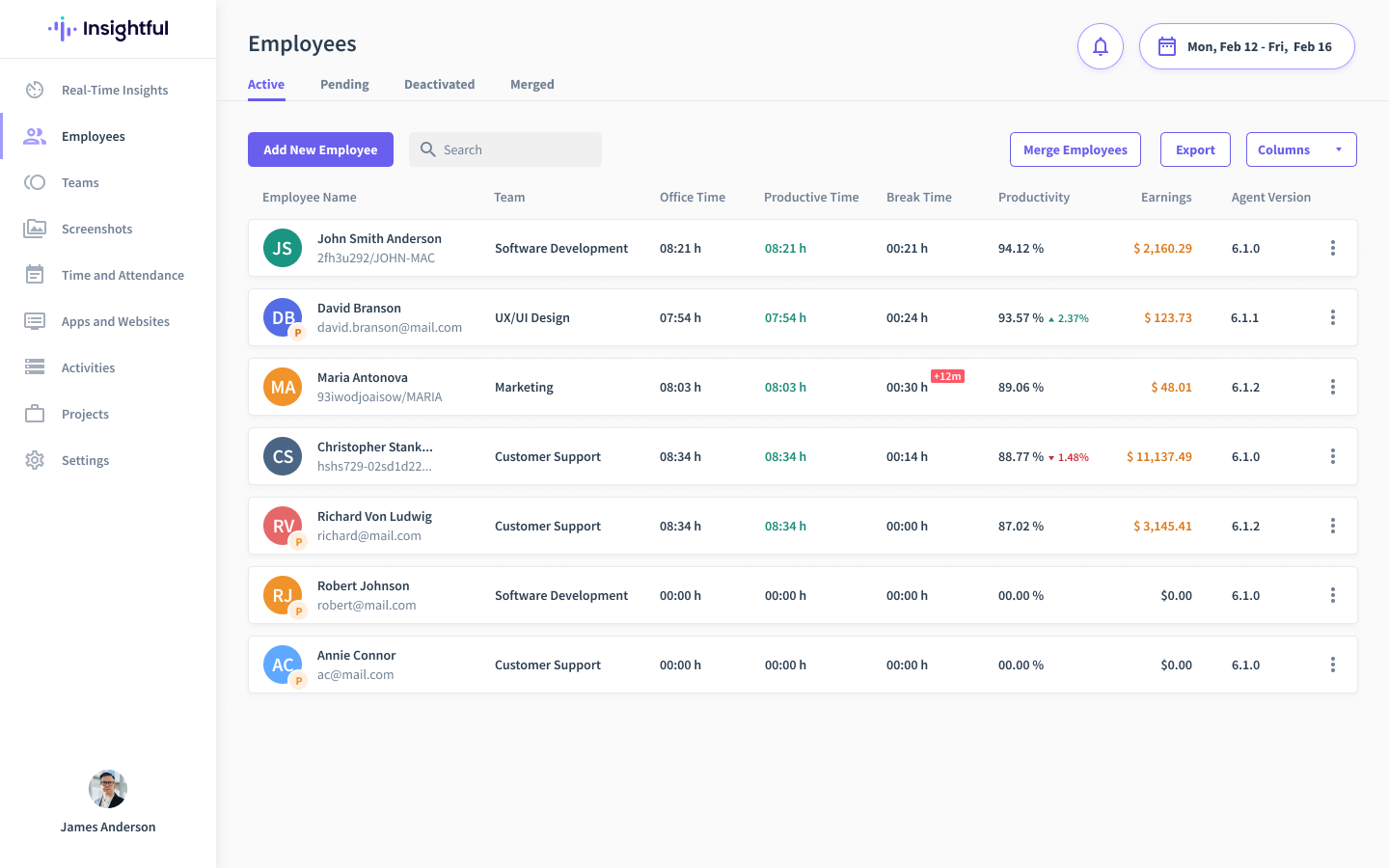
Insightful gives HR teams and business leaders a clear view of employee activity, helping organizations in tech, finance, and remote work environments track productivity, manage attendance, and analyze workflow patterns for smarter workforce decisions.
Who Is Insightful Best For?
Insightful is a strong fit for mid-sized to large companies managing remote or hybrid teams who need detailed visibility into how work time is actually being spent.
Why I Picked Insightful
Insightful earns its spot on my shortlist because of how precisely it tracks where work time actually goes. I picked it specifically for productivity monitoring because it automatically categorizes apps and websites as productive, unproductive, or neutral—and you can customize those labels by role, so a developer's productive apps look different from a salesperson's. I also like the real-time activity dashboard, which lets my team see who's active, idle, or offline at any given moment without manually checking in.
Insightful Key Features
- Screen monitoring: Capture periodic screenshots and record app usage to give managers visual context around employee activity during work hours.
- Time and attendance tracking: Monitor clock-in and clock-out times in real time to flag attendance gaps and ensure accurate records across remote and in-office teams.
- Automatic time mapping: Automatically allocate time to tasks and projects without manual input, reducing errors in time logs.
- Location insights: Segment productivity and activity data by work location to compare performance across remote, hybrid, and in-office employees.
Insightful Integrations
Integrations include Asana, Jira, Trello, BambooHR, ADP Workforce Now, Azure DevOps, GitHub, Google Workspace, Workday, and Okta.
Pros and Cons
Pros:
- Combines monitoring, time-tracking, and attendance
- Real-time insights into employee focus and activity levels
- Provides granular data on productive time
Cons:
- Interface can feel heavy for very small teams
- Reporting customization is somewhat limited
New Product Updates from Insightful
Insightful Expands MCP and HRIS Integrations
Insightful adds OAuth connections for ChatGPT and Microsoft Copilot Studio through its MCP Server, while HRIS integrations gain manager scope syncing in Beta. These updates expand AI access and automate permission management. For more information, visit Insightful’s official site.
 .
.
Best for hybrid team productivity insights

ActivTrak gives HR teams and business leaders real-time visibility into employee productivity, helping organizations with remote or distributed workforces understand work habits, identify bottlenecks, and support data-driven decisions about engagement and performance.
Who Is ActivTrak Best For?
ActivTrak is a strong fit for mid-sized companies managing hybrid or remote teams who need clear visibility into how work gets done across distributed environments.
Why I Picked ActivTrak
ActivTrak earns its spot on my shortlist because of how well it surfaces productivity patterns across hybrid teams—not just who's online, but how work time is being spent. I particularly like the Productivity Lab feature, which benchmarks individual and team focus time against organizational goals, so I can spot where people are stretched thin or disengaged before it becomes a retention issue. The workload balance reports are useful too, giving me a side-by-side view of output across in-office and remote employees without relying on gut feel.
ActivTrak Key Features
- Real-time activity monitoring: Track which applications and websites employees are actively using throughout the workday.
- Screen snapshots: Capture periodic screenshots of employee screens to provide visual context alongside activity data.
- Alerts: Set automated alerts that trigger when specific apps, URLs, or behaviors are detected.
- Team productivity dashboards: View aggregated productivity metrics across departments or groups in a single dashboard.
ActivTrak Integrations
Integrations include Microsoft Outlook, Google Calendar, Salesforce, Microsoft Teams, Slack, ServiceNow, Zendesk, Zoom, Microsoft Viva, Lattice, Qualtrics, and Jira Software.

Best for tracking location, time and job progress

Connecteam is a workforce management platform built for businesses with deskless or remote teams who need to track employee location, work hours, and job activities from a single mobile-friendly dashboard.
Who Is Connecteam Best For?
Connecteam is a strong fit for small to mid-sized businesses in field-based industries like construction, retail, and hospitality that manage large numbers of hourly or shift workers.
Why I Picked Connecteam
Connecteam earns its spot as one of the best on my shortlist because of how well it handles the full picture of remote employee monitoring—location, time, and job execution—in one mobile app. I particularly like the GPS breadcrumbs feature, which logs an employee's location trail while they're clocked in, so I can verify that a field worker stayed on-site throughout their shift. The geofencing feature takes this further by automatically clocking employees out when they leave a designated job site. I can also track time per job or project, which gives me a clear view of how work hours are being spent across different clients or locations.
Connecteam Key Features
- Task management: Assign, schedule, and monitor tasks for remote employees with due dates, checklists, and image attachments.
- Digital forms and checklists: Create custom forms for job reports, inspections, or incident logs that employees complete directly from their mobile devices.
- Employee scheduling: Build and publish shift schedules, assign employees to specific job sites, and track shift attendance in real time.
- In-app chat: Send direct or group messages to remote employees, with the ability to organize conversations by team, project, or location.
Connecteam Integrations
Integrations include QuickBooks, Gusto, Xero, ADP, Zapier, Wix, Lightspeed, PrismHR, Square, and BambooHR.
New Product Updates from Connecteam

Connecteam Expands Break and Timesheet Controls
Connecteam adds flexible break thresholds, personalized policies, auto-end options, a centralized exceptions report, and improved timesheet issue visibility to help teams manage breaks and timesheets more effectively. For more information, visit Connecteam’s official site.
 .
.
Teramind
Best for detecting policy violations

Teramind gives HR and IT teams in regulated industries a way to monitor employee activity, analyze behavior, and address insider threats with detailed tracking and automated alerts.
Who Is Teramind Best For?
Teramind is a strong fit for security-conscious organizations in finance, healthcare, and other regulated industries that need to monitor and manage insider risk.
Why I Picked Teramind
Teramind earns its spot as one of the best on my shortlist because of how precisely it handles policy violation detection. I like that it lets administrators build custom rules that trigger automated responses the moment a violation occurs—not just an alert, but an action such as blocking a message, redirecting a user, or locking them out until an admin reviews the incident. Few monitoring tools offer that level of control. I also rely on the smart rules engine, which lets my team set up compliance-related templates instead of building detection logic from scratch for every regulation we need to cover.
Teramind Key Features
- Screen recording and session playback: Capture and replay employee screen sessions to review activity in full context during investigations.
- User behavior analytics: Track behavioral patterns over time to identify anomalies and flag users who may pose an elevated risk.
- Productivity tracking: Monitor active vs. idle time, application usage, and website visits to measure how employees spend their workday.
- Optical character recognition (OCR): Scan on-screen text in images and documents to detect sensitive data exposure across monitored endpoints.
Teramind Integrations
Integrations include ServiceNow, Splunk, HP ArcSight, IBM QRadar, McAfee, LogRhythm, NetIQ, Microsoft Purview Information Protection, Jira, Zendesk, and Redmine.
Pros and Cons
Pros:
- Lets you set monitoring policies and alerts to act proactively
- Monitors apps, websites and network activity
- Tracks screen activity and keystrokes
Cons:
- Some customisation options may require technical support
- The depth of features means a steeper learning curve
Best for tracking work hours, app usage, and productivity
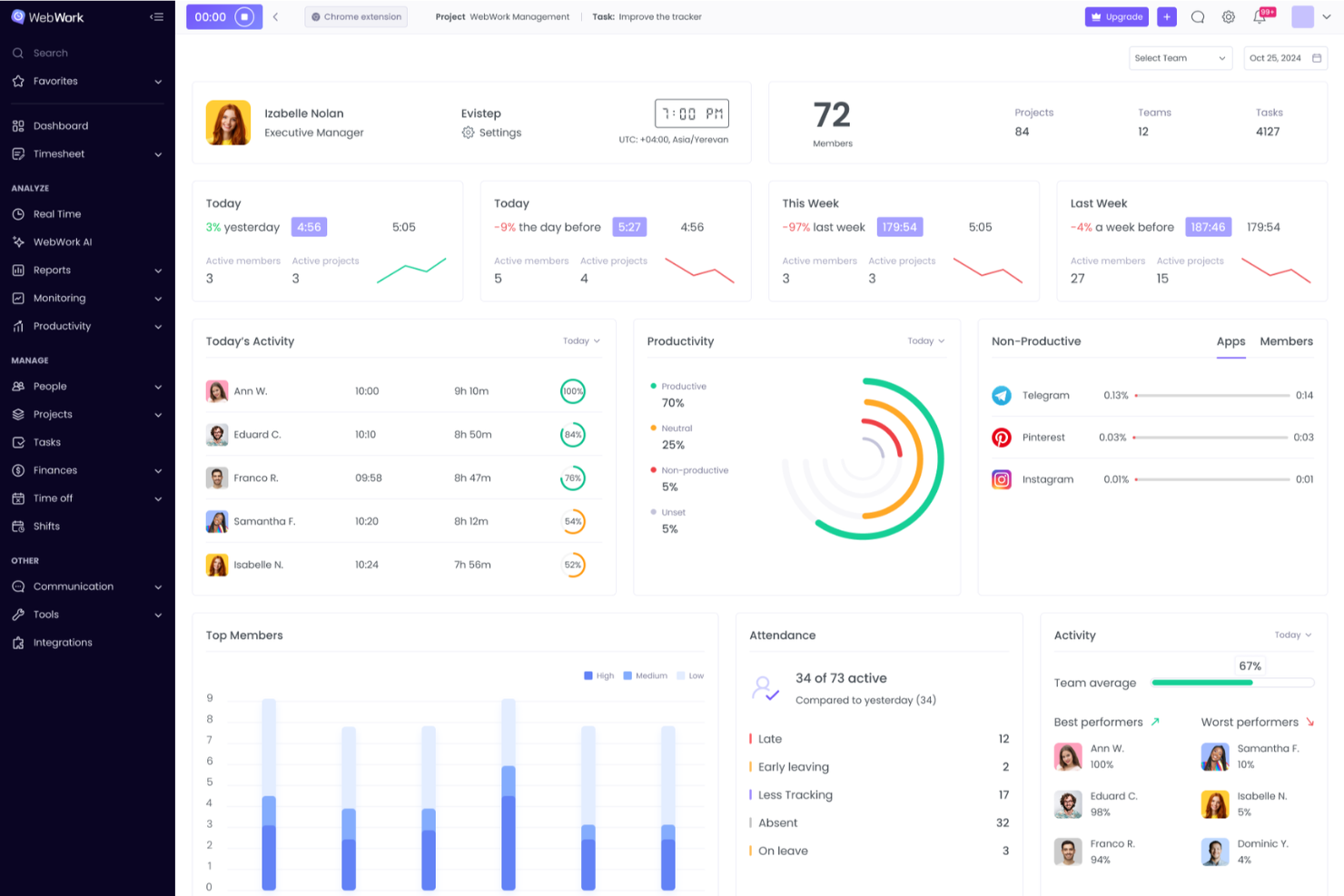
WebWork Time Tracker gives teams and managers in remote, hybrid, and office settings a way to monitor work hours, track app and website usage, and analyze productivity with detailed reports and visual data.
Who Is WebWork Time Tracker Best For?
WebWork Time Tracker suits small to mid-sized businesses managing remote or hybrid teams that require clear visibility into how work time is spent.
Why I Picked WebWork Time Tracker
WebWork Time Tracker earns its spot on my shortlist because of how much detail it captures about where work time actually goes. I like that the app and website tracking feature automatically categorizes platforms into productivity labels, so instead of manually reviewing usage logs, I can see at a glance whether my team is spending time on work-relevant tools or getting pulled into distractions. The activity level tracking goes a step further by measuring mouse clicks, scroll wheel use, and keyboard input frequency, giving me a minute-by-minute picture of engagement rather than just logged hours. On top of that, the unusual activity monitoring flags abnormal patterns automatically, which means I don't have to dig through reports to catch things like consistently low keyboard input during tracked hours.
WebWork Time Tracker Key Features
- Screenshots: Automatically captures screenshots at set intervals during tracked work sessions so you can review visual proof of activity.
- Attendance tracking: Logs employee check-in and check-out times and generates attendance reports across your team.
- Shift scheduling: Lets you create and assign work shifts directly in the platform so tracked hours align with expected schedules.
- Project and task time tracking: Assigns tracked time to specific projects or tasks so you can see how hours are distributed across work items.
WebWork Time Tracker Integrations
Integrations include Asana, Bitbucket, Azure DevOps, ClickUp, Deel, GitHub, Google Workspace, Jira, Slack, Trello, and QuickBooks.

DeskTime
Best for automatic project tracking
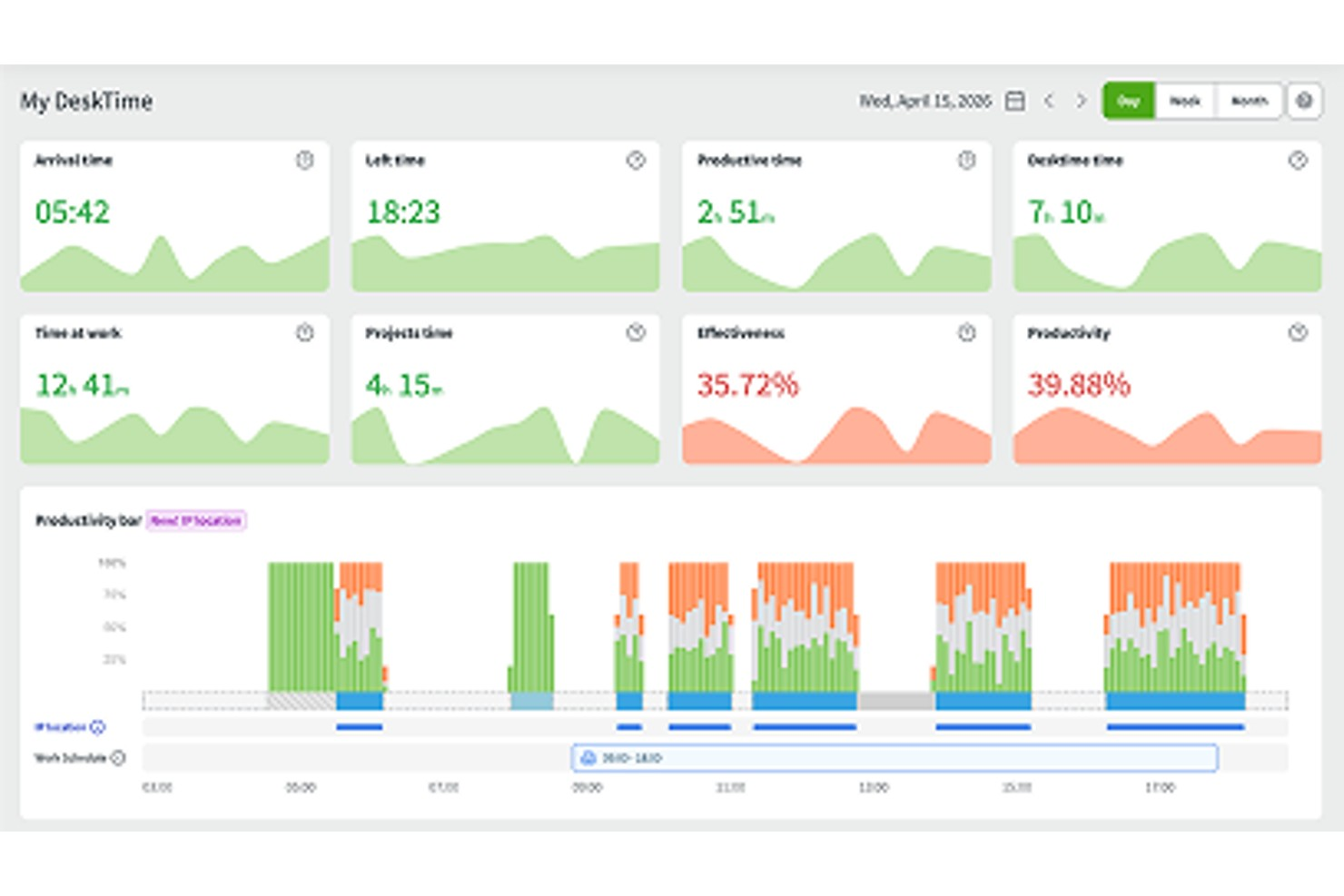
DeskTime is an automatic employee monitoring and time tracking platform that captures app and URL activity, measures productivity, tracks projects, and manages team schedules and absences across in-office, hybrid, and remote work setups.
Who Is DeskTime Best For?
DeskTime is a good fit for small to mid-sized teams that need a straightforward way to monitor employee time, track productivity, and manage schedules without heavy IT setup.
Why I Picked DeskTime
I've included DeskTime in my top picks because its project tracking is built directly into the automatic time monitoring layer, so time gets assigned to projects without requiring employees to manually log every session. When someone starts working on a task, they select the project in the desktop app and hit "Start," and DeskTime handles the rest. I also like that managers can add hourly rates per project, which makes client billing accurate down to the second. For teams running multiple concurrent projects, the ability to add up to 1,000 projects (or unlimited on the Enterprise plan) and see who contributed what gives you real visibility into workloads.
DeskTime Key Features
- App and URL tracking: Automatically logs every website and application employees use during work hours, categorized by productive, unproductive, or neutral status.
- Screenshots: Captures periodic screenshots of employee screens at set intervals, giving managers a visual record of activity throughout the workday.
- Productivity calculation: Assigns a real-time productivity score to each employee based on how their tracked apps and URLs are categorized.
- Offline time tracking: Lets employees log time spent on non-computer tasks, such as calls or meetings, directly within the app.
DeskTime Integrations
DeskTime offers a small set of native integrations, including Google Calendar, Outlook Calendar, Trello, GitLab, Asana, and Jira, and it connects with Zapier. An API is also available for custom integrations.
Pros and Cons
Pros:
- Tracks productive vs unproductive app usage
- Built-in shift and absence management
- Automatic time tracking requires no manual input
Cons:
- Limited offline time tracking capabilities
- No optional screenshot monitoring feature

Controlio gives HR teams and business leaders a way to monitor employee computer activity, track productivity, and address security risks with detailed insights and real-time visibility into daily workflows.
Who Is Controlio Best For?
Controlio suits small to mid-sized businesses that need straightforward, cloud-based tools to monitor remote or in-office employees across Windows and web environments.
Why I Picked Controlio
Controlio earns its spot on my shortlist because of how well it handles real-time desktop monitoring across distributed teams. I like that it captures live screenshots at set intervals, so I can see exactly what's on an employee's screen at any given moment without waiting for end-of-day reports. The real-time activity feed also shows active application usage and website visits as they happen, which is useful when I need to flag a potential policy violation promptly. That level of immediacy is what sets Controlio apart from tools that only surface historical data.
Controlio Key Features
- AI-powered productivity scoring: Automatically calculates productivity scores for individual users and departments based on tracked application and website activity.
- Keystroke logging: Records keystrokes across applications so you can review typed content as part of security investigations or policy reviews.
- Stealth mode: Runs the client agent invisibly in the background, with no visible icons in the taskbar or processes showing in Task Manager.
- App and web usage reports: Tracks time spent in specific applications and websites, with filters, categories, charts, and drill-down views for detailed analysis.
Controlio Integrations
Integrations are available through the Controlio API for custom connections with your applications and services.

Veriato
Best for protecting sensitive information and preventing data breaches
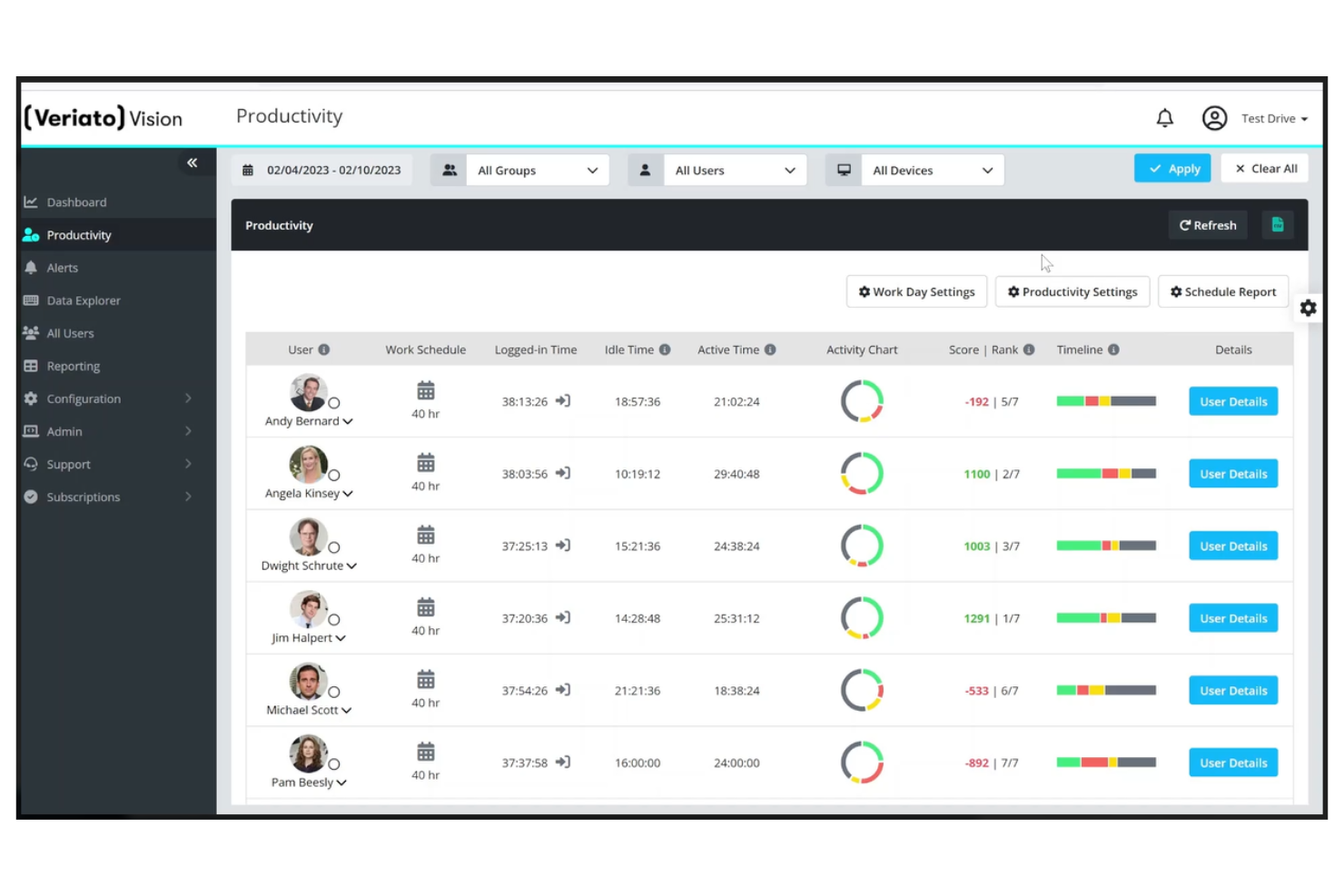
Veriato gives HR teams and IT leaders detailed visibility into employee activity, helping organizations in regulated industries monitor remote work, detect insider threats, and address compliance requirements.
Who Is Veriato Best For?
Veriato is a strong fit for security-conscious organizations in finance, healthcare, and other regulated industries that need to monitor employee behavior and protect sensitive data.
Why I Picked Veriato
I picked Veriato as one of the best because of how seriously it takes data protection at the activity level. I like that file and document tracking logs every action on local, removable, and cloud storage—so when sensitive files are downloaded, renamed, or moved to a USB drive, my team can see exactly what happened and when. Keyword-triggered screenshots are another feature I find genuinely useful, since they capture visual evidence the moment a flagged term appears, which is invaluable during a security investigation. Veriato also integrates with DLP and SIEM tools, so it fits into a broader security stack rather than sitting in isolation.
Veriato Key Features
- Email and chat monitoring: Tracks communications across email clients and messaging apps to flag policy violations or suspicious conversations.
- Idle and active time tracking: Logs how long an employee's computer is active or idle throughout the workday to surface productivity patterns.
- Web and application use categorization: Labels websites and applications as productive or unproductive to give managers a clear picture of how work time is spent.
- Real-time alerts: Sends notifications when employee activity matches predefined risk or productivity thresholds, so issues get flagged as they happen.
Veriato Integrations
Integrations include Microsoft Active Directory, Microsoft Exchange, Microsoft 365, Google Workspace, Splunk, IBM QRadar, Symantec DLP, Forcepoint DLP, and McAfee DLP; an API is available for custom integrations.

Clockify
Best for visually tracking time and logging employee activities

Clockify gives HR teams and managers a way to monitor employee work hours, track project activities, and review productivity trends with clear visual reports, making it a strong choice for businesses that need detailed oversight of remote or in-office teams.
Who Is Clockify Best For?
Clockify is a good fit for small to mid-sized businesses that need an affordable way to monitor employee time and activity across remote, hybrid, or in-office teams.
Why I Picked Clockify
I picked Clockify as one of the best because of how well it turns raw time data into something you can actually act on. The activity dashboard gives you a real-time view of who's working on what, broken down by project and billability status—so if someone on your team logs eight hours but half of it is unaccounted for, you'll see the gap immediately. I also like the auto tracker, which logs time spent across apps and websites and lays it out on a daily timeline. That kind of passive activity logging is genuinely useful when you need to verify how hours were spent without relying on manual input. The calendar view adds another layer, letting you spot gaps in tracked time visually rather than digging through rows of data.
Clockify Key Features
- Timesheet approvals: Managers can review, approve, or reject submitted timesheets before they're locked for payroll or reporting.
- Screenshots and activity tracking: Clockify captures periodic screenshots and records keyboard and mouse activity to verify employee engagement during work hours.
- GPS tracking: Track employee locations when they clock in and out, useful for field teams or employees working across multiple sites.
- Attendance and leave tracking: Log employee attendance, breaks, and time off in one place alongside tracked work hours.
Clockify Integrations
Integrations include QuickBooks, Jira, Google Calendar, Outlook, Asana, Trello, GitHub, Azure DevOps, ClickUp, and Monday.

Memtime
Best for continuous capture of work activity.

Memtime is an employee monitoring solution designed for teams and businesses that want automatic, accurate tracking of work activity without manual input, helping managers and professionals understand how time is spent across projects and applications.
Who Is Memtime Best For?
Memtime is a strong fit for freelancers, consultants, and professional services teams who need accurate, hands-off visibility into how billable hours are spent across projects.
Why I Picked Memtime
Memtime earns its spot on my shortlist because of how it handles continuous, automatic activity capture—it runs quietly in the background and records every app, document, and website you interact with, building a detailed timeline of your workday without any manual input. I like that this timeline isn't just a log; it lets you assign time blocks to specific projects after the fact, so nothing slips through the cracks. Local-first data storage keeps activity data on the user's device, addressing common privacy concerns about employee monitoring.
Memtime Key Features
- Project time budgets: Set time budgets for individual projects and track actual hours against them to flag scope creep early.
- Adjustable timeline intervals: Review your activity timeline in 5- or 6-minute increments, useful for billing in professions that require precise intervals, such as legal work.
- Multi-device support: Install Memtime on as many devices as needed per user, covering Windows, macOS, and Linux without additional per-device costs.
- Time entry export and reporting: Export logged time entries as reports or sync them directly to connected project software for billing and project oversight.
Memtime Integrations
Integrations include ClickUp, Xero Practice Manager, Clio, Toggl Track, ConnectWise, Teamleader Focus, Workamajig, Daylite, helloHQ, and Google Calendar.
Other Employee Monitoring Software
Here are a few more worthwhile employee monitoring systems that didn’t make it into my top 10 list. If you want a few more options to choose from, definitely check these out too:
- Bonsai Agency Software
For tracking time and utilization
- Time Champ
For customizable reporting dashboards
- CleverControl
Cloud-based solution for screen-recording, webcam-recording, and call-recording
- TimeDoctor
For automating time and attendance management
- Vericlock
For helping you manage employee locations
- Buddy Punch
For real-time GPS tracking
- Monitask
For analyzing employees’ computer usage to improve productivity
- BambooHR®
For people-centric time and attendance tracking
- Apploye
For visual activity tracking and accountability
- Hubstaff
For customizable monitoring settings
- Prodoscore
For insights & coaching recommendations
- Intelogos
For providing AI-driven insights
- Syteca
Identity and access management platform for incident response and employee activity audits
- Keepactive
For monitoring multiple employees' computer screens simultaneously
- FocusRO
Employee monitoring platform that uses algorithms to detect and manage employee productivity
- ControlUp
Employee monitoring application for observing, analyzing, and optimizing the employee experience
- ActiveOps WorkiQ
Process automation software with employee monitoring capabilities
- Work Examiner
Time-tracking solution for managing staff work time and productivity
- SoftActivity Monitor
Cloud-based employee monitoring solution to help prevent internal threats and prevent data loss


Related HR Software Reviews
If you still haven't found what you're looking for here, check out these other related tools that we've tested and evaluated:
- HR Software
- Payroll Software
- Recruiting Software
- Employer of Record Services
- Applicant Tracking Systems
- Workforce Management Software
How I Evaluate Employee Monitoring Software
I split my evaluation into two layers: the baseline every tool must hit—activity tracking, screenshots, compliance alerts—and the differentiators that set one platform apart.
Core Functionality (Table Stakes For This List)
When I'm selecting tools for my list, I rank each one on a scale from 0 (does not offer the functionality) to 5 (excels in this area) for each core functionality listed below. Then, I calculate the tool's total score into a percentage. Each tool needs to achieve a minimum total score of 65% to be considered for inclusion.
- Activity & Application Tracking: I check whether the tool logs app usage, website visits, and idle time across operating systems—for example, catching excessive social media use during core hours.
- Screen & Screenshot Monitoring: Configurable screenshot intervals matter here, along with options for on-demand screen recording or live viewing during active sessions.
- Productivity Analytics & Reporting: I look for dashboards that classify activity into productive and unproductive categories and let managers compare trends across teams over time.
- Time & Attendance Tracking: The tool should capture clock-in/clock-out, breaks, and overtime automatically—especially useful for tracking shift-based or hourly remote workers.
- Policy & Compliance Controls: I evaluate whether customizable alert rules exist for things like unauthorized USB use, visits to restricted sites, or access to sensitive files.
- Deployment Mode Flexibility: Both visible and stealth agent options should be available, ideally configurable per team or role so HR can tailor monitoring transparency by department.
Once I have a list of tools that meet the criteria, I consider what sets each platform apart.
Differentiating Factors (What Sets Vendors Apart)
Here's how I compare and contrast different vendors:
Standout Features
I look for user behavior analytics that go beyond simple reports—tools that baseline normal patterns and flag anomalies like sudden after-hours file downloads. Employee privacy controls also matter a lot. Features like PII redaction and employee-facing transparency dashboards help HR teams maintain trust while monitoring. Automated workflow triggers round things out by routing alerts or generating coaching prompts when specific thresholds are crossed, which saves HR from manually reviewing every flag.
Beyond Features
Compliance and legal framework support is the first thing I evaluate here. Employee monitoring carries real regulatory risk, so I check for built-in consent workflows and configurable data retention policies that align with regional privacy laws. Deployment model matters too—some organizations require on-premise hosting to satisfy internal IT security policies, while others need a lightweight cloud agent that won't slow down endpoints. I also consider implementation support, especially policy templates and employee communication kits that help HR roll out monitoring without damaging trust.
How to Choose an Employee Monitoring Software
As you work through your own unique tool selection process, keep the following points in mind:
- What problem are you trying to solve? Start by identifying the challenges you're trying to overcome. This will help you clarify the features and functionality the employee monitoring software needs to provide.
- Who will need to use it? To evaluate cost and requirements, consider who will use the tool and how many licenses you'll need. For employee monitoring software, you'll likely want employee-level access for your entire workforce, with special access for your HR administrators and managers. Once that's clear, it's also useful to rank the needs of your different users to identify the key priorities for your power users, managers, and employees, to ensure they're all met.
- What other tools it needs to work with? Clarify what tools you're replacing, what tools are staying, and the tools you'll need to integrate with, such as time tracking systems, attendance monitoring software, or project management tools. You'll need to decide if the tools will need to integrate together, or alternatively, if you can replace multiple tools with an all-in-one employee monitoring software.
- What outcomes are important? Review the capabilities you want to gain or improve, and how you will measure success. For example, you may want a tool to automate portions of the employee time tracking process, so nothing slips through the cracks. You could compare tool features until you’re blue in the face but if you aren’t thinking about the outcomes you want to achieve, you could waste a lot of valuable time.
- How it would work within your organization? Consider the tool selection alongside your existing workflows and systems. Evaluate what's working well, and the areas that are causing issues that need to be addressed.
Remember every business is different — don’t assume that an employee monitoring system will work for your organization just because it's popular.
Trends in Employee Monitoring Software for 2026
The landscape of employee monitoring software has evolved significantly, driven by technological advancements and shifting workplace dynamics. As these tools progress, we've seen a focus on enhancing efficiency, ensuring compliance with increasingly stringent company policies, and bolstering the security of sensitive information.
My analysis of product updates, press releases, and release logs from leading tools reveals several key trends that shape the current and future state of employee monitoring software. Here's my assessment:
Emerging Trends in Employee Monitoring Software
- Integration with Artificial Intelligence and Machine Learning: AI and ML are being increasingly leveraged to provide deeper insights into employee productivity and behavior. These technologies enable predictive analytics for identifying potential security threats or compliance violations before they occur, reflecting a shift towards more proactive monitoring strategies.
- Enhanced Focus on User Privacy: In response to growing privacy concerns, there's a noticeable trend towards more transparent monitoring practices. Software updates include features for anonymizing data and ensuring that monitoring is conducted ethically, balancing employer oversight with employee privacy rights.
- Rise of Behavioral Analytics: Behavioral analytics has become a rapidly evolving feature, offering novel insights into user activities and patterns. This functionality supports the detection of insider threats and helps in understanding productivity habits, indicating a move towards more nuanced and human-centric monitoring approaches.
Features Becoming Less Popular
- Manual Time Tracking: With the advent of automated and more intelligent monitoring solutions, manual time tracking features are becoming less prominent. The shift towards automation and AI-driven insights suggests a decreased reliance on self-reported productivity measures.
- Invasive Monitoring Practices: Features that are perceived as overly invasive, such as keystroke logging without clear justification or purpose, are becoming less popular. This trend aligns with a broader move towards ensuring ethical monitoring practices that respect employee privacy.
These trends reflect a balancing act between leveraging advanced technology to enhance organizational efficiency and security while maintaining ethical standards and respect for employee privacy. As the market continues to evolve, HR professionals must stay informed of these trends to select tools that align with their organization's values and operational needs.
What is Employee Monitoring Software?
Employee monitoring software is a digital tool used by HR teams and business leaders to track employee activity, measure productivity, and ensure data security. It helps reduce time theft, identify inefficiencies, and maintain compliance with company policies—especially in remote or hybrid work environments.
This software gives you visibility into how work is done by tracking time, apps, websites, and behavior patterns to support better decision-making and team management.
Features of Employee Monitoring Software
When selecting employee monitoring software, keep an eye out for the following key features:
- Activity tracking: Monitor which applications and websites your team members use during work hours. This helps you understand productivity patterns, spot distractions, and have informed chats about time management without micromanaging.
- Screen capture: Take periodic snapshots of employee screens to get real examples of how work time is spent. It’s especially useful if you need evidence-backed feedback or want to spot workflow bottlenecks.
- Keystroke logging: Record keyboard activity to get a sense of work intensity and engagement. This feature is generally used to understand work habits—not to spy—so transparency with your team is key.
- Idle time detection: Identify when a workstation goes inactive for an unusual period, letting you spot gaps in workflow or discover where breaks naturally fall throughout the day.
- Attendance tracking: Automate clock-in and clock-out records, track lateness or early departures, and generate attendance reports—no more chasing down timesheets or guesswork on hours worked.
- File and document tracking: See which files are being worked on and when. This helps you spot stuck projects, confirm deadlines are being met, and ensure sensitive documents aren’t being mishandled.
- Internet usage monitoring: Review browsing histories and assess whether employees are accessing non-work-related content. This helps you support productivity while also highlighting opportunities for better digital habits.
- Data security monitoring: Catch unusual file transfers, downloads, or activity that might signal a data leak or cyber threat. This helps you protect valuable company information with timely alerts.
- App and software usage reporting: Track which apps are being used most (and least), so you can optimize licensing costs and introduce new tools where they’ll make the biggest impact.
Common Employee Monitoring Software AI Features
Beyond the standard employee monitoring software features listed above, many of these solutions are incorporating AI with features like:
- Task classification: AI recognizes and categorizes employee tasks as productive or unproductive, freeing you from manually labeling every activity and helping everyone work smarter.
- Anomaly detection: Use AI models to flag out-of-the-ordinary behavior—like sudden spikes in file transfers or odd login times—so you can stay ahead of problems without manually combing through reports.
- Sentiment analysis: AI sifts through messages and feedback to detect changes in team morale or frustration, giving you an early heads-up on issues before they become bigger problems.
- Productivity trend forecasting: AI reviews historical work patterns to predict future productivity peaks and dips, so you can plan staffing or support before things go off track.
- Automated alerts: Instead of generic notifications, AI-powered alerts focus on the activities and risks you care about most, saving you time hunting for needles in haystacks.
Benefits of Employee Monitoring Software
Employee monitoring software plays a pivotal role in modern workplace management, offering a suite of tools designed to enhance productivity, ensure security, and maintain compliance across organizations. Below are five primary benefits that highlight the value of investing in employee monitoring software.
- Increased Productivity: Monitoring software provides insights into how employees spend their work hours, identifying areas of high efficiency and those needing improvement. This data-driven approach allows managers to optimize workflows and boost overall productivity.
- Enhanced Security: By tracking user activities and detecting unusual behavior, monitoring software helps in preventing data breaches and protecting sensitive information. This level of oversight ensures that security protocols are followed, reducing the risk of costly security incidents.
- Compliance Assurance: The software aids in enforcing compliance with both internal policies and external regulations. Automated monitoring and reporting simplify the process of adhering to legal and industry standards, minimizing the risk of non-compliance penalties.
- Operational Transparency: With real-time monitoring and comprehensive reporting, stakeholders gain a clear view of organizational operations. This transparency fosters trust and accountability, ensuring that everyone is aligned with company objectives.
- Data-Driven Decision Making: Employee monitoring software generates a wealth of data on operational activities, offering actionable insights for strategic planning. This information supports informed decision-making, helping leaders to allocate resources more effectively and identify opportunities for growth.
From enhancing productivity and security to ensuring compliance and operational transparency, these solutions offer significant benefits that can transform organizational efficiency and decision-making processes. For businesses seeking to maintain a competitive edge, understanding and leveraging these benefits is essential.
Costs & Pricing for Employee Monitoring Software
Different employee monitoring software providers offer a range of plans tailored to meet the needs of businesses of all sizes, from small startups to large enterprises. These plans often vary in terms of features, scalability, and cost, making it essential for buyers to carefully assess what each plan offers to find the one that best matches their organizational requirements.
Plan Comparison Table For Employee Monitoring Software
Below is a table that outlines the pricing and plan structures commonly found in employee monitoring software, aimed at simplifying the selection process for software buyers.
| Plan Type | Average Price | Common Features |
|---|---|---|
| Free | $0 | Basic monitoring, limited number of users, and basic reporting |
| Basic | $5 - $10 per user/month | Real-time monitoring, time tracking, some productivity analysis tools, and basic security features |
| Standard | $10 - $20 per user/month | Comprehensive monitoring, advanced reporting, website and application tracking, and email monitoring |
| Premium | $20 - $30 per user/month | Behavioral analytics, advanced security features, integration capabilities, and a full productivity suite |
| Enterprise | Custom pricing | Customizable features, scalability options, dedicated support, and enhanced security and compliance |
Selecting the right plan involves weighing the cost against the features your business needs to effectively monitor and improve employee productivity and security. Remember, the best choice not only fits your current needs but also offers the flexibility to scale as your business grows.
Frequently Asked Questions about Employee Monitoring Software
Here are some answers to FAQs that often come up regarding employee monitoring software and how it should be implemented:
How can HR leaders maximize employee acceptance of monitoring software?
To maximize acceptance, be open and honest about what you’re tracking and why—it builds trust from the start. Involve your remote team by explaining the goals, asking for feedback, and letting them express concerns. Emphasize benefits like fair workload management and personal productivity insights. Offer training and resources before deploying the software. Keep communication lines open and make it clear that the goal is support, not surveillance.
What privacy considerations should I be aware of when using employee monitoring software?
You need to prioritize privacy by only tracking data essential to job performance, such as work hours or application usage, and avoid tracking personal browsing or communications. Make your monitoring policies available to all employees and get written consent when possible.
Store collected data securely, restrict access to authorized personnel, and review retention policies regularly. Be mindful of legal obligations such as GDPR or state-specific employment laws if you manage teams across different locations.
What’s the best way to introduce monitoring software to a remote team?
The best way is to announce the change in advance, explaining the reasons for monitoring and describing exactly what will (and won’t) be tracked. Hold a meeting or provide detailed documentation so your team can ask questions and share their thoughts.
Address concerns about privacy and clarify how monitoring benefits the team—such as supporting workload balance or improving tools and processes. Let employees participate in setup or pilot phases for smoother adoption.
How do you balance productivity tracking with employee trust?
You balance these by tracking only work-relevant activities and making your processes visible and fair. Let your remote team know what data is collected and strictly avoid monitoring outside of work hours. Use insights from monitoring for positive feedback and support, not just discipline. Regularly review your approach based on employee feedback, and adjust settings if team morale dips. Always link tracking goals to team success rather than individual policing.
What are the pros and cons of using employee monitoring software?
Employee monitoring software can improve transparency and productivity tracking, giving you clearer insight into how your remote team spends work hours. It also provides data for feedback and helps identify process bottlenecks or uneven workloads.
However, you may risk lowering trust or engagement if not handled openly, and improper use could raise legal or privacy issues. To get the most from these tools, communicate clearly with your team and only monitor what’s necessary for work improvement.
For managing the broader processes around feedback, goals, reviews, and employee development, performance management tools can help.
Can employees detect employee monitoring software?
Yes, employees with technical know-how may spot software running in the background, especially if it affects device performance or appears in task managers. However, stealth features exist in some tools. Instead of relying on secrecy, it’s better to use monitoring openly and notify employees in advance. This minimizes suspicion and builds long-term trust within your remote team.
Can employee monitoring software integrate with HR or project management systems?
Yes, many employee monitoring solutions offer direct integrations with popular HRIS, payroll, and project management tools like Slack, Trello, or BambooHR. These integrations let you centralize data, simplify attendance and productivity reporting, and automate compliance or payroll actions.
When comparing tools, check if the software supports integrations you already use in your HR tech stack.