

Managing a distributed workforce can be a headache. You might be struggling with compliance, payroll solutions, local laws, employee data, or just finding the right talent across borders. Native Teams may not meet all your needs, which is why you're here.
In my experience, alternative workforce management software can offer solutions that are more tailored to your specific challenges. Whether it's better compliance tools, efficient payroll services, or more user-friendly interfaces, these options could be what your team needs.
I'll walk you through the best Native Teams alternatives. You'll get an unbiased review of each to help you make an informed decision. Let's find the right fit for your team together.
What is Native Teams?
Native Teams is a workforce management software designed to help businesses manage remote teams across different locations. It's commonly used by HR professionals and managers who need to handle payroll, compliance, and team collaboration effectively.
Payroll management, compliance tracking, and team communication features help with these tasks. Overall, Native Teams provides an all-in-one platform to manage your team's diverse needs efficiently.
Native Teams Alternatives Comparison Table
This comparison table outlines pricing and free trial options for my top Native Teams alternatives to help you find a solution that fits your budget and business needs.
Score legend (out of 5)
- Excellent4.5–5
- Good4–4.4
- Average3–3.9
- Below average2–2.9
- Poor1–1.9
Sorted by: Default
| Tool | Starting Price | Website | |||||||
|---|---|---|---|---|---|---|---|---|---|
Best for global hiring without annual terms | Not rated | Not rated | 3 | 4 | 5 | 4 | 2 | $199/user/month Free plan + demo available | Website |
Best for rapid market expansion | 3.3 out of 5 | 1 | 3 | 4 | 5 | 4 | 3 | $599/user/month Free demo available | Website |
Best for PEO HR solutions | 2.2 out of 5 | 2 | 3 | 2 | 2 | 2 | 2 | Pricing upon request Free demo available | Website |
Best for contractor payment coverage | 3.0 out of 5 | 3 | 2 | 4 | 2 | 3 | 4 | €19/user/month Free demo available | Website |
Best for AI-driven HR compliance | Not rated | Not rated | 3 | 4 | 5 | 4 | 3 | $599/user/month 14-day free trial + demo available | Website |
Best for distributed team management | Not rated | Not rated | 3 | 4 | 5 | 3 | 3 | $599/user/month Free demo available | Website |
Best for global payroll compliance | 3.5 out of 5 | 4 | 3 | 3 | 4 | 3 | 4 | $14/worker/month Free demo available | Website |
Best for quick global hiring | Not rated | Not rated | 2 | 4 | Not rated | 2 | 4 | $20/user/month Free demo available | Website |
Best for workforce payments at scale | Not rated | 4 | 1 | 2 | Not rated | Not rated | 5 | $29/user/month Free demo available | Website |
Best for distributed team hiring | 3.0 out of 5 | 1 | 3 | 3 | 4 | 4 | 3 | $699/user/month Free plan + 30-day free trial + free demo available | Website |


Why Trust Our Software Recommendations
6,700+
Reviews
20
Industry experts
16+
Evaluation factors
14
Years reviewing software
Our team has been testing and reviewing software since 2012. As HR experts ourselves, we know how difficult—and important—it is to choose the right software.
For this guide, we evaluated tools using hands-on testing and independent research, scoring tools using our selection criteria. We also draw on insights from industry thought leaders and practicing HR experts.
Our reviews reflect our human editorial judgment, not a sales pitch.
Expert reviewers:
- Phil GrayCOO
 Kim BehnkeHR Tech Editor & Analyst
 Josh BarkerPeople Ops Manager

Best Native Teams Alternatives Reviews
Below are my detailed summaries of the best Native Teams alternatives that made it onto my shortlist. My reviews offer a detailed look at the key features, pros & cons, integrations, and ideal use cases of each tool to help you find the best one for you.
 Best for global hiring without annual terms
- Free plan + demo available
- From $199/user/month
Visit WebsiteCustomer Rating:4.5/5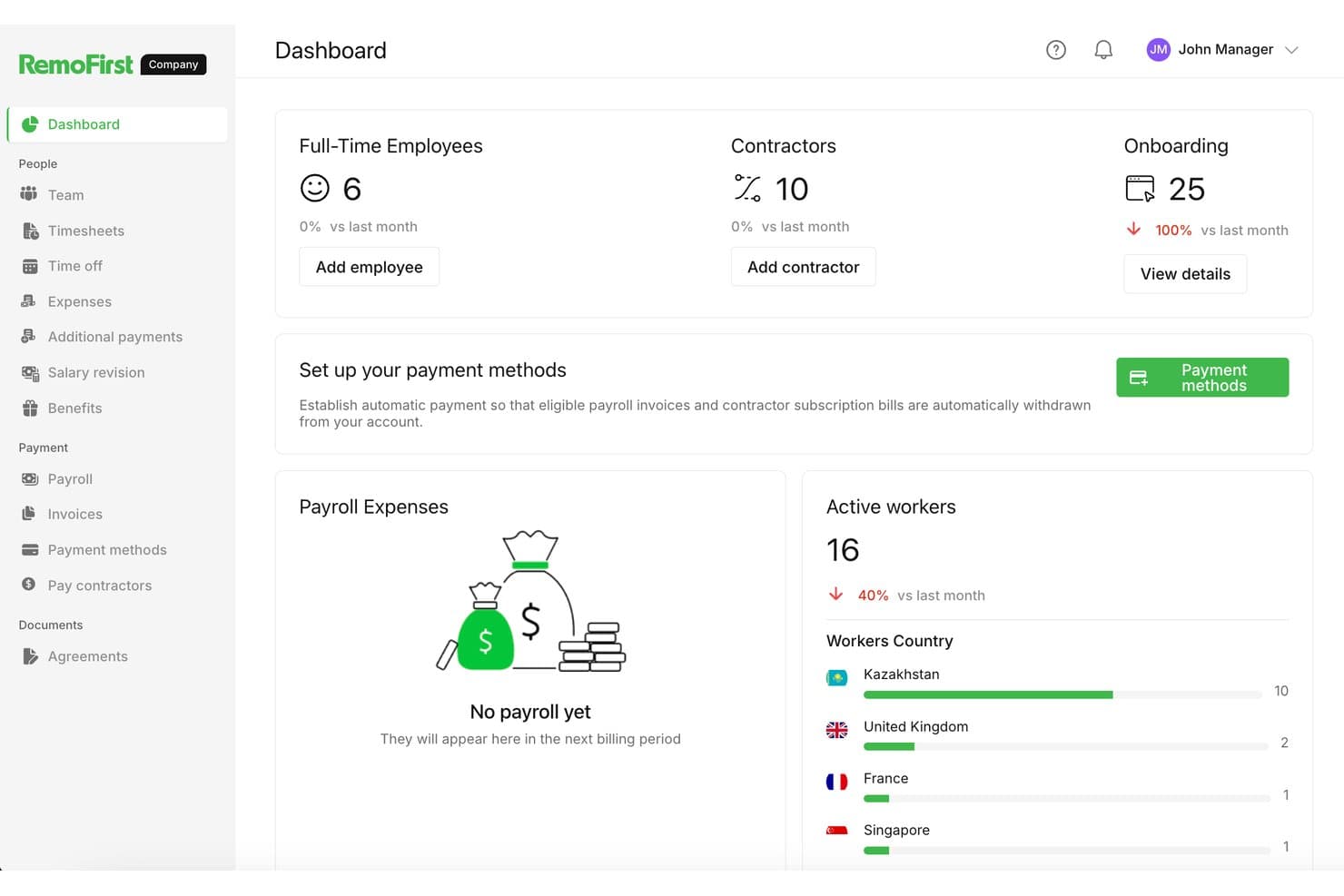
RemoFirst's dashboard gives a clear overview of global workforce stats. RemoFirst is an employer of record platform that lets companies hire and pay full-time employees in 185+ countries without setting up local entities, making it a practical fit for startups and global teams that need compliant international employment without the overhead of entity management.
Who Is RemoFirst Best For?
RemoFirst is a strong fit for startups and lean global teams that need to hire full-time employees across multiple countries without committing to annual contracts or minimum headcounts.
Why I Picked RemoFirst
I picked RemoFirst as one of the best because it lets you hire full-time employees in 185+ countries without signing an annual contract or meeting a minimum headcount. There's no lock-in: you can add or remove employees as your team changes, and RemoFirst handles localized contracts, payroll, and termination guidance on a country-by-country basis. I especially appreciate that it provides a full cost breakdown before you commit, so you're never guessing what a hire in a new country will actually cost.
RemoFirst Key Features
- Localized contract creation: RemoFirst generates employment contracts aligned with the labor laws of each country where you hire.
- Onboarding and termination guidance: The platform provides country-specific HR guidance for both onboarding new employees and managing compliant offboarding.
- Visa and work-permit support: RemoFirst manages visa applications, documentation, and filings in 85+ countries through its authorized local partners.
- Dedicated account manager: Each EOR client is assigned a dedicated account manager for ongoing support and compliance questions.
RemoFirst Integrations
RemoFirst offers integrations with Workday, BambooHR, ADP Workforce Now, and GoCardless for workforce data and payroll funding. API availability isn't stated.
Pros and Cons
Pros:
- Reviewers praise responsive account support
- Localized contracts support compliant hiring
- Hire employees across 185+ countries
Cons:
- Some reviewers report slow verification
- Termination disputes can complicate offboarding
 Best for rapid market expansion
- Free demo available
- From $599/user/month
Visit WebsiteCustomer Rating:4.6/5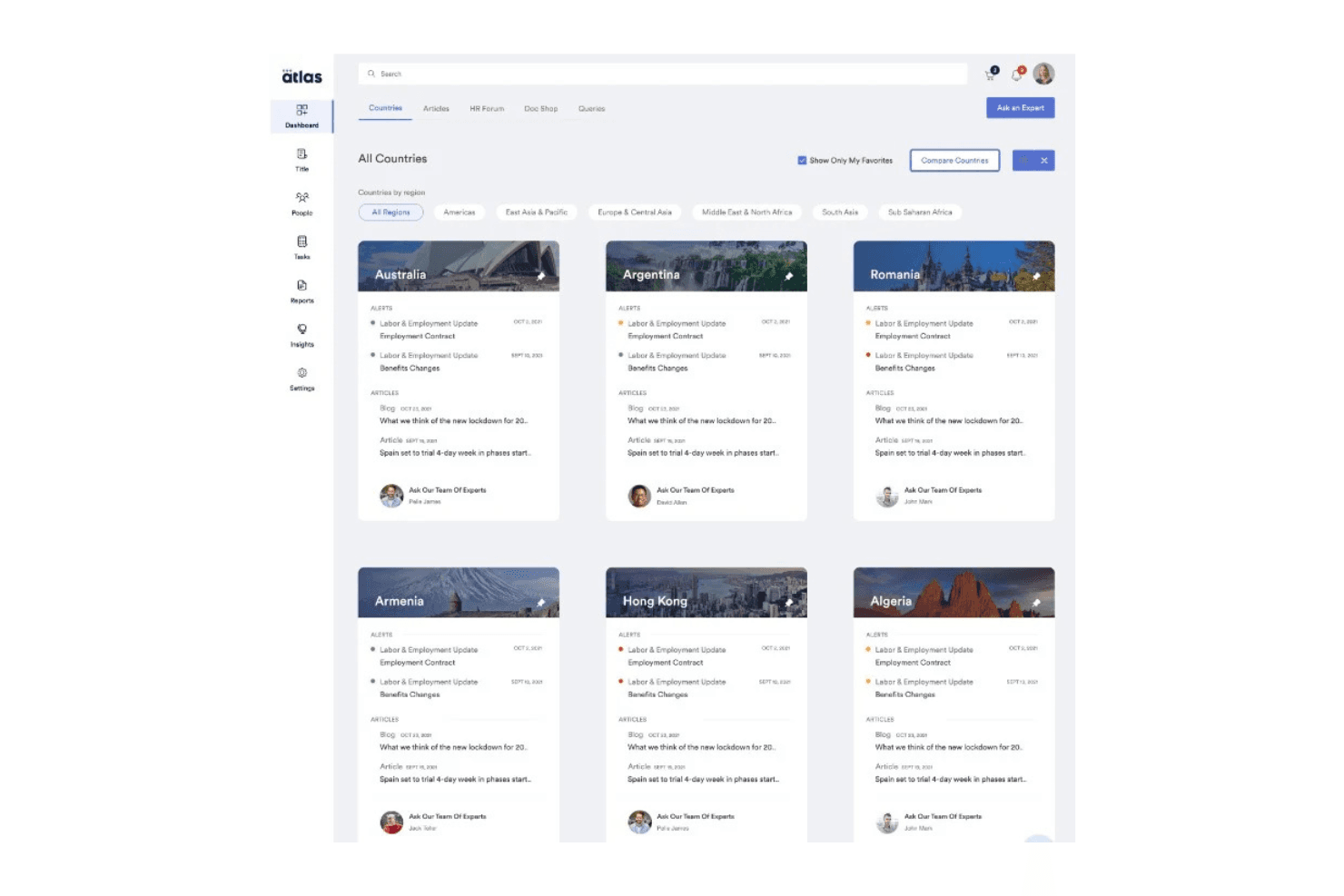
Atlas HXM's All Countries dashboard lists labor and employment alerts and expert help for each country. Atlas HXM is a global employer of record platform that lets HR teams and ops leaders hire, onboard, and pay employees across 160+ countries through Atlas's own legal entities—without setting up a local entity in each market.
Who Is Atlas HXM Best For?
Atlas HXM is a strong fit for HR and ops teams at mid-size to enterprise companies that need to hire full-time employees across multiple countries without setting up local legal entities.
Why I Picked Atlas HXM
Atlas HXM earns its spot on my shortlist because it operates its own legal entities in 160+ countries, meaning I can hire full-time employees in a new market without spending months setting up a local entity first. I particularly like the guided EOR provider transition support, which carries contracts, payroll continuity, and employee communications across when switching from another provider. The built-in visa sponsorship and global mobility services in 75+ countries also make rapid, cross-border hiring genuinely practical rather than a manual scramble.
Atlas HXM Key Features
- Global payroll in 80+ currencies: Processes employee pay in local currencies across 160+ countries, with layered validation using country-specific tax engines.
- Automated benefits enrollment: Lets employees compare plans, review coverage, and make their own benefit elections through self-service, with HR visibility into enrollments.
- Employee expense cards: Issues pre-funded virtual Visa cards with HR-set spending limits and category rules, usable via Apple Pay and Google Pay.
- SSO and HRIS integrations: Connects with Workday, BambooHR, UKG, Dayforce, and others, plus single sign-on via Okta, Microsoft, and Google Workspace.
Atlas HXM Integrations
Atlas HXM lists integrations with Workday, BambooHR, UKG, and Dayforce, plus SSO through Okta, Microsoft, and Google Workspace. An API is available for custom integrations, but sync details and API specifications aren't documented.
Pros and Cons
Pros:
- Guided EOR transfers preserve payroll continuity
- Reviewers praise local payroll and compliance support
- Owned entities support hiring across 160+ countries
Cons:
- Users report late or irregular payroll
- Contractor payouts rely on external processors
Learn more about Atlas HXM:
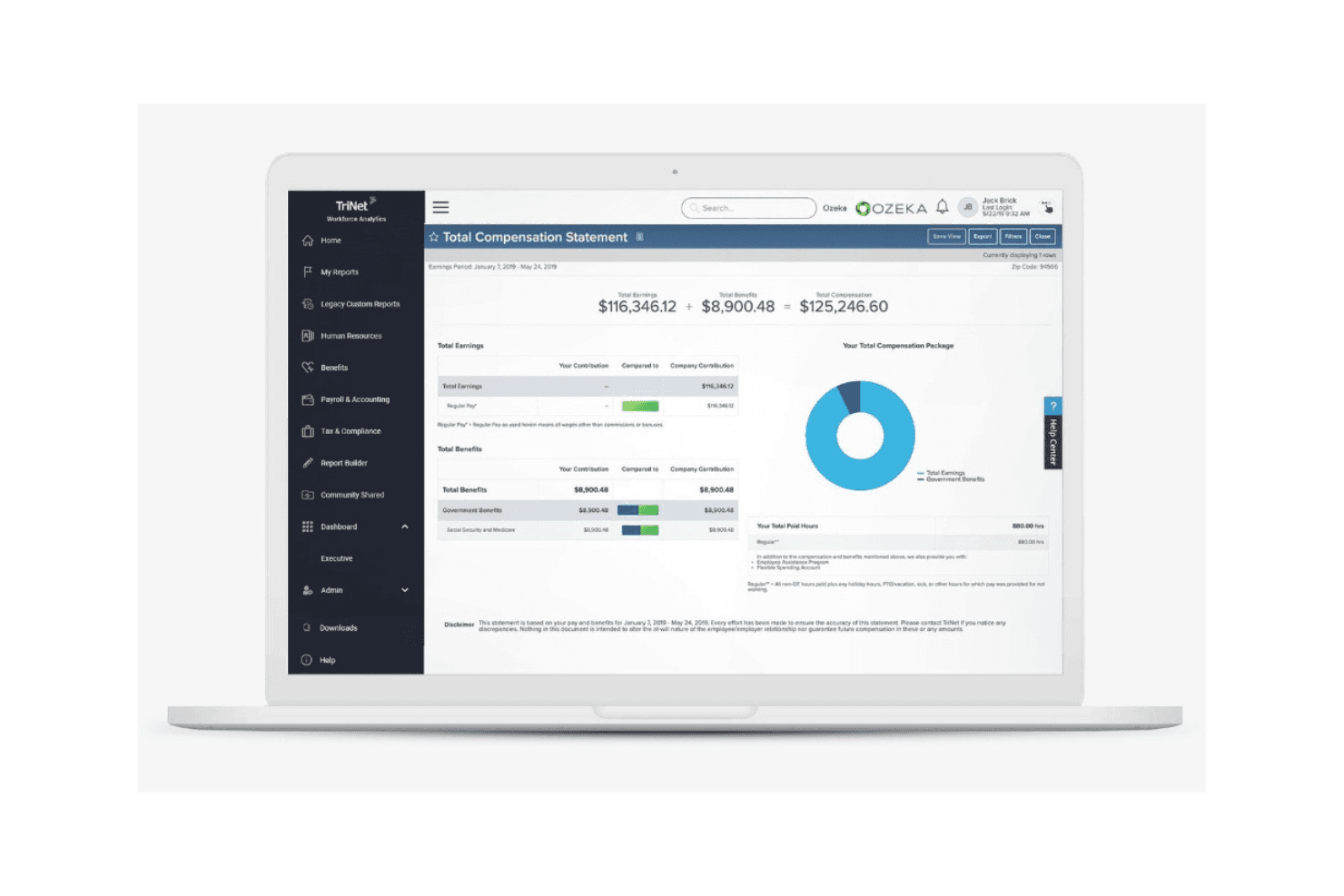
TriNet Workforce Analytics displays a Total Compensation Statement combining earnings and benefits. TriNet is a PEO platform built for small and medium-size businesses that want to offload payroll, benefits administration, HR compliance, and workforce management to a single provider.
Who Is TriNet Best For?
TriNet is a strong fit for small and medium-size businesses that want to hand off domestic payroll, benefits, and HR compliance to a single PEO provider.
Why I Picked TriNet
I picked TriNet as one of the best because it's purpose-built as a PEO, meaning payroll, benefits administration, and HR compliance all run under one co-employment arrangement rather than being loosely bolted together. I appreciate how TriNet handles payroll tax administration across federal, state, and local jurisdictions automatically, which removes a significant burden for small and mid-size teams managing a distributed U.S. workforce. The access to pooled benefits, including medical, dental, vision, and retirement plans, gives smaller businesses negotiating power they wouldn't otherwise have.
TriNet Key Features
- Workers' compensation administration: TriNet handles workers' compensation insurance processes, including claims handling and risk-mitigation guidance, within the PEO arrangement.
- Time and attendance tracking: Employees' time and schedules can be tracked and synced directly to payroll through the platform.
- Performance management tools: Users can run employee reviews and track goals from within the TriNet platform.
- Accounting integrations: TriNet connects with QuickBooks Online, NetSuite, Xero, and Intacct to push mapped payroll journal entries to your accounting system after each pay run.
TriNet Integrations
TriNet offers marketplace integrations with QuickBooks Online, NetSuite, Xero, Intacct, Greenhouse Recruiting, OneLogin, Slack, and Zoom. It also provides APIs for custom integrations, though specific API types aren’t documented.
Pros and Cons
Pros:
- Routine HR questions can receive helpful support
- Reviewers praise straightforward benefits enrollment
- Domestic PEO bundles payroll, benefits, and compliance
Cons:
- Reviewers report fragmented access and clunky navigation
- Global hiring depends on separate Multiplier agreements
Learn more about Trinet: 4Best for contractor payment coverage
Lano
- Free demo available
- From €19/user/month
Visit WebsiteCustomer Rating:4.3/5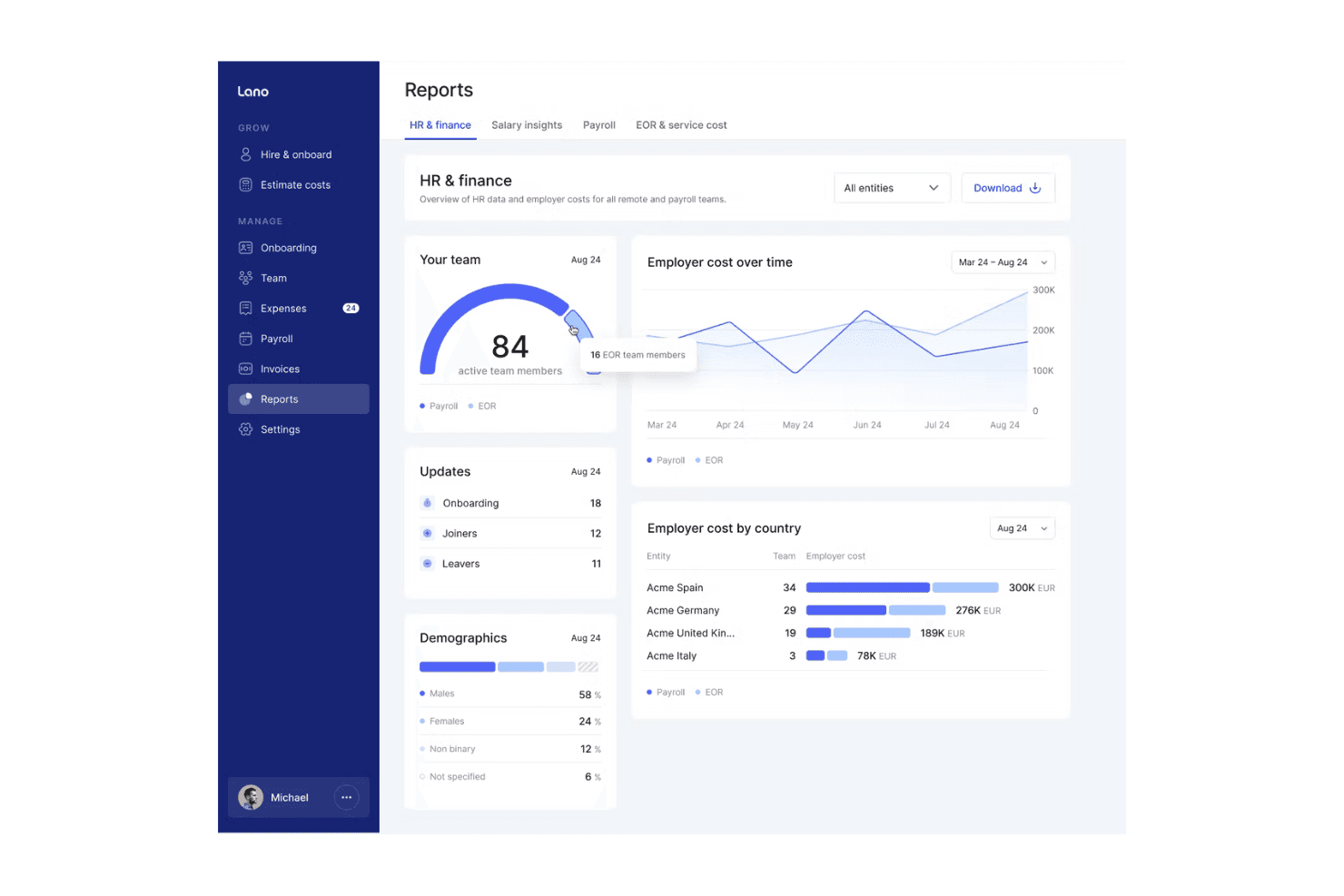
Lano's HR and finance reports dashboard tracks team size, hiring updates, demographics and employer costs by country. Lano is a global payroll and contractor management platform built for finance and HR teams that need to pay workers across multiple countries without juggling separate providers, entities, or currency conversions.
Who Is Lano Best For?
Lano works well for finance and HR teams managing payroll across multiple countries who need consolidated reporting, multi-currency payments, and local compliance support in one place.
Why I Picked Lano
I've included Lano in my top picks because it handles contractor payment coverage across 170+ countries better than most platforms its size. I particularly like that you can pay contractors in 28 local currencies using Lano Wallet, with local transfers completing in around two business days and SWIFT as an automatic fallback when local routes aren't available. The contractor management module also covers compliant contracts, onboarding, and invoice approvals in one place, so you're not stitching together separate tools to get a contractor paid correctly.
Lano Key Features
- Multi-entity payroll consolidation: View and manage payroll data from multiple providers and countries in a single dashboard, with automated cycle processing per entity.
- Gross-to-net reporting: Download detailed payroll summaries covering employer cost, gross pay, net pay, taxes, and employer contributions before approving each cycle.
- HRIS integrations: Connect Lano with HR platforms like Workday, Personio, SAP, and HiBob for two-way data syncing across salary, vacation, and benefits information.
- Expense management: Report and track employee expenses directly within payroll cycles, with submissions accepted up to each cycle's cutoff date.
Lano Integrations
Lano offers integrations with Workday, Personio, HiBob, and SAP, plus marketplace integrations for QuickBooks and Xero. Its REST API and webhooks support custom connections.
Pros and Cons
Pros:
- Reviewers praise responsive onboarding support
- Consolidates multi-country payroll reporting
- Pays contractors in 28 local currencies
Cons:
- Reviewers report payment and invoice delays
- EOR relies on local employment partners
Learn more about Lano:
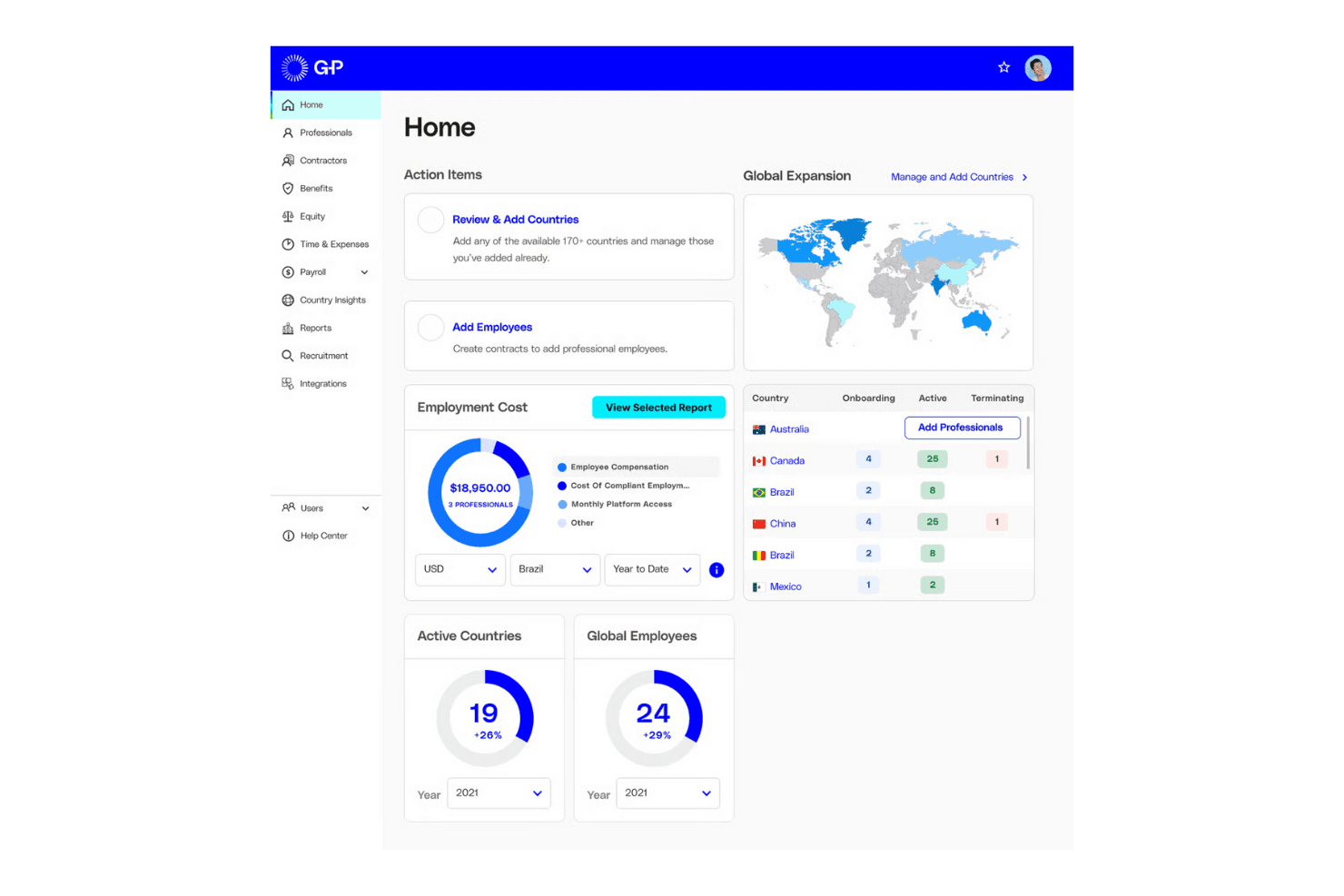
G-P's Home dashboard tracks global expansion, employment costs, and active employees across countries. G-P is an employer of record platform built for companies that need to hire and manage employees across 180+ countries without setting up local legal entities, handling payroll, benefits, and compliance in one place.
Who Is G-P Best For?
G-P is a strong fit for HR and people teams at mid-size to enterprise companies that need to hire compliantly across multiple countries without establishing local legal entities.
Why I Picked G-P
I picked G-P as one of the best because its AI-driven compliance engine does something I genuinely value: it flags legal risks in real time as you generate employment contracts across 180+ countries. G-P Assist adds to this by giving HR teams 24/7 access to country-specific guidance without waiting on a support queue. If you're managing hires across multiple jurisdictions and need confidence that every contract, payroll run, and benefits enrollment meets local requirements, G-P's Global Compliance Engine handles that validation automatically.
G-P Key Features
- Multicurrency payroll processing: Run payroll in 150+ currencies with automated local tax filings and end-to-end payment administration across 180+ countries.
- Global Compliance Engine: Validates employment contracts, onboarding steps, payroll runs, and benefits enrollments against local legal requirements in real time.
- Benefits dashboard: View mandatory and supplemental benefit options by country, manage enrollment, and track plan performance from a single dashboard.
- HCM and payroll integrations: Connect G-P to tools like BambooHR, Workday, SAP SuccessFactors, ADP Workforce Now, and Paylocity through 16+ native integrations.
G-P Integrations
G-P offers 16+ native integrations, including Workday, BambooHR, ADP Workforce Now, Paylocity, HiBob, Personio, UKG Pro, and SAP SuccessFactors. Its API supports custom, bidirectional integrations.
Pros and Cons
Pros:
- Payroll, benefits, and onboarding share one platform
- Local compliance guidance supports country-specific hiring
- Hire across 180+ countries without local entities
Cons:
- Users report delayed pay and calculation errors
- Support responses can lag across time zones
Learn more about G-P: Best for distributed team management
- Free demo available
- From $599/user/month (billed annually)
Customer Rating:2.9/5
Remote manages one-time bonus payments for employees across currencies. Remote is an employer of record and payroll provider that lets companies hire, pay, and manage employees across 90+ countries without setting up local legal entities—making it a practical option for teams building or scaling a distributed workforce.
Who Is Remote Best For?
Remote is a strong fit for companies hiring full-time employees across multiple countries without the overhead of setting up local legal entities.
Why I Picked Remote
I picked Remote as one of the best because it's purpose-built for distributed team management, acting as the legal employer in 90+ countries so your team can hire full-time employees without setting up local entities. I particularly like that Remote handles local payroll, localized benefits through Allianz, and country-specific compliance through its own in-country experts, not third-party partners. If I'm onboarding a new hire in, say, the Philippines or Colombia, Remote's dedicated onboarding specialist and built-in employee self-service tools keep the process centralized and trackable from day one.
Remote Key Features
- Employee self-service portal: Employees can access payslips, submit expenses, request time off, and manage benefits enrollment directly within the Remote platform.
- Remote Expense Card: A virtual card for EOR employees that automatically logs transactions as expenses in Remote, with admin controls for spending limits and eligible categories.
- Remote Agent: An AI tool that lets you build reports, query employment and payroll data, and pull insights from connected tools using plain-language prompts.
- EOR-to-payroll conversion path: Remote supports a structured transition from its EOR service to your own legal entity, with a country-specialist implementation lead overseeing the first payroll run.
Remote Integrations
Remote offers native integrations with Greenhouse, BambooHR, Workday, QuickBooks, Xero, Slack, and Google Suite. It also supports APIs, webhooks, SDKs, CLI, MCP, and Zapier for custom connectivity.
Pros and Cons
Pros:
- Reviewers praise clear payslips and onboarding
- Local payroll and benefits handled centrally
- Hire employees without local entities across 90+ countries
Cons:
- Contractor payments sit outside the EOR scope
- Users report payroll delays and overpayments
 Best for global payroll compliance
- Free demo available
- From $14/worker/month
Visit WebsiteCustomer Rating:4.9/5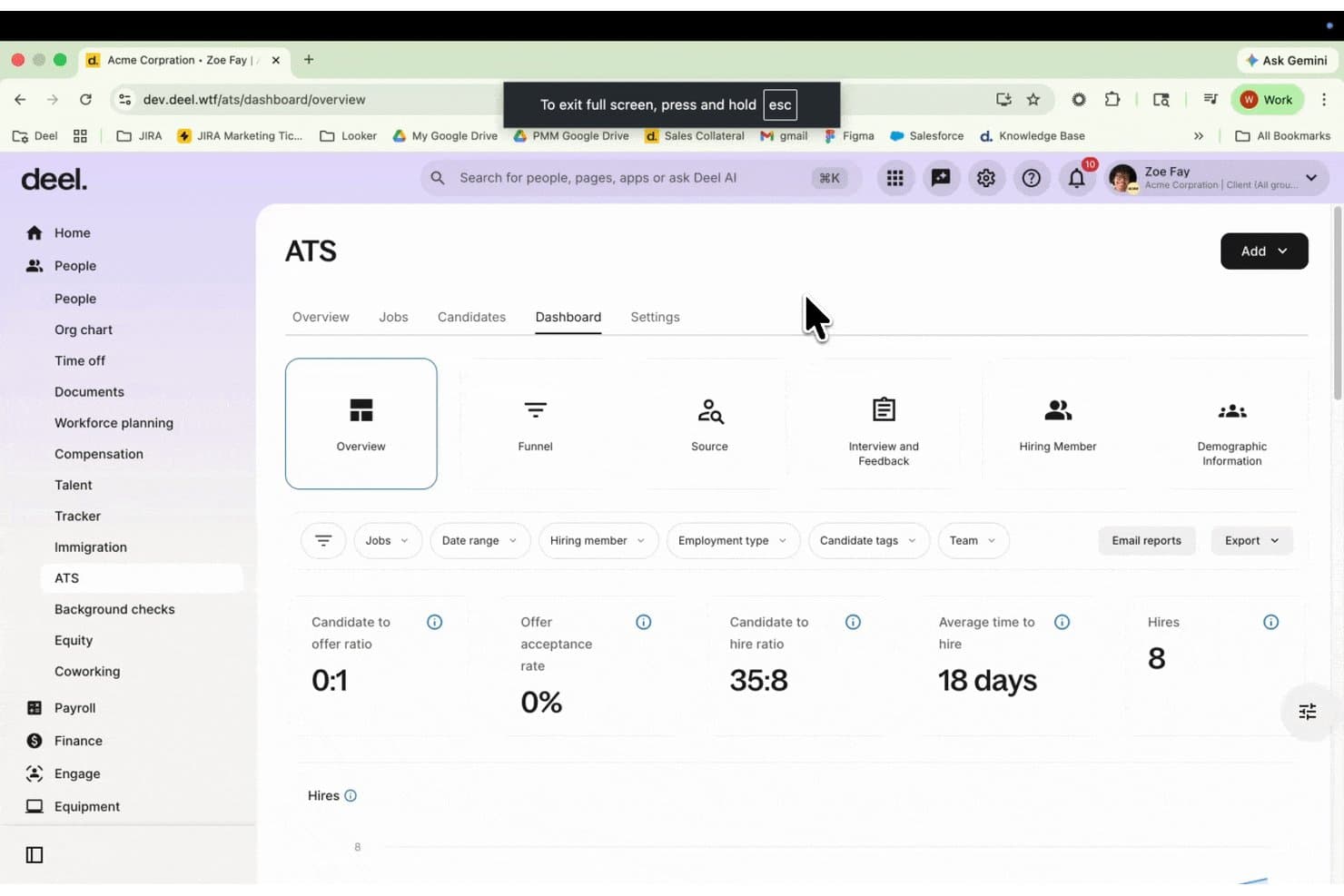
Deel's ATS dashboard tracks hiring metrics like time to hire, offer acceptance, and filtered hires by team. Deel Hire is a global hiring platform that lets companies source candidates, manage recruiting workflows, and bring on full-time employees or contractors in 150+ countries—without opening a local entity.
Who Is Deel Hire Best For?
Deel Hire is a strong fit for companies scaling across multiple countries that need EOR hiring, contractor payments, and recruiting tools in one place—without setting up local entities.
Why I Picked Deel Hire
I picked Deel Hire as one of the best because it handles global payroll compliance end-to-end, covering local contracts, statutory benefits, and tax obligations across 150+ countries without you needing to open a local entity. I especially like that the EOR onboarding quote breaks out gross salary, employer costs, and Deel's management fee country by country, so there are no hidden compliance costs surfacing after you've already committed to a hire. The built-in ATS, automated contractor invoicing, and 120+ currency payouts keep everything under one roof.
Deel Hire Key Features
- Job board distribution: Posts open roles to more than 1,000 connected job boards in a single click from the Deel ATS.
- AI-assisted candidate screening: Runs criteria-based first-round screens and surfaces match insights for hiring teams to review before moving candidates forward.
- Automated contractor invoicing: Generates contractor invoices automatically each payment cycle, with editing available until the invoice is issued.
- Accounting integrations: Syncs invoices and payroll data with NetSuite, Xero, QuickBooks, Sage, SAP, and Microsoft Dynamics Finance.
Deel Hire Integrations
Deel reports 120+ integrations across its platform, including Google Workspace, Microsoft Teams, NetSuite, Xero, QuickBooks, Sage, SAP, and Microsoft Dynamics Finance. It also offers REST API, webhooks, MCP, and CLI access for custom integrations.
Pros and Cons
Pros:
- Contractor payouts support multiple withdrawal methods
- Hiring workflows connect sourcing through onboarding
- Cross-border EOR avoids local entity setup
Cons:
- Some users report payout delays
- EOR costs can strain smaller teams
Learn more about Deel Hire: Best for quick global hiring
- Free demo available
- From $20/user/month (billed annually)
Visit WebsiteCustomer Rating:4.7/5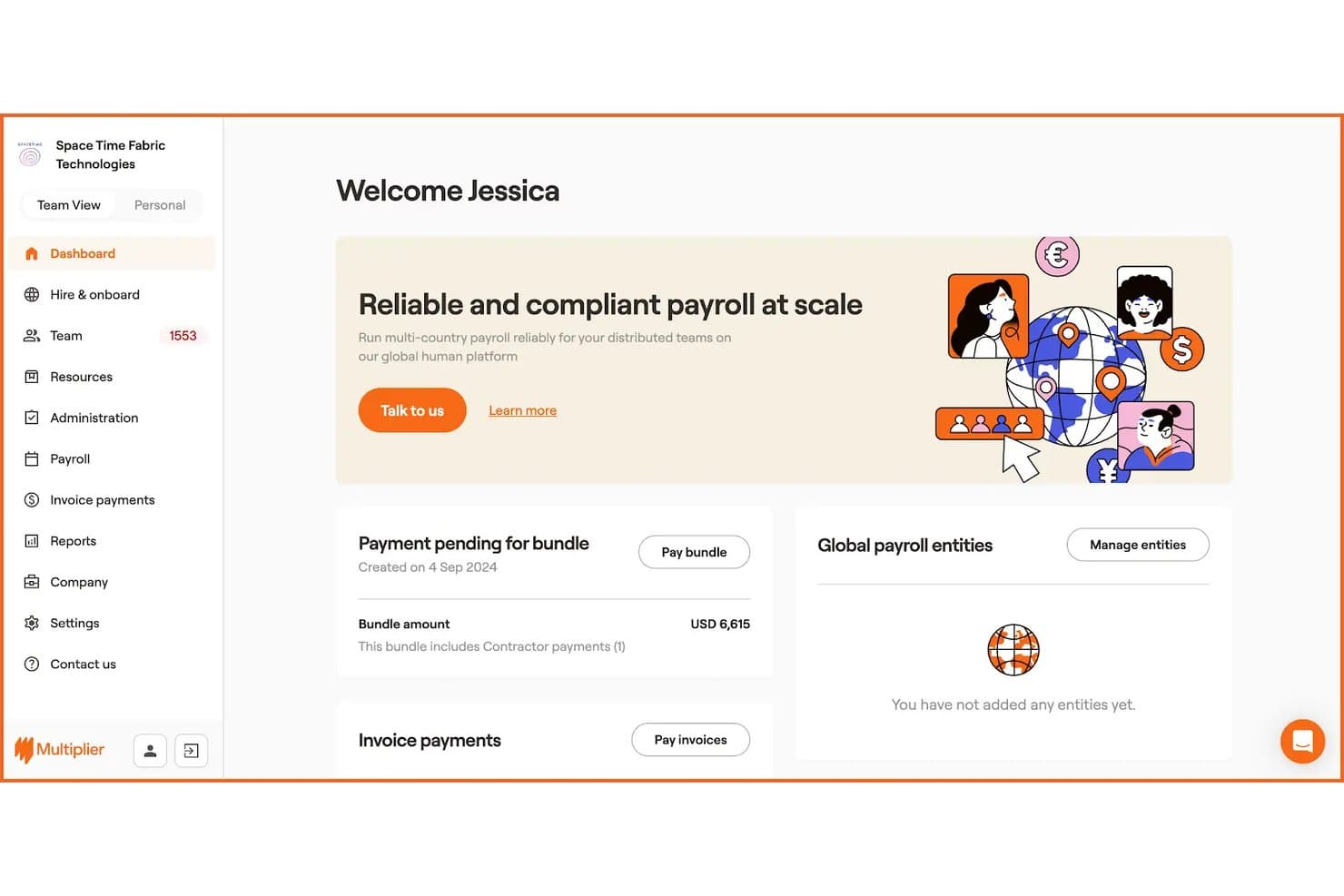
Multiplier's dashboard gives teams a central view of payroll bundles, invoice payments and global entities. Multiplier is a global payroll platform that helps HR and payroll teams manage multi-country employee payroll, statutory compliance, and salary disbursements from a single system—without juggling separate tools for each country's tax and filing requirements.
Who Is Multiplier Best For?
Multiplier's Global Payroll is a strong fit for HR and payroll teams managing employees across multiple countries through established local entities.
Why I Picked Multiplier
I picked Multiplier as one of the best because it handles multi-country payroll from a single platform, covering 160+ countries with automated statutory calculations, local filings, and payslip generation. I appreciate how it connects payroll directly with time off, attendance, and expenses, so there's no manual reconciliation across separate tools. For teams already operating through established local entities, that consolidated view of gross-to-net costs and compliance across every country is genuinely useful.
Multiplier Key Features
- Multi-currency salary disbursement: Pay employees in 120+ currencies via bank transfer, direct debit, or crypto from a single payment instruction.
- Gross-to-net cost reporting: View payroll costs broken down by country or cost center, with headcount and gross-to-net summaries across all entities.
- Statutory benefits setup: Calculate and remit statutory obligations including tax withholdings, social contributions, and provident funds for each jurisdiction.
- Named customer success manager: Every customer is assigned a dedicated CSM from day one, backed by 24/7 support from local payroll experts.
Multiplier Integrations
Multiplier has a documented marketplace integration with Paycor for profiles, compensation, time-off, and bank details. The vendor reports 15+ integrations, including HiBob, Workday, and ADP Workforce Now, plus API-based connectivity for custom integrations.
Pros and Cons
Pros:
- Connects payroll with time off and expenses
- Reviewers value local payroll expertise
- Centralizes payroll across multiple countries
Cons:
- Contractor payouts require separate products
- Requires your own local employing entities
Learn more about Multiplier: Best for workforce payments at scale
- Free demo available
- From $29/user/month
Visit WebsiteCustomer Rating:4.4/5
Papaya Global tracks employer costs by country, category, and cost center. Papaya Global is a workforce payments platform built for finance and HR teams that need to pay employees, contractors, vendors, and tax authorities across 180+ countries from a single workflow.
Who Is Papaya Global Best For?
Papaya Global suits finance and ops teams that need to pay contractors, vendors, and workers across 180+ countries at high volume without building complex payment infrastructure from scratch.
Why I Picked Papaya Global
I picked Papaya Global as one of the best because it handles workforce payments at a scale that most platforms simply aren't built for. When you're paying employees, contractors, vendors, and tax authorities across 180+ countries in a single workflow, the ability to approve up to 10,000 transactions in one click and fund them in 15 currencies is genuinely useful. I also appreciate the land date setup feature, which lets you set a desired payment arrival date and works backwards to initiate transfers so payouts hit on time, every time.
Papaya Global Key Features
- Mass payment approval: Create, schedule, and approve up to 10,000 transactions in a single click for high-volume global payroll runs.
- AI-powered onboarding validation: Automatically validates worker personal details, banking information, and required documents during contractor onboarding.
- Configurable approval chains: Set role-based permissions and multi-step approval workflows to control who can authorize payments across your organization.
- Automated payment reconciliation: Reconcile pay-ins and payouts automatically, with centralized reporting on spend and workforce payment trends.
Papaya Global Integrations
Papaya Global offers native integrations with Workday HCM, SAP SuccessFactors, Oracle HCM, BambooHR, NetSuite, and its Papaya Payments Connector. A payments API with sandbox access supports custom integrations.
Pros and Cons
Pros:
- Reviewers praise timely cross-border transfers
- Pays contractors quickly across borders
- Handles mass workforce payouts at scale
Cons:
- Payment execution isn't compliant payroll processing
- Payments OS doesn't provide EOR coverage
Learn more about Papaya Global: Best for distributed team hiring
- Free plan + 30-day free trial + free demo available
- From $699/user/month
Visit WebsiteCustomer Rating:4.4/5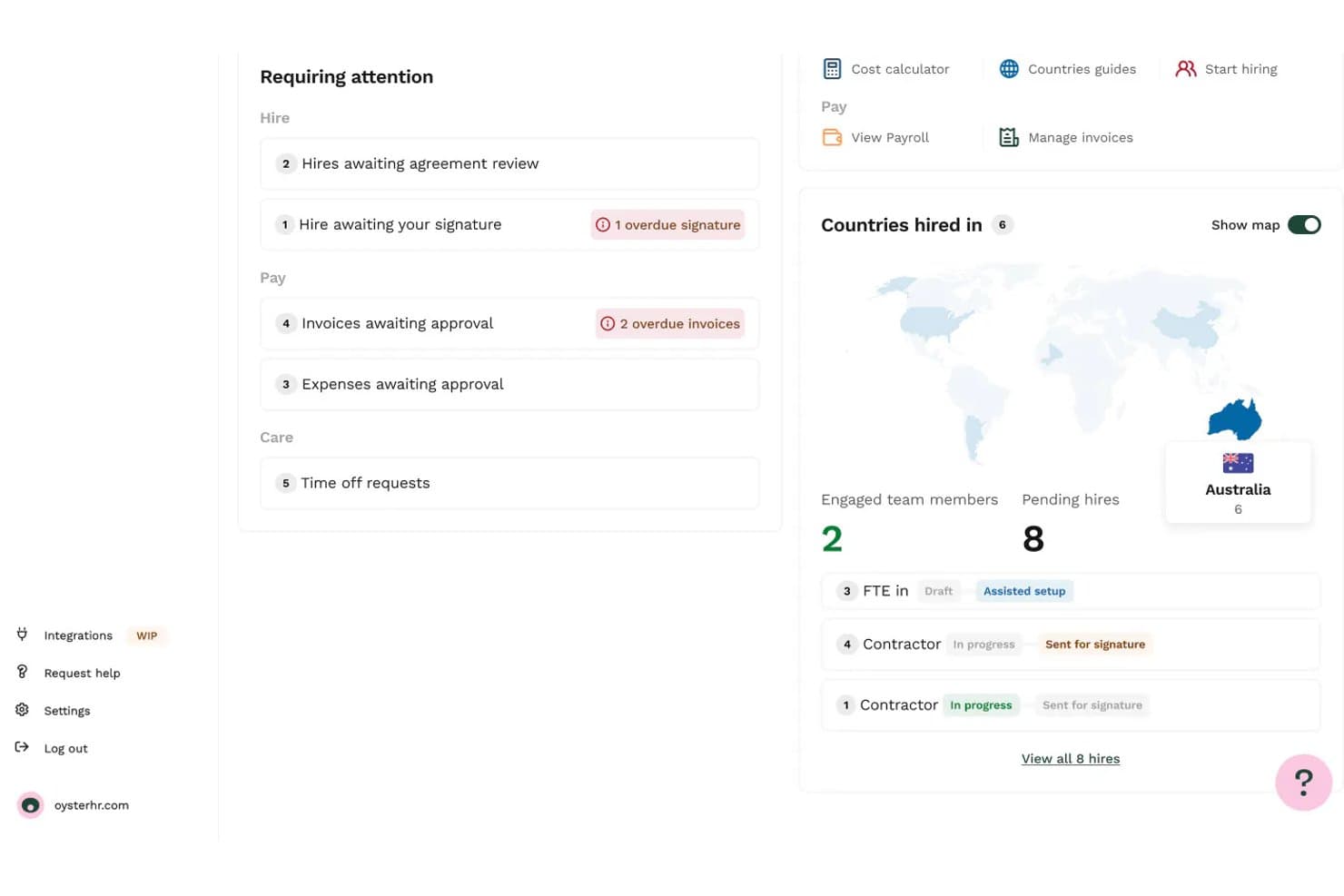
Oyster HR's home dashboard showing items requiring attention, pending hires, and countries where team members are hired. Oyster HR is an employer of record platform built for companies that want to hire and pay employees across borders without setting up local legal entities in each country.
Who Is Oyster HR Best For?
Oyster HR is a strong fit for companies scaling distributed teams across multiple countries without the resources to set up local legal entities in each one.
Why I Picked Oyster HR
I picked Oyster HR as one of the best because it's purpose-built for distributed team hiring across borders, without requiring you to set up local entities in every country you hire in. I particularly like its contract quality scoring feature, which benchmarks each offer against local statutory requirements so you can confirm compliance before a hire is finalized. Oyster also employs team members through its own entities in more than 80% of cases, which gives me more confidence than relying entirely on third-party partners.
Oyster HR Key Features
- Multi-country payroll: Run payroll across 120+ countries in local currencies, with automated salary, tax, and deduction calculations.
- Guided EOR migration: Move from another EOR provider through a structured process covering pre-migration evaluation, team member transition, and go-live with dedicated specialists.
- Role-based user access: Assign administrators and team managers specialized permissions for expenses, time off, payroll, and invoice management.
- HRIS and ATS integrations: Connect Oyster to tools like BambooHR, Greenhouse, Personio, and Workday, plus 5,000+ apps via Zapier.
Oyster HR Integrations
Oyster HR offers integrations with BambooHR, Greenhouse, Personio, Workday, and ADP Workforce Now, plus an API for custom integrations. It also supports Zapier.
Pros and Cons
Pros:
- Reviewers praise straightforward onboarding and support
- Localized contracts include statutory offer benchmarks
- Employs distributed teams across 120+ countries
Cons:
- Complex support cases can receive slow follow-up
- Some reviewers report delayed salary transfers
Other Native Teams Alternatives
Here are some additional Native Teams alternatives that didn’t make it onto my shortlist, but are still worth checking out:
- 11ADP GlobalView PayrollBest for integration capabilities
- 12RipplingBest for unified workforce management
- 13WorksuiteBest for managing freelancers and contractors
How I Evaluate Native Teams Alternatives
When a company needs to pay a hire in Brazil without a local entity, the platform either handles it end-to-end or it doesn't—I evaluate tools on that baseline first, then look at what sets them apart.
Core Functionality (Table Stakes For This List)
When I'm selecting tools for my list, I rank each one on a scale from 0 (does not offer the functionality) to 5 (excels in this area) for each core functionality listed below. Then, I calculate the tool's total score into a percentage. Each tool needs to achieve a minimum total score of 65% to be considered for inclusion.
- Employer of Record Services: I check whether the platform can legally employ someone on your behalf in the countries you're hiring in, using owned entities or vetted partners.
- Multi-Country Payroll Processing: Running payroll for a team spread across five or more countries means I look at currency handling, local tax calculations, and pay schedule flexibility.
- Contractor Management & Payments: I evaluate how each tool handles localized contracts, invoicing, and cross-border payouts—especially misclassification safeguards for contractor-heavy teams.
- Local Compliance & Tax Handling: Statutory requirements shift constantly, so I look for platforms that actively monitor labor law changes and automate filings across supported regions.
- Global Benefits Administration: Your offer letter in one country might need private health insurance while another requires a pension contribution—I check how each tool builds localized packages.
- Core HRIS & Workforce Management: A distributed team still needs onboarding workflows, time-off tracking, and centralized employee records, so I evaluate how well each platform covers day-to-day HR admin.
Once I have a list of tools that meet this criteria, I consider what sets each platform apart.
Differentiating Factors (What Sets Vendors Apart)
Here's how I compare and contrast different vendors:
Standout Features
Immigration and visa support matters when you're hiring someone who needs a work permit—I look at whether the platform handles sponsorship in-house or farms it out. Global mobility tools go hand-in-hand here, especially for tracking tax residency and permanent establishment risk when employees relocate or work across borders. I also evaluate equity administration, since offering stock options to an international hire involves country-specific tax treatment that not every platform covers.
Beyond Features
Pricing transparency is a big differentiator—I look at whether per-employee costs are clearly published or buried behind a "contact sales" wall, and whether FX markups are disclosed upfront. Implementation speed also varies widely; some platforms can get a new hire under contract in days, while others take weeks. I check integration support too, particularly native connections with HRIS and accounting tools like BambooHR, Xero, or NetSuite, since a platform that forces manual data entry between systems creates real friction for HR teams managing distributed payroll.
Why Look For A Native Teams Alternative?
While Native Teams is a good choice for workforce management software, there are several reasons why some users seek out alternative solutions. You might be looking for a Native Teams alternative because…
- You need more customization options
- Your team is growing beyond its capabilities
- It lacks local support in your region
- You need better integration with other tools
- It doesn’t support your industry-specific needs
- You require more advanced analytics
If any of these sound like you, you’ve come to the right place. My list includes several workforce management software options that are better suited for teams facing these challenges with Native Teams and seeking alternative solutions.
Native Teams Key Features
Here are some of the key features of Native Teams, to help you contrast and compare what alternative solutions offer:
- Payroll management: Handles diverse payroll regulations to ensure timely payments and global payroll management for your team.
- Compliance support: Keeps your team compliant with local labour laws across different countries.
- Multi-currency payments: Allows your team to receive payments in their preferred currencies.
- Employer of record services: EOR services enable hiring and managing employees internationally without local entities.
- Tax management tools: Assists in managing taxes efficiently and accurately across borders.
- Invoicing tools: Realign the invoicing process to save time and reduce errors.
- Employee benefits administration: Provides your team with access to various benefits and perks.
- Time and attendance tracking: Monitors your team's working hours and attendance for accurate payroll.
- Expense management: Helps your team manage and track expenses efficiently.
- Contract management: Simplifies the creation and management of employee contracts globally.