

Running payroll in a trucking company isn’t just about cutting checks, it’s about navigating a web of complexities unique to the transportation industry.
From managing per-mile and hourly pay to tracking driver hours across state lines and staying compliant with constantly evolving DOT and tax regulations, payroll can quickly become a time sink without the right tools in place.
That’s where specialized payroll software for trucking companies comes in. The right platform doesn’t just automate payments—it ensures accuracy for multi-pay structures, integrates seamlessly with ELDs and TMS tools, reduces administrative overhead, and keeps you audit-ready at all times.
In this guide, I draw on years of experience analyzing HR and payroll platforms for operationally intensive industries to spotlight the best payroll software options built specifically for trucking companies. Whether you’re running a small fleet or managing a growing logistics operation, you’ll find tools here that are purpose-built to streamline payroll, support compliance, and save time where it matters most—on the road.
Why Trust Our Software Recommendations
6,700+
Reviews
20
Industry experts
16+
Evaluation factors
14
Years
Our team has been testing and reviewing software since 2012. As HR experts ourselves, we know how difficult—and important—it is to choose the right software.
For this guide, we evaluated tools using hands-on testing and independent research, scoring tools using our selection criteria. We also draw on insights from industry thought leaders and practicing HR experts.
Our reviews reflect our human editorial judgment, not a sales pitch.
Expert reviewers:
- Phil GrayCOO
 Kim BehnkeHR Tech Editor & Analyst
 Josh BarkerPeople Ops Manager

Comparison Table: Payroll Software for Trucking Companies
This comparison table summarizes pricing details for my top selections of payroll software solutions for trucking companies:
| Tool | Best For | Trial Info | Price | ||
|---|---|---|---|---|---|
| 1 | Best for customizable payroll workflows | Free demo available | Pricing upon request | Website | |
| 2 | Best for integrated time tracking | Free demo available | From $8/user/month | Website | |
| 3 | Best for compliance and tax automation | Free demo available | From $49/month | Website | |
| 4 | Best for on-demand payments and self-service | Free demo available | Pricing upon request | Website | |
| 5 | Best for small trucking companies | Free demo available | Pricing upon request | Website | |
| 6 | Best for affordable payroll with free direct deposit | 30-day free trial + free demo available | From $17/month | Website | |
| 7 | Best for one driver record across states | Free demo available | Pricing upon request | Website | |
| 8 | Best for trip-based driver settlements | Free demo available | Pricing upon request | Website | |
| 9 | Best for Quebec labour and pension reporting | Free demo available | Pricing upon request | Website | |
| 10 | Best for load-to-pay prep via payroll partner | 30-day free trial available | From $69/user/month | Website |




Best Payroll Software for Trucking Companies Reviews
This in-depth analysis provides overviews of the best trucking payroll software tailored for companies. It covers the pros and cons of each tool, their features, and best use cases.
 Best for customizable payroll workflows
- Free demo available
- Pricing upon request
Visit WebsiteCustomer Rating:4.3/5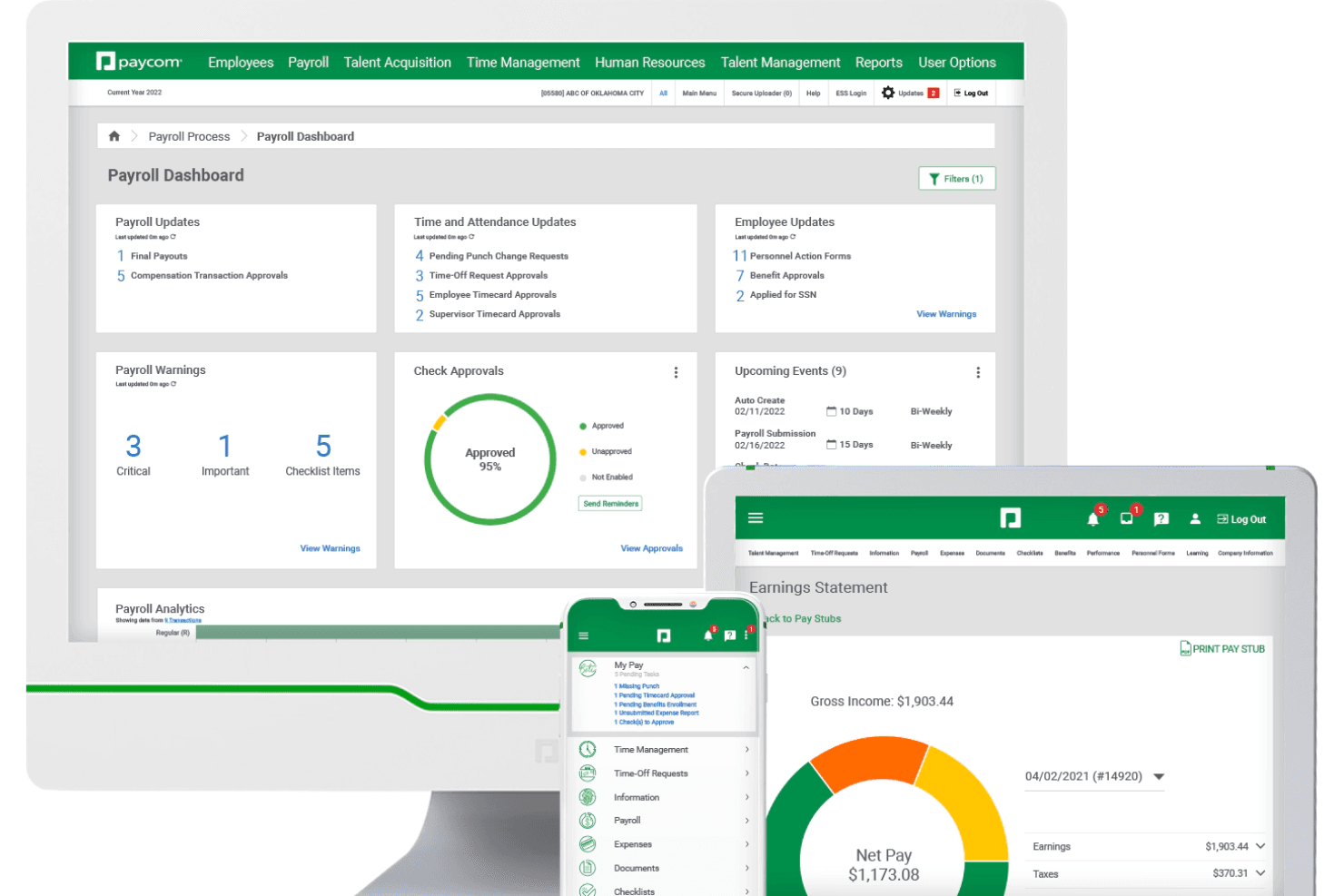
Paycom offers a centralized payroll dashboard with real-time updates on approvals, warnings, and earnings statements, supporting payroll management for construction teams. Paycom is an all-in-one HR and payroll platform built for industries like trucking and transportation, covering driver onboarding, multi-state tax compliance, CDL credential tracking, expense management, and employee-driven payroll processing.
Who Is Paycom Best For?
Paycom is a good fit for mid-to-large trucking and transportation companies that need a single platform to manage both driver HR and multi-state payroll.
Why I Picked Paycom
I selected Paycom for trucking companies because of the deep control it offers over multi-state payroll structures. Through its core platform, you can configure recurring payroll types, establish data templates, and set auto-approval criteria for industry-specific expenses like mileage. This backend data flows directly into Beti, Paycom's employee-driven tool, where drivers review and approve their own checks to catch errors before payroll runs. Finally, the GL Concierge tool automatically generates custom-mapped general ledger reports for seamless import into your accounting software, eliminating manual labor cost reformatting by job or location.
Paycom Key Features
- Multi-state tax filing: Automatically calculates and files payroll taxes across multiple states for drivers who cross state lines.
- Credential tracking: Stores CDL licenses, endorsements, and certifications with automatic alerts when expirations are approaching.
- Manager on-the-Go: A mobile tool that lets dispatchers and supervisors approve timecards, schedules, and time-off requests from anywhere.
- MVR and DOT background checks: Runs motor vehicle record checks and DOT drug and alcohol screening directly within the platform.
Paycom Integrations
Integrations are primarily delivered through Paycom's native HR and payroll suite, which includes built-in tools for talent management, time tracking, benefits administration, and employee self-service within a single database.
Pros and Cons
Pros:
- Mobile app works for on-the-road employees
- Single database handles multistate tax filing
- Beti lets drivers verify pay before submission
Cons:
- Custom reporting often requires extra Excel work
- No trucking-specific pay types like per diem
 Best for integrated time tracking
- Free demo available
- From $8/user/month
Visit WebsiteCustomer Rating:4.6/5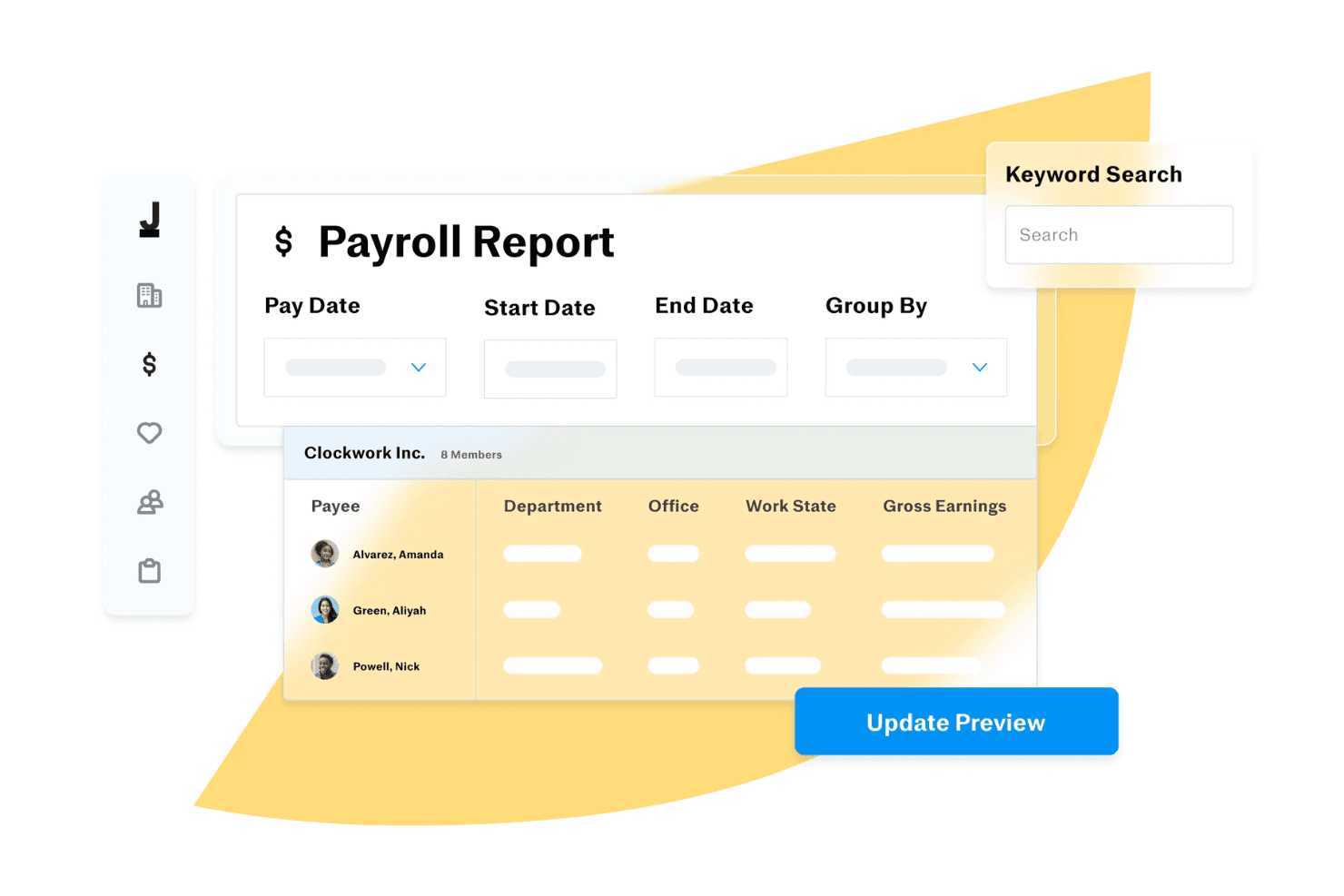
Justworks generates payroll reports grouped by department and office. Justworks is a payroll and HR platform designed for trucking companies that need multi-state payroll, compliance management, time tracking, and benefits administration in one system.
Who Is Justworks Best For?
Justworks suits trucking companies with distributed teams that need payroll, HR, and compliance support across multiple states.
Why I Picked Justworks
I picked Justworks as one of the best because its integrated time tracking lets my team capture driver hours and job-specific time directly in the payroll system. I like that I can review, approve, and sync time data without juggling separate tools. This setup helps me keep payroll accurate for drivers who log hours across different routes and states.
Justworks Key Services
- Multi-state payroll processing: Run payroll for employees working in different states with automated tax calculations.
- Compliance support: Get built-in tools to help manage federal, state, and local payroll compliance.
- Benefits administration: Offer health insurance, 401(k), and other benefits through the platform.
- Document management: Store and organize employee documents and onboarding paperwork securely online.
Justworks Integrations
Native integrations are not clearly documented. Justworks provides an API for custom integrations.
Pros and Cons
Pros:
- Automated tax filings for federal, state, and local
- Centralized benefits administration for all employees
- Integrated time tracking for hourly drivers and staff
Cons:
- Pricing is not transparent on the website
- No built-in mileage or per diem tracking
Learn more about Justworks: Best for compliance and tax automation
- Free demo available
- From $49/month
Visit WebsiteCustomer Rating:4.6/5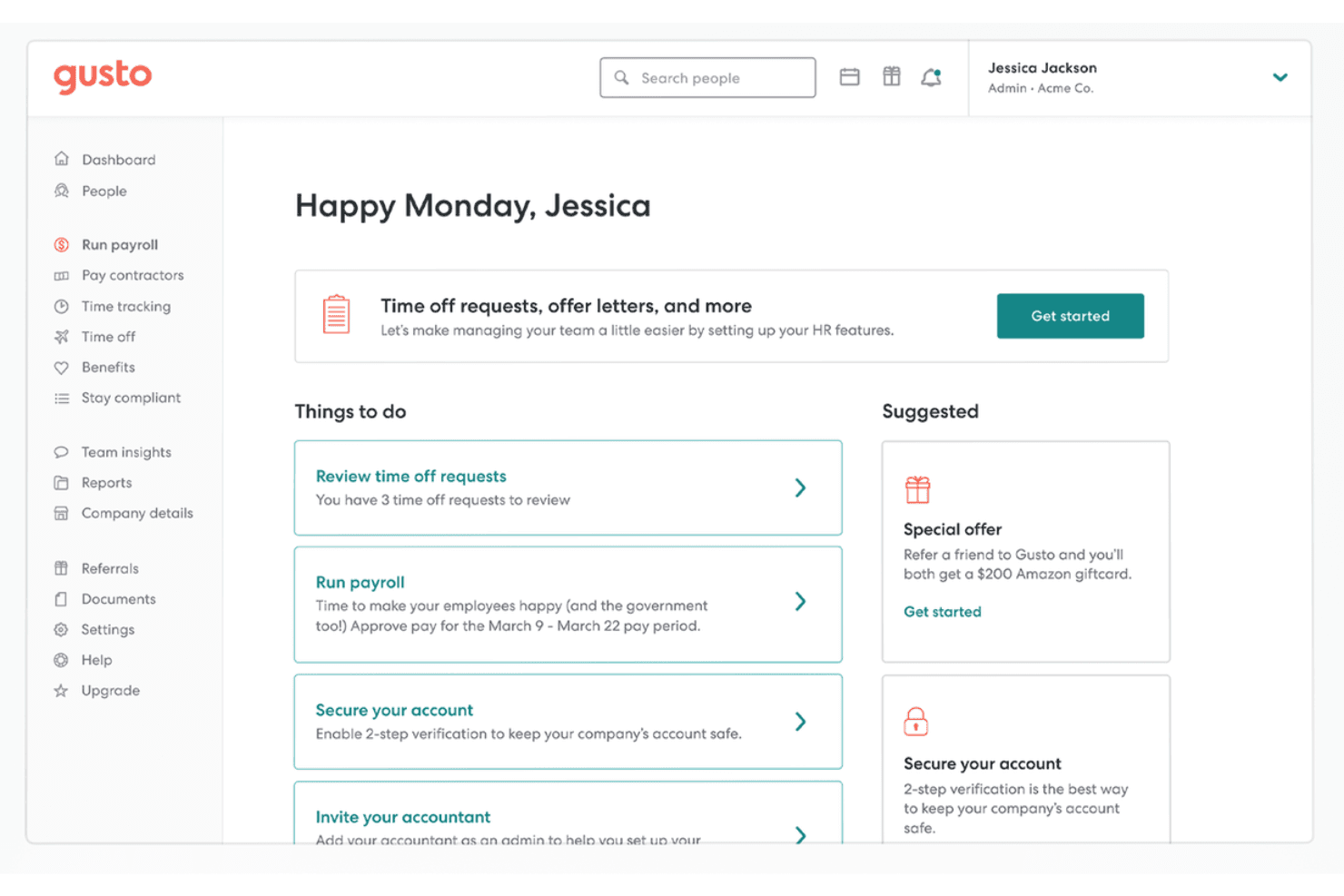
Gusto's dashboard surfaces payroll tasks and HR actions in one place. Gusto offers payroll solutions tailored to meet the unique needs of trucking companies, addressing common industry challenges such as high turnover and varied pay structures. With features designed to simplify payroll management and ensure compliance, Gusto appeals to business owners and HR professionals in the trucking industry looking for reliable and efficient payroll software.
Why I Picked Gusto
I picked Gusto for its ability to cater specifically to the trucking industry's payroll complexities. With automated tax filing and compliance support, Gusto ensures your payroll meets all regulatory requirements without extra hassle. Additionally, its integration with time-tracking tools helps you accurately manage hours and overtime, crucial for maintaining labor law compliance. These features make Gusto an excellent choice for trucking companies aiming to simplify their payroll processes.
Gusto Key Features
In addition to the core functionalities, Gusto offers several other features that are beneficial to trucking companies:
- Direct Deposit: Allows your team to receive payments directly into their bank accounts, reducing the need for manual check handling.
- Employee Benefits Management: Supports the administration of benefits, which is vital for retaining drivers and reducing turnover.
- Multi-State Payroll Management: Handles payroll for teams across different states, accommodating the geographic diversity typical in trucking.
- Automated Deductions: Ensures accurate deductions for taxes and benefits, minimizing errors in payroll processing.
Gusto Integrations
Integrations include QuickBooks, Xero, TSheets, Deputy, When I Work, Clover, Shopify, FreshBooks, Expensify, and ZipBooks.
Pros and Cons
Pros:
- Automated tax filing reduces manual paperwork and errors.
- Multi-state payroll management supports diverse trucking teams.
- Employee benefits management aids in driver retention.
Cons:
- Lacks specific trucking industry features like mileage tracking.
- Not customizable enough to handle large, complex orgs.
 Best for on-demand payments and self-service
- Free demo available
- Pricing upon request
Visit WebsiteCustomer Rating:4.3/5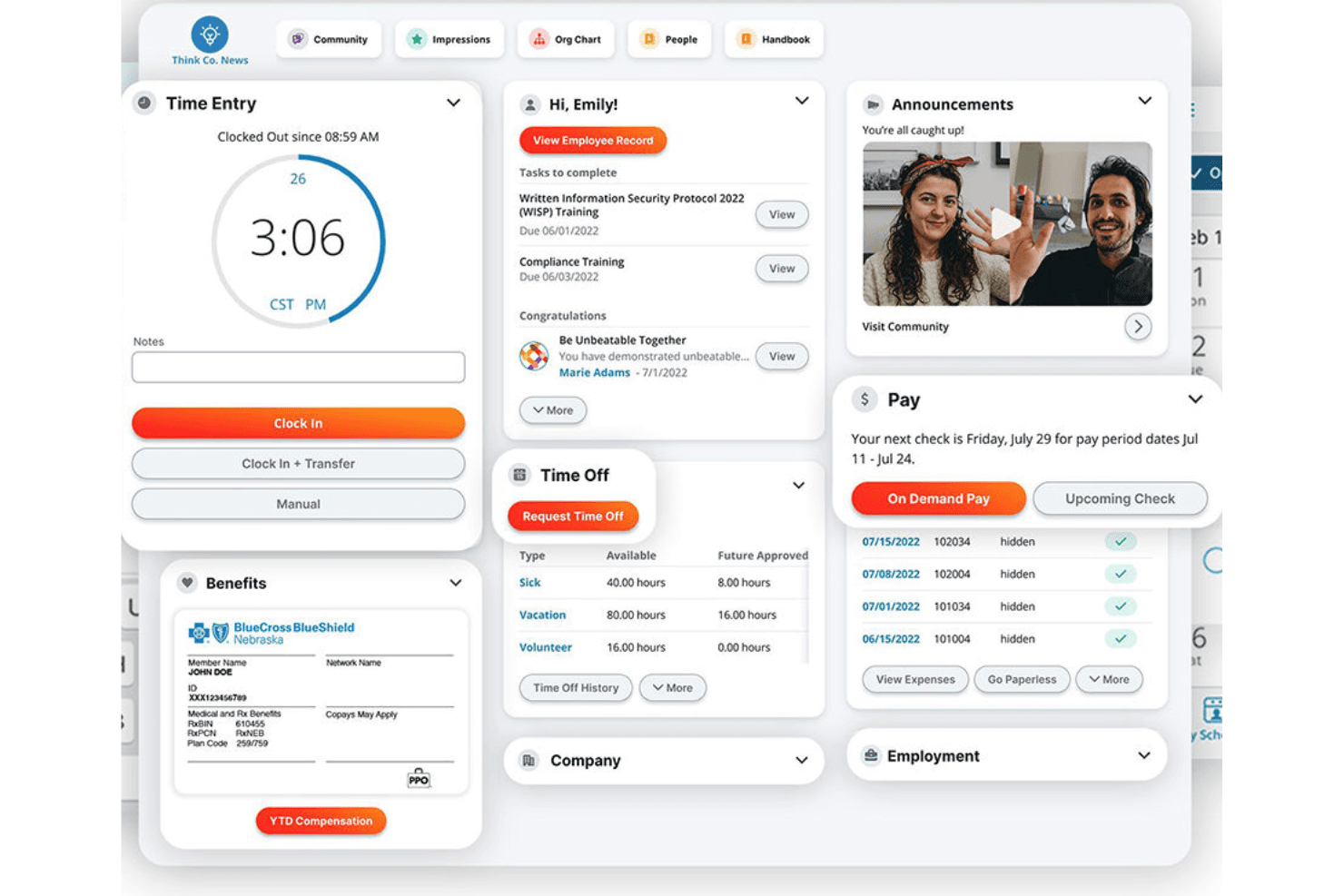
Paylocity centralizes time, pay, benefits, and time off in one dashboard. Paylocity offers HR and payroll solutions tailored for the transportation and logistics industry. It integrates HR and payroll functions to streamline operations and ensure compliance.
Why I picked Paylocity:
I chose Paylocity for its integration of HR and payroll functions, which is crucial for trucking companies that need to manage a diverse workforce and comply with various regulations. It offers features like on-demand payment for employees to access wages when they need to and an employee self-service portal to encourage more autonomy. Paylocity also automates complex payroll workflows and provides real-time access to employee data.
Standout features and integrations:
Features include automated payroll processing, real-time financial analysis, and a comprehensive HR management system.
Integrations include QuickBooks for both accounts receivable and payable, NetSuite, Xero, ADP, SAP, Oracle, Microsoft Dynamics, Sage, Workday, and BambooHR.
Pros and Cons
Pros:
- Automated payroll processing
- Real-time financial analysis
- Comprehensive HR and payroll integration
Cons:
- May require an extensive setup process
- Pricing information not readily available
 Best for small trucking companies
- Free demo available
- Pricing upon request
Visit WebsiteCustomer Rating:4.1/5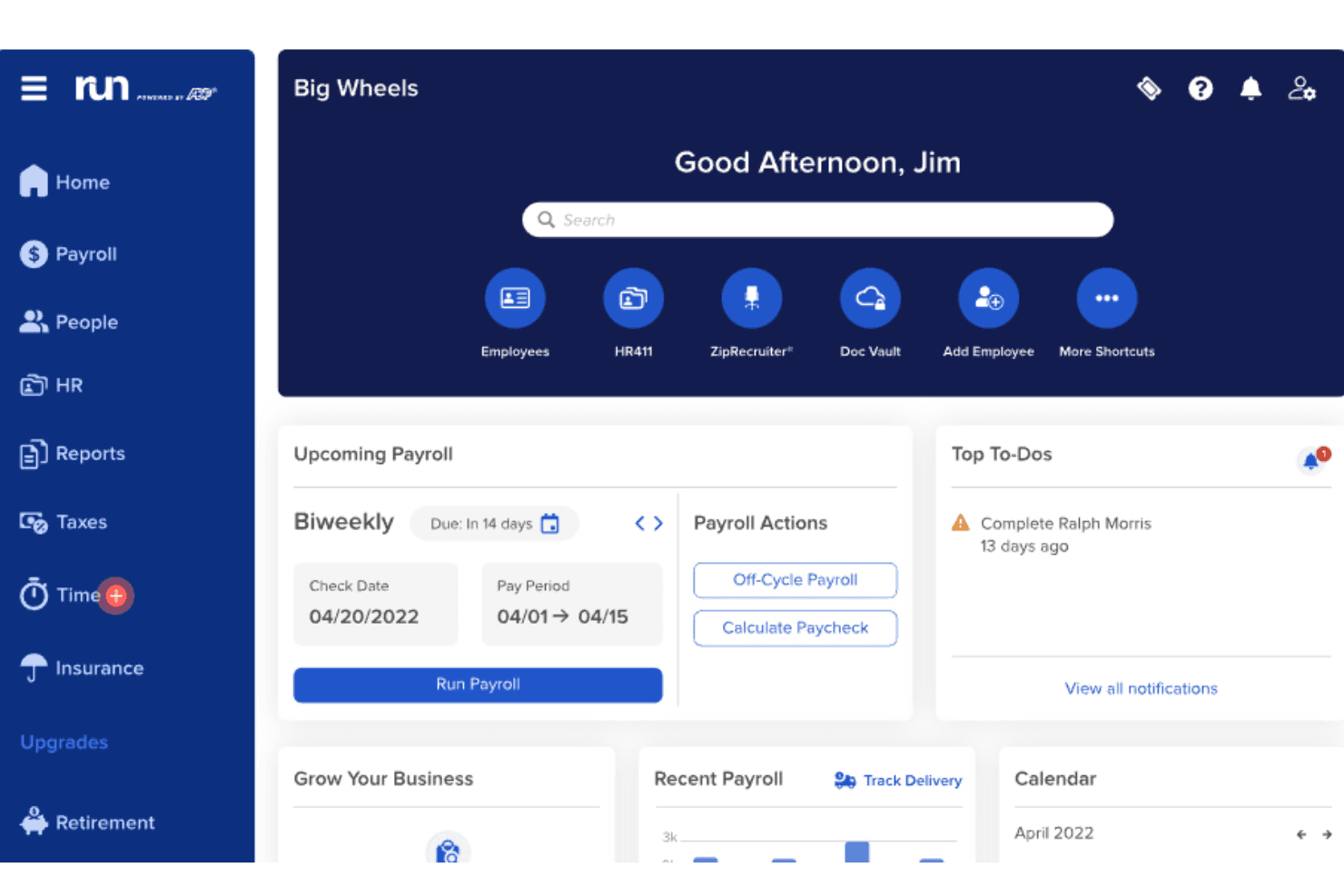
RUN Powered by ADP® centralizes payroll, HR, and scheduling in one dashboard. RUN powered by ADP is a payroll and HR platform tailored for small businesses, offering services such as automatic payroll tax calculation and filing, benefits administration, time and attendance management, and compliance support.
Why I picked RUN by ADP:
Ideal for small trucking businesses, RUN provides automated payroll processing, which simplifies managing driver pay, including hourly rates, mileage-based pay, and bonuses. It also offers automated tax filing and compliance support, helping businesses navigate complex multi-state tax regulations often encountered in the trucking industry. With its mobile access, RUN allows business owners and drivers to access payroll and HR information from anywhere, a crucial feature for businesses that operate on the road.
Standout features and integrations:
Features include direct deposit, employee self-service portal, HR compliance support, time and attendance tracking, garnishment payment services, new hire reporting, retirement plan services, workers' compensation management, and payroll and tax reports.
Integrations include Quickbooks, Wave, Xero, ClockShark, Points North, TruSaic, Compy, Wex, Synerion, JazzHR, 7Shifts, Snappy Gifts, Absorb LMS, SmartRecruiters, and hundreds more.
Pros and Cons
Pros:
- Robust mobile app
- Employee self-service portal
- Customizable, in-depth reporting options
Cons:
- Most HR functions are only available on higher-tier plans
- Not ideal for businesses with more than 49 employees
Learn more about RUN Powered by ADP®: Best for affordable payroll with free direct deposit
- 30-day free trial + free demo available
- From $17/month
Visit WebsiteCustomer Rating:5/5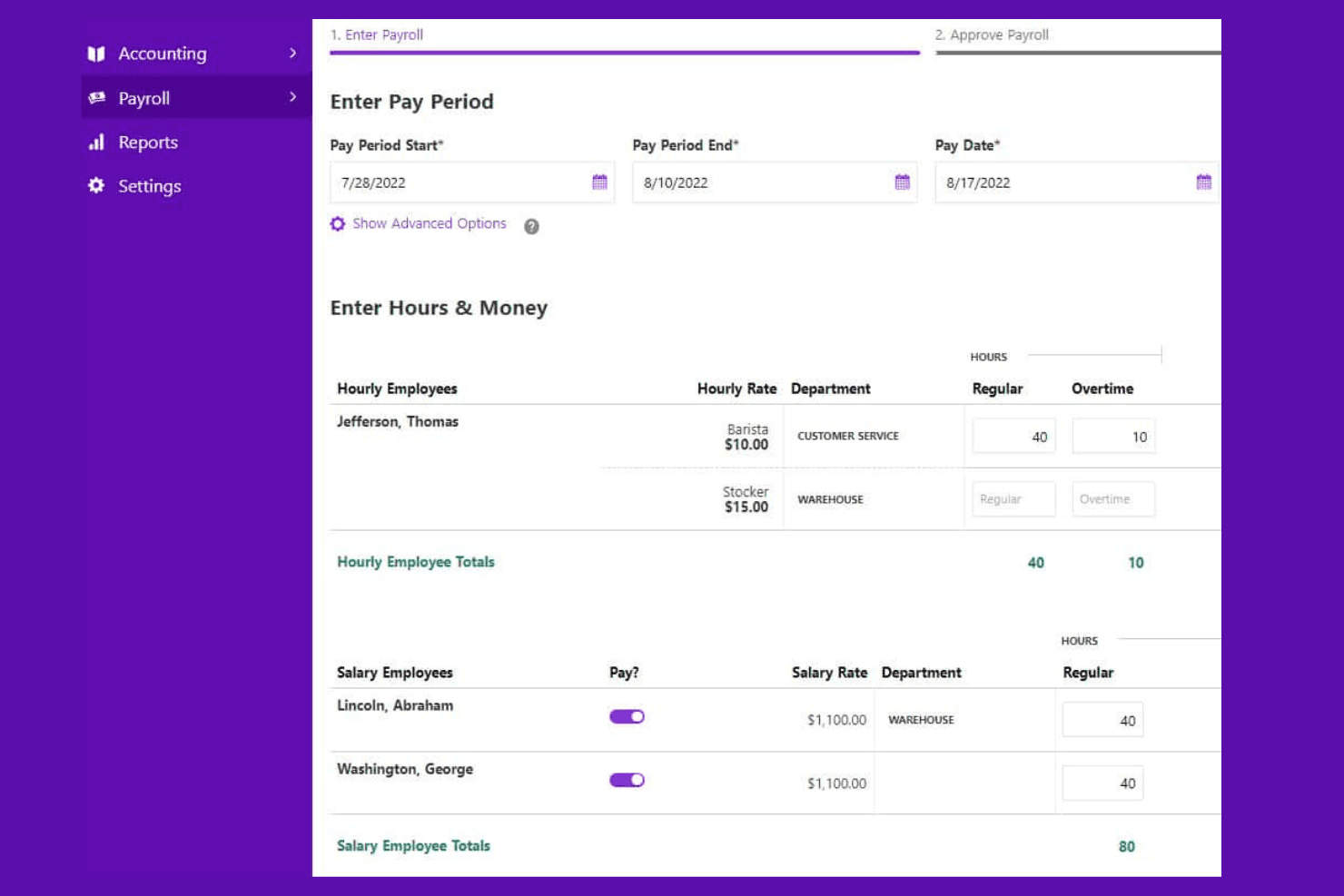
Patriot Payroll lets users enter employee hours and pay rates per period. Patriot Payroll is an online payroll software designed for small businesses with 1 to 500 employees, offering both basic and full-service payroll options.
Why I picked Patriot Payroll:
I chose Patriot Payroll because it offers a comprehensive and affordable payroll solution that meets the unique needs of the trucking industry. Patriot Payroll has a free direct deposit feature, which is a significant advantage as it helps businesses save on additional banking fees.
Patriot Payroll combines low-cost plans with essential payroll features, ensuring that businesses can manage their payroll without incurring high costs. The software's ability to handle payroll tax filings and provide electronic or printable W-2s adds to its appeal, making it a reliable and cost-effective solution for trucking companies.
Standout features and integrations:
Features include flexible pay rates, a simple three-step process for running payroll, free setup and free direct deposit, customizable time-off accrual rules, and U.S.-based support.
Integrations include Patriot Accounting, QuickBooks Online, QuickBooks Time, Plaid, and Workforce Time & Attendance.
Pros and Cons
Pros:
- Supports contractor payments
- Compliant with tax rules in all 50 US States
- Responsive customer support
Cons:
- No employee scheduling features
- For US-based businesses only
Learn more about Patriot Payroll: Best for one driver record across states
- Free demo available
- Pricing upon request
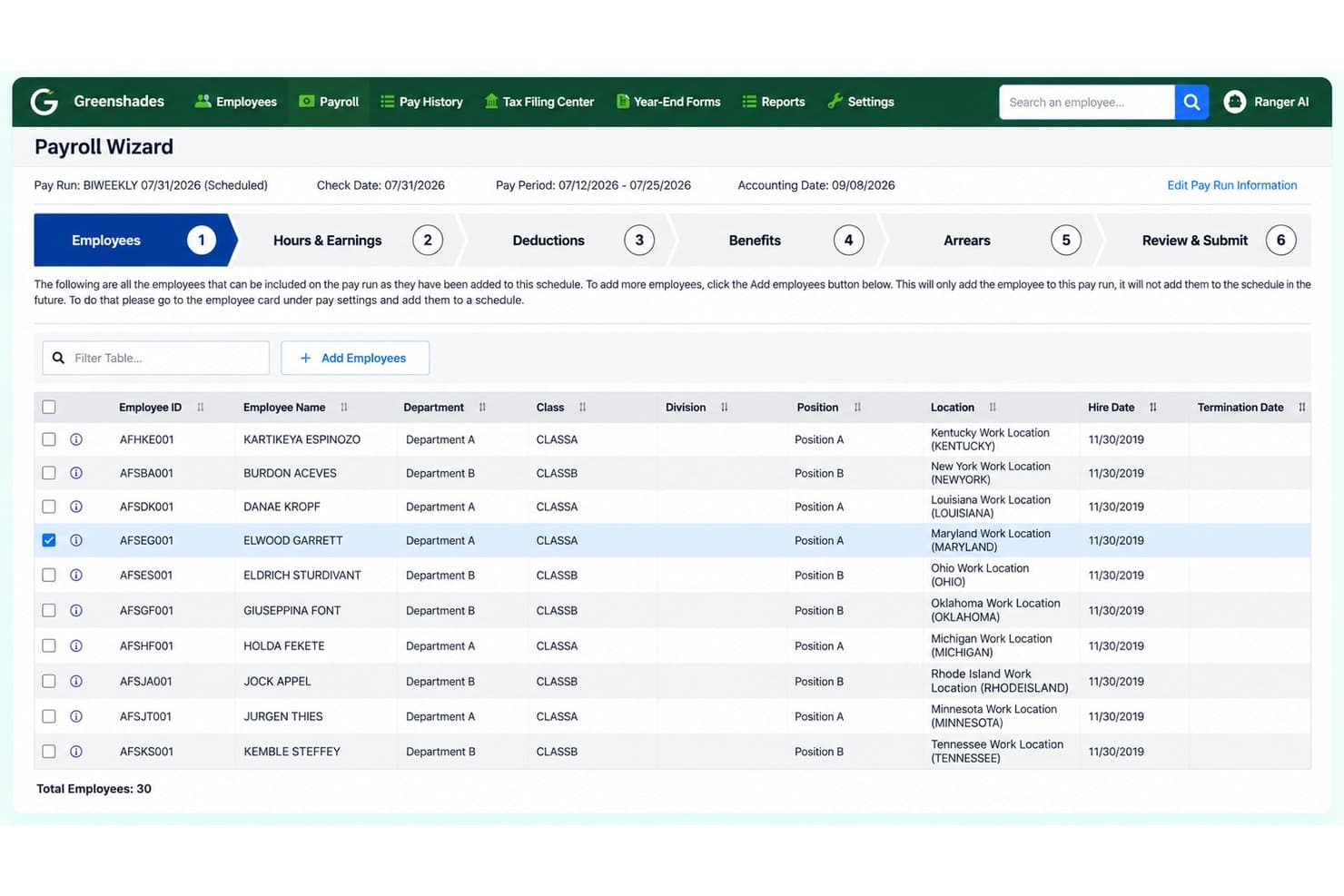
Greenshades manages employee payroll runs with step-by-step scheduling. Greenshades is a payroll, tax, and HR platform built for multi-state fleets that handles driver-specific pay structures—including per-mile, per-load, piecework, and detention pay—alongside multi-state tax withholding, certification tracking, and self-service pay access for drivers.
Who Is Greenshades Best For?
Greenshades suits multi-state fleet operators who need one driver record to follow a driver across states rather than creating new records for every new work location.
Why I Picked Greenshades
I've included Greenshades in my top picks because it solves one of the messiest problems in multi-state fleet payroll: keeping one driver record intact as a driver crosses state lines, rather than creating a new record for each work location. I love how it handles home-state withholding, assigns one primary unemployment state, and retains work-location tax data for every other jurisdiction, all within a single driver profile. CDL and DOT medical-card expiration alerts add another layer I find genuinely useful for fleets managing compliance across dozens of drivers.
Greenshades Key Features
- Parallel pay cycle processing: Runs weekly, bi-weekly, semi-monthly, and monthly payroll schedules simultaneously within a single account.
- Pre-run validation: Flags incorrect tax rates, missing work locations, duplicate SSNs, and unmapped accounts before a payroll run is submitted.
- CDL and DOT medical-card expiration alerts: Certification Management tracks driver credentials and sends alerts before licenses or medical cards lapse.
- Driver self-service pay access: Drivers can retrieve pay stubs and tax documents from any phone or computer, from any location.
Greenshades Integrations
Greenshades lists 21 integrations, including native Microsoft Dynamics GP, Microsoft Dynamics 365 Business Central, Acumatica, and Sage Intacct connections, plus marketplace integrations such as Bullhorn. An OAuth 2.0 API and webhooks support custom connections.
Pros and Cons
Pros:
- Per-mile and detention earnings fit payroll
- Drivers can retrieve pay documents remotely
- One driver record supports multistate withholding
Cons:
- Owner-operator settlements aren't documented
- IFTA calculations aren't documented
Learn more about Greenshades:
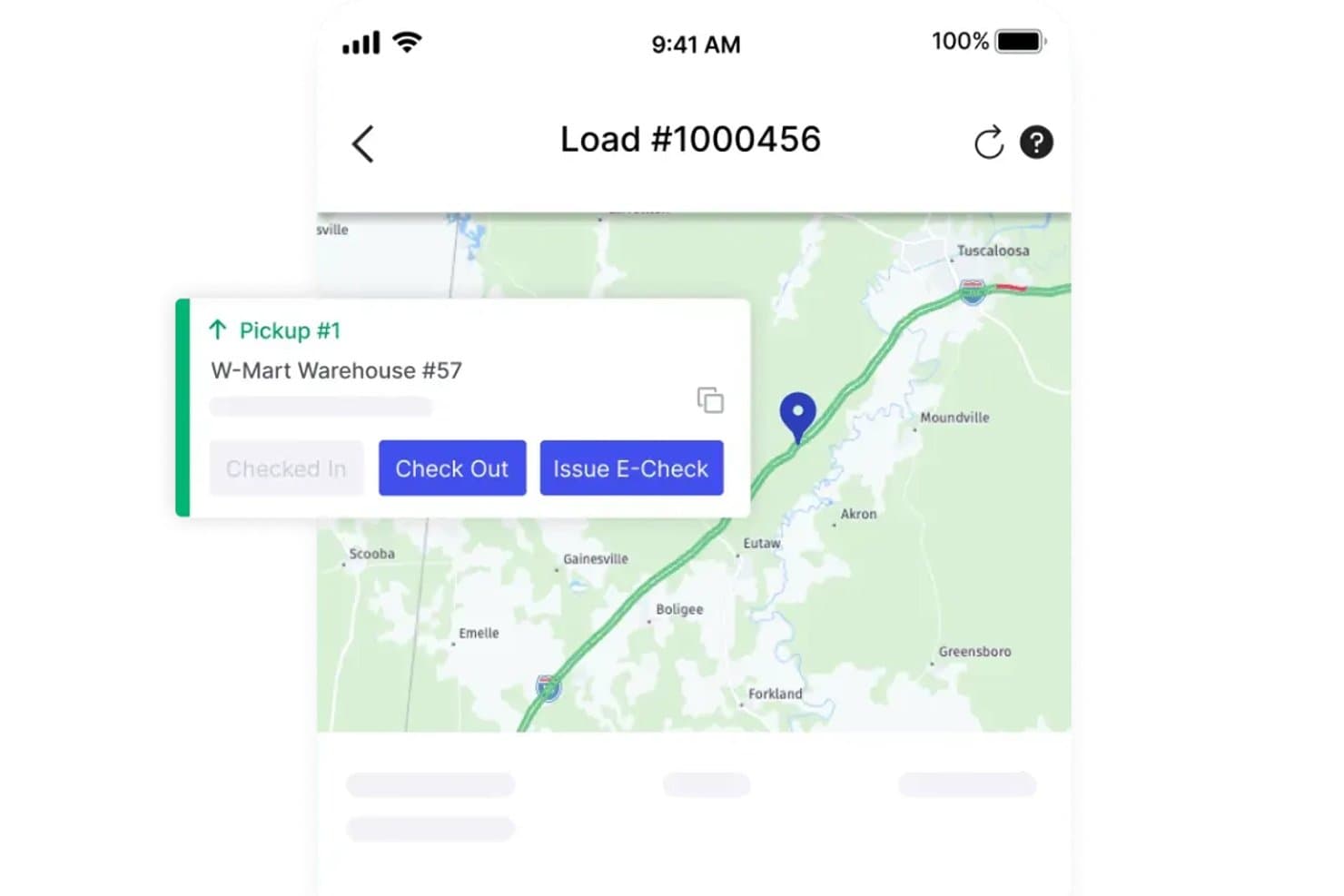
Alvys lets trucking companies issue automated e-checks at pickup. Alvys is a transportation management system for carriers, brokers, and hybrid operations that includes driver and owner-operator settlements, IFTA reporting, and accounting integrations built around delivered trip data.
Who Is Alvys Best For?
Alvys is a strong fit for carriers and hybrid trucking operations that want driver and owner-operator settlements built directly from trip data inside their TMS.
Why I Picked Alvys
Alvys earns its spot on my shortlist because driver settlements are built directly from delivered trip data, which means pay calculations aren't a separate process you have to manage outside the TMS. I particularly like that you can configure pay at the individual driver level or apply rate plans across groups, covering mileage, per-trip, percentage-of-load, and per diem structures in one place. It also handles owner-operator and company driver classifications within the same settlement workflow, so running both alongside each other doesn't require a workaround.
Alvys Key Features
- IFTA mileage calculator: Aggregates state mileage and fuel purchase data from ELD and fuel card integrations to generate quarterly IFTA reports.
- Escrow account management: Lets you set up scheduled or one-time escrow deposits and withdrawals for drivers and owner-operators for purposes like insurance, tolls, and equipment.
- Balance-based deductions: Configures recurring deductions with a starting balance and payment amount that automatically stop when the remaining balance hits zero.
- E-check issuance: Issues instant electronic payments to drivers through EFS and Comdata integrations directly from within the platform.
Alvys Integrations
Alvys lists 130+ marketplace integrations, including Motive, EFS, Comdata, QuickBooks, NetSuite Oracle, and Sage Intacct. It also offers a public REST API, webhooks, and an MCP server for custom connectivity.
Pros and Cons
Pros:
- Reviewers praise driver app communication
- Per diem, deductions, and escrow track together
- Trip-based pay supports varied rate structures
Cons:
- Settlement statements don’t move driver funds
- No documented multi-state payroll tax filing
Learn more about Alvys : Best for Quebec labour and pension reporting
- Free demo available
- Pricing upon request
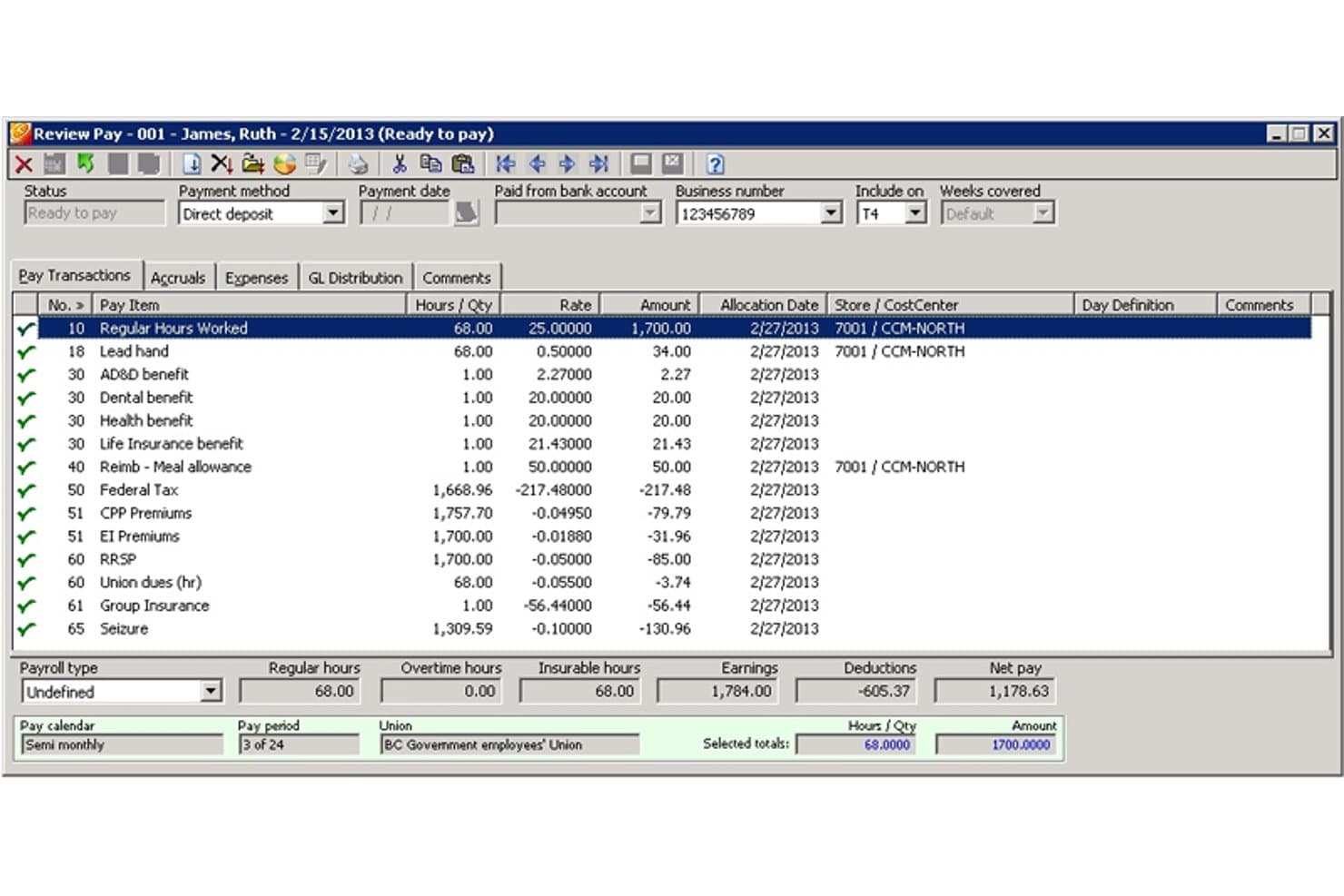
Orange Digital tracks employee pay items, deductions, and net pay. Orange Digital is a Canadian payroll and HR management system that handles trucking-specific pay structures—including mileage, truck type, and load-based compensation—alongside time management, project costing, and Quebec-focused compliance reporting.
Who Is Orange Digital Best For?
Orange Digital is a strong fit for Canadian trucking companies operating in Quebec that need payroll built around provincial labour standards, pension reporting, and French-language compliance.
Why I Picked Orange Digital
I picked Orange Digital as one of the best because it's the only solution on my list built specifically around Quebec's layered compliance requirements, including CCQ and RREGOP pension reporting, plus monthly Labour Standards reports that most generic payroll tools simply don't generate. The EMPulse Series also handles trucking-specific pay structures, converting mileage, truck type, and load data into pay amounts automatically. I also like that it produces Quebec Driver's Pension reports natively, which saves considerable manual work for Quebec-based fleets.
Orange Digital Key Features
- Bilingual interface: Menus, reports, and user documentation are available in both English and French.
- Multiple payment methods: Drivers can be paid by cheque, direct deposit to multiple bank accounts, or payroll debit card.
- Self-service web portal: Employees can access current and historical pay statements and year-end tax forms online.
- Owner-operator payment utilities: The transport solution includes dedicated tools for managing owner-operator payments and reporting.
Orange Digital Integrations
Native integrations are not clearly documented. Orange Digital supports custom interfaces with time-and-attendance, point-of-sale, financial, ERP, and costing systems, but it doesn’t name vendors or document API availability.
Pros and Cons
Pros:
- Multiple payout options and online statements
- Mileage and load factors inform pay
- Quebec pension and labour reports
Cons:
- IFTA and DOT compliance aren’t documented
- No documented US state tax handling
Learn more about Orange Digital: Best for load-to-pay prep via payroll partner
- 30-day free trial available
- From $69/user/month
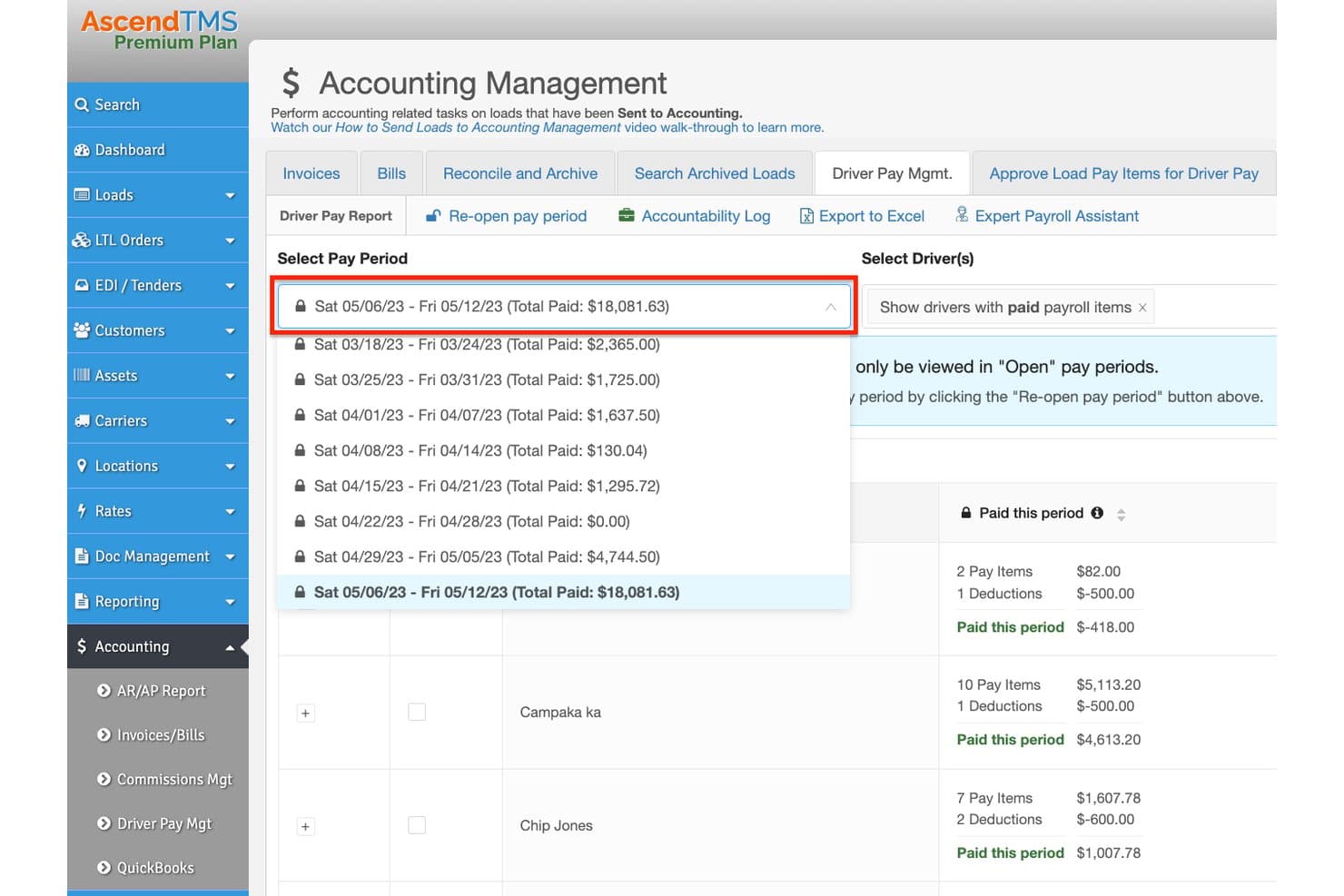
Ascend TMS manages driver pay periods with itemized payroll summaries. AscendTMS is a transportation management system that handles load management, dispatch, driver-pay calculations, and settlements, with payroll processing available through its integrated Superior Trucking Payroll Service partnership.
Who Is AscendTMS Best For?
AscendTMS is a strong fit for trucking company owners and dispatchers who want load-to-pay workflows in one TMS and are comfortable routing payroll processing through a specialist partner.
Why I Picked AscendTMS
I've included AscendTMS in my top picks because it handles the full load-to-pay workflow in one place, then hands off to a trucking-specialist payroll partner to close the loop. I like that driver pay items tied to specific loads, including per-mile rates, stop pay, and per diems, can be approved automatically when a load hits a configured status, cutting down manual reconciliation. That approved pay data then exports directly to Superior Trucking Payroll Service, which handles direct deposit, pay stubs, tax filings, and W-2s for trucking operations specifically.
AscendTMS Key Features
- IFTA tax reporting: Calculate state IFTA taxes using routes, miles by state, fuel data, and state tax rates, with the option to adjust miles and import fuel-card data.
- Automated Workflow Engine: Set rule-based triggers to approve driver pay items automatically when a load reaches a configured status or is sent to accounting.
- Scheduled deductions: Configure recurring deductions as balance-based with a set number of payments or as ongoing amounts taken each pay period.
- Two-way driver texting: Send load instructions to drivers and receive replies directly within AscendTMS, without requiring a separate driver app.
AscendTMS Integrations
AscendTMS reports over 140 pre-installed third-party integrations, including Superior Trucking Payroll Service, Motive, Transflo, Comdata, TriumphPay, and Triumph Business Capital. It exports driver-pay data to Superior, while API availability isn't documented.
Pros and Cons
Pros:
- Settlement sheets connect pay to loads
- Mileage, stop, and per-diem pay items
- Load-linked pay approvals reduce reconciliation
Cons:
- Reviewers flag gaps in IFTA reporting
- Tax filing and deposits require a partner
Learn more about Ascend TMS:
Other Payroll Software for Trucking Companies
Below is a list of additional payroll software for trucking companies that we shortlisted, but did not make it to the top list. It’s definitely worth checking them out.
- 11PaycorBest for fleets combining payroll and HR
- 12OnPayBest for payroll, HR and benefits in one plan
- 13RipplingBest for HR-led payroll management
- 14Paychex FlexBest for mixed W-2 and 1099 workforces
- 15QuickBooks PayrollBest for fleet and driver labor cost reports
- 16NetchexBest for centralized payroll across depots
- 17AxisBest for payroll review tied to load paperwork
- 18TruckbaseBest for dispatch-linked settlement prep
- 19TruckLogicsBest for dispatch-linked driver settlements
Related HR Software Reviews
If you still haven't found what you're looking for here, check out these other related tools that we've tested and evaluated:
- HR Software
- Payroll Software
- Recruiting Software
- Employer of Record Services
- Applicant Tracking Systems
- Workforce Management Software
How I Evaluate Payroll Software for Trucking Companies
I split my evaluation into three parts, with the most weight on core needs: calculate mileage- or load-based pay and handle multi-state withholding. Next, I look for differentiators like automated IFTA reporting. Finally, I consider trucking-specific onboarding, support, and pricing as fleets grow.
Core Functionality (Table Stakes For This List)
When I'm selecting tools for my list, I score each one on a scale from 0 (does not offer the functionality) to 5 (excels in this area) for each core functionality listed below. I then convert the total into a percentage to help assess each tool's overall fit, with extra weight on any functionalities I’ve deemed essential.
- Mileage And Load Pay (Essential): I check for configurable mileage, load-percentage, flat-rate, and hourly rules, including how trip data feeds each driver’s pay calculation.
- Multi-State Tax Compliance (Essential): I assess how the system calculates withholding and supports tax filing when drivers cross state lines or have different work and home locations.
- Owner-Operator Settlements: I look for 1099 settlement statements that show gross pay, fuel advances, escrow, and reimbursements alongside employee payroll.
- Dispatch And ELD Integration: I check whether dispatch, ELD, or TMS trip, mileage, and load records transfer into payroll without rekeying.
- Per Diem And Deductions: I evaluate configurable per diem and deductions for fuel advances, escrow, equipment, and reimbursements, including how they appear on pay records.
- Direct Deposit And Pay Access: I consider direct deposit, pay cards, accelerated pay, and mobile access so drivers can review pay and access funds away from the office.
Once I have a list of tools that meet the criteria, I consider what sets each platform apart.
Differentiating Factors (What Sets Vendors Apart)
Here's how I compare and contrast different vendors:
Standout Features
I look for automated IFTA reporting that calculates fuel tax by jurisdiction using mileage and fuel data—this saves hours of manual work each quarter. Escrow and advance tracking matters too, since I check whether the system reconciles fuel advances and cash draws against driver pay at settlement without spreadsheet workarounds. I also evaluate garnishment handling, because CDL drivers crossing multiple states often trigger different wage rules for court-ordered deductions, and manual errors here carry real legal risk.
Beyond Features
I check whether pricing scales with fleet size, since a per-driver model that works for a 10-truck operation can get expensive fast at 200 drivers. Onboarding support matters just as much—vendors with trucking-experienced implementation teams know how to configure per diem rules and multi-state withholding from day one, which cuts setup errors I've seen derail first payroll runs. I also evaluate how often a vendor updates its compliance rules for IRP, IFTA, and DOT wage requirements, because outdated tables mean audit exposure your team won't catch until it's too late.
How to Choose Payroll Software for Trucking Companies
As you work through your own unique software selection process, keep the following points in mind:
- Trucking-Specific Features: Trucking companies have unique payroll needs, such as paying drivers by mile, load, or hour, and tracking International Fuel Tax Agreement (IFTA) data. Ensure you look for software that offers these specialized functionalities.
- Integration Capabilities: The ability to integrate with other systems, such as Transportation Management Systems (TMS), Electronic Logging Devices (ELDs), and accounting software, is essential for seamless operations.
- Ease of Use: User-friendly interfaces and straightforward workflows are essential for efficient payroll management. Look for software that simplifies payroll processing through intuitive platforms. Features such as automatic time-tracking and seamless integration with mileage-tracking tools can greatly enhance efficiency.
- Compliance and Reporting: Ensuring compliance with federal and state regulations, as well as managing labor costs, is a significant concern for trucking companies. Look for software that automates tax calculations and filings, and generates necessary forms like W-2s and 1099s. Prioritize solutions that offer robust compliance tools and comprehensive reporting capabilities.
- Cost and Scalability: Consider the cost of the software and its ability to expand to fit your business needs. Look for pricing plans that align with the size of your fleet to ensure you receive value for your investment. The software should offer essential features like mileage tracking and driver settlements. A scalable solution will accommodate your business's growth, providing flexibility and additional features as your fleet expands.
By considering these factors, you can select payroll software that not only meets your current needs but also supports your cash flow and business growth.
Trends in Payroll Software for Trucking Companies
Payroll software for trucking companies is evolving rapidly. Here are some key trends to watch this year.
- Integration with Telematics Systems: Payroll software is now integrated with telematics systems. This allows for real-time tracking of driver hours and routes. It ensures accurate payroll calculations based on actual work done.
- Blockchain for Payroll Security: Blockchain technology is being used to enhance payroll security. It provides a tamper-proof ledger for all transactions. This reduces the risk of fraud and ensures data integrity.
- Mobile Payroll Management: Mobile apps for payroll management are gaining popularity. They allow drivers to access their payroll information on the go. This increases transparency and convenience for employees.
- AI-Powered Payroll Analytics: AI is being used to analyze payroll data. It helps in identifying patterns and anomalies. This can lead to more efficient payroll processing and error reduction.
- Automated Compliance Updates: Payroll software is now offering automated compliance updates. This ensures that the software is always up-to-date with the latest regulations. It reduces the risk of non-compliance and associated penalties.
As these technologies continue to evolve, they will offer significant benefits in efficiency, accuracy, and overall payroll management for trucking companies.
What is Payroll Software for Trucking Companies?
Payroll software for trucking companies is a specialized tool designed to manage and automate the payroll processes specific to the trucking industry. It is used by payroll administrators, HR professionals, and fleet managers to handle driver payments, track hours, and ensure compliance with industry regulations. Users need it to accurately calculate wages, manage deductions, and generate payroll reports efficiently.
The components of payroll software for trucking companies include time tracking, wage calculation, tax management, and compliance features. It also integrates with other systems like GPS for tracking driver hours and accounting software for financial reporting.
Features
Managing payroll can be a complex and intricate process for a trucking company, so it is essential to have payroll software that helps automate and streamline the payroll process, ensuring timely and accurate payments to drivers and other employees.
As you handle various operational aspects, from mileage calculations to driver settlements, here are the most important features to look for in payroll software for trucking companies:
- Driver Settlement Management: This feature allows for accurate calculation and distribution of driver payments, ensuring that drivers are paid correctly based on miles driven, loads delivered, and other factors.
- Compliance Tracking: Ensures that the company adheres to federal and state regulations, which is essential for avoiding fines and legal issues.
- Fuel Tax Reporting: Automates the calculation and reporting of fuel taxes, saving time and reducing errors in tax filings.
- Time and Attendance Tracking: Monitors driver hours and attendance, which is important for managing overtime and ensuring compliance with hours-of-service regulations.
- Direct Deposit: Provides the ability to pay drivers directly into their bank accounts, which is convenient and reduces the need for paper checks.
- Benefits Administration: Manages employee benefits such as health insurance and retirement plans, which is important for maintaining employee satisfaction and retention.
- Expense Tracking: Tracks and reimburses driver expenses, ensuring that all costs are accounted for and reimbursed promptly.
- Customizable Pay Rates: Allows for different pay rates based on various criteria, which is important for accurately compensating drivers with different roles and responsibilities.
- Reporting and Analytics: Provides detailed reports and analytics on payroll data, which helps in making informed business decisions.
- Integration with Accounting Software: Ensures seamless data transfer between payroll and accounting systems, which is crucial for maintaining accurate financial records.
By focusing on these features, you can acquire an efficient and effective payroll system tailored to the unique needs of your trucking company.
Benefits
In the trucking industry, managing payroll can be a complex and time-consuming task. Payroll software designed specifically for trucking companies can streamline this process, offering numerous benefits that enhance efficiency, accuracy, and compliance.
Below are five primary benefits of using payroll software for your trucking company:
- Customized Pay Stubs: Specialized payroll software allows for personalized pay stubs that include essential details such as load numbers, delivery dates, starting and ending cities, miles driven, and pay per load. This transparency helps in retaining drivers by clearly showing what they are being paid for.
- Flexible Report Customization: Payroll software for trucking companies offers flexibility in report customization, allowing businesses to tailor reports to their specific needs. This includes insights into payment frequencies and detailed breakdowns of deductions and allocations, providing a comprehensive financial overview.
- Tailored Deductions and Allocations: The complexity of trucking payroll often involves various deductions and allocations. Payroll software simplifies this by clearly outlining what is deducted from each paycheck and how that money is used, ensuring drivers are well-informed about their earnings.
- Efficient Focus on Mileage or Percentage-Based Payments: Payroll software efficiently manages payments based on mileage or percentage-based pay structures, ensuring accurate and fair compensation for drivers. This is crucial in the trucking industry where pay structures can vary significantly.
- Improved Compliance and Tax Filing: Payroll software helps trucking companies stay compliant with tax regulations by automating payroll tax filing and ensuring accurate calculations. This reduces the risk of errors and penalties, providing peace of mind for business owners.
- Improved Driver Retention and Satisfaction: Timely, transparent paydelivered with detail and accuracy goes a long way in retaining quality drivers. Integrated benefits management and self-serve portals further enhance their experience.
- Seamless System Integrations: Many trucking payroll platforms sync with ELDs, dispatch tools, TMS platforms, and accounting software like QuickBooks or Xero—reducing data duplication and ensuring operational alignment.
- Time and Cost Savings for Admin Teams: By automating repetitive tasks like tax filing, settlement calculations, and report generation, your HR and accounting staff can focus on more strategic work. This can lead to measurable cost savings over time.
Using payroll software designed for the trucking industry not only improves accuracy and efficiency in payroll processing but also allows companies to focus on growing their business while professionals handle the payroll. This strategic investment can lead to better driver retention, enhanced financial transparency, and overall operational efficiency.
Costs and Pricing
When considering payroll software for your trucking company, you should be aware of the various plan options and pricing structures available. The pricing and features of these plans can vary significantly, so it's important to understand what each plan offers to find the best fit for your needs.
This guide provides an overview of various payroll software options tailored for trucking companies, detailing their plans, average prices, and features to help you make an informed decision.
Payroll Software for Trucking Companies Plan Comparison Table
| Plan Type | Average Price | Common Features |
| Free | $0 | Basic payroll processing, limited customer support, and simple reporting tools |
| Basic | $50/month | Payroll processing, tax calculations, direct deposit, basic reporting, and email support |
| Standard | $150/month | All Basic features, plus time tracking, employee self-service, compliance management, and phone support |
| Premium | $300/month | All Standard features, plus advanced reporting, integration with other software, priority support, and mobile app access |
| Enterprise | Custom pricing (starting at $500/month) | All Premium features, plus a dedicated account manager, personalized setup and training, custom reporting, and enhanced security features |
A breakdown of pricing plans, costs, and features of payroll software for trucking companies.
More advanced payroll systems that include features like global payroll and employer of record (EOR) services, tend to be more expensive. For these platforms, you can expect to pay between $25 to $500 per employee, depending on the specific service configuration you choose.
FAQs
Here are some answers to frequently asked questions you may have about payroll software for trucking companies and how it works:
What features should I look for in payroll software for trucking companies?
When selecting payroll software for trucking companies, look for features such as automated payroll processing, tax compliance, direct deposit, employee self-service portals, and integration with other systems like accounting and time tracking. Additionally, consider software that can handle complex pay structures, including mileage and per diem payments.
How does payroll software handle different pay rates for drivers?
Payroll software designed for trucking companies can manage various pay rates by allowing you to set up different pay structures for each driver. This includes hourly rates, mileage rates, and per diem payments. The software can automatically calculate the correct pay based on the data entered, ensuring accurate and timely payments.
Can payroll software help with tax compliance for trucking companies?
Yes, payroll software can assist with tax compliance by automatically calculating and withholding the correct amount of federal, state, and local taxes. It can also generate necessary tax forms, such as W-2s and 1099s, and ensure that all tax filings are completed on time. This helps reduce the risk of errors and penalties.
Is it possible to integrate payroll software with other systems used by trucking companies?
Many online payroll software solutions offer integration capabilities with other systems commonly used by trucking companies, such as accounting software, time-tracking systems, and fleet management tools. This integration helps streamline operations and ensures that data is consistent across all platforms.
What support options are available for payroll software users?
Support options for payroll software users typically include online resources such as FAQs, user guides, and video tutorials. Many providers also offer customer support through phone, email, or live chat. Some software solutions may provide dedicated account managers or premium support packages for additional assistance.
Can payroll software handle payroll for both company drivers and independent contractors?
Yes, payroll software can manage payroll for both company drivers and independent contractors. It can differentiate between the two types of workers and apply the appropriate tax treatments and payment methods. This ensures that both employees and contractors are paid accurately and in compliance with regulations.
What are the costs associated with payroll software for trucking companies?
The costs of payroll software for trucking companies can vary based on factors such as the number of employees, the features included, and the level of support provided. Some software solutions charge a monthly subscription fee, while others may have a per-employee pricing model. It’s important to evaluate the pricing structure and choose a solution that fits your budget and needs.