

10 Best Recruiting Agency Software of 2026

10 Best Recruiting Agency Software Shortlist


The best recruiting agency software helps professional recruiters manage multiple clients, candidate pipelines, and back-office tasks—all from one centralized platform.
Recruiters are under constant pressure to deliver results fast while maintaining a great experience for both clients and candidates. The right software simplifies this process by automating repetitive admin work, organizing talent pools, and streamlining communication across placements.
Drawing on my experience reviewing HR and recruiting tools, I’ve curated a list of the top recruiting agency software designed to boost productivity, accuracy, and client satisfaction. In this guide, you’ll find platforms that help agencies work smarter, strengthen relationships, and deliver better hiring outcomes at scale.
Why Trust Our Software Recommendations
Our team has been testing and reviewing software since 2012. As HR experts ourselves, we know how difficult—and important—it is to choose the right software.
For this guide, we evaluated tools using hands-on testing and independent research, scoring tools using our selection criteria. We also draw on insights from industry thought leaders and practicing HR experts.
Our reviews reflect our human editorial judgment, not a sales pitch.
Expert reviewers:
Recruiting Agency Software Comparison Table
This comparison table summarizes pricing details about my top recruiting agency software selections:
| Tool | Best For | Trial Info | Price | ||
|---|---|---|---|---|---|
| 1 | Best ATS with CRM | Free demo available | From $79/user/month | Website | |
| 2 | Best for integrated recruitment automation | 30-day free trial + free demo available | From $85/user/month (billed annually) | Website | |
| 3 | Best for social media recruitment | 14-day free trial + free demo available | From $15/user/month (billed annually) | Website | |
| 4 | Best for novice recruiting specialists | Free trial + free demo available | From $85/user/month (billed annually) | Website | |
| 5 | Best for recruitment task tracking | Free demo available | Pricing upon request | Website | |
| 6 | Best for referral-based recruiting | Free demo available | Pricing upon request | Website | |
| 7 | Best sourcing for hourly positions | Free demo available | Pricing upon request | Website | |
| 8 | Best for organized candidate databases | Free demo available | From $99/user/month | Website | |
| 9 | Best for branded career pages | Free demo available | From $175/user/month | Website | |
| 10 | Best for candidate scoring in bulk | Free trial available | From $4.99/month (billed annually) | Website |

Best Recruiting Agency Software Reviews
Here are my detailed summaries of the best recruiting agency software that made it into my top 10 list, including notes on why I picked them. Each review offers a detailed look at the key features, pros & cons, integrations, and ideal use cases of each system to help you find the best tool for you.
Tracker
Best ATS with CRM
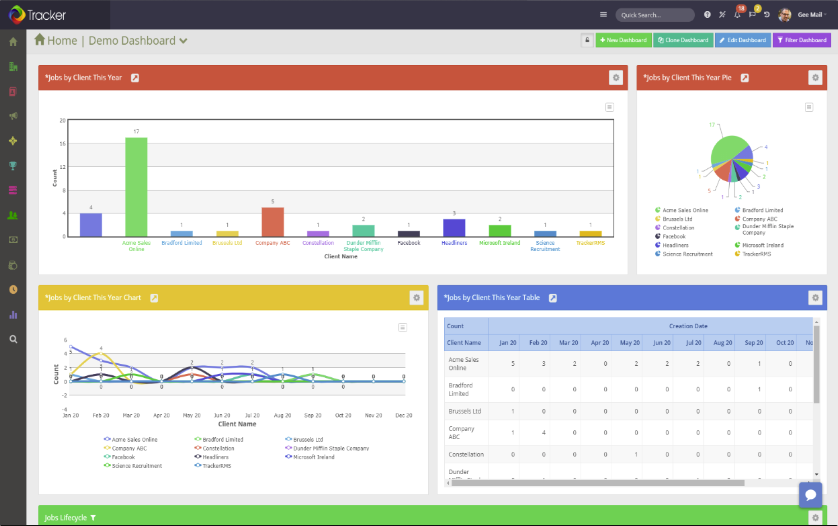
Tracker is an ATS and CRM in one, providing a comprehensive solution for staffing and recruitment agencies to manage a high volume of candidates, clients, and tasks under a single roof.
Why I picked Tracker: I decided to add this software to my list because of its robust functionality and feature set. Your staffing agency can maintain all candidate records in the same place you track recruitment processes, and even draw up reports using the analytics suite. Instead of managing multiple disparate systems, you’ll have an all-in-one solution.
Some of the handy tools included in the ATS are its custom recruitment workflows and resume parsing capabilities. As for the CRM module, you can easily send emails and text messages in bulk to keep candidates up to date on progress. Client-facing features help you manage not just staffing, but also your clients.
Tracker Standout Features & Integrations
Standout features of this platform include its AI capabilities, which can automatically parse resumes and rank applicants for specific roles. It also provides plenty of automations, including unlimited sequences and candidate matching to roles. Web forms and surveys also make data collection simple and straightforward.
Integrations include QuickBooks, Sage, Xero, Outlook, Gmail, LinkedIn, and Office365. An API is available to build custom integrations, and a paid Zapier account unlocks additional integrations.
Pros and Cons
Pros:
- Knowledgeable and helpful customer support team
- Designed specifically for recruitment agencies
- User-friendly and intuitive interface
Cons:
- Limited customization options
- Pricing is not transparent

Best for integrated recruitment automation

Recruit CRM combines the functionalities of a CRM with an ATS, making it an excellent choice for high-volume recruiters or recruitment agencies.
Why I picked Recruit CRM: Their user interface is intuitive and includes a Kanban style view that visually organizes all the prospective candidates in your hiring pipeline with separate columns for whichever recruitment phase they’re in. Moving them along in the pipeline is also straightforward, with just a click.
To increase your productivity, you can set up triggers for automated emails and other tasks to occur once you move a candidate from one phase to the next.
Recruit CRM Standout Features and Integrations:
Features include a Chrome browser extension that simplifies candidate sourcing through LinkedIn. You can use it to tag promising candidates and add them to your general database, or to one of your active hot lists, which function as individual talent pools for each position. Once flagged, Recruit CRM automatically scans the candidate’s profile details and transfers their personal details into your system for future use.
Their suite of built-in reports is what makes Recruit CRM stand out as an asset for recruiting teams or staffing firms.
You can run custom reports on all types of common recruiting metrics, or use one of their built-in reports, such as their Recruiter KPI Report, their Candidate Lifecycle Report, a Job Statistics Report, or a Client Performance Report.
Within each report, the data is visualized graphically, as well as in a table format that can be exported as a CSV file. Managers can even compare the output of recruiters side-by-side or click into the individual graph points to drill down into more nitty-gritty details.
Integrations for this software are entirely based on Zapier's offering. RecruitCRM has a Zapier connector that lets you integrate the software with thousands of apps like Gmail, Slack, HubSpot, and Typeform. Keep in mind that you will need to have a paid account with Zapier to be able to connect external apps.
Pros and Cons
Pros:
- Includes Boolean and radius searches to capture more candidates
- Huge list of third-party app integrations (over 5,000 via Zapier)
- Includes powerful AI features like resume parsing, email sequencing, and candidate matching
Cons:
- No freemium plan
- Custom branding locked to highest paid plan

Manatal
Best for social media recruitment
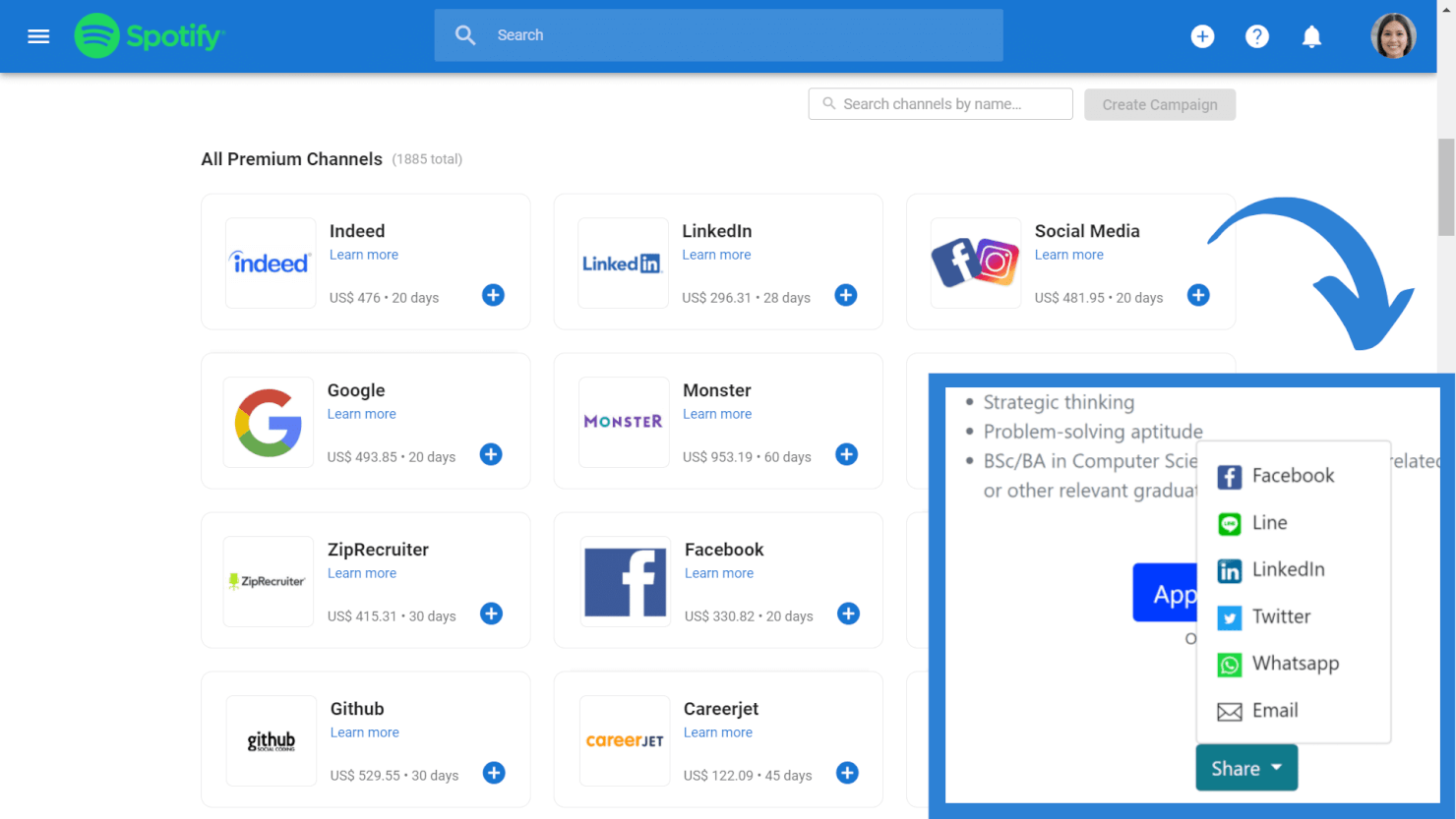
Manatal is an award-winning recruitment solution suitable for internal hiring teams and recruiting agencies and headhunters.
Why I picked Manatal: It comes with a range of features to help secure top talent across diverse roles using advanced sourcing capabilities and AI-driven candidate recommendations.
This includes ability to share roles across 2,500+ free and premium channels, import profiles directly from LinkedIn and LinkedIn Recruiter, and access to an external database of over 600 million professionals.
Manatal Standout Features & Integrations:
Standout features for Manatal include their intelligent candidate sourcing and AI-powered recommendations. These features work in tandem to help you sift through your stacks of candidate data, with the system automatically picking out candidates who check the most boxes.
It's also possible to retrieve verified email addresses and phone numbers directly from candidate profiles and their Vendor Management System, VM, empowers hiring teams and recruitment agencies to work together more efficiently.
Integrations are available with Facebook, Gmail, G Suite, Line, LinkedIn, Microsoft Outlook, Office 365, Wechat, and WhatsApp. Zapier integration and API access are available on their custom plan subscription.
Pros and Cons
Pros:
- You can create customizable career landing pages with embedded application forms
- Includes task tracking and team collaboration tools
- Candidate sourcing tool draws from 2,500+ job platforms
Cons:
- Annual billing only
- SMS recruitment features only available in their top-level plan
New Product Updates from Manatal

Manatal Adds Candidate Login and Employee Portal to Career Pages
Manatal has added Candidate Login, Internal Employee Portal, and internal job visibility controls for Career Pages. These features help teams simplify applications, support employee mobility, and manage internal hiring workflows. For more information, visit Manatal’s official site.
 .
.
Crelate
Best for novice recruiting specialists

Crelate is a recruiting agency recruiting tool built by recruiters with plenty of useful ATS and CRM features.
Why I picked Crelate: I selected Crelate due the tool's ease of use, customizability, and extensive feature list.
For example, you can easily drag and drop applicant records as candidates move through your recruitment process.
You can also tag applicants with skills, experience, source, or any other information that can be surfaced when searching.
It's the same with the CRM too, which is full customizable to adapt to your sales workflow. The customization filter allows you to search jobs by placements, companies, opportunities.
Crelate Standout Features and Integrations:
Standout features include resume parsing and automated candidate profile creation. Crelate pulls the information from your candidate’s resumes and uses it to create detailed profiles, complete with each job seeker’s social media information.
Also useful is their client portal allowing recruiters to communicate with clients via automated real-time alerts and record all client interactions and feedback regarding candidates in one centralized, easily accessible location.
Integrations include communication and analytics tools, and ATS solutions, such as ZoomInfo, hireEZ, CareerBuilder, Seekout, Glassdoor, Monster, JobInventory, Dice, CareerJet, Google Workspace, and Microsoft Outlook.
Pros and Cons
Pros:
- Drag-and-drop visual editor
- Automation features help you capture candidate data
- Great support department
Cons:
- You can’t customize the required fields for job applications
- Limited number of email templates

JobAdder
Best for recruitment task tracking

JobAdder is a recruiting agency platform that enables you to track applicants through your recruiting funnels. The solution gives you an overview of your recruiting efforts, allowing you to identify potential bottlenecks in your workflows.
Why I picked JobAdder: JobAdder made my list thanks to its applicant tracking features. The platform shows hiring managers the status of each candidate in real-time, allowing them to understand how the hiring process is going at a glance. Team members can rate candidates and leave comments for one another in candidate profiles, ensuring that only the best candidates move deeper into the funnel.
JobAdder’s Interview and Task dashboard enables you to keep your team members on track. The dashboard allows you to view upcoming tasks so you can optimize your calendar and your team’s workload.
JobAdder Standout Features and Integrations:
Standout features include candidate records, search and match automation, record enrichment, and talent pools. Combined, these features allow you to source candidates in a short amount of time by performing lookalike searches with advanced filters.
Integrations include communication, CRM, payroll, and ATS solutions, such as BambooHR, Calendly, Checkmate, Applyflow, Seek, Aircall, Deputy, Deel, QuickBooks, and HubSpot.
Pros and Cons
Pros:
- Good customization options
- Interview scorecards
- Great mobile app
Cons:
- May lag when saving multiple candidate profiles at once
- Some functionalities may seem complicated to novice users
Boon
Best for referral-based recruiting

Boon is a recruiting automation platform built to help recruiters and companies hire faster through referral-based sourcing. It connects employers with potential candidates by turning existing networks into a dynamic recruiting engine.
Why I picked Boon: I chose Boon because it’s centered on automating and incentivizing referrals. It allows you to crowdsource referrals from employees, alumni, and your broader network, then automatically engages those contacts with pre-set campaigns. This makes it especially effective for teams looking to tap into their existing relationships instead of only sourcing externally. You can set bounties for each job, giving people a reason to recommend candidates, which expands your reach without a traditional sourcing team.
Boon Standout Features and Integrations
Features include a referral leaderboard that gamifies participation by showing who brings in the most candidates, helping boost engagement. The tracking dashboard also shows how many referrals are coming in, what stage they’re at, and who made them, so your team can measure impact and accountability.
Integrations include NetSuite, Lever, Workday, Greenhouse, Google Workspace, Okta, Slack, Microsoft Teams, Facebook, LinkedIn, QuickBooks, Xero, and SmartRecruiters.
Pros and Cons
Pros:
- Referral tracking is efficient and easy to manage
- Gamification features help increase employee engagement
- AI automation helps recruiters identify better candidates faster
Cons:
- Uploading data manually can be difficult or time-consuming
- Incentive tracking lacks deeper customization options

Best sourcing for hourly positions

TalentReef's cloud-based recruitment and hiring platform purpose-built for location-based, high-volume recruiting.
Why I picked TalentReef: I included TalentReef in this list because of their unique focus on sourcing candidates to fill hourly positions. This makes their software particularly well-suited for sourcing talent for businesses in the service industry, such as restaurants, retail stores, and other hourly employers that frequently hire new staff in bulk.
TalentReef Standout Features and Integrations
Standout features include their conversational AI chatbot, a text-to-apply feature, two-way texting abilities, and social recruiting tools. Recruiters can also save a lot of time by using their campaign communication features to create templated email and SMS communications for candidate interactions, allowing them to stay in touch with high volumes of candidates at scale.
Another plus worth highlighting is their interview scheduling automation. By allowing candidates to pick a time that works for them, you'll reduce the likelihood of no-shows or last-minute cancellations, and eliminate the need for back-and-forth phone tag to find a time that works.
Integrations are available with payroll systems, candidate assessment tools, background check providers, and learning management systems, though individual platforms are not specified.
Pros and Cons
Pros:
- Well-suited for filling hourly roles in bulk
- Offers branded email communications
- Includes mobile-friendly features
Cons:
- No free trial available
- Pricing details are not transparent
Bullhorn
Best for organized candidate databases

Bullhorn aims to offer a single source of truth for busy staffing agencies and even acts as the central hub for the wider tech stack.
Why I picked Bullhorn: Bullhorn understands how busy recruitment teams are but also the need to balance efficiency (read, automation) with the human touch. As such, they're careful to implement automation with caution and use it to improve the experience for teams and candidates.
They're also generous with knowledge, providing playbooks to help organizations engage with candidates and differentiate their offering.
Bullhorn Standout Features and Integrations
Standout features include their AI tool, built on a sea of recruitment data, to help source and screen candidates and craft relevant communications, as well as advanced analytics features such as real-time dashboards and custom reporting.
Additionally, the platform allows you to create custom recruitment flows using omnichannel communication. This enables you to attract candidates on social media, engage them via SMS, and nurture them through personalized emails.
Integrations include applicant tracking systems (ATS), communication tools, background checkers, and customer relationship management (CRM) tools, such as Accurate Background, ADP, Checkr, First Advantage, hireEZ, Indeed, Arya, SkillCheck, LinkedIn, and Sterling.
Pros and Cons
Pros:
- Allows you to build multi-step custom flows
- Great for omnichannel communication
- Robust reporting and analytics capabilities
Cons:
- User interface can feel clunky when performing large searches
- Large number of features can feel overwhelming

Best for branded career pages

TargetRecruit is a recruiting agency software targeted at commercial, healthcare, and professional staffing.
Why I picked TargetRecruit: The platform helps you quickly source candidates through accurately searching your own database, external sources, job boards or posting to your own career pages.
Regarding the latter, the software offers a variety of templates to start with, but you can also build your own careers pages from scratch. These allow your candidates to search your open positions by title, skills, or location.
They can also create and update profiles, submit resumes, activate notifications so they receive alerts when you open a job that matches their profile, and complete onboarding and compliance docs.
From a sales perspective, their CRM provides a 360-degree view of your customer and candidate relationships and can also auto-convert new business to job orders to ensure the fastest possible placements.
TargetRecruit Standout Features and Integrations:
Standout features include Boolean search, automated lead scoring and routing for a quicker outreach, and a timesheet portal making it easy for contractors to record work hours and expenses and client hiring managers to accept and pay or reject requests as necessary.
I’m also a fan of TargetRecruit’s reporting features. The platform enables all your users to create custom reports and dashboards using only the data accessible with their permission levels, and they can also export reports to clients via email.
Integrations include CRMs, accounting and invoicing tools, and job posting solutions, such as QuickBooks, PayChex, ADP, ZoomInfo, Quip, DocuSign, Salesforce, CloudCall, Relias, and DataTrim.
Pros and Cons
Pros:
- Multiple add-ons available
- Flexible, customizable solution
- Great reporting features
Cons:
- Advanced features may feel overwhelming
- May be less effective outside North America

Unnanu Hire
Best for candidate scoring in bulk

Unnanu Hire is an advanced hiring platform that uses artificial intelligence and automation to optimize the recruiting process. Due to its ability to manage large volumes of candidate data and quickly rank candidate applications in bulk, it's a great tool for recruiting agencies who are dealing with high-volume hiring. Using Unnanu Hire, you can manage job postings, track applicants, and even conduct video interviews.
Why I picked Unnanu Hire: I included Unnanu Hire in this list because I really like its AI-powered candidate-matching capabilities. By leveraging AI algorithms, Unnanu Hire accurately analyzes job requirements and candidate profiles to find the best match for each position. Unnanu Hire also has a pre-populated talent database sourced from around the web, giving you quick and easy access to hundreds of vetted candidates (part of the Pro plan and above).
Unnanu Hire Standout Features & Integrations:
One of the standout features of Unnanu Hire is its video interviewing capability. Instead of having to schedule and conduct interviews in person or via a separate video conferencing tool, you can do it all within Unnanu Hire. This makes the whole process more efficient and provides a better candidate experience on the receiving end too.
Another feature that I really appreciate is the applicant tracking system. It's super easy to see where each applicant is in the hiring process, and you can even set up automated emails to keep candidates updated. It's a great way to keep everything organized and ensure no one falls through the cracks.
Integrations are not currently listed on their site.
Pros and Cons
Pros:
- Free plan includes unlimited job postings
- Supports mass emails and other bulk actions
- Includes a pre-populated talent database
Cons:
- AI evaluations costs extra
- Limited customer support on lower plans
Other Recruiting Agency Software
Below is a list of additional recruiting agency software that didn’t make it into my top 10 list, but are still worth checking out:
- Gem
For talent engagement
- Top Echelon
For pipeline management
- Vincere
For AI candidate matching
- Arya
For diversity hiring
- Mindscope
For mobile-first candidate experiences
- Recruiterflow
For custom hiring pipelines
- hireEZ
For candidate sourcing using AI
- Juicebox
For AI candidate outreach and sourcing
- TE Recruit
For split placement network access
- Greenhouse
For scalable workflows
- Zoho Recruit
For candidate sourcing
- Ceipal
For advanced candidate ranking
- PCRecruiter
For job management
- CATS
For for agency and high-volume staffing workflows
- Fountain
For hiring hourly workers
- Avionté
For high volume hiring
- JobDiva
For complex recruiting funnels


Related HR Software Reviews
If you still haven't found what you're looking for here, check out these other related human resource tools that we've tested and evaluated:
- HR Software
- Payroll Software
- Recruiting Software
- Applicant Tracking Systems
- Employer of Record Services
- Workforce Management Software
How I Evaluate Recruiting Agency Software
I evaluate recruiting agency tools in two layers: the must-haves—candidate pipelines, client CRM, job board posting—that qualify a platform, and the differentiators that distinguish the best options.
Core Functionality (Table Stakes For This List)
When I'm selecting tools for my list, I rank each one on a scale from 0 (does not offer the functionality) to 5 (excels in this area) for each core functionality listed below. Then, I calculate the tool's total score into a percentage. Each tool needs to achieve a minimum total score of 65% to be considered for inclusion.
- Applicant Tracking & Pipelines: I look for customizable recruiting pipelines that let you build unique workflows per job order—like separating IT contract roles from permanent executive searches with distinct stages and automations.
- Candidate CRM & Database: Resume parsing, Boolean search, and tagging matter here. A good candidate database lets recruiters rediscover past applicants when a matching role comes in months later.
- Client & Contact CRM: I evaluate whether the platform tracks client companies, hiring managers, and job orders separately from candidates—agencies need to log BD activity alongside recruitment activity.
- Multi-Job, Multi-Client Workflows: Agencies juggle dozens of open roles across clients simultaneously. I check that each job order maintains its own pipeline, ownership, and submission tracking without cross-contamination.
- Sourcing & Job Distribution: I look at how many job boards a tool posts to natively and whether it connects to sourcing channels like LinkedIn Recruiter or resume aggregators to widen your candidate reach.
- Placement & Billing Tracking: Staffing firms live on placement fees. I evaluate whether the tool tracks perm placements, contract margins, and commission splits—and whether it connects to accounting tools for invoicing.
Once I have a list of tools that meet this criteria, I consider what sets each platform apart.
Differentiating Factors (What Sets Vendors Apart)
Here's how I compare and contrast different vendors:
Standout Features
AI candidate matching is a major differentiator—I check whether the platform can auto-rank database candidates against new job orders, which saves hours on high-volume desks. Contractor back-office tools also matter for temp staffing firms that need timesheets, expense tracking, and onboarding built into the recruiting workflow. I look for branded client portals, too. Giving hiring managers a space to review submissions and leave feedback directly cuts out the usual email chains that slow down placements.
Beyond Features
Pricing model fit matters a lot here—some platforms charge per recruiter seat while others tier by job volume, and the wrong structure can quietly erode margins as your agency scales. I also evaluate the integration ecosystem, especially connections to major job boards and accounting tools like QuickBooks or Xero, since placement invoicing touches both recruiting and finance workflows. Implementation and data migration deserve attention, too. Agencies switching from legacy systems like Bullhorn or even spreadsheets need a clear path to move candidate and client data without losing history.
How to Choose Recruiting Agency Software
As you work through your own unique tool selection process, keep the following points in mind:
- What problem are you trying to solve - Start by identifying the challenges you're trying to overcome. This will help you clarify the features and functionalities your new software needs to provide.
- Who will need to use it - To evaluate cost and requirements, consider who will use the tool and how many licenses you'll need. Once that's clear, it's also useful to rank the needs of your different users to identify the key priorities for your power users, managers, and employees, to ensure they're all met.
- What other tools it needs to work with - Clarify what tools you're replacing, which tools are staying, and any tools you'll need to integrate with, such as your accounting and invoicing software, skill assessment software, or other key systems. You'll need to decide if the tools should integrate together, or alternatively, if you can replace multiple tools with an all-in-one recruiting agency platform.
- What outcomes are important - Review the capabilities you want to gain or improve, and how you will measure success. For example, you may want to gain AI-powered tools to compare candidates against job descriptions faster, or better tools for managing multiple clients simultaneously. However, you could waste a lot of valuable time if you don't outline your outcome goals upfront.
- How it would work within your organization - Consider the tool selection alongside your existing workflows and systems. Evaluate what's working well, and any problem areas that need to be addressed.
Remember every business is different — don’t assume that a recruiting agency system will work for your organization just because it's popular.
What is Recruiting Agency Software?
Recruiting agency software is used by professional recruiters to organize their recruiting campaigns and related talent pools for different clients. They support a team-based hiring model and include internal communication and collaboration tools, as well as other back-office functions such as accounting, invoicing, and time-tracking tools, plus client-facing portals. They’re designed to simplify recruiting for multiple clients simultaneously, helping teams fill numerous positions quickly while still offering a great client and candidate experience.
Recruiting agency software ultimately supports faster and better hiring through automation, improved candidate data management, and transparent team-based communication and collaboration tools. You can use these solutions to automate all aspects of the recruiting process – from job posting to resume parsing, background screening, applicant tracking, interview scheduling, candidate nurturing, and reporting.
Features of Recruiting Agency Software
Even though recruiting agency platforms offer a variety of features, the following are essential:
- Applicant Tracking: You should be able to track the progress of each candidate you present to your clients so you can calculate your time-to-fill metrics and get paid for your performance.
- Customer Relationship Management (CRM): A CRM feature allows you to manage and nurture your relationships with clients, ensuring you understand their needs and provide the best possible service.
- Automation: The tool should enable you to automate some, if not all, of the steps involved in the recruiting process, so you can fill a large number of positions in a short amount of time.
- Job Posting: The solution should enable you to post jobs in multiple places so you have a better chance of reaching your target audience.
- Candidate Sourcing: The tool should help you attract candidates from multiple sources, such as social media, job boards, career sites, and so on.
- Advanced Search Filters: Staffing solutions that offer advanced search filters or executive search features will help you identify the right candidates quickly, without wasting time. This is especially important for those hiring for hard-to-fill roles in high-demand industries.
- Communication Tools: Being able to control your communications from a central location enables you to follow up on discussions and nurture candidates with ease.
- Mobile Access: Dedicated mobile apps or mobile-friendly functionalities that allow you to manage recruitment activities from anywhere, helping you respond to client and candidate needs quickly.
- Reporting and Analytics: Detailed reports and analytics provide insights into your recruiting processes, helping you identify areas for improvement and demonstrate your value to clients.
- Software Integrations: Key integrations with applicant tracking systems, communication tools, CRMs, and background-checking solutions can help your team work more efficiently.
- Administration Functions: The best recruitment agency software should also include administrative functions to help you run your small business, including bookkeeping tools, and combined invoicing and payroll tools to manage your cash flow.
Costs & Pricing for Recruiting Agency Software
Recruiting agency software comes in a range of plans designed to meet the needs of businesses of all sizes, from small businesses and startups up to large enterprises. Each plan varies in terms of features, user limits, and pricing, allowing you to select the one that best fits your organization's requirements and budget.
Plan Comparison Table for Recruiting Agency Software
| Plan | Price | Features |
|---|---|---|
| Free | $0 | Basic applicant tracking, limited job postings, candidate database, and email support |
| Starter | $49 per month | All Free features, additional job postings, resume parsing, basic reporting, and phone support |
| Professional | $149 per month | All Starter features, advanced reporting, CRM integration, candidate sourcing, and priority support |
| Enterprise | Custom Pricing | All Professional features, unlimited users, custom integrations, and a dedicated account manager |
When evaluating these plans, consider the specific needs of your agency, the number of users you'd have, and the level of support you required. This will help you select the most appropriate plan for your budget and specific needs.
Frequently Asked Questions about Recruiting Agency Software
Curious to learn more about recruiting agency software? Here are some answers to common questions on this topic:
What are the benefits of using a recruiting agency?
Using a recruiting agency offers multiple benefits, including:
- Expertise: Recruiting agencies source candidates for multiple clients, so they know how to expand their reach and present your offer to your target audience. (For example, some agencies specialize in finance recruiting, whereas others may excel in recruiting engineering talent, etc.)
- Shorter time-to-hire: Staffing agencies generally have extensive candidate databases, so they’re more likely to find a suitable candidate in a short amount of time and have better recruitment metrics than internal HR departments.
How does recruiting agency software help manage relationships with multiple clients?
Good software lets you segment client profiles, track communications, and manage job orders separately for each client. You can set up automated reminders, store meeting notes, and generate client-specific reports. This all helps you provide a personalized experience while juggling multiple client demands.
What are some common challenges when switching recruiting software, and how can agencies address them?
Common challenges include migrating data, training staff, and adapting workflows. To overcome these, you should plan for a gradual transition, provide hands-on training, and choose software with strong onboarding support. Backing up existing data and starting with a test group can help minimize disruptions.