

Rippling; İK, bordro, BT ve finans yönetimini entegre eden, işletmelere çalışan verilerini yönetmek, bordroyu otomatikleştirmek ve İK görevlerini kolaylaştırmak için birleşik bir sistem sunan kapsamlı bir platformdur.
İyi bilinen ve değerli bir çözüm olsa da özel ihtiyaçlarınız için mutlaka en iyi seçenek olmayabilir.
Bu makalede, temel İK işlevlerinizi tek bir sistem üzerinden yönetmek için en iyi Rippling alternatiflerine ilişkin önerilerimi aktaracağım.
Rippling nedir?
Rippling; insan kaynakları yönetimini, finans ve bordro yazılımlarını ve BT operasyonlarını tek bir sistemde birleştiren hepsi bir arada bir platform sunar.
Öncelikle, iç süreçlerini kolaylaştırmak isteyen küçük ve orta ölçekli işletmeler için tasarlanmıştır.
Rippling; işe alım, bordro, yan hak yönetimi, performans yönetimi, zaman ve devam takibi, uyumluluk, planlama ve BT cihaz yönetimi gibi çok sayıda işlevi kapsayan üç farklı ürün sunar: İK Bulutu, BT Bulutu ve Finans Bulutu.
Rippling'in çekiciliği, çok sayıda idari görevi tek ve bütünleşik bir sistemde merkezileştirme olanağından kaynaklanır. Bu sayede işletmeler, uyumluluğu güvence altına alırken çalışan verilerini ve sistemlerini verimli şekilde yönetebilir ve genel operasyonel iş akışlarını iyileştirebilir.
Neden Rippling alternatifi kullanmalısınız?
Rippling'in sunabileceği çok şey olsa da bir Rippling rakibini değerlendirmeniz için aşağıdakiler de dahil olmak üzere çeşitli nedenler vardır:
1. Ölçek büyüdükçe pahalı hale gelebilir
Rippling uygun bir fiyatla başlar, ancak modüller (BT, Finans veya Küresel Bordro gibi) ekledikçe maliyetler hızla yükselir.
Bütçenize dikkat ediyorsanız beklediğinizden daha pahalı olabilir; ancak bazı kullanıcılar ilk yıl için indirim pazarlığı yapabildiklerini bildiriyor.
2. Yöneticiler için zorlu bir öğrenme süreci
Son derece özelleştirilebilir olması ve İK'nın çok ötesinde işlevler sunması nedeniyle ilk kez kullananlara bunaltıcı gelebilir. Sistemi tam anlamıyla optimize etmek için muhtemelen zamana (veya desteğe) ihtiyacınız olacaktır.
3. Karmaşık küresel kuruluşlar için henüz ideal değil
Rippling uluslararası işe alımı destekler, ancak karmaşık yasal yapılara veya yoğun uyumluluk gereksinimlerine sahip daha büyük şirketler bazı sınırlamalarla karşılaşabilir. Geleneksel kurumsal araçlarla karşılaştırıldığında hâlâ gelişme aşamasındadır.
4. Hizmet ve destek değişkenlik gösterebilir
Bazı kullanıcılar, özellikle uygulama sırasında, müşteri desteğinden gecikmeli veya tutarsız yardım aldıklarını bildiriyor; çünkü bir destek numarası yok, yalnızca canlı sohbet bulunuyor. Özel ilgiyle yürütülen bir başlangıç süreci olmazsa olmazınızsa bu durum sorun yaratabilir.
5. Bazı özellikler hâlâ geliştiriliyor
Rippling hızlı ilerlese de derinlemesine performans yönetimi, yerleşik LMS veya iş gücü planlaması gibi bazı özellikleri özel araçlara kıyasla daha sınırlıdır. Eklentilere veya entegrasyonlara ihtiyaç duyabilirsiniz.
Yukarıdakileri göz önünde bulundurarak bazı Rippling alternatifi incelemelerine geçelim!
Why Trust Our Software Recommendations
6,700+
Reviews
20
Industry experts
16+
Evaluation factors
14
Years
Our team has been testing and reviewing software since 2012. As HR experts ourselves, we know how difficult—and important—it is to choose the right software.
For this guide, we evaluated tools using hands-on testing and independent research, scoring tools using our selection criteria. We also draw on insights from industry thought leaders and practicing HR experts.
Our reviews reflect our human editorial judgment, not a sales pitch.
Expert reviewers:
- Phil GrayCOO
 Kim BehnkeHR Tech Editor & Analyst
 Josh BarkerPeople Ops Manager

Rippling Rakipleri Fiyat Karşılaştırma Tablosu
Bu karşılaştırma tablosu, seçeneklerinizi karşılaştırmanıza yardımcı olmak için önde gelen Rippling rakiplerimin fiyatlandırma ayrıntılarını öne çıkarır.
Sorted by: Default
| Tool | Starting Price | Website | |
|---|---|---|---|
Best for direct employee HR data access | 4.3 out of 5 | Pricing upon request Free demo available | Book Demo |
Best for global recruitment solutions | 5.0 out of 5 | $199/per employee/month Free demo available | Book Demo |
Best for unified global workforce management | 4.5 out of 5 | $599/per employee/month Free demo available | Website |
Best for global payroll and compliance | 4.9 out of 5 | $14/user/month Free demo available | Website |
Best for budget-conscious teams | 4.5 out of 5 | $199/user/month Free plan + free demo available | Website |
Best for customizable compensation planning | 4.5 out of 5 | Pricing upon request Free demo available | Website |
Best for automated payroll and tax filing | 4.6 out of 5 | $49/month Free trial + free demo available | Book Demo |
Best for benefits management and administration | 4.6 out of 5 | $79/user/month Free demo available | Book Demo |
Best for global compliance handling | 4.6 out of 5 | $99/per employee/month Free demo available | Website |
Best for unified reporting dashboards | 4.7 out of 5 | $20/user/month Free demo available | Website |


En İyi Rippling Rakipleri İncelemeleri
Aşağıda, en iyi Rippling rakipleri için önerilerimin ayrıntılı özetlerini bulabilirsiniz. İhtiyaçlarınıza en uygun seçeneği bulmanıza yardımcı olmak için özelliklerini, artılarını ve eksilerini ve en uygun kullanım alanlarını ele alacağım.
 Best for direct employee HR data access
- Free demo available
- Pricing upon request
Visit WebsiteCustomer Rating:4.3/5
Paycom offers a centralized Payroll Dashboard displaying payroll updates, time and attendance approvals, employee updates, warnings, check approvals, and upcoming payroll events. Paycom is a single-database HCM platform built for mid-sized to enterprise organizations that want to consolidate payroll, HR, benefits, and time management without stitching together multiple systems.
Who Is Paycom Best For?
Paycom is a strong fit for U.S.-based HR teams that want employees to own their own data entry, reducing administrative back-and-forth across payroll and HR workflows.
Why Paycom Is a Good Best Rippling Competitors
I've included Paycom in my top picks because of how it puts HR data directly in employees' hands. Beti, Paycom's employee-driven payroll tool, lets employees find and fix their own payroll errors before submission, which cuts processing time and reduces back-and-forth with HR. I also appreciate Employee Self-Service®, which lets employees update their own records, request time off, and manage benefits without routing every change through an HR admin.
Paycom Key Features
- Single-database HR platform: All HR, payroll, and benefits data live in one unified system for consistent records and fewer manual updates.
- Compensation budgeting tools: Create and manage detailed compensation plans, including budgeting, approvals, and analytics for salary adjustments.
- Learning management system: Assign, track, and report on employee training assignments and completion directly within the core platform.
- ACA and benefits compliance: Built-in compliance tools that handle Affordable Care Act reporting and benefits eligibility tracking.
Paycom Integrations
Native integrations are not clearly documented. Paycom provides an API for custom integrations.
Pros and Cons
Pros:
- Beti catches payroll errors before processing
- Single database eliminates duplicate data entry
- Employees self-manage their own payroll data
Cons:
- Reporting customization requires significant setup time
- Limited global payroll support outside the U.S.
 Best for global recruitment solutions
- Free demo available
- From $199/per employee/month
Visit WebsiteCustomer Rating:5/5
RemotePeople dashboard showing tasks, calendar, and payroll management tools. RemotePeople is a platform that helps businesses hire and manage remote talent across more than 150 countries. It's designed to support companies in expanding their global workforce by offering a range of recruitment and payroll services.
Why it's a good Rippling competitor: One of the reasons I picked RemotePeople as a competitor to Rippling is its global recruitment capabilities. It provides access to a vast pool of vetted candidates, ensuring businesses can find the right talent for various roles, including executive positions. This feature is crucial for companies looking to diversify their workforce with skilled professionals from around the world.
Another key feature is the employer of record (EOR) services, which allows businesses to hire employees in countries where they don't have a legal entity. This service ensures compliance with local labor laws, making it easier for companies to manage payroll and benefits for their international employees. The ability to legally hire and manage employees in multiple countries is a significant advantage for businesses aiming to expand globally.
Standout features & integrations:
Features include a streamlined hiring process that delivers a shortlist of vetted candidates within five days, making recruitment quick and efficient. The platform also offers contractor management services, allowing businesses to hire and pay international contractors with ease. Additionally, RemotePeople provides background checks, giving companies peace of mind when bringing new employees on board. These features work together to support a comprehensive approach to global workforce management.
Integrations are not presently listed by RemotePeople.
Pros and Cons
Pros:
- Candidate placement guarantee
- Dedicated client support contact
- Wide recruitment network
Cons:
- No publicly listed integrations
- Some services available only in certain regions
Learn more about RemotePeople: 3Best for unified global workforce management
G-P
- Free demo available
- From $599/per employee/month
Visit WebsiteCustomer Rating:4.5/5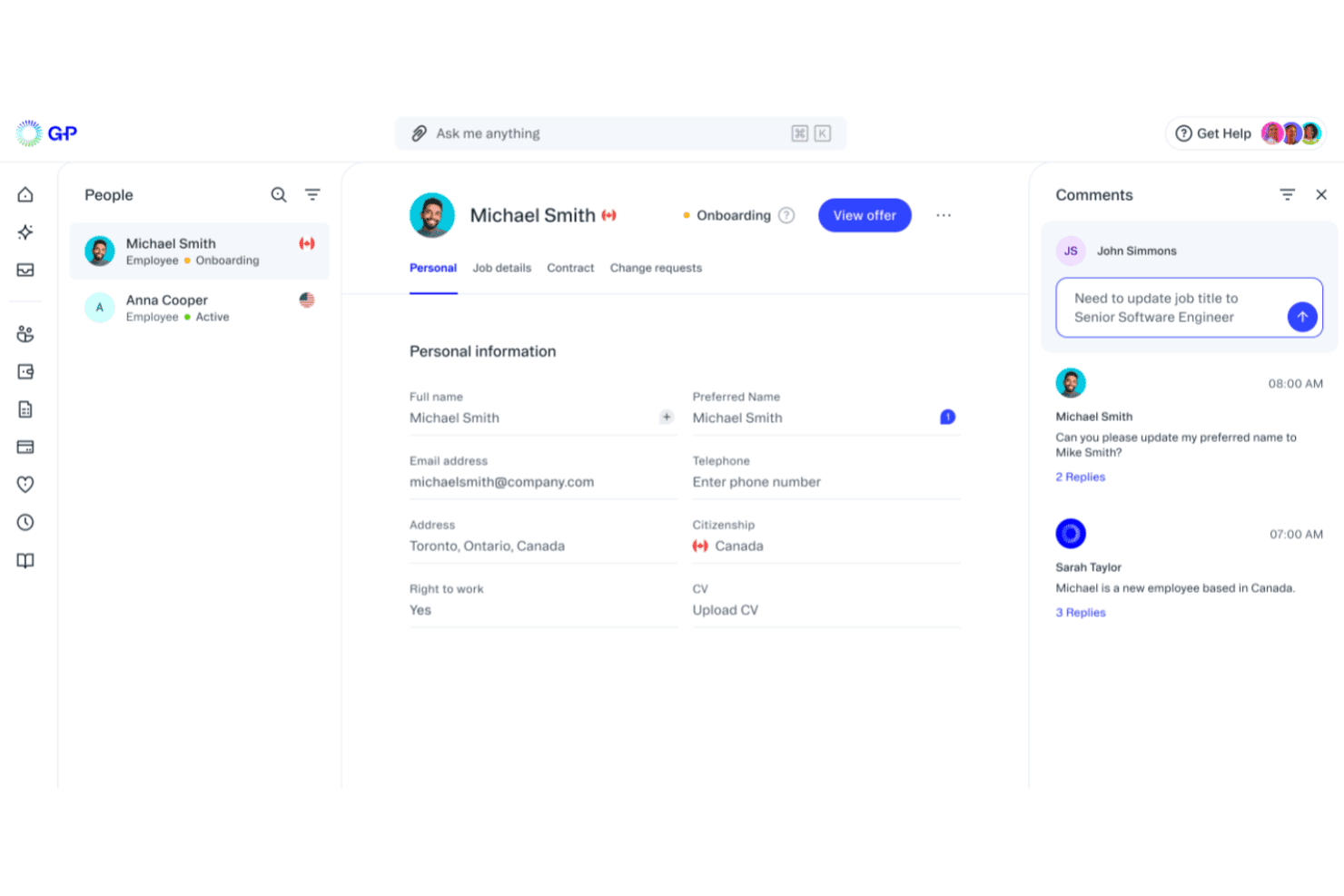
G-P brings employee information, onboarding status, contracts, and workforce updates into one platform for managing global teams. G-P is an employer of record platform that helps HR teams hire, pay, and stay compliant in 180+ countries—no local legal entities needed.
Who Is G-P Best For?
G-P suits mid-market and enterprise HR teams managing international expansion or overseeing employees across multiple countries simultaneously.
Why G-P Is a Good Best Rippling Competitors
I picked G-P as one of the best because its Global Compliance Engine automatically validates every employment action, from contracts to payroll, against local labor laws across 180+ countries in real time. I especially like the AI-guided onboarding, which handles right-to-work verification and cuts time-to-onboard by 87%. That level of built-in compliance depth is something Rippling's global module doesn't replicate natively.
G-P Key Features
- Global payroll engine: Process payroll in 150+ currencies with local tax compliance rules built in for each country.
- Localized benefits administration: Allocate and manage region-specific benefits packages for employees in 180+ countries.
- Bulk contractor onboarding: Generate and issue contracts, plus pay contractors in 190+ countries, all from one dashboard.
- API and HRIS integrations: Connect with systems like Workday, BambooHR, HiBob, and others to centralize data across your HR stack.
G-P Integrations
G-P offers native integrations with Workday, BambooHR, HiBob, Personio, SAP SuccessFactors, UKG, TriNet, ADP, Paylocity, Okta, Microsoft Entra ID, and Google Workspace. An open API is available for custom integrations.
Pros and Cons
Pros:
- AI-guided onboarding reduces time-to-hire significantly
- Built-in local compliance across all markets
- Covers EOR hiring in 180+ countries
Cons:
- Limited native HR tools beyond global employment
- Not suited for single-country domestic teams
Learn more about G-P: Best for global payroll and compliance
- Free demo available
- From $14/user/month
Visit WebsiteCustomer Rating:4.9/5
Deel streamlines global hiring, payroll, and compliance for remote teams from a user-friendly platform. Deel helps global companies hire, pay, and manage talent across borders with built-in compliance and localized support.
Why It's A Good Rippling Alternative
I picked Deel because it lets you run compliant international payroll without relying on manual processes or third-party intermediaries. You can hire full-time employees through its employer of record (EOR) network, which handles local contracts, taxes, and benefits so your team can enter new markets quickly and safely.
I also like that it centralizes contractor payments in hundreds of currencies with automated invoicing and tax documents, reducing admin for finance teams. Deel’s built-in HRIS gives you a place to manage onboarding, documents, and performance for both employees and contractors. For companies scaling globally, this mix of compliance support and payroll automation makes international operations much easier to manage.
Deel Key Features
Here are some key features worth highlighting:
- Localized employment contracts: Country-specific agreements reviewed by local legal experts.
- Automated global payroll: Consolidates payroll, taxes, and statutory contributions across multiple countries.
- Equity management: Supports granting and administering equity to international employees.
- Immigration support: Provides visa sponsorship and relocation assistance for cross-border hires.
Deel Integrations
Integrations include QuickBooks, Xero, NetSuite, BambooHR, Greenhouse, Lever, Workday, SAP SuccessFactors, ADP, and Oracle.
Pros and Cons
Pros:
- Multi-currency payments simplify global contractor management
- Strong local compliance guidance across many countries
- Dedicated customer support
Cons:
- Payroll reporting customization can feel limited
- No free trial available
Learn more about Deel Hire: Best for budget-conscious teams
- Free plan + free demo available
- From $199/user/month
Visit WebsiteCustomer Rating:4.5/5
RemoFirst displays a comprehensive overview of upcoming employee time-off. RemoFirst is a global EOR platform designed for teams that want to hire internationally without overspending. It helps you employ talent in 185+ countries while keeping payroll and compliance simple—making it an ideal fit for budget-conscious teams expanding abroad.
Why It's A Good Rippling Alternative
I picked RemoFirst because it gives you the essentials for global hiring without the extra IT, finance, or device-management modules that drive up costs in tools like Rippling.
You get compliant hiring, localized contracts, and consolidated payroll through one dashboard, so you can hire abroad without juggling multiple vendors. Its country specialists guide you through local employment rules, minimizing compliance mistakes in new markets.
I also like that RemoFirst’s pricing stays predictable, which matters when you’re scaling a distributed team on a tight budget. For companies that want straightforward global hiring instead of a full internal ops suite, it hits the sweet spot.
RemoFirst Key Features
Here are some key features worth highlighting:
- Global Health Coverage (RemoHealth): Offers worldwide medical plans managed directly through your EOR account.
- Visa & Work Permit Support: Handles immigration processes in 85+ countries with local partners.
- Background Checks: Screens new hires globally through integrated verification services.
- Invoice Aggregation: Replaces multiple individual payments with one consolidated monthly invoice.
RemoFirst Integrations
Integrations include ADP, QuickBooks, Xero, NetSuite, BambooHR, Deel, Remote, HubSpot, Salesforce, and FreshBooks.
Pros and Cons
Pros:
- Immigration support available across 85+ countries
- Single global invoice simplifies multi-country payroll
- Clear, predictable pricing suitable for budget-sensitive teams
Cons:
- Lacks extensive integration options
- No mobile app
 Best for customizable compensation planning
- Free demo available
- Pricing upon request
Visit WebsiteCustomer Rating:4.5/5
HiBob offers an AI-powered job catalog generator that suggests job profiles, roles, families, and levels based on existing titles and departments. HiBob's Bob platform is a people-centred HRIS built for mid-sized, multinational teams that need to manage the full employee lifecycle—from onboarding and performance to compensation and workforce planning—without stitching together separate systems.
Who Is HiBob Best For?
HiBob is a strong fit for growing companies between 100 and 5,000 employees that operate across multiple countries and need a single HR platform to keep up with them.
Why HiBob Is a Best Rippling Competitor
I picked HiBob as one of the best because its compensation planning tools go well beyond a basic salary review. I appreciate how you can build fully configurable comp cycles with custom pay bands, then validate those decisions against Mercer benchmarking data without leaving the platform. That combination of a structured review workflow and real market data baked directly into the process is something I rarely see in mid-market HRIS tools.
HiBob Key Features
- Employee database: Store and manage detailed employee records with customizable fields and document management.
- Automated onboarding workflows: Configure multi-step onboarding journeys with e-signatures, task assignments, and automated alerts.
- Time and attendance tracking: Monitor leave balances, PTO requests, and working hours with a built-in approval process.
- Open API and integration marketplace: Connect HiBob to major productivity, payroll, and IT systems through a broad selection of pre-built integrations and APIs.
HiBob Integrations
HiBob offers native integrations with Slack, Microsoft 365, Google Workspace, Greenhouse, Okta, DocuSign, Xero, BambooHR, and Workable. An open API is available for custom integrations.
Pros and Cons
Pros:
- People analytics dashboards built into the core
- Highly configurable employee lifecycle workflows
- Strong multi-country workforce visibility tools
Cons:
- Reporting customization can feel limited
- No native payroll in most countries
 Best for automated payroll and tax filing
- Free trial + free demo available
- From $49/month
Visit WebsiteCustomer Rating:4.6/5
Gusto combines payroll, HR, and benefits management for small businesses. Gusto simplifies the complexities of managing payroll and HR tasks for small to mid-sized businesses. With its intuitive platform, it caters to business owners seeking to streamline payroll processes and enhance employee management without the administrative burden. Gusto addresses significant challenges, such as ensuring compliance and providing affordable benefits, making it a valuable solution for companies aiming to improve operational efficiency and employee satisfaction.
Why I Picked Gusto
I picked Gusto for its strong focus on automating payroll and tax filing, which is crucial for businesses seeking alternatives to Rippling. Gusto's automated payroll feature ensures timely and accurate payroll processing, while its tax compliance tools help you manage state and federal tax filings effortlessly. Additionally, Gusto's employee benefits management stands out by offering a comprehensive suite of health insurance options, which can be a pivotal factor for businesses looking to attract and retain top talent.
Gusto Key Features
In addition to automated payroll and tax filing, Gusto offers:
- Time Tracking: Enables your team to log hours directly within Gusto, seamlessly syncing with payroll for accurate compensation.
- Hiring and Onboarding: Provides paperless onboarding solutions that enable new hires to complete required documentation online.
- Compliance Support: Assists in staying updated with labor laws and regulations, reducing the risk of non-compliance penalties.
- Employee Self-Service: Empowers employees to view payslips, manage benefits, and request time off through a user-friendly portal.
Gusto Integrations
Integrations include QuickBooks, Xero, FreshBooks, TSheets, When I Work, Deputy, Expensify, Clover, Shopify, and Slack.
Pros and Cons
Pros:
- Integration with popular accounting tools simplifies bookkeeping
- Flexible PTO tracking supports custom leave policies
- Comprehensive benefits management integrates health and retirement plans
Cons:
- Less suitable for larger, multi-entity companies
- Reporting options are less flexible for custom analysis
 Best for benefits management and administration
- Free demo available
- From $79/user/month
Visit WebsiteCustomer Rating:4.6/5
Justworks centralizes benefits management and administration in one platform. Justworks serves as an alternative to Rippling for businesses that need payroll and HR support in one system. It stands out for benefits management and administration, helping companies handle employee health plans and related programs alongside payroll and compliance. This structure supports organizations that prefer a centralized approach to workforce operations.
Why I Picked Justworks
I picked Justworks as a Rippling competitor for its benefits management and administration, which allows businesses to manage health insurance, retirement plans, and other employee programs within the same system as payroll. Compared to Rippling’s broader IT and HR focus, Justworks places stronger emphasis on structured benefits support alongside payroll and compliance. This setup helps small businesses keep benefits enrollment, contributions, and payroll records organized in one platform.
Justworks Key Features
In addition to benefits management and administration, Justworks offers:
- Time Tracking: Allows you to manage employee hours and attendance seamlessly.
- Employee Onboarding: Streamlines the process of bringing new hires into your organization with digital onboarding tools.
- Compliance Support: Helps you stay compliant with labor laws and regulations, reducing the risk of legal issues.
- Reporting and Analytics: Provides insights into various HR metrics, allowing you to make informed decisions.
Justworks Integrations
Integrations include QuickBooks, Xero, NetSuite, Sage Intacct, Electric AI, allwhere, JazzHR, Brex, Culture Amp, and Leapsome.
Pros and Cons
Pros:
- Automated payroll tax filings
- Clear employee dashboard for benefits and pay information
- Straightforward onboarding workflow for new hires
Cons:
- Reporting tools offer limited in-depth business insights
- Fewer advanced HR features than larger enterprise platforms
Learn more about Justworks: Best for global compliance handling
- Free demo available
- From $99/per employee/month
Visit WebsiteCustomer Rating:4.6/5
A Native Teams dashboard overview showing global team management, payroll costs, benefits, and employee details in one centralized view. Native Teams is built for companies that need affordable, compliant hiring across multiple countries without opening local entities. It’s a strong fit for small and mid-sized teams that want to employ or pay workers abroad while keeping global payroll, taxes, and benefits legally sound.
Why I Picked Native Teams
I picked Native Teams because it focuses heavily on compliance, giving your team the legal coverage needed to hire in 95+ countries. You get EOR services that manage compliant contracts, payroll taxes, and statutory contributions, reducing the risk of misclassification or local law violations.
I also like that it pairs compliance with practical tools—such as localized benefits and multi-currency wallets—so employees receive country-appropriate perks while your finance team handles payments accurately.
Lastly, its visa and relocation support adds another compliance layer for cross-border mobility.
Native Teams Key Features
Here are some key features worth highlighting:
- Visa & Relocation Assistance: Supports compliant relocation by managing visa requirements and documentation.
- Contractor Payment Tools: Ensures freelancers are paid correctly and within local legal frameworks.
- Localized Benefits Administration: Offers country-specific insurance and perks that meet statutory standards.
- Tax Optimization Tools: Helps calculate salaries and taxes based on each region’s legal requirements.
Native Teams Integrations
Integrations include Slack, QuickBooks, Xero, Deel Payroll Sync (limited regions), Google Calendar, Microsoft Outlook, Wise, Revolut Business, and Payoneer.
Pros and Cons
Pros:
- Regional benefit requirements in many countries
- Compliant employment contracts and documentation
- Payroll calculators for compliant salary planning
Cons:
- Covers fewer countries than some competitors
- May not offer advanced HR tools beyond essential employment features
Learn more about Native Teams: Best for unified reporting dashboards
- Free demo available
- From $20/user/month (billed annually)
Visit WebsiteCustomer Rating:4.7/5
Multiplier’s global payment system supports payments in 120+ currencies. Multiplier is a good fit for companies hiring internationally who want one place to manage payroll, compliance, and workforce costs across multiple countries. If you’re expanding into new markets and need clearer visibility into what you’re spending, its unified reporting dashboards help you monitor payroll, taxes, and headcount without juggling multiple vendors.
Why It's A Good Rippling Alternative
I picked Multiplier because it gives your team a single global payroll system where you can track costs, payments, and compliance requirements across 100+ countries. You can see country-level payroll totals, deductions, and employer contributions in one dashboard, which makes reporting much easier for finance teams.
I also like that Multiplier handles local taxes and filings for each region, so you don’t need separate in-country partners to stay compliant. Its ability to run payroll in local currencies—and consolidate all results into one view—helps you compare workforce costs across markets. For teams building globally, this clarity is a major advantage over tools that spread payroll features across multiple modules.
Multiplier Key Features
Here are some key features worth highlighting:
- Global Cost Visibility: Consolidated dashboards show payroll totals, contributions, and employer costs across regions.
- Country-Specific Payroll Processing: Local tax rules, deductions, and filings managed automatically for 100+ countries.
- Multi-Currency Payments: Supports payments in 120+ currencies with real-time exchange-rate calculations.
- Compliance Support: Access to in-country legal and tax specialists to help resolve region-specific questions.
Multiplier Integrations
Integrations include Workday, BambooHR, Personio, HiBob, Zoho People, Okta, Xero, and QuickBooks.
Pros and Cons
Pros:
- Fast onboarding for global employees via guided workflows
- Automates local tax calculations and statutory contributions
- Unified dashboard improves visibility into global payroll spending
Cons:
- Fewer native integrations than broader HR suites
- Limited contract-customization options for specific markets
Learn more about Multiplier:
Diğer Rippling Rakipleri
Değerlendirmek için birkaç seçeneğe daha göz atmak isterseniz, incelemeye değer diğer Rippling rakiplerinden bazıları şunlardır:
| Faktör | Dikkate Alınması Gerekenler |
|---|---|
| İş Hedefleri | İK süreçlerini otomatikleştirmek, uyumluluğu iyileştirmek veya küresel ölçekte büyümek gibi birincil hedeflerinizi belirleyin. Bu hedefleri doğrudan destekleyen bir çözüm seçin. |
| Temel İK Özellikleri | Sistemin çalışan kayıtları, zaman takibi, yan hak yönetimi ve uyumluluk yönetimi gibi temel özellikleri içerdiğinden emin olun. |
| Bordro ve Yan Hak Yönetimi | Gerekiyorsa birden fazla ülke desteği sunan, doğru ve otomatik bir bordro sistemiyle birlikte sorunsuz yan hak kaydı ve yönetimi araçları arayın. |
| Yetenek Yönetimi | Çalışanların gelişimini desteklemek için platformun işe alım, işe alıştırma, performans değerlendirmeleri ve öğrenme yönetimi özelliklerini içerip içermediğini değerlendirin. |
| Entegrasyon ve Uyumluluk | Kullandığınız muhasebe yazılımı, iş birliği araçları (Slack veya Teams gibi) ve diğer İK platformlarıyla sorunsuz bir şekilde entegre olduğunu doğrulayın. |
| Kullanım Kolaylığı | Kullanıcı arayüzünü ve çalışan deneyimini değerlendirin. Sade ve sezgisel bir tasarım, işe alıştırma süresini ve İK iş yükünü azaltır. |
| Ölçeklenebilirlik | Siz büyüdükçe platformun şirketinizle birlikte büyüyebildiğinden; ek çalışanları, konumları ve uyumluluk gerekliliklerini desteklediğinden emin olun. |
| Özelleştirme ve Esneklik | İş akışlarını, raporları ve kullanıcı izinlerini kuruluşunuzun yapısına ve politikalarına göre uyarlayıp uyarlayamayacağınızı kontrol edin. |
| Destek ve Eğitim | 7/24 sohbet, telefon desteği ve işe alıştırma yardımı gibi müşteri hizmeti seçeneklerini karşılaştırın ve eğitim kaynaklarını sorun. |
| Uyumluluk ve Güvenlik | Sistemin ilgili iş yasalarına ve veri koruma standartlarına (GDPR, SOC 2, HIPAA gibi) uyduğunu doğrulayın. |
| Analiz ve Raporlama | Daha iyi karar verme için iş gücü eğilimlerini, bordro maliyetlerini ve çalışan devir oranlarını izleyen yerleşik panolar arayın. |
| Maliyetler ve Fiyatlandırma Modeli | Fiyatlandırmanın kullanıcı ve özellik sayısına göre nasıl ölçeklendiğini anlayın. Entegrasyonlar veya uygulama için alınan ek ücretlere dikkat edin. |
| İtibar ve Güvenilirlik | Ürünün güvenilirliğini ve sağlayıcının güvenilirliğini değerlendirmek için kullanıcı yorumlarını, vaka çalışmalarını ve üçüncü taraf derecelendirmelerini (G2 veya Capterra gibi) okuyun. |
- 11HireGlobalBest for indemnification-backed hiring
- 12PaylocityBest for core HR with employee engagement
- 13FactorialBest as an AI for business
- 14TriNetBest for U.S. businesses with up to 500 employees
- 15PeblBest for AI-powered EOR tools
- 16RUN Powered by ADP®Best for small businesses
- 17CXC GlobalBest for integrating human expertise
- 18TimeTrexBest for detailed job costing and expense tracking
- 19WorkBrightBest for mobile-first onboarding
- 20GoCoBest for an easy-to-use interface with responsive customer support
- 21Borderless AIBest for automated contract generation
- 22UKG ReadyBest for AI-powered workforce management
- 23Atlas HXMBest for global compliance management
- 24OmnipresentBest for adherence to employment laws
- 25Sage HRBest modular HR software solution for small businesses
- 26ADPBest for comprehensive payroll and HR services
- 27SAP SuccessFactorsBest for AI-enabled talent management
- 28Oracle Cloud HCMBest for AI-embedded HR processes
- 29Zoho People PlusBest for customizable workflows
- 30Paychex Best for all-in-one payroll and HR solutions
- 31RemunanceBest EOR in India
- 32Papaya GlobalBest for multi-currency payments
- 33Oyster HRBest for specialized local support
- 34WisemonkBest for India hiring compliance
- 35BambooHRBest user-friendly HR software for SMBs
- 36RemoteBest for flexible employee and contractor management
- 37TopSourceBest for compliance-focused global hiring
- 38NamelyBest for mid-sized companies needing HR and payroll
- 39WorkdayBest for a skills-based people strategy
- 40Keka HRBest for employee experience and engagement
İlgili İK Yazılımı İncelemeleri
Aradığınızı hâlâ bulamadıysanız, test edip değerlendirdiğimiz diğer ilgili araçlara göz atın:
- İK Yazılımı
- Bordro Yazılımı
- İşe Alım Yazılımı
- Kayıtlı İşveren Hizmetleri
- Aday Takip Sistemleri
- İşgücü Yönetimi Yazılımı
How I Evaluate Rippling Competitors
I split my evaluation into two layers: the baseline HR and payroll capabilities a platform must cover, and the differentiators—like global coverage or pricing model—that separate the best fits.
Core Functionality (Table Stakes For This List)
When I'm selecting tools for my list, I rank each one on a scale from 0 (does not offer the functionality) to 5 (excels in this area) for each core functionality listed below. Then, I calculate the tool's total score into a percentage. Each tool needs to achieve a minimum total score of 75% to be considered for inclusion.
- Core HRIS & Employee Records: I check whether the platform serves as a true system of record—org charts, custom fields, headcount reporting, and multi-entity support.
- Payroll Processing: Each tool's payroll scope matters, from single-country runs with automated tax filing to multi-country payroll with local compliance built in.
- Benefits Administration: I look for carrier connectivity, open enrollment workflows, and plan setup—not just a place to log benefit elections manually.
- Onboarding & Offboarding Workflows: I evaluate how much of the new hire flow is automated, like offer letters, e-signatures, document collection, and task sequencing.
- Time & Attendance Tracking: PTO requests, clock-in options, approval chains, and scheduling all factor in, especially for teams managing hourly and salaried workers.
- Integrations & Workflow Automation: I look at the breadth of native connectors to tools like accounting platforms, ATS products, and productivity apps, plus API access.
Once I have a list of tools that meet this criteria, I consider what sets each platform apart.
Differentiating Factors (What Sets Vendors Apart)
Here's how I compare and contrast different vendors:
Standout Features
Global EOR capabilities matter when your team is hiring across borders without setting up local entities. I also evaluate whether a platform ties IT provisioning—like app access and device management—directly to HR events, since that's a gap many buyers are trying to close. Built-in talent management tools like performance reviews and compensation planning can eliminate the need for a separate platform entirely.
Beyond Features
Pricing transparency is a big differentiator—some vendors bundle modules while others charge per add-on, which changes total cost as you scale headcount. I also evaluate implementation support, especially how a platform handles data migration from a legacy HRIS or payroll system. Compliance coverage matters too. I look at whether the vendor actively maintains jurisdiction-specific tax and labor law updates or leaves that responsibility to your team.
Rippling Alternatiflerinin Özellikleri
Rippling alternatiflerini seçerken aşağıdaki temel özelliklere dikkat edin:
- Bordro yönetimi: Bordroyu otomatik olarak çalıştırabildiğinizden, vergileri hesaplayabildiğinizden ve kesintileri kolayca yönetebildiğinizden emin olun. Sistem, bordro süreçlerinde size rehberlik ettiğinde en iyisidir; böylece bordro uzmanı olmasanız bile hata yapma olasılığınız azalır.
- Yan haklar yönetimi: Sağlık sigortası ve emeklilik planları gibi çalışan yan haklarını oluşturmanıza ve yönetmenize yardımcı olan bir çözüm arayın. En iyi araçlar, çalışanların kolayca kaydolmasını sağlarken düzenlemelere uyumlu kalmanıza yardımcı olur.
- Mesai takibi: Çalışanların dijital olarak işe giriş ve çıkış yapmasına, çalışılan saatleri takip etmesine ve puantaj onayını kolaylaştırmasına olanak tanıyan bir yazılım seçin. Bu, manuel takip zahmetini ve klasik “saatlerini yine kim kaydetmeyi unuttu?” takibini ortadan kaldırır.
- İK yönetimi: Sistem, yeni çalışanların işe alıştırılmasını, çalışan kayıtlarının tutulmasını ve temel İK belgelerinin tek bir yerde yönetilmesini kolaylaştırmalıdır. Yaklaşan değerlendirmeler veya sertifikalar hakkında sizi güncel tutuyorsa ek bir avantajdır.
- Gider takibi: Çalışanların gider bildirebildiği, makbuz yükleyebildiği ve hızlı bir şekilde onay alabildiği bir platform bulun. Bu, masraf ödemelerini kolaylaştırır ve kimin ne harcadığını takip etmeyi kaybetmenizi önler.
- Raporlama ve analiz: Bordro ve İK verilerinizi okunması kolay raporlara dönüştüren bir hizmeti tercih edin. Bu içgörüler, eğilimleri fark etmenize, bütçeleri planlamanıza ve yöneticileri net verilerle memnun etmenize yardımcı olabilir.
- Entegrasyonlar: Doğru seçim, muhasebe platformlarınız, mesai takip araçlarınız veya diğer iş uygulamalarınızla sorunsuz bir şekilde bağlantı kurmalıdır. Böylece farklı sistemler arasında veri taşımak zorunda kalmazsınız.
- Çalışan self servis portalları: Çalışanlara kendi panolarını sunarak maaş bordrolarını incelemelerine, iletişim bilgilerini güncellemelerine ve ek e-posta ya da evrak işleri olmadan izin talep etmelerine olanak tanıyın.
- Uyumluluk desteği: İş kanunları sürekli değişirken, düzenlemeleri sizin için takip eden bir yazılıma sahip olmak yararlıdır. En iyi seçenekler, uyumluluğunuzu korumak için hatırlatıcılar gönderir veya belgeleri otomatik olarak günceller.
Yaygın Rippling Alternatiflerinin Yapay Zekâ Özellikleri
Yukarıda listelenen standart Rippling alternatif özelliklerinin ötesinde, bu çözümlerin çoğu şu özelliklerle yapay zekâyı kullanmaya başlıyor:
- Otomatik belge işleme: Yapay zekâ; özgeçmişleri okuma, sözleşmeleri sıralama ve belgelerden önemli ayrıntıları çıkarma gibi görevleri hızlandırır. Böylece idari işler çok daha hızlı tamamlanır ve zihinsel yükünüz azalır.
- Tahmine dayalı analiz: Bu araçlar, çalışan devir hızı risklerini, bordro artışlarını veya gelecekteki işe alım ihtiyaçlarını öngörmek için yapay zekâ kullanır. Böylece sürprizlere tepki vermek yerine güvenle önceden plan yapabilirsiniz.
- Akıllı sohbet robotu desteği: Çalışanlar, yapay zekâ destekli sohbet robotları sayesinde İK veya bordro sorularına anında yanıt alabilir; bu da herkes için karşılıklı e-posta trafiğini azaltır.
- Akıllı anomali tespiti: Yapay zekâ, bordro, yan haklar veya puantajlarda olağandışı görünen durumları tarar ve sorunları maliyetli hatalara dönüşmeden düzeltebilmeniz için işaretler.
- Kişiselleştirilmiş işe alıştırma iş akışları: Yapay zekâ, işe yeni başlayan her çalışan için işe alıştırma adımlarını uyarlar; süreci daha sorunsuz ve ilgili hâle getirir, yeni çalışanların ilk günlerindeki gerginliğini azaltır.
Rippling Alternatifi Nasıl Seçilir?
Rippling HCM'ye alternatif seçerken her seçeneğin işletmenizin ihtiyaçları, teknoloji altyapısı ve büyüme planlarıyla ne ölçüde örtüştüğünü değerlendirmek önemlidir. Karşılaştırma ve karar verme sürecinize yön vermesi için aşağıdaki tabloyu kullanın.
| Faktör | Dikkat Edilmesi Gerekenler |
|---|---|
| Faktörİş Hedefleri | Dikkat Edilmesi GerekenlerTemel hedeflerinizi belirleyin—ör. İK süreçlerini otomatikleştirmek, uyumluluğu iyileştirmek veya küresel ölçekte büyümek. Bu hedefleri doğrudan destekleyen bir çözüm seçin. |
| FaktörTemel HR Özellikleri | Dikkat Edilmesi GerekenlerSistemin çalışan kayıtları, zaman takibi, yan haklar yönetimi ve uyumluluk yönetimi gibi temel özellikleri içerdiğinden emin olun. |
| FaktörBordro ve Yan Haklar Yönetimi | Dikkat Edilmesi GerekenlerGerekiyorsa birden fazla ülke desteği sunan, doğru ve otomatik bordro özelliklerinin yanı sıra sorunsuz yan hak kaydı ve yönetimi araçlarını arayın. |
| FaktörYetenek Yönetimi | Dikkat Edilmesi GerekenlerPlatformun çalışan gelişimini desteklemek için işe alım, işe alıştırma, performans değerlendirmeleri ve öğrenme yönetimi özelliklerini içerip içermediğini değerlendirin. |
| FaktörEntegrasyon ve Uyumluluk | Dikkat Edilmesi GerekenlerKullandığınız muhasebe yazılımı, iş birliği araçları (Slack veya Teams gibi) ve diğer İK platformlarıyla sorunsuz şekilde entegre olduğunu doğrulayın. |
| FaktörKullanım Kolaylığı | Dikkat Edilmesi GerekenlerKullanıcı arayüzünü ve çalışan deneyimini değerlendirin. Sade ve sezgisel bir tasarım, işe alıştırma süresini ve İK iş yükünü azaltır. |
| FaktörÖlçeklenebilirlik | Dikkat Edilmesi GerekenlerPlatformun şirketinizle birlikte büyüyebildiğinden emin olun—genişledikçe ek çalışanları, lokasyonları ve uyumluluk gerekliliklerini destekleyebilmelidir. |
| FaktörÖzelleştirme ve Esneklik | Dikkat Edilmesi Gerekenlerİş akışlarını, raporları ve kullanıcı izinlerini kuruluşunuzun yapısına ve politikalarına göre uyarlayıp uyarlayamayacağınızı kontrol edin. |
| FaktörDestek ve Eğitim | Dikkat Edilmesi Gerekenler7/24 sohbet, telefon desteği ve işe alıştırma yardımı gibi müşteri hizmeti seçeneklerini karşılaştırın ve eğitim kaynaklarını sorun. |
| FaktörUyumluluk ve Güvenlik | Dikkat Edilmesi GerekenlerSistemin ilgili iş kanunlarına ve veri koruma standartlarına (ör. GDPR, SOC 2, HIPAA) uygun olduğunu doğrulayın. |
| FaktörAnaliz ve Raporlama | Dikkat Edilmesi GerekenlerDaha iyi karar verme için iş gücü trendlerini, bordro maliyetlerini ve çalışan devir oranlarını izleyen yerleşik panoları arayın. |
| FaktörMaliyetler ve Fiyatlandırma Modeli | Dikkat Edilmesi GerekenlerFiyatlandırmanın kullanıcı ve özellik sayısına göre nasıl ölçeklendiğini anlayın. Entegrasyonlar veya uygulama için ek ücretlere dikkat edin. |
| Faktörİtibar ve Güvenilirlik | Dikkat Edilmesi GerekenlerÜrün güvenilirliğini ve sağlayıcının güvenilirliğini değerlendirmek için kullanıcı yorumlarını, vaka çalışmalarını ve üçüncü taraf derecelendirmelerini (G2 veya Capterra gibi) okuyun. |