

Eski bir İK profesyoneli olarak, doğru İK yazılımının daha verimli çalışmanıza ve önünüzdeki zorluklara daha iyi hazırlanmanıza nasıl yardımcı olacağını biliyorum.
Tüm çalışan bilgilerinin tek bir çatı altında güvenle saklanması, zamandan tasarruf etmenizi sağlayan çok sayıda otomasyon ve sezgisel raporlama özellikleri. Çalışanların kendi kendine hizmet alabilmesi! 🙏
Büyüyen kuruluşlarda bu araçları kullanarak edindiğim yıllara dayanan deneyimimden yararlanarak, girişimler için en iyi İK yazılımlarından bazılarını inceledim ve özel ihtiyaçlarınıza en uygun çözümü bulmanıza yardımcı olacak bazı öneriler sundum.
Why Trust Our Software Recommendations
6,700+
Reviews
20
Industry experts
16+
Evaluation factors
14
Years
Our team has been testing and reviewing software since 2012. As HR experts ourselves, we know how difficult—and important—it is to choose the right software.
For this guide, we evaluated tools using hands-on testing and independent research, scoring tools using our selection criteria. We also draw on insights from industry thought leaders and practicing HR experts.
Our reviews reflect our human editorial judgment, not a sales pitch.
Expert reviewers:
- Phil GrayCOO
 Kim BehnkeHR Tech Editor & Analyst
 Josh BarkerPeople Ops Manager

Girişimler için İK Yazılımları Karşılaştırma Tablosu
Bu karşılaştırma tablosu, girişimler için en iyi İK yazılımı seçimlerimdeki fiyatlandırma ayrıntılarını özetlemektedir:
Sorted by: Default
| Tool | Starting Price | Website | |
|---|---|---|---|
Best for automating global hiring and compliance | 4.8 out of 5 | $5/user/month Free demo available | Website |
Best for integrated expense management | 4.6 out of 5 | $79/user/month Free demo available | Book Demo |
Best for legal employment document creation | 4.9 out of 5 | Pricing upon request Free demo available | Website |
Best for rapid growth and modern employer branding | 3.9 out of 5 | $10.25/user/month 7-day free trial + demo available | Website |
Best for automated payroll processing | 4.6 out of 5 | $49/month Free trial + free demo available | Book Demo |
Best for AI-driven HR insights | 4.8 out of 5 | $4/employee/month 14-day free trial + demo available | Website |
Best for custom org charts and access controls | 4.4 out of 5 | $8/user/month Free trial + Free demo available | Website |
Best for a platform-plus-service approach | 4.0 out of 5 | Pricing upon request Free demo available | Website |
Best for easy onboarding and 24/7 support | 4.5 out of 5 | $199/user/month Free plan + free demo available | Website |
Best for performance management & engagement | 4.5 out of 5 | Pricing upon request Free demo available | Website |


Girişimler için En İyi İK Yazılımları İncelemeleri
Aşağıda, her bir aracın avantajları ve dezavantajları, özellikleri ve en uygun kullanım senaryoları da dahil olmak üzere girişimler için çeşitli İK yazılımı seçeneklerine ilişkin ayrıntılı incelemelerimi ve analizlerimi bulabilirsiniz.
 Best for automating global hiring and compliance
- Free demo available
- From $5/user/month
Visit WebsiteCustomer Rating:4.8/5
Deel is an HR software for startups that specializes in simplifying global hiring and payroll processes. Deel simplifies the process of hiring international talent and managing international payments. It handles compliance, payroll, and HR admin, allowing startups to hire the best talent in 150 countries without worrying about legal issues.
Why I picked Deel: I chose Deel for its focus on automating global hiring and compliance, which is crucial for startups looking to expand internationally. Deel simplifies the complexities of international hiring by ensuring compliance with local laws and regulations (which can be quite complicated without the right software tool.) In that respect, its automation features and ease of use stand out from other HR tools.
Standout features & integrations:
Standout features include automated onboarding, compliance management, payroll processing, and expense management. It also provides support for various currencies and payment options.
Deel integrates natively with QuickBooks, Xero, Gusto, Slack, Microsoft Teams, Google Workspace, Dropbox, Zapier, and Trello
Pros and Cons
Pros:
- Supports multiple currencies
- Ensures compliance
- Simplifies international hiring
Cons:
- Limited customization
- Pricing details are not transparent
 Best for integrated expense management
- Free demo available
- From $79/user/month
Visit WebsiteCustomer Rating:4.6/5
Combined payroll, benefits, PTO requests, company directory, and employee self-service features displayed across desktop and mobile app interfaces. Justworks is an HR and payroll platform for startups that combines automated payroll, benefits administration, compliance support, and onboarding tools in one system.
Who Is Justworks Best For?
Startups and small businesses looking for an all-in-one HR, payroll, and compliance platform that supports rapid growth and multi-state teams.
Why I Picked Justworks
I picked Justworks as one of the best because I like how it brings expense management directly into its HR and payroll platform. My team is able to track, approve, and reimburse employee expenses alongside payroll, which keeps everything in one place. I also appreciate that expense policies and reporting are built into the same dashboard we use for onboarding and benefits.
Justworks Key Services
- Automated payroll processing: Run payroll for salaried and hourly employees, contractors, and vendors in all 50 states.
- Benefits administration: Manage health insurance, 401(k), commuter benefits, and more from a single dashboard.
- Onboarding workflows: Digitally onboard new hires with document collection, e-signatures, and compliance tasks.
- HR document storage: Store and organize employee handbooks, policies, and other HR documents securely online.
Justworks Integrations
Native integrations are not clearly documented. The tool supports integrations via API for custom connections.
Pros and Cons
Pros:
- Customizable onboarding workflows for new hires
- Integrated benefits administration for health and dental
- Built-in HR support for compliance and policy questions
Cons:
- Reporting features are less advanced than some competitors
- Benefits options may be limited outside major metros
Learn more about Justworks: Best for legal employment document creation
- Free demo available
- Pricing upon request
Visit WebsiteCustomer Rating:4.9/5
SixFifty assists with the creation and management of employment-related legal documents, such as hiring documents, policies, and handbooks. SixFifty is a platform designed to automate the creation of essential legal documents required for hiring, managing, and separating from employees, ensuring compliance with federal and state laws across the United States.
Why I picked SixFifty: I like that it simplifies the process of generating compliant employment documents, including hiring kits, employment agreements, offer letters, and employee handbooks. Startups can benefit from its user-friendly interface and guided Q&A flow, which helps create customized legal documents quickly and accurately. Additionally, SixFifty’s tools for real-time legal updates and multi-state compliance ensure that startups can manage their HR needs without the burden of keeping up with constantly changing regulations.
Standout features & integrations:
Standout features include customizable templates, version control, policy library, automated employee classification, interactive state law comparison, AI-driven document generation, in-app editing, real-time collaboration tools, and federal and state law research.
Integrations include HR management systems, payroll software, legal practice management tools, document management systems, compliance tracking software, and other enterprise resource planning (ERP) solutions.
Pros and Cons
Pros:
- Automated legal updates when laws change
- Helps in managing legal documents across the employee lifecycle
- Provides customizable legal document templates
Cons:
- No free trial available
- Initial setup can be time-consuming
Learn more about SixFifty: Best for rapid growth and modern employer branding
- 7-day free trial + demo available
- From $10.25/user/month
Visit WebsiteCustomer Rating:3.9/5
BambooHR provides HR software for startups, designed to support rapid growth and help establish a modern employer brand. BambooHR is best for rapid growth and scaling startups because it simplifies HR tasks, making them routine and easy to manage. It allows startups to focus on growing their operations while building a strong brand and internal company culture.
As Crystal Pinney-Ramos, HR Technology Strategist at cClearHR, notes: “A lot of people are interested in BambooHR because it’s simple to implement, especially for smaller companies that don’t have dedicated HR teams.”
Why I picked BambooHR: I chose BambooHR for its user-friendly interface, professional onboarding experience, and comprehensive features that meet the specific needs of rapidly growing startups. BambooHR is ideal for fast-growing teams and enhancing employer branding, as it provides tools that help startups attract and retain top talent while building a strong employer brand and internal culture through ongoing employee engagement features.
Standout features & integrations:
Standout features include an applicant tracking system, onboarding tools, performance management, time tracking, and payroll integration. The software also provides employee experience tools to help create a positive workplace culture.
BambooHR integrates natively with the following tools: QuickBooks, Xero, Slack, G Suite, Microsoft 365, Indeed, Glassdoor, LinkedIn, and ZipRecruiter.
Pros and Cons
Pros:
- Offers workplace engagement tools
- Includes an applicant tracking system and onboarding tools
- User-friendly interface
Cons:
- Limited customer support options
- Limited customization options
 Best for automated payroll processing
- Free trial + free demo available
- From $49/month
Visit WebsiteCustomer Rating:4.6/5
Gusto is an HR software for startups that streamlines payroll, benefits, and compliance management into a single, user-friendly platform. Gusto is designed to address the HR needs of startups and small businesses through its integrated platform, which combines payroll, benefits, and HR management in a single solution. If you're looking to streamline administrative tasks and enhance compliance, Gusto might be the tool for you. It appeals particularly to new and small enterprises that need efficient ways to manage payroll, time tracking, and employee benefits without the complexity of larger systems.
Why I Picked Gusto
I picked Gusto for its targeted approach to solving common HR challenges faced by startups, particularly in payroll and compliance. One standout feature is its automated payroll processing, which simplifies the often time-consuming task of running payroll, ensuring that your team gets paid accurately and on time. I also like its compliance alerts that help you stay ahead of regulatory changes, reducing the risk of costly errors. These features make Gusto particularly appealing for startups that need reliable HR solutions without the administrative burden.
Gusto Key Features
In addition to its payroll and compliance capabilities, I also found several other features beneficial for startups:
- Self-Onboarding: This feature allows new hires to complete paperwork and set up direct deposits, reducing the workload on your HR team.
- Employee Benefits Management: Gusto offers a variety of health benefits options, making it easier for you to provide competitive packages to your team.
- Time Tracking: Integrated time tracking helps you manage employee hours seamlessly, which is crucial for accurate payroll.
- Hiring and Onboarding Tools: These tools simplify the recruitment process, from job postings to onboarding new employees, helping you grow your team efficiently.
Gusto Integrations
Integrations include QuickBooks, Xero, Clover, TSheets, When I Work, Homebase, Deputy, Boomr, 7shifts, and Slack. An API is available for custom integrations.
Pros and Cons
Pros:
- Employee self-service portal empowers staff to access pay and forms.
- Payroll, benefits, and HR in one unified platform.
- Automatic tax filings and direct deposit simplify payroll compliance.
Cons:
- SMBs that need advanced compliance or niche industry-specific HR modules may find Gusto limiting.
- Great for simple pay and HR management but not customizable enough to handle large, complex orgs.
 Best for AI-driven HR insights
- 14-day free trial + demo available
- From $4/employee/month
Visit WebsiteCustomer Rating:4.8/5
Leapsome provides AI insights into goal progress with clear key results, initiatives, and real-time tracking for managers and contributors. For startups looking to enhance their HR capabilities, Leapsome offers an AI-powered platform that combines employee management with performance and learning tools. This software is well-suited for modern startups aiming to streamline HR processes and boost employee engagement through its comprehensive features. Whether you're managing onboarding or conducting performance reviews, Leapsome provides the insights and tools necessary to support your growing team.
Why I Picked Leapsome
I picked Leapsome for its unique ability to combine HR management with AI-driven insights, making it a great choice for startups. The platform's performance reviews and learning management features allow you to develop and engage your team effectively, fostering a culture of continuous improvement. Additionally, its onboarding tools simplify the integration of new hires, while the AI insights offer valuable recommendations to optimize HR processes. These features align perfectly with the needs of startups seeking to build a strong, dynamic workforce.
Leapsome Key Features
In addition to its AI-driven insights, Leapsome offers several features that cater to the specific needs of startups:
- Employee Records: Manage all employee data in one centralized location, ensuring easy access and organization.
- Absence Management: Track and manage employee absences seamlessly, helping you maintain workforce productivity.
- Goal Setting: Enable your team to set and track goals, fostering accountability and alignment with company objectives.
- Engagement Surveys: Collect valuable feedback from your team to gauge satisfaction and identify areas for improvement.
Leapsome Integrations
Integrations include Slack, Microsoft Teams, G Suite, Jira, BambooHR, Personio, Okta, OneLogin, Greenhouse, and Workday.
Pros and Cons
Pros:
- Comprehensive HRIS includes employee records and onboarding tools.
- AI-powered features enhance HR processes and decision-making.
- Performance reviews and engagement surveys are well-integrated.
Cons:
- Data export limitations, especially for reviews.
- Limited customization for niche business requirements.
 Best for custom org charts and access controls
- Free trial + Free demo available
- From $8/user/month
Visit WebsiteCustomer Rating:4.4/5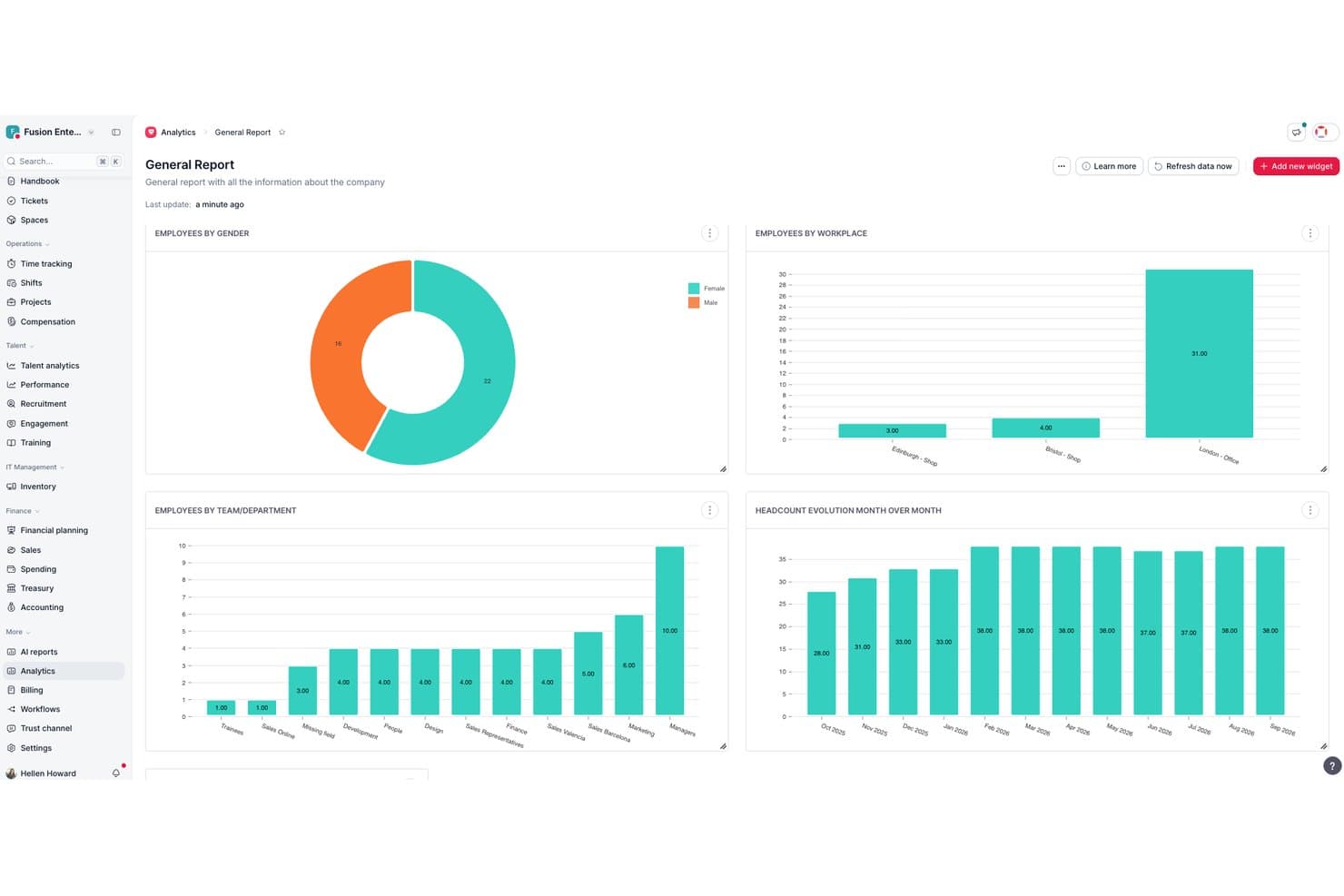
Factorial centralizes HR analytics into visual workforce reports. Factorial is an all-in-one HR platform that combines employee records, time tracking, payroll, recruitment, onboarding, and performance management in a single system built for small and growing teams.
Who Is Factorial Best For?
Factorial is a strong fit for early-stage startups and small businesses that need a single platform to manage HR without a dedicated HR team.
Why I Picked Factorial
I picked Factorial as one of the best because its org chart updates automatically as your team changes, so you're never manually correcting a stale chart after a new hire or promotion. I also like the custom permission system: you can build role-based access groups and assign specific approvers to documents and workflows, which keeps sensitive data out of the wrong hands as headcount grows. I've found this particularly useful when onboarding managers who need visibility into their team but not the entire org.
Factorial Key Features
- Employee directory: Store and manage profiles, documents, and custom fields for all employees in one place.
- Time off management: Create unlimited leave policies, automate accruals, and allow self-service PTO requests.
- Performance reviews: Run 360-degree feedback cycles, set up evaluation templates, and track employee goals.
- Recruiting module: Post jobs to multiple boards, screen applicants with built-in ATS tools, and automate interview scheduling.
Factorial Integrations
Factorial offers native integrations with Google Workspace, Slack, Monday, Okta, Teamtailor, Recruitee, LinkedIn, and Zapier, and provides an API for custom integrations.
Pros and Cons
Pros:
- Integrates core HR, time off, hiring
- Org charts update in real time automatically
- Automated onboarding workflows save setup time
Cons:
- Reporting customization is relatively basic
- Payroll limited to select countries only
 Best for a platform-plus-service approach
- Free demo available
- Pricing upon request
Visit WebsiteCustomer Rating:4/5
TriNet provides a centralized dashboard to access all HR functions. TriNet blends traditional HR software with outsourced HR expertise and payroll services, giving founders and small teams a way to manage hiring, benefits, compliance, and payroll without building an internal HR department. Whether you’re launching a startup or scaling into your first 50+ employees, TriNet provides tools and support that align HR admin with business growth priorities, helping you offload administrative complexity and focus on building your team and culture.
Why I Picked TriNet
I picked TriNet because it gives you access to a PEO-style HR model with integrated payroll, benefits, and compliance management, which makes handling HR tasks much more manageable as your startup grows. You get co-employment support and big-company benefits access, helping smaller teams compete for talent while sharing certain HR responsibilities with TriNet’s professionals. Its payroll and tax compliance tools tie directly into HR operations, reducing manual work and helping you stay aligned with federal and state requirements.
TriNet Key Features
In addition to the payroll and benefits focus that drew me to TriNet, you’ll find a number of other features that support HR needs in a startup environment:
- Payroll Processing: TriNet provides a robust payroll processing system that ensures timely and accurate payroll management.
- Compliance Support: The platform offers compliance assistance to help your startup navigate the complexities of employment laws and regulations.
- Benefits Administration: TriNet simplifies the administration of employee benefits, making it easier to offer competitive packages.
- Self-service Onboarding: Allows new hires to complete onboarding tasks digitally so they’re ready before day one.
TriNet Integrations
Integrations include QuickBooks, Xero, NetSuite, BambooHR, Workday, ADP, Paychex, Gusto, Zenefits, and Salesforce.
Pros and Cons
Pros:
- Offers combined HR software and human expertise support.
- Provides access to benefits typically available only to larger companies.
- Helps manage payroll tax filings and multi-state payroll.
Cons:
- Not the strongest choice if applicant tracking volume is high.
- Platform interface may feel clunky or dated to some users.
 Best for easy onboarding and 24/7 support
- Free plan + free demo available
- From $199/user/month
Visit WebsiteCustomer Rating:4.5/5
Remofirst provides access to dashboards that show team distribution, expenses, and other relevant data. Remofirst is a global employment services platform that offers tools for hiring and managing a global team, including global employer of record services, international payroll and invoice management, benefits management, compliance support, and customer service.
For HR leaders like Wendy Makinson, HR Manager at Joloda Hydraroll, the benefits are clear: “RemoFirst has proven to be an affordable software that allows us to easily onboard members remotely and make payments globally. The fact that RemoFirst is already set up in the countries we need means that we don’t have to invest in official entities, which is a significant cost saving.”
Why I picked Remofirst: Remofirst’s Employer of Record (EOR) service allows startups to quickly and legally hire remote talent from anywhere in the world without the need to establish local entities, which is often a costly and time-consuming process.
Additionally, Remofirst handles all aspects of international payroll, compliance, benefits, and taxes, ensuring startups remain compliant with local labor laws while minimizing administrative burdens. The platform also offers robust onboarding processes, customizable contracts, and 24/7 support.
Standout features & integrations:
Standout features include international payroll and invoice management, benefits management, equipment provisioning, compliance, and an employee cost calculator to determine the cost of employing someone in a different country.
Integrations include ADP.
Pros and Cons
Pros:
- Responsive, 24/7 customer support
- Manages legal and administrative tasks of hiring internationally
- Handles payroll in multiple countries
Cons:
- Limited integrations
- No mobile app available
 10Best for performance management & engagement
HiBob
- Free demo available
- Pricing upon request
Visit WebsiteCustomer Rating:4.5/5
HiBob's DE&I dashboard offers insights into diversity, equity, and inclusion metrics. HiBob is an HR software platform designed to help startups manage core HR functions, onboard new hires, and keep teams engaged as they grow. It combines tools for employee data management, time tracking, and compensation with features that support performance reviews and workplace culture initiatives.
As Char Stark, People Operations and Talent Strategist at Beacon HR, points out: “All-in-one platforms like HiBob simplify HR operations by consolidating multiple functions into one tool, reducing complexity.”
Why I picked HiBob: I picked HiBob for its strong focus on performance management and employee engagement—two areas where startups often need extra support. Its performance review tools let you set goals, track progress, and run evaluations that help identify high performers early.
On the engagement side, built-in surveys and feedback tools give you a real-time view of team morale, so you can address issues before they escalate. The combination of these features can help a growing company keep its culture positive while scaling quickly.
Standout features & integrations:
Standout features include onboarding automation to bring new hires up to speed quickly, people analytics that deliver actionable workforce insights, and compensation management tools that keep payroll and benefits organized.
Integrations include ADP, Breezy, Globalization Partners, Paylocity, Trinet, Xero, Sequoia Tech, Greenhouse, Slack, Deel, and NetSuite.
Pros and Cons
Pros:
- Comprehensive HR tools
- Employee self-service capabilities
- Provides detailed and insightful reports
Cons:
- End-to-end payroll only offered for UK businesses
- Could offer more configuration options
Girişimler için Diğer İK Yazılımları
Aşağıda, en iyi 10 listeme giremeyen ancak yine de göz atmaya değer girişimler için ek İK yazılımlarının bir listesini bulabilirsiniz:
- 11Workable HRBest for customizable onboarding workflows
- 12AeqiumBest for complex startup compensation planning
- 13SloneekBest for startup-friendly performance tracking
- 14TopSourceBest for 24/5 dedicated support
- 15LatticeBest for goal setting and tracking progress
- 16GoCoBest for integrated payroll and benefits
- 17ChartHopBest for managing growing teams
- 18Sage IntacctBest for scalable cloud-based financial and operational management
- 19ADPBest for simplified payroll and HR for small businesses
- 20Paychex Best for HR insights and needs assessment
How I Evaluate HR Software for Startups
For startups where a founder manages payroll, onboarding, and compliance solo, I evaluate tools on two layers: must-have functionality and the differentiators that set the best apart.
Core Functionality (Table Stakes For This List)
When I'm selecting tools for my list, I rank each one on a scale from 0 (does not offer the functionality) to 5 (excels in this area) for each core functionality listed below. Then, I calculate the tool's total score into a percentage. Each tool needs to achieve a minimum total score of 65% to be considered for inclusion.
- Employee Records Management: I look for a centralized database where you can store contracts, tax forms, and personal details—plus a visual org chart that updates as roles change.
- Payroll Processing: Whether native or tightly integrated, I evaluate how each tool handles wage calculations, tax withholdings, and direct deposits for both W-2 employees and contractors.
- Onboarding & Offboarding Workflows: A strong onboarding flow should automate offer letters, e-signatures, and compliance documents so a new hire's first day isn't buried in paperwork.
- Time Off & PTO Tracking: I check for self-service PTO requests, configurable accrual rules, and manager approval workflows—features that remove back-and-forth from Slack or email.
- Benefits Administration: I evaluate whether the tool supports digital enrollment, carrier or broker connections, and life-event changes without requiring manual plan updates.
- Compliance & Reporting: Startups rarely have in-house counsel, so I look for automated compliance prompts, standard HR reports, and audit-ready recordkeeping built into the platform.
Once I have a list of tools that meet this criteria, I consider what sets each platform apart.
Differentiating Factors (What Sets Vendors Apart)
Here's how I compare and contrast different vendors:
Standout Features
Global hiring support matters when your team is distributed from day one—I check whether a tool offers EOR services or multi-country payroll built in. Equity and compensation tracking is another area I evaluate closely, since startups often lean heavily on stock options over salary. I also look for built-in performance management features like OKRs and review cycles, which save growing teams from buying a separate platform too early.
Beyond Features
Pricing and scalability are the first things I evaluate—startups need transparent per-employee pricing that won't force a platform migration at 50 or 100 employees. Implementation speed also matters a lot here. A founder wearing the HR hat should be able to set up the system in days using pre-built templates, not weeks with a consultant. I also check how well each tool connects with common startup stacks like Slack, Google Workspace, and QuickBooks, since a disconnected HR platform creates more busywork than it solves.
Girişimler için İK Yazılımı Nasıl Seçilir?
En iyi çözümü belirlemek biraz ekip çalışması gerektirir. Kuruluşunuzun gereksinimleri için en iyi çözümü bulmanıza yardımcı olması amacıyla şu süreci izleyin:
1. Adım: İhtiyaçlarınızı Belirleyin
İlk adım her zaman, iş gücünüzün yapısı (sayı, tür, konum) ve büyüme planlarınız gibi özel ihtiyaçlarınızı netleştirmektir.
Bu aşamada sorulması gereken bazı önemli sorular:
- Kaç çalışanımız var ve ne kadar hızlı büyümeyi bekliyoruz?
- Tam zamanlı, yarı zamanlı ve sözleşmeli çalışanlardan oluşan karma bir yapımız var mı?
- Uluslararası işe alım yapıyor muyuz ve birden fazla ülkeyi destekleyen bordro özelliklerine ihtiyacımız var mı?
- Hangi İK süreçleri otomatikleştirilebilir (ör. işe alım ve işe başlatma, bordro, izin takibi)?
- Otomatik bordro çalıştırmalarına mı ihtiyacımız var, yoksa işleme almadan önce bordroyu manuel olarak mı onaylayacağız?
- Fazla mesaiyi, komisyonları ve çalışan yan haklarını şu anda nasıl yönetiyoruz?
- Bordromuzun vergi beyannamelerini, stopajları ve yasal kesintileri otomatik olarak yönetmesi gerekiyor mu?
- Farklı vergi yasalarının geçerli olduğu birden fazla eyalette veya ülkede faaliyet gösteriyor muyuz?
- Yasalardaki değişiklikler için yerleşik uyumluluk güncellemelerine ihtiyacımız var mı?
- Hangi diğer araçlarla entegre olması gerekecek?
En İyi Uygulamalar:
- Birden fazla paydaş dahil edin: Sistemin tüm iş ihtiyaçlarını karşılamasını sağlamak için İK, finans, uyumluluk ve BT ekiplerinden görüş alın.
- Mevcut bordro sürecinizi denetleyin: Otomasyona ihtiyaç duyan verimsizlikleri, uyumluluk risklerini ve manuel görevleri belirleyin.

Uzman İpucu: Mark Wei
İK departmanı ne kadar küçükse kullandığınız sistem sayısının da o kadar az olması o kadar iyidir; bu nedenle başlangıçta hepsi bir arada bir İK sistemi edinmek ve ihtiyaçlarınız geliştikçe daha özel araçlarla genişletmek isteyebilirsiniz. Bu nedenle iyi bir şekilde entegre olabilme, ideal olarak açık API’ler veya yerel bağlayıcılar aracılığıyla entegrasyon sağlama yeteneği kritik önem taşır. — Mark Wei, Kurucu, PropertySensor
2. Adım: Tedarikçileri Araştırın ve Karşılaştırın
İhtiyaçlar belirlendikten sonra gereksinimlerinizle uyumlu İK yazılımı tedarikçilerini araştırın.
Bu tür İK hizmeti rehberlerinden ve kendi ağınız ile İK topluluklarından yararlanabilirsiniz.
En İyi Uygulama: 3–5 tedarikçiyi kısa listeye alın ve özellikleri, fiyatlandırmayı ve destek seçeneklerini nesnel bir şekilde değerlendirmek için bir tedarikçi karşılaştırma matrisi oluşturun.
Kısa listenizi oluşturduktan sonra iletişime geçin ve aracın kullanılabilirliğini, özelliklerini ve arkasındaki ekibi değerlendirmenize yardımcı olacak bazı canlı tanıtım görüşmeleri planlayın.

Author's Tip
Satış görevlilerinin vaatlerine dikkat edin! Bir özellik “ürün yol haritasındaysa” gerçekleşme ihtimali düşüktür. Seçim yapmadan önce görüşmelerinizi yürütecek uygulama ekibiyle ve hizmet danışmanlarıyla tanıştığınızdan emin olun. Hatta mümkünse hizmet merkezlerini ziyaret edin!
3. Adım: Seçimi Kesinleştirin ve Şartları Müzakere Edin
Bir tedarikçi seçildikten sonra fiyatlandırma planlarını, hizmet düzeyi sözleşmelerini (SLA'lar) ve sözleşme şartlarını inceleyin.
İmzalamadan önce uygulama ücretleri, vergi beyannamesi hazırlama ücretleri veya kullanıcı lisansları gibi ek maliyetleri netleştirin.
Yazılım müşteri desteği katmanları içeriyorsa şirketinizin uygun düzeyde yardım aldığından emin olun ve ek destek maliyetleri konusunda son derece net olun.
Girişimler İçin İK Yazılımındaki Trendler
Bu pazar sürekli değişiyor. Girişimler için İK yazılımındaki bazı trendleri ve bunların sektör üzerindeki potansiyel etkilerini belirlemek amacıyla çok sayıda ürün güncellemesini, basın bültenini ve sürüm günlüğünü inceledim.
- Yapay Zeka Destekli İşe Alım Araçları: Yapay zeka, özgeçmişleri tarama ve adayları iş tanımlarıyla eşleştirme gibi görevlerde kullanılarak manuel taramaya harcanan zamanı azaltıyor. (Bunun harika örnekleri için yapay zeka destekli en iyi aday takip sistemleri listeme göz atın!)
- Uzaktan Çalışma Yönetimi: Z kuşağı iş gücüne katılırken ve iş-yaşam dengesi talebi artarken, uzaktan ekipleri yönetmeye yönelik araçlar daha gelişmiş hale geliyor. Bu araçlar, uzaktan çalışma için gerekli olan ve giderek daha yaygın hale gelen zaman takibi ve sanal iş birliği gibi özellikler sunuyor.
- Veriye Dayalı Karar Alma: İK yazılımları kararları yönlendirmek için veri analitiğinden yararlanıyor. Buna çalışan performansı ve çalışanların elde tutulması hakkında içgörüler sağlama, işe alım ihtiyaçlarını öngörme, olası yetenek açıklarını belirleme ve çalışan devir oranlarını tahmin etme dahildir.
- Çalışan Esenliğine ve Yan Haklara Öncelik Verme: Çalışanların esenliğine ve uzun vadeli elde tutulmasına verilen önem artarken, İK yazılımı çözümleri artık uzaktan bire bir görüşmelerin ve sürekli performans yönetiminin yanı sıra esenlik uygulamaları, stres yönetimi araçları ve iş-yaşam dengesini destekleyen platformlar gibi özellikleri de entegre ediyor.
Girişimler İçin İK Yazılımı Nedir?
Girişimler için İK yazılımı; işe alım, işe alıştırma, bordro, yan hak yönetimi, eğitim ve performans yönetimi gibi çeşitli İK işlevlerinin yönetilmesine yardımcı olmak üzere tasarlanmıştır.
Temel bileşenler arasında aday takibi, çalışan veritabanları, bordro işlemleri, yan hak yönetimi ve performans değerlendirmesi bulunur. Bunların tümü İK süreçlerini kolaylaştırmayı, uyumluluğu sağlamayı ve büyüyen bir iş gücünün yönetimindeki verimliliği artırmayı amaçlar.
Girişimler İçin İK Yazılımının Temel Özellikleri
Girişimler için İK yazılımı seçerken büyümeyi, verimliliği, esnekliği ve çalışan memnuniyetini destekleyen özelliklere odaklanın. Dikkate alınması gereken en önemli özellikler şunlardır:
- Çalışan İşe Alıştırma: Otomatik belge imzalama ve yönetimi, yeni işe alınanların şirkete entegrasyonu sürecini kolaylaştırarak yeni çalışanların ilk günden itibaren verimli olabilmelerine yardımcı olur.
- Bordro Yönetimi: Maaş hesaplamalarını ve ödemelerini otomatikleştirerek hataları azaltır ve ödemelerin zamanında yapılmasını sağlar.
- Çalışma Süresi ve Devam Takibi: Çalışanların çalışma saatlerini ve devam durumlarını izleyerek iş gücü verimliliğinin ve iş kanunlarına uyumun yönetilmesine yardımcı olur.
- Performans Yönetimi: Çalışan performansını izler ve değerlendirir; en başarılı çalışanların ve iyileştirilmesi gereken alanların belirlenmesine yardımcı olur.
- Yan Haklar Yönetimi: Çalışanların sağlık sigortası ve emeklilik planları gibi yan haklara kaydolabilmesi için portallar sunar.
- Çalışanların Kendi İşlemlerini Yapabilmesi: Çalışanların kişisel bilgilerine erişmesine ve bu bilgileri yönetmesine olanak tanıyarak İK personelinin idari yükünü azaltır.
- İşe Alım ve Aday Takibi: İş ilanının yayınlanmasından aday seçimine ve teklif sunulmasına kadar işe alım sürecini kolaylaştırarak sürece dahil olan herkes için daha iyi bir işe alım deneyimi oluşturur.
- Uyum Yönetimi: Otomatik güncellemeler ve hatırlatıcılar, değişen iş kanunlarına ve düzenlemelere uyulmasını sağlayarak hukuki sorun ve cezalarla karşılaşma riskini en aza indirmeye yardımcı olur.
- Raporlama ve Analiz: Veri analizi ve raporlama yoluyla içgörüler sunar. Bu, bilinçli karar alma ve stratejik planlamayı destekler.
- Entegrasyon Yetenekleri: Yazılımın diğer iş araçlarıyla sorunsuz şekilde çalışmasına olanak tanır. Bu, farklı departmanlar arasında uyumlu ve verimli bir iş akışı sağlar.
Öncelikli olarak bordro işlevleri için yeni bir sistem arıyorsanız girişimler için bordro platformlarını da araştırmayı düşünebilirsiniz.
Girişimler için İK Yazılımının Faydaları
İK yazılımı araçlarından yararlanmak, idari görevlerin azaltılması ve iş gücünün daha verimli yönetilmesi için etkili bir yoldur. İK yazılımının girişimlere sunduğu çeşitli faydalar şunlardır:
- Zaman Tasarrufu: Bordro, devam takibi ve çalışanların işe alıştırılması gibi rutin İK görevlerinin otomatikleştirilmesi önemli ölçüde zaman kazandırır ve İK ekiplerinin daha stratejik girişimlere odaklanmasına olanak tanır.
- Geliştirilmiş Uyum: İK yazılımı, zamanında güncellemeler sunarak ve doğru kayıtlar tutarak girişimlerin iş kanunlarına ve düzenlemelere uymasını sağlamaya yardımcı olur ve hukuki sorun riskini azaltır.
- Geliştirilmiş Çalışan Deneyimi: İzin talepleri ve performans yönetimi gibi süreçleri kolaylaştıran İK yazılımı, genel çalışan deneyimini iyileştirerek memnuniyet ve çalışanı elde tutma oranlarının artmasını sağlar.
- Veriye Dayalı Kararlar: Gerçek zamanlı analizlere ve raporlamaya erişim, girişimlerin işe alımdan beceri geliştirmeye kadar iş gücü hakkında bilinçli kararlar almasını sağlar.
- Ölçeklenebilirlik: Girişimler büyüdükçe İK yazılımı, artan çalışan sayısına uyum sağlamak üzere kolayca ölçeklenebilir ve İK süreçlerinin verimli ve etkili kalmasını sağlar.
İK yazılımına yatırım yapmak, girişimlere iş güçlerini etkili bir şekilde yönetme, uyumu sağlama, çalışan memnuniyetini artırma ve büyümeyi destekleme araçlarını sunar.
Girişimler için İK Yazılımı Maliyetleri ve Fiyatlandırması
Girişimler için İK yazılımları genellikle farklı ihtiyaçlara ve bütçelere göre uyarlanmış çeşitli planlarla sunulur.
İK yazılımı için maliyetleri ve fiyatlandırma seçeneklerini anlamak, özellikle pazara yeni girenler için zorlayıcı olabilir.
Aşağıda yaygın plan türlerini, ortalama fiyatlarını ve tipik özelliklerini özetleyen bir tablo yer almaktadır.
Girişimler için İK Yazılımı Plan Karşılaştırma Tablosu
| Plan Türü | Ortalama Fiyat | Yaygın Özellikler |
| Ücretsiz | $0 | Temel çalışan kayıtları, sınırlı kullanıcı erişimi ve temel raporlama |
| Temel | $30-$50/ay + $5-$10/çalışan | Çalışan kayıtları, bordro işlemleri, temel uyum araçları ve sınırlı destek |
| Orta Düzey | $50-$100/ay + $5-$15/çalışan | Gelişmiş bordro, yan haklar yönetimi, uyum desteği ve çalışanların kendi işlemlerini yapabildiği portallar |
| Üst Düzey | $100-$250/ay + $10-$25/çalışan | Kapsamlı İK yönetimi, gelişmiş analizler, yapay zekâ destekli özellikler, kapsamlı entegrasyonlar ve 7/24 destek |
| Kurumsal | Özel Fiyatlandırma | Tam özelleştirme, özel destek, kapsamlı entegrasyonlar ve gelişmiş güvenlik özellikleri |
Girişimler için İK yazılımında plan türlerinin, maliyetlerin ve özelliklerin dökümü.
Her plan farklı ihtiyaçlara hitap eder: ücretsiz ve temel planlar küçük ekipler için uygundur, orta düzey ve üst düzey planlar büyüyen işletmeler için gelişmiş özellikler sunar, kurumsal planlar ise karmaşık gereksinimleri olan daha büyük girişimler için kapsamlı özelleştirme ve destek sağlar.