

Los 10 mejores programas de gestión de reuniones de 2026

10 Mejor software de gestión de reuniones


Gestionar reuniones puede ser un verdadero quebradero de cabeza. Ya sabes cómo es: conflictos de horarios interminables, tiempo desperdiciado y la dificultad de mantener a todos informados. El software de gestión de reuniones está aquí para ayudar a tu equipo a trabajar de forma más inteligente, no más dura.
Según mi experiencia, estas herramientas pueden marcar una gran diferencia en la eficacia con la que gestionas tus reuniones. Te ayudan a mantenerte organizado, ahorrar tiempo y asegurarte de que todos estén alineados con los objetivos.
En este artículo, compartiré mis principales recomendaciones de software de gestión de reuniones. He probado y analizado cada uno, centrándome en lo que realmente importa para ti y tu equipo. Encontremos la opción que mejor se adapte a tus necesidades.
Por qué confiar en nuestras reseñas de software
Nuestro equipo lleva probando y evaluando software desde 2012. Como expertos en RR. HH., sabemos lo difícil —y lo importante— que es elegir el software adecuado.
Para esta guía, evaluamos las herramientas mediante pruebas prácticas e investigación independiente, puntuando las herramientas según nuestros criterios de selección. También nos basamos en la experiencia de líderes de opinión del sector y de profesionales de RR. HH. en activo.
Nuestras reseñas reflejan nuestro criterio editorial humano, no un discurso de ventas.
Revisores expertos:
Tabla comparativa de software de gestión de reuniones
Esta tabla comparativa resume los detalles de precios de mis principales selecciones de software de gestión de reuniones.
| Tool | Best For | Trial Info | Price | ||
|---|---|---|---|---|---|
| 1 | Ideal para la colaboración asincrónica entre diferentes zonas horarias | Demostración gratuita disponible | Desde $5/empleado/mes | Website | |
| 2 | Plataforma de reuniones que permite a los usuarios maximizar sus dispositivos móviles | Plan gratuito + demo gratuita disponible | Desde $14.99/licencia/mes | Website | |
| 3 | El mejor para la creación colaborativa de agendas | Plan gratuito disponible | Desde $5/usuario/mes | Website | |
| 4 | Software de gestión de reuniones que permite a los usuarios gestionar agendas de reuniones de manera eficaz | Demostración gratuita disponible | Precio bajo solicitud | Website | |
| 5 | Herramienta de videoconferencias que permite hasta 250 asistentes | Plan gratuito disponible | Desde $4.20/usuario/mes | Website | |
| 6 | Software de gestión de reuniones que permite a los usuarios organizar múltiples calendarios de reuniones | Garantía de reembolso de 14 días | Desde $149 pago único | Website | |
| 7 | Ideal para conferencias web seguras | Prueba gratuita de 14 días + plan gratuito + demo gratuita disponible | Desde $1/anfitrión/mes (facturado anualmente) | Website | |
| 8 | Ideal para la gestión de espacios de trabajo híbridos | Prueba gratuita de 30 días + demo gratuita disponible | Desde £10/mes (facturado anualmente) | Website | |
| 9 | Software de gestión de reuniones para crear y compartir transcripciones y grabaciones de reuniones | Prueba gratuita de 14 días | Desde $12/organizador/mes | Website | |
| 10 | Software de gestión de reuniones con funciones de accesibilidad para una fuerza laboral diversa | Prueba gratuita de 14 días | Desde $9.99/anfitrión/mes | Website |
Análisis del mejor software de gestión de reuniones
A continuación encontrarás mis resúmenes detallados del mejor software de gestión de reuniones que llegó a mi lista de favoritos. Mis análisis ofrecen una visión detallada de las funciones principales, ventajas e inconvenientes, integraciones y casos de uso ideales de cada herramienta para ayudarte a encontrar la mejor opción para ti.

Deel HR
Ideal para la colaboración asincrónica entre diferentes zonas horarias

Deel es un potente software de recursos humanos que es perfecto para equipos remotos que buscan optimizar sus procesos de gestión de reuniones. Una de sus funciones más destacadas es la herramienta '1 a 1', que ayuda a los gerentes a prepararse mejor, llevar a cabo y hacer seguimiento de sus reuniones individuales en Slack.
El complemento '1 a 1' se conecta a los calendarios de los usuarios y envía automáticamente mensajes previos a la reunión en un canal compartido de Slack para ayudar a los asistentes a ponerse de acuerdo en los temas a tratar y coordinar una agenda conjunta. Esto garantiza que las reuniones sean productivas y estén enfocadas, ahorrando tiempo y ayudando a que todos se mantengan alineados. Al finalizar la reunión, se envía una encuesta de salida a los asistentes para ayudarles a registrar lo que se discutió y su perspectiva en ese momento.
Lo que hace que '1 a 1' sea especialmente atractivo es su integración con otras ofertas de Deel. '1 a 1' forma parte de Deel Engage, un conjunto de complementos de Slack que simplifican tareas comunes de recursos humanos como la gestión de tiempo libre y encuestas de compromiso de empleados.
Combinado con las capacidades avanzadas de nómina de Deel y su cobertura global para beneficios y cumplimiento, los gerentes pueden estar al tanto de todos los temas relacionados con recursos humanos en un equipo distribuido y en crecimiento. En general, Deel es una excelente opción para equipos remotos que buscan administrar sus necesidades de recursos humanos de manera más efectiva.
Deel se integra con varios de los sistemas de software de recursos humanos más populares, incluidos Ashby, BambooHR, Expensify, Greenhouse, Hibob, Netsuite, Okta, OneLogin, Quickbooks, SCIM, Xero, Workday y Workable. También cuentan con una API abierta que admite integraciones personalizadas adicionales.
Deel ofrece detalles de precios fijos a solicitud, así como una demostración gratuita. También ofrece software de recursos humanos gratuito para empresas que deseen automatizar la administración y los informes en sus equipos globales.
New Product Updates from Deel HR

Deel Expands Stablecoin Wallet to 80+ Countries
Deel expands its Stablecoin Wallet to 80+ countries with dollar-backed balances and optional rewards. This gives eligible contractors more ways to hold and manage earnings inside Deel. For more information, visit Deel’s official site.
 .
.
Zoom
Plataforma de reuniones que permite a los usuarios maximizar sus dispositivos móviles
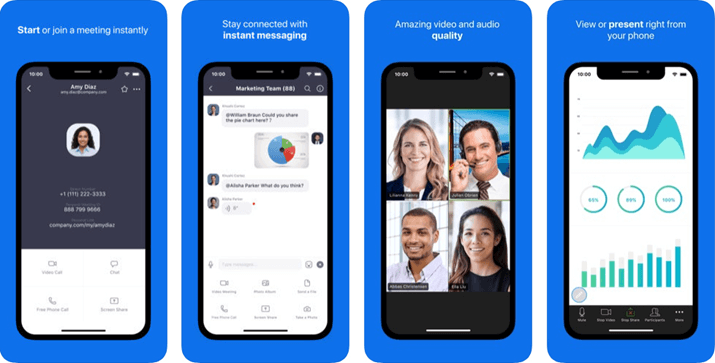
Zoom es un software de comunicaciones basado en la nube para realizar videoconferencias, reuniones virtuales y sesiones de chat. Puedes usar el software para configurar Zoom Rooms, donde puedes reunirte y trabajar con miembros seleccionados del equipo en privado. También cuenta con una función de gestión de eventos para organizar eventos, gestionar entradas y hacer seguimiento de la asistencia, lo que facilita la organización de los mismos.
Zoom es el mejor software de gestión de reuniones para ti si deseas realizar y asistir a reuniones utilizando tu dispositivo móvil, ya que Zoom permite a los usuarios pasar de una sesión de chat o una llamada telefónica directamente a una reunión móvil. Esta solución de gestión de reuniones tiene una aplicación móvil que funciona en dispositivos iOS y Android, permitiéndote asistir o realizar reuniones desde cualquier lugar. Con la función de fondo virtual de Zoom, puedes tener un fondo de reunión presentable mientras trabajas fuera de la oficina, ayudando a mantener la formalidad en entornos menos ideales.
Puedes integrar una amplia gama de herramientas de productividad en Zoom, incluyendo CRM Connector, Cronofy, Slack, Asana, Zapier, Zendesk y muchas otras.
Zoom tiene una versión gratuita, mientras que la versión de pago inicia desde $14.99/licencia/mes.

Fellow
El mejor para la creación colaborativa de agendas
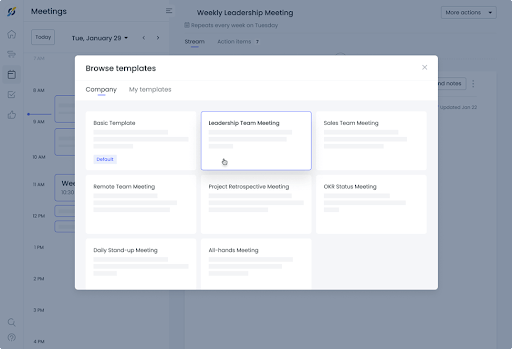
Fellow es un software de gestión de reuniones que ayuda a tu equipo a ser productivo antes, durante y después de las reuniones. Fellow puede ayudarte a elaborar tu agenda para garantizar que las reuniones transcurran sin problemas y que se aborden todos los asuntos empresariales críticos. Te permite almacenar un historial completo de todas tus reuniones para que puedas volver a discusiones anteriores como referencia. Puedes usar Fellow para obtener retroalimentación de los asistentes a la reunión, de modo que sepas cómo mejorar las reuniones futuras.
Las reuniones son colaborativas, y si necesitas un software de gestión de reuniones que ayude a tu equipo a convertirlas en sesiones productivas, entonces Fellow es la mejor opción. Puedes usar Fellow para registrar acciones en el momento y asegurarte de tener una lista de tareas completa que puedas compartir con otros miembros del equipo. Fellow te permite enviar notas de reuniones a todos con un solo clic, para que tengan una copia del acta y puedan sugerir correcciones o adiciones si es necesario.
Fellow se integra con otras herramientas de gestión y colaboración para reuniones, incluyendo Slack, Google Meet, MS Teams, Google Tasks, etc.
Fellow tiene una versión gratuita con funciones limitadas para hasta 10 usuarios, mientras que el precio de la versión Pro comienza desde $5/usuario/mes.
Software de gestión de reuniones que permite a los usuarios gestionar agendas de reuniones de manera eficaz
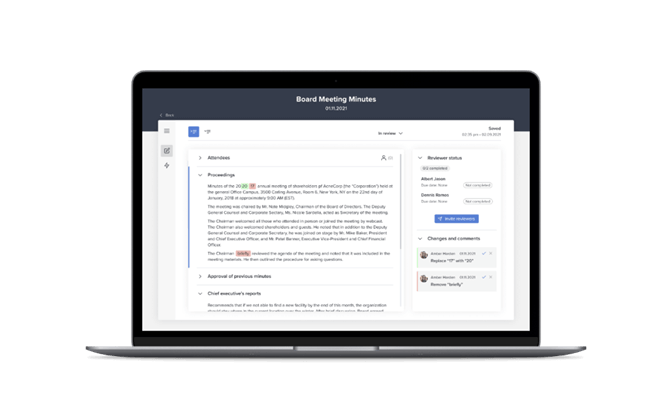
Diligent es un software de gestión de reuniones que puedes usar para aumentar la efectividad de los comités y reuniones de la junta directiva al ayudarte a digitalizar tus reuniones. Puedes utilizarlo para agilizar la toma de notas y el reparto de actas, de manera que puedas concentrarte en las discusiones. Diligent también te ayuda a simplificar las evaluaciones de la junta y los cuestionarios, lo que permite conocer la opinión de los miembros sobre asuntos críticos.
Si necesitas un software de gestión de reuniones para mejorar la administración de agendas, entonces Diligent es la mejor opción porque puedes usarlo para crear y compartir agendas de reuniones con los miembros del equipo. También te puede ayudar a evitar problemas de control de versiones, ya que las actualizaciones se reflejan incluso en la agenda que ya has enviado. Puedes digitalizar libros de la junta y mantener la información sensible segura antes, durante y después de las reuniones.
El precio de Diligent está disponible bajo solicitud.
Herramienta de videoconferencias que permite hasta 250 asistentes
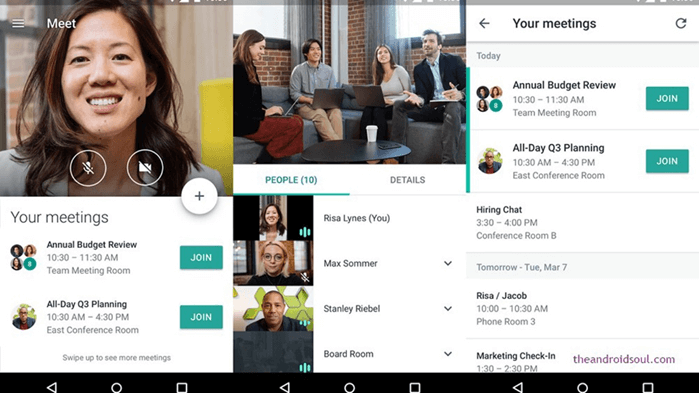
Google Meet es un servicio de comunicación por video que puedes usar para realizar reuniones de equipo, seminarios web y videoconferencias. Viene integrado en Google Workspace, lo que permite a los usuarios acceder a otras aplicaciones de productividad de Google como Gmail, Drive, Calendar, Sheets, Docs, Slides y Forms para usarlas durante las reuniones. Google Meet es una opción excelente para entrevistas por video con candidatos porque puedes enviar invitaciones a cualquiera por correo electrónico sin preocuparte por los permisos.
Google Meet es la mejor opción para ti si buscas software de gestión de reuniones y sueles realizar reuniones virtuales extensas con tu equipo remoto, ya que permite que las reuniones duren hasta 24 horas con un máximo de 250 participantes. Puedes usar Google Meet para crear pizarras digitales que permiten a los miembros del equipo compartir ideas durante las sesiones de lluvia de ideas. Permite grabar reuniones y guardarlas en Google Drive, dando acceso a todos los asistentes.
El precio de Google Meet comienza en $4.20/usuario/mes.

Infinity
Software de gestión de reuniones que permite a los usuarios organizar múltiples calendarios de reuniones
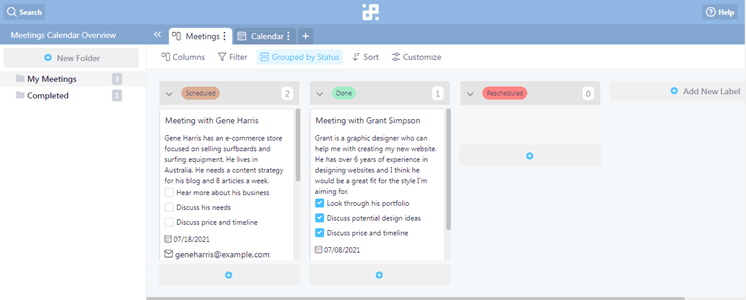
Infinity es un software de colaboración en equipo con funciones de programación de reuniones además de capacidades de gestión de tareas. Cuenta con tableros Kanban que te permiten una forma visual de seguir el progreso de tareas y proyectos. Puedes usar Infinity para asignar tareas y elementos de acción a los miembros del equipo, asegurando que las tareas se asignen a los miembros según su conjunto de habilidades.
Si buscas un software de gestión de reuniones que te ayude a organizar tu calendario de reuniones, entonces Infinity es la mejor opción para ti gracias a su plantilla de calendario de reuniones. Puedes usar esta plantilla para llevar el control de información crítica para las reuniones, como fechas y horas de las reuniones y la información de contacto de otros asistentes. Las plantillas de reuniones de Infinity también permiten a los usuarios incluir notas sobre las reuniones para registrar temas cruciales.
Infinity se integra con Zapier, Trello Import, CSV Import y otros.
Infinity tiene una tarifa única de $149.
Ideal para conferencias web seguras

Zoho Meeting es un software de reuniones y seminarios web en línea diseñado para facilitar la colaboración y comunicación remota mediante funciones como conferencias de audio y video, compartir pantalla y grabación de sesiones. Su énfasis en la protección de datos y privacidad lo posiciona como una opción líder para necesidades de conferencias web seguras.
Zoho Meeting ofrece un conjunto completo de funciones diseñadas para optimizar el proceso de gestión de reuniones, lo que lo convierte en una opción ideal para empresas de todos los tamaños. En primer lugar, Zoho Meeting destaca por su simplicidad y facilidad de uso. Desde la programación de reuniones hasta la realización de conferencias virtuales, la plataforma proporciona una interfaz fácil de usar que requiere una capacitación mínima para que los empleados la naveguen. Esta accesibilidad asegura una adopción fluida en los equipos, mejorando la productividad y colaboración en toda la organización.
Además, Zoho Meeting ofrece diversas integraciones con aplicaciones de calendario populares como Google Calendar y Outlook, simplificando el proceso de programación y garantizando una coordinación perfecta de reuniones en diferentes plataformas.
Asimismo, Zoho Meeting prioriza la seguridad y la privacidad, aspectos cruciales para profesionales de RRHH que manejan información sensible. La plataforma ofrece cifrado de extremo a extremo para todas las reuniones, asegurando que las discusiones confidenciales permanezcan protegidas contra el acceso no autorizado. Con funciones como protección por contraseña y sala de espera, Zoho Meeting proporciona a los administradores las herramientas necesarias para controlar el acceso y mantener la integridad de las reuniones.
Como parte del ecosistema Zoho, Zoho Meeting se integra con varias aplicaciones de Zoho como Zoho CRM, Zoho Projects y Zoho Campaigns, así como con plataformas externas como Microsoft Teams y Slack. También soporta integraciones de correo electrónico con Zoho Mail y Gmail, y se conecta con herramientas de automatización como Zoho Flow y Zoho Marketing Automation.

Ideal para la gestión de espacios de trabajo híbridos
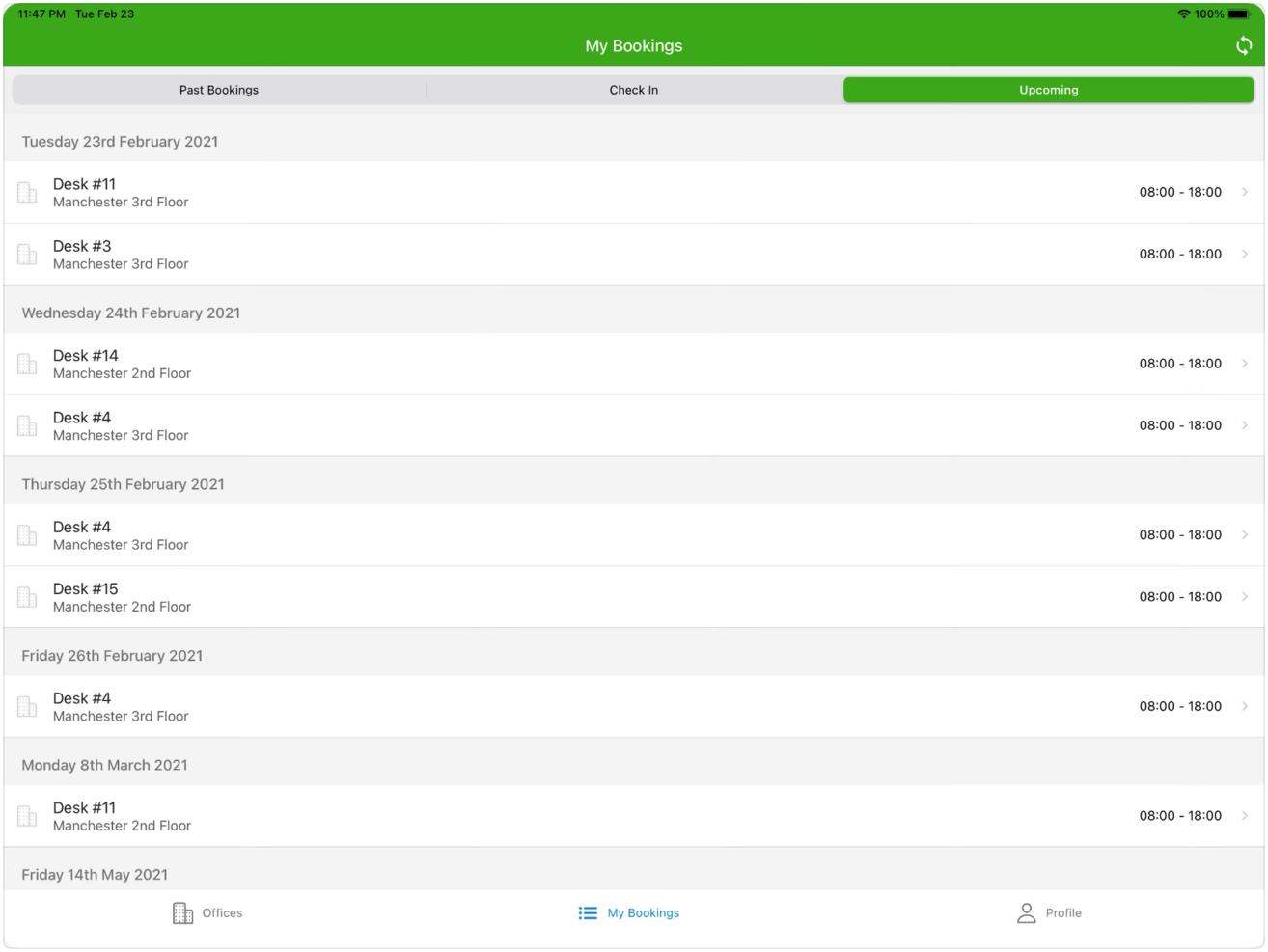
Clearooms es un software para la reserva de salas de reuniones y escritorios compartidos, diseñado para gestionar espacios de trabajo híbridos y proporcionar una solución a empresas que operan tanto con empleados en oficina como a distancia. Se reconoce por su capacidad para abordar las complejidades de gestionar un espacio de trabajo híbrido, lo que lo posiciona como una elección adecuada para aquellas empresas que buscan mantener un entorno laboral eficiente y productivo en este modelo.
Las funciones avanzadas de Clearooms están orientadas tanto a reuniones presenciales como virtuales, lo cual es esencial para los entornos de trabajo híbridos de la actualidad. Lo que lo diferencia es su interfaz fácil de usar que simplifica la gestión de los espacios de reunión y su integración con otras herramientas de productividad, lo que favorece un flujo de trabajo cohesivo.
Además, ofrece un sistema de reserva de salas en tiempo real con un plano interactivo, permitiendo a los usuarios reservar fácilmente espacios de reunión para fechas y horas específicas. Admite reservas recurrentes, automatizando el proceso para reuniones regulares. La plataforma incluye un sistema de registro para liberar salas cuando no se confirma la asistencia, y brinda opciones adicionales como la reserva de servicios extra, por ejemplo, catering o equipamiento.
Ofrece integraciones con diversos sistemas para facilitar la autenticación de usuarios y la reserva de salas de reunión. Es compatible con Single Sign On (SSO) mediante plataformas como Google, Okta y OneLogin. Así mismo, ofrece integraciones con terceros como Office 365 y MS Teams. Finalmente, puede usarse su API para crear integraciones personalizadas.
Software de gestión de reuniones para crear y compartir transcripciones y grabaciones de reuniones

GoToMeeting es un software de gestión de reuniones en línea con funciones de videoconferencia y uso compartido de escritorio que puedes utilizar para reunirte con empleados de forma remota. Puedes usar GoToMeeting para crear Salas de Trabajo, lo que te permite dividir a los asistentes en grupos más pequeños para colaborar eficazmente en tiempo real. GoToMeeting cuenta con una versión de aplicación móvil disponible tanto para dispositivos Android como iOS, lo que permite a los empleados asistir a reuniones desde sus dispositivos móviles.
GoToMeeting es el mejor software de gestión de reuniones para tu empresa si buscas transcripciones impecables gracias a la función de transcripción de reuniones de GoToMeeting. GoToMeeting transcribe las reuniones por ti, por lo que no es necesario asignar un tomador de notas, permitiendo así que todos los miembros del equipo se concentren en la discusión. También puedes compartir las actas de las reuniones con los miembros del equipo, estén donde estén, lo que lo hace ideal para equipos que trabajan de forma remota. Las transcripciones son accesibles en cualquier lugar, por lo que puedes revisar reuniones anteriores cuando y donde lo necesites.
GoToMeeting se integra con una amplia gama de otras herramientas de productividad, incluyendo Google Calendar, Outlook, Microsoft Teams, Salesforce, etc.
El precio de GoToMeeting comienza en $12/organizador/mes y ofrecen una prueba gratuita de 14 días.

Software de gestión de reuniones con funciones de accesibilidad para una fuerza laboral diversa
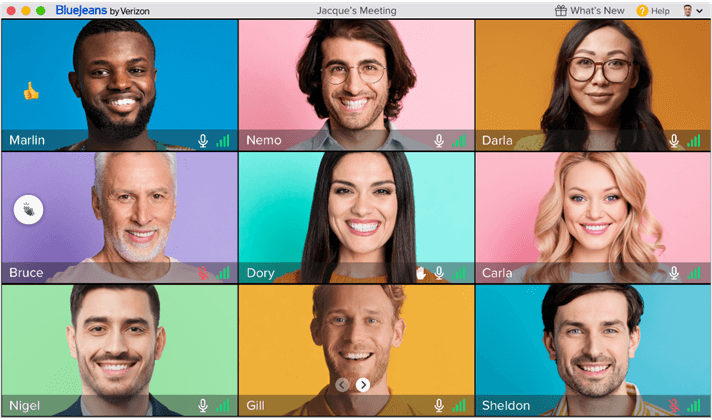
BlueJeans es una función de videoconferencia que tu empresa puede utilizar para realizar reuniones virtuales. Cuenta con Dolby Voice y video en HD, lo que garantiza claridad de audio y video durante las reuniones para que todos los asistentes puedan entender claramente al anfitrión. Tiene una funcionalidad de vista de galería mejorada que permite mostrar hasta 25 asistentes en pantalla, lo que lo hace ideal para grupos grandes. BlueJeans es multiplataforma, lo que permite a los usuarios organizar o asistir a reuniones desde sus computadoras de escritorio o dispositivos móviles manteniendo la misma experiencia de usuario.
BlueJeans es el mejor software de gestión de reuniones si buscas uno que sea fácil de usar para todos los usuarios debido a su función de accesibilidad. Dispone de subtítulos automáticos para que los miembros del equipo puedan seguir de cerca la discusión incluso si su primer idioma no es el inglés. BlueJeans también tiene funciones útiles para los miembros del equipo con discapacidad visual, incluyendo lectores de pantalla para facilitar el uso del software. También cuenta con elementos de usuario de alto contraste que facilitan a las personas con problemas de visión distinguir las opciones de BlueJeans durante las reuniones.
Los precios de BlueJeans comienzan en $9.99/anfitrión/mes, y ofrecen una prueba gratuita de 14 días.
Otro software de gestión de reuniones
Estas son algunas opciones adicionales de software de gestión de reuniones que no llegaron a mi lista de favoritos, pero que aún merece la pena considerar:
- BoardDocs
Función de gestión de reuniones ideal para equipos pequeños y empresas sin departamento de TI
- Teaming
Aplicación móvil que permite a los usuarios enviar fotos y videos a otros usuarios
- 4Minitz
Software de gestión de reuniones de código abierto que permite a los usuarios personalizar funciones según sus necesidades
- Slack
Software de gestión de proyectos con herramientas de comunicación para realizar reuniones remotas
- monday AI Workspace
La mejor opción para la detección de riesgos de proyectos basada en IA
- Topicflow
Ideal para conversaciones de desempeño basadas en datos


Cómo evalúo el software de gestión de reuniones
Evalúo las herramientas en dos niveles: las funciones básicas—como agendas colaborativas y seguimiento de tareas—que califican para la inclusión, y los diferenciadores que destacan a las mejores opciones.
Funcionalidad principal (requisitos básicos para esta lista)
Estas capacidades principales sirven como criterios de aceptación para incluirse en mi lista de software de gestión de reuniones:
- Creación colaborativa de agendas: Verifico si los asistentes pueden coeditar las agendas en tiempo real—como cuando un equipo añade temas de discusión a una reunión semanal antes de que comience.
- Notas y actas de reuniones: Las notas estructuradas asociadas a cada reunión importan más que un simple campo de texto en blanco, especialmente para seguir las decisiones a lo largo de reuniones recurrentes.
- Seguimiento de tareas: Busco tareas asignables con responsables, fechas de vencimiento y actualizaciones de estado que se trasladen automáticamente a la siguiente instancia de la reunión.
- Integración con calendario y videoconferencias: La sincronización bidireccional con Google Calendar, Outlook, Zoom y Teams es lo mínimo—las reuniones deben obtener contexto sin ingreso manual.
- Grabación y transcripción: Evalúo si la herramienta graba, transcribe y resume las discusiones para que los participantes puedan buscar temas específicos en reuniones pasadas.
- Plantillas reutilizables de reuniones: Las plantillas preconstruidas y personalizables para formatos comunes como 1:1, retrospectivas de sprint y reuniones de junta ahorran mucho tiempo de preparación real.
Califico a cada proveedor en una escala de 0 (no ofrece la funcionalidad) a 5 (sobresale en este aspecto) para cada criterio.
Los proveedores deben alcanzar un puntaje promedio mínimo para ser considerados en mi lista. A partir de ahí, considero lo que distingue a cada plataforma.
Factores diferenciadores (lo que destaca a los proveedores)
Una vez que he seleccionado mi lista, así es como comparo y contrasto los diferentes proveedores en el espacio del software de gestión de reuniones:
Funciones destacadas
Los asistentes de reuniones impulsados por IA que redactan agendas y resumen discusiones ayudan a que los equipos ocupados se mantengan enfocados y organizados sin esfuerzo adicional. También busco herramientas de toma de decisiones y votación—especialmente útiles para reuniones ejecutivas y de junta—y análisis entre reuniones que revelan tendencias en la frecuencia, participación y cumplimiento de tareas a lo largo del tiempo. Las integraciones con bases de conocimiento de la empresa, de modo que las notas de la reunión se alimenten directamente en herramientas como Confluence o Notion, tienen un gran impacto en la gestión global de la información.
Más allá de las funciones
La seguridad es importante aquí porque el contenido de las reuniones a menudo incluye discusiones sensibles de RR. HH. y estrategias a nivel directivo. Verifico la certificación SOC 2 Tipo II, soporte de SSO y permisos granulares que restringen el acceso a reuniones confidenciales. La estructura de precios también es relevante—algunas herramientas cobran por usuario, mientras que otras ofrecen planes por espacio de trabajo, lo que cambia las cuentas para equipos grandes. También evalúo si una plataforma se adapta a tu ritmo específico de reuniones, ya sean reuniones diarias, revisiones trimestrales de negocio o sesiones formales de gobierno corporativo.
Cómo elegir un software de gestión de reuniones
Es fácil perderse entre largas listas de funciones y estructuras de precios complejas. Para ayudarte a mantener la atención mientras llevas a cabo tu proceso único de selección de software, aquí tienes una lista de factores que debes tener en cuenta:
| Factor | Qué tener en cuenta |
|---|---|
| Escalabilidad | ¿Puede el software crecer junto con tu equipo? Ten en cuenta el crecimiento futuro y si la herramienta puede gestionar más usuarios o reuniones más grandes sin costes adicionales ni problemas de rendimiento. |
| Integraciones | ¿Funciona con las herramientas que ya utilizas, como calendarios o aplicaciones de gestión de proyectos? Comprueba que el flujo de datos sea fluido y que se reduzca el trabajo manual. |
| Personalización | ¿Puedes adaptar el software para que se ajuste a tus flujos de trabajo específicos? Busca opciones para personalizar plantillas de reuniones o paneles. |
| Facilidad de uso | ¿La interfaz es intuitiva para todos los miembros del equipo? Prueba la demostración o la versión de prueba para asegurarte de que todos puedan utilizarla sin frustraciones. |
| Implementación e incorporación | ¿Cuánto tiempo se tardará en ponerlo en marcha? Evalúa la disponibilidad de recursos de formación y asistencia durante la fase de transición. |
| Coste | ¿El precio se ajusta a tu presupuesto? Compara el coste con las funciones ofrecidas y comprueba si existen tarifas ocultas o cargos por funciones adicionales. |
| Medidas de seguridad | ¿Mantiene tus datos seguros? Busca estándares de cifrado, controles de acceso y cumplimiento de las normativas de protección de datos. |
¿Qué es el software de gestión de reuniones?
El software de gestión de reuniones es una herramienta que ayuda a organizar y facilitar las reuniones de forma eficaz. Profesionales como directivos, líderes de equipo y coordinadores utilizan estas herramientas para mejorar la productividad y la comunicación. Las funciones de programación, creación de agendas e integración permiten planificar y llevar a cabo reuniones de manera eficiente. Estas herramientas ahorran tiempo, reducen los conflictos de horarios y mejoran los resultados generales de las reuniones.
Funciones
Al seleccionar un software de gestión de reuniones, presta atención a las siguientes funciones clave:
- Herramientas de programación: Automatizan el proceso de búsqueda de franjas horarias disponibles y reducen el intercambio de correos electrónicos.
- Creación de agendas: Ayuda a organizar los temas y objetivos de las reuniones, manteniendo las conversaciones centradas y productivas.
- Capacidades de integración: Se conecta con calendarios y herramientas de gestión de proyectos para garantizar una integración fluida del flujo de trabajo.
- Plantillas personalizables: Permiten a los usuarios adaptar los formatos de las reuniones para satisfacer necesidades específicas y mejorar la eficiencia.
- Colaboración en tiempo real: Permite a los participantes trabajar juntos durante las reuniones, mejorando la participación y los resultados.
- Videoconferencias: Proporcionan una plataforma para la comunicación cara a cara a distancia, algo esencial para los equipos distribuidos.
- Grabación de actas: Captura y almacena automáticamente las notas para garantizar que todos estén informados. Para los equipos que quieran un resumen más conciso, las herramientas de IA para resumir reuniones pueden convertir automáticamente el contenido de las reuniones en resúmenes breves.
- Seguimientos automatizados: Envía recordatorios y tareas pendientes después de las reuniones para garantizar la responsabilidad y el progreso.
- Medidas de seguridad: Protege los datos confidenciales de las reuniones mediante cifrado y controles de acceso.
- Interfaz fácil de usar: Garantiza la facilidad de uso para todos los participantes y minimiza la curva de aprendizaje.
Ventajas
La implementación de un software de gestión de reuniones ofrece varias ventajas para tu equipo y tu empresa. Estas son algunas de las que puedes esperar:
- Ahorro de tiempo: La programación y los recordatorios automatizados reducen el tiempo dedicado a organizar reuniones.
- Mayor productividad: Las agendas centradas y los seguimientos mantienen las conversaciones encaminadas y generan resultados concretos.
- Colaboración mejorada: Las funciones de colaboración en tiempo real aumentan la participación y facilitan el trabajo en equipo.
- Mayor accesibilidad: Las videoconferencias permiten que los equipos remotos se comuniquen eficazmente, independientemente de su ubicación.
- Mejor organización: El almacenamiento centralizado de las actas y agendas de las reuniones ayuda a mantener a todos informados y alineados.
- Seguridad de los datos: Las sólidas medidas de seguridad protegen la información confidencial y te ofrecen tranquilidad.
- Facilidad de uso: Las interfaces fáciles de usar permiten que todos participen sin una curva de aprendizaje pronunciada.
Costes y precios
Para seleccionar un software de gestión de reuniones es necesario comprender los distintos modelos de precios y planes disponibles. Los costes varían en función de las funciones, el tamaño del equipo, los complementos y otros factores. La tabla siguiente resume los planes habituales, sus precios medios y las funciones que suelen incluir las soluciones de software de gestión de reuniones:
Tabla comparativa de planes para software de gestión de reuniones
| Tipo de plan | Precio medio | Funciones habituales |
|---|---|---|
| Plan gratuito | $0 | Programación básica, integraciones limitadas y videoconferencias básicas. |
| Plan personal | $5-$15/usuario/mes | Herramientas de programación, creación de agendas e integraciones básicas. |
| Plan empresarial | $20-$50/usuario/mes | Integraciones avanzadas, plantillas personalizables y colaboración en tiempo real. |
| Plan para empresas | $60-$100/usuario/mes | Acceso a todas las funciones, medidas de seguridad avanzadas y atención al cliente exclusiva. |
Preguntas frecuentes sobre el software de gestión de reuniones
Aquí tienes algunas respuestas a preguntas frecuentes sobre el software de gestión de reuniones:
¿Cómo sé si mi equipo necesita un software de gestión de reuniones?
Si tu equipo tiene dificultades con conflictos de horarios, reuniones desorganizadas o una comunicación deficiente, el software de gestión de reuniones podría ayudar. Puede automatizar la programación, agilizar la comunicación y mantener a todos coordinados. Ten en cuenta el tamaño de tu equipo y la complejidad de tus reuniones al tomar una decisión.
¿Es adecuado el software de gestión de reuniones para equipos remotos?
Sí, el software de gestión de reuniones es ideal para equipos remotos. Ofrece videoconferencias, colaboración en tiempo real y almacenamiento centralizado de documentos, elementos esenciales para mantener conectados y eficientes a los equipos remotos. Asegúrate de que el software sea compatible con tus métodos de comunicación preferidos y cuente con medidas de seguridad sólidas.
¿Hasta qué punto es seguro el software de gestión de reuniones?
La seguridad varía según el software, así que comprueba los estándares de cifrado, los controles de acceso y el cumplimiento de la normativa de protección de datos. Busca un software que ofrezca actualizaciones de seguridad periódicas y tenga una buena reputación en la protección de los datos de los usuarios. La seguridad es crucial, especialmente si gestionas información confidencial durante las reuniones.

