

I 10 migliori software per la gestione delle paghe per imprese edili nel 2026

Miglior software paghe per l'edilizia: selezione


Se hai difficoltà a gestire le paghe per le squadre sul campo, i subappaltatori e i lavoratori sindacalizzati distribuiti su più cantieri, non sei il solo e sei nel posto giusto. Il miglior software per le paghe nel settore edile può aiutarti a semplificare l'elaborazione delle paghe, ridurre gli errori, rispettare i requisiti relativi alle paghe certificate e liberare tempo da dedicare alla gestione dei tuoi progetti.
Avendo studiato un'ampia gamma di strumenti per le risorse umane e il luogo di lavoro nel corso degli anni, compresi quelli sviluppati appositamente per il settore edile, ho esaminato le opzioni principali per aiutarti a trovare il software più adatto alle tue esigenze.
Che tu stia passando dai fogli di calcolo o sostituendo uno strumento che non soddisfa le tue esigenze, questa guida ti aiuterà a scegliere un sistema in grado di gestire il monitoraggio delle ore, la contabilità dei costi dei lavori, la presentazione delle dichiarazioni fiscali e i pagamenti, mantenendoti sempre in regola e garantendo che i tuoi team ricevano lo stipendio puntualmente.
Perché fidarsi delle nostre recensioni sui software
Il nostro team testa e recensisce software dal 2012. In quanto esperti HR noi stessi, sappiamo quanto sia difficile — e importante — scegliere il software giusto.
Per questa guida, abbiamo valutato gli strumenti attraverso test pratici e ricerche indipendenti, assegnando un punteggio agli strumenti in base ai nostri criteri di selezione. Ci basiamo inoltre sulle competenze di leader di pensiero del settore e di professionisti HR attivi.
Le nostre recensioni riflettono il nostro giudizio editoriale umano, non un discorso di vendita.
Revisori esperti:
Tabella comparativa dei software paghe per l'edilizia
La tabella seguente confronta prezzi, prove gratuite e dettagli sulle demo delle mie migliori selezioni di software paghe per il settore edile.
| Tool | Best For | Trial Info | Price | ||
|---|---|---|---|---|---|
| 1 | Ideale per la gestione di risorse umane e benefit | Demo gratuita disponibile | A partire da $8/dipendente/mese + $50/mese di quota base | Website | |
| 2 | Ideale per gestione paghe mista W-2 e 1099 | Demo gratuita disponibile | Da $49/mese + $6/mese per persona | Website | |
| 3 | Ideale per flussi di lavoro integrati di paghe di progetto | Demo gratuita disponibile | Prezzo su richiesta | Website | |
| 4 | Ideale per piccole imprese edili | Demo gratuita disponibile | Prezzo su richiesta | Website | |
| 5 | Ideale per distinguere tra collaboratore e dipendente | Demo gratuita disponibile | Prezzo su richiesta | Website | |
| 6 | Ideale per job costing integrato e payroll | Prova gratuita di 30 giorni + demo gratuita disponibile | A partire da $50/mese | Website | |
| 7 | Ideale per deposito diretto gratuito in 2 giorni per dipendenti o collaboratori | Prova gratuita di 30 giorni disponibile | A partire da $8,50/mese + $2/dipendente | Website | |
| 8 | Ideale per la conformità in ambienti multi-giurisdizionali | Demo gratuita disponibile | Prezzi su richiesta | Website | |
| 9 | Ideale per soluzioni scalabili di conformità e gestione delle paghe | Demo gratuita disponibile | Prezzo su richiesta | Website | |
| 10 | Ideale per contabilità e gestione integrate nel settore delle costruzioni | Demo gratuita disponibile | Prezzo su richiesta | Website |


Recensioni dei migliori software paghe per l'edilizia
Questa analisi approfondita illustra i vantaggi e gli svantaggi di ciascun software paghe pensato per il settore edile. Fornisce inoltre una panoramica delle funzionalità, dei casi d’uso migliori e delle integrazioni principali.

Ideale per la gestione di risorse umane e benefit

Per le aziende edili che cercano una solida soluzione per la gestione delle paghe, Justworks offre una piattaforma che semplifica l'amministrazione delle retribuzioni e della forza lavoro. Supporta anche la gestione delle risorse umane e dei benefit, aiutando le imprese a gestire i vantaggi per i dipendenti insieme alle attività di payroll. Con strumenti per l'invio automatico delle dichiarazioni fiscali e la gestione dei dipendenti, Justworks aiuta le aziende edili a gestire le responsabilità di payroll supportando allo stesso tempo la loro forza lavoro.
Perché ho scelto Justworks
Ho scelto Justworks per la sua gestione delle risorse umane e dei benefit, che consente alle imprese edili di amministrare i vantaggi per i dipendenti insieme alle paghe su un'unica piattaforma. Il software include anche l'invio automatico dei tributi sulla retribuzione, riducendo così l'impegno necessario per gestire le tasse sulle paghe. Inoltre, Justworks supporta la gestione dell'assicurazione sugli infortuni sul lavoro, fondamentale per le aziende di costruzioni che si occupano di rischi professionali e coperture assicurative per i dipendenti.
Principali funzionalità di Justworks
Oltre alla gestione di HR e benefit, Justworks offre:
- Rilevazione presenze: Strumenti integrati per la rilevazione delle ore lavorate, che garantiscono un'elaborazione delle paghe accurata e il rispetto della normativa sul lavoro.
- Benefit per i dipendenti: Accesso a una vasta gamma di vantaggi per i dipendenti, migliorando soddisfazione e fidelizzazione nel team.
- Strumenti HR: Strumenti completi di gestione delle risorse umane per la gestione delle schede dei dipendenti e delle valutazioni delle performance.
- Archivio documenti: Spazio sicuro per l'archiviazione dei documenti importanti, assicurando facile accesso e organizzazione.
Integrazioni Justworks
Le integrazioni includono QuickBooks, Xero, BambooHR, JazzHR, Guideline e Mineral. È disponibile un'API per integrazioni personalizzate.
Pros and Cons
Pros:
- Centralizza la gestione di paghe, HR e assicurazione sanitaria
- Dashboard dipendenti chiara per informazioni su benefit e retribuzione
- Dichiarazioni fiscali sulle paghe automatizzate
Cons:
- Personalizzazione limitata per strutture di team complesse
- Meno funzionalità HR avanzate rispetto alle piattaforme enterprise di maggiori dimensioni

Gusto
Ideale per gestione paghe mista W-2 e 1099

Per le imprese edili che cercano una soluzione affidabile per la gestione delle paghe, Gusto offre una piattaforma intuitiva che risponde alle esigenze specifiche del settore. Automatizzando il monitoraggio delle ore lavorate e integrando i report di costo commessa, Gusto ti aiuta a gestire la complessità delle buste paga con facilità.
Perché ho scelto Gusto
Ho scelto Gusto perché supporta sia i dipendenti che i collaboratori nello stesso sistema, caratteristica particolarmente preziosa per le imprese edili che gestiscono sia squadre fisse che subappaltatori — puoi elaborare le paghe per dipendenti orari (W-2) ed emettere pagamenti per collaboratori 1099 in un'unica piattaforma. La funzione di invio automatico delle dichiarazioni fiscali e il supporto per la conformità permettono di non dover calcolare o inviare manualmente le tasse sulle paghe, riducendo così errori e rischi legali quando si hanno turni di lavoro irregolari o diverse giurisdizioni di competenza.
Caratteristiche principali di Gusto
Oltre alla flessibilità nelle paghe, troverai diverse funzioni fondamentali per i team orientati all’edilizia:
- Elaborazioni paga illimitate: Puoi gestire la paga ogni volta che serve — utile quando devi pagare ore irregolari, straordinari o squadre sfalsate.
- Benefici integrati e assicurazione infortuni: Gestisci facilmente i benefici dei dipendenti e garantisci la conformità con l’assicurazione infortuni a consumo, pensata per l’edilizia.
- Monitoraggio ferie, malattia e policy assenze: Puoi impostare le policy di ferie e malattia e tenere sotto controllo i saldi, facilitando la gestione delle assenze delle squadre.
- Accesso da mobile e sincronizzazione calendario: Tu (o l’amministratore) puoi gestire le paghe o controllare le scadenze dal telefono o dal tablet, e sincronizzare le date importanti del personale (come scadenze, assunzioni, anniversari) con Google, Outlook o iCal.
Integrazioni Gusto
Le integrazioni comprendono QuickBooks, Xero, TSheets, Deputy, Clover, Upserve, Expensify, Zapier e Buildertrend.
Pros and Cons
Pros:
- Offre onboarding self-service e archiviazione online di moduli fiscali e cedolini sia per collaboratori che per dipendenti.
- Paghe, benefici e risorse umane in un’unica piattaforma integrata.
- Gestisce paghe sia per collaboratori che per dipendenti, semplificando team misti.
Cons:
- Non è sufficientemente personalizzabile per gestire organizzazioni grandi e complesse.
- Le PMI che necessitano di funzioni avanzate di compliance o moduli HR specifici di nicchia potrebbero trovare Gusto limitante.
New Product Updates from Gusto
Gusto Adds Solo Advisory Tools and Mobile Money Features
Gusto adds Solo S-Corp Advisory Tools and Gusto Money on Mobile for tax guidance, invoicing, and bill payments. These updates help accountants advise solopreneurs and let users manage business finances from their phones. For more information, visit Gusto’s official site.

CMiC
Ideale per flussi di lavoro integrati di paghe di progetto
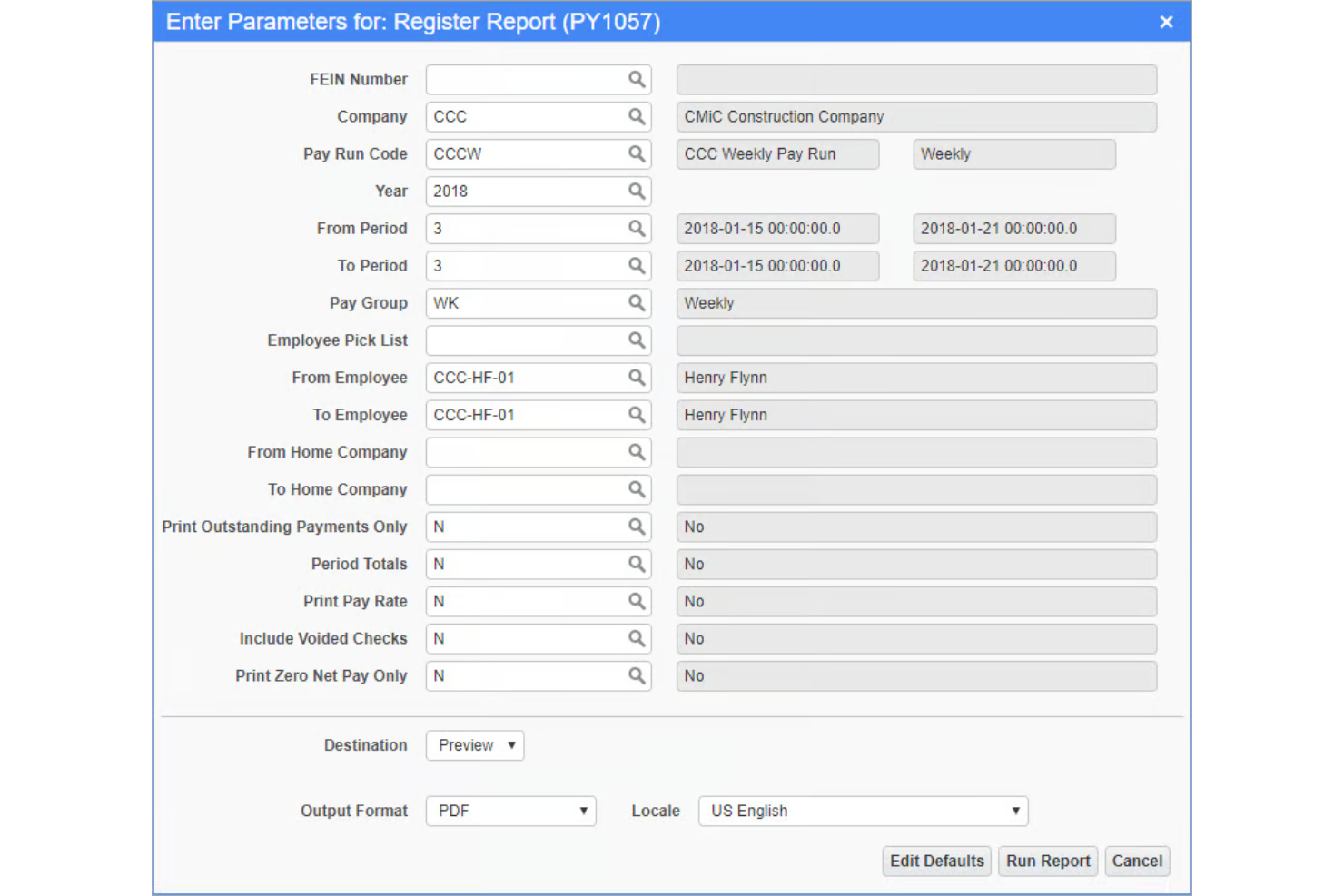
CMiC è un ERP specifico per il settore delle costruzioni con un modulo integrato di gestione paghe e HCM che gestisce la rilevazione dei costi di commessa, le strutture retributive sindacali, i cedolini certificati, la tassazione multi-giurisdizionale e il controllo delle ore delle squadre su un'unica piattaforma di database.
Per chi è più adatto CMiC?
CMiC è una scelta ideale per appaltatori generali di medie e grandi dimensioni e subappaltatori specializzati che necessitano di una gestione di paghe, finanze di progetto e risorse umane su un'unica piattaforma nativa per le costruzioni.
Perché ho scelto CMiC
Ho inserito CMiC tra le mie scelte principali perché paghe e contabilità di progetto sono presenti sulla stessa piattaforma di database unificata, così i costi della manodopera vengono trasferiti direttamente nei costi di commessa e nel libro mastro generale senza necessità di reinserimento manuale. Quando una squadra registra le ore direttamente in cantiere, queste ore sono immediatamente visibili rispetto al budget di progetto. Inoltre, mi piace che i calcoli delle paghe tengano conto di più tariffe in base al codice di costo all'interno dello stesso periodo di paga, cosa che la maggior parte dei software paghe stand-alone non è in grado di gestire.
Caratteristiche principali di CMiC
- Reportistica paghe certificata: Genera report paghe certificati conformi alle normative governative, compresi i moduli WH-347, direttamente dai dati paghe per progetti con salario prevalente.
- Gestione fiscale multi-giurisdizionale: Calcola e invia le tasse sulle paghe in diversi stati e giurisdizioni locali in un'unica procedura di pagamento.
- Portale self-service per i dipendenti: Consenti ai dipendenti di visualizzare i cedolini, aggiornare le informazioni personali e accedere ai documenti fiscali senza l'intervento delle risorse umane.
- Rilevamento mobile delle ore: I lavoratori in campo possono timbrare entrata e uscita e inserire le ore di lavoro specifiche per commessa tramite dispositivo mobile, generando dati paghe in tempo reale.
Integrazioni di CMiC
CMiC offre integrazioni sviluppate da partner con Procore, Arcoro, Oracle Textura, hh2, SmartBarrel, Prophix, GCPay, Autodesk ProEst, Finvari ed EarthCam. Un'API aperta è disponibile per aree funzionali tra cui area finanziaria, HCM, controllo di progetto e gestione materiali per integrazioni personalizzate.
Pros and Cons
Pros:
- Le buste paga vengono trasferite direttamente nei costi di commessa
- Piattaforma unificata su database singolo dedicata alle costruzioni
- Gestisce nativamente la reportistica paghe sindacali
Cons:
- Tempi di risposta lenti per i problemi relativi alle buste paga
- L'implementazione richiede tempo e risorse considerevoli
Ideale per piccole imprese edili
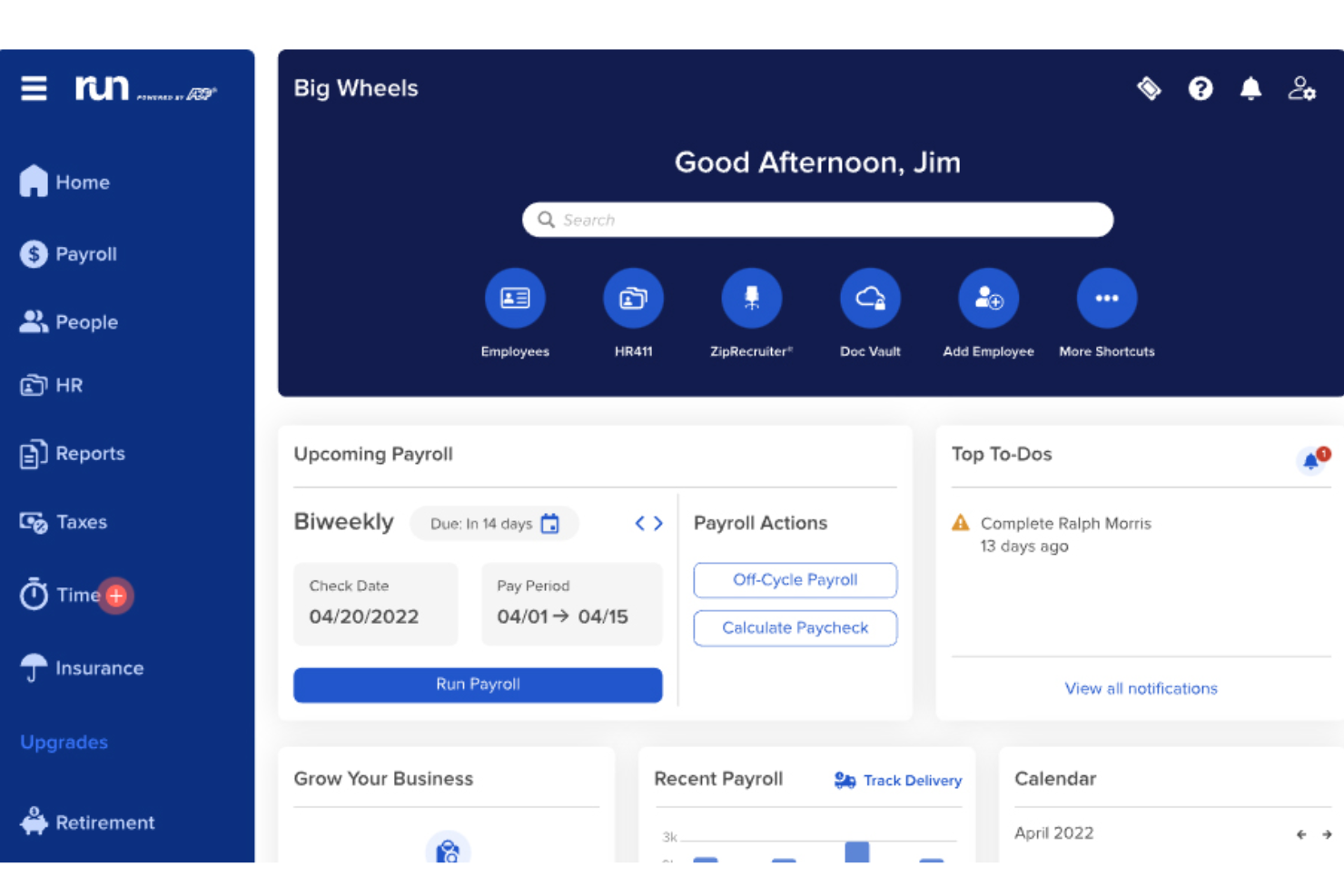
RUN by ADP è una piattaforma per la gestione delle paghe e delle risorse umane progettata per le piccole imprese, che offre funzionalità come il calcolo e la presentazione automatica delle imposte sui salari, detrazioni per benefit e pensioni, e piani personalizzabili.
Perché ho scelto RUN by ADP:
RUN Powered by ADP è un eccellente software per la gestione delle paghe per le piccole imprese edili perché consente di tracciare facilmente le ore lavorate per ogni commessa e sede, cosa fondamentale per gestire i dipendenti in diversi cantieri.
RUN semplifica inoltre la gestione delle quote sindacali, del payroll certificato e dei requisiti relativi al salario prevalente, aiutando le imprese edili a rimanere conformi alle normative locali, statali e federali.
Caratteristiche principali & Integrazioni
Le funzionalità includono l'elaborazione delle paghe, presentazione delle imposte, bonifico diretto, portale self-service per i dipendenti, supporto alla conformità HR, rilevazione presenze e orari, gestione dei pagamenti da pignoramento, comunicazione delle nuove assunzioni, servizi per i piani pensionistici, gestione dell'assicurazione contro gli infortuni sul lavoro, report su buste paga e tasse, e accesso tramite app mobile.
Le integrazioni includono QuickBooks, Wave, Xero, ClockShark, Points North, TruSaic, Compy, Wex, Synerion, JazzHR, 7Shifts, Snappy Gifts, Absorb LMS, SmartRecruiters e centinaia di altre.
Pros and Cons
Pros:
- Portale self-service per i dipendenti
- Ottima app mobile
- Funzioni di reportistica personalizzabile
Cons:
- Supporta solo fino a 49 dipendenti
- La maggior parte delle funzioni HR sono disponibili solo nei piani di fascia superiore

Paycor
Ideale per distinguere tra collaboratore e dipendente

Paycor è una piattaforma per la gestione delle paghe e del capitale umano (HCM) che include una soluzione completa per le paghe pensata per supportare i settori con forti esigenze normative come l'edilizia. Aiuta le aziende a gestire le paghe su più sedi, distinguere tra collaboratori e dipendenti, e rimanere aggiornate sulle evoluzioni delle leggi sul lavoro e dei requisiti fiscali.
Perché ho scelto Paycor:
Ho scelto Paycor perché affronta due sfide specifiche nella gestione paghe in edilizia: la rendicontazione delle paghe certificate e la classificazione dei collaboratori. È particolarmente utile per le aziende che gestiscono sia manodopera sindacalizzata che non sindacalizzata, poiché traccia le ore specifiche per progetto e assicura la conformità al Davis-Bacon Act.
Ho apprezzato anche che Paycor consenta di automatizzare le procedure di pagamento con AutoRun e di visualizzare in tempo reale il netto pagato—funzionalità che aiutano a evitare errori e risparmiare tempo durante la gestione paghe su più cantieri.
Funzionalità e integrazioni principali
Le funzionalità includono strumenti per la rendicontazione delle paghe certificate che associano ruoli e tariffe di pagamento a progetti specifici, calcoli delle paghe in tempo reale che eliminano l'elaborazione batch e opzioni di pagamento flessibili come paycard e accesso anticipato allo stipendio.
Include anche aggiornamenti integrati per la conformità alle normative locali, statali e federali.
Le integrazioni includono QuickBooks, Xero, SAP Concur, Indeed, LinkedIn, Glassdoor, Zapier, Microsoft Teams, Slack e DocuSign.
Pros and Cons
Pros:
- Ampia gamma di integrazioni con strumenti popolari
- Monitoraggio avanzato delle prestazioni dei dipendenti
- Soluzioni HR e paghe specifiche per settore
Cons:
- Potrebbe essere necessario un ulteriore supporto per una personalizzazione completa
- L'esperienza utente può risultare a volte poco fluida

TimeTrex
Ideale per job costing integrato e payroll

TimeTrex è una soluzione completa per la gestione della forza lavoro che integra il rilevamento delle presenze, l'elaborazione delle buste paga e la gestione delle risorse umane in un'unica piattaforma. Le aziende possono gestire le ore lavorate dai dipendenti, automatizzare i processi di payroll e garantire la conformità alle normative sul lavoro.
Perché ho scelto TimeTrex:
Per le aziende edili, TimeTrex si distingue per la capacità di gestire esigenze di payroll complesse. Le imprese di costruzione spesso si trovano ad affrontare tariffe di pagamento variabili, lavoratori sindacalizzati e molteplici cantieri, elementi che possono complicare l'elaborazione delle buste paga. TimeTrex affronta queste sfide con funzionalità come il job costing, che consente ai datori di lavoro di monitorare i costi del lavoro per progetto o cantiere, e una pianificazione avanzata che garantisce l'assegnazione dei lavoratori giusti ai compiti corretti con le tariffe adeguate. Questo livello di dettaglio è essenziale per una gestione accurata delle buste paga.
Funzionalità principali & integrazioni
Funzionalità includono bonifico bancario diretto, calcolo delle imposte, supporto multivaluta, portale self-service per i dipendenti, cedolini personalizzabili, monitoraggio della conformità, rilevamento delle presenze su dispositivi mobili, differenziali di turno e gestione automatica delle trattenute sul salario.
Integrazioni includono QuickBooks, Sage, ADP, Paychex, Xero, BambooHR, Zapier e Microsoft Excel.
Pros and Cons
Pros:
- Strumenti avanzati di pianificazione
- Calcolo automatico delle buste paga e delle imposte
- Payroll e gestione HR integrati
Cons:
- L'interfaccia utente appare datata
- Può risultare più lento durante la gestione di grandi volumi di dati o l'esecuzione di report complessi
New Product Updates from TimeTrex
TimeTrex Adds Quick Punch App With Offline and QR Support
TimeTrex adds a new Quick Punch app, offline punching, QR code scanning, punch images, configurable messages, and punch warnings or lockouts to improve employee clock-ins across browsers and local computers. For more information, visit TimeTrex’s official site.
 .
.
Ideale per deposito diretto gratuito in 2 giorni per dipendenti o collaboratori

Patriot Payroll è un software di gestione paghe online progettato per piccole aziende con da 1 a 500 dipendenti, offrendo opzioni sia di gestione paghe di base che completa.
Perché ho scelto Patriot Payroll:
Ho scelto Patriot Payroll perché offre una soluzione paghe completa e conveniente che soddisfa le esigenze delle aziende edili di piccole dimensioni. Dispone di una funzione gratuita di deposito diretto entro 2 giorni, un vantaggio notevole che aiuta le imprese a risparmiare su costi bancari aggiuntivi.
Patriot Payroll combina piani a basso costo con le funzioni essenziali per la gestione paghe, garantendo che le aziende possano gestire le paghe senza costi elevati. La capacità del software di gestire le dichiarazioni fiscali sulle paghe e fornire W-2 elettronici o stampabili ne aumenta ulteriormente l'attrattiva, rendendolo una soluzione affidabile ed economica per le imprese edili con sede negli Stati Uniti.
Funzionalità e integrazioni principali:
Funzionalità includono tariffe orarie flessibili, un semplice processo in tre fasi per l'esecuzione delle paghe, attivazione gratuita e deposito diretto gratuito, regole personalizzabili di maturazione dei permessi e assistenza clienti con sede negli Stati Uniti.
Integrazioni includono Patriot Accounting, QuickBooks Online, QuickBooks Time, Plaid e Workforce Time & Attendance.
Pros and Cons
Pros:
- Supporta pagamenti a collaboratori
- Conforme alle normative fiscali in tutti i 50 Stati USA
- Assistenza clienti reattiva
Cons:
- Nessuna funzione di pianificazione turni per i dipendenti
- Solo per aziende con sede negli Stati Uniti

Dayforce
Ideale per la conformità in ambienti multi-giurisdizionali
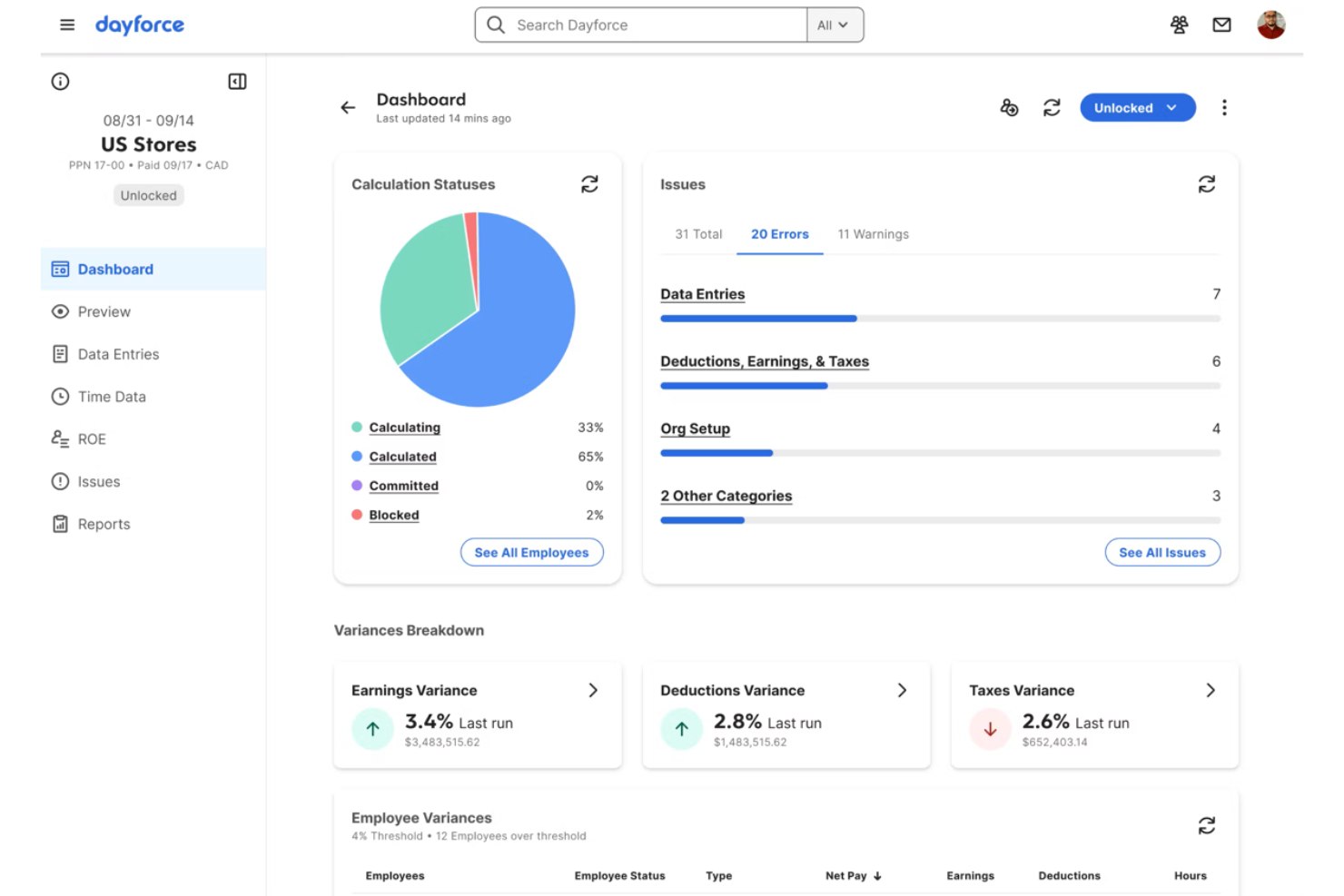
Dayforce è una soluzione completa di software per la gestione delle paghe progettata per il settore delle costruzioni. Semplifica l'elaborazione delle buste paga e garantisce la conformità normativa in diverse giurisdizioni.
Perché ho scelto Dayforce:
Ho scelto Dayforce perché eccelle nella gestione dei complessi requisiti di conformità in molteplici giurisdizioni, un'esigenza fondamentale nel settore delle costruzioni. Si è distinto per le sue robuste funzionalità di gestione della conformità ed è particolarmente efficace per le aziende che operano in contesti regolamentari diversi.
Caratteristiche distintive & Integrazioni
Le funzionalità includono l'elaborazione dei dati in tempo reale, che aiuta a mantenere le informazioni sulle paghe accurate e aggiornate. Offre inoltre funzionalità di reportistica avanzate, consentendo analisi dettagliate sui dati delle buste paga e della forza lavoro. Inoltre, Dayforce supporta l'automazione della dichiarazione fiscale e la gestione della conformità, riducendo il rischio di errori e sanzioni.
Le integrazioni includono SAP, Workday, Oracle, Microsoft Dynamics, QuickBooks, ADP, SuccessFactors, NetSuite, Sage e Salesforce.
Pros and Cons
Pros:
- Elaborazione dei dati in tempo reale
- Gestione completa della conformità
- Ampie funzionalità di reportistica
Cons:
- Leggera curva di apprendimento per i nuovi utenti
- Il costo può essere più restrittivo per le piccole imprese

ADP
Ideale per soluzioni scalabili di conformità e gestione delle paghe
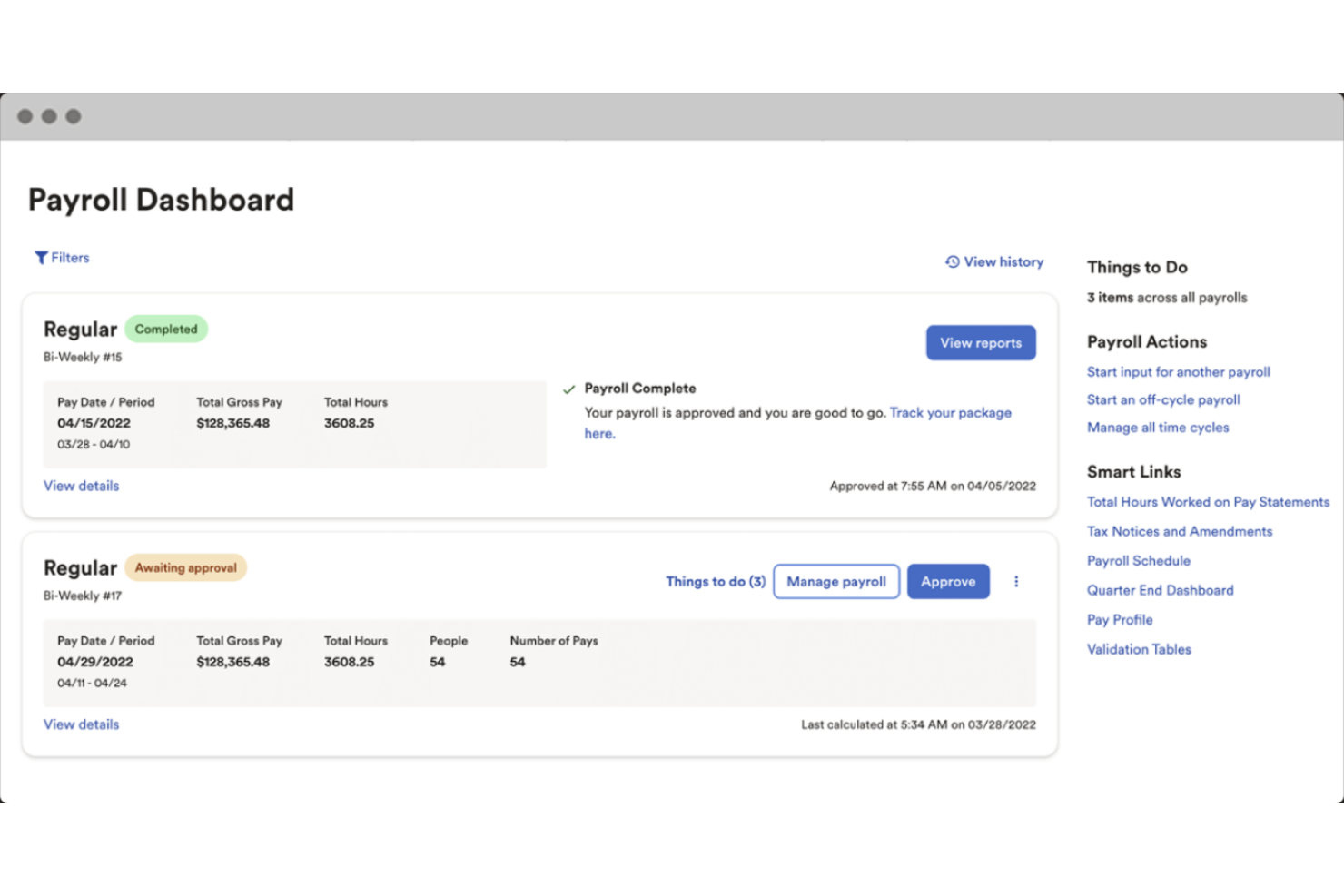
ADP offre una suite completa di soluzioni per la gestione delle paghe e della conformità, progettata specificamente per l'industria delle costruzioni. Fornisce servizi scalabili che si adattano alle esigenze delle aziende edili in crescita, garantendo l'elaborazione accurata delle buste paga e la conformità normativa.
Perché ho scelto ADP:
Ho scelto ADP perché eccelle nel fornire soluzioni scalabili per la gestione delle paghe e della conformità che possono crescere insieme alle aziende di costruzioni. Il suo ampio supporto in materia di conformità e la capacità di soddisfare le necessità di un'impresa edile la distinguono dagli altri software per le paghe. È particolarmente indicata per le aziende che cercano una soluzione affidabile e scalabile, in grado di adattarsi alle loro esigenze in continua evoluzione.
Caratteristiche principali e integrazioni
Le funzionalità includono la gestione automatizzata dell'invio delle tasse e della conformità. Il software offre monitoraggio in tempo reale dei costi del lavoro e analisi dei costi di commessa, migliorando il controllo finanziario e la gestione dei progetti. Inoltre, ADP supporta una serie di funzionalità HR, tra cui l'amministrazione dei benefit e l'onboarding dei dipendenti.
Le integrazioni comprendono strumenti come QuickBooks, Xero, TSheets, Sage, Microsoft Dynamics, Salesforce, Expensify, Concur, Workday e Oracle.
Pros and Cons
Pros:
- Soluzioni scalabili per paghe e conformità
- Monitoraggio in tempo reale dei costi del lavoro e dei progetti
- Funzionalità HR tra cui l'amministrazione dei benefit
Cons:
- Meno opzioni di personalizzazione
- Curva di apprendimento leggermente ripida per i nuovi utenti

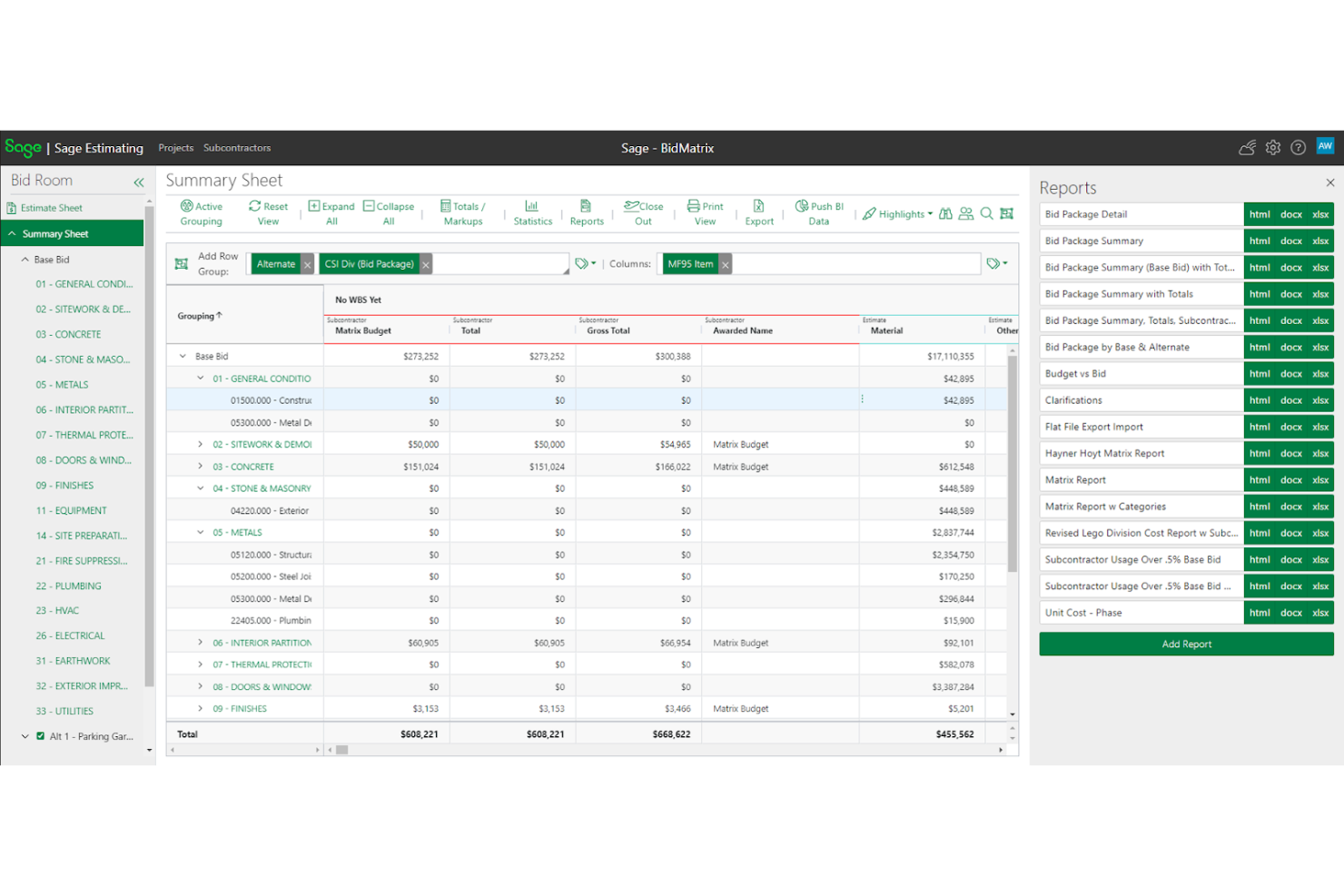
Sage è un servizio completo di gestione paghe per l'edilizia che offre soluzioni integrate di contabilità e gestione per il settore delle costruzioni. Semplifica l'elaborazione delle paghe e mette a disposizione strumenti avanzati per la gestione finanziaria e il controllo dei progetti.
Perché ho scelto Sage:
Ho scelto Sage perché unisce la contabilità per le costruzioni e la gestione dei progetti in un'unica piattaforma. Sage può fornire report dettagliati sulle costruzioni e approfondimenti finanziari, risultando particolarmente efficace per le aziende che necessitano di strumenti integrati di contabilità e gestione per ottimizzare le proprie operazioni.
Caratteristiche principali e integrazioni
Funzionalità includono funzioni avanzate di contabilità pensate per il settore delle costruzioni, come la determinazione dei costi di commessa, la gestione delle paghe e la rendicontazione finanziaria. Il software offre inoltre strumenti integrati per la gestione dei progetti, migliorando il flusso di lavoro e la collaborazione tra i team. Inoltre, Sage supporta una gestione completa della conformità, garantendo il rispetto delle normative e degli standard di settore.
Integrazioni includono Procore, Autodesk, QuickBooks, Microsoft Project, AIA Contract Documents, ADP, Bluebeam, eSub, ProEst e Buildertrend.
Pros and Cons
Pros:
- Contabilità e gestione integrate
- Visibilità in tempo reale
- Funzionalità contabili specifiche per il settore delle costruzioni
Cons:
- Leggera curva di apprendimento
- Funzionalità di reportistica di base
Altri software paghe per l'edilizia
Di seguito trovi un elenco di altri software paghe per il settore edile che non sono rientrati nella mia selezione principale, ma che vale comunque la pena prendere in considerazione:
- Paychex
Ideale per gestione HR, payroll e benefit tutto-in-uno
- Viewpoint
Ideale per l'inserimento delle ore lavorate tramite dispositivi mobili
- Assignar
Ideale per il monitoraggio dei dati di campo in tempo reale
- Payroll4Construction
Ideale per la reportistica delle buste paga certificate
- Construction Clock
Ideale per la rilevazione automatica delle ore tramite GPS
- ConstructionPayroll.com
Ideale per la gestione delle paghe multi-stato e multi-tariffa
- Rippling
Ideale per accesso mobile alle buste paga
- Deel Payroll
Ideale per gestione globale di buste paga e conformità
- BambooHR®
Ideale per la conformità payroll multi-stato
- Paylocity
Ideale per la reportistica delle buste paga certificate


Recensioni correlate dei software per le risorse umane
Se non hai ancora trovato quello che cerchi, dai un'occhiata a questi altri strumenti correlati che abbiamo testato e valutato:
- Software per le risorse umane
- Software paghe
- Software per la selezione del personale
- Servizi di datore di lavoro registrato
- Sistemi di tracciamento dei candidati
- Software per la gestione della forza lavoro
Cómo evalúo el equipo de transmisión para iglesias
Para las iglesias que gestionan cultos en vivo, operadores voluntarios y transmisión multiplataforma, divido mi evaluación en elementos fundamentales imprescindibles y los diferenciadores que separan un equipo excelente de uno simplemente aceptable.
Funcionalidad básica (Requisitos mínimos para esta lista)
Cuando selecciono herramientas para mi lista, califico cada una en una escala del 0 (no ofrece la funcionalidad) al 5 (destaca en esta área) por cada funcionalidad esencial que se enumera a continuación. Luego, calculo la puntuación total de la herramienta como un porcentaje. Cada herramienta debe lograr una puntuación total mínima del 55% para ser considerada para su inclusión.
- Hardware de captura de video: Evalúo si la solución incluye o es compatible directamente con cámaras de calidad para cultos; por ejemplo, unidades PTZ con preajustes para baja iluminación que funcionen bien en santuarios poco iluminados durante servicios a la luz de las velas.
- Codificación y conmutación en vivo: La conmutación de varias cámaras es esencial para el culto, por lo que analizo cuántas entradas maneja un sistema y si admite transiciones, tercios inferiores y picture-in-picture durante un sermón en vivo.
- Salida de transmisión multiplataforma: La mayoría de las iglesias transmiten a YouTube, Facebook y su propio sitio web simultáneamente, así que verifico si el equipo soporta destinos RTMP concurrentes desde el primer momento.
- Entrada e integración de audio: Para la mayoría de los asistentes virtuales, un sermón claro es más importante que la calidad de video, por eso busco soporte XLR y conexiones desde la mesa de mezclas que permitan extraer una mezcla limpia directamente del sistema de audio.
- Flujo de trabajo orientado a la iglesia: Los equipos de voluntarios rotan semanalmente, así que evalúo si el sistema ofrece preajustes específicos para cultos, interfaces simplificadas o paquetes diseñados para operadores que no son profesionales de AV.
- Grabación y archivo: Verifico si el equipo graba los servicios localmente o en la nube para bibliotecas de sermones, reproducción en pequeños grupos entre semana o reutilización de fragmentos para la difusión en redes sociales.
Una vez que tengo una lista de herramientas que cumplen los criterios, considero qué distingue a cada plataforma.
Factores diferenciadores (Qué distingue a los proveedores)
Así es como comparo y contrasto los diferentes proveedores:
Características destacadas
El control remoto de cámaras PTZ es muy importante aquí: que un solo voluntario controle tres o cuatro ángulos de cámara desde una tableta permite mantener pequeño el equipo de producción los domingos en la mañana. También evalúo el soporte para ProPresenter y superposiciones de letras, ya que los cultos necesitan mostrar escrituras y letras de canciones en la transmisión sin requerir un operador de gráficos aparte. También considero la subtitulación automática y funciones de accesibilidad, porque los subtítulos automáticos hacen que los servicios sean acogedores para congregantes sordos o con dificultades auditivas que ven en línea.
Más allá de las características
Los recursos de capacitación accesibles para voluntarios son un diferenciador importante que evalúo: los equipos técnicos rotativos necesitan guías rápidas y tutoriales en video que ayuden a un nuevo operador a sentirse seguro antes de su primer turno dominical. También considero cuán bien se integra el equipo con el ecosistema tecnológico de la iglesia, especialmente con Planning Center para la programación de servicios y Tithe.ly o Pushpay para las donaciones en línea. La escalabilidad también es vital. Una iglesia recién establecida con una sola cámara hoy puede necesitar un sistema para tres campus en pocos años, por lo que compruebo si los sistemas permiten expansión modular sin requerir renovar todo el hardware.
Come scegliere un software paghe per l'edilizia
Mentre affronti il processo di selezione del software paghe, tieni presenti i seguenti aspetti:
- Conformità alle leggi sul lavoro: I progetti edilizi spesso si estendono su più stati o regioni, ciascuno con le proprie leggi e normative sul lavoro. Il software per le buste paga deve garantire la conformità a queste leggi per evitare problemi legali e sanzioni. Ad esempio, il software dovrebbe aggiornare automaticamente le aliquote fiscali e le leggi sul lavoro per riflettere le modifiche più recenti in ogni giurisdizione.
- Calcolo dei costi e definizione del budget dei progetti: Il calcolo accurato dei costi dei progetti è fondamentale nel settore edilizio per garantire che i progetti rispettino il budget. Il software per le buste paga dovrebbe integrarsi con i sistemi di calcolo dei costi dei progetti per allocare i costi del lavoro a progetti o attività specifici. Questo aiuta a monitorare le spese e a prendere decisioni finanziarie informate. Ad esempio, il software può fornire report dettagliati sui costi del lavoro per progetto, aiutando i responsabili di progetto ad adeguare i budget secondo necessità.
- Reportistica per i lavoratori sindacalizzati e buste paga certificate: Molte aziende edili impiegano lavoratori sindacalizzati e sono tenute a presentare report sulle buste paga certificate. Il software per le buste paga più adatto dovrebbe semplificare il processo di generazione di questi report, garantendo che soddisfino tutti i requisiti. Ad esempio, il software può generare automaticamente report sulle buste paga certificate conformi alla legge Davis-Bacon, risparmiando tempo e riducendo gli errori.
- Monitoraggio delle ore e delle presenze: I lavoratori edili spesso lavorano in più cantieri con orari variabili. Il software per le buste paga dovrebbe includere funzionalità intuitive per il monitoraggio delle ore e delle presenze, così da registrare con precisione le ore lavorate. Ciò può includere timbrature basate sul GPS, integrazioni con applicazioni mobili e aggiornamenti in tempo reale. Ad esempio, i lavoratori possono timbrare l’entrata e l’uscita utilizzando un’app mobile e il software aggiornerà automaticamente le loro ore nel sistema delle buste paga.
- Integrazione con altri sistemi: Le aziende edili utilizzano diversi sistemi software per la gestione dei progetti, la contabilità e le risorse umane. Il software per le buste paga dovrebbe integrarsi perfettamente con questi sistemi per garantire la coerenza dei dati e ridurre l’inserimento manuale delle informazioni. Ad esempio, l’integrazione del software per le buste paga con gli strumenti di gestione dei progetti può aggiornare automaticamente i costi del lavoro nei budget dei progetti, offrendo una visione completa delle spese di progetto.
Tendenze nei software per le buste paga nel settore edilizio
Il settore edilizio sta registrando rapidi cambiamenti nei software per le buste paga. Ecco alcune tendenze chiave da tenere d’occhio.
- Accessibilità mobile: L’accessibilità mobile consente ai lavoratori di timbrare l’entrata e l’uscita dai cantieri utilizzando i propri smartphone. Ciò riduce la necessità di monitorare manualmente le ore. Garantisce inoltre un’elaborazione accurata delle buste paga.
- Integrazione con gli strumenti di gestione dei progetti: I software per le buste paga si integrano sempre più con gli strumenti di gestione dei progetti. Questo aiuta ad allineare i costi del lavoro ai budget dei progetti. Offre una visione più chiara delle spese di progetto.
- Aggiornamenti automatici sulla conformità: Gli aggiornamenti automatici sulla conformità garantiscono che il software per le buste paga rimanga aggiornato rispetto alle leggi sul lavoro. Ciò riduce il rischio di sanzioni per non conformità. Inoltre, fa risparmiare tempo sugli aggiornamenti manuali.
- Analisi dei dati in tempo reale: L’analisi dei dati in tempo reale offre informazioni sui costi del lavoro e sulla produttività. Questo aiuta a prendere rapidamente decisioni informate. Inoltre, contribuisce a individuare opportunità di risparmio sui costi.
- Soluzioni basate sul cloud: Le soluzioni per le buste paga basate sul cloud offrono flessibilità e scalabilità. Consentono di accedere ai dati delle buste paga da qualsiasi luogo. Ciò è particolarmente utile per le aziende edili con più cantieri.
Queste tendenze stanno plasmando il futuro dei software per le buste paga nel settore edilizio.
Che cos’è il software per le buste paga nel settore edilizio?
Il software per le buste paga nel settore edilizio è uno strumento specializzato che aiuta le aziende edili a gestire le buste paga, monitorare i costi del lavoro e rimanere conformi alle normative specifiche del settore. Viene utilizzato dai team delle risorse umane, dagli appaltatori e dai responsabili di progetto per automatizzare il monitoraggio delle ore, il calcolo dei costi dei progetti, la reportistica sui lavoratori sindacalizzati e l’elaborazione delle buste paga certificate.
Questo software risolve problemi chiave come la gestione delle squadre mobili, la gestione di strutture retributive complesse e la garanzia di pagamenti accurati in più cantieri.
Funzionalità dei software per le buste paga nel settore edilizio
Quando si gestiscono le buste paga nel settore edilizio, è fondamentale utilizzare un software specializzato in grado di affrontare le sfide e i requisiti specifici del settore. Il software per le buste paga nel settore edilizio deve essere solido, flessibile e in grado di gestire complessità come le normative sindacali, i molteplici cantieri, le diverse tariffe retributive e il calcolo dei costi del lavoro.
Di seguito sono riportate alcune delle più importanti funzionalità dei software per le buste paga da cercare quando si valutano le diverse opzioni:
- Inserimento automatizzato delle schede di lavoro: questa funzione consente di inserire i dati delle paghe in modo semplice ed efficiente, riducendo gli errori manuali e risparmiando tempo. È essenziale per gestire la complessità di più cantieri e delle diverse tariffe retributive.
- Gestione delle paghe certificate: questa funzione garantisce la conformità alle normative federali e statali calcolando e generando automaticamente i rapporti delle paghe certificate. È fondamentale per gestire le paghe soggette al salario prevalente e le paghe sindacali.
- Elaborazione delle paghe per più Stati e più sindacati: questa funzione consente al software di gestire le paghe dei dipendenti che lavorano in Stati diversi e in base a vari accordi sindacali, senza dover reinserire i dati. Garantisce conformità e precisione nelle diverse giurisdizioni.
- Monitoraggio dell'indennizzo dei lavoratori: questa funzione aiuta a monitorare e gestire le richieste di indennizzo e i premi assicurativi dei lavoratori. È importante per garantire la conformità alle normative statali e gestire i costi.
- Deposito diretto e presentazione dei moduli W-2: questa funzione consente il deposito diretto degli stipendi dei dipendenti e la presentazione elettronica dei moduli W-2 per più Stati. Semplifica il processo di elaborazione delle paghe e garantisce pagamenti e presentazioni puntuali.
- Inserimento mobile delle schede di lavoro: questa funzione consente ai dipendenti di registrare l'entrata e l'uscita dal cantiere utilizzando un'app mobile. Garantisce un monitoraggio preciso dell'orario di lavoro e riduce la necessità di utilizzare schede di lavoro cartacee.
- Contabilità dei costi dei lavori e rapporti sulla manodopera: questa funzione fornisce rapporti dettagliati sui costi dei lavori e sulle ore di manodopera, aiutando a gestire i budget dei progetti e a monitorare la produttività. È essenziale per una gestione accurata dei progetti e il controllo dei costi.
- Integrazione con il software di contabilità: questa funzione consente al software per le paghe di integrarsi con programmi di contabilità diffusi come QuickBooks. Garantisce un flusso continuo dei dati e riduce la necessità di inserire manualmente i dati.
- Rapporti e monitoraggio sindacale: questa funzione aiuta a gestire le quote sindacali, i benefici e altri requisiti relativi alle paghe sindacali. Garantisce la conformità agli accordi sindacali e semplifica la creazione dei rapporti.
- Conformità ACA: questa funzione aiuta a monitorare e gestire i requisiti previsti dalla Legge sull'assistenza sanitaria a prezzi accessibili (ACA). Garantisce la conformità alle normative sanitarie e semplifica la creazione dei rapporti.
Disporre del software per le paghe adatto può semplificare notevolmente i processi di elaborazione delle paghe, ridurre gli errori e garantire la conformità a diverse normative. Concentrandosi su queste funzioni fondamentali, le imprese edili possono gestire le paghe in modo più efficiente ed efficace.
Vantaggi del software per le paghe nel settore edile
La gestione delle paghe nel settore edile può essere complessa a causa dei diversi cantieri, delle differenti tariffe retributive e dei requisiti di conformità. Il software per le paghe progettato specificamente per il settore edile può semplificare queste attività e offrire vantaggi significativi.
- Monitoraggio preciso dell'orario di lavoro - Il software garantisce un monitoraggio preciso delle ore lavorate nei diversi cantieri, riducendo gli errori e assicurando che i dipendenti siano pagati correttamente.
- Gestione della conformità - Aiuta a mantenere la conformità alle leggi e alle normative sul lavoro, riducendo al minimo il rischio di problemi legali e sanzioni.
- Allocazione dei costi - Il software consente di monitorare e allocare in dettaglio i costi della manodopera a progetti specifici, favorendo una migliore gestione e pianificazione del budget dei progetti.
- Elaborazione automatizzata delle paghe - L'automazione dei processi di elaborazione delle paghe consente di risparmiare tempo e riduce la probabilità di errori manuali, rendendo più efficienti le operazioni di elaborazione.
- Accesso autonomo dei dipendenti - I dipendenti possono accedere online ai propri cedolini, ai moduli fiscali e ad altre informazioni relative alle paghe, riducendo il carico di lavoro amministrativo e migliorando la trasparenza.
Investire in un software per le paghe su misura per il settore edile può portare a operazioni più efficienti, a una migliore conformità e a una maggiore soddisfazione dei dipendenti.
Costi e prezzi del software per le paghe nel settore edile
Scegliere il software per le paghe adatto alla propria impresa edile può semplificare notevolmente le operazioni, garantire la conformità alle normative e far risparmiare tempo e denaro. Questa guida fornisce una panoramica delle diverse opzioni di software per le paghe pensate per il settore edile, illustrandone i piani tariffari e le funzioni comuni.
Di seguito è riportata una tabella che riassume i diversi piani, i prezzi medi e le funzioni comuni dei software per le paghe più diffusi tra le imprese edili.
Tabella comparativa dei piani per il software per le paghe nel settore edile
| Tipo di piano | Prezzo medio | Funzionalità comuni |
| Gratuito | $0 | Elaborazione di base delle paghe, portale self-service per i dipendenti, assistenza clienti limitata |
| Base | A partire da $7/utente/mese | Elaborazione delle paghe, deposito diretto, presentazione delle dichiarazioni fiscali, report di base, monitoraggio del tempo |
| Standard | A partire da $12/utente/mese | Tutte le funzionalità del piano Base, report avanzati, determinazione dei costi dei lavori, gestione della conformità, integrazioni con software di contabilità |
| Premium | A partire da $20/utente/mese | Tutte le funzionalità del piano Standard, gestione dei benefit per i dipendenti, accesso all'app mobile, assistenza clienti avanzata, flussi di lavoro automatizzati |
| Enterprise | Prezzo personalizzato | Tutte le funzionalità del piano Premium, report personalizzati, responsabile dell'account dedicato, analisi avanzate, integrazioni illimitate |
Quando scegli un software per le paghe per la tua impresa edile, considera le esigenze specifiche delle tue attività, come i requisiti di conformità, il monitoraggio del tempo e le capacità di integrazione. Ogni piano offre funzionalità e prezzi diversi, quindi seleziona quello più adatto alle dimensioni e ai requisiti della tua azienda.
Domande frequenti sui software per le paghe nel settore edile
Ecco alcune delle domande frequenti che ricevo sui software per le paghe nel settore edile.
In che modo il software per le paghe gestisce i contributi e i benefit sindacali?
I software per le paghe progettati per il settore edile includono in genere funzionalità per gestire i contributi e i benefit sindacali. Analogamente al software per le paghe degli appaltatori utilizzato nel settore edile, ciò include le detrazioni automatiche per i contributi sindacali, il monitoraggio dei benefit e la garanzia del rispetto degli accordi sindacali. Il software può generare report e fornire registri dettagliati ai fini della revisione contabile.
Il software per le paghe può gestire più cantieri e progetti?
Sì, la maggior parte dei software per le paghe nel settore edile è in grado di gestire più cantieri e progetti. Consente di assegnare i dipendenti a diversi cantieri, monitorare le ore lavorate in ciascuna sede e allocare di conseguenza i costi della manodopera. Questo aiuta a determinare con precisione i costi dei lavori e a realizzare report finanziari accurati.
È possibile integrare il software per le paghe con altri strumenti di gestione edile?
Molte soluzioni software per le paghe offrono l’integrazione con altri strumenti di gestione edile, come sistemi di gestione dei progetti, di contabilità e di monitoraggio del tempo. Questa integrazione garantisce un flusso uniforme dei dati tra i sistemi, riducendo l’inserimento manuale dei dati e migliorando la precisione.
In che modo il software per le paghe garantisce la conformità alle leggi e ai regolamenti sul lavoro?
I software per le paghe nel settore edile includono funzionalità che aiutano a garantire la conformità alle leggi e ai regolamenti sul lavoro. Questo comprende il monitoraggio delle ore dei dipendenti, la gestione degli straordinari e la corretta classificazione dei lavoratori. Il software può inoltre generare report utili per le verifiche e i controlli di conformità.
Quali sono i vantaggi dell'utilizzo di un software per le paghe basato sul cloud nel settore edile?
I software per le paghe basati sul cloud offrono diversi vantaggi, tra cui accesso remoto, aggiornamenti automatici e sicurezza dei dati. Consentono di accedere alle informazioni sulle paghe da qualsiasi luogo, permettendo di gestirle anche quando non ci si trova in cantiere. Inoltre, le soluzioni basate sul cloud includono spesso aggiornamenti regolari per garantire la conformità alle normative più recenti.
In che modo il software per le paghe può aiutare a determinare i costi dei lavori nel settore edile?
Il software per le paghe aiuta a determinare i costi dei lavori monitorando i costi della manodopera per ogni progetto o cantiere. Consente di attribuire le ore e le retribuzioni dei dipendenti a progetti specifici, fornendo report dettagliati sulle spese di manodopera. Queste informazioni sono fondamentali per la definizione del budget, le previsioni e la verifica che i progetti rimangano entro il budget previsto.
Quali opzioni di assistenza sono disponibili per gli utenti di software per le paghe nel settore edile?
Le opzioni di assistenza per gli utenti di software per le paghe includono in genere risorse online, linee telefoniche del servizio clienti e responsabili dell’account dedicati. Molti fornitori offrono sessioni di formazione, webinar e documentazione dettagliata per aiutare gli utenti a sfruttare al meglio il software. Alcuni forniscono inoltre assistenza in loco e servizi di consulenza per esigenze più complesse.