

I 10 migliori software per la gestione dei documenti HR del 2026

Software per la gestione dei documenti HR


Il software per la gestione dei documenti HR aiuta il tuo team a organizzare, archiviare e proteggere i dati dei dipendenti, le policy e i documenti relativi alla conformità in un unico sistema digitale. Se stai cercando modi per ridurre le pratiche cartacee manuali, migliorare la preparazione agli audit o mantenere i file sensibili accessibili ma protetti, la piattaforma giusta può fare davvero la differenza.
Questo elenco ti aiuterà a confrontare le migliori soluzioni per la gestione dei documenti HR per il 2026, così potrai trovare gli strumenti più adatti alle tue esigenze di conformità, alle tue preferenze di flusso di lavoro e alle dimensioni della tua azienda.
Perché fidarsi delle nostre recensioni sui software
Il nostro team testa e recensisce software dal 2012. In quanto esperti HR noi stessi, sappiamo quanto sia difficile — e importante — scegliere il software giusto.
Per questa guida, abbiamo valutato gli strumenti attraverso test pratici e ricerche indipendenti, assegnando un punteggio agli strumenti in base ai nostri criteri di selezione. Ci basiamo inoltre sulle competenze di leader di pensiero del settore e di professionisti HR attivi.
Le nostre recensioni riflettono il nostro giudizio editoriale umano, non un discorso di vendita.
Revisori esperti:
Tabella comparativa delle recensioni dei software per la gestione dei documenti HR
Questa tabella comparativa riassume i dettagli dei prezzi delle mie migliori selezioni di software per la gestione dei documenti HR.
| Tool | Best For | Trial Info | Price | ||
|---|---|---|---|---|---|
| 1 | Ideale per la centralizzazione dei documenti relativi ai benefit | Demo gratuita disponibile | Da $8/utente/mese + $50/mese di quota base | Website | |
| 2 | Ideale per flussi di approvazione dei documenti personalizzabili | Demo gratuita disponibile | A partire da $8/utente/mese | Website | |
| 3 | Ideale per la conformità dei fascicoli HR tra più entità | Demo gratuita disponibile | Prezzi su richiesta | Website | |
| 4 | Ideale per la collaborazione in tempo reale | Piano gratuito + prova disponibile | Da $7/utente/mese (fatturazione annuale) | Website | |
| 5 | Ideale per l'onboarding nelle piccole imprese | Demo gratuita disponibile | Da $4/utente/mese + $50/mese | Website | |
| 6 | Ideale per l'archiviazione sicura nel cloud | Demo gratuita disponibile | Prezzo su richiesta | Website | |
| 7 | Ideale con strumenti di collaborazione aziendale | Prova gratuita di 14 giorni + piano gratuito + demo gratuita disponibile | Da $5/utente/mese (fatturazione annuale) | Website | |
| 8 | Ideale per funzionalità avanzate di ricerca | Prova gratuita di 14 giorni + demo gratuita disponibile | Da $25/utente/mese | Website | |
| 9 | Ideale per gestione paghe integrata | Demo gratuita disponibile | Prezzi su richiesta | Website | |
| 10 | Ideale per i flussi di lavoro con documenti da firmare elettronicamente | Prova gratuita di 14 giorni + demo gratuita disponibile | Da $19/postazione/mese (fatturato annualmente) | Website |

Recensioni dei software per la gestione dei documenti HR
Di seguito trovi i miei riepiloghi dettagliati dei software per la gestione dei documenti HR che sono entrati nella mia selezione. Le mie recensioni offrono una panoramica dettagliata delle funzionalità, dei casi d’uso migliori e delle integrazioni di ciascuna piattaforma, per aiutarti a trovare quella più adatta a te.

Ideale per la centralizzazione dei documenti relativi ai benefit

Se il tuo team HR ha bisogno di un unico luogo dove gestire tutti i documenti relativi ai benefit, Justworks è progettato per te. La piattaforma centralizza i moduli di iscrizione ai benefit, i dettagli dei piani e le comunicazioni di conformità, così nulla viene perso o trascurato. È particolarmente utile per le piccole e medie imprese che vogliono semplificare l'amministrazione dei benefit e l'accesso ai documenti per i dipendenti.
Perché ho scelto Justworks
Centralizzare i documenti sui benefit è una sfida per molti team HR, e Justworks risponde direttamente a questa necessità. Ho scelto Justworks perché conserva tutti i moduli relativi ai benefit, i riepiloghi dei piani e le notifiche di conformità in un'unica posizione sicura, rendendo facile sia per HR che per i dipendenti trovare ciò di cui hanno bisogno. La piattaforma consente inoltre di gestire i documenti di iscrizione e di distribuire elettronicamente le comunicazioni necessarie, riducendo la carta e il monitoraggio manuale. Per le organizzazioni che vogliono mantenere la documentazione dei benefit organizzata e accessibile, Justworks offre una soluzione mirata.
Caratteristiche principali di Justworks
Oltre alla centralizzazione dei documenti relativi ai benefit, Justworks offre diverse altre funzionalità per i team HR:
- Checklist di onboarding automatizzate: Assegna e monitora le attività e i documenti richiesti per i nuovi assunti.
- Supporto per la firma elettronica: Raccogli firme digitali su moduli e accordi HR direttamente nella piattaforma.
- Avvisi di scadenza dei documenti: Ricevi notifiche quando i documenti HR importanti stanno per scadere o necessitano di aggiornamenti.
- Portale self-service per i dipendenti: Consenti ai dipendenti di accedere, scaricare e caricare in autonomia i documenti HR in modo sicuro.
Integrazioni di Justworks
Le integrazioni includono Greenhouse, Ramp, Vouch, Lever, Brex, Electric, JazzHR, Trainual, Leapsome e Vanta.
Pros and Cons
Pros:
- Gestione dei documenti di conformità integrata nel PEO
- Archiviazione automatica della dichiarazione dei salari
- Consulente HR esperto disponibile 24/7
Cons:
- Mancanza di impostazioni granulari per i permessi sui documenti
- Nessuna funzione di modifica dei documenti integrata

Ideale per flussi di approvazione dei documenti personalizzabili
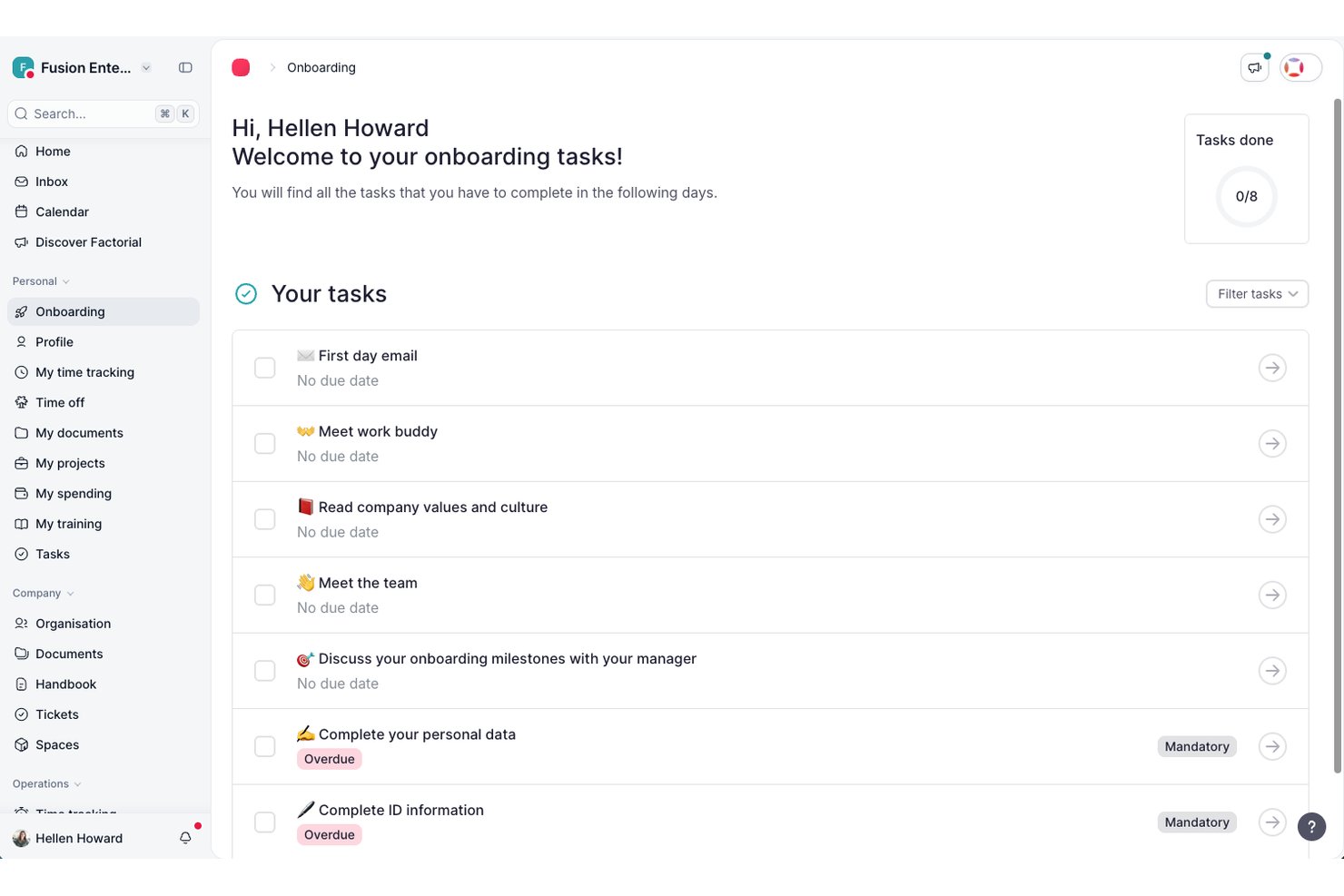
Factorial è una piattaforma HR con un sistema integrato di gestione dei documenti che include archiviazione centralizzata dei documenti, modelli compilabili con variabili per i dati dei dipendenti, firme elettroniche, gruppi di autorizzazioni configurabili e distribuzione in blocco dei documenti.
Per chi è più adatto Factorial?
Factorial è una soluzione adatta alle aziende di medie dimensioni che hanno bisogno di un'unica piattaforma per gestire insieme le operazioni HR e i documenti dei dipendenti.
Perché ho scelto Factorial
Factorial è una delle mie scelte preferite perché apprezzo la possibilità di creare flussi di approvazione dei documenti con revisori assegnabili a ogni fase. Puoi creare gruppi di approvazione per ruoli diversi—responsabili, risorse umane, finanza—e indirizzare i documenti a ciascun gruppo in sequenza. La funzione che trovo più utile è il Centro dei flussi di lavoro, dove puoi utilizzare modelli già pronti oppure creare un flusso personalizzato da zero, quindi monitorare direttamente nella piattaforma l'avanzamento di ogni documento in attesa. Mantiene trasparente la catena di approvazione senza richiedere a nessuno di sollecitare manualmente le firme.
Funzionalità principali di Factorial
- Modelli di documenti compilabili: Crea modelli con variabili dinamiche che compilano automaticamente i dati dei dipendenti, come nome, qualifica e data di inizio, quando vengono inviati.
- Firme elettroniche conformi a eIDAS: Raccogli firme elettroniche legalmente valide sui documenti direttamente all'interno della piattaforma.
- Richieste di documenti in blocco: Invia una richiesta di documenti a più dipendenti contemporaneamente, chiedendo loro di caricare i file nella loro area dipendente.
- Struttura delle cartelle personalizzata: Organizza i documenti dei dipendenti e dell'azienda in cartelle configurabili, con archiviazione separata per i file personali e quelli condivisi a livello aziendale.
Integrazioni di Factorial
Factorial offre un mercato con 99 integrazioni, tra cui Google Workspace, LinkedIn, Slack, Okta, Monday, Microsoft Dynamics 365 e Microsoft Power BI. Si connette inoltre a Zapier e offre un'API pubblica per integrazioni personalizzate.
Pros and Cons
Pros:
- Firme elettroniche integrate sui documenti HR
- Abbinamento automatico delle buste paga ai dipendenti
- Supporta otto lingue in tutta la piattaforma
Cons:
- I flussi di approvazione non dispongono di una logica condizionale avanzata
- L'assistenza dopo l'inserimento può essere lenta
Doxis
Ideale per la conformità dei fascicoli HR tra più entità
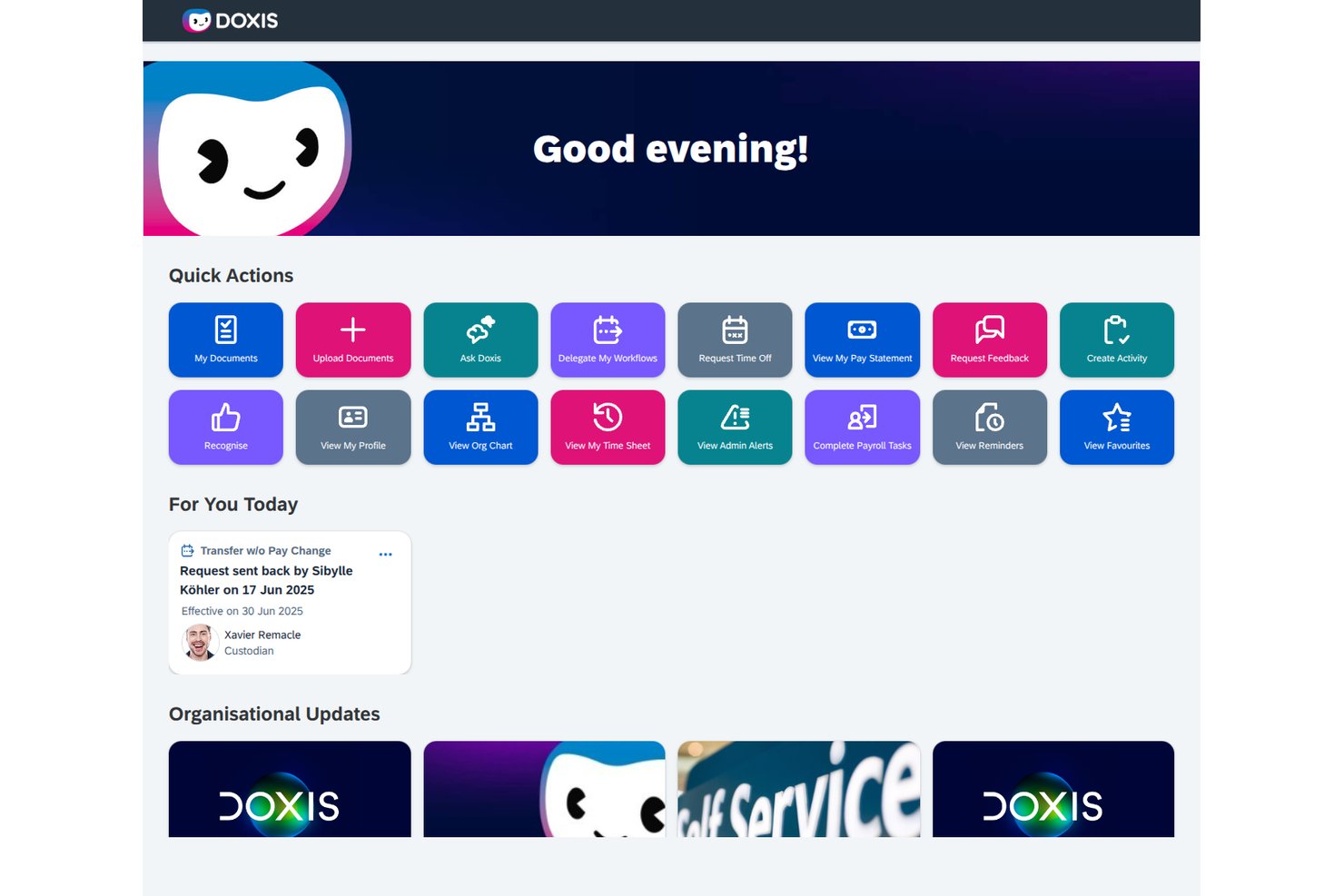
Doxis è una piattaforma di gestione dei documenti HR basata innanzitutto sull'intelligenza artificiale che centralizza i fascicoli digitali del personale, automatizza i flussi di lavoro documentali e applica le regole di conservazione e conformità tra più entità e sedi.
Per chi è più adatto Doxis?
Doxis è una scelta ideale per i team HR aziendali che gestiscono i fascicoli del personale tra più entità giuridiche o Paesi, soprattutto per quelli che utilizzano già SAP SuccessFactors o Workday.
Perché ho scelto Doxis
Ho scelto Doxis come una delle soluzioni migliori perché è stato sviluppato appositamente per la complessità della gestione delle risorse umane tra più entità giuridiche o Paesi. Mentre la maggior parte degli strumenti tratta i fascicoli del personale come un'unica struttura, Doxis consente di configurare i tipi di documento, le regole di conservazione e le strutture delle cartelle per Paese o entità giuridica, in modo che un team in Germania e uno nei Paesi Bassi applichino automaticamente le regole di conformità corrette. Apprezzo anche il modo in cui il suo verificatore basato sull'intelligenza artificiale segnala i documenti mancanti o in scadenza per ciascun fascicolo, un aspetto importante quando si verificano contemporaneamente decine di registri specifici per entità.
Funzionalità principali di Doxis
- Fascicolo elettronico HR: Ogni dipendente dispone di un fascicolo digitale strutturato del personale con una disposizione preimpostata delle cartelle che contiene contratti, documenti relativi alle buste paga, registri della formazione e valutazioni delle prestazioni per l'intero ciclo di vita del dipendente.
- Strumento di creazione dei flussi di lavoro BPMN 2.0: I flussi di lavoro HR per l'inserimento, le approvazioni e la cessazione del rapporto di lavoro vengono creati utilizzando strumenti a basso codice con logica condizionale, approvazioni in più fasi e notifiche automatiche via e-mail o SMS.
- Portale ad accesso autonomo per i dipendenti: I dipendenti possono visualizzare il proprio fascicolo entro un intervallo di tempo definito dall'ufficio HR, caricare documenti come certificati di malattia, richiedere certificati e inviare modifiche ai dati personali con date di decorrenza.
- Pianificazione automatizzata della conservazione: I periodi di conservazione vengono impostati per tipo di documento e applicati automaticamente, mentre ogni eliminazione viene registrata nel registro di controllo per supportare la conformità a GDPR e GoBD.
Integrazioni di Doxis
Doxis offre integrazioni documentate con SAP SuccessFactors, Workday, SAP HCM, ADP, Oracle PeopleSoft e Microsoft Dynamics. Le integrazioni del catalogo applicativo includono DocuSign, Adobe Acrobat Sign, FP Sign, MOXIS ed e-Sign Agent.
Pros and Cons
Pros:
- I recensori apprezzano i fascicoli elettronici del personale adattabili
- La conservazione automatizzata supporta regole di conformità specifiche per entità
- I team possono espandersi a partire da progetti pilota dipartimentali
Cons:
- L'ampio ambito aziendale può risultare eccessivo per i team HR più piccoli
- La firma da parte delle risorse umane dipende spesso da servizi esterni
Ideale per la collaborazione in tempo reale

Google Docs è una piattaforma di gestione documentale basata su cloud che consente ai team HR di creare, organizzare e collaborare su file dei dipendenti e documenti HR in tempo reale.
Per chi è ideale Google Docs?
I team HR di piccole e medie aziende che necessitano di una soluzione semplice e cloud per la collaborazione e la condivisione di documenti.
Perché ho scelto Google Docs
Ho scelto Google Docs tra i migliori perché il mio team può collaborare sui file HR in tempo reale, rendendo aggiornamenti e commenti immediatamente visibili. Mi piace poter controllare le autorizzazioni di condivisione per i documenti sensibili e organizzare le cartelle per onboarding, conformità e archivi dei dipendenti. In pratica, ciò significa che lo staff HR può lavorare insieme su policy o contratti senza creare confusione sulle versioni.
Caratteristiche principali di Google Docs
- Galleria di modelli: Accesso a modelli predefiniti per policy HR, checklist di onboarding e moduli dei dipendenti.
- Cronologia delle versioni: Tracciamento delle modifiche ai documenti e possibilità di ripristinare versioni precedenti secondo necessità.
- Commenti e suggerimenti: Aggiunta di commenti o suggerimenti di modifica senza alterare il testo originale.
- Modifica da mobile: Creazione e aggiornamento di documenti HR da qualsiasi dispositivo mobile.
Integrazioni di Google Docs
Google Docs offre integrazioni native in tutto l’ecosistema Google Workspace, inclusi Google Drive, Google Sheets, Google Slides e Gmail. È disponibile un’API per integrazioni personalizzate.
Pros and Cons
Pros:
- Condivisione facilitata con utenti interni ed esterni
- Impostazioni di autorizzazioni semplici per l'accesso ai documenti
- Archivio cloud con salvataggio automatico
Cons:
- Nessuno strumento HR integrato per conformità o conservazione dei dati
- Non progettato per esigenze di sicurezza dei dati HR sensibili

Eddy
Ideale per l'onboarding nelle piccole imprese
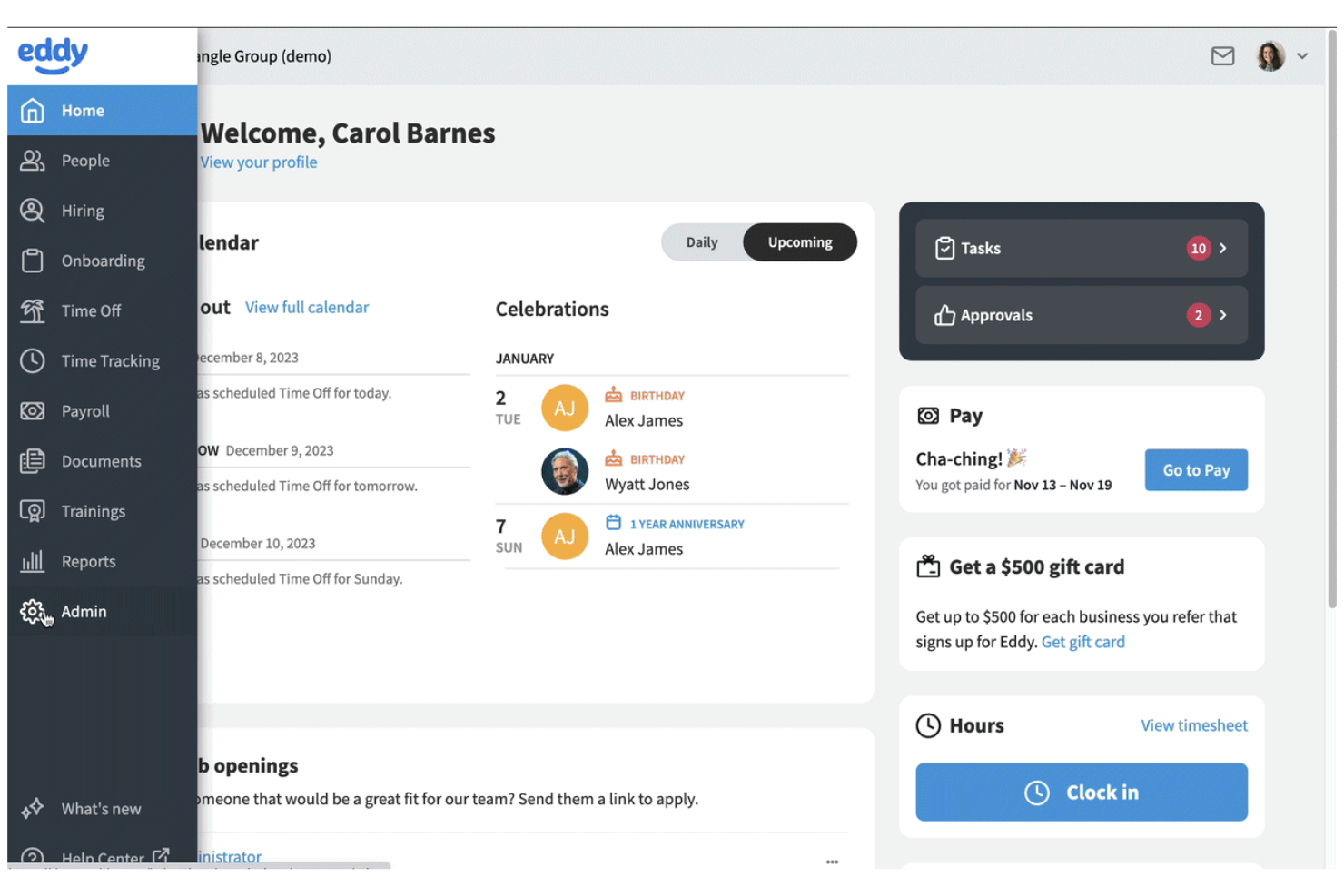
Eddy offre alle piccole imprese un modo per centralizzare i documenti HR e i compiti di onboarding in un'unica dashboard. È particolarmente utile per i team che vogliono digitalizzare la documentazione, gestire i file dei dipendenti e automatizzare l'onboarding senza una configurazione complessa. Se cerchi una soluzione che semplifichi la raccolta dei documenti e la conformità per i nuovi assunti, Eddy è stato pensato proprio per queste necessità.
Perché ho scelto Eddy
Per le piccole imprese che vogliono semplificare l'onboarding e la gestione dei documenti, Eddy offre una serie di strumenti mirati. Le sue checklist di onboarding dei dipendenti permettono di assegnare, monitorare e archiviare i documenti richiesti per ogni nuovo assunto, facilitando l'organizzazione. Ho scelto Eddy perché offre ai team HR un modo per gestire i file dei dipendenti, raccogliere firme digitali e garantire la conformità senza complicazioni aggiuntive. Se hai bisogno di una piattaforma intuitiva per ottimizzare la documentazione relativa all'onboarding e l'archiviazione dei documenti, Eddy è progettato con queste priorità.
Funzionalità principali di Eddy
Altre funzionalità di Eddy che i team HR potrebbero trovare utili includono:
- Permessi documentali basati sui ruoli: Controlla chi può visualizzare, modificare o caricare specifici documenti HR all'interno della piattaforma.
- Monitoraggio della scadenza dei documenti: Imposta e monitora le date di scadenza di certificazioni, licenze o altri documenti sensibili al fattore tempo.
- Modelli di documenti personalizzati: Crea e riutilizza modelli per formulari e accordi HR ricorrenti.
- Strumento di richiesta documenti ai dipendenti: Invia richieste per documenti mancanti direttamente ai dipendenti e traccia le risposte.
Integrazioni di Eddy
Le integrazioni includono SimplyInsured, Checkr, LinkedIn, Next, QuickBooks Online, SmartPay, 401GO, Indeed, Employee Navigator ed Express Evaluations.
Pros and Cons
Pros:
- Le checklist di onboarding automatizzano la raccolta dei documenti
- Firme digitali incluse per i moduli HR
- Modelli personalizzati per documenti HR ricorrenti
Cons:
- Nessun caricamento massivo dei documenti dei dipendenti
- Report limitati sullo storico delle attività dei documenti

DocuWare
Ideale per l'archiviazione sicura nel cloud
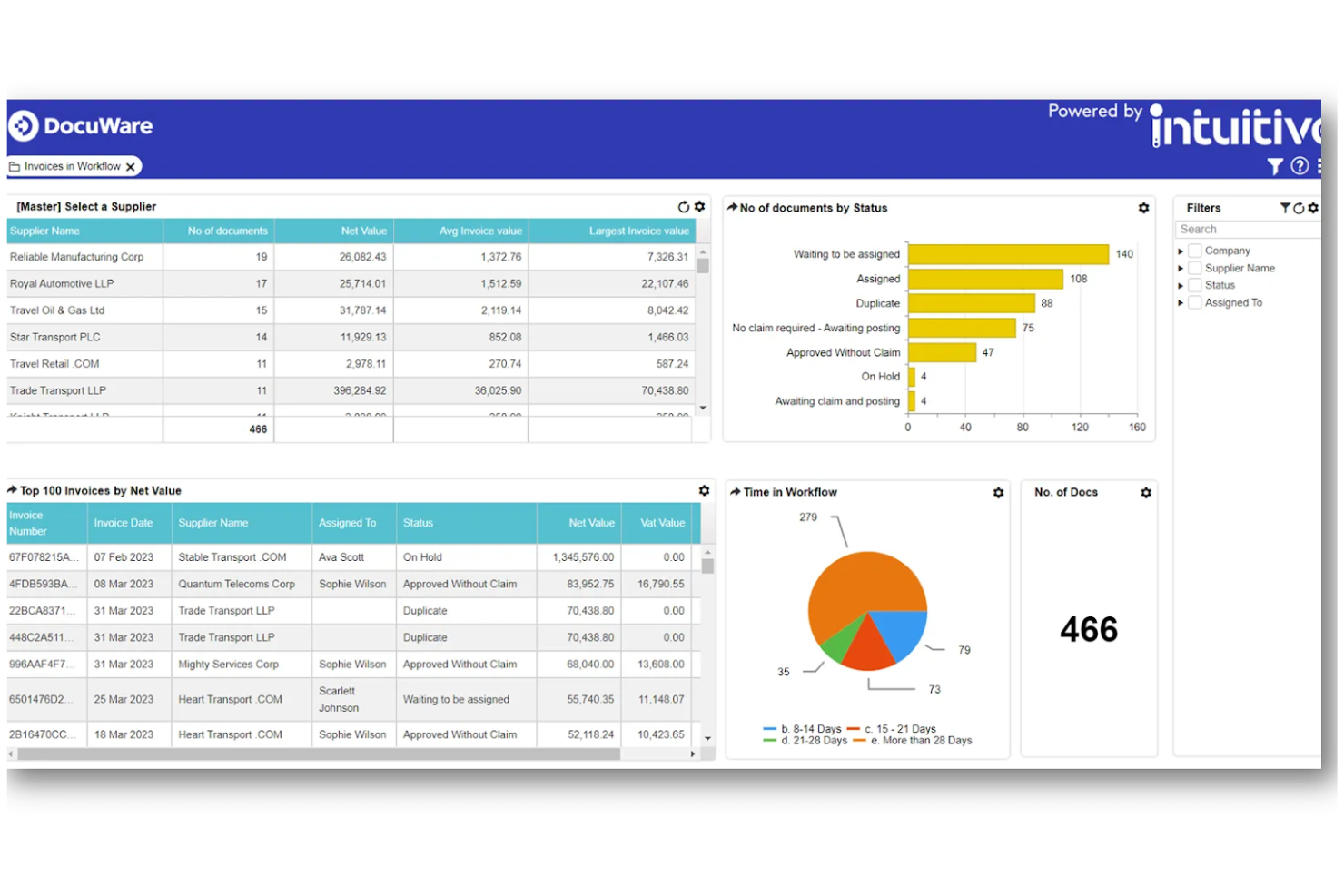
DocuWare offre ai team HR un modo sicuro per archiviare e gestire documenti sensibili dei dipendenti nel cloud. È particolarmente utile per le organizzazioni che devono rispettare standard di conformità rigorosi o gestire registri riservati tra più sedi. Con crittografia avanzata e politiche di conservazione automatizzate, DocuWare ti aiuta a mantenere i file HR protetti e organizzati.
Perché ho scelto DocuWare
Quando la sicurezza e l'archiviazione nel cloud sono una priorità per le risorse umane, DocuWare offre una soluzione dedicata. Ho scelto DocuWare perché utilizza crittografia avanzata e controlli di accesso per proteggere i documenti sensibili HR in ogni fase. Le politiche automatizzate di conservazione ed eliminazione aiutano i team HR a rispettare le normative e le policy interne. Queste caratteristiche rendono DocuWare una scelta solida per le organizzazioni che devono tutelare i registri riservati dei dipendenti nel cloud.
Caratteristiche principali di DocuWare
Altre funzionalità di DocuWare che i team HR possono trovare utili includono:
- Flussi di lavoro documentali automatizzati: Instrada i documenti HR per approvazioni, firme o revisioni in base a regole personalizzate.
- Accesso da mobile: Visualizza, carica e gestisci i file HR in modo sicuro da dispositivi mobili.
- Ricerca full-text: Trova rapidamente registri e documenti dei dipendenti utilizzando ricerche per parole chiave.
- Creazione di documenti tramite modelli: Genera moduli e lettere HR standard utilizzando modelli predefiniti.
Integrazioni di DocuWare
Le integrazioni comprendono SAP, Microsoft Outlook, Sage, QuickBooks, SharePoint, Infor, Oracle, JD Edwards, Microsoft Dynamics e Microsoft Teams.
Pros and Cons
Pros:
- Offre indicizzazione intelligente dei dati dei documenti
- Ricerca full-text su tutti i documenti caricati
- Moduli W-4 e I-9 precompilati
Cons:
- Accesso limitato ai documenti offline
- Nessuna integrazione nativa con sistemi di gestione paghe
Box
Ideale con strumenti di collaborazione aziendale

Per i team HR che devono collaborare tra diversi reparti o sedi, Box offre una piattaforma sicura per gestire e condividere documenti sensibili dei dipendenti. La sua integrazione con i principali strumenti aziendali lo rende particolarmente adatto per le organizzazioni di grandi dimensioni con flussi di lavoro complessi. Box aiuta i professionisti HR a centralizzare i file, controllare gli accessi e semplificare la collaborazione sui documenti senza compromettere la conformità.
Perché ho scelto Box
Quando i team HR devono collaborare con altri reparti o partner esterni, Box si distingue per le sue funzionalità di collaborazione a livello enterprise. Ho scelto Box perché consente a più utenti di co-modificare, commentare e gestire in modo sicuro i documenti HR sensibili in tempo reale. I suoi controlli granulari sui permessi permettono di impostare diversi livelli di accesso per i vari stakeholder, aspetto particolarmente importante per proteggere le informazioni riservate dei dipendenti. Per le organizzazioni che fanno affidamento sul lavoro di squadra trasversale e devono mantenere elevati standard di sicurezza sui documenti, Box offre una soluzione flessibile e scalabile.
Caratteristiche principali di Box
Altre funzionalità che rendono Box utile per la gestione dei documenti HR includono:
- Modelli di workflow automatizzati: Crea e implementa processi documentali ripetibili per attività come l'onboarding durante tutto il ciclo di vita del dipendente.
- Cronologia delle versioni dei documenti: Traccia e ripristina le versioni precedenti dei file quando necessario.
- Integrazione con firma elettronica legale: Raccogli firme direttamente all'interno di Box tramite Box Sign.
- Ricerca avanzata con tagging dei metadati: Trova rapidamente i documenti utilizzando tag e filtri personalizzati.
Integrazioni di Box
Le integrazioni includono Microsoft 365, Google Workspace, Salesforce, Workday, Slack, Oracle NetSuite, Okta, Broadcom, Splunk, Adobe e Palo Alto Networks.
Pros and Cons
Pros:
- Controlli granulari di crittografia AES a 256 bit
- Anteprima nativa di oltre 120 formati file
- Strumento di firma elettronica integrato per le approvazioni
Cons:
- Architettura complessa dei permessi per cartelle esterne
- La velocità di caricamento massivo può essere incostante
Revver
Ideale per funzionalità avanzate di ricerca

Quando hai bisogno di individuare rapidamente documenti HR all'interno di un archivio ampio o complesso, Revver offre strumenti di ricerca avanzati che si distinguono. La piattaforma è pensata per i team HR e le organizzazioni che gestiscono grandi volumi di file e necessitano di un recupero preciso e rapido. Le sue capacità di ricerca aiutano a ridurre il tempo trascorso a cercare policy, registri dei dipendenti o documenti di conformità, risultando ideale per i team che hanno esigenze avanzate di accesso ai documenti.
Perché ho scelto Revver
Trovare il documento giusto rapidamente può essere una sfida per le operazioni HR, soprattutto quando si gestiscono migliaia di file. Ho scelto Revver perché le sue funzionalità avanzate di ricerca consentono di filtrare per metadati, parole chiave e tipi di documento, rendendo molto più semplice individuare ciò che ti serve. La piattaforma supporta anche la ricerca full-text all'interno dei documenti, così puoi trovare informazioni specifiche anche se non ricordi il nome del file. Per i professionisti HR che necessitano di strumenti di ricerca affidabili e dettagliati per gestire raccolte documentali complesse, Revver offre un vantaggio evidente.
Caratteristiche principali di Revver
Altre funzionalità che rendono Revver utile per la gestione dei documenti HR includono:
- Politiche automatizzate di conservazione dei documenti: Imposta regole per quanto tempo i documenti vengono conservati e quando devono essere eliminati.
- Controlli di accesso basati sui ruoli: Assegna permessi agli utenti sulla base del loro ruolo per proteggere file HR sensibili.
- Tracciamento della cronologia delle versioni: Visualizza e ripristina le versioni precedenti dei documenti secondo necessità.
- Caricamento e tagging in blocco: Carica più file contemporaneamente e applica tag per una migliore organizzazione.
Integrazioni di Revver
Le integrazioni includono Microsoft 365, Google Drive, Microsoft Teams, Microsoft Outlook, Microsoft OneDrive, Google Docs, Google Sheets, Microsoft Word e Microsoft PowerPoint.
Pros and Cons
Pros:
- Filtri di ricerca avanzata per query complesse
- Strumento di confronto versioni tra due schermi
- Capacità di archiviazione di livello superiore fino a 20TB
Cons:
- Manca la modifica collaborativa dei documenti in tempo reale
- Automazione limitata dei flussi di lavoro per approvazioni HR

Dayforce
Ideale per gestione paghe integrata
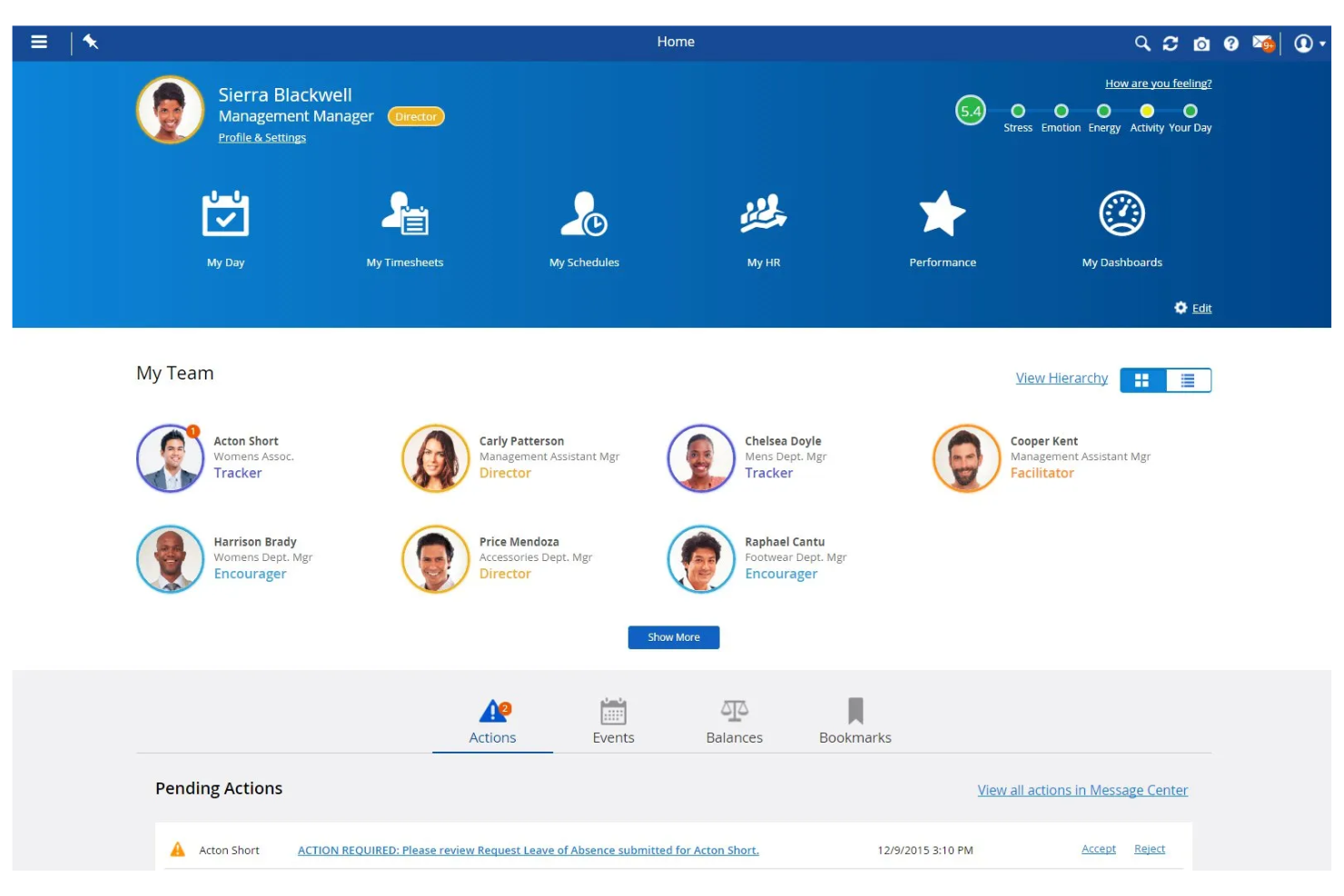
Dayforce si distingue per i team HR che desiderano una gestione documentale strettamente connessa ai dati di payroll e forza lavoro. Questa piattaforma all-in-one è particolarmente adatta alle organizzazioni che hanno bisogno di gestire file sensibili dei dipendenti insieme a buste paga, benefit e documenti di conformità in un unico posto. Se vuoi ridurre l'inserimento manuale dei dati e garantire l'accuratezza delle paghe tramite flussi di lavoro documentali integrati, Dayforce riunisce perfettamente queste funzionalità.
Perché ho scelto Dayforce
Ciò che distingue Dayforce è la sua capacità di collegare direttamente la gestione documentale HR con l'elaborazione delle paghe. Questa integrazione permette di archiviare, aggiornare e accedere ai documenti dei dipendenti—come moduli fiscali, contratti e documenti di conformità—proprio accanto ai dati di payroll, riducendo il rischio di errori e doppie registrazioni. Ho scelto Dayforce perché sincronizza automaticamente le modifiche ai documenti con gli aggiornamenti delle paghe, aiutando così i team HR a mantenere registrazioni accurate per audit e reportistica. Per le organizzazioni in cui l'accuratezza delle paghe e la conformità sono strettamente legate ai flussi documentali, Dayforce offre una soluzione unificata.
Funzionalità principali di Dayforce
Altre funzioni che i team HR possono trovare utili in Dayforce includono:
- Avvisi automatici di scadenza documenti: Ricevi una notifica quando i documenti HR importanti stanno per scadere o richiedono il rinnovo.
- Controlli di accesso ai documenti basati sul ruolo: Assegna permessi affinché solo gli utenti autorizzati possano visualizzare o modificare determinati file.
- Caricamento e tag di documenti in blocco: Carica più documenti contemporaneamente e taggali per una migliore organizzazione e reperibilità.
- Tracciamento audit trail: Monitora tutte le azioni e le modifiche ai documenti per conformità e responsabilità.
Integrazioni di Dayforce
Le integrazioni includono Salesforce, Microsoft Dynamics, Workday, SAP, Oracle, ADP, Kronos, QuickBooks, Ceridian e Infor.
Pros and Cons
Pros:
- Archiviazione della conformità payroll multivaluta a livello globale
- Self-service documentale per i dipendenti basato su IA
- Audit trail dei documenti per tutte le azioni degli utenti
Cons:
- Interfaccia complessa per la creazione di report personalizzati
- Aggiornamenti frequenti causano instabilità del sistema
PandaDoc
Ideale per i flussi di lavoro con documenti da firmare elettronicamente
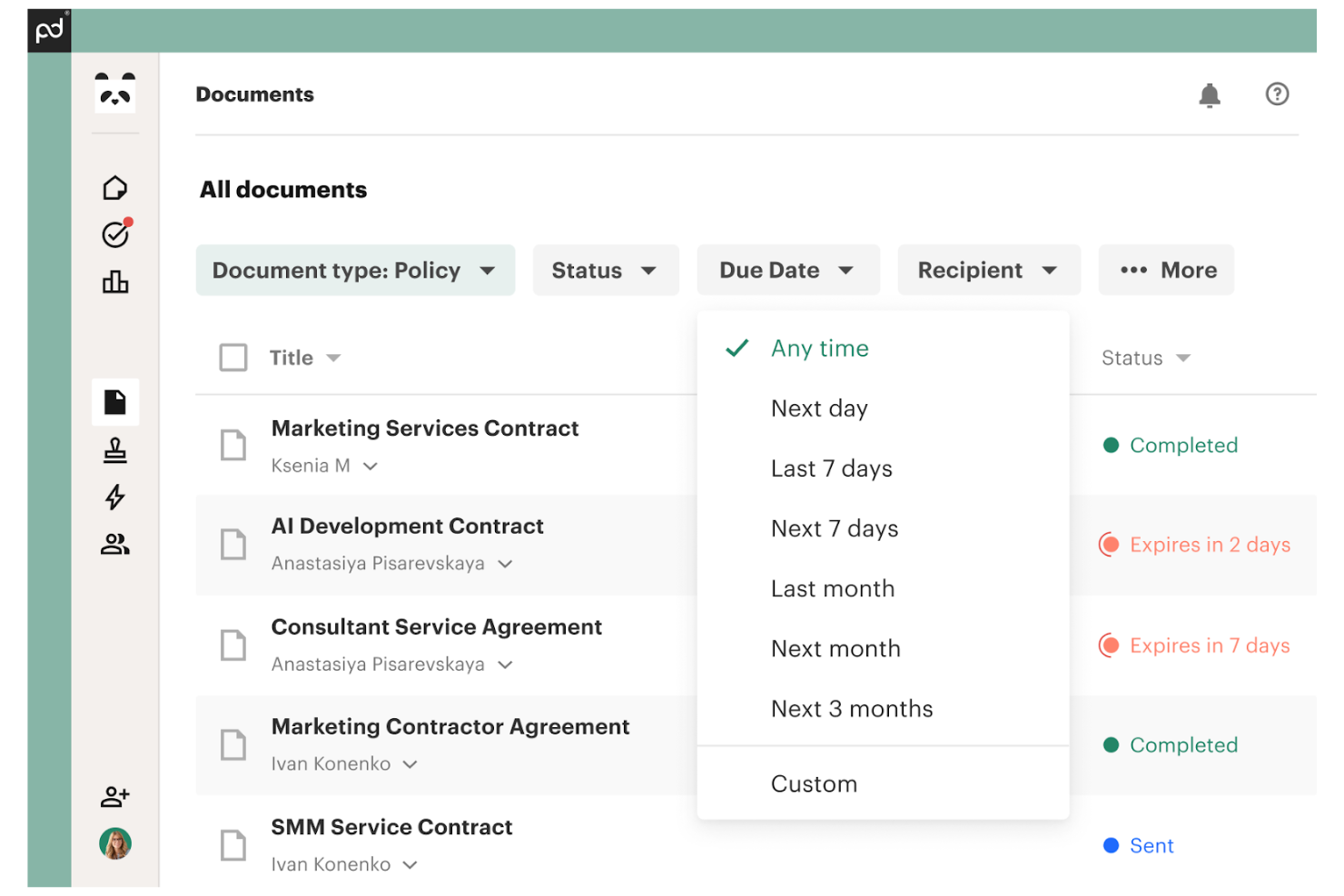
Se il tuo team HR deve gestire grandi volumi di documenti che necessitano di firme, PandaDoc offre una piattaforma dedicata per creare, inviare e monitorare flussi di lavoro per firme elettroniche. È particolarmente utile per i professionisti delle risorse umane che gestiscono lettere di assunzione, conferme delle politiche aziendali e documenti di onboarding che richiedono approvazione rapida e sicura. PandaDoc ti aiuta ad automatizzare la creazione e l’approvazione dei documenti, riducendo il lavoro manuale di follow-up e mantenendo tutto organizzato in un unico posto.
Perché ho scelto PandaDoc
Per i team HR che devono gestire documenti da firmare su larga scala, PandaDoc offre strumenti specializzati per i flussi di lavoro di firma elettronica. Ho scelto PandaDoc perché permette di creare modelli per i documenti HR più comuni, automatizzare l’instradamento delle approvazioni e monitorare lo stato di ogni firma in tempo reale. Le tracce di audit della piattaforma e le firme elettroniche legalmente vincolanti aiutano i professionisti HR a mantenere la conformità e ridurre gli errori nei documenti. Se i tuoi processi HR dipendono da una rapida e sicura approvazione dei documenti, PandaDoc è progettato per rispondere efficacemente a queste esigenze.
Funzionalità principali di PandaDoc
Altre funzionalità che rendono PandaDoc utile per la gestione dei documenti HR includono:
- Libreria di contenuti: Archivia sezioni riutilizzabili dei documenti HR, come sezioni sulle policy o dettagli sui benefit, per un accesso rapido.
- Invio massivo: Invia documenti a più destinatari contemporaneamente, ad esempio per aggiornamenti annuali delle policy o moduli di conformità.
- Branding personalizzato: Aggiungi logo, colori e font della tua azienda a tutti i documenti HR.
- Analisi dei documenti: Traccia quando i destinatari aprono, visualizzano e interagiscono con i documenti.
Integrazioni PandaDoc
Le integrazioni includono HubSpot, Salesforce, Pipedrive, monday.com, Greenhouse, QuickBooks, Stripe, PayPal, Microsoft Teams e Slack.
Pros and Cons
Pros:
- Invio massivo per comunicazioni HR collettive
- Mostra lo stato di coinvolgimento dei destinatari
- Editor drag-and-drop per creare modelli di documenti HR
Cons:
- La modifica dei modelli può risultare lenta con file di grandi dimensioni
- Opzioni di branding limitate nei piani inferiori
Altri software per la gestione dei documenti HR
Ecco alcune opzioni aggiuntive di software per la gestione dei documenti HR (DMS) che non sono entrate nella mia selezione, ma che vale comunque la pena valutare:
- Document Locator
Ideale per l'integrazione con Microsoft Office
- DynaFile
Ideale per la scansione di archivi cartacei in digitale
- WorkDocs
Ideale per l'automazione del monitoraggio della conformità
- Deel HR
Ideale per l'onboarding della forza lavoro globale
- Paycom
Ideale per l’accesso self-service dei dipendenti


Come Valuto i Software di Gestione Documentale HR
Divido la mia valutazione in due livelli: le funzionalità di base che uno strumento deve necessariamente avere—come un'archiviazione strutturata dei dipendenti e firme elettroniche conformi—e i fattori differenzianti che separano i migliori dal resto.
Funzionalità di Base (Requisiti Indispensabili per Questa Lista)
Quando seleziono gli strumenti per la mia lista, valuto ciascuno su una scala da 0 (non offre la funzionalità) a 5 (eccelle in quest’area) per ogni funzionalità di base elencata di seguito. Quindi calcolo il punteggio totale dello strumento come percentuale. Ciascuno deve ottenere un punteggio minimo totale del 65% per essere preso in considerazione per l’inclusione.
- Gestione dei Fascicoli Dipendente: Cerco un sistema di archiviazione strutturato, incentrato sul dipendente, dove i documenti siano organizzati per profilo—e non semplicemente inseriti in cartelle generiche da ordinare manualmente.
- Controlli di Accesso e Permessi: I file sensibili come quelli disciplinari o le documentazioni mediche richiedono restrizioni granulari basate sul ruolo, così che solo il personale autorizzato possa visualizzarli.
- Firme Elettroniche e Flussi di Lavoro Documentali: Valuto se lo strumento supporta firme elettroniche native e routing automatizzato, ad esempio con l’invio di una lettera d’offerta prima per l’approvazione e poi per la firma del candidato.
- Gestione della Conformità e delle Policy di Conservazione: Verifico la presenza di programmi di conservazione integrati, registri di audit e supporto normativo, in modo che il team possa tenere traccia delle scadenze I-9 o rispondere a richieste di cancellazione dati GDPR.
- Template e Generazione Documenti: Sono fondamentali template predefiniti e personalizzabili con campi variabili—come la compilazione automatica di un contratto di assunzione con i dati di un nuovo assunto prelevati dal suo profilo.
- Integrazione HRIS e Payroll: Lo strumento dovrebbe connettersi con il tuo attuale HRIS o sistema di payroll, in modo che i dati dei dipendenti circolino tra i sistemi senza duplicare inserimenti o caricare manualmente file.
Una volta identificati gli strumenti che soddisfano i criteri, considero cosa rende unica ciascuna piattaforma.
Fattori Differenzianti (Cosa Distingue i Fornitori)
Ecco come confronto e metto a paragone i diversi fornitori:
Funzionalità Distintive
I kit di onboarding automatizzato sono un grande punto di distinzione—cerco strumenti che raggruppano la documentazione per i nuovi assunti in pacchetti sequenziali con promemoria, così da non perdere nulla durante la prima settimana. Un portale self-service per i dipendenti aggiunge inoltre un valore reale, offrendo al personale accesso diretto a cedolini, policy e documenti personali senza dover inviare una richiesta HR. Valuto anche se la piattaforma usa intelligenza artificiale o OCR per classificare automaticamente i file caricati: risparmia ore di etichettatura manuale quando si migrano archivi storici.
Oltre le Funzionalità
Le certificazioni di sicurezza sono fondamentali quando si gestiscono dati sensibili dei dipendenti. Verifico la conformità a SOC 2 Type II o ISO 27001, oltre a standard di criptazione e al supporto SSO/MFA. Altrettanto importante è la profondità dell’integrazione: il software di gestione documentale deve sincronizzarsi con il tuo stack HRIS e payroll esistente così che i fascicoli dipendente restino aggiornati senza reinserimenti manuali. Valuto infine il supporto all’implementazione e alla migrazione, soprattutto in presenza di opzioni di importazione massiva per le aziende che passano da archivi cartacei o drive condivisi con migliaia di documenti storici da sistemare.
Come scegliere un software per la gestione dei documenti HR
È facile perdersi in lunghi elenchi di funzionalità e strutture tariffarie complesse. Per aiutarti a rimanere concentrato mentre affronti il tuo specifico processo di scelta del software, ecco una lista di fattori da tenere a mente:
| Fattore | Cosa considerare |
|---|---|
| Scalabilità | Il software sarà in grado di gestire il volume dei tuoi documenti man mano che la forza lavoro cresce o cambia nel tempo? |
| Integrazioni | Lo strumento si collega nativamente al tuo HRIS, al sistema paghe o ad altri sistemi fondamentali che utilizzi già? |
| Personalizzazione | Puoi adattare i flussi di lavoro dei documenti, le autorizzazioni e i modelli alle esigenze della tua organizzazione? |
| Semplicità d'uso | Il personale HR e i dipendenti potranno navigare e utilizzare il sistema con una formazione minima? |
| Implementazione e inserimento | Quanto tempo sarà necessario per migrare i documenti e formare gli utenti? Sono disponibili risorse per l'inserimento? |
| Costo | I livelli di prezzo sono chiari e prevedibili? Fai attenzione ai costi per utente, ai limiti di archiviazione o agli addebiti aggiuntivi. |
| Misure di sicurezza | Il software offre crittografia, controlli degli accessi e registri di audit per proteggere i dati sensibili? |
| Requisiti di conformità | Il sistema è in grado di supportare gli standard del tuo settore in materia di conservazione dei documenti, privacy e audit? |
Che cos'è un software per la gestione dei documenti HR?
Il software per la gestione dei documenti HR è un sistema digitale che archivia, organizza e protegge i dati dei dipendenti e i documenti HR in un'unica posizione centralizzata. Queste piattaforme aiutano i team HR a gestire le autorizzazioni di accesso, tenere traccia delle versioni dei documenti e garantire la conformità alle normative e alle policy aziendali.
Digitalizzando i flussi di lavoro dei documenti, i team HR riducono le pratiche cartacee manuali, migliorano la sicurezza dei dati e rendono più semplice per dipendenti e manager trovare e gestire i file importanti.
Funzionalità
Quando selezioni un software per la gestione dei documenti delle risorse umane, presta attenzione alle seguenti funzionalità chiave:
- Archiviazione dei documenti: centralizza tutti i file e i documenti delle risorse umane in un archivio digitale sicuro, facilitando l'organizzazione e il recupero dei documenti quando necessario.
- Controlli degli accessi: consente di impostare le autorizzazioni per stabilire chi può visualizzare, modificare o condividere documenti specifici, proteggendo le informazioni sensibili dei dipendenti.
- Monitoraggio delle versioni: conserva la cronologia delle modifiche ai documenti, così puoi vedere chi ha apportato gli aggiornamenti e ripristinare le versioni precedenti, se necessario.
- Distribuzione dei documenti: consente alle risorse umane di inviare documenti a singole persone o gruppi, monitorare la consegna e confermare la ricezione o la presa visione.
- Supporto per le firme elettroniche: consente a dipendenti e responsabili di fornire una firma elettronica, accelerando le approvazioni e riducendo l'uso della carta.
- Tracce di controllo: registrano tutte le attività relative ai documenti, incluse visualizzazioni, modifiche e download, per supportare la conformità e gli audit interni.
- Funzionalità di ricerca: fornisce strumenti di ricerca per individuare rapidamente i documenti in base a parola chiave, data o nome del dipendente.
- Gestione delle politiche di conservazione: automatizza l'archiviazione e l'eliminazione dei documenti in base ai requisiti legali o aziendali, riducendo i rischi di non conformità.
- Creazione di moduli personalizzati: consente ai team delle risorse umane di creare e distribuire moduli digitali per l'inserimento dei nuovi dipendenti, gli aggiornamenti delle policy o altri processi delle risorse umane.
- Accesso da dispositivi mobili: offre un accesso sicuro ai documenti da smartphone o tablet, supportando il lavoro delle risorse umane da remoto e in mobilità.
Vantaggi
L'implementazione di un software per la gestione dei documenti delle risorse umane offre diversi vantaggi al tuo team e alla tua azienda. Ecco alcuni dei risultati che puoi aspettarti:
- Maggiore conformità: le tracce di controllo automatizzate, le politiche di conservazione e il monitoraggio delle prese visione aiutano a soddisfare i requisiti legali e aziendali con meno lavoro manuale.
- Recupero più rapido dei documenti: l'archiviazione centralizzata e gli strumenti di ricerca avanzati forniscono un facile accesso ai documenti dei dipendenti e ai file delle risorse umane quando ne hai bisogno.
- Maggiore sicurezza dei dati: i controlli degli accessi e la crittografia proteggono le informazioni sensibili dei dipendenti dagli accessi non autorizzati o dalla condivisione accidentale.
- Riduzione della documentazione cartacea: i moduli digitali, le firme elettroniche e i flussi di lavoro automatizzati riducono al minimo le attività manuali su carta e la necessità di archiviazione fisica.
- Migliore esperienza dei dipendenti: l'accesso autonomo ai documenti consente ai dipendenti di trovare e gestire i propri documenti senza dover attendere l'intervento delle risorse umane.
- Inserimento e uscita semplificati: la distribuzione automatizzata dei documenti e i moduli personalizzati semplificano il processo di inserimento dei nuovi dipendenti o di gestione delle cessazioni.
- Scalabilità per i team in crescita: l'archiviazione basata sul cloud e le autorizzazioni flessibili consentono al sistema di gestione dei documenti di crescere insieme alla tua organizzazione.
Costi e prezzi
La scelta di un software per la gestione dei documenti delle risorse umane richiede la conoscenza dei vari modelli e piani tariffari disponibili. I costi variano in base alle funzionalità, alle dimensioni del team, ai componenti aggiuntivi e ad altri fattori. La tabella seguente riassume i piani più comuni, i relativi prezzi medi e le funzionalità tipicamente incluse nelle soluzioni software per la gestione dei documenti delle risorse umane:
Tabella comparativa dei piani per i software di gestione dei documenti delle risorse umane
| Tipo di piano | Prezzo medio | Funzionalità comuni |
|---|---|---|
| Piano gratuito | $0 | Archiviazione di base dei documenti, accesso limitato degli utenti, ricerca semplice e supporto di base. |
| Piano personale | $5-$15/utente/mese | Gestione individuale dei documenti, supporto per le firme elettroniche, controlli di base degli accessi e spazio di archiviazione limitato. |
| Piano aziendale | $15-$30/utente/mese | Condivisione dei documenti del team, autorizzazioni avanzate, tracce di controllo, moduli personalizzati e opzioni di integrazione. |
| Piano per grandi aziende | $30-$60/utente/mese | Spazio di archiviazione illimitato, strumenti avanzati per la conformità, flussi di lavoro personalizzati, supporto dedicato e opzioni SSO. |
FAQ sul software di gestione dei documenti HR
Ecco alcune risposte alle domande più frequenti sul software di gestione dei documenti HR:
In che modo i sistemi di gestione dei documenti HR aiutano a garantire la conformità?
I sistemi di gestione dei documenti HR aiutano a garantire la conformità automatizzando i tempi di conservazione, monitorando le conferme di presa visione dei documenti e mantenendo tracce di verifica. Queste funzionalità facilitano il rispetto dei requisiti legali, la preparazione alle verifiche e la gestione dei dati sensibili dei dipendenti in conformità alle normative.
Il software di gestione dei documenti HR può integrarsi con altri strumenti HR?
Sì, la maggior parte dei software di gestione dei documenti HR può integrarsi con piattaforme HRIS, per le buste paga e per l’inserimento dei dipendenti. Le integrazioni riducono l’inserimento manuale dei dati, mantengono coerenti i dati dei dipendenti e consentono ai team HR di gestire i documenti all’interno dei flussi di lavoro esistenti.
Cosa devo valutare per esaminare la sicurezza del software di gestione dei documenti HR?
Cerca funzionalità come la crittografia, i controlli degli accessi basati sui ruoli e registri di verifica dettagliati. Queste misure di sicurezza proteggono le informazioni sensibili dei dipendenti dagli accessi non autorizzati e aiutano a monitorare chi visualizza o modifica i documenti.
Quanto tempo occorre per implementare il software di gestione dei documenti HR?
I tempi di implementazione variano, ma la maggior parte delle soluzioni basate sul cloud può essere configurata in un periodo compreso tra pochi giorni e alcune settimane. Tra i fattori da considerare ci sono le dimensioni dell’archivio documentale, le esigenze di integrazione e la disponibilità di risorse per l’inserimento dei dipendenti, come la formazione e il supporto alla migrazione.
È possibile trasferire i documenti cartacei esistenti in un sistema digitale di gestione dei documenti HR?
Sì, puoi digitalizzare i documenti cartacei scansionandoli e caricandoli nel sistema. Molti fornitori offrono supporto alla migrazione o collaborano con servizi di scansione per aiutarti a convertire e organizzare i documenti esistenti.