

I 10 migliori software per la gestione delle riunioni del 2026

10 Miglior software per la gestione delle riunioni


Gestire le riunioni può essere davvero frustrante. Conosci la situazione: conflitti di programmazione infiniti, tempo sprecato e difficoltà nel mantenere tutti sulla stessa lunghezza d'onda. Il software per la gestione delle riunioni è qui per aiutare il tuo team a lavorare in modo più intelligente, non più duro.
In base alla mia esperienza, questi strumenti possono fare una grande differenza nel modo in cui gestisci le riunioni. Ti aiutano a rimanere organizzato, risparmiare tempo e garantire che tutti siano allineati sugli obiettivi.
In questo articolo condividerò le mie migliori scelte di software per la gestione delle riunioni. Li ho testati e recensiti uno per uno, concentrandomi su ciò che conta davvero per te e il tuo team. Troviamo la soluzione più adatta alle tue esigenze.
Perché fidarsi delle nostre recensioni sui software
Il nostro team testa e recensisce software dal 2012. In quanto esperti HR noi stessi, sappiamo quanto sia difficile — e importante — scegliere il software giusto.
Per questa guida, abbiamo valutato gli strumenti attraverso test pratici e ricerche indipendenti, assegnando un punteggio agli strumenti in base ai nostri criteri di selezione. Ci basiamo inoltre sulle competenze di leader di pensiero del settore e di professionisti HR attivi.
Le nostre recensioni riflettono il nostro giudizio editoriale umano, non un discorso di vendita.
Revisori esperti:
Riepilogo dei migliori software per la gestione delle riunioni
Questa tabella comparativa riassume i dettagli dei prezzi delle mie migliori selezioni di software per la gestione delle riunioni, per aiutarti a trovare quello più adatto al tuo budget e alle esigenze della tua azienda.
| Tool | Best For | Trial Info | Price | ||
|---|---|---|---|---|---|
| 1 | Ideale per la collaborazione asincrona tra fusi orari diversi | Demo gratuita disponibile | A partire da $5/dipendente/mese | Website | |
| 2 | Piattaforma per riunioni che permette agli utenti di sfruttare al massimo i propri dispositivi mobili | Piano gratuito + demo gratuita disponibile | Da $14,99/licenza/mese | Website | |
| 3 | Ideale per la creazione collaborativa dell'agenda | Piano gratuito disponibile | Da $5/utente/mese | Website | |
| 4 | Software per la gestione delle riunioni che consente agli utenti di gestire efficacemente l'ordine del giorno | Demo gratuita disponibile | Prezzo su richiesta | Website | |
| 5 | Strumento di videoconferenza che consente la partecipazione fino a 250 utenti | Piano gratuito disponibile | A partire da $4.20/utente/mese | Website | |
| 6 | Software per la gestione delle riunioni che consente agli utenti di organizzare più calendari di incontri | Garanzia di rimborso di 14 giorni | A partire da $149 una tantum | Website | |
| 7 | Ideale per videoconferenze sicure | Prova gratuita di 14 giorni + piano gratuito + demo gratuita disponibili | Da $1/host/mese (fatturato annualmente) | Website | |
| 8 | Ideale per la gestione degli spazi di lavoro ibridi | Prova gratuita di 30 giorni + demo gratuita disponibile | Da £10/mese (fatturazione annuale) | Website | |
| 9 | Software di gestione delle riunioni per creare e condividere trascrizioni e registrazioni delle riunioni | Prova gratuita di 14 giorni | Da $12/organizzatore/mese | Website | |
| 10 | Software di gestione delle riunioni con funzionalità di accessibilità per una forza lavoro diversificata | Prova gratuita di 14 giorni | Da $9.99/host/mese | Website |
Recensioni dei migliori software per la gestione delle riunioni
Di seguito trovi i miei riepiloghi dettagliati dei migliori software per la gestione delle riunioni inclusi nella mia selezione. Le mie recensioni offrono uno sguardo approfondito alle funzionalità principali, ai pro e contro, alle integrazioni e ai casi d’uso ideali di ogni strumento, per aiutarti a trovare quello più adatto a te.

Deel HR
Ideale per la collaborazione asincrona tra fusi orari diversi

Deel è un potente software HR ideale per i team remoti che vogliono ottimizzare la gestione delle riunioni. Una delle sue funzionalità di punta è lo strumento '1 on 1', che aiuta i manager a prepararsi meglio, condurre e monitorare gli incontri individuali su Slack.
Il plugin '1 on 1' si collega ai calendari degli utenti e invia automaticamente messaggi pre-riunione in un canale Slack condiviso per aiutare i partecipanti a concordare i punti da discutere e coordinare l'agenda condivisa. Questo assicura riunioni produttive e focalizzate, risparmiando tempo e aiutando tutti a restare allineati. Al termine dell'incontro viene inviato ai partecipanti un sondaggio finale per tenere traccia di quanto discusso e registrare il loro punto di vista in quel momento.
Ciò che rende '1 on 1' particolarmente interessante è la sua integrazione con gli altri strumenti di Deel. '1 on 1' fa parte di Deel Engage, una suite di plugin per Slack che semplificano attività HR frequenti come la gestione delle ferie (PTO) e i sondaggi sul coinvolgimento dei dipendenti.
Combinando queste funzionalità con l’avanzato sistema di paghe di Deel e la copertura globale per benefit e conformità, i manager possono gestire facilmente tutte le questioni HR anche in team distribuiti e in crescita. Nel complesso, Deel è un’ottima scelta per i team remoti che desiderano gestire in modo più efficiente le necessità HR.
Deel si integra con diversi sistemi HR popolari, tra cui Ashby, BambooHR, Expensify, Greenhouse, Hibob, Netsuite, Okta, OneLogin, Quickbooks, SCIM, Xero, Workday e Workable. Offre anche un'Open API che supporta ulteriori integrazioni personalizzate.
Deel propone prezzi fissi disponibili su richiesta, oltre a una demo gratuita. Offre inoltre software HR gratuito per le aziende che desiderano automatizzare attività amministrative e reportistica nel proprio team globale.
New Product Updates from Deel HR

Deel Expands Stablecoin Wallet to 80+ Countries
Deel expands its Stablecoin Wallet to 80+ countries with dollar-backed balances and optional rewards. This gives eligible contractors more ways to hold and manage earnings inside Deel. For more information, visit Deel’s official site.
 .
.
Zoom
Piattaforma per riunioni che permette agli utenti di sfruttare al massimo i propri dispositivi mobili

Zoom è un software di comunicazione basato su cloud per condurre videoconferenze, riunioni virtuali e sessioni di chat. Puoi utilizzare il software per creare Zoom Rooms, dove puoi incontrare e lavorare con membri selezionati del team in privato. Dispone anche di una funzione per la gestione degli eventi che consente di ospitare eventi, gestire i biglietti e monitorare la partecipazione, rendendo l'organizzazione più gestibile.
Zoom è il miglior software di gestione delle riunioni per te se desideri condurre e partecipare a riunioni utilizzando il tuo dispositivo mobile perché Zoom permette agli utenti di passare da una sessione di chat o una chiamata telefonica direttamente a una riunione mobile. Questa soluzione di gestione delle riunioni possiede un'app mobile che funziona su dispositivi mobili iOS e Android, permettendoti di partecipare o condurre riunioni ovunque ti trovi. Con la funzione sfondo virtuale di Zoom, puoi avere uno sfondo presentabile durante la riunione anche lavorando fuori sede, aiutandoti a mantenere la formalità in ambienti meno ideali.
Puoi integrare una vasta gamma di strumenti di produttività con Zoom, tra cui CRM Connector, Cronofy, Slack, Asana, Zapier, Zendesk e altri.
Zoom offre una versione gratuita, mentre la versione a pagamento parte da $14,99/licenza/mese.

Fellow
Ideale per la creazione collaborativa dell'agenda
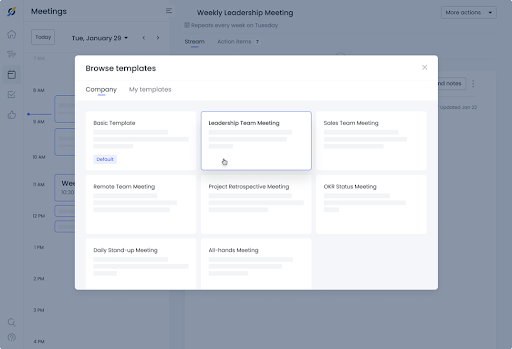
Fellow è un software di gestione delle riunioni che aiuta il tuo team a essere produttivo prima, durante e dopo gli incontri. Fellow può aiutarti a creare l'ordine del giorno per garantire che le riunioni si svolgano senza intoppi e che vengano affrontate tutte le questioni aziendali più importanti. Ti consente di conservare una cronologia completa di tutte le tue riunioni così puoi tornare alle discussioni precedenti come riferimento. Puoi usare Fellow per ricevere feedback dai partecipanti così da sapere come migliorare le riunioni future.
Le riunioni sono collaborative e, se ti serve un software di gestione delle riunioni che aiuti il tuo team a renderle sessioni produttive, Fellow è la scelta migliore. Puoi usare Fellow per annotare in tempo reale le azioni da svolgere, assicurandoti così di avere una lista completa di attività da condividere con altri membri del team. Fellow permette di inviare le note della riunione a tutti con un solo clic, così ciascuno avrà una copia del verbale e potrà suggerire eventuali correzioni o integrazioni.
Fellow si integra con altri strumenti di gestione delle riunioni e di collaborazione, inclusi Slack, Google Meet, MS Teams, Google Tasks, ecc.
Fellow offre una versione gratuita con funzionalità limitate fino a 10 utenti, mentre il prezzo della versione Pro parte da $5/utente/mese.

Software per la gestione delle riunioni che consente agli utenti di gestire efficacemente l'ordine del giorno
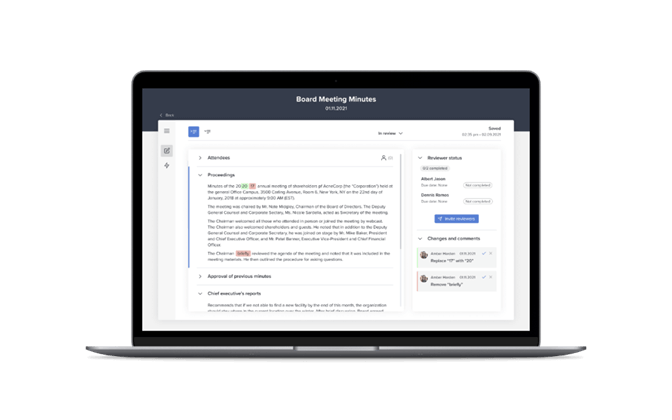
Diligent è un software per la gestione delle riunioni che puoi utilizzare per aumentare l'efficacia dei comitati e delle riunioni del consiglio aiutandoti a digitalizzare i tuoi incontri. Puoi usarlo per semplificare la presa di appunti e la condivisione dei verbali così da poterti concentrare sulle discussioni. Diligent ti aiuta anche a semplificare le valutazioni del consiglio e i questionari, permettendoti di conoscere l'opinione dei membri su questioni critiche.
Se hai bisogno di un software per la gestione delle riunioni che migliori la gestione dell'ordine del giorno, allora Diligent è la scelta migliore perché puoi utilizzarlo per creare e condividere gli ordini del giorno delle riunioni con i membri del team. Può anche aiutarti ad evitare problemi di controllo delle versioni perché gli aggiornamenti vengono visualizzati anche sull'agenda che hai già inviato. Puoi digitalizzare i fascicoli del consiglio mantenendo le informazioni sensibili sicure prima, durante e dopo le riunioni.
Il prezzo di Diligent è disponibile su richiesta.

Strumento di videoconferenza che consente la partecipazione fino a 250 utenti

Google Meet è un servizio di comunicazione video che puoi utilizzare per condurre riunioni di team, webinar e videoconferenze. È integrato nella piattaforma Workspace di Google, permettendo agli utenti di accedere ad altre app di produttività di Google come Gmail, Drive, Calendar, Sheets, Docs, Slides e Forms da utilizzare durante le riunioni. Google Meet è un'ottima opzione per colloqui video con i candidati perché puoi inviare inviti a chiunque tramite email senza preoccuparti dei permessi.
Google Meet è la soluzione migliore per te se cerchi un software per la gestione delle riunioni e tieni spesso riunioni virtuali estese con il tuo team remoto, perché permette incontri fino a un massimo di 24 ore con fino a 250 partecipanti. Puoi usare Google Meet per creare lavagne digitali che permettono ai membri del team di condividere idee durante le sessioni di brainstorming. Consente di registrare le riunioni e salvarle su Google Drive, garantendo l'accesso a tutti i partecipanti.
I prezzi di Google Meet partono da $4.20/utente/mese.

Infinity
Software per la gestione delle riunioni che consente agli utenti di organizzare più calendari di incontri
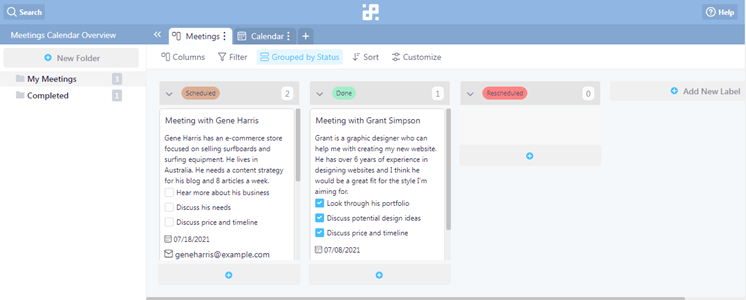
Infinity è un software di collaborazione per team con funzionalità di pianificazione delle riunioni oltre alle capacità di gestione delle attività. Dispone di bacheche Kanban che ti permettono di monitorare visivamente l'avanzamento delle attività e dei progetti. Puoi utilizzare Infinity per assegnare compiti e azioni ai membri del team, assicurandoti che le attività vengano assegnate in base alle competenze di ciascuno.
Se stai cercando un software per la gestione delle riunioni che ti aiuti a organizzare il tuo calendario delle riunioni, Infinity è la soluzione migliore grazie al suo modello di calendario per le riunioni. Puoi usare questo modello per tenere traccia di informazioni fondamentali per le riunioni, come date e orari e le informazioni di contatto degli altri partecipanti. I modelli di riunione di Infinity consentono anche agli utenti di inserire note sulle riunioni per monitorare gli argomenti cruciali.
Infinity si integra con Zapier, Trello Import, CSV Import e altri.
Infinity offre una tariffa una tantum di $149.

Ideale per videoconferenze sicure

Zoho Meeting è un software per riunioni online e webinar progettato per facilitare la collaborazione e la comunicazione a distanza tramite funzionalità come conferenze audio e video, condivisione dello schermo e registrazione delle sessioni. La sua enfasi sulla protezione dei dati e sulla privacy lo rende una scelta di punta per le esigenze di videoconferenza sicura.
Zoho Meeting offre un set completo di funzionalità pensate per semplificare la gestione delle riunioni, rendendolo ideale per aziende di tutte le dimensioni. Innanzitutto, Zoho Meeting si distingue per la sua semplicità e facilità d'uso. Dalla programmazione delle riunioni allo svolgimento di conferenze virtuali, la piattaforma offre un'interfaccia intuitiva che richiede una formazione minima per consentire ai dipendenti di orientarsi. Questa accessibilità facilita l'adozione da parte dei team, migliorando la produttività e la collaborazione all'interno dell'organizzazione.
Inoltre, Zoho Meeting offre diverse integrazioni con applicazioni di calendario popolari, come Google Calendar e Outlook, semplificando il processo di pianificazione e garantendo il coordinamento fluido delle riunioni su diverse piattaforme.
Zoho Meeting dà anche priorità alla sicurezza e alla privacy, aspetti fondamentali per i professionisti delle risorse umane che gestiscono informazioni sensibili. La piattaforma offre la crittografia end-to-end per tutte le riunioni, assicurando che le discussioni riservate rimangano protette da accessi non autorizzati. Con funzionalità come la protezione tramite password e la sala d'attesa, Zoho Meeting fornisce agli amministratori gli strumenti necessari per controllare l'accesso e mantenere l'integrità delle riunioni.
Come parte dell'ecosistema Zoho, Zoho Meeting si integra con varie applicazioni Zoho come Zoho CRM, Zoho Projects e Zoho Campaigns, oltre che con piattaforme esterne come Microsoft Teams e Slack. Supporta anche integrazioni email con Zoho Mail e Gmail e si collega con strumenti di automazione come Zoho Flow e Zoho Marketing Automation.

Ideale per la gestione degli spazi di lavoro ibridi

Clearooms è un software per la prenotazione di sale riunioni e scrivanie flessibili progettato per gestire spazi di lavoro ibridi, offrendo una soluzione alle aziende che operano sia con personale in ufficio che da remoto. È riconosciuto per la sua capacità di rispondere alle complessità della gestione di un ambiente di lavoro ibrido, il che lo rende una scelta adatta per le aziende che desiderano mantenere un ambiente efficiente e produttivo in questo contesto.
Le funzionalità avanzate di Clearooms soddisfano sia le esigenze degli incontri in presenza che di quelli virtuali, aspetto essenziale per i moderni ambienti di lavoro ibridi. Ciò che lo distingue è la sua interfaccia intuitiva che semplifica la gestione degli spazi riunioni e la sua integrazione con altri strumenti di produttività, supportando un flusso di lavoro integrato.
Offre inoltre un sistema di prenotazione delle sale in tempo reale con una piantina interattiva degli spazi, che permette agli utenti di riservare facilmente le sale per date e orari specifici. Supporta prenotazioni ricorrenti, automatizzando il processo di prenotazione per incontri regolari. La piattaforma include un sistema di check-in che libera automaticamente le sale non confermate e offre opzioni aggiuntive per prenotare servizi come catering o attrezzature.
Offre integrazioni con diversi sistemi per facilitare l'autenticazione degli utenti e la prenotazione delle sale riunioni. Supporta il Single Sign On (SSO) con piattaforme come Google, Okta e OneLogin. In aggiunta, offre integrazioni di terze parti con piattaforme come Office 365 e MS Teams. Infine, è possibile utilizzare la sua API per sviluppare integrazioni personalizzate.

Software di gestione delle riunioni per creare e condividere trascrizioni e registrazioni delle riunioni
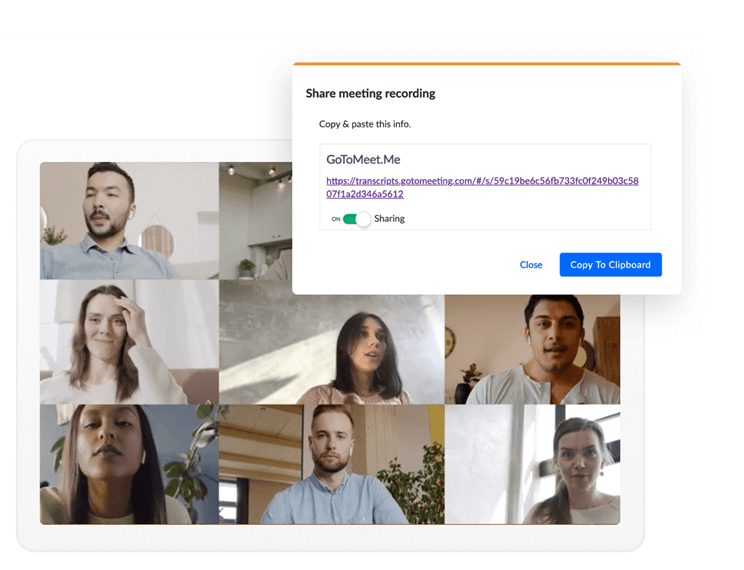
GoToMeeting è un software di gestione delle riunioni online con funzionalità di videoconferenza e condivisione del desktop, che puoi utilizzare per incontrare i dipendenti a distanza. Puoi usare GoToMeeting per creare Breakout Room, permettendoti di suddividere i partecipanti in gruppi più piccoli per collaborare efficacemente in tempo reale. GoToMeeting dispone di una versione app mobile disponibile sia per dispositivi Android che iOS, consentendo ai dipendenti di partecipare alle riunioni utilizzando i loro dispositivi mobili.
GoToMeeting è il miglior software di gestione delle riunioni per la tua azienda se desideri trascrizioni impeccabili, grazie alla funzione di trascrizione delle riunioni di GoToMeeting. GoToMeeting trascrive automaticamente le riunioni, eliminando la necessità di assegnare un verbalizzatore e permettendo così a tutti i membri del team di concentrarsi sulla discussione. Puoi anche condividere i verbali delle riunioni con i membri del team ovunque si trovino, rendendo il sistema ideale per gruppi di lavoro a distanza. Le trascrizioni sono accessibili ovunque tu sia, così puoi rivedere le riunioni precedenti quando e dove ne hai bisogno.
GoToMeeting si integra con una vasta gamma di altri strumenti di produttività, inclusi Google Calendar, Outlook, Microsoft Teams, Salesforce, ecc.
Il prezzo di GoToMeeting parte da $12/organizzatore/mese e viene offerta una prova gratuita di 14 giorni.

Software di gestione delle riunioni con funzionalità di accessibilità per una forza lavoro diversificata
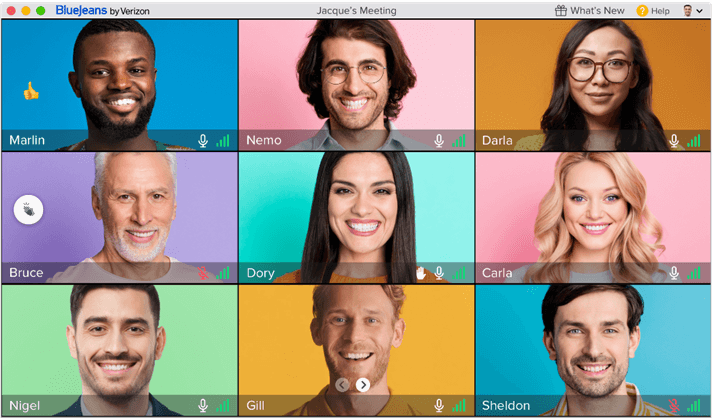
BlueJeans è una piattaforma di videoconferenza che la tua azienda può utilizzare per condurre riunioni virtuali. Offre Dolby Voice e video HD, garantendo chiarezza sia audio che visiva durante le riunioni affinché tutti i partecipanti comprendano chiaramente l'organizzatore. Dispone di una funzione avanzata di visualizzazione a galleria che permette di mostrare fino a 25 partecipanti contemporaneamente sullo schermo, rendendola ideale per gruppi numerosi. BlueJeans è multipiattaforma e consente agli utenti di ospitare o partecipare a riunioni tramite desktop o dispositivi mobili mantenendo la stessa esperienza utente.
BlueJeans è il miglior software di gestione delle riunioni se cerchi uno strumento semplice da usare per tutti grazie alle sue funzionalità di accessibilità. Offre sottotitoli in tempo reale affinché i membri del team possano seguire la discussione anche se la loro lingua madre non è l'inglese. BlueJeans include anche funzioni utili per chi ha disabilità visive, come il supporto ai lettori di schermo per un uso agevole della piattaforma. Sono inoltre presenti elementi ad alto contrasto che facilitano alle persone con problemi di vista il riconoscimento delle varie opzioni di BlueJeans durante le riunioni.
I prezzi di BlueJeans partono da $9.99/host/mese ed è disponibile una prova gratuita di 14 giorni.
Altri software per la gestione delle riunioni
Ecco alcune altre opzioni di software per la gestione delle riunioni che non sono state incluse nella mia selezione, ma che vale comunque la pena prendere in considerazione:
- BoardDocs
Funzionalità di gestione delle riunioni ideale per piccoli team e aziende senza reparto IT
- Teaming
App mobile che permette agli utenti di inviare foto e video ad altri utenti
- 4Minitz
Software open source per la gestione delle riunioni che consente agli utenti di personalizzare le funzionalità in base alle proprie esigenze
- Slack
Software per la gestione dei progetti con strumenti di comunicazione per organizzare riunioni da remoto
- monday AI Workspace
Ideale per il rilevamento dei rischi di progetto basato sull'AI
- Topicflow
Ideale per conversazioni sulle prestazioni guidate dai dati


Come valuto il software di gestione delle riunioni
Valuto gli strumenti su due livelli: le funzionalità di base—come agende collaborative e tracciamento delle attività—che qualificano l'inclusione, e i fattori differenzianti che distinguono le migliori opzioni.
Funzionalità di base (Requisiti fondamentali per questa lista)
Queste capacità di base fungono da criteri di accettazione per l'inserimento nella mia lista di software di gestione delle riunioni:
- Creazione collaborativa dell'agenda: Verifico se i partecipanti possono co-modificare le agende in tempo reale—come un team che aggiunge punti di discussione a una riunione settimanale prima che inizi.
- Note e verbali delle riunioni: Note strutturate collegate a ciascuna riunione sono più importanti di un semplice campo di testo vuoto, soprattutto per tracciare decisioni nelle riunioni ricorrenti.
- Tracciamento delle attività: Cerco compiti assegnabili con responsabili, date di scadenza e aggiornamenti di stato che si riportano automaticamente all'istanza successiva della riunione.
- Integrazione con calendario e conferenze: La sincronizzazione bidirezionale con Google Calendar, Outlook, Zoom e Teams è il minimo indispensabile—le riunioni dovrebbero acquisire il contesto senza inserimenti manuali.
- Registrazione e trascrizione: Valuto se lo strumento registra, trascrive e riassume le discussioni, così i partecipanti possono cercare riunioni passate per argomenti specifici.
- Modelli riutilizzabili di riunione: Modelli predefiniti e personalizzabili per formati comuni come 1:1, retrospettive degli sprint e riunioni di consiglio fanno risparmiare tempo reale nella configurazione.
Valuto ogni fornitore su una scala da 0 (non offre la funzionalità) a 5 (eccelle in quest'area) per ciascun criterio.
I fornitori devono raggiungere un punteggio medio minimo per essere considerati per l'inclusione nella mia lista. Da lì, considero cosa distingue ogni piattaforma.
Fattori differenzianti (Cosa distingue i fornitori)
Una volta stilata la mia lista, ecco come confronto i diversi fornitori nel campo del software di gestione delle riunioni:
Funzionalità distintive
Assistenti alle riunioni basati su AI che redigono agende e riassumono discussioni aiutano i team impegnati a rimanere concentrati e organizzati senza sforzo aggiuntivo. Cerco anche strumenti per prendere decisioni e votare—molto utili soprattutto per riunioni di direzione e consigli di amministrazione—oltre ad analisi trasversali alle riunioni che mostrano tendenze su frequenza, partecipazione e follow-up delle attività nel tempo. Le integrazioni con basi di conoscenza aziendali, in modo che le note delle riunioni siano trasferite direttamente in strumenti come Confluence o Notion, hanno un grande impatto sulla gestione complessiva delle informazioni.
Oltre le funzionalità
La sicurezza è fondamentale perché i contenuti delle riunioni includono spesso discussioni sensibili sulle risorse umane e strategie a livello di consiglio. Verifico la certificazione SOC 2 Type II, il supporto SSO e permessi granulari che limitano l'accesso alle riunioni riservate. Anche la struttura dei prezzi conta—alcuni strumenti offrono tariffe per utente, altri piani basati sullo spazio di lavoro, il che cambia i calcoli per i team numerosi. Valuto inoltre se una piattaforma si adatta al ritmo specifico delle vostre riunioni, che siano standup quotidiani, revisioni trimestrali del business o sessioni formali di governance del consiglio.
Come scegliere un software per la gestione delle riunioni
È facile perdersi in lunghi elenchi di funzionalità e strutture di prezzo complesse. Per aiutarti a rimanere concentrato mentre affronti il tuo specifico processo di selezione del software, ecco un elenco di fattori da tenere a mente:
| Fattore | Cosa considerare |
|---|---|
| Scalabilità | Il software può crescere insieme al tuo team? Considera la crescita futura e valuta se lo strumento può gestire più utenti o riunioni più numerose senza costi aggiuntivi o problemi di prestazioni. |
| Integrazioni | Funziona con gli strumenti che già utilizzi, come calendari o app per la gestione dei progetti? Verifica che il flusso di dati sia fluido e che il lavoro manuale venga ridotto. |
| Personalizzazione | Puoi adattare il software ai tuoi flussi di lavoro specifici? Cerca opzioni per personalizzare i modelli delle riunioni o i dashboard. |
| Facilità d'uso | L'interfaccia è intuitiva per tutti i membri del team? Prova la demo o la versione di prova per assicurarti che tutti possano utilizzarla senza difficoltà. |
| Implementazione e onboarding | Quanto tempo occorre per iniziare a utilizzarlo? Valuta la disponibilità di risorse formative e di assistenza durante la fase di transizione. |
| Costo | Il prezzo rientra nel tuo budget? Confronta il costo con le funzionalità offerte e verifica la presenza di costi nascosti o addebiti per funzionalità aggiuntive. |
| Misure di sicurezza | I tuoi dati sono al sicuro? Cerca standard di crittografia, controlli degli accessi e conformità alle normative sulla protezione dei dati. |
Che cos'è il software per la gestione delle riunioni?
Il software per la gestione delle riunioni è uno strumento che aiuta a organizzare e facilitare le riunioni in modo efficace. Professionisti come manager, responsabili di team e coordinatori utilizzano questi strumenti per migliorare la produttività e la comunicazione. Le funzionalità di programmazione, creazione dell'ordine del giorno e integrazione supportano una pianificazione e una gestione efficienti delle riunioni. Questi strumenti fanno risparmiare tempo, riducono i conflitti di programmazione e migliorano i risultati complessivi delle riunioni.
Funzionalità
Quando scegli un software per la gestione delle riunioni, presta attenzione alle seguenti funzionalità chiave:
- Strumenti di programmazione: automatizzano la ricerca delle fasce orarie disponibili, riducendo lo scambio continuo di e-mail.
- Creazione dell'ordine del giorno: aiuta a organizzare gli argomenti e gli obiettivi della riunione, mantenendo le discussioni concentrate e produttive.
- Funzionalità di integrazione: si collega ai calendari e agli strumenti di gestione dei progetti per garantire un'integrazione fluida del flusso di lavoro.
- Modelli personalizzabili: consentono agli utenti di adattare il formato delle riunioni alle esigenze specifiche, migliorando l'efficienza.
- Collaborazione in tempo reale: consente ai partecipanti di lavorare insieme durante le riunioni, migliorando il coinvolgimento e i risultati.
- Videoconferenze: offrono una piattaforma per la comunicazione faccia a faccia a distanza, fondamentale per i team distribuiti.
- Registrazione dei verbali: acquisisce e archivia automaticamente gli appunti, assicurandosi che tutti siano informati. Per i team che desiderano un riepilogo più conciso, gli strumenti di intelligenza artificiale per i riepiloghi delle riunioni possono trasformare automaticamente i contenuti delle riunioni in sintesi concise.
- Azioni di follow-up automatizzate: inviano promemoria e attività da svolgere dopo la riunione, assicurando responsabilità e progressi.
- Misure di sicurezza: proteggono i dati sensibili delle riunioni tramite crittografia e controlli degli accessi.
- Interfaccia intuitiva: garantisce facilità d'uso per tutti i partecipanti, riducendo al minimo la curva di apprendimento.
Vantaggi
L'implementazione di un software per la gestione delle riunioni offre diversi vantaggi al tuo team e alla tua azienda. Eccone alcuni:
- Risparmio di tempo: la programmazione automatizzata e i promemoria riducono il tempo dedicato all'organizzazione delle riunioni.
- Maggiore produttività: ordini del giorno mirati e azioni di follow-up mantengono le discussioni sulla giusta direzione e favoriscono risultati concreti.
- Collaborazione migliorata: le funzionalità di collaborazione in tempo reale aumentano il coinvolgimento e facilitano il lavoro di squadra.
- Maggiore accessibilità: le videoconferenze consentono ai team da remoto di comunicare efficacemente, indipendentemente dalla loro posizione.
- Organizzazione migliore: la conservazione centralizzata dei verbali e degli ordini del giorno aiuta a mantenere tutti informati e allineati.
- Sicurezza dei dati: misure di sicurezza efficaci proteggono le informazioni sensibili, garantendoti tranquillità.
- Facilità d'uso: le interfacce intuitive permettono a tutti di partecipare facilmente senza una curva di apprendimento ripida.
Costi e prezzi
La scelta di un software per la gestione delle riunioni richiede la comprensione dei diversi modelli di prezzo e dei piani disponibili. I costi variano in base alle funzionalità, alle dimensioni del team, ai componenti aggiuntivi e ad altri fattori. La tabella seguente riassume i piani più comuni, i relativi prezzi medi e le funzionalità tipicamente incluse nelle soluzioni software per la gestione delle riunioni:
Tabella comparativa dei piani per software di gestione delle riunioni
| Tipo di piano | Prezzo medio | Funzionalità comuni |
|---|---|---|
| Piano gratuito | $0 | Pianificazione di base, integrazioni limitate e videoconferenze di base. |
| Piano personale | $5-$15/utente/mese | Strumenti di pianificazione, creazione di ordini del giorno e integrazioni di base. |
| Piano aziendale | $20-$50/utente/mese | Integrazioni avanzate, modelli personalizzabili e collaborazione in tempo reale. |
| Piano aziendale | $60-$100/utente/mese | Accesso a tutte le funzionalità, misure di sicurezza avanzate e assistenza clienti dedicata. |
Domande frequenti sul software di gestione delle riunioni
Ecco alcune risposte alle domande comuni sul software di gestione delle riunioni:
Come faccio a sapere se il mio team ha bisogno di un software di gestione delle riunioni?
Se il tuo team ha difficoltà con i conflitti di pianificazione, le riunioni disorganizzate o la scarsa comunicazione, un software di gestione delle riunioni potrebbe essere utile. Può automatizzare la pianificazione, semplificare la comunicazione e mantenere tutti allineati. Nel decidere, considera le dimensioni del tuo team e la complessità delle riunioni.
Il software di gestione delle riunioni è adatto ai team che lavorano da remoto?
Sì, il software di gestione delle riunioni è ideale per i team che lavorano da remoto. Offre videoconferenze, collaborazione in tempo reale e archiviazione centralizzata dei documenti, elementi essenziali per mantenere connessi ed efficienti i team remoti. Assicurati che il software supporti i tuoi metodi di comunicazione preferiti e disponga di solide misure di sicurezza.
Quanto è sicuro il software di gestione delle riunioni?
La sicurezza varia in base al software, quindi verifica gli standard di crittografia, i controlli di accesso e la conformità alle normative sulla protezione dei dati. Cerca un software che offra aggiornamenti di sicurezza regolari e abbia una buona reputazione nella protezione dei dati degli utenti. La sicurezza è fondamentale, soprattutto se durante le riunioni gestisci informazioni sensibili.
E adesso:
Se stai cercando un software di gestione delle riunioni, contatta gratuitamente un consulente SoftwareSelect per ricevere consigli.
Compili un modulo e fai una breve conversazione durante la quale il consulente approfondirà le tue esigenze specifiche. Riceverai quindi una selezione ristretta di software da valutare. Ti assisterà inoltre durante l'intero processo di acquisto, comprese le negoziazioni sul prezzo.

