

I 10 migliori software semplici per le paghe recensiti nel 2026

10 Miglior elenco di software semplici per la gestione delle buste paga


Gestire le buste paga può essere un grattacapo per i CPAs e i team HR, soprattutto quando bisogna destreggiarsi tra numerose attività. Servono accuratezza ed efficienza, ma i processi manuali spesso portano a errori e sprechi di tempo. È qui che entra in gioco un software semplice per la gestione delle buste paga, offrendo un modo per alleggerire il carico di lavoro e migliorare la gestione delle buste paga.
In base alla mia esperienza, il software giusto può farti risparmiare tempo e offrirti maggiore tranquillità. Ho testato e recensito in modo indipendente diverse opzioni per presentarti le migliori scelte disponibili. Puoi fidarti del fatto che le mie analisi sono ben documentate e imparziali.
In questo articolo troverai le mie migliori proposte per soluzioni semplici per la gestione delle buste paga, ciascuna valutata tenendo conto delle esigenze del tuo team. Scopriamo come questi strumenti possono rendere la gestione delle buste paga meno gravosa.
Perché fidarsi delle nostre recensioni sui software
Il nostro team testa e recensisce software dal 2012. In quanto esperti HR noi stessi, sappiamo quanto sia difficile — e importante — scegliere il software giusto.
Per questa guida, abbiamo valutato gli strumenti attraverso test pratici e ricerche indipendenti, assegnando un punteggio agli strumenti in base ai nostri criteri di selezione. Ci basiamo inoltre sulle competenze di leader di pensiero del settore e di professionisti HR attivi.
Le nostre recensioni riflettono il nostro giudizio editoriale umano, non un discorso di vendita.
Revisori esperti:
Tabella comparativa dei software semplici per la gestione delle buste paga
Questa tabella comparativa riassume i dettagli dei prezzi delle mie migliori selezioni di software semplici per la gestione delle buste paga:
| Tool | Best For | Trial Info | Price | ||
|---|---|---|---|---|---|
| 1 | Ideale per l'elaborazione delle buste paga e i pagamenti in più valute | Demo gratuita disponibile | A partire da $29/utente/mese | Website | |
| 2 | Ideale per la pianificazione dei turni | Piano gratuito + prova gratuita di 14 giorni disponibile | Da $24/località/mese (fatturato annualmente) | Website | |
| 3 | Ideale per pacchetti paghe personalizzabili | Demo gratuita disponibile | Prezzo su richiesta | Website | |
| 4 | Ideale per l'integrazione con i sistemi di pagamento | Prova gratuita di 30 giorni + piano gratuito + demo gratuita disponibile | Da $49/località/mese | Website | |
| 5 | Ideale per liberi professionisti | Piano gratuito disponibile | Da $19/mese | Website | |
| 6 | Ideale per paghe scalabili | Non disponibile | Prezzo su richiesta | Website | |
| 7 | Ideale per le piccole imprese | Prova gratuita di 30 giorni + demo gratuita disponibile | Da $17/mese + $4/lavoratore pagato | Website | |
| 8 | Ideale per datori di lavoro domestico | Da $20/mese | Website | ||
| 9 | Ideale per la comunicazione del team | Prova gratuita di 14 giorni disponibile | A partire da $9/utente/mese (fatturazione annuale) | Website | |
| 10 | Ideale per l'uso offline | Prova gratuita di 60 giorni disponibile | Prezzi su richiesta | Website |
Recensioni dei migliori software semplici per la gestione delle buste paga
Di seguito trovi i miei riepiloghi dettagliati dei migliori software semplici per la gestione delle buste paga inclusi nel mio elenco. Le mie recensioni offrono una panoramica dettagliata delle funzionalità principali, dei pro e dei contro, delle integrazioni e dei casi d’uso ideali di ciascuno strumento, per aiutarti a trovare quello più adatto a te.

Ideale per l'elaborazione delle buste paga e i pagamenti in più valute
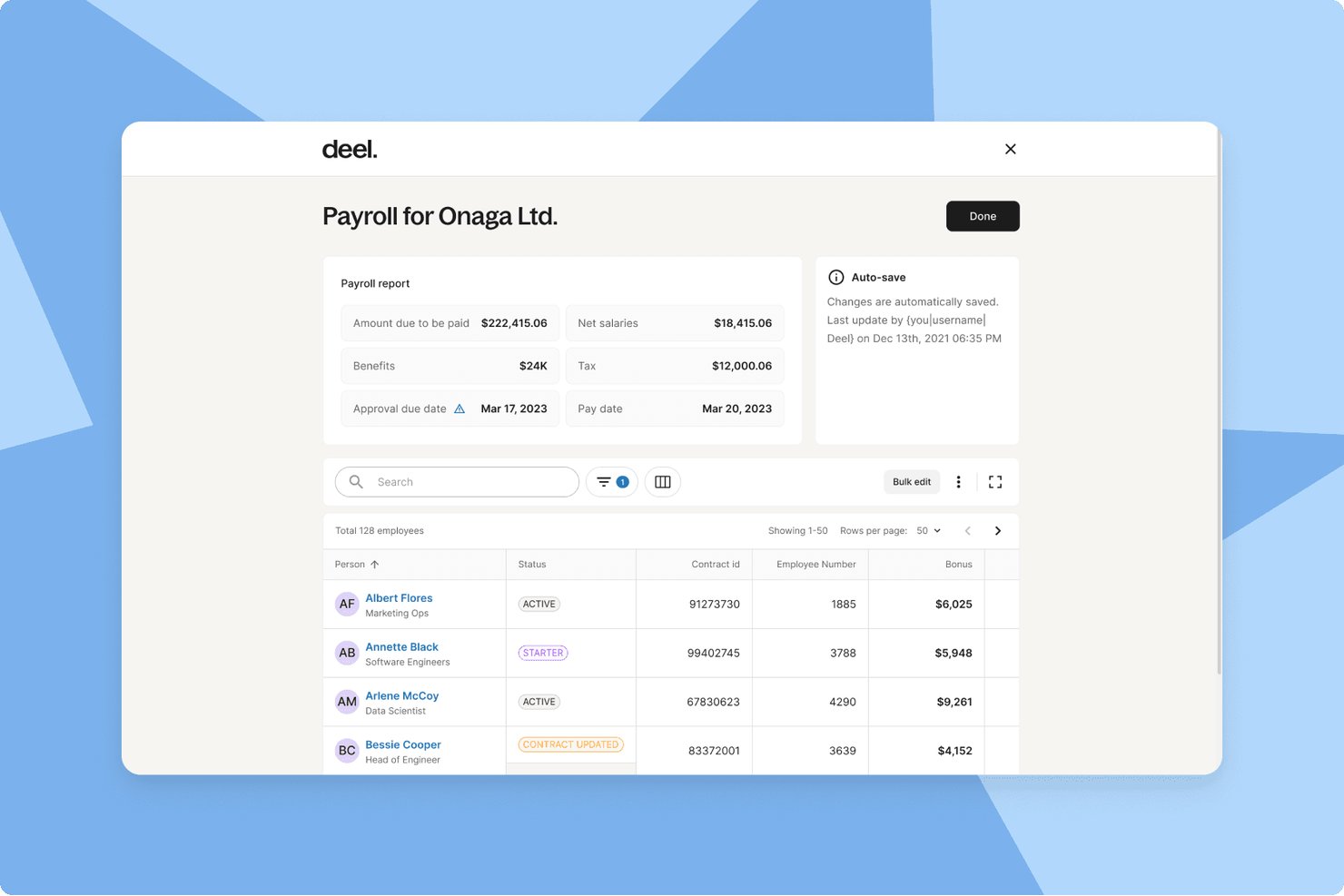
Deel Payroll è una piattaforma globale per l'elaborazione delle buste paga che gestisce pagamenti in più valute, invii fiscali automatizzati, gestione dei collaboratori e conformità normativa in oltre 130 paesi da un'unica dashboard.
A chi è più adatto Deel Payroll?
Deel Payroll è una soluzione particolarmente adatta a startup e aziende in crescita che pagano dipendenti o collaboratori in più paesi e in valute diverse.
Perché ho scelto Deel Payroll
Deel Payroll si è guadagnato un posto nel mio elenco ristretto perché gestisce un aspetto che la maggior parte degli strumenti per le buste paga semplicemente non offre: pagare i lavoratori in oltre 120 valute senza richiedere bonifici manuali o strumenti separati per il cambio valuta. Apprezzo in particolare il fatto che i suoi oltre 55 motori nativi per l'elaborazione delle buste paga gestiscano automaticamente gli invii fiscali e le detrazioni previste dalla legge, indipendentemente dal luogo in cui si trova il tuo team. Se gestisci un unico ciclo paghe che include un collaboratore in Brasile e un dipendente con stipendio in Germania, Deel mantiene entrambi conformi alle normative.
Funzionalità principali di Deel Payroll
- Portale self-service per i dipendenti: Consente a dipendenti e collaboratori di accedere online a cedolini, moduli fiscali e dati bancari.
- Funzionalità HRIS: Centralizza i dati dei dipendenti, gli organigrammi e la gestione dei documenti insieme alle buste paga.
- Aggiornamenti automatizzati sulla conformità: Aggiorna continuamente contratti, tariffe salariali e flussi di lavoro in base alle leggi locali sul lavoro vigenti in oltre 130 paesi.
- Analisi e reportistica delle buste paga: Offre dashboard integrate e report esportabili su buste paga, imposte e costi della forza lavoro.
Integrazioni di Deel Payroll
Deel Payroll offre integrazioni native con QuickBooks, Xero, NetSuite, BambooHR e Greenhouse, oltre a un'API per integrazioni personalizzate.
Pros and Cons
Pros:
- Paga automaticamente i lavoratori in oltre 120 valute
- Gestisce insieme le buste paga di collaboratori e dipendenti
- Strumenti di conformità integrati in oltre 150 paesi
Cons:
- Configurazione complessa per piccoli team che operano esclusivamente a livello nazionale
- Eccessivo per le esigenze di elaborazione delle buste paga in un solo paese

Homebase
Ideale per la pianificazione dei turni
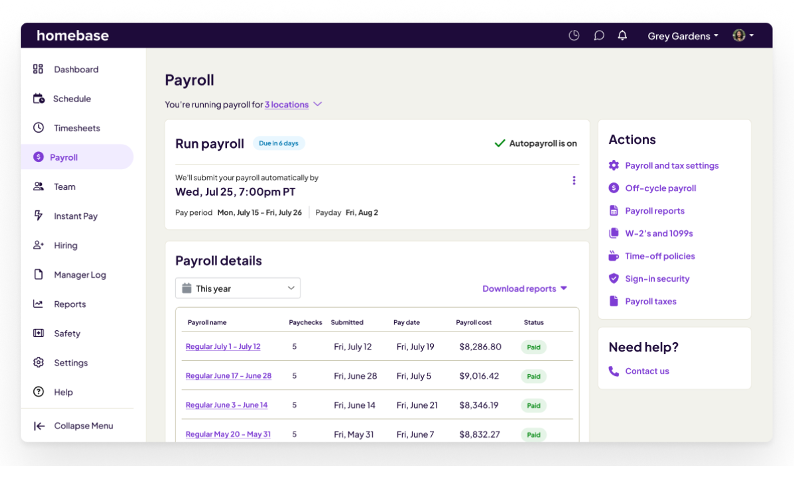
Homebase è uno strumento di gestione della forza lavoro progettato per le piccole imprese, con un focus sulla pianificazione dei turni e il monitoraggio delle presenze. Serve le aziende che necessitano di una gestione efficiente dei lavoratori orari e della pianificazione dei turni.
Perché ho scelto Homebase: Lo strumento offre un'ampia pianificazione dei turni, rendendolo ideale per le aziende con esigenze di pianificazione complesse. Fornisce funzionalità come il monitoraggio delle presenze e strumenti di comunicazione tra i dipendenti, essenziali per la gestione dei lavoratori orari. Homebase consente inoltre di gestire i costi del lavoro tenendo traccia delle ore lavorate e degli straordinari. Il suo focus sulla pianificazione e gestione del tempo lo rende un valido strumento per le aziende che necessitano di un controllo preciso dei turni.
Funzionalità distintive e integrazioni:
Funzionalità includono il monitoraggio delle presenze, che ti aiuta a controllare con precisione le ore dei dipendenti. La piattaforma offre anche la gestione dei costi del lavoro, consentendo di monitorare le spese relative ai turni dei dipendenti. Inoltre, Homebase mette a disposizione strumenti di comunicazione tra i dipendenti, permettendo al tuo team di rimanere connesso e informato.
Integrazioni includono QuickBooks, Square, Gusto, ADP, Shopify, Clover POS, Toast POS, Lightspeed, Square, Paychex e altri.
Pros and Cons
Pros:
- Pianificazione dei turni ed elaborazione delle presenze efficace
- Gestione dei costi del lavoro
- Strumenti di comunicazione tra dipendenti
Cons:
- Limitato ai lavoratori orari
- Nessuna funzionalità HR avanzata
Ideale per pacchetti paghe personalizzabili
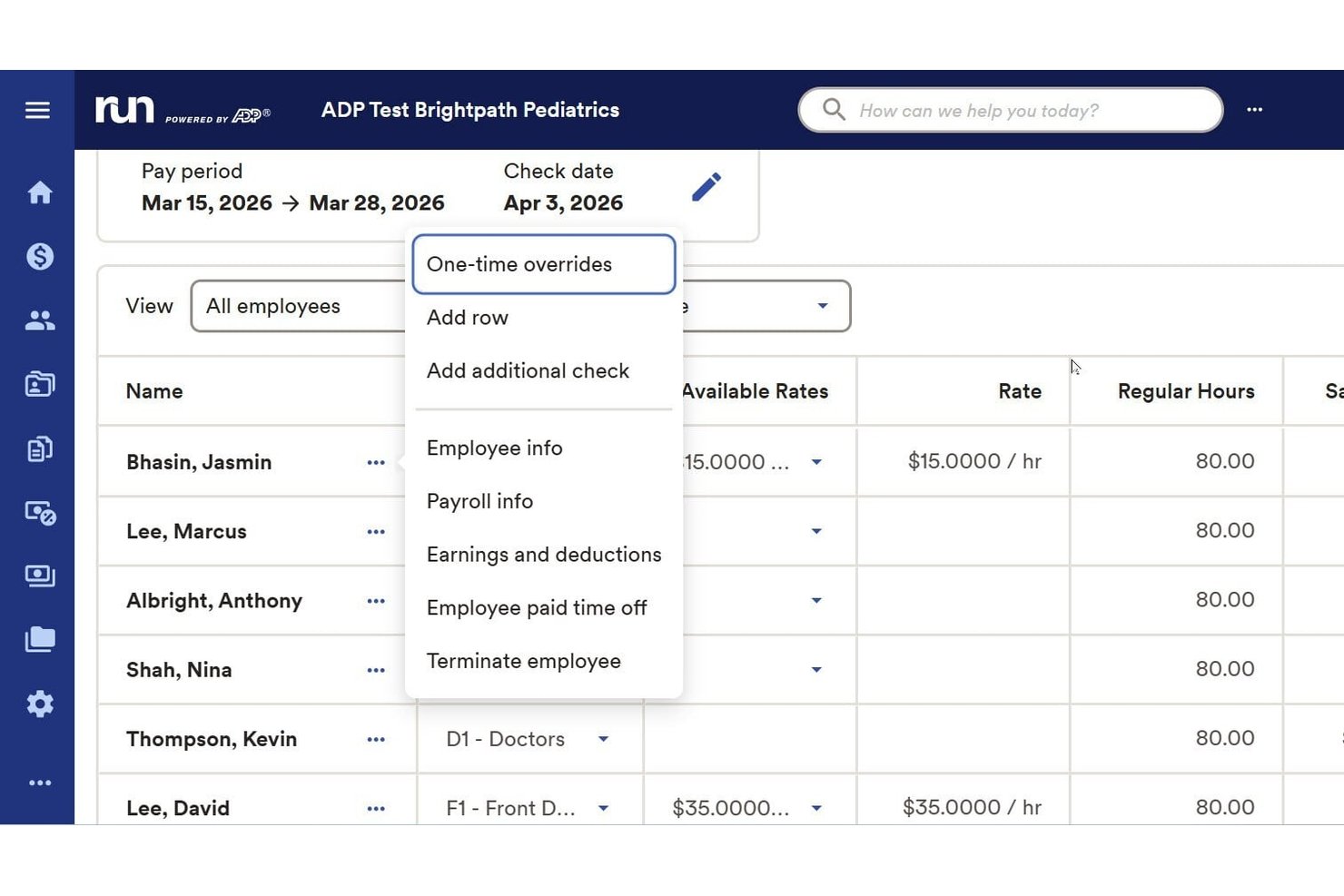
RUN Powered by ADP è una piattaforma software per la gestione delle buste paga progettata per le piccole imprese che semplifica l'elaborazione ricorrente delle buste paga, gestisce la presentazione delle tasse, si occupa dei pagamenti a dipendenti e collaboratori e supporta i requisiti normativi e di benefit.
Per chi è ideale RUN Powered by ADP?
Titolari di piccole imprese e team HR che cercano una soluzione completa per la gestione delle buste paga con impostazioni flessibili e supporto sia per dipendenti che per collaboratori esterni.
Perché ho scelto RUN Powered by ADP
Ho scelto RUN Powered by ADP tra i migliori perché consente di personalizzare i pacchetti paghe sulle esigenze aziendali specifiche, inclusi prelievi avanzati e pignoramenti. La piattaforma si adatta ai cambiamenti delle necessità di personale, consentendo al mio team di gestire facilmente lavoratori a ore, a stipendio fisso e collaboratori.
Funzionalità principali di RUN Powered by ADP
- Gestione automatica delle tasse sulle buste paga: La piattaforma calcola, presenta e paga in modo automatico le imposte sui salari federali, statali e locali.
- Portale self-service per i dipendenti: I dipendenti possono accedere a cedolini, moduli fiscali e aggiornare le informazioni personali online.
- Gestione mobile delle buste paga: È possibile elaborare le paghe e gestire i dati dei dipendenti tramite un'app mobile dedicata.
- Gestione della conformità in più giurisdizioni: Aggiornamento costante con le leggi sul lavoro e le aliquote fiscali in vari stati.
Integrazioni RUN Powered by ADP
RUN Powered by ADP offre integrazioni native con QuickBooks, Xero, Wave, When I Work e Slack. È disponibile un'API per integrazioni personalizzate.
Pros and Cons
Pros:
- Gestisce le buste paga sia per dipendenti che per collaboratori
- Include gestione integrata delle tasse e dei report
- Supporta la conformità in più stati per le piccole imprese
Cons:
- Esperienze di assistenza clienti non sempre coerenti
- Alcuni utenti riscontrano costi di elaborazione imprevisti
Ideale per l'integrazione con i sistemi di pagamento
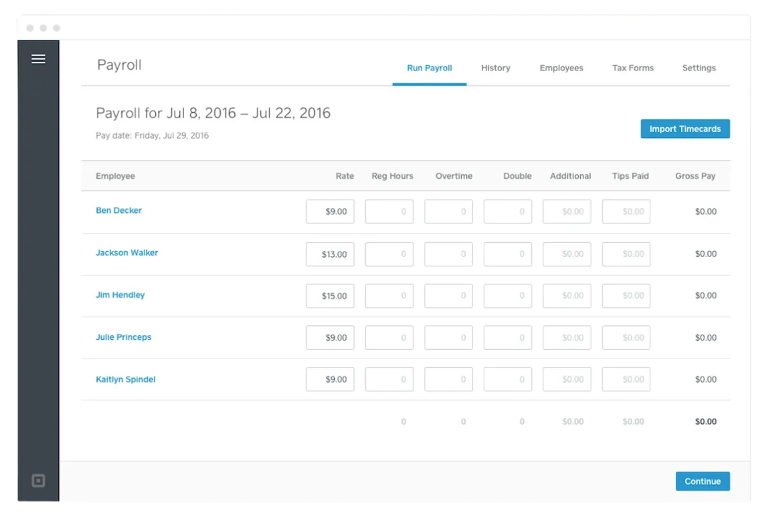
Square Payroll è un servizio online di gestione delle paghe progettato per le piccole imprese, che offre elaborazione delle buste paga e supporto per la conformità normativa. Si rivolge alle attività che necessitano di una gestione semplice delle paghe e integrazione con i sistemi di pagamento.
Perché ho scelto Square Payroll: Lo strumento si integra con i sistemi di pagamento di Square, rendendolo perfetto per le aziende che già utilizzano Square per le transazioni. Supporta il calcolo e l'invio automatico delle tasse sul libro paga, riducendo le attività manuali per il tuo team. Square Payroll offre anche la gestione dei benefit, compresi assicurazione sanitaria e piani pensionistici, aggiungendo valore per le aziende che desiderano offrire benefici completi ai dipendenti. Questa integrazione con l'elaborazione dei pagamenti distingue Square Payroll da altre soluzioni per le paghe.
Funzionalità principali e integrazioni:
Funzionalità includono il calcolo automatico delle tasse sul libro paga, che mantiene la tua attività conforme alle normative fiscali. La piattaforma offre anche opzioni di gestione dei benefit, consentendoti di proporre ai tuoi dipendenti assicurazione sanitaria e piani pensionistici. Inoltre, Square Payroll supporta sia i dipendenti W-2 sia i collaboratori 1099, offrendoti flessibilità nella gestione di diversi tipi di lavoratori.
Integrazioni includono QuickBooks, Xero, FreshBooks, Homebase, Deputy, When I Work, TSheets, Zapier e altro ancora.
Pros and Cons
Pros:
- Supporta sia dipendenti regolari che collaboratori indipendenti
- Calcolo automatico delle tasse
- Gestione dei benefit inclusa
Cons:
- Limitato alle aziende U.S.A.
- Richiede un account Square per le funzionalità complete

Wave
Ideale per liberi professionisti
Wave è un servizio online pensato per piccole imprese e liberi professionisti, che offre elaborazione delle buste paga e gestione delle tasse. Si rivolge a individui e piccoli team che necessitano di un modo efficiente per gestire le buste paga e rimanere conformi alle normative fiscali.
Perché ho scelto Wave: Questo strumento è particolarmente adatto ai liberi professionisti che hanno bisogno di una gestione delle buste paga semplice. Offre il calcolo e l'invio automatico delle imposte sui salari per ridurre il carico amministrativo. Wave mette inoltre a disposizione funzionalità di bonifico diretto e un portale self-service per i dipendenti, rendendo semplici pagamenti e accesso alle informazioni. Il suo focus sulla facilità d’uso e sulle funzionalità essenziali lo rende un’ottima scelta per i freelance che devono gestire le proprie buste paga.
Funzionalità eccezionali e integrazioni:
Funzionalità includono il calcolo automatico delle tasse e l'invio delle dichiarazioni fiscali, garantendo la conformità alle normative vigenti. La piattaforma offre bonifici diretti per pagare te e il tuo team. Wave offre anche il portale self-service per i dipendenti, consentendo loro di accedere online a cedolini paga e modelli fiscali.
Integrazioni includono Xero, ADP e altro ancora.
Pros and Cons
Pros:
- Ideale per freelance e piccoli team
- Opzioni di bonifico diretto
- Portale self-service per i dipendenti
Cons:
- Capacità di reportistica di base
- Funzionalità avanzate limitate
Paychex
Ideale per paghe scalabili
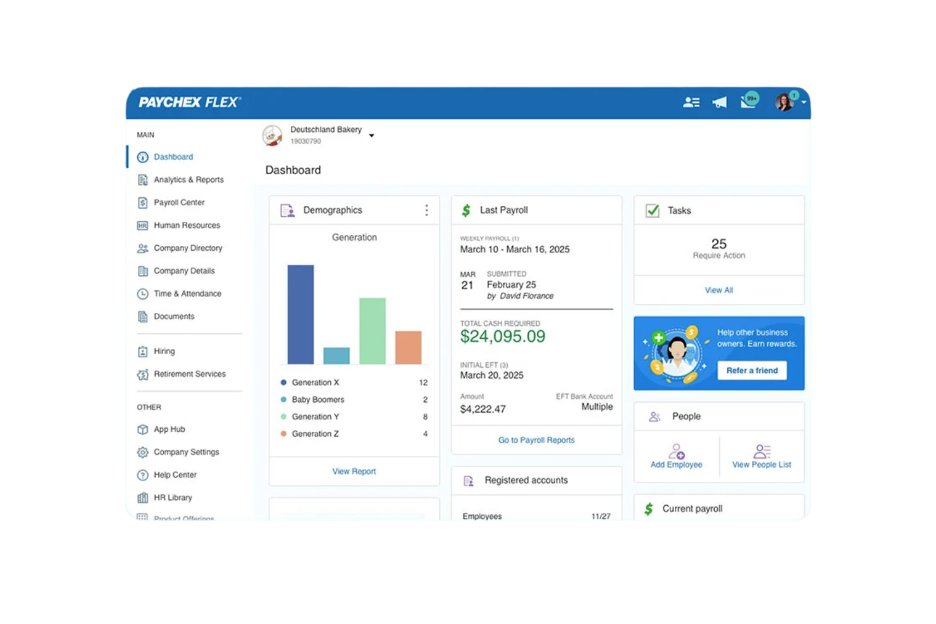
Paychex offre un servizio di gestione paghe progettato per piccole e medie imprese che necessitano di una soluzione scalabile. Gestisce l'elaborazione delle paghe, la conformità fiscale e il supporto HR, rendendolo adatto alle aziende che prevedono una crescita.
Perché ho scelto Paychex: Lo strumento è ideale per le aziende che intendono espandersi e hanno bisogno di una soluzione paghe scalabile. Offre opzioni flessibili di elaborazione delle paghe, permettendo di gestire le retribuzioni secondo le proprie tempistiche. Paychex offre anche supporto HR, un valore aggiunto per le aziende in crescita che necessitano di risorse aggiuntive. La sua scalabilità consente di adeguare il sistema paghe man mano che l'azienda cresce.
Caratteristiche e integrazioni principali:
Caratteristiche includono l'amministrazione delle imposte sui salari, che aiuta a rimanere conformi alle normative fiscali. La funzionalità di self-service per i dipendenti consente al personale di accedere facilmente alle proprie informazioni salariali e ai benefici. Paychex offre anche un'app mobile, così puoi gestire le paghe ovunque tu sia.
Integrazioni includono QuickBooks, Xero, Sage Intacct, Microsoft Dynamics, NetSuite, BambooHR, Salesforce, Indeed e altri.
Pros and Cons
Pros:
- Scalabile per aziende in crescita
- Opzioni self-service per i dipendenti
- App mobile per la gestione delle paghe
Cons:
- Opzioni di personalizzazione limitate
- Costi aggiuntivi per accessori

Ideale per le piccole imprese
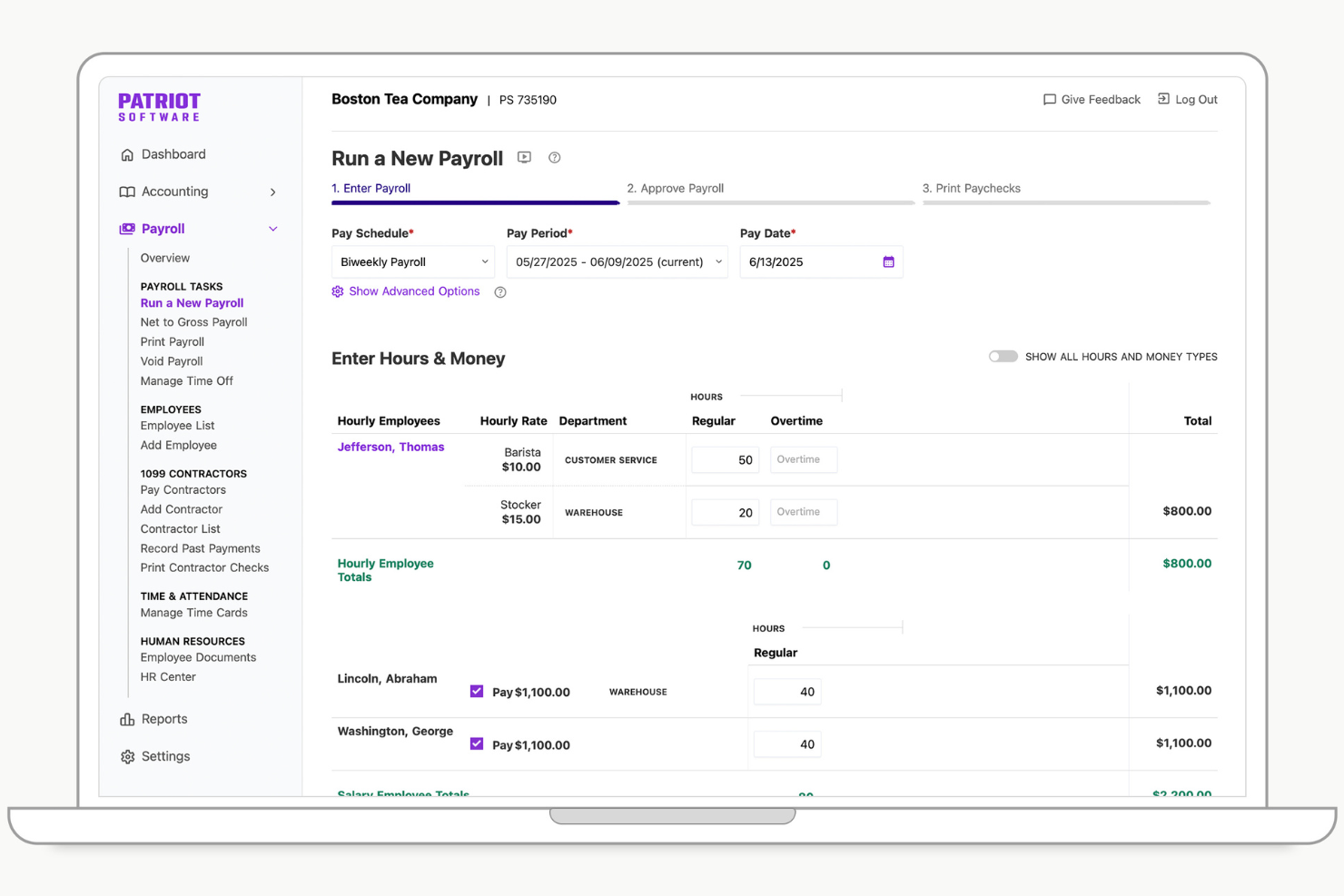
Patriot Software offre una soluzione per le paghe pensata per le piccole imprese, fornendo opzioni di personalizzazione e processi automatizzati. Solitamente si rivolge a titolari e responsabili di piccole aziende, gestendo in modo efficiente i calcoli delle buste paga e le dichiarazioni fiscali.
Perché ho scelto Patriot Software: Questo strumento è stato progettato pensando alle piccole imprese, offrendo funzionalità come esecuzioni illimitate delle paghe e supporto iniziale nell'installazione. Semplifica la gestione delle buste paga attraverso calcoli fiscali accurati e consente un accesso sicuro alle informazioni salariali tramite un portale dipendenti gratuito. L'integrazione di benefit sanitari e dell'assicurazione contro gli infortuni sul lavoro aggiunge valore per le piccole aziende che vogliono gestire benefit aggiuntivi per i dipendenti. Queste caratteristiche rendono Patriot Software un software paghe pratico per chi desidera semplificare i propri processi payroll.
Funzionalità principali e integrazioni:
Funzionalità includono opzioni personalizzabili che permettono di adattare le impostazioni delle buste paga alle esigenze della tua azienda. I processi automatizzati permettono di risparmiare tempo gestendo calcoli e dichiarazioni fiscali. Il prodotto consente anche di gestire benefit per i dipendenti e l'assicurazione contro gli infortuni. Il portale dipendenti gratuito offre un accesso sicuro ai dati retributivi.
Integrazioni includono Vestwell, SimplyInsured, NEXT, QuickBooks, TSheets e altri ancora.
Pros and Cons
Pros:
- Esecuzioni illimitate delle buste paga
- Calcoli fiscali accurati
- Portale dipendenti gratuito
Cons:
- Nessun supporto per il modulo IRS 943 (per i lavoratori agricoli)
- Reportistica personalizzata limitata

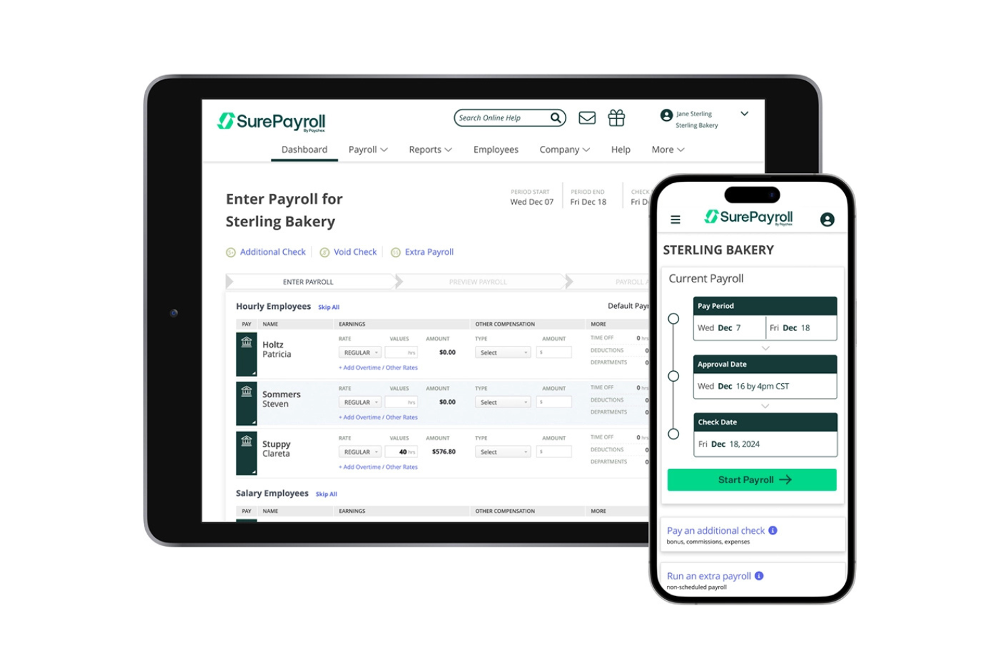
SurePayroll è un servizio di gestione paghe online pensato per le piccole imprese, in particolare per chi gestisce lavoratori domestici come tate e badanti. Offre gestione delle buste paga, dichiarazione dei redditi e supporto per la conformità normativa, facilitando la gestione delle paghe domestiche.
Perché ho scelto SurePayroll: Questo strumento semplifica il processo di gestione delle paghe per i datori di lavoro domestico occupandosi facilmente delle dichiarazioni fiscali e della conformità normativa. La pianificazione automatica delle buste paga e il bonifico diretto gratuito riducono il lavoro manuale. SurePayroll offre esecuzione illimitata delle buste paga, così puoi elaborare i pagamenti tutte le volte che serve senza costi aggiuntivi. La sua specializzazione nelle esigenze domestiche lo rende una scelta pratica per provider che gestiscono pagamenti a collaboratori domestici e lavoratori autonomi.
Funzionalità principali e integrazioni:
Funzionalità comprendono la pianificazione automatica delle paghe, per garantire pagamenti puntuali ai tuoi collaboratori domestici. Il bonifico diretto gratuito offre un'opzione comoda per trasferire gli stipendi direttamente sui conti bancari il giorno di paga. Con esecuzioni illimitate delle paghe, puoi elaborarle tutte le volte che serve senza costi extra.
Le integrazioni includono QuickBooks, Xero, FreshBooks, Sage 50, Paychex e altri.
Pros and Cons
Pros:
- Specializzato per datori di lavoro domestico
- Esecuzione illimitata delle paghe
- Bonifico diretto gratuito
Cons:
- Nessuna app mobile
- Nessun supporto paghe multi-stato

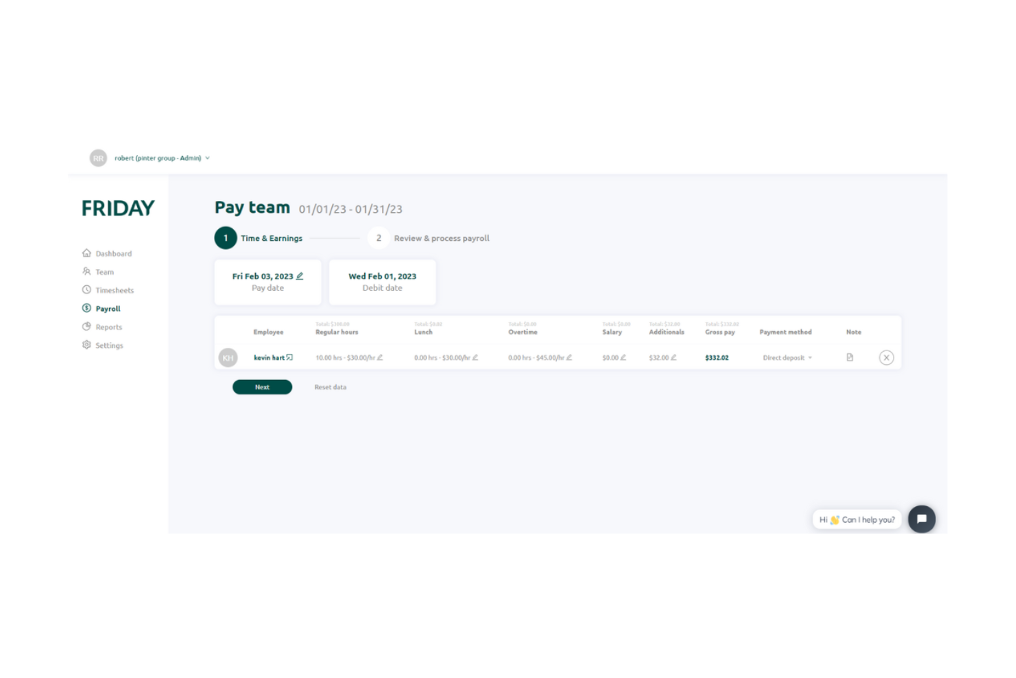
FRIDAY è uno strumento per la gestione delle buste paga e la comunicazione all’interno del team, progettato per le piccole imprese. Offre un’interfaccia intuitiva e un'elaborazione efficiente delle buste paga. Serve aziende da uno a 100 dipendenti, migliorando la gestione delle retribuzioni e facilitando le interazioni tra i membri del team.
Perché ho scelto FRIDAY: Lo strumento pone l’accento sulla comunicazione all’interno dei team, offrendo strumenti di collaborazione integrati. Include il monitoraggio in tempo reale delle ore di lavoro dei dipendenti e un sistema di gestione delle richieste di permesso. L’app intelligente per il rilevamento delle presenze tramite chiosco consente di tracciare in modo preciso il tempo di lavoro del personale, una funzione utile per una gestione efficace del team. Le funzionalità di comunicazione rendono FRIDAY prezioso per le piccole aziende che desiderano mantenere i propri gruppi sempre connessi.
Caratteristiche distintive e integrazioni:
Caratteristiche includono il monitoraggio in tempo reale delle ore lavorative dei dipendenti, permettendo al tuo team di registrare con precisione le ore svolte. La piattaforma gestisce anche le richieste di permessi e le ferie, offrendo un sistema snello per tenere sotto controllo le assenze. Inoltre, FRIDAY garantisce un ambiente sicuro grazie alla crittografia end-to-end per proteggere i dati della tua azienda.
Integrazioni includono QuickBooks, QuickBooks Desktop, Xero, Slack, Trello, Asana, Zapier, Microsoft Teams, Google Workspace e altri ancora.
Pros and Cons
Pros:
- Migliora la comunicazione tra i membri del team
- Monitoraggio in tempo reale
- Sicurezza con crittografia end-to-end
Cons:
- Destinato solo alle piccole imprese
- Opzioni di personalizzazione limitate
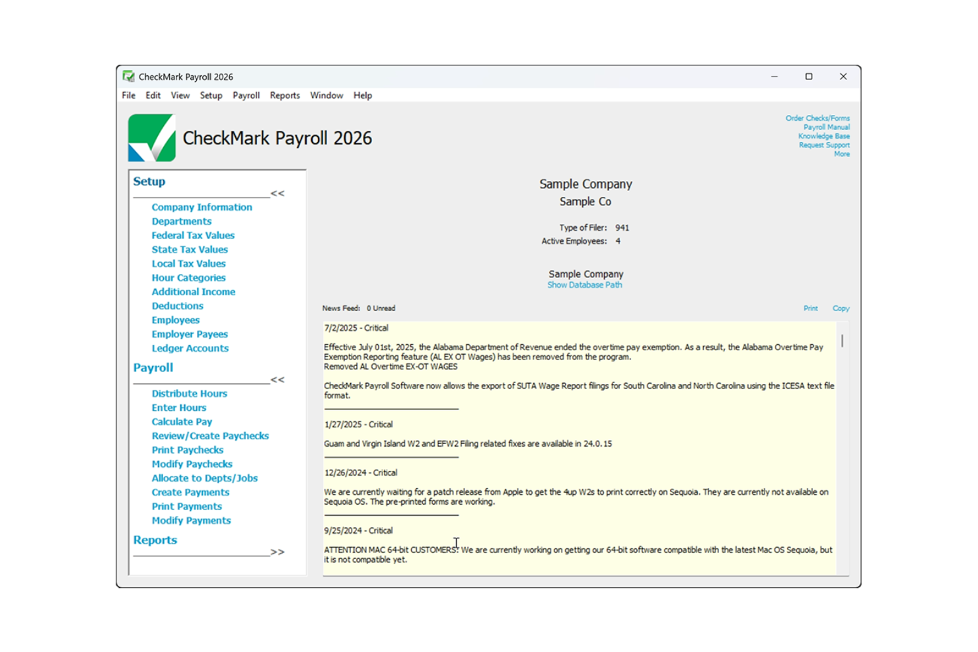
CheckMark Payroll è una soluzione software per la gestione delle paghe progettata per piccole e medie imprese che offre funzionalità offline e un'elaborazione paghe completa. È ideale per aziende che necessitano di gestire le paghe senza affidarsi esclusivamente alla connessione internet.
Perché ho scelto CheckMark Payroll: Questo strumento offre funzionalità offline, consentendo di gestire le paghe anche senza una connessione internet. Fornisce l'elaborazione paghe multi-stato, fondamentale per le aziende che operano in più stati. CheckMark Payroll include funzionalità come report paghe personalizzabili e assistenza per la compilazione delle tasse. La sua capacità offline lo rende una scelta pratica per le imprese che si trovano in aree con connettività instabile.
Funzionalità e integrazioni principali:
Funzionalità includono report paghe personalizzabili che permettono di adattare le informazioni alle esigenze aziendali. Il software offre assistenza per la compilazione delle tasse, aiutando a rimanere in regola con le normative federali e statali. Inoltre, CheckMark Payroll supporta il deposito diretto, offrendo una soluzione paghe semplice.
Integrazioni includono QuickBooks, Sage 50, AccountEdge, MYOB, Xero, ADP e altro ancora.
Pros and Cons
Pros:
- Funzionalità offline disponibile
- Elaborazione paghe multi-stato
- Report paghe personalizzabili
Cons:
- Nessuna app mobile disponibile
- Orari limitati per il supporto clienti
Altri software semplici per la gestione delle buste paga
Ecco alcune altre opzioni di software semplici per la gestione delle buste paga che non sono entrate nel mio elenco, ma che vale comunque la pena prendere in considerazione:
- Payroll People
Ideale per soluzioni su misura
- Keka HR
Ideale per collegare le ore di progetto alle paghe
- QuickBooks Online
Ideale per integrazione contabile
- Gusto
Ideale per la gestione integrata dei benefit
- OnPay
Ideale per le aziende agricole


Come Valuto il Software di Gestione Paghe Semplice
Affronto questa valutazione su due livelli: criteri di base che ogni strumento deve rispettare e fattori distintivi che contano per un office manager che gestisce le paghe da solo o per un founder che paga il suo primo gruppo di collaboratori.
Funzionalità Principali (Requisiti Minimi per Questa Lista)
Quando seleziono gli strumenti per la mia lista, valuto ciascuno su una scala da 0 (non offre la funzionalità) a 5 (eccelle in quest'area) per ogni funzionalità principale elencata di seguito. Successivamente calcolo il punteggio totale dello strumento in percentuale. Ogni strumento deve raggiungere un punteggio totale minimo del 65% per essere considerato per l'inclusione.
- Elaborazione Paghe Automatica: Cerco strumenti che gestiscano i calcoli dal lordo al netto sia per lavoratori a salario che a ore su cicli di pagamento standard senza richiedere calcoli manuali ad ogni ciclo.
- Gestione Fiscale & Conformità: Ogni strumento dovrebbe calcolare, trattenere e presentare le imposte sui salari a livello federale, statale e locale—coprendo tutto dalle dichiarazioni trimestrali alla generazione di W-2 e 1099 a fine anno.
- Pagamenti con Bonifico Diretto: La velocità di accredito è importante, quindi verifico se il bonifico diretto è standard o comporta un costo extra e se sono disponibili opzioni più veloci come accredito il giorno dopo o nello stesso giorno.
- Portale Self-Service per Dipendenti: I lavoratori dovrebbero poter visualizzare autonomamente le proprie buste paga e documenti fiscali senza dover contattare le risorse umane—ad esempio poter scaricare una W-2 in fase di dichiarazione senza doverla richiedere.
- Supporto a Collaboratori & Dipendenti (W-2): Valuto se la piattaforma gestisce entrambi i tipi di lavoratori in un unico flusso o li separa in moduli diversi, poiché molte piccole imprese pagano sia personale a tempo pieno che freelance.
- Configurazione Guidata & Interfaccia Semplice: Un contabile che passa dai fogli di calcolo dovrebbe essere in grado di configurare il sistema ed elaborare il primo stipendio senza chiamare l’assistenza, quindi valuto i wizard di onboarding, le opzioni di importazione dati e la chiarezza generale del flusso di lavoro.
Una volta individuati gli strumenti che soddisfano questi criteri, considero cosa distingue ogni piattaforma.
Fattori Distintivi (Cosa Distingue i Fornitori)
Ecco come confronto e metto in contrasto i diversi fornitori:
Funzionalità Distintive
La rilevazione delle presenze integrata è essenziale—quando le ore dei dipendenti a ore confluiscono direttamente nel payroll, si evita uno strato intero di inserimento dati manuale e importazioni soggette a errori. Controllo anche la sincronizzazione nativa con la contabilità, soprattutto connessioni bidirezionali con strumenti come QuickBooks o Xero che registrano automaticamente le scritture contabili. Per i team distribuiti su più stati, il supporto al payroll multi-stato risolve vere complicazioni gestendo reciprocità e requisiti fiscali locali in background.
Oltre le Funzionalità
La trasparenza dei prezzi è molto importante. Cerco piani chiari con prezzo base più un costo per dipendente senza costi nascosti per adempimenti fiscali o moduli di fine anno—le piccole imprese hanno bisogno di costi prevedibili. Il supporto clienti è un altro fattore che considero attentamente, perché per chi gestisce le paghe per la prima volta avere accesso diretto a uno specialista è fondamentale rispetto al dover cercare in una guida online. Controllo anche se il fornitore offre una garanzia di accuratezza sui calcoli fiscali che includa la copertura di eventuali sanzioni in caso di errore di dichiarazione causato dal sistema.
Come scegliere un software semplice per la gestione delle buste paga
È facile perdersi in lunghi elenchi di funzionalità e strutture tariffarie complesse, soprattutto quando si confrontano diversi tipi di software per la gestione delle buste paga. Per aiutarti a rimanere concentrato mentre porti avanti la tua selezione del software per la gestione delle buste paga, ecco una lista di fattori da tenere a mente:
| Fattore | Cosa considerare |
| Scalabilità | Considera se il software può crescere insieme alla tua attività. Sarà in grado di gestire un numero crescente di dipendenti e necessità di gestione delle paghe più complesse? Cerca prezzi o funzionalità a livelli. |
| Integrazioni | Verifica se il software si integra con gli strumenti che già utilizzi, come i sistemi contabili o per le risorse umane. La mancanza di integrazione può comportare l'inserimento manuale dei dati e degli errori. |
| Personalizzazione | Valuta quanto puoi adattare il software al tuo flusso di lavoro. Puoi personalizzare report e pannelli di controllo? Questa flessibilità può farti risparmiare tempo. |
| Facilità d'uso | Determina se il software è intuitivo per il tuo team. Una curva di apprendimento ripida potrebbe richiedere più formazione e supporto, soprattutto per i nuovi assunti. |
| Implementazione e inserimento | Valuta il tempo e le risorse necessari per la configurazione. Il fornitore offre supporto o risorse, come guide, per facilitare la transizione? |
| Costo | Confronta i piani tariffari e ciò che includono. Ci sono costi nascosti? Assicurati che il costo sia in linea con il tuo budget e offra un buon rapporto qualità-prezzo. |
| Misure di sicurezza | Valuta le misure di sicurezza del software. Protegge i dati sensibili dei dipendenti? Cerca funzionalità come la crittografia e l'autenticazione a più fattori. |
Che cos'è un software semplice per la gestione delle paghe?
Un software semplice per la gestione delle paghe è uno strumento progettato per automatizzare e gestire in modo efficiente i processi di elaborazione delle paghe dei dipendenti. Viene generalmente utilizzato da professionisti delle risorse umane, titolari di piccole imprese e commercialisti che devono gestire le attività relative alle paghe senza troppe difficoltà.
Funzionalità come il calcolo automatico delle imposte, l'accredito diretto, i portali di autogestione per i dipendenti e la gestione integrata delle paghe e delle presenze aiutano a ridurre gli errori, risparmiando tempo e migliorando l'accuratezza delle paghe. Nel complesso, questi strumenti offrono un modo semplice per gestire le paghe, garantendo la conformità e liberando tempo per altre attività aziendali.
Funzionalità
Quando selezioni una piattaforma semplice e completa, presta attenzione alle seguenti funzionalità principali dei software per la gestione delle paghe:
- Calcolo e presentazione automatica delle imposte: Garantisce la conformità alle normative fiscali nazionali e regionali calcolando e presentando automaticamente le imposte sulle paghe, riducendo il rischio di errori e sanzioni al momento della dichiarazione dei redditi.
- Accredito diretto: Consente ai dipendenti di ricevere gli stipendi tramite accredito diretto, risparmiando tempo e riducendo la complicazione degli assegni cartacei.
- Portale di autogestione per i dipendenti: Fornisce ai dipendenti l'accesso ai cedolini, ai moduli fiscali e alle informazioni personali, consentendo loro di gestire autonomamente i propri dati.
- Report personalizzabili: Offre la possibilità di generare report su misura, fornendo informazioni sui dati delle paghe e agevolando l'analisi finanziaria.
- Integrazione del rilevamento delle presenze: Registra le ore dei dipendenti senza interruzioni, garantendo un'elaborazione accurata delle paghe e contribuendo alla gestione dei costi del lavoro.
- Accesso tramite app mobile: Consente di accedere agli strumenti online per la gestione delle paghe da smartphone o tablet, rendendo più semplice gestire le paghe anche in mobilità.
- Gestione della conformità: Mantiene il software aggiornato con le più recenti leggi e normative sul lavoro, assicurando che la gestione delle paghe sia sempre conforme alla legge.
- Integrazione con i sistemi contabili: Sincronizza il software con i programmi di contabilità per garantire che i dati finanziari siano accurati e aggiornati, riducendo l'inserimento manuale dei dati.
- Gestione dei benefici: Gestisce i benefici dei dipendenti, come l'assicurazione sanitaria e i piani pensionistici, offrendo una visione completa della retribuzione dei dipendenti.
- Assistenza clienti: Fornisce accesso a supporto e indicazioni quando necessario, garantendo che eventuali problemi relativi alle paghe vengano risolti rapidamente ed efficacemente.
Vantaggi
L'implementazione di un software semplice per la gestione delle paghe offre diversi vantaggi al tuo team e alla tua azienda. Eccone alcuni di cui potrai beneficiare:
- Risparmio di tempo: Automatizzare le attività relative alle buste paga, come i calcoli fiscali e i depositi diretti, consente di risparmiare ore di lavoro manuale a ogni periodo di paga.
- Riduzione degli errori: I calcoli automatici e gli aggiornamenti sulla conformità contribuiscono a ridurre al minimo gli errori, garantendo buste paga accurate ed evitando sanzioni costose.
- Maggiore conformità: Il software tiene traccia dei requisiti legali, aiutandoti a rispettare le normative fiscali e del lavoro senza sforzi aggiuntivi.
- Maggiore autonomia per i dipendenti: I portali self-service consentono ai dipendenti di accedere alle proprie informazioni retributive, riducendo le richieste amministrative e permettendo loro di gestire i propri dati.
- Efficienza dei costi: Ridurre i processi manuali e gli errori può diminuire i costi amministrativi e migliorare l'efficienza finanziaria complessiva.
- Sicurezza dei dati: I sistemi sicuri proteggono i dati sensibili relativi alle buste paga, garantendo che le informazioni sui dipendenti e sull'azienda rimangano riservate.
- Scalabilità: Il software giusto può adattarsi alla gestione di un numero maggiore di dipendenti e di esigenze retributive più complesse man mano che l'azienda cresce, sostenendo l'espansione senza interruzioni.
Costi e prezzi
La scelta di un software semplice per la gestione delle buste paga richiede la comprensione dei diversi modelli e piani tariffari disponibili. I costi variano in base alle funzionalità, alle dimensioni del team, agli strumenti aggiuntivi e ad altri fattori. La tabella seguente riassume i piani più comuni, i relativi prezzi medi e le funzionalità tipicamente incluse nelle soluzioni software semplici per la gestione delle buste paga:
Tabella comparativa dei piani per software semplici per la gestione delle buste paga
| Tipo di piano | Prezzo medio | Funzionalità comuni |
| Piano gratuito | $0 | Elaborazione di base delle buste paga, portale self-service per i dipendenti e deposito diretto. |
| Piano personale | $5-$25/utente/mese | Calcoli fiscali automatici, deposito diretto, self-service per i dipendenti e reportistica di base. |
| Piano aziendale | $25-$50/utente/mese | Reportistica avanzata, gestione della conformità, gestione dei benefit e integrazione del monitoraggio delle ore. |
| Piano aziendale avanzato | $50-$100/utente/mese | Report personalizzabili, assistenza dedicata per l'account, funzionalità di sicurezza avanzate e integrazione completa con le risorse umane. |