

10 beste programmer for tilbakemeldinger fra ansatte i 2026

10 Kortliste over den beste programvaren for medarbeidertilbakemeldinger


Med så mange ulike programmer for medarbeidertilbakemeldinger kan det være vanskelig å finne ut hvilket som passer for deg. Du vet at du ønsker å samle inn og analysere tilbakemeldinger effektivt for å avdekke trender og forbedringsområder, men du må finne ut hvilket verktøy som er best. I dette innlegget hjelper jeg deg med å gjøre valget enklere ved å dele mine innsikter om den beste programvaren for medarbeidertilbakemeldinger for innsamling og analyse av svar, basert på min personlige erfaring innen HR.
Hva er programvare for medarbeidertilbakemeldinger?
Programvareløsninger for medarbeidertilbakemeldinger er digitale verktøy som hjelper deg med å samle inn og analysere tilbakemeldinger fra medarbeiderne dine og trekke ut innsikt fra dem. De lar deg måle medarbeiderengasjement, tilfredshet og utvikling over tid ved å avdekke trender i tilbakemeldingene og følge med på medarbeidernes holdninger. Disse avanserte undersøkelsesverktøyene støtter også anonym innsamling av tilbakemeldinger, slik at organisasjoner kan få ærlige tilbakemeldinger fra medarbeiderne uten at de frykter negative konsekvenser.
Bruk av programvare for medarbeidertilbakemeldinger kan forbedre medarbeiderengasjementet, medarbeiderbeholdningen og tilfredshetsnivået ved å gi medarbeiderne en stemme og fremme en åpen dialog i organisasjonen. Verktøyene kan også hjelpe deg med å identifisere organisatoriske svakheter for fremtidige forbedringer og ta bedre datadrevne beslutninger.
Why Trust Our Software Recommendations
Our team has been testing and reviewing software since 2012. As HR experts ourselves, we know how difficult—and important—it is to choose the right software.
For this guide, we evaluated tools using hands-on testing and independent research, scoring tools using our selection criteria. We also draw on insights from industry thought leaders and practicing HR experts.
Our reviews reflect our human editorial judgment, not a sales pitch.
Expert reviewers:
Sammenligningstabell for programvare for tilbakemeldinger fra ansatte
Denne sammenligningstabellen oppsummerer prisopplysningene for mine beste utvalg av programvare for tilbakemeldinger fra ansatte:
| Tool | Best For | Trial Info | Price | ||
|---|---|---|---|---|---|
| 1 | Best for automated pulse surveys | Free demo available | Pricing upon request | Website | |
| 2 | Best for tying survey feedback to recognition workflows | Free demo available | Pricing upon request | Website | |
| 3 | Best for employee performance feedback | Free demo available | Pricing upon request | Website | |
| 4 | Best for government, small business, & non-profits | 30-day free trial + free demo available | From $2.50/user/month (billed annually) | Website | |
| 5 | Best for team-led action on feedback | 21-day free trial available | From $6/user/month (billed annually) | Website | |
| 6 | Best with fixed anonymity safeguards | Free plan + free trial + free demo available | From $4/user/month (billed annually) | Website | |
| 7 | Best as AI for business | Free demo available | From $8/user/month | Website | |
| 8 | Best for turning feedback into action plans | 14-day free trial + free demo available | From $2/user/month | Website | |
| 9 | Best for 360-degree feedback | Free demo available | From $5/user/month (billed annually) | Website | |
| 10 | Best for mobile-friendly surveys | Free plan available | From $19/month | Website |


Oversikt over de 10 beste programmene for tilbakemeldinger fra ansatte
Her er min vurdering av de beste plattformene for tilbakemeldinger fra ansatte som er tilgjengelige nå, med korte beskrivelser av de fremragende funksjonene deres og forklaringer på hvorfor jeg tok dem med på listen min.

Best for automated pulse surveys
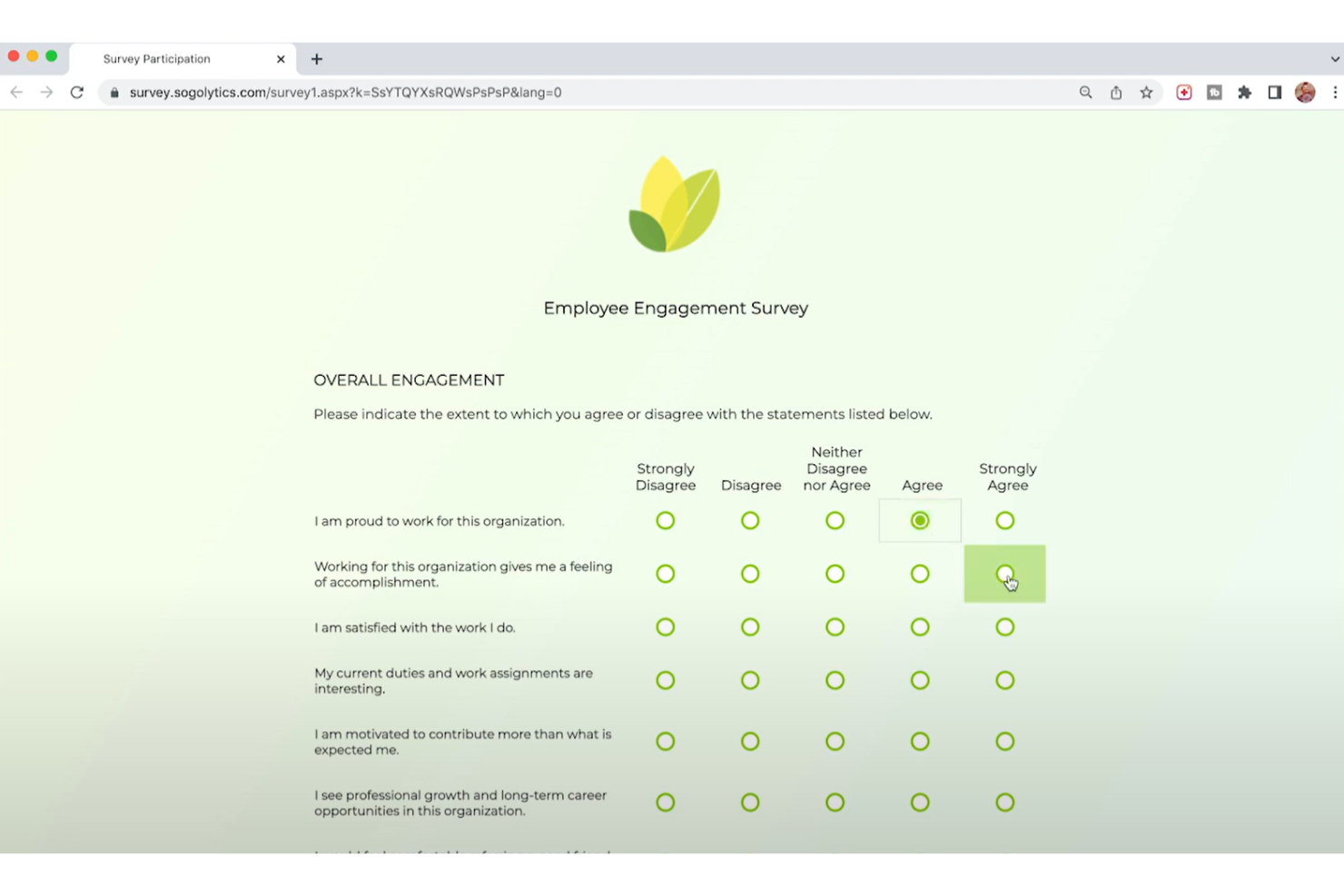
Sogolytics is an employee feedback software platform that lets you create, distribute, and analyze surveys with advanced automation, real-time analytics, and customizable templates.
Who Is Sogolytics Best For?
Sogolytics is a good fit for HR teams at mid-size to large organizations that need a structured, data-driven approach to collecting and acting on employee feedback.
Why I Picked Sogolytics
I picked Sogolytics as one of the best because of how well its automation handles the repetitive side of pulse survey programs. You can schedule pulse surveys at regular intervals, set up automated reminders, and let the platform run the cadence without manual intervention each cycle. What I really like is that the NLP-powered sentiment analysis works on open-text responses in real time—so when an employee writes in a free-form field, Sogolytics decodes sentiment automatically, so you don't have to read hundreds of comments manually. The guaranteed anonymity feature is built into the platform at the survey level, which makes a real difference in getting candid responses on sensitive topics like manager relationships or workload concerns.
Sogolytics Key Features
- Employee journey mapping: Track and trigger surveys at key lifecycle milestones—onboarding, stay interviews, and exit—by linking dates in the Directories feature.
- eNPS and ESAT tracking: Monitor employee Net Promoter Score and satisfaction scores in a unified EX dashboard alongside well-being trends.
- Key driver analysis: Identify the specific factors most influencing engagement, burnout, or turnover across departments, roles, or tenure groups.
- 360-degree feedback collection: Gather multi-source input from peers, managers, and direct reports to support individual development and performance reviews.
Sogolytics Integrations
Sogolytics offers native integrations with Microsoft Teams, Google Workspace, Salesforce, and Zapier. An API is available for custom integrations.
Pros and Cons
Pros:
- Includes tools for tracking employee engagement over time
- Supports multilingual surveys for diverse teams
- Offers a wide range of survey customization options
Cons:
- Could offer more report customization
- Advanced survey logic is limited to higher-tier plans
New Product Updates from Sogolytics
Sogolytics Adds Shareable Track, Automated Imports, and Folder Permissions
Sogolytics adds shareable Track links, expanded Import Automation sources, and folder-level permissions. These updates make it easier to share distribution insights, automate data intake, and manage project access. For more information, visit Sogolytics’ official site.
 .
.
Nectar
Best for tying survey feedback to recognition workflows
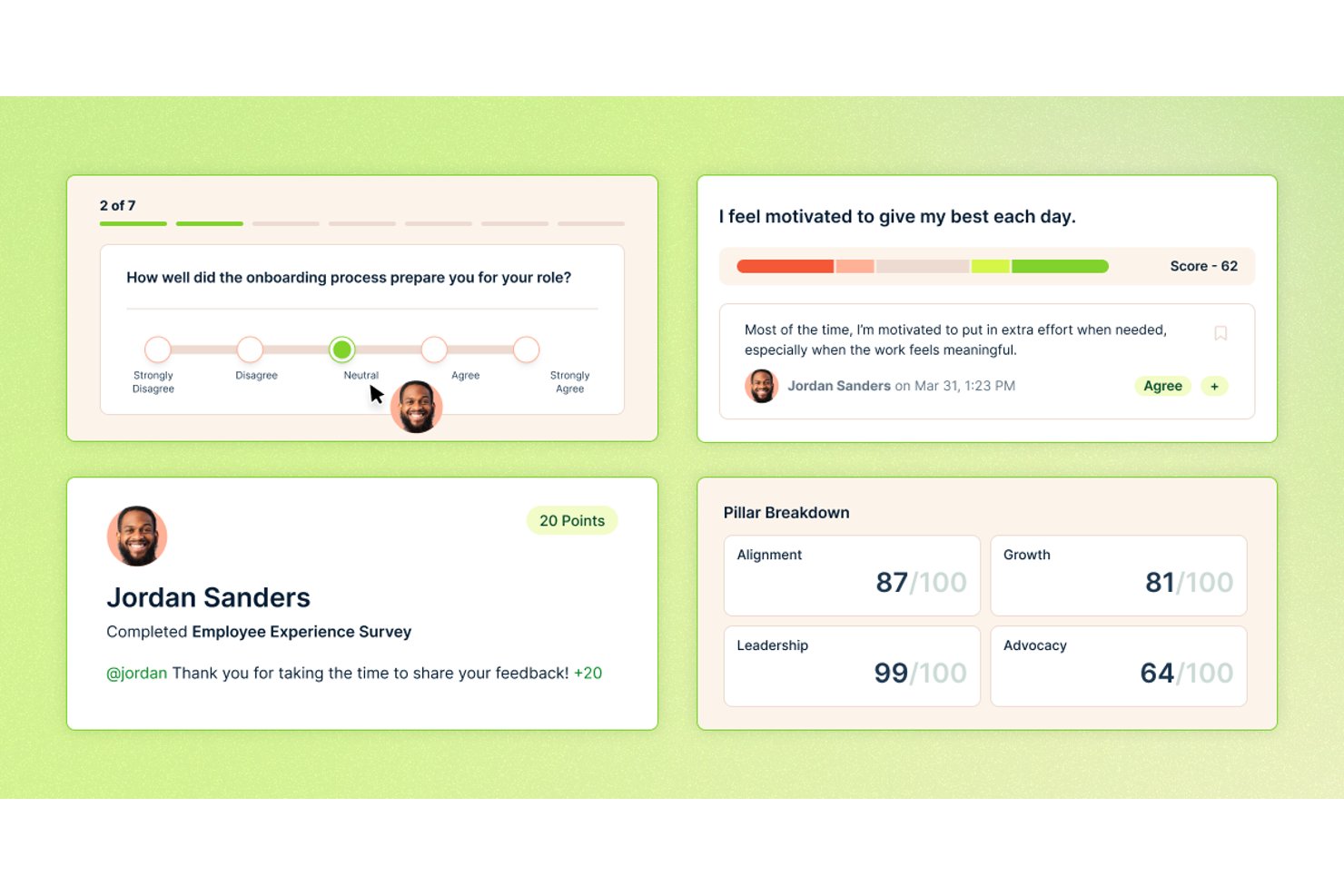
Nectar is an employee feedback and recognition platform that combines pulse surveys, eNPS, anonymous feedback channels, and engagement analytics with built-in recognition and communications workflows.
Who Is Nectar Best For?
Nectar suits HR teams and people ops managers who want to connect employee sentiment data directly to recognition and follow-up workflows in one platform.
Why I Picked Nectar
Nectar earns its spot on my shortlist because it's the only tool I've seen that routes survey results directly into recognition and communication workflows without any manual handoff. When SafeTalk™ surfaces an anonymous concern or an eNPS cycle flags a dip in a specific team, managers can send a shoutout, draft a comms update, or trigger a Flows automation in the same platform. That closed loop between listening and responding is what sets Nectar apart in this category.
Nectar Key Features
- SafeTalk™ anonymous two-way chat: HR and managers can reply to anonymous survey comments and ask follow-up questions without revealing the respondent's identity.
- Nectar Signals health scores: Each employee, team, and department receives a 0–100 health score grouped into five tiers, with six-month trend lines and AI plain-language explanations.
- Lifecycle-triggered surveys via Flows: A no-code workflow builder sends surveys automatically based on hire date, work anniversary, HRIS changes, or external API triggers.
- Survey completion incentives: Employees earn Nectar points for completing surveys, including anonymous ones, to encourage participation across frontline and deskless teams.
Nectar Integrations
Nectar offers integrations with Workday, BambooHR, Rippling, ADP, Slack, Microsoft Teams, and Google Chat. It also supports custom connections through a public API and Zapier.
Pros and Cons
Pros:
- Incentivizes participation from frontline employees
- SafeTalk™ enables anonymous two-way conversations
- Connects survey feedback with recognition workflows
Cons:
- Lacks dedicated action-plan tracking tools
- No current 360-degree feedback cycles
New Product Updates from Nectar

Nectar Enhances Clara AI With Live Platform Data
Nectar introduces live platform data access and expanded knowledge coverage for Clara AI. The updates improve response accuracy and speed while enabling Clara AI to answer questions across more recognition and rewards features. For more information, visit Nectar's official site.

Best for employee performance feedback

Mitratech Perform is an employee feedback and performance management platform that offers tools for continuous feedback, customizable review cycles, goal tracking, and analytics.
Who Is Mitratech Perform Best For?
Mitratech Perform is a good fit for HR teams and people managers who need a structured, scalable approach to performance reviews and ongoing employee feedback.
Why I Picked Mitratech Perform
Mitratech Perform earns its spot on my shortlist because of how well it handles structured, multi-directional feedback. I particularly like the 360-degree feedback feature, which pulls input from peers, managers, and direct reports to give a fuller picture of how an employee is performing—not just how their manager sees them. I also use the continuous feedback tools to capture real-time notes throughout the year, so review conversations aren't built from memory alone. The customizable review templates let my team design evaluation cycles that reflect our actual competencies and values, rather than forcing everyone into a generic format.
Mitratech Perform Key Features
- Goal tracking and setting: Set individual and team goals, define a pathway to reach them, and monitor progress over time.
- Pulse surveys and check-ins: Gather employee sentiment through pulse surveys, manager check-ins, and polls to track engagement alongside performance.
- Competency assessment: Evaluate employees against defined competencies to identify skill gaps and top performers across the organization.
- Automated reminders: Trigger automatic notifications to managers and employees when performance reviews are due or actions are needed.
Mitratech Perform Integrations
Integrations include ADP Workforce Now, UKG Pro, Trakstar Learn, Slack, Azure Active Directory, Okta, Google Workspace, and SAML.The tool supports API-based integrations for custom connections.
Pros and Cons
Pros:
- Responsive and helpful customer support team
- Customizable goals and goal tracking
- Robust platform for managing performance
Cons:
- Full feature set may not be needed by all
- Pricing details are not transparent


Express Evaluations is an employee feedback software platform that provides customizable evaluation forms, automated reminders, and reporting tools for structured performance reviews.
Who Is Express Evaluations Best For?
Express Evaluations is a strong fit for government agencies, small businesses, and non-profits that need a straightforward, affordable way to run structured employee performance reviews.
Why I Picked Express Evaluations
I picked Express Evaluations as one of the best because its pricing model is built around the budget constraints of government agencies, small businesses, and non-profits. The Essentials plan covers custom evaluation templates, automated notifications, and digital signatures without requiring a large HR team to manage it. I particularly like the digital signature feature—it removes the paper-based approval workflows that are still common in government and non-profit settings. The bias detection in reporting is also a practical touch, helping smaller organizations flag inconsistencies in evaluation results that a lean HR team might miss.
Express Evaluations Key Features
- Pulse surveys: Send short, recurring surveys to employees to gather real-time sentiment data between formal review cycles.
- Manager/employee check-ins: Conduct structured one-on-one check-ins with optional ratings and notes logged directly in the platform.
- 360-degree evaluation tool: Collect feedback on an employee from multiple reviewers, including peers, direct reports, and managers.
- Performance improvement plans: Build, assign, and track formal improvement plans for employees who need structured development support.
Express Evaluations Integrations
Integrations include ADP Workforce Now, Paylocity, BambooHR, UKG Pro, Azure, Okta, Google Workspace, Slack, Salesforce, Eddy, and Employee Navigator. An API is available for custom integrations.
Pros and Cons
Pros:
- Comprehensive reporting features
- Supports performance improvement plans
- Customizable evaluation templates
Cons:
- Limited integration options with other HR systems
- No mobile application for on-the-go access

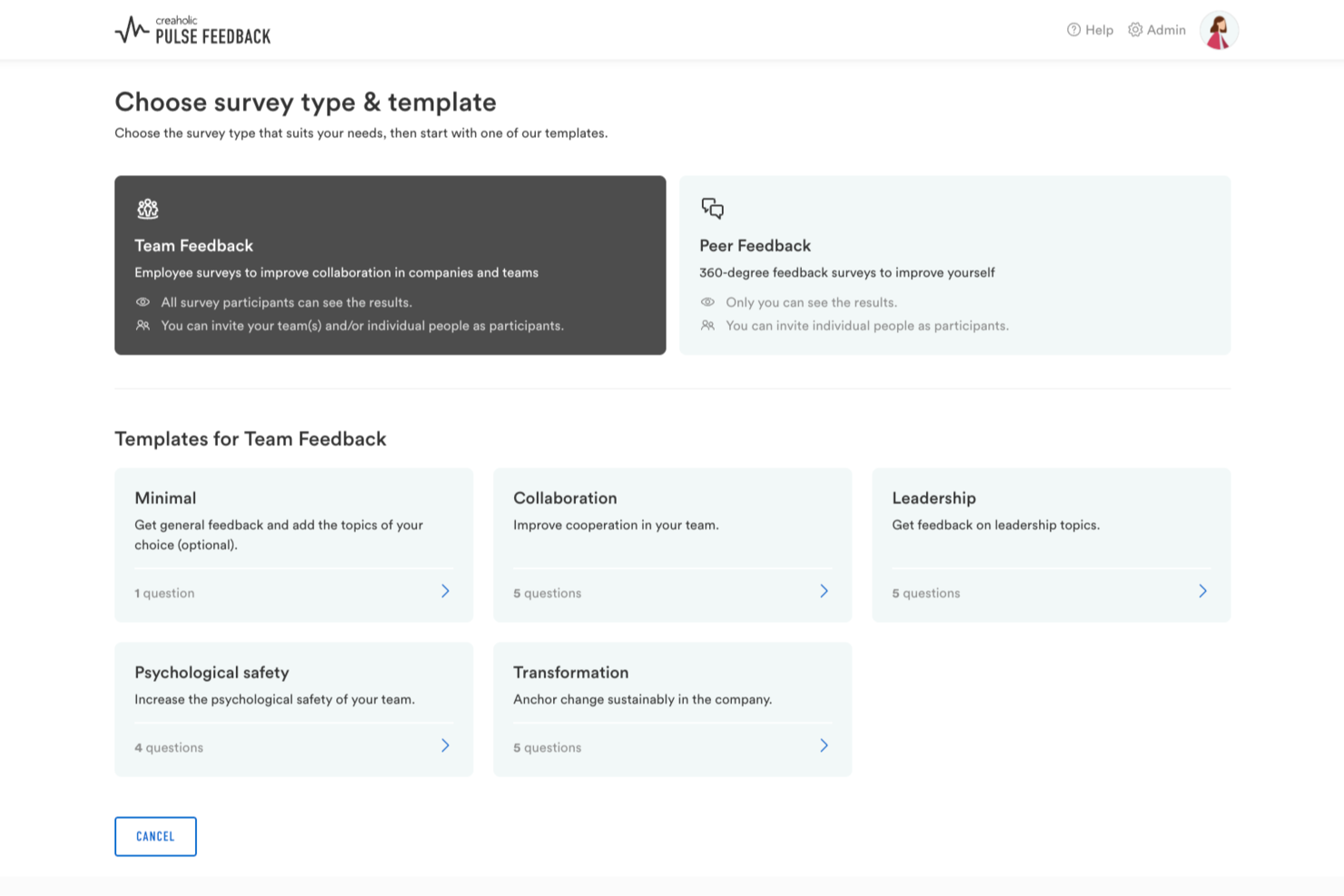
Pulse Feedback is a Swiss-developed employee feedback platform that combines pulse surveys, 360-degree feedback, engagement measurement, and AI-powered insights with guided team discussion tools. Alongside the software, hands-on consulting support is available to guide organizations through every stage of the process—from custom questionnaire design to post-survey results workshops.
Who Is Pulse Feedback Best For?
Pulse Feedback is a good fit for HR teams, executives, and people managers in mid-sized to large organizations looking for a flexible feedback solution paired with optional expert guidance to improve organizational culture and employee engagement.
Why I Picked Pulse Feedback
I've included Pulse Feedback in my top picks because it's one of the more complete tools I've seen for measuring company culture over time, not just capturing a one-time snapshot. I particularly like the time comparison feature, which lets you track how culture metrics shift across survey cycles, and the benchmark comparison, which puts your results in context against internal or external references. On top of that, the AI-guided discussion moderator brings teams together to work through results in structured sessions, so culture data actually leads somewhere.
Pulse Feedback Key Features
- 360-degree feedback: Collect structured feedback on individuals from managers, peers, and direct reports within the same survey cycle.
- Scientifically validated question library: Access 120+ pre-built survey questions grounded in organizational research to reduce setup time.
- Bottom-up surveys: Let individual employees or teams create and send their own surveys, not just top-down HR-led ones.
- AI chat: Query your survey results conversationally to surface patterns and specific data points without manually digging through reports.
Pulse Feedback Integrations
Native integrations are not clearly documented; however, the platform does support Single Sign-On (SSO) with Microsoft 365 credentials.
Pros and Cons
Pros:
- Built-in constructive feedback prompts guide responses
- Bottom-up surveys initiated by any employee
- AI-guided team sessions for discussing results
Cons:
- Limited third-party app integrations available
- Survey creation can feel complex for larger surveys
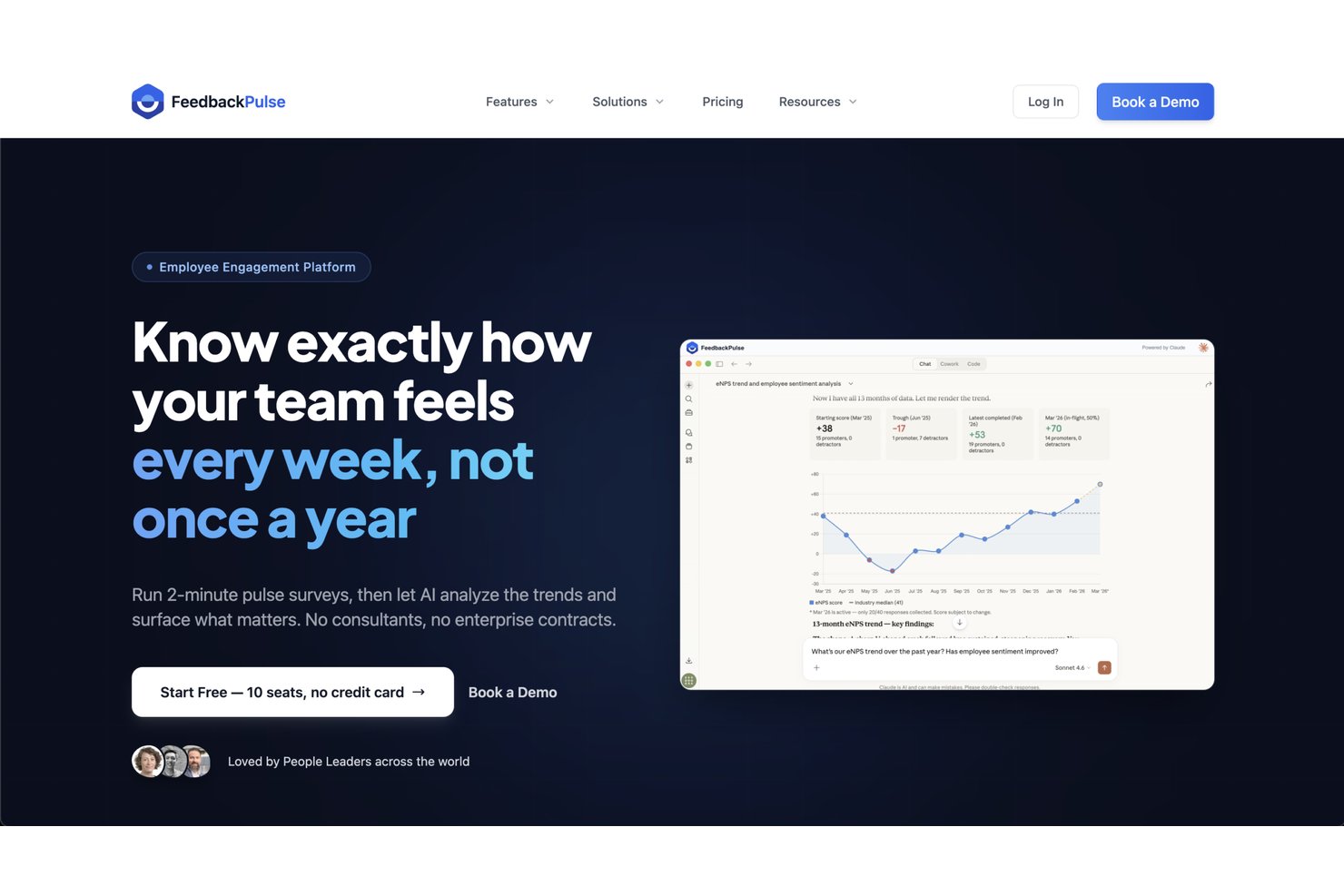
FeedbackPulse is a feedback and engagement platform that brings together pulse surveys, 360° reviews, performance cycles, eNPS tracking, and peer recognition in one place.
Who Is FeedbackPulse Best For?
FeedbackPulse is a good fit for HR teams at mid-sized companies that need a dedicated tool for running structured feedback and engagement programs.
Why I Picked FeedbackPulse
I've included FeedbackPulse in my top picks because it gives HR teams genuine control over how feedback programs are structured and sequenced. I like that survey templates are fully editable, so you can adapt questions by team, location, or lifecycle stage without rebuilding from scratch each cycle. You can also mix survey types, pulse, eNPS, onboarding, and exit, into a single recurring workflow rather than managing them as separate processes. That kind of configurability is what makes FeedbackPulse feel like a tool built around how HR actually operates.
FeedbackPulse Key Features
- 360° peer reviews: Run structured peer review cycles with anonymous-by-default settings and manager review tracks built in.
- AI-powered text analysis: Automatically surfaces themes and summaries from open-text survey responses across large response sets.
- Automated survey reminders: Set reminder schedules with daily send caps and cooldown controls to avoid over-surveying employees.
- Peer recognition wall: Let employees send public kudos to colleagues, visible across the organization in a shared recognition feed.
FeedbackPulse Integrations
FeedbackPulse offers a smaller set of integrations at this stage. It connects with Slack for delivering survey invitations and reminders as direct messages, and supports AI assistant access through the Model Context Protocol (MCP), with documented connections for Claude Desktop and Claude.ai. A native API and automation tooling, including Zapier-style workflows, are listed as planned but not yet available.
Pros and Cons
Pros:
- Peer review visibility controls protect fairness
- Combines surveys, reviews, and recognition
- Built-in AI summaries of survey responses
Cons:
- No mobile app currently offered
- Limited third-party native integrations available

Best as AI for business
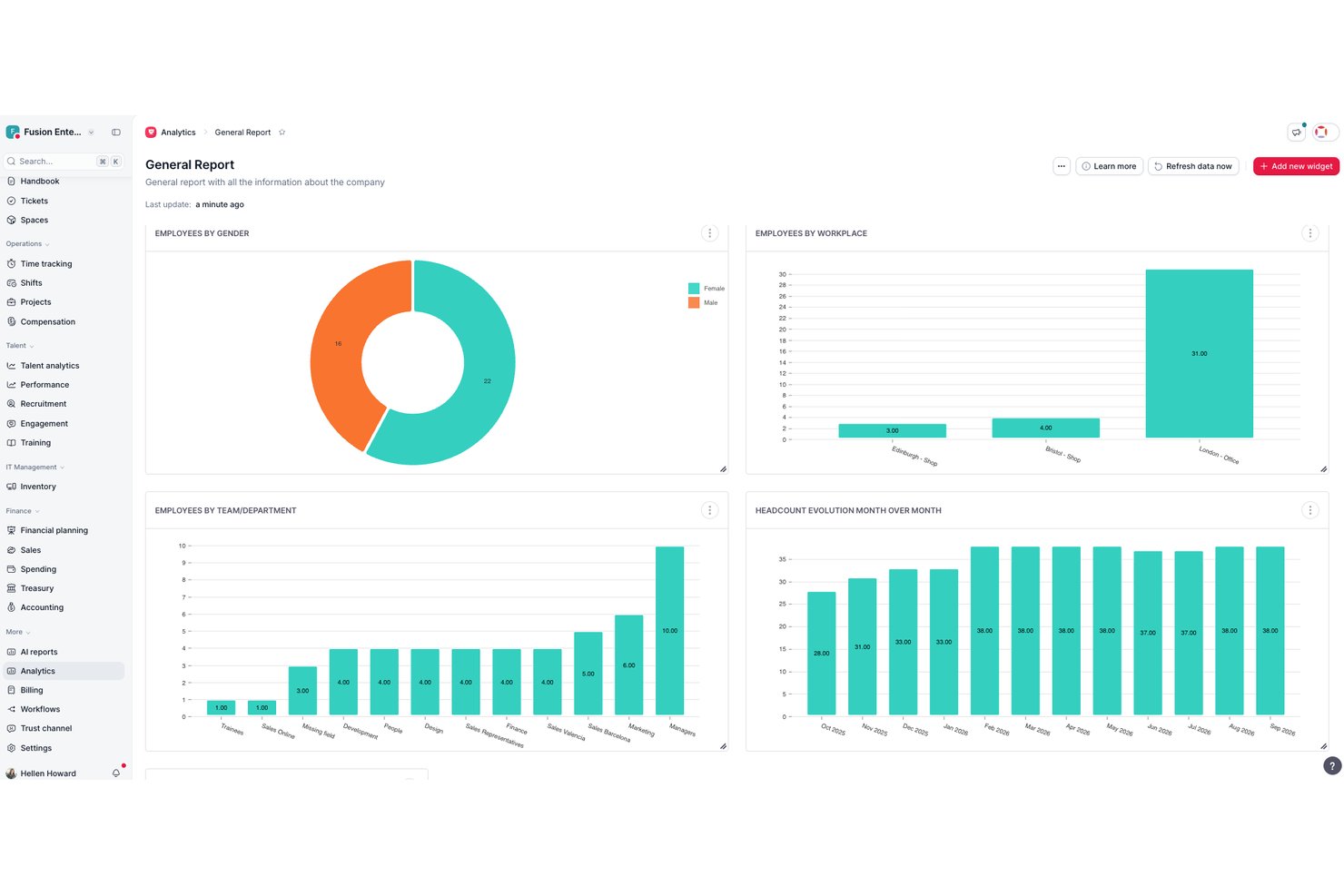
Factorial is a broad HR platform that brings together performance reviews, 360-degree feedback cycles, engagement surveys, eNPS tracking, and AI-assisted analysis tools in one place.
Who Is Factorial Best For?
Factorial suits teams that want performance reviews, engagement surveys, and core HR workflows managed in one AI-assisted platform rather than spread across separate tools.
Why I Picked Factorial
I've included Factorial in my top picks because its AI sits at the center of how feedback actually gets used, not just collected. I particularly like how the AI tool One lets you compare survey cycles side by side, summarize open feedback, and filter insights by specific groups without digging through raw data manually. Paired with a full suite of 180° and 360° review cycles and an Engagement Insight Dashboard, Factorial connects structured performance feedback to real analysis in one place.
Factorial Key Features
- eNPS and climate surveys: Gather employee net promoter scores and run climate surveys built on Gallup's 12 engagement questions to measure workplace sentiment.
- 9-box grid assessment: Plot employees on a 9-box grid to assess team performance and identify strengths across your organization.
- Peer competency assessments: Run 180°, 270°, and 360° competency evaluations that compare self, manager, and peer responses side by side.
- Mobile survey access: Employees can complete surveys directly from the Factorial mobile app, making participation easier across distributed teams.
Factorial Integrations
Factorial offers marketplace integrations including Slack, Google Workspace, Microsoft Azure, LinkedIn, and Microsoft Power BI. It also supports a public API, API keys, OAuth 2.0, webhooks, SDKs, OpenAPI, and Zapier.
Pros and Cons
Pros:
- Employees can complete surveys on mobile
- 360-degree reviews include peer and upward feedback
- AI summarizes feedback and compares survey cycles
Cons:
- Action plans lack completion tracking
- Custom reports can require workarounds
Best for turning feedback into action plans

ThriveSparrow is employee feedback software that lets you run pulse surveys, gather anonymous input, analyze engagement data, and create action plans based on real-time insights.
Who Is ThriveSparrow Best For?
ThriveSparrow is a good fit for HR teams at small to mid-sized companies that need a structured way to collect employee feedback and follow through on it.
Why I Picked ThriveSparrow
ThriveSparrow earns its spot as one of the best on my shortlist because it doesn't just collect feedback—it gives you a direct path from survey results to structured action. I particularly like the action plans feature, which lets you create a plan in a single click straight from an engagement report, then break it down into checklists and assign tasks to specific people. When a pulse survey flags low scores in a particular team or category, my team can move immediately from insight to ownership without switching tools. The heatmap view highlights which groups are underperforming against benchmarks, so action plans are targeted rather than generic.
ThriveSparrow Key Features
- 360-degree feedback: Collect multi-rater feedback from peers, managers, and direct reports to give employees a full-circle view of their performance.
- AI sentiment analysis: Analyzes open-text survey responses to surface the emotions and themes behind employee answers, flagging signs of burnout or disengagement.
- Multilingual surveys: Run surveys in 100+ languages and translate responses automatically, so you can gather feedback from global or distributed teams.
- eNPS surveys: Measure employee loyalty with a single-question survey format, then track shifts in advocacy scores over time using built-in reporting.
ThriveSparrow Integrations
Integrations include Slack, Microsoft Teams, Google Workspace, Google Chat, HiBob, and various HRIS systems through Merge. ThriveSparrow offers an API for custom integrations.
Pros and Cons
Pros:
- Offers peer-to-peer recognition
- Real-time feedback mechanisms
- Provides valuable insights into employee engagement
Cons:
- Fewer integrations compared to other platforms
- Lacks advanced features that larger organizations might require

Best for 360-degree feedback
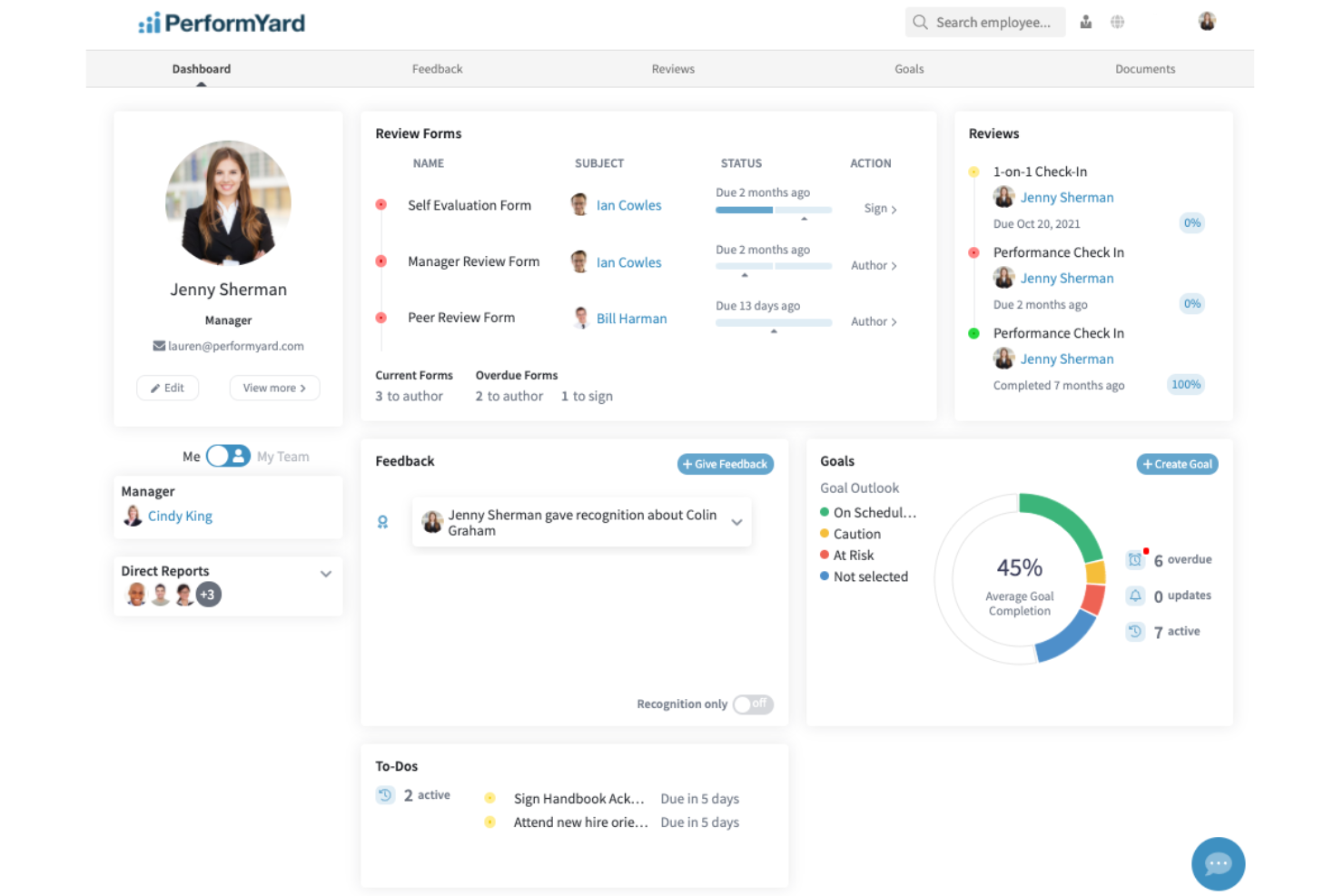
PerformYard is employee feedback software that lets HR teams and managers run structured performance reviews, gather 360-degree feedback, and manage ongoing feedback cycles in one platform.
Who Is PerformYard Best For?
PerformYard is a good fit for mid-sized organizations where HR teams need a structured, customizable approach to performance management and employee feedback.
Why I Picked PerformYard
PerformYard earns its spot as one of the best on my shortlist because of how much flexibility it gives you when setting up 360-degree feedback. I like that you can pull in feedback from direct reports, peers, managers, and even people outside your organization—all within the same review cycle. That external feedback option is something I don't see often, and it's genuinely useful for roles with client-facing responsibilities. The platform also lets you combine self-assessments and multiple manager evaluations in a single review, so you get a layered picture of performance rather than a one-sided snapshot.
PerformYard Key Features
- Continuous feedback: Request, give, and receive ongoing feedback between review cycles, including employee recognition and performance notes.
- Goal management: Set and track individual, team, and company-level goals, with cascading goal alignment to broader organizational objectives.
- Employee engagement surveys: Build fully custom surveys—from onboarding to exit interviews—with a live response dashboard and participation tracking.
- Performance reporting and analytics: View performance trends over time and across teams using dashboards, 9-box grids, rankings, and data exports.
PerformYard Integrations
PerformYard offers native integrations with Microsoft Teams, Slack, HRIS platforms for employee data, and SSO providers for one-click login. An API is available for custom integrations.
Pros and Cons
Pros:
- Performance data and analytics
- Goal tracking capabilities
- Wide range of feedback collection methods
Cons:
- Review cycle setup can be non-intuitive for some users
- Custom reporting is limited
SurveyLegend
Best for mobile-friendly surveys
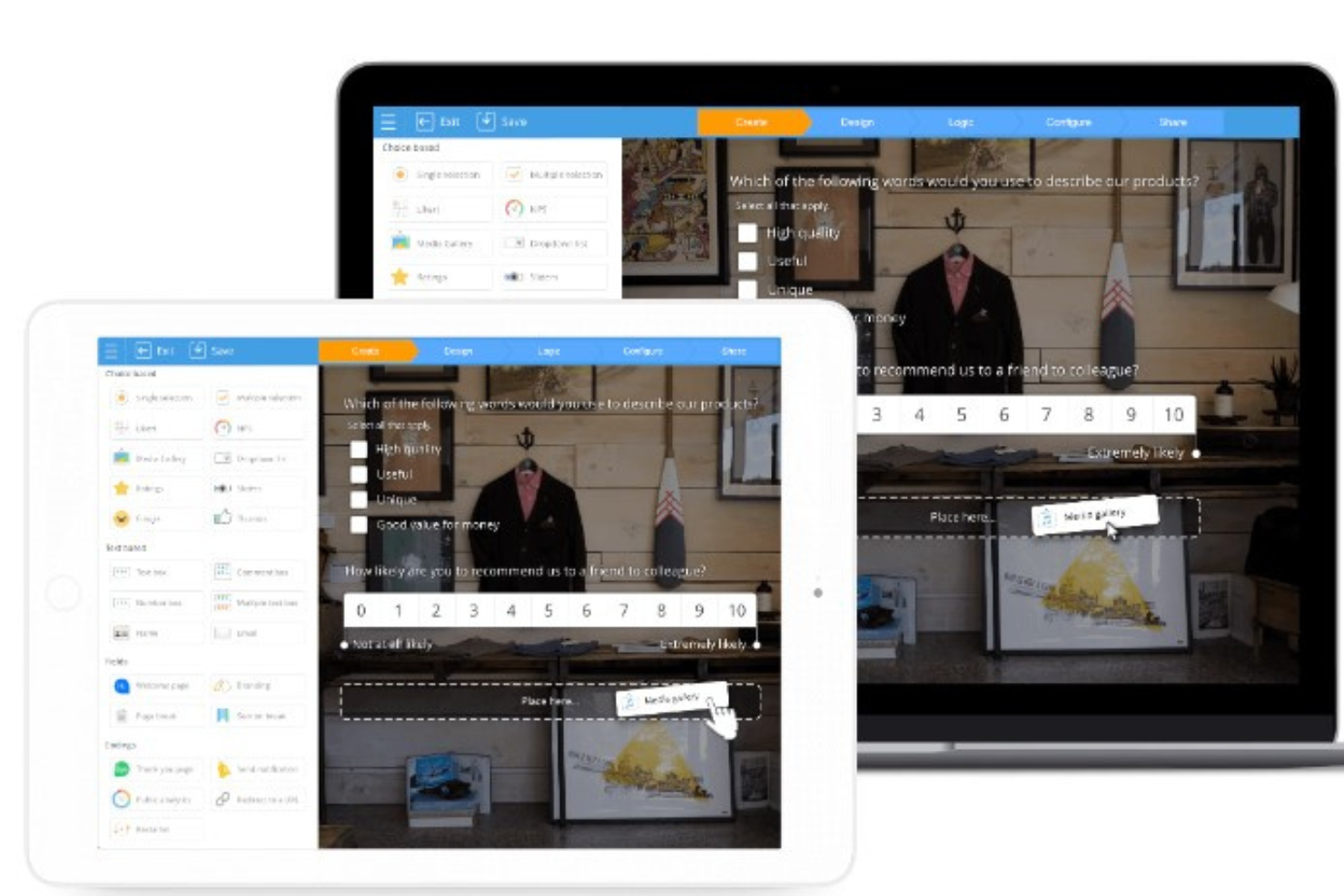
SurveyLegend is an employee feedback software platform that lets you create visually engaging surveys with a drag-and-drop builder, customizable templates, and real-time analytics.
Who Is SurveyLegend Best For?
SurveyLegend suits HR teams and small to mid-sized businesses that need an accessible, visually appealing way to collect employee feedback across devices.
Why I Picked SurveyLegend
SurveyLegend stands out for how seriously it takes the mobile experience—not just for respondents, but for survey creators too. You can build and manage surveys directly from a tablet or phone, which is rare among tools in this space. The Likert scale and opinion scale question types are specifically designed to be mobile-friendly, with large tap targets and a clean layout that holds up on small screens. For HR teams running pulse surveys or exit interviews where employees are likely responding from their phones, that level of mobile optimization makes a real difference in response quality.
SurveyLegend Key Features
- Drag-and-drop survey builder: Create and customize surveys visually without any coding knowledge.
- Anonymous responses: Configure surveys to collect feedback anonymously, encouraging more honest employee responses.
- Real-time analytics dashboard: View response data as it comes in with visual charts and graphs.
- Custom branding: Apply your company's colors, logos, and fonts to surveys for a consistent look.
SurveyLegend Integrations
SurveyLegend offers native integrations with WordPress and Joomla for survey embedding.
Pros and Cons
Pros:
- Survey interface is designed to be touch-friendly
- Supports over 50 languages
- Quick and easy set up
Cons:
- Full responses can’t be viewed on summary screen
- No API for custom integrations
Andre alternativer
Her er noen andre verktøy for tilbakemeldinger fra ansatte du bør sjekke ut. Selv om de ikke kom med på min topp 10-liste, er de fortsatt effektive løsninger:
- Spidergap 360˚ Feedback
For customizable feedback processes
- Lattice
For AI-powered people insights
- Vantage Circle
For real-time employee feedback collection
- SurveyMonkey
For survey templates
- Culture Amp
For small HR departments
- CultureMonkey
For measuring employee engagement
- Workleap
For anonymous, aggregated feedback data
- ChartHop
For ad-hoc feedback collection
- Qualtrics XM
For AI-powered insights
- Zoho Survey
For survey customization


How I Evaluate Employee Feedback Software
I look at these tools in two layers: the core capabilities—like pulse surveys and anonymous channels—any platform must have, and the differentiators that make one a better fit than another.
Core Functionality (Table Stakes For This List)
When I'm selecting tools for my list, I rank each one on a scale from 0 (does not offer the functionality) to 5 (excels in this area) for each core functionality listed below. Then, I calculate the tool's total score into a percentage. Each tool needs to achieve a minimum total score of 65% to be considered for inclusion.
- Pulse & Engagement Surveys: I check whether a platform supports both quick recurring pulse checks and longer engagement surveys, and whether it offers flexible scheduling like weekly, monthly, or quarterly cadences.
- Anonymous Feedback Channels: Beyond a simple anonymity toggle on surveys, I look for always-on channels like suggestion boxes or anonymous threads that let employees raise concerns anytime.
- Survey Template Library: A strong library saves HR teams from building every survey from scratch. I evaluate the breadth of templates across use cases like eNPS, onboarding, exit, and DEI.
- Feedback Analytics & Reporting: I evaluate how well each tool lets you segment data by team, department, or tenure and whether it surfaces trends over time rather than just raw response counts.
- Action Planning Tools: Collecting feedback matters only if you act on it. I look for guided plans, task assignments, and progress tracking that connect directly to survey results.
- 360-Degree & Peer Feedback: I check whether a platform supports multi-directional feedback flows—peer reviews, upward manager feedback, and self-assessments—beyond standard top-down surveys.
Once I have a list of tools that meet the criteria, I consider what sets each platform apart.
Differentiating Factors (What Sets Vendors Apart)
Here's how I compare and contrast different vendors:
Standout Features
I look for AI sentiment analysis that can parse open-text responses and surface recurring themes—especially valuable after a company-wide survey generates thousands of comments. External benchmarking is another differentiator, since it lets HR leaders contextualize eNPS or engagement scores against similar-sized organizations and build a stronger case for investment. Manager enablement dashboards matter too. The best ones give team leads direct visibility into their group's feedback data alongside coaching prompts and recommended actions.
Beyond Features
Data privacy and compliance are top of mind because feedback data is inherently sensitive. I check for anonymity thresholds that prevent re-identification in small teams, plus GDPR and SOC 2 compliance. HRIS integrations also weigh heavily—platforms that sync with Workday, BambooHR, or ADP keep employee rosters current without manual uploads. Finally, I evaluate how well a vendor supports outcomes tracking, like correlating engagement scores with turnover trends, so HR leaders can show measurable impact from their feedback programs.
Andre spør også
Nysgjerrig på å lære mer om programvare for tilbakemeldinger fra ansatte? Her er noen populære spørsmål – med svar, selvfølgelig.
Hva er de mest effektive måtene å samle inn tilbakemeldinger fra ansatte på?
Det finnes ulike måter å samle inn tilbakemeldinger fra ansatte på, og hver av dem har sine egne fordeler og ulemper:
- Undersøkelser: Selv om bedrifter har brukt undersøkelser i flere tiår, er medarbeiderundersøkelser fortsatt en av de mest effektive måtene å samle inn tilbakemeldinger fra ansatte på.
- Én-til-én-intervjuer: Det kan være uvurderlig å snakke ansikt til ansikt med noen. Denne metoden har imidlertid en stor ulempe – den kan hindre folk i å dele sine egentlige tanker og følelser.
- Anonyme tilbakemeldinger: Denne metoden kan være svært effektiv fordi den gjør det mulig for ansatte å dele tankene sine fritt. Ulempen er at noen kanskje ikke tar anonyme undersøkelser særlig alvorlig, siden de er beskyttet av anonymitet.
- Pulsmålinger: Korte og hyppige innsjekker kan hjelpe deg med å forstå de ansatte. Det beste med pulsmålinger er at de kan hjelpe deg med å avdekke trender eller temaer, slik at du kan handle umiddelbart.
- 360-graders tilbakemeldinger: 360-graders tilbakemeldinger kan være oppklarende. Ansatte får tilbakemeldinger fra ledere, kolleger og underordnede, slik at de kan forstå hvordan de kan forbedre prestasjonene og atferden sin.
Hva er de mest effektive måtene å gi ansatte tilbakemeldinger på?
Her er flere velprøvde metoder som kan hjelpe deg med å gi verdifulle tilbakemeldinger uten å være negativ og gjøre de ansatte opprørte:
- SBI-metoden: SBI står for situasjon, atferd og innvirkning. Den gjør det mulig å beskrive konkrete situasjoner, den observerbare atferden til den ansatte og hvilken innvirkning denne atferden hadde på teamet ditt. Denne metoden er nyttig når du deler negative tilbakemeldinger.
- STAR-metoden: STAR står for situasjon, oppgave, handling og resultat. Den gjør det mulig å beskrive situasjonen der den ansatte utmerket seg, oppgaven de fikk, handlingen de utførte og resultatet de oppnådde. Denne metoden er nyttig når du deler positive tilbakemeldinger.
- Sandwich-metoden: Denne metoden anbefaler å legge en negativ tilbakemelding mellom to positive, slik at du kan dempe virkningen av kritikken.
Hvorfor er det viktig å samle inn tilbakemeldinger fra ansatte?
Det er viktig å samle inn tilbakemeldinger fra ansatte fordi det kan:
- Forbedre de ansattes moral, tilfredshet, lojalitet og produktivitet
- Bygge en positiv bedriftskultur basert på tillit og åpenhet
- Øke de ansattes engasjement og samsvar med bedriftens mål
Hva slags tilbakemeldinger fra ansatte bør du be om, og hvor ofte?
Du bør be om både positive og negative tilbakemeldinger. Når det gjelder hyppigheten, bør du be om tilbakemeldinger minst én gang i året. Ideelt sett bør du oppfordre de ansatte til å dele tilbakemeldinger når som helst.
For flere tips kan du se nærmere på 8 effektive måter å få tilbakemeldinger fra ansatte på. Vi har også dekket fordeler og ulemper ved hver metode for innsamling av tilbakemeldinger.
Andre anmeldelser av programvare for tilbakemeldinger fra ansatte
Interessert i andre typer verktøy for medarbeiderengasjement enn bare innsamling av tilbakemeldinger? Ta også en titt på disse andre typene programvare:
- Beste KI-programvare for tilbakemeldinger fra medarbeidere
- Beste programvare for 360-graders tilbakemeldinger i medarbeidervurderinger
- Beste verktøy for medarbeiderundersøkelser og tilbakemeldinger fra ansatte
- Beste plattformer for anerkjennelse av medarbeidere og feiring av fremragende talenter
- Beste programvare for medarbeiderengasjement
- Beste programvare for medarbeiderevalueringer, prestasjonsvurderinger og anerkjennelse
- Beste programvare for prestasjonsstyring og kontinuerlige tilbakemeldinger
- Beste OKR-programvare