

Sente-se sobrecarregado com a enorme quantidade de dados que a sua equipa de RH gere diariamente? O software de análise de pessoas pode ser exatamente aquilo de que precisa. Transforma dados brutos em informações úteis para agir, ajudando-o a tomar decisões fundamentadas sobre contratação, retenção e satisfação dos trabalhadores.
Com base na minha experiência, os profissionais de RH enfrentam uma pressão constante para otimizar a sua força de trabalho. Precisa de ferramentas que simplifiquem o processo e apresentem resultados claros. É aí que entra o software de análise de pessoas.
Testei e analisei inúmeras opções para lhe apresentar uma lista imparcial e bem fundamentada das melhores soluções disponíveis. Pode confiar que as minhas análises se centram no que realmente importa para si e para a sua equipa. Vamos conhecer as principais opções que podem fazer a diferença na sua estratégia de RH.
Porque pode confiar nas nossas recomendações de software
6,700+
Reviews
20
Industry experts
16+
Evaluation factors
14
Years reviewing software
A nossa equipa testa e analisa software desde 2012. Como especialistas em RH, sabemos o quão difícil — e importante — é escolher o software certo.
Para este guia, avaliámos as ferramentas através de testes práticos e pesquisa independente, pontuando-as de acordo com os nossos critérios de seleção. Recorremos também a contributos de líderes de opinião do setor e de especialistas em RH no ativo.
As nossas análises refletem o juízo da nossa equipa editorial, e não um discurso de vendas.
Revisores especialistas:
- Phil GrayCOO
 Kim BehnkeHR Tech Editor & Analyst
 Josh BarkerPeople Ops Manager

Tabela comparativa de software de análise de pessoas
A tabela abaixo compara os preços, a disponibilidade de testes gratuitos e as opções de demonstração das minhas principais escolhas de software de análise de pessoas.
Sorted by: Default
| Tool | Starting Price | Website | |
|---|---|---|---|
Best for integrated payroll and compliance support | 4.6 out of 5 | $79/user/month Free demo available | Website |
Best for global workforce management | 4.8 out of 5 | $5/user/month Free demo available | Website |
Best for tracking VDI and shared workstations | 4.8 out of 5 | $8/user/month Free trial + free demo available | Website |
Best for actionable workforce insights | 4.3 out of 5 | Pricing upon request Free demo available | Website |
Best for user behavior insights | 4.5 out of 5 | Pricing upon request Free demo available | Website |
Best people analytics software for unlimited workforce contextual data sources | 4.8 out of 5 | Pricing upon request Free demo available | Website |
Best for visualizing pay equity and total rewards | 4.8 out of 5 | Pricing upon request Free demo available | Website |
Best people analytics software for HR data visualization | 4.5 out of 5 | $75/user/month Free trial + Free demo available | Website |
Best people analytics software for democratizing insights | 4.9 out of 5 | Pricing upon request Free demo available | Website |
Best people analytics software for eNPS tracking | 4.8 out of 5 | $4.50-$11.70/employee/month Free demo available | Website |


Melhor software de análise de pessoas
Eis uma breve descrição de cada software de análise de pessoas, que apresenta o melhor caso de utilização de cada ferramenta, as suas funcionalidades mais relevantes e algumas vantagens & desvantagens. Incluí também capturas de ecrã para lhe dar uma ideia da respetiva interface de utilizador.
 Best for integrated payroll and compliance support
- Free demo available
- From $79/user/month
Customer Rating:4.6/5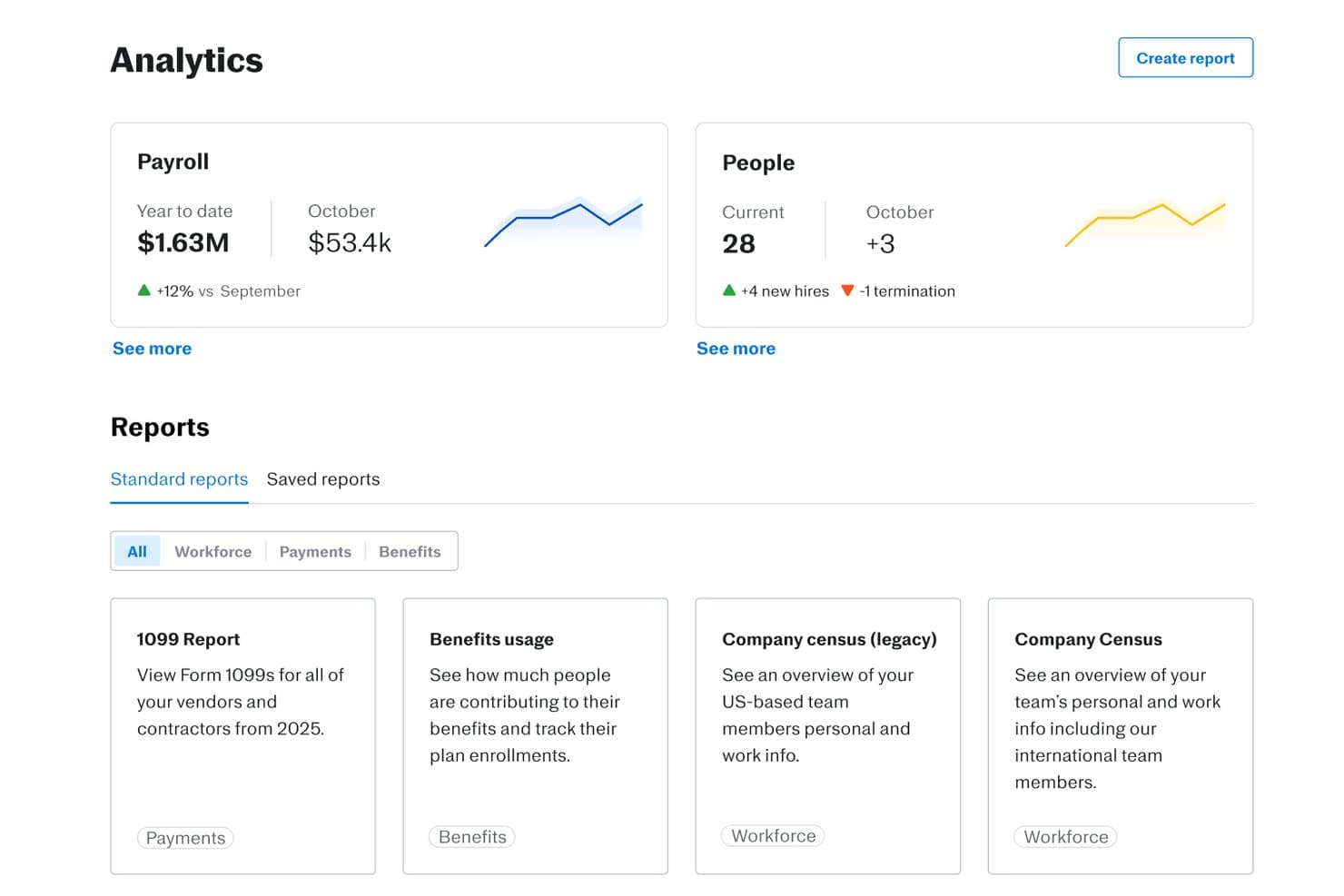
Justworks offers an Analytics dashboard with payroll summaries, people metrics, and standard reports. Justworks is a cloud-based HR and payroll platform designed to help organizations manage workforce data, employee onboarding, benefits, time tracking, compliance, and basic people analytics within a unified system.
Who Is Justworks Best For?
Small to midsize companies seeking an all-in-one platform to manage payroll, HR, and compliance in the US.
Why I Picked Justworks
I picked Justworks as one of the best because I can rely on its unified payroll, compliance, and basic analytics to track headcount changes, employment trends, and risk data from a single platform. Payroll and compliance are always current without manual updates.
Justworks Key Features
- Custom report builder: Create and export people data reports tailored to your workforce analysis needs.
- Employee directory: Access a searchable list of employee profiles with roles, teams, and key workforce details.
- Time and attendance tracking: Monitor employee hours, paid time off, and attendance patterns in one dashboard.
- Document management: Store and organize HR policies, compliance forms, and employee contracts for easy access.
Justworks Integrations
Justworks offers 20+ integrations, including QuickBooks, Xero, NetSuite, Sage Intacct, Greenhouse, JazzHR, Lever, 15Five, Leapsome, Carta, Brex, and Vanta.
Pros and Cons
Pros:
- Payroll data easily surfaced for analysis
- Automated workforce headcount and turnover reports
- Compliance tracking built into analytics dashboards
Cons:
- Limited custom analytics beyond core metrics
- No predictive analytic features
Learn more about Justworks: Best for global workforce management
- Free demo available
- From $5/user/month
Visit WebsiteCustomer Rating:4.8/5
Deel's HRIS feature is a centralized platform for managing all aspects of a global team. Deel is a global HR platform designed to assist businesses in managing payroll, compliance, and HR services across more than 150 countries. It caters to both employees and contractors, aiming to simplify the hiring and management of global teams.
Why I picked Deel: Deel's platform is designed to assist HR teams in leveraging people analytics to make data-driven decisions that impact business outcomes. It provides a suite of tools that enable the measurement and analysis of HR initiatives and projects, with a focus on improving efficiency and identifying areas for improvement within an organization.
Deel's analytics capabilities include descriptive and diagnostic analysis, as well as predictive and prescriptive analytics, which help in understanding employee turnover, optimizing hiring processes, and improving onboarding. The platform also supports global hiring, payroll, and compliance, and integrates with finance, legal, and hiring tools, ensuring that HR teams can manage a decentralized workforce effectively. Additionally, Deel emphasizes real-time insights, headcount planning, cost optimization, and data privacy, offering security measures to protect sensitive employee data.
Deel Standout Features and Integrations
Features include contractor management features, including tools for managing contracts, payments, and compliance, as well as benefits and insurance options for global team members.
The tool is also designed to help users maintain compliance with local laws by providing necessary documentation and knowledge of local regulations. This feature is intended to prevent mistakes and fines that can arise from non-compliance.
Integrations include Xero, Bob, Okta, Expensify, BambooHR, Workday, QuickBooks, NetSuite.
Pros and Cons
Pros:
- Convenient withdrawal methods for contractors
- One-click payments in different currencies
- Easy-to-navigate interface
Cons:
- Some inefficiencies in the portal for uploading documents
- Some delays in visa processing for employees
 Best for tracking VDI and shared workstations
- Free trial + free demo available
- From $8/user/month (billed annually)
Visit WebsiteCustomer Rating:4.8/5
Insightful tracks employee productivity and app usage in real time. Insightful is a workforce analytics platform that tracks time and attendance, app and website usage, capacity, workload, and project time across office, remote, and hybrid teams—including those operating on VDI and shared workstations.
Who Is Insightful Best For?
Insightful is a strong fit for people operations managers who need accurate, automated visibility into time, attendance, and productivity across office, remote, and hybrid teams.
Why I Picked Insightful
I picked Insightful as one of the best because it's the only tool on my list that natively tracks activity across VDI environments and shared workstations, which is a real gap most workforce analytics tools simply ignore. In practice, that means teams running Citrix or other virtual desktop setups can see accurate utilization, app usage, and productive time per user, not per machine. I also like the Workstation Mode for shared devices, which keeps individual employee records clean even when multiple people log in from the same computer.
Insightful Key Features
- Shift scheduling and schedule adherence: Lets managers set up team shifts and automatically tracks whether employees clock in and out according to their assigned schedules.
- App and AI tool usage reporting: Ranks applications, websites, and AI tools by usage time and surfaces idle paid seats so you can see where software spend is or isn't being used.
- Location insights: Compares productive time across office, remote, and hybrid days at the team level so you can evaluate how different work arrangements affect output.
- HRIS integrations with automated provisioning: Syncs employee data from systems like Workday, BambooHR, and ADP to keep team structures and records current without manual updates.
Insightful Integrations
Insightful offers 50+ native integrations, including Workday, BambooHR, ADP Workforce Now, SAP SuccessFactors, UKG Pro, Microsoft Entra ID, Okta, Asana, Jira, and BigQuery. It also provides a REST API for custom connections, with a 200-request-per-minute organization limit.
Pros and Cons
Pros:
- Capacity reports surface workload imbalances
- Clear dashboards show team activity and schedules
- Tracks activity across VDI and shared workstations
Cons:
- Rule-based beta offers no attrition forecasting
- No DEI or pay-equity analysis
Learn more about Insightful: Best for actionable workforce insights
- Free demo available
- Pricing upon request
Visit WebsiteCustomer Rating:4.3/5
Paylocity's time and labor management features let you set schedules, track time, and approve time-off requests. Paylocity is a human capital management platform that equips HR teams with real-time, AI-powered insights to improve workforce decisions across the employee lifecycle. From performance and engagement to turnover and compensation, it helps transform people data into strategic action.
Why I picked Paylocity: I selected Paylocity for its standout people analytics capabilities that span recruitment, onboarding, performance, and talent development. Its Modern Workforce Index (MWI) delivers predictive modeling and actionable recommendations on workforce trends like attrition risk, labor costs, and Diversity, Equity, Inclusion, and Accessibility (DEIA) representation—giving HR leaders a clear roadmap for proactive decision-making.
Unlike tools that simply display metrics, Paylocity’s analytics suite guides you with next steps—whether that’s closing skills gaps, budgeting smarter, or improving retention.
Paylocity Standout Features and Integrations
Features include real-time dashboards, performance tracking, predictive insights, and compensation modeling. It also supports benefits administration, employee self-service, succession planning, and compliance automation.
Integrations include Salesforce, NetSuite, BambooHR, Greenhouse, Oracle HCM, Workday, Criteria Corp, The Predictive Index, and others—enabling unified data across your HR ecosystem.
Pros and Cons
Pros:
- Tailored workflows and reports
- On demand payment options
- Includes tax compliance services
Cons:
- Limited customization options in certain modules
- Setup can be time consuming
 Best for user behavior insights
- Free demo available
- Pricing upon request
Visit WebsiteCustomer Rating:4.5/5
Teramind tracks and analyzes your employees' desktop-based computer activities and categorizes them into key functions for easy review. Teramind is a comprehensive platform designed to address cybersecurity, compliance management, insider risk management, data loss prevention, and productivity.
Why I picked Teramind: I like its user behavior analytics. This feature lets you track and understand what your team is up to, offering insights into their actions and productivity levels. It's not just about keeping tabs, but about understanding the workflow and identifying areas for improvement. With user behavior analysis, you can see how time is being used and make informed decisions to boost productivity.
Another important feature of Teramind is its advanced data telemetry capabilities. This provides you with enriched insights into how your employees are performing and interacting with their environments. With advanced data telemetry, you can dive deep into metrics that matter, like how resources are being utilized and where there might be bottlenecks in processes.
Teramind Standout Features and Integrations
Features include session recording and playback, email monitoring, file transfer tracking, print job tracking, clipboard monitoring, network activity monitoring, policy and rules management, remote desktop control, risk analysis, compliance management, productivity analysis, and active versus idle time tracking.
Integrations include Google Cloud BigQuery, Splunk Cloud Platform, Jira, Zendesk, Redmine, Microsoft Power BI, IBM Security QRadar, LogRhythm, ArcSight, McAfee Business Protection, Microsoft Entra ID, and ServiceNow.
Pros and Cons
Pros:
- Supports both cloud-based and on-premises deployments
- Real-time alerts and automated responses to policy violations
- Detailed user behavior analytics to detect anomalies
Cons:
- Limited support for mobile device monitoring
- Minimum of 5 seats
 Best people analytics software for unlimited workforce contextual data sources
- Free demo available
- Pricing upon request
Visit WebsiteCustomer Rating:4.8/5
One Model reports are comprehensive data visualization and analytics tools that provide a detailed and easily interpretable overview of HR metrics and workforce analytics, enabling informed decision-making and strategic workforce planning. One Model is a comprehensive people analytics platform that's designed to help businesses make sense of their workforce data. It's a tool that's all about taking the mountains of data that businesses generate and turning it into something useful.
Why I picked One Model: One Model offers unlimited workforce contextual data sources, meaning you can integrate with and pull data from sources for financial, sales, labor market, and customer experience, as well as everything they offer for people analytics. They have a huge list of third-party integrations to support this, and you can even connect to form and survey tools to collect your own self-led data.
Another thing that sets One Model apart is its focus on collaboration. It's not just about crunching numbers; it's about helping your team make better decisions. You can share reports, create dashboards, and even set up alerts to keep everyone in the loop. It's a great way to make sure everyone is on the same page and working towards the same goals.
One Model Standout Features and Integrations
Features include easy data modeling, pre-defined metrics, analytics, and storyboards. These are all designed to get you up and running quickly without fiddling with building your own systems from scratch.
They also offer AI-embedded analytics, which leverages advanced algorithms and machine learning techniques to extract valuable patterns and predictions from HR data, enabling more accurate workforce planning and talent management.
Integrations include SuccessFactors, Workday, ADP, Ultimate Software, SAP, Oracle, PeopleSoft, BambooHR, Fairsail, Namely, Deltek, Cornerstone, Azure, Snowflake, AWS, Google Cloud, CultureAmp, Waggl, ModernSurvey, Glint, Maritz, Confirmit, Reflektive, Qualtrix, and others for LMS, payroll, and ATS.
Pros and Cons
Pros:
- Comprehensive plan modeling
- AI-powered insights
- Range of integrstions offered
Cons:
- ORG charts locked to highest plan
- May not be appropriate for SMEs/startups
Learn more about One Model: Best for visualizing pay equity and total rewards
- Free demo available
- Pricing upon request
Visit WebsiteCustomer Rating:4.8/5
Barley automates the compensation review process, eliminating the need for spreadsheets. Barley helps HR and People teams make smart, proactive, efficient compensation decisions using real-time data analytics and insights. It unifies all your comp needs while spotlighting important KPIs within pay equity, pay distribution, and compensation health. Barley improves efficiency by automating comp/merit workflows and identifies risk areas across your company so that you can focus your priorities on what (and who) matters most.
Why I picked Barley: Barley offers comprehensive compensation management software with features such as pay band management, cohort analysis, compensation analytics, pay equity analysis, and global benchmarking data (powered by Mercer). This software allows organizations to effectively manage and analyze their compensation data, ensuring fair and competitive pay practices while also providing valuable insights for talent acquisition and retention. It also helps HR and People teams manage their compensation processes, make data-driven and equitable decisions, reduce compensation cycle time, allocate spend efficiently, and cut overspending.
Additionally, Barley offers integrations with various HRIS and ATS systems and has received positive feedback for its intuitive interface, automation of processes, and ability to provide valuable context and analysis for compensation decisions. Overall, Barley helps organizations manage and visualize their compensation data in one platform.
Barley Standout Features and Integrations
Features include Total Rewards which helps employees understand the full value of their compensation package through a personalized portal, which includes salary, equity, pay transparency, and benefits. Additionally, candidate benchmarking, configurable permissions for security, and automated compensation reviews are other notable features Barley offers.
Integrations include BambooHR, Lever, Paylocity, HiBob, Namely, ADP Workforce Now, Ceridian Dayforce, and UKG Pro.
Pros and Cons
Pros:
- Helps increase pay transparency
- Responsive customer support services
- High levels of customization
Cons:
- Relies on external benchmarking data
- Initial set-up can be time-consuming
Learn more about Workleap: Best people analytics software for HR data visualization
- Free trial + Free demo available
- From $75/user/month (billed annually)
Visit WebsiteCustomer Rating:4.5/5
Tableau helps you visualize your employee data in flexible dashboards so you can find patterns. Tableau is a people analytics software that helps HR professionals visualize data in shareable dashboards.
Why I picked Tableau: Tableau collects and tracks your HR data in real-time. The software enables you to create detailed dashboards from ready-built templates. The templates are customizable, so you can tailor them to your business needs.
Tableau’s reporting features make it easy to spot trends and make data a crucial part of your decision-making. The software’s graphs highlight anomalies, allowing you to draw insights from your workforce data and present them to stakeholders. The software’s ability to slice and dice large sets of data makes it ideal for large organizations.
Tableau Standout Features and Integrations
Features include dashboard templates, real-time data tracking, self-service data preparation, and survey and NPS tracking.
Integrations are available natively with Amazon Redshift, Google Analytics, Google Sheets, IBM BigInsights, Microsoft Excel, OneDrive, Oracle, Presto, Salesforce, SAP HANA, and others.
Pros and Cons
Pros:
- Simple implementation
- Customizable dashboards
- Tracks and interprets huge sets of data
Cons:
- Can respond slowly on low-end devices
- Some advanced features have a steep learning curve
Learn more about Tableau: Best people analytics software for democratizing insights
- Free demo available
- Pricing upon request
Visit WebsiteCustomer Rating:4.9/5
Users can quickly identify trends in employee turnover, such as which departments or job titles are experiencing the highest churn rates. Crunchr is an innovative software that utilizes people analytics to help organizations better understand their workforce. It helps companies make better-informed decisions regarding talent management, succession planning, and employee retention.
Why I picked Crunchr: The software integrates all your data sources (from your HR information systems, recruitment systems, compensation systems, and employee surveys) and aggregates and visualizes it for more convenient and effective data analysis. You can use rich visualizations like dashboards, visuals, graphs, and measurements, to identify workforce trends and performance gaps, making informed, data-driven decisions.
Crunchr employs predictive analytics to forecast workforce trends and outcomes based on historical data. The platform uses artificial intelligence to identify associations and causal relationships between the workforce and organizational objectives, enabling managers to make informed decisions based on data insights.
Its competency analytics help managers assess employee skills and competencies, identifying opportunities for employee development and promotion. Managers can also develop customized learning plans and track their employees' progress, ensuring they remain engaged and motivated.
Crunchr Standout Features and Integrations
Features include the ability to segment your workforce into various categories based on demographics, skills, performance, and retention intentions. You can also easily identify influential factors behind employee attrition, enabling managers to create targeted retention strategies.
Crunchr includes a benchmarking option where you can compare your company's workforce details to competitors, industry norms, or segmented groups. Using benchmarks, you can establish how various groups are performing within your company and identify the root cause of any gaps.
Crunchr complies with industry-standard security and privacy regulations, and includes robust privacy and user management features, giving you granular control over who has access to your sensitive workforce data.
Integrations are available with numerous software systems, including performance management, engagement, recruitment, and learning & development systems, as well as HR systems like Oracle, SAP, and Workday.
Pros and Cons
Pros:
- Visualization tools make data easy to understand
- Predictive analytics can help with workforce planning
- Data can help improve succession plans and uncover employees at a flight risk
Cons:
- Pricing details are not transparent
- No free trial available
Learn more about Crunchr: Best people analytics software for eNPS tracking
- Free demo available
- From $4.50-$11.70/employee/month
Visit WebsiteCustomer Rating:4.8/5
intelliHR enables you to track employee satisfaction keywords. intelliHR is an all-in-one human capital management (HCM) platform that helps businesses assess employee satisfaction with qualitative and quantitative data.
Why I picked intelliHR: intelliHR enables HR teams to measure an organization’s employee net promoter score (eNPS) with customized pulse surveys and AI-driven sentiment analysis. The tool helps you keep track of employee satisfaction keywords so you can identify trends early on and take corrective action when necessary.
intelliHR’s analytics tool increases the transparency of your employee data by creating easy-to-interpret reports. The software helps you understand how changes in headcount or remuneration can lead to changes in satisfaction, so its insights can help you improve your business processes. Thanks to its ability to track employee satisfaction, this tool is ideal for businesses with high attrition rates.
intelliHR Standout Features and Integrations
Features include report templates, automated workflows, actionable insights, employee onboarding, talent retention, and compliance tracking.
Integrations are available natively with Bonusly, Go1, Greenhouse, Lever, PandaDoc, Perkbox, Talos, Teamtailor, Workable, Xero, and others.
Pros and Cons
Pros:
- 30+ pre-made report templates
- Employee engagement tracking
- Easy to track goals
Cons:
- Training materials not easily available
- Some users may experience a steep learning curve due to customization and integrations
Learn more about IntelliHR:
Outro software de análise de pessoas
Eis mais algumas opções interessantes que não entraram na lista do melhor software de análise de pessoas:
- 11WorkleapBest for transforming feedback into insights
- 12ChartHopBest people analytics software for headcount forecasting
- 13VisierBest people analytics software for businesses with hourly workers
- 14UKG ProBest people analytics software for talent tracking
- 15SAP Analytics CloudBest people analytics software for predictive analytics
- 16OrgvueBest people analytics software for workforce planning
- 17CompassBest for monitoring digital adoption
- 18NakisaBest people analytics software for simple organizational design
- 19SplashHRBest people analytics software for DE&I tracking
- 20KnoeticBest people analytics software for custom dashboards
- 21Peoplebox.aiBest people analytics software for engagement and performance trends
- 22AgentnoonBest for headcount + compensation analytics
- 23IntelogosBest for AI-driven team analytics
- 24QlikBest people analytics software for proactive analysts
- 25WorkdayBest people analytics software for attrition gap detection
- 26CompportBest people analytics software for compensation analysis
- 27DarwinboxBest people analytics software for risk identification
- 28EDLIGOBest people analytics software for learning analytics
- 29HRForecastBest people analytics software for big data breakdowns
- 30Sisense Fusion AnalyticsBest people analytics software for holistic data analysis
Related Reviews
If you still haven’t found what you’re looking for here, check out these other tools that we’ve tested and evaluated:
How I Evaluate People Analytics Software
I evaluate people analytics tools in two layers: baseline requirements like Workday integration and attrition modeling, and the differentiators that separate a CHRO-level tool from an HR ops platform.
Core Functionality (Table Stakes For This List)
When I'm selecting tools for my list, I rank each one on a scale from 0 (does not offer the functionality) to 5 (excels in this area) for each core functionality listed below. Then, I calculate the tool's total score into a percentage. Each tool needs to achieve a minimum total score of 65% to be considered for inclusion.
- Workforce Data Integration: I check whether a platform can pull from HRIS, ATS, payroll, and performance systems so HR teams aren't manually exporting CSVs from five different tools.
- Pre-Built HR Metrics & KPIs: Each tool should surface ready-to-use metrics like turnover rate, time-to-fill, and diversity ratios without requiring analysts to build formulas from scratch.
- Custom Dashboards & Reporting: I look for drag-and-drop builders that let an HR ops manager create a retention dashboard for leadership and a headcount view for finance from the same dataset.
- Predictive & Advanced Analytics: Tools should offer models that flag attrition risk or forecast hiring needs, not just display historical trends in a chart.
- Segmentation & Drill-Down Analysis: I evaluate whether you can slice data by department, tenure, location, and demographic attributes to compare, say, new-hire turnover across regions.
- Data Security & Compliance Controls: Role-based access, data anonymization thresholds, and compliance support for regulations like GDPR matter when you're handling sensitive employee records.
Once I have a list of tools that meet this criteria, I consider what sets each platform apart.
Differentiating Factors (What Sets Vendors Apart)
Here's how I compare and contrast different vendors:
Standout Features
Pay equity analysis is a big one for me. A tool that can model compensation gaps across demographic segments gives DEI leaders actionable data, not just awareness. I also look for external benchmarking, which lets you compare turnover or engagement scores against industry peers instead of operating in a vacuum. Natural language querying is increasingly valuable too. When an HRBP can type "show me voluntary attrition for managers hired last year" and get a real answer, adoption across the team jumps fast.
Beyond Features
HR tech stack compatibility matters a lot here. I check whether a platform has native connectors to the HRIS, ATS, and payroll systems your team already runs. A tool with great dashboards means little if it can't pull data from your Workday or BambooHR instance. Implementation speed is another factor I weigh. Some platforms need months of professional services before you see a single insight, while others ship pre-built templates that get HR teams to their first attrition report within weeks. For multinational teams, I also evaluate data residency options and anonymization controls.
Como escolher software de análise de pessoas
É fácil perder-se em listas extensas de funcionalidades e estruturas de preços complexas. Para o ajudar a manter o foco enquanto percorre o seu processo único de seleção de software, eis uma lista de fatores a ter em conta:
| Fator | O que considerar |
|---|---|
| FatorEscalabilidade | O que considerarO software pode crescer com a sua organização? Considere se suporta volumes crescentes de dados e de utilizadores sem aumentos significativos de custos. |
| FatorIntegrações | O que considerarEstabelece ligação com os seus sistemas de RH existentes? Verifique a compatibilidade com ferramentas como sistemas de informação de recursos humanos (HRIS), processamento salarial e software de recrutamento para evitar interrupções nos fluxos de trabalho. |
| FatorPersonalização | O que considerarPode adaptar o software às suas necessidades? Procure opções para ajustar painéis, relatórios e métricas de acordo com os requisitos específicos da sua equipa. |
| FatorFacilidade de utilização | O que considerarA interface é intuitiva para todos os utilizadores? Certifique-se de que tanto os membros da equipa com conhecimentos tecnológicos como os que não os têm conseguem navegar no sistema sem frustrações. |
| FatorImplementação e integração inicial | O que considerarCom que rapidez pode a sua equipa começar? Avalie o tempo e os recursos necessários para a configuração, a formação e a adaptação da sua equipa. |
| FatorCusto | O que considerarOs planos de preços são claros e estão dentro do seu orçamento? Considere os custos totais, incluindo taxas ocultas relativas a funcionalidades ou utilizadores adicionais, para evitar despesas inesperadas. |
| FatorMedidas de segurança | O que considerarO fornecedor dá prioridade à proteção de dados? Verifique se cumpre as normas do setor e se disponibiliza funcionalidades como encriptação e controlos de acesso. |
| FatorDisponibilidade do apoio | O que considerarTerá acesso a ajuda quando necessário? Procure opções de apoio 24 horas por dia, 7 dias por semana, e avalie a capacidade de resposta da equipa de apoio ao cliente do fornecedor. |
O que é o software de análise de pessoas?
O software de análise de pessoas é uma ferramenta que ajuda as organizações a analisar dados dos colaboradores para melhorar as decisões e as estratégias de RH. Os profissionais de RH, os gestores e os analistas de dados utilizam geralmente estas ferramentas para obter informações sobre as tendências da força de trabalho e o desempenho dos colaboradores. As funcionalidades de criação de relatórios, visualização de dados e análise preditiva ajudam a tomar decisões informadas, acompanhar o desempenho e fazer planeamento. De um modo geral, estas ferramentas fornecem informações valiosas que melhoram a gestão da força de trabalho e aumentam a eficiência organizacional.
Funcionalidades
Ao selecionar um software de análise de pessoas, procure as seguintes funcionalidades essenciais:
- Análise de dados dos colaboradores: Fornece informações sobre as tendências da força de trabalho e ajuda a tomar decisões de RH baseadas em dados.
- Planeamento da força de trabalho: Ajuda a prever as necessidades de pessoal e a alinhar os recursos com os objetivos da empresa.
- Acompanhamento do desempenho: Monitoriza as métricas de desempenho dos colaboradores para identificar pontos fortes e áreas a melhorar.
- Previsão da rotatividade: Analisa padrões para prever a saída de colaboradores, contribuindo para as estratégias de retenção.
- Métricas de diversidade e inclusão: Acompanha os dados de diversidade para apoiar iniciativas destinadas a promover um local de trabalho inclusivo.
- Capacidades de análise preditiva: Apresenta previsões e tendências para orientar futuras estratégias de RH.
- Painéis personalizáveis: Permite aos utilizadores adaptar vistas e relatórios às suas necessidades e preferências específicas.
- Integração com sistemas HRIS: Garante um fluxo de dados contínuo entre as ferramentas de RH existentes para uma análise abrangente.
- Atualizações de dados em tempo real: Fornece informações atualizadas para uma tomada de decisões atempada.
- Ferramentas avançadas de visualização de dados: Melhora a compreensão de dados complexos através de representações gráficas claras.
Benefícios
A implementação de um software de análise de pessoas proporciona vários benefícios à sua equipa e à sua empresa. Eis alguns dos que pode esperar:
- Melhoria da tomada de decisões: O acesso a dados precisos e a análises preditivas ajuda a tomar decisões de RH informadas.
- Melhoria do planeamento da força de trabalho: As ferramentas de previsão apoiam o planeamento estratégico de pessoal e a atribuição de recursos.
- Aumento das taxas de retenção: As funcionalidades de previsão da rotatividade permitem identificar e abordar os riscos de saída de colaboradores.
- Melhor gestão do desempenho: O acompanhamento do desempenho ajuda a monitorizar e a melhorar a produtividade dos colaboradores.
- Apoio a iniciativas de diversidade: As métricas de diversidade e inclusão fornecem informações para promover um local de trabalho inclusivo.
- Poupança de custos: Um planeamento eficiente dos recursos e a redução da rotatividade podem gerar poupanças financeiras.
- Informações em tempo real: Os dados atualizados permitem responder atempadamente às tendências e alterações da força de trabalho.
Custos e preços
A seleção de um software de análise de pessoas exige uma compreensão dos vários modelos e planos de preços disponíveis. Os custos variam consoante as funcionalidades, a dimensão da equipa, os complementos, entre outros fatores. A tabela abaixo resume os planos mais comuns, os respetivos preços médios e as funcionalidades normalmente incluídas nas soluções de software de análise de pessoas:
Tabela de comparação de planos para software de análise de pessoas
| Tipo de plano | Preço médio | Funcionalidades comuns |
|---|---|---|
| Tipo de planoPlano gratuito | Preço médio$0 | Funcionalidades comunsAnálise básica de dados, relatórios limitados e apoio da comunidade. |
| Tipo de planoPlano pessoal | Preço médio$5-$25/utilizador/mês | Funcionalidades comunsVisualização avançada de dados, painéis fáceis de utilizar e apoio por e-mail. |
| Tipo de planoPlano empresarial | Preço médio$30-$75/utilizador/mês | Funcionalidades comunsRelatórios personalizáveis, integração com HRIS e apoio prioritário. |
| Tipo de planoPlano empresarial de grande dimensão | Preço médio$100+/utilizador/mês | Funcionalidades comunsAnálise preditiva, gestor de conta dedicado e integração completa com todos os sistemas de RH. |
Software de análise de pessoas: perguntas frequentes
Eis algumas respostas a perguntas frequentes que poderá ter sobre o software de análise de pessoas e o seu funcionamento.
Como é que o software de análise de pessoas se integra nos sistemas de RH existentes?
Sim, o software de análise de pessoas integra-se frequentemente nos sistemas de RH existentes. A integração permite simplificar o fluxo de dados entre plataformas como HRIS, processamento salarial e ferramentas de recrutamento. Isto garante a consistência dos dados em todos os sistemas e reduz a introdução manual de dados. Antes de efetuar a compra, verifique se o software suporta a integração com os seus sistemas atuais para evitar problemas de compatibilidade.
Como funcionam os sistemas de software de análise de pessoas?
O software de análise de pessoas recolhe dados de várias fontes, como HCM, HRIS ou outras soluções de RH, e interpreta-os. Estas ferramentas oferecem uma visão clara de diferentes métricas de RH, com o objetivo de facilitar a compreensão da forma como essas métricas podem afetar vários resultados empresariais.
Como é que a análise de pessoas pode ajudar-me a melhorar os meus processos de RH?
As empresas utilizam a análise de pessoas porque esta ajuda os gestores a compreender os dados de RH no seu contexto. Isto permite-lhes determinar o que afeta as métricas de RH e de que forma essas métricas afetam diferentes resultados empresariais. Ao compreender os dados relativos às suas pessoas, pode melhorar a capacidade da sua empresa para atrair e reter os melhores talentos. Também melhorará a cultura da sua empresa, permitindo-lhe proporcionar uma experiência superior aos colaboradores, entre outros benefícios.