

Enquanto antigo profissional de RH, sei como o software de RH adequado o ajudará a trabalhar de forma mais eficiente e a estar mais bem preparado para os desafios futuros.
Todas as informações dos colaboradores armazenadas em segurança num só lugar, inúmeras automatizações para lhe poupar tempo e funcionalidades intuitivas de elaboração de relatórios. Autosserviço dos colaboradores! 🙏
Com base nos meus anos de experiência na utilização destas ferramentas em organizações em crescimento, analisei alguns dos melhores softwares de RH para startups e apresento algumas orientações para o ajudar a encontrar a melhor solução para as suas necessidades específicas.
Why Trust Our Software Recommendations
6,700+
Reviews
20
Industry experts
16+
Evaluation factors
14
Years
Our team has been testing and reviewing software since 2012. As HR experts ourselves, we know how difficult—and important—it is to choose the right software.
For this guide, we evaluated tools using hands-on testing and independent research, scoring tools using our selection criteria. We also draw on insights from industry thought leaders and practicing HR experts.
Our reviews reflect our human editorial judgment, not a sales pitch.
Expert reviewers:
- Phil GrayCOO
 Kim BehnkeHR Tech Editor & Analyst
 Josh BarkerPeople Ops Manager

Tabela comparativa de software de RH para startups
Esta tabela comparativa resume os detalhes de preços das minhas principais escolhas de software de RH para startups:
| Tool | Best For | Trial Info | Price | ||
|---|---|---|---|---|---|
| 1 | Best for automating global hiring and compliance | Free demo available | From $5/user/month | Website | |
| 2 | Best for integrated expense management | Free demo available | From $8/user/month | Website | |
| 3 | Best for legal employment document creation | Free demo available | Pricing upon request | Website | |
| 4 | Best for rapid growth and modern employer branding | Free demo available | From $10/user/month | Website | |
| 5 | Best for automated payroll processing | Free demo available | From $49/month | Website | |
| 6 | Best for AI-driven HR insights | Free demo available | From $7/employee/month | Website | |
| 7 | Best for custom org charts and access controls | Free trial + Free demo available | From $8/user/month | Website | |
| 8 | Best for a platform-plus-service approach | Free demo available | Pricing upon request | Website | |
| 9 | Best for easy onboarding and 24/7 support | Free plan + free demo available | From $199/user/month | Website | |
| 10 | Best for performance management & engagement | Free demo available | Pricing upon request | Website |


Análises do melhor software de RH para startups
Eis as minhas análises e avaliações detalhadas de várias opções de software de RH para startups, incluindo as vantagens e desvantagens de cada ferramenta, as suas funcionalidades e os casos de utilização ideais.
 Best for automating global hiring and compliance
- Free demo available
- From $5/user/month
Visit WebsiteCustomer Rating:4.8/5
Deel is an HR software for startups that specializes in simplifying global hiring and payroll processes. Deel simplifies the process of hiring international talent and managing international payments. It handles compliance, payroll, and HR admin, allowing startups to hire the best talent in 150 countries without worrying about legal issues.
Why I picked Deel: I chose Deel for its focus on automating global hiring and compliance, which is crucial for startups looking to expand internationally. Deel simplifies the complexities of international hiring by ensuring compliance with local laws and regulations (which can be quite complicated without the right software tool.) In that respect, its automation features and ease of use stand out from other HR tools.
Standout features & integrations:
Standout features include automated onboarding, compliance management, payroll processing, and expense management. It also provides support for various currencies and payment options.
Deel integrates natively with QuickBooks, Xero, Gusto, Slack, Microsoft Teams, Google Workspace, Dropbox, Zapier, and Trello
Pros and Cons
Pros:
- Supports multiple currencies
- Ensures compliance
- Simplifies international hiring
Cons:
- Limited customization
- Pricing details are not transparent
 Best for integrated expense management
- Free demo available
- From $8/user/month
Visit WebsiteCustomer Rating:4.6/5
Combined payroll, benefits, PTO requests, company directory, and employee self-service features displayed across desktop and mobile app interfaces. Justworks is an HR and payroll platform for startups that combines automated payroll, benefits administration, compliance support, and onboarding tools in one system.
Who Is Justworks Best For?
Startups and small businesses looking for an all-in-one HR, payroll, and compliance platform that supports rapid growth and multi-state teams.
Why I Picked Justworks
I picked Justworks as one of the best because I like how it brings expense management directly into its HR and payroll platform. My team is able to track, approve, and reimburse employee expenses alongside payroll, which keeps everything in one place. I also appreciate that expense policies and reporting are built into the same dashboard we use for onboarding and benefits.
Justworks Key Services
- Automated payroll processing: Run payroll for salaried and hourly employees, contractors, and vendors in all 50 states.
- Benefits administration: Manage health insurance, 401(k), commuter benefits, and more from a single dashboard.
- Onboarding workflows: Digitally onboard new hires with document collection, e-signatures, and compliance tasks.
- HR document storage: Store and organize employee handbooks, policies, and other HR documents securely online.
Justworks Integrations
Native integrations are not clearly documented. The tool supports integrations via API for custom connections.
Pros and Cons
Pros:
- Customizable onboarding workflows for new hires
- Integrated benefits administration for health and dental
- Built-in HR support for compliance and policy questions
Cons:
- Reporting features are less advanced than some competitors
- Benefits options may be limited outside major metros
Learn more about Justworks: Best for legal employment document creation
- Free demo available
- Pricing upon request
Visit WebsiteCustomer Rating:4.9/5
SixFifty assists with the creation and management of employment-related legal documents, such as hiring documents, policies, and handbooks. SixFifty is a platform designed to automate the creation of essential legal documents required for hiring, managing, and separating from employees, ensuring compliance with federal and state laws across the United States.
Why I picked SixFifty: I like that it simplifies the process of generating compliant employment documents, including hiring kits, employment agreements, offer letters, and employee handbooks. Startups can benefit from its user-friendly interface and guided Q&A flow, which helps create customized legal documents quickly and accurately. Additionally, SixFifty’s tools for real-time legal updates and multi-state compliance ensure that startups can manage their HR needs without the burden of keeping up with constantly changing regulations.
Standout features & integrations:
Standout features include customizable templates, version control, policy library, automated employee classification, interactive state law comparison, AI-driven document generation, in-app editing, real-time collaboration tools, and federal and state law research.
Integrations include HR management systems, payroll software, legal practice management tools, document management systems, compliance tracking software, and other enterprise resource planning (ERP) solutions.
Pros and Cons
Pros:
- Automated legal updates when laws change
- Helps in managing legal documents across the employee lifecycle
- Provides customizable legal document templates
Cons:
- No free trial available
- Initial setup can be time-consuming
Learn more about SixFifty: Best for rapid growth and modern employer branding
- Free demo available
- From $10/user/month
Visit WebsiteCustomer Rating:3.9/5
BambooHR provides HR software for startups, designed to support rapid growth and help establish a modern employer brand. BambooHR is best for rapid growth and scaling startups because it simplifies HR tasks, making them routine and easy to manage. It allows startups to focus on growing their operations while building a strong brand and internal company culture.
As Crystal Pinney-Ramos, HR Technology Strategist at cClearHR, notes: “A lot of people are interested in BambooHR because it’s simple to implement, especially for smaller companies that don’t have dedicated HR teams.”
Why I picked BambooHR: I chose BambooHR for its user-friendly interface, professional onboarding experience, and comprehensive features that meet the specific needs of rapidly growing startups. BambooHR is ideal for fast-growing teams and enhancing employer branding, as it provides tools that help startups attract and retain top talent while building a strong employer brand and internal culture through ongoing employee engagement features.
Standout features & integrations:
Standout features include an applicant tracking system, onboarding tools, performance management, time tracking, and payroll integration. The software also provides employee experience tools to help create a positive workplace culture.
BambooHR integrates natively with the following tools: QuickBooks, Xero, Slack, G Suite, Microsoft 365, Indeed, Glassdoor, LinkedIn, and ZipRecruiter.
Pros and Cons
Pros:
- Offers workplace engagement tools
- Includes an applicant tracking system and onboarding tools
- User-friendly interface
Cons:
- Limited customer support options
- Limited customization options
 Best for automated payroll processing
- Free demo available
- From $49/month
Visit WebsiteCustomer Rating:4.6/5
Gusto is an HR software for startups that streamlines payroll, benefits, and compliance management into a single, user-friendly platform. Gusto is designed to address the HR needs of startups and small businesses through its integrated platform, which combines payroll, benefits, and HR management in a single solution. If you're looking to streamline administrative tasks and enhance compliance, Gusto might be the tool for you. It appeals particularly to new and small enterprises that need efficient ways to manage payroll, time tracking, and employee benefits without the complexity of larger systems.
Why I Picked Gusto
I picked Gusto for its targeted approach to solving common HR challenges faced by startups, particularly in payroll and compliance. One standout feature is its automated payroll processing, which simplifies the often time-consuming task of running payroll, ensuring that your team gets paid accurately and on time. I also like its compliance alerts that help you stay ahead of regulatory changes, reducing the risk of costly errors. These features make Gusto particularly appealing for startups that need reliable HR solutions without the administrative burden.
Gusto Key Features
In addition to its payroll and compliance capabilities, I also found several other features beneficial for startups:
- Self-Onboarding: This feature allows new hires to complete paperwork and set up direct deposits, reducing the workload on your HR team.
- Employee Benefits Management: Gusto offers a variety of health benefits options, making it easier for you to provide competitive packages to your team.
- Time Tracking: Integrated time tracking helps you manage employee hours seamlessly, which is crucial for accurate payroll.
- Hiring and Onboarding Tools: These tools simplify the recruitment process, from job postings to onboarding new employees, helping you grow your team efficiently.
Gusto Integrations
Integrations include QuickBooks, Xero, Clover, TSheets, When I Work, Homebase, Deputy, Boomr, 7shifts, and Slack. An API is available for custom integrations.
Pros and Cons
Pros:
- Employee self-service portal empowers staff to access pay and forms.
- Payroll, benefits, and HR in one unified platform.
- Automatic tax filings and direct deposit simplify payroll compliance.
Cons:
- SMBs that need advanced compliance or niche industry-specific HR modules may find Gusto limiting.
- Great for simple pay and HR management but not customizable enough to handle large, complex orgs.
 Best for AI-driven HR insights
- Free demo available
- From $7/employee/month
Visit WebsiteCustomer Rating:4.8/5
Leapsome provides AI insights into goal progress with clear key results, initiatives, and real-time tracking for managers and contributors. For startups looking to enhance their HR capabilities, Leapsome offers an AI-powered platform that combines employee management with performance and learning tools. This software is well-suited for modern startups aiming to streamline HR processes and boost employee engagement through its comprehensive features. Whether you're managing onboarding or conducting performance reviews, Leapsome provides the insights and tools necessary to support your growing team.
Why I Picked Leapsome
I picked Leapsome for its unique ability to combine HR management with AI-driven insights, making it a great choice for startups. The platform's performance reviews and learning management features allow you to develop and engage your team effectively, fostering a culture of continuous improvement. Additionally, its onboarding tools simplify the integration of new hires, while the AI insights offer valuable recommendations to optimize HR processes. These features align perfectly with the needs of startups seeking to build a strong, dynamic workforce.
Leapsome Key Features
In addition to its AI-driven insights, Leapsome offers several features that cater to the specific needs of startups:
- Employee Records: Manage all employee data in one centralized location, ensuring easy access and organization.
- Absence Management: Track and manage employee absences seamlessly, helping you maintain workforce productivity.
- Goal Setting: Enable your team to set and track goals, fostering accountability and alignment with company objectives.
- Engagement Surveys: Collect valuable feedback from your team to gauge satisfaction and identify areas for improvement.
Leapsome Integrations
Integrations include Slack, Microsoft Teams, G Suite, Jira, BambooHR, Personio, Okta, OneLogin, Greenhouse, and Workday.
Pros and Cons
Pros:
- Comprehensive HRIS includes employee records and onboarding tools.
- AI-powered features enhance HR processes and decision-making.
- Performance reviews and engagement surveys are well-integrated.
Cons:
- Data export limitations, especially for reviews.
- Limited customization for niche business requirements.
 Best for custom org charts and access controls
- Free trial + Free demo available
- From $8/user/month
Visit WebsiteCustomer Rating:4.4/5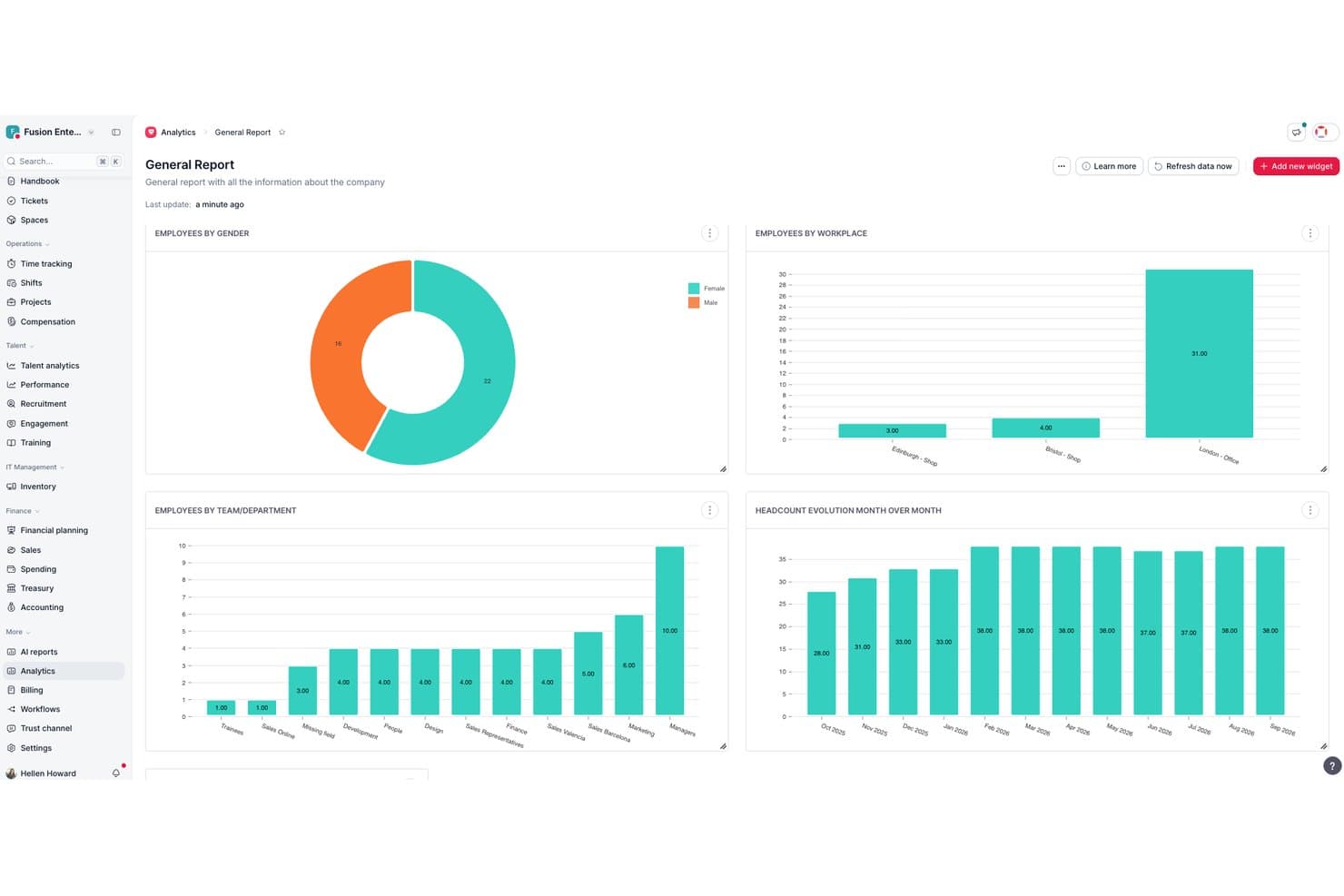
Factorial centralizes HR analytics into visual workforce reports. Factorial is an all-in-one HR platform that combines employee records, time tracking, payroll, recruitment, onboarding, and performance management in a single system built for small and growing teams.
Who Is Factorial Best For?
Factorial is a strong fit for early-stage startups and small businesses that need a single platform to manage HR without a dedicated HR team.
Why I Picked Factorial
I picked Factorial as one of the best because its org chart updates automatically as your team changes, so you're never manually correcting a stale chart after a new hire or promotion. I also like the custom permission system: you can build role-based access groups and assign specific approvers to documents and workflows, which keeps sensitive data out of the wrong hands as headcount grows. I've found this particularly useful when onboarding managers who need visibility into their team but not the entire org.
Factorial Key Features
- Employee directory: Store and manage profiles, documents, and custom fields for all employees in one place.
- Time off management: Create unlimited leave policies, automate accruals, and allow self-service PTO requests.
- Performance reviews: Run 360-degree feedback cycles, set up evaluation templates, and track employee goals.
- Recruiting module: Post jobs to multiple boards, screen applicants with built-in ATS tools, and automate interview scheduling.
Factorial Integrations
Factorial offers native integrations with Google Workspace, Slack, Monday, Okta, Teamtailor, Recruitee, LinkedIn, and Zapier, and provides an API for custom integrations.
Pros and Cons
Pros:
- Integrates core HR, time off, hiring
- Org charts update in real time automatically
- Automated onboarding workflows save setup time
Cons:
- Reporting customization is relatively basic
- Payroll limited to select countries only
 Best for a platform-plus-service approach
- Free demo available
- Pricing upon request
Visit WebsiteCustomer Rating:4/5
TriNet provides a centralized dashboard to access all HR functions. TriNet blends traditional HR software with outsourced HR expertise and payroll services, giving founders and small teams a way to manage hiring, benefits, compliance, and payroll without building an internal HR department. Whether you’re launching a startup or scaling into your first 50+ employees, TriNet provides tools and support that align HR admin with business growth priorities, helping you offload administrative complexity and focus on building your team and culture.
Why I Picked TriNet
I picked TriNet because it gives you access to a PEO-style HR model with integrated payroll, benefits, and compliance management, which makes handling HR tasks much more manageable as your startup grows. You get co-employment support and big-company benefits access, helping smaller teams compete for talent while sharing certain HR responsibilities with TriNet’s professionals. Its payroll and tax compliance tools tie directly into HR operations, reducing manual work and helping you stay aligned with federal and state requirements.
TriNet Key Features
In addition to the payroll and benefits focus that drew me to TriNet, you’ll find a number of other features that support HR needs in a startup environment:
- Payroll Processing: TriNet provides a robust payroll processing system that ensures timely and accurate payroll management.
- Compliance Support: The platform offers compliance assistance to help your startup navigate the complexities of employment laws and regulations.
- Benefits Administration: TriNet simplifies the administration of employee benefits, making it easier to offer competitive packages.
- Self-service Onboarding: Allows new hires to complete onboarding tasks digitally so they’re ready before day one.
TriNet Integrations
Integrations include QuickBooks, Xero, NetSuite, BambooHR, Workday, ADP, Paychex, Gusto, Zenefits, and Salesforce.
Pros and Cons
Pros:
- Offers combined HR software and human expertise support.
- Provides access to benefits typically available only to larger companies.
- Helps manage payroll tax filings and multi-state payroll.
Cons:
- Not the strongest choice if applicant tracking volume is high.
- Platform interface may feel clunky or dated to some users.
 Best for easy onboarding and 24/7 support
- Free plan + free demo available
- From $199/user/month
Visit WebsiteCustomer Rating:4.5/5
Remofirst provides access to dashboards that show team distribution, expenses, and other relevant data. Remofirst is a global employment services platform that offers tools for hiring and managing a global team, including global employer of record services, international payroll and invoice management, benefits management, compliance support, and customer service.
For HR leaders like Wendy Makinson, HR Manager at Joloda Hydraroll, the benefits are clear: “RemoFirst has proven to be an affordable software that allows us to easily onboard members remotely and make payments globally. The fact that RemoFirst is already set up in the countries we need means that we don’t have to invest in official entities, which is a significant cost saving.”
Why I picked Remofirst: Remofirst’s Employer of Record (EOR) service allows startups to quickly and legally hire remote talent from anywhere in the world without the need to establish local entities, which is often a costly and time-consuming process.
Additionally, Remofirst handles all aspects of international payroll, compliance, benefits, and taxes, ensuring startups remain compliant with local labor laws while minimizing administrative burdens. The platform also offers robust onboarding processes, customizable contracts, and 24/7 support.
Standout features & integrations:
Standout features include international payroll and invoice management, benefits management, equipment provisioning, compliance, and an employee cost calculator to determine the cost of employing someone in a different country.
Integrations include ADP.
Pros and Cons
Pros:
- Responsive, 24/7 customer support
- Manages legal and administrative tasks of hiring internationally
- Handles payroll in multiple countries
Cons:
- Limited integrations
- No mobile app available
 10Best for performance management & engagement
HiBob
- Free demo available
- Pricing upon request
Visit WebsiteCustomer Rating:4.5/5
HiBob's DE&I dashboard offers insights into diversity, equity, and inclusion metrics. HiBob is an HR software platform designed to help startups manage core HR functions, onboard new hires, and keep teams engaged as they grow. It combines tools for employee data management, time tracking, and compensation with features that support performance reviews and workplace culture initiatives.
As Char Stark, People Operations and Talent Strategist at Beacon HR, points out: “All-in-one platforms like HiBob simplify HR operations by consolidating multiple functions into one tool, reducing complexity.”
Why I picked HiBob: I picked HiBob for its strong focus on performance management and employee engagement—two areas where startups often need extra support. Its performance review tools let you set goals, track progress, and run evaluations that help identify high performers early.
On the engagement side, built-in surveys and feedback tools give you a real-time view of team morale, so you can address issues before they escalate. The combination of these features can help a growing company keep its culture positive while scaling quickly.
Standout features & integrations:
Standout features include onboarding automation to bring new hires up to speed quickly, people analytics that deliver actionable workforce insights, and compensation management tools that keep payroll and benefits organized.
Integrations include ADP, Breezy, Globalization Partners, Paylocity, Trinet, Xero, Sequoia Tech, Greenhouse, Slack, Deel, and NetSuite.
Pros and Cons
Pros:
- Comprehensive HR tools
- Employee self-service capabilities
- Provides detailed and insightful reports
Cons:
- End-to-end payroll only offered for UK businesses
- Could offer more configuration options
Outro software de RH para startups
Segue-se uma lista de software de RH adicional para startups que não entrou na minha lista dos 10 melhores, mas que vale a pena conhecer:
- 11Workable HRBest for customizable onboarding workflows
- 12AeqiumBest for complex startup compensation planning
- 13SloneekBest for startup-friendly performance tracking
- 14TopSourceBest for 24/5 dedicated support
- 15LatticeBest for goal setting and tracking progress
- 16GoCoBest for integrated payroll and benefits
- 17ChartHopBest for managing growing teams
- 18Sage IntacctBest for scalable cloud-based financial and operational management
- 19ADPBest for simplified payroll and HR for small businesses
- 20Paychex Best for HR insights and needs assessment
How I Evaluate HR Software for Startups
For startups where a founder manages payroll, onboarding, and compliance solo, I evaluate tools on two layers: must-have functionality and the differentiators that set the best apart.
Core Functionality (Table Stakes For This List)
When I'm selecting tools for my list, I rank each one on a scale from 0 (does not offer the functionality) to 5 (excels in this area) for each core functionality listed below. Then, I calculate the tool's total score into a percentage. Each tool needs to achieve a minimum total score of 65% to be considered for inclusion.
- Employee Records Management: I look for a centralized database where you can store contracts, tax forms, and personal details—plus a visual org chart that updates as roles change.
- Payroll Processing: Whether native or tightly integrated, I evaluate how each tool handles wage calculations, tax withholdings, and direct deposits for both W-2 employees and contractors.
- Onboarding & Offboarding Workflows: A strong onboarding flow should automate offer letters, e-signatures, and compliance documents so a new hire's first day isn't buried in paperwork.
- Time Off & PTO Tracking: I check for self-service PTO requests, configurable accrual rules, and manager approval workflows—features that remove back-and-forth from Slack or email.
- Benefits Administration: I evaluate whether the tool supports digital enrollment, carrier or broker connections, and life-event changes without requiring manual plan updates.
- Compliance & Reporting: Startups rarely have in-house counsel, so I look for automated compliance prompts, standard HR reports, and audit-ready recordkeeping built into the platform.
Once I have a list of tools that meet this criteria, I consider what sets each platform apart.
Differentiating Factors (What Sets Vendors Apart)
Here's how I compare and contrast different vendors:
Standout Features
Global hiring support matters when your team is distributed from day one—I check whether a tool offers EOR services or multi-country payroll built in. Equity and compensation tracking is another area I evaluate closely, since startups often lean heavily on stock options over salary. I also look for built-in performance management features like OKRs and review cycles, which save growing teams from buying a separate platform too early.
Beyond Features
Pricing and scalability are the first things I evaluate—startups need transparent per-employee pricing that won't force a platform migration at 50 or 100 employees. Implementation speed also matters a lot here. A founder wearing the HR hat should be able to set up the system in days using pre-built templates, not weeks with a consultant. I also check how well each tool connects with common startup stacks like Slack, Google Workspace, and QuickBooks, since a disconnected HR platform creates more busywork than it solves.
Como escolher software de RH para startups
Encontrar a melhor solução é um esforço de equipa. Siga este processo para o ajudar a encontrar a melhor solução para os requisitos da sua organização:
Passo 1: Defina as suas necessidades
O primeiro passo consiste sempre em clarificar as suas necessidades específicas, por exemplo, a composição da força de trabalho (número, tipo e localização) e os planos de crescimento.
Algumas perguntas importantes a colocar nesta fase:
- Quantos colaboradores temos e a que ritmo esperamos crescer?
- Temos uma combinação de trabalhadores a tempo inteiro, a tempo parcial e contratados?
- Estamos a contratar internacionalmente e precisamos de suporte para o processamento de salários em vários países?
- Que processos de RH podem ser automatizados (por exemplo, integração de novos colaboradores, processamento de salários e registo de folgas)?
- Precisamos de processamentos de salários automatizados ou iremos aprovar manualmente os salários antes do processamento?
- Como lidamos atualmente com horas extraordinárias, comissões e benefícios dos colaboradores?
- O nosso sistema de processamento de salários precisa de gerir automaticamente declarações fiscais, retenções e deduções legais?
- Operamos em vários estados ou países com leis fiscais diferentes?
- Precisamos de atualizações de conformidade integradas para alterações legislativas?
- Com que outras ferramentas terá de se integrar?
Boas práticas:
- Envolver várias partes interessadas: Recolha contributos dos recursos humanos, das finanças, da conformidade e das TI para garantir que o sistema responde a todas as necessidades da empresa.
- Auditar o seu atual processo de processamento salarial: Identifique ineficiências, riscos de conformidade e tarefas manuais que precisam de ser automatizadas.

Dica profissional: Mark Wei
Quanto menor for o departamento de recursos humanos, melhor será utilizar menos sistemas. Por isso, poderá ser conveniente começar com um sistema de recursos humanos completo e, posteriormente, acrescentar ferramentas mais especializadas à medida que as suas necessidades evoluem. É por isso que a capacidade de integração eficaz, idealmente através de APIs abertas ou conectores nativos, é fundamental. — Mark Wei, fundador da \u003cb id=\u0022m_2161397808206887471gmail-docs-internal-guid-125341da-7fff-6340-2741-ed1b528da587\u0022\u003ePropertySensor\u003c/b\u003e
Passo 2: Pesquisar e comparar fornecedores
Depois de definir as necessidades, pesquise fornecedores de software de recursos humanos que estejam alinhados com os seus requisitos.
Pode utilizar guias de serviços de recursos humanos como este, bem como a sua rede de contactos e comunidades de recursos humanos.
Boa prática: Faça uma lista restrita de 3–5 fornecedores e crie uma matriz de comparação para avaliar objetivamente as funcionalidades, os preços e as opções de apoio.
Depois de criar a sua lista restrita, contacte os fornecedores e marque algumas demonstrações ao vivo para o ajudar a avaliar a facilidade de utilização da ferramenta, as funcionalidades e a equipa que está por detrás dela.

Author's Tip
Tenha cuidado com as promessas dos vendedores! Se algo estiver “no plano de desenvolvimento”, é pouco provável que venha a acontecer. Antes de escolher, certifique-se de que conhece as equipas de implementação e os consultores de serviço que atenderão as suas chamadas. Visite inclusivamente o centro de assistência, se puder!
Passo 3: Finalizar a seleção e negociar as condições
Depois de escolher um fornecedor, analise os planos de preços, os acordos de nível de serviço (SLAs) e as condições do contrato.
Esclareça quaisquer custos adicionais, como taxas de implementação, encargos de declaração de impostos ou licenças de utilizador, antes de assinar.
Se o software incluir diferentes níveis de apoio ao cliente, certifique-se de que a sua empresa obtém o nível adequado de assistência e seja absolutamente claro quanto a quaisquer custos adicionais de apoio.
Tendências no software de recursos humanos para startups
Este mercado está em constante mudança. Analisei numerosas atualizações de produtos, comunicados de imprensa e registos de versões para identificar algumas tendências no software de recursos humanos para startups e o seu potencial impacto no setor.
- Ferramentas de recrutamento baseadas em IA: A IA está a ser utilizada em tarefas como a triagem de currículos e a correspondência entre candidatos e descrições de funções, reduzindo o tempo despendido na triagem manual. (Consulte a minha lista dos melhores sistemas de acompanhamento de candidaturas baseados em IA para ver excelentes exemplos!)
- Gestão do trabalho remoto: As ferramentas para gerir equipas remotas estão a tornar-se mais sofisticadas à medida que a Geração Z entra no mercado de trabalho e aumenta a procura por um melhor equilíbrio entre a vida profissional e pessoal. Oferecem funcionalidades como o registo de horas e a colaboração virtual, essenciais para o trabalho remoto e cada vez mais comuns.
- Tomada de decisões baseada em dados: O software de recursos humanos utiliza a análise de dados para fundamentar decisões. Isto inclui informações sobre o desempenho e a retenção dos colaboradores, a previsão das necessidades de contratação, a identificação de potenciais lacunas de talento e a previsão das taxas de rotatividade dos colaboradores.
- Priorização do bem-estar e dos benefícios: Com a crescente atenção dada ao bem-estar dos colaboradores e à retenção a longo prazo, as soluções de software de recursos humanos integram agora funcionalidades como aplicações de bem-estar, ferramentas de gestão do stress e plataformas que promovem o equilíbrio entre a vida profissional e pessoal, juntamente com reuniões individuais remotas e uma gestão contínua do desempenho.
O que é o software de recursos humanos para startups?
O software de recursos humanos para startups foi concebido para ajudar a gerir várias funções de recursos humanos, como o recrutamento, a integração, o processamento salarial, a administração de benefícios, a formação e a gestão do desempenho.
Os principais componentes incluem o acompanhamento de candidaturas, bases de dados de colaboradores, processamento salarial, gestão de benefícios e avaliação do desempenho, todos destinados a simplificar os processos de recursos humanos, garantir a conformidade e melhorar a eficiência na gestão de uma força de trabalho em crescimento.
Principais funcionalidades do software de recursos humanos para startups
Ao selecionar software de recursos humanos para startups, concentre-se nas funcionalidades que apoiam o crescimento, a eficiência, a flexibilidade e a satisfação dos colaboradores. Eis as funcionalidades mais importantes a considerar:
- Integração de novos funcionários: A assinatura e a gestão automatizadas de documentos simplificam o processo de integração de novos contratados na empresa, ajudando a garantir que os novos funcionários possam ser produtivos desde o primeiro dia.
- Gestão de salários: Automatiza os cálculos e os pagamentos de salários, reduzindo os erros e garantindo pagamentos atempados.
- Registo de tempos e assiduidade: Monitoriza as horas de trabalho e a assiduidade dos funcionários, ajudando a gerir a produtividade da força de trabalho e o cumprimento da legislação laboral.
- Gestão do desempenho: Regista e avalia o desempenho dos funcionários, ajudando a identificar os melhores desempenhos e as áreas que necessitam de melhorias.
- Gestão de benefícios: Portais para a inscrição dos funcionários em benefícios como seguros de saúde e planos de reforma.
- Autoatendimento dos funcionários: Permite que os funcionários acedam e façam a gestão das suas informações pessoais, reduzindo a carga administrativa sobre o pessoal de RH.
- Recrutamento e acompanhamento de candidatos: Simplifica o processo de contratação, desde a publicação da vaga até à seleção do candidato e à apresentação de uma proposta, criando uma melhor experiência de contratação para todas as pessoas envolvidas.
- Gestão da conformidade: As atualizações e os lembretes automáticos ajudam a garantir o cumprimento das alterações à legislação e aos regulamentos laborais, minimizando o risco de problemas jurídicos e penalizações.
- Relatórios e análises: Fornece informações através da análise de dados e de relatórios. Isto apoia a tomada de decisões informadas e o planeamento estratégico.
- Capacidades de integração: Permite que o software funcione de forma integrada com outras ferramentas empresariais. Isto garante um fluxo de trabalho coeso e eficiente entre diferentes departamentos.
Se procura um novo sistema principalmente para funções relacionadas com salários, poderá também considerar pesquisar plataformas de processamento salarial para startups.
Benefícios do software de RH para startups
A utilização de ferramentas de software de RH é uma forma eficaz de reduzir as tarefas administrativas e gerir a força de trabalho de forma mais eficiente. Eis vários benefícios que o software de RH oferece às startups:
- Poupança de tempo: A automatização de tarefas rotineiras de RH, como o processamento salarial, o registo de assiduidade e a integração de funcionários, poupa bastante tempo, permitindo que as equipas de RH se concentrem em iniciativas mais estratégicas.
- Melhoria da conformidade: O software de RH ajuda a garantir que as startups cumprem a legislação e os regulamentos laborais, fornecendo atualizações atempadas e mantendo registos exatos, reduzindo o risco de problemas jurídicos.
- Melhoria da experiência dos funcionários: Ao simplificar processos como os pedidos de ausência e a gestão do desempenho, o software de RH melhora a experiência geral dos funcionários, conduzindo a níveis mais elevados de satisfação e retenção.
- Decisões baseadas em dados: O acesso a análises e relatórios em tempo real permite que as startups tomem decisões informadas sobre a sua força de trabalho, desde a contratação até ao desenvolvimento de competências.
- Escalabilidade: À medida que as startups crescem, o software de RH pode ser facilmente dimensionado para acomodar um número crescente de funcionários, garantindo que os processos de RH continuam a ser eficientes e eficazes.
Investir em software de RH proporciona às startups as ferramentas necessárias para gerir eficazmente a sua força de trabalho, garantir a conformidade, melhorar a satisfação dos funcionários e apoiar o crescimento.
Custos e preços do software de RH para startups
O software de RH para startups está normalmente disponível em vários planos adaptados a diferentes necessidades e orçamentos.
Compreender os custos e as opções de preços do software de RH pode ser um desafio, especialmente para quem está a entrar agora no mercado.
A tabela abaixo resume os tipos de planos mais comuns, os seus preços médios e as funcionalidades habituais.
Tabela de comparação de planos de software de RH para startups
| Tipo de plano | Preço médio | Funcionalidades comuns |
| Grátis | $0 | Registos básicos de funcionários, acesso limitado de utilizadores e relatórios básicos |
| Básico | $30-$50/mês + $5-$10/funcionário | Registos de funcionários, processamento salarial, ferramentas básicas de conformidade e suporte limitado |
| Intermédio | $50-$100/mês + $5-$15/funcionário | Processamento salarial avançado, gestão de benefícios, apoio à conformidade e portais de autoatendimento dos funcionários |
| Premium | $100-$250/mês + $10-$25/funcionário | Gestão abrangente de RH, análises avançadas, funcionalidades baseadas em IA, integrações extensivas e suporte 24/7 |
| Empresarial | Preços personalizados | Personalização completa, suporte dedicado, integrações extensivas e funcionalidades de segurança avançadas |
Uma análise dos tipos de planos, custos e funcionalidades do software de RH para startups.
Cada plano responde a necessidades diferentes: os planos grátis e básicos são adequados para equipas pequenas, os planos intermédios e premium oferecem funcionalidades avançadas para empresas em crescimento e os planos empresariais proporcionam uma ampla personalização e suporte para startups maiores com requisitos complexos.
Perguntas frequentes sobre software de RH para startups
Eis algumas das perguntas mais frequentes sobre software de RH para startups: