

Gerir tarefas de recursos humanos pode ser uma verdadeira dor de cabeça, não é? Entre processar salários, controlar a assiduidade e garantir a conformidade, é fácil sentir-se assoberbado. É aí que entra o software de gestão de recursos humanos. Ajuda a gerir estas tarefas de forma eficiente, dando-lhe mais tempo para se concentrar na sua equipa.
Passei bastante tempo a testar e a analisar software de recursos humanos e vi em primeira mão como pode facilitar-lhe a vida. Quero partilhar consigo as minhas conclusões, apresentando uma análise imparcial das melhores opções disponíveis.
Neste artigo, vou apresentar-lhe as minhas principais escolhas, destacando o que torna cada uma única. Quer tenha uma pequena empresa ou uma organização de maior dimensão, encontrará aqui uma opção para si.
Porque pode confiar nas nossas recomendações de software
6,700+
Reviews
20
Industry experts
16+
Evaluation factors
14
Years reviewing software
A nossa equipa testa e analisa software desde 2012. Como especialistas em RH, sabemos o quão difícil — e importante — é escolher o software certo.
Para este guia, avaliámos as ferramentas através de testes práticos e pesquisa independente, pontuando-as de acordo com os nossos critérios de seleção. Recorremos também a contributos de líderes de opinião do setor e de especialistas em RH no ativo.
As nossas análises refletem o juízo da nossa equipa editorial, e não um discurso de vendas.
Revisores especialistas:
- Phil GrayCOO
 Kim BehnkeHR Tech Editor & Analyst
 Josh BarkerPeople Ops Manager

Resumo do melhor software de gestão de recursos humanos
Esta tabela comparativa resume os detalhes dos preços das minhas principais escolhas de software de gestão de recursos humanos, para ajudar a encontrar a melhor opção para o seu orçamento e as necessidades da sua empresa.
Sorted by: Default
| Tool | Starting Price | Website | |
|---|---|---|---|
Best for worldwide HR management | 4.8 out of 5 | $5/user/month Free demo available | Website |
Best for benefits administration | 4.6 out of 5 | $79/user/month Free demo available | Website |
Best for scaling HR needs | 4.3 out of 5 | $99/month Free demo available | Website |
Best HR management software with integrated IT functions | 4.9 out of 5 | Pricing upon request Free demo available | Website |
Best for small and medium businesses | 4.5 out of 5 | $10/employee/month Free trial + free demo available | Website |
Best for payroll-HR integration | 4.6 out of 5 | $49/month Free demo available | Book Demo |
Best for payroll integration | 4.3 out of 5 | Pricing upon request Free demo available | Website |
Best as AI for business | 4.4 out of 5 | $8/user/month Up to 15-day free trial + demo available | Website |
Best for onboarding new hires | 4.5 out of 5 | Pricing upon request Free demo available | Website |
Best for SMEs seeking HR solutions | 4.3 out of 5 | £24/month 14-day free trial available | Website |


Análises do melhor software de gestão de recursos humanos
Seguem-se os meus resumos detalhados do melhor software de gestão de recursos humanos que entrou na minha seleção. As minhas análises apresentam uma visão detalhada das principais funcionalidades, vantagens & desvantagens, integrações e casos de utilização ideais de cada ferramenta, para ajudar a encontrar a melhor opção para si.
 Best for worldwide HR management
- Free demo available
- From $5/user/month
Visit WebsiteCustomer Rating:4.8/5
The dashboard gives you a clear overview of pending tasks and team updates. Deel is designed for companies hiring across multiple countries who need reliable global payroll, compliance, and HR administration in one platform. It’s especially useful for teams managing distributed employees or contractors and looking to centralize onboarding, payments, and documentation.
Why I Picked Deel
I picked Deel because it gives you a single system to run HR, payroll, and compliance across 150+ countries without juggling local vendors. You can manage time off, track performance documentation, and automate onboarding through structured workflows that ensure every hire meets local requirements.
I also like that you can offer localized benefits packages and manage global compensation policies directly in the platform. Deel’s compliant payroll engine handles taxes, payslips, and contractor payments automatically, reducing your admin workload.
Deel Key Features
Here are some key features worth highlighting:
- Invoice Generation: Create compliant contractor invoices and payouts from one dashboard.
- Tax and Compliance Management: Automatically applies country-specific tax rules and filing requirements.
- Payslip Management: Generates localized, legally compliant payslips for every hire.
- Accounting Integrations: Sync payroll and contractor payments directly into your finance systems.
Deel Integrations
Integrations include BambooHR, Ashby, Expensify, Greenhouse, Hibob, Netsuite, Okta, OneLogin, QuickBooks, Xero, Workday, and Workable.
Pros and Cons
Pros:
- Automated onboarding workflows with required documentation
- Localized benefits management for global teams
- Supports compliant HR and payroll in 150+ countries
Cons:
- Limited customization in certain regions
- Some HR tools (like performance) less advanced
 Best for benefits administration
- Free demo available
- From $79/user/month
Customer Rating:4.6/5
Justworks handles coverage and regulation tasks for smaller teams. Justworks is an HR and payroll platform designed for small to medium-sized businesses, offering solutions for benefits administration, compliance, and payroll. It helps you manage employee benefits and ensure compliance with regulations.
Why I picked Justworks: Justworks excels in benefits administration, providing straightforward access to health insurance, 401(k) plans, and other benefits. You can manage compliance with ease, thanks to its built-in tools and resources.
The software handles payroll and tax filings, ensuring your finances are in order. It also offers support for employee onboarding, making it easier to integrate new hires into your team.
Standout features & integrations:
Features include automated payroll processing, compliance support, and employee self-service. These features allow your team to manage HR tasks efficiently. Justworks offers 24/7 support, ensuring that help is always available when you need it.
Integrations include QuickBooks, Xero, Slack, Expensify, TSheets, Google Workspace, Microsoft Teams, BambooHR, Gusto, and ADP.
Pros and Cons
Pros:
- Easy employee onboarding
- 24/7 customer support
- Strong benefits administration
Cons:
- Occasional software glitches
- Some features need improvement
Learn more about Justworks:

Paycor supports hiring and tax tasks for smaller organizations. Paycor is designed for small and mid-sized businesses that need HR and payroll tools that can scale as they grow. It’s especially useful if your team wants a system that supports hiring, payroll, and compliance while letting you expand capabilities over time.
Why I Picked Paycor
I picked Paycor because it gives growing organizations the HR foundation they need without adding unnecessary complexity. You can run payroll confidently thanks to built-in tax calculations and automated filings, which help reduce manual errors.
Its hiring tools—such as applicant tracking and structured onboarding—make it easier to bring new employees onboard smoothly as your workforce expands. I also like that its workforce management tools, including scheduling and attendance tracking, give you visibility into staffing needs across different business sizes.
And because Paycor offers modular add-ons, you can extend functionality—like benefits, performance, or learning tools—whenever your team is ready.
Paycor Key Features
Here are some key features worth highlighting:
- Onboarding Checklists: Create consistent new-hire experiences with customizable, step-by-step tasks.
- Employee Self-Service: Let employees update personal details, view pay info, and manage time-off requests.
- Performance Management: Track goals and share feedback using built-in reviews and evaluation tools.
- Benefits Administration: Manage open enrollment, eligibility, and plan elections in one place.
Paycor Integrations
Integrations include QuickBooks, Xero, NetSuite, ADP, Salesforce, Indeed, Glassdoor, BambooHR, Microsoft Dynamics, and Workday.
Pros and Cons
Pros:
- Module add-ons let you expand HR capabilities as you grow
- User-friendly interface
- Effective compliance management
Cons:
- Limited customization for dashboards and reports
- Setup can take time for teams with complex payroll needs
 Best HR management software with integrated IT functions
- Free demo available
- Pricing upon request
Customer Rating:4.9/5
Rippling offers a streamlined user experience with all features accessible from their main dashboard. Rippling is a cloud-based HR management system that acts as a single source of truth for employee data with numerous automations to reduce manual work.
Why I picked Rippling: Its HR management software is available in three distinct bundles: Workforce Platform, HR Cloud, and IT Cloud. All three products operate seamlessly or can be purchased independently, depending on your business needs. Due to their sophisticated IT and global features, their software is well-suited to support distributed workforces.
Rippling Standout Features and Integrations:
Their Workforce Platform offers strong workflow automations and process improvement tools for workforce management, including tools for onboarding & offboarding and document approvals using e-signatures.
Their HR Cloud includes a suite of flexible modules for core HR tasks, including full-service payroll software with time-tracking and benefits administration data automatically synced to payroll to improve productivity and payroll accuracy. They even offer professional employer organization (PEO) services for organizations interested in hiring international talent, including international benefit plans, compliance tracking, and global payroll processing.
Still within their HR Cloud, their talent management and recruitment module features one-click job postings to multiple job boards, an applicant tracking system to organize candidates, and automatic interview scheduling through calendar integrations. To round that all out, their HR Cloud also includes a flexible learning management system (LMS) with 1,000+ pre-built courses and tools to build your own, plus automations to assign, remind and track course completion.
Last but not least, their IT Cloud offering really sets them apart from other traditional HRIS platforms. Within it, they offer advanced device & inventory management features to track, update, lock and wipe devices, manage security threats, and organize software (including purchasing apps and hardware) for new employees. In addition, they have app & identity management tools for password management, software lifecycle management, provisioning & de-provisioning of software licenses, multi-factor authentication, and single sign-on services too.
Integrations are available with 500+ third-party software systems through their App Shop. If needed, you can also set up custom integrations through their API too.
They do have two mobile apps as well: “Rippling - Time Clock” for clocking in/out, and “Rippling - Simplify HR & IT” for viewing pay stubs, managing time-off, accessing the employee directory, and managing passwords and apps.
 Best for small and medium businesses
- Free trial + free demo available
- From $10/employee/month
Visit WebsiteCustomer Rating:4.5/5
BambooHR empowers your workforce to manage their own employee data and personal requests from anywhere through their employee self service features or their employee-facing mobile app. BambooHR is a good fit for small and mid-sized companies that want a single place to manage employee data, simplify everyday HR tasks, and give staff easy self-service access. It’s especially useful for teams that want clearer visibility into employee sentiment, stronger onboarding workflows, and mobile-friendly tools employees will actually use.
Why I Picked BambooHR
I picked BambooHR because it gives your team one centralized system for employee records, time-off management, hiring, and onboarding without adding extra admin work. Its self-service tools let employees request time off, update their own information, and access org charts or directories through the mobile app—reducing your team’s day-to-day workload.
I also like its built-in engagement tools, which combine eNPS surveys, well-being check-ins, and sentiment analysis so you can better understand how your workforce is doing. For hiring, its ATS auto-fills offer letter templates with candidate and job details and supports e-signatures to help you move faster. And because data syncs across the platform, you avoid duplicate entry and keep all employee information consistent.
BambooHR Key Features
Here are some key features worth highlighting:
- Employee Well-Being Surveys: Collect anonymous feedback using short recurring check-ins and open-text responses.
- Mobile App for Employees: Manage time off, view calendars, complete onboarding tasks, and sign documents from iOS or Android.
- Customizable Onboarding Templates: Build pre-boarding and onboarding task lists tailored to roles, departments, or locations.
- Time Tracking Add-On: Track hours, approve timesheets, and sync data directly into payroll when enabled.
BambooHR Integrations
Integrations include Slack, Microsoft Teams, Google Workspace, Indeed, Checkr, Greenhouse, Okta, OneLogin, NetSuite, and Trainual.
Pros and Cons
Pros:
- Employee mobile app supports time off, docs, and announcements
- Pre-boarding templates shorten new hire setup time
- Strong eNPS and sentiment tools improve engagement insights
Cons:
- Limited customization in certain HR workflows
- Payroll is an add-on
 Best for payroll-HR integration
- Free demo available
- From $49/month
Customer Rating:4.6/5
Gusto provides a clear, organized dashboard for running and reviewing payroll. Gusto offers a clean, all-in-one payroll and HR experience that can help you manage payroll, benefits, and employee data in one place — ideal if you want to simplify hiring, onboarding, and paying people without juggling multiple tools. It appeals especially to small-to-medium businesses, startups, and other teams where you may not have a full HR department but still need reliable payroll, benefits, and compliance support.
Why I Picked Gusto
I picked Gusto because it combines payroll, benefits, and HR functions into a single platform, which means your team doesn’t need separate systems for payroll and HR — you get direct deposit, tax filing, and benefits-deduction handling all under one roof. Gusto's automated payroll system ensures that all calculations and filings are handled accurately, reducing the risk of errors. Additionally, its comprehensive benefits management allows you to offer health and retirement plans seamlessly, aligning with your business goals. These features make Gusto an ideal choice for businesses looking to improve their HR processes.
Gusto Key Features
In addition to payroll and benefits management, Gusto provides several other valuable features:
- Time and Attendance: Manage employee hours and time-off requests with ease, ensuring accurate record-keeping.
- Hiring and Onboarding: Streamline the onboarding process with tools for creating offer letters and managing new hire paperwork.
- Talent Management: Conduct performance reviews and track employee development to foster a productive work environment.
- Insights and Reporting: Access data-driven reports to make informed decisions about your workforce and business strategies.
Gusto Integrations
Integrations include QuickBooks, Xero, FreshBooks, Clover, TSheets, Trainual, Deputy, Expensify, Homebase, and When I Work.
Pros and Cons
Pros:
- Employee self-service portal empowers staff to access pay and forms.
- Automatic tax filings and direct deposit simplify payroll compliance.
- Payroll, benefits, and HR in one unified platform.
Cons:
- SMBs that need advanced compliance or niche industry-specific HR modules may find Gusto limiti
- Per-person pricing can get expensive as team grows.
 Best for payroll integration
- Free demo available
- Pricing upon request
Visit WebsiteCustomer Rating:4.3/5
Paylocity helps organize compensation and team oversight processes. Paylocity is a human resources and payroll platform designed for businesses of all sizes. It offers payroll processing, benefits administration, and employee management solutions.
Why I picked Paylocity: Paylocity's strong payroll integration is a key feature, making it ideal if you need a reliable payroll solution. It provides automated payroll processing and tax filing, which simplifies financial management.
The software also offers employee self-service options, reducing the administrative burden on your HR team. You can manage benefits and track employee performance all in one place.
Standout features & integrations:
Features include a learning management system, survey tools, and performance reviews. These features help you develop and engage your workforce effectively. Paylocity’s survey tools allow you to gather valuable employee feedback.
Integrations include QuickBooks, ADP, Workday, Salesforce, Microsoft Dynamics, BambooHR, Xero, NetSuite, Oracle, and G Suite.
Pros and Cons
Pros:
- Learning management system
- Employee self-service options
- Automated tax filing
Cons:
- Limited offline access
- Occasional technical issues
 Best as AI for business
- Up to 15-day free trial + demo available
- From $8/user/month
Visit WebsiteCustomer Rating:4.4/5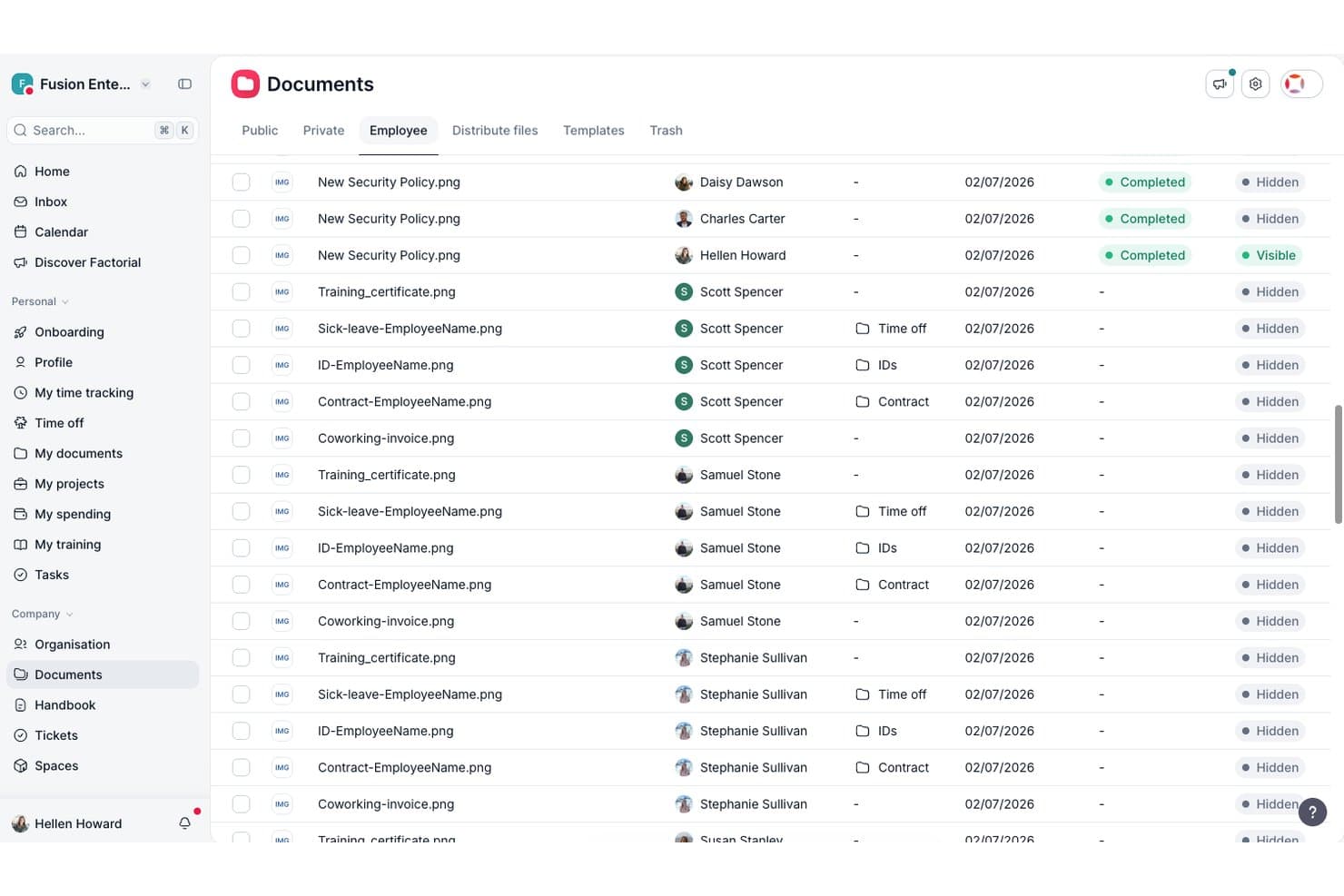
Factorial centralizes employee documents with visibility and status tracking. Factorial is an AI-driven HR management platform that covers employee records, time-off and leave tracking, onboarding and offboarding workflows, performance management, and reporting—with an AI assistant built into each area to handle tasks like scheduling, report generation, and policy questions.
Who Is Factorial Best For?
Factorial is a strong fit for small and mid-sized businesses, particularly those in Europe, that want AI woven into everyday HR tasks like scheduling, reporting, and answering employee policy questions.
Why I Picked Factorial
I picked Factorial as one of the best because its AI runs across every corner of the platform, not just as a chatbot add-on. In practice, that means I can ask it to build a shift schedule from an uploaded spreadsheet, generate a custom HR report in plain language, or get an instant answer to a leave policy question without digging through documentation. The AI also flags payroll anomalies before a run and writes performance review summaries, cutting the manual back-and-forth that slows down core HR work.
Factorial Key Features
- 360° feedback and review cycles: Factorial lets you run structured review periods with automatic reminders, competency tracking, and a 9-box talent matrix to assess and develop your team.
- Employee self-service portal: Employees can update their own details, view payslips and documents, e-sign files, and manage their schedules directly from the portal or mobile app.
- Custom HR reporting: Build standard or custom reports using plain-language prompts or SQL, pulling real-time data across performance, recruiting, training, and engagement.
- Configurable onboarding workflows: Assign tasks with due dates, share documents, collect e-signatures, and set up a new-hire welcome space—all from a centralized onboarding plan.
Factorial Integrations
Factorial offers integrations with Slack, Google Workspace, Microsoft Azure, Okta, Microsoft Power BI, LinkedIn, Recruitee, ZKTeco, DATEV LODAS, and Zapier. It also provides a public API for custom integrations.
Pros and Cons
Pros:
- AI assists reports, schedules, and policy answers
- Employee portal centralizes documents and e-signatures
- Simple leave requests and shared absence calendar
Cons:
- US payroll and compliance coverage is limited
- Reviewers report slow or unresponsive support
 Best for onboarding new hires
- Free demo available
- Pricing upon request
Visit WebsiteCustomer Rating:4.5/5
HiBob lets your team give kudos, share updates, and track people’s work status all in one social-style dashboard. HiBob is designed for companies that want a modern, people-focused way to manage core HR tasks. It’s best suited for mid-sized and fast-growing teams that need clear onboarding workflows, reliable performance tools, and a single place to maintain employee data.
Why I Picked HiBob
I picked HiBob because it gives you practical tools to support the full employee lifecycle without adding administrative clutter. You can onboard new hires with guided steps that help your team set expectations, assign tasks, and track progress from day one.
Its goal-setting and review features help you tie individual performance to company objectives, giving managers a clear structure to work with, and I like that HiBob includes compensation planning tools, letting you compare salary data and manage increases in one place. Its built-in people analytics give you real workforce insights you can use to make informed HR decisions.
HiBob Key Features
Here are some key features worth highlighting:
- Payroll Hub: Centralizes payroll data and connects with leading payroll providers for consistent processing.
- Time & Attendance Tracking: Lets employees record hours and submit time-off requests, giving managers clear oversight.
- Customizable Workflows: Helps you automate recurring HR tasks such as approvals, reminders, and policy acknowledgments.
- Employee Engagement Tools: Supports recognition, updates, and surveys to help your team stay connected.
HiBob Integrations
Integrations include Slack, Microsoft Teams, Zoom, LinkedIn Learning, Deel, CloudPay, Culture Amp, Capdesk, ClickTime, and NetSuite.
Pros and Cons
Pros:
- Compensation modeling supports fair, consistent pay decisions
- Goal-setting tools help align teams with company objectives
- Guided onboarding workflows reduce admin work for managers
Cons:
- Reporting setup can take time for new admins
- Some features require add-ons depending on your plan
 Best for SMEs seeking HR solutions
- 14-day free trial available
- From £24/month
Visit WebsiteCustomer Rating:4.3/5
Breathe HR includes an employee directory for easy access to staff information. Breathe HR is a cloud-based HR management platform built for small businesses in the UK. It combines core HR functions like leave tracking, recruitment, performance management, and employee data storage into one system that supports GDPR compliance and scales with your growing business.
Why I picked Breathe HR: Breathe HR is built around the UK employment landscape, making holiday entitlement calculations for part-time staff, mid-year joiners, and statutory leave much easier to manage. I also appreciate how it offers small businesses access to features typically reserved for larger HR systems—like recruitment tracking, one-to-one performance logging, and partner access for HR consultants—without locking you into long-term contracts. With its marketplace model, you can add tools for AI-powered HR support, financial wellbeing, workspace assessments, learning management, and expenses, depending on your needs.
What makes Breathe HR different is its focus on providing UK small and medium enterprises (SMEs) with both flexibility and control. You can configure holiday rules to fit your policies, securely store sensitive data under GDPR standards, and choose which modules fit your current size. As your business evolves, the marketplace offers expansion into learning, benefits, AI support, or payroll—keeping everything connected within a single HR platform.
Breathe HR Standout Features and Integrations:
Key features include automated holiday approvals, absence and sickness tracking, recruitment management, employee performance tracking, expense management, rota scheduling, one-to-one meeting logs, GDPR-compliant document storage, and partner support portals for HR consultants.
Integrations include Xero Payroll, LivePay, RotaCloud, Pleo, Harriet AI, Mintago, AdviceSheet, Hireful ATS, Google Calendar, Outlook, iCal, Amazon, Google, Intercom, LinkedIn, YouTube, Microsoft, Vimeo, Hubspot, Hotjar, Feefo, and API access for third-party tools.
Learn more about Breathe HR:
Outro software de gestão de recursos humanos
Eis algumas opções adicionais de software de gestão de recursos humanos que não entraram na minha seleção, mas que ainda vale a pena conhecer:
- 11LeapsomeBest for aligned HRIS-to-performance flow
- 12monday AI WorkspaceBest for detailed task management + automations
- 13Workable HRBest for customizable onboarding workflows
- 14SloneekBest for 360 degree feedback
- 15RemoFirstBest HR management systems for global benefits management
- 16LatticeBest for customizable performance reviews
- 17factoHRBest for compliance management
- 18GoCoBest for small and mid-sized businesses
- 19IntelliHRBest for advanced analytics and time-saving compliance management features
- 20edaysBest for shared team calendars
- 21Oracle HCM CloudBest for managing the workforce lifecycle
- 22WorkleapBest for real-time feedback and analytics
- 23WorkdayBest for managing human capital
- 24PersonioBest for people workflow tools for productivity
- 25Kallidus SaplingBest HR software with an integrated learning management system
- 26UKG ProAdvanced HCM software with talent management tools and AI-backed employee feedback sentiment analysis
- 27OrangeHRMBest for open-source flexibility
- 28Odoo (HR module)Best for modular scalability
- 29DayforceBest for data-driven HR decisions
- 30NamelyBest for mid-sized companies
- 31Sage HRAdaptable HRMS software with unlimited applicant pipelines and an expense management app
- 32SAP SuccessFactorsEnterprise-level HR management software suite focused on human experience management.
- 33Cezanne HRBest for European markets
- 34Vault ERPScalable HR management software with add-ons for budgeting, operations, asset management, client management, and more
- 35Zoho PeopleBest for multi-language support
- 36FreshteamHuman resource management software well-suited for small business - available as a 21-day free trial.
- 37PeopleFluentBest for talent management in enterprises
- 38peopleHumBest for AI-driven HR insights
- 39ConnecteamHR management software for deskless workers, including employee scheduling, time clocking in/out, task management, checklists and forms.
- 40ArcoroCore HR management software well-suited for compliance and health & safety focused industries.
How I Evaluate HR Management Software
I split my evaluation into baseline criteria—like employee database depth and leave management—and differentiators that separate vendors for specific team sizes or compliance needs.
Core Functionality (Table Stakes For This List)
When I'm selecting tools for my list, I rank each one on a scale from 0 (does not offer the functionality) to 5 (excels in this area) for each core functionality listed below. Then, I calculate the tool's total score into a percentage. Each tool needs to achieve a minimum total score of 75% to be considered for inclusion.
- Employee Database & Records: I look for a centralized employee directory where HR teams can store and retrieve profiles, documents, and employment histories without toggling between spreadsheets or file systems.
- Onboarding & Offboarding Workflows: Each tool should support structured task sequences for new hires and departures, including offer letter collection, e-signatures, IT provisioning checklists, and exit interview scheduling.
- Time & Leave Management: I evaluate how the platform handles PTO requests, accrual policies, and approval routing—especially for organizations juggling multiple leave types like parental leave, sick time, and floating holidays.
- Performance Management Tools: Goal setting, review cycles, and feedback mechanisms matter here. I check whether the tool supports formats like 360 reviews, 1:1 tracking, or OKR alignment rather than just annual review forms.
- Compliance & Reporting: The platform should generate workforce reports and support regulatory requirements like EEO-1 filings or audit-ready data exports, not just basic headcount summaries.
- Payroll & Benefits Integration: I look at whether payroll and benefits administration are built in or connected through integrations with providers like ADP, Gusto, or Paychex—and how smoothly data flows between systems.
Once I have a list of tools that meet this criteria, I consider what sets each platform apart.
Differentiating Factors (What Sets Vendors Apart)
Here's how I compare and contrast different vendors:
Standout Features
Employee self-service portals are a big differentiator. When employees can update their own addresses, download tax documents, or submit PTO requests without emailing HR, it frees up hours every week. I also look at mobile app quality—especially for teams with deskless or field workers who need to clock in, check schedules, or view pay stubs from their phones. Pulse surveys and eNPS tools are worth evaluating too, since they give people ops teams real-time sentiment data instead of relying on annual engagement surveys.
Beyond Features
Integration ecosystem matters a lot here. I check whether a platform connects with your existing payroll provider, ATS, and tools like Slack or Microsoft 365—because disconnected systems create duplicate data entry. Compliance and data security are equally important; I look for SOC 2 certification, role-based access controls, and audit logs that hold up during internal or external reviews. Implementation support is another factor I weigh, since migrating employee records from a legacy HRIS can be complex, and a dedicated onboarding team makes a real difference.
Como escolher software de gestão de recursos humanos
É fácil perder-se em listas extensas de funcionalidades e estruturas de preços complexas. Para o ajudar a manter-se focado enquanto percorre o seu processo único de seleção de software, eis uma lista de fatores a ter em conta:
| Fator | O que considerar |
|---|---|
| FatorEscalabilidade | O que considerarO software acompanhará o crescimento da sua empresa? Considere se consegue suportar um aumento do número de colaboradores ou funções adicionais de recursos humanos à medida que a sua empresa se expande. |
| FatorIntegrações | O que considerarFunciona com as suas ferramentas atuais? Verifique a compatibilidade com o seu conjunto atual de software para evitar interrupções nos seus fluxos de trabalho. |
| FatorPersonalização | O que considerarPode adaptar o software às suas necessidades? Procure opções para ajustar fluxos de trabalho, campos e relatórios de modo a corresponderem aos seus processos de recursos humanos. |
| FatorFacilidade de utilização | O que considerarÉ fácil de utilizar pela sua equipa? Certifique-se de que a interface é intuitiva e requer o mínimo de formação, para reduzir a curva de aprendizagem dos seus colaboradores. |
| FatorImplementação e integração inicial | O que considerarCom que rapidez pode começar? Avalie o tempo e os recursos necessários para a implementação e a formação inicial, e procure opções de assistência por parte do fornecedor. |
| FatorCusto | O que considerarEstá dentro do seu orçamento? Compare os planos de preços e considere o custo total de propriedade, incluindo eventuais taxas ocultas ou custos por funcionalidades adicionais. |
| FatorMedidas de segurança | O que considerarOs seus dados estão protegidos? Verifique se o software cumpre as normas do setor e disponibiliza encriptação, controlos de acesso e atualizações de segurança regulares. |
| FatorRequisitos de conformidade | O que considerarCumpre as normas legais? Certifique-se de que o software respeita a legislação e os regulamentos laborais locais para evitar potenciais problemas jurídicos. |
O que é o software de gestão de recursos humanos?
O software de gestão de RH é uma ferramenta concebida para ajudar as organizações a gerir eficazmente as suas funções de recursos humanos. Os profissionais de RH, incluindo gestores e recrutadores, utilizam normalmente estas ferramentas para simplificar tarefas como o processamento salarial, a administração de benefícios e a gestão dos dados dos colaboradores. As funcionalidades de controlo do tempo, avaliações de desempenho e gestão da conformidade ajudam a manter registos e a garantir o cumprimento da legislação. Em última análise, estas ferramentas poupam tempo e reduzem os erros, tornando os processos de RH mais eficientes.
Funcionalidades
Ao selecionar software de gestão de RH, procure as seguintes funcionalidades principais:
- Gestão dos dados dos colaboradores: Organiza e armazena as informações dos colaboradores, facilitando o acesso e a atualização dos registos.
- Processamento salarial: Automatiza os cálculos salariais e as deduções fiscais, reduzindo os erros e poupando tempo.
- Controlo do tempo e da assiduidade: Monitoriza as horas de trabalho e a assiduidade dos colaboradores, garantindo um processamento salarial exato e o cumprimento da legislação.
- Administração de benefícios: Gere os benefícios dos colaboradores, incluindo seguros de saúde e planos de reforma, simplificando a adesão e o acompanhamento.
- Avaliações de desempenho: Facilita as avaliações regulares dos colaboradores, ajudando os gestores a acompanhar o progresso e a definir objetivos.
- Gestão da conformidade: Garante o cumprimento das leis e dos regulamentos laborais, reduzindo o risco de problemas legais.
- Ferramentas de integração: Agiliza o processo de contratação, facilitando a integração de novos colaboradores na empresa.
- Portais de autosserviço: Permitem aos colaboradores aceder e atualizar as suas informações, reduzindo a carga administrativa da equipa de RH.
- Funcionalidades de aplicação móvel: Disponibilizam acesso às ferramentas de RH em qualquer lugar, aumentando a flexibilidade e a conveniência para os utilizadores.
- Fluxos de trabalho personalizáveis: Permitem adaptar processos e campos às necessidades específicas de uma organização.
Vantagens
A implementação de software de gestão de RH proporciona várias vantagens para a sua equipa e para a sua empresa. Eis algumas das que pode esperar:
- Melhoria da eficiência: Automatiza tarefas como o processamento salarial e o controlo da assiduidade, poupando tempo e reduzindo os erros manuais.
- Maior conformidade: Garante o cumprimento das leis laborais através de funcionalidades de gestão da conformidade, minimizando os riscos legais.
- Maior envolvimento dos colaboradores: Disponibiliza portais de autosserviço e acesso móvel, permitindo aos colaboradores gerir as suas próprias informações.
- Integração simplificada: Simplifica o processo de contratação com ferramentas de integração, facilitando a integração de novos colaboradores.
- Tomada de decisões fundamentada: Fornece informações através de avaliações de desempenho e ferramentas de elaboração de relatórios, ajudando os gestores a tomar decisões baseadas em dados.
- Poupança de custos: Reduz os custos administrativos ao automatizar e centralizar as tarefas de RH, conduzindo potencialmente a uma redução dos custos.
- Escalabilidade: Adapta-se às necessidades crescentes da empresa através de fluxos de trabalho personalizáveis e opções escaláveis, garantindo uma utilidade a longo prazo.
Custos e preços
A seleção de software de gestão de RH exige uma compreensão dos vários modelos de preços e planos disponíveis. Os custos variam consoante as funcionalidades, a dimensão da equipa, os complementos, entre outros fatores. A tabela abaixo resume os planos comuns, os respetivos preços médios e as funcionalidades normalmente incluídas nas soluções de software de gestão de RH:
Tabela de comparação de planos de software de gestão de RH
| Tipo de plano | Preço médio | Funcionalidades comuns |
|---|---|---|
| Tipo de planoPlano gratuito | Preço médio$0 | Funcionalidades comunsGestão básica dos dados dos colaboradores, elaboração limitada de relatórios e controlo simples do tempo. |
| Tipo de planoPlano pessoal | Preço médio$5-$25/utilizador/mês | Funcionalidades comunsGestão dos dados dos colaboradores, processamento salarial e gestão básica da conformidade. |
| Tipo de planoPlano empresarial | Preço médio$30-$60/utilizador/mês | Funcionalidades comunsElaboração avançada de relatórios, avaliações de desempenho, administração de benefícios e acesso à aplicação móvel. |
| Tipo de planoPlano empresarial de grande dimensão | Preço médio$70-$100/utilizador/mês | Funcionalidades comunsFluxos de trabalho personalizáveis, suporte dedicado, funcionalidades avançadas de conformidade e capacidades de integração. |
Perguntas frequentes sobre software de gestão de RH
Eis algumas respostas a perguntas comuns sobre software de gestão de RH:
O software de gestão de RH pode integrar-se com plataformas de processamento salarial e benefícios?
Sim, a maioria dos principais softwares de gestão de RH oferece integração direta com fornecedores populares de processamento salarial e benefícios. Isto reduz a introdução manual de dados e ajuda a evitar erros. Confirme sempre se o software é compatível com os seus fornecedores atuais ou verifique se disponibilizam exportações de dados simples e acesso à API para integrações personalizadas.
É fácil migrar os dados existentes dos colaboradores para uma nova plataforma de RH?
A maioria dos softwares de gestão de RH disponibiliza ferramentas de importação passo a passo ou um processo de integração orientado para ajudar a migrar os seus registos atuais. Alguns fornecedores oferecem apoio dedicado à migração ou serviços de mapeamento de dados, o que pode poupar-lhe tempo e evitar erros. Agende uma importação de teste antes de mudar totalmente, para garantir que os dados são transferidos corretamente.
Até que ponto os sistemas de gestão de RH são compatíveis com dispositivos móveis?
A maioria dos sistemas de gestão de RH oferece aplicações móveis que permitem aos colaboradores aceder às suas informações em qualquer lugar. Esta funcionalidade é útil para o trabalho remoto, permitindo que as equipas tratem de tarefas como pedidos de férias e registo de horas a partir dos seus smartphones. Certifique-se de que a aplicação é fácil de utilizar e compatível com os seus dispositivos.
Como pode o software de gestão de RH melhorar o envolvimento e a retenção dos colaboradores?
O software de gestão de RH disponibiliza ferramentas para feedback frequente, programas de reconhecimento e inquéritos rápidos, facilitando a aplicação das opiniões dos colaboradores. Os fluxos de trabalho automatizados permitem às equipas de RH concentrarem-se em interações mais significativas. Ao acompanhar as métricas de envolvimento e os riscos de rotatividade, pode resolver proativamente as preocupações e manter os seus melhores talentos.
E agora:
Se está a pesquisar software de gestão de RH, contacte gratuitamente um consultor da SoftwareSelect para obter recomendações.
Preencha um formulário e terá uma breve conversa em que o consultor procura compreender as especificidades das suas necessidades. Depois, receberá uma lista restrita de softwares para analisar. O consultor irá também apoiá-lo durante todo o processo de compra, incluindo as negociações de preços.