

10 Best AI Hot Desk Booking Software Reviewed in 2026

10 Best AI Hot Desk Booking Software Shortlist


Managing a dynamic workspace can be a headache, especially when desks are scarce and teams are growing. AI hot desk booking software can ease this burden by intelligently allocating space, ensuring your team always finds the right spot.
In my experience, these tools are invaluable for optimizing space usage and boosting productivity. With AI, you get predictive analytics, smart desk assignments, and real-time data, making your job easier.
You'll find my top picks in this article, each reviewed for their AI capabilities and how these best booking software can address your specific needs. Whether you're dealing with a hybrid workforce or just need better space management, I've got you covered with unbiased insights.
Why Trust Our Software Reviews
We’ve been testing and reviewing HR software systems since 2019. As HR experts ourselves, we know how critical and difficult it is to make the right decision when selecting software.
We invest in deep research to help our audience make better software purchasing decisions. We’ve tested more than 2,000 tools for different HR management use cases and written over 1,000 comprehensive software reviews. Learn how we stay transparent & our software review methodology.
AI Hot Desk Booking Software Comparison Table
This comparison table summarizes pricing details for my top AI hot desk booking software selections:
| Tool | Best For | Trial Info | Price | ||
|---|---|---|---|---|---|
| 1 | Best for automated desk booking rule enforcement | Free demo available | Pricing upon request | Website | |
| 2 | Best for interactive floor plans | Free trial + free demo available | From $5/user/month (billed annually) | Website | |
| 3 | Best for intuitive AI-powered desk suggestions | Free demo available | Pricing upon request | Website | |
| 4 | Best for compliance with data regulations | Free demo available | From $99/month | Website | |
| 5 | Best for scalable AI integrations | Free demo available | Pricing upon request | Website | |
| 6 | Best for AI-enhanced user experience | Free plan + free demo available | Pricing upon request | Website | |
| 7 | Best with Microsoft Teams integration | Free plan available | Pricing upon request | Website | |
| 8 | Best for AI integration with existing tools | 14-day trial available | From $24.95/user/month | Website | |
| 9 | Best for AI-driven workspace analytics | Free demo available | Pricing upon request | Website | |
| 10 | Best for hybrid teams with AI scheduling | Free demo available | From $2.50/user/month | Website |

Best AI Hot Desk Booking Software Review
Below are my detailed summaries of the best AI hot desk booking software that made it onto my shortlist. My reviews offer a detailed look at the key features, pros & cons, integrations, and ideal use cases of each tool to help you find the best one for you.
Best for automated desk booking rule enforcement
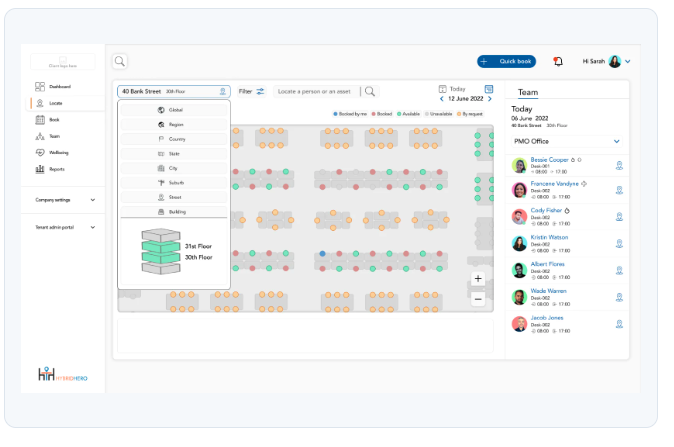
Hybrid Hero is an AI-powered hot desk booking platform that combines natural-language desk reservations, interactive floor plans, automated policy enforcement, and real-time utilization analytics.
Who Is Hybrid Hero Best For?
Hybrid Hero is a good fit for mid-size to enterprise organizations managing hybrid workforces across multiple office locations.
Why I Picked Hybrid Hero
I picked Hybrid Hero as one of the best because its booking rule engine is genuinely one of the more granular I've seen in this space. You can set role-based access controls that restrict which desks specific teams or individuals can book, pair that with approval workflows for sensitive areas, and let the auto-release function reclaim desks when employees don't check in. In practice, that means policy enforcement happens at the point of booking, not after the fact when an admin notices a violation.
Hybrid Hero Key Features
- HybridHero AI: A natural-language AI assistant that lets employees search live desk availability and confirm bookings through plain-language prompts.
- Interactive floor plans: Live visual maps of office floors showing real-time desk availability, so employees can browse and book by location.
- Utilization heat maps: Visual analytics that surface peak usage days, no-show rates, and desk demand trends across every site.
- Team neighborhoods: Groups of desks reserved for specific teams, keeping colleagues co-located without requiring fixed assigned seating.
Hybrid Hero Integrations
Hybrid Hero offers native integrations with Microsoft Outlook, Microsoft Teams, Google Calendar, Google Workspace, Slack, Okta, and Azure AD, and supports SSO through Active Directory, SAML, and OpenID Connect. A REST API and webhooks are available for custom integrations with HRIS, access control, and internal systems.
Pros and Cons
Pros:
- Includes HR and leave management modules
- Interactive floor plans show live availability
- Built-in fire warden and first aider tracking
Cons:
- Mobile app lacks some web app features
- Web app can be slow to load

deskbird
Best for interactive floor plans
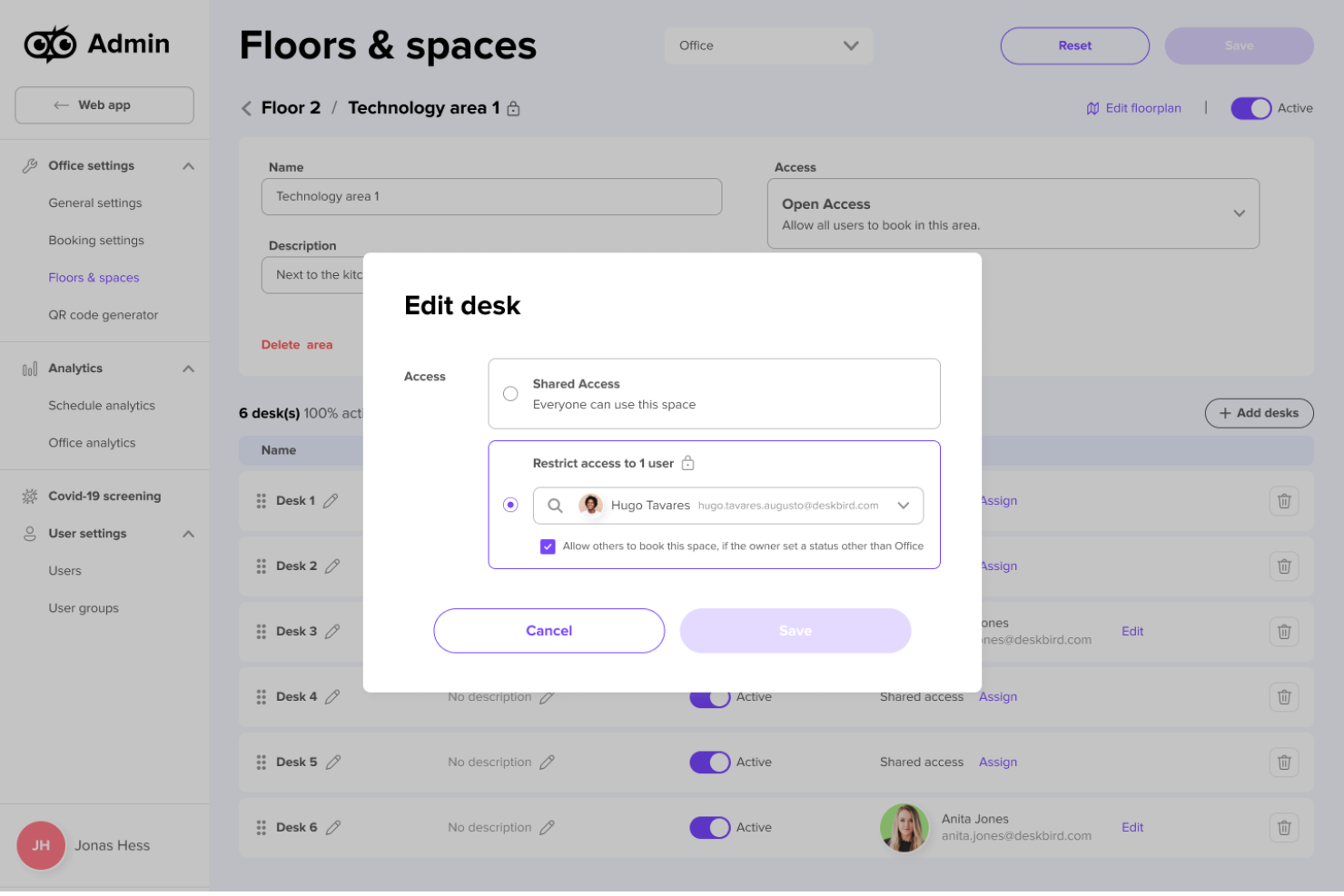
For businesses navigating the complexities of hybrid work environments, deskbird offers a dynamic solution to improve workplace flexibility and efficiency. By providing intuitive desk and room booking capabilities, it caters to organizations aiming to optimize space utilization and improve team collaboration. deskbird addresses challenges such as double bookings and resource management, making it an appealing choice for enterprises seeking to improve their office operations.
Why I Picked deskbird
I picked deskbird for its desk and room booking features, which are important for managing hybrid workspaces. The platform's interactive floor plans allow you to visualize all the available seating options and who's sitting where. Additionally, deskbird's workspace analytics provide valuable insights into desk utilization, helping you make informed decisions about space management. These features, combined with its ability to integrate with popular tools like MS Teams and Outlook, make deskbird a strong choice for AI-driven hot desk booking solutions.
deskbird Key Features
In addition to its core booking functionalities, deskbird offers several other valuable features:
- Week Planning: This feature allows you to organize and manage your workweek, ensuring optimal use of office resources and facilitating better team coordination.
- Incident Management: deskbird includes tools to report and manage workplace incidents, helping maintain a safe and productive office environment.
- Visitor Management: This feature simplifies the process of registering and tracking visitors, improving security and operational efficiency within the workplace.
- Multi-language Support: deskbird is available in nine languages, making it accessible to diverse teams across different regions.
deskbird Integrations
Integrations include Microsoft Teams, Outlook, Slack, Google Workspace, and various HR systems. deskbird also supports over 200 API integrations, allowing for smooth connectivity with a wide range of tools and services.
Pros and Cons
Pros:
- Hybrid scheduling supports flexible work environments
- Real-time occupancy analytics aid in space optimization
- Intuitive interface simplifies desk and room booking
Cons:
- Limited scalability for large enterprises with complex needs
- Initial setup can be fiddly and time-consuming

Robin
Best for intuitive AI-powered desk suggestions
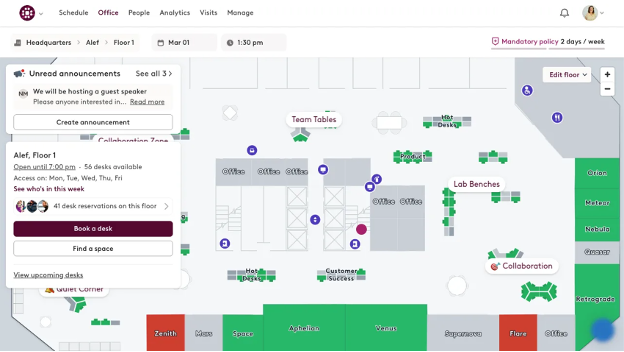
Robin is a hot desk and meeting room booking software designed for businesses looking to optimize their office space. It caters to organizations aiming to enhance workspace utilization through AI-driven desk allocation and smart scheduling.
Why I picked Robin: Robin offers intuitive AI-powered desk suggestions that help your team find the best available workspace efficiently. Its AI capabilities analyze usage patterns to recommend optimal desk assignments, reducing the hassle of manual booking.
You can benefit from features like real-time availability updates and predictive analytics, which align with its USP of providing intuitive desk suggestions. This tool differentiates itself by focusing on user-friendly AI interactions that support flexible work environments.
Standout features & integrations:
Features include real-time occupancy tracking, interactive floor plans, and automated desk management. Your team can easily navigate the workspace with Robin's mobile app, and the tool ensures that booking processes are straightforward. It also provides insights into workspace utilization, helping you make informed decisions.
Integrations include Microsoft Teams, Google Workspace, Slack, Zoom, Okta, Azure AD, Office 365, Jira, Outlook, and Asana.
Pros and Cons
Pros:
- Easy mobile app access
- Real-time availability updates
- Intuitive AI desk recommendations
Cons:
- Can be complex for new users
- Limited customization options
YAROOMS
Best for compliance with data regulations
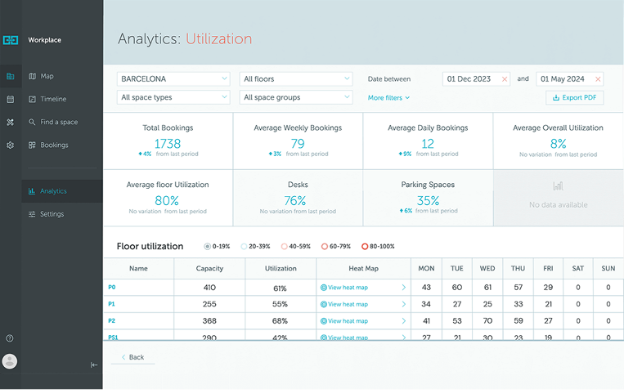
Yarooms is an AI-powered desk reservation system designed for businesses that prioritize data privacy and compliance. It serves companies looking to efficiently manage their workspace while ensuring adherence to data protection standards.
Why I picked Yarooms: Yarooms stands out in its data compliance features, making it ideal for organizations with strict data regulations. Its AI capabilities include real-time occupancy monitoring and predictive analytics, ensuring optimal desk allocation in hot desking and desk hoteling environments.
Yarooms' AI assistant, Yarvis, enhances the reservation process by managing recurring bookings and providing personalized recommendations tailored to your team's specific needs. These features align with its focus on data privacy, providing a secure and efficient workspace management, whether you're managing flexible seating or structured reservations.
Standout features & integrations:
Features include real-time occupancy monitoring, interactive office maps, and automated booking processes. Your team can benefit from smart recommendations that personalize workspace settings. The platform also offers predictive analytics to optimize space utilization.
Integrations include Microsoft Teams, Google Calendar, Outlook, Slack, Zoom, Okta, Azure AD, Asana, Jira, and Trello.
Pros and Cons
Pros:
- Smart AI recommendations
- Real-time occupancy monitoring
- Strong data compliance features
Cons:
- Limited customization for large enterprises
- Less intuitive user interface

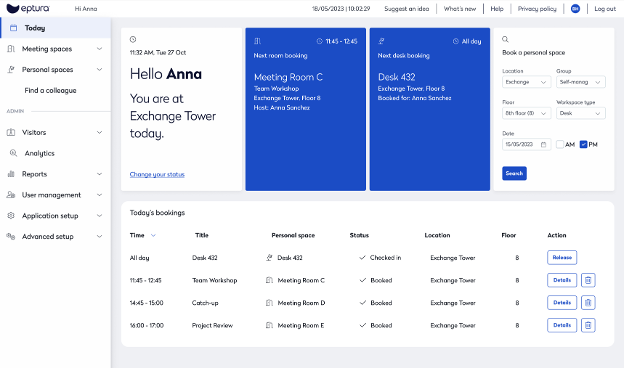
Eptura Engage is a versatile desk booking platform aimed at businesses looking for scalable solutions to manage their workspace efficiently. It serves companies that need flexible, AI-driven tools to enhance office productivity and space utilization.
Why I picked Eptura Engage: Eptura Engage performs exceptionally well in offering scalable AI integrations that adapt to your growing business needs. Its AI features include dynamic desk assignments, permanent desk configurations, and real-time data analytics, which help you optimize space usage.
The software provides predictive insights that allow your team to plan for future workspace requirements. Its scalable integrations make it ideal for expanding businesses.
Standout features & integrations:
Features include automated reservation reminders, space utilization analytics, and user-friendly booking interfaces. Your team can easily manage workspace availability with its intuitive dashboard. It also offers occupancy tracking to ensure optimal usage of resources.
Integrations include Microsoft Outlook, Google Calendar, Slack, Zoom, Microsoft Teams, Salesforce, SharePoint, Azure Active Directory, Okta, and HubSpot.
Pros and Cons
Pros:
- User-friendly booking interface
- Predictive analytics for future planning
- Scalable AI integration capabilities
Cons:
- Requires consistent updates for best performance
- Initial setup can be complex

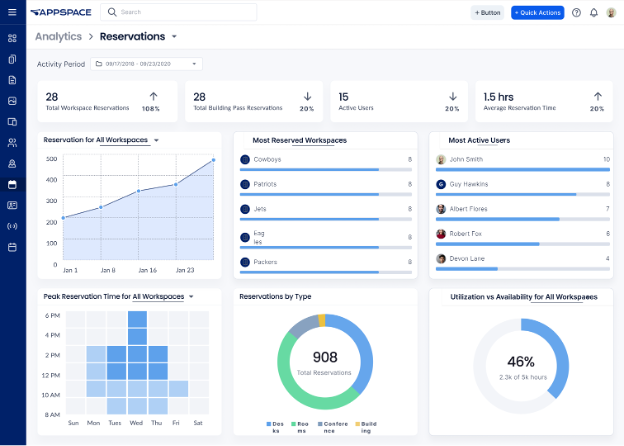
Appspace is a desk booking tool designed for businesses seeking an enhanced workplace experience through AI-driven solutions. It primarily serves organizations that want to optimize their workspace utilization and improve employee engagement with intuitive tools.
Why I picked Appspace: Appspace offers an AI-enhanced employee experience, making it easy for your team to navigate workspace management. Its AI capabilities include personalized workspace recommendations and real-time desk availability updates.
The tool's focus on user-centric design ensures that booking and managing spaces is straightforward and efficient. These features provide an efficient experience for active users.
Standout features & integrations:
Features include customizable booking templates, detailed usage analytics, and automated alerts. Your team can easily access workspace information through a centralized dashboard. It also offers digital signage to improve communication within the office.
Integrations include Microsoft Teams, Google Workspace, Zoom, Slack, Office 365, Salesforce, SharePoint, Azure, Okta, and HubSpot.
Pros and Cons
Pros:
- Real-time availability updates
- Personalized workspace recommendations
- AI-enhanced user interface
Cons:
- May require training for full utilization
- Less intuitive user interface
Best with Microsoft Teams integration
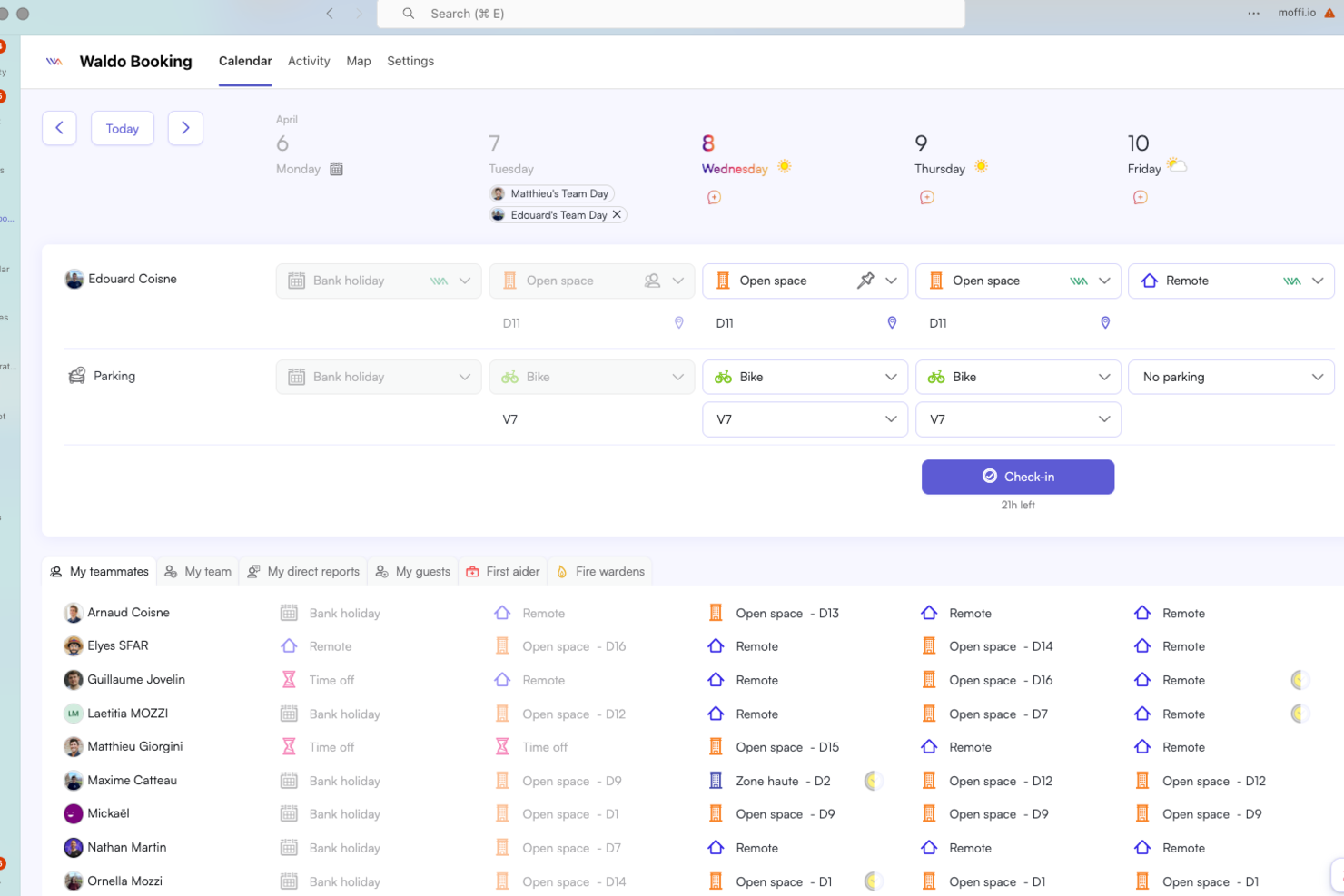
Waldo by MOFFI is an AI-powered hot desk booking platform that connects with workplace tools to automate desk reservations, manage real-time availability, and integrate with calendar systems.
Who Is Waldo by MOFFI Best For?
Waldo by MOFFI is a good fit for HR teams and office managers in organizations using Microsoft 365 and hybrid work environments.
Why I Picked Waldo by MOFFI
I picked Waldo by MOFFI as one of the best because its Microsoft Teams integration lets my team book desks directly from our chat environment. I like that I can check desk availability, make reservations, and manage bookings without leaving Teams. This setup keeps everything in one place and fits right into our daily workflow.
Waldo by MOFFI Key Features
- AI-powered booking assistant: Lets users reserve desks based on preferences and past behavior.
- Automated desk release: Frees up unused desks by syncing with calendar activity.
- Real-time availability dashboard: Shows up-to-date desk occupancy and open spots.
- Customizable booking rules: Allows admins to set booking policies and restrictions for different teams or zones.
Waldo by MOFFI Integrations
Waldo by MOFFI offers native integrations with Microsoft Teams, Outlook, and Google Calendar. An API is available for custom integrations.
Pros and Cons
Pros:
- Real-time occupancy dashboard for workspace monitoring
- Visual floor plan for desk selection
- Automated desk release based on calendar activity
Cons:
- Lacks built-in visitor management features
- Few third-party integrations beyond Microsoft ecosystem

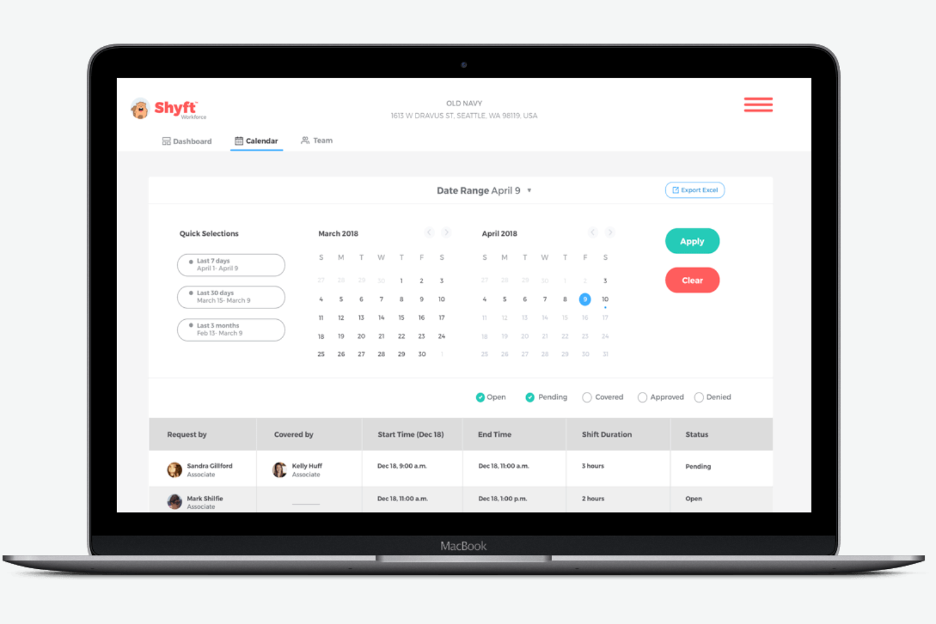
Shyft is a desk booking solution designed for teams that need efficient workspace management integrated with their existing tools. It targets businesses looking to enhance productivity through AI-driven desk allocation and scheduling.
Why I picked Shyft: Shyft proves highly capable in integrating AI with your current tools, making it a flexible addition to your workspace management system. Its AI features include smart desk allocation and automated scheduling, which ensure efficient use of resources.
The software's ability to work with existing platforms enhances its functionality, providing a cohesive user experience. These capabilities offer smooth integration for improved efficiency.
Standout features & integrations:
Features include customizable booking options, real-time occupancy tracking, and automated notifications. Your team can easily manage workspace preferences and get instant updates on availability. It also offers detailed analytics to help optimize space utilization.
Integrations include Microsoft Teams, Slack, Zoom, Google Workspace, Office 365, Salesforce, Asana, Trello, Outlook, and HubSpot.
Pros and Cons
Pros:
- Real-time occupancy tracking
- Smart AI-driven desk allocation
- Smooth integration with existing tools
Cons:
- Poor history visibility
- Login and loading issues

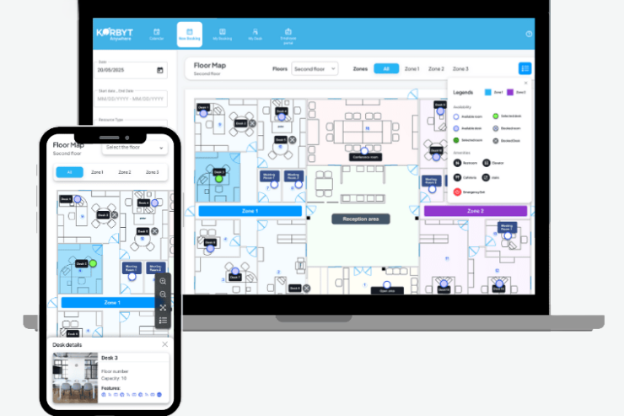
Korbyt is an AI-driven workplace management platform designed for businesses that want to leverage data for optimized desk usage. It primarily serves organizations looking to enhance workspace efficiency through advanced analytics and real-time insights.
Why I picked Korbyt: Korbyt stands out in providing AI-driven workplace analytics, making it an excellent choice for data-focused teams. Its AI features include real-time monitoring of desk occupancy and analytics that help anticipate future space needs.
This tool provides insights into workspace trends, enabling your team to make informed decisions about desk allocation. These capabilities deliver detailed analytics, giving you a strategic edge in managing your office environment.
Standout features & integrations:
Features include customizable dashboards, automated reporting, and real-time alerts. Your team can track workspace performance with ease, allowing for adjustments on the fly. Korbyt also offers visual data presentations that simplify complex analytics.
Integrations include Microsoft Teams, Slack, Zoom, Google Workspace, Office 365, Salesforce, Azure, Power BI, SharePoint, and Tableau.
Pros and Cons
Pros:
- Real-time monitoring features
- Customizable dashboards
- Detailed AI-driven analytics
Cons:
- Setup can be time-consuming
- May require technical expertise for system integration

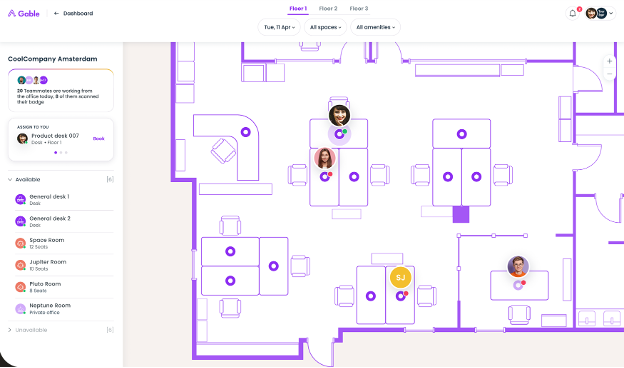
Gable is a desk reservation and room scheduling software tailored for in-office and remote teams that need efficient hybrid workplace management. It provides AI-driven scheduling to optimize desk usage and supports remote collaboration by offering flexible workspace solutions.
Why I picked Gable: Gable is ideal for remote teams, offering AI scheduling that adapts to your team's changing needs. Its AI features include smart desk allocation and real-time availability updates, which ensure your team can find the right workspace whenever needed.
The tool's intuitive interface simplifies desk booking, making it accessible for teams working from various locations. Its features provide strong support for hybrid work environments.
Standout features & integrations:
Features include customizable workspace settings, detailed usage analytics, and automated booking confirmations. Your team can easily manage their workspace preferences through a user-friendly platform. It also provides insights into workspace trends, allowing for informed decision-making.
Integrations include Google Calendar, Slack, Microsoft Teams, Zoom, Outlook, Asana, Trello, Salesforce, Okta, and HubSpot.
Pros and Cons
Pros:
- Real-time availability updates
- Intuitive interface for easy booking
- AI-driven scheduling for remote teams
Cons:
- May require training for new users
- Limited customization options
Other AI Hot Desk Booking Software
Here are some additional AI hot desk booking software options that didn’t make it onto my shortlist, but are still worth checking out:
- B-Line
For AI-driven occupancy tracking
- Room Manager AI
For industry-specific AI features
- Skedda
For flexible AI booking options
- anny
For 3D office layout visualization
- Kadence
For small businesses with limited resources
- OfficeSpace
For large enterprises with complex needs
- Tactic
For data-driven workspace decisions
- Archie
For creative teams needing collaborative spaces


How I Evaluate AI Hot Desk Booking Software
Every tool on this list needs to go beyond basic desk reservations—AI should drive real value, like auto-assigning desks based on team schedules or forecasting occupancy to right-size your space. I split my evaluation into core functionality every platform must have to qualify and the differentiating factors that separate good options from great ones.
Core Functionality (Table Stakes For This List)
When I'm selecting tools for my list, I rank each one on a scale from 0 (does not offer the functionality) to 5 (excels in this area) for each core functionality listed below. Then, I calculate the tool's total score into a percentage. Each tool needs to achieve a minimum total score of 65% to be considered for inclusion.
- AI-Powered Desk Recommendations: I look for AI that goes beyond random assignment—suggesting desks based on teammate proximity, past preferences, or project-based groupings.
- Interactive Booking Interface: The booking experience should include a visual floor plan with real-time availability, filters, and search across multiple locations.
- Predictive Occupancy Analytics: I evaluate whether the platform forecasts attendance patterns and surfaces actionable insights, like flagging underused floors midweek.
- Hybrid Schedule Coordination: Tools should sync team schedules with bookings, so anchor days or collaboration days translate into automatic desk assignments.
- HR & Calendar Integrations: I check for native connections with HRIS platforms, SSO, Google Workspace or Microsoft 365, and messaging tools like Slack or Teams.
- Automated Policy Enforcement: Booking rules like capacity caps, check-in windows, and no-show auto-releases should be configurable without manual oversight.
Once I have a list of tools that meet the criteria, I consider what sets each platform apart.
Differentiating Factors (What Sets Vendors Apart)
Here's how I compare and contrast different vendors:
Standout Features
An AI workplace assistant that lives inside Slack or Teams makes a real difference—employees can book a desk or find a teammate without leaving their workflow. I also evaluate sensor and IoT integration, where real-time occupancy data feeds back into the AI to auto-release ghost bookings and sharpen forecasting. Dynamic neighborhood zoning is another feature I value, especially for HR teams coordinating cross-functional projects where seating clusters need to shift week to week.
Beyond Features
Data privacy matters here because these platforms track employee location and behavior—I check for GDPR and SOC 2 compliance, along with clear data retention policies. Implementation support is another factor I weigh, since floor plan digitization and change management resources can make or break adoption across multiple offices. I also consider pricing flexibility, particularly whether per-user or per-desk models scale well for hybrid teams where only a portion of employees are in-office on any given day.
How to Choose AI Hot Desk Booking Software
It’s easy to get bogged down in long feature lists and complex pricing structures. To help you stay focused as you work through your unique software selection process, here’s a checklist of factors to keep in mind:
| Factor | What to Consider |
| Scalability | Will the software grow with your team? Check if it supports additional users and locations without a significant increase in cost. |
| Integrations | Does it connect with your existing tools? Look for compatibility with calendars, communication platforms, and other essential systems. |
| Customizability | Can you tailor it to fit your workflows? Evaluate the ability to adjust settings and configurations to match your specific needs. |
| Ease of use | Is it intuitive for everyone? Ensure that even non-tech-savvy employees can use it comfortably without extensive training. |
| Implementation and onboarding | How smooth is the transition? Consider the time and resources required to get up and running, including available training resources and support. |
| Cost | Does it fit your budget? Compare pricing plans and look for hidden fees. Consider the long-term costs, not just the initial price. |
| Security safeguards | Are your data protected? Ensure the software offers encryption, access controls, and compliance with data protection regulations. |
| Support availability | Can you get help when needed? Check if the vendor offers 24/7 support and multiple channels like chat, phone, or email for assistance. |
What Is AI Hot Desk Booking Software?
AI hot desk booking software is a tool that uses artificial intelligence to manage and optimize workspace reservations. It's commonly used by facility managers, office admins, HR professionals, and IT teams to improve space utilization and enhance productivity. Features like predictive analytics, real-time availability tracking, and smart desk assignments help with efficient space management and user satisfaction. Overall, these tools simplify the process of managing dynamic work environments, ensuring spaces are used effectively.
Features
When selecting AI hot desk booking software, keep an eye out for the following key features:
- Predictive analytics: Uses historical data to forecast future workspace needs, helping you plan and allocate resources more efficiently.
- Real-time availability tracking: Provides up-to-the-minute information on desk occupancy, ensuring users can quickly find available workspaces.
- Smart desk assignments: Automatically allocates desks based on user preferences and patterns, optimizing space utilization.
- Integration capabilities: Connects with existing tools like calendars and communication platforms to enhance operations.
- Customizable settings: Allows you to tailor booking rules and configurations to suit your specific workplace requirements.
- Automated notifications: Send alerts and reminders for bookings and cancellations to keep everyone informed and organized.
- Interactive floor plans: Offers visual representations of office layouts to assist users in selecting the best available desks.
- Data privacy controls: Ensures compliance with data protection regulations, safeguarding user information.
- User-friendly interface: Provides an intuitive and accessible platform for users of all technical levels.
- Occupancy tracking: Monitors and reports on space usage trends, aiding in strategic planning and decision-making.
Benefits
Implementing AI hot desk booking software provides several benefits for your team and your business. Here are a few you can look forward to:
- Improved space utilization: AI-driven insights help allocate desks efficiently, ensuring no space is wasted.
- Enhanced productivity: Smart desk assignments minimize the time spent searching for available workspaces, allowing your team to focus on their tasks.
- Data-driven decisions: Predictive analytics provide valuable insights into workspace trends, aiding in strategic planning.
- Increased flexibility: Real-time tracking and smart assignments support dynamic work environments and changing team needs.
- Reduced administrative burden: Automated notifications and easy scheduling free up time for your team to concentrate on other priorities.
- Better user experience: An intuitive interface and interactive floor plans make booking and managing workspaces straightforward for everyone.
- Enhanced security: Data privacy controls ensure compliance with regulations, protecting sensitive user information.
Costs & Pricing
Selecting AI hot desk booking software requires an understanding of the various pricing models and plans available. Costs vary based on features, team size, add-ons, and more. The table below summarizes common plans, their average prices, and typical features included in AI hot desk booking software solutions:
Plan Comparison Table for AI Hot Desk Booking Software
| Plan Type | Average Price | Common Features |
| Free Plan | $0 | Basic desk booking, limited user access, and basic support. |
| Personal Plan | $5-$15/user/month | Enhanced booking options, calendar integration, and email notifications. |
| Business Plan | $20-$40/user/month | Advanced analytics, smart desk assignments, and admin controls. |
| Enterprise Plan | $50-$100/user/month | Customizable features, dedicated support, and advanced security measures. |
AI Hot Desk Booking Software FAQs
Here are some answers to common questions about AI hot desk booking software:
Can AI hot desk booking software integrate with my existing tools?
Yes, most AI hot desk booking software can integrate with existing tools like calendar apps, communication platforms, and even project management systems. When evaluating options, check if the software supports integration with tools your team already uses, such as Google Workspace, Microsoft Teams, or Slack. This ensures a smooth workflow and reduces the need for manual data entry. It’s always a good idea to ask for a demo to see how integrations work in real-time and to test the compatibility with your current setup.
How can AI hot desk booking software improve space utilization?
AI hot desk booking software improves space utilization by using algorithms to predict usage patterns and suggest optimal desk assignments. It can analyze past booking data to identify peak usage times and underutilized areas, helping you make informed decisions about workspace allocation. For example, if certain desks are frequently booked while others remain empty, the software can adjust assignments to balance usage. This not only maximizes your office space but also boosts employee satisfaction by ensuring everyone has access to a suitable workspace when needed.
Is data privacy a concern with AI hot desk booking software?
Yes, it is. Make sure the AI hot desk booking software you choose follows strict data protection regulations like GDPR or CCPA and includes features like encryption and secure access controls. Single sign-on(SSO) is another important layer—it simplifies secure logins and reduces password-related vulnerabilities. Ask about how your data is stored, who can access it, and how often the system gets security updates. Always check the provider’s privacy policy before onboarding your team.
How does AI improve the accuracy of desk bookings compared to manual systems?
AI hot desk booking software leverages machine learning to predict demand, minimize booking overlaps, and automatically resolve conflicts that manual systems often overlook. For example, the AI can recognize booking patterns to reduce double-booking and recommend optimal seating based on real-time office occupancy. This leads to fewer no-shows, increased desk utilization, and a more reliable reservation system, giving HR a data-backed way to support flexible work while cutting down on errors and administrative tasks.
Can I set rules or priorities for certain teams or leaders in AI hot desk booking software?
Yes, advanced hot desk platforms let HR define custom rules for specific departments, leadership roles, or critical teams. You can reserve blocks of desks for certain groups, allocate priority access for executives, or ensure onboarding teams always get seats together. This is helpful if you’re managing a hybrid schedule or need to accommodate fluctuating team sizes while coworking. It allows HR to balance fairness and flexibility while still honoring department-specific needs and privacy requirements.
What’s Next:
If you're in the process of researching AI hot desk booking software, connect with a SoftwareSelect advisor for free recommendations.
You fill out a form and have a quick chat where they get into the specifics of your needs. Then you'll get a shortlist of software to review. They'll even support you through the entire buying process, including price negotiations.