

10 Best Enterprise Workforce Management Software In 2026

Best Enterprise Workforce Management Software Shortlist


Enterprise workforce management software helps large organizations coordinate scheduling, timekeeping, labor forecasting, and compliance across their entire workforce. If you’re looking for a better way to manage dispersed teams, balance labor budgets, and stay ahead of changing regulations, finding the right software is a must.
This guide brings together the top workforce management platforms built for enterprise complexity to improve the employee experience, so you can compare your options, see what sets each apart, and pick a solution that aligns with your HR and business goals.
Why Trust Our Software Recommendations
Our team has been testing and reviewing software since 2012. As HR experts ourselves, we know how difficult—and important—it is to choose the right software.
For this guide, we evaluated tools using hands-on testing and independent research, scoring tools using our selection criteria. We also draw on insights from industry thought leaders and practicing HR experts.
Our reviews reflect our human editorial judgment, not a sales pitch.
Expert reviewers:
Enterprise Workforce Management Software Comparison Table
This comparison table summarizes pricing details for my top enterprise workforce management software selections:
| Tool | Best For | Trial Info | Price | ||
|---|---|---|---|---|---|
| 1 | Best for automated employee lifecycle tracking | Free demo available | From $5/user/month | Website | |
| 2 | Best for UK retail and healthcare scheduling | Free demo available | From $500/month | Website | |
| 3 | Best for omnichannel workforce forecasting accuracy | Free demo available | Pricing upon request | Website | |
| 4 | Best for biometric time and attendance tracking | 30-day free trial + free demo available | From $80/month | Website | |
| 5 | Best for payroll-connected multi-location scheduling | Free demo available | Pricing upon request | Website | |
| 6 | Best for employee engagement and shift autonomy | 14-day free trial + free demo available | From $5/user/month | Website | |
| 7 | Best for integrated compliance management tools | Free demo available | From $15/user/month | Website | |
| 8 | Best for AI-powered scheduling automation | 30-day free trial + free demo available | Pricing upon request | Website | |
| 9 | Best for demand-driven, flexible scheduling | Free demo available | Pricing upon request | Website | |
| 10 | Best for real-time frontline staff scheduling | Free demo available | Pricing upon request | Website |
Best Enterprise Workforce Management Software Reviews
Below are my detailed summaries of the best enterprise workforce management software that made it onto my shortlist. My reviews offer a detailed look at the features, best use cases, and integrations of each platform to help you find the best one for you.

Deel HR
Best for automated employee lifecycle tracking

Deel HR is a global HRIS platform that centralizes employee and contractor management, onboarding automation, compliance tracking, payroll operations, and workforce analytics across 150+ countries.
Who Is Deel HR Best For?
Deel HR is best suited for enterprise organizations managing distributed teams across multiple countries and worker types who need centralized HR infrastructure with built-in compliance controls.
Why I Picked Deel HR
I picked Deel HR because enterprise workforce management isn’t just about hiring — it’s about controlling the full employee lifecycle across jurisdictions. Deel automates onboarding, contract generation, compliance tracking, time off policies, and offboarding within one unified system. The ability to apply country-specific workflow logic ensures large enterprises can maintain standardized HR processes while adapting to regional labor laws without manual oversight.
Deel HR Key Features
- Compliance hub: Monitors local regulatory updates and flags risks across jurisdictions with recommended actions.
- People analytics dashboards: Build workforce reports filtered by country, department, worker type, or cost center.
- Time off management: Create region-specific leave policies with automated approval workflows.
- Org chart and directory: View a live, searchable workforce structure across global teams.
Deel HR Integrations
Deel HR integrates with major platforms including Workday, SAP SuccessFactors, BambooHR, QuickBooks, Xero, NetSuite, Greenhouse, Slack, Okta, and Azure AD. It also provides API access, webhooks, and Zapier connectivity for custom integrations.
Pros and Cons
Pros:
- Scales with business growth
- Strong global compliance tools
- Unified workforce management
Cons:
- Setup can be time-consuming
- Limited workforce scheduling
New Product Updates from Deel HR

Deel Expands Stablecoin Wallet to 80+ Countries
Deel expands its Stablecoin Wallet to 80+ countries with dollar-backed balances and optional rewards. This gives eligible contractors more ways to hold and manage earnings inside Deel. For more information, visit Deel’s official site.
 .
.
Rotageek
Best for UK retail and healthcare scheduling
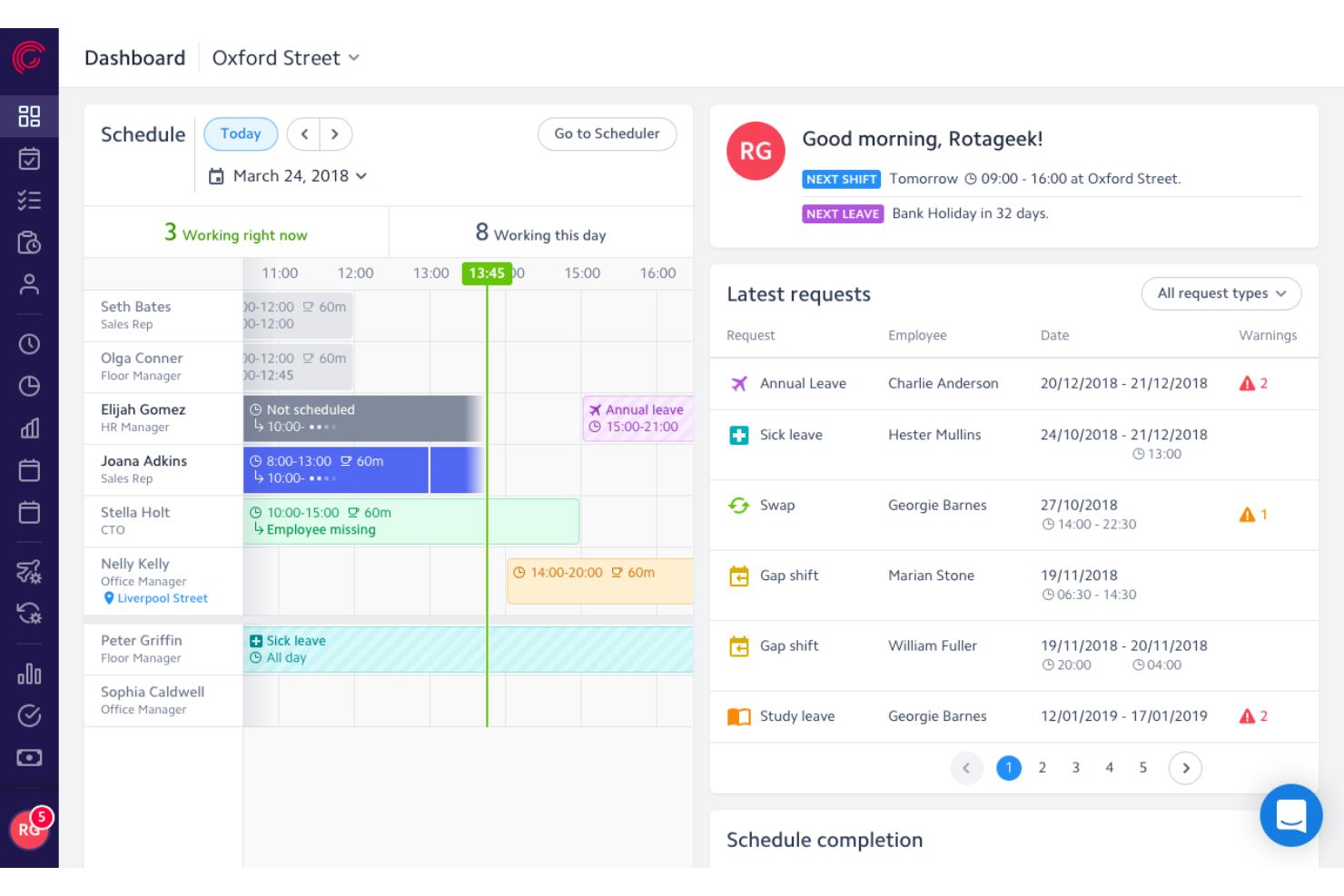
Rotageek is a workforce management platform built around AI-driven scheduling, demand-based labor forecasting, and time and attendance tracking, with dedicated configurations for retail and healthcare environments.
Who Is Rotageek Best For?
Rotageek is a strong fit for UK and European retail and healthcare enterprises that need AI-driven scheduling and precise demand forecasting across dozens or hundreds of locations.
Why I Picked Rotageek
I picked Rotageek as one of the best because it's purpose-built for UK retail and healthcare environments in a way most enterprise workforce management platforms simply aren't. Its AI Auto Scheduling engine generates millions of compliant shift combinations in roughly 30 seconds, factoring in skills, working-time regulations, and fairness rules simultaneously. Pair that with 15-minute interval demand forecasting using real footfall and sales data, and you get scheduling that actually reflects what's happening on the floor at Nando's or an NHS trust.
Rotageek Key Features
- Skills and certifications matching: Tag employees with specific skills and qualifications so that multi-activity shifts are automatically assigned to workers who meet the role's requirements.
- Employee self-service mobile app: Employees can view schedules, swap or pick up shifts, submit availability, request leave, and receive push notifications directly from iOS or Android devices.
- Labour Modelling add-on: Converts demand forecast outputs into deployable rotas and supports what-if scenario modeling for volume changes, cost pressures, and new operating hours.
- Multi-step timesheet approval: Auto-generated timesheets move through a configurable approval hierarchy before payroll export, with custom pay codes aligned to labor laws and company policies.
Rotageek Integrations
Rotageek offers native integrations with Zellis HCM Cloud, IRIS HR and Payroll, ELMO, and Cascade. ADP, Oracle, SAP, and Sage are listed as enterprise partners, while APIs, webhooks, and SFTP support custom connections.
Pros and Cons
Pros:
- Employee mobile app supports real-time shift swaps
- 15-minute demand forecasting boosts staffing accuracy
- AI auto scheduling handles complex compliance rules
Cons:
- Mobile app users report reliability issues
- Quote-based pricing requires sales contact

Verint
Best for omnichannel workforce forecasting accuracy
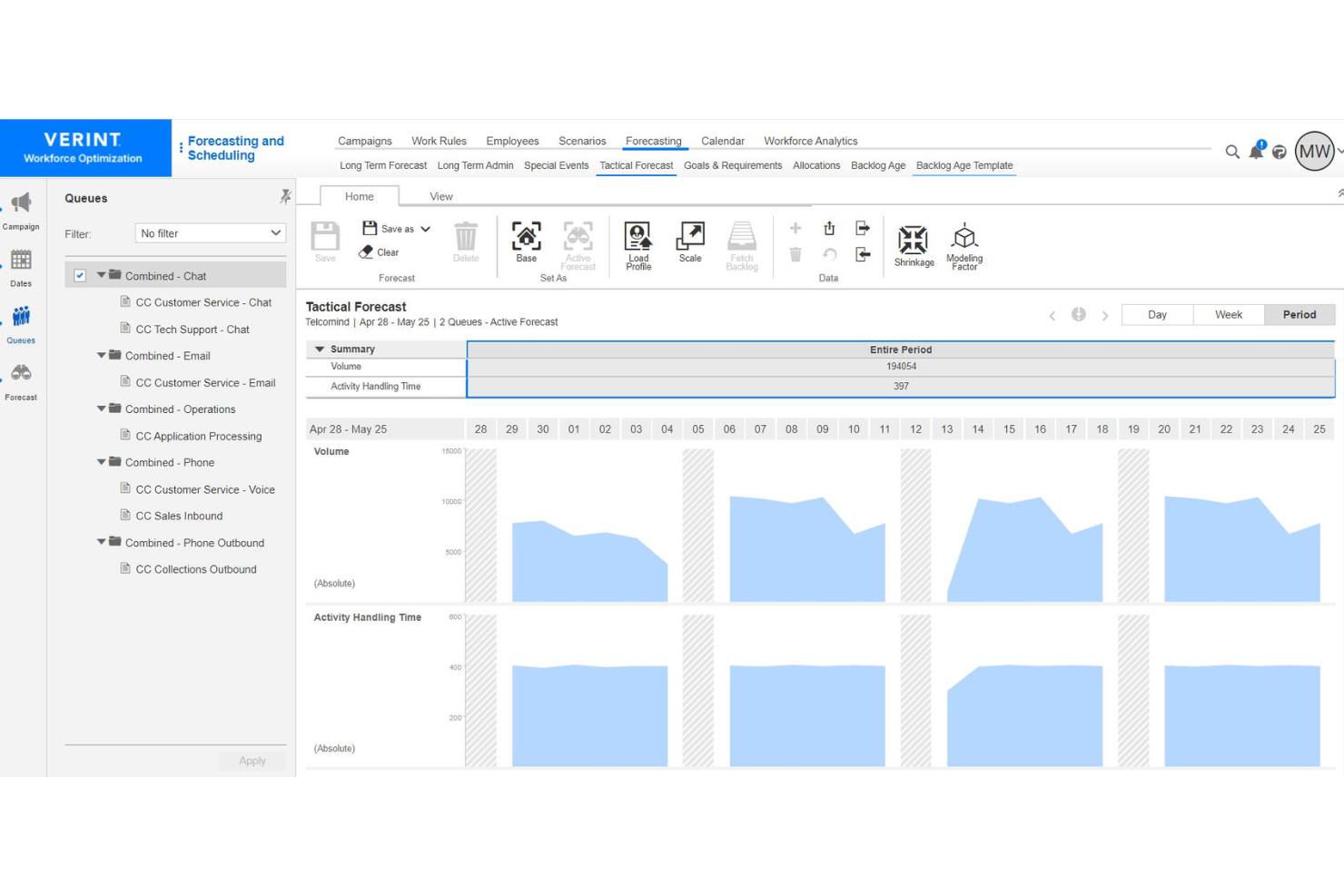
Verint is an enterprise workforce management software platform built for contact centers and back-office operations, offering features for omnichannel forecasting, scheduling, adherence monitoring, and real-time analytics.
Who Is Verint Best For?
Large contact centers and service operations leaders needing unified forecasting across voice, chat, email, and digital engagement channels.
Why I Picked Verint
I picked Verint because I rely on its AI-driven omnichannel forecasting engine to align workforce plans across call, chat, and email. I use its intraday reforecasting and shrinkage modeling, so my team can adapt staffing to real-time changes in demand patterns.
Verint Key Features
- Automated scheduling: Build multi-skill schedules based on forecasted demand and employee availability.
- Performance tracking dashboards: Monitor real-time adherence, agent KPIs, and historical productivity metrics.
- Self-service shift swaps: Enable employees to request, swap, or bid on available shifts in a unified portal.
Verint Integrations
Verint offers native integrations with Salesforce, Microsoft, ServiceNow, and Workday, and provides an API for custom integrations.
Pros and Cons
Pros:
- Automated compliance with labor regulations
- Real-time intraday reforecasting capabilities
- AI-powered omnichannel forecasting models
Cons:
- Configuration requires specialized expertise
- Interface can feel overly complex

TimeTrex
Best for biometric time and attendance tracking

TimeTrex is a workforce management platform that combines time and attendance, employee scheduling, payroll processing, HR management, and recruitment tools into a single configurable system for large organizations.
Who Is TimeTrex Best For?
TimeTrex is a strong fit for mid-to-large organizations managing hourly and salaried workforces across multiple locations, particularly those that need payroll, scheduling, and time tracking under one system.
Why I Picked TimeTrex
I've included TimeTrex in my top picks because of how it handles biometric time and attendance at scale. What stands out to me is that it turns any standard tablet or phone into a facial recognition time clock, so large organizations don't need to invest in proprietary hardware across every site. The recognition is fast (as little as one second to clock in) and handles real-world variables like hats, glasses, and facial hair. Each punch also captures GPS location and an optional photo, which I find especially useful for distributed teams or multi-site operations where verifying who clocked in and from where actually matters.
TimeTrex Key Features
- Drag-and-drop shift scheduling: Build and manage employee schedules using a visual calendar, with support for rotating shifts, split shifts, and absence coverage across multiple locations.
- Multi-jurisdiction payroll processing: Run payroll across different states, provinces, or countries, with automatic tax calculations and support for multiple pay periods and wage types.
- Job costing and work order tracking: Assign employee punches to specific jobs, tasks, or cost centers so you can track labor costs at a granular level.
- Document management: Store and manage employee documents directly in their HR profiles, with expiry date tracking and access controls tied to user permissions.
TimeTrex Integrations
TimeTrex offers integrations with payroll and accounting platforms, including ADP, QuickBooks, Sage, Paychex, and Surepay, as well as Ceridian, CompuPay, Tyler Technologies, and Vensure Employer Services. It also provides an API for custom integrations.
Pros and Cons
Pros:
- Biometric facial recognition prevents buddy punching
- Built-in job costing and invoicing
Cons:
- Lacks automatic payroll tax filing
- Some modules look dated and confusing
New Product Updates from TimeTrex
TimeTrex Redesigns Workforce Management With New Payroll, Scheduling, and AI Tools
TimeTrex redesigns its workforce management experience with new dashboards, scheduling and timesheet tools, a rebuilt payroll workflow, and expanded AI assistance. These updates give teams more flexible ways to manage schedules, payroll, reporting, and employee data. For more information, visit TimeTrex’s official site.
 .
.
Best for payroll-connected multi-location scheduling
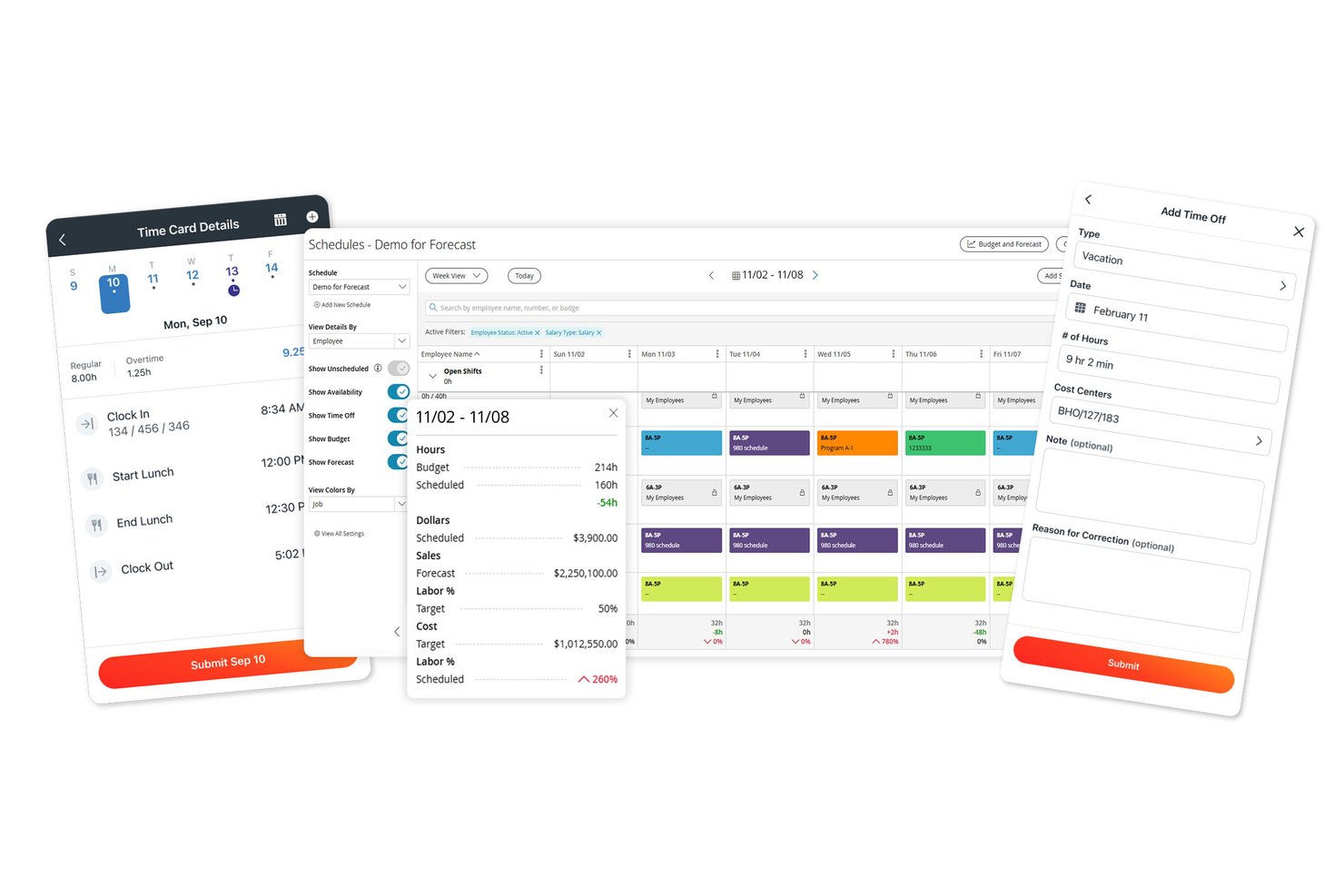
Paylocity is an HCM platform that combines payroll, time and attendance tracking, AI-assisted scheduling, labor forecasting, and workforce analytics across multi-location organizations.
Who Is Paylocity Best For?
Paylocity suits mid-to-large organizations that need scheduling and time tracking connected directly to payroll, especially those managing staff across multiple locations.
Why I Picked Paylocity
I picked Paylocity as one of the best because it's built around the idea that scheduling and payroll shouldn't live in separate systems. When a manager at a 30-location organization builds a shift schedule, hours and labor allocations flow directly into payroll, with the system flagging anyone who may need retroactive or prorated pay. I also like that AI-driven shift recommendations factor in historical staffing trends, while certification validation ensures only qualified employees get scheduled for roles that require it.
Paylocity Key Features
- Multi-method time collection: Employees can clock in via badge, biometric reader, mobile app, tablet kiosk, or web, with geolocation verification available on mobile.
- Certification validation: The scheduling tool checks employee certifications against role requirements before placing them on a shift.
- Labor cost allocation: Web timesheets let managers assign hours to jobs, projects, cost centers, and labor levels within a single entry.
- Break and meal-waiver attestation: Time clocks and kiosks can prompt attestations at the point of punch, recording responses directly to the timecard and triggering supervisor alerts.
Paylocity Integrations
Paylocity offers hundreds of integrations, including marketplace integrations with Comprehensive Integration, Checkr, Aeqium, Microsoft Entra, Google Workspace, and Okta. Its APIs support custom connections for employee, punch, punch-import, and scheduling data.
Pros and Cons
Pros:
- Break attestations can alert supervisors
- AI shift recommendations draw on historical trends
- Schedules by role, location, and skill
Cons:
- Reports can take extra work to customize
- Some users report missing punches and glitches
New Product Updates from Paylocity

Paylocity Adds Candidate Engagement and Talent Rediscovery Agents
Paylocity adds Candidate Engagement and Talent Rediscovery Agents to automate candidate outreach, scheduling, and re-engagement. This helps recruiting teams move candidates through hiring faster. For more information, visit Paylocity’s official site.
 .
.
Deputy
Best for employee engagement and shift autonomy
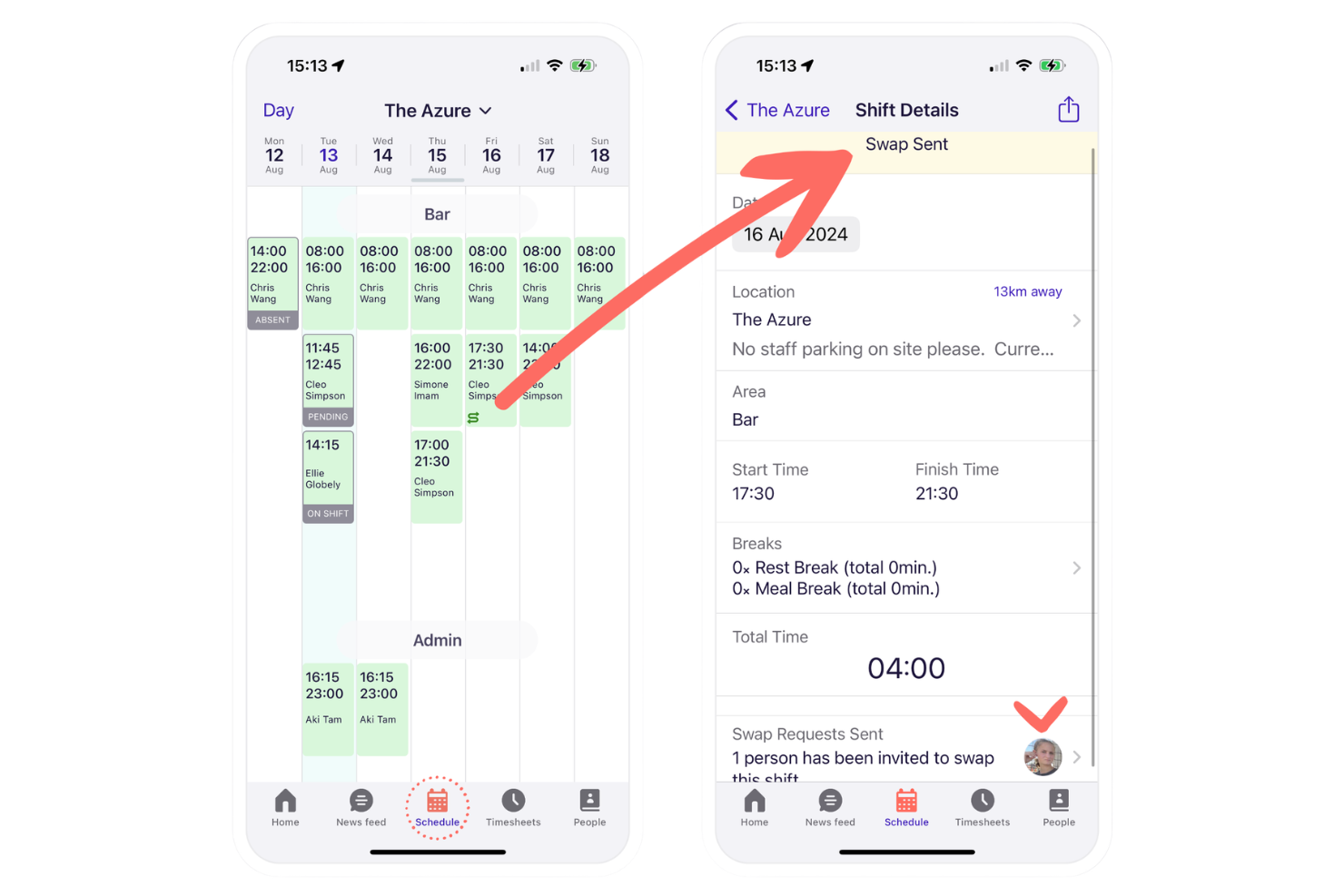
Deputy is a workforce management platform for large and mid-sized organizations that handles shift scheduling, time and attendance, team communication, and labor compliance from a centralized dashboard.
Who Is Deputy Best For?
Deputy is a strong fit for retail, hospitality, and healthcare teams managing shift-based, hourly staff across multiple locations.
Why I Picked Deputy
I picked Deputy as one of the best because I see how its shift swapping, open shift bidding, and news feed help my frontline teams feel more in control of their schedules and communication. I also use its real-time attendance alerts daily.
Deputy Key Features
- Task management: Managers can assign and track task completion for individual employees or teams.
- Demand forecasting: Auto-generates shift schedules based on projected business activity and staffing needs.
- Time clock with photo capture: Employees clock in and out using a digital time clock that verifies identity with a photo.
Deputy Integrations
Deputy offers native integrations with ADP, Gusto, QuickBooks Online, Xero, Square, BambooHR, Paychex, Netsuite, CloudPayroll, MYOB, and Zapier. An API is available for custom integrations.
Pros and Cons
Pros:
- In-app news feed for workforce communications
- Automated labor compliance monitoring tools
- Employee shift swap and bidding features
Cons:
- Occasional delays syncing schedule updates across teams
- GPS clock-in issues reported by users
Best for integrated compliance management tools
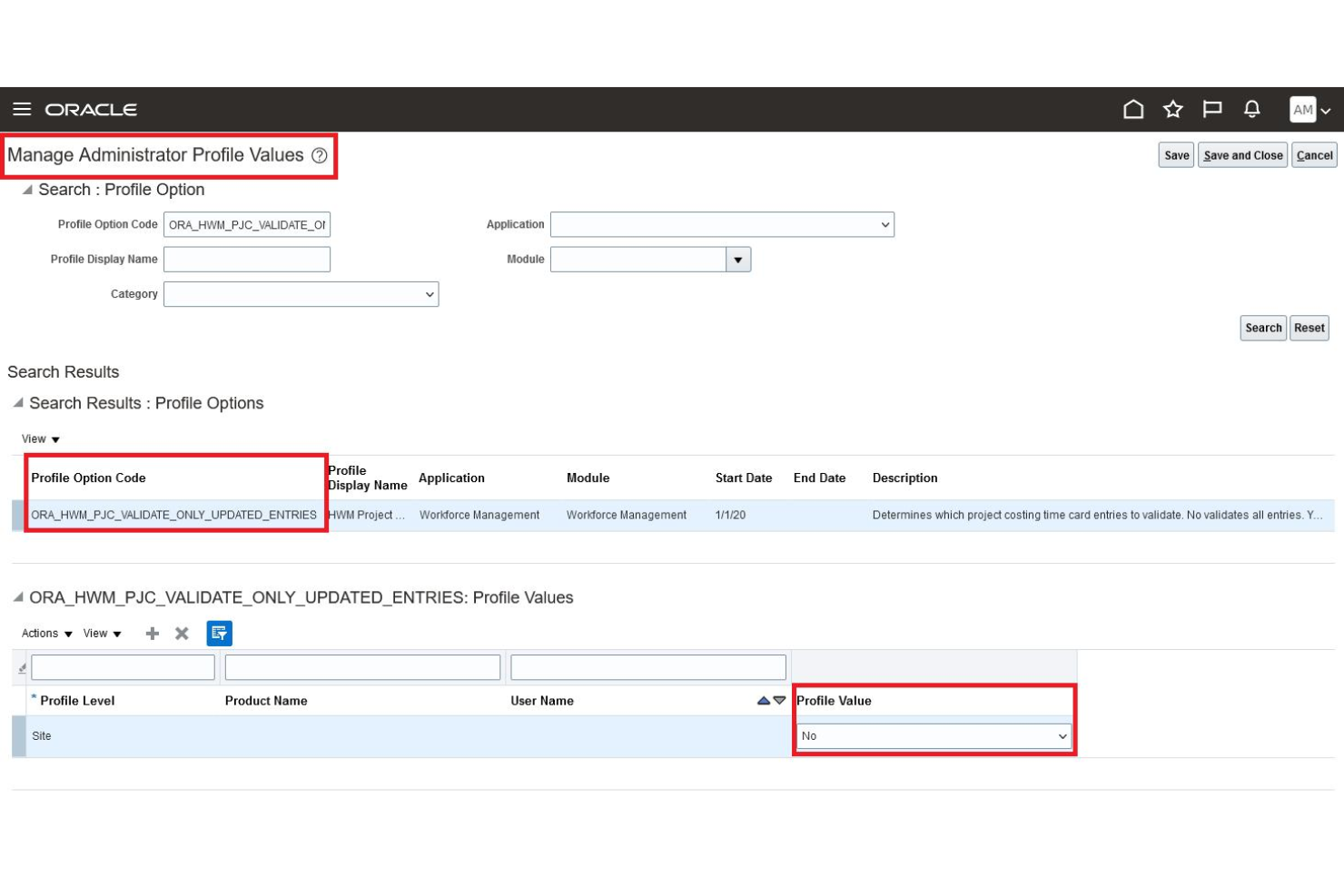
Oracle HCM Cloud is a comprehensive talent management and enterprise workforce management platform that delivers time tracking, scheduling, absence management, and workforce optimization in a unified solution.
Who Is Oracle HCM Cloud Best For?
Large international organizations that need centralized compliance and workforce management across multiple locations and jurisdictions.
Why I Picked Oracle HCM Cloud
I picked Oracle HCM Cloud because I need built-in compliance rules that automatically track regional labor regulations. My team relies on audit-ready reporting and real-time alerts when schedules or timecards don’t align with compliance standards.
Oracle HCM Cloud Key Features
- Advanced scheduling engine: Automates shift assignments based on business priorities.
- Centralized time capture: Collects time worked from multiple devices and locations.
- Absence and leave management: Tracks, approves, and audits leave requests within the platform.
Oracle HCM Cloud Integrations
Oracle HCM Cloud offers native integrations with Oracle ERP Cloud, Oracle Cloud Payroll, Oracle Learning, Salesforce, Workday, Shopify, and SAP SuccessFactors, and provides an API for custom integrations.
Pros and Cons
Pros:
- Highly configurable global scheduling and time capture
- Real-time compliance alerts and monitoring
- Advanced AI-driven workforce planning tools
Cons:
- Implementation process requires significant time investment
- Reporting customization options are limited

Workday
Best for AI-powered scheduling automation
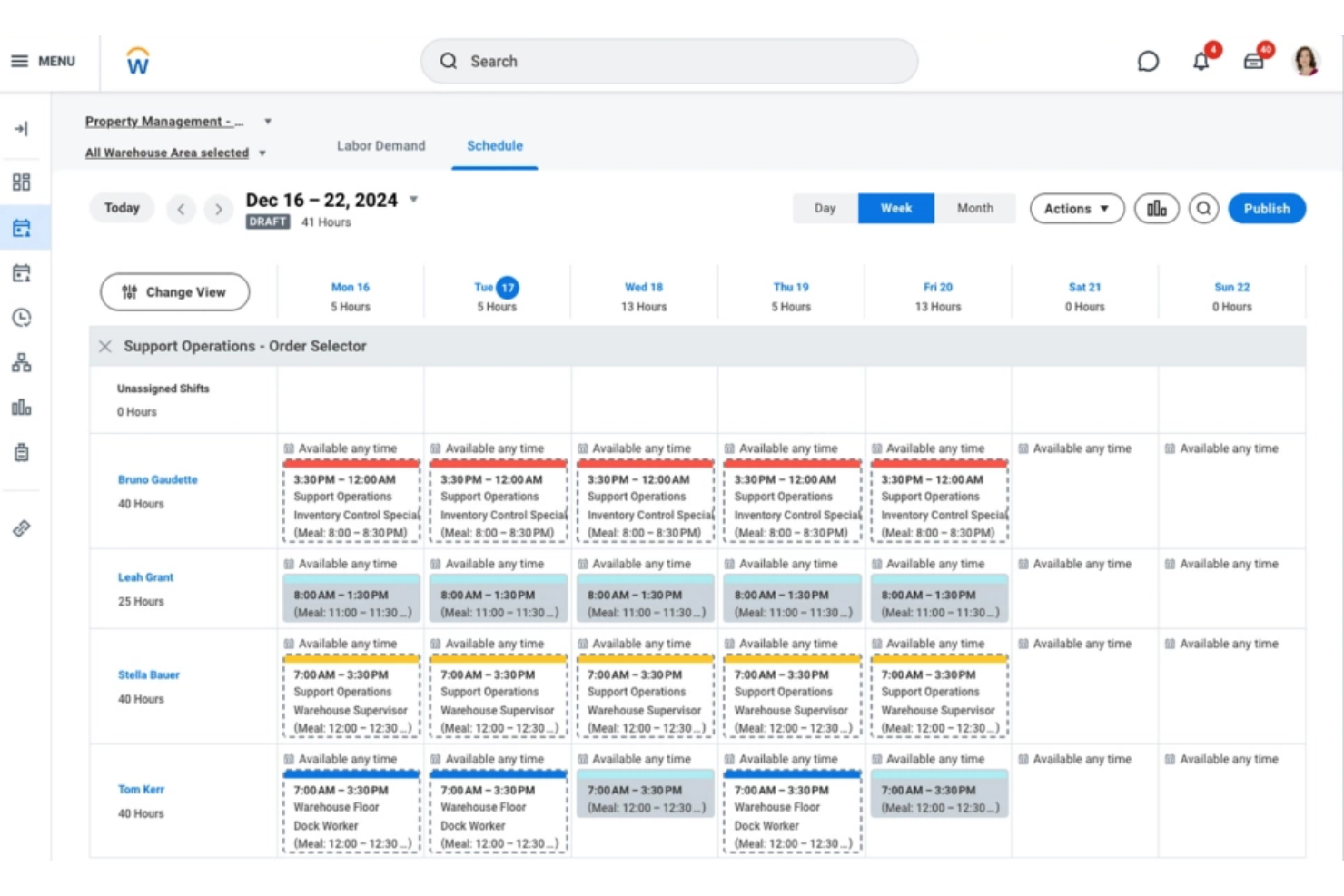
Workday is an enterprise workforce management platform that brings together scheduling, time tracking, and labor analytics in one integrated system designed for large organizations.
Who Is Workday Best For?
Workday fits large organizations and enterprises that need to manage complex workforce scheduling and compliance at scale.
Why I Picked Workday
I picked Workday as one of the best because its AI-powered scheduling automation stands out when tackling fluctuating staffing needs. My team is able to automate shift assignments, adapt coverage in real time, and reduce manual scheduling steps.
Workday Key Features
- Time tracking integration: Syncs time clocks and digital payroll systems for accurate labor reporting.
- Labor compliance monitoring: Tracks changing labor laws and flags compliance risks in real time.
- Mobile workforce access: Lets employees and managers handle scheduling and time tracking from mobile devices.
Workday Integrations
Workday offers native integrations with platforms like Salesforce, Microsoft 365, Oracle, ADP, and Okta, and provides an API for custom integrations.
Pros and Cons
Pros:
- Detailed absence and attendance tracking
- Real-time labor compliance flagging
- AI-driven shift and workload recommendations
Cons:
- Reporting customization can be limited
- Initial implementation requires significant time
Dayforce
Best for demand-driven, flexible scheduling

Dayforce is an enterprise workforce management solution that centralizes employee scheduling, time tracking, labor planning, and compliance oversight in one system.
Who Is Dayforce Best For?
Dayforce fits mid-sized to large enterprises that need real-time, demand-driven workforce coverage in sectors like retail, healthcare, and manufacturing.
Why I Picked Dayforce
I picked Dayforce because its demand-driven, flexible scheduling lets my team automatically align staffing levels to real-time forecasts and shifting business needs. I also rely on built-in shift swapping and mobile self-service to empower frontline employees and boost overall retention.
Dayforce Key Features
- Labor compliance engine: Monitors wage and hour regulations for every shift.
- Real-time analytics dashboard: Presents live workforce metrics to improve operational efficiency for managers.
- Absence management tools: Tracks and approves employee leave requests.
Dayforce Integrations
Dayforce offers native integrations with Workday, Oracle, and SAP SuccessFactors. An API is available for custom integrations.
Pros and Cons
Pros:
- Mobile tools for workforce self-service
- Built-in compliance monitoring for shift hours
- Real-time scheduling based on labor demand
Cons:
- Implementation process is often time-intensive
- Reporting tools can feel restrictive
Infor
Best for real-time frontline staff scheduling
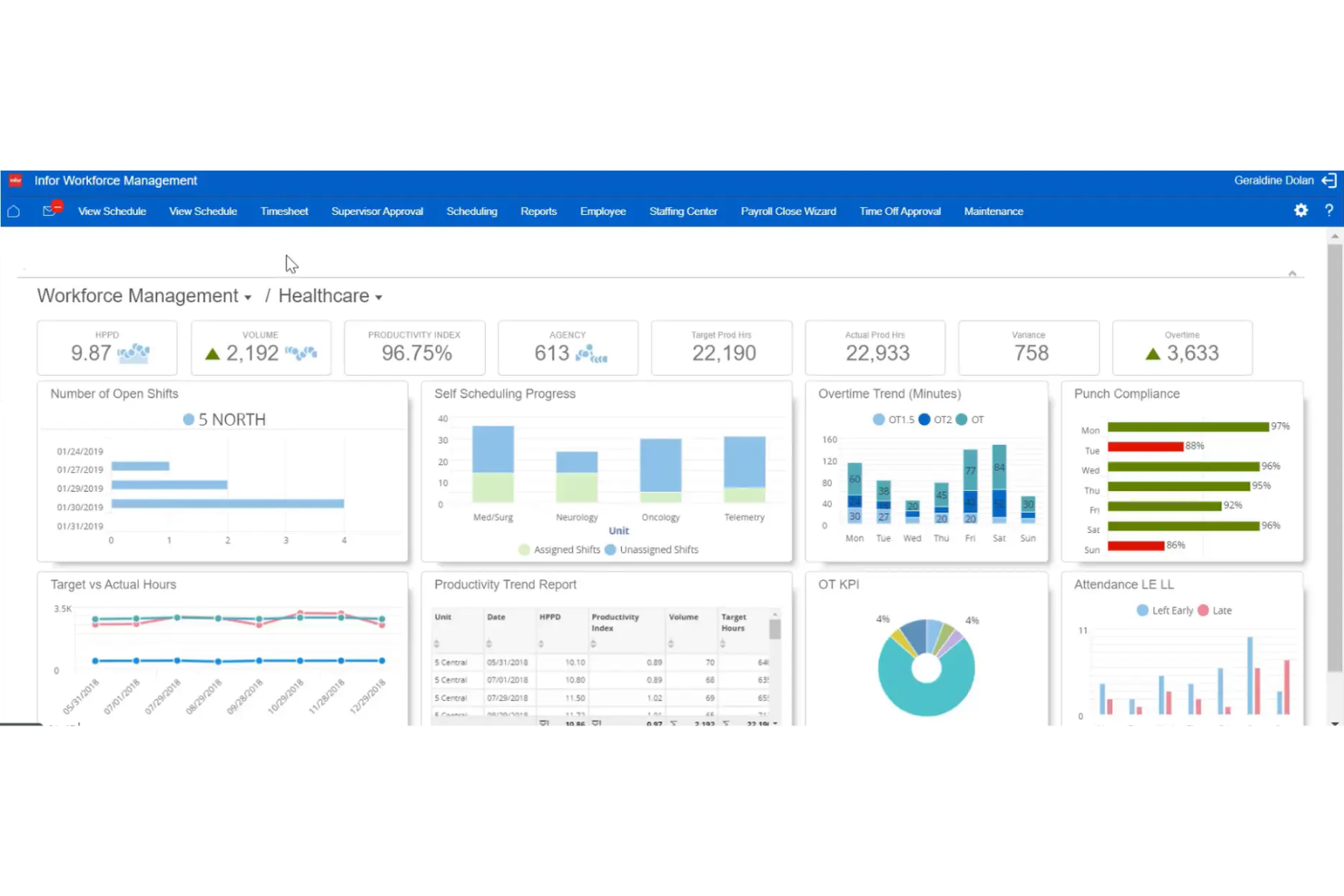
Infor Workforce Management is an enterprise workforce management software solution that centralizes scheduling, time and attendance, labor tracking, and compliance management for large businesses with complex staffing needs.
Who Is Infor Best For?
Infor is ideal for large organizations with hourly frontline workforces in sectors like healthcare, manufacturing, and retail that need intelligent, dynamic scheduling.
Why I Picked Infor
I picked Infor because my team can generate and adjust frontline schedules instantly as staffing needs fluctuate. I also use its demand-driven forecasting and mobile self-scheduling, so our managers and employees stay in sync throughout each shift.
Infor Key Features
- Automated leave management: Track and approve employee leave requests within the platform.
- Compliance rule engine: Enforce labor compliance policies for shift scheduling and attendance.
- Labor analytics dashboard: Analyze workforce data with built-in, customizable dashboards and reports to drive fast, accurate decision-making.
Infor Integrations
Native integrations are not publicly listed. Infor provides an API for custom integrations.
Pros and Cons
Pros:
- Mobile access for frontline employees
- Automated compliance with labor regulations
- Real-time intraday reforecasting for schedules
Cons:
- Implementation often requires specialized expertise
- Interface can be difficult to navigate
Other Enterprise Workforce Management Software
Here are some additional enterprise workforce management software options that didn’t make it onto my shortlist, but are still worth checking out:
- Legion
For AI-optimized hourly workforce planning
- SAP SuccessFactors
For global labor law compliance adaptation
- Zoho People
For multi-location workforce data centralization
- Quinyx
For industry-specific workforce optimization
- ADP Workforce Now
For integrated payroll and analytics tools
- Insightful
For advanced productivity and activity analytics
- Connecteam
For mobile-first daily operations management
- UKG
For complex compliance scheduling needs
- Rippling
For unified HR, IT, and finance automation


How I Evaluate Enterprise Workforce Management Software
When a company needs to schedule 5,000 shift workers across dozens of sites, I look for two things: baseline capabilities every tool must have, and the differentiators that set the best options apart.
Core Functionality (Table Stakes For This List)
When I'm selecting tools for my list, I rank each one on a scale from 0 (does not offer the functionality) to 5 (excels in this area) for each core functionality listed below. Then, I calculate the tool's total score into a percentage. Each tool needs to achieve a minimum total score of 75% to be considered for inclusion.
- Employee Scheduling: I look for automated, rule-based scheduling that handles multi-location shift plans, open shift posting, and employee self-service swaps.
- Time & Attendance Tracking: Capture methods matter here—I evaluate clock-in options like mobile, biometric, and kiosk alongside exception alerts and absence management.
- Labor Demand Forecasting: I check whether the platform uses historical data, seasonal trends, or real-time demand signals to project staffing needs by role and location.
- Compliance Management: Overtime rules, mandatory rest periods, predictive scheduling laws—I evaluate how well each tool enforces labor regulations across jurisdictions.
- Workforce Analytics: Dashboards should cover labor cost, attendance trends, and schedule adherence. I look for drill-down reporting and role-based visibility for managers.
- HRIS & Payroll Integration: I check for native connectors to platforms like Workday, ADP, and SAP SuccessFactors, plus open APIs for syncing hours and employee data.
Once I have a list of tools that meet the criteria, I consider what sets each platform apart.
Differentiating Factors (What Sets Vendors Apart)
Here's how I compare and contrast different vendors:
Standout Features
Skills and certifications tracking is a big differentiator. When you're staffing a hospital floor or a manufacturing line, the system should auto-match qualified workers to shifts that require specific licenses. I also evaluate employee self-service tools, since frontline workers need mobile access to pick up open shifts, submit time-off requests, and swap schedules without manager bottlenecks. AI-powered recommendations round things out by surfacing staffing risks and absence patterns before they become coverage gaps.
Beyond Features
Enterprise workforce management rollouts often span thousands of users across multiple regions, so I evaluate each vendor's implementation support closely. Phased rollout options and dedicated project teams make a real difference when onboarding a 10,000-person retail chain versus a single office. Industry-specific fit also matters—a platform pre-loaded with healthcare scheduling rules saves months of configuration compared to a generic setup. I check security posture too, looking for SOC 2 Type II certification, role-based access controls, and regional data hosting options for global workforces.
How to Choose Enterprise Workforce Management Software
It’s easy to get bogged down in long feature lists and complex pricing structures. To help you stay focused as you work through your unique software selection process, here’s a checklist of factors to keep in mind:
| Factor | What to Consider |
|---|---|
| Scalability | Can the system handle your headcount growth or restructures across multiple locations, now and in the future? Consider projected employee numbers and new sites. |
| Integrations | Does it connect natively to the payroll, HRIS, or analytics tools your team already uses? Be wary of systems requiring workarounds or custom builds for core apps. |
| Customizability | Can workflows, fields, and processes be configured to match your policies? Rigid tools can lead to adoption friction and manual workarounds. |
| Ease of use | Will non-technical users, especially local managers, learn it quickly? Look for demos or hands-on trials with staff who’ll use it daily. |
| Implementation and onboarding | What’s required to migrate data and set up workflows? Check for migration tools, guided onboarding, and the availability of training support. |
| Cost | Is pricing transparent and predictable, with all necessary modules included? Watch for hidden add-ons, support surcharges, or fees for additional users. |
| Security safeguards | Does the vendor offer role-based access, audit logs, and relevant certifications like SOC 2 or ISO 27001? Match data controls to your compliance needs. |
| Support availability | Are help resources, chat, or phone support reachable on your schedule, and in your region or language? Confirm SLAs and escalation paths before committing. |
What Is Enterprise Workforce Management Software?
Enterprise workforce management software is a digital systems that centralize and automate core processes like scheduling, time tracking, leave management, and performance monitoring for large, multi-location organizations. These platforms bring together employee data, support human resources compliance, and connect HR operations at scale, making it easier for teams to coordinate and leaders to access real-time workforce insights.
Features
When selecting enterprise workforce management software, keep an eye out for the following key features:
- Centralized employee database: Stores and organizes worker profiles, records, contracts, and documents in one place for easy access and updates across locations.
- Time and attendance tracking: Captures working hours, clock-ins/outs, and absences, syncing data for payroll, compliance, and auditing.
- Automated scheduling: Enables managers to build, assign, and adjust employee schedules and shifts based on demand, availability, and labor rules.
- Leave and absence management: Tracks PTO, sick days, and leave requests, allowing users to apply for time off and managers to approve or decline requests with transparent rules.
- Compliance management: Enforces labor regulations, company policies, and union rules, alerting HR to potential violations or overtime risks.
- Performance management: Supports goal-setting, 360-degree feedback, competency reviews, and appraisal cycles to track employee growth and align with business objectives.
- Self-service employee portal: Lets employees update personal info, check schedules, submit requests, and view documents, reducing manual HR inquiries.
- Customizable workflows: Allows teams to design or modify HR and administrative processes, approvals, and notifications to match organizational needs.
- Reporting and analytics: Provides dashboards and exportable reports on workforce trends, costs, productivity, and compliance to support data-driven decisions.
- Role-based access controls: Limits data visibility and access to sensitive information based on user roles, strengthening data privacy and internal governance.
Benefits
Implementing enterprise workforce management software provides several benefits for your team and your business. Here are a few you can look forward to:
- Consistent processes across locations: Standardizes scheduling, data handling, and compliance procedures for distributed teams, reducing inconsistencies and manual errors.
- Improved regulatory compliance: Automates tracking of hours, policies, and labor rules, minimizing the risk of fines or violations.
- Centralized workforce visibility: Brings all employee data, status, and performance history to one dashboard, making it easier for HR and leaders to make informed decisions.
- Greater employee self-sufficiency: Empowers users to update personal info, request time off, and access documents through an intuitive self-service portal.
- Better resource allocation: Leverages scheduling tools and analytics to distribute workloads efficiently and reduce both understaffing and unnecessary overtime.
- Optimized HR operations: Reduces repetitive administrative tasks by automating approvals, document management, and notifications.
- Enhanced data security: Protects sensitive workforce data with smooth access controls and audit trails tailored to enterprise privacy standards.
Costs and Pricing
Selecting enterprise workforce management software requires an understanding of the various pricing models and plans available. Costs vary based on features, team size, add-ons, and more. The table below summarizes common plans, their average prices, and typical features included in enterprise workforce management software solutions:
Plan Comparison Table for Enterprise Workforce Management Software
| Plan Type | Average Price | Common Features |
|---|---|---|
| Free Plan | $0 | Basic employee directory, simple time tracking, limited user seats, and essential reporting. |
| Personal Plan | $5-$10/user/month | Single-user support, leave management tools, document storage, and basic scheduling functions. |
| Business Plan | $12-$25/user/month | Multi-user support, shift scheduling, compliance alerts, self-service portal, and standard analytics. |
| Enterprise Plan | $30-$50/user/month | Advanced automation, custom workflows, role-based access, unlimited locations, and priority support. |
Enterprise Workforce Management Software FAQs
Here are some answers to common questions about enterprise workforce management software:
How do these systems help with multi-location workforce management?
These systems centralize employee data and provide standardized scheduling, time tracking, and compliance management across all your sites. This unified approach makes it easier to coordinate staffing, monitor headcount, and enforce consistent HR policies, whether you’re managing two locations or two hundred.
Can enterprise workforce management software integrate with existing HR and payroll tools?
Yes, most solutions offer native or API-based integrations with popular HRIS, payroll, accounting, and analytics platforms. Check your top contenders for ready-made connectors to avoid manual data entry or building custom interfaces.
What are the top security features to look for?
Key security features include role-based access controls, audit logging of user actions, data encryption, and certification to standards like SOC 2 or ISO 27001. Confirm these safeguards are present if you handle sensitive data or must meet industry-specific compliance requirements.
How do vendors typically support the onboarding process?
Vendors commonly offer self-guided product tours, step-by-step setup tutorials, on-demand or live training sessions, and dedicated onboarding specialists. Some also provide data migration tools and integration guidance to help you transition smoothly without disrupting your current processes.
Does pricing usually scale by features, seats, or locations?
Most plans scale by the number of users (or employees managed), but advanced features, additional locations, or premium support tiers can drive up costs. Always clarify how price changes as your team or needs grow to prevent budget surprises later on.