

İK ekibinizin her gün yönettiği büyük miktardaki veriler karşısında bunalmış mı hissediyorsunuz? Çalışan analitiği yazılımı tam da ihtiyacınız olan çözüm olabilir. Ham verileri uygulanabilir içgörülere dönüştürerek işe alım, çalışanları elde tutma ve çalışan memnuniyeti hakkında bilinçli kararlar almanıza yardımcı olur.
Deneyimlerime göre İK profesyonelleri, iş gücünü optimize etmek için sürekli baskı altında. Süreci kolaylaştıran ve net sonuçlar sunan araçlara ihtiyacınız var. Çalışan analitiği yazılımı tam bu noktada devreye giriyor.
Tarafsız ve kapsamlı bir şekilde araştırılmış en iyi çözümler listesini sunmak için çok sayıda seçeneği test edip inceledim. İncelemelerimin sizin ve ekibiniz için gerçekten önemli olan noktalara odaklandığından emin olabilirsiniz. İK stratejinizde fark yaratabilecek en iyi seçeneklere göz atalım.
Why Trust Our Software Recommendations
6,700+
Reviews
20
Industry experts
16+
Evaluation factors
14
Years
Our team has been testing and reviewing software since 2012. As HR experts ourselves, we know how difficult—and important—it is to choose the right software.
For this guide, we evaluated tools using hands-on testing and independent research, scoring tools using our selection criteria. We also draw on insights from industry thought leaders and practicing HR experts.
Our reviews reflect our human editorial judgment, not a sales pitch.
Expert reviewers:
- Phil GrayCOO
 Kim BehnkeHR Tech Editor & Analyst
 Josh BarkerPeople Ops Manager

Çalışan Analitiği Yazılımları Karşılaştırma Tablosu
Aşağıdaki tabloda, en iyi çalışan analitiği yazılımı seçeneklerim için fiyatlandırma, ücretsiz deneme olanağı ve demo seçenekleri karşılaştırılıyor.
Sorted by: Default
| Tool | Starting Price | Website | |
|---|---|---|---|
Best for integrated payroll and compliance support | 4.6 out of 5 | $79/user/month Free demo available | Book Demo |
Best for global workforce management | 4.8 out of 5 | $5/user/month Free demo available | Website |
Best for actionable workforce insights | 4.3 out of 5 | Pricing upon request Free demo available | Website |
Best for user behavior insights | 4.5 out of 5 | Pricing upon request Free demo available | Website |
Best people analytics software for unlimited workforce contextual data sources | 4.8 out of 5 | Pricing upon request Free demo available | Website |
Best for tracking VDI and shared workstations | 4.8 out of 5 | $8/user/month Free trial + free demo available | Website |
Best for visualizing pay equity and total rewards | 4.8 out of 5 | Pricing upon request Free demo available | Website |
Best people analytics software for HR data visualization | 4.5 out of 5 | Pricing upon request 14-day free trial | Website |
Best people analytics software for democratizing insights | 4.9 out of 5 | Pricing upon request Free demo available | Website |
Best people analytics software for eNPS tracking | 4.8 out of 5 | $4.50-$11.70/employee/month Free demo available | Website |


En İyi Çalışan Analitiği Yazılımları
Her bir çalışan analitiği yazılımının en uygun kullanım alanını, dikkat çeken özelliklerini, bazı avantajlarını ve dezavantajlarını öne çıkarmak için kısa bir açıklamasını burada bulabilirsiniz. Kullanıcı arayüzlerine dair genel bir fikir vermek için ekran görüntülerine de yer verdim.
 Best for integrated payroll and compliance support
- Free demo available
- From $79/user/month
Visit WebsiteCustomer Rating:4.6/5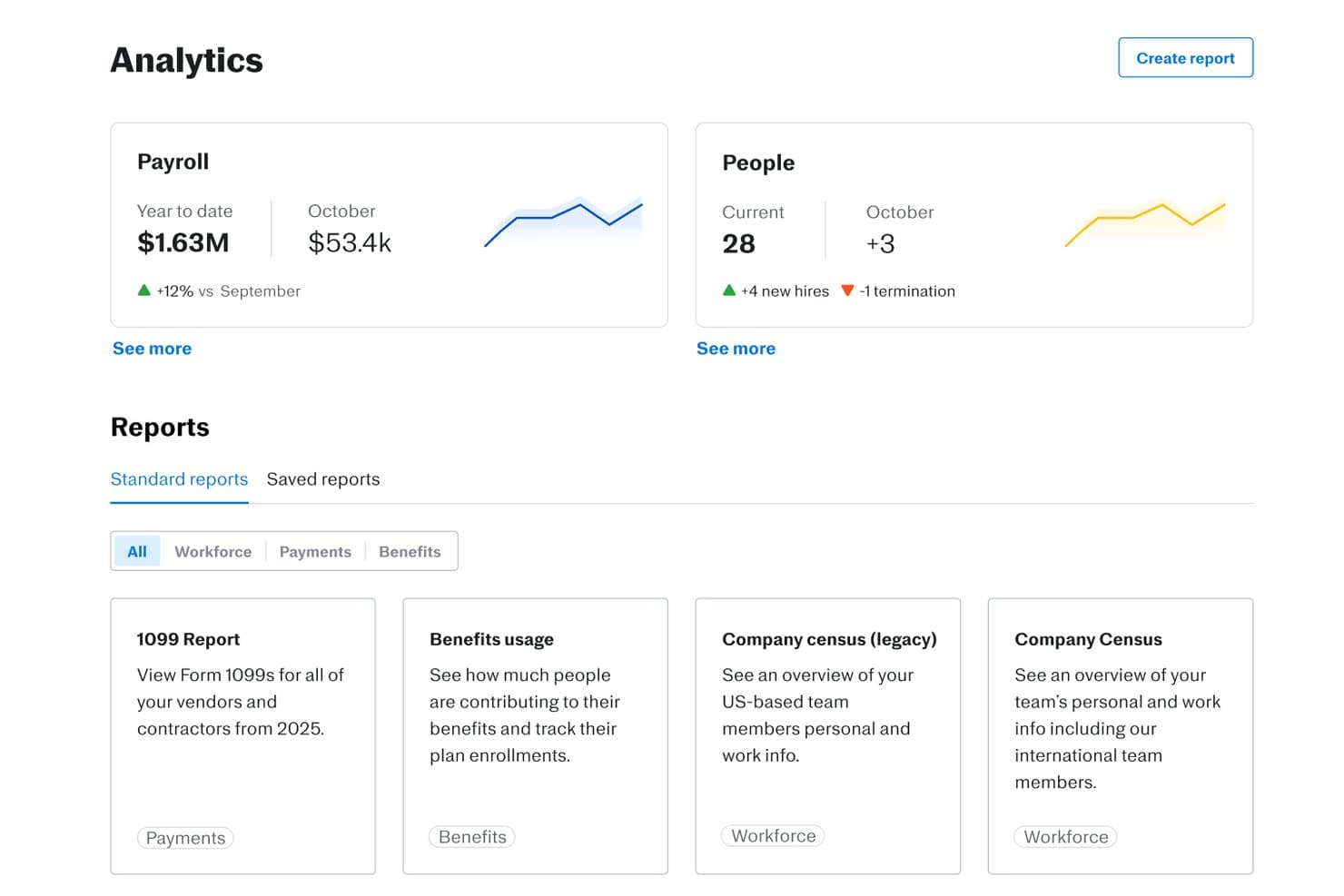
Justworks offers an Analytics dashboard with payroll summaries, people metrics, and standard reports. Justworks is a cloud-based HR and payroll platform designed to help organizations manage workforce data, employee onboarding, benefits, time tracking, compliance, and basic people analytics within a unified system.
Who Is Justworks Best For?
Small to midsize companies seeking an all-in-one platform to manage payroll, HR, and compliance in the US.
Why I Picked Justworks
I picked Justworks as one of the best because I can rely on its unified payroll, compliance, and basic analytics to track headcount changes, employment trends, and risk data from a single platform. Payroll and compliance are always current without manual updates.
Justworks Key Features
- Custom report builder: Create and export people data reports tailored to your workforce analysis needs.
- Employee directory: Access a searchable list of employee profiles with roles, teams, and key workforce details.
- Time and attendance tracking: Monitor employee hours, paid time off, and attendance patterns in one dashboard.
- Document management: Store and organize HR policies, compliance forms, and employee contracts for easy access.
Justworks Integrations
Justworks offers 20+ integrations, including QuickBooks, Xero, NetSuite, Sage Intacct, Greenhouse, JazzHR, Lever, 15Five, Leapsome, Carta, Brex, and Vanta.
Pros and Cons
Pros:
- Payroll data easily surfaced for analysis
- Automated workforce headcount and turnover reports
- Compliance tracking built into analytics dashboards
Cons:
- Limited custom analytics beyond core metrics
- No predictive analytic features
Learn more about Justworks: Best for global workforce management
- Free demo available
- From $5/user/month
Visit WebsiteCustomer Rating:4.8/5
Deel's HRIS feature is a centralized platform for managing all aspects of a global team. Deel is a global HR platform designed to assist businesses in managing payroll, compliance, and HR services across more than 150 countries. It caters to both employees and contractors, aiming to simplify the hiring and management of global teams.
Why I picked Deel: Deel's platform is designed to assist HR teams in leveraging people analytics to make data-driven decisions that impact business outcomes. It provides a suite of tools that enable the measurement and analysis of HR initiatives and projects, with a focus on improving efficiency and identifying areas for improvement within an organization.
Deel's analytics capabilities include descriptive and diagnostic analysis, as well as predictive and prescriptive analytics, which help in understanding employee turnover, optimizing hiring processes, and improving onboarding. The platform also supports global hiring, payroll, and compliance, and integrates with finance, legal, and hiring tools, ensuring that HR teams can manage a decentralized workforce effectively. Additionally, Deel emphasizes real-time insights, headcount planning, cost optimization, and data privacy, offering security measures to protect sensitive employee data.
Deel Standout Features and Integrations
Features include contractor management features, including tools for managing contracts, payments, and compliance, as well as benefits and insurance options for global team members.
The tool is also designed to help users maintain compliance with local laws by providing necessary documentation and knowledge of local regulations. This feature is intended to prevent mistakes and fines that can arise from non-compliance.
Integrations include Xero, Bob, Okta, Expensify, BambooHR, Workday, QuickBooks, NetSuite.
Pros and Cons
Pros:
- Convenient withdrawal methods for contractors
- One-click payments in different currencies
- Easy-to-navigate interface
Cons:
- Some inefficiencies in the portal for uploading documents
- Some delays in visa processing for employees
 Best for actionable workforce insights
- Free demo available
- Pricing upon request
Visit WebsiteCustomer Rating:4.3/5
Paylocity's time and labor management features let you set schedules, track time, and approve time-off requests. Paylocity is a human capital management platform that equips HR teams with real-time, AI-powered insights to improve workforce decisions across the employee lifecycle. From performance and engagement to turnover and compensation, it helps transform people data into strategic action.
Why I picked Paylocity: I selected Paylocity for its standout people analytics capabilities that span recruitment, onboarding, performance, and talent development. Its Modern Workforce Index (MWI) delivers predictive modeling and actionable recommendations on workforce trends like attrition risk, labor costs, and Diversity, Equity, Inclusion, and Accessibility (DEIA) representation—giving HR leaders a clear roadmap for proactive decision-making.
Unlike tools that simply display metrics, Paylocity’s analytics suite guides you with next steps—whether that’s closing skills gaps, budgeting smarter, or improving retention.
Paylocity Standout Features and Integrations
Features include real-time dashboards, performance tracking, predictive insights, and compensation modeling. It also supports benefits administration, employee self-service, succession planning, and compliance automation.
Integrations include Salesforce, NetSuite, BambooHR, Greenhouse, Oracle HCM, Workday, Criteria Corp, The Predictive Index, and others—enabling unified data across your HR ecosystem.
Pros and Cons
Pros:
- Tailored workflows and reports
- On demand payment options
- Includes tax compliance services
Cons:
- Limited customization options in certain modules
- Setup can be time consuming
 Best for user behavior insights
- Free demo available
- Pricing upon request
Visit WebsiteCustomer Rating:4.5/5
Teramind tracks and analyzes your employees' desktop-based computer activities and categorizes them into key functions for easy review. Teramind is a comprehensive platform designed to address cybersecurity, compliance management, insider risk management, data loss prevention, and productivity.
Why I picked Teramind: I like its user behavior analytics. This feature lets you track and understand what your team is up to, offering insights into their actions and productivity levels. It's not just about keeping tabs, but about understanding the workflow and identifying areas for improvement. With user behavior analysis, you can see how time is being used and make informed decisions to boost productivity.
Another important feature of Teramind is its advanced data telemetry capabilities. This provides you with enriched insights into how your employees are performing and interacting with their environments. With advanced data telemetry, you can dive deep into metrics that matter, like how resources are being utilized and where there might be bottlenecks in processes.
Teramind Standout Features and Integrations
Features include session recording and playback, email monitoring, file transfer tracking, print job tracking, clipboard monitoring, network activity monitoring, policy and rules management, remote desktop control, risk analysis, compliance management, productivity analysis, and active versus idle time tracking.
Integrations include Google Cloud BigQuery, Splunk Cloud Platform, Jira, Zendesk, Redmine, Microsoft Power BI, IBM Security QRadar, LogRhythm, ArcSight, McAfee Business Protection, Microsoft Entra ID, and ServiceNow.
Pros and Cons
Pros:
- Supports both cloud-based and on-premises deployments
- Real-time alerts and automated responses to policy violations
- Detailed user behavior analytics to detect anomalies
Cons:
- Limited support for mobile device monitoring
- Minimum of 5 seats
 Best people analytics software for unlimited workforce contextual data sources
- Free demo available
- Pricing upon request
Visit WebsiteCustomer Rating:4.8/5
One Model reports are comprehensive data visualization and analytics tools that provide a detailed and easily interpretable overview of HR metrics and workforce analytics, enabling informed decision-making and strategic workforce planning. One Model is a comprehensive people analytics platform that's designed to help businesses make sense of their workforce data. It's a tool that's all about taking the mountains of data that businesses generate and turning it into something useful.
Why I picked One Model: One Model offers unlimited workforce contextual data sources, meaning you can integrate with and pull data from sources for financial, sales, labor market, and customer experience, as well as everything they offer for people analytics. They have a huge list of third-party integrations to support this, and you can even connect to form and survey tools to collect your own self-led data.
Another thing that sets One Model apart is its focus on collaboration. It's not just about crunching numbers; it's about helping your team make better decisions. You can share reports, create dashboards, and even set up alerts to keep everyone in the loop. It's a great way to make sure everyone is on the same page and working towards the same goals.
One Model Standout Features and Integrations
Features include easy data modeling, pre-defined metrics, analytics, and storyboards. These are all designed to get you up and running quickly without fiddling with building your own systems from scratch.
They also offer AI-embedded analytics, which leverages advanced algorithms and machine learning techniques to extract valuable patterns and predictions from HR data, enabling more accurate workforce planning and talent management.
Integrations include SuccessFactors, Workday, ADP, Ultimate Software, SAP, Oracle, PeopleSoft, BambooHR, Fairsail, Namely, Deltek, Cornerstone, Azure, Snowflake, AWS, Google Cloud, CultureAmp, Waggl, ModernSurvey, Glint, Maritz, Confirmit, Reflektive, Qualtrix, and others for LMS, payroll, and ATS.
Pros and Cons
Pros:
- Range of integrstions offered
- AI-powered insights
- Comprehensive plan modeling
Cons:
- May not be appropriate for SMEs/startups
- ORG charts locked to highest plan
Learn more about One Model: Best for tracking VDI and shared workstations
- Free trial + free demo available
- From $8/user/month (billed annually)
Visit WebsiteCustomer Rating:4.8/5
Insightful tracks employee productivity and app usage in real time. Insightful is a workforce analytics platform that tracks time and attendance, app and website usage, capacity, workload, and project time across office, remote, and hybrid teams—including those operating on VDI and shared workstations.
Who Is Insightful Best For?
Insightful is a strong fit for people operations managers who need accurate, automated visibility into time, attendance, and productivity across office, remote, and hybrid teams.
Why I Picked Insightful
I picked Insightful as one of the best because it's the only tool on my list that natively tracks activity across VDI environments and shared workstations, which is a real gap most workforce analytics tools simply ignore. In practice, that means teams running Citrix or other virtual desktop setups can see accurate utilization, app usage, and productive time per user, not per machine. I also like the Workstation Mode for shared devices, which keeps individual employee records clean even when multiple people log in from the same computer.
Insightful Key Features
- Shift scheduling and schedule adherence: Lets managers set up team shifts and automatically tracks whether employees clock in and out according to their assigned schedules.
- App and AI tool usage reporting: Ranks applications, websites, and AI tools by usage time and surfaces idle paid seats so you can see where software spend is or isn't being used.
- Location insights: Compares productive time across office, remote, and hybrid days at the team level so you can evaluate how different work arrangements affect output.
- HRIS integrations with automated provisioning: Syncs employee data from systems like Workday, BambooHR, and ADP to keep team structures and records current without manual updates.
Insightful Integrations
Insightful offers 50+ native integrations, including Workday, BambooHR, ADP Workforce Now, SAP SuccessFactors, UKG Pro, Microsoft Entra ID, Okta, Asana, Jira, and BigQuery. It also provides a REST API for custom connections, with a 200-request-per-minute organization limit.
Pros and Cons
Pros:
- Capacity reports surface workload imbalances
- Clear dashboards show team activity and schedules
- Tracks activity across VDI and shared workstations
Cons:
- Rule-based beta offers no attrition forecasting
- No DEI or pay-equity analysis
Learn more about Insightful: Best for visualizing pay equity and total rewards
- Free demo available
- Pricing upon request
Visit WebsiteCustomer Rating:4.8/5
Barley automates the compensation review process, eliminating the need for spreadsheets. Barley helps HR and People teams make smart, proactive, efficient compensation decisions using real-time data analytics and insights. It unifies all your comp needs while spotlighting important KPIs within pay equity, pay distribution, and compensation health. Barley improves efficiency by automating comp/merit workflows and identifies risk areas across your company so that you can focus your priorities on what (and who) matters most.
Why I picked Barley: Barley offers comprehensive compensation management software with features such as pay band management, cohort analysis, compensation analytics, pay equity analysis, and global benchmarking data (powered by Mercer). This software allows organizations to effectively manage and analyze their compensation data, ensuring fair and competitive pay practices while also providing valuable insights for talent acquisition and retention. It also helps HR and People teams manage their compensation processes, make data-driven and equitable decisions, reduce compensation cycle time, allocate spend efficiently, and cut overspending.
Additionally, Barley offers integrations with various HRIS and ATS systems and has received positive feedback for its intuitive interface, automation of processes, and ability to provide valuable context and analysis for compensation decisions. Overall, Barley helps organizations manage and visualize their compensation data in one platform.
Barley Standout Features and Integrations
Features include Total Rewards which helps employees understand the full value of their compensation package through a personalized portal, which includes salary, equity, pay transparency, and benefits. Additionally, candidate benchmarking, configurable permissions for security, and automated compensation reviews are other notable features Barley offers.
Integrations include BambooHR, Lever, Paylocity, HiBob, Namely, ADP Workforce Now, Ceridian Dayforce, and UKG Pro.
Pros and Cons
Pros:
- Helps increase pay transparency
- Responsive customer support services
- High levels of customization
Cons:
- Relies on external benchmarking data
- Initial set-up can be time-consuming
Learn more about Workleap: Best people analytics software for HR data visualization
- 14-day free trial
- Pricing upon request
Visit WebsiteCustomer Rating:4.5/5
Tableau helps you visualize your employee data in flexible dashboards so you can find patterns. Tableau is a people analytics software that helps HR professionals visualize data in shareable dashboards.
Why I picked Tableau: Tableau collects and tracks your HR data in real-time. The software enables you to create detailed dashboards from ready-built templates. The templates are customizable, so you can tailor them to your business needs.
Tableau’s reporting features make it easy to spot trends and make data a crucial part of your decision-making. The software’s graphs highlight anomalies, allowing you to draw insights from your workforce data and present them to stakeholders. The software’s ability to slice and dice large sets of data makes it ideal for large organizations.
Tableau Standout Features and Integrations
Features include dashboard templates, real-time data tracking, self-service data preparation, and survey and NPS tracking.
Integrations are available natively with Amazon Redshift, Google Analytics, Google Sheets, IBM BigInsights, Microsoft Excel, OneDrive, Oracle, Presto, Salesforce, SAP HANA, and others.
Pros and Cons
Pros:
- Tracks and interprets huge sets of data
- Customizable dashboards
- Simple implementation
Cons:
- Some advanced features have a steep learning curve
- Can respond slowly on low-end devices
Learn more about Tableau: Best people analytics software for democratizing insights
- Free demo available
- Pricing upon request
Visit WebsiteCustomer Rating:4.9/5
Users can quickly identify trends in employee turnover, such as which departments or job titles are experiencing the highest churn rates. Crunchr is an innovative software that utilizes people analytics to help organizations better understand their workforce. It helps companies make better-informed decisions regarding talent management, succession planning, and employee retention.
Why I picked Crunchr: The software integrates all your data sources (from your HR information systems, recruitment systems, compensation systems, and employee surveys) and aggregates and visualizes it for more convenient and effective data analysis. You can use rich visualizations like dashboards, visuals, graphs, and measurements, to identify workforce trends and performance gaps, making informed, data-driven decisions.
Crunchr employs predictive analytics to forecast workforce trends and outcomes based on historical data. The platform uses artificial intelligence to identify associations and causal relationships between the workforce and organizational objectives, enabling managers to make informed decisions based on data insights.
Its competency analytics help managers assess employee skills and competencies, identifying opportunities for employee development and promotion. Managers can also develop customized learning plans and track their employees' progress, ensuring they remain engaged and motivated.
Crunchr Standout Features and Integrations
Features include the ability to segment your workforce into various categories based on demographics, skills, performance, and retention intentions. You can also easily identify influential factors behind employee attrition, enabling managers to create targeted retention strategies.
Crunchr includes a benchmarking option where you can compare your company's workforce details to competitors, industry norms, or segmented groups. Using benchmarks, you can establish how various groups are performing within your company and identify the root cause of any gaps.
Crunchr complies with industry-standard security and privacy regulations, and includes robust privacy and user management features, giving you granular control over who has access to your sensitive workforce data.
Integrations are available with numerous software systems, including performance management, engagement, recruitment, and learning & development systems, as well as HR systems like Oracle, SAP, and Workday.
Pros and Cons
Pros:
- Data can help improve succession plans and uncover employees at a flight risk
- Predictive analytics can help with workforce planning
- Visualization tools make data easy to understand
Cons:
- No free trial available
- Pricing details are not transparent
Learn more about Crunchr: Best people analytics software for eNPS tracking
- Free demo available
- From $4.50-$11.70/employee/month
Visit WebsiteCustomer Rating:4.8/5
intelliHR enables you to track employee satisfaction keywords. intelliHR is an all-in-one human capital management (HCM) platform that helps businesses assess employee satisfaction with qualitative and quantitative data.
Why I picked intelliHR: intelliHR enables HR teams to measure an organization’s employee net promoter score (eNPS) with customized pulse surveys and AI-driven sentiment analysis. The tool helps you keep track of employee satisfaction keywords so you can identify trends early on and take corrective action when necessary.
intelliHR’s analytics tool increases the transparency of your employee data by creating easy-to-interpret reports. The software helps you understand how changes in headcount or remuneration can lead to changes in satisfaction, so its insights can help you improve your business processes. Thanks to its ability to track employee satisfaction, this tool is ideal for businesses with high attrition rates.
intelliHR Standout Features and Integrations
Features include report templates, automated workflows, actionable insights, employee onboarding, talent retention, and compliance tracking.
Integrations are available natively with Bonusly, Go1, Greenhouse, Lever, PandaDoc, Perkbox, Talos, Teamtailor, Workable, Xero, and others.
Pros and Cons
Pros:
- Easy to track goals
- Employee engagement tracking
- 30+ pre-made report templates
Cons:
- Some users may experience a steep learning curve due to customization and integrations
- Training materials not easily available
Learn more about IntelliHR:
Diğer Çalışan Analitiği Yazılımları
En iyi çalışan analitiği yazılımları listesine giremeyen, değerlendirmeye değer birkaç seçenek daha şunlar:
- 11WorkleapBest for transforming feedback into insights
- 12SAP Analytics CloudBest people analytics software for predictive analytics
- 13VisierBest people analytics software for businesses with hourly workers
- 14ChartHopBest people analytics software for headcount forecasting
- 15UKG ProBest people analytics software for talent tracking
- 16OrgvueBest people analytics software for workforce planning
- 17CompassBest for monitoring digital adoption
- 18NakisaBest people analytics software for simple organizational design
- 19SplashHRBest people analytics software for DE&I tracking
- 20KnoeticBest people analytics software for custom dashboards
- 21Peoplebox.aiBest people analytics software for engagement and performance trends
- 22AgentnoonBest for headcount + compensation analytics
- 23IntelogosBest for AI-driven team analytics
- 24QlikBest people analytics software for proactive analysts
- 25WorkdayBest people analytics software for attrition gap detection
- 26CompportBest people analytics software for compensation analysis
- 27DarwinboxBest people analytics software for risk identification
- 28EDLIGOBest people analytics software for learning analytics
- 29HRForecastBest people analytics software for big data breakdowns
- 30Sisense Fusion AnalyticsBest people analytics software for holistic data analysis
Related Reviews
If you still haven’t found what you’re looking for here, check out these other tools that we’ve tested and evaluated:
How I Evaluate People Analytics Software
I evaluate people analytics tools in two layers: baseline requirements like Workday integration and attrition modeling, and the differentiators that separate a CHRO-level tool from an HR ops platform.
Core Functionality (Table Stakes For This List)
When I'm selecting tools for my list, I rank each one on a scale from 0 (does not offer the functionality) to 5 (excels in this area) for each core functionality listed below. Then, I calculate the tool's total score into a percentage. Each tool needs to achieve a minimum total score of 65% to be considered for inclusion.
- Workforce Data Integration: I check whether a platform can pull from HRIS, ATS, payroll, and performance systems so HR teams aren't manually exporting CSVs from five different tools.
- Pre-Built HR Metrics & KPIs: Each tool should surface ready-to-use metrics like turnover rate, time-to-fill, and diversity ratios without requiring analysts to build formulas from scratch.
- Custom Dashboards & Reporting: I look for drag-and-drop builders that let an HR ops manager create a retention dashboard for leadership and a headcount view for finance from the same dataset.
- Predictive & Advanced Analytics: Tools should offer models that flag attrition risk or forecast hiring needs, not just display historical trends in a chart.
- Segmentation & Drill-Down Analysis: I evaluate whether you can slice data by department, tenure, location, and demographic attributes to compare, say, new-hire turnover across regions.
- Data Security & Compliance Controls: Role-based access, data anonymization thresholds, and compliance support for regulations like GDPR matter when you're handling sensitive employee records.
Once I have a list of tools that meet this criteria, I consider what sets each platform apart.
Differentiating Factors (What Sets Vendors Apart)
Here's how I compare and contrast different vendors:
Standout Features
Pay equity analysis is a big one for me. A tool that can model compensation gaps across demographic segments gives DEI leaders actionable data, not just awareness. I also look for external benchmarking, which lets you compare turnover or engagement scores against industry peers instead of operating in a vacuum. Natural language querying is increasingly valuable too. When an HRBP can type "show me voluntary attrition for managers hired last year" and get a real answer, adoption across the team jumps fast.
Beyond Features
HR tech stack compatibility matters a lot here. I check whether a platform has native connectors to the HRIS, ATS, and payroll systems your team already runs. A tool with great dashboards means little if it can't pull data from your Workday or BambooHR instance. Implementation speed is another factor I weigh. Some platforms need months of professional services before you see a single insight, while others ship pre-built templates that get HR teams to their first attrition report within weeks. For multinational teams, I also evaluate data residency options and anonymization controls.
Çalışan Analitiği Yazılımı Nasıl Seçilir?
Uzun özellik listeleri ve karmaşık fiyatlandırma yapılarına takılıp kalmak kolaydır. Kendinize özgü yazılım seçim sürecinizi yürütürken odağınızı korumanıza yardımcı olmak için göz önünde bulundurmanız gereken faktörleri içeren bir kontrol listesi hazırladım:
| Faktör | Dikkat Edilmesi Gerekenler |
|---|---|
| FaktörÖlçeklenebilirlik | Dikkat Edilmesi GerekenlerYazılım kuruluşunuzla birlikte büyüyebilir mi? Önemli maliyet artışları olmadan artan veri hacimlerini ve kullanıcı sayılarını destekleyip desteklemediğini değerlendirin. |
| FaktörEntegrasyonlar | Dikkat Edilmesi GerekenlerMevcut İK sistemlerinize bağlanabiliyor mu? İş akışlarında kesinti yaşanmaması için İK bilgi sistemleri, bordro ve işe alım yazılımları gibi araçlarla uyumluluğunu kontrol edin. |
| FaktörÖzelleştirilebilirlik | Dikkat Edilmesi GerekenlerYazılımı ihtiyaçlarınıza uyacak şekilde uyarlayabilir misiniz? Gösterge tablolarını, raporları ve ölçümleri ekibinizin özel gereksinimlerine uyacak şekilde ayarlama seçeneklerini arayın. |
| FaktörKullanım kolaylığı | Dikkat Edilmesi GerekenlerArayüz tüm kullanıcılar için sezgisel mi? Hem teknoloji konusunda bilgili hem de bilgili olmayan ekip üyelerinin sistemi zorlanmadan kullanabildiğinden emin olun. |
| FaktörUygulama ve işe alışma | Dikkat Edilmesi GerekenlerEkibiniz ne kadar hızlı başlayabilir? Kurulum, eğitim ve ekibinizin sistemi kullanmaya başlaması için gereken süreyi ve kaynakları değerlendirin. |
| FaktörMaliyet | Dikkat Edilmesi GerekenlerFiyatlandırma planları açık ve bütçenize uygun mu? Beklenmedik giderlerden kaçınmak için ek özellikler veya kullanıcılar için alınan gizli ücretler de dâhil olmak üzere toplam maliyetleri değerlendirin. |
| FaktörGüvenlik önlemleri | Dikkat Edilmesi GerekenlerSağlayıcı veri korumaya öncelik veriyor mu? Sektör standartlarına uyduklarını ve şifreleme ile erişim kontrolleri gibi özellikler sunduklarını doğrulayın. |
| FaktörDestek hizmetinin kullanılabilirliği | Dikkat Edilmesi Gerekenlerİhtiyaç duyduğunuzda yardım alabilecek misiniz? 7/24 destek seçeneklerini arayın ve sağlayıcının müşteri hizmetleri ekibinin yanıt verme hızını değerlendirin. |
İnsan Analitiği Yazılımı Nedir?
İnsan analitiği yazılımı, kuruluşların İK kararlarını ve stratejilerini geliştirmek amacıyla çalışan verilerini analiz etmesine yardımcı olan bir araçtır. İK uzmanları, yöneticiler ve veri analistleri bu araçları genellikle iş gücü eğilimleri ve çalışan performansı hakkında içgörüler elde etmek için kullanır. Raporlama, veri görselleştirme ve öngörücü analitik özellikleri bilinçli kararlar almaya, performansı izlemeye ve planlama yapmaya yardımcı olur. Genel olarak bu araçlar, iş gücü yönetimini geliştiren ve kuruluşun verimliliğini artıran değerli içgörüler sağlar.
Özellikler
İnsan analitiği yazılımı seçerken aşağıdaki temel özelliklere dikkat edin:
- Çalışan verilerinin analizi: İş gücü eğilimleri hakkında içgörüler sağlar ve veriye dayalı İK kararları alınmasına yardımcı olur.
- İş gücü planlaması: Personel ihtiyaçlarının öngörülmesine ve kaynakların iş hedefleriyle uyumlu hâle getirilmesine yardımcı olur.
- Performans takibi: Güçlü yönleri ve iyileştirilmesi gereken alanları belirlemek için çalışan performansı ölçümlerini izler.
- Çalışan kaybı tahmini: Çalışan devir oranını tahmin etmek için örüntüleri analiz eder ve çalışanları elde tutma stratejilerine yardımcı olur.
- Çeşitlilik ve kapsayıcılık ölçümleri: Kapsayıcı iş yeri girişimlerini desteklemek için çeşitlilik verilerini izler.
- Öngörücü analitik yetenekleri: Gelecekteki İK stratejilerine yön vermek için tahminler ve eğilimler sunar.
- Özelleştirilebilir gösterge tabloları: Kullanıcıların görünümleri ve raporları belirli ihtiyaçlarına ve tercihlerine göre uyarlamasına olanak tanır.
- İK bilgi sistemleriyle entegrasyon: Kapsamlı analiz için mevcut İK araçları arasında kesintisiz veri akışı sağlar.
- Gerçek zamanlı veri güncellemeleri: Zamanında karar alabilmek için güncel bilgiler sağlar.
- Gelişmiş veri görselleştirme araçları: Karmaşık verilerin anlaşılmasını açık grafiksel gösterimler aracılığıyla kolaylaştırır.
Faydalar
İnsan analitiği yazılımını uygulamak ekibiniz ve işletmeniz için çeşitli faydalar sağlar. Yararlanabileceğiniz bazı faydalar şunlardır:
- Geliştirilmiş karar alma: Doğru verilere ve öngörücü analitiğe erişim, bilinçli İK kararları almanıza yardımcı olur.
- Geliştirilmiş iş gücü planlaması: Tahmin araçları stratejik personel planlamasını ve kaynak tahsisini destekler.
- Artan çalışanı elde tutma oranları: Çalışan kaybı tahmini özellikleri, çalışan devir risklerini belirlemenize ve ele almanıza olanak tanır.
- Daha iyi performans yönetimi: Performans takibi, çalışan verimliliğini izlemenize ve artırmanıza yardımcı olur.
- Çeşitlilik girişimleri için destek: Çeşitlilik ve kapsayıcılık ölçümleri, kapsayıcı bir iş yeri oluşturmanıza yardımcı olacak içgörüler sağlar.
- Maliyet tasarrufu: Verimli kaynak planlaması ve çalışan devrinin azaltılması finansal tasarruf sağlayabilir.
- Gerçek zamanlı içgörüler: Güncel veriler, iş gücü eğilimlerine ve değişikliklerine zamanında yanıt verilmesini sağlar.
Maliyetler ve Fiyatlandırma
İnsan analitiği yazılımı seçmek, mevcut çeşitli fiyatlandırma modellerinin ve planlarının anlaşılmasını gerektirir. Maliyetler özelliklere, ekip büyüklüğüne, eklentilere ve daha fazlasına göre değişir. Aşağıdaki tablo, insan analitiği yazılımı çözümlerinde yaygın planları, ortalama fiyatlarını ve genellikle sunulan özellikleri özetlemektedir:
İnsan Analitiği Yazılımı için Plan Karşılaştırma Tablosu
| Plan Türü | Ortalama Fiyat | Yaygın Özellikler |
|---|---|---|
| Plan TürüÜcretsiz Plan | Ortalama Fiyat$0 | Yaygın ÖzelliklerTemel veri analizi, sınırlı raporlar ve topluluk desteği. |
| Plan TürüKişisel Plan | Ortalama Fiyat$5-$25/kullanıcı/ay | Yaygın ÖzelliklerGelişmiş veri görselleştirme, kullanıcı dostu panolar ve e-posta desteği. |
| Plan Türüİşletme Planı | Ortalama Fiyat$30-$75/kullanıcı/ay | Yaygın ÖzelliklerÖzelleştirilebilir raporlar, HRIS ile entegrasyon ve öncelikli destek. |
| Plan TürüKurumsal Plan | Ortalama Fiyat$100+/kullanıcı/ay | Yaygın ÖzelliklerÖngörücü analitik, özel hesap yöneticisi ve tüm İK sistemleriyle tam entegrasyon. |
İnsan Analitiği Yazılımı: Sıkça Sorulan Sorular
İnsan analitiği yazılımı ve bunların nasıl çalıştığı hakkında sahip olabileceğiniz sıkça sorulan bazı soruların yanıtlarını burada bulabilirsiniz.
İnsan analitiği yazılımı mevcut İK sistemleriyle nasıl entegre olur?
Evet, insan analitiği yazılımı çoğunlukla mevcut İK sistemleriyle entegre olur. Entegrasyon, HRIS, bordro ve işe alım araçları gibi platformlar arasındaki veri akışını kolaylaştırmanızı sağlar. Bu, tüm sistemlerde tutarlı veriler bulunmasını sağlar ve manuel veri girişini azaltır. Satın almadan önce uyumluluk sorunlarını önlemek için yazılımın mevcut sistemlerinizle entegrasyonu destekleyip desteklemediğini kontrol edin.
İnsan analitiği yazılımı sistemleri nasıl çalışır?
İnsan analitiği yazılımı, HCMs, HRIS veya diğer İK çözümleri gibi birden fazla kaynaktan veri çeker ve bu verileri yorumlar. Bu araçlar, farklı İK metriklerine ilişkin net bir genel bakış sunar; nihai amaç, bu metriklerin çeşitli iş sonuçlarını nasıl etkileyebileceğini anlamayı kolaylaştırmaktır.
İnsan analitiği İK süreçlerimi geliştirmeme nasıl yardımcı olabilir?
İşletmeler insan analitiğini kullanır çünkü bu araçlar yöneticilerin İK verilerini bağlam içinde görmesine yardımcı olur. Bu, İK metriklerini nelerin etkilediğini ve bu metriklerin farklı iş sonuçlarını nasıl etkilediğini belirlemelerine yardımcı olur. Çalışan verilerinizi anlayarak şirketinizin en yetenekli çalışanları çekme ve elde tutma becerisini geliştirebilirsiniz. Ayrıca şirket kültürünüzü geliştirerek üstün bir çalışan deneyimi sunabilir ve daha fazlasını yapabilirsiniz.