

Mevcut sayısız İK veritabanı yazılımı seçeneği arasında kuruluşunuz için doğru olanı bulmak bunaltıcı olabilir. İK verilerini depolama, bunlara erişme ve bunları yönetme şeklinizi basitleştiren; operasyonları kolaylaştırırken daha bilinçli karar almayı destekleyen bir çözüme ihtiyacınız vardır. Ancak özel ihtiyaçlarınıza en uygun seçeneği belirlemek her zaman kolay değildir.
Çok çeşitli İK veritabanı araçlarıyla kapsamlı şekilde çalışmış deneyimli bir İK ve işe alım uzmanı olarak, bir platformu gerçekten etkili kılan unsurları biliyorum. Bu rehberde, veri yönetiminizi optimize etmenize ve İK operasyonlarınız genelinde verimliliği artırmanıza yardımcı olmak için en iyi İK veritabanı yazılımlarından oluşan bir kısa listeyi özenle derledim.
Why Trust Our Software Recommendations
6,700+
Reviews
20
Industry experts
16+
Evaluation factors
14
Years
Our team has been testing and reviewing software since 2012. As HR experts ourselves, we know how difficult—and important—it is to choose the right software.
For this guide, we evaluated tools using hands-on testing and independent research, scoring tools using our selection criteria. We also draw on insights from industry thought leaders and practicing HR experts.
Our reviews reflect our human editorial judgment, not a sales pitch.
Expert reviewers:
- Phil GrayCOO
 Kim BehnkeHR Tech Editor & Analyst
 Josh BarkerPeople Ops Manager

İK Veritabanı Yazılımı Karşılaştırma Tablosu
Bu karşılaştırma tablosu, en iyi İK veritabanı yazılımı seçimlerim için fiyatlandırma ayrıntılarını özetlemektedir:
Sorted by: Default
| Tool | Starting Price | Website | |
|---|---|---|---|
Best for integrated time tracking | 4.6 out of 5 | $79/user/month Free demo available | Book Demo |
Best for managing a global workforce | 4.8 out of 5 | $5/user/month Free demo available | Website |
Best for managing the employee lifecycle | 3.9 out of 5 | $10.25/user/month 7-day free trial + demo available | Website |
Best for built-in AI for automating admin tasks | 4.8 out of 5 | $2/user/month Free plan + free demo available | Website |
Best for digital document management | 4.7 out of 5 | Pricing upon request 14-day free trial + free demo available | Website |
Best for automatic shift assignments | 4.8 out of 5 | $3.50/user/month 21-day free trial + free demo available | Website |
Best for historical data retention | 5.0 out of 5 | Pricing upon request Free demo available | Website |
Best for tracking career development | 4.7 out of 5 | $8/user/month Free demo available | Website |
Best for customizable workflows | 4.3 out of 5 | Pricing upon request Free demo available | Website |
Best for assessing employee sentiment using AI | 4.3 out of 5 | Pricing upon request Not available | Website |


En İyi İK Veritabanı Yazılımı İncelemeleri
İşte en iyi 10 listeme giren en iyi İK veritabanı yazılımlarına ilişkin ayrıntılı özetlerim; seçimlerimi neden yaptığım hakkında notlar da dahil. Her inceleme, sizin için en iyi aracı bulmanıza yardımcı olmak amacıyla her sistemin temel özelliklerine, ntegrasyonlarına ve ideal kullanım alanlarına ayrıntılı bir bakış sunar.
 Best for integrated time tracking
- Free demo available
- From $79/user/month
Visit WebsiteCustomer Rating:4.6/5
Onboarding interface in Justworks displaying employee profile details and options to add or upload new onboarding documents. Justworks is an HR database software platform that centralizes employee records, payroll, benefits administration, compliance management, onboarding, and time tracking in one system.
Who Is Justworks Best For?
Justworks is a good fit for small to midsize businesses that want a unified platform to manage HR, payroll, and compliance.
Why I Picked Justworks
I picked Justworks as one of the best because I can manage employee records and payroll while tracking work hours in the same platform. The integrated time tracking lets my team capture hours worked, sync them directly to payroll, and stay compliant with labor laws. I like that I can review timesheets and approve hours without switching between systems.
Justworks Key Services
- Employee onboarding: Digitally collect documents and set up new hires in one workflow.
- Benefits administration: Manage health insurance, 401(k), and other employee benefits from a single dashboard.
- Document storage: Store and organize HR documents securely for easy access and compliance.
- Custom reporting: Generate reports on employee data, payroll, and benefits for audits or internal review.
Justworks Integrations
Native integrations are not clearly documented. Justworks offers an API for custom integrations.
Pros and Cons
Pros:
- HR document storage and digital onboarding
- Automated payroll tax filings and reporting
- Built-in time tracking for hourly employees
Cons:
- Custom reporting options are limited
- No built-in performance management tools
Learn more about Justworks: Best for managing a global workforce
- Free demo available
- From $5/user/month
Visit WebsiteCustomer Rating:4.8/5
Centralize your HR operations into an intuitive dashboard with Deel. Deel is a powerful HR database software for companies of all sizes. It helps to store, manage, and analyze employee data with ease. With Deel, businesses get a single source of truth for their workforce data, allowing them to view all employees and contractors in one place, no matter where they’re located.
Why I picked Deel: Their platform offers powerful features and tools that help businesses manage their employee data more effectively. It comes with comprehensive reporting and analytics functions so employers can make informed decisions about their workforce quickly and accurately. Its intuitive user interface makes it easy for companies to organize and review employee data, and automated compliance monitoring ensures that proper documentation and certifications are always accessible.
Deel Standout Features and Integrations:
Features include global payroll, automations, contractor payments, invoice generation, payslips, taxes, accounting software integration, and benefits management.
Integrations include Ashby, BambooHR, Expensify, Greenhouse, Hibob, Netsuite, Okta, OneLogin, Quickbooks, SCIM, Xero, Workday, and Workable. They also have an API, where you can connect Deel to tools beyond their pre-built integrations or automate and sync data across your HR tech stack.
 Best for managing the employee lifecycle
- 7-day free trial + demo available
- From $10.25/user/month
Visit WebsiteCustomer Rating:3.9/5
A BambooHR documents page displaying categorized folders for employee uploads, resumes, signed documents, and workflow attachments. BambooHR offers a human resources information system targeting small and growing companies. Features include an applicant tracking system (ATS), payroll processing, time tracking, and employee engagement tools.
HR managers also get workforce data analytics to manage every aspect of the employee lifecycle, from the initial interview all the way through to exiting the company. They get insights that help them improve the hiring process, plus tools to onboard new employees, manage compensation, and maintain employee data.
Additional functions include customization services, user support, administrator roles, and inactive employee management. Managers can also measure employee performance and gauge overall satisfaction.
This tool integrates with HR systems such as BreezyHR, Greenhouse, Hireology, and Jobvite.
 Best for built-in AI for automating admin tasks
- Free plan + free demo available
- From $2/user/month (billed annually)
Visit WebsiteCustomer Rating:4.8/5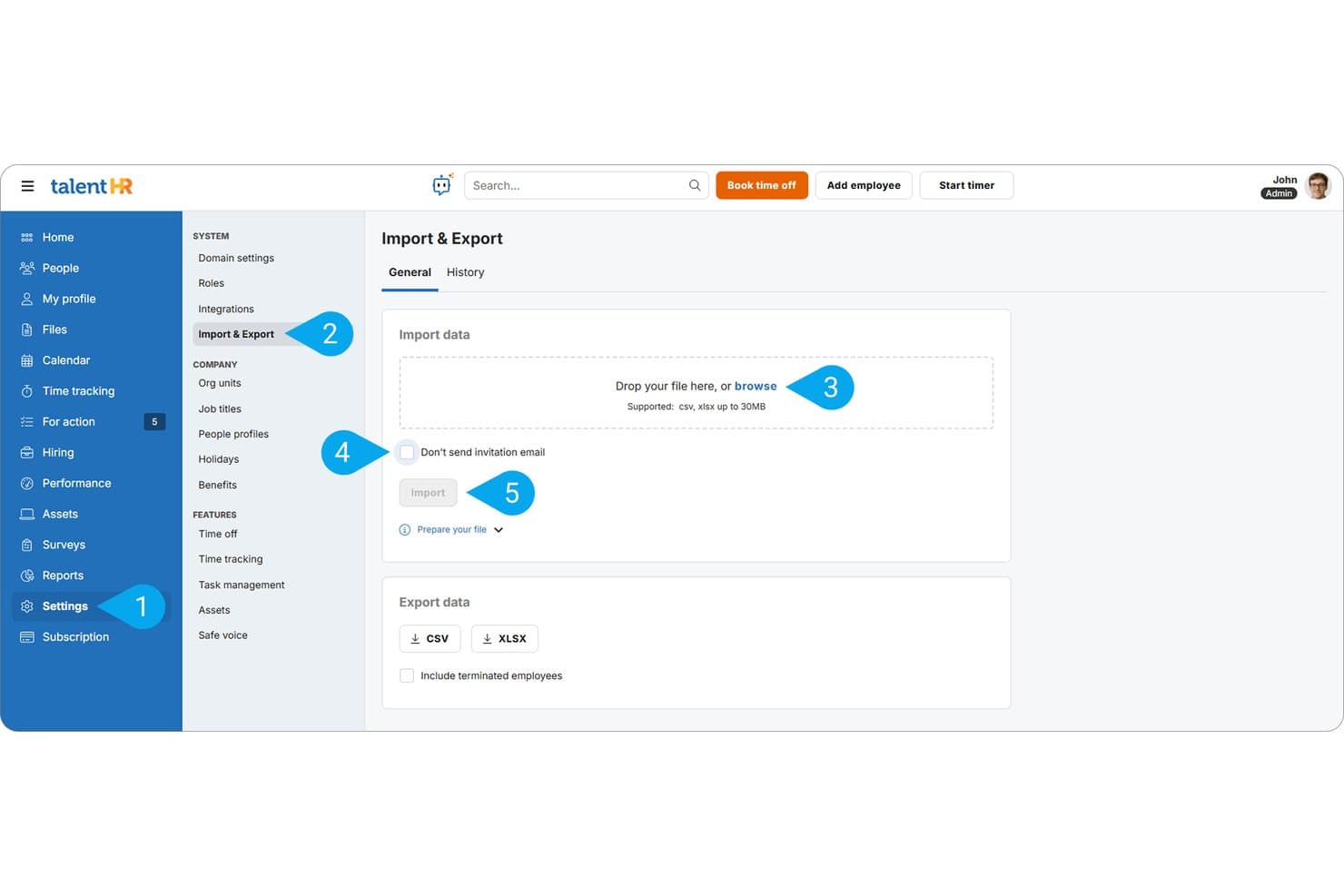
TalentHR allows HR teams to bulk import employee records via CSV or XLSX files and export data for record-keeping. TalentHR is an all-in-one HRIS for SMBs that centralizes employee records, document storage, time off tracking, onboarding workflows, and people analytics in a single platform.
Who Is TalentHR Best For?
TalentHR is a strong fit for HR managers and founders at small to mid-sized businesses who need a simple, centralized HR system without enterprise-level complexity.
Why I Picked TalentHR
I picked TalentHR as one of the best because its AI tools are genuinely baked into the record-keeping workflow, not added on as an afterthought. I particularly like the AI candidate suitability scoring, which automatically summarizes CVs against open roles so my team isn't manually cross-referencing applications with job criteria. The built-in document summary tool also lets me extract key details from stored personnel files in seconds, which saves real time when auditing records across the employee database.
TalentHR Key Features
- Employee database: Store and manage personal details, role info, contracts, and supporting HR files in one searchable system.
- Time off and attendance: Automate PTO, leave approvals, and calendar syncing across teams and departments.
- Custom fields: Add organization-specific fields to employee records without developer involvement.
- Safe voice (whistleblowing): Collect confidential reports and store them securely for compliance needs.
TalentHR Integrations
TalentHR offers native integrations with Google Calendar, Slack, Outlook, and WordPress, connects with Zapier, and provides an API for custom integrations.
Pros and Cons
Pros:
- Org chart auto-generates from stored employee data
- Built-in document storage with e-signature support
- AI automates repetitive employee record updates
Cons:
- No multi-entity support for complex org structures
- Reporting depth limited compared to enterprise HRIS
Learn more about TalentHR: Best for digital document management
- 14-day free trial + free demo available
- Pricing upon request
Visit WebsiteCustomer Rating:4.7/5
Sloneek’s dashboard makes it easy to manage employee roles and track key HR functions in one place. Sloneek is a versatile HR database software designed to simplify the entire employee journey, from recruitment to offboarding. It consolidates HR tasks into one system so you can focus more on supporting people rather than managing paperwork. With its strong document and records management capabilities, Sloneek is especially well-suited for HR teams that want to keep everything digital, organized, and accessible.
Why I picked Sloneek: I picked Sloneek because it combines robust employee record-keeping with digital document management, including e-signatures, so you can handle contracts, policies, and HR forms without paper clutter. Its time management tools, like attendance tracking and absence management, also make it easier to stay on top of employee schedules. On top of that, Sloneek includes performance management features such as 360 degree feedback and goal tracking, giving you visibility into both compliance and employee development.
Sloneek Standout Features and Integrations:
Features include employee records management, digital document handling with e-signatures, performance management with 360 degree feedback, AI-driven engagement surveys, and organizational chart creation. HR automation helps reduce repetitive admin, while whistleblowing and people analytics tools support compliance and decision-making.
Integrations include Jira, Google Calendar, Google Workspace, Microsoft 365, MS Active Directory, Looker Studio, ICE Warp, OKTA, and API connections for extended flexibility.
Learn more about Sloneek: Best for automatic shift assignments
- 21-day free trial + free demo available
- From $3.50/user/month
Visit WebsiteCustomer Rating:4.8/5
Agendrix displays a color-coded weekly schedule with shift details, open slots, and time-off visibility, helping managers assign roles and avoid conflicts. Agendrix is an employee scheduling software designed for small businesses and shift work. It provides tools for managing employee schedules, time tracking, and HR needs, making it a valuable resource for companies looking to manage workforce tasks.
I picked Agendrix for its all-in-one HR and scheduling tools, including shift management, PTO tracking, onboarding, and document handling. It also supports team engagement through recognition features and surveys, with mobile apps ensuring access for both managers and employees on the go.
Features include time and attendance tracking, which helps you keep precise records of employee work hours. Another feature is the task tracking linked to shifts, allowing managers to assign and track tasks efficiently. The software also offers automatic shift assignments based on employee availability, which reduces administrative burden. They also offer bilingual support and user interface in English and French.
Integrations include EmployerD, Nethris, Sage 50, Acomba, QuickBooks, Ceridian Powerpay, ADP Workforce Now, Payworks, Lightspeed, Azur, Easypay, BeLocum, Hopem, and Folks HR.
Learn more about Agendrix: Best for historical data retention
- Free demo available
- Pricing upon request
Visit WebsiteCustomer Rating:5/5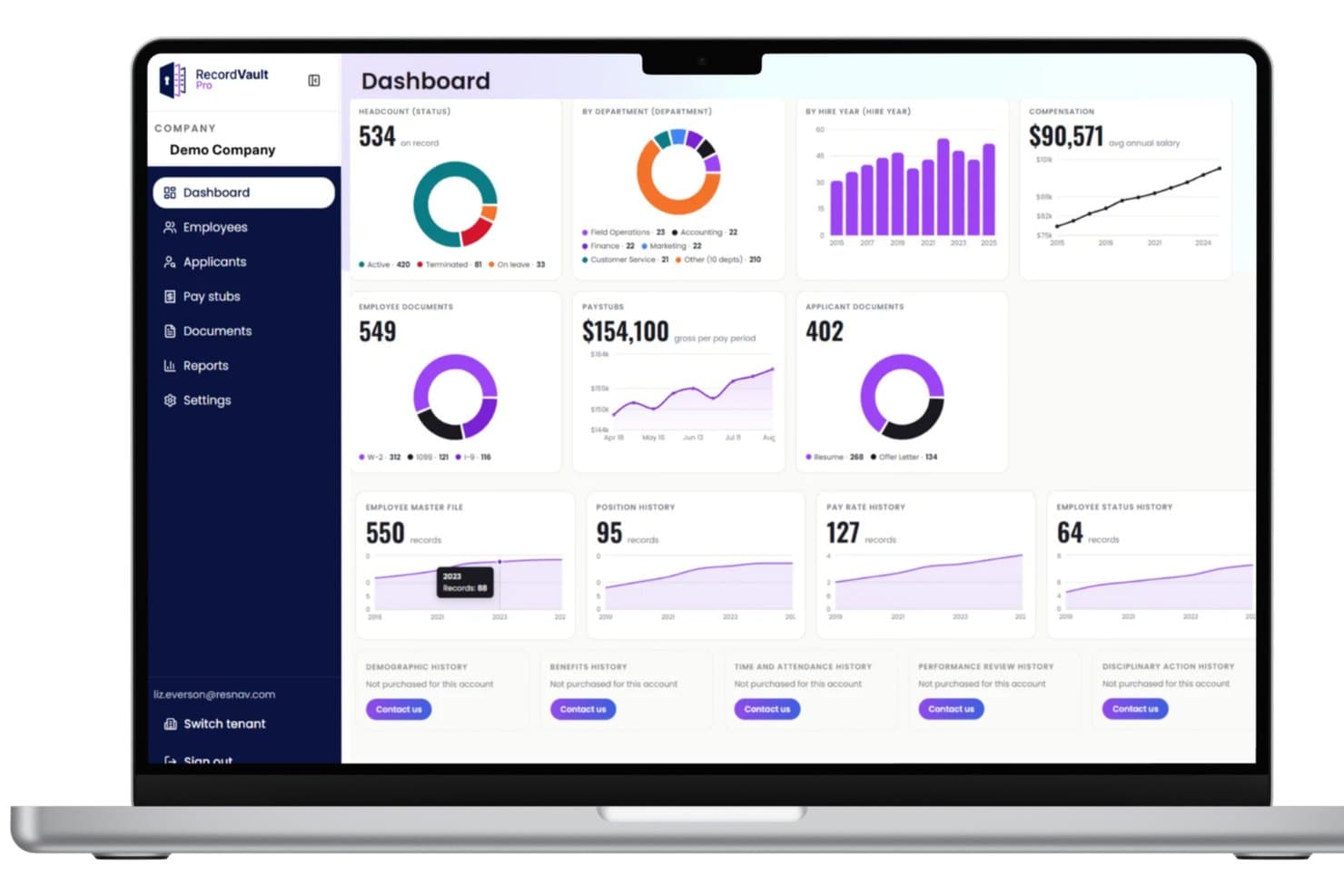
RecordVault's dashboard centralizes HR metrics like headcount, pay, and documents. For organizations that need long term access to historical HR and payroll records, ResNav’s History Link provides a secure, compliance-focused database solution. The platform is designed to preserve employee data, payroll history, and supporting documents, especially during payroll transitions or system changes. As an HR database tool, it helps you maintain access to legacy records while supporting audit readiness and regulatory requirements.
Why I Picked ResNav - History Link
I picked ResNav - History Link because it focuses specifically on secure historical data retention, which is often overlooked in HR database software. If you are transitioning payroll providers or replacing your HRIS, you can still maintain searchable access to prior employee records, pay data, and documentation. I also like that it integrates with payroll and HRIS vendors, allowing you to connect archived data with your current systems for reporting and compliance needs.
ResNav - History Link Key Features
In addition to its compliance and data retention capabilities, ResNav - History Link offers several other features that enhance its utility as an HR database solution.
- Secure Log-In: Provides a secure access point to the platform, ensuring that sensitive HR data is protected from unauthorized access.
- Performance Analytics: Offers insights into data usage and system performance, helping users optimize their HR database management processes.
- Cloud-Based Storage: Ensures that HR records are safely stored and easily accessible, providing flexibility and scalability for growing businesses.
- Integration with Payroll and HRIS Vendors: Facilitates efficient data transfer and reporting, aligning with various industry standards and practices.
ResNav - History Link Integrations
Integrations include ADP, Paychex, Workday, and various other payroll and HRIS vendors.
Pros and Cons
Pros:
- Secure cloud-based record storage
- Supports position control planning
- Strong document retention compliance
Cons:
- May require integration setup support
- Primarily focused on archival use
Learn more about ResNav - RecordVault: Best for tracking career development
- Free demo available
- From $8/user/month (billed annually)
Visit WebsiteCustomer Rating:4.7/5
Lattice offers detailed information about each employee, including their goals and areas for career growth. Lattice is a versatile HR platform that connects performance management, career development, compensation management, and employee engagement. The system makes career advancement opportunities crystal clear, encouraging employees to achieve greater success.
Why I picked Lattice: I included Lattice in this list because it effectively combines performance, engagement, and compensation management in a single solution. Its continuous performance management approach allows for ongoing feedback and development discussions between managers and employees. Having compensation management in the same system as performance evaluations and goal tracking empowers data-driven pay decisions. Meanwhile, engagement surveys help HR teams understand and improve employee sentiments.
Lattice Standout Features and Integrations:
Features include an HRIS, performance management tools including goals and OKRs, compensation management tools, and HR analytics. The admin dashboard allows HR teams to create custom questions for performance reviews or customize reviews to evaluate specific objectives. Users can also set custom fields for performance analysis, and review their overall company-wide employee performance review status. All reports are stored for future review and comparison.
Integrations include ADP, BambooHR, Google Workspace, Humaans, Jira, Microsoft Suite, Okta, Rippling, Salesforce, Slack, UKG, Workday, and others.
 Best for customizable workflows
- Free demo available
- Pricing upon request
Visit WebsiteCustomer Rating:4.3/5
Kallidus Sapling’s dashboard lets you see important information at a glance. Kallidus Sapling is a software-as-a-service (SaaS) HCM solution designed to help with employee onboarding and managing HR operations.
Why I picked Kallidus Sapling: Their HR tools simplify tasks using auto-assigned workflows, email scheduling, and alerts which can be customized for different locations, departments, or employee types to standardize processes. This is a useful feature for companies with distributed teams as it helps HR managers regulate processes across all work locations and departments. Their system also comes with pre-built reports to analyze any type of data that’s stored in the system.
Kallidus Sapling Standout Features and Integrations:
Features include an employee self-service portal, an activity dashboard, and custom reporting. Employees can complete onboarding tasks such as completing, uploading, and signing documents online. HR team members can then leverage this data to sync employee details with payroll and accounting.
Designed to be flexible, Sapling helps managers build custom, automated workflows to reduce manual admin. They can also create custom email templates to communicate with individuals or groups. It's also easy to track job-related data such as promotions, salary adjustments, relocations, and other historical changes.
Integrations include 50+ leading HR, IT, and productivity systems such as JazzHR, Lever, Workday, ADP, Paylocity, 15Five, Lattice, OneLogin, Greenhouse, Okta, Zapier, the Google Suite, Slack, Lessonly, ChartHop, Jira, LinkedIn, and many other platforms.
Learn more about Kallidus Sapling: 10Best for assessing employee sentiment using AI
UKG Pro
- Not available
- Pricing upon request
Visit WebsiteCustomer Rating:4.3/5
UKG Pro's payroll gateway seamlessly integrates all payroll functions into one unified system, including timekeeping, tax calculations, and direct deposit. UKG Pro is a complete HR management software that covers HR processes like payroll, benefits, compensation, talent acquisition, and performance management.
Why I picked UKG Pro: I like its AI-powered survey feature that collects employee feedback regularly to measure engagement levels and company culture insights. Based on the results, it provides recommendations on how to improve specific areas of the employee experience and facilitate better work-life balance.
UKG Pro Standout Features and Integrations:
Features include an employee data for personal information, benefits, and performance reviews, and an employee self-serve portal where staff can access and adjust their contact information, submit time off requests, and review their pay.
The platform stores performance review data for each employee, and facilitates hiring and talent management. Administrators can see a high-level overview of the company's workforce, including employee demographics and various detailed reports. The software also provides timely updates to meet regulatory compliance requirements in the US and Canada.
Integrations include job boards, applicant tracking systems, and people management solutions, such as Bonusly, LinkedIn, Okta, Greenhouse, iCIMS Talent Cloud, Yammer, Bucketlist, Jobvite, GoodHire, Assembly, and OneLogin. UKG Pro also offers a RESTful API.
Learn more about UKG Pro:
Diğer Seçenekler
İşte en iyi İK veritabanı yazılımı listesine giremeyen birkaç seçenek daha:
- 11Sage HRBest for employee compensation management
- 12InsperityBest for access to additional HR support services
- 13SAP HCMBest for enterprise-level organizations
- 14RipplingBest for compliance tracking
- 15ConnecteamBest for a mobile-first HR platform
- 16FactorialBest with an employee portal
- 17PaycorBest for organizing employee data
- 18RiseBest for intuitive people management
- 19HR PartnerBest HR database software for automations
- 20HR CloudBest HR database software comprised of flexible cloud-based HR applications
İlgili İK Yazılımı İncelemeleri
Burada hâlâ aradığınızı bulamadıysanız, test edip değerlendirdiğimiz diğer ilgili araçlara göz atın:
- İK Yazılımı
- Bordro Yazılımı
- İşe Alım Yazılımı
- Kayıtlı İşveren Hizmetleri
- Aday Takip Sistemleri
- İşgücü Yönetimi Yazılımı
How I Evaluate HR Database Software
I split my evaluation into two layers: what every HR database must handle—like employee records, lifecycle tracking, and access controls—and the differentiators that separate the best tools.
Core Functionality (Table Stakes For This List)
When I'm selecting tools for my list, I rank each one on a scale from 0 (does not offer the functionality) to 5 (excels in this area) for each core functionality listed below. Then, I calculate the tool's total score into a percentage. Each tool needs to achieve a minimum total score of 65% to be considered for inclusion.
- Centralized Employee Records: I check whether a platform stores personal details, job data, compensation, and documents in a single searchable profile rather than scattered across tabs or modules.
- Custom Fields & Data Structure: Every organization structures its workforce data differently, so I look for configurable fields, employee categories, and org hierarchies that adapt to your setup.
- Role-Based Access & Security: I evaluate how granular the permission model is—for example, whether you can restrict a regional manager's view to only their direct reports' compensation data.
- Reporting & Analytics: The ability to build custom reports on headcount trends, turnover rates, or demographic breakdowns matters more to me than a library of prebuilt templates you'll never use.
- Employee Lifecycle Tracking: I look for how well a tool records the full history of hires, promotions, lateral moves, and terminations with effective dating so you can audit changes over time.
- Integrations & API Access: Connecting your HR database to payroll, ATS, and benefits platforms keeps data consistent, so I evaluate native integrations alongside open API and webhook availability.
Once I have a list of tools that meet the criteria, I consider what sets each platform apart.
Differentiating Factors (What Sets Vendors Apart)
Here's how I compare and contrast different vendors:
Standout Features
Self-service portals make a real difference—I look for tools where employees update their own addresses, banking details, or emergency contacts without filing an HR ticket. Workflow automation is another separator. The best platforms trigger onboarding checklists or approval chains automatically when an employee record changes status. For distributed teams, I also evaluate global data localization, including support for multi-country fields, local currencies, and region-specific compliance structures.
Beyond Features
Compliance matters beyond just checking a box. I look for certifications like SOC 2 Type II and configurable data retention policies, especially when a company operates across regions with different privacy laws. Implementation support is equally important—migrating years of employee records from spreadsheets or a legacy HRIS can go sideways fast without guided import tools or dedicated onboarding specialists. I also evaluate how well a platform scales, checking whether it supports multi-entity structures for organizations managing separate divisions or subsidiaries.
İK Veritabanı Nasıl Seçilir?
İK veritabanı yazılımı birçok farklı sorunu çözebilir ve çok sayıda iş akışını iyileştirebilir. İhtiyaçlarınıza en uygun İK veritabanı yazılımını belirlemenize yardımcı olmak için öncelikle temel kullanıcılarınızı ve onların karşılaştığı özel zorlukları belirlemeniz ve belgeleyebilmeniz gerekir.
Kendinize özgü İK yazılımı seçim sürecinizi yürütürken aşağıdaki noktaları göz önünde bulundurun:
- Hangi sorunu çözmeye çalışıyorsunuz - Üstesinden gelmeye çalıştığınız zorlukları belirleyerek başlayın. Bu, İK veritabanı yazılımının sunması gereken özellikleri ve işlevleri netleştirmenize yardımcı olacaktır.
- Kimlerin kullanması gerekecek - Maliyeti ve gereksinimleri değerlendirmek için yazılımı kimlerin kullanacağını ve kaç lisansa ihtiyaç duyacağınızı göz önünde bulundurun. Platforma bağlı olarak, tüm çalışanlarınız için çalışan düzeyinde erişim ve İK yöneticileriniz ile yöneticileriniz için özel erişim isteyebilirsiniz. Bu netleştikten sonra, tüm ihtiyaçların karşılandığından emin olmak üzere İK yazılımınızın ileri düzey kullanıcıları, yöneticileri ve çalışanları için temel önceliklerinizi belirlemek amacıyla farklı kullanıcılarınızın ihtiyaçlarını önem sırasına koymanız da yararlı olacaktır.
- Hangi diğer araçlarla birlikte çalışması gerekecek - Hangi araçları değiştireceğinizi, hangi araçları kullanmaya devam edeceğinizi ve muhasebe, zaman takibi veya bordro yazılımı gibi hangi araçlarla entegre etmeniz gerekeceğini netleştirin. Araçların birbirleriyle entegre olması gerekip gerekmediğine veya bunun yerine birden fazla aracı hepsi bir arada bir İK platformuyla değiştirip değiştiremeyeceğinize karar vermeniz gerekecektir.
- Hangi sonuçlar önemli - Elde etmek veya geliştirmek istediğiniz yetenekleri ve başarıyı nasıl ölçeceğinizi gözden geçirin. Örneğin, çalışanların kendi kendine hizmet olanaklarını artırarak daha zengin bir çalışan deneyimi sunmak veya verileri bir sistemden diğerine manuel olarak aktarmaktan kaçınmak isteyebilirsiniz. İK veritabanı özelliklerini gözünüz kararana kadar karşılaştırabilirsiniz; ancak elde etmek istediğiniz sonuçları düşünmüyorsanız çok değerli zamanınızı boşa harcayabilirsiniz.
- Kuruluşunuz içinde nasıl çalışacağı - Yazılım seçimini mevcut iş akışlarınız ve sistemlerinizle birlikte değerlendirin. Nelerin iyi çalıştığını ve ele alınması gereken sorunlu alanları inceleyin.
Her işletmenin farklı olduğunu unutmayın — sırf popüler diye bir İK veritabanının kuruluşunuz için işe yarayacağını varsaymayın.
İK Veritabanı Yazılımı Nedir?
İK veritabanı yazılımı, çalışan bilgilerini depolamak, düzenlemek ve yönetmek için kullanılan; verimli insan kaynakları yönetimine ve verilere erişime yardımcı olan dijital bir araçtır. İK veritabanı yazılımının temel özellikleri arasında merkezi çalışan veri depolama, kolay veri alma ve güncelleme, güvenli erişim kontrolleri ve uyumluluk takibi yer alır.
Çalışan veritabanı yazılımının amacı, çalışan bilgilerini verimli bir şekilde depolamak, yönetmek ve geri almak; etkili insan kaynakları yönetimini ve karar alma süreçlerini desteklemektir.
Özellikler
Yukarıdaki temel işlevlere ek olarak, bu listedeki her sistem için şu ek temel İK özelliklerini de değerlendirdim:
- Kayıt tutma: İnsan kaynakları yönetim sistemi (HRMS), operasyonel ve yasal gereksinimleri karşılamak için gerekli tüm kayıtları tutabilmelidir.
- Bordro yazılımı: Maaşları hesaplama ve ödeme, vergileri kesme ve maaş bordrolarını düzenleme olanağının entegre olarak sunulması. Tüm İK veritabanlarında bu özellik bulunmaz; ancak bulunması kesinlikle bir avantajdır.
- İş akışları: İK yönetiminin verimliliğini genellikle azaltan onaylar gibi tekrarlayan görevleri otomatikleştiren araçlar.
- Bildirimler: İK uzmanlarınızın, çalışanlarınızın kendi kişisel verilerini güncellediğini veya ilgili diğer değişiklikleri öğrenmesini sağlayan otomatik uyarılar.
- Çalışan planlama & izin yönetimi özellikleri: Çalışma vardiyalarını düzenleyen, çalışanların çalıştığı saatleri takip eden ve izin taleplerini yöneten araçlar.
- Çalışan yan hakları yönetimi: İK ekiplerinin çalışanların sağlık yardımlarını, emeklilik planlarını ve diğer haklarını yönetebilmesi.
- Performans yönetimi: Çalışan performansını değerlendirmek, terfileri yönetmek ve kariyer ilerlemesini takip etmek için yerleşik araçlar.
- Raporlama & analiz: Yöneticilerinizin veriye dayalı daha iyi kararlar almasını desteklemek üzere çalışan verileriniz hakkında sistem genelinde raporlar çalıştırabilme.
- Mobil uygulamalar: Android veya iOS cihazlara yönelik mobil uygulamaları kullanarak çalışan kayıtlarını gerçek zamanlı olarak güncelleyebilme.
Bu özellikleri sunan bir İK veritabanı seçmek, tüm temel ihtiyaçlarınızın karşılanmasını sağlayarak sizi uzun vadeli başarıya hazırlayacaktır.
Avantajlar
İK veritabanı yazılımı, operasyonları kolaylaştıran, verileri koruyan ve genel kuruluş verimliliğini artıran çeşitli avantajlar sunar. İK veritabanı yazılımını değerlendiren potansiyel alıcılar için bu avantajları anlamak, karar alma sürecinizi önemli ölçüde etkileyebilir. Bu sistemlerin sunduğu temel avantajlardan bazıları şunlardır:
- Gelişmiş Verimlilik için Merkezileştirilmiş Veriler: Çalışan bilgilerinin tek bir veritabanında merkezileştirilmesi, veri yönetimini kolaylaştırır ve idari yükleri azaltarak hataları en aza indirir ve güncellemeleri hızlandırır. İK personelinin manuel veri girişi ve evrak işleri için harcadığı zamanı azaltan İK veritabanı yazılımı, doğrudan işletmeye daha fazla fayda sağlayan stratejik faaliyetlere odaklanmalarına olanak tanır.
- Geliştirilmiş Raporlama, Planlama ve Veriye Dayalı Karar Alma: Güçlü analiz araçlarıyla İK veritabanı yazılımı, işletmelerin daha iyi iş gücü stratejileri planlamasına ve veriye dayalı içgörülere göre gelecekteki İK ihtiyaçlarını öngörmesine yardımcı olur. Güncel ve doğru verilere erişim, yönetimin bilinçli kararları hızlı bir şekilde almasını sağlayarak operasyonel yanıt verme kabiliyetini geliştirir.
- Geliştirilmiş Veri Güvenliği: İK veritabanı yazılımı genellikle yetkisiz erişimi ve veri ihlallerini önlemeye yardımcı olan gelişmiş güvenlik protokollerini içerir ve gizlilik düzenlemelerine uyumu güvence altına alır.
- Geliştirilmiş Çalışan Öz Hizmeti: İK veritabanları, çalışanların kişisel bilgilerini ve taleplerini yönetmelerine olanak tanır; bu da İK ekibinizin yönetmesi gereken talep sayısını önemli ölçüde azaltabilir. Bu öz hizmet özellikleri, çalışanlara verileri ve talepleri üzerinde daha fazla kontrol sağlayarak çalışan memnuniyetini de artırır.
Bu avantajlar yalnızca İK departmanının günlük operasyonlarını geliştirmekle kalmaz, aynı zamanda daha geniş kurumsal yapının daha etkili bir şekilde çalışmasını da sağlar. İşletmeler böyle bir sistemi benimseyerek iş gücünü daha verimli yönetebilir ve İK uygulamalarını stratejik hedefleriyle uyumlu hâle getirebilir.
Maliyetler ve Fiyatlandırma
Özellikle bu tür bir teknolojiye yeni başlıyorsanız, kuruluşunuzdaki insan kaynakları yönetimini en iyi duruma getirmek için doğru İK veritabanı planını seçmek çok önemlidir. Farklı ihtiyaçlara ve ekip büyüklüklerine sahip işletmelere hitap eden çeşitli plan seçenekleri mevcuttur. Bu seçenekleri anlamak, bütçenize uyan ve özel gereksinimlerinizi karşılayan bir plan seçmenize yardımcı olur. En iyi seçeneğe odaklanmanıza yardımcı olmak için yaygın İK veritabanı yazılımı planı seçeneklerini, ortalama fiyatlarını ve genellikle içerdikleri özellikleri ayrıntılı olarak açıkladım.
İK Veritabanı Yazılımı için Plan Karşılaştırma Tablosu
| Plan Türü | Ortalama Fiyat | Yaygın Olarak Sunulan Özellikler |
|---|---|---|
| Plan TürüÜcretsiz | Ortalama Fiyat$0 | Yaygın Olarak Sunulan ÖzelliklerTemel çalışan takibi, sınırlı raporlama ve erişim denetimleri |
| Plan TürüTemel | Ortalama Fiyat$50-100 kullanıcı başına/ay | Yaygın Olarak Sunulan ÖzelliklerGeliştirilmiş çalışan takibi, bordro entegrasyonu, temel analizler ve müşteri desteği |
| Plan TürüProfesyonel | Ortalama Fiyat$100-200 kullanıcı başına/ay | Yaygın Olarak Sunulan ÖzelliklerTam İK paketi, gelişmiş analizler, artırılmış veri güvenliği, API erişimi ve 7/24 destek |
| Plan TürüKurumsal | Ortalama FiyatÖzel Fiyatlandırma | Yaygın Olarak Sunulan ÖzelliklerÖzel entegrasyonlar, tahsis edilmiş destek, eğitim, uyumluluk yönetimi ve sınırsız ölçeklenebilirlik |
İK veritabanı yazılımı için plan türlerinin, maliyetlerin ve özelliklerin dökümü.
Son seçiminizi yaparken çalışan sayısını, ihtiyaç duyduğunuz özellikleri ve gereksinim duyacağınızı öngördüğünüz destek düzeyini göz önünde bulundurun. Doğru planı seçerken ihtiyacınız olmayan gereksiz özellikler için ödeme yapmadığınızdan emin olmanız da önemlidir. Maliyet en önemli etkeninizse bu makale, İK yazılımının maliyetlerini ve şirketiniz için en uygun seçeneğe nasıl karar verebileceğinizi ayrıntılı olarak ele alır.
Sıkça Sorulan Sorular
İK veritabanı yazılımları ve bunların nasıl çalıştığı hakkında genel sorularınız mı var? Sıkça sorulan sorulara verilen bu yanıtlar başlamak için iyi bir yerdir:
İK veritabanı nedir?
İK veritabanı, yeni çalışanların işe alımından işten ayrılan çalışanların çıkış işlemlerine kadar çalışan verilerinin tüm yönlerini düzenleyen bir tür İK yazılımıdır. Şirket büyüklüğü ne olursa olsun, her İK ekibinin günlük faaliyetlerinin vazgeçilmez bir parçasıdır. Küçük işletmeler, orta ölçekli işletmeler ve kurumsal kuruluşların tümü, İK işlevlerini bir tür İK veritabanı üzerinden yürütür.
Bu tür yazılımlar için kullanılan diğer yaygın terimler arasında insan kaynakları bilgi sistemleri (HRIS), insan sermayesi yönetim sistemleri (HCM) veya insan kaynakları yönetim sistemleri (HRMS) yer alır. Yazılım sağlayıcıları hangi adı kullanırsa kullansın, tümü temel İK görevlerinizi kolaylaştırmanıza ve dijitalleştirmenize yardımcı olur. Elektronik tablolarınızdan ve dosya dolaplarınızdan kurtulup dijital İK çağının modern dünyasına geçmenizi sağlarlar.
İşletmem için hangi İK veritabanının doğru olduğunu nasıl anlayabilirim?
Sizin için en uygun İK veritabanına karar vermeye çalışırken kullanmanızı önerdiğim beş kolay adımlı süreç şöyledir:
- İhtiyaçlarınızı belirleyin. Şu anda karşılaştığınız tüm zorlukların ve yeni bir yazılım sistemine yatırım yaparak sahip olmak istediğiniz özelliklerin bir listesini oluşturun.
- Sağlayıcıları araştırın. Web topluluğumuz bu amaçla tasarlandı; bu nedenle diğer listelerin size nasıl yardımcı olabileceğini görmek için arama alanımıza mutlaka göz atın. Araştırma yaparken size en çekici görünen sağlayıcıların adlarını not edin. Bu liste, kısa listenizi oluşturacaktır.
- Kısa listenizi ekibinizle gözden geçirin. Yeni yazılımı tek başınıza seçmemelisiniz. Söz konusu yeni yazılımı kullanacak ilgili her departmandan önemli paydaşları sürece dahil etmek önemlidir. Böylece yeni sistemin yalnızca sizin bireysel ihtiyaçlarınıza değil, tüm iç kullanıcılarınızın ihtiyaçlarına da hizmet etmesini sağlayabilirsiniz.
- Ücretsiz deneme veya kişiselleştirilmiş demo için kaydolun. Bu önemli bir adımdır; çünkü sistemi kullanmanın nasıl bir şey olduğuna dair uygulamalı deneyim edinmenizi sağlar. Mümkünse, ilk üç seçeneğinizden ücretsiz deneme veya demo talep edin. Böylece her sistemin kullanıcı deneyimini, avantajlarını ve dezavantajlarını daha iyi karşılaştırabilirsiniz.
- Seçin ve uygulamaya geçin. Son kararınızı ekip olarak verin. Seçtiğiniz yazılımın tüm işletme ihtiyaçlarınızı karşılamasını ve mevcut sorunlarınızı çözmesini sağlamalısınız. Ayrıca ücretsiz deneme sürecindeki deneyiminize de büyük önem vermelisiniz.
İK veritabanları veri güvenliğini nasıl yönetir?
İK veritabanları, veri gizliliğini ve korumasını sağlamak için aktarım sırasında ve bekleme hâlindeki verilerin şifrelenmesi, düzenli güvenlik denetimleri ve GDPR gibi küresel veri koruma düzenlemelerine uyumluluk dâhil olmak üzere çeşitli güvenlik önlemleri sunar. Olası güvenlik açıklarına karşı koruma sağlamak için düzenli güncellemeler ve yamalar da sunulur.
Yazılım sağlayıcıları genellikle özelleştirilebilir erişim denetimleri sunarak kuruluşların belirli İK verilerini kimlerin görüntüleyebileceğini veya düzenleyebileceğini tanımlamasına olanak tanır ve böylece güvenliği artırır. İşletmelerin bir çözüme karar vermeden önce her sağlayıcının güvenlik yeterliliklerini ve uyumluluk sertifikalarını incelemesi önemlidir. Daha fazla bilgi edinmek istiyorsanız, bu makale veri yönetimindeki en iyi uygulamalar hakkında daha fazla ayrıntı sunar .
İK veritabanı yazılımını etkili bir şekilde kullanmak için hangi eğitim gereklidir?
İK veritabanı yazılımının etkili kullanımı genellikle yazılımın hem temel hem de gelişmiş işlevlerini kapsayan bir eğitim gerektirir. Bu eğitim; kullanıcı arayüzünde gezinmeyi, çalışan kayıtlarını yönetmeyi, raporlar oluşturmayı ve uyumluluk özelliklerini anlamayı içerebilir.
Birçok yazılım sağlayıcısı çevrim içi eğitimler, canlı web seminerleri ve yüz yüze eğitim oturumları sunar. Ayrıca bazı platformlarda, kullanıcıların yazılımı kullanırken çeşitli özellikleri anlamasına yardımcı olacak yerleşik yönlendirmeler veya diğer müşteri destek araçları bulunabilir.
Yeni özelliklere veya güncellenen düzenlemelere sürekli olarak uyum sağlamak ve öğrenmeye devam etmek için kesintisiz eğitim önerilir. Kullanıcıların yazılım şirketleri veya üçüncü taraf uzmanlar tarafından sağlanan forumlara ya da kullanıcı gruplarına katılması da faydalıdır.
İK veritabanlarının maliyeti nedir?
Bir İK veritabanının maliyeti, seçtiğiniz veritabanının türüne ve içerdiği yönetim araçlarının çeşitliliğine bağlıdır. Basit İK yönetim sistemleri (genellikle bir İK veritabanı veya HRIS) için hizmet olarak yazılım (SaaS) anlaşması kapsamında çalışan başına aylık $1 ile $15 arasında ödeme yapmayı bekleyebilirsiniz. Bazı durumlarda ayrıca temel bir aylık ücret de ödemeniz gerekebilir.
Daha gelişmiş sistemler için daha yüksek bir aylık ücret ödemeyi bekleyebilirsiniz. Bu sistemlerin uzmanlaşmış yapısı nedeniyle çoğu sağlayıcı fiyatlandırma ayrıntılarını yalnızca talep üzerine sunar. Bunun nedeni, yazılımlarını kendi işletme ihtiyaçlarınıza göre özelleştirmek için hangi modülleri istediğinizi seçebilmenizdir.
Yeni bir İK veritabanı sistemine geçişle ilişkili maliyetler nelerdir?
Yeni bir İK veritabanı sistemine geçişin maliyetleri; operasyonun ölçeği, mevcut sistemlerin karmaşıklığı ve yeni sistemde gereken belirli özellikler gibi çeşitli faktörlere bağlı olarak büyük ölçüde değişebilir. İlk maliyetler genellikle yeni yazılımın satın alma fiyatını veya abonelik ücretlerini, İK personeli ve diğer kullanıcılar için eğitimi ve veri geçişi hizmetleri için olası ücretleri içerir. Yazılım bakımı, güncellemeler ve ek eğitimle ilgili devam eden maliyetler de olabilir.
Kuruluşların geçiş yapmaya karar vermeden önce kapsamlı bir maliyet-fayda analizi gerçekleştirmesi önemlidir. Bu analizde yalnızca anlık maliyetler değil, uzun vadeli verimlilikler ile uyumluluk ve veri yönetimindeki olası iyileştirmeler de dikkate alınmalıdır.