

Bu kadar çok seçenek varken doğru kurumsal bordro yazılımını seçmek zor olabilir. Çok sayıda çalışanın bordrosunu verimli bir şekilde yönetebileceğiniz bir araca ihtiyacınız var, ancak hangisinin en iyi olduğunu belirlemek bunaltıcı olabilir. Bu nedenle bu makaleyi yazdım; özelleştirme, raporlama ve entegrasyonlar gibi ihtiyaçlarınıza bağlı olarak seçeneklerinizi daraltmanıza yardımcı olmak istiyorum. Farklı bordro araçlarını test etme ve kullanma konusundaki yıllara dayanan deneyimimden yararlanarak ihtiyaçlarınıza en uygun seçeneği bulmanıza yardımcı olacağım.
Why Trust Our Software Recommendations
6,700+
Reviews
20
Industry experts
16+
Evaluation factors
14
Years
Our team has been testing and reviewing software since 2012. As HR experts ourselves, we know how difficult—and important—it is to choose the right software.
For this guide, we evaluated tools using hands-on testing and independent research, scoring tools using our selection criteria. We also draw on insights from industry thought leaders and practicing HR experts.
Our reviews reflect our human editorial judgment, not a sales pitch.
Expert reviewers:
- Phil GrayCOO
 Kim BehnkeHR Tech Editor & Analyst
 Josh BarkerPeople Ops Manager

Kurumsal Bordro Yazılımı Fiyat Karşılaştırma Tablosu
Aşağıdaki tabloda, kurumsal bordro yazılımı için en iyi seçimlerimin fiyatlandırma ayrıntıları karşılaştırılmaktadır.
Score legend (out of 5)
- Excellent4.5–5
- Good4–4.4
- Average3–3.9
- Below average2–2.9
- Poor1–1.9
Sorted by: Default
| Tool | Starting Price | Website | |||||||
|---|---|---|---|---|---|---|---|---|---|
Best for employee-managed payroll and HR data | 3.2 out of 5 | 4 | 2 | 4 | 3 | 4 | 2 | Pricing upon request Free demo available | Book Demo |
Best for global compliance and payroll | 3.7 out of 5 | 4 | 4 | 3 | 3 | 4 | 4 | $29/user/month Free demo available | Website |
Best for integrations and open APIs | 3.2 out of 5 | 3 | 4 | 3 | 3 | 4 | 2 | Pricing upon request Free demo available | Website |
Best for all-in-one HR, IT, and finance management | 3.0 out of 5 | 3 | 4 | 2 | 4 | 3 | 2 | $8/user/month Free trial + free demo available | Book Demo |
Best with integrated time tracking | 1.7 out of 5 | 2 | 2 | 2 | 1 | 2 | 1 | $79/user/month Free demo available | Book Demo |
Best for cross-border hiring and payroll | 3.5 out of 5 | 4 | 4 | 3 | 2 | 4 | 4 | $599/user/month Free demo available | Book Demo |
Best for robust reporting and analytics | Not rated | 4 | 4 | 4 | 3 | 3 | Not rated | Pricing upon request Free demo available | Website |
Best for handling complex pay structures | 2.7 out of 5 | 4 | 3 | 2 | 2 | 3 | 2 | $50/user/month 30-day free trial + free demo available | Website |
Best for oversight of local payroll providers | 3.7 out of 5 | 4 | 3 | 4 | 3 | 4 | 4 | Pricing upon request Free demo available | Website |
Best for choosing who runs payroll by country | 3.5 out of 5 | 3 | 3 | 4 | 3 | 4 | 4 | Pricing upon request Free demo available | Website |


En İyi Kurumsal Bordro Yazılımı İncelemeleri
Bu bölümde, her bir kurumsal bordro yazılımı hakkında ayrıntılı bir analiz ve genel bakışın yanı sıra bunları bu listeye neden dahil ettiğime dair notlar yer almaktadır. Ayrıca her sistem için artıları ve eksileri, özellikleri ve en uygun kullanım alanlarını da ekledim.
 Best for employee-managed payroll and HR data
- Free demo available
- Pricing upon request
Visit WebsiteCustomer Rating:4.3/5
Paycom is a powerful enterprise payroll software that simplifies payroll processing, HR management, and compliance tasks for businesses. Paycom offers an enterprise payroll software solution that empowers employees to manage their payroll and HR data directly. It is designed to streamline payroll processes and enhance data accuracy by giving employees control over their own information.
Why I picked Paycom: I chose Paycom after comparing it with other enterprise payroll software options because it uniquely focuses on employee-managed data through its unique Beti feature, which actively involves employees in the payroll process. This approach reduces administrative burdens and increases data accuracy by allowing employees to double-check their own payroll and HR information before payday.
For that reason, I believe Paycom is best for employee-managed payroll and HR data because it fosters a sense of ownership and responsibility among employees, leading to fewer errors and more efficient processes.
Paycom Standout Features & Integrations:
Features include payroll processing, compliance management, and real-time reporting and analytics, plus a self-service portal where employees can manage their payroll, benefits, and HR information. The software also offers mobile access, allowing employees to manage their information from anywhere.
Integrations are not available.
Pros and Cons
Pros:
- Comprehensive mobile access for on-the-go management
- Real-time reporting and analytics enhance decision-making
- Designed to reduce administrative workloads for HR teams
Cons:
- Could use more native integrations
- Pricing details are not transparent
 Best for global compliance and payroll
- Free demo available
- From $29/user/month
Visit WebsiteCustomer Rating:4.9/5
Deel is a flexible enterprise payroll software that streamlines global payroll, compliance, and HR management for remote and international teams. Deel Payroll is a global payroll platform that handles multi-country payroll processing, local tax compliance, contractor payments, and workforce management across 150+ countries from a single system.
Who Is Deel Payroll Best For?
Deel Payroll is a natural fit for enterprise HR and payroll teams managing distributed workforces across multiple countries, especially those hiring both employees and contractors internationally.
Why I Picked Deel Payroll
I've included Deel Payroll in my top picks because no other platform handles the complexity of cross-border compliance at enterprise scale as well. I particularly like the built-in compliance engine, which automatically updates payroll calculations to reflect local tax laws, social contributions, and statutory deductions for each country. I also rely on the continuous compliance monitoring, which flags regulatory changes before they create payroll errors—something I've found invaluable when running payroll across regions like APAC and EMEA simultaneously.
Deel Payroll Key Features
- Multi-currency payroll: Run payroll and disburse funds in 120+ currencies without manual FX conversions or third-party exchange tools.
- Payroll Connect: Aggregates payroll data from third-party providers into a single dashboard, giving you visibility across every country.
- Configurable approval workflows: Set up multi-step payroll approval chains so finance, HR, and legal can each sign off before funds are released.
- AI-powered anomaly detection: Automatically flags unusual payroll entries—like duplicate payments or statistical outliers—before processing runs.
Pros and Cons
Pros:
- Offers optional add-ons for other human resources services
- Automated contract management and international onboarding
- Strong focus on global compliance and local expertise
Cons:
- No mobile app
- Limited invoicing customizations
Learn more about Deel Payroll: Best for integrations and open APIs
- Free demo available
- Pricing upon request
Visit WebsiteCustomer Rating:4.3/5
Paylocity is an enterprise payroll software that offers comprehensive payroll, HR, and employee engagement tools to streamline workforce management. Paylocity is a cloud-based payroll and HR platform that covers the full range of enterprise payroll needs, from multi-state and global tax compliance to time tracking, benefits administration, garnishment management, and on-demand payments.
Who Is Paylocity Best For?
Paylocity is a strong fit for mid-to-large U.S.-based organizations that need a unified payroll and HR platform with deep customization and integration capabilities.
Why Pick Paylocity
Paylocity's open, developer-friendly API and webhook infrastructure set it apart for enterprise teams that can't afford data silos. Webhooks push updates across your business in real time when payroll is processed and when employees are hired, transferred, or terminated. That means a termination in Paylocity instantly triggers downstream updates across your connected systems, with no manual intervention. Paylocity's Pay Entry API also lets third-party systems pass time tracking, earnings, deductions, and taxes directly to payroll, which is a real advantage when you're running a distributed tech stack with separate timekeeping or ERP tools.
Paylocity Key Features
- Multi-state tax automation: Automatically determines and applies the correct state and local tax rules for each employee based on their work location.
- On-demand pay: Lets employees access earned wages before the standard pay cycle without disrupting payroll processing.
- Garnishment management: Routes and manages wage garnishments through a dedicated team to reduce compliance risk.
- Global payroll activation: Extends payroll coverage to employees in 100+ countries directly within the platform.
Pros and Cons
Pros:
- Employee self-service portal for improved accessibility
- Advanced analytics and reporting capabilities
- Offers a wide range of HR features
Cons:
- Implementation can be complex due to having numerous modules
- Transparent pricing isn’t available
 Best for all-in-one HR, IT, and finance management
- Free trial + free demo available
- From $8/user/month
Visit WebsiteCustomer Rating:4.9/5
Rippling is a dynamic enterprise payroll software that integrates payroll, HR, IT, and finance functions for comprehensive workforce management. Rippling is a workforce management platform that unifies payroll, HR, IT, and finance operations—handling everything from global payroll and tax filing to device management and spend tracking in a single system.
Who Is Rippling Best For?
Rippling is a strong fit for mid-sized to enterprise companies that need to manage payroll, HR, IT, and finance across multiple countries from one platform.
Why Rippling Stands Out
Rippling stands out because no other payroll platform ties HR, IT, and finance together as tightly. When my team runs payroll, headcount changes automatically ripple through benefits, device provisioning, and expense policies—without any manual re-entry. I also really like the pay run comparison tool, which flags discrepancies between pay periods before anything gets approved. Rippling's Workflow Automator lets you build cross-functional triggers, so an approved salary change in HR instantly updates both payroll and finance reporting.
Rippling Key Features
- Global payroll: Run payroll across 185+ countries with localized tax calculations and multi-currency payments built in.
- Automatic tax filing: Rippling calculates and files federal, state, and local payroll taxes automatically, including year-end forms.
- Compliance 360: Monitors regulatory changes across all 50 states and flags compliance gaps in real time.
- Role-based payroll approvals: Assign granular permissions so the right stakeholders review and approve payroll before it processes.
Pros and Cons
Pros:
- Extensive reporting and analytics capabilities
- Automated onboarding and offboarding processes
- Automatically highlights possible data errors
Cons:
- App can take a while to load in areas with slow internet
- Mobile app lacks some features that are available on the desktop and browser versions
 Best with integrated time tracking
- Free demo available
- From $79/user/month
Visit WebsiteCustomer Rating:4.6/5
Justworks offers a detailed payroll dashboard displaying integrated benefits management, PTO request tracking, and company directory features. Justworks is a payroll, HR, and benefits platform that combines PEO, EOR, and payroll-only options with built-in tools for onboarding, compliance, and time tracking.
Who Is Justworks Best For?
Justworks is a strong fit for small to mid-sized businesses that need payroll, benefits, and HR tools in one place without building out a large HR team.
Why I Picked Justworks
I picked Justworks as one of the best because the time tracking module is built directly into the payroll workflow, not bolted on as an afterthought. Approved shifts automatically sync to payroll, which removes the manual reconciliation step that creates errors in most multi-tool setups. I also like the geofencing feature for location verification on hourly workers, and the ability to set custom overtime alerts so managers catch issues before payroll runs, not after.
Justworks Key Features
- Multi-state payroll processing: Run payroll across multiple states with automatic tax calculations and filings handled per jurisdiction.
- PEO services: Access a co-employment model that lets your team offer Fortune 500-level benefits without managing carrier relationships directly.
- Automated tax filing: Justworks handles federal, state, and local payroll tax filings and year-end W-2 and 1099 form generation.
- Employee self-service portal: Employees can access pay stubs, tax documents, and benefits enrollment from a single login.
Pros and Cons
Pros:
- Provides access to large-group employee benefits
- Handles both employee and contractor payroll
- Includes dedicated HR consulting as an add-on
Cons:
- Pricing increases quickly with add-ons and team size
- Health benefits are not included in all plans
Learn more about Justworks: Best for cross-border hiring and payroll
- Free demo available
- From $599/user/month (billed annually)
Visit WebsiteCustomer Rating:2.9/5
Remote is a comprehensive enterprise payroll software that simplifies global payroll, compliance, and HR tasks for distributed teams. Remote is a payroll and employment provider that runs multi-country payroll across 100+ countries, handling local gross-to-net calculations, tax filings, statutory remittances, and contractor management in one platform.
Who Is Remote Best For?
Remote is a strong fit for companies managing payroll across multiple countries who want local compliance, local-currency payments, and a single workflow without stitching together regional providers.
Why I Picked Remote
I picked Remote as one of the best because it's purpose-built for cross-border hiring and payroll, running local gross-to-net calculations across 100+ countries through owned entities rather than a patchwork of regional partners. I particularly like that the same implementation specialist who sets up your payroll stays with you after go-live, which matters when you're managing statutory filings and cut-off dates across dozens of jurisdictions. The unified payroll calendar handles off-cycle runs and country-specific deadlines in one place, so expanding into a new country doesn't mean rebuilding your workflow from scratch.
Remote Key Features
- Local gross-to-net calculation: Remote calculates payroll locally in each country, accounting for country-specific tax rules and statutory deductions.
- Payroll calendar: A shared calendar tracks off-cycle runs and country-specific cut-off dates across all jurisdictions in one place.
- Custom reporting by entity and cost center: Generate reports organized by country, entity, and cost center, with audit-ready general-ledger exports for finance teams.
- SOC 2 Type II and ISO 27001 certification: Remote maintains both certifications alongside SSO, two-factor authentication, and encryption in transit and at rest.
Remote Integrations
Remote offers native integrations with Workday, BambooHR, Personio, HiBob, NetSuite, and Xero for payroll, time, expense sync, and GL exports. It also provides APIs, webhooks, and SDKs for custom integrations.
Pros and Cons
Pros:
- Shared payroll calendar tracks local deadlines
- Implementation specialist remains after go-live
- Local gross-to-net payroll across 100+ countries
Cons:
- Audit logs require requests, not self-service
- Some reviewers report inadequate local compliance guidance
 Best for robust reporting and analytics
- Free demo available
- Pricing upon request
Visit WebsiteCustomer Rating:4.1/5
The payroll dashboard of ADP Workforce Now offers a comprehensive view of payroll processing and management. ADP Workforce Now is a cloud-based HCM platform that handles payroll processing, tax compliance, benefits administration, time and attendance tracking, talent management, and HR workflows in a single system.
Who Is ADP Workforce Now Best For?
ADP Workforce Now is a strong fit for mid-to-large enterprises that need a unified platform to manage payroll, HR, and compliance across multiple states or regions.
Why I Picked ADP Workforce Now
I've included ADP Workforce Now in my top picks because the reporting and analytics capabilities here are genuinely hard to match in the enterprise payroll space. The platform's built-in ADP DataCloud pulls together payroll, HR, talent, and benefits data into a single analytics layer, with pre-built dashboards and drag-and-drop custom reporting across every stage of the employee lifecycle. What I find especially useful is the compensation benchmarking tool, which lets you measure pay against anonymized data from 39 million U.S. employees to see whether your salaries are competitive by role, location, or industry. AI-powered anomaly detection also flags payroll discrepancies before they become costly errors.
ADP Workforce Now Key Features
- Automated tax filing: Calculates, files, and deposits federal, state, and local payroll taxes automatically.
- Multi-state payroll processing: Runs payroll across multiple states with jurisdiction-specific compliance rules applied.
- Time and attendance sync: Pulls approved hours directly from the timekeeping module into payroll calculations.
- Garnishment management: Calculates and processes wage garnishments, including child support orders and tax levies.
Pros and Cons
Pros:
- Scalable and suitable for businesses of all sizes
- Helps businesses stay compliant with labor laws and regulations
- Convenient employee self-service portal
Cons:
- Platform can be complex for new users
- Offers limited customization options
Learn more about ADP Workforce Now: Best for handling complex pay structures
- 30-day free trial + free demo available
- From $50/user/month
Visit WebsiteCustomer Rating:4.5/5
TimeTrex's time and attendance features track employee work hours, breaks, and overtime for more accurate payroll processing. TimeTrex is an enterprise-grade workforce management platform that combines payroll processing, time and attendance tracking, HR management, and employee scheduling in a single system.
Who Is TimeTrex Best For?
TimeTrex is a strong fit for mid-to-large organizations that manage hourly and salaried workers across multiple locations, departments, or pay groups.
Why I Picked TimeTrex
I picked TimeTrex as one of the best because of how well it handles layered pay structures that would break most standard payroll tools. Its custom deductions engine lets you configure benefits, insurance, garnishments, and both vacation and sick leave accruals independently per employee. Multi-source bank debiting lets you split employer payments across multiple accounts—useful for organizations with complex funding arrangements.
TimeTrex Key Features
- Automated tax calculations: TimeTrex calculates federal, state/provincial, and local payroll taxes automatically for each pay run.
- Year-end tax form generation: Generate and distribute W2, 1099, T4, and ROE forms directly from the platform at year-end.
- Job costing: Allocate labor costs across up to four levels of cost centers, giving finance teams granular visibility into workforce spend.
- Integrated time and attendance: Employee clock-in data feeds directly into payroll, reducing manual entry and timesheet discrepancies.
Pros and Cons
Pros:
- Automated payroll and tax calculations
- Integrated payroll and HR management solutions
- Robust time, attendance, and scheduling features
Cons:
- Some features are difficult to find within the platform
- Platform design is a little outdated
Learn more about TimeTrex: Best for oversight of local payroll providers
- Free demo available
- Pricing upon request
Visit WebsiteCustomer Rating:5/5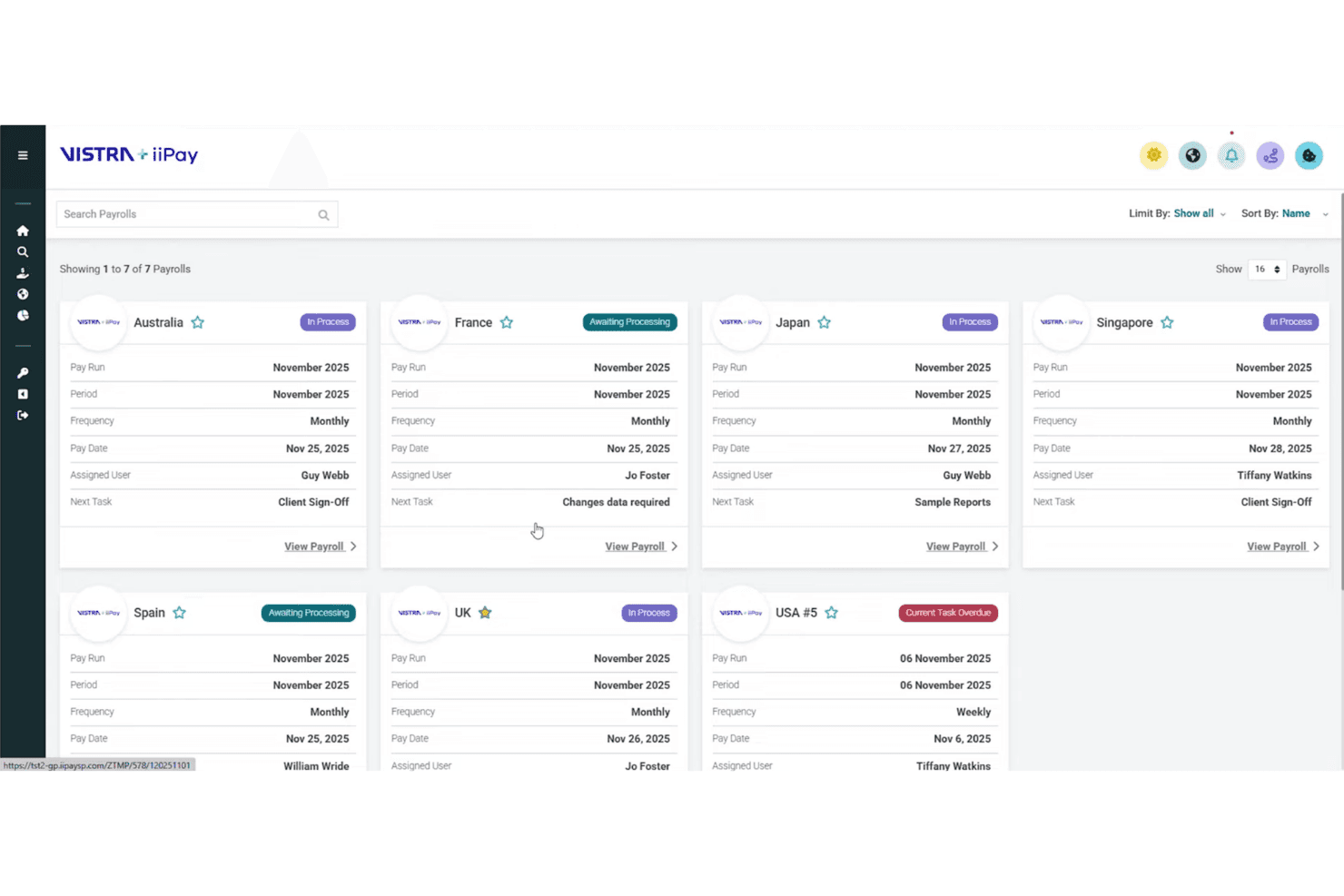
iiPay displays global payroll statuses across countries in one dashboard. iiPay is a fully managed global payroll platform that centralises multi-country payroll processing, compliance monitoring, payments across 100+ currencies, and workforce analytics through a single control layer.
Who Is iiPay Best For?
iiPay is a strong fit for multinational enterprises that need centralized visibility and governance over payroll delivered across dozens of countries and local providers.
Why I Picked iiPay
I've included iiPay in my top picks because its Global Control Centre gives multinational teams a single management layer over payroll delivered by either Vistra's own in-country specialists or the local providers you already use. What I find particularly valuable is that it standardises payroll data across geographies and systems into one stream, so you're never flying blind on what's happening in each country. The AI-driven anomaly detection flags discrepancies before disbursement across 100+ currencies, which is exactly the kind of pre-emptive oversight that matters at scale.
iiPay Key Features
- In-country payroll processing: 1,500+ local payroll professionals process payroll across 170+ countries, with 96% handled in-house.
- Employee self-service portal: Employees get 24/7 access to payslips, year-end documents, and historical payroll records in 20+ languages.
- Multi-step approval workflows: Configurable approval chains and audit trails track every payroll change and payment from initiation through disbursement.
- Cost-centre reporting: Analytics dashboards report workforce spend, budget variances, and total cost of employment by entity, region, or cost centre.
iiPay Integrations
iiPay offers documented connectors for Workday and HiBob, plus integrations with SAP SuccessFactors, Oracle HCM, and Microsoft Dynamics. It also supports REST API, SFTP, and flat-file exchange for custom HCM, time, finance, ERP, and general-ledger connections.
Pros and Cons
Pros:
- Enterprise-scale processing backed by 11 million payslips annually
- Local specialists support in-country payroll execution
- Broad visibility across multinational payroll runs
Cons:
- Some payroll relies on local providers
- Payment timing can vary by geography
Learn more about iiPay :
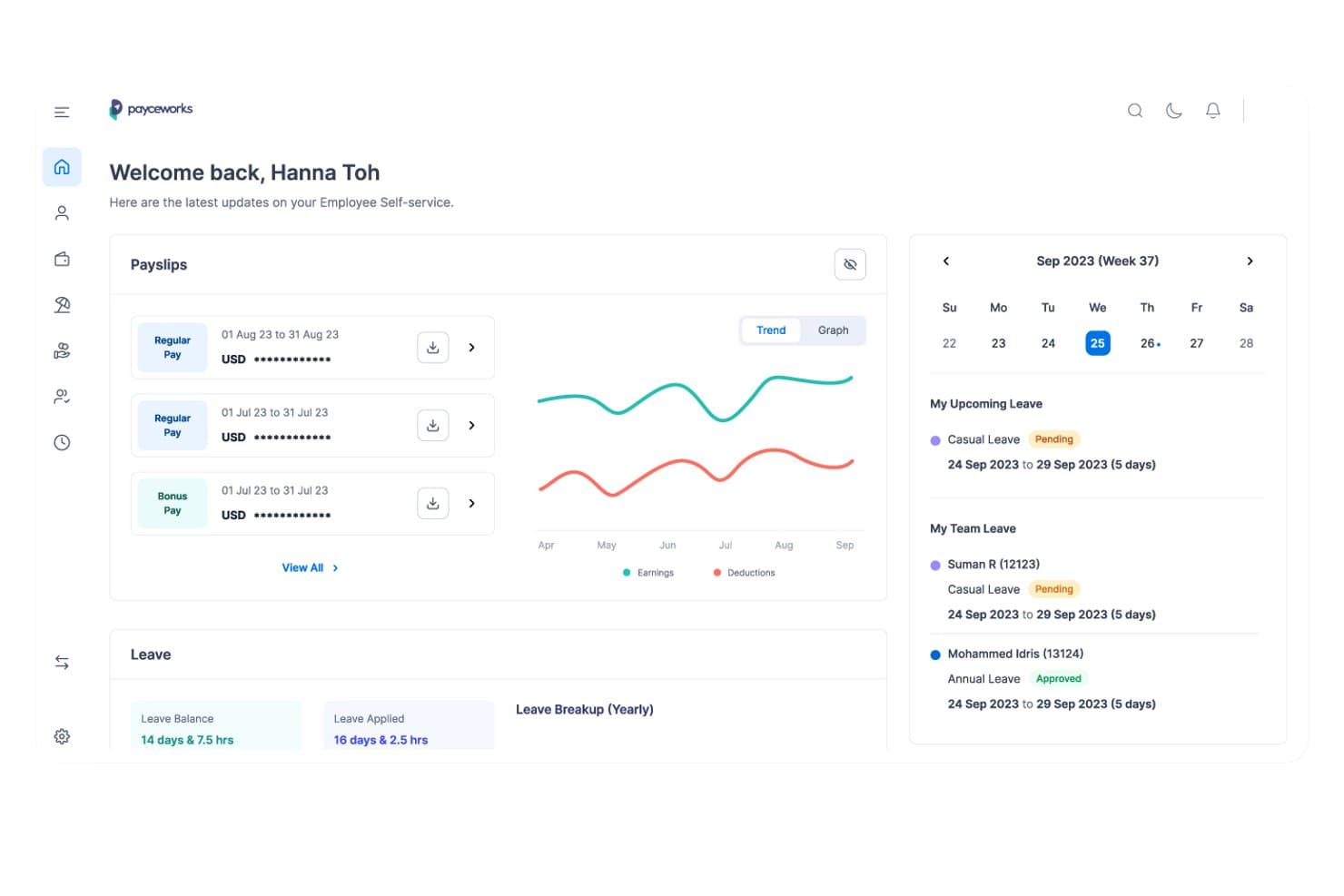
Payce centralizes payslips, leave balances, and team schedules in one dashboard. Payce is an enterprise payroll platform from Ramco Systems that handles multi-country payroll processing, statutory compliance across 150+ countries, multi-entity pay-run consolidation, and AI-driven anomaly detection.
Who Is Payce Best For?
Payce is a strong fit for large, multinational organizations that need to distribute payroll ownership across regions while keeping compliance and reporting centralized.
Why I Picked Payce
I've included Payce in my top picks because it lets large multinationals decide, at the country level, whether payroll is run in-house, through Ramco's managed service, or through a hybrid split. That flexibility is rare. In practice, a company running payroll directly in the UK and Germany can simultaneously hand off Brazil and Japan to Ramco's regional specialists, all within one consolidated platform. The AI anomaly detection, which narrows 800 variances down to 8 items flagged for review, keeps oversight tight regardless of who's running each country's pay cycle.
Payce Key Features
- Multi-currency processing: Handles salary payments across 40+ currencies with live exchange-rate integration built into each pay run.
- BInGO reporting: Lets you query payroll costs, regional trends, and variance summaries in plain language without writing code.
- Low-code rule builder: Configures complex pay logic for different employee groups, entities, or countries without requiring developer involvement.
- Daily HR self-service portal: Gives employees mobile-browser access to payslips, leave requests, and personal-information updates.
Payce Integrations
Payce offers native integrations with Workday, Oracle HCM, SAP SuccessFactors, Microsoft Dynamics, Epicor, Sage, Kronos, Tanda, and Time2Work. It also provides a REST API for custom integrations.
Pros and Cons
Pros:
- Reviewers praise multi-country localization
- AI anomaly flags focus review effort
- Country-level payroll ownership stays flexible
Cons:
- Reviewers report limited business-specific reporting flexibility
- Implementation can require substantial configuration and testing
Learn more about Payce:
Diğer Kurumsal Bordro Yazılımları
İşte en iyi 10 listeme giremeyen, ancak yine de göz atmaya değer birkaç kurumsal bordro yazılımı seçeneği:
- 11Oracle Fusion Cloud PayrollBest for spotting pay impacts of HR changes
- 12Workday PayrollBest for early access to earned wages
- 13DayforceBest for payroll-linked earned wage access
- 14Papaya GlobalBest for AI-based payroll data verification
- 15MercansBest for co-managed payroll operations
- 16UKG ProBest for one paymaster across legal entities
- 17CloudPayBest for linking payroll to global payments
- 18SAP SuccessFactors Employee Central PayrollBest for SAP-connected HR and finance teams
- 19ZalarisBest for managed payroll on the same platform
İlgili İK Yazılımı İncelemeleri
Burada aradığınızı hâlâ bulamadıysanız test edip değerlendirdiğimiz diğer ilgili araçlara göz atın:
- İK Yazılımı
- Bordro Yazılımı
- İşe Alım Yazılımı
- Kayıtlı İşveren Hizmetleri
- Aday Takip Sistemleri
- İşgücü Yönetimi Yazılımı
How I Evaluate Enterprise Payroll Software
I split my evaluation into three parts, weighting core functionality most: calculate and file taxes across jurisdictions, and run payroll for thousands across entities and pay groups. Next, I look for differentiators such as global payroll orchestration. Finally, I consider implementation and migration support, service levels, and pricing value beyond features.
Core Functionality (Table Stakes For This List)
When I'm selecting tools for my list, I score each one on a scale from 0 (does not offer the functionality) to 5 (excels in this area) for each core functionality listed below. I then convert the total into a percentage to help assess each tool's overall fit, with extra weight on any functionalities I’ve deemed essential.
- Tax Compliance (Essential): I look for automated tax calculations, withholdings, and filings across jurisdictions, including support for regulatory changes affecting distributed teams.
- Payroll Scale (Essential): I assess whether the platform can handle thousands of employees across entities, pay groups, and pay frequencies without disrupting payroll cycles.
- Entities & Currencies: I check how the system manages distinct legal entities, currencies, and cost centers while supporting consolidated payroll reporting.
- System Integrations: I look for connections to HRIS, time-tracking, benefits, and ERP systems that keep employee and compensation data in sync.
- Approval Workflows: I evaluate role-based, multi-level approvals that reflect organizational hierarchies and handle payroll changes across business units.
- Audit & Reporting: I check for detailed activity logs and configurable payroll reports that support internal controls, reviews, and external audits.
Once I have a list of tools that meet the criteria, I consider what sets each platform apart.
Differentiating Factors (What Sets Vendors Apart)
Here's how I compare and contrast different vendors:
Standout Features
Global payroll orchestration is the first thing I evaluate. I look for vendors that own in-country payroll engines rather than routing payments through third-party aggregators, since that directly affects pay accuracy and local compliance. Earned wage access matters too—when employees can draw earned wages before payday, it reduces financial stress and the ad hoc pay requests that burden HR teams. I also check how each platform handles contractor and gig workforce payments alongside traditional employees, because misclassification risk grows fast when you're paying both groups through disconnected systems.
Beyond Features
I evaluate how each vendor handles implementation and migration, since enterprise payroll rollouts can stretch across months and a botched data conversion means employees get paid wrong. Vendors that offer phased go-live plans and dedicated migration teams reduce that risk considerably. Scalability through M&A matters just as much—I check whether a platform can absorb new entities or rapid headcount growth without re-platforming, because I've seen organizations outgrow their payroll system mid-acquisition. I also look at total cost of ownership, including hidden fees for added jurisdictions or off-cycle runs.
Kurumsal Bordro Yazılımı Nasıl Seçilir?
Kendinize özgü yazılım seçim sürecinizi yürütürken aşağıdaki noktaları göz önünde bulundurun:
- Ölçeklenebilirlik ve Esneklik: Yazılımın işletmenizle birlikte büyüyebilmesini sağlayın. Hızlı büyüme veya mevsimsel dalgalanmalar yaşayan işletmeler için, önemli kesintiler olmadan ölçeği artırabilme veya azaltabilme özelliği kritik önem taşır. Örneğin, çok sayıda geçici tatil dönemi çalışanı bulunan bir perakende şirketi, bordro işlemlerindeki ani artışları yönetebilecek bir sisteme ihtiyaç duyacaktır.
- Uyumluluk ve Raporlama: Yazılım, yerel, eyalet ve federal düzenlemelere uyumlu kalmanıza yardımcı olmalıdır. Birden fazla bölgede faaliyet gösteren işletmeler karmaşık vergi yasaları ve çalışma mevzuatıyla karşı karşıyadır. Örneğin bir sağlık kuruluşu, eyalete göre değişen belirli çalışma yasalarına ve raporlama gerekliliklerine uymalıdır.
- Entegrasyon Yetenekleri: Bordro yazılımı, mevcut İK, muhasebe ve zaman takip sistemlerinizle entegre olmalıdır. Uzmanlaşmış zaman takip araçları kullanan bir üretim şirketi için entegrasyon, doğru bordro işlemlerini güvence altına alır ve manuel veri girişi hatalarını azaltır.
- Kullanıcı Deneyimi ve Destek: Yazılım kullanıcı dostu olmalı ve güçlü müşteri desteği sunmalıdır. Çok uluslu şirketler gibi çeşitli bir iş gücüne sahip işletmeler, eğitim süresini en aza indirmek ve tüm çalışanların sistemi etkili bir şekilde kullanabilmesini sağlamak için sezgisel arayüzlere ihtiyaç duyar. Ayrıca güvenilir müşteri desteği, sorunların hızlı bir şekilde çözülmesi için gereklidir.
- Güvenlik ve Veri Gizliliği: Hassas çalışan bilgilerinin korunması son derece önemlidir. Finans kuruluşları gibi büyük miktarlarda kişisel veri işleyen işletmeler, veri ihlallerini önlemek ve veri koruma düzenlemelerine uyumu sağlamak için gelişmiş güvenlik özelliklerine ihtiyaç duyar.
Kurumsal Bordro Yazılımı Trendleri
Kurumsal bordro yazılımı, teknolojideki gelişmeleri (yapay zekâ ve blok zinciri teknolojisi gibi) bünyesine katmak ve kurumsal yapılardaki değişen trendlere uyum sağlamak üzere gelişmeye devam etmiştir. Günümüzde bordro yazılımı geliştirmesini etkileyen en önemli trendlerin kısa bir özeti:
- Yapay Zekâ ve Makine Öğrenimi Entegrasyonu: Yapay zekâ ve makine öğrenimi bordro sistemlerine entegre edilmektedir. Bu teknolojiler, karmaşık hesaplamaları otomatikleştirerek ve anormallikleri tespit ederek bordro işlemlerine yardımcı olur; böylece hataları azaltır ve zamandan tasarruf sağlar.
- Güvenlik için Blok Zinciri: Blok zinciri teknolojisi; güvenliği artırmak, veri bütünlüğünü güvence altına almak ve şeffaflığı geliştirmek amacıyla bordro sistemlerine giderek daha fazla entegre edilmeye başlanmıştır. Bu, dolandırıcılığı önlemek ve uyumluluğu sağlamak açısından kritik öneme sahiptir.
- Mobil Erişilebilirlik: Bordro yazılımına mobil cihazlar üzerinden giderek daha kolay erişilebilmektedir. Bu sayede çalışanlar bordro bilgilerine istedikleri zaman ve istedikleri yerden erişebilir; bu da kolaylığı ve çalışan memnuniyetini artırır.
- Aynı Gün Ödemeleri: Aynı gün ödeme seçenekleri bordro yazılımlarında daha yaygın hale gelmektedir. Bu yeni özellik, çalışanların geleneksel ödeme dönemlerini beklemek yerine ücretlerini anında alabilmesi anlamına gelir. Bu, özellikle geçici işlerde ve sözleşmeli olarak çalışanlar için faydalıdır.
Bu trendler, bordro yazılımı geliştiricilerinin müşterilerinin daha iyi bir çalışan deneyimi sunmasına ve yetenek piyasasında rekabetçi kalmasına yardımcı olmak için yeni teknolojilerden yararlanmasına örnektir.
Kurumsal Bordro Yazılımı Nedir?
Kurumsal bordro yazılımı, büyük kuruluşlar için bordro sürecini yönetmek ve otomatikleştirmek üzere tasarlanmış bir araçtır. Çalışan ücretlerinin, vergilerinin ve yan haklarının doğru ve zamanında ödenmesini sağlamak için İK departmanları, bordro yöneticileri ve finans ekipleri tarafından kullanılır.
Kurumsal bordro yazılımının temel bileşenleri arasında bordro işleme, vergi hesaplama, yan hak yönetimi ve uyumluluk yönetimi bulunur. Bu özellikler, kuruluşların çalışan ücretlerini yönetmesine, yasal gerekliliklere uymasına ve doğru mali kayıtlar tutmasına yardımcı olur.
Kurumsal Bordro Yazılımının Özellikleri
Kurumsal bordro yazılımı, özellikle büyük miktarlardaki bordro verilerini yönetmeye odaklanarak kuruluşların çalışan ücretlerini yönetmeye ilişkin karmaşık süreci otomatikleştirmesine yardımcı olmak üzere tasarlanmıştır. Bilinçli bir karar vermenize yardımcı olmak için kurumsal düzeydeki seçeneklerde aramanız gereken en önemli bordro yazılımı özelliklerini aşağıda sıraladım:
- Bordro İşleme: Bu özellik, vergiler, yan haklar ve diğer kesintiler dahil olmak üzere çalışan ücretlerinin hesaplanmasını otomatikleştirir. Çalışanlara doğru ve zamanında ödeme yapılmasını sağlayarak hata riskini azaltır ve idari zamandan tasarruf sağlar.
- Doğrudan Para Yatırma: Doğrudan para yatırma, işletmelerin çalışan ücretlerini doğrudan banka hesaplarına aktarmasına olanak tanır. Bu özellik, fiziksel maaş çeklerine olan ihtiyacı ortadan kaldırır, evrak işlerini azaltır ve zamanında ödeme yapılmasını sağlayarak çalışan memnuniyetini artırır.
- Vergi Beyanı ve Uyumluluk: Bordro yazılımı, yıl sonu vergi formlarının hazırlanması dahil olmak üzere, işletme adına bordro vergilerini otomatik olarak hesaplayabilir, kesebilir ve gönderebilir. Bu özellik, federal, eyalet ve yerel vergi yasalarına uyumu sağlayarak ceza ve yasal sorun riskini azaltır.
- Çalışanların Kendi İşlemlerini Yapabilmesi: Kendi işlemlerini yapmaya olanak tanıyan portallar, çalışanların maaş bordrolarına erişmesine, kişisel bilgilerini güncellemesine ve vergi formlarını yönetmesine olanak tanır. Bu, İK ve bordro departmanlarının idari yükünü azaltır ve daha fazla özerklik sağlayarak çalışan memnuniyetini artırır.
- Çalışma Süresi Takibi Entegrasyonu: Çalışma süresi takibinin bordro yazılımıyla entegre edilmesi, fiilen çalışılan saatlere dayalı doğru ücret hesaplamaları yapılmasını sağlar. Bu özellik, saatlik ücret alan çalışanları bulunan işletmeler için özellikle faydalıdır; manuel veri girişini azaltır ve hataları en aza indirir.
- Gider Yönetimi: Bu özellik, işletmelerin seyahat ve ofis malzemeleri gibi çalışan giderlerini takip etmesine ve yönetmesine olanak tanır. Giderlerin doğru şekilde kaydedilmesini ve geri ödenmesini sağlayarak finansal kontrolün ve şeffaflığın korunmasına yardımcı olur.
- Ücretlendirme Yönetimi: Bordro yazılımı; primler, komisyonlar ve fazla mesai dahil olmak üzere çeşitli ücretlendirme türlerini yönetebilir. Bu özellik, çalışan ücretlendirmesinin tüm biçimlerinin doğru şekilde hesaplanmasını ve ödenmesini sağlayarak adil ve şeffaf ücretlendirme uygulamalarını destekler.
- Bordro Raporlama: Etkili bordro raporlama araçları, bordro giderleri, vergi yükümlülükleri ve diğer finansal ölçütlere ilişkin kapsamlı ve gerçek zamanlı raporlara erişim sağlar. Bu raporlar bilinçli karar almayı destekler ve mevzuata uyumun sağlanmasına yardımcı olur.
- Ücret Haczi: Ücret haczi işlemlerini destekleyen bordro yazılımı; nafaka veya vergi haczi gibi haciz tutarlarını çalışan ücretlerinden otomatik olarak kesebilir ve ilgili kurumlara aktarabilir. Bu özellik, yasal gerekliliklere uyumu sağlar ve idari iş yükünü azaltır.
- ACA Raporlama ve İzleme: Uygun Fiyatlı Sağlık Hizmetleri Yasası (ACA) düzenlemelerine uyması gereken işletmeler için bordro yazılımı, ACA ile ilgili verileri izleyebilir ve raporlayabilir. Bu özellik, işletmelerin sağlık hizmetleri düzenlemelerine uyumlu kalmasına, cezalardan kaçınmasına ve çalışan sağlık sigortası yan haklarına ilişkin gerekliliklerin karşılanmasını sağlamasına yardımcı olur.
Doğru kurumsal bordro yazılımını seçmek, işletme faaliyetlerinizin verimliliği ve etkinliği açısından kritik öneme sahiptir. Her özellik, bordro işlemlerini iyileştirmede, uyumluluğu sağlamada ve çalışan memnuniyetini artırmada rol oynar. Farklı seçenekleri değerlendirirken işletmenizin özel ihtiyaçlarını göz önünde bulundurun ve bu gereksinimlerle uyumlu bir yazılım arayın.
Kurumsal Bordro Yazılımının Faydaları
Kurumsal bordro yazılımı, büyük miktarlarda çalışan verisi yönetilirken bordro işlemlerini optimize etmek ve doğruluk, uyumluluk ve verimlilik sağlamak amacıyla tasarlanmıştır. Kuruluşunuzda kurumsal bordro yazılımı uygulayarak elde etmeyi bekleyebileceğiniz bazı faydalar şunlardır:
- Zamandan Tasarruf: Bordro süreçlerinin otomatikleştirilmesi, manuel veri girişi ve hesaplamalarına harcanan zamanı önemli ölçüde azaltarak İK departmanlarının daha stratejik görevlere odaklanmasına olanak tanır.
- Geliştirilmiş Doğruluk: Bordro yazılımı, hesaplamaları ve veri girişini otomatikleştirerek insan hatası riskini en aza indirir ve çalışanlara doğru zamanda doğru ödeme yapılmasını sağlar.
- Uyumluluk Yönetimi: Bordro yazılımı, kuruluşların sürekli değişen vergi yasalarına ve iş mevzuatına uyumlu kalmasına yardımcı olarak maliyetli ceza riskini azaltır.
- Gelişmiş Güvenlik: Bordro yazılımı; şifreleme, çok faktörlü kimlik doğrulama ve düzenli güvenlik güncellemeleri dahil olmak üzere hassas çalışan verilerini korumaya yönelik güçlü güvenlik özellikleri sunar.
- Çalışanların Kendi İşlemlerini Yapabilmesi: Birçok bordro sistemi, çalışanların maaş bordrolarına ve vergi formlarına erişebileceği ve kişisel bilgilerini güncelleyebileceği kendi işlemlerini yapmaya olanak tanıyan portallar sunarak şeffaflığı ve memnuniyeti artırır.
Kurumsal Bordro Yazılımı Maliyetleri ve Fiyatlandırması
Kurumsal bordro yazılımını değerlendirirken mevcut fiyatlandırma planlarının kapsamını anlamak önemlidir. Aşağıda farklı plan türlerini, ortalama fiyatlarını ve yaygın özelliklerini ana hatlarıyla belirttim. Ancak kurumsal bordro yazılımının sunduğu tüm özelliklerden yararlanmak için en üst düzey Kurumsal planına kaydolmanız gerektiğini lütfen unutmayın.
Bordro Yazılımı Planı Karşılaştırma Tablosu
| Plan Türü | Ortalama Fiyat | Yaygın Özellikler |
| Ücretsiz Plan | $0 | Temel bordro işlemleri, doğrudan para yatırma, çalışanların kendi işlemlerini yapabildiği portal ve sınırlı müşteri desteği |
| Temel Plan | $39/ay + $5/çalışan | Bordro işlemleri, vergi beyannamesi gönderimi, doğrudan para yatırma, çalışanların kendi işlemlerini yapabilmesi ve temel raporlama |
| Standart Plan | $50/ay + $6/çalışan | Tüm Temel özelliklerine ek olarak zaman takibi, PTO yönetimi, uyumluluk desteği ve gelişmiş raporlama |
| Üst Düzey Plan | $99/ay + $8/çalışan | Tüm Standart özelliklerine ek olarak gelişmiş İK araçları, yan hak yönetimi, özel hesap yöneticisi ve gelişmiş analizler |
| Kurumsal Plan | Özel Fiyatlandırma | Tüm Üst Düzey özelliklerine ek olarak çok ülkeli bordro, özel entegrasyonlar, 7/24 destek ve özelleştirilmiş uyumluluk hizmetleri |
Bordro yazılımı için plan türleri, maliyetler ve özelliklerin dökümü.
İlk bordro planınızı seçerken işletmenizin büyüklüğünü, bordro ihtiyaçlarınızın karmaşıklığını ve gereksinim duyabileceğiniz ek İK işlevlerini göz önünde bulundurun. Her plan, farklı işletme ihtiyaçlarına ve gereksinimlerine uyum sağlamak için farklı özellikler ve fiyatlandırma seçenekleri sunar.