

Bordro yalnızca çalışanlara ödeme yapmakla ilgili değildir; doğruluk, mevzuata uygunluk ve güvenle de ilgilidir. Ancak geciken ödemelerle, yanlış vergi hesaplamalarıyla veya çözdüğünden daha fazla sorun yaratan kullanışsız sistemlerle uğraştıysanız, bunun ne kadar sinir bozucu olabileceğini bilirsiniz.
İşte bu nedenle doğru doğrudan yatırmalı bordro yazılımı önemlidir. Ödemeleri otomatikleştirir, vergileri hesaplar ve mevzuata uygun kalmanızı sağlar; ancak bu kadar çok seçenek varken en uygun olanı bulmak kolay değildir.
Yıllarımı İK ve bordro sistemlerini test ederek, gerçekten işe yarayan çözümleri görmek için finans ve İK liderleriyle çalışarak geçirdim. Bu rehberde, en iyi bordro araçlarını gerçek hayattaki kullanımlara göre ayrıntılı olarak inceliyorum; böylece doğru çözümü bulabilir ve bordroyu stres yaşamadan sorunsuz şekilde yürütebilirsiniz.
Why Trust Our Software Recommendations
6,700+
Reviews
20
Industry experts
16+
Evaluation factors
14
Years
Our team has been testing and reviewing software since 2012. As HR experts ourselves, we know how difficult—and important—it is to choose the right software.
For this guide, we evaluated tools using hands-on testing and independent research, scoring tools using our selection criteria. We also draw on insights from industry thought leaders and practicing HR experts.
Our reviews reflect our human editorial judgment, not a sales pitch.
Expert reviewers:
- Phil GrayCOO
 Kim BehnkeHR Tech Editor & Analyst
 Josh BarkerPeople Ops Manager

Doğrudan Yatırmalı Bordro Yazılımları Karşılaştırma Tablosu
\u003cspan style=\u0022font-weight: 400;\u0022\u003eBu karşılaştırma tablosu, doğrudan yatırmalı yazılım seçimlerimde öne çıkan seçeneklerin \u003c/span\u003e\u003cspan style=\u0022font-weight: 400;\u0022\u003efiyatlandırma\u003c/span\u003e\u003cspan style=\u0022font-weight: 400;\u0022\u003e ayrıntılarını özetlemektedir:\u003c/span\u003e
Score legend (out of 5)
- Excellent4.5–5
- Good4–4.4
- Average3–3.9
- Below average2–2.9
- Poor1–1.9
Sorted by: Default
| Tool | Starting Price | Website | |||||||
|---|---|---|---|---|---|---|---|---|---|
Best for employee self-service payroll | 3.3 out of 5 | 3 | 4 | 4 | 5 | 2 | 2 | Pricing upon request Free demo available | Book Demo |
Best for global payroll | 2.5 out of 5 | 2 | 2 | 4 | 3 | 2 | 2 | $29/user/month Free demo available | Website |
Best for flexible direct deposit options | 3.7 out of 5 | 3 | 4 | 4 | 4 | 4 | 3 | $49/month Free trial + free demo available | Book Demo |
Best for automated tax filings | 3.3 out of 5 | 4 | 3 | 3 | 4 | 3 | 3 | $79/user/month Free demo available | Book Demo |
Best for automated payroll processing | 3.5 out of 5 | 4 | 4 | 4 | 3 | 2 | 4 | Pricing upon request Free demo available | Website |
Best for payroll with built-in scheduling | 3.7 out of 5 | 3 | 4 | 4 | 4 | 4 | 3 | $99/month Free plan + 30-day free trial + free demo available | Website |
Best for payroll error detection | 4.0 out of 5 | 4 | 4 | 4 | 4 | 4 | 4 | Pricing upon request Free demo available | Website |
Best for accurate time-to-payroll integration | 3.3 out of 5 | 2 | 3 | 4 | 4 | 4 | 3 | $50/user/month 30-day free trial + free demo available | Website |
Best for free 2-day direct deposit | 3.8 out of 5 | 4 | 4 | 4 | 4 | 4 | 3 | $17/month 30-day free trial + demo available | Website |
Best for integrated payroll and benefits | 3.8 out of 5 | 4 | 4 | 4 | 4 | 4 | 3 | Pricing upon request Free demo available | Website |


En İyi Doğrudan Yatırmalı Bordro Yazılımları İncelemeleri
Bu bölüm, her bir doğrudan yatırmalı bordro yazılımının kapsamlı bir analizini ve genel değerlendirmesini sunmaktadır. Aşağıda her aracın artılarını ve eksilerini, özelliklerini ve en uygun kullanım alanlarını ele alacağız.
 Best for employee self-service payroll
- Free demo available
- Pricing upon request
Visit WebsiteCustomer Rating:4.3/5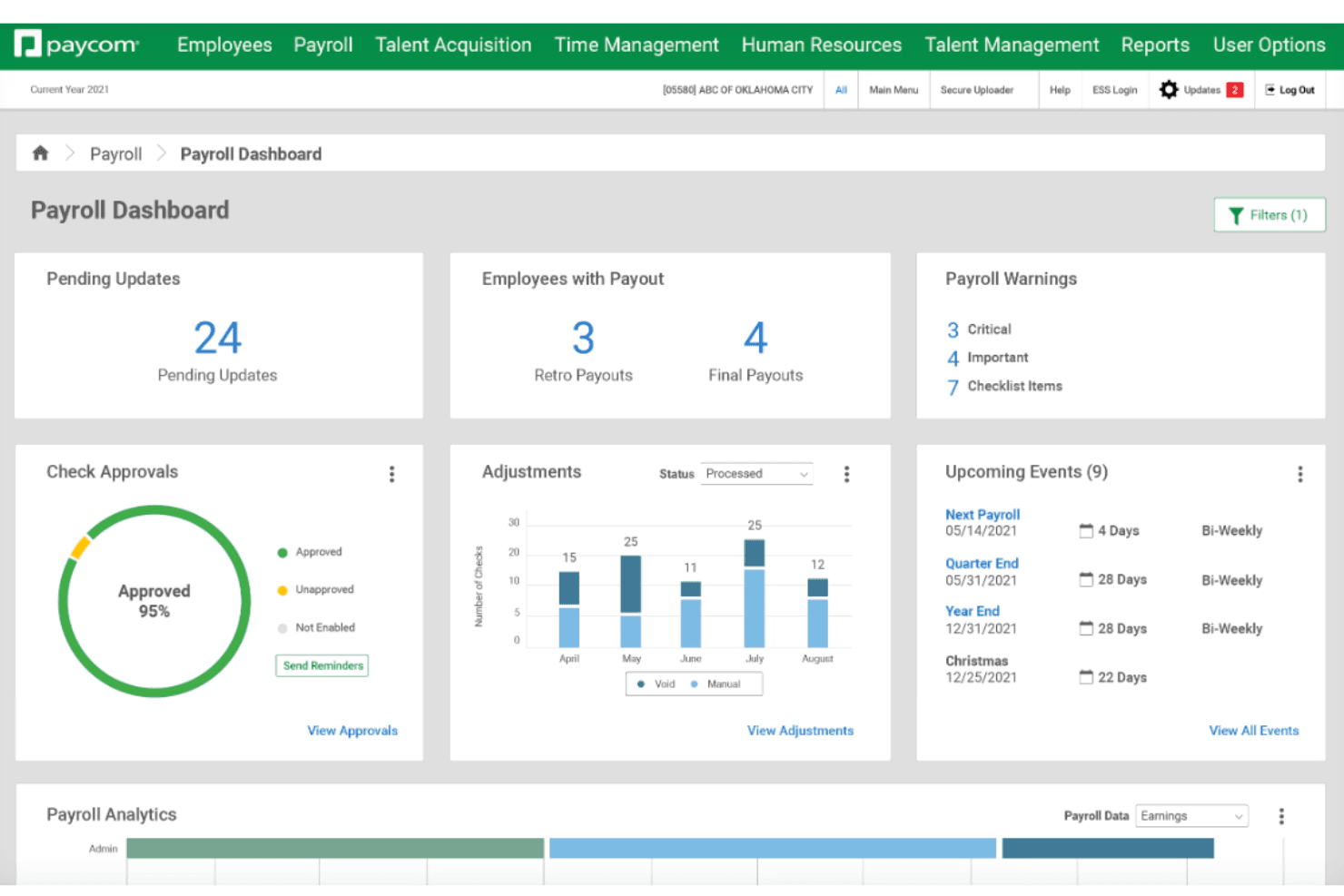
Paycom offers a dashboard that centralizes payroll updates, supporting payroll processing workflows. Paycom is a single-database HCM and payroll platform that handles direct deposit, pay cards, daily pay, automated tax filing, garnishment administration, and employee-driven payroll processing in one system.
Who Is Paycom Best For?
Paycom is a strong fit for mid-to-large businesses that want a single platform to manage payroll, HR, and workforce data without juggling multiple systems.
Why I Picked Paycom
Paycom is one of my top picks for employee self-service payroll because of Beti, its employee-guided payroll tool. Beti automatically starts building payroll at the beginning of each pay period, pulling live data from timecards, expenses, and deductions, then alerts employees through the Paycom mobile app to review and approve their own paychecks before submission. What I really like is that employees can catch and fix errors before payroll ever runs, which cuts out the back-and-forth corrections that eat up so much of a payroll team's time.
Paycom Key Features
- Direct deposit management: Employees can add, update, or split direct deposit accounts across multiple banks through the self-service portal.
- Everyday on-demand pay: Lets employees access earned wages before their scheduled payday through the Paycom app.
- Automated tax filing: Calculates, files, and remits federal, state, and local payroll taxes automatically each pay period.
- Garnishment administration: Tracks and processes court-ordered wage garnishments directly within the payroll run.
Paycom Integrations
Paycom is built on a single-database architecture, so it intentionally limits third-party integrations in favor of keeping all HR and payroll data in one system.
Pros and Cons
Pros:
- Dedicated single point of contact support
- Payroll data updates without manual rekeying
- Unified single database reduces syncing errors
Cons:
- Scheduled reports only deliver inside the platform
- Quote-based pricing structure


Deel supports bulk payments for contractors, Employer of Record (EOR) employees, and direct employees around the globe. Deel is a global HR platform that simplifies managing a global team for businesses, offering tools and guidance for hiring, payroll, and compliance.
Why I picked Deel: Deel simplifies the complexities of international payroll, making it easy for companies to pay their employees via direct deposit, no matter where they are located. With Deel, businesses can manage payroll in multiple currencies. Additionally, the platform’s ability to handle compliance with local tax laws and labor regulations further enhances its appeal, making it an essential tool for companies with a diverse, global team.
Standout features & integrations:
Features include automated payroll processing, expense management, contract generation, benefits administration, time-off tracking, tax form generation, employee self-service portal, multi-language support, customizable payroll reports, compliance management, onboarding tools, currency conversion, and localized payslips.
Integrations include QuickBooks, Xero, Gusto, Rippling, BambooHR, Workday, ADP, SAP SuccessFactors, NetSuite, Slack, Trello, Asana, Google Workspace, Microsoft Office 365, HubSpot, and Greenhouse.
Pros and Cons
Pros:
- Automated payroll processing
- In-house visa support
- Fast setup process
Cons:
- Could have more customization options
- No mobile app
Learn more about Deel Payroll: Best for flexible direct deposit options
- Free trial + free demo available
- From $49/month
Visit WebsiteCustomer Rating:4.6/5
Gusto simplifies payroll with direct deposits, automated tax filing, and integrated HR tools for small to medium-sized businesses. You run a growing business and you need a direct-deposit payroll system that just works — that’s where I think Gusto can fit the bill. With Gusto, you and your team can move beyond paper checks and manual payroll spreadsheets, and instead manage pay runs through a straightforward cloud-based tool. It’s designed to suit small and midsize companies, giving you the flexibility to pay hourly, salaried, or contract staff, while handling tax filings, deposits, and record-keeping.
Why I Picked Gusto
I picked Gusto because its direct deposit offering is built into a broader payroll system that handles more than just paycheck transfers. You get automated ACH-based payroll that supports flexibility, like next-day, two-day, or same-day deposits — so you don’t have to chase down checks or track whether everyone got paid. Gusto also handles tax calculations, filings, and year-end W-2s/1099s, which means you don’t need to juggle separate tax software or manual filings every quarter. That combination (dependable deposit timing plus automatic tax and compliance work) makes it especially attractive if you want to minimize payroll headaches while keeping everything centralized.
Gusto Key Features
In addition to its robust direct deposit capabilities, Gusto offers several other features that enhance its functionality as a payroll solution:
- Automated Payroll Runs: Allows you to schedule and automate payroll processes, reducing the need for manual oversight and ensuring timely payments.
- Employee Self-Service: Empowers your team to manage their personal information, pay stubs, and tax documents, minimizing administrative tasks for HR.
- Multiple Pay Rates: Supports different pay rates for employees, accommodating businesses with diverse payroll needs across various roles and departments.
- Compliance Management: Provides tools and alerts to help you stay compliant with local, state, and federal payroll regulations, reducing the risk of penalties.
Gusto Integrations
Integrations include QuickBooks, Xero, FreshBooks, Clover, TSheets, Trainual, Deputy, Expensify, Guideline, and JazzHR.
Pros and Cons
Pros:
- Payroll, benefits, and HR in one unified platform.
- Built-in time tracking and PTO features simplify hourly billing.
- Offers self-service onboarding and online storage of tax forms and pay stubs for contractors and employees.
Cons:
- Limited customization for complex payroll scenarios or non-standard billing structures.
- Reporting and analytics capabilities may be less flexible than specialized HR or finance platforms.
 Best for automated tax filings
- Free demo available
- From $79/user/month
Visit WebsiteCustomer Rating:4.6/5
Justworks automates payroll and tax tasks while keeping employee records organized. For small businesses seeking a reliable payroll solution, Justworks offers a straightforward approach to managing direct deposits, with support for automated tax filings. It's designed for startups and growing companies that need to efficiently handle payroll tasks without the complexity. Justworks simplifies employee and contractor payroll, helping teams manage varied pay schedules while staying aligned with payroll requirements.
Why I Picked Justworks
I picked Justworks because it supports automated tax filings, which helps reduce the manual work tied to payroll taxes. Along with that, it handles direct deposit for salaried and hourly employees to keep pay runs on schedule. It also supports split direct deposits, so employees can send their paycheck to multiple accounts.
Justworks Key Features
In addition to automated tax filings, Justworks offers:
- Compliance Management: The platform keeps you informed about relevant labor laws and regulations, helping you maintain compliance effortlessly.
- Time Tracking Integration: Integrate with time tracking tools to ensure accurate payroll calculations based on employee hours worked.
- Employee Self-Service Portal: Employees can access their pay stubs, tax documents, and update their information through a user-friendly portal.
Justworks Integrations
Integrations include QuickBooks, NetSuite, Xero, Sage Intacct, 15Five, Culture Amp, Brex, allwhere, Electric, and JazzHR.
Pros and Cons
Pros:
- Payroll and employment taxes handled for international hires with one system
- Centralizes payroll, HR, and health insurance administration
- Transparent pricing options for Payroll or PEO plans, add-ons available
Cons:
- Limited customization for workflows, approvals, and complex org structures
- Reporting tools offer limited in-depth business insights
Learn more about Justworks: Best for automated payroll processing
- Free demo available
- Pricing upon request
Visit WebsiteCustomer Rating:4.1/5
Users can access payroll information, priority tasks, and other features directly within RUN by ADP's dashboard. RUN by ADP is a payroll and HR software solution tailored for small businesses with fewer than 50 employees. It offers services such as payroll processing, tax compliance, time and attendance management, and compliance services.
Why I picked RUN by ADP: One of the key features of RUN by ADP is its automated payroll processing, which ensures that payroll is calculated accurately and on time. This automation extends to tax calculations and filings, reducing the risk of errors and ensuring compliance with federal, state, and local tax regulations. The software also supports direct deposit, allowing employees to receive their wages quickly and securely, which enhances employee satisfaction and reduces the administrative burden on HR departments.
Standout features & integrations:
Features include an employee self-service portal, HR compliance support, time and attendance tracking, garnishment payment services, new hire reporting, retirement plan services, workers' compensation management, payroll and tax reports, and mobile app access.
Integrations include Quickbooks, Wave, Xero, ClockShark, Points North, TruSaic, Compy, Wex, Synerion, JazzHR, 7Shifts, Snappy Gifts, Absorb LMS, SmartRecruiters, and hundreds more.
Pros and Cons
Pros:
- Good mobile app
- Employee self-service portal
- Customizable, in-depth reporting options
Cons:
- Most HR functions are only available on higher-tier plans
- Initial setup can be complex
Learn more about RUN Powered by ADP®: Best for payroll with built-in scheduling
- Free plan + 30-day free trial + free demo available
- From $99/month (billed annually)
Visit WebsiteCustomer Rating:4.2/5
Homebase helps hourly teams manage payroll, scheduling, and time tracking. Homebase is a payroll and workforce management platform designed for hourly teams. It combines direct deposit payroll, employee scheduling, time tracking, tip management, and compliance tools in a single system, helping small businesses manage day-to-day workforce operations more efficiently.
Who Is Homebase Best For?
Homebase is a strong fit for small businesses in retail, hospitality, food service, and other hourly work environments that want to manage payroll and employee scheduling from one platform.
Why I Picked Homebase
I picked Homebase because it removes much of the manual work that typically happens between scheduling and payroll. Employee hours flow directly from schedules and timesheets into payroll, helping reduce errors and eliminate duplicate data entry. I also like that managers can monitor labor costs as schedules are built, making it easier to control overtime and staffing expenses before payroll is processed. For businesses managing hourly employees, having scheduling and payroll connected in one system can save significant administrative time.
Key Features
- Automated tax filing: Calculates, files, and pays federal, state, and local payroll taxes, including year-end tax forms.
- New hire onboarding: Collects employment and payroll documents digitally before an employee's first shift.
- Employee self-service portal: Allows employees to access pay stubs, tax forms, and direct deposit details without manager assistance.
- PTO and sick pay tracking: Tracks leave balances and incorporates paid time off and sick leave into payroll calculations.
Integrations
Homebase integrates with Square, Clover, Toast, Shopify, Lightspeed, GoDaddy, Gusto, QuickBooks, ADP, and Paychex. It also offers API access for reporting and custom data retrieval.
Pros and Cons
Pros:
- Built-in tip tracking and management
- Unlimited payroll runs available
- Payroll and scheduling work together seamlessly
Cons:
- Advanced reporting options are limited
- Payroll requires a separate paid add-on
 Best for payroll error detection
- Free demo available
- Pricing upon request
Visit WebsiteCustomer Rating:4.3/5
Paylocity offers a self-service portal, allowing employees to access and manage their payroll and direct deposit information directly. Paylocity is a cloud-based payroll and human capital management (HCM) software solution designed to simplify and automate payroll processes for businesses of all sizes.
Why I picked Paylocity: Paylocity's direct deposit feature enables your employees to receive their paychecks directly into their bank accounts, eliminating the need for paper checks and reducing administrative tasks. By automating the payment process, you can ensure timely and accurate compensation for your team, enhancing overall satisfaction. Additionally, Paylocity's payroll system is designed to minimize errors through configurable pre-submit audits. These audits flag any irregularities, such as an employee receiving double their typical pay, allowing you to address issues before finalizing payroll.
Standout features & integrations:
Features include general ledger mapping, automatic data transfer from time and labor systems, on-demand payment options, expense management, compensation management, employee self-service portal, payroll reports, tax filing services, wage garnishment management, global payroll capabilities, and customizable reporting.
Integrations include ClearStar, Microsoft Dynamics 365, 7shifts, AirMason, APA Benefits, Azure, Atlassian, Asana, Box, ClearCompany, Dropbox, Freshdesk, Google Workspace, Greenhouse, HubSpot, Slack, Salesforce, Trakstar, and Zoho People.
Pros and Cons
Pros:
- Tailored workflows and reports
- Comprehensive suite of HR and payroll features
- Includes tax compliance services
Cons:
- Setup can be time consuming
- Mobile app functionality is more limited compared to the desktop version
 Best for accurate time-to-payroll integration
- 30-day free trial + free demo available
- From $50/user/month
Visit WebsiteCustomer Rating:4.5/5
TimeTrex provides detailed employee pay stubs with automated earnings, deductions, and payroll calculations. TimeTrex gives you a payroll platform where time-tracking, scheduling, and payroll (including direct deposit) all live under one roof — which can be a big relief if your business handles lots of hourly employees or wants to avoid juggling multiple tools.
Why I Picked TimeTrex
I picked TimeTrex because it directly supports integrated direct-deposit payroll tied to real employee time tracking — so when someone clocks out, that data flows into payroll without manual intervention. Its built-in payroll engine handles calculations, tax withholdings, and can deposit paychecks into multiple bank accounts per employee, which works well if your staff need split deposits or you run complex payrolls. That tight integration between attendance, wage calculation, and electronic fund transfers makes it a compelling choice for businesses needing dependable direct-deposit payroll.
TimeTrex Key Features
In addition to its direct deposit and payroll engine, I also found these useful for teams like yours:
- Biometric & Attendance Solutions: Advanced attendance tracking with facial recognition and GPS capabilities to enhance accuracy and reduce fraud.
- Payroll Deduction & Tax Management: Supports automatic deduction calculations for taxes, benefits, and other withholdings so payroll entries stay accurate and compliant.
- Scheduling & Workforce Management: Flexible scheduling options, AI-driven shift management, and leave tracking to optimize workforce allocation.
- Human Resources & Employee Management: Consolidated HR tools for managing employee profiles, benefits, compliance, and document management.
TimeTrex Integrations
TimeTrex provides custom API integration for enhanced functionality, allowing seamless connectivity with existing systems.
Pros and Cons
Pros:
- Time and attendance plus payroll in one package
- Supports mobile and biometric clock-in, handy for distributed workforces
- Allows employee self-service for time off, schedules, timesheets
Cons:
- Free plan lacks customer support and mobile app access
- Limited number of native integrations compared with leading HR platforms
Learn more about TimeTrex: Best for free 2-day direct deposit
- 30-day free trial + demo available
- From $17/month
Visit WebsiteCustomer Rating:5/5
Patriot Payroll makes it easy to pay hourly or salary workers using a simple 3-step payroll process. Patriot Payroll is an online payroll software that offers affordable payroll services with free direct deposit, making it a popular choice for small businesses.
Why I picked Patriot Payroll: I chose Patriot Payroll for its direct deposit payroll software because it offers affordable payroll solutions with free direct deposit, unlimited payrolls, and a user-friendly interface. It offers free 2-day direct deposit for qualified customers, or free 4-day direct deposit at a minimum, making it an affordable direct deposit option for businesses of all sizes.
Standout features & integrations:
Features include a simple three-step process for running payroll, free payroll setup, US-based support, customizable time-off accrual rules, free direct deposit with 2-day processing, tracking reported tips, multiple pay rates for hourly employees, and free 401(k) integration with exclusive discount pricing, making it easy for businesses to automate payroll processes, track employee benefits, and integrate with other financial services.
Integrations include Patriot Accounting, QuickBooks Online, QuickBooks Time, Plaid, and Workforce Time & Attendance.
Pros and Cons
Pros:
- Combined payroll for employees and contractors
- Budget-friendly plans
- Free direct deposit
Cons:
- Some manual data entry required
- Only available for US-based businesses
Learn more about Patriot Payroll:
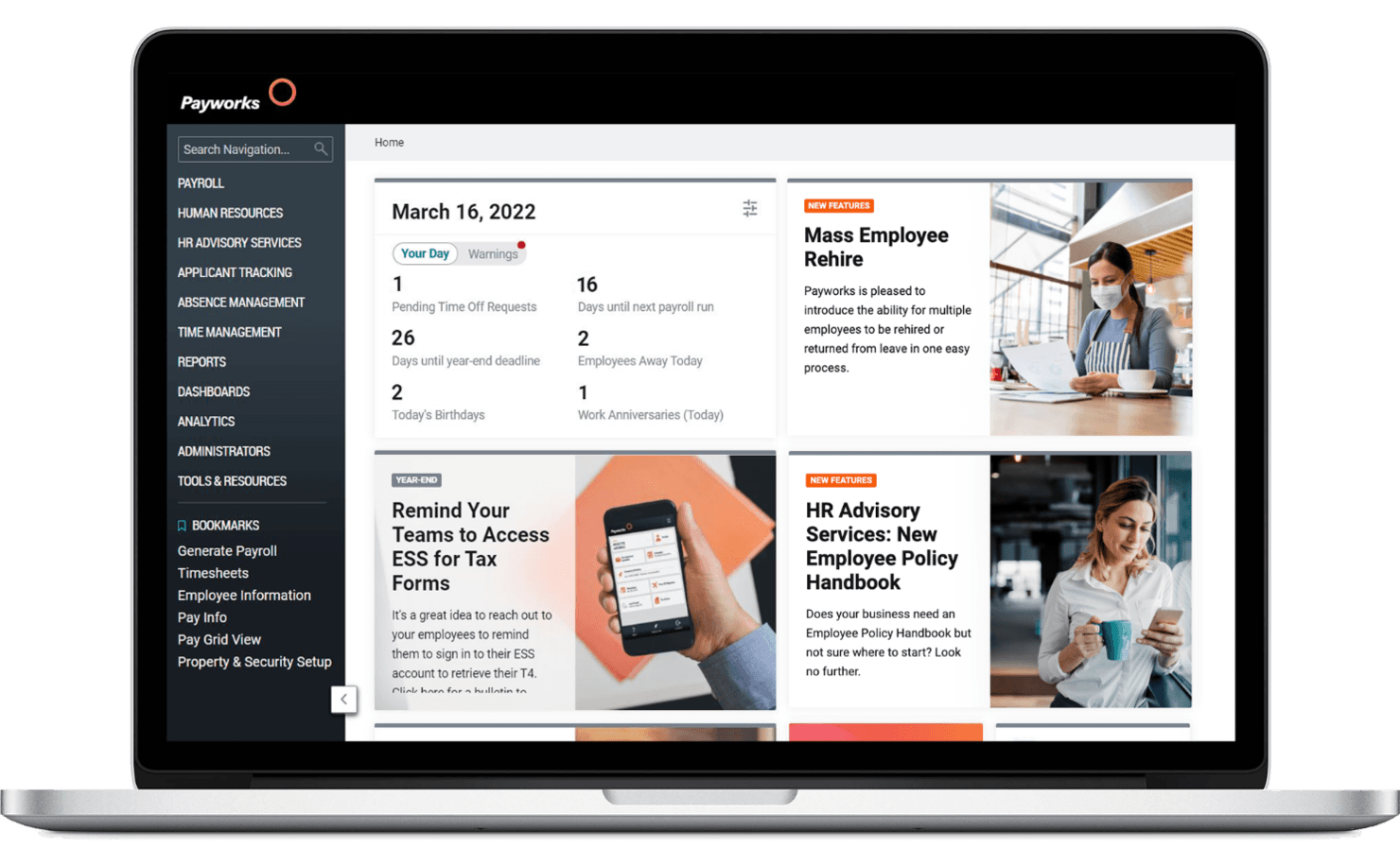
Payworks is a direct deposit payroll software that streamlines payroll processing, ensuring accurate and timely employee payments. Payworks is a Canadian cloud-based payroll and workforce management platform that combines direct deposit payroll processing, automated tax remittances, HR, absence tracking, and employee self-service tools.
Who Is Payworks Best For?
Payworks is a strong fit for Canadian small businesses that want payroll, HR, and benefits managed together in one platform.
Why I Picked Payworks
Payworks earns its spot on my shortlist because it's one of the few Canadian payroll platforms that genuinely connects payroll, HR, and benefits in one place. I like that approved time-off and benefits data flow directly into payroll without any rekeying, which cuts down on the kind of manual entry errors that lead to incorrect deposits. Payworks also handles CRA and Revenu Québec remittances automatically with every pay run, so Canadian small businesses aren't chasing compliance deadlines on top of everything else.
Payworks Key Features
- Employee self-service app: Lets employees view pay stubs, access tax forms, update banking details, and request time off from a mobile device.
- Garnishment automation: Calculates and remits garnishment deductions based on federal, provincial, and territorial rules, including handling multiple orders and arrears tracking.
- Custom payroll reporting: Generates standard and custom reports, with a Funds Summary Report provided after every payroll run.
- QuickBooks Online and Xero integration: Sends journal-entry data from Payworks to your accounting software with Location and Class mapping support.
Payworks Integrations
Payworks offers two documented native integrations: QuickBooks Online and Xero, with journal-entry transfers and Location and Class mapping. Its REST API supports custom connections for Employees, Payroll, Reports, Time Management, and authentication.
Pros and Cons
Pros:
- Support helps resolve payroll questions promptly
- Employee app supports pay and time-off access
- Automated remittances reduce payroll follow-up
Cons:
- Payroll adjustments and reports can feel cumbersome
- Holiday and break calculations sometimes need corrections
Learn more about Payworks:
Diğer Doğrudan Yatırmalı Bordro Yazılımları
Aşağıda kısa listeme aldığım ek doğrudan yatırmalı bordro yazılımlarının bir listesini bulabilirsiniz. En iyi 10 seçenek arasına girememiş olsalar da hâlâ değerlidir ve daha fazla araştırılmaya değerdir.
- 11OnPayBest for comprehensive payroll management
- 12RipplingBest for unified workforce management
- 13BambooHRBest for integrated HR and payroll
- 14Paychex FlexBest for validated payroll transitions
- 15QuickBooks PayrollBest for pay prep with admin review
- 16Employment HeroBest for Canadian businesses
- 17Square PayrollBest for integrated payroll and POS
- 18PaycorBest for custom employee deposit integrations
- 19Roll by ADPBest for tipped and transportation pay
İlgili İK Yazılımı İncelemeleri
Aradığınızı burada hâlâ bulamadıysanız, test edip değerlendirdiğimiz diğer ilgili araçlara göz atın:
- İK Yazılımı
- Bordro Yazılımı
- İşe Alım Yazılımı
- Kayıtlı İşveren Hizmetleri
- Aday Takip Sistemleri
- İşgücü Yönetimi Yazılımı
How I Evaluate Direct Deposit Payroll Software
I split my evaluation into three parts, giving core functionality the most weight: calculate net pay, taxes, and deductions, then deposit wages across pay schedules. I compare standout features such as on-demand pay. Finally, I consider factors beyond features, including payroll onboarding, specialist support, and pricing as headcount grows.
Core Functionality (Table Stakes For This List)
When I'm selecting tools for my list, I score each one on a scale from 0 (does not offer the functionality) to 5 (excels in this area) for each core functionality listed below. I then convert the total into a percentage to help assess each tool's overall fit, with extra weight on any functionalities I’ve deemed essential.
- Automated Direct Deposit (Essential): I check whether scheduled payroll sends net pay to employees’ chosen accounts automatically and how the platform handles rejected deposits.
- Payroll Calculations (Essential): I assess gross-to-net calculations for regular hours, overtime, bonuses, taxes, and deductions, including how much review corrections require.
- Pay Schedule Options: I look for support for weekly, biweekly, semi-monthly, and monthly payroll, plus how the tool handles off-cycle payments.
- Tax Filing And Remittance: I evaluate whether the platform calculates, files, and remits payroll taxes across relevant jurisdictions, and what tasks remain with the employer.
- Employee Self-Service: I check whether employees can access pay stubs and payment history and update their banking details without asking payroll staff.
- Multi-Region Payments: I assess whether one payroll run can pay employees across jurisdictions and banks, including how the platform handles different payment details.
Once I have a list of tools that meet the criteria, I consider what sets each platform apart.
Differentiating Factors (What Sets Vendors Apart)
Here's how I compare and contrast different vendors:
Standout Features
I look for same-day or on-demand pay options, since employees increasingly expect access to earned wages before a scheduled pay date. I also check whether a platform handles garnishments and deduction orders automatically within each deposit run—manually tracking child support or levy amounts is a common source of payroll errors. Multi-entity support matters too: if your organization operates under several legal entities, I evaluate whether you can run separate or consolidated payrolls from one login instead of managing multiple accounts.
Beyond Features
I evaluate how each platform handles onboarding—specifically whether it offers guided migration from a previous provider and a dedicated specialist to help configure bank accounts and tax registrations. A slow setup delays your first pay run, which is the last thing a new team needs. I also check whether the vendor guarantees accuracy on tax filings and will cover penalties if their system makes the error, since that shifts real financial risk off your plate. Finally, I look at access to payroll-specific support during pay-run windows, not just a general help queue that routes you through chatbot triage first.
Doğrudan Yatırmalı Bordro Yazılımı Nasıl Seçilir?
Kendinize özgü yazılım seçme sürecinizi yürütürken aşağıdaki noktaları göz önünde bulundurun:
- Entegrasyon Olanakları: Doğrudan ödeme bordro yazılımı seçerken, mevcut İK, muhasebe ve zaman takibi yazılımlarınız gibi sistemlerle sorunsuz bir şekilde entegre olduğundan emin olmanız önemlidir. Bu, manuel veri girişini azaltmaya, hataları en aza indirmeye ve operasyonları kolaylaştırmaya yardımcı olur.
- Vergi Uyumluluğu ve Otomasyon: Bordro vergilerine uyumluluk, birçok işletme için önemli bir sorun alanıdır. Doğru bordro yazılımı, federal, eyalet ve yerel düzenlemelere uyumu sağlamak için vergi hesaplamalarını, kesintileri ve bildirimleri otomatikleştirmelidir. Ayrıca yazılım, maliyetli cezalardan kaçınmak ve idari zamandan tasarruf etmek için vergi tablolarını otomatik olarak güncellemeli ve gerekli belgeleri sunmalıdır.
- Ölçeklenebilirlik: Bugün işletmenizin ihtiyaçları yarın aynı olmayabilir; bu nedenle işletmeniz büyüdükçe onunla birlikte ölçeklenebilecek bir bordro yazılımı seçin. Şu anda küçük bir ekibiniz olup büyümeyi planlıyor olsanız da birden fazla konumda faaliyet gösteriyor olsanız da yazılım, artan çalışan sayılarına ve daha karmaşık bordro gereksinimlerine uyum sağlamalıdır. Daha küçük ekipler, seçeneklerini değerlendirirken küçük işletmeler için bordro yazılımlarını da karşılaştırmak isteyebilir.
- Kullanım Kolaylığı ve Mobil Erişim: Bordro yazılımında kullanım kolaylığı hayati önem taşır. Kullanıcı dostu bir arayüz, bordro yöneticilerinin sistemi hızlıca öğrenmesini ve verimli bir şekilde kullanmasını sağlayarak hata olasılığını azaltır. Ayrıca mobil erişim, bordro işlemlerinin her yerden yapılmasına olanak tanır; bu da özellikle uzaktan veya hareket hâlinde çalışan işletmeler için oldukça faydalıdır.
- Güvenlik Özellikleri: Hassas çalışan verilerinin işlenmesi güçlü güvenlik önlemleri gerektirir. Bordro yazılımının veri şifreleme, çok faktörlü kimlik doğrulama ve veri ihlallerine ve yetkisiz erişime karşı koruma sağlamak için sınırlı erişim izinleri gibi özellikler sunduğundan emin olun.
Doğrudan Ödeme Bordro Yazılımındaki Trendler
Bordro yazılımları hızla gelişiyor ve trendlerin önünde olmak, işletmelerin doğruluğu, uyumluluğu ve çalışan deneyimini iyileştirmesine yardımcı olabilir. Sektörü şekillendiren en önemli değişimleri belirlemek için önde gelen bordro sağlayıcılarının ürün güncellemelerini, basın bültenlerini ve sürüm günlüklerini analiz ettim.
- Yapay Zekâ Destekli Bordro İşleme: Bordro platformları; vergi hesaplamalarını otomatikleştirmek, tutarsızlıkları tespit etmek ve maliyetli hatalara dönüşmeden önce uyumluluk risklerini işaretlemek için yapay zekâyı entegre ediyor. Bu, manuel iş yükünü azaltır, hataları en aza indirir ve düzenlemeler değişse bile bordronun sorunsuz şekilde işlenmesini sağlar.
- Gelişmiş Güvenlik için Blok Zinciri: Bordro verileri dolandırıcılık için başlıca hedeflerden biri olduğundan, bazı platformlar şeffaf ve üzerinde değişiklik yapılamayan işlem kayıtları oluşturmak için blok zincirinden yararlanıyor. Bu, işletmelerin bordro dolandırıcılığını önlemesine, uyumluluğu sağlamasına ve çalışanların ödeme güvenliğine duyduğu güveni artırmasına yardımcı olur.
- Mobil Erişilebilirlik: Daha fazla bordro yazılımı sağlayıcısı mobil erişilebilirliğe öncelik veriyor ve çalışanlara maaş bordrolarına, vergi belgelerine ve doğrudan ödeme ayarlarına telefonlarından anında erişim olanağı sunuyor. İK ve bordro ekipleri de ödemeleri onaylayabilir ve bordroyu uzaktan işleyebilir; böylece ekipler masalarında olmadığında operasyonların durması önlenir.
- Gerçek Zamanlı Ödeme Seçenekleri: Geleneksel bordro dönemleri değişiyor; bazı platformlar artık anında veya erken ücret erişimi sunuyor. Çalışanlar bir vardiyanın hemen ardından ödeme alabilir veya maaş gününden önce kazandıkları ücretlerin bir kısmına erişebilir. Bu, finansal istikrara yardımcı olur ve yüksek faizli kredilere olan bağımlılığı azaltır.
- Finansal İyilik Hâli Araçlarıyla Entegrasyon: Bordro yalnızca çalışanlara ödeme yapmaktan ibaret değildir; giderek finansal iyilik hâliyle daha fazla ilişkilendirilmektedir. Artık birçok platform, çalışanların kazançlarını etkili bir şekilde yönetmesine ve finansal stresi azaltmasına yardımcı olmak için bütçeleme araçları, tasarruf programları ve emeklilik planlama kaynaklarıyla entegre oluyor.
Bu trendler, bordroyu kapsamlı İK işlevleriyle birleştiren ve sorunsuz operasyonlar ile daha yüksek çalışan memnuniyeti sağlayan daha entegre sistemlere doğru bir geçiş olduğunu gösteriyor. Bu değişiklikleri benimsemek; her büyüklükteki işletme için daha yüksek doğruluk, daha kısa işlem süresi ve daha verimli bir bordro deneyimi sağlayabilir.
Doğrudan Ödeme Bordro Yazılımı Nedir?
Doğrudan ödeme bordro yazılımı, çalışanların maaşlarını doğrudan banka hesaplarına aktarma sürecini otomatikleştirerek fiziksel çek ihtiyacını ortadan kaldırır. Bu, zamanında ve doğru ödemeler yapılmasını sağlarken işverenler için bordro yönetimini kolaylaştırır.
Doğrudan ödeme sunan bordro yazılımlarının çoğu, bordro hesaplama, vergi hesaplama ve banka entegrasyonu da sağlar. Diğer gelişmiş özellikler arasında bordro operasyonlarını kolaylaştırmak için çalışanların kendi işlemlerini yapabildiği portallar, uyumluluk yönetimi ve raporlama araçları bulunabilir.
Özellikler
Doğrudan ödeme bordro yazılımı ararken mevcut teknoloji altyapınızla bağlantı kuran bir yazılım seçmek hayati önem taşır. Doğrudan ödeme bordro yazılımında aranması gereken bazı önemli özellikler şunlardır:
- Otomatik Ödeme İşleme: Bu özellik, ödemelerin planlanan tarihlerde otomatik olarak işlenmesini sağlayarak manuel müdahale gereksinimini ortadan kaldırır ve hata riskini azaltır.
- Vergi Uyumluluğu ve Hesaplama: Yazılım, federal, eyalet ve yerel vergi yasalarına uyumu sağlamak için doğru vergi tutarını otomatik olarak hesaplamalı ve kesmelidir.
- Çalışma Süresi ve Devam Takibi: Çalışma süresi takip sistemleriyle entegrasyon, yazılımın fazla mesai de dahil olmak üzere ücretleri çalışılan saatlere göre doğru şekilde hesaplamasını sağlar.
- Çalışanların Kendi Kendine Hizmet Kullanımı: çevrim içi bordro platformlarındaki bu özellik, çalışanların maaş bordrolarına, vergi formlarına ve bordroyla ilgili diğer bilgilere çevrim içi erişmesini sağlayarak İK üzerindeki idari yükü azaltır.
- Bordro Raporlama: Ayrıntılı bordro raporları oluşturabilme özelliği, işletmelerin bordro giderlerini takip etmesine yardımcı olur ve şeffaflık sağlar.
- Doğrudan Para Yatırma: Bu özellik, işverenlerin doğrudan para yatırmalı bordroyu ayarlamasına olanak tanır. Böylece çalışanlar ücretlerini doğrudan banka hesaplarına alarak kolaylık ve güvenlik elde eder.
- Gider Yönetimi: Yazılım, çalışanların gider geri ödemelerini yönetebilmeli ve ödemelerin zamanında ve doğru şekilde yapılmasını sağlamalıdır.
- Mobil Erişim: Mobil uyumlu bordro yazılımı, çalışanların ve yöneticilerin her yerden bordro bilgilerine erişmesine ve işlemleri gerçekleştirmesine olanak tanır.
- Muhasebe Yazılımıyla Entegrasyon: Muhasebe yazılımıyla sorunsuz entegrasyon, bordro verilerinin finansal kayıtlara doğru şekilde yansıtılmasını sağlar.
- Güvenlik Özellikleri: Şifreleme ve çok faktörlü kimlik doğrulama gibi güçlü güvenlik önlemleri, hassas bordro verilerini yetkisiz erişime karşı korur.
Doğrudan para yatırmalı doğru bordro yazılımını seçmek, işletme faaliyetlerinin sorunsuz yürütülmesi açısından önemlidir. Yazılımın bu temel özellikleri içerdiğinden emin olarak bordro sürecinizi kolaylaştırabilir, uyumluluğu sağlayabilir ve çalışanlarınıza daha iyi bir deneyim sunabilirsiniz.
Avantajlar
Doğrudan para yatırmalı bordro yazılımının uygulanması, kullanıcılar ve kuruluşlar için çok sayıda avantaj sunabilir. Bordro süreçlerini basitleştirmenin, finansal güvenliği ve operasyonel verimliliği artırmanın yanı sıra bu yazılım türüyle ilişkili başka faydalar da vardır:
- Zamandan Tasarruf: Bordro sürecini otomatikleştirerek manuel hesaplamalar ve çek dağıtımı için harcanan zamanı azaltır, İK ekiplerinin daha stratejik görevlere odaklanmasını sağlar.
- Geliştirilmiş Güvenlik: Paranın doğrudan çalışanların banka hesaplarına yatırılması sayesinde kaybolan veya çalınan çek riskini en aza indirir ve dolandırıcılık olasılığını azaltır.
- Maliyet Verimliliği: Kâğıt çek, posta ve ilgili malzeme gereksinimini ortadan kaldırarak idari maliyetleri düşürür ve zaman içinde önemli tasarruf sağlar.
- Çalışan Kolaylığı: Çalışanların paralarına daha hızlı erişmesini sağlar ve maaş çeklerini yatırmak için bankaya gitme gereksinimini ortadan kaldırarak genel çalışan memnuniyetini artırır.
- Geliştirilmiş Doğruluk: Bordro hesaplama ve işleme süreçlerindeki insan hatası olasılığını azaltarak çalışanlara her ödeme döneminde doğru ve zamanında ödeme yapılmasını sağlar.
İşletmeler, bordro işlemlerini otomatikleştirip güvence altına alarak zamandan ve paradan tasarruf ederken hataları azaltabilir ve çalışanlarına daha fazla kolaylık sağlayabilir. Bu yazılıma yatırım yapmak, daha verimli ve memnun bir kuruluş oluşturulmasına katkıda bulunabilir.
Maliyetler ve Fiyatlandırma
Doğrudan para yatırmalı bordro yazılımını değerlendirirken mevcut çeşitli fiyatlandırma planlarını ve özellikleri anlamak önemlidir. Aşağıda, doğrudan para yatırmalı bordro yazılımıyla ilişkili farklı planları, özellikleri ve maliyetleri gösteren bir tablo yer almaktadır.
Doğrudan Para Yatırmalı Bordro Yazılımı İçin Plan Karşılaştırma Tablosu
| Plan Türü | Ortalama Fiyat | Yaygın Özellikler |
| Ücretsiz Plan | $0 | Temel bordro işleme, çalışanların kendi kendine hizmet kullanımı ve sınırlı destek |
| Temel Plan | $17/month + $4/employee | Maaş çekleri, doğrudan para yatırma, yazdırılabilir W-2'ler, kurulum ve uzman desteği |
| Standart Plan | $39/month + $5/employee | Çevrim içi bordro işleme, mobil uygulama, vergi yönetimi ve doğrudan para yatırma |
| Plus Planı | $80/month + $12/employee | Birden çok eyalette bordro, ertesi gün doğrudan para yatırma ve gelişmiş işe alım ve işe uyum süreçleri |
| Premium Planı | $125/month + $10/employee | Vergi cezası koruması, mobil çalışma süresi ve proje takibi ve kişisel İK danışmanı |
| Yüklenici Planı | $35/month + $6/contractor | Sınırsız yüklenici ödemeleri, yüklenicilerin kendi kendine hizmet kullanımı ve 1099 formu oluşturma |
Doğrudan para yatırmalı bordro yazılımının fiyatlandırma planları, maliyetleri ve özelliklerinin dökümü.
Doğrudan para yatırmalı bordro yazılımı seçerken işletmenizin büyüklüğünü, bordro ihtiyaçlarınızın karmaşıklığını ve bütçenizi göz önünde bulundurun. Her plan farklı özellikler ve fiyatlandırma sunar; bu nedenle işletmenizin gereksinimleriyle en iyi şekilde örtüşen planı seçin.
SSS
Doğrudan para yatırmalı bordro yazılımıyla ilgili bana sıkça sorulan bazı sorular burada yer alıyor.
Doğrudan para yatırmalı bordro yazılımı ne kadar güvenlidir?
Çoğu doğrudan para yatırmalı bordro yazılımı, hassas verileri korumak için şifreleme ve güvenli protokoller kullanır. Düzenli güncellemeler ve finansal düzenlemelere uyum, güvenliği daha da artırır.
Doğrudan para yatırmalı bordro yazılımı farklı ödeme takvimlerini destekleyebilir mi?
Evet, çoğu doğrudan para yatırmalı bordro yazılımı haftalık, iki haftada bir, ayda iki kez ve aylık ödeme gibi çeşitli ödeme takvimlerini yönetebilir. Bu esneklik, farklı işletme ihtiyaçlarının karşılanmasına yardımcı olur.
Doğrudan para yatırmalı bordro yazılımını kurmak ne kadar kolaydır?
Kurulum oldukça basittir; birçok sağlayıcı yönlendirmeli kurulum süreçleri ve müşteri desteği sunar. Bazı yazılım çözümleri, süreci kolaylaştırmak için şablonlar ve eğitimler de sağlar.
Doğrudan para yatırmalı bordro yazılımı için ne tür bir destek sunuluyor?
Çoğu sağlayıcı telefon, e-posta ve sohbet yoluyla müşteri desteği sunar. Bazıları ayrıca sıkça sorulan sorular, kılavuzlar ve video eğitimleri de dahil olmak üzere kapsamlı çevrimiçi kaynaklar sağlar.
Doğrudan para yatırma ödemesinde bir hata olursa ne olur?
Hatalar yazılım içinde hızlı bir şekilde tespit edilip düzeltilebilir. Destek ekipleri genellikle sorunların zamanında çözülmesine yardımcı olmak için hazır bulunur.
Doğrudan para yatırmalı bordro yazılımı çalışanlar için birden fazla banka hesabını yönetebilir mi?
Evet, çalışanlar doğrudan para yatırma ödemelerini çoğu zaman birden fazla banka hesabı arasında bölüştürebilir. Bu özellik, kişisel mali yönetim açısından esneklik sağlar.