

10 migliori alternative a deskbird per il lavoro ibrido nel 2026

Elenco delle migliori alternative a deskbird


Le migliori alternative a deskbird sono soluzioni software per la prenotazione di postazioni che offrono modalità semplici e flessibili per prenotare le postazioni, gestire gli orari di lavoro ibridi e adattare facilmente gli spazi dell'ufficio alle esigenze in continua evoluzione dei team. Se stai cercando alternative a deskbird, probabilmente desideri prenotazioni più fluide, integrazioni migliori e strumenti che si adattino davvero al modo di lavorare del tuo team, non un'altra semplice app per la gestione degli orari.
In questo elenco ti presenterò le principali opzioni progettate per aiutare i team delle risorse umane e della gestione degli ambienti di lavoro a gestire gli spazi, supportare il lavoro ibrido e mantenere fluide le operazioni quotidiane. Scoprirai cosa distingue ogni strumento e come può adattarsi ai tuoi obiettivi per 2026.
Che cos'è deskbird?
deskbird è una piattaforma software per la prenotazione di postazioni che aiuta i team a gestire la prenotazione delle scrivanie, la prenotazione delle sale, i posti auto e gli orari di lavoro ibridi da un unico sistema di prenotazione delle postazioni. I dipendenti possono prenotare in anticipo gli spazi di lavoro, visualizzare in tempo reale la disponibilità dell'ufficio e coordinare la collaborazione in presenza attraverso strumenti come l'integrazione con Microsoft Teams, Slack, le app mobili e un browser web.
I professionisti delle risorse umane e i responsabili degli ambienti di lavoro utilizzano deskbird per migliorare l'esperienza dei dipendenti, ridurre le doppie prenotazioni e prendere decisioni migliori sulle risorse dell'ufficio. La piattaforma è progettata per essere facile da usare, con funzionalità che supportano la pianificazione ibrida, l'esperienza utente, l'analisi dell'ufficio, l'accesso SSO tramite autenticazione SAML e criteri scalabili per gli ambienti di lavoro di piccoli team e organizzazioni più grandi.
Tabella di confronto delle alternative a deskbird
Questa tabella di confronto riassume i dettagli sui prezzi delle mie principali alternative a deskbird:
| Tool | Best For | Trial Info | Price | ||
|---|---|---|---|---|---|
| 1 | Ideale per automatizzare le attività operative sul luogo di lavoro | Piano gratuito + dimostrazione gratuita disponibile | A partire da $500/mese | Website | |
| 2 | Ideale per prezzi basati sulla postazione anziché su piani per utente | Prova gratuita di 14 giorni | A partire da $19/postazione/mese | Website | |
| 3 | Ideale per grandi imprese | Demo gratuita disponibile | Prezzi su richiesta | Website | |
| 4 | Ideale per analisi dell'occupazione in tempo reale | Demo gratuita disponibile | A partire da $5/risorsa prenotabile/mese (fatturato annualmente) | Website | |
| 5 | Ideale per mappe interattive dell'ufficio | Demo gratuita disponibile | Prezzi su richiesta | Website | |
| 6 | Ideale per la prenotazione avanzata degli spazi per il lavoro ibrido | Demo gratuita disponibile | Prezzi su richiesta | Website | |
| 7 | Ideale per esigenze di conformità complesse | Demo gratuita disponibile | A partire da £99/mese | Website | |
| 8 | Ideale per la gestione di spazi di coworking distribuiti su più sedi | Demo gratuita disponibile | Prezzi su richiesta | Website | |
| 9 | Ideale per analisi avanzate sulla gestione degli ambienti di lavoro | Demo gratuita disponibile | Prezzi su richiesta | Website | |
| 10 | Ideale per operazioni e strutture complesse distribuite su più sedi | Demo gratuita disponibile | Prezzo su richiesta | Website |

Perché fidarsi delle nostre recensioni sui software
Il nostro team testa e recensisce software dal 2012. In quanto esperti HR noi stessi, sappiamo quanto sia difficile — e importante — scegliere il software giusto.
Per questa guida, abbiamo valutato gli strumenti attraverso test pratici e ricerche indipendenti, assegnando un punteggio agli strumenti in base ai nostri criteri di selezione. Ci basiamo inoltre sulle competenze di leader di pensiero del settore e di professionisti HR attivi.
Le nostre recensioni riflettono il nostro giudizio editoriale umano, non un discorso di vendita.
Revisori esperti:
Recensioni delle migliori alternative a deskbird
Di seguito trovi le mie analisi dettagliate delle migliori alternative a deskbird che sono entrate nel mio elenco ristretto. Le mie recensioni offrono una panoramica dettagliata delle funzionalità, dei casi d’uso più indicati e delle integrazioni di ogni software, per aiutarti a trovare quello più adatto a te.
elia
Ideale per automatizzare le attività operative sul luogo di lavoro

elia è una piattaforma per la gestione delle attività operative sul luogo di lavoro, progettata per i team delle risorse umane, delle strutture e del settore immobiliare che devono gestire la prenotazione delle scrivanie, le prenotazioni delle sale, la pianificazione del lavoro ibrido e l'utilizzo degli spazi da un unico sistema connesso.
Per chi è più adatto elia?
elia è ideale per organizzazioni di medie e grandi dimensioni che gestiscono ambienti di lavoro ibridi e hanno bisogno di qualcosa di più della semplice prenotazione delle scrivanie, in particolare quelle che gestiscono richieste di servizio e flussi di lavoro complessi per la conformità.
Perché Elia è una buona alternativa a deskbird
Ho incluso elia tra le mie migliori scelte perché il suo modulo di Automazione del luogo di lavoro va ben oltre ciò che offre deskbird. Posso creare flussi di lavoro automatizzati che attivano l'assegnazione di attività, promemoria per le prenotazioni e richieste di servizio direttamente dalla planimetria. Il modulo Gestione delle richieste gestisce catering, assistenza IT e manutenzione da un'unica vista centrale, mentre il modulo Salute e sicurezza esegue automaticamente il monitoraggio della conformità e la segnalazione degli incidenti.
Funzionalità principali di elia
- Prenotazione di scrivanie e sale con planimetrie interattive: I dipendenti possono prenotare scrivanie e sale riunioni utilizzando una mappa visiva della disposizione dell'ufficio.
- Analisi dell'occupazione con dati dei sensori in tempo reale: Acquisisci le tendenze di utilizzo in tutti gli spazi usando sensori per scrivanie e sale, per report in tempo reale e storici.
- Gestione dei visitatori con registrazione sicura: Registra le visite degli ospiti, automatizza le notifiche ai responsabili e conserva registri dettagliati dei visitatori.
- App mobile per prenotazioni in mobilità: Prenota gli spazi di lavoro, visualizza le planimetrie dell'ufficio e coordina le giornate del team da dispositivi iOS o Android.
Integrazioni di elia
elia offre integrazioni native con Microsoft 365, Outlook, Google Workspace e Slack. La predisposizione degli utenti e la sincronizzazione dei calendari sono integrate, mentre l'accesso API è disponibile per integrazioni personalizzate.
Pros and Cons
Pros:
- Automatizza da un capo all'altro i flussi di lavoro complessi sul luogo di lavoro
- Gestione integrata delle richieste di servizio per i team delle strutture
- Dati sull'occupazione in tempo reale tramite l'integrazione dei sensori
Cons:
- La configurazione richiede tempo per implementazioni in uffici di grandi dimensioni
- Risorse per l'autonomia limitate per i team più piccoli

Whatspot
Ideale per prezzi basati sulla postazione anziché su piani per utente
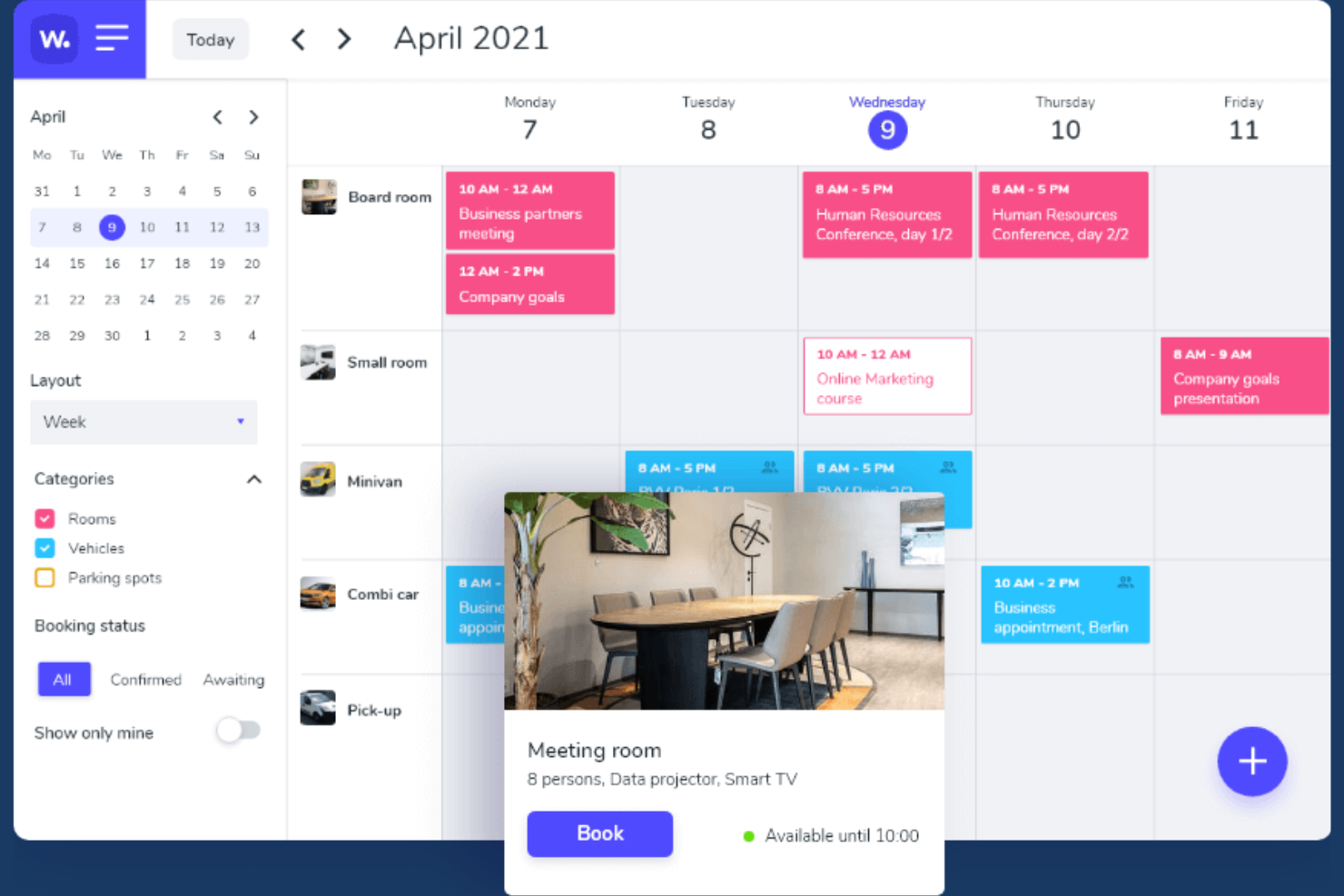
Whatspot offre agli uffici in crescita e agli spazi di coworking un modo flessibile per gestire le prenotazioni di scrivanie e sale, semplificando il controllo da parte dei team su chi può prenotare gli spazi condivisi e il monitoraggio dell'utilizzo degli spazi di lavoro in più sedi.
A chi è più adatto Whatspot?
Whatspot è una soluzione adatta ai responsabili delle strutture e degli uffici di aziende in crescita che hanno bisogno di un modo flessibile per gestire le prenotazioni di scrivanie e sale riunioni in più sedi.
Perché Whatspot è una valida alternativa a deskbird
Mi piace Whatspot perché consente al mio team di assegnare i prezzi per scrivania o sala riunioni, invece di applicare un costo per utente. Questo modello basato sulla postazione è flessibile quando gestiamo più sedi o dobbiamo aumentare o ridurre le dimensioni senza rinegoziare il numero di utenti. Inoltre, monitoriamo attentamente l'utilizzo effettivo degli spazi, così possiamo adattare le risorse al variare delle nostre esigenze.
Funzionalità principali di Whatspot
- Prenotazione tramite codice QR: Prenota istantaneamente scrivanie e sale scansionando un codice QR presso ogni postazione.
- Prenotazioni ricorrenti: Configura prenotazioni ripetute per riservare lo stesso spazio secondo una programmazione regolare.
- Regole di prenotazione personalizzate: Configura flussi di approvazione e limiti di prenotazione in base alle politiche di ciascun team.
- Supporto per più sedi: Gestisci tutte le prenotazioni di scrivanie e sale riunioni in diversi uffici da un unico pannello di controllo.
Integrazioni di Whatspot
Le integrazioni native non sono documentate chiaramente. Whatspot offre un'API per le integrazioni personalizzate.
Pros and Cons
Pros:
- I prezzi basati sulla postazione riducono i costi per utente
- Prenotazione tramite codice QR per prenotazioni istantanee
- Supporta la gestione degli spazi di lavoro in più sedi
Cons:
- Nessuna integrazione nativa di terze parti documentata
- Funzionalità limitate per rapporti e analisi avanzati
New Product Updates from Whatspot

Whatspot Adds Booking Modes for Different Space Types
Whatspot introduces Booking Modes to support different reservation rules for different space types. Admins can choose flexible bookings, fixed durations, or fixed intervals based on how each space is used. For more information, visit Whatspot's official site.
 .
.
Ideale per grandi imprese

Hybrid Hero è una piattaforma per la gestione del luogo di lavoro che riunisce in un unico sistema la prenotazione delle scrivanie, la prenotazione delle sale riunioni, la gestione dei visitatori, dei parcheggi e strumenti HR integrati, per team di medie e grandi imprese che gestiscono ambienti di lavoro ibridi complessi e distribuiti su più sedi.
Per chi è più adatto Hybrid Hero?
Hybrid Hero è adatto ai team delle strutture, della gestione del luogo di lavoro e delle operazioni HR di organizzazioni di medie e grandi dimensioni che gestiscono programmi di lavoro ibrido su più sedi.
Perché Hybrid Hero è una buona alternativa a deskbird
Hybrid Hero si è guadagnato un posto nella mia selezione perché è l'unica piattaforma di questa categoria a includere un modulo HR integrato oltre alla prenotazione delle scrivanie, alla prenotazione delle sale, alla gestione dei visitatori e dei parcheggi, tutto in un unico sistema. Apprezzo in particolare il controllo degli accessi basato sui ruoli, che mi permette di definire esattamente chi può visualizzare o prenotare le scrivanie in base al team, alla funzione o alla regione all'interno di una configurazione con più sedi. Anche la registrazione degli audit è una funzionalità che trovo davvero utile: ogni azione eseguita sulla piattaforma viene tracciata, quindi supportare una verifica di conformità non significa dover consultare fogli di calcolo.
Caratteristiche principali di Hybrid Hero
- Planimetrie interattive: i dipendenti possono prenotare scrivanie, sale e risorse utilizzando mappe dinamiche che riflettono la disponibilità in tempo reale.
- Gestione di più sedi: gli amministratori gestiscono prenotazioni, utilizzo e criteri per diversi uffici da un'unica dashboard.
- Integrazione con calendari e Microsoft Teams: le prenotazioni si sincronizzano direttamente con Outlook, Google Calendar e Microsoft Teams per una programmazione senza interruzioni.
- App mobili con check-in tramite QR: le app native per iOS e Android supportano la prenotazione in mobilità e il check-in senza contatto alla scrivania o in sala tramite codici QR.
Integrazioni di Hybrid Hero
Hybrid Hero offre integrazioni native con Microsoft 365, Google Workspace, Microsoft Teams e Slack. L'SSO è supportato tramite Okta, Microsoft Entra ID e Google, ed è disponibile un'API per le integrazioni personalizzate.
Pros and Cons
Pros:
- Strumenti HR integrati insieme alla prenotazione delle scrivanie
- Include la gestione dei visitatori e dei flussi di lavoro per gli accordi di riservatezza
- Gestisce più sedi da un'unica dashboard di amministrazione
Cons:
- Eccessivo per i team piccoli o con una sola sede
- La complessità della configurazione aumenta con le impostazioni aziendali

Envoy
Ideale per analisi dell'occupazione in tempo reale
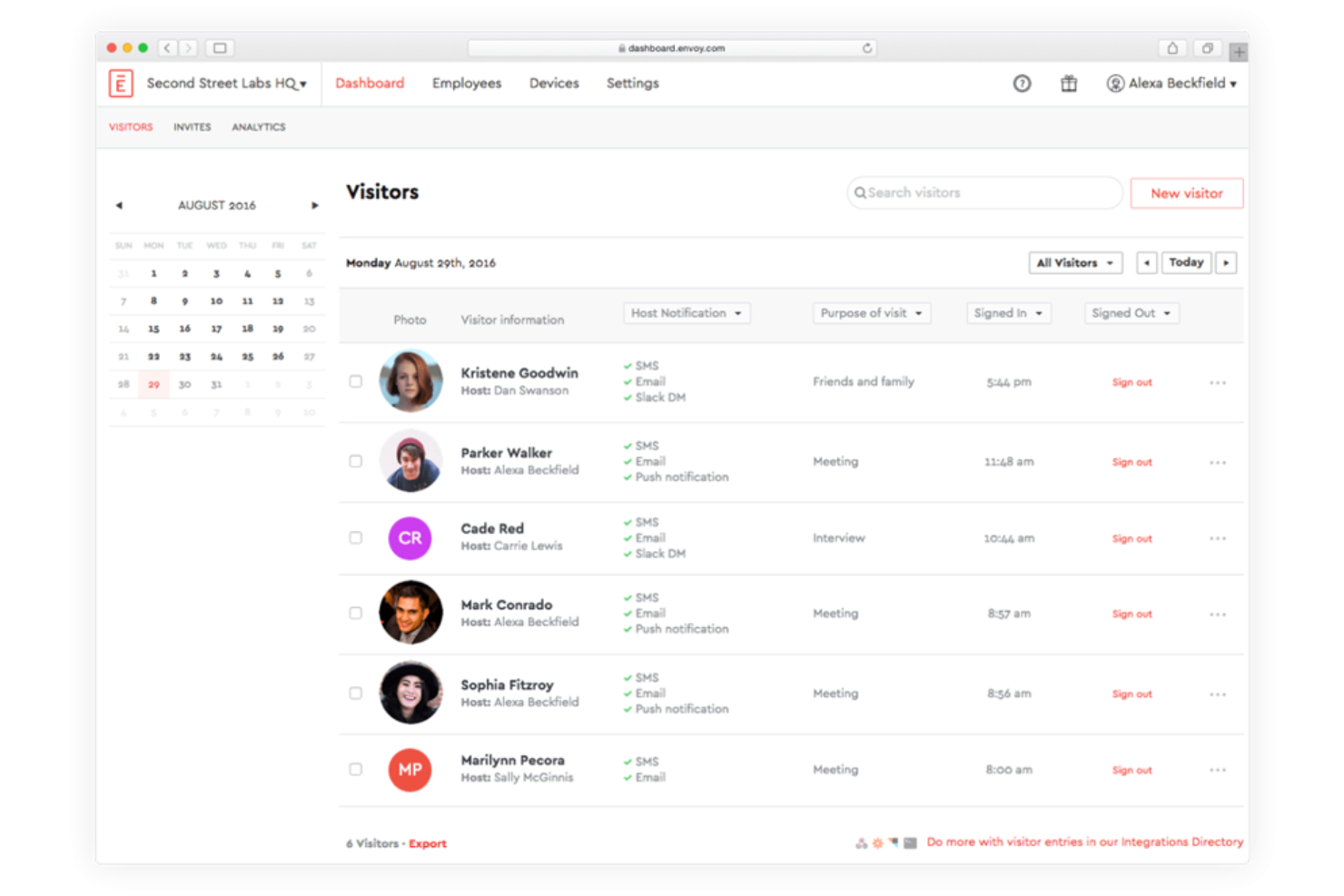
Envoy offre ai team che gestiscono uffici ibridi e strutture una piattaforma per gestire le prenotazioni degli spazi di lavoro, l'occupazione e il flusso dei dipendenti, con una configurazione flessibile per i moderni modelli di lavoro. Se hai bisogno di una soluzione che vada oltre la semplice prenotazione delle scrivanie, Envoy mette a disposizione strumenti per coordinare l'accesso degli ospiti, gli orari e la conformità sul luogo di lavoro.
Per chi è più adatto Envoy?
Envoy è adatto alle organizzazioni con team distribuiti che devono gestire la presenza dinamica sul luogo di lavoro, l'accesso degli ospiti in sede e l'assegnazione delle scrivanie in tempo reale in più sedi.
Perché Envoy è una buona alternativa a deskbird
Ho scelto Envoy perché le sue analisi sull'occupazione vanno oltre la semplice indicazione di chi ha prenotato una scrivania: mostrano anche se i dipendenti si sono effettivamente presentati. Mi piace il fatto che i dati sull'occupazione in tempo reale di Envoy permettano al mio team di vedere quali piani, zone e scrivanie vengono utilizzati attivamente, così possiamo prendere decisioni informate sull'assegnazione degli spazi invece di basarci solo sui dati delle prenotazioni. In questo modo possiamo identificare le aree sottoutilizzate e adeguare di conseguenza le politiche sul luogo di lavoro. Le funzionalità di pianificazione dei dipendenti consentono inoltre al mio team di coordinare le giornate in ufficio verificando quando i colleghi prevedono di essere presenti, rendendo la pianificazione della presenza ibrida molto più mirata.
Funzionalità principali di Envoy
- Prenotazione delle scrivanie: Prenota scrivanie specifiche o spazi di lavoro aperti direttamente da un'app mobile o dal browser.
- Gestione dei visitatori: Registra gli ospiti, invia notifiche di arrivo e gestisci gli accessi alla reception.
- Mappe interattive: Visualizza una planimetria aggiornata che mostra gli spazi disponibili, occupati e prenotati in tutto l'ufficio.
- Strumenti per la salute e la sicurezza sul luogo di lavoro: Imposta limiti di capienza, raccogli attestazioni sanitarie e controlla chi può accedere ad aree specifiche.
Integrazioni di Envoy
Envoy offre integrazioni native con Google Workspace, Microsoft 365, Okta, Slack, Zoom, Microsoft Teams, Box, Salesforce e Aruba, oltre a un'API disponibile per integrazioni personalizzate.
Pros and Cons
Pros:
- Mappe personalizzate dell'ufficio con indicatori dell'occupazione in tempo reale
- Gestione di visitatori e consegne in un'unica piattaforma
- Funzionalità flessibili per l'assegnazione di scrivanie e sale
Cons:
- I controlli sulle postazioni nelle aree non offrono sufficiente flessibilità
- Le analisi delle scrivanie possono subire ritardi durante i periodi di utilizzo intenso

Robin
Ideale per mappe interattive dell'ufficio

Robin è progettato per organizzazioni, team HR e responsabili degli uffici che necessitano di un coordinamento dinamico degli spazi di lavoro in ambienti ibridi e flessibili. Se desideri una soluzione che si adatti facilmente alle esigenze mutevoli del tuo ufficio, apprezzerai la combinazione di opzioni di prenotazione e funzionalità di ottimizzazione degli spazi offerta da Robin.
Per chi è più adatto Robin?
Robin è adatto a organizzazioni di medie e grandi dimensioni alla ricerca di uno strumento dedicato alla prenotazione di scrivanie e sale per gestire ambienti di lavoro flessibili.
Perché Robin è una buona alternativa a deskbird
Ho scelto Robin perché le sue mappe interattive dell'ufficio rendono intuitiva la prenotazione in tempo reale di scrivanie e sale, in un modo che i semplici elenchi statici di prenotazione non riescono a offrire. Mi piace il fatto che i dipendenti possano vedere visivamente quali scrivanie sono disponibili, chi è seduto dove e quali sale riunioni sono libere, tutto da un'unica schermata. Il mio team può utilizzare le funzionalità di quartieri e zone di Robin per organizzare le postazioni in base al reparto o al team, facilitando il coordinamento delle giornate in presenza senza infiniti scambi di messaggi. In pratica, questo significa che possiamo pianificare gli orari di lavoro ibrido in base all'effettiva disponibilità dell'ufficio anziché procedere per supposizioni.
Funzionalità principali di Robin
- Gestione dei visitatori: Pre-registrazione degli ospiti, gestione degli accessi e conservazione del registro dei visitatori direttamente in Robin.
- Check-in automatico: Rilevamento automatico della presenza dei dipendenti in ufficio tramite dati mobili, di rete o dei sensori di occupazione.
- Monitoraggio delle policy di presenza in ufficio: Comunicazione delle policy di lavoro ibrido e possibilità per i dipendenti di monitorare i propri progressi relativi alla presenza in ufficio.
- Servizi per le riunioni: Gestione delle richieste di catering, della configurazione delle sale e del supporto audiovisivo tramite flussi di lavoro personalizzabili prima della riunione.
Integrazioni di Robin
Robin offre integrazioni native con Google Workspace, Microsoft 365, Slack, Zoom, Okta, Condeco ed Envoy. È disponibile un'API per le integrazioni personalizzate.
Pros and Cons
Pros:
- Mappe dell'ufficio personalizzate con stato di occupazione in tempo reale
- Controlli flessibili per l'assegnazione di scrivanie e sale
- Gestione dei visitatori integrata nei flussi di lavoro di pianificazione
Cons:
- La funzionalità dei quartieri non offre controlli utente granulari
- L'analisi può essere lenta negli uffici di grandi dimensioni

Ideale per la prenotazione avanzata degli spazi per il lavoro ibrido
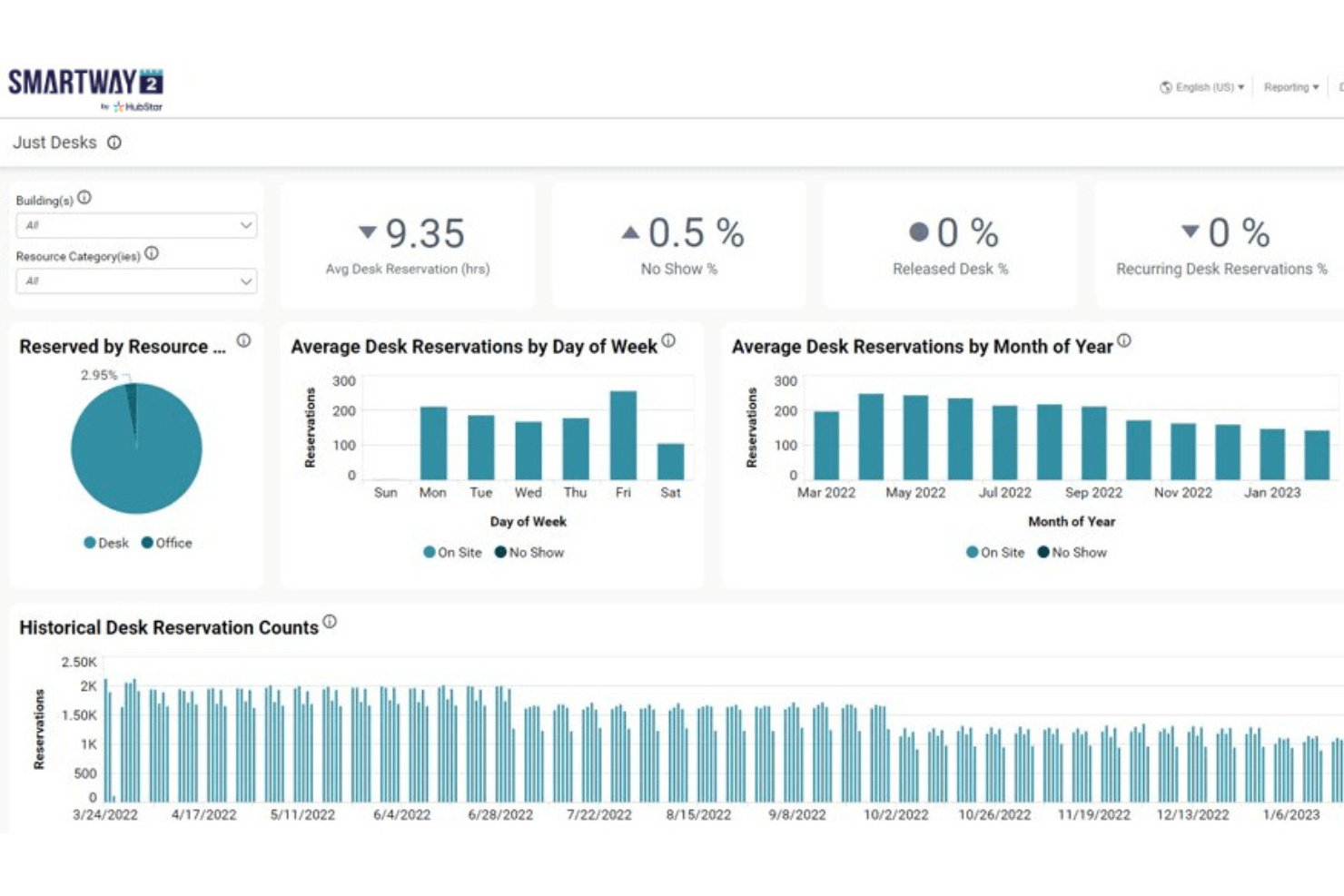
Smartway2 è una piattaforma di gestione del luogo di lavoro progettata per le organizzazioni che desiderano ottimizzare gli spazi, la prenotazione delle risorse e la collaborazione negli ambienti di lavoro ibridi. I team che desiderano una logica di prenotazione avanzata e ampie opzioni di personalizzazione troveranno Smartway2 particolarmente utile per gestire esigenze d'ufficio in continua evoluzione.
Per chi è più adatto Smartway2?
Smartway2 è ideale per i responsabili del luogo di lavoro e i team che gestiscono le strutture di aziende di medie e grandi dimensioni e che necessitano di una programmazione dinamica delle risorse e di un'automazione delle prenotazioni.
Perché Smartway2 è una buona alternativa a deskbird
Ho scelto Smartway2 perché la sua automazione delle prenotazioni è più avanzata rispetto a quella della maggior parte degli strumenti in questo settore. Ciò che mi colpisce è la funzionalità di concierge digitale: non si limita a mostrarti le scrivanie disponibili, ma consiglia il giorno migliore per venire in ufficio in base a chi altro ha intenzione di esserci e poi prenota la scrivania per te. Apprezzo anche il fatto che Smartway2 permetta di impostare regole di prenotazione flessibili in base al tipo di scrivania, alla zona e all'area del team, così le politiche di lavoro ibrido vengono effettivamente applicate invece di essere semplicemente documentate. Per le organizzazioni che devono gestire programmi di lavoro ibrido complessi o soggetti a frequenti cambiamenti, è difficile trovare altrove una logica di prenotazione così adattabile e basata su regole.
Funzionalità principali di Smartway2
- Planimetrie interattive: Visualizza e prenota le scrivanie da una mappa visiva aggiornata della disposizione del tuo ufficio.
- Programmazione delle sale riunioni: Prenota le sale con regole configurabili per capacità, attrezzature e autorizzazioni di accesso.
- Gestione dei visitatori: Registra e monitora i visitatori presenti in sede insieme alle prenotazioni degli spazi interni.
- Report sull'utilizzo: Accedi ai dati sull'occupazione e alle tendenze delle prenotazioni per orientare le decisioni sulla pianificazione degli spazi.
Integrazioni di Smartway2
Smartway2 offre integrazioni native con Microsoft 365, Microsoft Teams, Outlook, Google Workspace e Zoom, oltre a un'API per le integrazioni personalizzate.
Pros and Cons
Pros:
- Politiche di prenotazione avanzate e regole personalizzabili
- Le planimetrie visive semplificano la scelta delle scrivanie
- Strumenti integrati per la gestione dei visitatori e delle consegne
Cons:
- La dashboard analitica può risultare limitata
- Le notifiche dell'app mobile possono essere incoerenti

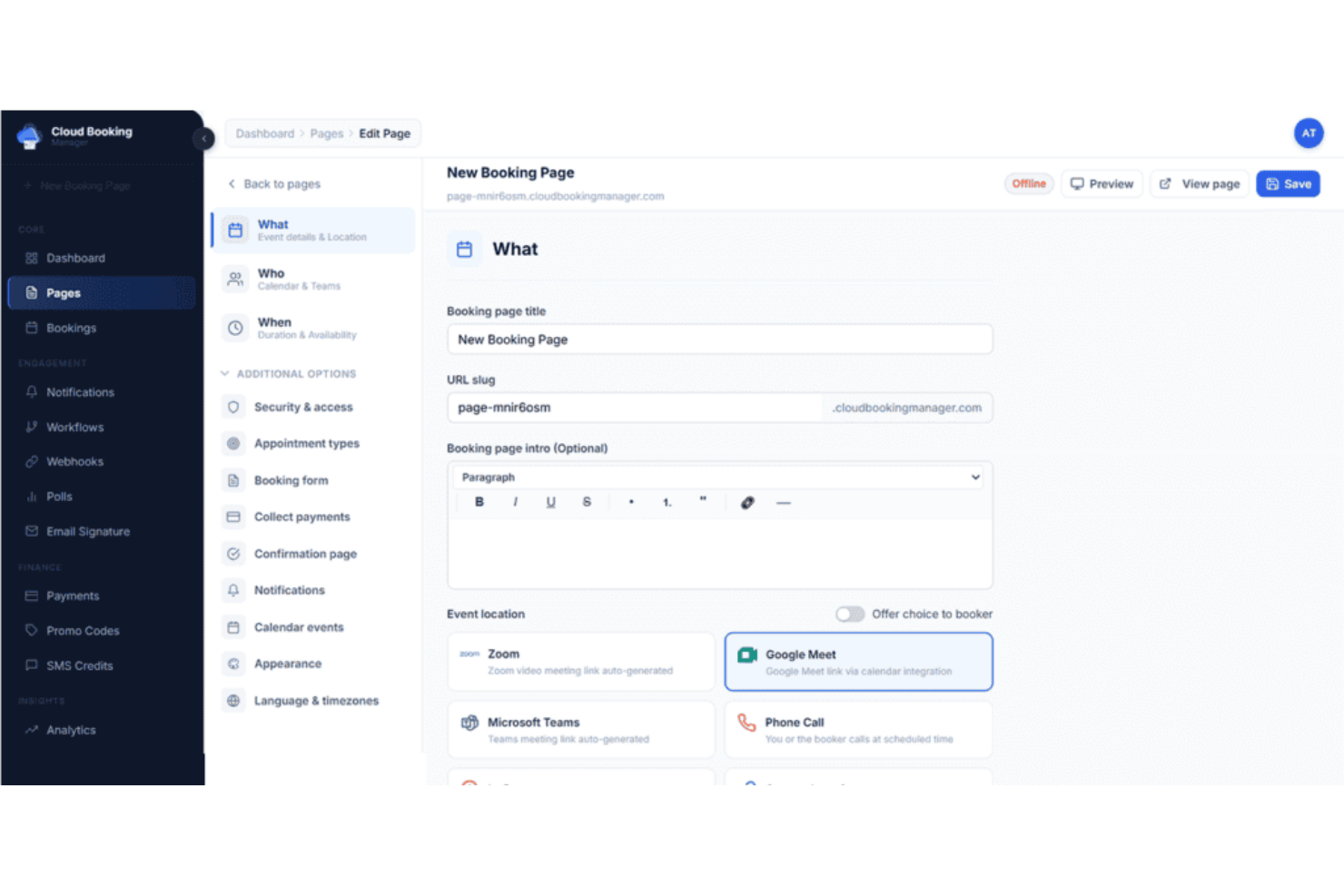
Cloudbooking è un software per la gestione degli spazi di lavoro progettato per le organizzazioni che devono gestire normative e policy aziendali complesse. Ritengo che i gruppi responsabili delle strutture e le aziende attente alla conformità apprezzeranno la sua attenzione alla programmazione sicura e verificabile delle scrivanie e al monitoraggio delle risorse in tempo reale.
Per chi è più adatto Cloudbooking?
Cloudbooking è una soluzione adatta alle grandi aziende e alle organizzazioni del settore pubblico che necessitano di una rigorosa conformità, registri di controllo e un controllo avanzato sulle prenotazioni degli spazi di lavoro.
Perché Cloudbooking è una buona alternativa a deskbird
Per i gruppi che operano in settori regolamentati o in ambienti ad alta sicurezza, l'approccio alla programmazione delle scrivanie basato innanzitutto sulla conformità distingue Cloudbooking. Apprezzo particolarmente i suoi flussi di approvazione configurabili, che impediscono a visitatori o dipendenti di accedere alle aree riservate senza previa autorizzazione: un aspetto che ho trovato fondamentale negli ambienti governativi e della difesa, dove il controllo degli accessi non è facoltativo.
Anche la funzione di registro di controllo è molto preziosa: registra in tempo reale tutti gli eventi relativi ai visitatori e alle prenotazioni, fornendo ai gruppi responsabili della conformità uno storico chiaro, con data e ora, di chi ha avuto accesso a cosa e quando. In pratica, questo significa che il mio gruppo non deve affrettarsi a ricostruire i registri delle attività quando arriva il momento di una verifica di conformità.
Funzionalità principali di Cloudbooking
- Planimetrie interattive in 3D: Visualizza la disponibilità in tempo reale di scrivanie e sale in tutto l'ufficio tramite planimetrie digitali personalizzate su dispositivi mobili, web o chioschi.
- Configurazione dei tipi di scrivania: Configura scrivanie condivise, fisse o flessibili e rendile filtrabili, così che i dipendenti possano trovare lo spazio più adatto al proprio stile di lavoro.
- Accettazione autonoma dei visitatori: I visitatori effettuano la registrazione, stampano i pass e completano le domande su salute e sicurezza tramite tablet o chiosco, senza l'assistenza della reception.
- Prenotazione dei parcheggi: Prenota i posti auto insieme alle scrivanie e alle sale attraverso la stessa applicazione o interfaccia web.
Integrazioni di Cloudbooking
Cloudbooking offre integrazioni native con Microsoft 365, Outlook, Azure Active Directory e Google Workspace. È disponibile un'API per le integrazioni personalizzate.
Pros and Cons
Pros:
- Registri di controllo per gli accessi agli spazi di lavoro e dei visitatori
- La prenotazione delle scrivanie supporta flussi di approvazione per la conformità
- Strumenti integrati per la prenotazione di parcheggi e armadietti
Cons:
- Integrazioni limitate oltre a Microsoft e Google
- La configurazione può richiedere il coinvolgimento del reparto IT per esigenze personalizzate

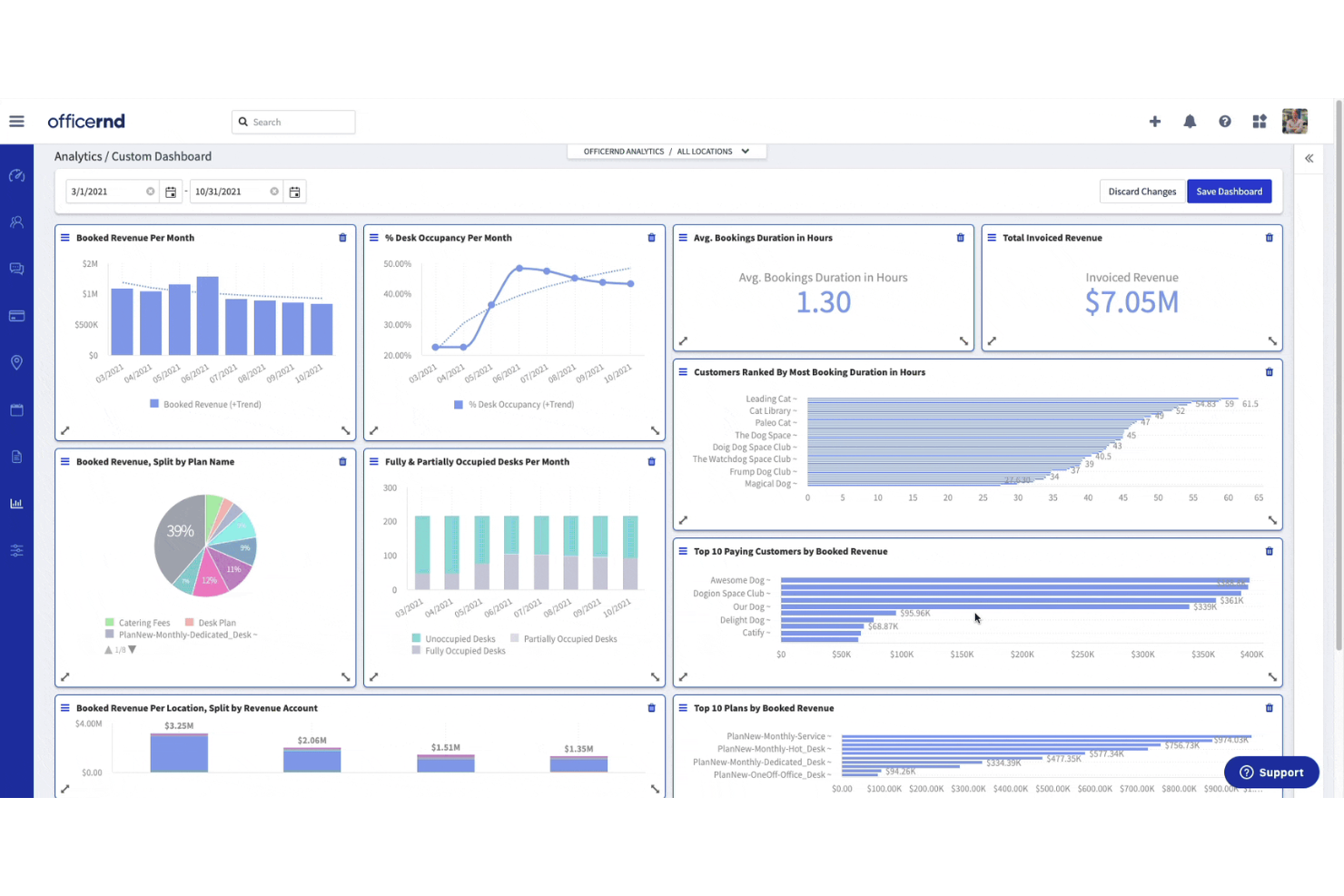
OfficeRnD offre una piattaforma di gestione degli spazi di lavoro pensata per le organizzazioni che gestiscono modalità di lavoro ibride e configurazioni d'ufficio flessibili. La troverai particolarmente utile se gestisci spazi di coworking o ambienti d'ufficio distribuiti su più sedi e cerchi funzionalità avanzate di prenotazione e visibilità delle risorse.
Per chi è più adatto OfficeRnD?
OfficeRnD è una soluzione particolarmente adatta agli operatori di coworking e ai responsabili delle strutture aziendali che gestiscono spazi di lavoro flessibili e distribuiti su più sedi.
Perché OfficeRnD è una buona alternativa a deskbird
Ho scelto OfficeRnD perché è progettato tenendo conto delle esigenze concrete di gestione di un'attività di spazi di lavoro flessibili, non solo della gestione di alcune scrivanie. Mentre deskbird si concentra sulla prenotazione delle scrivanie dal punto di vista dei dipendenti, OfficeRnD offre funzionalità molto più approfondite dal punto di vista dell'operatore. I suoi strumenti automatizzati per la fatturazione e l'emissione delle fatture gestiscono abbonamenti ricorrenti, addebiti una tantum e la raccolta dei pagamenti tramite Stripe con un intervento manuale minimo; così il mio team non deve rincorrere le fatture né riconciliare manualmente i pagamenti alla fine di ogni mese. Apprezzo anche la gestione del ciclo di vita dei contratti, che comprende tutto, dai modelli di abbonamento personalizzati ai flussi di approvazione configurabili, offrendo agli operatori un controllo preciso sulle modalità di onboarding e addebito dei membri.
Funzionalità principali di OfficeRnD
- Prenotazione tramite planimetria interattiva: Sfoglia e prenota scrivanie o sale direttamente su una mappa visiva del tuo ufficio.
- Gestione di quartieri e zone: Assegna i team ad aree specifiche dello spazio di lavoro e controlla la disponibilità delle scrivanie per zona.
- Portale web per i membri: Offri ai membri un portale self-service per gestire le proprie prenotazioni, i piani e i dati dell'account.
- Report sull'utilizzo degli spazi: Accedi ai dati sull'occupazione e sull'utilizzo di scrivanie e sale tramite la dashboard analitica Data Hub.
Integrazioni di OfficeRnD
OfficeRnD offre integrazioni native con Google Workspace, Microsoft 365, Slack, HubSpot, Xero, Stripe, QuickBooks, Salto KS, Kisi e Zapier. È disponibile un'API per le integrazioni personalizzate.
Pros and Cons
Pros:
- Analisi avanzate sull'occupazione con report esportabili
- Prenotazione visiva delle scrivanie tramite planimetrie interattive
- Gestione delle policy ibride per monitorare la presenza dei team
Cons:
- Supporto in tempo reale limitato per i problemi urgenti
- Meno opzioni di personalizzazione per i flussi di prenotazione


FM:Systems fornisce una piattaforma unificata per la gestione degli ambienti di lavoro, progettata per le organizzazioni che gestiscono ambienti d'ufficio complessi o ampi portafogli immobiliari. I team che desiderano ottimizzare l'utilizzo delle scrivanie, la pianificazione degli spazi e l'esperienza lavorativa in più sedi dovrebbero prenderla in considerazione.
Per chi è più adatto FM:Systems?
FM:Systems è particolarmente adatto ai responsabili della gestione delle strutture aziendali e ai team immobiliari aziendali che supervisionano ambienti di lavoro complessi e distribuiti in più sedi.
Ho scelto FM:Systems perché la profondità degli strumenti di analisi va ben oltre ciò che offre deskbird. Il modulo di analisi aggrega i dati provenienti da sensori IoT, sistemi di prenotazione, dati sui contratti di locazione e consumi energetici in un'unica pannello di controllo, offrendo ai team responsabili delle strutture una visione multidimensionale delle prestazioni effettive degli spazi. Apprezzo particolarmente la funzione di valutazione delle prestazioni, che consente di ponderare fino a otto KPI e classificare gli edifici confrontandoli tra loro: una funzionalità davvero utile nella gestione di un ampio portafoglio. Per i team che registrano un numero crescente di dipendenti in presenza o che stanno consolidando gli immobili, questo livello di granularità dei dati fa davvero la differenza.
Funzionalità principali di FM:Systems
- Pianificazione degli scenari: Simula configurazioni degli spazi ipotetiche per testare diverse planimetrie dei piani prima di apportare modifiche.
- Gestione dei trasferimenti: Automatizza e pianifica i trasferimenti dei dipendenti tra piani o edifici con flussi di lavoro integrati.
- Ordinazione di catering e servizi: Richiedi servizi di catering, supporto IT o servizi per le strutture direttamente durante la prenotazione di una sala o di uno spazio di lavoro.
- Gestione dei visitatori: Registra gli ospiti tramite chioschi self-service e gestisci l'intero percorso del visitatore, dall'invito alla partenza.
Integrazioni di FM:Systems
FM:Systems offre integrazioni native con Okta, Microsoft Power BI, ArcGIS e AutoCAD, oltre a un'API per integrazioni personalizzate.
Pros and Cons
Pros:
- Planimetria interattiva con modifica tramite trascinamento
- Analisi avanzate per monitorare l'utilizzo degli spazi
- Scalabile per portafogli di uffici distribuiti in più sedi
Cons:
- La configurazione e l'impostazione richiedono competenze IT
- La gestione dei visitatori non supporta l'accesso con autenticazione unica

Ideale per operazioni e strutture complesse distribuite su più sedi

MRI Workplace Central è progettato per le organizzazioni che desiderano una supervisione e una gestione dettagliate dei propri spazi d'ufficio. I responsabili delle strutture e i team operativi possono utilizzarlo per coordinare l'assegnazione delle scrivanie, le sale riunioni e l'occupazione in ambienti di lavoro dinamici e flessibili.
Per chi è più adatto MRI Workplace Central?
Responsabili delle strutture e degli immobili di organizzazioni di medie e grandi dimensioni che necessitano di una supervisione unificata di scrivanie, sale e spazi di lavoro condivisi.
Perché MRI Workplace Central è una buona alternativa a deskbird
Ho scelto MRI Workplace Central perché va oltre la prenotazione delle scrivanie, offrendo ai team responsabili delle strutture una visione completa dell'effettivo utilizzo degli spazi d'ufficio. Ciò che mi colpisce è la reportistica sull'utilizzo degli spazi, che mostra dati reali sull'occupazione e mi consente di prendere decisioni consapevoli sulle modifiche alla planimetria o sul rapporto tra scrivanie e dipendenti. Apprezzo anche la funzionalità di gestione dei trasferimenti, che mi permette di pianificare e monitorare le assegnazioni delle postazioni dei dipendenti tra i vari reparti senza dover ricorrere a fogli di calcolo. Per le organizzazioni che gestiscono uffici grandi e distribuiti su più piani, è davvero difficile trovare altrove un livello simile di controllo operativo.
Funzionalità principali di MRI Workplace Central
- Simulazione degli scenari di disposizione dei posti: Modella diverse configurazioni della planimetria e applica automaticamente le regole di distanziamento fisico per individuare la disposizione ottimale delle scrivanie.
- Controlli di accesso a zone e aree: Limita o consente l'accesso dei dipendenti a zone specifiche dell'ufficio, aree o singole scrivanie utilizzando regole configurabili.
- Acquisizione dei dati da dispositivi IoT e badge: Acquisisce dati in tempo reale sull'occupazione tramite passaggi dei badge, segnali WiFi o sensori IoT per monitorare l'utilizzo degli spazi.
- Monitoraggio degli spostamenti dei visitatori: Monitora e gestisce l'accesso dei visitatori agli edifici e ai luoghi di lavoro utilizzando l'integrazione WhosOnLocation di MRI.
Integrazioni di MRI Workplace Central
MRI Workplace Central offre integrazioni native nell'ecosistema Microsoft, tra cui Microsoft 365 e Azure, oltre a integrazioni con Serraview e MRI WhosOnLocation e un'API per integrazioni personalizzate.
Pros and Cons
Pros:
- Reportistica avanzata sull'occupazione e sull'utilizzo degli spazi
- Supporta una gestione completa dei trasferimenti d'ufficio
- Si integra nativamente con l'ecosistema Microsoft
Cons:
- L'interfaccia per la prenotazione delle scrivanie può risultare datata
- Esperienza di prenotazione tramite dispositivi mobili limitata
Altre alternative a deskbird
Ecco alcune alternative aggiuntive a deskbird che non sono entrate nel mio elenco ristretto, ma che vale comunque la pena valutare:
- Flowscape Solutions
Ideale per trovare scrivanie, sale e colleghi
- Joan Desk Booking
Ideale per l'integrazione con configurazioni esistenti negli ambienti di lavoro
- SharingCloud
Ideale per soluzioni avanzate per uffici intelligenti
- Smart Spaces
Ideale per i team che desiderano un controllo basato sull'IoT
- Roomzilla
Ideale per la prenotazione di scrivanie per team in crescita
- Archie
Ideale per la gestione completa di visitatori e scrivanie


Come valuto le alternative a Deskbird
Divido la mia valutazione in criteri di base, come la prenotazione interattiva delle scrivanie e la pianificazione ibrida, e fattori distintivi che separano gli strumenti migliori dal resto.
Funzionalità principali (requisiti fondamentali per questo elenco)
Quando seleziono gli strumenti per il mio elenco, assegno a ciascuno un punteggio su una scala da 0 (non offre la funzionalità) a 5 (eccelle in quest'area) per ogni funzionalità principale elencata di seguito. Poi calcolo il punteggio totale dello strumento trasformandolo in una percentuale. Ogni strumento deve raggiungere un punteggio totale minimo del 65% per essere preso in considerazione.
- Prenotazione delle scrivanie: Cerco planimetrie interattive in cui i dipendenti possano scegliere una scrivania specifica per zona o area, invece di limitarsi ad assegnarne una da un elenco a discesa.
- Prenotazione di sale e risorse: Oltre alle sale riunioni, verifico se i team possono prenotare anche posti auto, armadietti o attrezzature condivise tramite la stessa interfaccia.
- Pianificazione ibrida: Valuto quanto bene ogni strumento consenta ai dipendenti di indicare i giorni in ufficio o da remoto e se i colleghi possano vedere chi sarà presente prima di prenotare.
- Analisi dell'ufficio: Qui i cruscotti di utilizzo sono importanti: cerco le tendenze di occupazione per piano, reparto o periodo di tempo, che aiutino i team delle strutture a dimensionare correttamente gli spazi.
- Integrazioni con calendari e sistemi HRIS: Ogni strumento dovrebbe sincronizzarsi almeno con Microsoft 365 o Google Workspace, oltre a connettersi a piattaforme come BambooHR o Personio per i dati dei dipendenti.
- Accessibilità da dispositivi mobili: Verifico la presenza di app native per iOS e Android che consentano ai dipendenti di prenotare una scrivania o controllare il proprio programma senza dover prima aprire un laptop.
Una volta ottenuto un elenco di strumenti che soddisfano questi criteri, considero ciò che distingue ciascuna piattaforma.
Fattori distintivi (ciò che differenzia i fornitori)
Ecco come confronto i diversi fornitori:
Funzionalità distintive
La gestione dei visitatori è un importante fattore distintivo: gli strumenti che gestiscono la registrazione degli ospiti, gli avvisi ai referenti e la firma degli accordi di riservatezza insieme alla prenotazione delle scrivanie offrono ai team responsabili del luogo di lavoro un sistema in meno da gestire. Esamino anche l'integrazione con sensori e dispositivi IoT, poiché i sensori di occupazione che liberano automaticamente le prenotazioni in caso di mancata presenza risolvono un problema concreto per i responsabili delle strutture che monitorano l'utilizzo effettivo rispetto a quello prenotato. Anche la reportistica sulla sostenibilità è sempre più rilevante, soprattutto per le organizzazioni che devono collegare i dati sulla presenza in ufficio agli obiettivi ESG o relativi all'impronta di carbonio.
Oltre le funzionalità
In questo settore, il livello di sicurezza e conformità è molto importante. Verifico la conformità al GDPR, la certificazione SOC 2 e il supporto SSO, soprattutto per le organizzazioni che gestiscono dati sensibili sul luogo di lavoro in diverse aree geografiche. Anche la capacità di implementazione su larga scala è un elemento da considerare: una piattaforma che funziona per un singolo ufficio potrebbe avere difficoltà nella gestione delle prenotazioni tra decine di sedi con regole diverse. Valuto inoltre la trasparenza dei prezzi, verificando se i fornitori offrono modelli tariffari per utente o per scrivania e se mettono a disposizione una prova gratuita, affinché i team HR possano effettuare un progetto pilota prima di prendere un impegno.
Perché cercare un'alternativa a deskbird?
Sebbene deskbird sia una buona scelta come software per la prenotazione di postazioni, ci sono diversi motivi per cui alcuni utenti cercano soluzioni alternative. Potresti essere alla ricerca di un'alternativa a deskbird perché…
- Hai bisogno di analisi più approfondite sull'utilizzo degli spazi di lavoro
- Il tuo team desidera una gestione dei visitatori più avanzata
- Hai bisogno di un'integrazione nativa con i sistemi IT principali
- La configurazione o le dimensioni del tuo ufficio non sono supportate
- Hai bisogno di una maggiore automazione per la prenotazione delle sale o dei parcheggi
- La tua azienda richiede impostazioni di controllo degli accessi più avanzate
Se ti riconosci in una di queste situazioni, sei nel posto giusto. Il mio elenco include diverse opzioni software per la prenotazione di postazioni più adatte ai team che affrontano queste difficoltà con deskbird e cercano soluzioni alternative.
Funzionalità principali di deskbird
Ecco alcune delle funzionalità principali di deskbird, per aiutarti a mettere a confronto ciò che offrono le soluzioni alternative:
- Prenotazione delle scrivanie: Consente ai dipendenti di prenotare le scrivanie in anticipo o su richiesta, visualizzare le planimetrie e trovare postazioni di lavoro adatte alle loro esigenze.
- Prenotazione delle sale riunioni: Consente agli utenti di cercare e prenotare sale riunioni disponibili, con visibilità in tempo reale e dettagli sui servizi offerti.
- Mappa interattiva dell'ufficio: Fornisce una mappa visiva e interattiva dello spazio di lavoro per aiutare gli utenti a individuare colleghi, scrivanie libere e risorse dell'ufficio.
- Pianificazione del team: Supporta il coordinamento della presenza in ufficio consentendo ai team di pianificare e condividere insieme le giornate in presenza.
- Applicazione mobile: Consente ai dipendenti di gestire le prenotazioni di scrivanie e sale, visualizzare l'occupazione e accedere alle mappe dai propri telefoni.
- Spazi preferiti: Permette ai dipendenti di aggiungere ai preferiti e trovare rapidamente le scrivanie o le sale preferite per utilizzarle più volte.
- Analisi dell'ufficio: Offre dati e informazioni sull'utilizzo delle scrivanie, sulle tendenze dell'occupazione e sui modelli di presenza in ufficio per orientare la pianificazione degli spazi di lavoro.
- Integrazioni: Si connette a strumenti come Microsoft 365 e Google Workspace per sincronizzare calendari, prenotazioni e dati degli utenti.
- Gestione dei visitatori: Semplifica la preregistrazione degli ospiti, la notifica al responsabile della visita e le procedure di registrazione senza contatto per i visitatori dell'ufficio.
- Pianificazione del lavoro ibrido: Aiuta le organizzazioni a gestire politiche di lavoro flessibili e a coordinare gli orari di lavoro da remoto e in ufficio.