

I 10 migliori software per il monitoraggio del tempo nel 2026

Elenco dei migliori software per il monitoraggio del tempo


Il software per il monitoraggio del tempo consente al tuo team di registrare con precisione le ore, monitorare i carichi di lavoro e tenere sotto controllo le scadenze nei portafogli di progetti. Se gestisci progetti digitali, trovare gli strumenti giusti per il monitoraggio del tempo significa ridurre le scadenze mancate, rendere più chiara la fatturazione e migliorare la pianificazione delle risorse.
Con così tante opzioni disponibili, è facile perdersi tra le diverse possibilità. Per questo ho raccolto questo elenco, che ti aiuterà a confrontare le migliori soluzioni, capire quali funzionalità contano di più per il tuo lavoro e avere il controllo sul tempo, sul budget e sugli obiettivi dei tuoi progetti.
Perché fidarsi delle nostre recensioni sui software
Il nostro team testa e recensisce software dal 2012. In quanto esperti HR noi stessi, sappiamo quanto sia difficile — e importante — scegliere il software giusto.
Per questa guida, abbiamo valutato gli strumenti attraverso test pratici e ricerche indipendenti, assegnando un punteggio agli strumenti in base ai nostri criteri di selezione. Ci basiamo inoltre sulle competenze di leader di pensiero del settore e di professionisti HR attivi.
Le nostre recensioni riflettono il nostro giudizio editoriale umano, non un discorso di vendita.
Revisori esperti:
Tabella comparativa dei software per il monitoraggio del tempo
Questa tabella comparativa riassume i dettagli sui prezzi delle mie migliori selezioni di software per il monitoraggio del tempo:
| Tool | Best For | Trial Info | Price | ||
|---|---|---|---|---|---|
| 1 | Ideale per il monitoraggio delle ore fatturabili tra progetti dei clienti | Prova gratuita di 14 giorni + demo gratuita disponibile | Da $3.99/utente/mese (con fatturazione annuale) | Website | |
| 2 | Ideale per il monitoraggio delle presenze in tempo reale | Prova gratuita + demo gratuita disponibile | A partire da $5/utente/mese | Website | |
| 3 | Ideale per la registrazione intuitiva delle ore in formato digitale | Prova gratuita + demo gratuita disponibili | Prezzi su richiesta | Website | |
| 4 | Ideale per la conformità HR e IT unificata | Demo gratuita disponibile | Prezzo su richiesta | Website | |
| 5 | Ideale per la sincronizzazione unificata delle paghe | Demo gratuita disponibile | A partire da $49/mese + $6/utente/mese | Website | |
| 6 | Ideale per l'automazione configurabile dei flussi di lavoro | Demo gratuita disponibile | Prezzo su richiesta | Website | |
| 7 | Ideale per la gestione self-service degli orari dei dipendenti | Demo gratuita disponibile | Prezzo su richiesta | Website | |
| 8 | Ideale per la raccolta oraria tramite dispositivi flessibili | Demo gratuita disponibile | Prezzo su richiesta | Website | |
| 9 | Ideale per analisi avanzate della forza lavoro | Demo gratuita disponibile | Prezzo su richiesta | Website | |
| 10 | Ideale per l'integrazione con sistemi paghe aziendali | Demo gratuita disponibile | Prezzi su richiesta | Website |

Recensioni dei migliori software per il monitoraggio del tempo
Di seguito trovi le mie sintesi dettagliate dei migliori software per il monitoraggio del tempo inclusi nel mio elenco ristretto. Le mie recensioni offrono uno sguardo approfondito sulle funzionalità, sulle integrazioni e sui casi d’uso migliori di ciascuna piattaforma, per aiutarti a trovare quella più adatta a te.
Ideale per il monitoraggio delle ore fatturabili tra progetti dei clienti
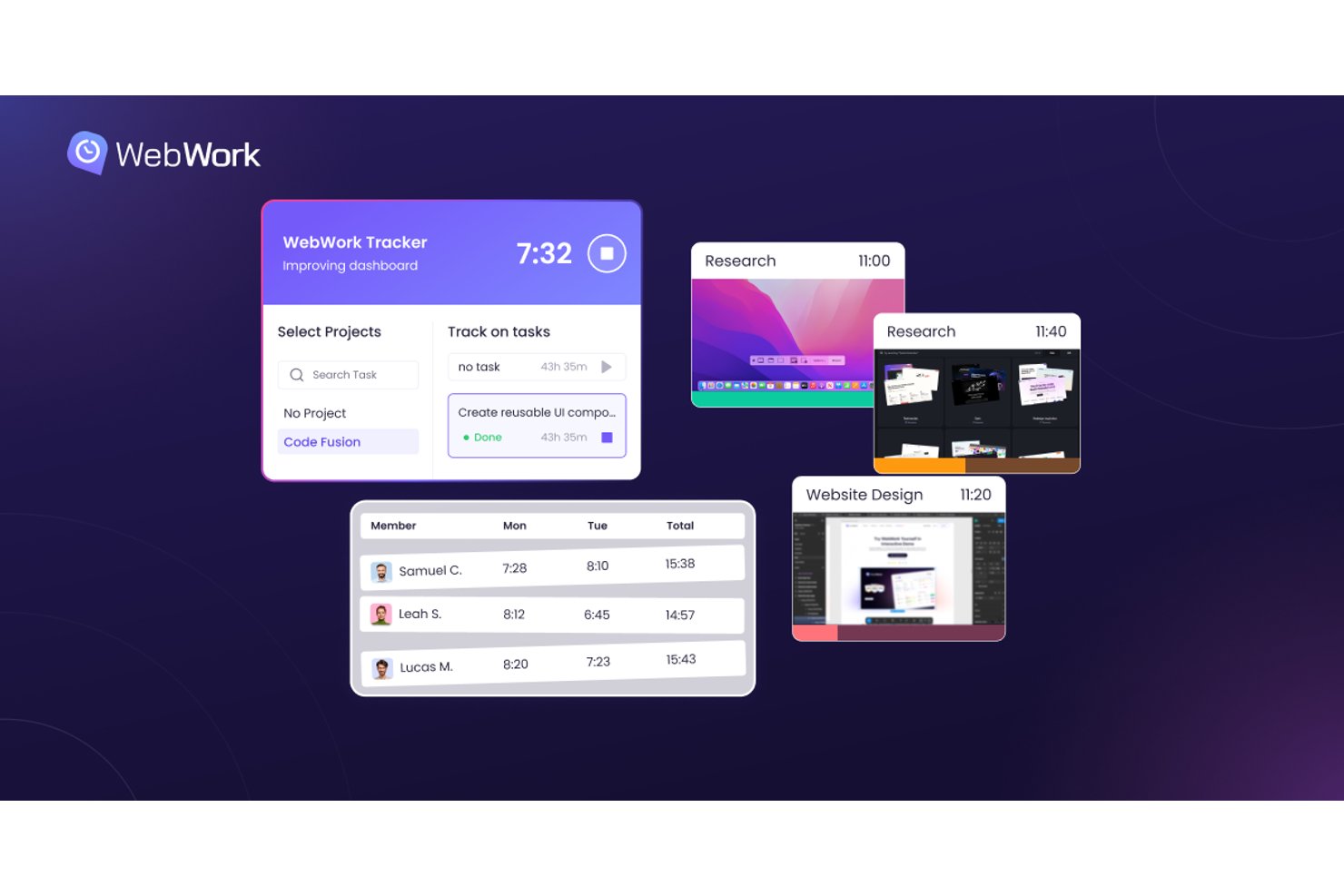
WebWork Time Tracker è una piattaforma per il monitoraggio del tempo che combina la rilevazione automatica del tempo, il monitoraggio delle ore fatturabili, la gestione delle presenze e dei congedi, le esportazioni per le paghe e la fatturazione dei clienti tra progetti e team.
Per chi è più adatto WebWork Time Tracker?
WebWork Time Tracker è particolarmente adatto ai responsabili delle risorse umane e ai team operativi che devono gestire ore fatturabili, presenze e congedi in un unico posto senza pagare per una piattaforma troppo complessa.
Perché ho scelto WebWork Time Tracker
Ho scelto WebWork Time Tracker come uno dei migliori perché gestisce il monitoraggio delle ore fatturabili tra progetti dei clienti meglio della maggior parte degli strumenti in questa fascia di prezzo. Mi piace il fatto che permetta di impostare tariffe fatturabili e tariffe di costo per progetto o per membro, quindi generi fatture pronte per i clienti direttamente dal tempo monitorato, con supporto multivaluta. I report personalizzati con il marchio e condivisibili mi permettono di inviare ai clienti riepiloghi professionali senza ulteriore lavoro di formattazione.
Funzionalità principali di WebWork Time Tracker
- Pannello delle presenze: Una panoramica in tempo reale di chi è attivo, assente, in ritardo o in congedo in qualsiasi momento all'interno del team.
- Accumulo e riporto dei congedi: Accumula automaticamente i saldi dei congedi con regole di riporto configurabili, diritti per paese e flussi di approvazione a più livelli.
- Geofencing: Registra automaticamente l'ingresso e l'uscita dei membri del team quando entrano o escono dal raggio definito di un sito di lavoro.
- Revisione dei fogli presenze con AI: Segnala lacune, ore mancanti e voci di progetto assegnate erroneamente, quindi invia riepiloghi via e-mail per mantenere accurati i dati.
Integrazioni di WebWork Time Tracker
WebWork Time Tracker offre integrazioni native con Asana, Jira, ClickUp, QuickBooks, Zoho Books, Deel, Google Calendar e Outlook. Supporta inoltre integrazioni personalizzate tramite la sua API pubblica e Zapier.
Pros and Cons
Pros:
- Le tariffe fatturabili supportano la fatturazione dei progetti dei clienti
- Il monitoraggio del budget copre i progetti a tariffa fissa
- I report con il marchio chiariscono le ore dei clienti
Cons:
- Nessuna previsione delle risorse o pianificazione della capacità
- I punteggi delle attività interpretano erroneamente ricerca e pianificazione

Deputy
Ideale per il monitoraggio delle presenze in tempo reale
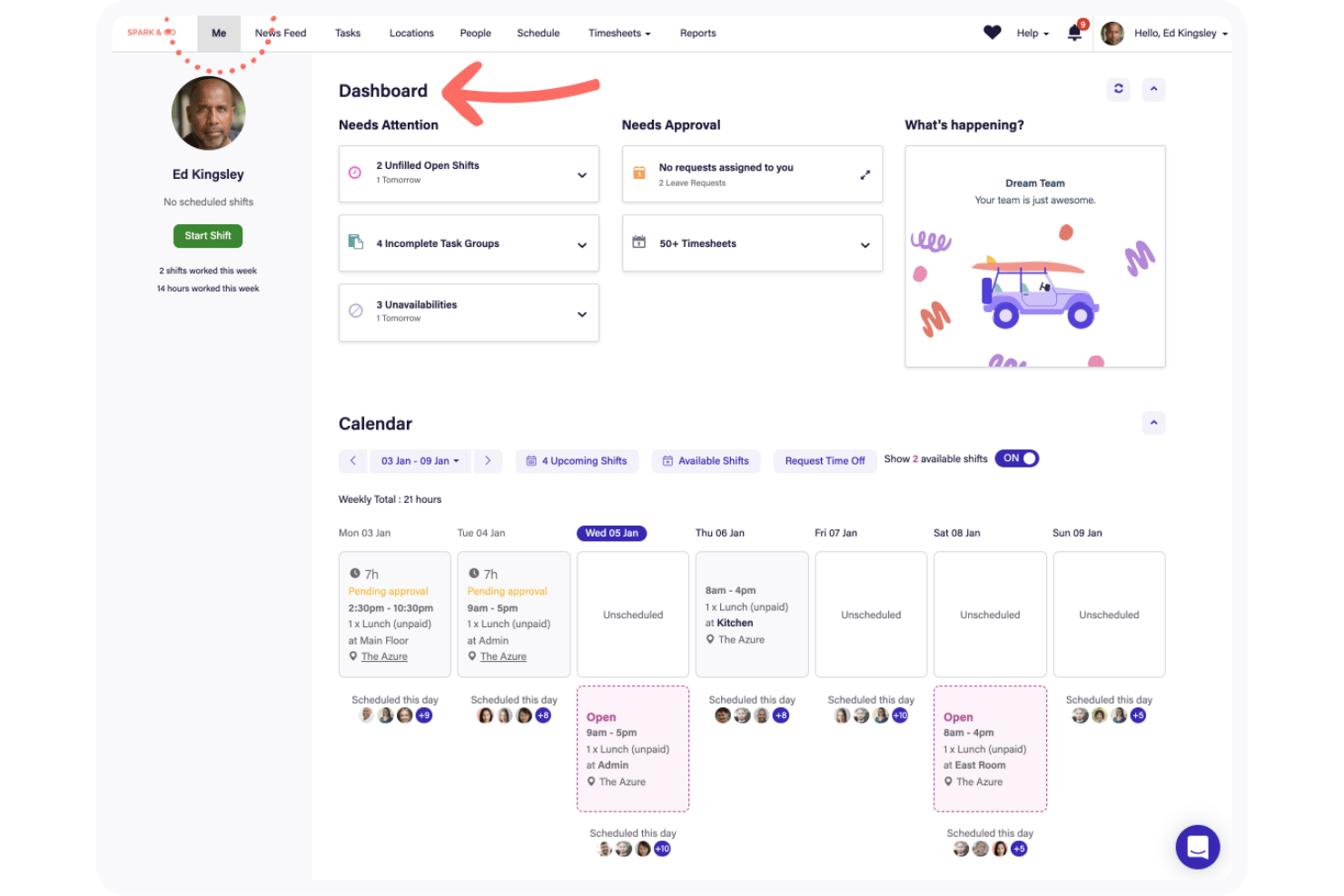
Deputy è una piattaforma per la gestione della forza lavoro e il rilevamento delle presenze creata per team a turni, che combina strumenti di timbratura, pianificazione dei dipendenti, gestione dei fogli presenze, monitoraggio delle presenze e controlli per la conformità alle normative sul lavoro.
Per chi è ideale Deputy?
Deputy è particolarmente adatto ai responsabili operativi e ai team HR di settori come vendita al dettaglio, ristorazione e sanità che gestiscono turni di lavoro su più sedi.
Perché ho scelto Deputy
Ho scelto Deputy tra i migliori perché il suo pannello di controllo delle presenze in tempo reale mi offre un'immediata visibilità su chi è timbrato, chi è in ritardo e chi è in pausa in ogni sede. Apprezzo in particolare la funzione di attestazione del dipendente, che segnala automaticamente pause saltate o timbrature non programmate e richiede la verifica da parte dei lavoratori prima dell'approvazione del foglio presenze. Abbinata al riconoscimento facciale biometrico sul Deputy Kiosk, la frode nelle timbrature diventa un problema inesistente.
Caratteristiche principali di Deputy
- Pianificazione turni drag-and-drop: Crea e modifica i turni con un'interfaccia visiva e intuitiva.
- Supporto per chiosco multilingue: Consente ai dipendenti di timbrare entrata e uscita nella lingua preferita su dispositivi condivisi.
- Motore di conformità alle leggi sul lavoro: Applica automaticamente alle pianificazioni le regole sugli straordinari e sulle pause specifiche per ogni regione.
- Integrazione con i sistemi di payroll: Sincronizza i fogli presenze con provider di buste paga popolari come ADP, Gusto e Xero.
Integrazioni Deputy
Deputy offre oltre 60 integrazioni native, inclusi ADP, Gusto, QuickBooks, Xero, Paychex, Square, BambooHR, Lightspeed, Box e Zapier. È disponibile anche un'API per integrazioni personalizzate.
Pros and Cons
Pros:
- Pannello presenze e stato dei turni in tempo reale
- Riconoscimento facciale biometrico integrato per la timbratura
- Conformità automatica a normative su lavoro e straordinari
Cons:
- Manca la fatturazione e gestione clienti integrata
- Le analisi avanzate richiedono un aggiornamento a pagamento

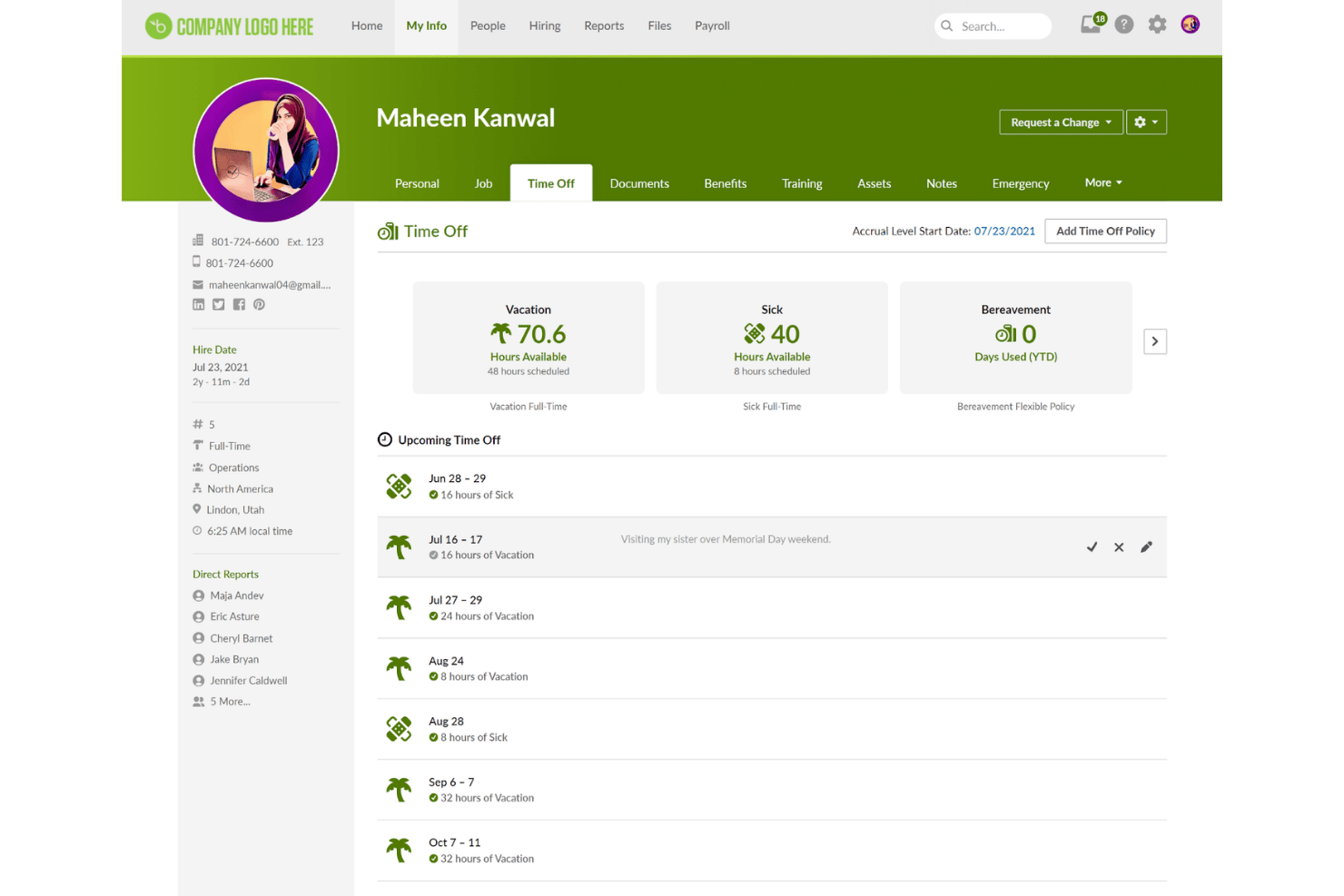
BambooHR è una piattaforma HR che combina il monitoraggio delle ore lavorate dei dipendenti, il controllo delle presenze, la pianificazione dei turni, la gestione dei congedi e la sincronizzazione delle buste paga in un unico sistema pensato per le piccole e medie imprese.
Per chi è più adatto BambooHR?
BambooHR è una soluzione particolarmente adatta ai gruppi che gestiscono le attività HR e necessitano di monitoraggio delle ore, gestione dei congedi e buste paga in un unico posto, anziché di uno strumento indipendente per la gestione del tempo.
Perché ho scelto BambooHR
Ho scelto BambooHR per l'ampia gamma di opzioni digitali per la registrazione delle ore che supporta all'interno di un unico sistema HR. I dipendenti possono timbrare l'entrata tramite app web, dispositivo mobile con geolocalizzazione oppure un chiosco per la registrazione delle ore su iPad che scatta una foto al momento dell'ingresso. Apprezzo inoltre il fatto che il blocco delle timbrature anticipate sia integrato direttamente nel modulo di pianificazione, mantenendo accurata l'osservanza dei turni senza richiedere l'intervento del responsabile per ogni mancato rispetto dell'orario di inizio.
Funzionalità principali di BambooHR
- Flussi di approvazione automatizzati: Invia, esamina e approva i fogli presenze dei dipendenti con un instradamento automatico al responsabile corretto.
- Monitoraggio completo dei permessi retribuiti: Monitora, approva e gestisci i congedi dei dipendenti con personalizzazione delle politiche e aggiornamenti in tempo reale dei saldi.
- Integrazione con le buste paga: Sincronizza direttamente i dati sulle ore approvati con le buste paga per calcolare le retribuzioni in modo più rapido e accurato.
- Intelligenza per la conformità: Applica automaticamente le regole relative a straordinari, pause e normativa del lavoro in diverse giurisdizioni degli Stati Uniti.
Integrazioni di BambooHR
BambooHR offre oltre 150 integrazioni native, tra cui Deputy, Deel, Chekr, Merge, Lattice, 15Five, Bonusly, Papaya Global, AccuSourceHR e Payscale. È disponibile un'API per le integrazioni personalizzate.
Pros and Cons
Pros:
- Molteplici opzioni per la registrazione delle ore, inclusa la modalità chiosco
- Automazione accurata delle regole statunitensi sugli straordinari
- Gestione integrata dei permessi retribuiti e dei congedi
Cons:
- Il monitoraggio delle ore è un componente aggiuntivo a pagamento
- I flussi di approvazione possono presentare problemi per alcuni gruppi

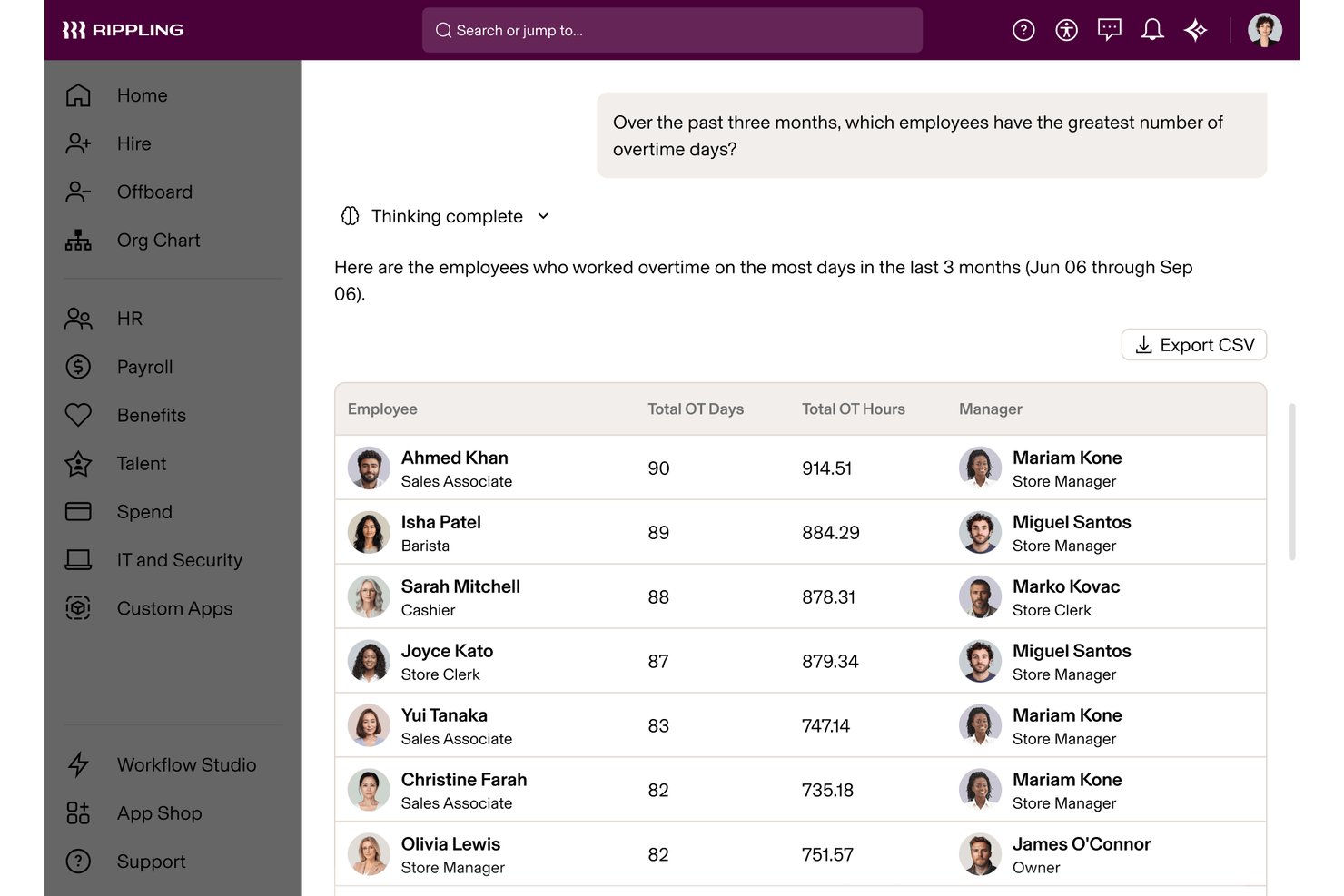
Rippling è una piattaforma di gestione della forza lavoro che combina il monitoraggio delle presenze e delle ore lavorate, la sincronizzazione automatica delle paghe, l'applicazione della conformità normativa sul lavoro e la gestione delle assenze in un unico sistema integrato.
Per chi è ideale Rippling?
È particolarmente indicato per le aziende di medie dimensioni con team HR che gestiscono personale in più sedi, dove l'accuratezza delle paghe e la conformità legale sono prioritarie.
Perché ho scelto Rippling
Ho inserito Rippling tra le mie scelte perché integra strettamente la rilevazione delle ore lavorate con la conformità HR e i flussi di lavoro IT. Apprezzo soprattutto il fatto che applichi automaticamente le regole corrette su straordinari e pause in base alla sede di lavoro di ciascun dipendente, segnalando problemi come doppi timbri o dimenticanze di uscita prima dell'elaborazione delle paghe. Accesso degli utenti, assegnazione dei dispositivi e dati sulle ore lavorate sono tutti gestiti sulla stessa piattaforma, così il mio team non deve conciliare dati tra strumenti diversi.
Funzionalità principali di Rippling
- Calcolo costi di lavoro e monitoraggio progetti: I dipendenti possono registrare le ore su lavori specifici, progetti o attività per l'attribuzione dei costi.
- Inserimento ore tramite app mobile: Il personale può timbrare entrata/uscita, consultare i turni e richiedere ferie da dispositivi iOS o Android.
- Reportistica IA: Dashboard personalizzabili che evidenziano in tempo reale trend come aumenti di straordinari o variazioni del costo del lavoro.
- Gestione integrata delle assenze: Richieste, approvazioni e saldi ferie vengono gestiti e sincronizzati con i dati di ciascun dipendente.
Integrazioni Rippling
Rippling offre oltre 600 integrazioni native, tra cui Slack, Zendesk, Notion, Chekr, Campfire, Tilt, Gong, Google Workspace, Microsoft 365, e Slack, oltre a un'API per integrazioni personalizzate.
Pros and Cons
Pros:
- Monitora ore, pause e straordinari per sede
- La rilevazione presenze si sincronizza istantaneamente con le paghe
- Segnala colli di bottiglia nelle approvazioni e anomalie delle ore
Cons:
- Monitoraggio limitato della produttività o utilizzo delle app
- Non consente un dettaglio delle ore su singole attività

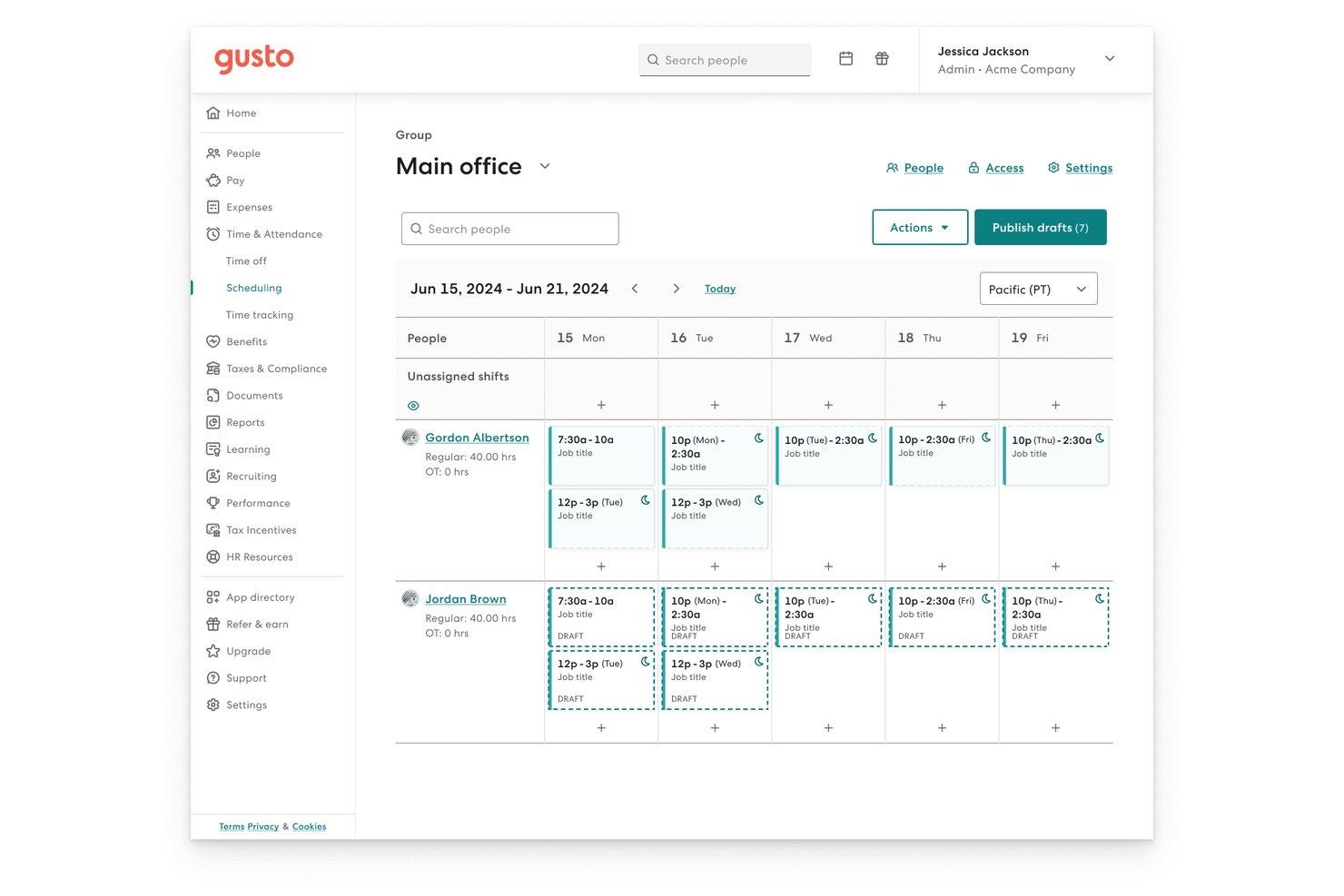
Gusto è una piattaforma per la gestione delle risorse umane e dell'elaborazione paghe con strumenti di rilevazione presenze integrati, tra cui timbratura di entrata/uscita, pianificazione dei turni, gestione delle ferie, geofencing e approvazione dei fogli presenze sincronizzati direttamente con le paghe.
Per chi è più indicato Gusto?
È particolarmente adatto a piccole e medie imprese che già utilizzano Gusto per le paghe e desiderano una soluzione di rilevazione presenze senza aggiungere strumenti separati.
Perché ho scelto Gusto
Ho scelto Gusto come uno dei migliori perché i fogli presenze approvati vengono inseriti direttamente nei calcoli delle paghe, eliminando il passaggio manuale di esportazione che può causare errori tra sistemi separati. Trovo particolarmente utili le politiche di pausa specifiche per stato, che garantiscono la conformità a livello di giurisdizione automaticamente al momento della rilevazione delle ore. Il monitoraggio di progetti e commesse permette di visualizzare i costi del personale suddivisi per progetto e questi dati si sincronizzano direttamente con QuickBooks Online o Xero.
Funzionalità principali di Gusto
- Time Kiosk: Trasforma qualsiasi tablet o computer in una postazione di timbratura per i membri del team.
- Geofencing mobile: Limita le timbrature di entrata e uscita a specifiche sedi di lavoro tramite la geolocalizzazione sull'app mobile.
- Suggerimenti orari con IA: Segnala e suggerisce correzioni per anomalie nei fogli presenze prima che le ore vengano approvate.
- Reportistica presenze: Esporta report dettagliati delle ore pianificate rispetto a quelle lavorate per dipendente, reparto o progetto.
Integrazioni di Gusto
Gusto offre integrazioni native con 15Five, Arvo, Box, Deputy, Clover, Connecteam, DocuSign, HubSpot, Novo, Okta, Salesforce e altri ancora.
Pros and Cons
Pros:
- Sincronizzazione diretta delle paghe con fogli presenze approvati
- Conformità a pause e straordinari specifici per stato
- Timbratura mobile con restrizioni di posizione
Cons:
- Nessuna analisi avanzata di produttività o utilizzo
- Flussi di approvazione multilivello non configurabili

Ideale per l'automazione configurabile dei flussi di lavoro
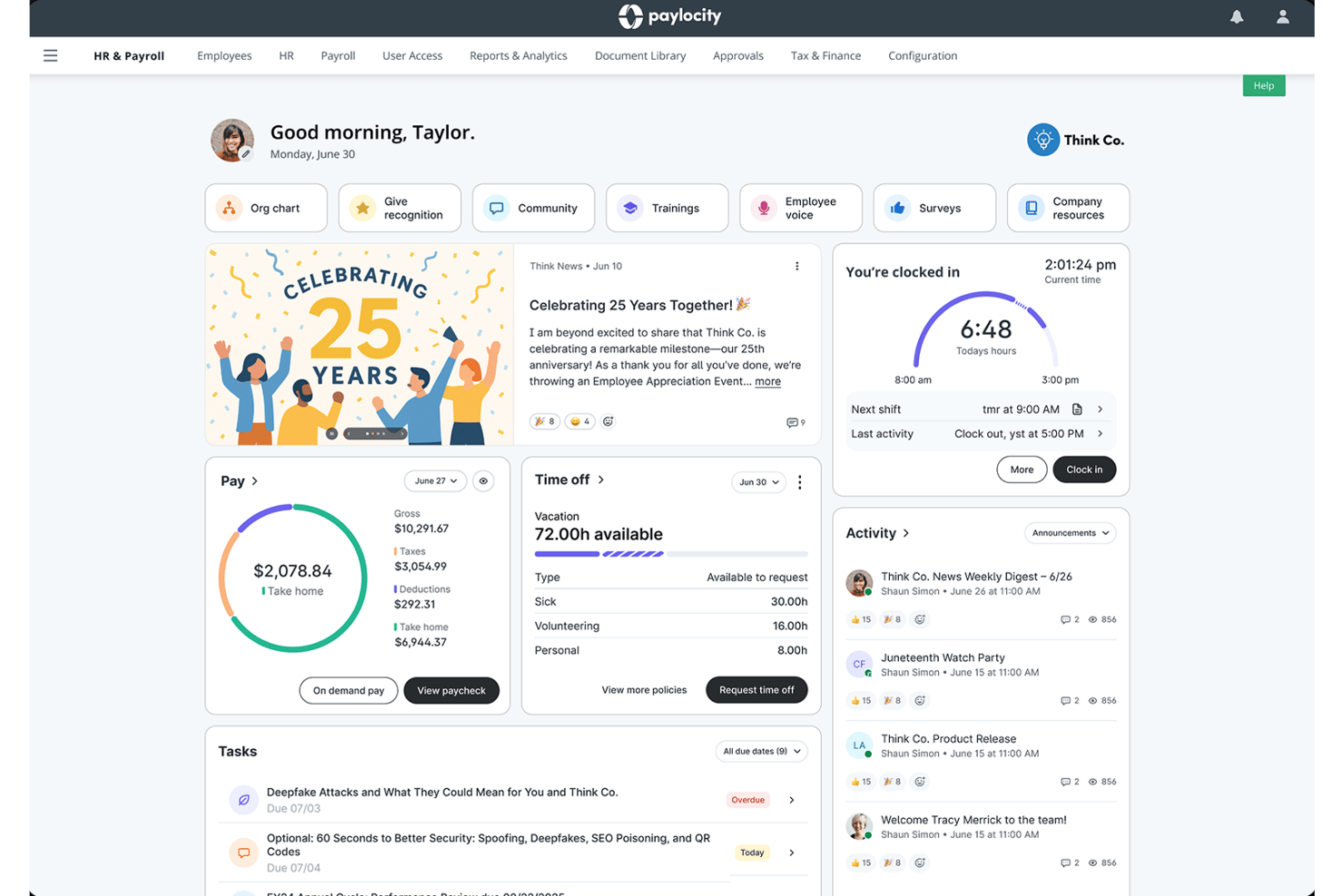
Paylocity è una piattaforma cloud per la gestione delle risorse umane e della forza lavoro, dotata di un modulo per la gestione del tempo e delle presenze che copre la rilevazione delle ore lavorate, il monitoraggio delle presenze, la gestione delle ferie, la pianificazione dei turni e l'integrazione con il sistema di payroll.
Per chi è ideale Paylocity?
Paylocity è particolarmente adatto ai team HR di medie dimensioni negli Stati Uniti che gestiscono personale orario o misto e necessitano di una tracciatura del tempo integrata con il payroll in un unico sistema.
Perché ho scelto Paylocity
Paylocity si guadagna un posto nella mia selezione perché i suoi flussi di lavoro per l'approvazione dei timesheet sono realmente configurabili e non limitati a una semplice approvazione di livello base. Posso impostare approvazioni multi-step con notifiche automatiche che si attivano ad ogni fase, mantenendo così le revisioni delle timbrature in movimento senza necessità di follow-up manuale. Quello che davvero lo distingue è il livello di applicazione automatica delle policy: le soglie per gli straordinari e le regole dei turni vengono applicate automaticamente, quindi la conformità non è qualcosa che devo monitorare manualmente.
Funzionalità principali di Paylocity
- Rilevazione del tempo da mobile: I dipendenti possono timbrare entrata e uscita tramite un'app mobile con verifica della posizione.
- Pianificazione dei turni: Crea e gestisci i turni con consigli supportati da intelligenza artificiale.
- Sincronizzazione integrata con il payroll: Le rilevazioni di tempo confluiscono direttamente nei calcoli delle buste paga senza necessità di trasferimenti manuali dei dati.
- Gestione di PTO e assenze: Monitora ferie, malattie e richieste di permessi in un'interfaccia centralizzata.
Integrazioni Paylocity
Paylocity offre centinaia di integrazioni disponibili sul marketplace, tra cui AccuSourceHR, Chekr, Asana, Atlassian, Box, Deputy, Expensify, FlexSpring, Okta, Oracle NetSuite e altro ancora. È disponibile un'API per integrazioni personalizzate.
Pros and Cons
Pros:
- Gestione automatizzata di turni e straordinari
- Opzioni di timbratura multicanale tra cui chiosco e app mobile
- Intelligenza artificiale integrata per la pianificazione dei turni
Cons:
- La configurazione dei report è complicata per esigenze complesse
- Progettato principalmente per la conformità payroll negli Stati Uniti
New Product Updates from Paylocity

Paylocity Expands Expense and Purchase Request Tools
Paylocity adds connected personal cards, smarter expense categorization, and a streamlined purchase request experience. This reduces manual entry and helps finance teams manage expenses and approvals more efficiently. For more information, visit Paylocity’s official site.
 .
.
Paycom
Ideale per la gestione self-service degli orari dei dipendenti
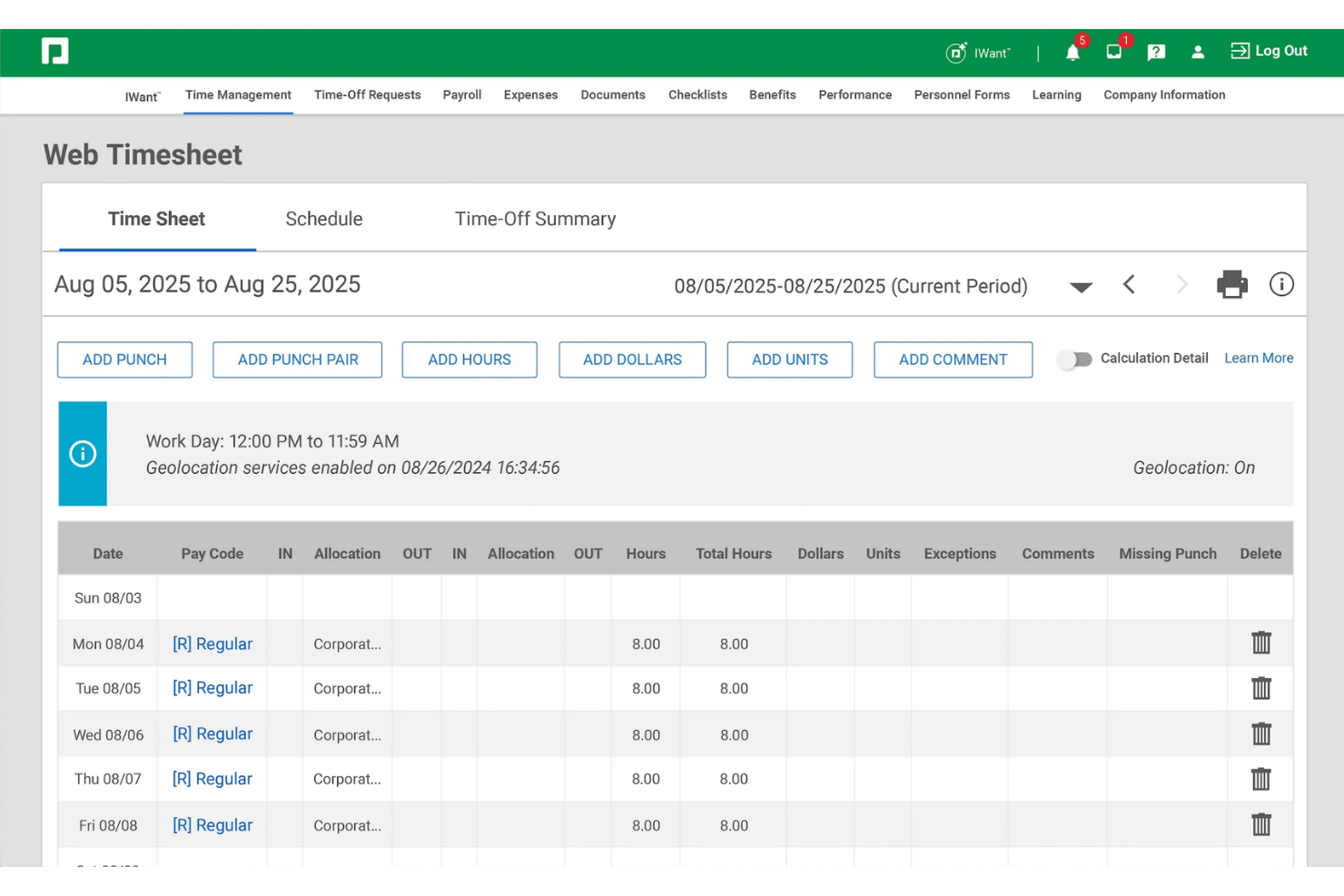
Paycom è una piattaforma HCM a database unico con una suite integrata per la gestione di orari e presenze che copre timbratura dei dipendenti, pianificazione dei turni, monitoraggio delle ferie, allocazione delle ore di lavoro e sincronizzazione nativa con le paghe.
Per chi è ideale Paycom?
Paycom è una soluzione adatta per team HR e payroll di medie aziende statunitensi che desiderano gestire gli orari dei dipendenti all’interno di un sistema HCM unificato anziché tramite uno strumento separato.
Perché ho scelto Paycom
Ho scelto Paycom perché il suo modello self-service trasferisce realmente la gestione del tempo dagli HR ai dipendenti. I lavoratori timbrano tramite mobile, inoltrano richieste di modifica delle timbrature e attivano approvazioni ferie direttamente dal proprio telefono. Mi piace in particolare GONE®, che approva o rifiuta automaticamente le richieste di ferie in base alle regole impostate dal team, eliminando completamente i tempi di attesa per le approvazioni. Le funzioni di geofencing e filtro IP sulla timbratura offrono anche ai manager un reale controllo su dove e quando avvengono le timbrature.
Funzionalità principali di Paycom
- Allocazione delle ore di lavoro: Assegna le ore dei dipendenti a diverse sedi, ruoli o centri di costo in tempo reale.
- Timbrature mobile: Usa l’app mobile Paycom per timbrare, visualizzare i turni e monitorare le ore anche da remoto.
- Impostazioni straordinari e conformità: Configura il tracciamento automatico degli straordinari e delle pause secondo le regole specifiche di ciascun territorio.
- Strumenti di reportistica personalizzata: Crea analisi del personale ed esporta dati in tempo reale su ore lavorate, presenze e tendenze.
Integrazioni Paycom
Le integrazioni native non sono elencate pubblicamente.
Pros and Cons
Pros:
- I dipendenti possono modificare autonomamente le loro timbrature
- Le regole su straordinari e conformità sono configurabili
- L’app mobile supporta la timbratura con geofencing
Cons:
- Nessuna prova gratuita o tariffazione trasparente
- La conformità globale è limitata al di fuori degli Stati Uniti

Ideale per la raccolta oraria tramite dispositivi flessibili
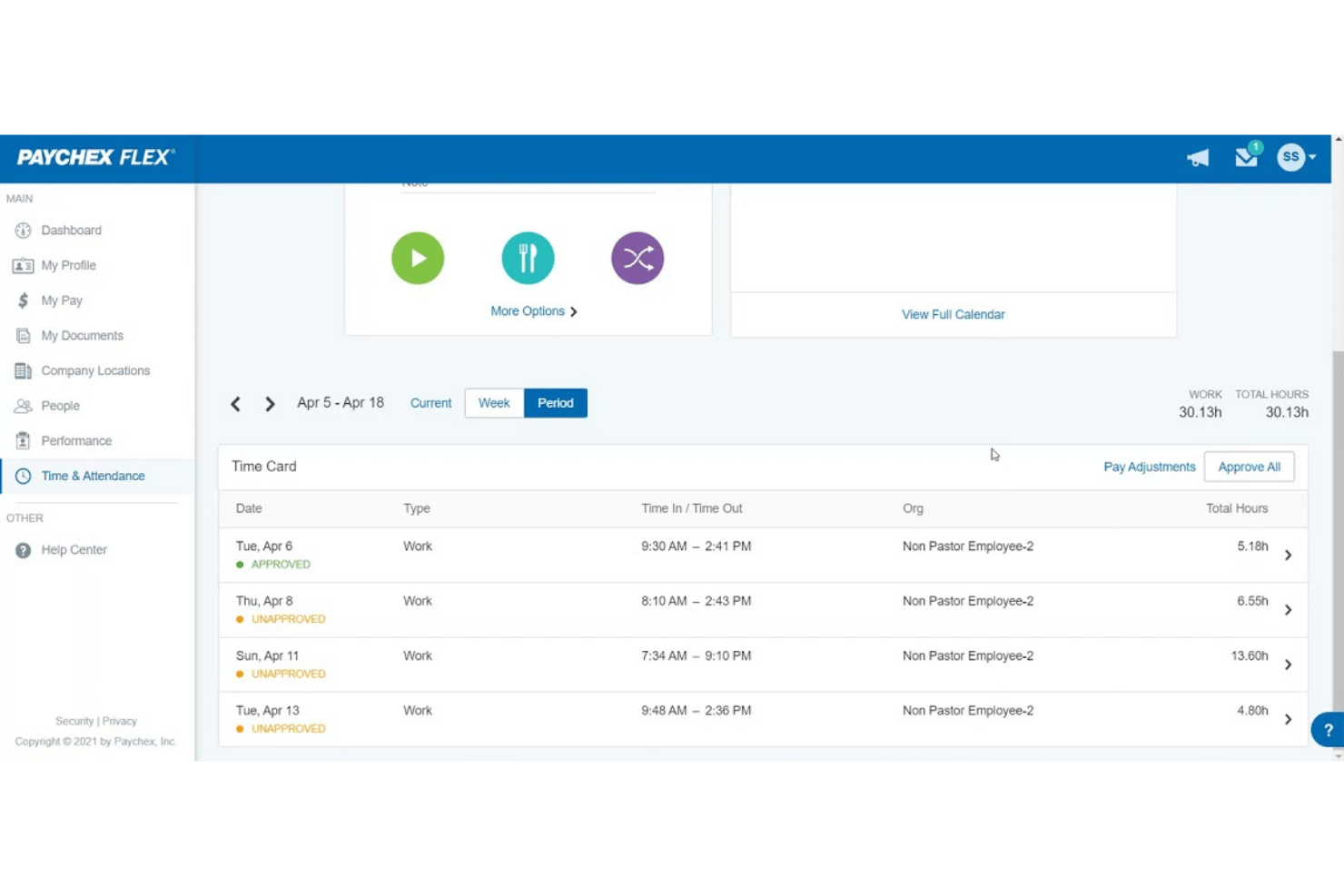
Paychex Flex è una piattaforma di rilevazione delle presenze che combina registrazione biometrica, timbratura via mobile, fogli presenze web, monitoraggio delle presenze, gestione delle assenze e integrazione con il sistema paghe in un unico sistema HR.
Per chi è ideale Paychex Flex?
È particolarmente adatto per i team HR di aziende di medie e grandi dimensioni che gestiscono forza lavoro in sede, ibrida o distribuita e necessitano di un monitoraggio del tempo collegato alle paghe.
Perché ho scelto Paychex Flex
Paychex Flex si guadagna un posto nella mia shortlist perché nessun altro strumento di rilevazione oraria che ho testato propone la stessa varietà di opzioni hardware per la timbratura. Posso installare orologi biometrici ad iride per una timbratura senza contatto, lettori di badge di prossimità per team onsite veloci, oppure un chiosco tablet con verifica facciale dove è necessario contenere i costi hardware. Gli avvisi di straordinari imminenti e il geofencing presenti nella versione completa Flex Time garantiscono uno strato di conformità su cui posso contare oltre alla flessibilità dei dispositivi.
Caratteristiche principali di Paychex Flex
- Gestione online dei fogli presenze: I dipendenti inviano e i manager approvano le ore di lavoro attraverso fogli presenze web.
- Monitoraggio automatico della maturazione dei permessi: Gestisci e tieni traccia dei saldi di ferie e permessi dei dipendenti con calcoli automatici integrati.
- Integrazione nativa con il sistema paghe: I dati su presenze e ore lavorate confluiscono direttamente nel payroll di Paychex per una gestione senza interruzioni.
- Sistema a punti per le infrazioni di presenza: Configura regole per tracciare automaticamente problemi di presenza e assegnare punti alle infrazioni.
Integrazioni di Paychex Flex
Paychex Flex offre una vasta gamma di integrazioni native tra cui Xero, Sage Intacct, QuickBooks, Oracle NetSuite, Connecteam, BambooHR, Clover e 7Shifts. È disponibile un’API per integrazioni personalizzate.
Pros and Cons
Pros:
- Ampia gamma di opzioni di orologio fisico
- Gestione avanzata e integrata della maturazione ferie/permessi
- Avvisi automatici su straordinari e conformità
Cons:
- Manca una suddivisione dettagliata delle ore per progetto
- Funzionalità avanzate solo nei livelli superiori

UKG Pro
Ideale per analisi avanzate della forza lavoro
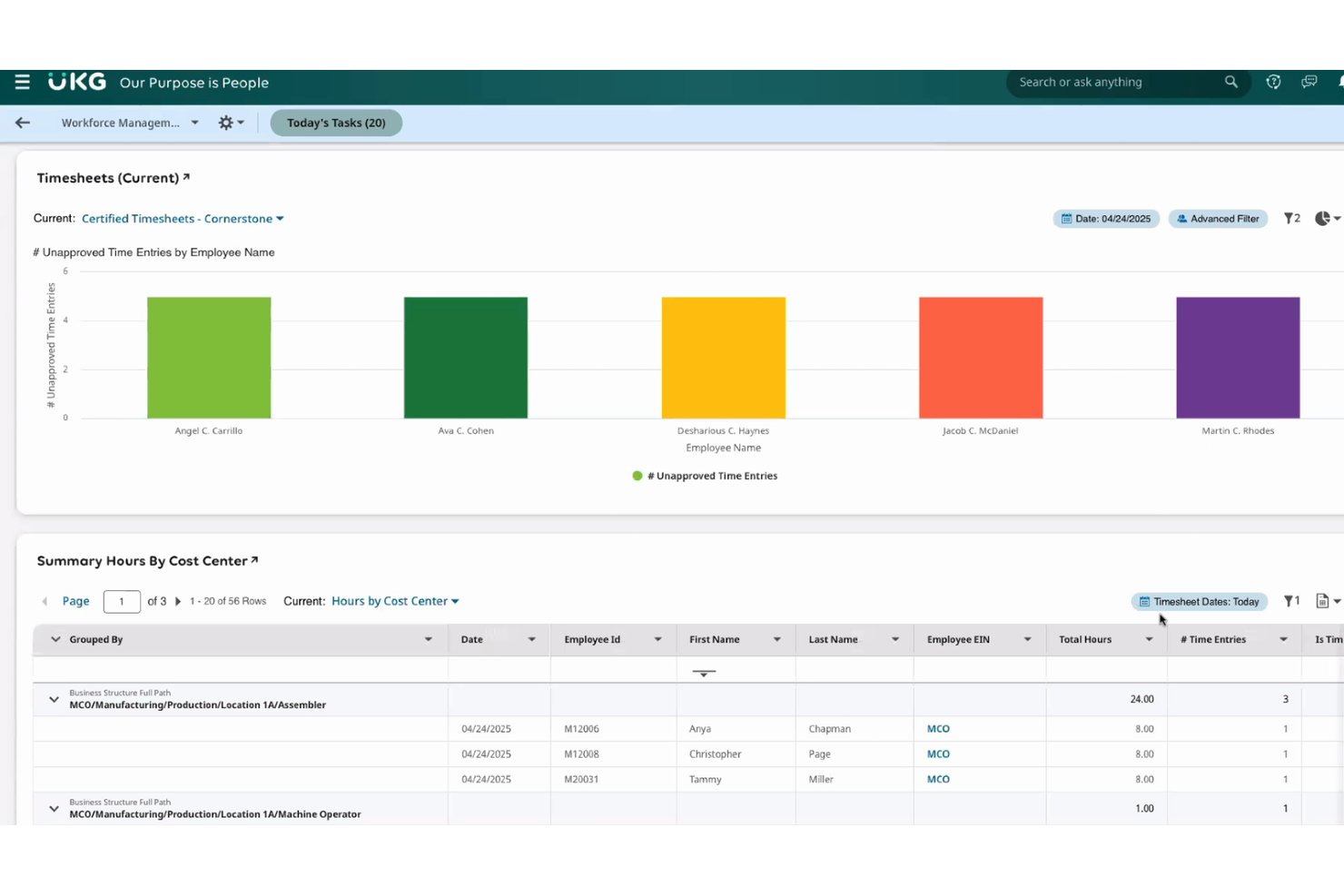
UKG Pro è una suite HCM per le aziende che include un modulo dedicato alla gestione della forza lavoro, coprendo la rilevazione delle presenze in modalità multiple, la gestione dei fogli ore, il monitoraggio di assenze e permessi, l'automazione della conformità alle normative sul lavoro e analisi della forza lavoro guidate dall'intelligenza artificiale.
Per chi è più adatto UKG Pro?
UKG Pro è particolarmente indicato per organizzazioni di medie e grandi dimensioni con workforce complesse, distribuite su più sedi e con team HR o di analisi delle risorse umane dedicati.
Perché ho scelto UKG Pro
UKG Pro si è guadagnato un posto nella mia selezione grazie alla profondità delle sue analisi sulla forza lavoro, che vanno ben oltre i semplici conteggi orari. Apprezzo in particolare il livello di intelligenza artificiale applicata, che individua colli di bottiglia, schemi di tempo perso e lacune nella copertura dei turni direttamente dai dati di presenza. I dashboard in tempo reale offrono al mio team visibilità su eccezioni e variazioni di costo prima della chiusura delle paghe, non dopo.
Funzionalità principali di UKG Pro
- Rilevazione orari multi-modale: Registra le ore tramite terminali biometrici, app mobile, browser o telefono.
- Applicazione configurabile delle policy: Applica automaticamente regole su retribuzione, pause e turni in tutte le sedi.
- Strumenti self-service da mobile: Permette ai dipendenti di richiedere permessi, timbrare o visualizzare i turni da qualsiasi dispositivo.
- Monitoraggio e audit della conformità: Mantieni registri audit automatici e assicura il rispetto delle normative sul lavoro.
Integrazioni di UKG Pro
UKG Pro offre integrazioni native con ADP, DocuSign, Microsoft Teams, Oracle, Salesforce, SAP, Workday, Okta, ServiceNow e altri ancora. È disponibile un'API per integrazioni personalizzate e sono offerti connettori aggiuntivi tramite UKG Marketplace.
Pros and Cons
Pros:
- Motore avanzato di analisi della forza lavoro basato su AI
- Opzioni di rilevazione orari in modalità multiple disponibili
- Funzionalità complete per l'automazione della conformità alle normative sul lavoro
Cons:
- Troppo complesso per team piccoli o semplici
- La configurazione iniziale può richiedere molto tempo

ADP
Ideale per l'integrazione con sistemi paghe aziendali
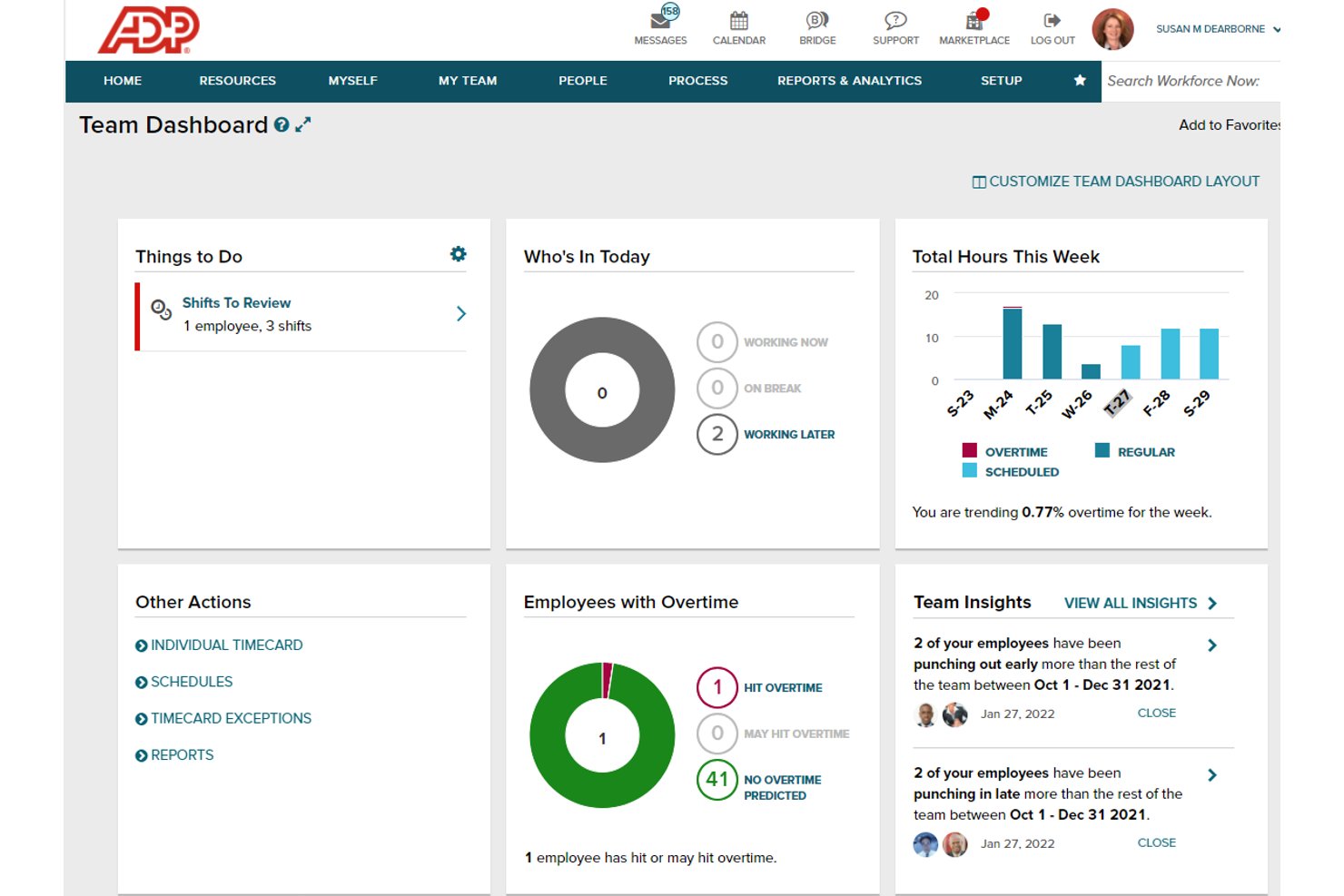
ADP è una piattaforma HCM che combina rilevazione delle presenze dei dipendenti, calcolo automatizzato delle ore lavorate, monitoraggio delle assenze, applicazione delle normative sul lavoro e sincronizzazione nativa delle paghe per organizzazioni di medie e grandi dimensioni.
Per chi è ADP?
ADP è ideale per organizzazioni di medie e grandi dimensioni che già gestiscono le paghe tramite ADP e desiderano integrare la rilevazione delle ore lavorative nello stesso sistema.
Perché ho scelto ADP
Ho scelto ADP come uno dei migliori perché è l'unico strumento in questa lista che rappresenta il sistema di gestione paghe stesso, non solo una soluzione che si collega ad esso. Le ore registrate confluiscono direttamente nei calcoli delle buste paga, con regole sugli straordinari e politiche per le festività applicate automaticamente in base al contratto di ogni dipendente. Non è necessario alcun passaggio di riconciliazione tra i dati sulle ore lavorate e la retribuzione, perché entrambi risiedono nello stesso database.
Funzionalità principali di ADP
- Rilevamento delle ore tramite app mobile: I dipendenti timbrano in entrata e in uscita utilizzando l'app mobile ADP con GPS e geofencing.
- Orologi fisici e chioschi: Supporta badge, impronta digitale e riconoscimento facciale per la presenza in sede.
- Monitoraggio presenze e assenze: I responsabili visualizzano i dati di presenza in tempo reale e gestiscono ferie, permessi e assenze per malattia in un unico sistema.
- Politiche di conformità automatizzate: Applicazione integrata delle regole sugli straordinari, sulle pause e delle normative canadesi sulle festività.
Integrazioni ADP
ADP offre integrazioni native con Sage, Xero, Workday, QuickBooks, Ashby, Flexspring, Chekr, Stream e altri ancora. È disponibile un'API per integrazioni personalizzate.
Pros and Cons
Pros:
- Sincronizzazione diretta con i calcoli paghe ADP
- Politiche avanzate per straordinari e festività nazionali
- Varie modalità di rilevazione presenze: app, chioschi, orologi
Cons:
- Nessun monitoraggio delle ore a livello di progetto o attività
- Personalizzazione dei report limitata e poco intuitiva
Altri software per il monitoraggio del tempo
Ecco alcune opzioni aggiuntive di software per il monitoraggio del tempo che non sono entrate nel mio elenco ristretto, ma che vale comunque la pena prendere in considerazione:
- Paycor
Ideale per strumenti di pianificazione dinamici
- Deel HRIS
Ideale per la supervisione globale della forza lavoro
- Homebase
Ideale per la gestione dei turni delle piccole imprese
- TriNet
Ideale per la connettività integrata delle buste paga
- Justworks Hours
Ideale per il monitoraggio orario unificato
- Factorial
Ideale per l'automazione di PTO e assenze
- TimeClock Plus
Ideale per opzioni di timbratura personalizzabili
- Workday HCM
Ideale per la gestione della forza lavoro mobile-first
- Replicon
Ideale per il monitoraggio delle ore su base progetto
- SAP SuccessFactors Time Tracking
Ideale per le capacità di conformità globale


Come Valuto i Software di Monitoraggio del Tempo
Suddivido la mia valutazione tra le fondamenta principali—approvazione dei fogli ore, sincronizzazione con le buste paga—e fattori differenzianti come la segmentazione delle ore fatturabili e il monitoraggio dell’esaurimento del budget che distinguono i migliori strumenti dal resto.
Funzionalità Principali (Requisiti Minimi per Questa Lista)
Quando seleziono gli strumenti per la mia lista, li valuto su una scala da 0 (non offre la funzionalità) a 5 (eccelle in questa area) per ciascuna delle funzionalità di base elencate di seguito. Poi converto il punteggio totale di ogni strumento in una percentuale. Ogni strumento deve raggiungere un punteggio minimo del 65% per essere preso in considerazione.
- Rilevamento Orario dei Dipendenti: Cerco diversi metodi di timbratura—mobile, timer da desktop, modalità chiosco—così i team sul campo e in ufficio possono registrare le ore in base al loro flusso di lavoro.
- Gestione dei Fogli Ore: Qui è importante il flusso di approvazione da parte dei responsabili, soprattutto l’approvazione multilivello in cui sia il team leader che un direttore devono dare il consenso prima dell’elaborazione delle buste paga.
- Integrazione con le Buste Paga: Verifico se le ore registrate si sincronizzano nativamente con piattaforme salariali come ADP o Gusto, invece di richiedere l’esportazione manuale di file CSV a ogni ciclo paga.
- Monitoraggio Presenze e Assenze: Gli strumenti dovrebbero unificare saldi di ferie, registri delle assenze e ore lavorate in una sola schermata, così il reparto HR non deve gestire sistemi separati per ciascuno.
- Controlli di Conformità al Lavoro: Valuto quanto bene la piattaforma gestisce le regole sugli straordinari e i requisiti delle pause in diverse giurisdizioni senza dover effettuare configurazioni manuali costanti.
- Reportistica e Analisi: Dashboard personalizzati e report esportabili su costi del lavoro, tendenze di presenza e ore per progetto forniscono a HR e finanza i dati realmente necessari.
Una volta raccolta una lista di strumenti che soddisfano questi criteri, valuto cosa distingue ciascuna piattaforma dalle altre.
Fattori Differenzianti (Cosa Distingue i Fornitori)
Ecco come confronto e metto in evidenza i diversi fornitori:
Funzionalità Distintive
La segmentazione tra ore fatturabili e non è un importante elemento di differenziazione. Cerco strumenti che assegnino automaticamente le ore in base a cliente, tipo di attività e fase di progetto, così la fatturazione resta precisa senza dover aggiustare manualmente i dati. Il monitoraggio di retainers e budget è fondamentale in questo contesto, poiché offre ai PM una visione aggiornata dell’utilizzo del budget prima che un progetto sfori il preventivo. Valuto anche l’automazione dei fogli ore, come la compilazione automatica delle voci da eventi di calendario o attività in Jira, che riduce il tempo che i PM devono spendere per sollecitare le consegne.
Oltre le Funzionalità
L’integrazione con la propria infrastruttura tecnica è fondamentale. Controllo se uno strumento si connette nativamente a piattaforme di project management come Asana o Jira e se si sincronizza in modo bidirezionale con strumenti di contabilità come QuickBooks o Xero. L’idoneità per agenzie è un altro fattore chiave—gli strumenti progettati per strutture multi-cliente o multi-progetto con tariffe differenti gestiscono molto meglio i flussi reali delle agenzie rispetto ai tracker generici. Esamino anche la profondità della reportistica, in particolare se è possibile ottenere viste sulla redditività a livello di progetto e cliente senza dover esportare i dati grezzi in uno strumento BI separato.
Come scegliere il software per il monitoraggio del tempo
È facile perdersi tra lunghi elenchi di funzionalità e strutture tariffarie complesse. Per aiutarti a rimanere concentrato mentre affronti il tuo particolare processo di selezione del software, ecco un elenco dei fattori da tenere presenti:
| Fattore | Cosa considerare |
|---|---|
| Scalabilità | Lo strumento sarà in grado di gestire la crescita del numero di dipendenti, i nuovi reparti e il cambiamento della struttura dei progetti man mano che l'azienda si espande? |
| Integrazioni | Può collegarsi ai tuoi attuali sistemi di gestione dei progetti, elaborazione delle paghe e fatturazione senza soluzioni alternative? |
| Personalizzazione | Ti consente di adattare i flussi di approvazione, i report o le etichette dei progetti al modo in cui lavora il tuo team? |
| Facilità d'uso | Con quale facilità i responsabili di progetto e i dipendenti possono registrare e approvare le ore su qualsiasi dispositivo e quanto è ripida la curva di apprendimento? |
| Implementazione e avvio | Quale supporto — formazione, guide, assistenza in tempo reale — offre il fornitore per fare in modo che tutti utilizzino correttamente il sistema? |
| Costo | Quanto sono prevedibili i costi con l'aumento dell'utilizzo? Fai attenzione ai costi per utente, ai sovrapprezzi per i moduli o alle tariffe per le integrazioni. |
| Misure di sicurezza | Sono presenti protezioni dei dati come la conformità SOC 2 o GDPR e puoi impostare controlli utente per le informazioni sensibili? |
| Requisiti di conformità | La piattaforma applicherà le norme sul lavoro straordinario, sulle pause e sul lavoro locali per ogni area geografica e ruolo che gestisci? |
Che cos'è il software per il monitoraggio del tempo?
Il software per il monitoraggio del tempo è una categoria di strumenti progettati per aiutare i team che gestiscono progetti digitali a registrare le ore lavorate, gestire i fogli presenze e monitorare le presenze ai fini dell'elaborazione delle paghe, della conformità e dell'analisi della produttività. Queste piattaforme semplificano i flussi di approvazione, si collegano ai sistemi di elaborazione delle paghe e supportano i flussi di lavoro delle agenzie con strutture basate su più clienti e progetti.
Funzionalità del software per il monitoraggio del tempo
Quando scegli un software per il monitoraggio del tempo, presta attenzione alle seguenti funzionalità principali:
- Rilevazione delle ore dei dipendenti: consente ai dipendenti di registrare le ore tramite timer, inserimento manuale o strumenti di entrata/uscita su diversi dispositivi, così la raccolta dei dati si adatta a qualsiasi modalità di lavoro.
- Gestione dei fogli presenze: fornisce fogli presenze strutturati con flussi di revisione, modifica e approvazione, garantendo registrazioni accurate per l'elaborazione delle buste paga e la conformità normativa.
- Integrazione con le buste paga: collega direttamente le ore registrate alle piattaforme di gestione delle buste paga o HRIS, automatizzando i calcoli delle retribuzioni e riducendo il lavoro manuale a ogni elaborazione.
- Monitoraggio delle presenze e dei congedi: registra presenze, PTO e richieste di congedo insieme alle ore lavorate, offrendo ai team HR una visione unificata di tutti i dati relativi al tempo.
- Controlli di conformità del lavoro: applica le regole relative a pause, straordinari e normative sul lavoro specifiche delle diverse giurisdizioni, con criteri che segnalano automaticamente le non conformità per la revisione.
- Report e analisi: offre report e dashboard personalizzabili sulle ore lavorate, le presenze, i costi del lavoro e la produttività, supportando decisioni più efficaci sulla forza lavoro.
- Segmentazione tra attività fatturabili e non fatturabili: classifica le registrazioni del tempo per cliente, attività o stato di fatturabilità, migliorando la determinazione dei costi dei progetti e la fatturazione ai clienti.
- Previsione delle risorse: utilizza il tempo registrato per aiutare i project manager a prevedere il fabbisogno di risorse, evitare sovrapposizioni e pianificare i carichi di lavoro futuri sulla base di dati reali.
- Supporto per più clienti e progetti: organizza le registrazioni del tempo per clienti e progetti diversi, offrendo ad agenzie e PMO una visibilità chiara sull'allocazione del tempo e sulla redditività.
- Automazione e promemoria dei fogli presenze: compila automaticamente i fogli presenze a partire dagli eventi del calendario o dalle attività dei task e ricorda agli utenti di inviare le registrazioni completate, riducendo le attività amministrative di follow-up.
Funzionalità comuni di intelligenza artificiale nei software di rilevazione del tempo
Oltre alle funzionalità standard dei software di rilevazione del tempo elencate sopra, molte di queste soluzioni integrano l'intelligenza artificiale con funzionalità come:
- Suggerimenti automatici per i fogli presenze: l'intelligenza artificiale analizza eventi del calendario, e-mail e attività dei progetti per suggerire le registrazioni del tempo, riducendo gli inserimenti manuali e le ore non registrate.
- Rilevamento delle anomalie: l'intelligenza artificiale segnala schemi insoliti nelle ore registrate o nelle presenze, aiutando i manager a individuare rapidamente errori, frodi o rischi di non conformità.
- Allocazione predittiva delle risorse: l'intelligenza artificiale prevede il futuro fabbisogno di personale e i potenziali colli di bottiglia analizzando i dati storici dei progetti e i carichi di lavoro attuali.
- Avvisi intelligenti sugli straordinari: l'intelligenza artificiale monitora i modelli di lavoro e informa proattivamente manager e dipendenti sui potenziali straordinari o sulle violazioni della normativa sul lavoro prima che si verifichino.
- Inserimento del tempo in linguaggio naturale: l'intelligenza artificiale consente agli utenti di registrare il tempo utilizzando il linguaggio colloquiale, rendendo più rapida e intuitiva la registrazione delle attività lavorative.
Vantaggi dei software di rilevazione del tempo
L'implementazione di un software di rilevazione del tempo offre diversi vantaggi al team e all'azienda. Ecco alcuni dei benefici che si possono ottenere:
- Elaborazione accurata delle buste paga: la rilevazione automatica del tempo e le integrazioni con i sistemi paghe riducono gli errori manuali e garantiscono pagamenti puntuali.
- Conformità della forza lavoro: i controlli integrati sulla normativa del lavoro aiutano ad applicare i requisiti relativi a straordinari, pause e specificità regionali, riducendo al minimo i rischi legali.
- Analisi della redditività dei progetti: la segmentazione delle attività fatturabili, il monitoraggio del budget e i report basati sui ruoli mostrano quali clienti, team o progetti generano i migliori rendimenti.
- Ottimizzazione delle risorse: le previsioni sulle risorse e le analisi guidano una migliore assegnazione dei membri del team e prevengono il sovraccarico o il burnout.
- Riduzione del carico amministrativo: i promemoria automatici per i fogli presenze, i processi di approvazione ottimizzati e i dati precompilati fanno risparmiare tempo a project manager e dipendenti.
- Maggiore visibilità sui dati: dashboard unificate riuniscono presenze, ore, PTO e metriche dei progetti per decisioni più rapide.
- Maggiore trasparenza verso i clienti: i report pronti per i clienti facilitano la condivisione con gli stakeholder di dettagli personalizzati con il brand sulle ore e sui costi.
Costi e prezzi dei software di rilevazione del tempo
La scelta di un software di rilevazione del tempo richiede la comprensione dei diversi modelli e piani tariffari disponibili. I costi variano in base alle funzionalità, alle dimensioni del team, ai componenti aggiuntivi e ad altri fattori. La tabella seguente riassume i piani più comuni, i relativi prezzi medi e le funzionalità tipicamente incluse nelle soluzioni software di rilevazione del tempo:
Tabella comparativa dei piani per i software di rilevazione del tempo
| Tipo di piano | Prezzo medio | Funzionalità comuni |
|---|---|---|
| Piano gratuito | $0 | Strumenti di base per l'inserimento delle ore, reportistica limitata e limiti restrittivi per progetti o utenti. |
| Piano personale | $5-$10/user/month | Fogli presenze individuali, accesso mobile, opzioni di esportazione di base e risorse di supporto autonomo. |
| Piano aziendale | $10-$25/user/month | Approvazione dei fogli presenze del team, integrazioni con i sistemi paghe, monitoraggio delle ferie, reportistica sui costi dei progetti e sincronizzazione con gli strumenti di gestione dei progetti. |
| Piano per grandi aziende | $25-$45/user/month | Analisi avanzate, flussi di lavoro personalizzati, avvio dedicato, opzioni di sicurezza e supporto per le esigenze di conformità. |
Domande frequenti sul software di monitoraggio del tempo
Ecco alcune risposte alle domande comuni sul software di monitoraggio del tempo: