

10 migliori strumenti alternativi a FreshBooks per la contabilità nel 2026

Elenco ristretto delle migliori alternative a FreshBooks


FreshBooks è un noto software di contabilità che aiuta le aziende a gestire la fatturazione, i pagamenti, le spese, i progetti, il monitoraggio del tempo e le attività di base relative alle paghe. Sebbene sia una soluzione valida, potresti valutare altre alternative a FreshBooks a causa di esigenze specifiche relative alle funzionalità, alle opzioni di personalizzazione o ai costi. In questo articolo ti presenterò i miei consigli per le migliori alternative a FreshBooks, per aiutarti a gestire le tue attività contabili con facilità.
Che cos'è FreshBooks?
FreshBooks è un software di contabilità progettato per aiutare i titolari di piccole imprese e i liberi professionisti a gestire le proprie finanze. Tra gli utenti tipici rientrano imprenditori, liberi professionisti e lavoratori autonomi che devono monitorare le spese, inviare fatture e gestire i propri registri finanziari.
Perché fidarsi delle nostre recensioni sui software
Il nostro team testa e recensisce software dal 2012. In quanto esperti HR noi stessi, sappiamo quanto sia difficile — e importante — scegliere il software giusto.
Per questa guida, abbiamo valutato gli strumenti attraverso test pratici e ricerche indipendenti, assegnando un punteggio agli strumenti in base ai nostri criteri di selezione. Ci basiamo inoltre sulle competenze di leader di pensiero del settore e di professionisti HR attivi.
Le nostre recensioni riflettono il nostro giudizio editoriale umano, non un discorso di vendita.
Revisori esperti:
Le migliori alternative a FreshBooks: tabella comparativa dei prezzi
Questa tabella comparativa riassume i dettagli sui prezzi delle mie migliori alternative a FreshBooks, per aiutarti a trovare il software più adatto al tuo budget e alle esigenze della tua azienda.
| Tool | Best For | Trial Info | Price | ||
|---|---|---|---|---|---|
| 1 | Ideale per l'integrazione precisa tra rilevazione ore e paghe | Prova gratuita di 30 giorni + demo gratuita disponibile | Da $50/mese | Website | |
| 2 | Ideale per strumenti integrati di gestione stipendi e contabilità | Prova gratuita di 30 giorni disponibile | Da $8.50/mese + $2/dipendente | Website | |
| 3 | Ideale per l'elaborazione di pagamenti online | Non disponibile | A partire da 2,9% + 30¢/transazione | Website | |
| 4 | Ideale per la contabilità delle piccole imprese | Prova gratuita di 30 giorni disponibile | Da $2.50/mese | Website | |
| 5 | Ideale per una contabilità accessibile | Prova gratuita di 30 giorni + piano gratuito disponibile | Da $15/mese | Website | |
| 6 | Ideale per la contabilità automatica | Prova gratuita di 14 giorni disponibile | Da $30/mese | Website | |
| 7 | Ideale per la gestione dell'inventario | Prova gratuita di 30 giorni + demo gratuita disponibile | Da $20/mese | Website | |
| 8 | Ideale per aziende basate su progetti | Demo gratuita disponibile | Prezzi su richiesta | Website | |
| 9 | Ideale per la fatturazione online | Prova gratuita di 14 giorni disponibile | A partire da $16/mese (fatturato annualmente) | Website | |
| 10 | Ideale per strumenti di fatturazione e contabilità gratuiti | Piano gratuito disponibile | Da $16/utente/mese | Website |
Recensioni delle migliori alternative a FreshBooks
Di seguito trovi riepiloghi approfonditi delle mie raccomandazioni per le migliori alternative a FreshBooks. Ti illustrerò i pro e i contro di ogni strumento, le relative funzionalità e i casi d’uso ideali, per aiutarti a trovare la soluzione più adatta alle tue esigenze.

TimeTrex
Ideale per l'integrazione precisa tra rilevazione ore e paghe

TimeTrex offre una piattaforma unificata per la gestione della forza lavoro che combina strumenti per la rilevazione presenze, pianificazione turni, gestione paghe e HR — una soluzione particolarmente utile se gestisci un'attività con personale orario, lavoro a turni o pianificazioni variabili. Se il tuo team alterna turni, timbrature da remoto o opera su più sedi, TimeTrex ti aiuta a monitorare le ore, gestire le paghe e garantire la conformità senza dover utilizzare sistemi separati.
Perché ho scelto TimeTrex
Ho scelto TimeTrex perché collega in modo integrato il monitoraggio presenze in tempo reale con la gestione delle paghe e dei turni, adattandosi perfettamente ai team con orari flessibili o personale distribuito. Il suo sistema di registrazione ore basato su regole — inclusi timbratura biometrica, rilevazione tramite app/mobile o terminali, e geolocalizzazione/geofence — si collega direttamente al calcolo delle paghe, evitando la necessità di trasferire manualmente le ore ai cedolini. Inoltre, il modulo di pianificazione gestisce l'assegnazione dei turni, le richieste di permesso e la copertura tramite calendario, assicurandoti sempre il personale necessario senza sovrappopolare i turni.
Funzionalità principali di TimeTrex
Oltre a queste capacità fondamentali, troverai le seguenti funzionalità particolarmente rilevanti se cerchi una vera alternativa a FreshBooks dotata di una robusta gestione della forza lavoro:
- Rilevazione presenze mobile e timbrature: I dipendenti possono registrare le ore tramite browser web, app mobile o terminali biometrici, permettendo allo staff remoto o in trasferta di timbrare ovunque si trovino.
- Geolocalizzazione e geofence: Puoi richiedere che le timbrature avvengano solo entro determinati confini geografici, garantendo che il personale mobile o remoto registri l'orario solo quando effettivamente sul posto di lavoro.
- Attribuzione costi e fatturazione lavori/progetti: Assegna ore e costi di manodopera a specifici progetti o commesse — generando poi in automatico le fatture per i clienti sulla base delle ore effettivamente lavorate.
- Reportistica e analisi dettagliate: Crea report completi su presenze, costi del lavoro, turni e dati paghe per monitorare le metriche della forza lavoro e prendere decisioni guidate dai dati.
Integrazioni TimeTrex
TimeTrex offre integrazioni API personalizzate per collegamenti software senza soluzione di continuità.
Pros and Cons
Pros:
- Timbrature biometriche e geofence riducono i rischi di frodi sulle presenze o 'timbrature di favore'.
- Motore paghe integrato che collega le ore lavorate alle buste paga, gestendo detrazioni, pignoramenti e bonifici bancari.
- Accesso tramite app mobile che consente ai dipendenti di timbrare l’ingresso/uscita o richiedere permessi ovunque si trovino.
Cons:
- La versione gratuita/open-source non offre supporto ufficiale (ad esempio: app mobile, assistenza diretta).
- Esperienza utente meno raffinata rispetto agli strumenti specifici per contabilità o fatturazione.
New Product Updates from TimeTrex
TimeTrex Adds Quick Punch App With Offline and QR Support
TimeTrex adds a new Quick Punch app, offline punching, QR code scanning, punch images, configurable messages, and punch warnings or lockouts to improve employee clock-ins across browsers and local computers. For more information, visit TimeTrex’s official site.
 .
.
Ideale per strumenti integrati di gestione stipendi e contabilità
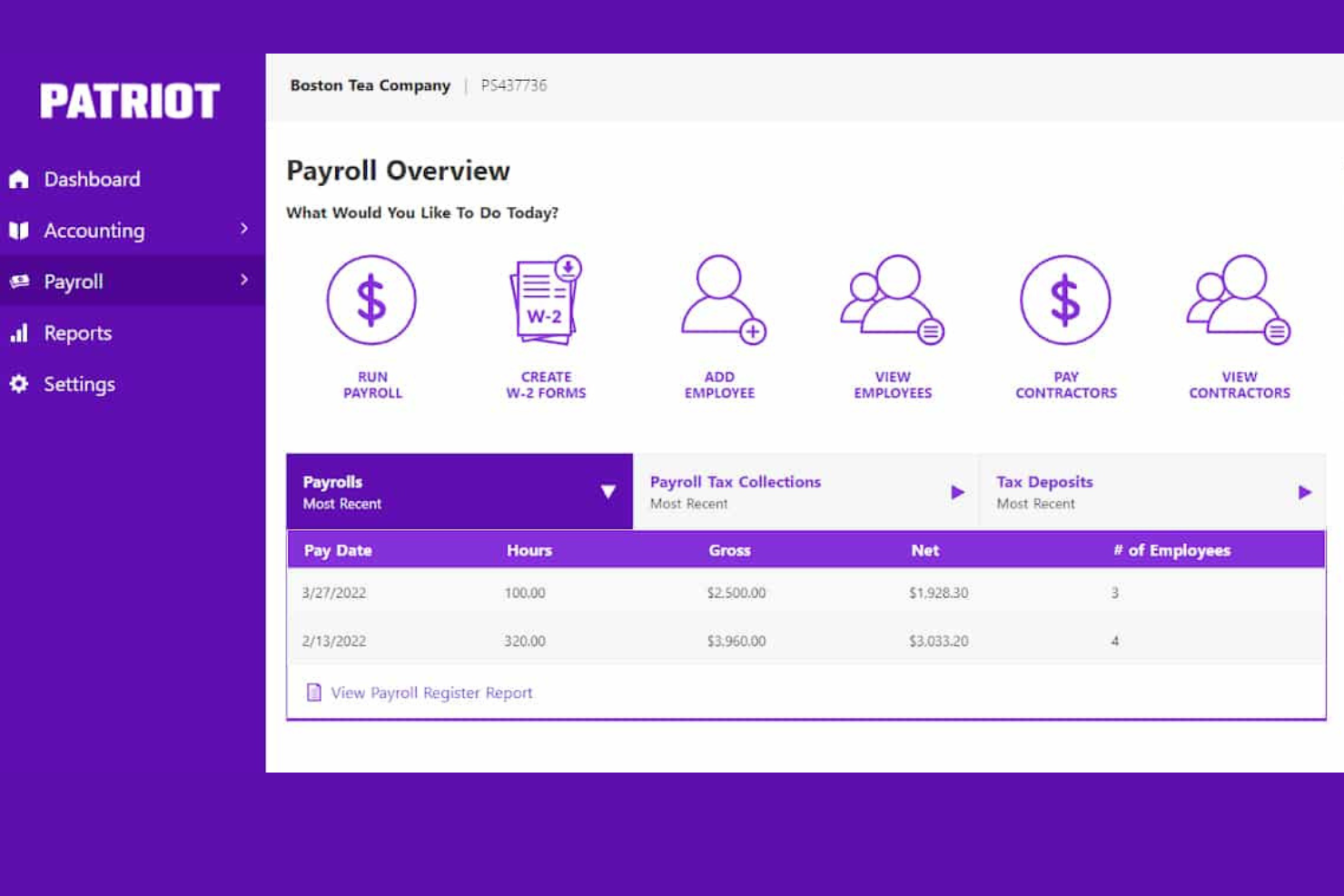
Patriot Software offre software per la gestione di stipendi e contabilità convenienti e facili da usare, modulari e progettati appositamente per le piccole e medie imprese con sede negli Stati Uniti.
Perché è una buona alternativa a FreshBooks: Patriot e FreshBooks offrono entrambi software modulari per la gestione di stipendi e contabilità. Tuttavia, mettendo a confronto i due prodotti, Patriot si distingue per i prezzi contenuti e l'assistenza clienti con sede negli USA. È accessibile e semplice da utilizzare grazie alla sua flessibilità e all'interfaccia utente intuitiva, risultando ideale per piccole imprese senza contabili dedicati.
Funzionalità e integrazioni principali:
Funzionalità includono configurazione gratuita della gestione stipendi, assistenza clienti con sede negli USA, elaborazioni stipendio illimitate, tariffe salariali flessibili, bonifico diretto gratuito in 2 giorni e un semplice processo in tre passaggi per l'esecuzione della busta paga, configurazione gratuita e assistenza con sede negli Stati Uniti.
Inoltre, il software Payroll di Patriot si integra con Patriot Accounting per offrire una suite completa di soluzioni software facilmente paragonabili a FreshBooks.
Integrazioni includono Patriot Accounting, QuickBooks Online, QuickBooks Time, Plaid e Workforce Time & Attendance.
Pros and Cons
Pros:
- Strumenti di contabilità integrati
- Puoi pagare dipendenti o collaboratori
- Assistenza clienti reattiva
Cons:
- Disponibile solo per aziende con sede negli Stati Uniti
- I moduli Payroll e Accounting di Patriot vengono venduti separatamente

Stripe
Ideale per l'elaborazione di pagamenti online

Stripe è una piattaforma completa per l'elaborazione dei pagamenti progettata per gestire transazioni online. Offre funzionalità avanzate che supportano un'ampia gamma di metodi di pagamento e valute, rendendola ideale per le aziende che operano sul mercato globale.
Perché è una buona alternativa a FreshBooks: Ho scelto Stripe per questa lista perché offre capacità di elaborazione dei pagamenti estese che possono completare le funzionalità di fatturazione e contabilità di FreshBooks. Stripe si distingue come valida alternativa a FreshBooks perché gestisce diversi metodi di pagamento, tra cui carte di credito, bonifici ACH e pagamenti internazionali, che possono essere integrati nel flusso finanziario di un'azienda.
Funzionalità e integrazioni principali:
Le funzionalità includono moduli di checkout personalizzabili, strumenti per la prevenzione delle frodi e supporto per l'elaborazione dei pagamenti in oltre 135 valute. Inoltre, Stripe offre il calcolo e la rendicontazione automatica delle tasse, facilitando la gestione degli obblighi fiscali aziendali.
Le integrazioni includono QuickBooks Online, NetSuite, Xero, FreshBooks, Shopify, WooCommerce, Magento, BigCommerce, Salesforce e Zapier.
Pros and Cons
Pros:
- Supporta una vasta gamma di metodi di pagamento e valute
- Strumenti avanzati per la prevenzione delle frodi
- Calcolo e rendicontazione automatica delle tasse
Cons:
- Le commissioni possono aumentare in caso di transazioni ad alto volume
- Configurazione complessa per utenti non tecnici

Xero
Ideale per la contabilità delle piccole imprese
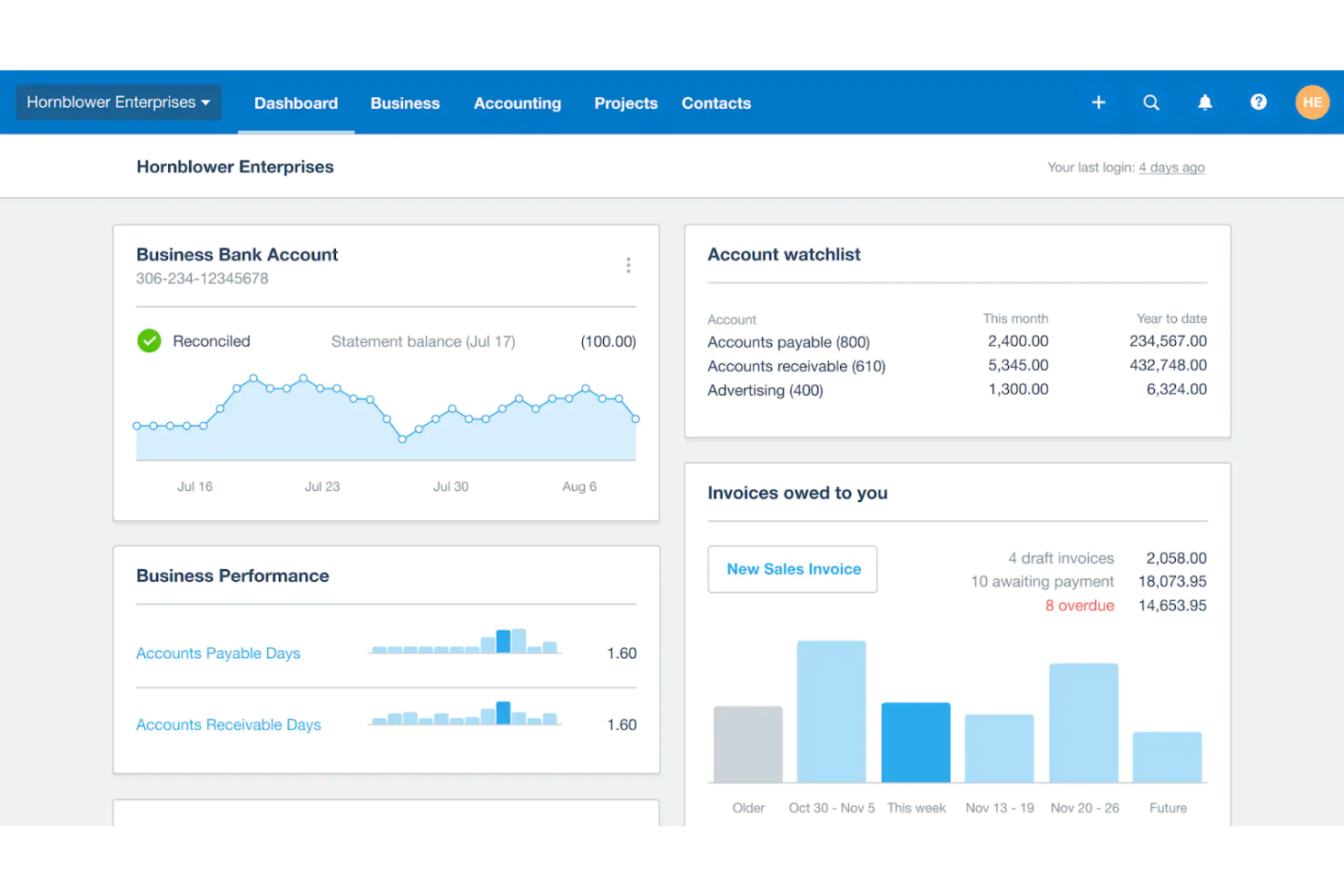
Xero è un software di contabilità online progettato per aiutare le piccole imprese a gestire le proprie finanze in modo efficiente. Offre strumenti completi pensati per soddisfare le esigenze uniche delle piccole aziende, garantendo una gestione finanziaria semplice e conforme alle normative.
Perché è una valida alternativa a FreshBooks: Ho scelto Xero per le sue ampie funzionalità contabili di cui le piccole imprese hanno bisogno. Il suo ricco set di funzionalità e l'interfaccia facile da usare lo rendono un'opzione di rilievo per chi cerca un'alternativa solida a FreshBooks.
Funzionalità e integrazioni principali:
Le funzionalità includono fatturazione, monitoraggio delle spese e riconciliazione bancaria. Offre anche la gestione delle buste paga e strumenti di reportistica finanziaria che semplificano i compiti contabili complessi per i titolari di piccole imprese.
Le integrazioni includono Stripe, PayPal, Gusto, HubSpot, Shopify, Square, GoCardless, Expensify, Bill.com e Salesforce.
Pros and Cons
Pros:
- Funzionalità contabili complete
- Supporto per utenti illimitati
- Solide integrazioni con strumenti popolari
Cons:
- Può essere costoso per imprese molto piccole
- Opzioni di assistenza clienti limitate

ZipBooks
Ideale per una contabilità accessibile

ZipBooks è uno strumento di contabilità e tenuta dei registri facile da usare, progettato per semplificare la gestione finanziaria delle piccole imprese. È ideale per una contabilità accessibile grazie alla sua interfaccia intuitiva e alle funzionalità automatizzate che riducono il tempo dedicato alle attività quotidiane.
Perché è una buona alternativa a FreshBooks: Ho scelto ZipBooks per questa lista perché offre un'esperienza d'uso semplice e intuitiva, rendendo facile per gli utenti gestire la propria contabilità senza una conoscenza approfondita della materia. Le funzionalità automatizzate e le analisi intelligenti lo rendono un valido concorrente di FreshBooks.
Funzionalità principali e integrazioni:
Le funzionalità includono fatturazione, monitoraggio dei pagamenti, fatturazione automatica, analisi intelligenti, rilevazione dei tempi, gestione del team e contabilità da mobile. Gli utenti possono anche collegare i propri conti bancari e carte di credito per una gestione più intelligente delle transazioni.
Le integrazioni includono PayPal, Stripe, Square, Gusto, Slack, Google Drive, Google Sheets, Trello, Asana e QuickBooks.
Pros and Cons
Pros:
- Interfaccia intuitiva e facile da usare
- Fatturazione automatica e monitoraggio dei pagamenti
- Analisi e report intelligenti
Cons:
- Funzionalità avanzate limitate per aziende di grandi dimensioni
- I tempi di risposta dell'assistenza clienti possono variare

Kashoo
Ideale per la contabilità automatica
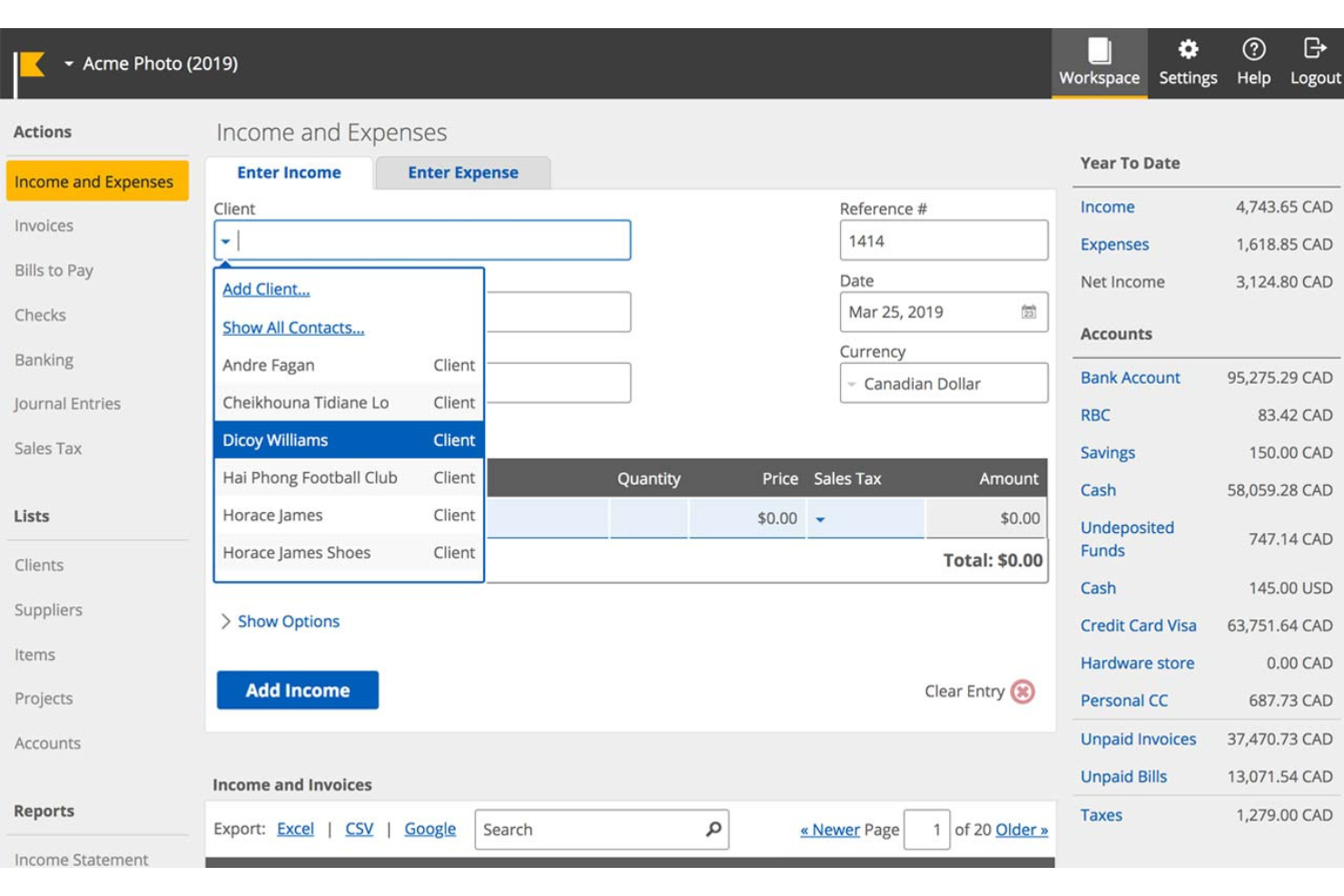
Kashoo è un software di contabilità progettato per automatizzare la registrazione di entrate e spese per le piccole imprese. È ideale per la contabilità automatica poiché elimina compiti ridondanti e inserimenti manuali, permettendo agli utenti di collegare i propri conti bancari e lasciare che il software gestisca tutto il resto.
Perché è una buona alternativa a FreshBooks: Ho scelto Kashoo per questa lista perché offre un alto livello di automazione che può far risparmiare molto tempo ai titolari di piccole imprese. La sua capacità di categorizzare automaticamente le spese e riconciliare i conti lo rende un forte concorrente per chi desidera semplificare i processi contabili.
Funzionalità principali e integrazioni:
Le funzionalità comprendono la contabilità automatizzata, il monitoraggio di entrate e spese e la reportistica personalizzabile per bilanci, stati patrimoniali, crediti e debiti, e altro ancora. Il software supporta anche transazioni in più valute e offre una dashboard visiva per una supervisione finanziaria semplificata.
Le integrazioni includono Stripe, PayPal, Square, FreshBooks, QuickBooks, Xero, Gusto, Hubdoc, Expensify e Zapier.
Pros and Cons
Pros:
- Automazione delle spese
- Supporto multivaluta
- Reportistica personalizzabile
Cons:
- Funzionalità avanzate limitate rispetto ad alcuni concorrenti
- Integrazioni limitate con terze parti rispetto alle piattaforme più grandi

ZarMoney
Ideale per la gestione dell'inventario
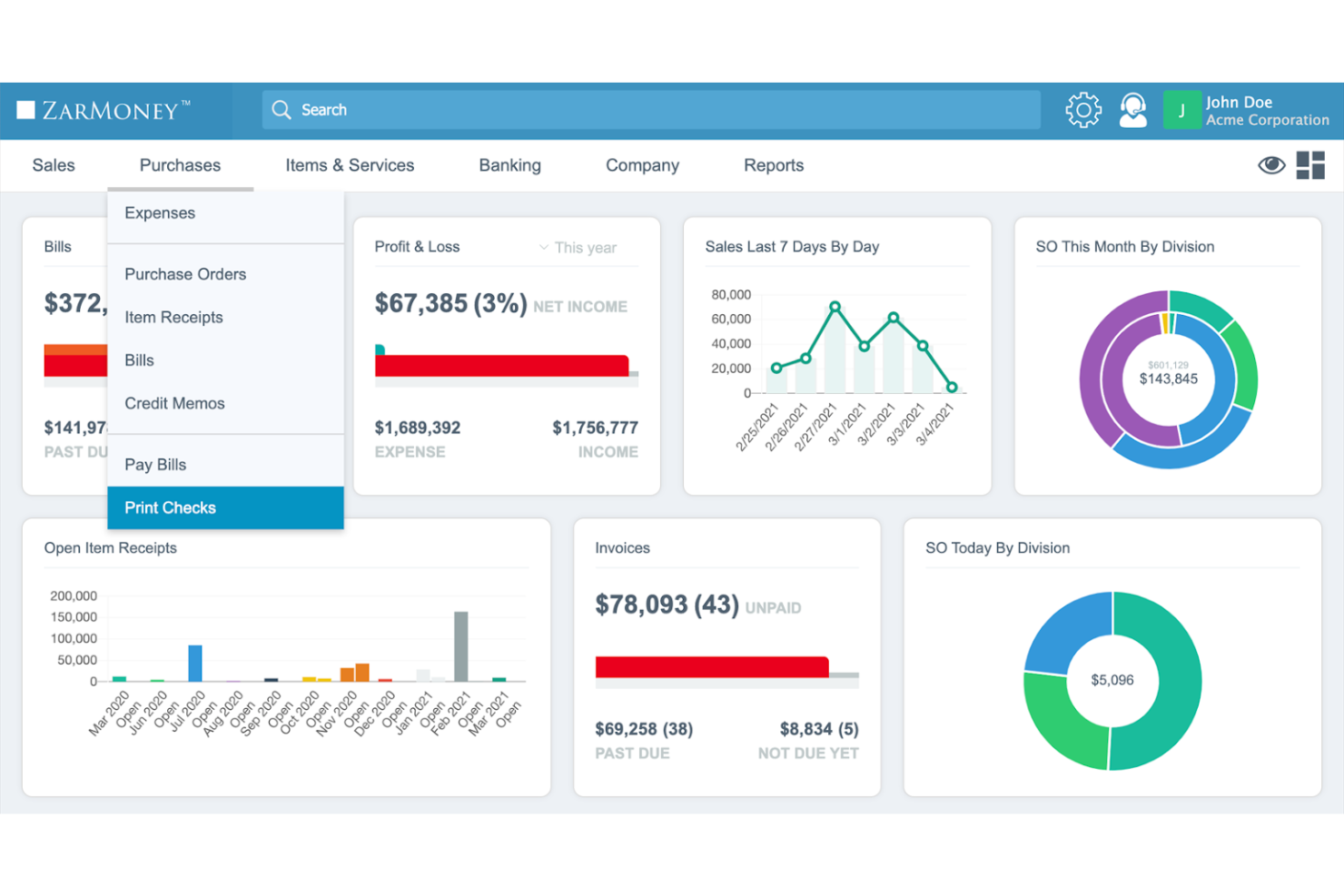
ZarMoney è una soluzione completa per la contabilità, la fatturazione e la gestione dell'inventario. Fornisce una visibilità totale sull'inventario globale, rendendola ideale per le aziende che necessitano di una gestione dell'inventario solida.
Perché è una valida alternativa a FreshBooks: Ho scelto ZarMoney per le sue avanzate capacità di gestione dell'inventario, che spiccano rispetto a FreshBooks. Le funzionalità avanzate in ambito inventario, tra cui il supporto per più sedi e l'analisi predittiva, la rendono una scelta interessante per le imprese con esigenze complesse di gestione delle scorte.
Caratteristiche principali e integrazioni:
Le funzionalità includono la gestione avanzata dell'inventario, pagamenti online, collegamenti con le banche, preventivi e stime, ordini di acquisto, automazione delle imposte sulle vendite e reportistica dettagliata. Queste caratteristiche aiutano a razionalizzare i processi finanziari e a migliorare il flusso di cassa.
Le integrazioni includono Stripe, PayPal, QuickBooks Online, Xero, Shopify, WooCommerce, Amazon, eBay, Square e Google Drive.
Pros and Cons
Pros:
- Gestione dell'inventario completa
- Supporta più sedi e magazzini
- Capacità di reportistica avanzata
Cons:
- Potrebbe essere troppo complesso per le aziende molto piccole
- Opzioni di personalizzazione limitate per alcune funzionalità
BQE Core
Ideale per aziende basate su progetti
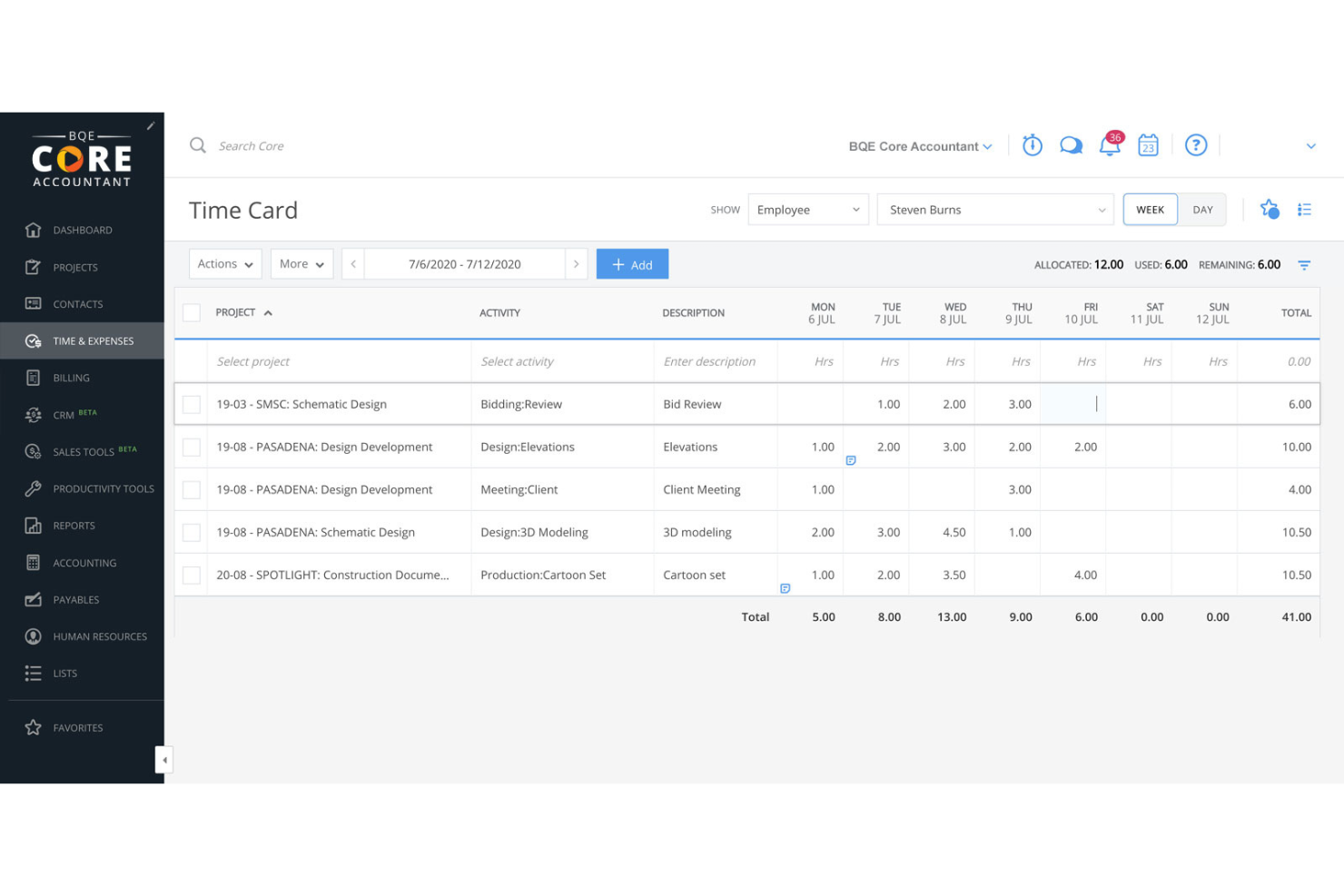
BQE Core è un software tutto-in-uno per la contabilità e la fatturazione dedicato a studi professionali che lavorano su progetti, come quelli di architettura, ingegneria e servizi professionali. Si distingue per le sue complete funzionalità di gestione progetto e contabilità che semplificano le operazioni e migliorano i risultati dei progetti.
Perché è una buona alternativa a FreshBooks: Ho scelto BQE Core per questa lista grazie alla sua gamma di strumenti pensati per le aziende basate su progetti, che lo rendono un concorrente di FreshBooks. Le sue capacità di gestione progetto e contabilità offrono approfondimenti dettagliati e automazioni in grado di aumentare efficienza e redditività.
Funzionalità e integrazioni principali:
Le funzionalità includono gestione dei progetti, contabilità, reportistica e analisi, rilevazione di tempi e spese, gestione dei pagamenti e automazione dei servizi professionali. Queste funzionalità forniscono informazioni in tempo reale e semplificano i processi complessi, rendendo la gestione dello studio più agile e orientata ai dati.
Le integrazioni includono QuickBooks, MYOB, Dropbox, Google Drive, OneDrive, Box, Microsoft Outlook, Slack, Salesforce e HubSpot.
Pros and Cons
Pros:
- Strumenti completi di gestione progetto
- Visibilità KPI in tempo reale e report automatici
- Dashboard personalizzabili e approfondimenti dettagliati
Cons:
- La modifica delle fatture non è intuitiva
- Può essere dispendioso in termini di tempo da apprendere

Hiveage
Ideale per la fatturazione online

Hiveage è una piattaforma di fatturazione online che semplifica la gestione delle fatture per piccole imprese e liberi professionisti. Offre un'interfaccia intuitiva e funzionalità di fatturazione complete, pensate per soddisfare le esigenze delle attività online.
Perché è una buona alternativa a FreshBooks: Ho scelto Hiveage per questa lista perché propone una soluzione di fatturazione semplice e intuitiva, ideale per le piccole imprese. La sua piattaforma basata su cloud garantisce l’accessibilità da qualsiasi dispositivo, rendendola una scelta versatile per imprenditori sempre in movimento.
Funzionalità e integrazioni salienti:
Le funzionalità includono creazione di fatture, preventivi, gateway di pagamento, report finanziari, fatturazione ricorrente, monitoraggio del tempo, delle spese e delle distanze percorse. Queste caratteristiche la rendono uno strumento completo per la gestione delle finanze di una piccola impresa.
Le integrazioni includono PayPal, Stripe, Braintree, Authorize.Net, WePay, Mollie, 2Checkout, Razorpay, BitPay e Coinbase.
Pros and Cons
Pros:
- Interfaccia intuitiva
- Funzionalità di fatturazione complete
- Accessibilità da cloud
Cons:
- Limitato alla fatturazione e alle relative funzionalità
- Opzioni di assistenza clienti limitate

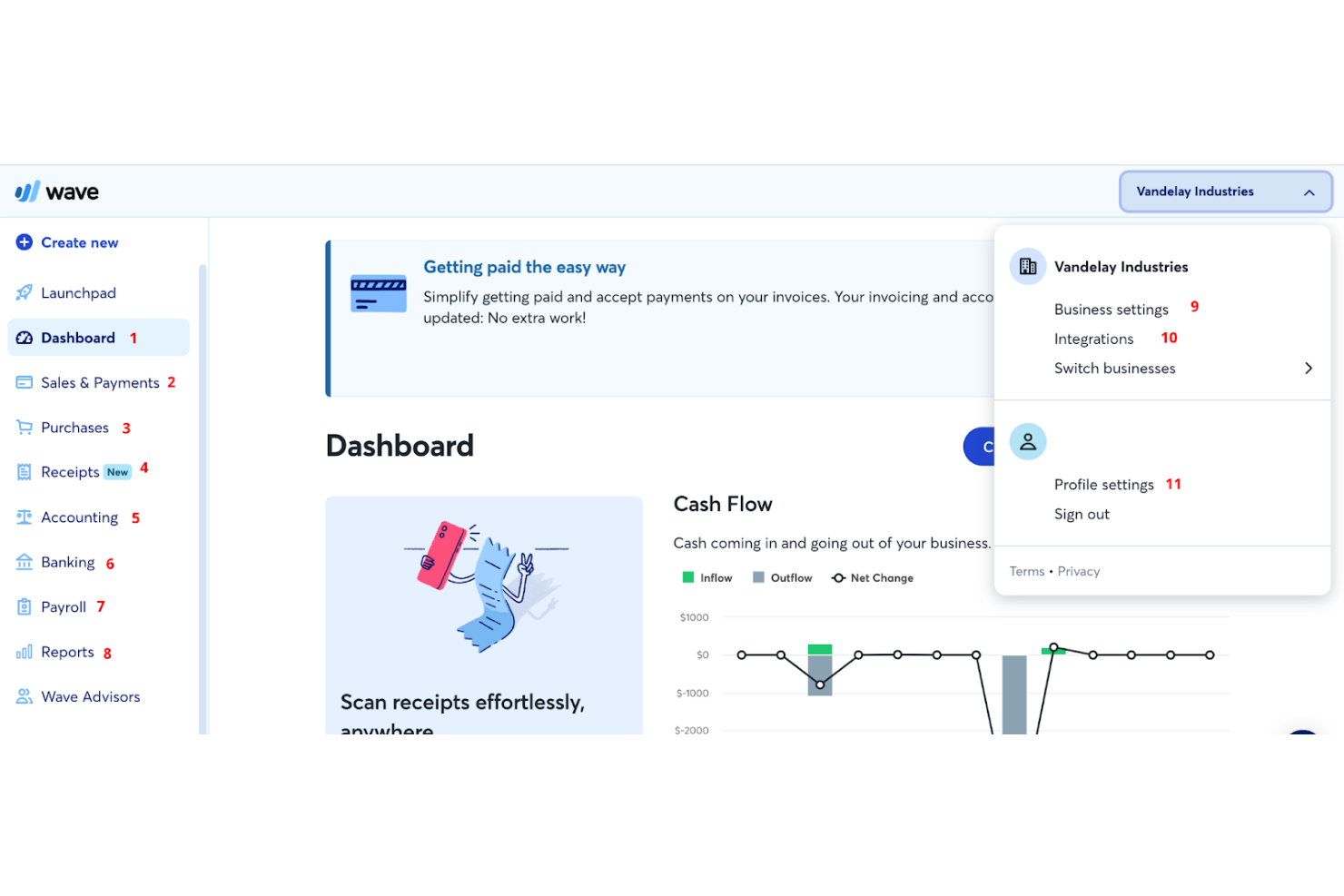
Wave è un software di contabilità per piccole imprese che offre fatturazione, pagamenti online, contabilità, banking, gestione delle buste paga e accesso a consulenti. È il migliore grazie alla sua suite completa di strumenti finanziari disponibili gratuitamente.
Perché è una buona alternativa a FreshBooks: Ho scelto Wave per questa lista perché offre una gamma solida di funzionalità senza costi, rendendolo un'opzione eccellente per piccole aziende e liberi professionisti che devono gestire le loro finanze senza sostenere costi aggiuntivi. Si distingue per il suo design intuitivo e la sua funzionalità robusta, che ho trovato più facile da usare rispetto a FreshBooks.
Funzionalità e integrazioni principali:
Funzionalità includono fatturazione, contabilità e scansione delle ricevute, che aiutano i titolari di piccole imprese a gestire le proprie finanze senza costi aggiuntivi. Offre anche servizi per la gestione delle buste paga e strumenti di gestione delle finanze personali.
Integrazioni includono PayPal, Etsy, Shoeboxed, Zapier, Google Sheets, Slack, HubSpot, Mailchimp, Stripe e Square.
Pros and Cons
Pros:
- Strumenti gratuiti per fatturazione e contabilità
- Interfaccia intuitiva
- Funzionalità di contabilità automatizzata
Cons:
- Commissioni aggiuntive per l'elaborazione dei pagamenti
- Alcune funzionalità avanzate richiedono un piano a pagamento
Altre alternative a FreshBooks
Se desideri prendere in considerazione qualche altra opzione, ecco diverse alternative a FreshBooks interessanti che vale la pena valutare:
- ABBYY
Ideale per l'elaborazione intelligente dei documenti
- Patriot
Ideale per software di contabilità e paghe accessibili
- AccountEdge
Ideale per la gestione avanzata dei dati
- Deel Payroll
Ideale per la gestione della conformità globale
- RemotePeople
Ideale per soluzioni globali di gestione delle buste paga
- BigTime
Ideale per l’automazione dei servizi professionali


Recensioni correlate dei software per le risorse umane
Se non hai ancora trovato ciò che cerchi, dai un'occhiata a questi altri strumenti correlati che abbiamo testato e valutato:
- Software per le risorse umane
- Software per la gestione delle paghe
- Software per il reclutamento
- Servizi di datore di lavoro registrato
- Sistemi di monitoraggio dei candidati
- Software per la gestione della forza lavoro
Come valuto le alternative a FreshBooks
Valuto le alternative a FreshBooks su due livelli: le funzionalità fondamentali di fatturazione e monitoraggio del tempo che ogni strumento deve offrire, quindi gli elementi distintivi importanti per i consulenti HR che gestiscono compensi ricorrenti dei clienti.
Funzionalità fondamentali (requisiti minimi per questo elenco)
Quando seleziono gli strumenti da includere nel mio elenco, assegno a ciascuno un punteggio su una scala da 0 (non offre la funzionalità) a 5 (eccelle in quest'area) per ogni funzionalità fondamentale indicata di seguito. Poi calcolo il punteggio totale dello strumento come percentuale. Ogni strumento deve raggiungere un punteggio totale minimo del 65% per essere preso in considerazione.
- Fatturazione e pagamenti: verifico se lo strumento supporta fatture ricorrenti, promemoria automatici e fatturazione in più valute, soprattutto per i consulenti che gestiscono compensi mensili ricorrenti per diversi clienti.
- Monitoraggio del tempo: ogni strumento dovrebbe consentire di registrare le ore fatturabili e convertirle in fatture, come fanno piattaforme quali Harvest e Zoho Invoice per la fatturazione basata sui progetti.
- Gestione delle spese: cerco funzionalità per acquisire le ricevute, assegnare tag alle categorie e collegare le spese a specifici incarichi dei clienti, così da poterle riaddebitare correttamente al termine di un progetto.
- Elaborazione dei pagamenti online: la possibilità di accettare carte di credito e pagamenti ACH direttamente da una fattura è importante, quindi valuto la gamma di gateway di pagamento supportati nativamente da ciascuna piattaforma.
- Gestione di progetti e clienti: gli strumenti che mantengono un database dei clienti con budget a livello di progetto e monitoraggio della redditività si distinguono da quelli che offrono solo un elenco di contatti di base.
- Report finanziari: cerco report fondamentali come profitti e perdite, scadenziario dei crediti e riepiloghi fiscali, che offrano a freelance e piccole aziende una visione chiara del flusso di cassa.
Una volta ottenuto un elenco di strumenti che soddisfano questi criteri, valuto ciò che distingue ogni piattaforma.
Fattori distintivi (ciò che differenzia i fornitori)
Ecco come confronto i diversi fornitori:
Funzionalità di spicco
Le proposte e i preventivi sono importanti quando presenti compensi ricorrenti per consulenze HR. Cerco strumenti che consentano di creare una proposta dettagliata e convertirla in una fattura una volta che il cliente l'ha approvata. Anche un portale self-service per i clienti fa la differenza: i clienti che possono accedere, esaminare le fatture aperte e pagare secondo le proprie tempistiche ti fanno risparmiare ore di attività di sollecito. Valuto anche le funzionalità di automazione, come l'applicazione automatica delle penali per ritardato pagamento e la pianificazione delle fatture ricorrenti, che mantengono prevedibile il flusso di cassa quando gestisci una dozzina di incarichi attivi.
Oltre le funzionalità
Il supporto alle integrazioni è un aspetto importante: verifico se uno strumento si collega alle piattaforme HRIS e per l'elaborazione delle buste paga più diffuse, o almeno se offre l'accesso a Zapier o alle API, così da poter sincronizzare i dati delle fatture con il resto del tuo ecosistema tecnologico HR. Anche la conformità è importante, soprattutto quando gestisci dati sensibili dei clienti. Cerco la conformità SOC 2, autorizzazioni basate sui ruoli e la condivisione crittografata dei documenti. Infine, valuto se la piattaforma è progettata per le aziende di servizi, poiché gli strumenti pensati per la fatturazione oraria e a compenso ricorrente tendono ad adattarsi meglio ai consulenti HR rispetto a quelli rivolti ai venditori di prodotti.
Perché cercare un'alternativa a FreshBooks?
Sebbene FreshBooks sia certamente un sistema di contabilità noto e popolare, ci sono diversi motivi per cui potresti voler cercare un'alternativa, tra cui:
- Costo: FreshBooks può essere costoso per le piccole imprese.
- Funzionalità: hai bisogno di funzionalità più avanzate che FreshBooks non offre.
- Personalizzazione: FreshBooks non offre sufficienti opzioni di personalizzazione.
- Interfaccia utente: trovi difficile navigare nell'interfaccia di FreshBooks.
- Integrazione: FreshBooks non si integra bene con gli altri strumenti che utilizzi.
Le alternative a FreshBooks possono offrire prezzi più convenienti, funzionalità avanzate, una migliore personalizzazione, un'interfaccia più intuitiva e una maggiore integrazione con altri strumenti. Queste opzioni possono soddisfare meglio le esigenze specifiche della tua azienda.
Caratteristiche principali da cercare nelle alternative a FreshBooks
Ecco alcune caratteristiche principali di FreshBooks che il tuo software alternativo dovrebbe essere in grado di replicare o migliorare per adattarsi alle tue esigenze:
- Fatturazione: Crea fatture professionali in modo semplice e rapido.
- Pagamenti: Accetta pagamenti online, ricorrenti e senza fattura.
- Monitoraggio del tempo: Tieni automaticamente traccia del tempo e registra le ore fatturabili.
- Contabilità: Utilizza report e strumenti per monitorare il denaro in entrata e in uscita.
- Spese e ricevute: Registra spese e ricevute per mantenere la contabilità pronta per le imposte.
- Report: Genera report per il periodo fiscale e sullo stato di salute dell'azienda.
- Progetti: Monitora lo stato dei progetti e collabora con clienti e membri del team.
- Proposte: Crea proposte organizzate e professionali per acquisire nuovi clienti.
- Preventivi: Definisci aspettative chiare con i clienti e organizza i piani dei progetti.
- Gestione dei clienti: Gestisci tutte le informazioni sui clienti in un unico posto.
Esistono alternative gratuite a FreshBooks?
Se cerchi alternative gratuite a FreshBooks, esistono diverse opzioni che potrebbero funzionare se hai esigenze contabili limitate. Questi strumenti offrono una serie di funzionalità, dalla fatturazione al monitoraggio delle spese, e alcuni forniscono persino funzioni avanzate come la gestione dell'inventario e le integrazioni con altre applicazioni aziendali. Ecco le migliori alternative gratuite a FreshBooks da prendere in considerazione:
- Zoho Books: Zoho Books offre un piano gratuito per le aziende con un fatturato annuo inferiore a $50,000. Include funzionalità come fatturazione, monitoraggio delle spese e riconciliazione bancaria.
- GnuCash: GnuCash è un software di contabilità open source che supporta la contabilità a partita doppia, il monitoraggio delle spese e la reportistica finanziaria. È compatibile con diversi sistemi operativi, incluso Linux.
- Brightbook: Brightbook è pensato per freelance e piccole imprese. Offre funzionalità come fatturazione, monitoraggio delle spese e reportistica finanziaria di base.
- ProfitBooks: ProfitBooks offre un software di contabilità gratuito con funzionalità di gestione dell'inventario, che lo rendono ideale per le attività di vendita al dettaglio. Include anche fatturazione e monitoraggio delle spese.
- Manager: Manager è un software di contabilità gratuito per desktop che supporta diversi sistemi operativi. Offre funzionalità come fatturazione, monitoraggio delle spese e reportistica finanziaria.
- Odoo: Odoo offre un piano gratuito per la sua applicazione di contabilità, che può essere integrata con altre applicazioni aziendali di Odoo. È adatto alle aziende che cercano una soluzione personalizzabile e scalabile.
Questi strumenti per la gestione delle paghe e la fatturazione offrono diverse funzionalità che possono aiutarti a gestire efficacemente le finanze della tua azienda senza dover sottoscrivere un abbonamento a pagamento.
Qual è il prossimo passo?
Per rimanere aggiornato su tutte le ultime novità nella gestione del personale, iscriviti alla nostra newsletter per leader e manager. Riceverai direttamente nella tua casella di posta approfondimenti e offerte pensati per leader e professionisti delle risorse umane.