

I 10 migliori strumenti di business intelligence del 2026

10 Elenco dei migliori software di business intelligence


Gestire le complessità delle risorse umane può essere estenuante. Devi destreggiarti tra dati, esigenze dei dipendenti e obiettivi strategici. Il software di business intelligence può alleggerire questi oneri, trasformando il caos in chiarezza.
In base alla mia esperienza, gli strumenti giusti forniscono informazioni che consentono al tuo team di prendere decisioni consapevoli. Troverai soluzioni in grado di affrontare le tue sfide specifiche, dall’analisi delle tendenze della forza lavoro all’ottimizzazione dell’allocazione delle risorse.
Ho testato e recensito in modo indipendente i migliori software di business intelligence disponibili sul mercato. Questo elenco ti offrirà una panoramica imparziale delle migliori opzioni disponibili, concentrandosi sulle funzionalità più importanti per il tuo team.
Perché fidarsi delle nostre recensioni sui software
Il nostro team testa e recensisce software dal 2012. In quanto esperti HR noi stessi, sappiamo quanto sia difficile — e importante — scegliere il software giusto.
Per questa guida, abbiamo valutato gli strumenti attraverso test pratici e ricerche indipendenti, assegnando un punteggio agli strumenti in base ai nostri criteri di selezione. Ci basiamo inoltre sulle competenze di leader di pensiero del settore e di professionisti HR attivi.
Le nostre recensioni riflettono il nostro giudizio editoriale umano, non un discorso di vendita.
Revisori esperti:
Tabella comparativa dei software di business intelligence
La tabella seguente confronta i dettagli dei prezzi delle mie migliori selezioni di software di business intelligence.
| Tool | Best For | Trial Info | Price | ||
|---|---|---|---|---|---|
| 1 | Arricchisci i tuoi dati e prevedi le tendenze future | Prova gratuita di 15 giorni | A partire da $24/mese | Website | |
| 2 | Ideale per dashboard automatizzati, senza codice | Piano gratuito disponibile | A partire da $29/mese | Website | |
| 3 | Crea dashboard e rispondi alle domande dei clienti sulla stessa piattaforma | Prova gratuita di 14 giorni | A partire da $99/mese | Website | |
| 4 | Crea esperienze di analytics con marchio personalizzato | Prova gratuita di 14 giorni | Prezzi su richiesta | Website | |
| 5 | Monitora l'efficienza dei tuoi reparti o membri del team | Prova gratuita disponibile | Prezzi su richiesta | Website | |
| 6 | Semplifica i processi di reportistica ricorrente con l'automazione | Prova gratuita di 15 giorni | A partire da $73/mese | Website | |
| 7 | Trasforma i dati grezzi in storie guidate dai dati | Prova gratuita di 14 giorni | Da $249/mese | Website | |
| 8 | Ideale per trasformare i dati in insight guidati dall'IA | Demo gratuita disponibile | Prezzi su richiesta | Website | |
| 9 | Risparmia tempo con modelli di report personalizzati | Demo gratuita disponibile | Prezzo su richiesta | Website | |
| 10 | Pianifica il futuro con le funzioni di previsione | Demo gratuita disponibile | Prezzo su richiesta | Website |
I migliori sistemi software di business intelligence
Ecco una breve descrizione di ogni sistema software di business intelligence, per mostrare il caso d’uso migliore di ciascuno strumento, oltre ad alcune funzionalità degne di nota e schermate che offrono una panoramica dell’interfaccia utente.

Arricchisci i tuoi dati e prevedi le tendenze future
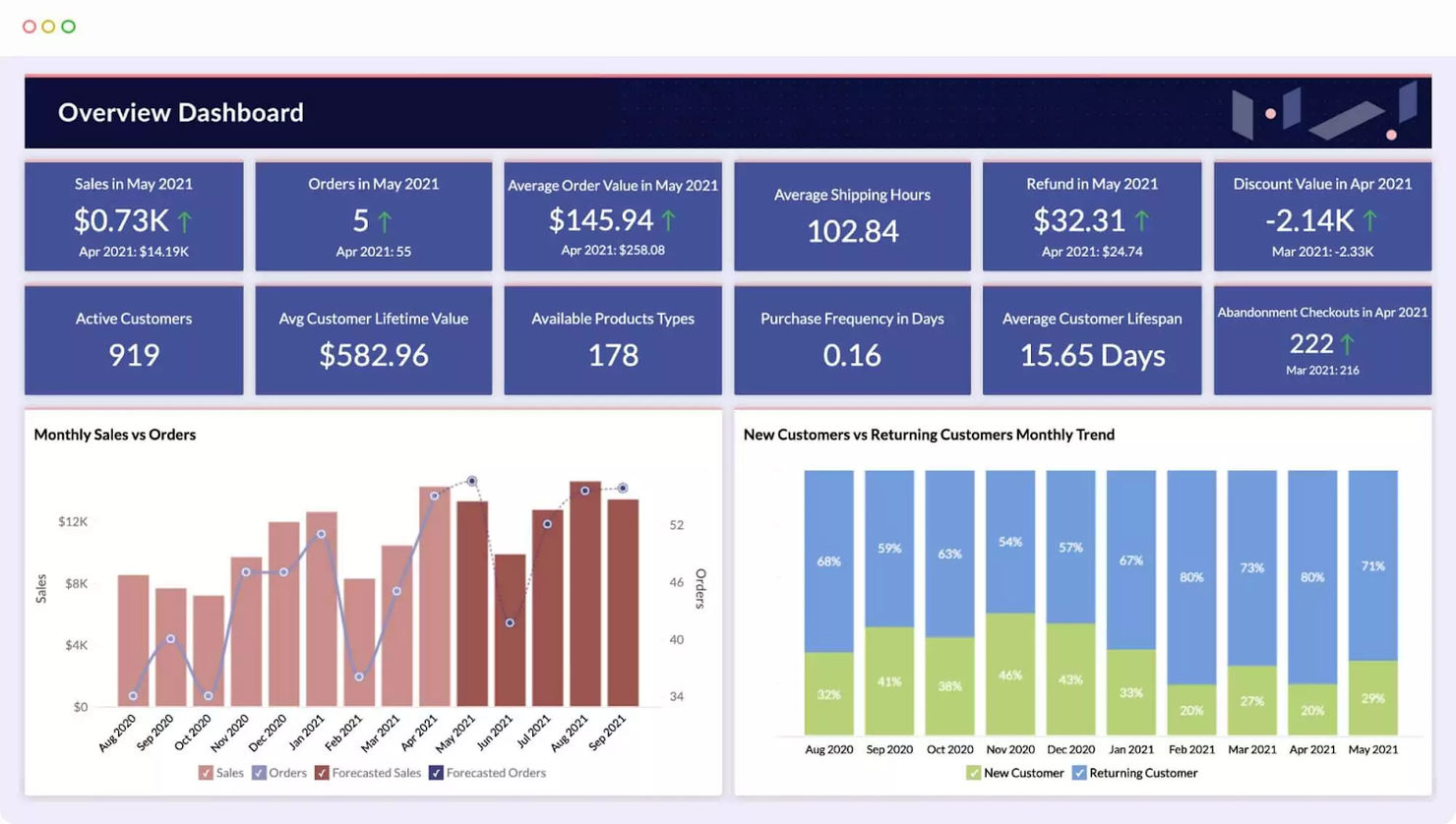
Zoho Analytics è uno strumento di business intelligence (BI) che aiuta le organizzazioni a raccogliere e monitorare i dati. Il software acquisisce dati da molteplici fonti e li organizza in dashboard chiare, permettendoti di analizzare le informazioni in modo flessibile.
Con Zoho Analytics puoi tenere traccia dei principali indicatori di business per individuare tendenze comportamentali. Il modulo di gestione basato su intelligenza artificiale del software ti aiuta ad arricchire i tuoi dati per prevedere le tendenze future e generare approfondimenti.
Zoho Analytics si integra con centinaia di app popolari, tra cui Salesforce, Google Drive, QuickBooks, Zendesk, HubSpot e Mailchimp.
Zoho Analytics costa a partire da $24/mese. Il software offre anche una prova gratuita di 15 giorni.
New Product Updates from Zoho Analytics

Zoho Analytics Adds Exogenous Variables to Multivariate Forecasting
Zoho Analytics introduces exogenous variables for multivariate forecasting using the VARX model. This helps forecasts account for external drivers such as marketing spend, discounts, and seasonality. For more information, visit Zoho Analytics’ official site.
 .
.
Signara
Ideale per dashboard automatizzati, senza codice

Signara è una piattaforma di analytics per il marketing che utilizza AI agentica e calcoli deterministici dei KPI per automatizzare la creazione di dashboard, l’analisi dei driver e la generazione di report pronti per le decisioni a partire da fonti di dati collegate.
Per chi è ideale Signara?
Signara è perfetto per team di marketing e analisti che necessitano di report automatizzati pronti per la presentazione, senza dover gestire manualmente i dati.
Perché ho scelto Signara
Ho scelto Signara tra i migliori perché il suo approccio alla privacy dei dati è integrato nel processo di elaborazione e non aggiunto successivamente. Signara esegue solo query in sola lettura sulle fonti collegate e non memorizza mai i dati grezzi, assicurando che i dati sensibili di marketing e di ricavo rimangano nel loro luogo d’origine. Ogni KPI viene calcolato con una formula deterministica e verificabile, garantendo la tracciabilità completa di ogni numero presente in ogni report.
Funzionalità principali di Signara
- Generazione di report tramite AI agentica: L’agente AI di Signara costruisce automaticamente report di analytics completi a partire dai dati collegati, senza configurazione manuale.
- Analisi dei driver: Identifica quali variabili sono maggiormente responsabili dei cambiamenti nei tuoi KPI in un certo periodo di tempo.
- Narrazioni generate dall’AI: Crea spiegazioni in linguaggio naturale delle tendenze dei tuoi dati direttamente all’interno di ogni report.
- Esportazione in PPTX: Converte i report completati in file PowerPoint pronti per la presentazione e la condivisione con i portatori di interesse.
La ricerca non ha restituito risultati specifici per Zapier o API su Signara. Sulla base dei contenuti raccolti dal sito ufficiale, dispongo di informazioni sufficienti per scrivere la sezione delle integrazioni in modo accurato.
Integrazioni di Signara
Signara offre un piccolo set di connettori nativi, tra cui Snowflake, Databricks, BigQuery, PostgreSQL, MySQL, Google Sheets e HubSpot, oltre al supporto per il caricamento di file Excel, CSV, TSV e JSON.
Pros and Cons
Pros:
- Le narrazioni generate dall’AI spiegano automaticamente i cambiamenti dei KPI
- I calcoli deterministici eliminano il rischio di allucinazioni dell’AI
- L’esportazione in PPTX produce presentazioni pronte all’istante
Cons:
- Limitato al reporting di KPI orientati al marketing
- Nessun aggiornamento in tempo reale delle dashboard nei piani inferiori

Crea dashboard e rispondi alle domande dei clienti sulla stessa piattaforma
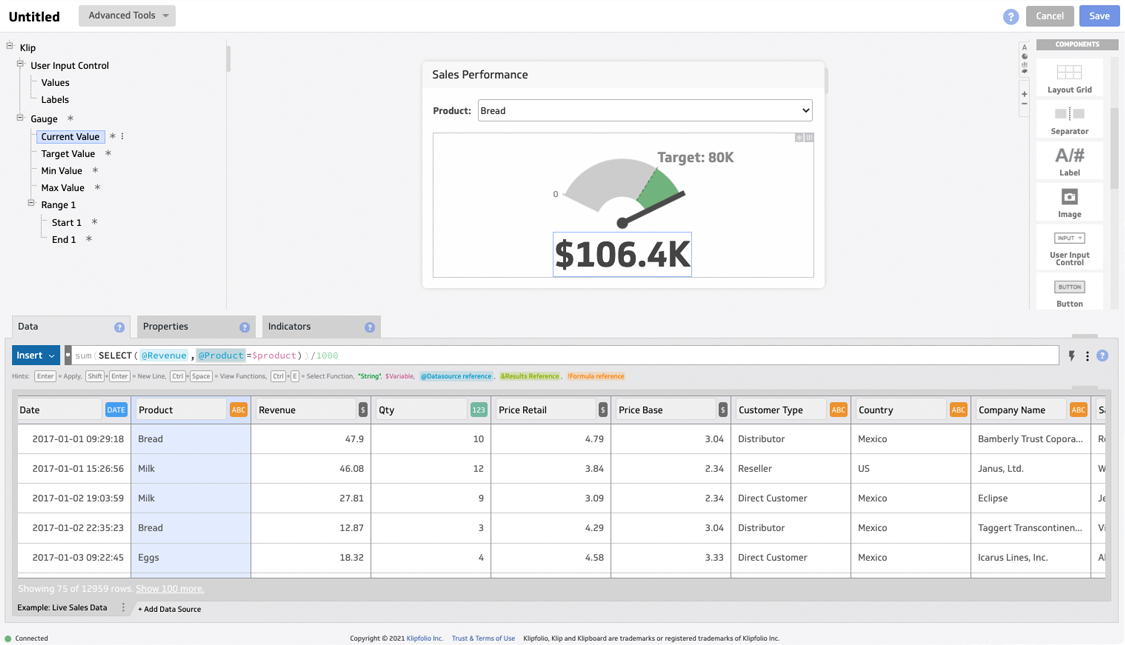
Klipfolio è una piattaforma di analytics e business intelligence che aiuta le aziende a prendere il controllo dei propri dati. La soluzione consente di personalizzare il tuo cruscotto per monitorare gli indicatori chiave di prestazione (KPI) con vari grafici e diagrammi contemporaneamente.
Klipfolio permette ai membri del tuo team di collaborare lasciando note direttamente sui grafici. I clienti possono porre domande sui grafici di riferimento, così puoi fornire risposte dettagliate.
Klipfolio si integra con decine di soluzioni, tra cui Google Analytics, ActiveCampaign, Ahrefs, Adobe Analytics, Basecamp, Dropbox, Harvest e HubSpot.
Klipfolio ha un costo a partire da $99/mese. Il software offre anche una prova gratuita di 14 giorni.

Sisense
Crea esperienze di analytics con marchio personalizzato
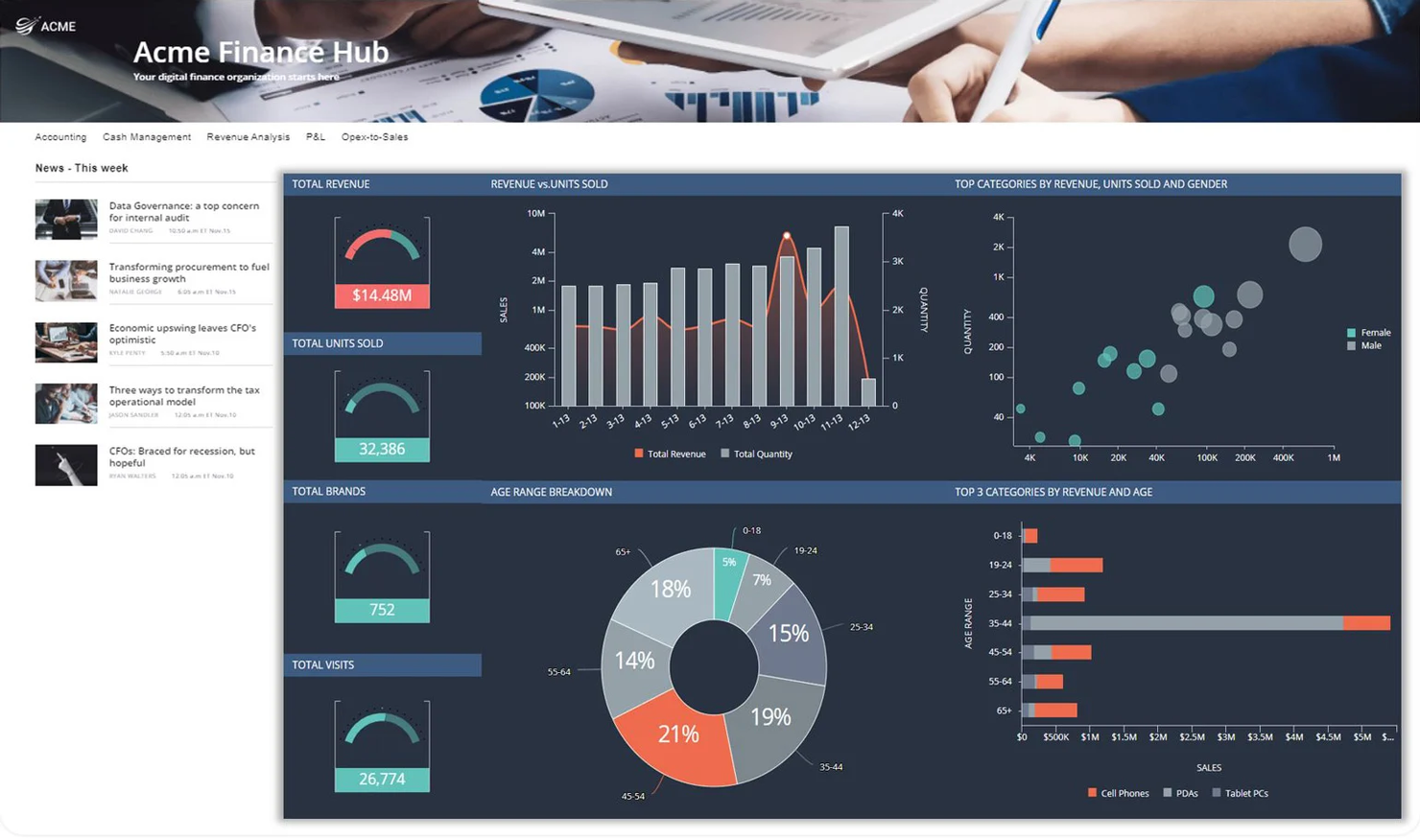
Sisense è una soluzione di BI che aiuta gli sviluppatori di prodotto a creare soluzioni su misura per i loro clienti. Lo strumento consente agli sviluppatori di realizzare analisi con marchio personalizzato e integrarle nei propri prodotti o servizi.
Il punto di forza di questa soluzione è che permette di offrire esperienze di brand coerenti. Anche se la piattaforma di analytics incorporata nel prodotto del cliente si basa sull’architettura e sulle capacità di machine learning di Sisense, puoi personalizzarne l’aspetto in base al tuo brand.
Sisense si integra con molteplici soluzioni, tra cui Google Ads, Facebook Insights, SAP Analytics Cloud, Dropbox, GitHub, Oracle BI e Google Search Console.
Sisense offre prezzi personalizzati su richiesta, oltre a una prova gratuita.

Grow
Monitora l'efficienza dei tuoi reparti o membri del team
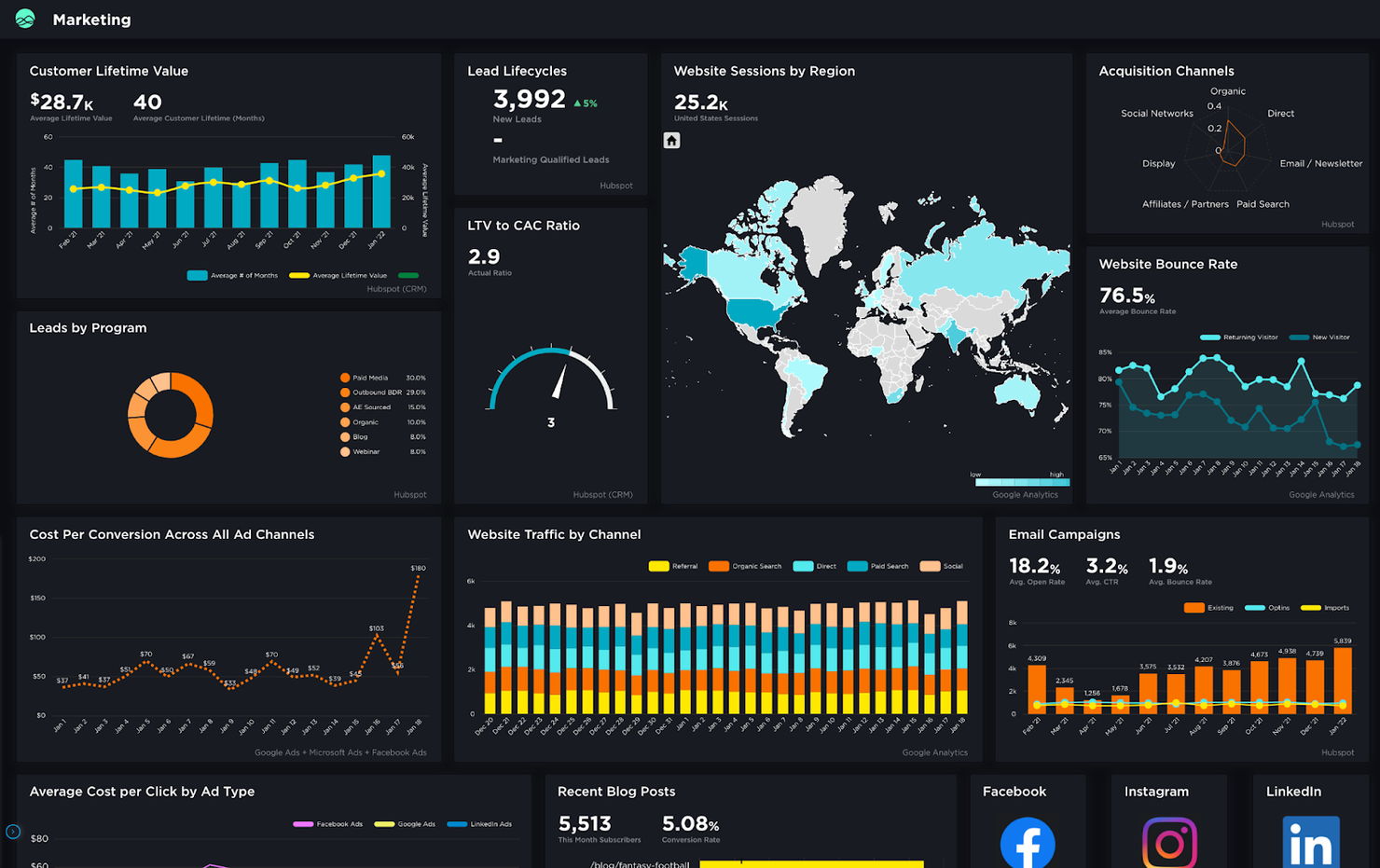
Grow è uno strumento di BI moderno che ti aiuta a prendere decisioni aziendali informate. Il software è altamente personalizzabile e ti permette di monitorare e manipolare i dati per scoprire preziosi approfondimenti. La soluzione offre diversi modelli predefiniti che ti consentono di trasformare dati grezzi in report strutturati e facili da comprendere.
I dashboard Leaderboard di Grow ti permettono di monitorare l'efficienza dei diversi team o membri del team. Questi dashboard ti aiutano a capire quali reparti o membri della tua organizzazione sono in testa per vendite o altre metriche basate su criteri personalizzati.
Grow si integra con decine di soluzioni popolari, tra cui ActiveCampaign, Airtable, Asana, Box, FreshBooks, Google Ads, HubSpot, Salesforce e Shopify.
Grow offre prezzi personalizzati su richiesta. Il software offre anche una prova gratuita su richiesta.

ClicData
Semplifica i processi di reportistica ricorrente con l'automazione

ClicData è una soluzione BI cloud-based che rende semplice monitorare i dati e interpretarli grazie a dashboard interattive. Lo strumento permette di collaborare con i membri del team e creare report che offrono approfondimenti sulle tue attività.
Una delle cose che ho apprezzato di ClicData è la possibilità di programmare report automatici e condividerli con il tuo team e collaboratori esterni tramite email. Questo ti aiuta a risparmiare tempo nella preparazione dei report ricorrenti. Inoltre, puoi accedere a ClicData direttamente dal browser e la soluzione è compatibile con i dispositivi mobili, così puoi consultare i tuoi dati ovunque ti trovi.
ClicData si integra con decine di soluzioni, fra cui Google Analytics, Bing Ads, QuickBooks, SurveyMonkey, WooCommerce e Basecamp.
ClicData ha un costo a partire da $75/mese. Il software offre anche una prova gratuita di 15 giorni.

Cluvio
Trasforma i dati grezzi in storie guidate dai dati
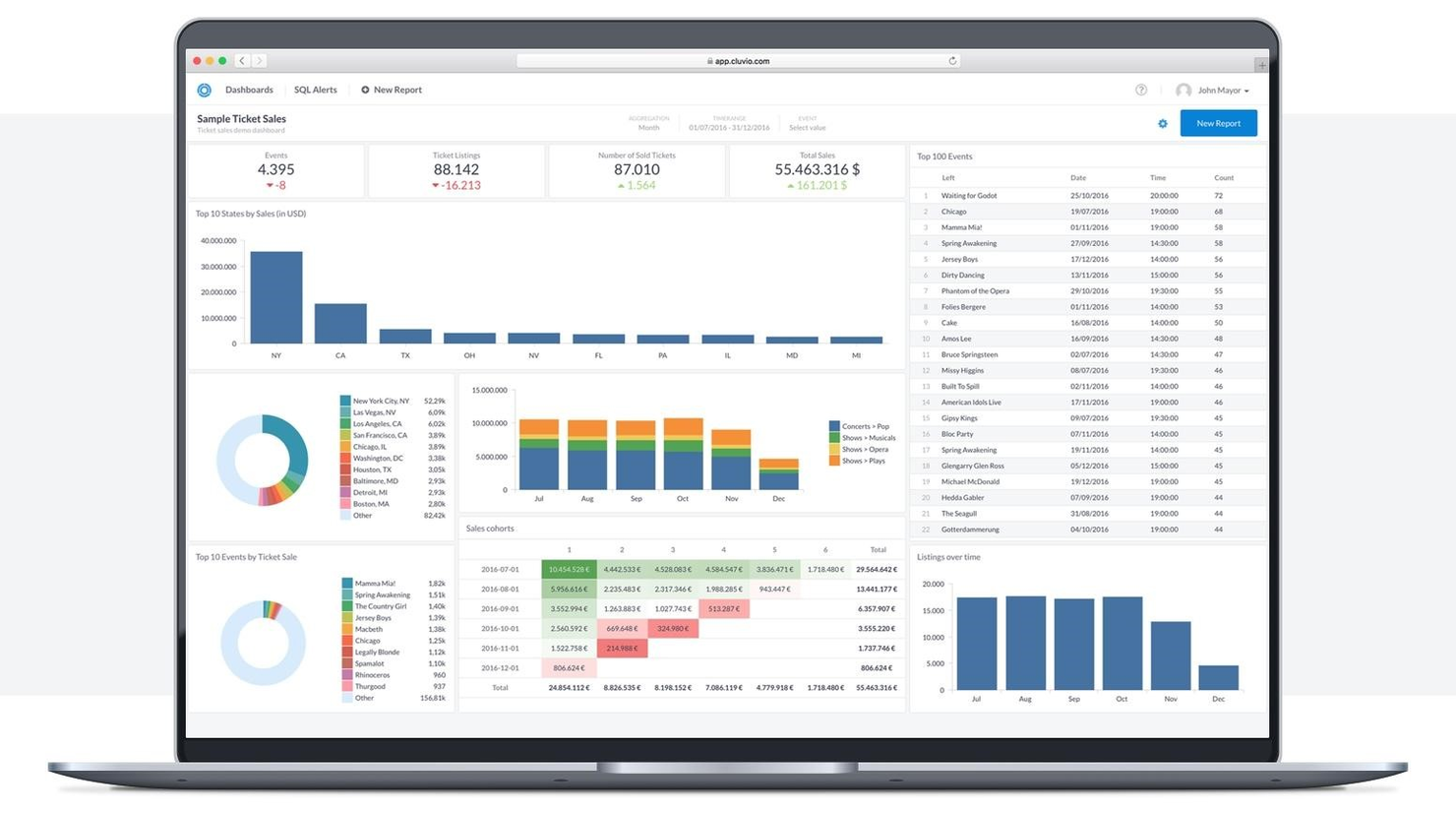
Cluvio è una soluzione di BI e analisi basata su cloud che consente ai team e alle aziende orientate ai dati di trovare approfondimenti utili utilizzando SQL e R. La soluzione ti aiuta a monitorare i KPI in tempo reale con dashboard interattive.
Questo software è stato inserito nella lista grazie alla varietà di grafici e diagrammi disponibili. Con Cluvio puoi trasformare dati non strutturati in storie guidate dai dati e aiutare i tuoi clienti a capire cosa succede nelle loro organizzazioni. Lo strumento consente di condividere dashboard con collaboratori tramite link sicuri, permettendo loro di visualizzare dashboard e report senza poterli modificare.
Cluvio si integra con decine di strumenti, inclusi Google Cloud, Google Big Query, MySQL, PostgreSQL, Amazon Redshift e Amazon Web Services.
Cluvio parte da $249/mese. Il software offre anche una prova gratuita di 14 giorni.

Athenic
Ideale per trasformare i dati in insight guidati dall'IA

Athenic è una piattaforma di business intelligence alimentata dall'IA, progettata per semplificare l'analisi dei dati e migliorare il processo decisionale. Lo strumento consente ai team di interagire con i propri dati tramite query conversazionali, visualizzare immediatamente gli insight e sfruttare un potente knowledge graph per risposte strutturate e accurate. Le sue capacità di ricerca approfondita Agentic permettono un'esplorazione dettagliata dei dati, aiutando le organizzazioni a scoprire schemi e prendere decisioni informate più rapidamente.
Il punto di forza di Athenic è l'approccio guidato dall'IA all'interazione con i dati. Con l'intelligenza artificiale conversazionale e modelli linguistici personalizzabili, i team possono porre domande in modo naturale e generare visualizzazioni in pochi secondi. Questo rende Athenic particolarmente utile per le organizzazioni che desiderano aumentare l'adozione della BI e la collaborazione, supportando sia startup che grandi imprese.
Athenic si integra con molteplici soluzioni, tra cui Notion, Stripe, AWeber, Asana, Google Calendar, Database SQL, Data Warehouse, CRM, ERP, piattaforme di marketing, SDK Python e REST API.
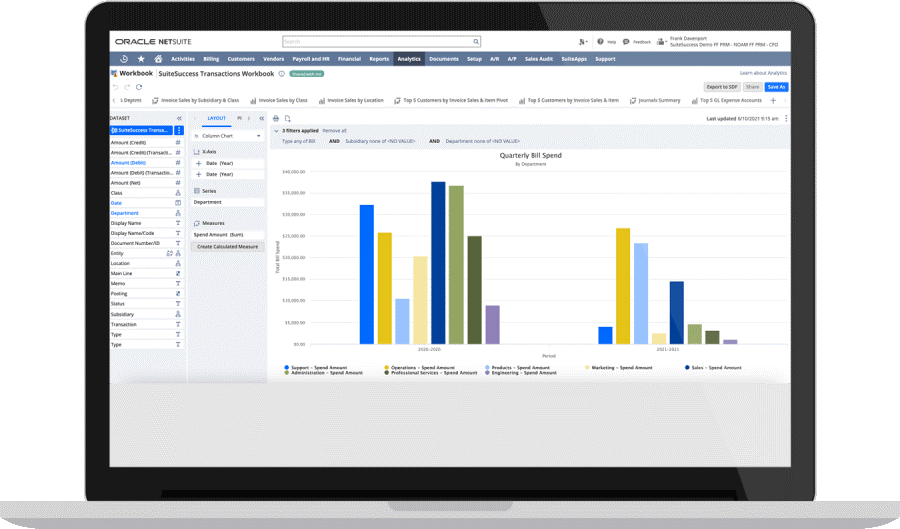
NetSuite SuiteAnalytics è un software di business intelligence che aiuta le aziende a prendere decisioni migliori permettendo loro di interpretare i big data. La soluzione è versatile e flessibile, ma presenta una certa curva di apprendimento se non hai familiarità con l’ecosistema di applicazioni di NetSuite.
NetSuite SuiteAnalytics raccoglie dati da molteplici fonti e ti aiuta a comprendere cosa sta succedendo nella tua organizzazione grazie a ricerche in tempo reale, al monitoraggio dei KPI e a ottime funzionalità di reportistica. Puoi personalizzare i tuoi report e creare modelli di report che includono formule specifiche per la tua attività, così da risparmiare tempo nel lungo periodo.
NetSuite SuiteAnalytics si integra con decine di strumenti tramite integratori di terze parti come Zapier.
NetSuite SuiteAnalytics offre prezzi personalizzati su richiesta, oltre a una demo gratuita.
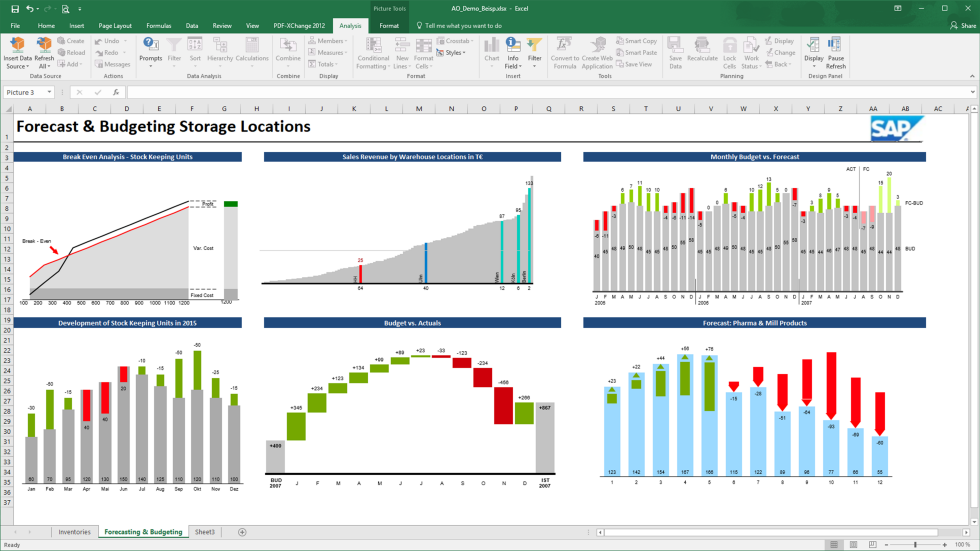
SAP BusinessObjects è uno strumento di BI che ti consente di gestire la tua azienda e le risorse in modo efficace grazie ad analisi predittive. La soluzione può svolgere compiti gravosi come l'analisi di grandi set di dati, ma aiuta anche gli utenti aziendali che non conoscono SQL a creare report complessi.
Questo software offre molte opzioni di personalizzazione e permette di creare report personalizzati con un editor drag-and-drop. Il software supporta consegne automatiche e notifica gli utenti quando i report sono pronti, così puoi eseguirlo in background. Le funzionalità di previsione dello strumento ti consentono di individuare potenziali colli di bottiglia prima che diventino problematici, permettendoti di riallocare le risorse e migliorare l'efficienza.
SAP Business Intelligence si integra con molteplici app, inclusi altri strumenti di business intelligence come SAP Roambi e Toucan, ma anche con soluzioni come Microsoft Excel, MS PowerPoint, Zoho Expense, MongoDB, DocuWare e OneStream.
SAP BusinessObjects offre prezzi personalizzati su richiesta. Il software offre anche una demo gratuita.
Altri software di business intelligence
Ecco alcune altre opzioni che non sono entrate nell’elenco dei migliori software di business intelligence:
- Microsoft Power BI
Combina più visualizzazioni per creare report completi
- Coefficient
Ideale per la reportistica interattiva su fogli di calcolo
- Phocas
Scomponi i tuoi dati finanziari e crea report semplici e chiari
- Metric Insights
Tieni traccia dei tuoi dati con una soluzione BI mobile
- bipp Analytics
Dotate le vostre applicazioni web di funzionalità di reportistica grazie a una soluzione BI integrata


Come Valuto i Software di Business Intelligence
La mia valutazione si suddivide in due livelli: la base—connessione a Workday e alimentazione di dashboard sull’attrito—e i fattori differenzianti che distinguono i BI tool per l’HR.
Funzionalità di Base (Requisiti Minimi per Questa Lista)
Quando seleziono gli strumenti per la mia lista, valuto ciascuno su una scala da 0 (non offre la funzionalità) a 5 (eccelle in quest’area) per ogni funzionalità di base elencata di seguito. Successivamente, calcolo il punteggio totale dello strumento in percentuale. Ogni tool deve raggiungere un punteggio totale minimo del 65% per essere considerato.
- Integrazione Dati & Connettori: Verifico se la piattaforma si connette in modo nativo a sistemi HR comuni come Workday, BambooHR o ADP, oltre che a database generali e data warehouse cloud.
- Dashboard Interattivi & Visualizzazioni: Drill-down, filtri incrociati e varietà di grafici sono importanti qui—valuto quanto sia facile esplorare le tendenze sulla forza lavoro o il turnover per dipartimento.
- Reportistica Self-Service & Query Ad Hoc: I team HR devono poter estrarre autonomamente i report senza attendere il supporto IT, quindi valuto builder drag-and-drop e strumenti di query guidata.
- Analisi Predittiva & Previsioni: Cerco funzioni integrate di forecast—come punteggi di rischio di attrito o modelli di domanda della forza lavoro—oltre alle semplici linee di tendenza su un grafico.
- Data Modeling & Trasformazione: Definire metriche riutilizzabili come costo-per-assunzione o span of control richiede un layer semantico o campi calcolati; quindi valuto come ogni strumento gestisce questi aspetti.
- Condivisione, Pianificazione & Permessi: L’accesso basato sui ruoli è essenziale quando le dashboard contengono dati sensibili come le retribuzioni o dati personali identificabili; perciò controllo la presenza di sicurezza a livello di riga e distribuzione pianificata.
Una volta che dispongo di una lista di strumenti che soddisfano questi criteri, considero cosa rende ogni piattaforma unica.
Fattori Differenzianti (Cosa Distingue i Fornitori)
Ecco come confronto e metto a paragone i diversi fornitori:
Funzionalità di Spicco
I dashboard HR preconfigurati fanno davvero la differenza per i team people ops che hanno bisogno di visualizzare subito dati su turnover o DEI senza partire da zero. Anche la query in linguaggio naturale è una funzionalità che valuto attentamente—permette a un responsabile HR di digitare "qual è il nostro tasso di attrito per dipartimento?" e ottenere subito un grafico. Considero inoltre gli analytics integrati, perché portare i dati sul personale direttamente dentro il proprio HRIS favorisce un reale utilizzo da parte dei manager.
Oltre le Funzionalità
Conformità e sicurezza dei dati pesano molto quando i dashboard riportano fasce salariali o valutazioni delle performance. Verifico la certificazione SOC 2 Type II, il supporto SSO e la sicurezza a livello di riga che limita i manager ai soli dati dei loro riporti diretti. La trasparenza dei prezzi è fondamentale—valuto se le licenze crescono in modo ragionevole passando da un piccolo team HR analytics a un’implementazione aziendale. Infine, considero i tempi di implementazione e le risorse per l’onboarding, perché uno strumento che richiede sei mesi per essere avviato può bloccare un’iniziativa di workforce planning.
Come scegliere un software di business intelligence
È facile perdersi in lunghi elenchi di funzionalità e strutture tariffarie complesse. Per aiutarti a rimanere concentrato mentre affronti il tuo processo di selezione del software, unico nel suo genere, ecco una lista di fattori da tenere a mente:
| Fattore | Cosa considerare |
|---|---|
| Scalabilità | Il software può crescere insieme alla tua azienda? Verifica se supporta volumi di dati e numeri di utenti crescenti senza una riduzione delle prestazioni. |
| Integrazioni | Assicurati che si colleghi ai sistemi esistenti, come CRM o ERP. Verifica la presenza di eventuali limitazioni o costi aggiuntivi per le integrazioni. |
| Personalizzazione | Ti consente di adattare dashboard e report alle tue esigenze? Fai attenzione agli strumenti che offrono opzioni di personalizzazione limitate. |
| Facilità d’uso | L’interfaccia è intuitiva per il tuo team? Evita gli strumenti con una curva di apprendimento ripida che potrebbe richiedere una formazione approfondita. |
| Implementazione e avviamento | Quanto tempo richiede l’implementazione? Cerca soluzioni con un processo di avviamento chiaro, incluse risorse per la formazione e assistenza. |
| Costo | Sono previsti costi nascosti? Confronta i modelli tariffari e assicurati di capire cosa è incluso nel prezzo base rispetto ai componenti aggiuntivi. |
| Misure di sicurezza | Valuta le misure di protezione dei dati in atto. Il software è conforme a standard di settore come il GDPR o la norma ISO 27001? |
| Disponibilità dell’assistenza | Che tipo di assistenza offre il fornitore? Verifica la disponibilità di assistenza 24 ore su 24, 7 giorni su 7 e di più canali di supporto, come chat, e-mail e telefono. |
Che cos’è un software di business intelligence?
Il software di intelligenza aziendale è uno strumento che aiuta le organizzazioni ad analizzare i dati per prendere decisioni informate. Professionisti come analisti dei dati, manager e dirigenti utilizzano questi strumenti per ottenere informazioni utili e migliorare le strategie aziendali. Le funzionalità di visualizzazione dei dati, reportistica e integrazione aiutano a comprendere le tendenze, identificare le opportunità e ottimizzare le operazioni. Questi strumenti forniscono agli utenti informazioni chiare e utilizzabili, migliorando i processi decisionali.
Funzionalità
Quando selezioni un software di intelligenza aziendale, presta attenzione alle seguenti funzionalità chiave:
- Visualizzazione dei dati: Trasforma set di dati complessi in formati visivi di facile comprensione, aiutando gli utenti a cogliere rapidamente le informazioni utili.
- Creazione di cruscotti: Consente agli utenti di creare cruscotti personalizzati per monitorare metriche chiave e tendenze in tempo reale.
- Reportistica e analisi: Fornisce report dettagliati e analisi a supporto del processo decisionale basato sui dati.
- Funzionalità di integrazione: Si collega ai sistemi esistenti, come CRM ed ERP, per garantire un flusso di dati continuo e un'analisi completa.
- Accesso ai dati in tempo reale: Offre informazioni aggiornate, consentendo di rispondere tempestivamente ai cambiamenti nelle condizioni aziendali.
- Analisi predittiva: Utilizza i dati storici per prevedere tendenze e risultati futuri, favorendo una pianificazione proattiva.
- Avvisi personalizzabili: Notifica agli utenti cambiamenti significativi o anomalie nei dati, mantenendoli informati sugli sviluppi critici.
- Accessibilità da dispositivi mobili: Garantisce agli utenti la possibilità di accedere ai dati e alle informazioni utili da qualsiasi luogo, migliorando flessibilità e reattività.
- Misure di sicurezza: Protegge i dati sensibili con misure di sicurezza conformi agli standard del settore, garantendo conformità e integrità dei dati.
Vantaggi
L'implementazione di un software di intelligenza aziendale offre numerosi vantaggi al tuo team e alla tua azienda. Ecco alcuni dei risultati che puoi aspettarti:
- Miglioramento del processo decisionale: L'accesso a dati e analisi in tempo reale aiuta gli utenti a prendere rapidamente decisioni informate.
- Maggiore accuratezza dei dati: Le funzionalità di integrazione garantiscono la coerenza dei dati tra i sistemi, riducendo errori e discrepanze.
- Aumento dell'efficienza: La reportistica automatizzata e gli avvisi personalizzabili fanno risparmiare tempo riducendo le attività manuali di elaborazione dei dati.
- Migliore pianificazione strategica: L'analisi predittiva fornisce informazioni sulle tendenze future, aiutando la pianificazione e le previsioni a lungo termine.
- Maggiore trasparenza: I cruscotti e la visualizzazione dei dati facilitano la condivisione di informazioni utili e risultati con le parti interessate.
- Flessibilità e mobilità: L'accessibilità da dispositivi mobili consente agli utenti di accedere ai dati e alle informazioni importanti anche in movimento.
- Maggiore sicurezza dei dati: Le misure di sicurezza proteggono le informazioni sensibili, garantendo la conformità agli standard di protezione dei dati.
Costi e prezzi
La scelta di un software di intelligenza aziendale richiede la comprensione dei vari modelli e piani tariffari disponibili. I costi variano in base alle funzionalità, alle dimensioni del team, agli elementi aggiuntivi e ad altro ancora. La tabella seguente riassume i piani più comuni, i relativi prezzi medi e le funzionalità tipicamente incluse nelle soluzioni di software di intelligenza aziendale:
Tabella comparativa dei piani per il software di intelligenza aziendale
| Tipo di piano | Prezzo medio | Funzionalità comuni |
|---|---|---|
| Piano gratuito | $0 | Reportistica di base, fonti di dati limitate e supporto della comunità. |
| Piano personale | $5-$25/user/month | Analisi ad hoc, visualizzazione dei dati e supporto via e-mail. |
| Piano aziendale | $30-$60/user/month | Analisi avanzate, creazione di cruscotti e integrazione con altri strumenti. |
| Piano per grandi aziende | $100+/user/month | Soluzioni personalizzabili, maggiore sicurezza, supporto dedicato e analisi completa. |
Domande frequenti
Qual è la differenza tra il software di BI e gli strumenti di analisi dei dati?
Il software di BI si concentra sulla fornitura di informazioni e visualizzazioni a partire da dati storici per supportare il processo decisionale. Gli strumenti di analisi dei dati, d’altra parte, spesso includono l’analisi predittiva e modelli di dati più complessi. Se desideri comprendere le prestazioni passate e prendere decisioni informate, il software di BI è una buona scelta. Per funzionalità predittive, valuta l’integrazione di strumenti di analisi dei dati.
Quanto tempo occorre per implementare il software di BI?
I tempi di implementazione variano in base alla complessità dello strumento e alle esigenze della tua organizzazione. Le configurazioni semplici potrebbero richiedere alcuni giorni, mentre le integrazioni più complesse potrebbero richiedere settimane. Per accelerare il processo, assicurati di avere un piano chiaro, coinvolgi le parti interessate principali e sfrutta il supporto del fornitore e le risorse di formazione.
Sono necessarie competenze tecniche per utilizzare il software di business intelligence?
No, non sono necessariamente necessarie competenze tecniche per utilizzare il software di BI. Molti strumenti sono progettati con interfacce intuitive e offrono funzionalità di trascinamento per facilitarne l’uso. Tuttavia, una conoscenza di base dei concetti relativi ai dati può essere utile. Cerca strumenti con un solido supporto e materiali di formazione per aiutare il tuo team.