

I 10 migliori software per il feedback dei dipendenti del 2026

10 Elenco dei migliori software per il feedback dei dipendenti


Con così tanti software diversi per il feedback dei dipendenti disponibili, capire quale sia quello giusto per te è difficile. Sai di voler raccogliere e analizzare il feedback in modo efficiente per aiutarti a identificare tendenze e aree di miglioramento, ma devi capire quale strumento sia il migliore. In questo articolo ti aiuterò a rendere più semplice la tua scelta condividendo le mie opinioni sui migliori software per il feedback dei dipendenti per raccogliere e analizzare le risposte, basate sulla mia esperienza personale nel settore delle risorse umane.
Che cos'è il software per il feedback dei dipendenti?
Le soluzioni software per il feedback dei dipendenti sono strumenti digitali che ti aiutano a raccogliere e analizzare i feedback del tuo personale e a ricavarne informazioni utili. Ti consentono di misurare nel tempo il coinvolgimento, la soddisfazione e lo sviluppo dei dipendenti, individuando le tendenze nei feedback e monitorando la percezione dei dipendenti. Questi strumenti avanzati per i sondaggi supportano anche la raccolta di feedback anonimi, aiutando le organizzazioni a ottenere risposte sincere dai propri dipendenti senza timore di ripercussioni.
L'utilizzo di un software per il feedback dei dipendenti può migliorare i livelli di coinvolgimento, fidelizzazione e soddisfazione del personale, dando voce ai dipendenti e promuovendo un dialogo aperto all'interno dell'organizzazione. Questi strumenti possono inoltre aiutarti a individuare le debolezze aziendali per apportare miglioramenti futuri e prendere decisioni migliori basate sui dati.
Perché fidarsi delle nostre recensioni sui software
Il nostro team testa e recensisce software dal 2012. In quanto esperti HR noi stessi, sappiamo quanto sia difficile — e importante — scegliere il software giusto.
Per questa guida, abbiamo valutato gli strumenti attraverso test pratici e ricerche indipendenti, assegnando un punteggio agli strumenti in base ai nostri criteri di selezione. Ci basiamo inoltre sulle competenze di leader di pensiero del settore e di professionisti HR attivi.
Le nostre recensioni riflettono il nostro giudizio editoriale umano, non un discorso di vendita.
Revisori esperti:
Tabella comparativa dei software per il feedback dei dipendenti
Questa tabella comparativa riassume i dettagli sui prezzi dei miei principali software per il feedback dei dipendenti:
| Tool | Best For | Trial Info | Price | ||
|---|---|---|---|---|---|
| 1 | Ideale per sondaggi ai dipendenti senza interruzioni per team remoti | Demo gratuita disponibile | Da $5/dipendente/mese | Website | |
| 2 | Ideale per sondaggi pulse automatizzati | Prova gratuita + demo gratuita disponibile | Da $66/utente/mese | Website | |
| 3 | Ideale per collegare il feedback dei sondaggi ai flussi di lavoro per il riconoscimento | Demo gratuita disponibile | Prezzi su richiesta | Website | |
| 4 | Ideale per il feedback sulle prestazioni dei dipendenti | Demo gratuita disponibile | Prezzo su richiesta | Website | |
| 5 | Ideale per enti pubblici, piccole imprese e non profit | Prova gratuita disponibile | Da $2.50/dipendente/mese | Website | |
| 6 | Ideale per promuovere azioni guidate dai team sulla base del feedback | È disponibile una prova gratuita di 21 giorni | Fino a $6/utente/mese (con fatturazione annuale) | Website | |
| 7 | Il migliore con solide garanzie di anonimato | Piano gratuito + prova gratuita + demo gratuita disponibili | Da $4/dipendente/mese (fatturato annualmente) | Website | |
| 8 | Ideale per l'IA aziendale | Demo gratuita disponibile | A partire da $8/utente/mese | Website | |
| 9 | Ideale per trasformare il feedback in piani d'azione | Prova gratuita di 14 giorni | Da $2/utente/mese (fatturato annualmente) | Website | |
| 10 | Ideale per feedback a 360 gradi | Demo gratuita disponibile | Da $5/utente/mese (fatturazione annuale) | Website |


Panoramica dei 10 migliori software per il feedback dei dipendenti
Ecco la mia valutazione delle migliori piattaforme per il feedback dei dipendenti attualmente disponibili, con brevi descrizioni delle loro caratteristiche più interessanti e spiegazioni del motivo per cui le ho incluse nel mio elenco.

Deel HR
Ideale per sondaggi ai dipendenti senza interruzioni per team remoti
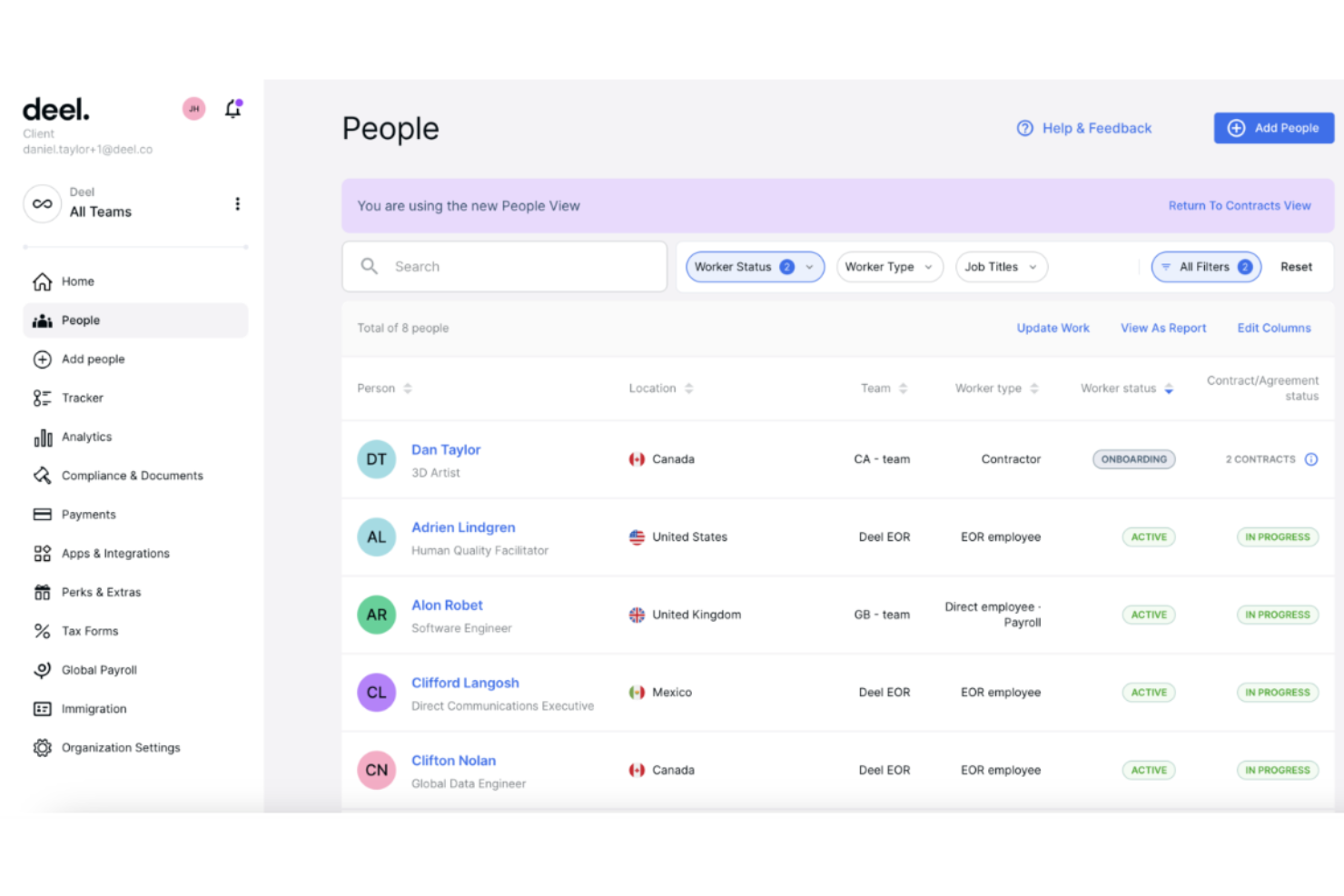
Deel HR è una piattaforma di feedback per i dipendenti che consente di creare, distribuire e analizzare sondaggi, gestire i cicli di feedback e centralizzare i dati relativi ai feedback per team remoti e globali.
Per chi è ideale Deel HR?
Deel HR è particolarmente adatto ai team HR che gestiscono una forza lavoro distribuita o internazionale e hanno bisogno di un modo centralizzato per raccogliere e agire sui feedback dei dipendenti in diversi fusi orari e regioni.
Perché ho scelto Deel HR
Ho scelto Deel HR tra i migliori perché i suoi strumenti di creazione di sondaggi sono progettati appositamente per le realtà dei team distribuiti. Il costruttore di sondaggi consente di lanciare rapidamente sondaggi di engagement, pulse o completamente personalizzati, con opzioni per l’anonimato e pianificazione automatica—così non è necessario inseguire manualmente le risposte in diversi fusi orari. Apprezzo anche che i risultati dei sondaggi confluiscano direttamente in una dashboard di analisi centralizzata che visualizza i punteggi eNPS, i driver di engagement e le tendenze di sentiment in un unico luogo. Da lì, il mio team può passare direttamente alla pianificazione delle azioni utilizzando i moduli collegati di Obiettivi, Formazione e Carriera senza mai lasciare la piattaforma.
Di seguito le caratteristiche principali.
Caratteristiche principali di Deel HR
- Valutazioni delle prestazioni a 360°: Conduci cicli di valutazione multilivello in cui i dipendenti ricevono feedback strutturati da colleghi, manager e collaboratori diretti in un unico posto.
- Redazione assistita da IA per feedback: Utilizza l’AI integrata per creare librerie di competenze, modelli di valutazione e testi di feedback, riducendo il tempo necessario per partire da zero.
- Piani di sviluppo carriera: Crea piani di sviluppo individuali legati a quadri di progressione di carriera, in modo che i dipendenti possano vedere percorsi di crescita chiari.
- Strumento di segnalazione anonima: Offri ai dipendenti un canale sicuro e confidenziale per segnalare preoccupazioni attraverso una funzione di whistleblowing integrata nella stessa piattaforma HR.
Integrazioni Deel HR
Deel HR offre integrazioni native con Slack, Greenhouse, BambooHR, Workday, HiBob e Okta. È disponibile un’API per integrazioni personalizzate.
Pros and Cons
Pros:
- Può lavorare con criptovalute
- Offre prelievi di denaro rapidi
- Documenti di conformità compilati automaticamente per ogni paese
Cons:
- Può essere difficile da configurare
- Personalizzazione e flessibilità limitate
New Product Updates from Deel HR

Deel Expands Stablecoin Wallet to 80+ Countries
Deel expands its Stablecoin Wallet to 80+ countries with dollar-backed balances and optional rewards. This gives eligible contractors more ways to hold and manage earnings inside Deel. For more information, visit Deel’s official site.
 .
.
Ideale per sondaggi pulse automatizzati

Sogolytics è una piattaforma software per il feedback dei dipendenti che consente di creare, distribuire e analizzare sondaggi con automazione avanzata, analisi in tempo reale e modelli personalizzabili.
Per chi è più indicato Sogolytics?
Sogolytics è adatto ai team delle risorse umane di organizzazioni di medie e grandi dimensioni che hanno bisogno di un approccio strutturato e basato sui dati per raccogliere e agire sul feedback dei dipendenti.
Perché ho scelto Sogolytics
Ho scelto Sogolytics tra i migliori proprio per l'efficienza con cui l'automazione gestisce il lato ripetitivo dei programmi di pulse survey. Puoi programmare sondaggi periodici, impostare promemoria automatici e lasciare che la piattaforma gestisca la cadenza senza interventi manuali ad ogni ciclo. Quello che apprezzo maggiormente è che l'analisi del sentiment, guidata dall'NLP, funziona sulle risposte a testo libero in tempo reale—quindi quando un dipendente scrive in un campo libero, Sogolytics rileva automaticamente il sentiment, evitando di dover leggere manualmente centinaia di commenti. La funzione di anonimato garantito è incorporata nella piattaforma a livello di sondaggio, il che fa davvero la differenza per ottenere risposte sincere su temi delicati come il rapporto con i manager o la gestione del carico di lavoro.
Caratteristiche principali di Sogolytics
- Employee journey mapping: Traccia e attiva sondaggi in punti chiave del ciclo di vita—onboarding, colloqui di permanenza e uscita—collegando le date nella funzione Directory.
- Monitoraggio eNPS ed ESAT: Tieni traccia del punteggio Net Promoter e della soddisfazione dei dipendenti in un'unica dashboard EX insieme ai trend di benessere organizzativo.
- Analisi dei fattori chiave: Identifica i fattori specifici che influenzano maggiormente coinvolgimento, burnout o turnover tra dipartimenti, ruoli o gruppi per anzianità.
- Raccolta di feedback a 360 gradi: Raccogli input da più fonti—colleghi, manager e collaboratori diretti—a supporto dello sviluppo individuale e delle valutazioni delle performance.
Integrazioni di Sogolytics
Sogolytics offre integrazioni native con Microsoft Teams, Google Workspace, Salesforce e Zapier. È disponibile un'API per integrazioni personalizzate.
Pros and Cons
Pros:
- Offre un'ampia gamma di opzioni di personalizzazione dei sondaggi
- Supporta sondaggi multilingue per team eterogenei
- Include strumenti per monitorare il coinvolgimento dei dipendenti nel tempo
Cons:
- La logica avanzata dei sondaggi è disponibile solo nei piani di livello superiore
- Potrebbe offrire maggiori personalizzazioni dei report
New Product Updates from Sogolytics
Sogolytics Adds Shareable Track, Automated Imports, and Folder Permissions
Sogolytics adds shareable Track links, expanded Import Automation sources, and folder-level permissions. These updates make it easier to share distribution insights, automate data intake, and manage project access. For more information, visit Sogolytics’ official site.
 .
.
Nectar
Ideale per collegare il feedback dei sondaggi ai flussi di lavoro per il riconoscimento
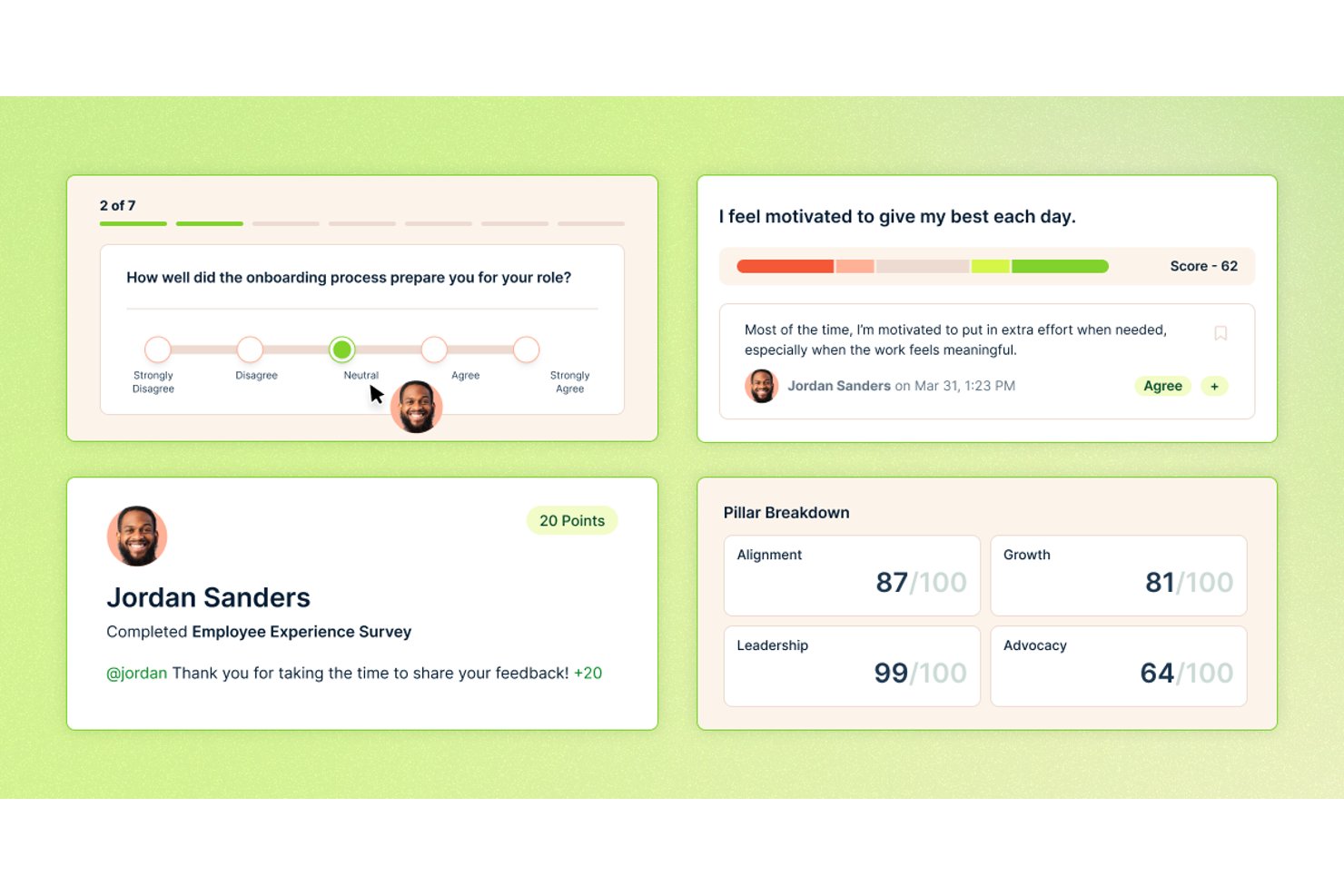
Nectar è una piattaforma per il feedback e il riconoscimento dei dipendenti che combina sondaggi periodici, eNPS, canali di feedback anonimi e analisi del coinvolgimento con flussi di lavoro integrati per il riconoscimento e le comunicazioni.
Per chi è più indicato Nectar?
Nectar è adatto ai team delle risorse umane e ai responsabili delle operations del personale che desiderano collegare direttamente i dati sul sentiment dei dipendenti ai flussi di lavoro per il riconoscimento e il follow-up in un'unica piattaforma.
Perché ho scelto Nectar
Nectar è entrato nella mia rosa dei candidati perché è l'unico strumento che ho visto indirizzare direttamente i risultati dei sondaggi verso flussi di lavoro per il riconoscimento e la comunicazione senza alcun passaggio manuale. Quando SafeTalk™ fa emergere una preoccupazione anonima o un ciclo eNPS rileva un calo in un team specifico, i responsabili possono inviare un riconoscimento, preparare un aggiornamento per le comunicazioni o attivare un'automazione Flows nella stessa piattaforma. È questo circuito chiuso tra ascolto e risposta a distinguere Nectar in questa categoria.
Funzionalità principali di Nectar
- Chat anonima bidirezionale SafeTalk™: le risorse umane e i responsabili possono rispondere ai commenti anonimi dei sondaggi e porre domande di approfondimento senza rivelare l'identità del rispondente.
- Indicatori di salute Nectar Signals: ogni dipendente, team e reparto riceve un punteggio di salute da 0 a 100 suddiviso in cinque livelli, con linee di tendenza su sei mesi e spiegazioni in linguaggio semplice generate dall'IA.
- Sondaggi attivati dagli eventi del ciclo di vita tramite Flows: un generatore di flussi senza codice invia automaticamente i sondaggi in base alla data di assunzione, all'anniversario lavorativo, alle modifiche nell'HRIS o ai trigger di API esterne.
- Incentivi per il completamento dei sondaggi: i dipendenti guadagnano punti Nectar completando i sondaggi, inclusi quelli anonimi, per incoraggiare la partecipazione dei team sul campo e dei dipendenti senza postazione fissa.
Integrazioni di Nectar
Nectar offre integrazioni con Workday, BambooHR, Rippling, ADP, Slack, Microsoft Teams e Google Chat. Supporta inoltre connessioni personalizzate tramite un'API pubblica e Zapier.
Pros and Cons
Pros:
- Collega il feedback dei sondaggi ai flussi di lavoro per il riconoscimento
- SafeTalk™ consente conversazioni anonime bidirezionali
- Incentiva la partecipazione dei dipendenti sul campo
Cons:
- Attualmente non offre cicli di feedback a 360 gradi
- Non dispone di strumenti dedicati per monitorare i piani d'azione
New Product Updates from Nectar

Nectar Enhances Clara AI With Live Platform Data
Nectar introduces live platform data access and expanded knowledge coverage for Clara AI. The updates improve response accuracy and speed while enabling Clara AI to answer questions across more recognition and rewards features. For more information, visit Nectar's official site.

Ideale per il feedback sulle prestazioni dei dipendenti

Mitratech Perform è una piattaforma di feedback dei dipendenti e gestione delle prestazioni che offre strumenti per feedback continui, cicli di valutazione personalizzabili, monitoraggio degli obiettivi e analisi dei dati.
Per Chi è Ideale Mitratech Perform?
Mitratech Perform è adatto ai team HR e ai responsabili del personale che necessitano di un approccio strutturato e scalabile alle valutazioni delle prestazioni e al feedback continuo dei dipendenti.
Perché Ho Scelto Mitratech Perform
Mitratech Perform merita un posto nella mia lista ristretta per la sua eccellente gestione del feedback strutturato e multidirezionale. Apprezzo in particolare la funzione di feedback a 360 gradi, che raccoglie input da colleghi, responsabili e subordinati diretti per offrire una panoramica completa delle prestazioni di un dipendente — non solo dal punto di vista del manager. Utilizzo anche gli strumenti di feedback continuo per annotare osservazioni in tempo reale durante tutto l’anno, evitando che le conversazioni di revisione si basino solo sulla memoria. I modelli di valutazione personalizzabili consentono al mio team di progettare cicli di valutazione in linea con le nostre vere competenze e valori, invece di costringere tutti in un formato generico.
Caratteristiche Chiave di Mitratech Perform
- Monitoraggio e definizione degli obiettivi: Imposta obiettivi individuali e di squadra, definisci il percorso per raggiungerli e monitora i progressi nel tempo.
- Sondaggi pulse e check-in: Raccogli il sentiment dei dipendenti tramite sondaggi pulse, check-in del manager e sondaggi per monitorare l’engagement insieme alle performance.
- Valutazione delle competenze: Valuta i dipendenti in base alle competenze definite per identificare lacune di competenze e performer di alto livello nell’organizzazione.
- Promemoria automatici: Attiva notifiche automatiche per manager e dipendenti quando le revisioni delle prestazioni sono in scadenza o sono necessarie azioni.
Integrazioni di Mitratech Perform
Le integrazioni includono ADP Workforce Now, UKG Pro, Trakstar Learn, Slack, Azure Active Directory, Okta, Google Workspace e SAML. Lo strumento supporta anche integrazioni basate su API per connessioni personalizzate.
Pros and Cons
Pros:
- Piattaforma robusta per la gestione delle prestazioni
- Obiettivi personalizzabili e monitoraggio degli obiettivi
- Team di assistenza clienti reattivo e disponibile
Cons:
- Dettagli sui prezzi non trasparenti
- Non tutte le funzionalità possono servire a tutti


Express Evaluations è una piattaforma software per il feedback dei dipendenti che offre moduli di valutazione personalizzabili, promemoria automatici e strumenti di reportistica per revisioni delle prestazioni strutturate.
Per chi è ideale Express Evaluations?
Express Evaluations è particolarmente adatto per enti pubblici, piccole imprese e organizzazioni non profit che necessitano di una soluzione semplice ed economica per gestire le revisioni strutturate delle prestazioni dei dipendenti.
Perché ho scelto Express Evaluations
Ho selezionato Express Evaluations tra i migliori perché il suo modello di prezzo è sviluppato tenendo conto dei vincoli di bilancio di enti pubblici, piccole imprese e organizzazioni non profit. Il piano Essentials include modelli di valutazione personalizzabili, notifiche automatiche e firme digitali, senza la necessità di un grande team HR. Trovo particolarmente utile la funzione di firma digitale: elimina i flussi di approvazione cartacei ancora diffusi nel settore pubblico e non profit. Anche il rilevamento dei bias nella reportistica è un aspetto pratico, poiché aiuta le organizzazioni più piccole a individuare eventuali discrepanze nei risultati delle valutazioni che un team HR ristretto potrebbe non notare.
Caratteristiche principali di Express Evaluations
- Sondaggi lampo: Invia sondaggi brevi e ricorrenti ai dipendenti per raccogliere dati in tempo reale sul clima tra i cicli di valutazione formale.
- Check-in tra manager e dipendente: Consente incontri strutturati uno-a-uno con valutazioni opzionali e note registrate direttamente sulla piattaforma.
- Strumento di valutazione a 360 gradi: Raccoglie feedback su un dipendente da più valutatori, inclusi colleghi, collaboratori diretti e responsabili.
- Piani di miglioramento delle prestazioni: Crea, assegna e monitora piani formali di miglioramento per i dipendenti che necessitano di un supporto strutturato allo sviluppo.
Integrazioni di Express Evaluations
Le integrazioni disponibili includono ADP Workforce Now, Paylocity, BambooHR, UKG Pro, Azure, Okta, Google Workspace, Slack, Salesforce, Eddy e Employee Navigator. È disponibile un'API per integrazioni personalizzate.
Pros and Cons
Pros:
- Modelli di valutazione personalizzabili
- Supporta piani di miglioramento delle prestazioni
- Funzionalità di reportistica complete
Cons:
- Nessuna applicazione mobile per l'accesso in mobilità
- Opzioni di integrazione limitate con altri sistemi HR

Ideale per promuovere azioni guidate dai team sulla base del feedback
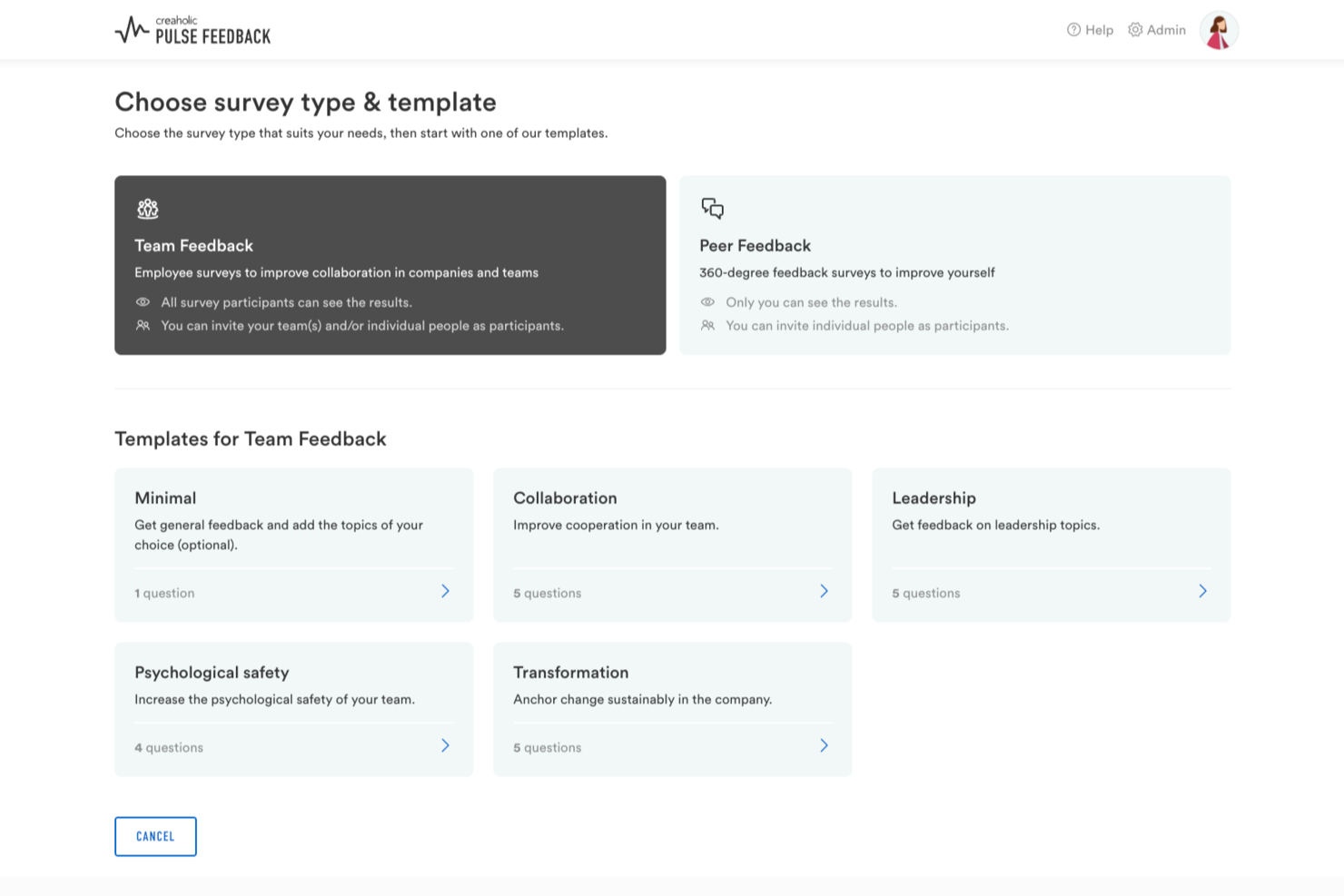
Pulse Feedback è una piattaforma svizzera per il feedback dei dipendenti che combina sondaggi periodici, feedback a 360 gradi, misurazione del coinvolgimento e insight basati sull'IA con strumenti guidati per la discussione dei team. Oltre al software, è disponibile un supporto di consulenza operativo per guidare le organizzazioni in ogni fase del processo, dalla progettazione di questionari personalizzati ai workshop sui risultati post-sondaggio.
Per chi è più adatto Pulse Feedback?
Pulse Feedback è una soluzione adatta ai team delle risorse umane, ai dirigenti e ai responsabili del personale di organizzazioni di medie e grandi dimensioni che cercano uno strumento flessibile per il feedback, abbinato alla possibilità di ricevere una guida da parte di esperti per migliorare la cultura organizzativa e il coinvolgimento dei dipendenti.
Perché ho scelto Pulse Feedback
Ho incluso Pulse Feedback tra le mie scelte principali perché è uno degli strumenti più completi che abbia visto per misurare nel tempo la cultura aziendale, non solo per ottenere un'istantanea occasionale. Apprezzo in particolare la funzione di confronto temporale, che consente di monitorare come cambiano gli indicatori della cultura nei diversi cicli di sondaggio, e il confronto con i benchmark, che permette di contestualizzare i risultati rispetto a riferimenti interni o esterni. Inoltre, il moderatore delle discussioni guidato dall'IA riunisce i team per analizzare i risultati in sessioni strutturate, facendo sì che i dati sulla cultura portino effettivamente a un'azione concreta.
Funzionalità principali di Pulse Feedback
- Feedback a 360 gradi: Raccogli feedback strutturati sulle singole persone da responsabili, colleghi e collaboratori diretti all'interno dello stesso ciclo di sondaggio.
- Libreria di domande con validazione scientifica: Accedi a oltre 120 domande di sondaggio predefinite, basate sulla ricerca organizzativa, per ridurre i tempi di configurazione.
- Sondaggi dal basso verso l'alto: Consenti ai singoli dipendenti o ai team di creare e inviare i propri sondaggi, non solo quelli promossi dall'alto dalle risorse umane.
- Chat con l'IA: Interroga i risultati del sondaggio in modo conversazionale per individuare schemi e punti dati specifici senza dover analizzare manualmente i report.
Integrazioni di Pulse Feedback
Le integrazioni native non sono documentate chiaramente; tuttavia, la piattaforma supporta l'accesso singolo (SSO) con le credenziali Microsoft 365.
Pros and Cons
Pros:
- Sessioni di team guidate dall'IA per discutere i risultati
- Sondaggi dal basso verso l'alto avviati da qualsiasi dipendente
- Suggerimenti integrati per un feedback costruttivo guidano le risposte
Cons:
- La creazione di sondaggi può risultare complessa per i sondaggi più estesi
- Disponibilità limitata di integrazioni con app di terze parti

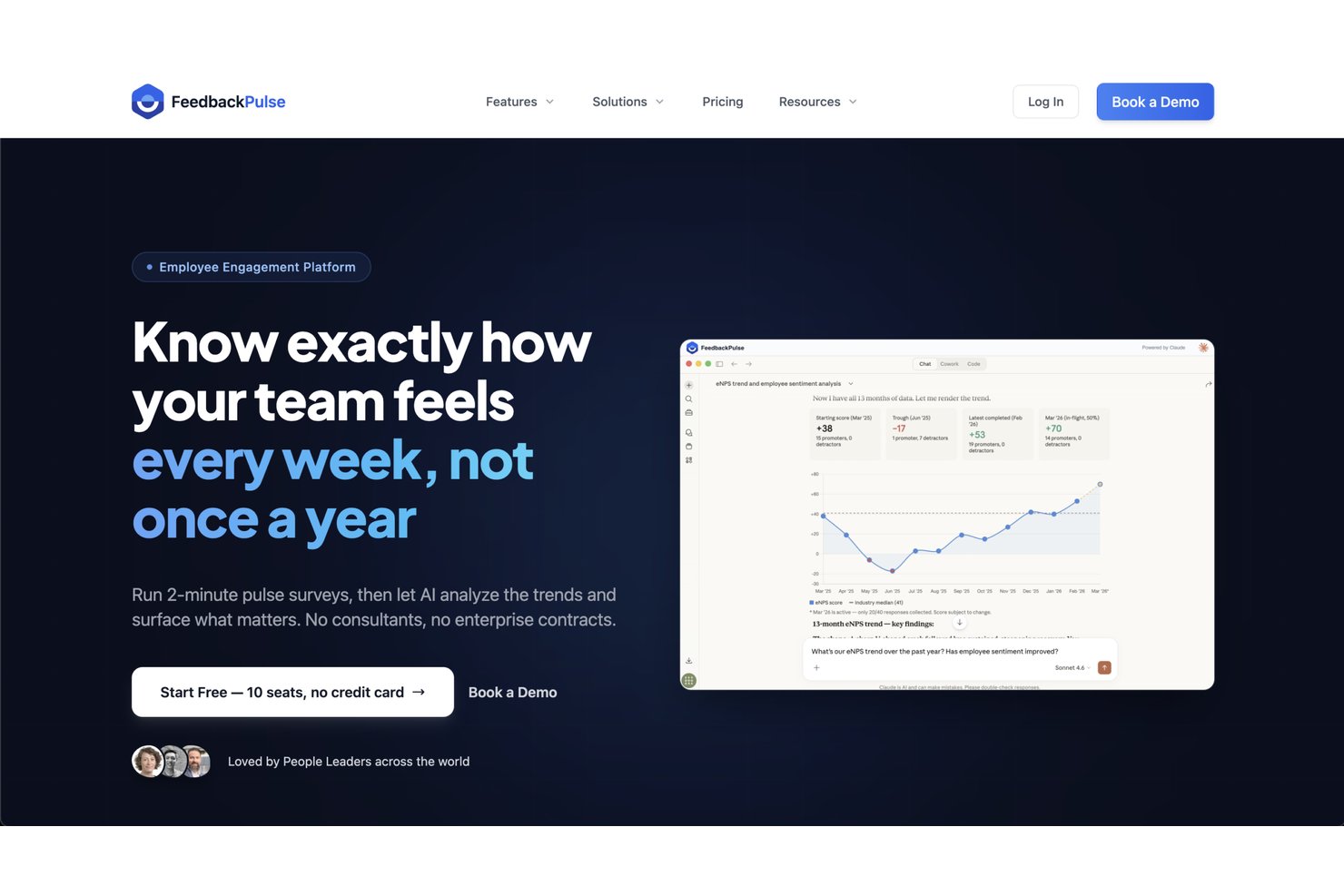
FeedbackPulse è una piattaforma di feedback e coinvolgimento che riunisce in un unico luogo sondaggi pulse, valutazioni a 360°, cicli di performance, monitoraggio eNPS e riconoscimento tra pari.
Per chi è FeedbackPulse?
FeedbackPulse è adatto ai team HR di aziende di medie dimensioni che necessitano di uno strumento dedicato per gestire programmi strutturati di feedback e coinvolgimento.
Perché ho scelto FeedbackPulse
Ho inserito FeedbackPulse tra le mie migliori scelte perché offre ai team HR un reale controllo su come strutturare e sequenziare i programmi di feedback. Mi piace che i modelli di sondaggio siano completamente modificabili, così puoi adattare le domande in base al team, alla sede o alla fase del ciclo di vita senza dover ricostruire tutto da zero a ogni ciclo. Puoi inoltre combinare diversi tipi di sondaggi—pulse, eNPS, onboarding ed exit—all'interno di un unico flusso di lavoro ricorrente, invece di gestirli come processi separati. Questo livello di configurabilità fa sì che FeedbackPulse sembri davvero uno strumento creato attorno alle esigenze operative reali dell'HR.
Funzionalità principali di FeedbackPulse
- Valutazioni tra pari a 360°: Avvia cicli strutturati di valutazione tra pari con impostazioni anonime per impostazione predefinita e percorsi di revisione per i manager integrati.
- Analisi testuale AI: Individua automaticamente temi e sintesi dalle risposte aperte ai sondaggi su insiemi di risposte ampie.
- Promemoria sondaggi automatici: Imposta pianificazioni di promemoria con limiti giornalieri di invio e controlli di cooldown per evitare di sovraccaricare i dipendenti con troppi sondaggi.
- Bacheca di riconoscimento tra pari: Consenti ai dipendenti di inviare attestati pubblici ai colleghi, visibili in tutta l'organizzazione tramite un feed di riconoscimento condiviso.
Integrazioni di FeedbackPulse
FeedbackPulse offre al momento un set ridotto di integrazioni. Si connette a Slack per l'invio di inviti e promemoria ai sondaggi come messaggi diretti e supporta l'accesso ad assistenti AI tramite il Model Context Protocol (MCP), con connessioni documentate per Claude Desktop e Claude.ai. Un'API nativa e strumenti di automazione, inclusi workflow in stile Zapier, sono pianificati ma non ancora disponibili.
Pros and Cons
Pros:
- Sintesi delle risposte ai sondaggi tramite AI integrata
- Coniuga sondaggi, valutazioni e riconoscimento
- Controlli di visibilità per le valutazioni tra pari tutelano l'equità
Cons:
- Disponibilità limitata di integrazioni native di terze parti
- Attualmente non è disponibile un'app mobile

Ideale per l'IA aziendale
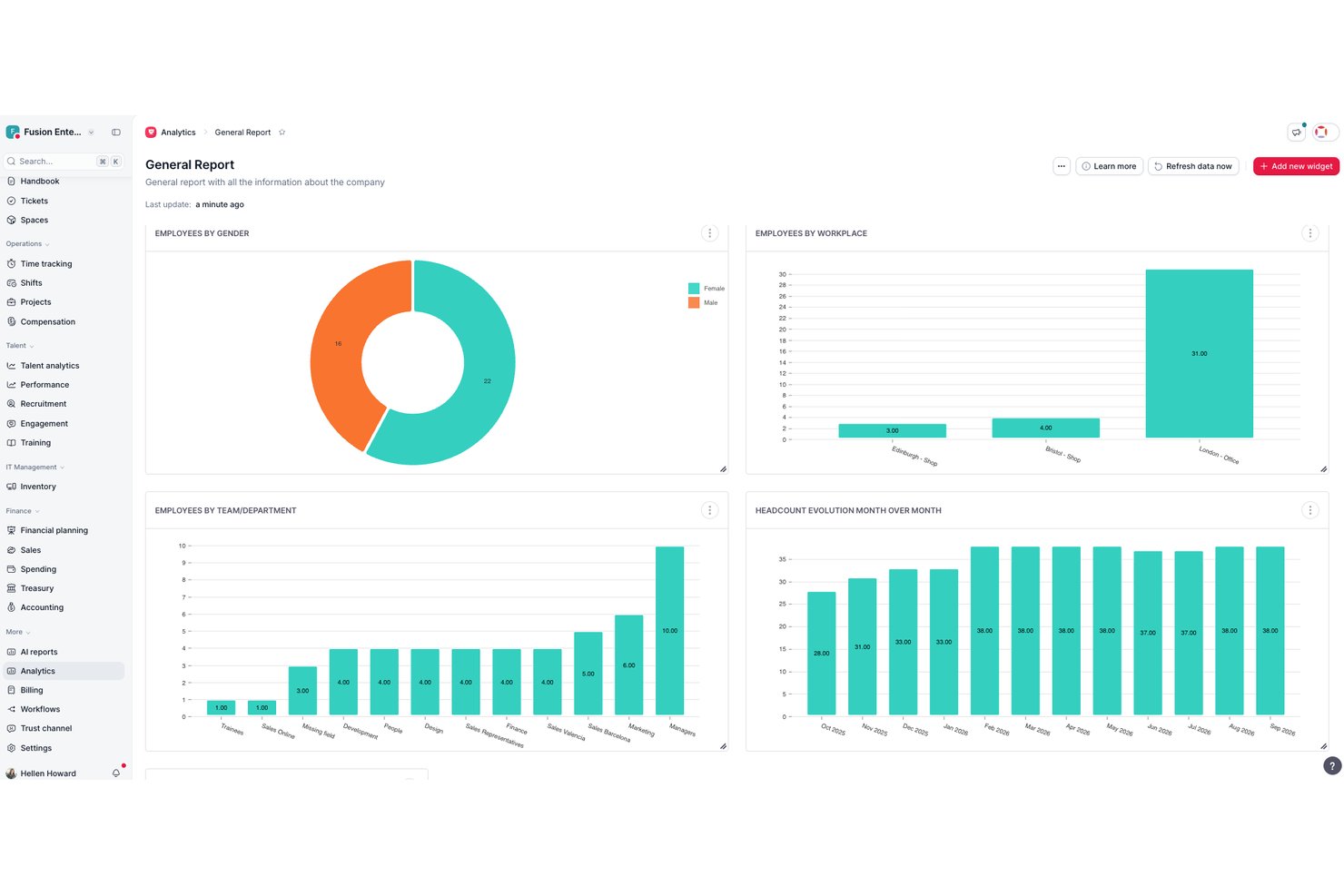
Factorial è una piattaforma HR completa che riunisce valutazioni delle prestazioni, cicli di riscontri a 360 gradi, sondaggi sul coinvolgimento, monitoraggio dell'eNPS e strumenti di analisi assistiti dall'IA in un unico luogo.
Per chi è più adatto Factorial?
Factorial è adatto ai gruppi che desiderano gestire valutazioni delle prestazioni, sondaggi sul coinvolgimento e flussi di lavoro HR fondamentali in un'unica piattaforma assistita dall'IA, invece di distribuirli tra strumenti separati.
Perché ho scelto Factorial
Ho incluso Factorial tra le mie scelte principali perché la sua IA è al centro del modo in cui i riscontri vengono effettivamente utilizzati, non solo raccolti. Mi piace in particolare il modo in cui lo strumento di IA One consente di confrontare fianco a fianco i cicli dei sondaggi, riepilogare i riscontri aperti e filtrare gli approfondimenti per gruppi specifici senza dover analizzare manualmente i dati grezzi. Insieme a una suite completa di cicli di valutazione a 180° e 360° e a un pannello degli approfondimenti sul coinvolgimento, Factorial collega i riscontri strutturati sulle prestazioni all'analisi effettiva in un unico luogo.
Caratteristiche principali di Factorial
- Sondaggi eNPS e sul clima: Raccogliere i punteggi Net Promoter dei dipendenti e condurre sondaggi sul clima basati sulle 12 domande di Gallup sul coinvolgimento per misurare il sentiment sul luogo di lavoro.
- Valutazione con griglia a 9 caselle: Posizionare i dipendenti su una griglia a 9 caselle per valutare le prestazioni del gruppo e individuare i punti di forza in tutta l'organizzazione.
- Valutazioni delle competenze tra pari: Condurre valutazioni delle competenze a 180°, 270° e 360° che confrontano fianco a fianco le risposte personali, dei manager e dei colleghi.
- Accesso ai sondaggi da dispositivi mobili: I dipendenti possono completare i sondaggi direttamente dall'applicazione mobile di Factorial, facilitando la partecipazione dei gruppi distribuiti.
Integrazioni di Factorial
Factorial offre integrazioni tramite il mercato, tra cui Slack, Google Workspace, Microsoft Azure, LinkedIn e Microsoft Power BI. Supporta inoltre un'API pubblica, chiavi API, OAuth 2.0, webhook, SDK, OpenAPI e Zapier.
Pros and Cons
Pros:
- L'IA riepiloga i riscontri e confronta i cicli dei sondaggi
- Le valutazioni a 360 gradi includono riscontri dei colleghi e dei collaboratori sui manager
- I dipendenti possono completare i sondaggi da dispositivi mobili
Cons:
- I report personalizzati possono richiedere soluzioni alternative
- I piani d'azione non monitorano il completamento
Ideale per trasformare il feedback in piani d'azione
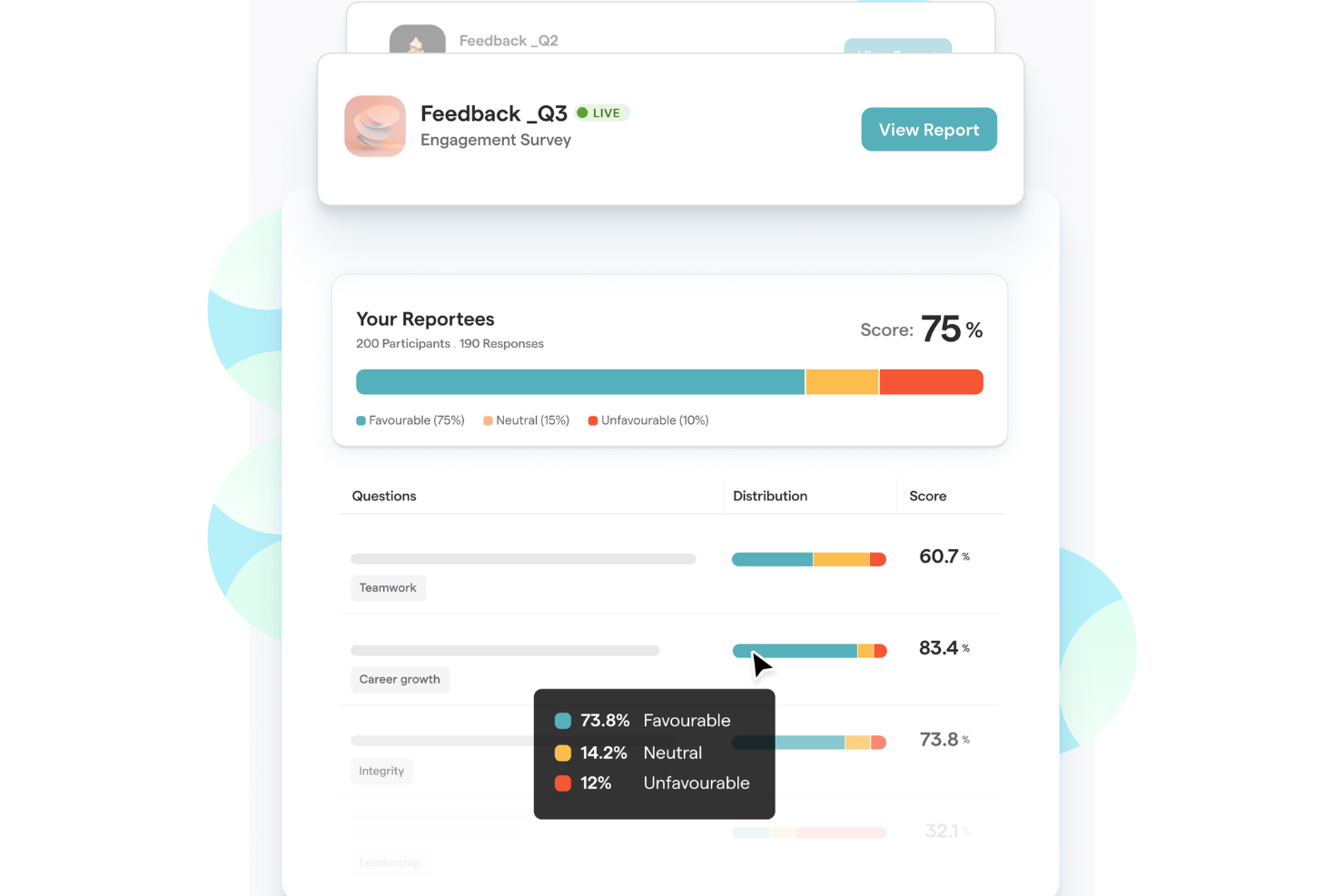
ThriveSparrow è un software di feedback per i dipendenti che permette di gestire sondaggi periodici, raccogliere input anonimi, analizzare i dati sull'engagement e creare piani d'azione basati su insight in tempo reale.
Per chi è ideale ThriveSparrow?
ThriveSparrow è adatto ai team HR di aziende piccole e medie che necessitano di un metodo strutturato per raccogliere feedback dai dipendenti e agire di conseguenza.
Perché ho scelto ThriveSparrow
ThriveSparrow si guadagna il suo posto tra i migliori della mia lista perché non si limita a raccogliere feedback: ti offre un percorso diretto dai risultati dei sondaggi all’azione strutturata. Apprezzo in particolare la funzione dei piani d’azione, che ti permette di creare un piano con un solo clic direttamente da un report di engagement, per poi suddividerlo in checklist e assegnare compiti a persone specifiche. Quando un sondaggio periodico segnala punteggi bassi in un particolare team o categoria, il mio team può passare immediatamente dall'insight all’assunzione di responsabilità senza cambiare strumento. La visualizzazione a mappa termica evidenzia quali gruppi sono sotto la media rispetto ai benchmark, così i piani d’azione possono essere mirati invece che generici.
Caratteristiche principali di ThriveSparrow
- Feedback a 360°: Raccogli feedback multipli da pari, manager e collaboratori diretti per offrire ai dipendenti una visione completa delle proprie prestazioni.
- Analisi del sentiment con IA: Analizza le risposte aperte dei sondaggi per individuare emozioni e temi dietro le risposte, segnalando segnali di burnout o disimpegno.
- Sondaggi multilingue: Svolgi sondaggi in oltre 100 lingue e traduci automaticamente le risposte, così puoi raccogliere feedback da team globali o distribuiti.
- Sondaggi eNPS: Misura la lealtà dei dipendenti con un sondaggio a domanda unica e monitora l’evoluzione dei punteggi di advocacy nel tempo con i report integrati.
Integrazioni di ThriveSparrow
Le integrazioni includono Slack, Microsoft Teams, Google Workspace, Google Chat, HiBob e vari sistemi HRIS tramite Merge. ThriveSparrow offre un'API per integrazioni personalizzate.
Pros and Cons
Pros:
- Fornisce preziosi insight sull'engagement dei dipendenti
- Meccanismi di feedback in tempo reale
- Offre riconoscimento tra pari
Cons:
- Manca di funzionalità avanzate utili alle organizzazioni più grandi
- Meno integrazioni rispetto ad altre piattaforme

PerformYard
Ideale per feedback a 360 gradi

PerformYard è un software per il feedback dei dipendenti che consente ai team HR e ai manager di gestire revisioni delle prestazioni strutturate, raccogliere feedback a 360 gradi e amministrare cicli di feedback continuo su un'unica piattaforma.
Per chi è ideale PerformYard?
PerformYard è adatto a organizzazioni di medie dimensioni in cui i team HR necessitano di un approccio strutturato e personalizzabile alla gestione delle prestazioni e al feedback dei dipendenti.
Perché ho scelto PerformYard
PerformYard merita il suo posto nella mia classifica dei migliori grazie alla grande flessibilità che offre nell'impostare il feedback a 360 gradi. Mi piace poter raccogliere feedback da subordinati diretti, colleghi, manager e persino persone esterne all'organizzazione—all'interno dello stesso ciclo di revisione. L'opzione per il feedback esterno è una funzionalità rara e realmente utile per ruoli con responsabilità verso i clienti. La piattaforma consente inoltre di combinare autovalutazioni e più valutazioni di manager in una singola revisione, offrendo così una visione stratificata delle prestazioni invece di un quadro unilaterale.
Caratteristiche chiave di PerformYard
- Feedback continuo: Richiedi, invia e ricevi feedback costante tra i cicli di revisione, inclusi riconoscimenti ai dipendenti e annotazioni sulle prestazioni.
- Gestione degli obiettivi: Definisci e monitora obiettivi individuali, di team e aziendali, con allineamento a cascata agli obiettivi organizzativi più ampi.
- Sondaggi di coinvolgimento dei dipendenti: Crea sondaggi completamente personalizzati—dall'onboarding ai colloqui di uscita—with una dashboard live per le risposte e monitoraggio della partecipazione.
- Reportistica e analisi delle prestazioni: Visualizza le tendenze delle prestazioni nel tempo e tra i team utilizzando dashboard, griglie 9-box, classifiche ed esportazioni di dati.
Integrazioni PerformYard
PerformYard offre integrazioni native con Microsoft Teams, Slack, piattaforme HRIS per la gestione dei dati dei dipendenti e provider SSO per l'accesso con un clic. È disponibile un'API per integrazioni personalizzate.
Pros and Cons
Pros:
- Ampia gamma di metodi per la raccolta del feedback
- Capacità di monitoraggio degli obiettivi
- Dati sulle prestazioni e analisi
Cons:
- Reportistica personalizzata limitata
- L'impostazione dei cicli di revisione può risultare poco intuitiva per alcuni utenti
Altre opzioni
Ecco altri strumenti per il feedback dei dipendenti che dovresti prendere in considerazione. Anche se non sono entrati nella mia top 10, sono comunque soluzioni efficaci:
- SurveyLegend
Ideale per sondaggi ottimizzati per dispositivi mobili
- Spidergap 360˚ Feedback
Ideale per processi di feedback personalizzabili
- Lattice
Ideale per insight sulle risorse umane basati sull’IA
- Vantage Circle
Ideale per la raccolta di feedback in tempo reale dei dipendenti
- SurveyMonkey
Ideale per modelli di sondaggio
- Culture Amp
Ideale per piccoli dipartimenti HR
- CultureMonkey
Ideale per misurare il coinvolgimento dei dipendenti
- Workleap
Ideale per dati di feedback anonimi e aggregati
- ChartHop
Ideale per la raccolta di feedback ad-hoc
- Qualtrics XM
Ideale per insight basati sull'IA


Come Valuto il Software per il Feedback dei Dipendenti
Esamino questi strumenti su due livelli: le capacità di base—come i sondaggi brevi e i canali anonimi—che qualsiasi piattaforma deve offrire, e i fattori che le distinguono e rendono una soluzione migliore rispetto a un'altra.
Funzionalità di Base (Requisiti Minimi per Questa Lista)
Quando seleziono gli strumenti per la mia lista, valuto ciascuno su una scala da 0 (non offre la funzionalità) a 5 (eccelle in questo ambito) per ogni funzionalità di base elencata qui sotto. Poi, calcolo il punteggio totale dello strumento come percentuale. Ogni strumento deve raggiungere un punteggio totale minimo del 65% per essere considerato per l'inserimento.
- Sondaggi Pulse e di Coinvolgimento: Controllo se una piattaforma supporta sia rapidi controlli periodici che sondaggi di coinvolgimento più approfonditi, e se offre una pianificazione flessibile come cadenze settimanali, mensili o trimestrali.
- Canali di Feedback Anonimi: Oltre a una semplice opzione di anonimato nei sondaggi, cerco canali disponibili in ogni momento come cassette dei suggerimenti o thread anonimi che permettono ai dipendenti di sollevare questioni in qualsiasi momento.
- Libreria di Modelli di Sondaggi: Una buona libreria evita al team HR di dover creare ogni sondaggio da zero. Valuto l'ampiezza dei modelli disponibili per casi d'uso come eNPS, onboarding, offboarding e DEI.
- Analisi e Reportistica del Feedback: Valuto quanto bene ogni strumento permette di segmentare i dati per team, dipartimento o anzianità e se evidenzia tendenze nel tempo invece di limitarsi al conteggio delle risposte.
- Strumenti per la Pianificazione delle Azioni: Raccogliere feedback è utile solo se si agisce di conseguenza. Cerco piani guidati, assegnazione di compiti e monitoraggio dei progressi collegati direttamente ai risultati dei sondaggi.
- Feedback a 360 Gradi e tra Pari: Controllo se una piattaforma supporta flussi di feedback multidirezionali—recensioni tra pari, feedback verso i manager e autovalutazioni—oltre ai consueti sondaggi top-down.
Una volta che ho una lista di strumenti che soddisfano questi criteri, considero cosa distingue ciascuna piattaforma.
Fattori Differenzianti (Cosa Distingue i Fornitori)
Ecco come confronto e metto a contrasto i diversi fornitori:
Funzionalità Distintive
Cerco analisi AI del sentiment che possa interpretare le risposte aperte e individuare temi ricorrenti—particolarmente utile dopo che un sondaggio aziendale raccoglie migliaia di commenti. Il benchmarking esterno è un ulteriore elemento distintivo, poiché consente ai responsabili HR di confrontare punteggi eNPS o di coinvolgimento rispetto ad aziende di dimensioni simili e rafforzare la loro proposta di investimento. Anche le dashboard per la responsabilizzazione dei manager sono importanti. Le migliori forniscono ai responsabili di team piena visibilità sui dati di feedback del proprio gruppo, insieme a suggerimenti di coaching e azioni raccomandate.
Oltre la Funzionalità
La privacy dei dati e la conformità sono prioritarie, poiché i dati di feedback sono intrinsecamente sensibili. Controllo la presenza di soglie di anonimato che impediscono la re-identificazione nei piccoli team, oltre alla conformità a GDPR e SOC 2. Anche le integrazioni con gli HRIS hanno un peso importante—le piattaforme che si sincronizzano con Workday, BambooHR o ADP mantengono aggiornati gli elenchi dei dipendenti senza caricamenti manuali. Infine, valuto quanto bene un fornitore supporta il monitoraggio degli esiti, come la correlazione tra i punteggi di coinvolgimento e le tendenze del turnover, in modo che i responsabili HR possano mostrare un impatto misurabile dei loro programmi di feedback.
Domande frequenti
Vuoi saperne di più sui software per il feedback dei dipendenti? Ecco alcune domande frequenti, con relative risposte, naturalmente.
Quali sono i modi più efficaci per raccogliere il feedback dei dipendenti?
Esistono diversi modi per raccogliere il feedback dei dipendenti, ciascuno con i propri vantaggi e svantaggi:
\u003cul\u003e
\t\u003cli\u003e\u003cstrong\u003eSondaggi\u003c/strong\u003e: Anche se le aziende utilizzano i sondaggi da decenni, i sondaggi tra i dipendenti rappresentano ancora uno dei modi più efficaci per raccogliere il loro feedback.\u003c/li\u003e
\t\u003cli\u003e\u003cstrong\u003eColloqui individuali\u003c/strong\u003e: Parlare faccia a faccia con qualcuno può essere prezioso. Tuttavia, questo metodo presenta un importante svantaggio: può dissuadere le persone dal condividere i propri pensieri e sentimenti reali.\u003c/li\u003e
\t\u003cli\u003e\u003cstrong\u003eFeedback anonimo\u003c/strong\u003e: Questo metodo può essere molto efficace perché consente ai dipendenti di condividere liberamente i propri pensieri. Lo svantaggio è che alcune persone potrebbero non prendere troppo sul serio i sondaggi anonimi, dato che sono protetti dall’anonimato.\u003c/li\u003e
\t\u003cli\u003e\u003cstrong\u003eSondaggi frequenti\u003c/strong\u003e: Brevi verifiche frequenti possono aiutarti a comprendere i tuoi dipendenti. E l’aspetto migliore dei sondaggi frequenti è che possono aiutarti a individuare tendenze o temi ricorrenti, così da poter agire immediatamente.\u003c/li\u003e
\t\u003cli\u003e\u003cstrong\u003eFeedback a 360 gradi\u003c/strong\u003e: Le sessioni di feedback a 360 gradi possono offrire nuove prospettive. I dipendenti ricevono feedback da manager, colleghi e subordinati, così possono capire come migliorare le proprie prestazioni e il proprio comportamento.\u003c/li\u003e
\u003c/ul\u003e
Quali sono i modi più efficaci per dare feedback ai dipendenti?
Ecco diversi metodi collaudati che possono aiutarti a offrire feedback preziosi senza essere negativi e turbare i tuoi dipendenti:
\u003cul\u003e
\t\u003cli\u003e\u003cstrong\u003eMetodo SBI\u003c/strong\u003e: SBI sta per Situazione, Comportamento e Impatto. Ti consente di descrivere situazioni specifiche, il comportamento osservabile del dipendente e l’impatto che tale comportamento ha avuto sul tuo team. Questo metodo è utile quando si condivide un feedback negativo.\u003c/li\u003e
\t\u003cli\u003e\u003cstrong\u003eMetodo STAR\u003c/strong\u003e: STAR sta per Situazione, Compito, Azione e Risultato. Ti consente di descrivere la situazione in cui il dipendente si è distinto, il compito che gli è stato assegnato, l’azione che ha svolto e il risultato che ha ottenuto. Questo metodo è utile quando si condivide un feedback positivo.\u003c/li\u003e
\t\u003cli\u003e\u003cstrong\u003eMetodo del sandwich\u003c/strong\u003e: Questo metodo consiglia di inserire un feedback negativo tra due feedback positivi, così da attenuare l’impatto della critica.\u003c/li\u003e
\u003c/ul\u003e
Perché è importante raccogliere il feedback dei dipendenti?
Raccogliere il feedback dei dipendenti è importante perché può:
\u003cul\u003e
\t\u003cli\u003eMigliorare il morale, la soddisfazione, la fidelizzazione e la produttività dei dipendenti\u003c/li\u003e
\t\u003cli\u003eCreare una cultura aziendale positiva basata sulla fiducia e sulla trasparenza\u003c/li\u003e
\t\u003cli\u003eAumentare il coinvolgimento dei dipendenti e l’allineamento con gli obiettivi aziendali\u003c/li\u003e
\u003c/ul\u003e
Che tipo di feedback dovresti chiedere ai dipendenti e con quale frequenza?
Dovresti chiedere sia feedback positivi sia negativi. Per quanto riguarda la frequenza, dovresti chiedere feedback almeno una volta all’anno. Idealmente, dovresti invitare i dipendenti a sentirsi liberi di condividere feedback in qualsiasi momento.
Per ulteriori suggerimenti, dai un’occhiata a 8 modi efficaci per ottenere il feedback dei dipendenti. Abbiamo analizzato anche i pro e i contro di ciascun metodo di raccolta del feedback.
Altre recensioni di software per il feedback dei dipendenti
Interessato ad altri tipi di strumenti per il coinvolgimento dei dipendenti oltre alla semplice raccolta di feedback? Dai un'occhiata anche a questi altri tipi di software:
- Migliori software di intelligenza artificiale per il feedback dei dipendenti
- Migliori software per il feedback a 360 gradi nelle valutazioni dei dipendenti
- Migliori strumenti per i sondaggi dei dipendenti e il feedback del personale
- Migliori piattaforme per il riconoscimento dei dipendenti e la valorizzazione dei migliori talenti
- Migliori software per il coinvolgimento dei dipendenti
- Migliori software per la valutazione dei dipendenti, le valutazioni delle prestazioni e il riconoscimento
- Migliori software per la gestione delle prestazioni e il feedback continuo
- Migliori software per gli OKR