

I 10 migliori strumenti di base di conoscenza con IA recensiti nel 2026

10 Selezione dei migliori strumenti di base di conoscenza basati sull'IA


Gestire le informazioni all'interno di un team è più difficile di quanto sembri. I documenti si accumulano, i processi e le conoscenze interne si trovano in luoghi diversi e diventa difficile per le persone trovare le risposte di cui hanno bisogno per svolgere il proprio lavoro. Gli strumenti di base di conoscenza basati sull'IA aiutano a risolvere questo problema organizzando le informazioni, migliorando la precisione delle ricerche e facilitando l'accesso dei team ai contenuti più importanti.
Questi strumenti utilizzano l'IA per mettere in evidenza i contenuti pertinenti, fornire risposte autonome alle domande e mantenere aggiornata la documentazione, riducendo significativamente il lavoro manuale. Nella mia esperienza di test di queste piattaforme, le funzionalità di IA più adatte possono far risparmiare tempo, migliorare la chiarezza e aiutare i team a collaborare in modo più efficace.
In questo articolo condividerò le mie scelte migliori tra gli strumenti di base di conoscenza basati sull'IA, insieme ad approfondimenti sulle loro caratteristiche distintive e sui loro vantaggi. Che tu stia costruendo il tuo primo hub della conoscenza o aggiornandone uno esistente, troverai opzioni che supportano una gestione delle informazioni più rapida e intelligente.
Perché fidarsi delle nostre recensioni sui software
Il nostro team testa e recensisce software dal 2012. In quanto esperti HR noi stessi, sappiamo quanto sia difficile — e importante — scegliere il software giusto.
Per questa guida, abbiamo valutato gli strumenti attraverso test pratici e ricerche indipendenti, assegnando un punteggio agli strumenti in base ai nostri criteri di selezione. Ci basiamo inoltre sulle competenze di leader di pensiero del settore e di professionisti HR attivi.
Le nostre recensioni riflettono il nostro giudizio editoriale umano, non un discorso di vendita.
Revisori esperti:
Tabella comparativa degli strumenti di base di conoscenza basati sull'IA
Questa tabella comparativa riassume i dettagli sui prezzi degli strumenti di base di conoscenza basati sull’IA che ho selezionato:
| Tool | Best For | Trial Info | Price | ||
|---|---|---|---|---|---|
| 1 | Ideale per knowledge hub creati da esperti | Demo gratuita disponibile | Da $5/dipendente/mese | Website | |
| 2 | Ideale per workflow di documentazione personalizzati | Prova gratuita di 14 giorni + demo gratuita disponibile | Prezzo su richiesta | Website | |
| 3 | Ideale per la distribuzione della conoscenza delle risorse umane incentrata sull'intranet | Demo gratuita disponibile | Prezzi su richiesta | Website | |
| 4 | Ideale per il supporto self-service tramite intelligenza artificiale | Prova gratuita di 14 giorni + demo gratuita disponibile | A partire da $19/agente/mese (fatturazione annuale) | Website | |
| 5 | Ideale per capacità di ricerca di livello enterprise | Dimostrazione gratuita disponibile | Prezzo su richiesta | Website | |
| 6 | Ideale per i flussi di lavoro della conoscenza tra team | Prova gratuita di 14 giorni | A partire da $9/utente/mese (con fatturazione annuale) | Website | |
| 7 | Ideale per il monitoraggio dell'integrità della conoscenza basato sull'intelligenza artificiale | Prova gratuita di 14 giorni + demo gratuita disponibile | Prezzi su richiesta | Website | |
| 8 | Ideale per la condivisione di documenti nei team remoti | Prova gratuita di 14 giorni + demo gratuita disponibile | Da $10/utente/mese (fatturato annualmente) | Website | |
| 9 | Ideale per la gestione delle conoscenze del team HR | Demo gratuita disponibile | Prezzi su richiesta | Website | |
| 10 | Ideale per la manutenzione automatica dei contenuti | Demo gratuita disponibile | Prezzo su richiesta | Website |


Recensioni dei migliori strumenti di base di conoscenza basati sull'IA
Di seguito sono riportati i miei riepiloghi dettagliati dei migliori strumenti di base di conoscenza basati sull’IA inclusi nella mia selezione. Le mie recensioni offrono uno sguardo approfondito alle caratteristiche principali, ai pro e contro, alle integrazioni e ai casi d’uso ideali di ciascuno strumento, per aiutarti a trovare quello più adatto a te.

Deel HR
Ideale per knowledge hub creati da esperti
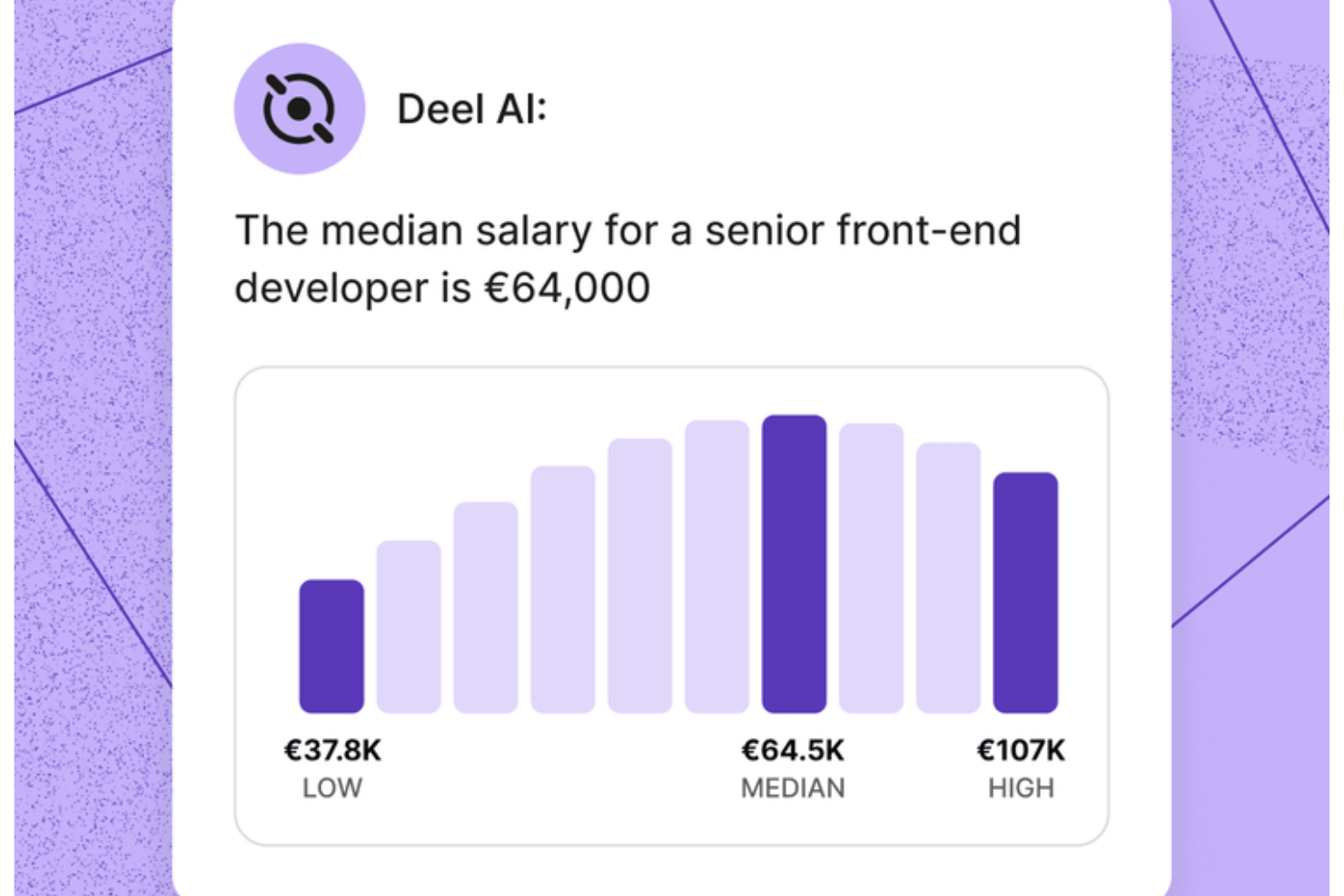
Gestire domande su risorse umane e conformità in un team in crescita diventa molto più semplice quando si dispone di uno strato intelligente di conoscenza che comprende i dati sulle persone e le regole applicabili. Deel AI ti offre questo vantaggio, agendo come un esperto sempre attivo che interpreta le tue politiche, fornisce risposte istantanee e collega le informazioni direttamente a ciò che stai visualizzando sulla piattaforma.
Perché ho scelto Deel
Ho scelto Deel perché funziona come una base di conoscenza AI dinamica sviluppata specificamente per risorse umane, paghe e conformità globale, non solo come un chatbot generico. Attrae informazioni dal Knowledge Hub creato dagli esperti di Deel e le unisce ai dati della tua forza lavoro per offrire risposte contestuali, in tempo reale e su misura per la tua organizzazione. Inoltre, apprezzo il fatto che comprenda dove ti trovi nella piattaforma e ti fornisca riepiloghi, dati chiave e indicazioni di conformità, distinguendosi rispetto agli archivi di conoscenza statici. Per i team che hanno bisogno di guida immediata e basata sui dati in diversi paesi e normative, questo livello di supporto AI è difficile da replicare.
Funzionalità principali di Deel
Oltre alle informazioni contestuali basate sull’AI già descritte, troverai queste funzionalità particolarmente preziose se stai valutando strumenti di knowledge base AI:
- Approfondimenti HR dai tuoi dati sulle persone: Il sistema combina i tuoi dati esistenti con il Knowledge Hub di Deel per fornire informazioni su misura per la tua forza lavoro.
- Report e analisi organizzative generati dall’AI: Permette di creare riepiloghi organizzativi, visualizzare dati chiave e ricevere suggerimenti di conformità utilizzando il tuo contesto interno.
- Supporto AI 24/7: Offre orientamento sempre disponibile su attività di risorse umane e domande sul prodotto, aiutandoti a mantenere il flusso di lavoro attivo in qualsiasi fuso orario.
- Accesso self-service per i dipendenti: Consenti al tuo team di accedere a paghe, contratti e informazioni sulla conformità attraverso un’interfaccia intuitiva.
Integrazioni di Deel
Le integrazioni includono QuickBooks, Xero, NetSuite, BambooHR, Greenhouse, Slack, Workday, SAP SuccessFactors, Oracle e Gusto.
Pros and Cons
Pros:
- I dipendenti possono trovare risposte HR in autonomia senza coinvolgimento del manager
- Gli approfondimenti contestuali riassumono le pagine HR durante la visualizzazione
- L’intelligenza artificiale offre risposte immediate sulle leggi sul lavoro locali in oltre 150 paesi
Cons:
- Forte dipendenza dal Knowledge Hub proprietario per l’accuratezza
- Le indicazioni dell’AI possono richiedere una revisione umana per scenari legali complessi
New Product Updates from Deel HR

Deel Expands Stablecoin Wallet to 80+ Countries
Deel expands its Stablecoin Wallet to 80+ countries with dollar-backed balances and optional rewards. This gives eligible contractors more ways to hold and manage earnings inside Deel. For more information, visit Deel’s official site.
 .
.
Ideale per workflow di documentazione personalizzati

Nell'ecosistema in continua evoluzione degli strumenti di gestione della conoscenza basati sull'AI, Document360 si distingue come una soluzione versatile pensata per le aziende che desiderano migliorare le proprie strategie di documentazione. Questo strumento è particolarmente interessante per settori come SaaS, IT, finanza, sanità ed istruzione, dove una gestione efficiente delle informazioni è fondamentale. Document360 affronta le sfide relative al supporto clienti, alla redazione tecnica e alla gestione dei prodotti offrendo funzionalità guidate dall'AI che semplificano la documentazione e migliorano il coinvolgimento degli utenti.
Perché ho scelto Document360
Ho scelto Document360 per la sua integrazione unica di capacità AI, essenziali negli strumenti di knowledge base moderni. La AI Premium Suite della piattaforma, che include ricerca AI e chatbot AI, risponde direttamente all'esigenza di recupero efficiente delle informazioni e di assistenza clienti automatizzata. Inoltre, la funzione di sintesi degli articoli aiuta i team a distillare rapidamente informazioni complesse rendendole accessibili e immediatamente fruibili. Queste funzionalità rendono Document360 una scelta interessante per le organizzazioni che vogliono ottimizzare la gestione della conoscenza.
Caratteristiche principali di Document360
Oltre alle funzionalità alimentate dall'AI, ho riscontrato altri aspetti che ne aumentano l'utilità:
- Analisi avanzate: monitora il coinvolgimento degli utenti e le performance della documentazione, fornendo indicazioni utili per migliorare la strategia dei contenuti.
- Workflow personalizzati: permette di adattare i processi di documentazione alle esigenze specifiche del team e alla struttura operativa.
- Deflessione dei ticket di supporto: riduce il volume delle richieste di supporto fornendo agli utenti risposte immediate attraverso una knowledge base intuitiva.
- Integrazione di AI generativa: sfrutta Eddy AI per ottimizzare la gestione della conoscenza grazie alla creazione e all'aggiornamento automatici dei contenuti.
Integrazioni di Document360
Le integrazioni includono Freshdesk, Salesforce, Zendesk, Intercom, Microsoft Teams, Slack, Google Analytics, Disqus, Hotjar e Segment.
Pros and Cons
Pros:
- Supporto chatbot AI integrato
- La sintesi degli articoli consente di risparmiare tempo
- Builder di workflow di documentazione personalizzati
Cons:
- Le funzionalità avanzate richiedono un apprendimento
- Integrazioni native piuttosto limitate
New Product Updates from Document360

Document360 Adds Drive and Eddy AI Workflow Updates
Document360 adds Drive file renaming, Eddy AI email ticket notifications, and Drive image support in AI Capture. These updates simplify file management, support escalation, and visual content editing. For more information, visit Document360’s official site.
 .
.
Haystack
Ideale per la distribuzione della conoscenza delle risorse umane incentrata sull'intranet
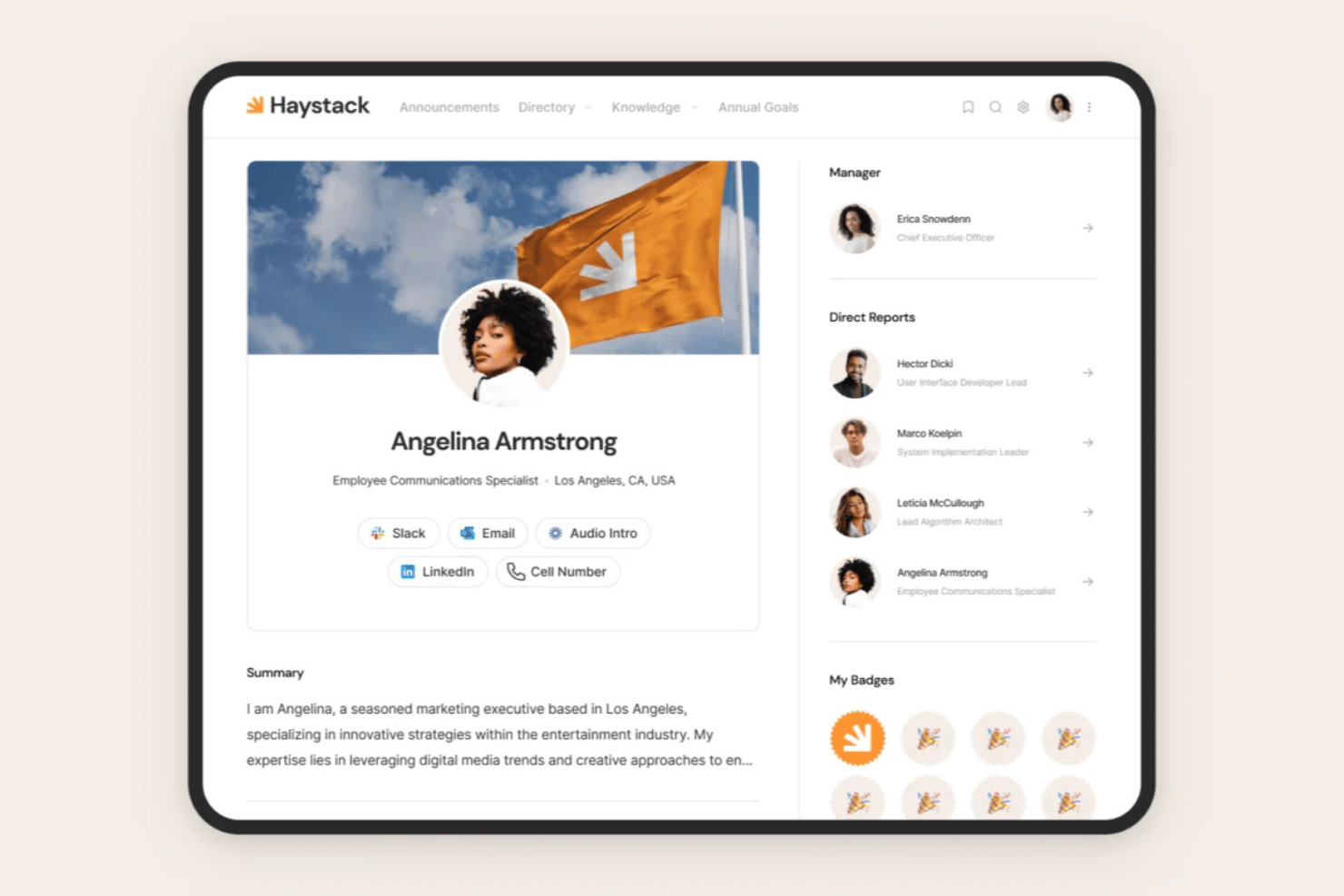
Haystack è una piattaforma per l'esperienza dei dipendenti e l'intranet con un modulo di conoscenza basato sull'IA integrato, che combina la ricerca semantica basata su Google Cloud, domande e risposte generative, la gestione dell'aggiornamento dei contenuti e la distribuzione multicanale tramite Slack, Teams, e-mail, SMS e dispositivi mobili.
Per chi è più adatto Haystack?
Haystack è particolarmente adatto ai gruppi delle risorse umane e della comunicazione interna che desiderano centralizzare la distribuzione delle conoscenze all'interno di un'intranet, con una copertura multicanale tramite Slack, Teams e dispositivi mobili.
Perché ho scelto Haystack
Ho scelto Haystack come una delle soluzioni migliori perché si basa sull'idea che la base di conoscenze e l'intranet debbano essere un'unica cosa, non due. Il Motore di aggiornamento è ciò che lo distingue ai miei occhi: è possibile assegnare date di scadenza ai documenti sulle politiche e ai manuali, e Haystack invita automaticamente l'esperto dei contenuti appropriato a esaminarli e verificarli nuovamente. Se a questo si aggiunge la Ricerca universale basata su Google Cloud, che interpreta le domande in linguaggio naturale e recupera le risposte dalla base di conoscenze e dalle app collegate come SharePoint e Confluence, si ottiene un'esperienza di conoscenza per le risorse umane realmente incentrata sull'intranet.
Funzionalità principali di Haystack
- Traduzione multilingue dei contenuti: 'Traduci con fiducia' traduce dinamicamente i contenuti in decine di lingue, consentendo ai gruppi distribuiti di accedere alle stesse conoscenze verificate senza dover creare basi di conoscenze separate per ogni lingua.
- Conferme di lettura obbligatoria: gli amministratori possono contrassegnare le comunicazioni sulle politiche come obbligatorie da leggere, richiedendo ai dipendenti di confermare la ricezione per il monitoraggio della conformità.
- Glossario aziendale: un glossario centralizzato definisce la terminologia delle risorse umane, gli acronimi e il gergo interno, così i dipendenti hanno sempre un punto di riferimento coerente.
- Acquisizione di contenuti in più formati: Haystack accetta pagine, documenti, video e incorporamenti con aggiornamento in tempo reale provenienti da app di terze parti come Confluence, SharePoint e Google Drive all'interno di un unico archivio di conoscenze.
Integrazioni di Haystack
Haystack supporta oltre 40 integrazioni con sistemi HRIS, tra cui Workday, BambooHR, UKG, ADP e HiBob. Si collega inoltre a Google Drive, SharePoint, Confluence, Slack, Microsoft Teams, Okta e Microsoft Entra ID.
Pros and Cons
Pros:
- Il Motore di aggiornamento integrato automatizza la revisione delle politiche
- La traduzione basata sull'IA in più lingue supporta i gruppi globali
- Centro per l'inserimento dei dipendenti con conferme di lettura obbligatoria
Cons:
- Nessuna risposta generativa basata sull'IA personalizzata in base al ruolo
- Manca la gestione nativa delle richieste o dell'escalation per evitare l'apertura di ticket

Ideale per il supporto self-service tramite intelligenza artificiale
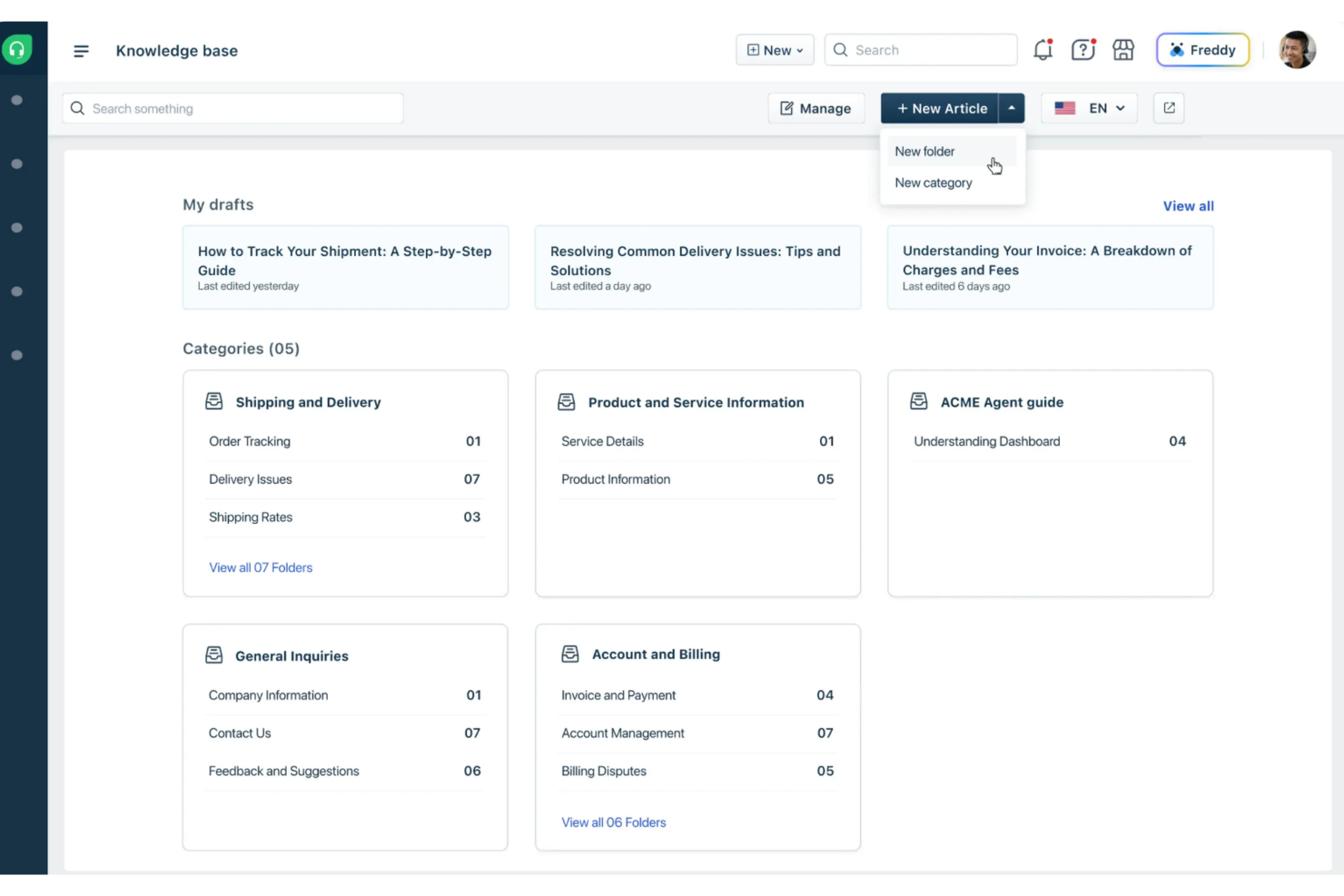
Freshdesk è una piattaforma di assistenza clienti basata sull'intelligenza artificiale progettata per semplificare i processi di supporto e migliorare la gestione delle richieste dei clienti da parte dei team. Aiuta le aziende a gestire le interazioni con i clienti e a risolvere i problemi in modo efficiente grazie a strumenti come Vertical AI Agents e AI Copilot. Il suo portale di assistenza e la knowledge base consentono un supporto self-service tramite intelligenza artificiale, permettendo ai clienti di trovare rapidamente le risposte senza dover contattare un agente.
Perché ho scelto Freshdesk
Ho scelto Freshdesk per la sua funzione di supporto self-service con intelligenza artificiale, che aiuta i clienti a trovare risposte senza dover contattare un agente. La sua knowledge base e il portale di assistenza permettono alle aziende di fornire articoli utili e risorse che i clienti possono cercare e consultare autonomamente. Freshdesk include anche AI Copilot, che assiste gli agenti con suggerimenti di risposta e riepiloghi dei ticket per ridurre i tempi di risposta. Inoltre, i Vertical AI Agents sono in grado di risolvere in autonomia determinate problematiche dei clienti, aiutando i team di supporto a gestire le richieste in modo più efficiente.
Caratteristiche principali di Freshdesk
Oltre al supporto self-service tramite intelligenza artificiale, Freshdesk offre:
- Workspace centralizzato: Freshdesk mette a disposizione una piattaforma unificata per gestire tutte le interazioni con i clienti, assicurando una comunicazione fluida tra i team.
- Strumenti di automazione: La piattaforma dispone di funzionalità di automazione per l'instradamento dei ticket e la gestione dei flussi di lavoro, riducendo le attività manuali e aumentando l'efficienza.
- AI Insights: Freshdesk offre approfondimenti basati sull'intelligenza artificiale che forniscono alla leadership una visione sulle tendenze del servizio clienti e sui metriche di prestazione.
- Supporto multilingue: Grazie al supporto di più lingue, Freshdesk permette alle aziende di rivolgersi a una clientela diversificata.
Integrazioni di Freshdesk
Le integrazioni includono Slack, MS Teams, Shopify, Google Calendar, Freshsales Suite, Google Analytics, Atlassian Jira, Mailchimp, HubSpot CRM e Zoho CRM. Freshdesk offre inoltre un'interfaccia low-code che consente agli utenti di creare integrazioni personalizzate quando necessario.
Pros and Cons
Pros:
- Il portale self-service collega la knowledge base al sistema di ticketing per un supporto più rapido
- Sistema di ticketing organizzato con diverse visualizzazioni per monitoraggio e collaborazione
- AI Copilot suggerisce risposte e riassume i ticket per far risparmiare tempo agli agenti
Cons:
- Tempi di caricamento lenti con grandi volumi di ticket
- Gestione delle risorse non integrata rispetto ad altri prodotti Freshworks

Glean
Ideale per capacità di ricerca di livello enterprise
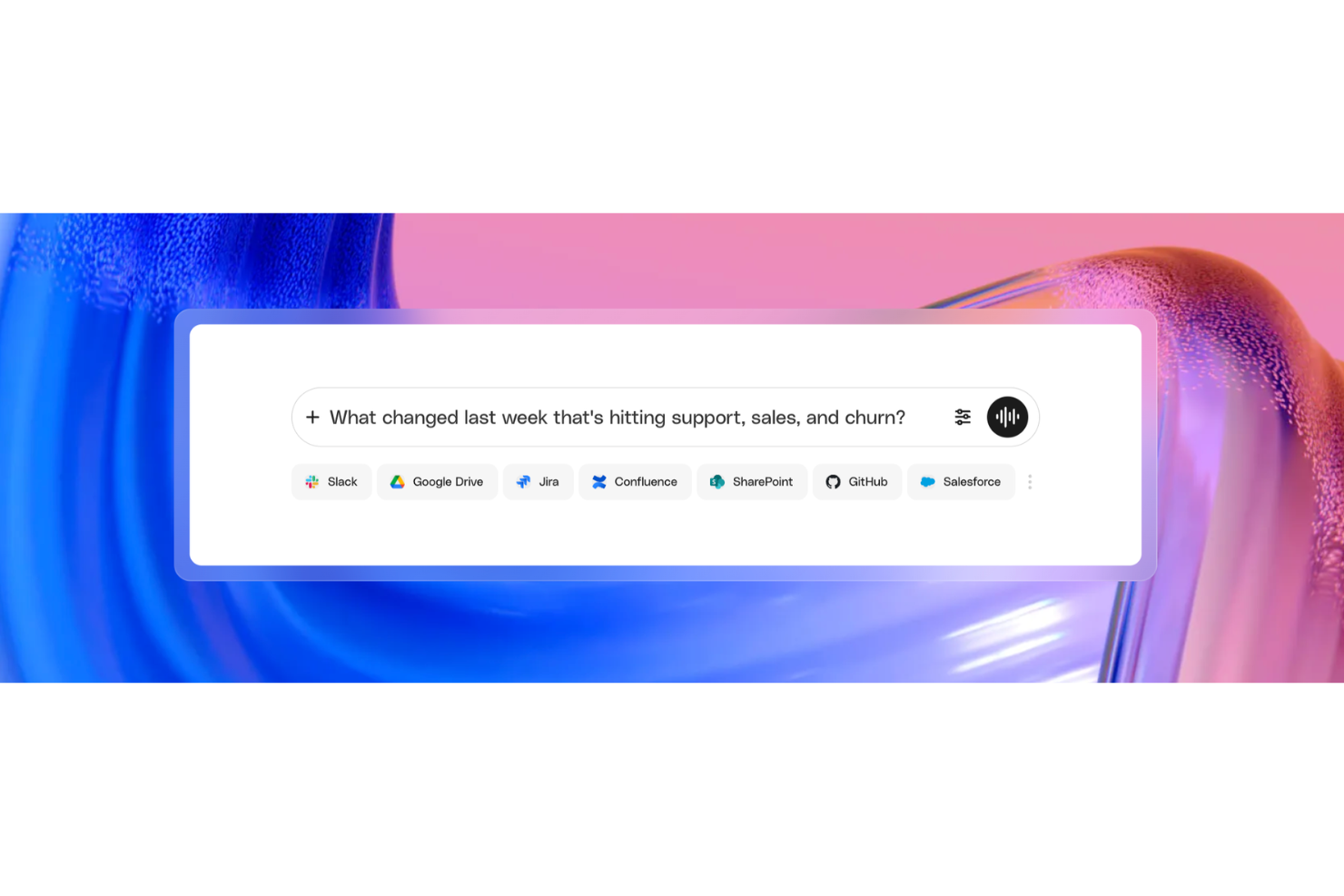
Glean è una piattaforma AI per il lavoro aziendale che collega le conoscenze tra le app della tua azienda e utilizza la ricerca potenziata dall'intelligenza artificiale, risposte generative e controlli di accesso sensibili alle autorizzazioni per offrire informazioni affidabili e contestuali a tutti i team.
Per chi è indicato Glean?
Glean è ideale per le grandi aziende con stack tecnologici complessi e multi-app, dove team IT, HR e della conoscenza devono gestire e rendere accessibili informazioni su larga scala.
Perché ho scelto Glean
Glean è una delle mie scelte preferite perché adoro il modo in cui la sua ricerca aziendale va oltre la corrispondenza di parole chiave. Il motore di ricerca vettoriale utilizza LLM di deep learning per la comprensione semantica, così quando qualcuno del mio team pone una domanda in linguaggio naturale, Glean estrae la risposta corretta simultaneamente da Slack, Jira, Google Drive o da una qualsiasi delle oltre 100 app collegate. Trovo anche particolarmente impressionante il grafo delle conoscenze: mappa le relazioni tra persone, contenuti e interazioni per personalizzare i risultati in base al ruolo, quindi due persone che pongono la stessa domanda non riceveranno una generica risposta uguale.
Caratteristiche principali di Glean
- Risposte generative AI: L'AI di Glean sintetizza una risposta diretta a domande in linguaggio naturale e rimanda ai documenti di origine verificati che supportano quella risposta.
- Raccolte di conoscenza: Organizza set curati di risorse, link e documenti in raccolte condivise accessibili ai team come hub di riferimento strutturati.
- Verifica dei contenuti: Contrassegna i documenti come affidabili o segnala i contenuti obsoleti affinché la conoscenza rimanga accurata senza richiedere un processo di audit manuale.
- Agenti AI: Crea agenti AI senza codice in grado di recuperare, ragionare e agire sulle conoscenze aziendali utilizzando istruzioni in linguaggio naturale.
Integrazioni di Glean
Glean offre oltre 275 connettori nativi e basati su MCP, compresi Confluence, Slack, Google Workspace, Jira, Salesforce, GitHub, ServiceNow, BambooHR, Dropbox e Box. È disponibile su Zapier e fornisce un'API per integrazioni personalizzate.
Pros and Cons
Pros:
- Comprende bene l'intento delle query in linguaggio naturale
- Risultati personalizzati in base al contesto del ruolo
- Indicizza i contenuti esistenti senza nuova documentazione
Cons:
- Non può eseguire azioni nelle app collegate
- La qualità della ricerca diminuisce con documenti poco taggati

Ideale per i flussi di lavoro della conoscenza tra team
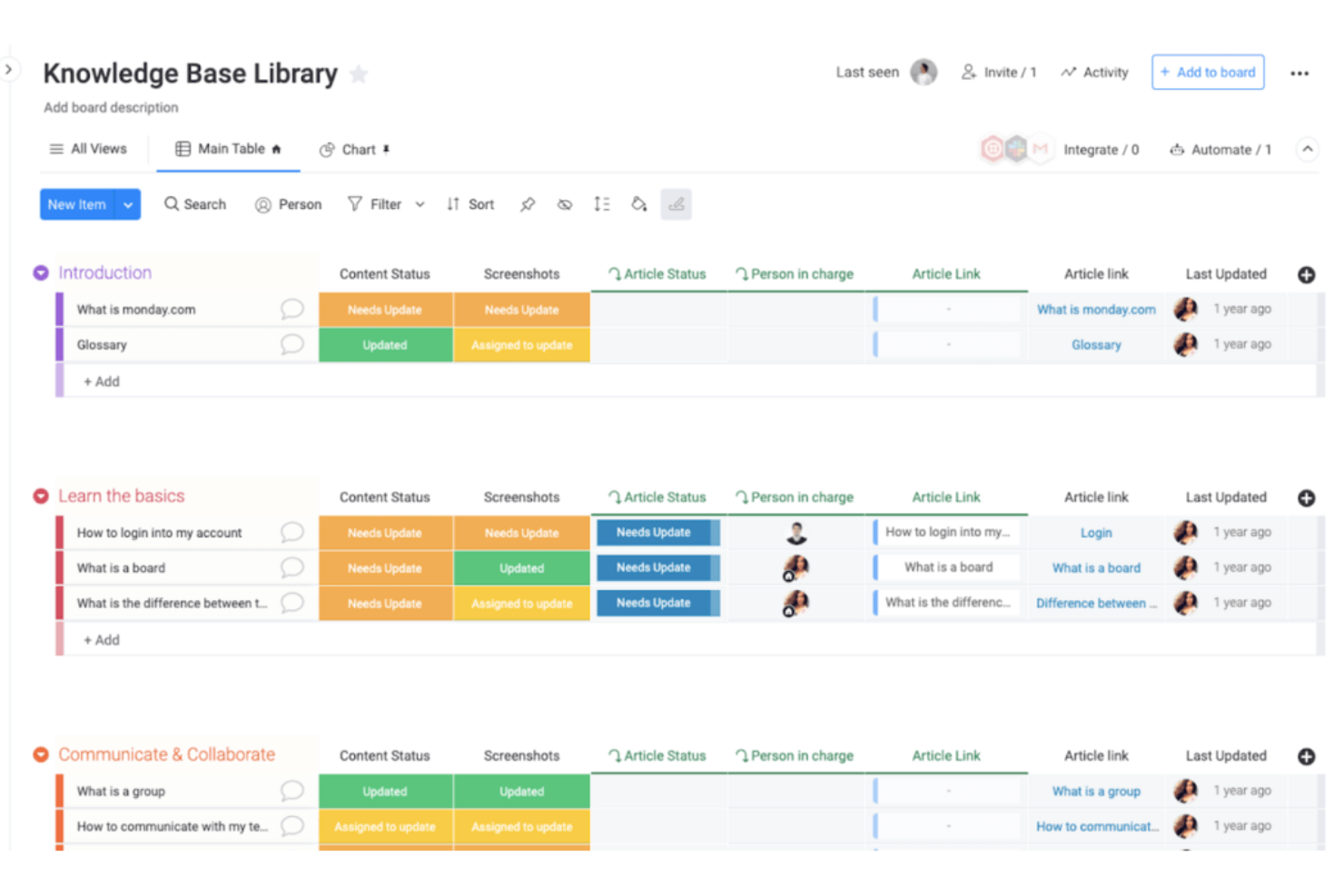
monday AI Workspace è una piattaforma per la gestione del lavoro che integra agenti di intelligenza artificiale, un assistente Sidekick e strumenti di intelligenza artificiale generativa direttamente nei flussi di lavoro dei team, per individuare, aggiornare e utilizzare la conoscenza organizzativa condivisa tra bacheche e documenti.
Per chi è più adatto monday AI Workspace?
È una soluzione particolarmente adatta ai team operativi e di progetto di organizzazioni di medie e grandi dimensioni che gestiscono il lavoro tra più reparti e hanno bisogno di integrare l'intelligenza artificiale nei flussi di lavoro esistenti.
Perché ho scelto monday AI Workspace
Ho scelto monday AI Workspace per il modo in cui collega l'intelligenza artificiale direttamente ai dati organizzativi aggiornati presenti in bacheche e documenti, rendendolo uno dei pochi strumenti in cui la conoscenza non è archiviata separatamente dal lavoro. Mi piace il fatto che l'assistente Sidekick utilizzi il contesto dei progetti attivi, della cronologia delle richieste e delle policy aziendali per rispondere alle domande in tempo reale. Quando il mio team collega Claude o Copilot al nostro spazio di lavoro, questi assistenti di intelligenza artificiale possono leggere i dati delle bacheche e intraprendere azioni senza che nessuno debba cambiare applicazione.
Caratteristiche principali di monday AI Workspace
- Pannelli di controllo basati sull'intelligenza artificiale: Crea pannelli di controllo dinamici e visivi che si aggiornano automaticamente in base ai dati delle bacheche e dei progetti.
- Modifica collaborativa dei documenti: Crea e modifica documenti in tempo reale con i membri del team direttamente all'interno del tuo spazio di lavoro.
- Controlli degli accessi basati sui ruoli: Controlla chi può visualizzare o modificare bacheche, documenti e dati specifici utilizzando autorizzazioni granulari per gli utenti.
- Integrazioni multicanale: Collega la piattaforma a strumenti come Slack, Google Drive ed e-mail per ottimizzare i flussi di lavoro.
Integrazioni di monday AI Workspace
monday AI Workspace offre centinaia di integrazioni native, tra cui Slack, Google Workspace, Microsoft 365, Salesforce, Jira, GitHub, Zoom, Dropbox, HubSpot e Zendesk. Supporta inoltre Zapier e mette a disposizione un'API per integrazioni personalizzate.
Pros and Cons
Pros:
- Sidekick AI esegue ricerche in tutte le bacheche dello spazio di lavoro
- La conoscenza si collega direttamente ai dati aggiornati dei progetti
- Supporto per più modelli di intelligenza artificiale all'interno di un unico spazio di lavoro
Cons:
- Non è progettato specificamente per i contenuti relativi alle policy HR
- Funzionalità limitate per l'acquisizione strutturata di contenuti HR
New Product Updates from monday AI Workspace
monday AI Workspace Adds Human Approval Routing
monday AI Workspace adds a human-in-the-loop approval block to AI Workflows, sending approval requests and routing workflow paths based on responses. For more information, visit monday AI Workspace's official site.

Stonly
Ideale per il monitoraggio dell'integrità della conoscenza basato sull'intelligenza artificiale
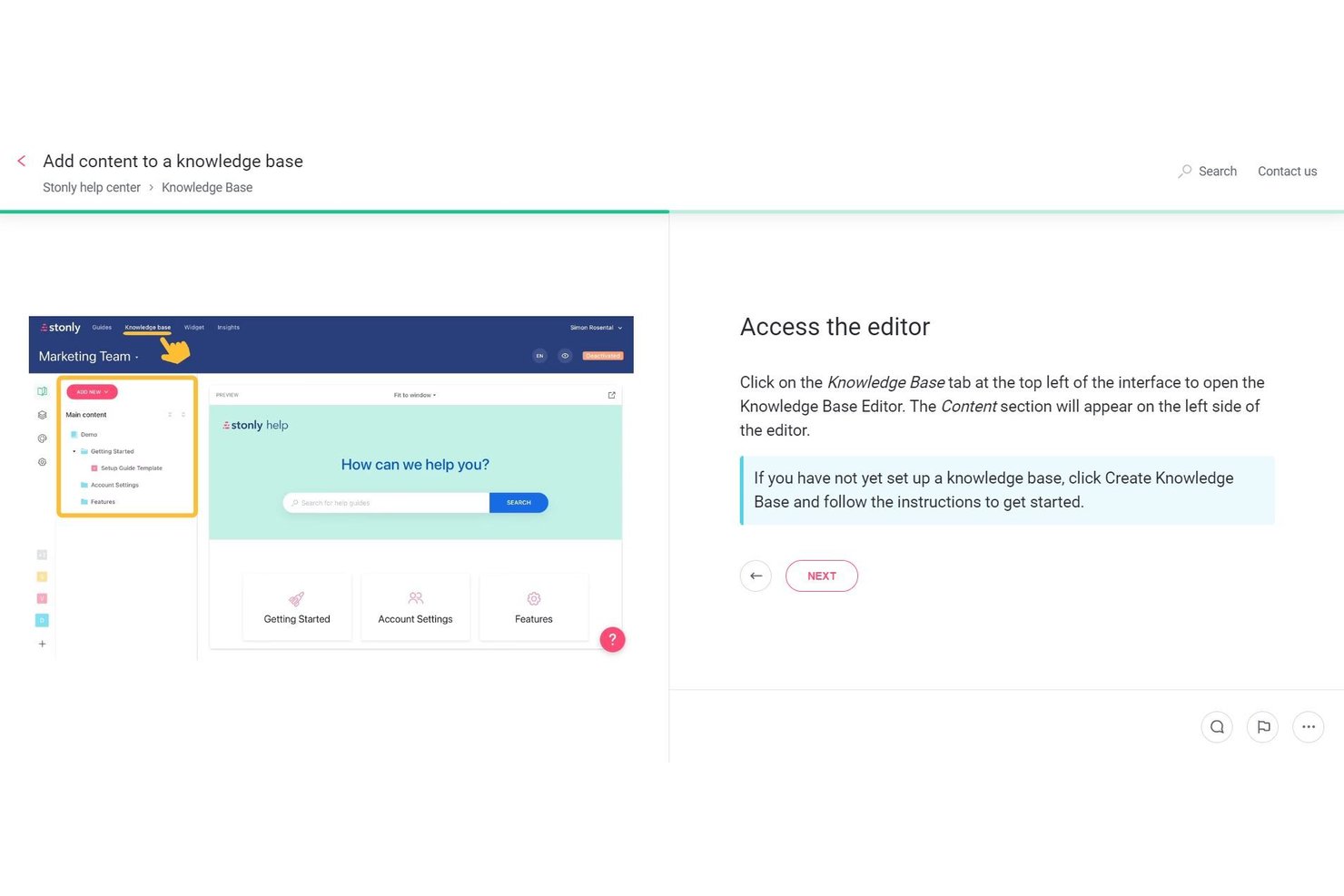
Stonly è una piattaforma di base di conoscenza basata sull'intelligenza artificiale e strutturata attorno a contenuti organizzati passo dopo passo, che offre ricerca semantica, risposte generate dall'intelligenza artificiale, alberi decisionali interattivi e Agenti della conoscenza autonomi che monitorano, verificano e redigono aggiornamenti per tutti i contenuti della base di conoscenza.
Per chi è più adatto Stonly?
Stonly è particolarmente adatto ai team che gestiscono grandi volumi di contenuti strutturati per la gestione della conoscenza e hanno bisogno dell'intelligenza artificiale per monitorare continuamente, segnalare e redigere aggiornamenti per la propria base di conoscenza.
Perché ho scelto Stonly
Stonly è entrato nella mia rosa di candidati soprattutto grazie ai suoi Agenti della conoscenza, che considero il sistema di monitoraggio dell'integrità della conoscenza basato sull'intelligenza artificiale più efficace che abbia visto in questa categoria. Questi agenti operano continuamente, segnalando collegamenti non funzionanti, contenuti duplicati e lacune nella copertura, quindi redigendo aggiornamenti suggeriti da sottoporre alla revisione umana prima della pubblicazione. Il Punteggio di salute della conoscenza offre una verifica in tempo reale dell'intera base di conoscenza, così i contenuti obsoleti o in conflitto vengono individuati automaticamente invece di essere scoperti da un utente frustrato.
Funzionalità principali di Stonly
- Risposte guidate: Un livello di rilevamento dell'intento che identifica lo scopo alla base di una richiesta di ricerca e avvia l'albero decisionale interattivo più pertinente direttamente dai risultati di ricerca.
- Agenti per i processi aziendali: Agenti di intelligenza artificiale programmati che gestiscono flussi di lavoro di risoluzione in più passaggi dall'inizio alla fine tramite e-mail, chat e piattaforme integrate di gestione dei ticket come Zendesk e ServiceNow.
- Segmentazione dei contenuti: Una funzionalità di targeting che fornisce contenuti di conoscenza diversi a gruppi di utenti diversi in base ai propri dati sugli utenti, disponibile a partire dal piano per piccole imprese.
- Analisi del percorso completo: Tiene traccia di come gli utenti si muovono passo dopo passo all'interno delle singole guide, mostrando i punti in cui abbandonano il percorso o effettuano ricerche senza trovare risposte.
Integrazioni di Stonly
Stonly offre integrazioni native con SharePoint, Confluence, Google Drive, Google Sheets, Notion, Slack, Microsoft Teams, Zendesk, Salesforce e ServiceNow. Supporta inoltre Zapier e integrazioni personalizzate basate su API.
Pros and Cons
Pros:
- Gli Agenti della conoscenza basati sull'intelligenza artificiale automatizzano il monitoraggio dell'integrità dei contenuti
- Le guide strutturate passo dopo passo riducono gli errori dell'intelligenza artificiale
- Supporto multilingue per la distribuzione globale della conoscenza
Cons:
- Nessuna sincronizzazione nativa con sistemi HRIS o dati dei dipendenti
- La creazione manuale delle guide può richiedere molto tempo

Slite
Ideale per la condivisione di documenti nei team remoti
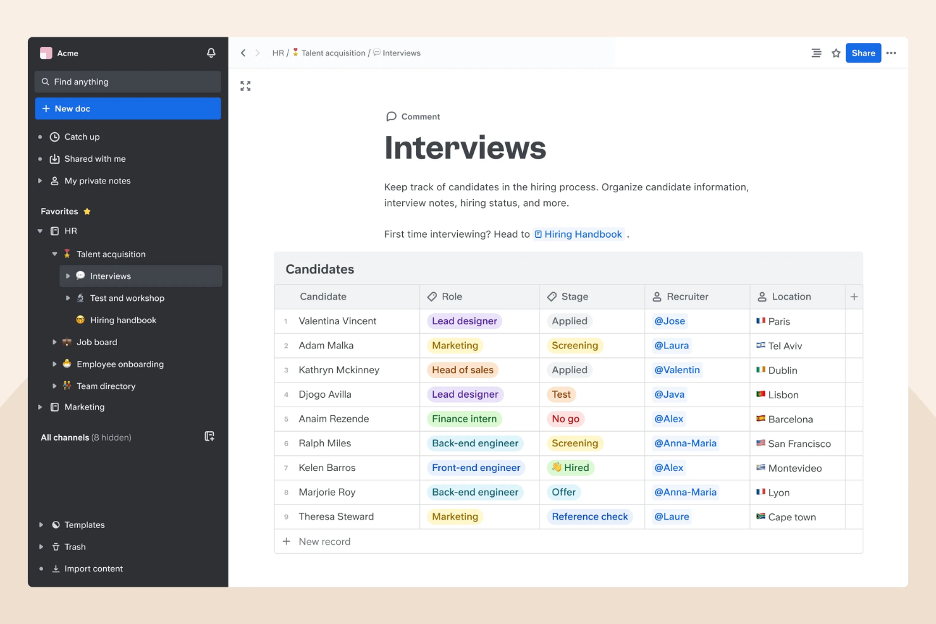
Slite è uno strumento collaborativo di documentazione con formati flessibili, pensato per team remoti che necessitano di condividere e organizzare informazioni in modo efficiente. I suoi principali utenti sono team distribuiti che cercano modalità efficaci per gestire e accedere ai documenti.
Perché ho scelto Slite: Slite va oltre la semplice condivisione di documenti statici, trasformando note e documenti sparsi in una conoscenza strutturata, ricercabile e connessa. La piattaforma utilizza l’intelligenza artificiale per suggerire modalità di categorizzazione dei contenuti, individuare sovrapposizioni o informazioni mancanti e assicurare che ogni documento rientri in un quadro di conoscenza più ampio.
Funzionalità e integrazioni principali:
Funzionalità comprendono un’interfaccia intuitiva che semplifica la navigazione, collaborazione in tempo reale che permette al team di lavorare insieme e un sistema di organizzazione dei documenti che mantiene tutto in ordine.
Integrazioni includono Slack, Google Drive, Trello, Asana, GitHub, Dropbox, Microsoft Teams, Zapier, Jira e Confluence.
Pros and Cons
Pros:
- Ricerca assistita dall’IA che recupera le risposte semanticamente, non solo tramite parole chiave
- Interfaccia intuitiva che migliora l’esperienza utente
- Organizzazione dei documenti potenziata dall'intelligenza artificiale
Cons:
- La configurazione iniziale può richiedere tempo
- Opzioni di personalizzazione avanzata limitate

HR Cloud
Ideale per la gestione delle conoscenze del team HR

HR Cloud è una piattaforma completa per la gestione delle risorse umane, progettata per supportare i processi HR delle piccole e medie imprese. Offre ai professionisti delle risorse umane soluzioni per l'inserimento dei dipendenti, il coinvolgimento dei dipendenti e la gestione delle prestazioni.
Perché ho scelto HR Cloud: Include analisi basate sull'intelligenza artificiale e agenti di supporto intelligenti che forniscono informazioni sulle prestazioni e sul coinvolgimento dei dipendenti. Gli strumenti di automazione dell'inserimento dei dipendenti della piattaforma aiutano a ridurre le attività manuali, migliorando l'efficienza. I flussi di lavoro personalizzabili consentono di adattare i processi alle esigenze del tuo team.
Funzionalità e integrazioni principali:
Le funzionalità includono flussi di lavoro personalizzabili che si adattano alle esigenze del tuo team, automazione dell'inserimento dei dipendenti che riduce le attività manuali e analisi che forniscono informazioni sulle prestazioni e sul coinvolgimento.
Le integrazioni includono Slack, Microsoft Teams, Google Workspace, ADP, OneLogin, Okta, Workday, Salesforce e Zapier.
Pros and Cons
Pros:
- Informazioni sulle prestazioni basate sull'intelligenza artificiale
- Flussi di lavoro personalizzabili per processi su misura
- L'automazione dell'inserimento dei dipendenti riduce le attività manuali
Cons:
- Potrebbe richiedere tempo per la configurazione iniziale
- Opzioni di personalizzazione avanzata limitate

Bloomfire
Ideale per la manutenzione automatica dei contenuti

Bloomfire è una piattaforma di gestione della conoscenza basata sull’IA, progettata per aiutare i team a mantenere le informazioni accurate, accessibili e in costante miglioramento. È particolarmente utile per le organizzazioni che desiderano una base di conoscenza dinamica e in evoluzione, senza l’onere manuale di continui controlli sul contenuto.
Perché ho scelto Bloomfire: Bloomfire si distingue per la sua IA auto-riparante, che identifica articoli obsoleti, flussi di lavoro inattivi e contenuti duplicati, quindi li rimuove automaticamente o li segnala per la revisione. Questo dà ai team la certezza che ciò che cercano, consultano e condividono sia sempre aggiornato.
Funzionalità principali e integrazioni:
Funzionalità includono etichettatura e categorizzazione dei contenuti per migliorare l’organizzazione, un’interfaccia intuitiva che favorisce il coinvolgimento degli utenti e dashboard personalizzabili che offrono insight e metriche sulle prestazioni dei contenuti.
Integrazioni includono Slack, Salesforce, Microsoft Teams, Google Drive, Dropbox, Box, OneDrive, Yammer, SharePoint e Zendesk.
Pros and Cons
Pros:
- Ricerca potenziata dall’IA migliora il recupero delle informazioni
- Interfaccia intuitiva per una navigazione semplificata
- Dashboard personalizzabili per viste personalizzate
Cons:
- Accesso offline limitato
- La configurazione iniziale può richiedere tempo
Altri strumenti di base di conoscenza basati sull'IA
Ecco alcune ulteriori opzioni di strumenti di base di conoscenza basati sull’IA che non sono entrate nella mia selezione, ma che vale comunque la pena valutare:
- Tettra
Ideale per integrazioni con i flussi di lavoro
- Guru
Ideale per funzionalità di chat AI interne
- Capacity
Ideale per l'automazione del supporto guidata dall'IA
- Freddy AI
Ideale per l'interazione con i clienti guidata dall'IA
- Helpjuice
Ideale per knowledge base scalabili
- Gurubase
Ideale per ottenere insight dai dati potenziati dall'intelligenza artificiale
- Trupeer
Ideale per la creazione rapida di contenuti


Come valuto gli strumenti di Knowledge Base AI
Qualsiasi strumento in questo elenco deve andare oltre la semplice ricerca per parole chiave con un'etichetta chatbot: cerco AI che risponda davvero alle domande dei dipendenti sulle politiche PTO, sull'idoneità ai benefit o sui passaggi dell'onboarding senza deviare verso un generalista HR. Suddivido la mia valutazione tra funzionalità principali obbligatorie per qualificarsi e fattori differenzianti che distinguono le buone opzioni da quelle eccellenti.
Funzionalità principali (Requisiti minimi per questa lista)
Quando seleziono gli strumenti per la mia lista, valuto ciascuno su una scala da 0 (non offre la funzionalità) a 5 (eccelle in quest'area) per ogni funzionalità chiave elencata sotto. Poi calcolo il punteggio totale dello strumento in percentuale. Ogni strumento deve raggiungere un punteggio minimo totale del 65% per essere considerato per l'inclusione.
- Ricerca semantica basata su AI: Verifico se la ricerca comprende domande naturali come "quanti giorni di malattia mi restano" invece di costringere i dipendenti a indovinare il titolo giusto del documento o la parola chiave.
- Risposte generative AI: Ogni strumento dovrebbe sintetizzare una risposta diretta e citata dal contenuto della knowledge base, invece di limitarsi a linkare un manuale di 40 pagine quando qualcuno chiede l'idoneità al congedo parentale.
- Ingestione di contenuti HR: Valuto l'efficacia della piattaforma nel raccogliere politiche, SOP e documenti relativi a benefit da fonti come Google Drive, SharePoint o un HRIS senza la necessità di riformattazione manuale.
- Permessi e controllo degli accessi: I contenuti HR spesso includono materiali sensibili, quindi cerco restrizioni basate su gruppo o ruolo che limitano la visibilità di fasce di compenso, procedure disciplinari o politiche specifiche per regione.
- Implementazione rivolta ai dipendenti: Lo strumento dovrebbe raggiungere i dipendenti negli ambienti dove già lavorano—tramite Slack, Microsoft Teams, un portale HRIS o un widget integrato—invece di richiedere loro di visitare un sito separato.
- Gestione dei contenuti con AI: Cerco AI che segnali politiche obsolete, rilevi duplicati o evidenzi mancanze nei contenuti, ad esempio identificando che la policy sul lavoro da remoto non è stata aggiornata dal passaggio all'ibrido.
Una volta che ho una lista di strumenti che soddisfano questi criteri, considero cosa distingue ciascuna piattaforma.
Fattori differenzianti (Cosa distingue i fornitori)
Ecco come confronto e paragono i diversi fornitori:
Caratteristiche distintive
L'analisi conversazionale è un grande elemento di differenziazione: cerco dashboard che mostrino quali sono le domande più frequenti dei dipendenti e dove l’AI non trova risposta, aiutando l’HR a individuare lacune nelle policy prima che diventino ticket ricorrenti. Anche il contesto personalizzato nelle risposte è importante, soprattutto per i team globali dove una domanda sui benefit deve restituire risultati diversi in base alla posizione o al ruolo del dipendente. Inoltre, valuto quanto sia efficace lo strumento nell'escalation verso la gestione dei casi HR quando la fiducia dell’AI è bassa, mantenendo l’intera conversazione così che nulla vada perso.
Oltre le funzionalità
La governance dell’AI è un aspetto che considero con molta attenzione—le knowledge base HR trattano temi sensibili come policy sulle molestie o procedure di licenziamento, quindi verifico la presenza di paletti come la valutazione del livello di sicurezza, risposte ancorate alla fonte e controlli admin che impediscano all’AI di generare risposte non autorizzate. Conformità e sicurezza dei dati hanno anch’esse peso reale, in particolare la certificazione SOC 2 Type II e le opzioni di residenza dei dati per organizzazioni con personale in più regioni. Infine, valuto la profondità dell'integrazione con l’HRIS, poiché sincronizzare gli attributi dei dipendenti da strumenti come Workday o BambooHR permette risposte personalizzate e consapevoli del ruolo, su larga scala.
Come scegliere gli strumenti di base di conoscenza basati sull'IA
È facile perdersi in lunghi elenchi di funzionalità e strutture tariffarie complesse. Per aiutarti a rimanere concentrato mentre affronti il tuo processo unico di selezione del software, ecco una lista di fattori da tenere a mente:
| Fattore | Cosa valutare |
| Scalabilità | Lo strumento può crescere insieme al tuo team? Verifica che supporti volumi di dati e utenti in aumento senza compromettere le prestazioni. |
| Integrazioni | Si collega al tuo attuale insieme di software? Cerca la compatibilità con strumenti come Slack, Salesforce e Google Workspace per garantire flussi di lavoro fluidi. |
| Personalizzazione | Puoi adattare lo strumento ai tuoi processi? Assicurati che offra opzioni flessibili per i flussi di lavoro e i ruoli degli utenti, in modo da soddisfare le esigenze del tuo team. |
| Facilità d'uso | Lo strumento è intuitivo? Prova l'interfaccia per verificare che richieda una formazione minima, così il tuo team potrà iniziare rapidamente. |
| Implementazione e avviamento | Quanto tempo richiede la configurazione? Valuta le risorse necessarie per l'implementazione e verifica se è disponibile assistenza durante la fase di avviamento. |
| Costo | Il prezzo rientra nel tuo budget? Confronta il costo con le funzionalità offerte e presta attenzione ai costi nascosti o ai contratti a lungo termine. |
| Misure di sicurezza | I tuoi dati sono protetti? Cerca crittografia, controlli degli accessi e conformità agli standard di protezione dei dati per salvaguardare le informazioni sensibili. |
| Disponibilità dell'assistenza | È facile contattare l'assistenza quando hai bisogno di aiuto? Verifica la disponibilità di opzioni di assistenza 24 ore su 24, 7 giorni su 7 e la rapidità di risposta del servizio clienti del fornitore. |
Cosa sono gli strumenti di base di conoscenza basati sull'IA?
Gli strumenti di gestione della conoscenza basati sull'IA sono piattaforme digitali che utilizzano l'intelligenza artificiale per organizzare, gestire e recuperare le informazioni in modo più intelligente rispetto ai sistemi tradizionali. Le basi di conoscenza tradizionali si affidano molto all'assegnazione manuale di etichette, a strutture rigide di cartelle e alla corrispondenza esatta delle parole chiave per trovare le informazioni pertinenti; di conseguenza, spesso è difficile trovare le risposte, a meno che non si sappia già dove sono archiviate.
Gli strumenti di base di conoscenza basati sull'IA risolvono questi problemi utilizzando l'elaborazione del linguaggio naturale, la ricerca semantica e i suggerimenti predittivi. Invece di cercare una frase esatta, gli utenti possono porre domande in modo naturale e ottenere risultati accurati, anche se la formulazione è diversa da quella presente nella documentazione. Questi strumenti aiutano inoltre a mantenere aggiornati i contenuti, segnalando le informazioni obsolete e individuando le lacune.
I team dell'assistenza clienti, delle operazioni, delle risorse umane e del prodotto fanno affidamento sulle basi di conoscenza interne per velocizzare l'accesso alle informazioni, creare una fonte attendibile per le procedure operative standard, supportare decisioni migliori e disporre di un riferimento rapido per rispondere alle domande. Rendendo le informazioni più facili da mantenere e ancora più semplici da recuperare, le basi di conoscenza basate sull'IA migliorano la produttività e aiutano i team a lavorare con maggiore chiarezza.
Funzionalità
Quando selezioni gli strumenti di base di conoscenza basati sull'IA, presta attenzione alle seguenti funzionalità chiave:
- Ricerca basata sull'IA: Trova rapidamente informazioni accurate grazie a funzionalità di ricerca intelligenti che comprendono il contesto e l'intento.
- Elaborazione del linguaggio naturale: Migliora l'interazione con gli utenti interpretando e rispondendo alle richieste nel linguaggio di tutti i giorni.
- Analisi predittiva: Anticipa le esigenze degli utenti e fornisci soluzioni tempestive analizzando schemi e tendenze.
- Modelli personalizzabili: Adatta la base di conoscenza al tuo marchio e alle esigenze del tuo flusso di lavoro con opzioni di progettazione flessibili.
- Collaborazione in tempo reale: Consenti ai team di lavorare contemporaneamente su documenti e aggiornamenti, migliorando l'efficienza.
- Sincronizzazione dei dati: Mantieni le informazioni aggiornate su tutte le piattaforme e i dispositivi, garantendo la coerenza.
- Categorizzazione dei contenuti: Organizza logicamente le informazioni con l'assegnazione di etichette e la categorizzazione basate sull'IA, per facilitarne il recupero.
- Funzionalità di integrazione: Collega senza problemi strumenti esistenti come Slack e Salesforce per migliorare l'efficienza del flusso di lavoro.
- Analisi avanzata: Ottieni informazioni sulle prestazioni dei contenuti e sul coinvolgimento degli utenti per perfezionare le strategie e migliorare i risultati.
- Flussi di lavoro automatizzati: Riduci le attività manuali e migliora l'efficienza automatizzando con l'IA i processi di routine.
Vantaggi
L'implementazione di strumenti di base di conoscenza basati sull'IA offre diversi vantaggi al tuo team e alla tua azienda. Eccone alcuni:
- Maggiore efficienza: La ricerca basata sull'IA e l'automazione riducono il tempo dedicato alla ricerca delle informazioni e all'esecuzione di attività ripetitive.
- Collaborazione migliorata: Le funzionalità di collaborazione in tempo reale consentono al tuo team di lavorare insieme in modo più efficace, anche da remoto.
- Risposte accurate: L'elaborazione del linguaggio naturale garantisce che le richieste vengano comprese e ricevano una risposta corretta, migliorando la qualità dell'assistenza.
- Processo decisionale consapevole: L'analisi predittiva fornisce informazioni sulle tendenze e sulle esigenze degli utenti, aiutandoti a prendere decisioni aziendali migliori.
- Informazioni coerenti: La sincronizzazione dei dati mantiene aggiornata la base di conoscenza su tutte le piattaforme, garantendo che tutti accedano alle stesse informazioni.
- Soluzioni personalizzabili: Adatta la piattaforma alle tue esigenze specifiche con modelli e flussi di lavoro personalizzabili.
- Maggiore coinvolgimento: L'analisi avanzata ti aiuta a comprendere il comportamento degli utenti e a migliorare le strategie dei contenuti, aumentando il coinvolgimento.
Costi e prezzi
La selezione degli strumenti di base di conoscenza basati sull'IA richiede la comprensione dei vari modelli e piani tariffari disponibili. I costi variano in base alle funzionalità, alle dimensioni del team, ai componenti aggiuntivi e ad altri fattori. La tabella seguente riassume i piani più comuni, i relativi prezzi medi e le funzionalità generalmente incluse nelle soluzioni di strumenti di base di conoscenza basati sull'IA:
Tabella di confronto dei piani per gli strumenti di base di conoscenza basati sull'IA
| Tipo di piano | Prezzo medio | Funzionalità comuni |
| Piano gratuito | $0 | Funzionalità di ricerca di base, spazio di archiviazione limitato e supporto della community. |
| Piano personale | $5-$15/utente/mese | Ricerca avanzata, analisi di base, opzioni di personalizzazione e supporto via e-mail. |
| Piano aziendale | $20-$50/utente/mese | Analisi basate sull'IA, strumenti di collaborazione avanzati, funzionalità di integrazione e supporto prioritario. |
| Piano per grandi aziende | $60-$100/utente/mese | Personalizzazione completa, funzionalità di sicurezza avanzate, account manager dedicato e supporto premium 24 ore su 24, 7 giorni su 7. |
Domande frequenti sugli strumenti di base di conoscenza IA
Ecco alcune risposte alle domande comuni sugli strumenti di base di conoscenza IA:
Gli strumenti di base di conoscenza IA possono integrarsi con i software esistenti?
Sì, la maggior parte degli strumenti di base di conoscenza IA offre funzionalità di integrazione con software diffusi come Slack, Salesforce e Google Workspace. Queste integrazioni aiutano a mantenere flussi di lavoro fluidi collegando la base di conoscenza agli strumenti che il team utilizza già. Prima dell’acquisto, verifica che lo strumento supporti le integrazioni specifiche di cui hai bisogno. Alcune piattaforme possono offrire anche l’accesso API per integrazioni personalizzate, utile se hai requisiti particolari. Assicurati di valutare la facilità di configurazione e gli eventuali costi associati a queste integrazioni.
In che modo gli strumenti di base di conoscenza IA migliorano la sicurezza dei dati?
Gli strumenti di base di conoscenza IA migliorano la sicurezza dei dati offrendo funzionalità come crittografia, controlli di accesso e conformità agli standard di protezione dei dati. Quando scegli uno strumento, assicurati che sia conforme a normative come il GDPR se operi in Europa. Cerca opzioni che consentano di impostare le autorizzazioni degli utenti, in modo che solo i membri autorizzati del team possano accedere alle informazioni sensibili. Anche gli aggiornamenti e gli audit di sicurezza regolari sono fattori importanti da considerare, poiché garantiscono che lo strumento rimanga protetto dalle potenziali minacce.
Gli strumenti di base di conoscenza IA sono scalabili per i team in crescita?
Sì, gli strumenti di base di conoscenza IA sono generalmente scalabili e possono crescere insieme al team. Con l’espansione dell’azienda, questi strumenti possono supportare un numero maggiore di utenti e volumi di dati più elevati senza sacrificare le prestazioni. Quando valuti le opzioni, verifica se la struttura dei prezzi consente una scalabilità semplice. Alcuni strumenti offrono piani a livelli che permettono di aggiungere utenti e funzionalità secondo necessità. Considera inoltre la capacità dello strumento di gestire strutture di dati e flussi di lavoro complessi, poiché questi aspetti possono diventare più importanti con la crescita dell’organizzazione.
Gli strumenti di base di conoscenza IA richiedono una formazione approfondita?
No, la maggior parte degli strumenti di base di conoscenza IA è progettata per essere intuitiva e richiede una formazione minima. Tuttavia, è importante fornire al team alcune indicazioni iniziali per sfruttare al meglio le funzionalità dello strumento. Cerca fornitori che offrano risorse formative come tutorial, webinar e tour del prodotto. Alcuni fornitori offrono anche assistenza clienti per aiutare con l’avvio e la risoluzione dei problemi. Incoraggiare il team a esplorare e sperimentare con lo strumento può inoltre accelerare il processo di apprendimento e favorirne l’adozione.
Che tipo di supporto posso aspettarmi dai fornitori di strumenti di base di conoscenza IA?
Il supporto varia a seconda del fornitore, ma in genere puoi aspettarti opzioni come assistenza via e-mail, chat e telefono. Alcuni fornitori offrono supporto 24 ore su 24, 7 giorni su 7, mentre altri possono avere orari limitati. È importante comprendere il livello di supporto che riceverai, soprattutto in momenti critici come l’avvio o la risoluzione dei problemi. Verifica se il fornitore offre l’accesso a un account manager dedicato o a un centro assistenza completo con domande frequenti e guide. Anche i forum della community possono essere una risorsa preziosa per condividere esperienze e soluzioni con altri utenti.
Microsoft Copilot è uguale a uno strumento di base di conoscenza IA?
No. Copilot non è uno strumento di base di conoscenza. Non archivia, organizza né gestisce la documentazione. Funziona invece come un assistente IA che opera sui file esistenti in Microsoft 365. Poiché Copilot può effettuare ricerche nei dati di Microsoft 365 (SharePoint, OneDrive, Teams), dà l’impressione di essere un hub di conoscenza, anche se non gestisce né struttura tali informazioni.
Un vero sistema di base di conoscenza:
\u003cul\u003e
\t\u003cli\u003eOrganizza la documentazione in hub strutturati\u003c/li\u003e
\t\u003cli\u003eGarantisce il controllo delle versioni e la governance dei contenuti\u003c/li\u003e
\t\u003cli\u003eFornisce ricerca semantica e classificazione per argomento\u003c/li\u003e
\t\u003cli\u003eAiuta a verificare e aggiornare le informazioni obsolete\u003c/li\u003e
\t\u003cli\u003eSupporta i flussi di lavoro per la gestione della conoscenza condivisa\u003c/li\u003e
\u003c/ul\u003e
Copilot non gestisce nulla di tutto questo: legge e interpreta soltanto i file che già possiedi. Molti team affiancano Copilot a uno strumento strutturato di base di conoscenza IA per ottimizzare i contenuti di tale base di conoscenza. È ottimo per trovare rapidamente le informazioni, riassumere documenti lunghi e rispondere alle domande sulla base dei contenuti archiviati. Migliora l’accesso alle informazioni, anche se non sostituisce una base di conoscenza dedicata.