
De beste AI-verktøyene for prestasjonsstyring hjelper deg med å følge opp mål, gi tilbakemeldinger og få tilgang til innsikter du kan handle på – slik at du kan støtte teamets utvikling uten å legge mer administrativt arbeid på dine skuldre.
Tradisjonell prestasjonsstyring føles ofte tungvint og baserer seg på manuelle evalueringer eller statiske rapporter som ikke gjenspeiler fremdriften i sanntid.
AI-drevne verktøy endrer spillereglene ved å automatisere tilbakemeldingssløyfer, avdekke utviklingstrekk i prestasjonene og til og med forutsi kompetansegap – slik at ledere får dataene de trenger for å veilede mer effektivt.
Med utgangspunkt i mange års erfaring fra HR og uavhengige programvareanmeldelser har jeg satt sammen en liste over plattformer for AI-basert prestasjonsstyring som er intuitive, skalerbare og utviklet for å forbedre både produktiviteten og medarbeiderengasjementet.
I denne veiledningen finner du løsninger som effektiviserer oppfølgingen av prestasjoner, samtidig som de hjelper teamet ditt med å nå sitt fulle potensial.
Hvorfor du kan stole på våre programvareanbefalinger
6,700+
Reviews
20
Industry experts
16+
Evaluation factors
14
Years
Teamet vårt har testet og anmeldt programvare siden 2012. Vi er selv HR-eksperter, så vi vet hvor vanskelig og hvor viktig det er å velge riktig programvare.
I denne guiden har vi vurdert verktøyene gjennom praktisk testing og uavhengig research og gitt dem poeng ut fra våre utvelgelseskriterier. Vi bygger også på innsikt fra ledende eksperter i bransjen og erfarne HR-eksperter.
Anmeldelsene våre bygger på vår egen redaksjonelle vurdering. De er ikke et salgsargument.
Ekspertanmeldere:
- Phil GrayCOO
 Kim BehnkeHR Tech Editor & Analyst
 Josh BarkerPeople Ops Manager

Sammenligningstabell for AI-verktøy for prestasjonsstyring
Denne sammenligningstabellen oppsummerer prisdetaljene for mine utvalgte AI-verktøy for prestasjonsstyring:
Sorted by: Default
| Tool | Starting Price | Website | |
|---|---|---|---|
Best for AI-driven question templates | 4.8 out of 5 | $3/user/month Free plan + trial available | Website |
Best for customizable reviews | 4.8 out of 5 | $5/user/month Free demo available | Website |
Best for HR integration | 4.9 out of 5 | $8/user/month Free trial + free demo available | Website |
Best for AI-driven global performance reviews | 4.8 out of 5 | $5/user/month Free demo available | Website |
Best as AI for business | 4.4 out of 5 | $8/user/month Free trial + Free demo available | Website |
Best for AI-enabled goals and coaching | 4.3 out of 5 | $8/user/month Free demo available | Book Demo |
Best for government, small business, & non-profits | 2.6 out of 5 | $2.50/user/month 14-day free trial | Website |
Best for goal setting | 4.7 out of 5 | $10/user/month Free demo available | Website |
Best for continuous feedback | 4.6 out of 5 | $11/user/month Free demo available | Website |
Best for actionable AI-powered peer feedback | 4.4 out of 5 | $416.58/month Free demo available | Website |


Anmeldelser av de beste AI-verktøyene for prestasjonsstyring
Nedenfor finner du mine detaljerte sammendrag av de beste AI-verktøyene for prestasjonsstyring som kom med på kortlisten. Anmeldelsene mine gir en detaljert gjennomgang av de viktigste funksjonene, fordeler & ulemper, integrasjoner og ideelle bruksområder for hvert verktøy, slik at du kan finne det som passer best for deg.
 Best for AI-driven question templates
- Free plan + trial available
- From $3/user/month (billed annually)
Visit WebsiteCustomer Rating:4.8/5
Create customized 360° performance reviews with Effy AI. Effy AI is an AI-native performance management platform that covers 360-degree reviews, self-assessments, goal and OKR tracking, AI-generated feedback summaries, and people analytics across the full review cycle.
Who Is Effy AI Best For?
Effy AI is a good fit for HR teams at small to mid-sized companies that want to run structured performance reviews without a heavy administrative lift.
Why I Picked Effy AI
I've included Effy AI in my top picks because its AI form builder genuinely removes one of the most time-consuming parts of running a review cycle: writing the questions. Instead of starting from scratch, the AI generates role-specific review questions automatically, so a form for an engineering manager looks different from one for a sales rep. I also like that you can use those AI-generated templates as-is or customize them, which means you're not locked into a rigid structure. The AI follow-up questions that trigger based on rating context add another layer of depth that most tools at this price point just don't have.
Effy AI Key Features
- AI-generated review summaries: Effy AI automatically produces written narrative summaries from collected feedback, including development recommendations for each reviewee.
- 9-box grid: Plot employees by performance and potential on a visual 9-box matrix directly within the analytics dashboard.
- OKR tracking: Set and track goals at the company, team, and individual level, with the option to pull active goals directly into review forms.
- AI quality nudges: The platform scores open-ended responses and prompts reviewers to add more detail when answers are too brief or vague.
Effy AI Integrations
Effy AI offers native integrations with Slack, Microsoft Teams, and HRIS platforms. The Business plan includes HRIS integration and an API for custom integrations. The Slack integration lets your team sync workspace members, receive review reminders, and capture feedback directly in Slack.
Pros and Cons
Pros:
- Completes reviews directly inside Slack
- Free plan available for small teams
- Sentiment analysis on open-ended feedback
- AI-generated review summaries save hours
Cons:
- No built-in compensation management tools
- Limited native third-party integrations
Learn more about Effy AI: Best for customizable reviews
- Free demo available
- From $5/user/month (billed annually)
Visit WebsiteCustomer Rating:4.8/5
PerformYard offers flexible reviews with tools for goals and feedback. PerformYard is a performance management platform for HR teams that offers customizable review cycles, goal tracking, continuous feedback, and analytics for managing employee performance.
Who Is PerformYard Best For?
PerformYard suits HR teams at mid-sized companies that need flexible, configurable performance review processes without a one-size-fits-all approach.
Why I Picked PerformYard
PerformYard is on my shortlist because it extends review customization. I can build review cycles from scratch—defining my own questions, timelines, and touchpoints—or import existing appraisal forms directly into the platform. That flexibility means I'm not retrofitting my process to fit the tool. I also like that PerformYard supports project-based reviews alongside annual and quarterly cycles, so teams with non-traditional review cadences aren't forced into a one-size-fits-all structure.
PerformYard Key Features
- Goal management: Set, track, and cascade goals across individuals, teams, and departments, with alignment to broader company objectives.
- 9-box grid reporting: Visualize employee performance and potential in a 9-box grid to support talent calibration and succession planning.
- Continuous feedback tools: Enable managers and employees to share real-time feedback, recognition, and performance notes outside of formal review cycles.
- AI review summaries: Automatically condense multi-form review responses into a single summary with suggested action items for each employee.
PerformYard Integrations
PerformYard offers native integrations with ADP, BambooHR, Gusto, Rippling, UKG, Workday, Paylocity, Slack, Microsoft Teams, G Suite, Office 365, Okta, and OneLogin, and supports SFTP for compatibility with other HRIS platforms.
Pros and Cons
Pros:
- Goal management functionality
- Detailed reporting capabilities
- Supports various review types
Cons:
- Limited mobile app functionality
- Steeper learning curve for new users
Learn more about PerformYard: Best for HR integration
- Free trial + free demo available
- From $8/user/month
Visit WebsiteCustomer Rating:4.9/5
Rippling unifies HR, payroll, and reviews in one performance platform. Rippling is an AI-enabled HR platform that combines performance management, employee data, payroll, and IT management in a single system for businesses looking to unify their people operations.
Who Is Rippling Best For?
Rippling is a strong fit for mid-sized to large companies that want performance management built into the same platform handling their HR, payroll, and IT.
Why I Picked Rippling
I picked Rippling as one of the best because its performance management lives inside the same system that runs payroll, benefits, and HR data—and that connection is genuinely useful. When a review cycle wraps up, approved compensation changes sync directly to payroll without any manual exports or re-entry. I also like how calibration pulls in live employee data like tenure and compa-ratio, so rating decisions are grounded in context rather than gut feel. The ability to auto-assign employees to review cycles using attributes like location or department saves my team a lot of setup time at the start of each cycle.
Rippling Key Features
- Customizable review question sets: Build targeted question sets for different reviewer types and add department-specific questions using employee attributes.
- Performance improvement plans: Create structured development plans for low performers and set a recurring cadence for progress check-ins.
- 1:1 meeting templates: Run structured 1:1s using Rippling's built-in template library or custom templates, with action items tracked for accountability.
- Automated review triggers: Set performance check-ins to fire automatically based on employee events, like 30-60-90 day milestones for new hires.
Rippling Integrations
Rippling offers native integrations with Slack, Zoom, Zendesk, and GitHub, and provides an API for custom integrations.
Pros and Cons
Pros:
- Simplifies onboarding processes
- Automated compliance tracking
- Reduces manual tasks
Cons:
- Requires technical setup
- Limited advanced analytics
 Best for AI-driven global performance reviews
- Free demo available
- From $5/user/month
Visit WebsiteCustomer Rating:4.8/5
Deel supports global teams with payroll, compliance, and contracts. Deel HR is an AI-powered performance management platform that combines global HR tools, automated review workflows, and compliance features for distributed teams.
Who Is Deel HR Best For?
Deel HR is a strong fit for HR teams managing performance across international workforces and time zones.
Why I Picked Deel HR
I picked Deel HR as one of the best because of how it handles AI-driven performance reviews for teams spread across multiple countries. Deel Engage uses built-in AI to draft competency libraries, generate feedback, and build out review cycles in minutes—so instead of starting from scratch each cycle, my team can refine content to better reflect our org's needs. The 360° review functionality is built for global teams, with support for anonymous and open feedback using both quantitative and qualitative methods. Deel AI is embedded directly into the platform and pulls from your live people data to surface contextual insights during review periods—so you're not just running reviews in a vacuum, you're connecting them to real workforce signals.
Deel HR Key Features
- Goal and OKR tracking: Set company, team, and individual OKRs with customizable cycles and real-time progress tracking across your entire workforce.
- Employee engagement surveys: Build pulse surveys and eNPS questionnaires with centralized analytics dashboards for action planning.
- Career progression frameworks: Define role expectations and career paths to give employees visibility into growth opportunities within the organization.
- Performance review calibration: Run calibration sessions to ensure fair and consistent performance evaluations across global teams.
Deel HR Integrations
Deel HR offers native integrations with BambooHR, Workday, HiBob, Greenhouse, Lever, Ashby, Okta, Slack, QuickBooks, Xero, and NetSuite. An API is available for custom integrations.
Pros and Cons
Pros:
- Offers wide country coverage
- Ensures local compliance
- Automates tax calculations
Cons:
- Requires understanding of compliance
- Complex setup for some users
 Best as AI for business
- Free trial + Free demo available
- From $8/user/month
Visit WebsiteCustomer Rating:4.4/5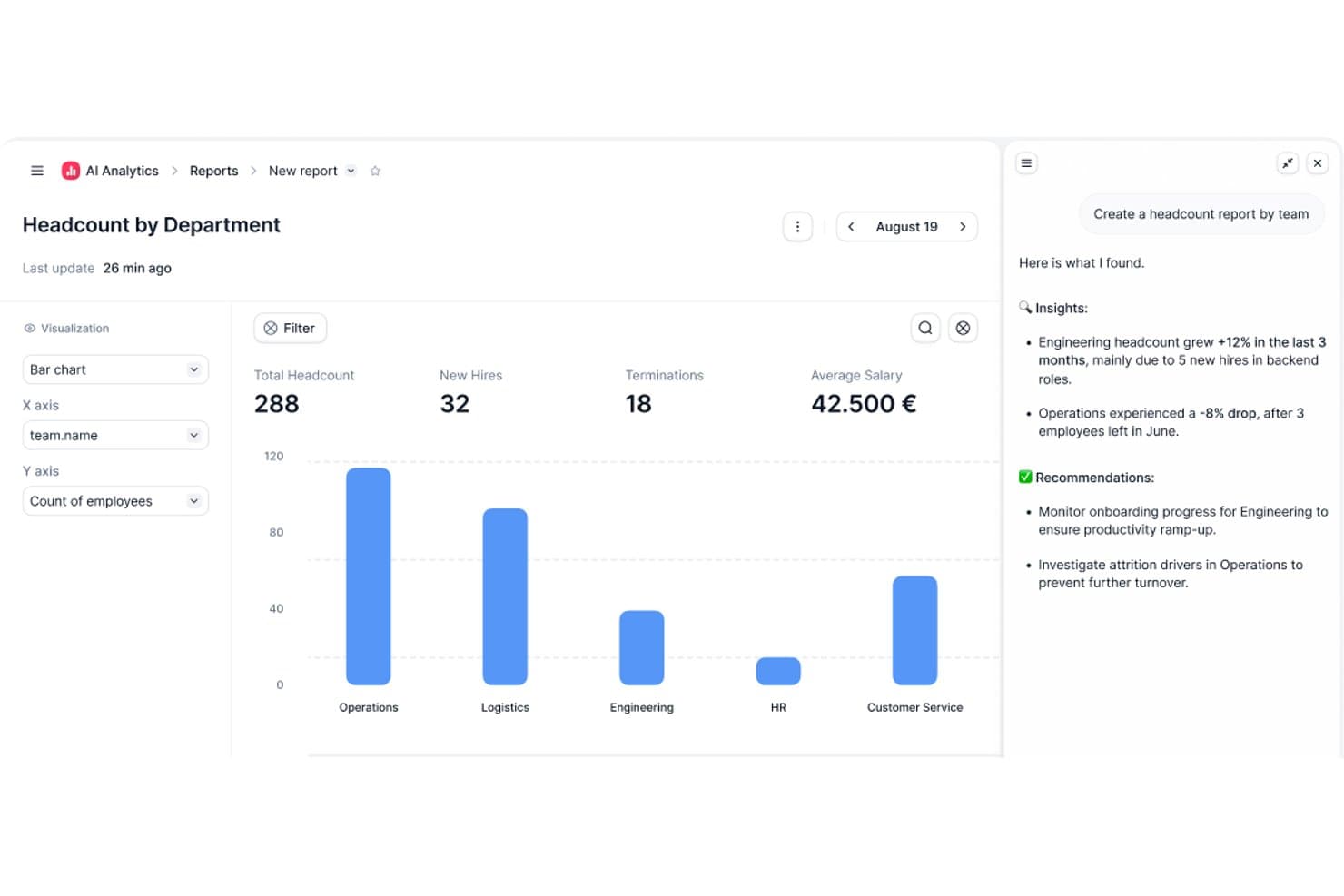
Factorial's AI Analytics generates headcount reports with insights. Factorial is an AI for business that brings performance reviews, goal and OKR tracking, 360° feedback, and AI-generated review summaries into a single HR suite.
Who Is Factorial Best For?
Factorial works well for teams that want to manage performance reviews, goals, and day-to-day HR operations from a single AI-powered platform.
Why I Picked Factorial
I've included Factorial in my top picks because it approaches performance management as part of a broader AI for business vision, which means review cycles, goal tracking, and day-to-day HR operations all live in one place. I particularly like how Factorial AI generates performance review summaries and supports goal alignment, saving managers real time during review season. The cascading OKR setup is also genuinely useful: parent goals automatically pull progress from sub-goals, so team-level performance stays visible without manual updates.
Factorial Key Features
- 360° performance reviews: Run manager, peer, and self-reviews in a single configurable cycle, with participant groups set by team, office, or individual.
- Customizable review templates: Build review forms using ready-made templates or your own questions, with variable formats and options for anonymous or compulsory responses.
- 9-box grid: Plot employees by performance and potential to identify strengths and support talent decisions across your team.
- Automated review reminders: Schedule review cycles to launch immediately or at a future date, with automatic reminders sent 7 days and 1 day before the deadline.
Factorial Integrations
Factorial offers marketplace integrations with LinkedIn, Recruitee, Indeed, IdealDisc, Shakers, Refapp, and InfoJobs. Its public REST API, webhooks, and SDKs support custom integrations.
Pros and Cons
Pros:
- Automated 360° cycles reduce review chasing
- Cascading goals keep team progress visible
- AI summaries reduce review-season synthesis work
Cons:
- Reviewers report limited reporting flexibility
- No documented flight-risk forecasting
 Best for AI-enabled goals and coaching
- Free demo available
- From $8/user/month
Visit WebsiteCustomer Rating:4.3/5
Betterworks provides a centralized performance dashboard where employees can track goals, feedback, and upcoming 1:1s in one place. Betterworks is an AI-powered performance management platform that brings together goal setting, continuous feedback, coaching, and analytics for HR teams looking to manage employee performance at scale.
Who Is Betterworks Best For?
Betterworks is a good fit for mid-size to enterprise HR teams that need a structured, AI-supported approach to performance management across large or distributed workforces.
Why I Picked Betterworks
Betterworks earns its spot on my shortlist because of how deeply AI is woven into the goal-setting and coaching experience—not just as a bolt-on feature. I particularly like the Goal Intelligence feature, which uses an employee's role, team context, and company priorities to suggest specific, measurable goals, cutting down the back-and-forth between managers and direct reports. The Curated Manager Context feature also stands out: it synthesizes themes, blockers, and follow-ups across every 1:1 throughout the year, so managers aren't walking into coaching conversations cold. I also find the AI-synthesized performance summary genuinely useful—it pulls together goals, feedback, and 1:1 insights into a coherent narrative that makes review writing faster and more evidence-based.
Betterworks Key Features
- Performance calibration: Run structured calibration sessions that compare employee performance across teams using a consistent, data-backed framework to reduce bias in evaluation decisions.
- Pulse survey builder: Create and schedule recurring engagement surveys using research-backed templates, with anonymity thresholds and eNPS trend tracking built in.
- External feedback collection: Gather structured input from clients, partners, or suppliers directly into the platform without requiring them to have an account.
- 360-degree feedback: Collect peer, upward, and manager feedback across formal and informal cycles, with all responses automatically rolling into performance reviews and calibration tools.
Betterworks Integrations
Betterworks offers native integrations with ADP, Asana, Azure DevOps, BambooHR, GitHub, Google Sheets, Jira, LinkedIn Learning, Microsoft Teams, Okta, Oracle, Salesforce, Slack, SuccessFactors, Udemy, UKG Pro, Workday, and Zenefits. An API is available for custom integrations.
Pros and Cons
Pros:
- Strong customer support
- User-friendly interface
- Supports continuous performance management
Cons:
- Learning curve for integrating AI features
- Limited offline access
Learn more about Betterworks: Best for government, small business, & non-profits
- 14-day free trial
- From $2.50/user/month (billed annually)
Visit WebsiteCustomer Rating:2.5/5
Express Evaluations displays real-time employee activities such as completed evaluations, goal creation, and self-assessments for performance tracking. Express Evaluations is a web-based performance management platform designed for structured employee evaluations, customizable review forms, and automated documentation workflows.
Who Is Express Evaluations Best For?
Express Evaluations suits HR teams in government agencies, small businesses, and non-profits that need a straightforward, affordable way to run structured employee reviews.
Why I Picked Express Evaluations
Express Evaluations is one of my top picks because it fits the budget and operational realities of government agencies, small businesses, and non-profits. I've found the custom evaluation templates and automated reminder notifications especially useful—these features matter for small HR teams that can't afford to chase down incomplete reviews manually. I also like that the platform includes pulse surveys and manager check-ins, which let lean HR teams track employee sentiment between review cycles.
Express Evaluations Key Features
- Digital signatures: Sign and finalize evaluation forms directly within the platform, without printing, scanning, or external tools.
- 360-degree evaluation tool: Collect structured feedback on employees from multiple reviewers across different roles and levels.
- Performance improvement plans: Create, present, and track formal improvement plans for employees who need additional support.
- Employee goals: Set and monitor individual employee goals within the platform, keeping development tied directly to the review process.
Express Evaluations Integrations
Native integrations are not clearly documented. An API is available for custom integrations.
Pros and Cons
Pros:
- Automated reminders ensure timely evaluations
- Comprehensive reporting identifies performance trends
- Customizable evaluation templates and schedules
Cons:
- Feature availability varies by plan
- Limited scalability for large organizations
Learn more about Express Evaluations: Best for goal setting
- Free demo available
- From $10/user/month (billed annually)
Visit WebsiteCustomer Rating:4.7/5
Lattice aligns team goals with business objectives through reviews and feedback. Lattice is an AI-powered performance management platform that brings together performance reviews, goal tracking, feedback, engagement surveys, and analytics for HR teams and managers.
Who Is Lattice Best For?
Lattice is a good fit for mid-size to enterprise HR teams that need a structured, people-first approach to performance management across the full employee lifecycle.
Why I Picked Lattice
Lattice earns its spot as one of the best on my shortlist because of how tightly it connects goal setting to every other part of performance management. I love that OKRs in Lattice link directly to 1:1s, performance reviews, and company-wide dashboards, so goals don't get buried in a separate system mid-quarter. I also use the cascading goals feature to align individual work to department and company objectives, which gives managers real visibility into how each person's contributions ladder up. The "Needs Update" view is a small but genuinely useful touch that keeps goal progress from going stale between check-ins.
Lattice Key Features
- AI writing assistance: Get real-time grammar, clarity, and bias checks while writing performance reviews and feedback.
- Pulse surveys: Run continuous, real-time pulse surveys to track employee sentiment between formal engagement cycles.
- Individual development plans (IDPs): Build personalized development plans with AI-powered growth area recommendations tied to career tracks and performance data.
- Succession planning: Identify and track internal talent pipelines using performance and potential data to guide promotion and succession decisions.
Lattice Integrations
Lattice offers native integrations with ADP, BambooHR, Greenhouse, Gusto, HiBob, Jira, Lever, Microsoft Teams, Okta, Salesforce, Slack, and Workday. An API is available for custom integrations.
Pros and Cons
Pros:
- Provides engagement insights
- Supports OKR frameworks
- Encourages structured goal setting
Cons:
- Basic reporting capabilities
- Requires setup time
 Best for continuous feedback
- Free demo available
- From $11/user/month (billed annually)
Visit WebsiteCustomer Rating:4.6/5
15five promotes growth with goals, check-ins, and open communication. 15Five is an AI-powered performance management platform for HR teams that combines continuous feedback, goal tracking, engagement surveys, and manager coaching tools.
Who Is 15Five Best For?
15Five is a strong fit for mid-sized companies where HR teams and managers need structured, ongoing performance conversations rather than annual review cycles.
Why I Picked 15Five
15Five earns its spot on my shortlist because continuous feedback is built into the platform rather than bolted on as an afterthought. Weekly check-ins give employees a structured space to share progress, flag blockers, and request feedback from their manager regularly. I also like the Kona Meeting Assistant, which automatically takes notes during 1:1s—allowing managers to avoid scrambling to document conversations and focus on the discussion. That note-taking feeds directly into performance reviews, which means review cycles draw on a real record of ongoing feedback rather than whatever a manager can recall from the past six months.
15Five Key Features
- OKR and goal tracking: Set, align, and monitor individual and team goals across the organization with progress updates tied directly to performance cycles.
- AI-assisted performance reviews: Generate review summaries and suggested ratings based on check-in data, feedback, and goal progress collected throughout the review period.
- Employee engagement surveys: Run pulse surveys and deeper engagement assessments with built-in benchmarking to track workforce sentiment over time.
- Manager effectiveness scores: Measure manager performance using aggregated data from direct reports to identify coaching opportunities.
15Five Integrations
15Five offers native integrations with Slack, Microsoft Teams, Google Workspace, BambooHR, Namely, Workday, and ADP. An API is available for custom integrations.
Pros and Cons
Pros:
- Facilitates open communication
- Supports goal alignment
- Encourages regular feedback
Cons:
- May need additional training
- Initial setup takes time
 10Best for actionable AI-powered peer feedback
Workleap
- Free demo available
- From $416.58/month (billed annually)
Visit WebsiteCustomer Rating:4.4/5
Workleap is an AI-powered platform for engagement, 360 feedback, pulse surveys, and goal tracking. Workleap is an AI-powered employee engagement and performance platform that combines pulse surveys, 360-degree feedback, goal tracking, and manager-facing insights in one connected system.
Who Is Workleap Best For?
Workleap Officevibe is a strong fit for mid-sized organizations where managers need structured tools to run performance conversations while continuously monitoring team engagement.
Why I Picked Workleap
I picked Workleap because its AI doesn’t just collect feedback; it turns it into action. Peer recognition through Good Vibes feeds into performance insights, and AI-generated summaries surface patterns managers might otherwise miss. The AI reply assistant also helps managers respond to survey feedback quickly, reducing the risk of unresolved engagement issues.
Workleap Key Features
- Pulse surveys: Automated recurring surveys track engagement across key metrics and trends over time.
- AI smart reports: AI-generated summaries highlight engagement shifts and surface areas that require manager attention.
- 360-degree feedback: Structured review cycles with AI-assisted summaries to identify strengths and development areas.
- Goal tracking: Managers and employees can set, monitor, and align goals with performance discussions.
Workleap Integrations
Workleap integrates with Slack and Microsoft Teams and connects with major HRIS platforms including BambooHR, HiBob, ADP Workforce Now, Workday, SAP SuccessFactors, UKG Pro, Dayforce, and Deel. An API is available for custom integrations.
Pros and Cons
Pros:
- Peer recognition integrates into performance discussions
- Continuous pulse surveys reduce blind spots between review cycles
- AI-generated summaries surface actionable performance insights
Cons:
- Reporting customization options are limited for complex orgs
- Advanced performance modules require add-on pricing
Learn more about Workleap:
Andre AI-verktøy for prestasjonsstyring
Her er noen flere alternativer innen AI-verktøy for prestasjonsstyring som ikke kom med på kortlisten, men som likevel er verdt å se nærmere på:
- 11ChartHopBest for AI-powered performance dashboards
- 12Mesh AIBest for remote teams
- 13EngagedlyBest for employee recognition
- 14CultureAmpBest for engagement insights
- 15ConfirmBest for small teams
- 16Keka HRBest with AI-powered HR helpdesk
- 17IntelogosBest for AI productivity monitoring and analysis
- 18ClearCoBest for talent management
- 19eloomiBest for employee learning
- 20Peoplebox.aiBest for team alignment
How I Evaluate AI Performance Management Tools
I only include tools that use AI to deliver real, measurable value—like drafting reviews from actual employee data or flagging bias patterns managers would miss. I split my evaluation into core functionality every tool needs to qualify and the differentiating factors that separate a good option from the best fit.
Core Functionality (Table Stakes For This List)
When I'm selecting tools for my list, I rank each one on a scale from 0 (does not offer the functionality) to 5 (excels in this area) for each core functionality listed below. Then, I calculate the tool's total score into a percentage. Each tool needs to achieve a minimum total score of 65% to be considered for inclusion.
- AI-Assisted Review Generation: I evaluate whether the tool can draft meaningful review content from real inputs—like goal progress, peer feedback, and 1:1 notes—rather than just offering fill-in-the-blank templates.
- Predictive People Analytics: Tools should surface forward-looking insights like attrition risk or engagement dips, not just historical dashboards that require HR to connect the dots manually.
- Goal & OKR Tracking: I look for structured goal-setting with AI that helps cascade objectives across teams, nudges managers on stalled progress, and connects goals to review outcomes.
- Continuous Feedback & 360° Reviews: The platform should support ongoing check-ins and multi-rater feedback with AI that synthesizes themes—so managers see patterns, not just a pile of comments.
- Bias Detection & Fairness Tools: I check whether AI flags biased language in written reviews or highlights rating inconsistencies during calibration, helping HR teams promote equitable evaluations.
- Skill & Development Insights: The tool should map employee skills and recommend relevant growth paths, whether that's surfacing a learning course or identifying an internal mobility opportunity.
Once I have a list of tools that meet the criteria, I consider what sets each platform apart.
Differentiating Factors (What Sets Vendors Apart)
Here's how I compare and contrast different vendors:
Standout Features
An AI coaching assistant makes a real difference for managers who need in-the-moment guidance during 1:1s or tough feedback conversations. I also look for natural language querying, where HR leaders can ask questions like "which teams have the lowest engagement scores this quarter?" and get instant answers without building custom reports. Career pathing AI is another feature I value—tools that recommend internal moves or succession candidates based on skills and performance give HR teams a proactive retention lever.
Beyond Features
AI governance matters a lot here—I check whether a vendor explains how its models generate recommendations and whether HR can review or override AI outputs before they reach employees. Integration depth is equally important. A tool that syncs with your HRIS, Slack or Teams, and your LMS keeps performance data flowing without manual exports. I also evaluate data security posture, especially SOC 2 Type II certification and role-based access controls, since these platforms handle some of the most sensitive employee information in your stack.
Slik velger du et AI-verktøy for prestasjonsstyring
Det er lett å gå seg vill i lange funksjonslister og kompliserte prisstrukturer. For å holde fokus mens du går gjennom din unike prosess for valg av programvare, får du her en sjekkliste over faktorer du bør ha i mente:
| Faktor | Hva du bør vurdere |
|---|---|
| FaktorSkalerbarhet | Hva du bør vurdereKan verktøyet vokse med teamet ditt? Sjekk om det støtter den nåværende størrelsen og fremtidig vekst. Se etter funksjoner som brukergrenser og ekstra kostnader ved skalering. Vurder om det kan håndtere flere brukere eller lokasjoner uten ytelsesproblemer. |
| FaktorIntegrasjoner | Hva du bør vurdereFungerer det med verktøyene du allerede bruker? Sørg for at programvaren kan integreres med de eksisterende HR-systemene, kommunikasjonsverktøyene og andre plattformene dine. Vurder hvor enkelt det er å integrere, samt eventuelle forstyrrelser. |
| FaktorTilpasningsmuligheter | Hva du bør vurdereKan du tilpasse det slik at det passer til prosessene dine? Se etter tilpasningsmuligheter som maler, arbeidsflyter og kontrollpaneler. Unngå verktøy som krever omfattende tekniske ferdigheter for enkle endringer. |
| FaktorBrukervennlighet | Hva du bør vurdereEr det intuitivt for teamet ditt? Vurder læringskurven og utformingen av brukergrensesnittet. Verktøyene bør være enkle å navigere i uten omfattende opplæring. Se etter brukeranmeldelser som nevner brukervennlighet. |
| FaktorImplementering og innføring | Hva du bør vurdereHvor raskt kan du komme i gang? Evaluer oppsettsprosessen og tilgjengelige ressurser, som opplæringsvideoer og brukerstøtte. Vurder tiden og innsatsen som kreves for å implementere verktøyet fullt ut i organisasjonen. |
| FaktorKostnad | Hva du bør vurderePasser prisen budsjettet ditt? Sammenlign kostnader på tvers av leverandører, og ta hensyn til både innledende og løpende utgifter. Vær oppmerksom på skjulte gebyrer, og sørg for at prisstrukturen samsvarer med de økonomiske planene dine. |
| FaktorSikkerhetstiltak | Hva du bør vurdereEr dataene dine beskyttet? Se etter kryptering, sikkerhetskopiering av data og samsvar med personvernregler. Sørg for at leverandøren er åpen om sikkerhetstiltakene sine og håndteringen av hendelser. |
| FaktorTilgjengelig brukerstøtte | Hva du bør vurdereHvilken hjelp er tilgjengelig når du trenger den? Vurder hvilke brukerstøttekanaler som tilbys, for eksempel telefon, e-post og chat. Sjekk om brukerstøtte er tilgjengelig døgnet rundt, og om det påløper ekstra kostnader for førsteklasses brukerstøtte. |
Hva er verktøy for AI-basert resultatstyring?
Verktøy for AI-basert resultatstyring er programvareløsninger som hjelper organisasjoner med å følge opp og forbedre medarbeidernes resultater gjennom datadrevet innsikt og automatisering. HR-medarbeidere, ledere og teamledere bruker vanligvis disse verktøyene for å øke produktiviteten og engasjementet.
Funksjoner som målsetting, innsamling av tilbakemeldinger og resultatoppfølging bidrar til å samordne teamets mål, gi kontinuerlige tilbakemeldinger og følge med på fremdriften. Samlet sett gir disse verktøyene en effektiv måte å styre og forbedre arbeidsstyrkens resultater på.
Funksjoner i verktøy for AI-basert resultatstyring
Når du velger verktøy for AI-basert resultatstyring, bør du se etter følgende nøkkelfunksjoner:
- Målsetting: Bidrar til å samordne teamets og den enkeltes mål med virksomhetens mål, slik at alle arbeider mot de samme målene.
- Innsamling av tilbakemeldinger: Legger til rette for kontinuerlige tilbakemeldinger mellom teammedlemmer og ledere, og fremmer en kultur for åpen kommunikasjon og forbedring.
- Resultatoppfølging: Følger med på medarbeidernes fremdrift og resultater over tid, og gir innsikt i områder for utvikling og oppnådde resultater.
- Engasjementsundersøkelser: Samler inn data om medarbeidernes oppfatninger for å forstå arbeidsmiljøets trivsel og identifisere områder som kan forbedres.
- Tilpassbare kontrollpaneler: Tilbyr personaliserte visninger av resultatdata, slik at brukerne kan fokusere på den mest relevante informasjonen for rollene sine.
- Integrasjonsmuligheter: Kobler seg til eksisterende HR-systemer og verktøy for å gi en sømløs arbeidsflyt og konsistente data.
- Sanntidsanalyse: Gir oppdatert innsikt i resultatmålinger, slik at det blir mulig å ta raske beslutninger og gjøre justeringer.
- Automatiske påminnelser: Sender varsler og meldinger for å sikre at oppgaver og vurderinger fullføres i tide, og forbedrer ansvarliggjøringen.
Fordeler med verktøy for AI-basert resultatstyring
Implementering av verktøy for AI-basert resultatstyring gir flere fordeler for teamet og virksomheten din. Her er noen av fordelene du kan se frem til:
- Bedre samordning: Samordner teamets mål med virksomhetens mål gjennom effektiv målsetting, slik at alle arbeider mot de samme målene.
- Forbedret tilbakemeldingskultur: Oppmuntrer til åpen kommunikasjon og kontinuerlig forbedring med funksjoner for innsamling av tilbakemeldinger.
- Økt produktivitet: Følger med på resultatmålinger og fremdrift, og bidrar til å identifisere områder for utvikling og anerkjenne oppnådde resultater.
- Større engasjement: Bruker engasjementsundersøkelser til å innhente innsikt i medarbeidernes oppfatninger, noe som forbedrer trivselen på arbeidsplassen.
- Tidsbesparelser: Automatiserer påminnelser og varsler, slik at oppgaver og vurderinger fullføres i tide uten manuell oppfølging.
- Bedre beslutningsgrunnlag: Gir sanntidsanalyse og innsikt, slik at det blir mulig å gjøre raske justeringer og planlegge strategisk.
- Sømløs integrasjon: Kobler seg til eksisterende HR-verktøy og -systemer, sikrer en konsekvent datastrøm og reduserer den administrative belastningen.
Kostnader og priser for AI-verktøy for prestasjonsstyring
Valg av AI-verktøy for prestasjonsstyring krever en forståelse av de ulike prismodellene og abonnementene som er tilgjengelige. Kostnadene varierer basert på funksjoner, teamstørrelse, tillegg og mer. Tabellen nedenfor oppsummerer vanlige abonnementer, gjennomsnittsprisene deres og typiske funksjoner som er inkludert i løsninger for AI-verktøy for prestasjonsstyring:
Sammenligningstabell for AI-verktøy for prestasjonsstyring
| Abonnementstype | Gjennomsnittspris | Vanlige funksjoner |
|---|---|---|
| AbonnementstypeGratisabonnement | Gjennomsnittspris$0 | Vanlige funksjonerGrunnleggende målsetting, begrenset innsamling av tilbakemeldinger og minimal prestasjonssporing. |
| AbonnementstypePersonlig abonnement | Gjennomsnittspris$5-$25/bruker/måned | Vanlige funksjonerForbedret målsetting, grunnleggende medarbeiderundersøkelser, verktøy for tilbakemeldinger og prestasjonssporing. |
| AbonnementstypeBedriftsabonnement | Gjennomsnittspris$25-$50/bruker/måned | Vanlige funksjonerAvansert analyse, tilpassbare dashbord, omfattende tilbakemeldingssystemer og integrasjoner. |
| AbonnementstypeStorbedriftsabonnement | Gjennomsnittspris$50-$100/bruker/måned | Vanlige funksjonerFull tilpasning, sanntidsanalyse, prioritert brukerstøtte og omfattende integrasjoner. |