

10 beste lønnssystemer for større virksomheter i 2026

10 Kortliste over de beste lønnssystemene for store virksomheter


Det kan være vanskelig å velge riktig lønnssystem for store virksomheter når det finnes så mange alternativer. Du trenger et verktøy som kan håndtere lønn effektivt for et stort antall ansatte, men det kan være overveldende å finne ut hvilket som er best. Derfor har jeg skrevet denne artikkelen – for å hjelpe deg med å begrense alternativene ut fra behovene dine, fra tilpasning og rapportering til integrasjoner. Med utgangspunkt i mange års erfaring med å teste og bruke ulike lønnsverktøy hjelper jeg deg med å finne det beste alternativet for dine behov.
Why Trust Our Software Recommendations
Our team has been testing and reviewing software since 2012. As HR experts ourselves, we know how difficult—and important—it is to choose the right software.
For this guide, we evaluated tools using hands-on testing and independent research, scoring tools using our selection criteria. We also draw on insights from industry thought leaders and practicing HR experts.
Our reviews reflect our human editorial judgment, not a sales pitch.
Expert reviewers:
Sammenligningstabell for priser på lønnssystemer for store virksomheter
Tabellen nedenfor sammenligner prisopplysningene for mine beste utvalgte lønnssystemer for store virksomheter.
| Tool | Best For | Trial Info | Price | ||
|---|---|---|---|---|---|
| 1 | Best for employee-managed payroll and HR data | Not available | Pricing upon request | Website | |
| 2 | Best for global compliance and payroll | Free demo available | From $29/user/month | Website | |
| 3 | Best for integrations and open APIs | Free demo available | Pricing upon request | Website | |
| 4 | Best with integrated time tracking | Not available | From $599/employee/month | Website | |
| 5 | Best for robust reporting and analytics | Free demo available | Pricing upon request | Website | |
| 6 | Best for handling complex pay structures | 30-day free trial + free demo available | From $50/user/month | Website | |
| 7 | Best for AI-powered workforce management | Free demo available | Pricing upon request | Website | |
| 8 | Best for complex payroll setups | Free demo available | From €499/employee/month | Website | |
| 9 | Best for simplifying global payroll processes | 30-day free trial | Pricing upon request | Website | |
| 10 | Best for customizable payroll and HR solutions | 4-month free trial upon signing up | From $5/user/month + $29/month base fee | Website |


Anmeldelser av de beste lønnssystemene for store virksomheter
Denne delen gir en grundig analyse og oversikt over hvert lønnssystem for store virksomheter, samt en forklaring på hvorfor jeg har tatt dem med på denne listen. Jeg har også inkludert fordeler og ulemper, funksjoner og de beste bruksområdene for hvert system.

Paycom
Best for employee-managed payroll and HR data

Paycom offers an enterprise payroll software solution that empowers employees to manage their payroll and HR data directly. It is designed to streamline payroll processes and enhance data accuracy by giving employees control over their own information.
Why I picked Paycom: I chose Paycom after comparing it with other enterprise payroll software options because it uniquely focuses on employee-managed data through its unique Beti feature, which actively involves employees in the payroll process. This approach reduces administrative burdens and increases data accuracy by allowing employees to double-check their own payroll and HR information before payday.
For that reason, I believe Paycom is best for employee-managed payroll and HR data because it fosters a sense of ownership and responsibility among employees, leading to fewer errors and more efficient processes.
Paycom Standout Features & Integrations:
Features include payroll processing, compliance management, and real-time reporting and analytics, plus a self-service portal where employees can manage their payroll, benefits, and HR information. The software also offers mobile access, allowing employees to manage their information from anywhere.
Integrations are not available.
Pros and Cons
Pros:
- Comprehensive mobile access for on-the-go management
- Real-time reporting and analytics enhance decision-making
- Designed to reduce administrative workloads for HR teams
Cons:
- Could use more native integrations
- Pricing details are not transparent
Best for global compliance and payroll

Deel Payroll is a global payroll platform that handles multi-country payroll processing, local tax compliance, contractor payments, and workforce management across 150+ countries from a single system.
Who Is Deel Payroll Best For?
Deel Payroll is a natural fit for enterprise HR and payroll teams managing distributed workforces across multiple countries, especially those hiring both employees and contractors internationally.
Why I Picked Deel Payroll
I've included Deel Payroll in my top picks because no other platform handles the complexity of cross-border compliance at enterprise scale as well. I particularly like the built-in compliance engine, which automatically updates payroll calculations to reflect local tax laws, social contributions, and statutory deductions for each country. I also rely on the continuous compliance monitoring, which flags regulatory changes before they create payroll errors—something I've found invaluable when running payroll across regions like APAC and EMEA simultaneously.
Deel Payroll Key Features
- Multi-currency payroll: Run payroll and disburse funds in 120+ currencies without manual FX conversions or third-party exchange tools.
- Payroll Connect: Aggregates payroll data from third-party providers into a single dashboard, giving you visibility across every country.
- Configurable approval workflows: Set up multi-step payroll approval chains so finance, HR, and legal can each sign off before funds are released.
- AI-powered anomaly detection: Automatically flags unusual payroll entries—like duplicate payments or statistical outliers—before processing runs.
Pros and Cons
Pros:
- Offers optional add-ons for other human resources services
- Automated contract management and international onboarding
- Strong focus on global compliance and local expertise
Cons:
- No mobile app
- Limited invoicing customizations

Best for integrations and open APIs

Paylocity is a cloud-based payroll and HR platform that covers the full range of enterprise payroll needs, from multi-state and global tax compliance to time tracking, benefits administration, garnishment management, and on-demand payments.
Who Is Paylocity Best For?
Paylocity is a strong fit for mid-to-large U.S.-based organizations that need a unified payroll and HR platform with deep customization and integration capabilities.
Why Pick Paylocity
Paylocity's open, developer-friendly API and webhook infrastructure set it apart for enterprise teams that can't afford data silos. Webhooks push updates across your business in real time when payroll is processed and when employees are hired, transferred, or terminated. That means a termination in Paylocity instantly triggers downstream updates across your connected systems, with no manual intervention. Paylocity's Pay Entry API also lets third-party systems pass time tracking, earnings, deductions, and taxes directly to payroll, which is a real advantage when you're running a distributed tech stack with separate timekeeping or ERP tools.
Paylocity Key Features
- Multi-state tax automation: Automatically determines and applies the correct state and local tax rules for each employee based on their work location.
- On-demand pay: Lets employees access earned wages before the standard pay cycle without disrupting payroll processing.
- Garnishment management: Routes and manages wage garnishments through a dedicated team to reduce compliance risk.
- Global payroll activation: Extends payroll coverage to employees in 100+ countries directly within the platform.
Pros and Cons
Pros:
- Employee self-service portal for improved accessibility
- Advanced analytics and reporting capabilities
- Offers a wide range of HR features
Cons:
- Implementation can be complex due to having numerous modules
- Transparent pricing isn’t available
New Product Updates from Paylocity

Paylocity Expands Expense and Purchase Request Tools
Paylocity adds connected personal cards, smarter expense categorization, and a streamlined purchase request experience. This reduces manual entry and helps finance teams manage expenses and approvals more efficiently. For more information, visit Paylocity’s official site.
 .
.
Best with integrated time tracking
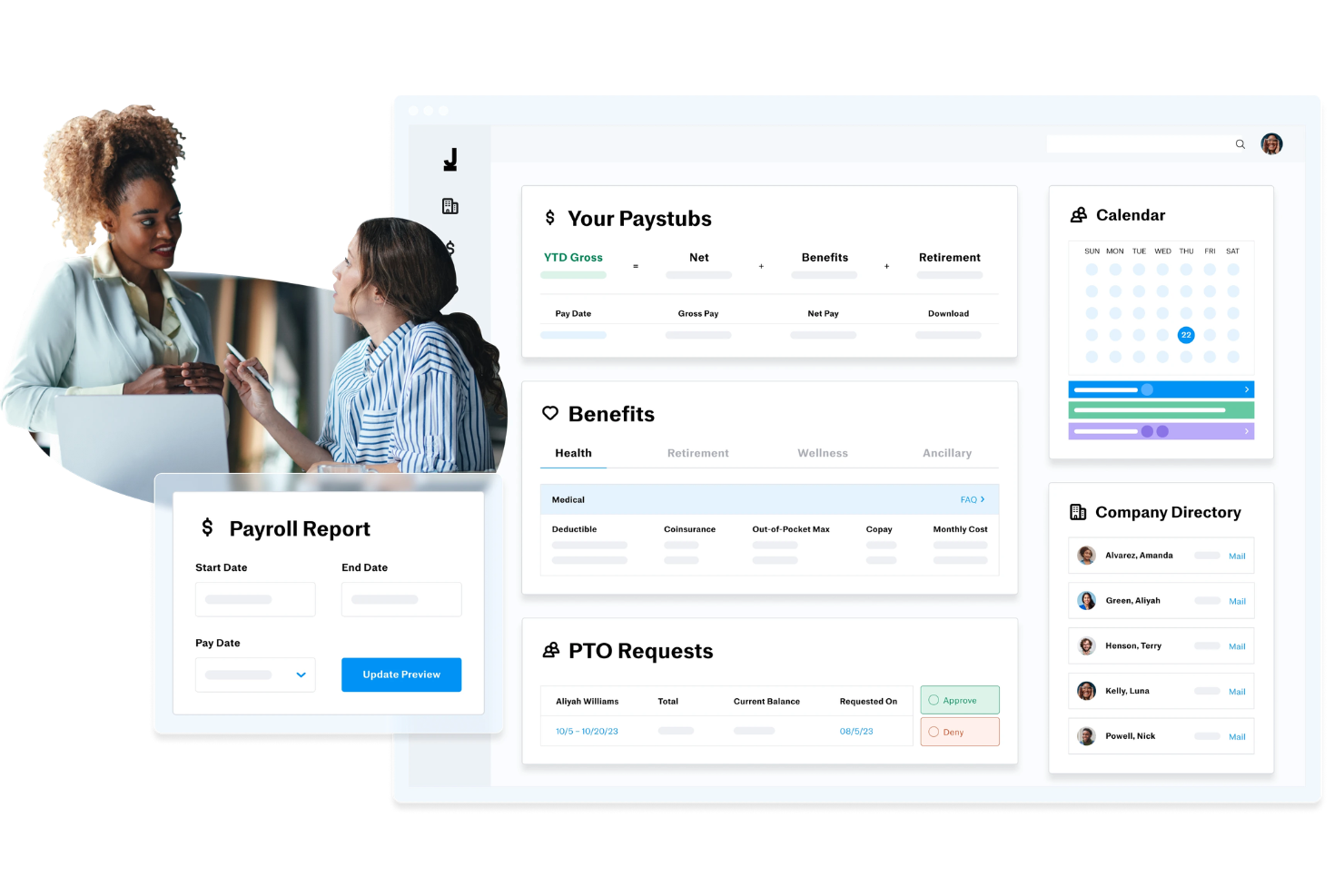
Justworks is a payroll, HR, and benefits platform that combines PEO, EOR, and payroll-only options with built-in tools for onboarding, compliance, and time tracking.
Who Is Justworks Best For?
Justworks is a strong fit for small to mid-sized businesses that need payroll, benefits, and HR tools in one place without building out a large HR team.
Why I Picked Justworks
I picked Justworks as one of the best because the time tracking module is built directly into the payroll workflow, not bolted on as an afterthought. Approved shifts automatically sync to payroll, which removes the manual reconciliation step that creates errors in most multi-tool setups. I also like the geofencing feature for location verification on hourly workers, and the ability to set custom overtime alerts so managers catch issues before payroll runs, not after.
Justworks Key Features
- Multi-state payroll processing: Run payroll across multiple states with automatic tax calculations and filings handled per jurisdiction.
- PEO services: Access a co-employment model that lets your team offer Fortune 500-level benefits without managing carrier relationships directly.
- Automated tax filing: Justworks handles federal, state, and local payroll tax filings and year-end W-2 and 1099 form generation.
- Employee self-service portal: Employees can access pay stubs, tax documents, and benefits enrollment from a single login.
Pros and Cons
Pros:
- Provides access to large-group employee benefits
- Handles both employee and contractor payroll
- Includes dedicated HR consulting as an add-on
Cons:
- Pricing increases quickly with add-ons and team size
- Health benefits are not included in all plans
Best for robust reporting and analytics

ADP Workforce Now is a cloud-based HCM platform that handles payroll processing, tax compliance, benefits administration, time and attendance tracking, talent management, and HR workflows in a single system.
Who Is ADP Workforce Now Best For?
ADP Workforce Now is a strong fit for mid-to-large enterprises that need a unified platform to manage payroll, HR, and compliance across multiple states or regions.
Why I Picked ADP Workforce Now
I've included ADP Workforce Now in my top picks because the reporting and analytics capabilities here are genuinely hard to match in the enterprise payroll space. The platform's built-in ADP DataCloud pulls together payroll, HR, talent, and benefits data into a single analytics layer, with pre-built dashboards and drag-and-drop custom reporting across every stage of the employee lifecycle. What I find especially useful is the compensation benchmarking tool, which lets you measure pay against anonymized data from 39 million U.S. employees to see whether your salaries are competitive by role, location, or industry. AI-powered anomaly detection also flags payroll discrepancies before they become costly errors.
ADP Workforce Now Key Features
- Automated tax filing: Calculates, files, and deposits federal, state, and local payroll taxes automatically.
- Multi-state payroll processing: Runs payroll across multiple states with jurisdiction-specific compliance rules applied.
- Time and attendance sync: Pulls approved hours directly from the timekeeping module into payroll calculations.
- Garnishment management: Calculates and processes wage garnishments, including child support orders and tax levies.
Pros and Cons
Pros:
- Scalable and suitable for businesses of all sizes
- Helps businesses stay compliant with labor laws and regulations
- Convenient employee self-service portal
Cons:
- Platform can be complex for new users
- Offers limited customization options

TimeTrex
Best for handling complex pay structures

TimeTrex is an enterprise-grade workforce management platform that combines payroll processing, time and attendance tracking, HR management, and employee scheduling in a single system.
Who Is TimeTrex Best For?
TimeTrex is a strong fit for mid-to-large organizations that manage hourly and salaried workers across multiple locations, departments, or pay groups.
Why I Picked TimeTrex
I picked TimeTrex as one of the best because of how well it handles layered pay structures that would break most standard payroll tools. Its custom deductions engine lets you configure benefits, insurance, garnishments, and both vacation and sick leave accruals independently per employee. Multi-source bank debiting lets you split employer payments across multiple accounts—useful for organizations with complex funding arrangements.
TimeTrex Key Features
- Automated tax calculations: TimeTrex calculates federal, state/provincial, and local payroll taxes automatically for each pay run.
- Year-end tax form generation: Generate and distribute W2, 1099, T4, and ROE forms directly from the platform at year-end.
- Job costing: Allocate labor costs across up to four levels of cost centers, giving finance teams granular visibility into workforce spend.
- Integrated time and attendance: Employee clock-in data feeds directly into payroll, reducing manual entry and timesheet discrepancies.
Pros and Cons
Pros:
- Automated payroll and tax calculations
- Integrated payroll and HR management solutions
- Robust time, attendance, and scheduling features
Cons:
- Some features are difficult to find within the platform
- Platform design is a little outdated
New Product Updates from TimeTrex
TimeTrex Adds Quick Punch App With Offline and QR Support
TimeTrex adds a new Quick Punch app, offline punching, QR code scanning, punch images, configurable messages, and punch warnings or lockouts to improve employee clock-ins across browsers and local computers. For more information, visit TimeTrex’s official site.
 .
.
Best for AI-powered workforce management
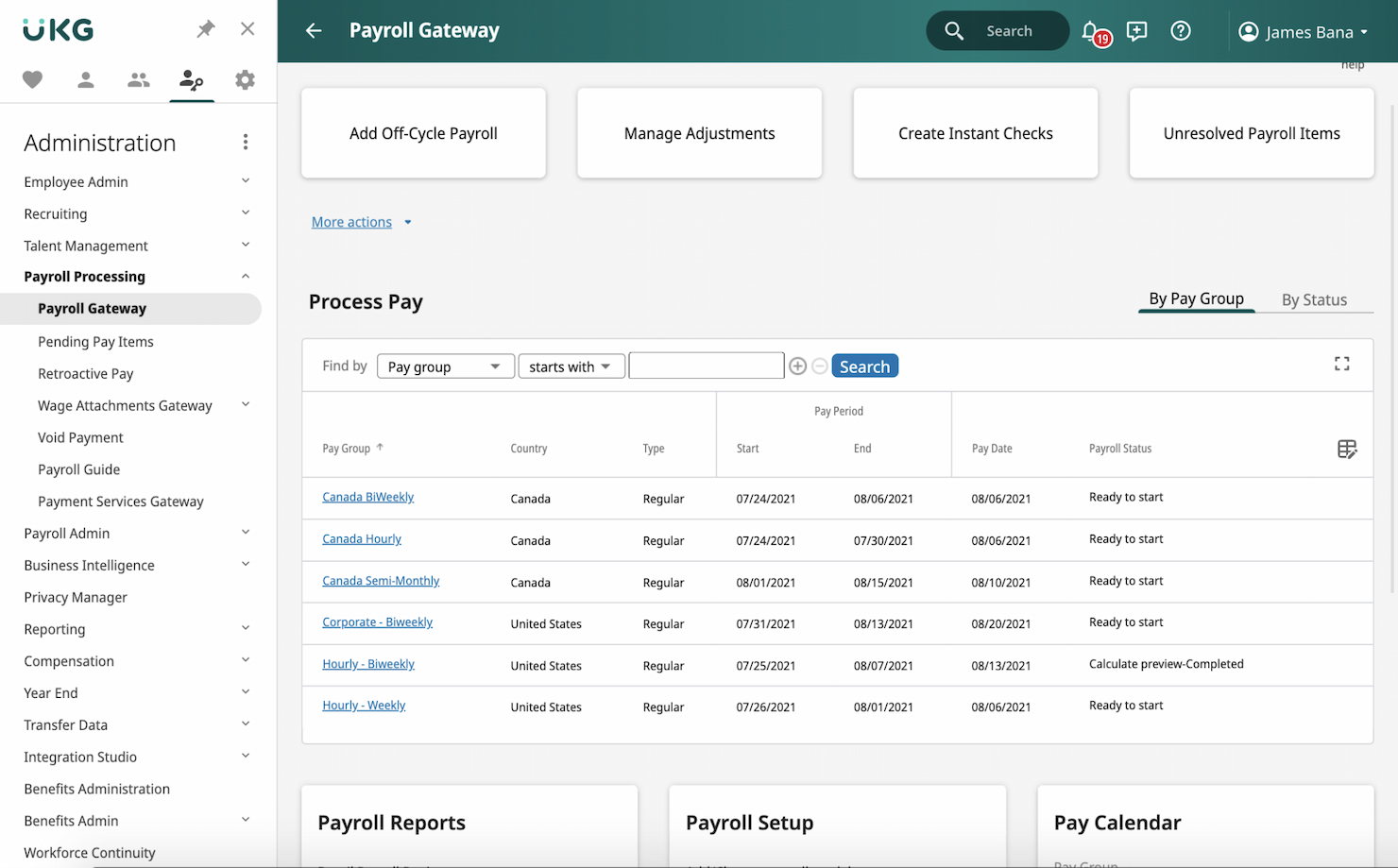
UKG Ready is an all-in-one HR and payroll platform that combines payroll processing, benefits administration, time and attendance, scheduling, talent management, and AI-driven workforce insights in a single solution.
Who Is UKG Ready Best For?
UKG Ready is a strong fit for growing and midsize businesses that need HR, payroll, and workforce management handled in one connected platform.
Why I Picked UKG Ready
Bryte AI is woven into payroll and workforce management workflows. Rather than a bolted-on chatbot, Bryte AI functions as an embedded advisor—flagging payroll anomalies, analyzing fatigue risks before they become attendance problems, and guiding managers toward schedule adjustments in real time. I also like that it runs continuous gross-to-net payroll calculations in the background, so by the time you're ready to run payroll, errors are already surfaced and resolved.
UKG Ready Key Features
- Automated tax compliance: Smart Tax Search automatically updates tax tables, W-2s, and garnishment rules across jurisdictions.
- Earned wage access: Employees can draw from earned wages before payday through on-demand pay options.
- Employee self-service portal: Employees access pay stubs, W-2s, and benefits details directly from a mobile app.
- Benefits administration: Manage enrollment, eligibility, and carrier connections within the same platform as payroll.
Pros and Cons
Pros:
- Strong compliance management features
- Comprehensive payroll processing with real-time analytics
- AI-driven workforce management for optimized scheduling and forecasting
Cons:
- Product structure is confusing due to having multiple payroll plans available
- Pricing details are not transparent

Lano
Best for complex payroll setups
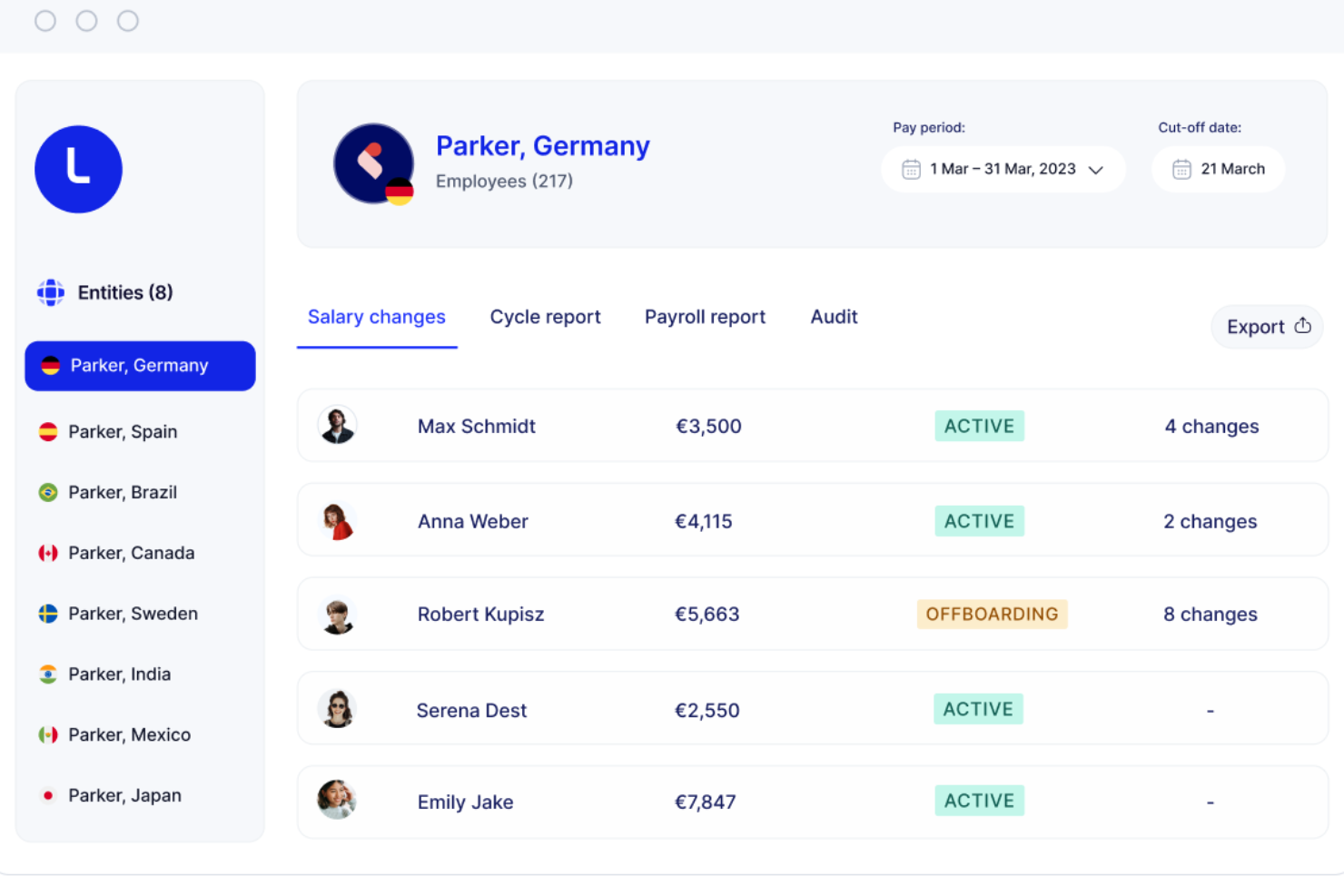
Lano is a global payroll platform that lets enterprise teams centralize multi-country, multi-entity payroll operations, consolidate existing local payroll providers, and manage cross-border payments and workforce data from a single platform.
Who Is Lano Best For?
Lano is a strong fit for global HR and payroll teams in mid-size to enterprise companies managing employees and contractors across multiple countries and legal entities.
Why I Picked Lano
I've included Lano in my top picks because it's one of the few platforms built specifically around consolidating fragmented, multi-country payroll setups rather than replacing them. I especially like how you can connect your existing local payroll providers into one system, so you're not forced into a rip-and-replace migration. Lano's AI-assisted payroll audits automatically flag anomalies across entities before each pay run, which is something I find genuinely useful when you're processing payroll across dozens of countries with different rules.
Lano Key Features
- Cross-border salary payments: Pay employees in 28 currencies directly through the platform without using third-party payment tools.
- Gross-to-net standardization: Lano normalizes payroll data across all countries into a consistent format for reporting and reconciliation.
- Contractor management: Create, send, and manage contractor agreements and invoices alongside employee payroll in one place.
- Multi-entity reporting: Access consolidated payroll reports across all your legal entities from a single dashboard.
Pros and Cons
Pros:
- Offers tools for automating onboarding processes
- Access to a network of vetted local experts
- Comprehensive global coverage for hiring and payroll in over 170 countries
Cons:
- No built-in recruitment services
- Integration with existing systems may require setup effort
Best for simplifying global payroll processes

SAP SuccessFactors is a cloud-based HCM suite with built-in payroll capabilities designed for enterprise organizations, covering multi-country payroll processing, core HR, time management, compliance, and AI-assisted pay explanation across global workforces.
Who Is SAP SuccessFactors Best For?
SAP SuccessFactors is a strong fit for large, multinational enterprises that need to manage payroll across multiple countries with localized compliance built in.
Why I Picked SAP SuccessFactors
SAP SuccessFactors earns its spot on my shortlist because it handles multi-country payroll without requiring separate tools for each region. I particularly like the Payroll Control Center, which runs continuous payroll checks and flags anomalies before processing—so my team isn't scrambling to fix errors after the fact. The embedded localization for 60+ countries, maintained by in-country product managers, keeps tax and compliance updates built in rather than bolted on.
SAP SuccessFactors Key Features
- Explain Pay: An AI-powered feature that translates pay statement line items into plain-language explanations employees can understand.
- Compliance reporting: Access 500+ pre-built, country-specific compliance reports tailored to local legal requirements.
- Multi-currency and multi-language support: Process payroll in 158 currencies across 34 languages for globally distributed workforces.
- Flexible deployment options: Run payroll in-house, fully outsourced, or in a hybrid model depending on your organization's operational needs.
Pros and Cons
Pros:
- Advanced reporting and analytics for payroll data insights
- Useful employee portal that’s available via mobile app
- Excellent for managing complex global payroll requirements
Cons:
- Implementation process is complex
- Pricing details are not transparent


ADP Lyric HCM is a full-suite human capital management platform built for large, multinational organizations, covering payroll processing, HR, workforce management, benefits administration, talent management, and analytics.
Who Is ADP Enterprise HR Best For?
ADP Enterprise HR suits large enterprises and multinational corporations needing payroll and HR capabilities across multiple countries and regulatory environments.
Why I Picked ADP Enterprise HR
ADP Lyric HCM earns its spot on my shortlist because it adapts to how large, complex organizations operate. Payroll in particular is built around what ADP calls adaptable payroll processing—automated workflows you configure to reflect your org's specific pay rules, approval chains, and pay structures. Layered on top of that, AI guidance validates pay data and flags issues before they cause errors. That combination matters when you're running payroll across dozens of business units or geographies.
ADP Enterprise HR Key Features
- Global payroll coverage: Process payroll across 140+ countries with localized compliance built into the platform for each region.
- Benefits administration: Configure and manage benefit plans, total rewards, and carrier connections directly within the system.
- Time and attendance tracking: Collect time data, manage schedules, and handle absence requests with flexible data collection options.
- HCM metrics and dashboards: Access 100+ industry-standard workforce metrics with AI-based benchmarking to compare against peers.
Pros and Cons
Pros:
- Wide range of integrations with other enterprise tools
- Extensive reporting and analytics capabilities
- Highly customizable to fit specific business needs
Cons:
- May require dedicated support for full utilization
- Initial setup can be complex
Andre lønnssystemer for store virksomheter
Her er flere andre gode alternativer for lønnssystemer for store virksomheter som ikke kom med på min topp 10-liste, men som likevel er verdt å undersøke:
- Dayforce HCM
For continuous payroll calculation
- Rippling
For all-in-one HR, IT, and finance management


Relaterte anmeldelser av HR-programvare
Hvis du fortsatt ikke har funnet det du leter etter her, kan du se nærmere på disse andre relaterte verktøyene som vi har testet og evaluert:
- HR-programvare
- Lønnssystemer
- Rekrutteringsprogramvare
- Tjenester for registrert arbeidsgiver
- Systemer for søkersporing
- Programvare for arbeidsstyring
How I Evaluate Enterprise Payroll Software
I split my evaluation into baseline requirements—like multi-entity tax filing and payroll scale—and differentiators that separate one vendor from another for complex, global HR teams.
Core Functionality (Table Stakes For This List)
When I'm selecting tools for my list, I rank each one on a scale from 0 (does not offer the functionality) to 5 (excels in this area) for each core functionality listed below. Then, I calculate the tool's total score into a percentage. Each tool needs to achieve a minimum total score of 65% to be considered for inclusion.
- Large-Scale Payroll Processing: I evaluate how well a platform handles thousands of employees across multiple pay groups, entities, and schedules—like running biweekly salaried and weekly hourly cycles simultaneously.
- Tax Compliance & Filing: Each tool should automate tax calculations and filings at multiple government levels, including year-end forms, without requiring manual intervention from your payroll team.
- Multi-Jurisdiction Support: I check whether a platform can manage payroll across different states or countries, including localized tax rules, currencies, and labor law requirements for distributed workforces.
- HRIS & ERP Integrations: The platform's ability to connect with systems like Workday, SAP SuccessFactors, or NetSuite matters—I look for native connectors and open APIs, not just CSV imports.
- Direct Deposit & Payment Methods: I look for flexible disbursement options beyond basic direct deposit, such as pay cards, multi-account splits, and off-cycle runs for things like terminations or corrections.
- Reporting & Audit Controls: Strong platforms offer configurable payroll reports, full audit trails, and granular role-based permissions—especially important for organizations subject to internal or external audits.
Once I have a list of tools that meet this criteria, I consider what sets each platform apart.
Differentiating Factors (What Sets Vendors Apart)
Here's how I compare and contrast different vendors:
Standout Features
AI-powered anomaly detection is a major differentiator—I look for tools that catch duplicate entries or unusual pay amounts before a run finalizes. Employee self-service portals also matter at enterprise scale, where thousands of employees updating withholdings or downloading tax documents can overwhelm HR teams. I evaluate embedded analytics and forecasting too, since payroll directors and CPOs need labor cost modeling across business units to support planning cycles.
Beyond Features
Implementation support is a big one—enterprise payroll migrations involve parallel runs, data validation across entities, and phased rollouts that can span months. I check whether vendors offer dedicated implementation teams with payroll-specific expertise. Compliance certifications like SOC 1 Type II and SOC 2 Type II also carry real weight, especially when your organization handles sensitive compensation data across regions. Ongoing support matters too; I look for named customer success managers and access to in-house tax advisors rather than general help desk queues.
Slik velger du lønnssystem for store virksomheter
Mens du går gjennom din egen unike prosess for valg av programvare, bør du ha følgende punkter i bakhodet:
- Skalerbarhet og fleksibilitet: Sørg for at programvaren kan vokse med virksomheten din. For virksomheter som opplever rask vekst eller sesongvariasjoner, er muligheten til å skalere opp eller ned uten betydelige forstyrrelser avgjørende. Et detaljhandelsselskap med et stort antall midlertidig ansatte i høytiden vil for eksempel trenge et system som kan håndtere plutselige økninger i lønnskjøringen.
- Samsvar og rapportering: Programvaren må hjelpe deg med å overholde lokale, regionale og føderale bestemmelser. Virksomheter som opererer i flere regioner, møter komplekse skatte- og arbeidslivsregler. En helseorganisasjon må for eksempel følge spesifikke arbeidslivsregler og rapporteringskrav som varierer fra delstat til delstat.
- Integrasjonsmuligheter: Lønnsprogramvaren bør kunne integreres med eksisterende systemer for HR, regnskap og tidsregistrering. For en produksjonsbedrift som bruker spesialiserte verktøy for tidsregistrering, sikrer integrasjon nøyaktig lønnsbehandling og reduserer feil ved manuell dataregistrering.
- Brukeropplevelse og støtte: Programvaren bør være brukervennlig og leveres med omfattende kundestøtte. Virksomheter med en mangfoldig arbeidsstyrke, for eksempel multinasjonale selskaper, trenger intuitive grensesnitt for å minimere opplæringstiden og sikre at alle ansatte kan bruke systemet effektivt. I tillegg er pålitelig kundestøtte avgjørende for å løse eventuelle problemer raskt.
- Sikkerhet og personvern: Beskyttelse av sensitiv informasjon om ansatte er avgjørende. Virksomheter som håndterer store mengder personopplysninger, som finansinstitusjoner, trenger avanserte sikkerhetsfunksjoner for å forhindre datainnbrudd og sikre samsvar med personvernregler.
Trender innen lønnssystemer for store virksomheter
Lønnssystemer for store virksomheter har fortsatt å utvikle seg for å ta i bruk teknologiske fremskritt (som kunstig intelligens og blokkjedeteknologi) og tilpasses endringer i organisasjonsstrukturer. Her er en kort oppsummering av de viktigste trendene som for tiden påvirker utviklingen av lønnssystemer:
- Integrasjon av KI og maskinlæring: KI og maskinlæring integreres i lønnssystemer. Disse teknologiene bidrar til lønnskjøringen ved å automatisere komplekse beregninger og oppdage avvik, noe som reduserer feil og sparer tid.
- Blokkjede for sikkerhet: Blokkjedeteknologi begynner å bli tatt i bruk i lønnssystemer for å styrke sikkerheten, sikre dataintegriteten og forbedre åpenheten. Dette er avgjørende for å forhindre svindel og sikre samsvar med regelverket.
- Tilgjengelighet på mobil: Lønnsprogramvare blir stadig mer tilgjengelig via mobile enheter. Dette gjør det mulig for ansatte å få tilgang til lønnsopplysningene sine når som helst og hvor som helst, noe som øker brukervennligheten og medarbeidertilfredsheten.
- Utbetalinger samme dag: Alternativer for utbetaling samme dag blir stadig vanligere i lønnsprogramvare. Denne nye funksjonen innebærer at ansatte kan motta lønnen sin umiddelbart i stedet for å vente på de tradisjonelle lønnssyklusene. Dette er spesielt nyttig for oppdrags- og kontraktsarbeidere.
Disse trendene er eksempler på hvordan utviklere av lønnssystemer tar i bruk ny teknologi for å hjelpe kundene med å gi de ansatte en bedre opplevelse og holde seg konkurransedyktige i kampen om talenter.
Hva er lønnssystemer for store virksomheter?
Lønnssystemer for store virksomheter er verktøy som er utviklet for å administrere og automatisere lønnsprosessen i store organisasjoner. De brukes av HR-avdelinger, lønnsadministratorer og økonomiteam for å sikre nøyaktig og rettidig utbetaling av ansattes lønn, skatter og ytelser.
De viktigste komponentene i lønnssystemer for store virksomheter omfatter lønnskjøring, skatteberegning, administrasjon av ytelser og regelverksetterlevelse. Disse funksjonene hjelper organisasjoner med å administrere de ansattes kompensasjon, overholde juridiske krav og opprettholde nøyaktige økonomiske registre.
Funksjoner i lønnssystemer for store virksomheter
Lønnssystemer for store virksomheter er utviklet for å hjelpe organisasjoner med å automatisere den komplekse prosessen med å administrere ansattes kompensasjon, med særlig vekt på håndtering av store mengder lønnsdata. Nedenfor har jeg beskrevet de viktigste funksjonene i lønnsprogramvare du bør se etter i alternativer for store virksomheter, slik at du kan ta en informert beslutning:
- Lønnsbehandling: Denne funksjonen automatiserer beregningen av ansattes lønn, inkludert fradrag for skatt, ytelser og andre trekk. Den sikrer at ansatte får korrekt lønn til rett tid, reduserer risikoen for feil og sparer administrativ tid.
- Direkte innskudd: Direkte innskudd gjør det mulig for virksomheter å overføre ansattes lønn direkte til bankkontoene deres. Denne funksjonen eliminerer behovet for fysiske lønnsslipper, reduserer papirarbeidet og sikrer punktlige utbetalinger, noe som øker medarbeidertilfredsheten.
- Skatteinnlevering og overholdelse: Lønnsprogramvare kan automatisk beregne, holde tilbake og rapportere lønnsskatt på vegne av virksomheten, inkludert utarbeidelse av årsoppgaver. Denne funksjonen sikrer overholdelse av føderale, statlige og lokale skattelover, og reduserer risikoen for bøter og juridiske problemer.
- Selvbetjening for ansatte: Selvbetjeningsportaler gir ansatte mulighet til å få tilgang til lønnsslippene sine, oppdatere personopplysninger og administrere skatteskjemaer. Dette reduserer den administrative belastningen på HR- og lønnsavdelingene og øker medarbeidertilfredsheten ved å gi større selvstendighet.
- Integrasjon med tidsregistrering: Integrasjon av tidsregistrering med lønnsprogramvare sikrer nøyaktige lønnsberegninger basert på faktisk arbeidstid. Denne funksjonen er særlig nyttig for virksomheter med timelønnede ansatte, ettersom den reduserer manuell dataregistrering og minimerer feil.
- Utgiftsstyring: Denne funksjonen gjør det mulig for virksomheter å spore og administrere ansattes utgifter, for eksempel reiser og kontorrekvisita. Den sikrer at utgifter registreres og refunderes korrekt, noe som bidrar til å opprettholde økonomisk kontroll og åpenhet.
- Lønns- og godtgjørelsesstyring: Lønnsprogramvare kan administrere ulike typer godtgjørelser, inkludert bonuser, provisjoner og overtidsbetaling. Denne funksjonen sikrer at alle former for godtgjørelse til ansatte beregnes og utbetales korrekt, og støtter rettferdig og åpen praksis for godtgjørelser.
- Lønnsrapportering: Effektive verktøy for lønnsrapportering gir tilgang til omfattende rapporter i sanntid om lønnskostnader, skatteforpliktelser og andre økonomiske nøkkeltall. Disse rapportene støtter informerte beslutninger og bidrar til å sikre overholdelse av regelverket.
- Utleggstrekk: Lønnsprogramvare som støtter behandling av utleggstrekk, kan automatisk trekke og innbetale utleggstrekk, for eksempel barnebidrag eller skattekrav, fra ansattes lønn. Denne funksjonen sikrer overholdelse av lovpålagte krav og reduserer den administrative arbeidsbelastningen.
- Rapportering og overvåking av ACA: For virksomheter som må overholde loven om rimelig helsedekning (ACA), kan lønnsprogramvare overvåke og rapportere ACA-relaterte data. Denne funksjonen hjelper virksomheter med å overholde regelverket for helsetjenester, unngå bøter og sikre at kravene til ansattes helseforsikringsytelser oppfylles.
Det er avgjørende å velge riktig lønnsprogramvare for virksomheter for å sikre effektiviteten og virkningen av virksomhetens drift. Hver funksjon spiller en rolle når det gjelder å forbedre lønnsbehandlingen, sikre overholdelse av regelverket og fremme medarbeidertilfredshet. Når du vurderer ulike alternativer, bør du ta hensyn til virksomhetens spesifikke behov og se etter programvare som er i tråd med disse kravene.
Fordeler med lønnsprogramvare for virksomheter
Lønnsprogramvare for virksomheter er utviklet for å optimalisere lønnsbehandlingen og sikre nøyaktighet, overholdelse av regelverket og effektivitet ved håndtering av store mengder ansattdata. Her er flere fordeler du kan forvente å oppnå ved å implementere lønnsprogramvare for virksomheter i organisasjonen din:
- Tidsbesparende: Automatisering av lønnsprosesser reduserer tiden som brukes på manuell dataregistrering og beregninger betydelig, slik at HR-avdelinger kan konsentrere seg om mer strategiske oppgaver.
- Forbedret nøyaktighet: Ved å automatisere beregninger og dataregistrering minimerer lønnsprogramvare risikoen for menneskelige feil og sikrer at ansatte får korrekt lønn til rett tid.
- Styring av regelverksetterlevelse: Lønnsprogramvare hjelper organisasjoner med å overholde stadig skiftende skattelover og arbeidslivsregler, og reduserer risikoen for kostbare bøter.
- Forbedret sikkerhet: Lønnsprogramvare tilbyr robuste sikkerhetsfunksjoner for å beskytte sensitive ansattdata, inkludert kryptering, flerfaktorautentisering og regelmessige sikkerhetsoppdateringer.
- Selvbetjening for ansatte: Mange lønnssystemer tilbyr selvbetjeningsportaler der ansatte kan få tilgang til lønnsslippene og skatteskjemaene sine samt oppdatere personopplysninger, noe som forbedrer åpenheten og tilfredsheten.
Kostnader og priser for lønnsprogramvare for virksomheter
Når du vurderer lønnsprogramvare for virksomheter, er det viktig å forstå utvalget av tilgjengelige prisplaner. Nedenfor har jeg beskrevet de ulike plantypene, gjennomsnittsprisene og vanlige funksjonene. Vær imidlertid oppmerksom på at du må registrere deg for Enterprise-planen på høyeste nivå for å dra nytte av alle funksjonene som lønnsprogramvare for virksomheter tilbyr.
Sammenligningstabell for planer for lønnsprogramvare
| Plantype | Gjennomsnittlig pris | Vanlige funksjoner |
| Gratisplan | $0 | Grunnleggende lønnskjøring, direkte innskudd, selvbetjeningsportal for ansatte og begrenset kundestøtte |
| Grunnplan | $39 per måned + $5 per ansatt | Lønnskjøring, skatteinnrapportering, direkte innskudd, selvbetjening for ansatte og grunnleggende rapportering |
| Standardplan | $50 per måned + $6 per ansatt | Alle funksjonene i grunnplanen, samt tidsregistrering, administrasjon av betalt fritid, støtte for overholdelse av regelverk og forbedret rapportering |
| Premiumplan | $99 per måned + $8 per ansatt | Alle funksjonene i standardplanen, samt avanserte HR-verktøy, administrasjon av personalgoder, egen kundeansvarlig og avansert analyse |
| Virksomhetsplan | Tilpasset pris | Alle funksjonene i premiumplanen, samt lønnskjøring i flere land, tilpassede integrasjoner, kundestøtte døgnet rundt og skreddersydde tjenester for overholdelse av regelverk |
Når du velger den første lønnsplanen din, bør du ta hensyn til størrelsen på virksomheten, hvor komplekse lønnsbehovene dine er, og hvilke ekstra HR-funksjoner du kan ha behov for. Hver plan tilbyr ulike funksjoner og priser for å imøtekomme forskjellige virksomhetsbehov og krav.
Vanlige spørsmål om lønnsprogramvare for virksomheter
Her er noen svar på vanlige spørsmål du måtte ha om lønnsprogramvare for virksomheter og hvordan den fungerer: