

10 beste Rippling-konkurrenter i 2026

10 Liste over de beste Rippling-konkurrentene


Rippling er en omfattende plattform som integrerer HR, lønn, IT og økonomistyring, og gir virksomheter et samlet system for å administrere medarbeiderdata, automatisere lønnsutbetalinger og effektivisere HR-oppgaver.
Selv om det er en velkjent og nyttig løsning, er den kanskje ikke nødvendigvis den beste for dine spesifikke behov.
I denne artikkelen går jeg gjennom mine anbefalinger for de beste konkurrentene til Rippling for å administrere dine sentrale HR-funksjoner i ett system.
Hva er Rippling?
Rippling tilbyr en alt-i-ett-plattform som integrerer personaladministrasjon, økonomi- og lønnsprogramvare samt IT-drift i ett system.
Den er først og fremst utviklet for små og mellomstore virksomheter som ønsker å effektivisere sine interne prosesser.
Rippling tilbyr tre separate produkter – en HR-sky, en IT-sky og en økonomisky – som dekker en rekke funksjoner, blant annet rekruttering, lønn, administrasjon av personalgoder, resultatstyring, tidsregistrering og oppmøte, etterlevelse, planlegging og administrasjon av IT-enheter.
Ripplings appell ligger i muligheten til å samle en rekke administrative oppgaver i ett helhetlig system. Dette hjelper virksomheter med å administrere medarbeiderdata og systemer effektivt, samtidig som det sikrer etterlevelse og forbedrer de overordnede arbeidsflytene.
Hvorfor bruke et alternativ til Rippling?
Selv om Rippling har mye å tilby, er det flere grunner til at du kan vurdere en konkurrent til Rippling, blant annet:
1. Kan bli dyrt etter hvert som virksomheten vokser
Rippling starter rimelig, men kostnadene øker raskt når du legger til moduler (som IT, økonomi eller global lønn).
Hvis du har et stramt budsjett, kan løsningen ende opp med å bli dyrere enn forventet. Noen brukere rapporterer imidlertid at de har klart å forhandle frem rabatter det første året.
2. Bratt læringskurve for administratorer
Fordi løsningen kan tilpasses i stor grad og dekker langt mer enn HR, kan den føles overveldende for førstegangsbrukere. Du trenger sannsynligvis tid (eller støtte) for å optimalisere den fullt ut.
3. Ikke ideell for komplekse globale virksomheter (ennå)
Rippling støtter internasjonal ansettelse, men større selskaper med komplekse juridiske strukturer eller omfattende behov for etterlevelse kan oppleve begrensninger. Løsningen er fortsatt under utvikling sammenlignet med etablerte verktøy for større virksomheter.
4. Service og støtte kan variere
Noen brukere rapporterer forsinkelser eller ujevn hjelp fra kundestøtten, særlig under implementeringen, ettersom det ikke finnes noe supportnummer, bare en direktechat. Hvis personlig oppfølging er et must, kan dette bli et problem.
5. Enkelte funksjoner er fortsatt under utvikling
Selv om Rippling utvikler seg raskt, er enkelte funksjoner – som detaljert resultatstyring, et innebygd læringsstyringssystem eller bemanningsplanlegging – mindre omfattende enn i dedikerte verktøy. Du kan derfor trenge tillegg eller integrasjoner.
Med dette i mente går vi gjennom noen vurderinger av alternativer til Rippling!
Hvorfor du kan stole på våre programvareanbefalinger
Teamet vårt har testet og anmeldt programvare siden 2012. Vi er selv HR-eksperter, så vi vet hvor vanskelig og hvor viktig det er å velge riktig programvare.
I denne guiden har vi vurdert verktøyene gjennom praktisk testing og uavhengig research og gitt dem poeng ut fra våre utvelgelseskriterier. Vi bygger også på innsikt fra ledende eksperter i bransjen og erfarne HR-eksperter.
Anmeldelsene våre bygger på vår egen redaksjonelle vurdering. De er ikke et salgsargument.
Ekspertanmeldere:
Prissammenligningstabell for Rippling-konkurrenter
Denne sammenligningstabellen fremhever prisdetaljer for mine fremste Rippling-konkurrenter, slik at du kan sammenligne alternativene dine.
| Tool | Best For | Trial Info | Price | ||
|---|---|---|---|---|---|
| 1 | Best for global payroll and compliance | Free demo available | From $599/employee/month | Website | |
| 2 | Best for direct employee HR data access | Free demo available | Pricing upon request | Website | |
| 3 | Best for unified global workforce management | Free demo available | From $599/user/month | Website | |
| 4 | Best for budget-conscious teams | Free demo available | From $199/user/month | Website | |
| 5 | Best for global recruitment solutions | Free demo available | From $499/user/month | Website | |
| 6 | Best for customizable compensation planning | Free demo available | Pricing upon request | Website | |
| 7 | Best for automated payroll and tax filing | Free demo available | From $49/month + $6/person/month | Website | |
| 8 | Best for benefits management and administration | Free demo available | From $599/user/month | Website | |
| 9 | Best for unified reporting dashboards | Free demo available | From $459/user/month | Website | |
| 10 | Best for indemnification-backed hiring | Not available | From $399/user/month | Website |


Anmeldelser av de beste Rippling-konkurrentene
Nedenfor finner du grundige sammendrag av anbefalingene mine for de beste Rippling-konkurrentene. Jeg går gjennom funksjonene, fordelene og ulempene samt de beste bruksområdene for å hjelpe deg med å finne den løsningen som passer best til behovene dine.
Best for global payroll and compliance

Deel helps global companies hire, pay, and manage talent across borders with built-in compliance and localized support.
Why It's A Good Rippling Alternative
I picked Deel because it lets you run compliant international payroll without relying on manual processes or third-party intermediaries. You can hire full-time employees through its employer of record (EOR) network, which handles local contracts, taxes, and benefits so your team can enter new markets quickly and safely.
I also like that it centralizes contractor payments in hundreds of currencies with automated invoicing and tax documents, reducing admin for finance teams. Deel’s built-in HRIS gives you a place to manage onboarding, documents, and performance for both employees and contractors. For companies scaling globally, this mix of compliance support and payroll automation makes international operations much easier to manage.
Deel Key Features
Here are some key features worth highlighting:
- Localized employment contracts: Country-specific agreements reviewed by local legal experts.
- Automated global payroll: Consolidates payroll, taxes, and statutory contributions across multiple countries.
- Equity management: Supports granting and administering equity to international employees.
- Immigration support: Provides visa sponsorship and relocation assistance for cross-border hires.
Deel Integrations
Integrations include QuickBooks, Xero, NetSuite, BambooHR, Greenhouse, Lever, Workday, SAP SuccessFactors, ADP, and Oracle.
Pros and Cons
Pros:
- Multi-currency payments simplify global contractor management
- Strong local compliance guidance across many countries
- Dedicated customer support
Cons:
- Payroll reporting customization can feel limited
- No free trial available

Paycom
Best for direct employee HR data access
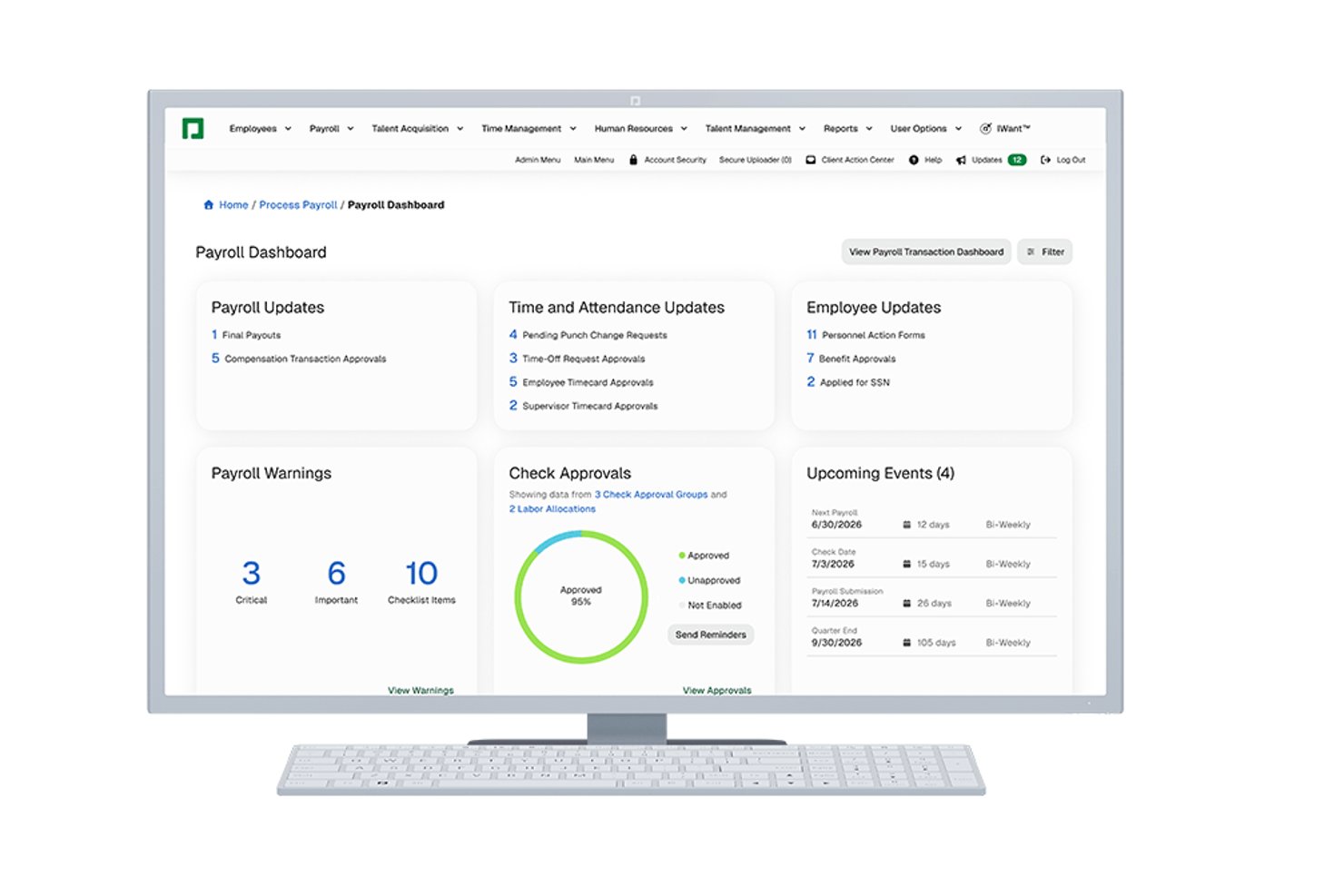
Paycom is a single-database HCM platform built for mid-sized to enterprise organizations that want to consolidate payroll, HR, benefits, and time management without stitching together multiple systems.
Who Is Paycom Best For?
Paycom is a strong fit for U.S.-based HR teams that want employees to own their own data entry, reducing administrative back-and-forth across payroll and HR workflows.
Why Paycom Is a Good Best Rippling Competitors
I've included Paycom in my top picks because of how it puts HR data directly in employees' hands. Beti, Paycom's employee-driven payroll tool, lets employees find and fix their own payroll errors before submission, which cuts processing time and reduces back-and-forth with HR. I also appreciate Employee Self-Service®, which lets employees update their own records, request time off, and manage benefits without routing every change through an HR admin.
Paycom Key Features
- Single-database HR platform: All HR, payroll, and benefits data live in one unified system for consistent records and fewer manual updates.
- Compensation budgeting tools: Create and manage detailed compensation plans, including budgeting, approvals, and analytics for salary adjustments.
- Learning management system: Assign, track, and report on employee training assignments and completion directly within the core platform.
- ACA and benefits compliance: Built-in compliance tools that handle Affordable Care Act reporting and benefits eligibility tracking.
Paycom Integrations
Native integrations are not clearly documented. Paycom provides an API for custom integrations.
Pros and Cons
Pros:
- Beti catches payroll errors before processing
- Single database eliminates duplicate data entry
- Employees self-manage their own payroll data
Cons:
- Reporting customization requires significant setup time
- Limited global payroll support outside the U.S.
G-P
Best for unified global workforce management
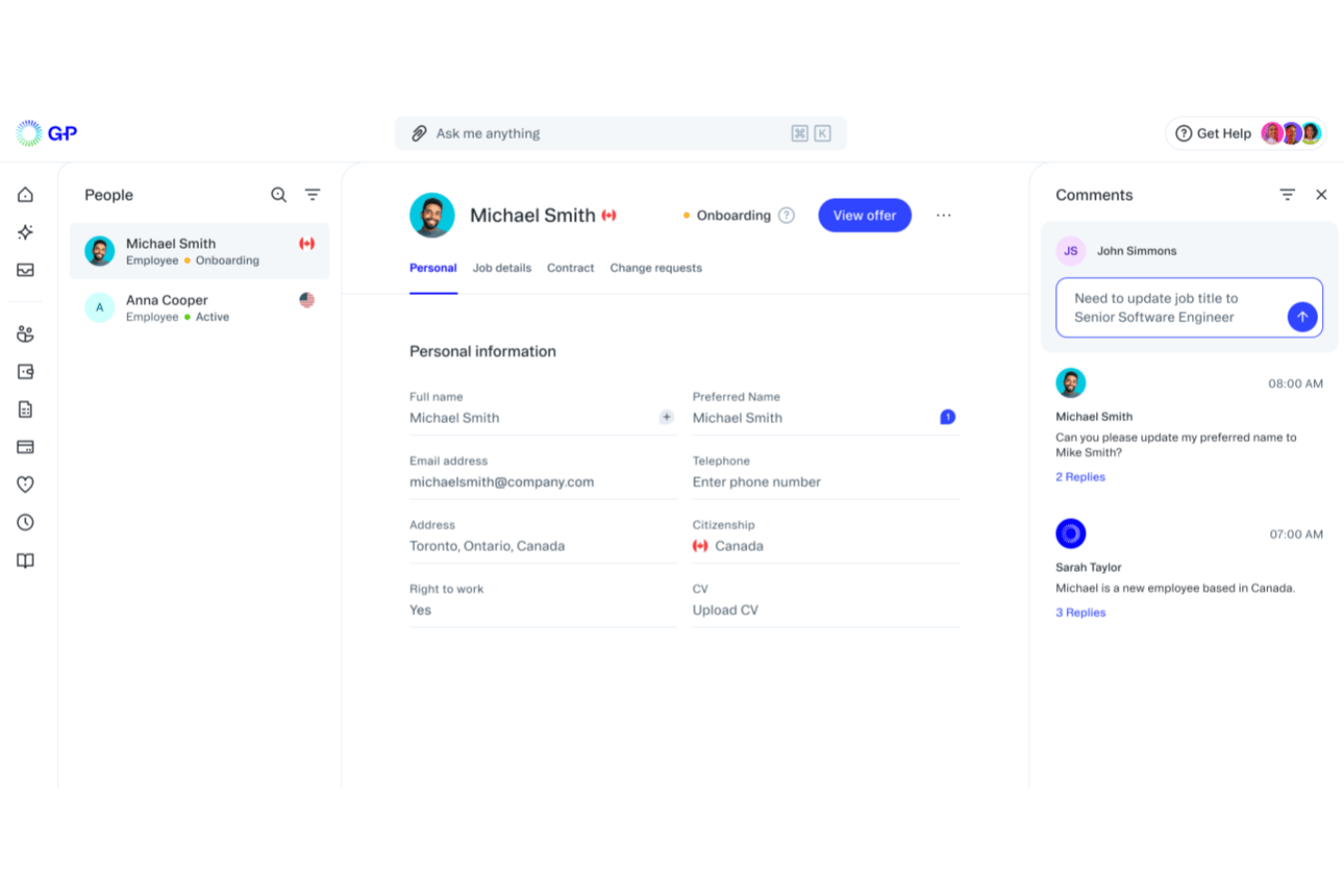
G-P is an employer of record platform that helps HR teams hire, pay, and stay compliant in 180+ countries—no local legal entities needed.
Who Is G-P Best For?
G-P suits mid-market and enterprise HR teams managing international expansion or overseeing employees across multiple countries simultaneously.
Why G-P Is a Good Best Rippling Competitors
I picked G-P as one of the best because its Global Compliance Engine automatically validates every employment action, from contracts to payroll, against local labor laws across 180+ countries in real time. I especially like the AI-guided onboarding, which handles right-to-work verification and cuts time-to-onboard by 87%. That level of built-in compliance depth is something Rippling's global module doesn't replicate natively.
G-P Key Features
- Global payroll engine: Process payroll in 150+ currencies with local tax compliance rules built in for each country.
- Localized benefits administration: Allocate and manage region-specific benefits packages for employees in 180+ countries.
- Bulk contractor onboarding: Generate and issue contracts, plus pay contractors in 190+ countries, all from one dashboard.
- API and HRIS integrations: Connect with systems like Workday, BambooHR, HiBob, and others to centralize data across your HR stack.
G-P Integrations
G-P offers native integrations with Workday, BambooHR, HiBob, Personio, SAP SuccessFactors, UKG, TriNet, ADP, Paylocity, Okta, Microsoft Entra ID, and Google Workspace. An open API is available for custom integrations.
Pros and Cons
Pros:
- AI-guided onboarding reduces time-to-hire significantly
- Built-in local compliance across all markets
- Covers EOR hiring in 180+ countries
Cons:
- Limited native HR tools beyond global employment
- Not suited for single-country domestic teams

Best for budget-conscious teams

RemoFirst is a global EOR platform designed for teams that want to hire internationally without overspending. It helps you employ talent in 185+ countries while keeping payroll and compliance simple—making it an ideal fit for budget-conscious teams expanding abroad.
Why It's A Good Rippling Alternative
I picked RemoFirst because it gives you the essentials for global hiring without the extra IT, finance, or device-management modules that drive up costs in tools like Rippling.
You get compliant hiring, localized contracts, and consolidated payroll through one dashboard, so you can hire abroad without juggling multiple vendors. Its country specialists guide you through local employment rules, minimizing compliance mistakes in new markets.
I also like that RemoFirst’s pricing stays predictable, which matters when you’re scaling a distributed team on a tight budget. For companies that want straightforward global hiring instead of a full internal ops suite, it hits the sweet spot.
RemoFirst Key Features
Here are some key features worth highlighting:
- Global Health Coverage (RemoHealth): Offers worldwide medical plans managed directly through your EOR account.
- Visa & Work Permit Support: Handles immigration processes in 85+ countries with local partners.
- Background Checks: Screens new hires globally through integrated verification services.
- Invoice Aggregation: Replaces multiple individual payments with one consolidated monthly invoice.
RemoFirst Integrations
Integrations include ADP, QuickBooks, Xero, NetSuite, BambooHR, Deel, Remote, HubSpot, Salesforce, and FreshBooks.
Pros and Cons
Pros:
- Immigration support available across 85+ countries
- Single global invoice simplifies multi-country payroll
- Clear, predictable pricing suitable for budget-sensitive teams
Cons:
- Lacks extensive integration options
- No mobile app

Best for global recruitment solutions
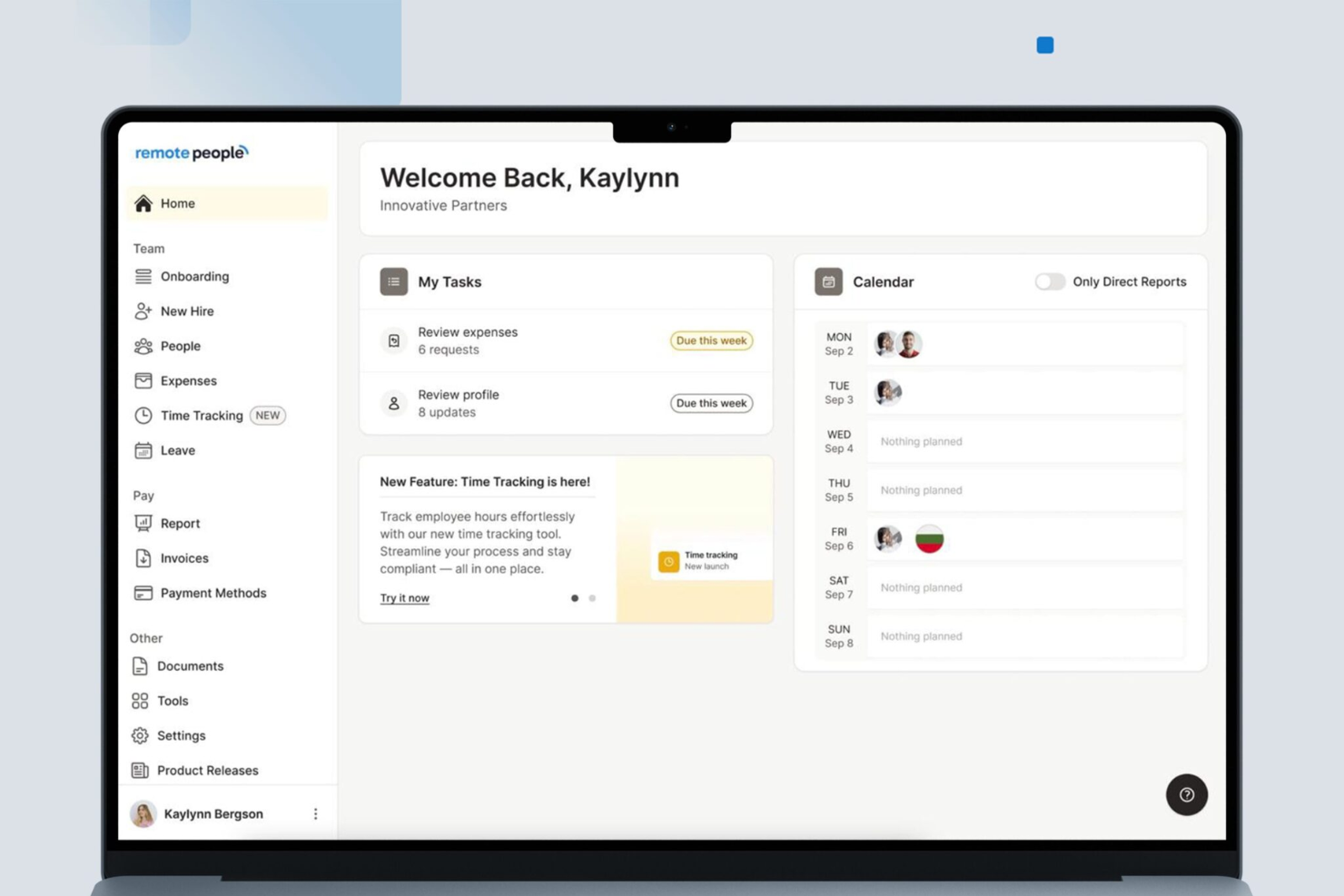
RemotePeople is a platform that helps businesses hire and manage remote talent across more than 150 countries. It's designed to support companies in expanding their global workforce by offering a range of recruitment and payroll services.
Why it's a good Rippling competitor: One of the reasons I picked RemotePeople as a competitor to Rippling is its global recruitment capabilities. It provides access to a vast pool of vetted candidates, ensuring businesses can find the right talent for various roles, including executive positions. This feature is crucial for companies looking to diversify their workforce with skilled professionals from around the world.
Another key feature is the employer of record (EOR) services, which allows businesses to hire employees in countries where they don't have a legal entity. This service ensures compliance with local labor laws, making it easier for companies to manage payroll and benefits for their international employees. The ability to legally hire and manage employees in multiple countries is a significant advantage for businesses aiming to expand globally.
Standout features & integrations:
Features include a streamlined hiring process that delivers a shortlist of vetted candidates within five days, making recruitment quick and efficient. The platform also offers contractor management services, allowing businesses to hire and pay international contractors with ease. Additionally, RemotePeople provides background checks, giving companies peace of mind when bringing new employees on board. These features work together to support a comprehensive approach to global workforce management.
Integrations are not presently listed by RemotePeople.
Pros and Cons
Pros:
- Candidate placement guarantee
- Dedicated client support contact
- Wide recruitment network
Cons:
- No publicly listed integrations
- Some services available only in certain regions
HiBob
Best for customizable compensation planning
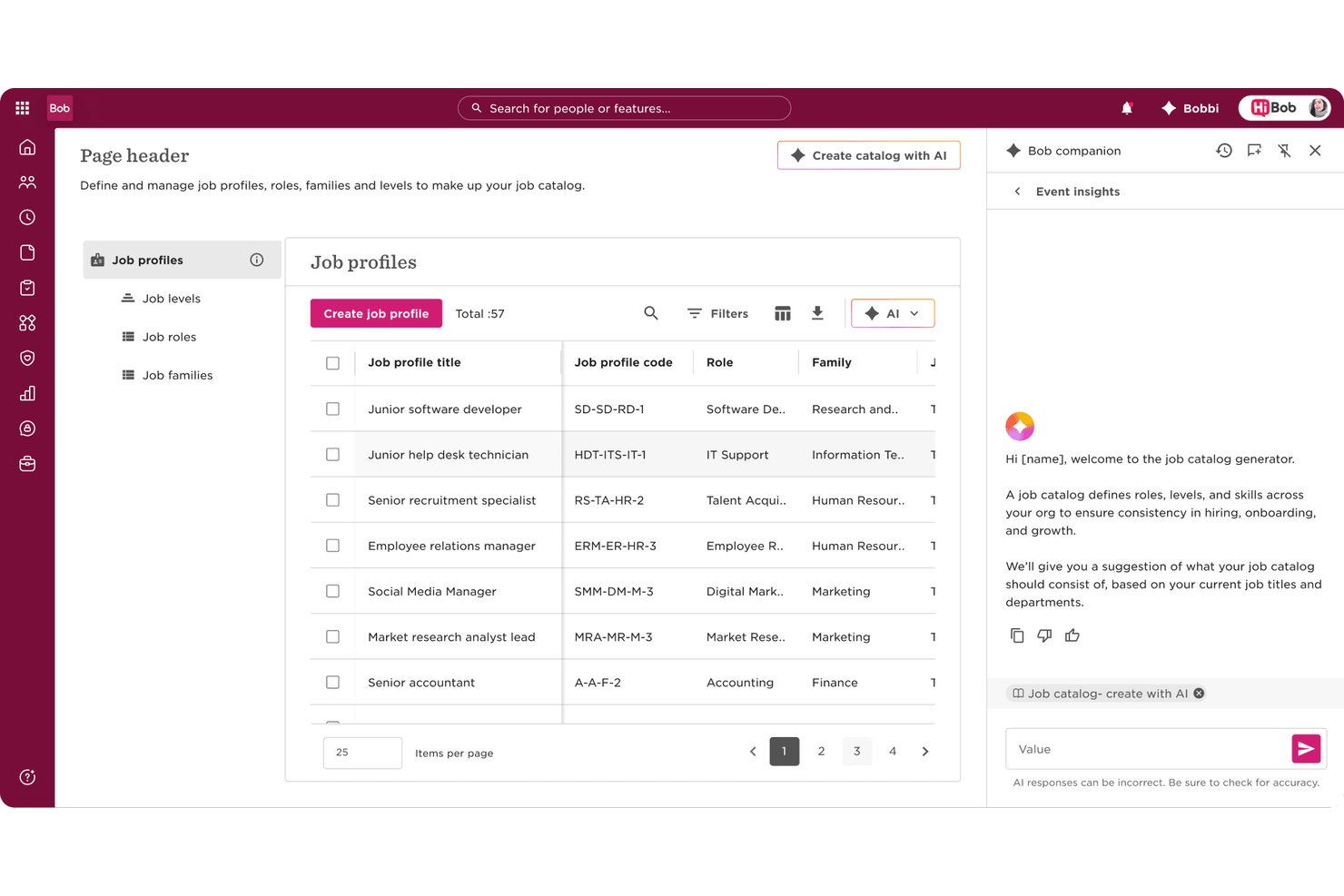
HiBob's Bob platform is a people-centred HRIS built for mid-sized, multinational teams that need to manage the full employee lifecycle—from onboarding and performance to compensation and workforce planning—without stitching together separate systems.
Who Is HiBob Best For?
HiBob is a strong fit for growing companies between 100 and 5,000 employees that operate across multiple countries and need a single HR platform to keep up with them.
Why HiBob Is a Best Rippling Competitor
I picked HiBob as one of the best because its compensation planning tools go well beyond a basic salary review. I appreciate how you can build fully configurable comp cycles with custom pay bands, then validate those decisions against Mercer benchmarking data without leaving the platform. That combination of a structured review workflow and real market data baked directly into the process is something I rarely see in mid-market HRIS tools.
HiBob Key Features
- Employee database: Store and manage detailed employee records with customizable fields and document management.
- Automated onboarding workflows: Configure multi-step onboarding journeys with e-signatures, task assignments, and automated alerts.
- Time and attendance tracking: Monitor leave balances, PTO requests, and working hours with a built-in approval process.
- Open API and integration marketplace: Connect HiBob to major productivity, payroll, and IT systems through a broad selection of pre-built integrations and APIs.
HiBob Integrations
HiBob offers native integrations with Slack, Microsoft 365, Google Workspace, Greenhouse, Okta, DocuSign, Xero, BambooHR, and Workable. An open API is available for custom integrations.
Pros and Cons
Pros:
- People analytics dashboards built into the core
- Highly configurable employee lifecycle workflows
- Strong multi-country workforce visibility tools
Cons:
- Reporting customization can feel limited
- No native payroll in most countries
Gusto
Best for automated payroll and tax filing
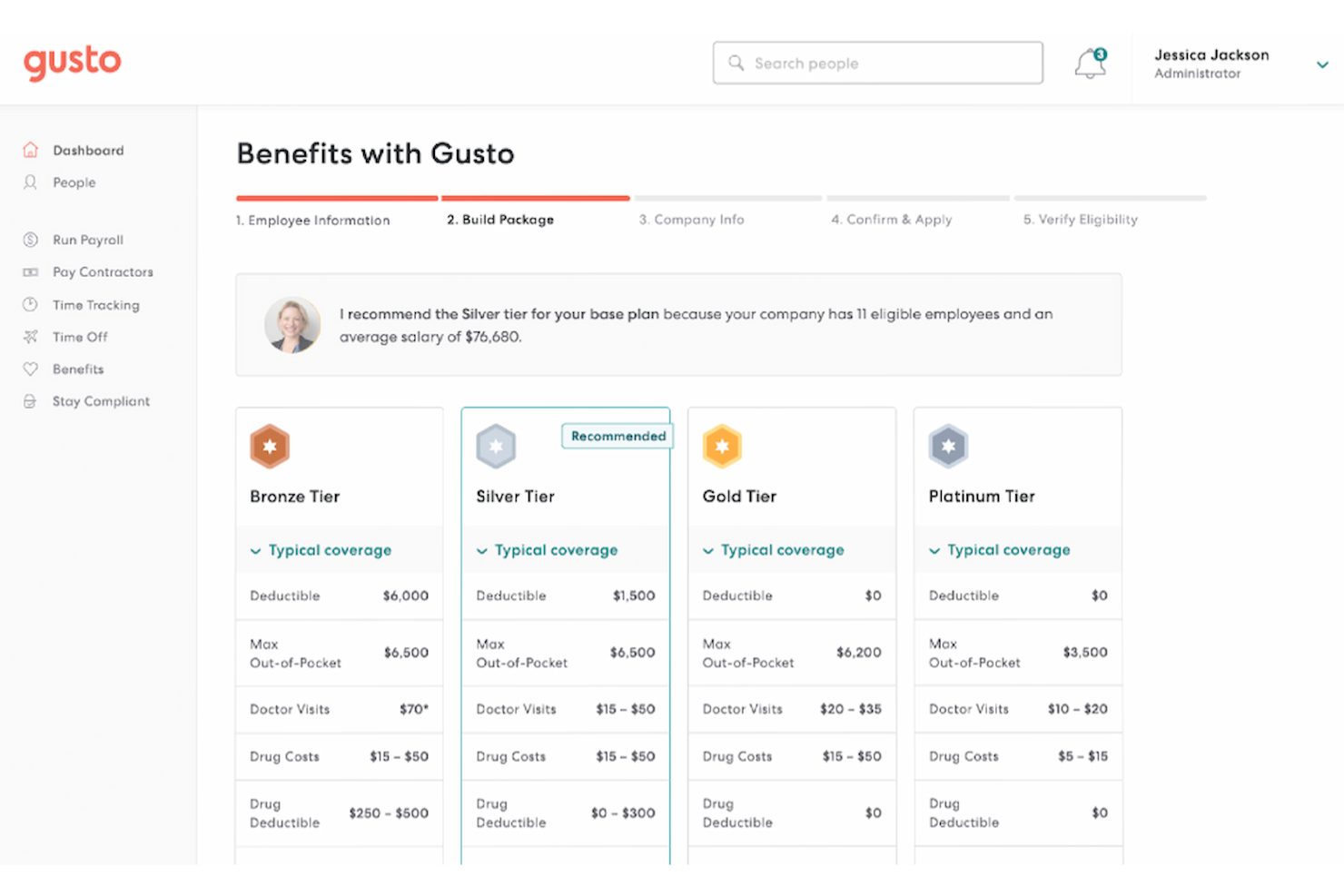
Gusto simplifies the complexities of managing payroll and HR tasks for small to mid-sized businesses. With its intuitive platform, it caters to business owners seeking to streamline payroll processes and enhance employee management without the administrative burden. Gusto addresses significant challenges, such as ensuring compliance and providing affordable benefits, making it a valuable solution for companies aiming to improve operational efficiency and employee satisfaction.
Why I Picked Gusto
I picked Gusto for its strong focus on automating payroll and tax filing, which is crucial for businesses seeking alternatives to Rippling. Gusto's automated payroll feature ensures timely and accurate payroll processing, while its tax compliance tools help you manage state and federal tax filings effortlessly. Additionally, Gusto's employee benefits management stands out by offering a comprehensive suite of health insurance options, which can be a pivotal factor for businesses looking to attract and retain top talent.
Gusto Key Features
In addition to automated payroll and tax filing, Gusto offers:
- Time Tracking: Enables your team to log hours directly within Gusto, seamlessly syncing with payroll for accurate compensation.
- Hiring and Onboarding: Provides paperless onboarding solutions that enable new hires to complete required documentation online.
- Compliance Support: Assists in staying updated with labor laws and regulations, reducing the risk of non-compliance penalties.
- Employee Self-Service: Empowers employees to view payslips, manage benefits, and request time off through a user-friendly portal.
Gusto Integrations
Integrations include QuickBooks, Xero, FreshBooks, TSheets, When I Work, Deputy, Expensify, Clover, Shopify, and Slack.
Pros and Cons
Pros:
- Integration with popular accounting tools simplifies bookkeeping
- Flexible PTO tracking supports custom leave policies
- Comprehensive benefits management integrates health and retirement plans
Cons:
- Less suitable for larger, multi-entity companies
- Reporting options are less flexible for custom analysis
New Product Updates from Gusto
Gusto Adds Solo Advisory Tools and Mobile Money Features
Gusto adds Solo S-Corp Advisory Tools and Gusto Money on Mobile for tax guidance, invoicing, and bill payments. These updates help accountants advise solopreneurs and let users manage business finances from their phones. For more information, visit Gusto’s official site.
Best for benefits management and administration
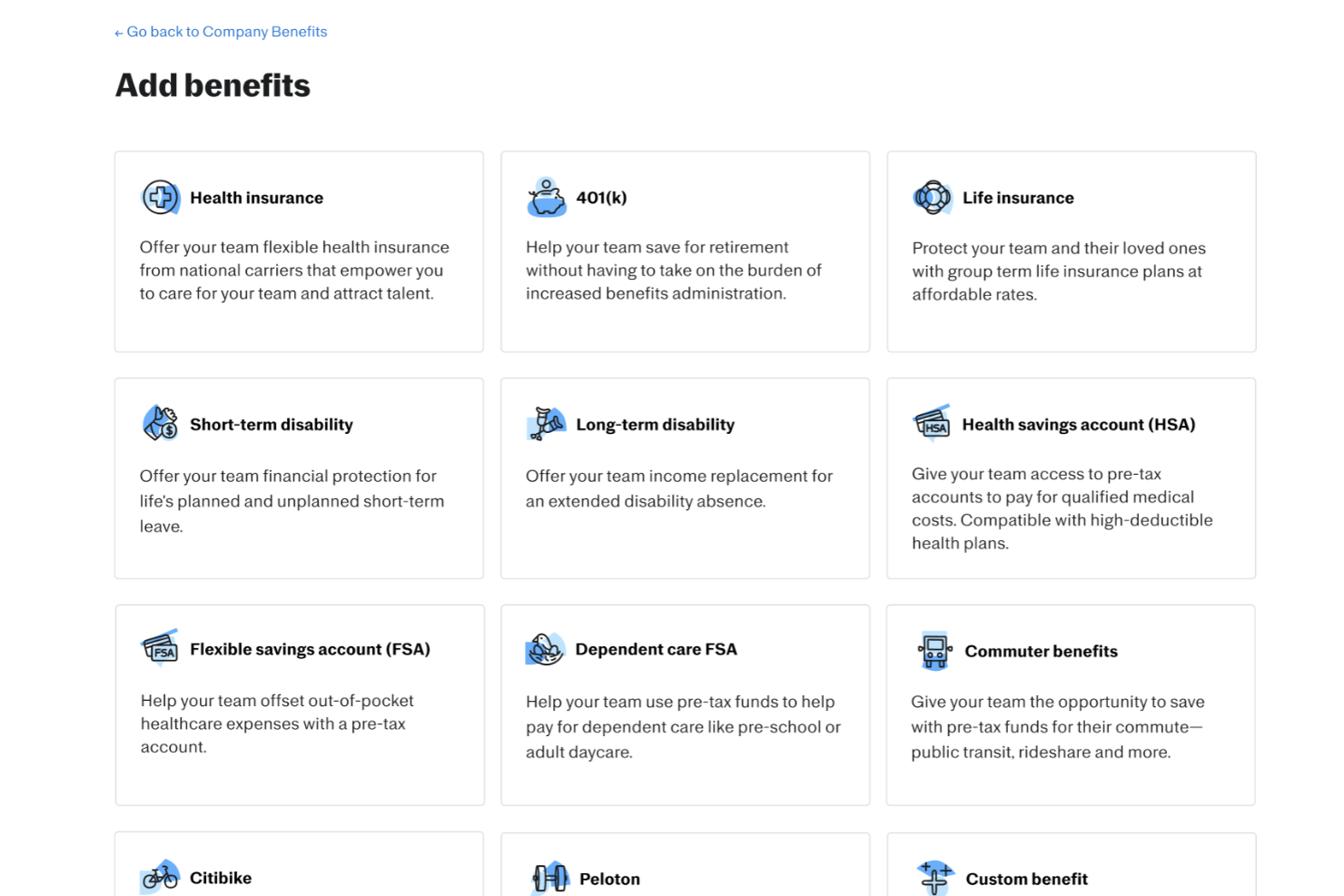
Justworks serves as an alternative to Rippling for businesses that need payroll and HR support in one system. It stands out for benefits management and administration, helping companies handle employee health plans and related programs alongside payroll and compliance. This structure supports organizations that prefer a centralized approach to workforce operations.
Why I Picked Justworks
I picked Justworks as a Rippling competitor for its benefits management and administration, which allows businesses to manage health insurance, retirement plans, and other employee programs within the same system as payroll. Compared to Rippling’s broader IT and HR focus, Justworks places stronger emphasis on structured benefits support alongside payroll and compliance. This setup helps small businesses keep benefits enrollment, contributions, and payroll records organized in one platform.
Justworks Key Features
In addition to benefits management and administration, Justworks offers:
- Time Tracking: Allows you to manage employee hours and attendance seamlessly.
- Employee Onboarding: Streamlines the process of bringing new hires into your organization with digital onboarding tools.
- Compliance Support: Helps you stay compliant with labor laws and regulations, reducing the risk of legal issues.
- Reporting and Analytics: Provides insights into various HR metrics, allowing you to make informed decisions.
Justworks Integrations
Integrations include QuickBooks, Xero, NetSuite, Sage Intacct, Electric AI, allwhere, JazzHR, Brex, Culture Amp, and Leapsome.
Pros and Cons
Pros:
- Automated payroll tax filings
- Clear employee dashboard for benefits and pay information
- Straightforward onboarding workflow for new hires
Cons:
- Reporting tools offer limited in-depth business insights
- Fewer advanced HR features than larger enterprise platforms
Best for unified reporting dashboards

Multiplier is a good fit for companies hiring internationally who want one place to manage payroll, compliance, and workforce costs across multiple countries. If you’re expanding into new markets and need clearer visibility into what you’re spending, its unified reporting dashboards help you monitor payroll, taxes, and headcount without juggling multiple vendors.
Why It's A Good Rippling Alternative
I picked Multiplier because it gives your team a single global payroll system where you can track costs, payments, and compliance requirements across 100+ countries. You can see country-level payroll totals, deductions, and employer contributions in one dashboard, which makes reporting much easier for finance teams.
I also like that Multiplier handles local taxes and filings for each region, so you don’t need separate in-country partners to stay compliant. Its ability to run payroll in local currencies—and consolidate all results into one view—helps you compare workforce costs across markets. For teams building globally, this clarity is a major advantage over tools that spread payroll features across multiple modules.
Multiplier Key Features
Here are some key features worth highlighting:
- Global Cost Visibility: Consolidated dashboards show payroll totals, contributions, and employer costs across regions.
- Country-Specific Payroll Processing: Local tax rules, deductions, and filings managed automatically for 100+ countries.
- Multi-Currency Payments: Supports payments in 120+ currencies with real-time exchange-rate calculations.
- Compliance Support: Access to in-country legal and tax specialists to help resolve region-specific questions.
Multiplier Integrations
Integrations include Workday, BambooHR, Personio, HiBob, Zoho People, Okta, Xero, and QuickBooks.
Pros and Cons
Pros:
- Fast onboarding for global employees via guided workflows
- Automates local tax calculations and statutory contributions
- Unified dashboard improves visibility into global payroll spending
Cons:
- Fewer native integrations than broader HR suites
- Limited contract-customization options for specific markets

HireGlobal
Best for indemnification-backed hiring
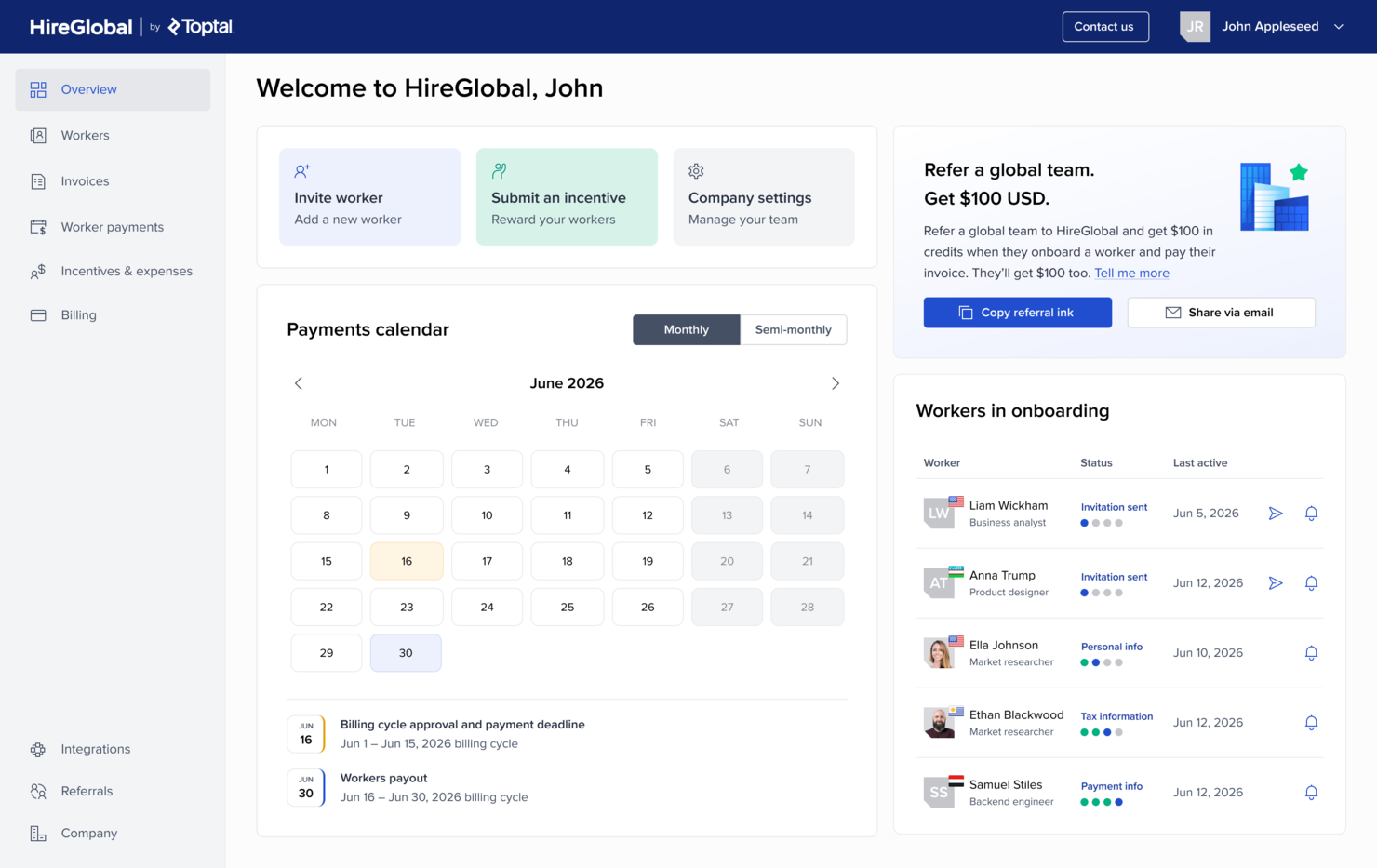
HireGlobal is a global hiring and payroll platform for businesses that need to onboard, pay, and compliantly manage international contractors and remote employees across 180+ countries without setting up local entities.
Who Is HireGlobal Best For?
HireGlobal is a strong fit for growing companies that need to hire and pay international talent quickly, without the overhead of managing multi-country compliance in-house.
Why HireGlobal Is a Good Rippling Competitor
I picked HireGlobal as a competitor to Rippling because it combines global employment services with access to Toptal's network of pre-vetted professionals. Every candidate has already passed Toptal's multi-stage vetting process, covering technical skills, communication, and professionalism. It also pairs talent access with Agent of Record and Virtual EOR services, making it a good option for businesses that want to hire and engage global workers through a single provider.
HireGlobal Key Features
- Global payroll processing: Run payroll for contractors and employees across 180+ countries in local currencies from a single dashboard.
- Background screening: Request and manage candidate background checks directly within the HireGlobal platform during onboarding.
- Misclassification indemnification: HireGlobal provides up to $1M in coverage to protect your business against worker misclassification liability.
- Consolidated invoicing: Receive a single invoice across all international workers, regardless of country or contract type.
HireGlobal Integrations
HireGlobal integrates with TopTracker, Toptal's time tracking tool, for time tracking, invoice approval, and payment processing. Native integrations beyond TopTracker are not clearly documented, and public documentation does not list Zapier or API support.
Pros and Cons
Pros:
- $1M compliance indemnification per worker
- EOR coverage through multiple local partners
- Backed by 40+ in-house lawyers
Cons:
- No mobile worker tracking application
- Relatively new platform with fewer reviews
Andre Rippling-konkurrenter
Hvis du ønsker noen flere alternativer å vurdere, er dette flere andre interessante Rippling-konkurrenter som også er verdt å undersøke:
| Faktor | Hva du bør vurdere |
|---|---|
| Forretningsmål | |
| Viktige HR-funksjoner | |
| Lønns- og personalgodeadministrasjon | |
| Talentadministrasjon | |
| Integrasjon og kompatibilitet | |
| Brukervennlighet | |
| Skalerbarhet | |
| Tilpasning og fleksibilitet | |
| Support og opplæring | |
| Etterlevelse og sikkerhet | |
| Analyse og rapportering | |
| Kostnader og prismodell | |
| Omdømme og pålitelighet |
- Paylocity
For core HR with employee engagement
- Factorial
As an AI for business
- TriNet
For U.S. businesses with up to 500 employees
- Pebl
For AI-powered EOR tools
- RUN Powered by ADP®
For small businesses
- CXC Global
For integrating human expertise
- TimeTrex
For detailed job costing and expense tracking
- WorkBright
For mobile-first onboarding
- GoCo
For an easy-to-use interface with responsive customer support
- Borderless AI
For automated contract generation
- Atlas HXM
For global compliance management
- Omnipresent
For adherence to employment laws
- Sage HR
Modular HR software solution for small businesses
- ADP
For comprehensive payroll and HR services
- SAP SuccessFactors
For AI-enabled talent management
- Oracle Cloud HCM
For AI-embedded HR processes
- Zoho People Plus
For customizable workflows
- Paychex
For all-in-one payroll and HR solutions
- UKG Ready
For AI-powered workforce management
- Remunance
EOR in India
- Remote
For flexible employee and contractor management
- BambooHR
User-friendly HR software for SMBs
- Papaya Global
For multi-currency payments
- Oyster HR
For specialized local support
- Wisemonk
For India hiring compliance
- Native Teams
For global compliance handling
- TopSource
For compliance-focused global hiring
- Namely
For mid-sized companies needing HR and payroll
- Workday
For a skills-based people strategy
- Keka HR
For employee experience and engagement


Relaterte anmeldelser av HR-programvare
Hvis du fortsatt ikke har funnet det du leter etter her, kan du se nærmere på disse andre relaterte verktøyene som vi har testet og vurdert:
- HR-programvare
- Lønnsprogramvare
- Rekrutteringsprogramvare
- Tjenester for formell arbeidsgiver
- Systemer for søkersporing
- Programvare for arbeidsstyring
How I Evaluate Rippling Competitors
I split my evaluation into two layers: the baseline HR and payroll capabilities a platform must cover, and the differentiators—like global coverage or pricing model—that separate the best fits.
Core Functionality (Table Stakes For This List)
When I'm selecting tools for my list, I rank each one on a scale from 0 (does not offer the functionality) to 5 (excels in this area) for each core functionality listed below. Then, I calculate the tool's total score into a percentage. Each tool needs to achieve a minimum total score of 75% to be considered for inclusion.
- Core HRIS & Employee Records: I check whether the platform serves as a true system of record—org charts, custom fields, headcount reporting, and multi-entity support.
- Payroll Processing: Each tool's payroll scope matters, from single-country runs with automated tax filing to multi-country payroll with local compliance built in.
- Benefits Administration: I look for carrier connectivity, open enrollment workflows, and plan setup—not just a place to log benefit elections manually.
- Onboarding & Offboarding Workflows: I evaluate how much of the new hire flow is automated, like offer letters, e-signatures, document collection, and task sequencing.
- Time & Attendance Tracking: PTO requests, clock-in options, approval chains, and scheduling all factor in, especially for teams managing hourly and salaried workers.
- Integrations & Workflow Automation: I look at the breadth of native connectors to tools like accounting platforms, ATS products, and productivity apps, plus API access.
Once I have a list of tools that meet this criteria, I consider what sets each platform apart.
Differentiating Factors (What Sets Vendors Apart)
Here's how I compare and contrast different vendors:
Standout Features
Global EOR capabilities matter when your team is hiring across borders without setting up local entities. I also evaluate whether a platform ties IT provisioning—like app access and device management—directly to HR events, since that's a gap many buyers are trying to close. Built-in talent management tools like performance reviews and compensation planning can eliminate the need for a separate platform entirely.
Beyond Features
Pricing transparency is a big differentiator—some vendors bundle modules while others charge per add-on, which changes total cost as you scale headcount. I also evaluate implementation support, especially how a platform handles data migration from a legacy HRIS or payroll system. Compliance coverage matters too. I look at whether the vendor actively maintains jurisdiction-specific tax and labor law updates or leaves that responsibility to your team.
Funksjoner i alternativer til Rippling
Når du velger alternativer til Rippling, bør du se etter følgende viktige funksjoner:
- Lønnsadministrasjon: Sørg for at du kan kjøre lønn automatisk, beregne skatter og håndtere fradrag uten problemer. Det er best når systemet veileder deg gjennom lønnskjøringene, slik at det er mindre sannsynlig at det oppstår feil – selv om du ikke er lønnsekspert.
- Administrasjon av personalgoder: Se etter en løsning som hjelper deg med å sette opp og administrere personalgoder, som helseforsikring og pensjonsordninger. De beste verktøyene gjør det enkelt for ansatte å registrere seg, samtidig som de hjelper deg med å overholde regelverket.
- Tidsregistrering: Velg programvare som lar ansatte stemple inn og ut digitalt, registrerer arbeidstimer og effektiviserer godkjenningen av timelister. Dette fjerner hodebryet med manuell registrering (og den klassiske jakten på «hvem glemte å registrere timene sine igjen?»).
- HR-administrasjon: Systemet bør gjøre det enkelt å ta imot nyansatte, håndtere personalopplysninger og administrere viktig HR-dokumentasjon på ett sted. Ekstrapoeng hvis det holder deg oppdatert om kommende medarbeidersamtaler eller sertifiseringer.
- Utgiftsregistrering: Finn en plattform der ansatte kan sende inn utgifter, laste opp kvitteringer og få godkjenninger raskt. Det gjør refusjon enkelt og hjelper deg med å unngå å miste oversikten over hvem som brukte hva.
- Rapportering og analyse: Velg en tjeneste som omgjør lønns- og HR-dataene dine til lettleste rapporter. Denne innsikten kan hjelpe deg med å oppdage trender, planlegge budsjetter og holde ledelsen fornøyd med tydelige data.
- Integrasjoner: Det riktige valget bør koble seg sømløst til regnskapsplattformene dine, verktøy for tidsregistrering eller andre forretningsapper. På den måten slipper du å flytte data mellom ulike systemer.
- Selvbetjeningsportaler: Gi de ansatte egne oversikter, slik at de kan se lønnsslipper, oppdatere kontaktopplysninger og be om fri uten ekstra e-poster eller papirarbeid.
- Støtte for regelverksetterlevelse: Siden arbeidslovgivningen stadig endres, er det nyttig å ha programvare som holder oversikt over regelverket for deg. De beste alternativene sender påminnelser eller oppdaterer dokumenter automatisk, slik at du holder deg på trygg grunn.
Vanlige AI-funksjoner i alternativer til Rippling
I tillegg til standardfunksjonene i alternativene til Rippling som er nevnt ovenfor, tar mange av disse løsningene i bruk AI med funksjoner som:
- Automatisert dokumentbehandling: AI fremskynder oppgaver som å lese CV-er, sortere kontrakter og hente ut viktig informasjon fra dokumenter – noe som gjør administrativt arbeid mye raskere (og gir deg tilbake litt av forstanden).
- Prediktiv analyse: Disse verktøyene bruker AI til å forutsi risiko for turnover, lønnstopper eller fremtidige bemanningsbehov, slik at du kan planlegge med trygghet i stedet for å reagere på overraskelser.
- Smart chatbotstøtte: Ansatte kan få umiddelbare svar på HR- eller lønnsspørsmål takket være AI-drevne chatboter, noe som reduserer mengden e-postutveksling for alle.
- Intelligent avviksdeteksjon: AI skanner etter ting som ser unormale ut i lønn, personalgoder eller timelister, og flagger problemer slik at du kan løse dem før de blir kostbare feil.
- Personlig tilpassede arbeidsflyter for introduksjon: AI tilpasser trinnene i introduksjonsprosessen for hver nyansatt, slik at prosessen blir smidigere og mer relevant (og slik at nyansatte føler seg mindre nervøse på den første dagen).
Slik velger du et alternativ til Rippling
Når du velger et alternativ til Rippling HCM, er det viktig å vurdere hvordan hvert alternativ samsvarer med virksomhetens behov, teknologiske oppsett og vekstplaner. Bruk tabellen nedenfor som hjelp i sammenligningen og beslutningsprosessen.
| Faktor | Hva du bør vurdere |
|---|---|
| Forretningsmål | Identifiser de viktigste målene dine – for eksempel å automatisere HR-prosesser, forbedre etterlevelsen eller skalere globalt. Velg en løsning som støtter disse målene direkte. |
| Grunnleggende HR-funksjoner | Sørg for at systemet inneholder viktige funksjoner som medarbeideropplysninger, tidsregistrering, administrasjon av fordeler og håndtering av etterlevelse. |
| Lønns- og fordelsadministrasjon | Se etter nøyaktig, automatisert lønnskjøring med støtte for flere land (ved behov), samt sømløse verktøy for registrering og administrasjon av fordeler. |
| Talentforvaltning | Vurder om plattformen inkluderer rekruttering, introduksjon av nyansatte, medarbeidersamtaler og funksjoner for læringsadministrasjon som støtter medarbeidernes utvikling. |
| Integrasjon og kompatibilitet | Kontroller at den integreres sømløst med regnskapsprogramvaren din, samarbeidsverktøy (som Slack eller Teams) og andre HR-plattformer du bruker. |
| Brukervennlighet | Vurder brukergrensesnittet og medarbeideropplevelsen. Et ryddig og intuitivt design reduserer tiden det tar å komme i gang, samt arbeidsbelastningen for HR. |
| Skalerbarhet | Sørg for at plattformen kan vokse med virksomheten din – og støtte flere medarbeidere, lokasjoner og krav til etterlevelse etter hvert som du utvider. |
| Tilpasning og fleksibilitet | Kontroller om du kan tilpasse arbeidsflyter, rapporter og brukertillatelser til organisasjonens struktur og retningslinjer. |
| Støtte og opplæring | Sammenlign alternativer for kundeservice – som chat døgnet rundt, telefonstøtte og hjelp med oppstart – og spør om tilgjengelige opplæringsressurser. |
| Etterlevelse og sikkerhet | Bekreft at systemet overholder relevante arbeidsrettslige regler og standarder for databeskyttelse (for eksempel GDPR, SOC 2 og HIPAA). |
| Analyse og rapportering | Se etter innebygde oversikter som følger utviklingen i arbeidsstyrken, lønnskostnader og turnover for å legge til rette for bedre beslutninger. |
| Kostnader og prismodell | Forstå hvordan prisene skalerer med antall brukere og funksjoner. Vær oppmerksom på ekstrakostnader for integrasjoner eller implementering. |
| Omdømme og pålitelighet | Les brukeranmeldelser, kundehistorier og vurderinger fra tredjeparter (som G2 eller Capterra) for å vurdere produktets pålitelighet og leverandørens troverdighet. |