

How to Choose Performance Management Software


To choose performance management software, focus on finding a tool that streamlines reviews, tracks goals, supports continuous feedback, and fits your company culture. The right platform helps you align employees with business objectives and provides actionable insights, while a poor fit wastes time and frustrates your team. In this guide, I’ll break down the key features and selection steps you need to make a confident, effective choice that grows with your organization.
10 Things to Look for When Choosing Performance Management Software
Before you start comparing vendors, it helps to know exactly what to look for. The best performance management software balances functionality, usability, and adaptability—without overwhelming your team with features you’ll never use.
To guide your search, here are 10 key factors to consider as you evaluate your options:

1. Plan Flexibility

Choose software that makes it easy to upgrade or downgrade as your needs change. This way, you won’t be locked into paying for features or modules you won’t use.
Check if the vendor offers month-to-month plans or requires long-term contracts, and ask about fees tied to changing your plan. During a trial, explore how simple it is to adjust your subscription. Flexibility ensures you can adapt without unnecessary costs or friction.
2. Data Access and Reporting
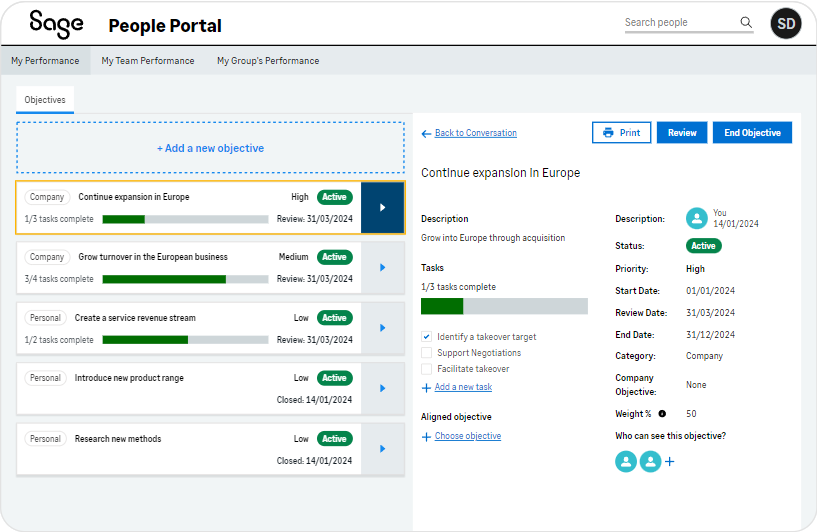
Robust performance data and reporting are essential for tracking employee performance effectively. Look for tools that provide customizable reports, real-time metrics, and easy data exports.
During a demo, test how quickly you can generate reports and how clearly they present insights to improve decision-making. Accessible reporting helps you make informed decisions and spot trends before they become problems.
3. Integration with Your Tech Stack

Your performance management system should connect seamlessly with the tools you already use, such as your HRIS, employee engagement platform, or OKR system.
Ask if the vendor offers APIs or pre-built integrations, and request examples of how other clients have used them successfully. During a trial, check that performance data flows smoothly between systems. Good integration saves time, reduces manual data entry, and eliminates duplicate work.
4. Onboarding and Support
A smooth onboarding process and reliable customer support make transitioning to a new system far easier. Look for vendors that provide hands-on training, comprehensive resources, and timely assistance.
Ask about the vendor’s onboarding process and test their customer support response time with a few questions. Reliable support ensures your team can start using the new software solution confidently and without unnecessary delays.
5. Role-Based Permissions
Role-based permissions protect sensitive data while keeping the right tools accessible to each team member.
Check that you can assign permissions based on roles and adjust them as responsibilities change. During a demo, explore how permissions are managed. Strong permission controls help keep your data secure and compliant.
6. Industry-Specific Compliance
Every industry has unique compliance requirements, so it’s important to choose software designed with your specific needs in mind.
Ask vendors about certifications, case studies, or features tailored to your sector. During a trial, verify that compliance functions are easy to manage and align with your obligations. This reduces risk and ensures the performance management solution will support your regulatory needs.
7. Customization Options
Your software should adapt to your processes—not the other way around. Customizable workflows, dashboards, and features save time, reduce time-consuming work, and improve user experience.
Ask if the system lets you tailor review cycles, forms, or dashboards. During a demo, test how easy it is to personalize the software to fit your team’s performance review process. Customization ensures the platform feels like a natural extension of your existing processes.
8. Automation Features
Automation saves time by handling repetitive tasks like scheduling review cycles, and sending reminder notifications.
Look for software that automates performance reviews and supports continuous feedback cycles. You should also check if you can set up automated alerts for key performance indicators.
Some AI performance management tools can even provide insights and recommendations regarding individual and team performance.
During a trial period, test automation features to see how well they streamline your performance management processes. This will help you gain an understanding of how much time the software will free up for other strategic tasks.
9. Mobile or Multi-Location Support
For remote or distributed teams, mobile functionality is a must. Your team should be able to access the system anytime, anywhere.
Look for a responsive mobile app or web version, and test whether all key features are available on the go. Reliable mobile access ensures employees and managers can engage with performance processes no matter where they are.
10. Employee Experience and Ease of Use

Even the most powerful software won’t succeed if your team finds it difficult or frustrating to use. A positive employee experience ensures higher adoption rates and more consistent use of the system.
Look for intuitive dashboards, clear navigation, and user-friendly workflows. Ask if the vendor offers role-specific views so managers, employees, and HR can each interact with the system in ways that make sense for them.
During a demo, consider how quickly you can complete common tasks—like leaving feedback, setting goals, or running a performance review. If it feels complicated, your team may resist using it, reducing the value of your investment.
Essentially, the right performance management software should do more than check boxes—it should empower your team, simplify workflows, and support long-term growth.
By focusing on these 10 factors during your selection process, you’ll be better equipped to choose a performance management platform that fits your organization today and adapts as your needs evolve.
How to Choose Performance Management Software: A 5-Step Framework
Selecting the right performance management software can feel overwhelming, but breaking it down into steps makes it manageable. Focus on what truly matters for your team and avoid getting sidetracked by unnecessary features.
Here's a step-by-step guide to help you choose wisely:
Step 1: Identify Your Needs
Start by defining your team’s needs to ensure you select software that truly supports them:
Gather Stakeholder Input
Involve key stakeholders like HR, payroll, finance, leadership, IT, and employees to gather diverse insights. Hold meetings or surveys to understand their specific challenges and needs. This collective input will provide a comprehensive view of what the software must address. By engaging everyone, you create buy-in and ensure the solution fits your team's culture.
List and Prioritize Pain Points
Identify and prioritize the pain points or blockers in your current system. Make a list of issues like inefficient processes, lack of integration, or poor user experience. Rank them based on impact and frequency. This helps you focus on solving the most pressing problems first, ensuring the new software provides real value.
Align with Internal Policies
Ensure your requirements align with internal policies, vendor preferences, security protocols, and regulatory goals. Consult with IT and compliance teams to avoid any conflicts. This alignment ensures a smooth implementation and reduces the risk of compliance issues. It also helps narrow down your vendor options.
Differentiate Must-Have Features
Distinguish between must-have and nice-to-have features. Must-haves are essential for your team’s daily operations, while nice-to-have’s enhance but aren’t necessary. Create a checklist to evaluate software vendors against these criteria. This keeps you focused on solutions that meet your core needs without getting distracted by unnecessary extras.
Ask These Questions:
- What complaints or blockers come up most often?
- What needs aren’t being met today?
- What features would solve your top 3 pain points?
- What ROI are you expecting from this investment?
- How does the software align with our security protocols?
Step 2: Research Performance Management Software Vendors
Research and compare vendors to find the best fit for your team:
Conduct High-Level Vendor Scans
Start with high-level scans using review sites, rankings, and case studies. If performance reviews are a primary need, compare employee evaluation software options to narrow your search to tools built around structured reviews and feedback. Look for patterns in feedback and ratings. Pay attention to vendors frequently mentioned in success stories. This helps you identify reputable options and gather insights into real-world performance.
Compare Based on Business Size
Evaluate tools based on your business size, necessary integrations, or whether you want to outsource or create in-house models. Smaller teams might need simpler solutions, while larger organizations may require more robust features. Check if the software integrates with your existing tech stack to ensure the solution scales with your growth.
Identify Key Differentiators
Focus on key differentiators like implementation support, user experience, or flexibility for niche use cases. Look for vendors offering strong onboarding assistance and intuitive interfaces. Consider if they provide customizable features for unique needs. These factors can significantly impact user adoption and satisfaction.
Document Findings
Keep track of your research findings in a structured way. Create a spreadsheet or document to compare features, pricing, and support options. List pros and cons for each vendor. This documentation helps you make an informed decision and provides a reference for future evaluations.
Ask These Questions:
- What does each tool do best?
- Does it fit your team size, budget, and stack?
- What support and documentation are available?
- How do users rate their experience with the tool?
- What unique features set it apart from competitors?
Top Performance Management Tools to Consider
Here’s my list of the top 10 performance management software options available, to help you get started in your search:
Clicks on the links below may earn a commission, which supports our independent testing and review of software and services. Learn more about how we stay transparent.


Step 3: Make a Performance Management Software Shortlist and Reach Out
Narrow your vendor options and start conversations with potential partners:
Shortlist Vendors
Based on your research, narrow down your options to 2-4 vendors. Choose those that align best with your team's needs and budget. If cost is a priority, include free performance management software in your comparison. Consider factors like feature set, reputation, and user feedback. This focused shortlist helps you dive deeper into each option without getting overwhelmed.
Send an RFI or RFP
Once you have your shortlist, send a Request for Information (RFI) or performance management software Request for Proposal (RFP) to gather detailed information. This formal request helps you understand vendor capabilities and offerings. Include specific questions about features, pricing, and customer support. RFIs and RFPs are both valuable tools for comparing vendors on a deeper level.
Book Demos and Ask Questions
Schedule demos with your shortlisted vendors and prepare focused questions. During demos, explore key features and functionalities that matter to your team. Ask about user experience and integration capabilities. This hands-on experience will give you a clearer picture of how each software fits your needs.
Use Consistent Evaluation Criteria
Apply consistent performance evaluation criteria across all vendors to ensure a fair comparison. Use a checklist to rate each vendor on aspects like usability, support, and cost. This structured approach helps you make an objective data-driven decision. It also highlights any gaps or strengths in each solution.
Ask These Questions:
- Can you walk me through a real customer story like ours?
- What support or onboarding resources do you offer?
- What features require an upgrade?
- How does your software integrate with existing tools?
- What’s the typical timeline for implementation?
Step 4: Build the Business Case
Turn your vendor research into a compelling business case that your leadership team will understand and support:
Summarize Pain Points and Outcomes
Clearly summarize your team's pain points and the expected outcomes of implementing new software. Highlight how the software will solve specific issues like inefficient processes or lack of integration. Use bullet points to make it easy to digest. This helps your leadership see the direct value in addressing these challenges.
Present Cost Estimates and Timelines
Find basic cost estimates and implementation timelines from vendor proposals or review performance management software pricing guides. Present these in a clear, concise format, like a table or chart. Include any potential cost savings or efficiency gains. This provides a realistic view of what to expect financially and operationally.
Articulate ROI and Risks
Explain the return on investment (ROI), efficiency gains, and the financial or operational risks of doing nothing. Use specific examples, like how the software could reduce manual work by 30% or improve organizational goal tracking and increase actionable insights. Highlighting these aspects shows why investment is necessary and what could be lost by delaying.
Ask These Questions:
- What business problem will this solve?
- What are the risks of doing nothing?
- What are the financial and operational upsides?
- How will this improve our team's efficiency?
- What long-term benefits can we expect?
Step 5: Implement Your Performance Management Software and Onboard Your Users
Plan a thorough implementation process once you’ve selected your performance management software vendor:
Communicate the Rollout Plan
Clearly communicate the rollout plan to all users. Share timelines, key dates, and what to expect during the transition. Use emails, meetings, or an internal portal to keep everyone informed. This ensures everyone knows their role and reduces confusion.
Assign Internal Owners
Assign internal owners and points of contact for different aspects of the rollout. Choose team members who understand the software and can address questions or issues. This creates accountability and ensures smooth coordination. Having clear contacts helps users know where to turn for help.
Ensure Training and Adoption
Ensure teams complete training and adopt the tool consistently. Schedule training sessions and provide resources like guides or videos. Monitor participation and follow up with those who need extra help. Consistent use across the team maximizes the benefits of performance management software.
Create Feedback Loops
Create feedback loops during rollout to gather insights and make improvements. Use surveys or meetings to collect user feedback. Coordinate with vendor resources for additional support or training. This helps you address issues quickly and improve the onboarding process.
Ask These Questions:
- What’s the change management plan?
- Who’s responsible for roll-out?
- How will you track early success?
- What training resources are available?
- How will you gather user feedback?
What’s Next?
If you're in the process of researching performance management software, connect with a SoftwareSelect advisor for free recommendations.
You’ll fill out a form and have a quick chat where they get into the specifics of your needs. Then you'll get a shortlist of software to review. They'll even support you through the entire buying process, including price negotiations.

