

Gerir o processamento salarial pode ser uma dor de cabeça para as equipas de RH, especialmente quando os orçamentos são limitados. Precisa de uma solução acessível, mas que não poupe nas funcionalidades essenciais. É aqui que entra o software de processamento salarial económico. Ajuda a gerir o processamento salarial de forma eficiente, poupando tempo e reduzindo erros.
Passei bastante tempo a testar e analisar vários softwares e compreendo o que funciona melhor no mundo dos RH. Neste artigo, vou partilhar as minhas principais escolhas de software de processamento salarial económico. Encontrará informações sobre funcionalidades, vantagens e desvantagens, e preços, para que possa tomar uma decisão informada para a sua equipa. Vamos analisar as melhores opções que podem tornar a gestão do processamento salarial mais simples e económica para si.
Why Trust Our Software Recommendations
6,700+
Reviews
20
Industry experts
16+
Evaluation factors
14
Years
Our team has been testing and reviewing software since 2012. As HR experts ourselves, we know how difficult—and important—it is to choose the right software.
For this guide, we evaluated tools using hands-on testing and independent research, scoring tools using our selection criteria. We also draw on insights from industry thought leaders and practicing HR experts.
Our reviews reflect our human editorial judgment, not a sales pitch.
Expert reviewers:
- Phil GrayCOO
 Kim BehnkeHR Tech Editor & Analyst
 Josh BarkerPeople Ops Manager

Tabela comparativa de software de processamento salarial económico
Esta tabela comparativa resume os detalhes de preços das minhas principais escolhas de software de processamento salarial económico:
| Tool | Best For | Trial Info | Price | ||
|---|---|---|---|---|---|
| 1 | Best with integrated time tracking tools | Free demo available | From $8/user/month | Website | |
| 2 | Best for moving contractors to EOR employment | Free plan + free demo available | From $199/user/month | Website | |
| 3 | Best for scheduling hourly shift workers | Free plan + 30-day free trial + free demo available | From $99/month (billed annually) | Website | |
| 4 | Best for small business payroll and compliance | Free demo available | Pricing upon request | Website | |
| 5 | Best for small POS retailers with hourly staff | Free demo available | From $35/month + $6/person/month | Website | |
| 6 | Best for growing SMBs with HR support | Free demo available | Pricing upon request | Website | |
| 7 | Best for Wave users syncing payroll and books | 30-day free trial available | From $46/month | Website | |
| 8 | Best for payroll unified with HR and IT | Not available | From $8/user/month | Website | |
| 9 | Best for S-corp payroll with guided election | Free demo available | From $49/month | Website | |
| 10 | Best for QuickBooks users wanting built-in payroll | Not available | From $50/month | Website |


Análise do melhor software de processamento salarial económico
Abaixo encontrará os meus resumos detalhados do melhor software de processamento salarial económico que entrou na minha lista restrita. As minhas análises apresentam uma visão detalhada das principais funcionalidades, vantagens e desvantagens, integrações e casos de utilização ideais de cada ferramenta, para o ajudar a encontrar a melhor opção para si.
 Best with integrated time tracking tools
- Free demo available
- From $8/user/month
Visit WebsiteCustomer Rating:4.6/5
Payroll processing overview showing processing dates, pay types, pay periods, status, and total debit amounts for completed payroll runs. Justworks is a payroll and HR platform that combines automated payroll processing, compliance support, benefits administration, and time tracking for small businesses seeking affordable payroll software.
Who Is Justworks Best For?
Justworks is a good fit for small to midsize businesses that need affordable payroll and HR tools with built-in compliance support.
Why I Picked Justworks
I picked Justworks as one of the best because I like how it combines payroll with integrated time tracking tools. My team can track employee hours directly in the platform, which syncs with payroll calculations and overtime management. I also use the built-in time tracking to monitor attendance and ensure accurate wage payments without juggling separate systems.
Justworks Key Services
- Automated payroll processing: Run payroll for salaried and hourly employees with automatic tax calculations.
- Multi-state payroll support: Pay employees in multiple states and handle state-specific tax filings.
- Benefits administration: Manage health insurance, 401(k), and other employee benefits from one platform.
- Compliance management: Access built-in tools for labor law compliance, reporting, and document storage.
Justworks Integrations
Native integrations are not clearly documented. The tool supports integrations via API for custom connections.
Pros and Cons
Pros:
- HR document storage and onboarding workflows
- Automated W-2 and 1099 form generation
- Built-in time tracking for hourly workers
Cons:
- No in-app pay advance or earned wage access
- No free plan or trial available
Learn more about Justworks: Best for moving contractors to EOR employment
- Free plan + free demo available
- From $199/user/month
Visit WebsiteCustomer Rating:4.5/5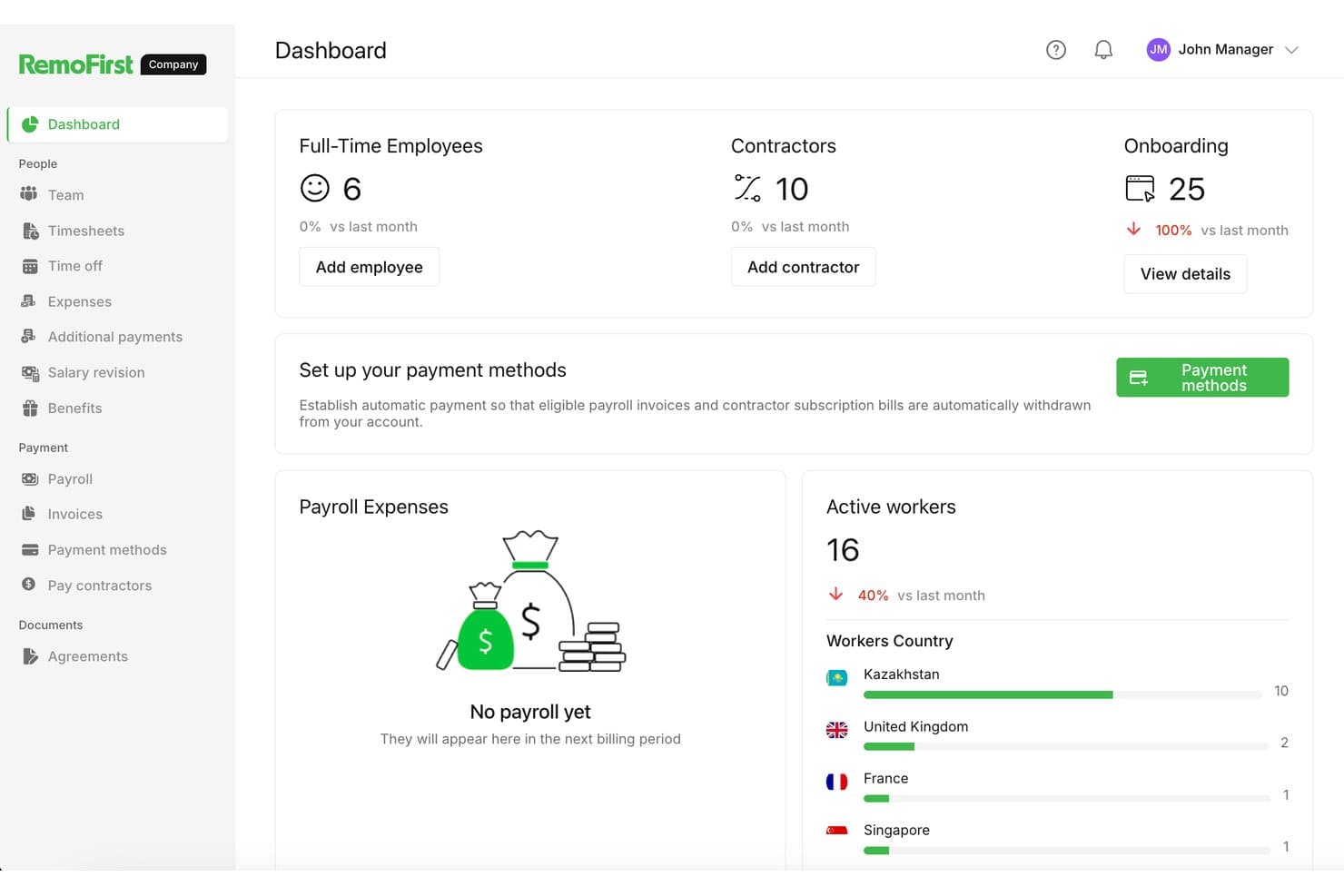
RemoFirst tracks employees, contractors, and payroll across countries. RemoFirst is an employer of record platform that handles international payroll, tax filings, employment contracts, and compliance across 185+ countries—without requiring you to set up a local legal entity.
Who Is RemoFirst Best For?
RemoFirst is a strong fit for companies that want to convert international contractors into full-time employees without setting up a local legal entity.
Why I Picked RemoFirst
I've included RemoFirst in my top picks because it's the clearest path I know for converting international contractors into full-time employees without touching a local entity setup. When a contractor relationship grows into something that needs formal employment status, RemoFirst handles the localized contract creation, payroll, and tax filings in 185+ countries from day one. I also like that onboarding takes days rather than weeks, and that employees can access their payslips and update bank details directly through the platform.
RemoFirst Key Features
- Global payroll and tax filing: RemoFirst calculates and files payroll taxes, pension contributions, and other local requirements across 185+ countries on your behalf.
- Localized employment contracts: The platform generates employment contracts tailored to the labor laws of each employee's country at the start of every hire.
- Employee self-service payslip access: Employees can log in, navigate to the Payments section, and view or download their payslips at any time.
- BambooHR integration: Marking a worker as hired in BambooHR automatically creates a draft onboarding record inside RemoFirst.
RemoFirst Integrations
RemoFirst lists four integrations: BambooHR, Workday, ADP Workforce Now, and GoCardless. BambooHR supports one-way worker data sync, while GoCardless funds payroll and contractor payments through Direct Debit.
Pros and Cons
Pros:
- Employees can find payslips and payment details
- Onboarding checklists help move hires forward
- International hiring avoids local entity setup
Cons:
- Termination disputes can obscure final costs
- Built for cross-border hiring, not domestic payroll
 Best for scheduling hourly shift workers
- Free plan + 30-day free trial + free demo available
- From $99/month (billed annually)
Visit WebsiteCustomer Rating:4.2/5
Homebase combines scheduling, time tracking, payroll, and team communication. Homebase is a payroll and workforce management platform designed for hourly teams. It combines scheduling, time tracking, payroll processing, tax filing, and employee communication tools into a single platform for small businesses.
Who Is Homebase Best For?
Homebase is best suited for small businesses in retail, hospitality, food service, and other hourly workforce environments that need payroll and workforce management without a dedicated HR department.
Why I Picked Homebase
I picked Homebase because its scheduling and payroll tools work together seamlessly. Employee hours flow directly from schedules and timesheets into payroll, eliminating manual data entry and reducing payroll errors. I also like that labor costs update in real time while schedules are being built, helping managers control overtime and staffing costs before payroll is processed.
Homebase Key Features
- Mobile time clock: Employees can clock in and out using mobile devices, tablets, or POS systems with GPS verification.
- Automatic tax filing: Calculates, files, and pays payroll taxes on behalf of employers.
- Time-off management: Employees submit PTO requests directly through the platform.
- New hire onboarding: Sends onboarding documents and payroll forms before an employee's first shift.
Integrations
Homebase integrates with Square, Clover, Toast, Shopify, Lightspeed, GoDaddy, Gusto, QuickBooks, ADP, and Paychex. It also provides API access for custom reporting and integrations.
Pros and Cons
Pros:
- POS-integrated tip tracking for hourly teams
- Free plan available for one location
- Scheduling and payroll work together seamlessly
Cons:
- Advanced features are limited to higher-tier plans
- Payroll requires a separate paid add-on
 Best for small business payroll and compliance
- Free demo available
- Pricing upon request
Visit WebsiteCustomer Rating:4.1/5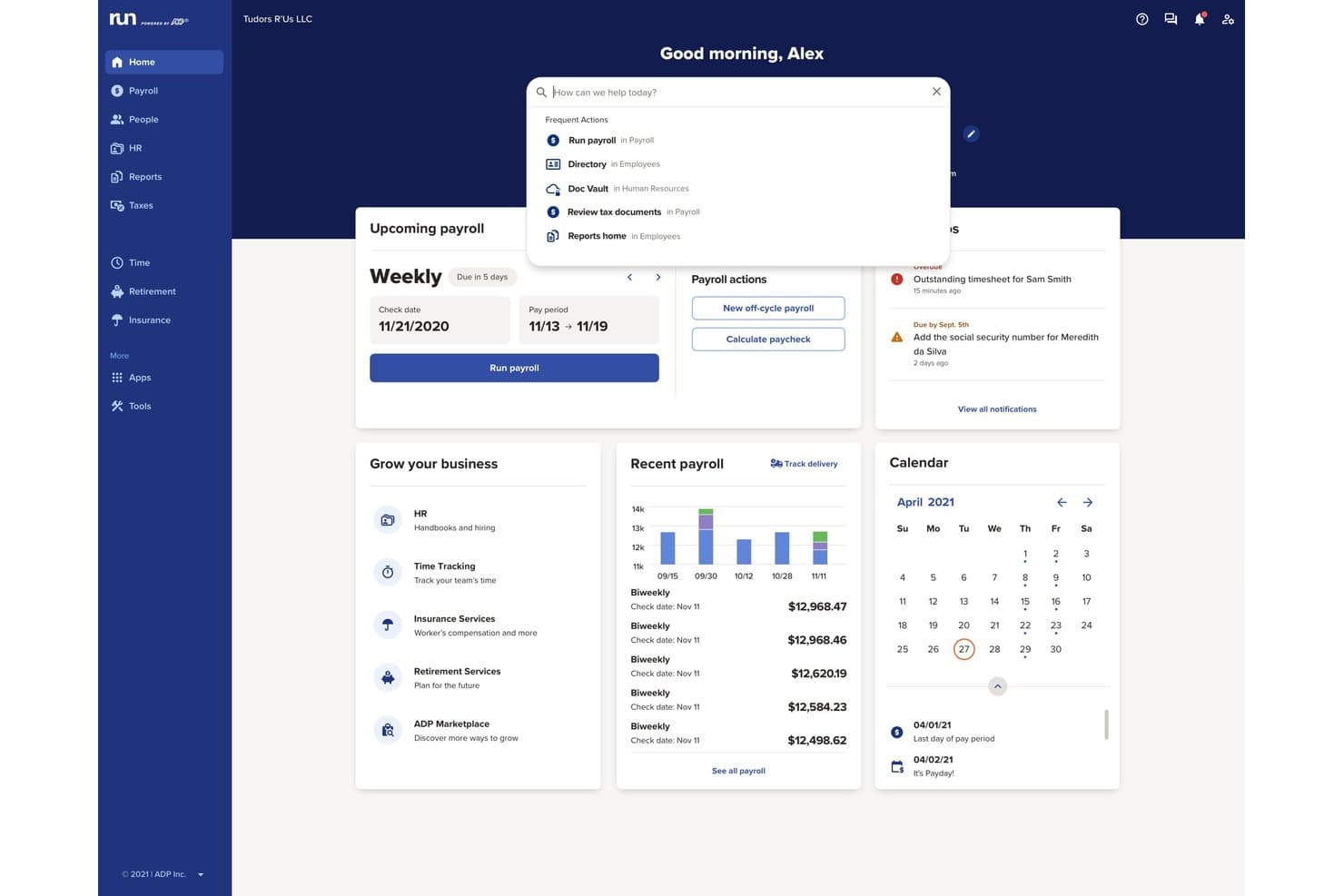
RUN Powered by ADP offers a centralized dashboard with payroll management, notifications, calendar, and a search bar for frequent actions. RUN Powered by ADP is a small business payroll software platform that automates payroll processing, tax filing, direct deposit, employee payments, and year-end reporting for employees and contractors.
Who Is RUN Powered by ADP Best For?
Small business owners and office managers looking for reliable payroll automation and built-in compliance across multiple states.
Why I Picked RUN Powered by ADP
I picked RUN Powered by ADP because I see how it handles complex payroll compliance, taking care of payroll tax calculations and filing for every jurisdiction my business operates in. I rely on its automatic regulatory updates and secure employee self-service portal.
RUN Powered by ADP Key Features
- Built-in new hire onboarding: Add new employees and collect required tax forms within the platform.
- Mobile payroll app: Run payroll and view pay data from iOS and Android devices.
- Custom payroll deductions: Configure garnishments, benefits, or retirement deductions for each pay run.
- Automated year-end tax forms: Generate and distribute W-2 and 1099 forms to employees and contractors.
RUN Powered by ADP Integrations
RUN Powered by ADP offers native integrations with QuickBooks, Xero, Wave, Clover, and Deputy. An API is available for custom integrations.
Pros and Cons
Pros:
- Supports contractor and employee payments
- Robust employee self-service portal
- Automatic tax filing in all states
Cons:
- Initial system setup is time-consuming
- Reporting customization options are highly limited
Learn more about RUN Powered by ADP®: Best for small POS retailers with hourly staff
- Free demo available
- From $35/month + $6/person/month
Visit WebsiteCustomer Rating:4.2/5
Square Payroll supports retail payroll with POS-linked tips and tax automation. Square Payroll is an online payroll solution designed for small and mid-sized businesses, especially in retail and service industries. It handles payroll processing, tax filings, and employee benefits, making it a valuable tool for managing your team’s payroll needs.
Why I picked Square Payroll: Square Payroll caters to small retailers and startups by integrating directly with Square POS, which simplifies payroll for businesses already using Square’s ecosystem. The software also offers automatic tax filings and compliance, allowing you to focus more on your business operations. With features such as direct deposit and tools to run payroll via the Square Dashboard or Team App, it’s tailored to meet the needs of small business owners.
Standout Features and Integrations:
Features include unlimited monthly payroll runs, automated tax filings, and direct tip imports from Square POS. You’ll also find flexible pay management options, allowing for commissions, bonuses, and tips. The software provides live support and onboarding assistance to get you started smoothly.
Integrations include Intuit QuickBooks Online, Square POS, Square Appointments, Square Invoices, Square Online, and more.
Pros and Cons
Pros:
- Retail-focused workflows
- Handles tips automatically
- POS-linked payroll automation
Cons:
- Lacks advanced HR features and reporting
- Dependency on the Square ecosystem
Learn more about Square Payroll: Best for growing SMBs with HR support
- Free demo available
- Pricing upon request
Visit WebsiteCustomer Rating:4.2/5
Paychex scales payroll and tax services for growing businesses. Paychex is a payroll and HR solution designed for small to medium-sized businesses, offering payroll processing and tax services. It simplifies payroll management and provides scalable solutions as your business expands.
Why I picked Paychex: Paychex is ideal for growing businesses because it offers scalable payroll solutions that can adapt as your team grows. It includes features such as automatic payroll tax administration, which helps keep your business compliant. You can manage employee benefits and retirement plans, providing a complete HR solution. The software also offers mobile access, allowing you to manage payroll on the go.
Standout Features and Integrations:
Features include detailed payroll reporting, giving you insights into your payroll expenses. The software provides employee self-service options, enabling your team to access pay stubs and year-end tax forms. Additionally, Paychex offers dedicated customer support to assist with any issues.
Integrations include Intuit QuickBooks, Xero, Sage Intacct, Oracle NetSuite, and more.
Pros and Cons
Pros:
- HR expansion ready
- Automated tax administration
- Supports business growth
Cons:
- Cost increases quickly
- Upselling of unnecessary services
 Best for Wave users syncing payroll and books
- 30-day free trial available
- From $46/month
Visit WebsiteCustomer Rating:4.1/5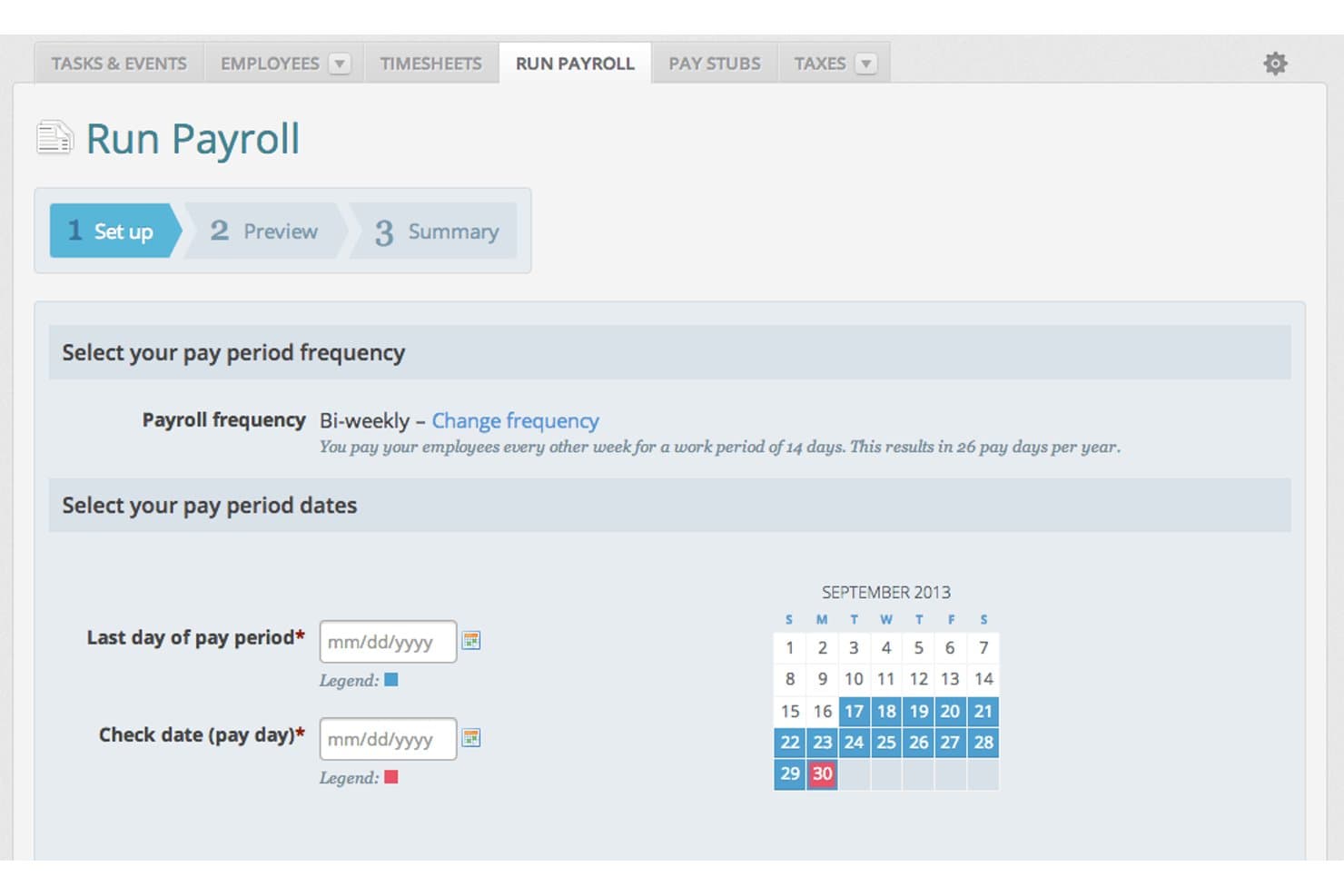
Wave Payroll lets users set pay period dates and frequency easily. Wave Payroll is payroll software for small businesses that handles pay runs for employees and contractors, automates tax calculations and filings, and syncs payroll data directly with Wave's accounting tools.
Who Is Wave Payroll Best For?
Wave Payroll is a natural fit for small business owners who already use Wave for accounting and want payroll to sync with their books automatically.
Why I Picked Wave Payroll
I've included Wave Payroll in my top picks because it's the only tool on this list that automatically posts payroll journal entries directly to Wave's accounting records, so your books update the moment payroll runs. If you're already using Wave for invoicing and accounting, there's no manual data transfer or third-party sync to manage. I also like that automatic tax payments and filings are built into the base subscription, covering both federal and state obligations in the US and CRA remittances in Canada.
Wave Payroll Key Features
- Employee self-service portal: Employees can log in to view pay stubs, access tax forms, and update their personal and banking details independently.
- Payroll tax form generation: Wave produces W-2, W-3, and 1099-NEC forms for US businesses, and T4 and T4A slips and summaries for Canadian businesses.
- Payroll expense reporting: Breaks down payroll expenses by employee and expense type to help you track payroll's impact on cash flow.
- Contractor payment support: Pay independent contractors through direct deposit on the same pay schedule as your employees.
Wave Payroll Integrations
Wave Payroll offers native integrations with Wave Accounting, Wave Invoicing, and Wave Payments. It also provides a public API and webhooks for custom integrations.
Pros and Cons
Pros:
- Tax filings reduce routine payroll administration
- Employees retrieve pay documents independently
- Affordable for straightforward small-team payroll
Cons:
- Users report delayed support resolutions
- Payroll approval needs advance scheduling
Learn more about Wave Payroll: Best for payroll unified with HR and IT
- Not available
- From $8/user/month
Visit WebsiteCustomer Rating:4.9/5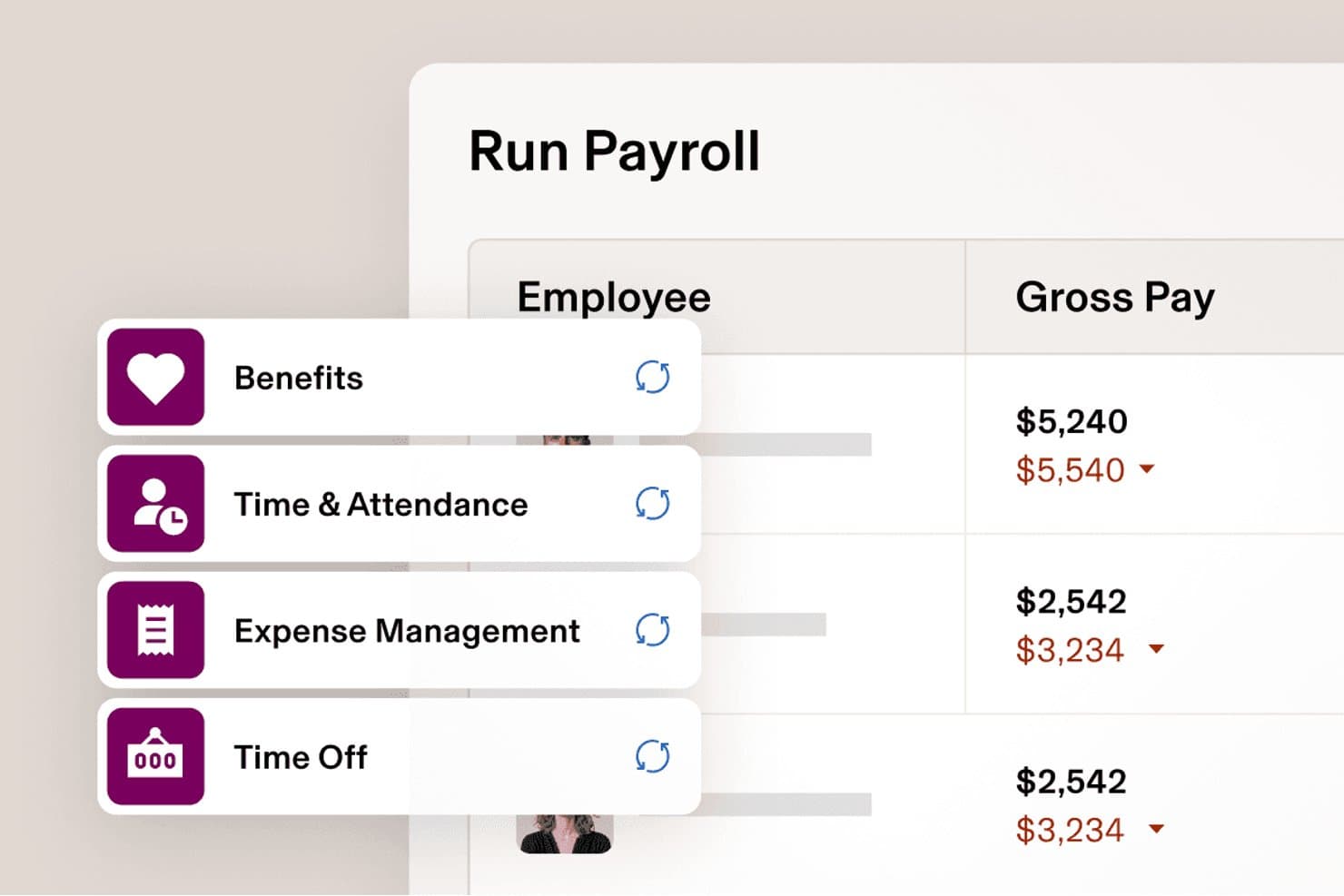
Rippling syncs benefits and time data automatically into payroll. Rippling is a payroll platform that unifies pay runs, automated tax calculation and filing, contractor payments, and employee self-service with HR and IT management in a single system.
Who Is Rippling Best For?
Rippling is a strong fit for fast-growing startups and small businesses that want payroll, HR, and IT managed in one place from day one.
Why I Picked Rippling
I picked Rippling as one of the best because it's the only payroll tool on this list that keeps payroll, HR, and IT in a single system, which means salary changes and benefits deductions flow into payroll automatically without manual re-entry. I especially like that it handles W-2 employees and 1099 contractors in the same platform, with separate schedules and payment types for each. Its one-click pay runs, built-in tax filing across all 50 states, and AI-assisted bonus processing make it a genuinely capable option for fast-growing teams.
Rippling Key Features
- Pay-run comparison: Review changes in gross pay, taxes, and deductions side by side with the previous pay run before approving.
- Multi-state payroll support: Rippling handles tax registration, withholding calculations, and filings across all 50 states at no extra charge.
- Accounting software integrations: Connect payroll to QuickBooks, Xero, or NetSuite to post automated journal entries with general-ledger dimensions.
- AI-assisted bonus processing: Upload a bonus spreadsheet and let Rippling's AI map the data, flag issues, and prepare it for approval before running payroll.
Rippling Integrations
Rippling reports 650+ Payroll integrations, including QuickBooks, Xero, and NetSuite, which can support automated journal entries with general-ledger dimensions.
Pros and Cons
Pros:
- W-2 and 1099 payroll share workflows
- Employee pay records reduce HR requests
- Automated tax handling cuts manual payroll work
Cons:
- Required platform purchase raises total cost
- Unpublished costs complicate budget comparisons
 Best for S-corp payroll with guided election
- Free demo available
- From $49/month
Visit WebsiteCustomer Rating:4.6/5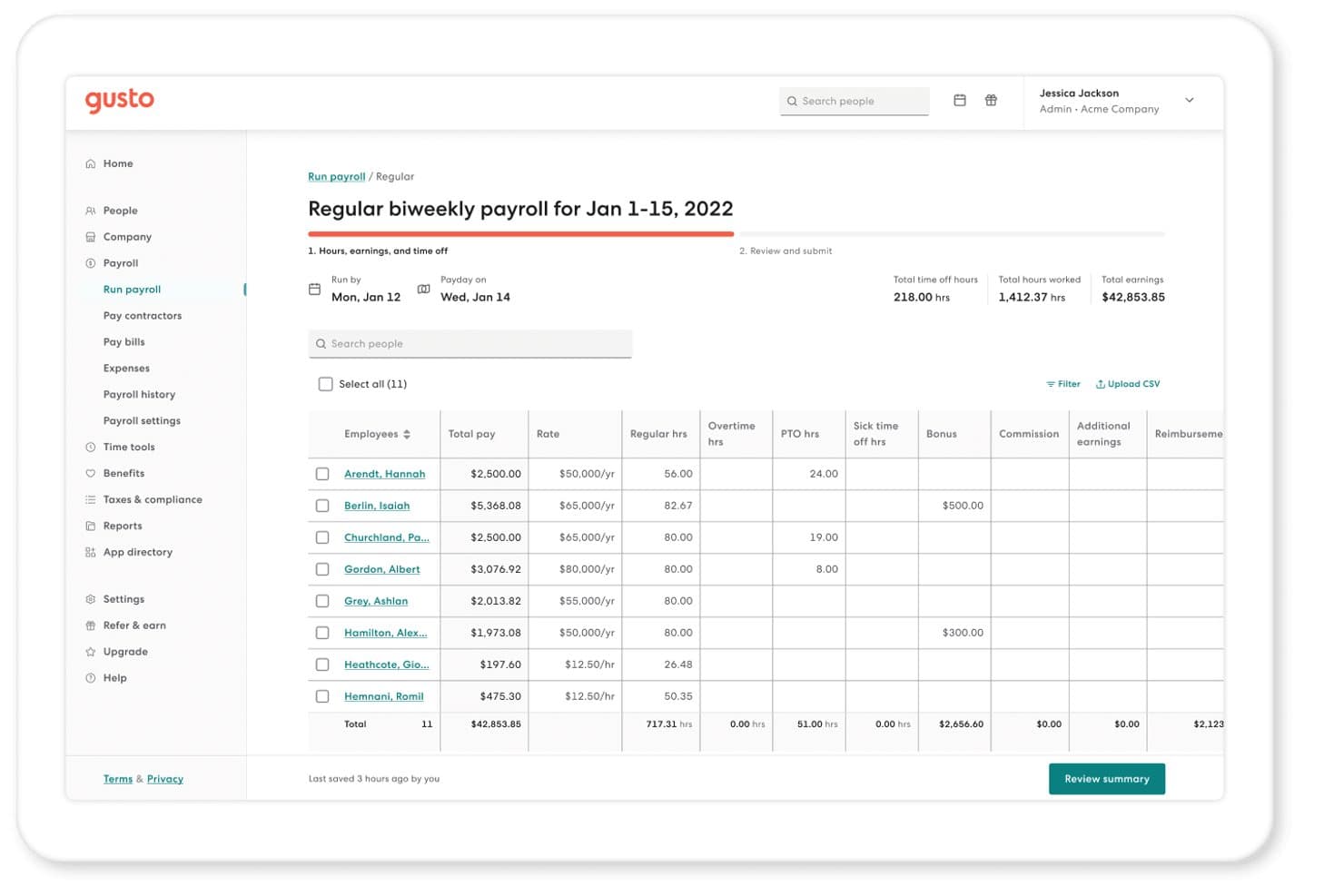
Gusto lets users run biweekly payroll with hours, pay, and bonuses. Gusto is a full-service payroll platform for small businesses that handles automated payroll runs, tax calculations and filings, contractor payments, employee self-service, and benefits administration.
Who Is Gusto Best For?
Gusto is a strong fit for small business owners and startup founders who need automated payroll, tax filings, and S-corp election support in one place.
Why I Picked Gusto
I picked Gusto as one of the best because it's the only platform I've seen that actively walks you through S-corp election with a guided Form 2553 filing built directly into the product. The Gusto Solo plan even includes a reasonable salary calculator to help you set compliant owner compensation before you run your first payroll. I also like that quarterly tax withholdings and filings are automated from day one, so you're not scrambling to meet agency deadlines on your own.
Gusto Key Features
- Payroll on AutoPilot: Schedule payroll to run automatically each pay period without manual submission.
- Employee self-onboarding: Invite new hires to enter their own personal, tax, and direct deposit information before their first payday.
- QuickBooks Online sync: Automatically creates and syncs a detailed payroll journal entry to QuickBooks Online each time payroll runs.
- Domestic contractor payments: Pay US contractors by direct deposit on weekly, biweekly, twice-monthly, or monthly schedules with automatic 1099-NEC filing.
Gusto Integrations
Gusto lists 154 marketplace integrations, including QuickBooks, Xero, Homebase, Clover, and When I Work. It also offers the partner-focused Gusto Embedded payroll API for custom integrations.
Pros and Cons
Pros:
- Straightforward payroll runs earn reviewer praise
- Employees access paystubs without HR requests
- Automated tax filings reduce admin work
Cons:
- Support delays complicate payroll issue resolution
- Faster deposits can add to costs
 Best for QuickBooks users wanting built-in payroll
- Not available
- From $50/month
Visit WebsiteCustomer Rating:4.4/5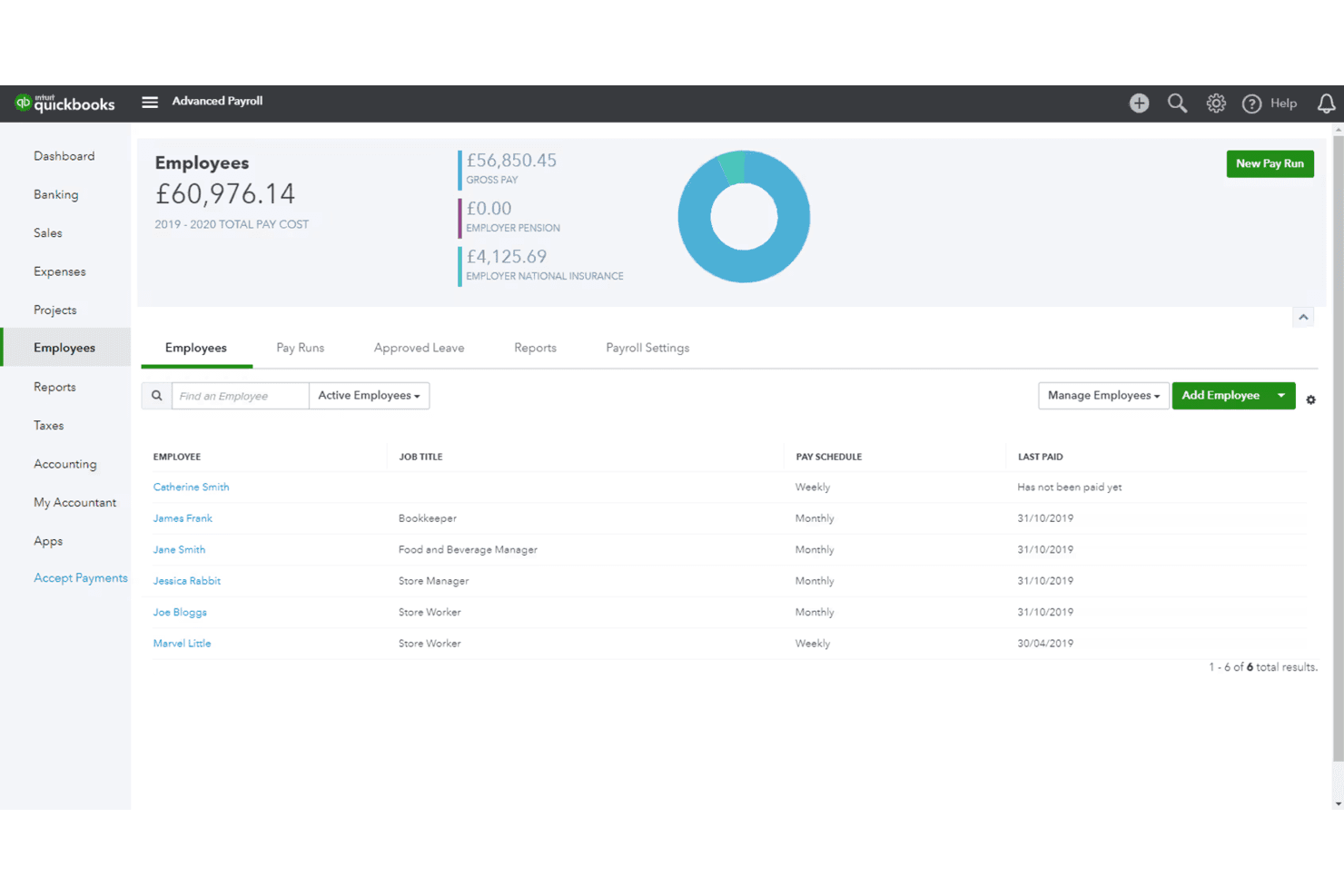
QuickBooks Payroll tracks employee pay schedules and total payroll costs. QuickBooks Workforce is a full-service payroll and workforce management platform that handles automated payroll runs, federal and state tax calculation and filing, direct deposit, contractor payments, employee self-service, and built-in HR and accounting tools.
Who Is QuickBooks Payroll Best For?
QuickBooks Payroll is a natural fit for small business owners and bookkeepers already running their finances in QuickBooks who want payroll built into the same system.
Why I Picked QuickBooks Payroll
QuickBooks Payroll earns its spot on my shortlist because it's the only payroll tool that runs directly inside QuickBooks accounting, so payroll data flows to your ledger without any manual export or reconciliation. I particularly like Auto Payroll, which handles scheduled runs for salaried employees automatically, and the full-service tax filing that calculates and pays federal and state taxes on your behalf.
QuickBooks Payroll Key Features
- Employee self-service portal: Employees access pay stubs, W-2s, and personal tax or bank details through a web portal or mobile app without involving HR.
- Contractor 1099 e-filing: QuickBooks tracks contractor payments and generates and e-files 1099-MISC and 1099-NEC forms directly from the platform.
- Payroll AI: An AI-assisted tool collects time and attendance data, flags inconsistencies, and prepares payroll for administrator review before processing.
- Accounting sync: Payroll transactions, including tax and contractor payments, export to QuickBooks Online with account mapping to your chart of accounts.
QuickBooks Payroll Integrations
QuickBooks Payroll has documented native integrations with QuickBooks Online and QuickBooks Time, plus connections to Allstate, Vestwell, NEXT, Mineral, and Checkr. An API is available for custom integrations.
Pros and Cons
Pros:
- Employee pay records reduce HR requests
- Tax filing cuts manual compliance tasks
- Routine payroll runs reduce administrative work
Cons:
- Support delays complicate urgent payroll fixes
- Per-employee charges raise growth costs
Learn more about QuickBooks Payroll:
Outro software de processamento salarial económico
Eis algumas opções adicionais de software de processamento salarial económico que não entraram na minha lista restrita, mas que vale a pena conhecer:
- 11OnPayBest for multi-state filing without extra fees
- 12Patriot PayrollBest for bookkeepers with multiple businesses
- 13Deel PayrollBest for contractor management tools
- 14Zoho PayrollBest for Zoho-based accounting practices
- 15Payroll4free.comBest free payroll service for under 25 employees
- 16EvereeBest for on-demand pay to W-2 and 1099 teams
- 17Toast PayrollBest for restaurant teams with pooled tips
Related Reviews
How I Evaluate Cheap Payroll Software
I split my evaluation into three parts, giving the most weight to core functions: calculate pay, run scheduled payroll, and file payroll taxes. Next, I compare standout features such as time-tracking integrations. Finally, I weigh factors beyond features, including setup help, support access, and total cost as headcount grows.
Core Functionality (Table Stakes For This List)
When I'm selecting tools for my list, I score each one on a scale from 0 (does not offer the functionality) to 5 (excels in this area) for each core functionality listed below. I then convert the total into a percentage to help assess each tool's overall fit, with extra weight on any functionalities I’ve deemed essential.
- Automated Payroll (Essential): I check whether scheduled runs calculate pay, deductions, and net wages for hourly and salaried staff with minimal manual corrections.
- Tax Calculation And Filing (Essential): I look for automatic tax calculations and filing support, including how much review or manual work payroll administrators still need to do.
- Direct Deposit: I assess whether employees can receive pay directly in their bank accounts on a predictable schedule.
- Affordable Pricing: I compare published costs and check whether core payroll features require paid add-ons as a team grows.
- Employee Self-Service: I check whether employees can access pay stubs, tax documents, payment history, and personal details without asking HR.
- Contractor Payments: I look for ways to pay contractors alongside employees and manage payment schedules and related tax documents.
Once I have a list of tools that meet the criteria, I consider what sets each platform apart.
Differentiating Factors (What Sets Vendors Apart)
Here's how I compare and contrast different vendors:
Standout Features
I check whether time tracking syncs directly into payroll runs, since manually re-entering hours for hourly teams invites errors every pay cycle. Multi-state payroll support also matters—I look for automatic tax registration and filing across jurisdictions, which is essential if your team is remote or distributed. Finally, I evaluate accounting software integrations with tools like QuickBooks or Xero, because automatic payroll reconciliation saves your bookkeeper real time each period.
Beyond Features
I check whether a vendor's base price stays affordable as headcount grows, since per-employee fees and add-ons for tax filing or year-end forms can quietly double the real cost. Setup matters too—guided wizards and free data migration from spreadsheets or a prior provider save small teams weeks of manual work. I also look for tax penalty guarantees, because when a non-specialist runs payroll, that safety net reduces real liability.
Como escolher um software de processamento salarial económico
É fácil perder-se em listas extensas de funcionalidades e estruturas de preços complexas. Para o ajudar a manter o foco enquanto escolhe um software de processamento salarial, eis uma lista de fatores a ter em conta:
| Fator | O que deve considerar |
|---|---|
| FatorEscalabilidade | O que deve considerarO software acompanhará o crescimento da sua equipa? Verifique se consegue gerir mais colaboradores à medida que a sua empresa cresce. Procure planos de preços flexíveis que se adaptem às suas necessidades. |
| FatorIntegrações | O que deve considerarFunciona com as ferramentas que já utiliza? Verifique se integra com os seus sistemas de contabilidade e RH para evitar a introdução manual de dados. |
| FatorPossibilidade de personalização | O que deve considerarPode adaptá-lo aos seus fluxos de trabalho? Certifique-se de que permite ajustar os processos de processamento salarial e os relatórios de acordo com as operações da sua empresa. |
| FatorFacilidade de utilização | O que deve considerarÉ fácil de utilizar pela sua equipa? Procure interfaces intuitivas e uma navegação simples para reduzir o tempo de formação e os erros. |
| FatorImplementação e integração inicial | O que deve considerarQuanto tempo será necessário para começar? Avalie o tempo e os recursos necessários para configurar o sistema e formar a sua equipa. Procure ferramentas com processos de integração inicial orientados. |
| FatorCusto | O que deve considerarEstá dentro do seu orçamento? Compare os níveis de preços e os custos totais, incluindo taxas ocultas. Verifique se as funcionalidades justificam a despesa. |
| FatorMedidas de segurança | O que deve considerarOs seus dados e informações salariais estão protegidos? Verifique a existência de encriptação, atualizações regulares e conformidade com os regulamentos de proteção de dados. |
| FatorRequisitos de conformidade | O que deve considerarCumpre as normas legais? Verifique se o software é compatível com os regulamentos locais, regionais e nacionais relativos ao processamento salarial, para evitar problemas legais. |
O que é um software de processamento salarial económico?
O software de processamento salarial económico é uma solução rentável para gerir os processos de processamento salarial. Estas ferramentas são normalmente utilizadas por proprietários de pequenas empresas, profissionais de RH e contabilistas para tratar eficazmente das tarefas relacionadas com os salários. Os cálculos automatizados, os pagamentos por depósito direto e as funcionalidades de entrega de declarações fiscais ajudam a reduzir os erros e a poupar tempo. No geral, estas ferramentas oferecem uma forma económica de gerir os salários com facilidade.
Funcionalidades do software de processamento salarial económico
Ao selecionar uma plataforma económica, esteja atento a estas principais funcionalidades do software de processamento salarial:
- Cálculos automatizados: Garantem cálculos salariais precisos, reduzem os erros manuais e poupam tempo à sua equipa.
- Depósito direto: Permite que os funcionários W-2 e os trabalhadores contratados recebam o seu pagamento diretamente nas respetivas contas bancárias, proporcionando comodidade e eficiência.
- Funcionalidades de entrega de declarações fiscais: Ajudam a gerir e a entregar as declarações de impostos sobre os salários, garantindo o cumprimento dos regulamentos locais e federais.
- Portais de autosserviço para funcionários: Permitem que os funcionários acedam aos seus recibos de vencimento e formulários fiscais, reduzindo a carga administrativa sobre os RH.
- Relatórios personalizáveis: Fornecem informações sobre as despesas salariais através de relatórios adaptados, o que ajuda na análise financeira e na tomada de decisões.
- Integração com ferramentas de contabilidade: Liga-se ao software de contabilidade existente para eliminar a introdução duplicada de dados e melhorar a precisão.
- Gestão da conformidade: Garante o cumprimento da legislação laboral e dos regulamentos salariais, minimizando o risco de problemas legais.
- Acesso móvel: Permite gerir os salários em qualquer lugar, proporcionando flexibilidade aos proprietários de empresas e aos profissionais de RH.
- Calendários salariais flexíveis: Suportam várias frequências de pagamento, adaptando-se às diferentes necessidades das empresas e preferências dos funcionários.
- Gestão de benefícios: Gere os benefícios e as deduções dos funcionários para melhorar a experiência geral dos funcionários.
Vantagens do software de processamento salarial económico
A implementação de software de processamento salarial económico proporciona várias vantagens para a sua equipa e para a sua empresa. Eis algumas das vantagens que pode esperar:
- Poupança de custos: Reduz as despesas associadas aos processos salariais manuais e ao software dispendioso, tornando-o económico.
- Eficiência de tempo: Utiliza a automatização do processamento salarial para os cálculos e a entrega de declarações fiscais, libertando tempo para que a sua equipa se concentre noutras tarefas importantes.
- Redução de erros: Minimiza os erros no processamento salarial através de cálculos automatizados e da gestão da conformidade.
- Comodidade: Disponibiliza depósitos diretos e portais de autosserviço para funcionários, proporcionando-lhes um acesso fácil às informações salariais.
- Conformidade regulamentar: Garante o cumprimento da legislação laboral e dos regulamentos fiscais, reduzindo o risco de problemas legais.
- Maior precisão dos dados: Integra-se com ferramentas de contabilidade, eliminando a introdução duplicada de dados e melhorando a precisão financeira.
- Flexibilidade: Suporta vários calendários salariais e o acesso móvel, adaptando-se às diferentes necessidades das empresas e formas de trabalhar.
Custos e preços do software de processamento salarial económico
A seleção de software de processamento salarial económico exige uma compreensão dos vários modelos de preços e planos disponíveis. O custo do processamento salarial varia consoante as funcionalidades, a dimensão da equipa, os complementos e outros fatores. A tabela abaixo resume os planos comuns, os seus preços médios e as funcionalidades normalmente incluídas nas soluções de software de processamento salarial económico:
Tabela de comparação de planos de software de processamento salarial económico
| Tipo de plano | Preço médio | Funcionalidades comuns |
|---|---|---|
| Tipo de planoPlano gratuito | Preço médio$0 | Funcionalidades comunsProcessamento salarial básico, relatórios limitados e suporte básico. |
| Tipo de planoPlano pessoal | Preço médio$5-$40/mês | Funcionalidades comunsCálculos automatizados, depósito direto, entrega de declarações fiscais e portais de autosserviço para funcionários. |
| Tipo de planoPlano empresarial | Preço médio$15-$50/mês | Funcionalidades comunsRelatórios avançados, integração com ferramentas de contabilidade, gestão da conformidade e acesso móvel. |
| Tipo de planoPlano empresarial de grande dimensão | Preço médio$50+/mês | Funcionalidades comunsRelatórios personalizáveis, gestor de conta dedicado, funcionalidades de segurança avançadas e suporte completo. |
Perguntas frequentes sobre software de processamento salarial barato
Eis algumas respostas a perguntas comuns sobre software de processamento salarial barato:
Como sei se a minha empresa precisa de software de processamento salarial?
Se está a dedicar demasiado tempo a tarefas manuais relacionadas com o processamento salarial ou a cometer erros frequentes, está na altura de considerar um software de processamento salarial. Este ajuda a automatizar processos como o cálculo de impostos e os depósitos diretos, poupando tempo e reduzindo os erros. Para pequenas empresas, o software de processamento salarial para pequenas empresas pode proporcionar estas eficiências, libertando mais tempo para se concentrar no crescimento. Ao avaliar software de processamento salarial, procure sinais como um aumento das perguntas dos colaboradores sobre os salários ou dificuldades em acompanhar as alterações ao nível da conformidade.
O software de processamento salarial barato consegue tratar da conformidade fiscal?
Sim, a maioria das soluções de software de processamento salarial barato inclui funcionalidades de conformidade fiscal. Calculam e submetem automaticamente os impostos de acordo com os regulamentos locais, reduzindo o risco de penalizações. Certifique-se de que o software escolhido está atualizado relativamente à legislação em vigor. Algumas ferramentas enviam até lembretes sobre os prazos fiscais, ajudando-o a manter a conformidade sem o stress associado.
O software de processamento salarial barato é seguro?
Sim, os fornecedores de software de processamento salarial barato com boa reputação dão prioridade à segurança. Procure funcionalidades como a encriptação de dados e atualizações regulares de segurança. Verifique sempre se o fornecedor cumpre as normas e os regulamentos do setor. Para proteger ainda mais os seus dados, utilize palavras-passe fortes e ative a autenticação de dois fatores, quando disponível.
Como escolho o software de processamento salarial adequado para a minha equipa?
Comece por avaliar as necessidades específicas da sua equipa, por exemplo, se precisa de software de processamento salarial para um colaborador ou de suporte para uma equipa maior, bem como das funcionalidades necessárias. Compare diferentes opções de processamento salarial online, concentrando-se em fatores como a facilidade de utilização, a escalabilidade e a integração com os sistemas existentes. Leia as avaliações dos clientes para obter informações sobre o desempenho em situações reais. Considere começar por um período de teste gratuito para testar o software antes de assumir um compromisso.