

10 Best Applicant Tracking Software for Marketing Teams in 2026

Best Applicant Tracking Software for Marketing Teams Shortlist


Applicant tracking software for marketing teams is purpose-built software that helps you collect, organize, and evaluate candidates so you can hire marketers faster and with less hassle.
If you’re searching for tools that support collaborative hiring, track outreach, and simplify decisions in today’s noisy talent market, you’re not alone—great marketing talent rarely sticks around, and you can’t afford laggy processes or lost details.
In this list, you’ll find applicant tracking platforms I think are best for marketing teams, including tools that fit varied budgets, team sizes, and hiring needs. Use this guide to pinpoint software that actually helps you attract and land top marketers this 2026.
Why Trust Our Software Recommendations
Our team has been testing and reviewing software since 2012. As HR experts ourselves, we know how difficult—and important—it is to choose the right software.
For this guide, we evaluated tools using hands-on testing and independent research, scoring tools using our selection criteria. We also draw on insights from industry thought leaders and practicing HR experts.
Our reviews reflect our human editorial judgment, not a sales pitch.
Expert reviewers:
Comparison Table: Applicant Tracking Software for Marketing Teams
This comparison table summarizes pricing details for my applicant tracking software for marketing teams.
| Tool | Best For | Trial Info | Price | ||
|---|---|---|---|---|---|
| 1 | Best for sourcing across multiple channels | 14-day free trial + free demo available | From $61.25/month (billed annually) | Website | |
| 2 | Best for automated candidate skill assessments | 7-day free trial + free demo available | From $99/month (billed annually) | Website | |
| 3 | Best for drag-and-drop candidate management | 14-day free trial | From $157/month (billed annually) | Website | |
| 4 | Best for customizable hiring pipelines | Free demo available | Pricing upon request | Website | |
| 5 | Best for small to midsize team hiring | Free demo available | From $350/month | Website | |
| 6 | Best for integrated job advertising options | Free demo available | From $14,995/year (billed annually) | Website | |
| 7 | Best for integrated talent relationship management | Free demo available | Pricing upon request | Website | |
| 8 | Best for social media recruitment integrations | Free demo available | Pricing upon request | Website | |
| 9 | Best for shared hiring team dashboard | 15-day free trial + free demo available | From €29/month (billed annually) | Website | |
| 10 | Best with multi-language employee self-service | Free plan + free demo available | From $2/user/month (billed annually) | Website |
Best Applicant Tracking Software for Marketing Teams Reviews
Below are my detailed summaries of the best applicant tracking software for marketing teams that made it onto my shortlist. My reviews offer a detailed look at the features, best use cases, and integrations of each platform to help you find the best one for you.

Best for sourcing across multiple channels
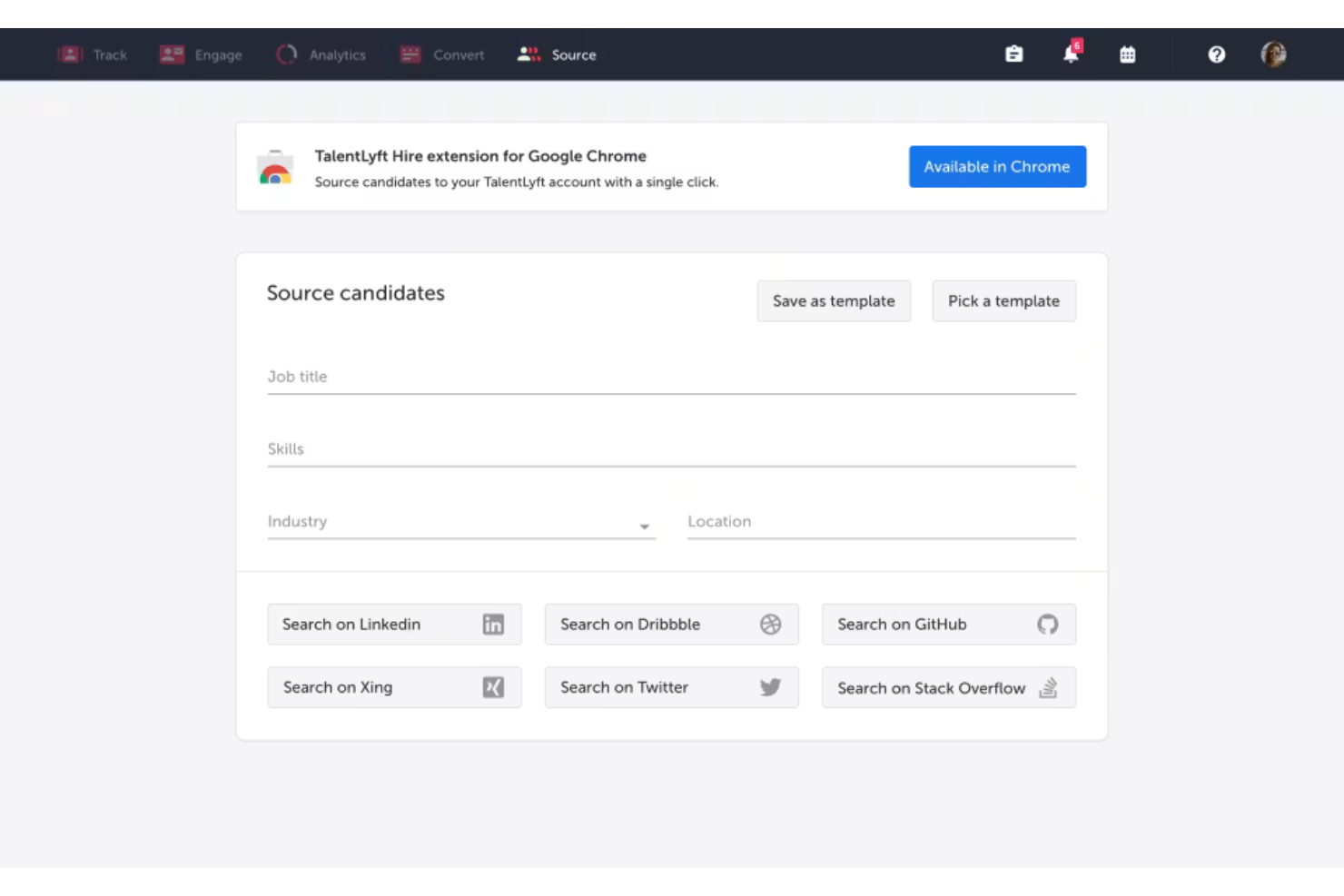
TalentLyft is an applicant tracking software for marketing teams that unifies candidate sourcing, job posting, interview scheduling, and recruitment analytics in one platform.
Who Is TalentLyft Best For?
TalentLyft is a smart pick for small and mid-sized marketing teams that need to source candidates from multiple channels and centralize their hiring process.
Why I Picked TalentLyft
I picked TalentLyft because I can post jobs to multiple boards and social networks at once, create custom sourcing campaigns, and use built-in analytics to see which channels bring in top marketing candidates.
TalentLyft Key Features
- Email automation: Send personalized emails to candidates directly from the platform.
- Referral management: Track and manage employee referral programs for open roles.
- Interview feedback collection: Gather team interview feedback in structured digital forms.
- Branded career site builder: Create customizable career pages aligned with your organization’s branding.
TalentLyft Integrations
TalentLyft offers native integrations with LinkedIn, Slack, Google Calendar, Outlook, Indeed, Facebook, Mailchimp, and has an API for custom integrations.
Pros and Cons
Pros:
- Automated interview scheduling and reminders
- Launches automated email nurture campaigns
- Bulk candidate messaging and status updates
Cons:
- Requires custom coding for site designs
- Candidate assessments require external tools
AvaHR
Best for automated candidate skill assessments
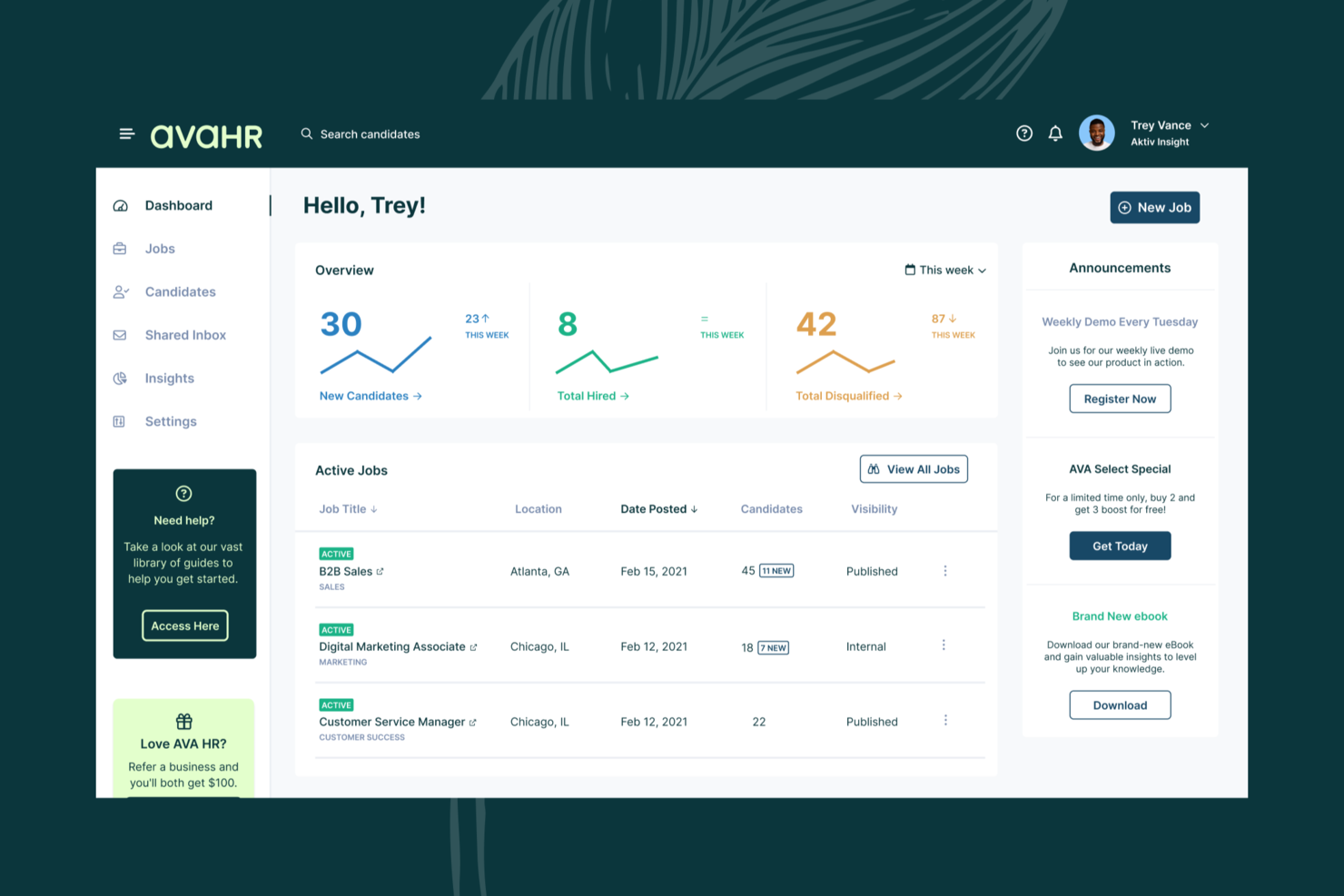
AvaHR is an applicant tracking system with multi-board job distribution, AI-powered candidate scoring, culture profile pages, custom screening questionnaires, and automated candidate communication tools integrated into a single hiring platform.
Who Is AvaHR Best For?
AvaHR is best for small to mid-sized businesses that need a structured, all-in-one hiring process without a dedicated recruiting team.
Why I Picked AvaHR
I've included AvaHR in my top picks because its automated candidate questionnaires and custom scorecards do a lot of the screening legwork for you. When hiring for a marketing role, you can build a questionnaire specific to that opening and trigger it automatically when a candidate reaches a certain pipeline stage. The scorecards then let you evaluate each applicant against the exact criteria that matter for the role, so your team isn't making judgment calls from a resume alone. I also like that AI candidate scoring runs in the background, surfacing your strongest applicants before you've even opened a single profile.
AvaHR Key Features
- Multi-board job distribution: Post open roles to 100+ job boards, including Indeed and LinkedIn, from a single interface.
- Culture profile pages: Build a branded careers page with photos and videos that give candidates an inside look at your team and workplace.
- Automated candidate communication: Send email and SMS updates to candidates at key stages in your hiring pipeline.
- Custom hiring pipelines: Design stage-by-stage workflows tailored to each role, so every open position follows a consistent review process.
AvaHR Integrations
AvaHR connects with a range of apps through Zapier, including Gusto, BambooHR, Checkr, Slack, Google Calendar, Calendly, Salesforce, HubSpot, Microsoft Teams, and ADP Workforce Now. An API is also available for custom integrations.
Pros and Cons
Pros:
- Built-in SMS and email candidate messaging
- One-click posting to 100+ job boards
- AI candidate scoring ranks applicants
Cons:
- Few options for advanced reporting and analytics
- Lacks built-in video interviewing
Best for drag-and-drop candidate management
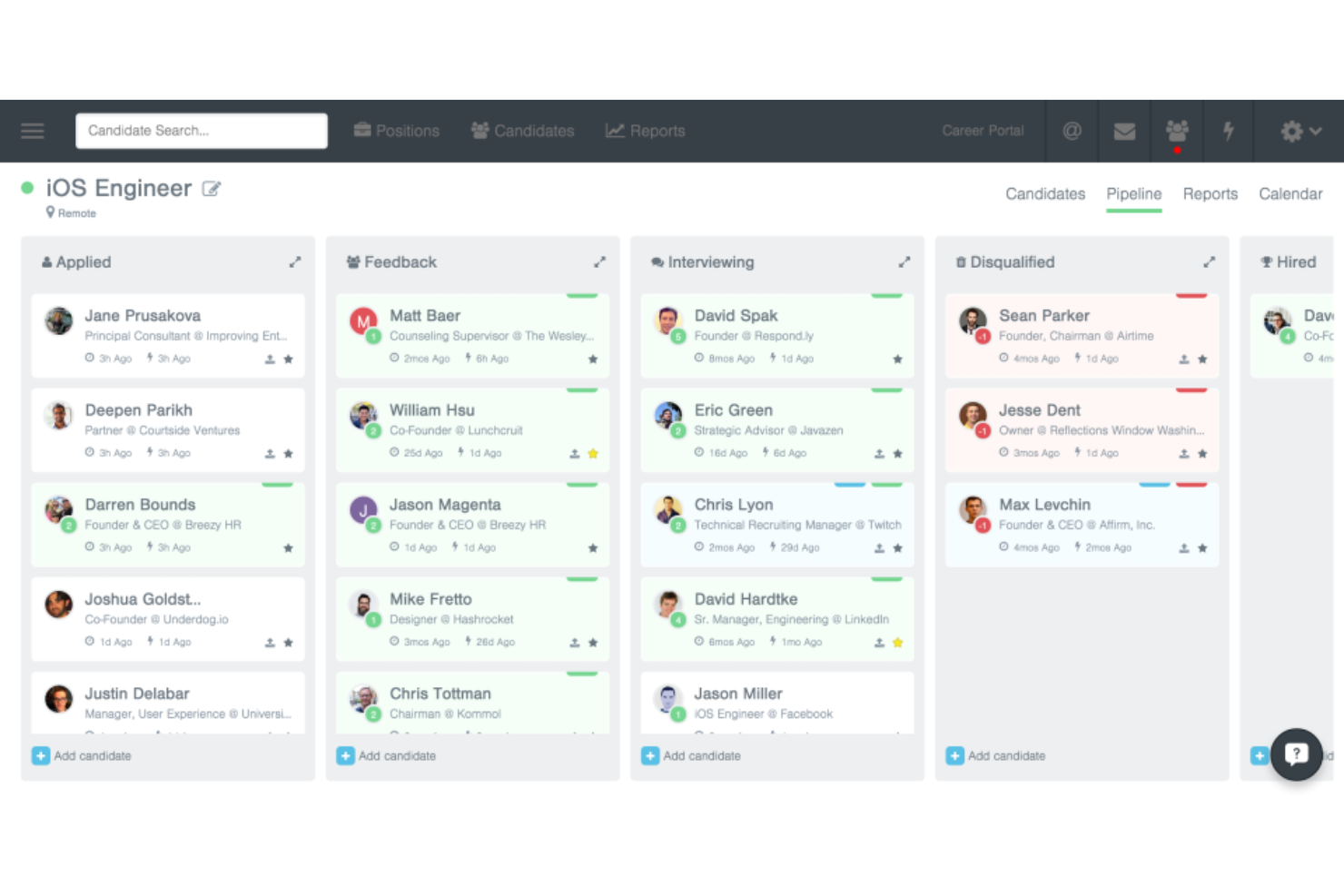
Breezy HR is an applicant tracking platform for marketing teams, offering pipeline management, resume parsing, interview scheduling, and team collaboration tools.
Who Is Breezy HR Best For?
Breezy HR suits marketing teams and growing agencies that want clear visual pipelines and collaborative hiring.
Why I Picked Breezy HR
I picked Breezy HR as one of the best because my team moves candidates through stages using a true drag-and-drop pipeline, customizes hiring workflows for each marketing role, and leverages in-app team chat to coordinate feedback instantly.
Breezy HR Key Features
- Automated interview scheduling: Let candidates pick interview times that fit their schedule.
- Branded career portal: Publishes marketing-specific job openings on a customizable careers page.
- Candidate scorecards: Standardize candidate evaluation criteria for fair reviews.
- Job posting to multiple boards: Distributes open positions across major job boards simultaneously.
Breezy HR Integrations
Breezy HR offers native integrations with Google Workspace, Slack, LinkedIn, Indeed, DocuSign, Zoom, BambooHR, ADP, Namely, Checkr, and Zapier. An API is available for custom integrations.
Pros and Cons
Pros:
- Includes built-in live video interview
- Collaborative team feedback on candidate profiles
- Centralized candidate pipeline view
Cons:
- Basic reporting options
- Limited layout personalization in career portal
Best for customizable hiring pipelines
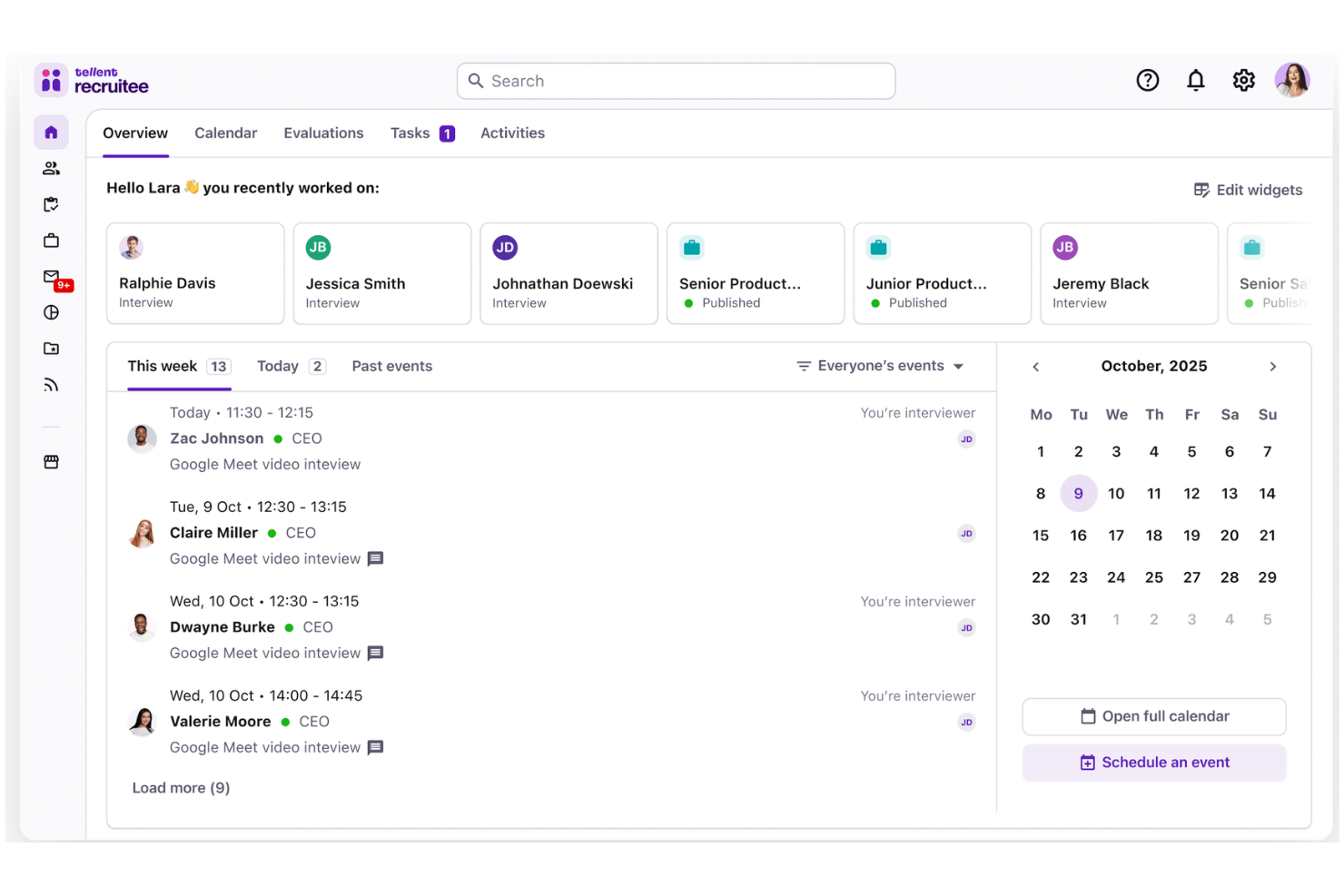
Recruitee is an applicant tracking system for marketing teams that offers tools for collaborative hiring, branded career sites, pipeline management, and automated interview scheduling.
Who Is Recruitee Best For?
Recruitee suits marketing teams at midsize and growing companies looking for flexible, collaborative hiring workflows.
Why I Picked Recruitee
I picked Recruitee as one of the best because I can design custom hiring pipelines for each marketing role, automate stage transitions, and use drag-and-drop workflows to optimize every candidate journey.
Recruitee Key Features
- Branded career site builder: Create and manage customizable career pages to showcase marketing roles.
- Job board multiposting: Post openings across multiple job boards from one platform.
- Collaborative candidate evaluation: Add team ratings, notes, and feedback directly to candidate profiles.
- Email automation: Set up automated candidate communications with custom templates and scheduling.
Recruitee Integrations
Recruitee offers native integrations with Google Workspace, Slack, LinkedIn, Indeed, Facebook, Microsoft 365, DocuSign, Zoom, Calendly, and Zapier. An API is available for custom integrations.
Pros and Cons
Pros:
- Customizable scorecards for candidate evaluation
- Drag-and-drop job board publishing
- Schedules interviews using shared calendars
Cons:
- Career site branding requires manual adjustments
- Limited AI candidate screening credits
JazzHR
Best for small to midsize team hiring
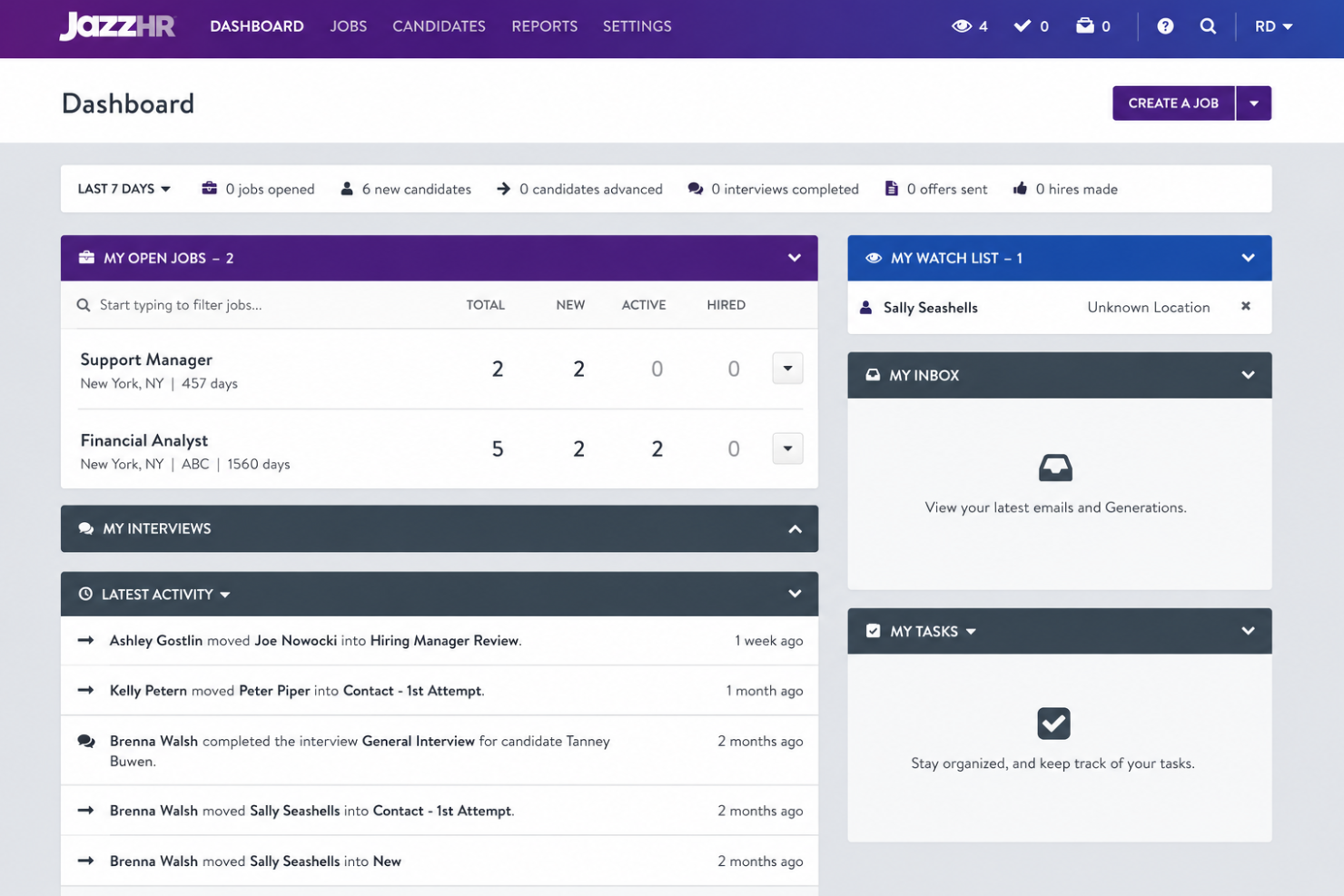
JazzHR is an applicant tracking system designed for small and midsize teams, offering job posting, resume screening, interview scheduling, and candidate pipeline management for hiring-focused marketing teams.
Who Is JazzHR Best For?
JazzHR fits small to midsize marketing teams or agencies that want straightforward hiring workflows and collaborative candidate management.
Why I Picked JazzHR
I picked JazzHR as one of the best because my team is able to quickly create custom job templates, publish openings to dozens of boards at once, and automate workflow stages without complex setup—making it ideal for small to midsize team hiring.
JazzHR Key Features
- Candidate self-scheduling: Let candidates pick interview times that work for them.
- Collaborative candidate scoring: Allows your team to rate and comment on applicants together.
- Centralized resume database: Stores and organizes all incoming resumes in one place.
- Offer letter editor: Generates, customizes, and tracks offers sent to candidates.
JazzHR Integrations
JazzHR offers native integrations with LinkedIn, Indeed, Glassdoor, Google Workspace, Slack, Zoom, ADP, Namely, DocuSign, and Paylocity and provides an API for custom integrations.
Pros and Cons
Pros:
- Custom career site editor for your team
- Automated candidate reminders and messaging
- Custom workflows for different open roles
Cons:
- Limited built-in analytics without an extra module
- Manual setup required for permission management

Best for integrated job advertising options
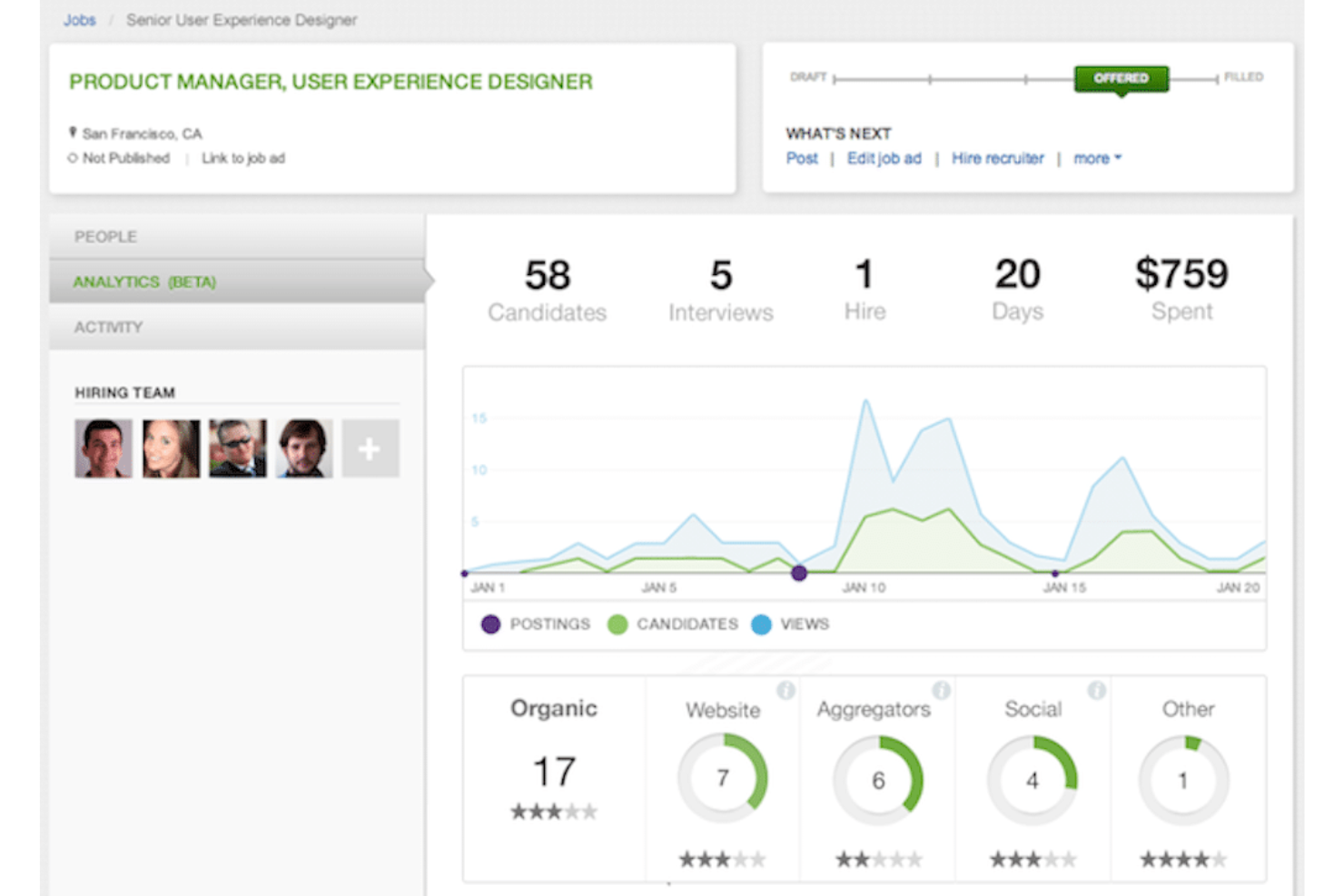
SmartRecruiters is an applicant tracking platform for marketing teams that consolidates job posting, candidate management, and collaborative hiring in one system.
Who Is SmartRecruiters Best For?
SmartRecruiters is well-suited for enterprise marketing teams with high hiring volumes and complex recruitment workflows.
Why I Picked SmartRecruiters
I picked SmartRecruiters because I can access built-in job advertising, sponsor posts across hundreds of boards and social networks, and manage campaigns directly from the same dashboard my team uses for candidate tracking.
SmartRecruiters Key Features
- Collaboration tools: Share candidate notes and feedback with your hiring team.
- Mobile app: Review applicants and perform actions from any device.
- Offer management: Generate, send, and track offers within the platform.
- Branded career site builder: Design custom career pages to attract talent.
SmartRecruiters Integrations
SmartRecruiters offers native integrations with LinkedIn, Indeed, Glassdoor, Google Workspace, Microsoft 365, DocuSign, Zoom, Slack, and Harver, and provides an API for custom integrations.
Pros and Cons
Pros:
- Multi-location job posting in a single workflow
- Built-in collaborative notes for interview panels
- Rates compliance using regional legal checks
Cons:
- No native employee onboarding features
- Longer implementation timelines for deployment
Lever
Best for integrated talent relationship management
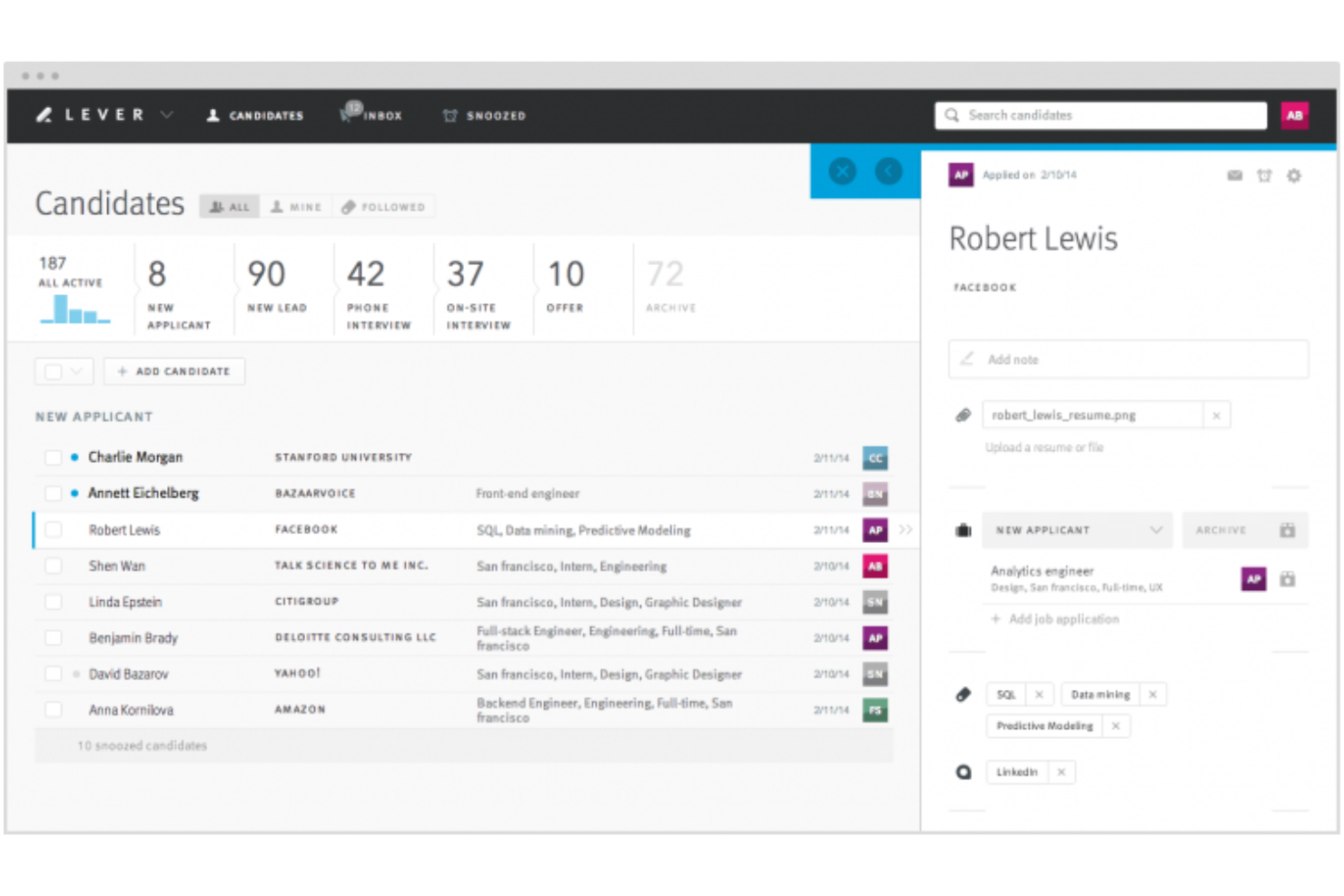
Lever is an applicant tracking software for marketing teams that combines recruiting, pipeline management, candidate sourcing, and advanced analytics in one collaborative platform.
Who Is Lever Best For?
Lever is a strong fit for scaling marketing teams and talent acquisition specialists who manage high-volume, relationship-driven recruiting pipelines.
Why I Picked Lever
I picked Lever because I can manage both sourcing and nurturing of marketing talent in one place, track candidate engagement over time, and use built-in CRM features to simplify long-term relationship management.
Lever Key Features
- Automated interview scheduling: Syncs with calendars to book interviews with candidates and team members.
- Customizable feedback forms: Let hiring teams tailor evaluation forms for each stage and role.
- Job posting management: Enables posting to job boards and tracking application sources in one place.
- Offer letter templates: Provide editable offer templates to simplify the hiring process.
Lever Integrations
Lever offers native integrations with LinkedIn, Google Workspace, Slack, Microsoft 365, Zoom, DocuSign, and has an API for custom integrations.
Pros and Cons
Pros:
- Talent pools for ongoing marketing hiring needs
- Supports internal talent relationship management
- Bulk email and personalized candidate messaging
Cons:
- Require separate fees for advanced analytics
- Some assessments require external tools
Jobvite
Best for social media recruitment integrations
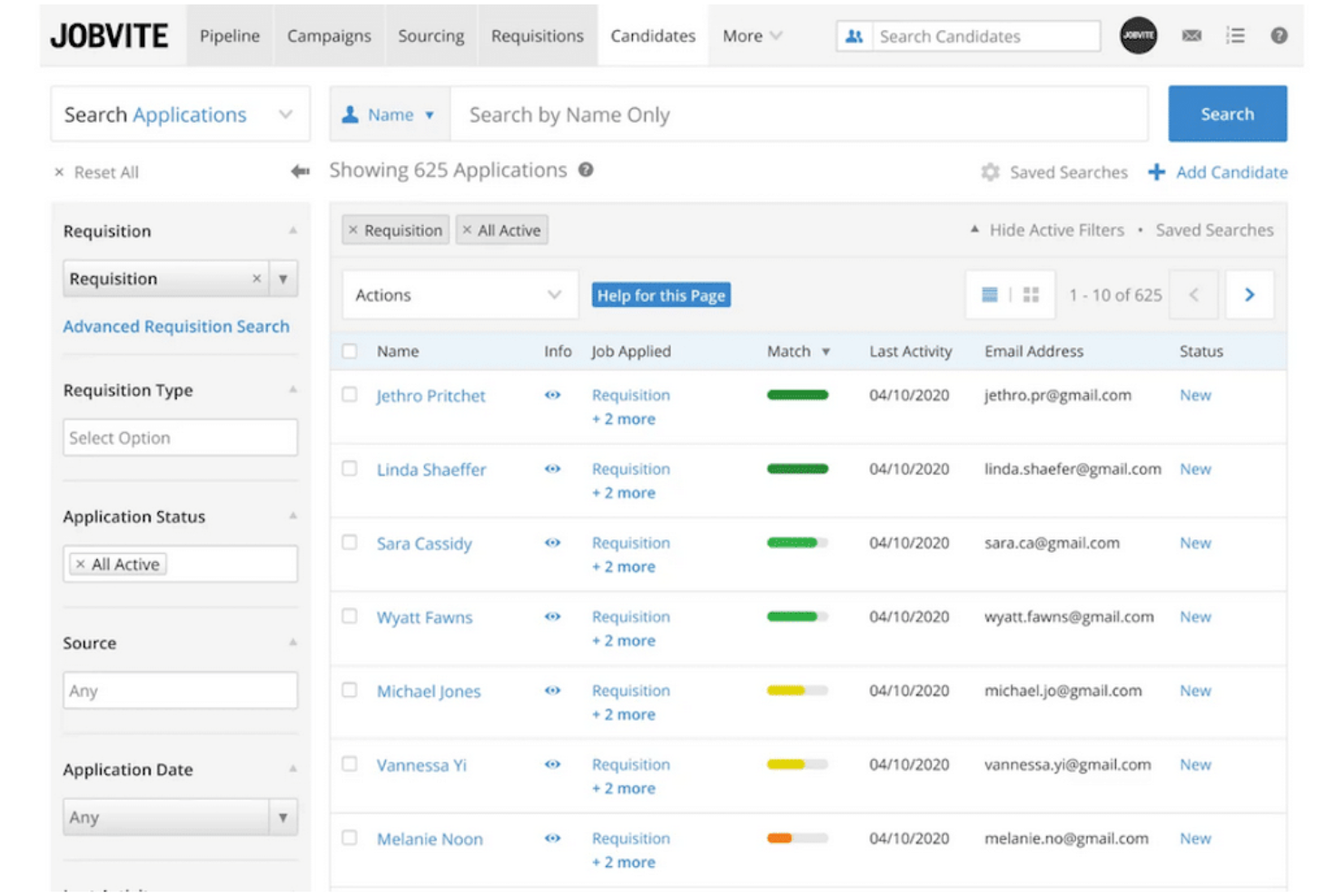
Jobvite is an applicant tracking system for marketing teams that brings together candidate sourcing, application workflow management, recruitment analytics, and communication tools in one platform.
Who Is Jobvite Best For?
Jobvite is a strong match for talent acquisition teams at mid-size and large businesses looking to prioritize social media-driven recruiting.
Why I Picked Jobvite
I picked Jobvite as one of the best because my team can publish and manage job posts across all major social platforms, sync campaigns with our brand accounts, and track applicant sources directly within the platform.
Jobvite Key Features
- Smart Scheduler: Coordinate interviews by syncing candidate and team calendars.
- Career site builder: Create branded job pages with custom design tools.
- Configurable hiring workflows: Customize hiring stages and approval chains for each role.
- Employee referral portal: Launch internal campaigns and track referrals from your team.
Jobvite Integrations
Jobvite offers native integrations with LinkedIn, Indeed, Glassdoor, Google Workspace, Microsoft 365, Slack, Zoom, DocuSign, ADP, and Oracle, and provides an API for custom integrations.
Pros and Cons
Pros:
- Customizable branded career page builder
- Automated candidate communications and reminders
- Extensive social media job-sharing tools
Cons:
- Integration requires developer support
- Requires formal software training

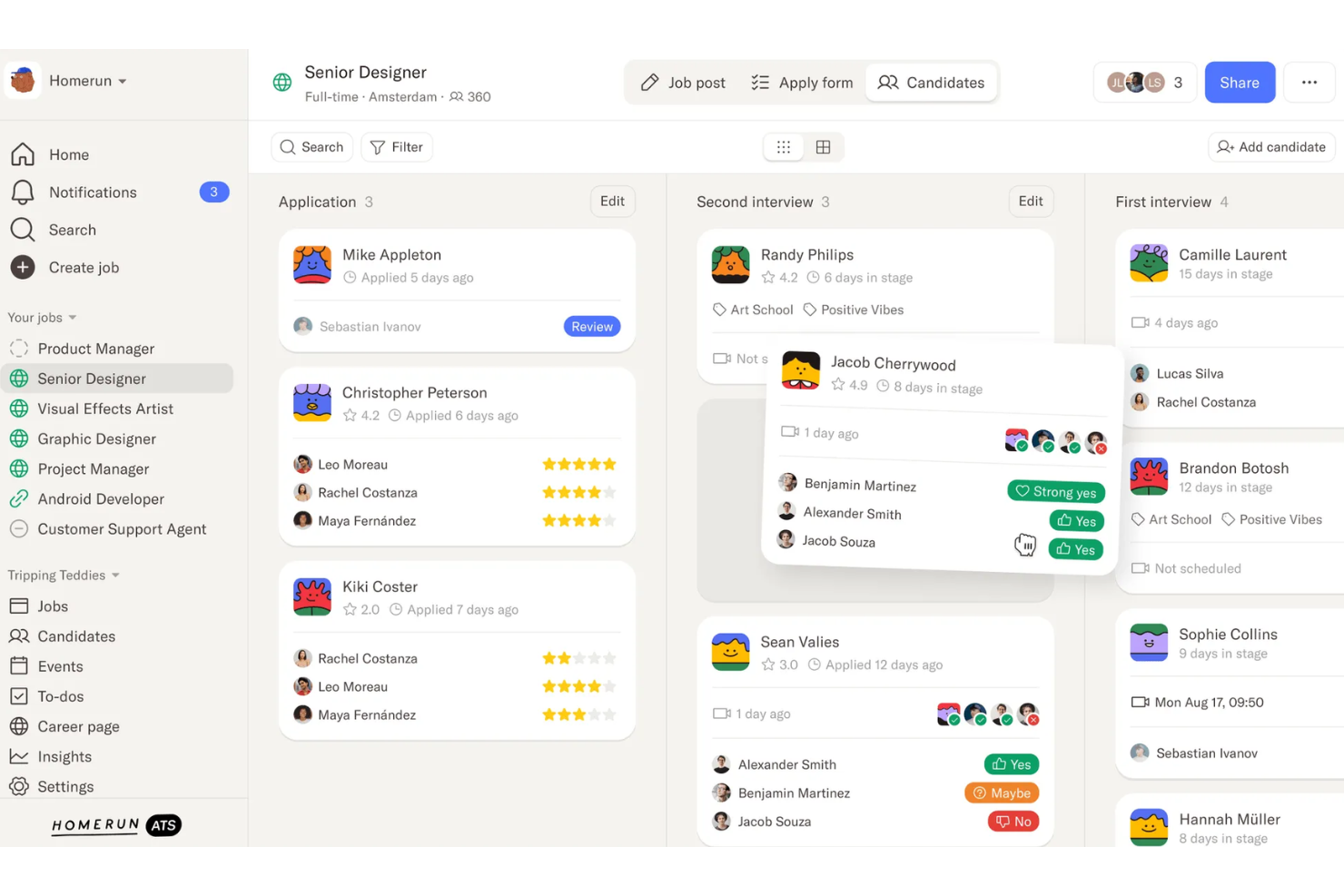
Homerun is an applicant tracking platform for marketing teams that brings together job posting, candidate tracking, customizable workflows, and hiring collaboration in one interface.
Who Is Homerun Best For?
Homerun suits small to midsize marketing teams that want everyone involved in hiring on a collaborative, shared dashboard.
Why I Picked Homerun
I picked Homerun as one of the best because its shared hiring dashboard keeps everyone on the hiring team updated and involved. I use features like real-time status updates, collaborative commenting, and at-a-glance candidate progress to keep marketing teams aligned.
Homerun Key Features
- Custom job page builder: Create visually branded, mobile-friendly career pages with drag-and-drop tools.
- Pipeline customization: Tailor each hiring pipeline to fit specific roles or campaigns within your marketing team.
- Email scheduling: Automate and personalize candidate communications from within the platform.
- Candidate tagging: Organize applicants using customizable tags for fast filtering and sorting.
Homerun Integrations
Integrations include Slack, Google Calendar, Recruitee, LinkedIn, Indeed, Zapier, Greenhouse, and BambooHR.
Pros and Cons
Pros:
- Visual pipeline management for candidate stages
- Customizable job pages for employer branding
- Collaborative dashboard for marketing hiring teams
Cons:
- Limited automated workflow triggers
- Limited reporting for advanced analytics
TalentHR
Best with multi-language employee self-service
TalentHR is an applicant tracking software designed for marketing teams, offering customizable hiring pipelines, portfolio uploads, job posting, collaborative candidate review, and integrated scheduling tools.
Who Is TalentHR Best For?
TalentHR suits small to midsize marketing agencies and teams needing applicant tracking with strong multi-language and employee self-service capabilities.
Why I Picked TalentHR
I picked TalentHR as one of the best because its multi-language employee self-service stands out for distributed marketing teams. I can set up self-service portals in several languages, and employees can manage their profiles or documents without HR’s help.
TalentHR Key Features
- Customizable hiring pipelines: Build, edit, and visualize candidate stages that match different marketing roles or workflows.
- Portfolio uploads: Candidates can submit creative work samples, presentations, and multimedia assets directly in their application.
- Collaborative candidate evaluation: Recruiters and hiring managers can leave notes, ratings, and tags for shared team reviews.
- Integrated interview scheduling: Syncs with Google and Outlook calendars for direct interview booking and reminders.
TalentHR Integrations
TalentHR offers native integrations with TalentLMS, Slack, Google Calendar, Outlook, WordPress, and Make. An API is available for custom integrations.
Pros and Cons
Pros:
- Employees can self-manage onboarding documents
- Customizable applicant workflows for marketing hires
- Multi-language portals for international talent pools
Cons:
- Limited job board syndication beyond internal pages
- Lacks specialized creative portfolio review tools
Other Applicant Tracking Software For Marketing Teams
Here are some additional applicant tracking software for marketing teams options that didn’t make it onto my shortlist, but are still worth checking out:
- Greenhouse
For structured interview workflows
- Keka HR
For end-to-end hiring and onboarding
- Ashby
For analytics and reporting features
- Recruit CRM
For recruitment agency workflows
- Workable
For collaborative candidate evaluation
- Zoho Recruit
For tailored workflow automation
- Teamtailor
For multi-brand division management
- Manatal
For AI-driven candidate recommendations
- Pinpoint
For employer branding customization
- VidCruiter
For video interview process management
- Rippling
For unified HR and payroll integration
- Deel Payroll
For global team hiring compliance
- BambooHR
For onboarding and employee records


How I Evaluate Applicant Tracking Software for Marketing Teams
I split my evaluation into must-have pipeline and portfolio tools and differentiators like marketing-specific job board reach and collaborative scoring that separate the best options from the rest.
Core Functionality (Table Stakes For This List)
When I'm selecting tools for my list, I rank each one on a scale from 0 (does not offer the functionality) to 5 (excels in this area) for each core functionality listed below. Then, I calculate the tool's total score into a percentage. Each tool needs to achieve a minimum total score of 65% to be considered for inclusion.
- Candidate Pipeline Management: I look for customizable stages that mirror real creative hiring workflows, like separate pipelines for a content strategist role versus a brand designer opening.
- Portfolio & Work Sample Review: Each tool should let hiring teams preview creative assets inline, so reviewers can assess a candidate's design samples or campaign work without downloading files.
- Job Board Distribution: I check whether a platform distributes to marketing- and creative-focused job boards alongside general ones, not just the usual aggregators.
- Collaborative Hiring Tools: Marketing hiring often involves input from copywriters, designers, and department leads, so I evaluate structured scorecards, tagging, and feedback workflows.
- Resume Parsing & Search: Strong parsing should extract marketing-relevant skills like SEO, paid media, or brand strategy into searchable fields that recruiters can filter on later.
- Interview Scheduling & Communication: I look for calendar sync and self-scheduling links that reduce back-and-forth, especially when coordinating panel interviews with busy creative directors.
Once I have a list of tools that meet this criteria, I consider what sets each platform apart.
Differentiating Factors (What Sets Vendors Apart)
Here's how I compare and contrast different vendors:
Standout Features
Branded career pages matter more here than in most categories. Marketing teams want a careers site that reflects the brand they've built, not a generic template. I also evaluate whether a platform includes a talent CRM with nurture campaigns, which is useful when you're building a bench of passive creative talent for future roles. Recruiting analytics round things out; I look for dashboards that break down source performance and time-to-fill by role type.
Beyond Features
Integration depth is one of the first things I check. A platform that connects to Slack, Google Workspace, and portfolio sites like Behance makes hiring feel native to how marketing teams already work. Pricing structure also matters; agencies with seasonal hiring spikes need flexible plans that don't lock them into rigid per-seat commitments. I also evaluate industry fit by looking at whether a vendor offers pre-built templates for creative roles and has a customer base that skews toward marketing-driven organizations.
How to Choose Applicant Tracking Software For Marketing Teams
It’s easy to get bogged down in long feature lists and complex pricing structures. To help you stay focused as you work through your unique software selection process, here’s a checklist of factors to keep in mind:
| Factor | What to Consider |
|---|---|
| Scalability | Will the software handle your team’s workload if hiring needs grow? Check for user or job posting limits, pricing changes with scale, and growth support. |
| Integrations | Does it connect smoothly to your HR tools, email, or calendars? Look for native integrations with your key platforms and avoid manual data entry traps. |
| Customizability | Can you adapt pipelines, templates, and branding to your processes? Avoid rigid systems that force you into someone else’s workflow. |
| Ease of use | How much training will your team need? Ideally, your team should navigate and use it with little or no instruction. |
| Implementation and onboarding | What time and resources are required to get up and running? Ask about migration support, import options, and onboarding training. |
| Cost | Are pricing tiers predictable and within budget? Watch for seat-based charges or added costs for integrations and advanced features. |
| Security safeguards | What data privacy measures are in place? Verify encryption, access controls, and compliance with local data regulations to protect candidate data. |
| Support availability | Will you get help when you need it? Consider support hours, channels (chat, email, phone), and response SLAs that align with your workflow. |
What Is Applicant Tracking Software For Marketing Teams?
Applicant tracking software for marketing teams is a system that helps teams manage every step of their hiring process, from job posting to candidate evaluation and onboarding.
These tools centralize candidate data, support team collaboration, and support fast-moving recruitment pipelines tailored to diverse marketing roles and campaign needs.
Features
When selecting applicant tracking software for marketing teams, keep an eye out for the following key features:
- Customizable pipelines: Let you build, edit, and manage candidate stages that reflect your marketing team’s hiring process for different roles.
- Multi-channel job posting: Allows you to distribute job ads across numerous job boards, social media, and your careers page with a single submission.
- Collaborative feedback tools: Provide structured ways for hiring team members to share notes, ratings, and comments for each candidate in the same workspace.
- Automated interview scheduling: Syncs with calendars and lets candidates choose interview slots, reducing back-and-forth coordination.
- Resume parsing and management: Automatically extracts candidate data from resumes and organizes profiles for easy searching and sorting.
- Careers page branding: Enables you to design a branded careers page or widget tailored to your organization’s visual identity and messaging.
- Candidate communications: Offers built-in messaging (email and SMS) and templates to keep candidates informed throughout the process.
- Reporting and analytics: Generates metrics and visual dashboards tracking pipeline health, candidate sources, and hiring speed, supporting data-driven decisions.
- Permission controls: Let you set access levels so team members only see or edit information relevant to their role.
- Offer management: Supports sending, tracking, and collecting digital signatures on offer letters, often integrating with onboarding tools.
Benefits
Implementing applicant tracking software for marketing teams provides several benefits for your team and your business. Here are a few you can look forward to:
- Faster hiring cycles: Drag-and-drop pipelines, automated scheduling, and centralized feedback help teams move candidates through the process quickly.
- Better team collaboration: Built-in feedback tools and permission controls keep everyone aligned and make it easy to evaluate candidates together.
- Consistent candidate experience: Automated communications and branded careers pages ensure every applicant receives timely, professional interactions.
- Data-driven decision making: Reporting dashboards and analytics help you optimize sourcing, identify bottlenecks, and improve marketing talent acquisition.
- Reduced manual work: Multi-channel posting, resume parsing, and digital offer management minimize repetitive tasks, so your team can focus on strategic activities.
- Custom-fit recruiting workflows: Customizable pipelines and templates make it simple to adapt the system to your unique hiring needs and campaigns.
Costs and Pricing
Selecting applicant tracking software for marketing teams requires an understanding of the various pricing models and plans available. Costs vary based on features, team size, add-ons, and more. The table below summarizes common plans, their average prices, and typical features included in applicant tracking software for marketing teams' solutions:
Plan Comparison Table for Applicant Tracking Software For Marketing Teams
| Plan Type | Average Price | Common Features |
|---|---|---|
| Free Plan | $0-$30/user/month | Basic job posting, limited pipelines, standard candidate management, and simple reporting. |
| Personal Plan | $30-$60/user/month | Branded careers page, multi-channel job posting, basic integrations, and custom workflow configuration. |
| Business Plan | $60-$120/user/month | Bulk resume import, collaborative hiring tools, advanced analytics, and increased support access. |
| Enterprise Plan | $120-$200+/user/month | Custom security controls, API access, priority support, onboarding services, and advanced customizations. |
Applicant Tracking Software For Marketing Teams FAQs
Here are some answers to common questions about applicant tracking software for marketing teams:
How does an all-in-one ATS software help marketing teams collaborate during the recruitment process?
This type of recruiting software lets recruiting teams leave feedback, assign ratings, and share notes in one workspace. This makes it easy for hiring managers, recruiters, and marketers to compare impressions, support decision-making, and move qualified candidates through the talent pipeline together.
Can applicant tracking software integrate with other tools marketing teams use?
Yes, most software solutions offer integrations with platforms like email, calendars, HRIS, and communication tools. Check for integrations with apps your team relies on—such as Slack, Google Workspace, or project management tools—to avoid switching between platforms.
What security measures should we expect from applicant tracking software?
You should look for encryption (in transit and at rest), access controls, regular security audits, and compliance with data privacy laws such as GDPR or CCPA. These safeguards protect your candidate database and team data from unauthorized access or breaches.
How customizable are end-to-end pipelines for different marketing roles to find the right candidates?
Most applicant tracking systems let you tailor hiring pipelines for specific roles or campaigns to attract top talent and improve your overall time-to-hire. You can add, reorder, or rename stages and even set role-based permissions for who can edit or move candidates at each stage.
What support options are available if hr teams at a startup or among small businesses need help using the platform?
Many vendors provide onboarding support for training new hires or new employees, video tutorials, help centers, chatbots, and live chat or phone support. If your team needs fast answers or hands-on help from a user-friendly system—whether you work in-house or run staffing agencies—look for platforms that offer 24/7 support, candidate relationship management features, and background checks.