

10 Best Employee Training Software of 2026

10 Best Employee Training Software Shortlist


The best employee training software helps HR professionals simplify learning workflows, boost engagement, and measure training effectiveness—all without getting buried in spreadsheets or clunky legacy tools.
If you’re struggling to keep training programs organized, track employee progress, or prove ROI to leadership, you’re not alone. The sheer number of solutions on the market can make it difficult to know which one is truly right for your team’s needs.
This list includes LMS platforms, sales enablement tools, compliance systems, and learning experience platforms — because “employee training software” now spans more than just traditional course delivery. Different teams need different capabilities, whether that’s structured certification tracking, coaching reps, managing regulatory requirements, or building interactive learning paths.
Below, you’ll find the best employee training software across these categories, with clear explanations of who each tool is best for and where it fits — so you can choose the right solution for your team’s priorities—and your budget.
Why Trust Our Software Recommendations
Our team has been testing and reviewing software since 2012. As HR experts ourselves, we know how difficult—and important—it is to choose the right software.
For this guide, we evaluated tools using hands-on testing and independent research, scoring tools using our selection criteria. We also draw on insights from industry thought leaders and practicing HR experts.
Our reviews reflect our human editorial judgment, not a sales pitch.
Expert reviewers:
Employee Training Software Comparison Table
This comparison table summarizes pricing details for my top employee training software selections:
| Tool | Best For | Trial Info | Price | ||
|---|---|---|---|---|---|
| 1 | Best for mobile usage and training deskless employees | 14-day free trial | From $29/month (billed annually) | Website | |
| 2 | Best for goal and career development | Free demo available | From $5/user/month | Website | |
| 3 | Best for AI-driven training capabilities | Free plan + free trial + free demo available | From $20/user/month (billed annually) | Website | |
| 4 | Best for powering the entire training cycle | Free trial available | From $6.91/user/month (billed annually) | Website | |
| 5 | Best as an AI for business | Free demo available | From $8/user/month | Website | |
| 6 | Best for role-based employee training | Free plan + free demo available | From $119/month (billed annually) | Website | |
| 7 | Best for quality customer support | 14-day free trial | Pricing upon request | Website | |
| 8 | Best for upskilling and reskilling employees | Free demo available | Pricing upon request | Website | |
| 9 | Best for AI-driven practice scenarios | Free demo available | Pricing upon request | Website | |
| 10 | Best for AI voice roleplay in healthcare training | 14-day free trial | From $50/seat/month | Website |


Best Employee Training Software Reviews
Here’s a brief description of the best software to manage and track employee training. To help you with your selection process, I’ve explained each system’s best use case and noteworthy features. I’ve also included a screenshot for each so you can preview their user interface too.

Best for mobile usage and training deskless employees
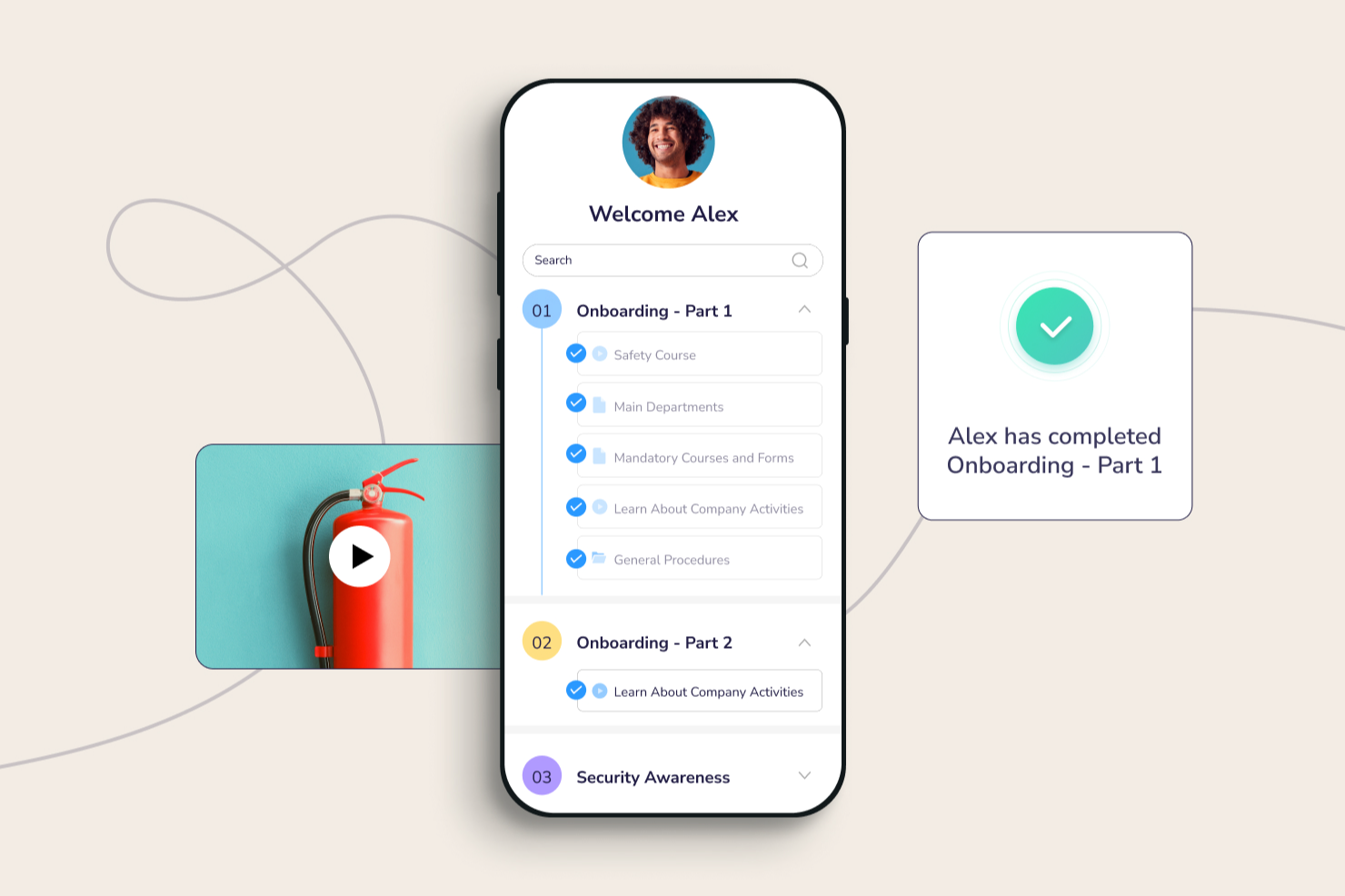
Connecteam is an employee training platform built for businesses with frontline, field, or deskless teams who need to deliver training, track progress, and communicate—all from a mobile app.
Who Is Connecteam Best For?
Connecteam is a great fit for small to mid-sized businesses in industries like retail, hospitality, construction, and healthcare that rely on hourly or shift-based workers.
Why I Picked Connecteam
Connecteam earns its spot on my shortlist because it's purpose-built for training teams who don't sit at a desk. I chose it for its mobile-first course builder, which lets you create training modules with videos, PDFs, and quizzes that employees complete on their phones—no laptop required. Managers get real-time visibility into who has completed training and who hasn't, which helps when coordinating a dispersed crew across multiple job sites or store locations.
Connecteam Key Features
- Knowledge base: Store and organize company documents, SOPs, and reference materials that employees can access on demand from their mobile devices.
- In-app chat: Send direct or group messages to employees in the field without needing personal phone numbers or third-party messaging apps.
- Surveys and polls: Collect employee feedback or run knowledge checks using built-in survey tools tied directly to your workforce.
- Automated onboarding workflows: Assign onboarding tasks, training courses, and forms to new hires automatically based on their role or location.
Connecteam Integrations
Integrations include QuickBooks, Gusto, Xero, ADP, Zapier, Wix, Lightspeed, PrismHR, Square, and BambooHR.
Pros and Cons
Pros:
- Offline learning works well for job sites with poor connectivity
- Smart Groups automate enrollment based on roles or locations
- Mobile-first design fits frontline and shift-based training needs
Cons:
- Advanced reporting/custom analytics for training may be limited
- Training depth (e.g. simulations, branching scenarios) not as rich as specialized eLearning tools
New Product Updates from Connecteam

Connecteam Expands Break and Timesheet Controls
Connecteam adds flexible break thresholds, personalized policies, auto-end options, a centralized exceptions report, and improved timesheet issue visibility to help teams manage breaks and timesheets more effectively. For more information, visit Connecteam’s official site.
 .
.
Deel HR
Best for goal and career development

Deel HR gives HR teams and business leaders a platform to manage employee training, track development progress, and support growth for distributed and global teams.
Who Is Deel HR Best For?
Deel HR is a strong fit for HR teams managing global or remote workforces who need to connect employee training with structured career growth.
Why I Picked Deel HR
Deel HR connects goal setting directly to career development within one integrated system. Through Deel Engage, you can define company, team, and individual OKRs and track progress in real time across customizable review cycles. The career progression framework lets you map role expectations and growth paths so employees know what's required to advance. AI-assisted content drafting lets teams build competency libraries and training content without starting from scratch.
Deel HR Key Features
- 360-degree feedback: Collect structured feedback from peers, managers, and direct reports as part of employee development cycles.
- Employee surveys: Run engagement and pulse surveys to gather team sentiment and identify areas for development focus.
- Learning management: Assign and track training courses and learning materials directly within employee profiles.
- Onboarding workflows: Build structured onboarding task sequences to guide new hires through role-specific training steps.
Deel HR Integrations
Integrations include BambooHR, Workday, Personio, HiBob, Greenhouse, Lever, Slack, Microsoft Teams, and Okta.
Pros and Cons
Pros:
- Automates course assignments using employee role, region, or start date
- Connects training to performance reviews and long-term career growth
- AI-powered course creation dramatically reduces time spent building training content
Cons:
- Lacks built-in social learning or peer collaboration features
- Reporting customization may require additional support or API use
New Product Updates from Deel HR

Deel Expands Stablecoin Wallet to 80+ Countries
Deel expands its Stablecoin Wallet to 80+ countries with dollar-backed balances and optional rewards. This gives eligible contractors more ways to hold and manage earnings inside Deel. For more information, visit Deel’s official site.
 .
.
Exec
Best for AI-driven training capabilities
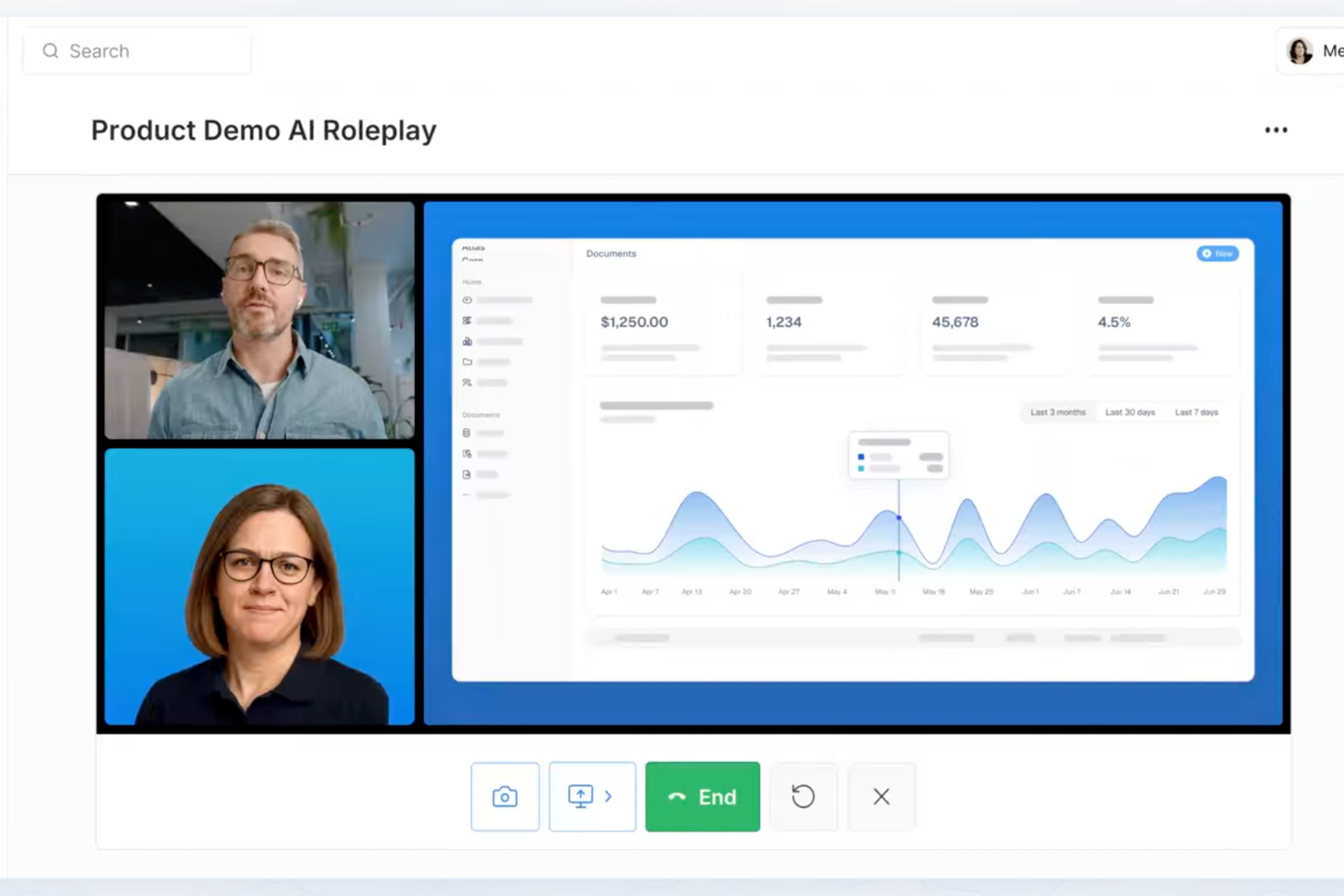
Exec is designed for HR teams and business leaders who want to deliver personalized, data-driven employee training that adapts to individual learning needs and supports ongoing skill development.
Who Is Exec Best For?
Exec suits mid-size to large organizations with L&D teams looking to move beyond static course libraries and deliver adaptive, AI-driven training at scale.
Why I Picked Exec
I picked Exec because its AI-driven approach goes beyond simple course recommendations. It uses AI to build personalized learning paths based on each employee's role, skill gaps, and progress—so training feels relevant rather than generic. My team tracks individual development in real time, making it straightforward to identify who needs support and where. The AI coaching features set it apart, delivering on-demand guidance that adapts as employees grow.
Exec Key Features
- Call scoring: Automatically analyzes recorded calls against custom rubrics to surface skill gaps and coaching opportunities across your team.
- Certification gates: Awards certifications when employees pass AI roleplay assessments based on your custom criteria, ensuring readiness before taking on new responsibilities.
- Screen sharing for demo practice: Lets employees present decks or demo products to an interactive AI audience that responds like real stakeholders.
- Weekly progress digests: Sends automated weekly summaries of team member progress and achievements to keep managers informed.
Exec Integrations
Native integrations are not listed.
Pros and Cons
Pros:
- Built-in call scoring insights
- Customizable onboarding learning paths
- Realistic AI-powered sales simulations
Cons:
- No publicly listed native integrations
- Setup may require admin configuration

Best for powering the entire training cycle

iSpring LMS gives HR teams and learning professionals a platform to create, deliver, and track employee training programs, making it easier for organizations to manage onboarding, compliance, and ongoing development in one place.
Who Is iSpring LMS Best For?
iSpring LMS is a good fit for mid-sized to large organizations that need a structured, scalable approach to employee training across departments.
Why I Picked iSpring LMS
iSpring LMS earns its spot on my shortlist because it covers every stage of the training cycle without requiring you to stitch together separate tools. I like that you can build courses directly in iSpring Suite, assign them through automated learning paths, and then track completion and quiz scores in the same platform. The detailed reporting dashboard lets my team monitor individual progress, identify knowledge gaps, and pull compliance reports without exporting data elsewhere. That end-to-end visibility—from content creation to performance tracking—distinguishes it.
iSpring LMS Key Features
- Gamification: Employees earn points and badges and track their progress on leaderboards to stay motivated throughout training.
- 360-degree review: Collects structured feedback from peers, managers, and direct reports to assess employee competencies and role fit.
- Knowledge base: Stores corporate resources, guides, and FAQs in a role-controlled, cloud-based hub that employees can access anytime.
- Mobile app: A native iOS and Android app lets learners complete training offline, with progress synced automatically when they reconnect.
iSpring LMS Integrations
Integrations include Salesforce, MS Azure, MS Exchange, BambooHR, Udemy, Go1, LinkedIn Learning, and other popular course libraries.
Pros and Cons
Pros:
- Automated enrollment and reminders save significant administrative time
- White-label capability allows for complete brand customization
- Extremely fast setup
Cons:
- Integration setup can be overly technical for non-developers
- Limited gamification or social learning features compared to newer platforms
New Product Updates from iSpring LMS

iSpring LMS Adds Multiple Observations to OJT Sessions
iSpring LMS now lets managers log multiple observations within one OJT session, grouping visits and auto-generating summary stats like averages, criterion results, and comparisons. For more information, visit iSpring LMS's official site.

Best as an AI for business
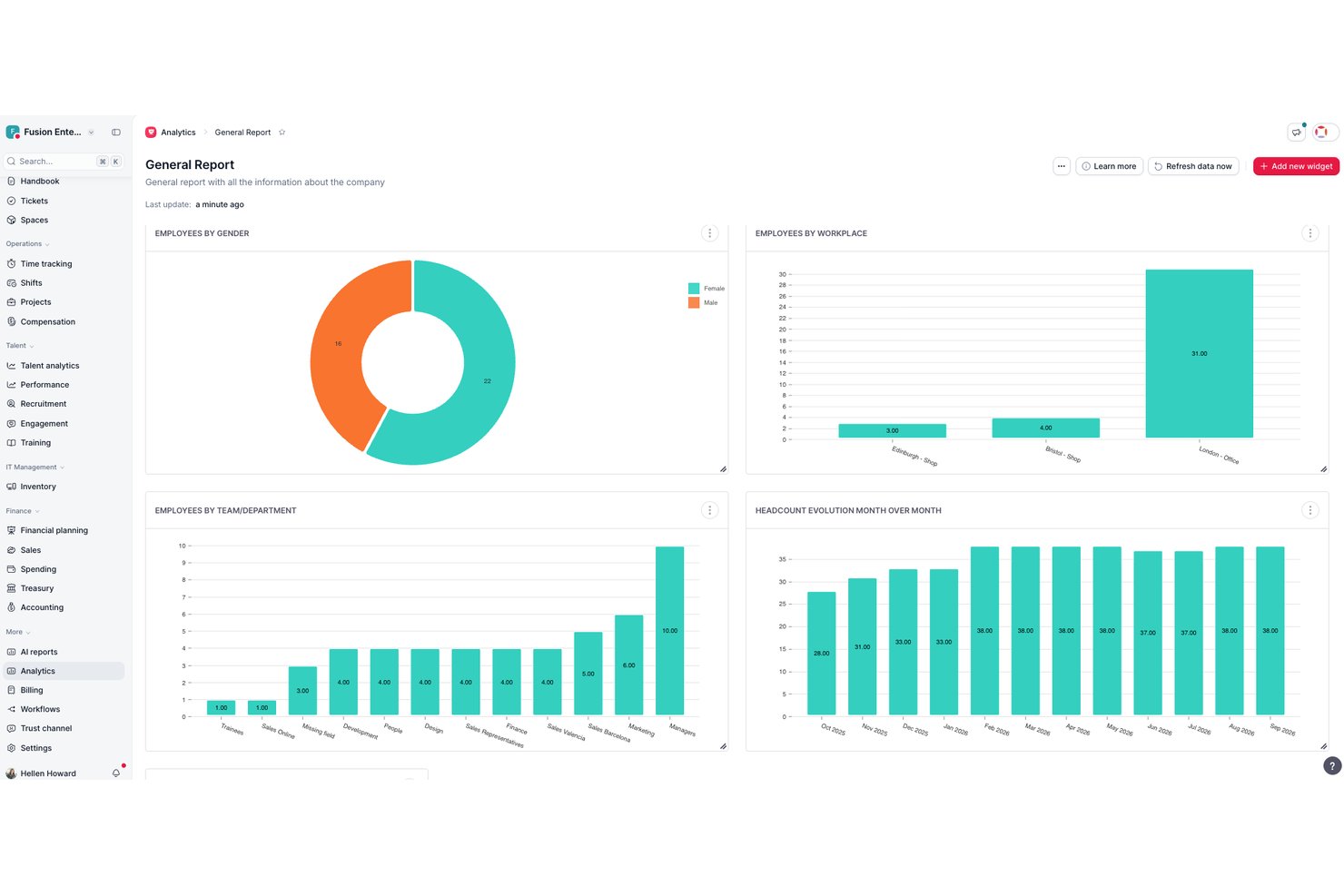
Factorial is an AI-powered HR platform that combines an LMS, course authoring, skills-based learning paths, and training tracking within a broader suite covering payroll, onboarding, and workforce management.
Who Is Factorial Best For?
Factorial is a strong fit for HR teams at small and mid-sized businesses that want training built into the same platform they use for payroll, onboarding, and people management.
Why I Picked Factorial
I picked Factorial as one of the best because its AI sits at the center of how the platform actually works, not just as a bolt-on feature. I'm particularly drawn to how Factorial AI handles the day-to-day operational load: it can auto-generate full training courses from existing PDFs, answer employee questions about company policies, and produce reports without manual input. That kind of AI-driven assistance makes it a natural fit for HR teams that want training built into the same system running their payroll, scheduling, and workforce management.
Factorial Key Features
- SCORM course import: Upload and manage existing SCORM-based eLearning packages directly within Factorial's training module.
- Knowledge tests: Build quizzes within courses to assess whether employees have retained what they've learned.
- Automated certificate generation: Automatically issue completion certificates to employees once they finish a training course.
- Skills and competency tracking: Map employee competencies to identify development gaps and link training assignments to specific skills.
Factorial Integrations
Factorial integrates with Okta, Microsoft Azure AD, Slack, Google Workspace, Microsoft Outlook, and Microsoft Power BI. It also offers an open API for custom integrations and supports Zapier.
Pros and Cons
Pros:
- HR platform embeds onboarding and learning
- Training connects directly to employee competencies
- AI-generated courses from existing PDFs
Cons:
- Reporting remains basic for advanced analysis
- Newly launched LMS has limited maturity

Best for role-based employee training

TalentLMS is a cloud-based learning management system for businesses that deliver, track, and manage employee training, with flexible course-creation and assignment tools.
Who Is TalentLMS Best For?
TalentLMS suits small to mid-sized businesses that need a straightforward platform to train employees, partners, or customers across multiple teams or departments.
Why I Picked TalentLMS
I picked TalentLMS as one of the best because of how well it handles role-based training at scale. The Branches feature lets you create separate training environments for different departments or teams, each with its own content, users, and branding—all managed from a single admin view. I also like the Custom Roles & Permissions feature, which lets you define exactly what admins, instructors, and learners can access, so training stays relevant and content doesn't cross between groups. Paired with Groups, which lets you assign entire course sets to a team in one click, role-specific training becomes manageable.
TalentLMS Key Features
- Course authoring: Build courses directly in the platform using text, video, presentations, and quizzes without needing a separate authoring tool.
- Gamification: Add points, badges, and leaderboards to training courses to increase learner engagement and course completion rates.
- Certification management: Create and automatically issue certificates when learners complete a course or pass an assessment.
- Reporting and analytics: Track learner progress, course completion, and assessment scores through built-in reporting dashboards.
TalentLMS Integrations
Integrations include BambooHR, Salesforce, TalentHR, Sage People, Intercom, ADP Workforce Now, Zendesk Chat, Zoom, Microsoft Teams, and GoTo.
Pros and Cons
Pros:
- Built-in assessments support skills measurement and certification.
- AI tools speed up course creation for fast-changing training needs.
- Clear learner grouping features support complex training structures.
Cons:
- Large multimedia files may require external hosting solutions.
- Built-in collaboration tools are basic compared with dedicated learning communities.
New Product Updates from TalentLMS
TalentLMS Adds Learning Paths, AI Video, and Learner Experience Updates
TalentLMS introduced updates across learning management, content creation, and learner experience, including Learning Paths for Groups, AI video generation in TalentCraft, video bookmarking, and expanded administration tools. For more information, visit TalentLMS’s official site.

SkyPrep
Best for quality customer support
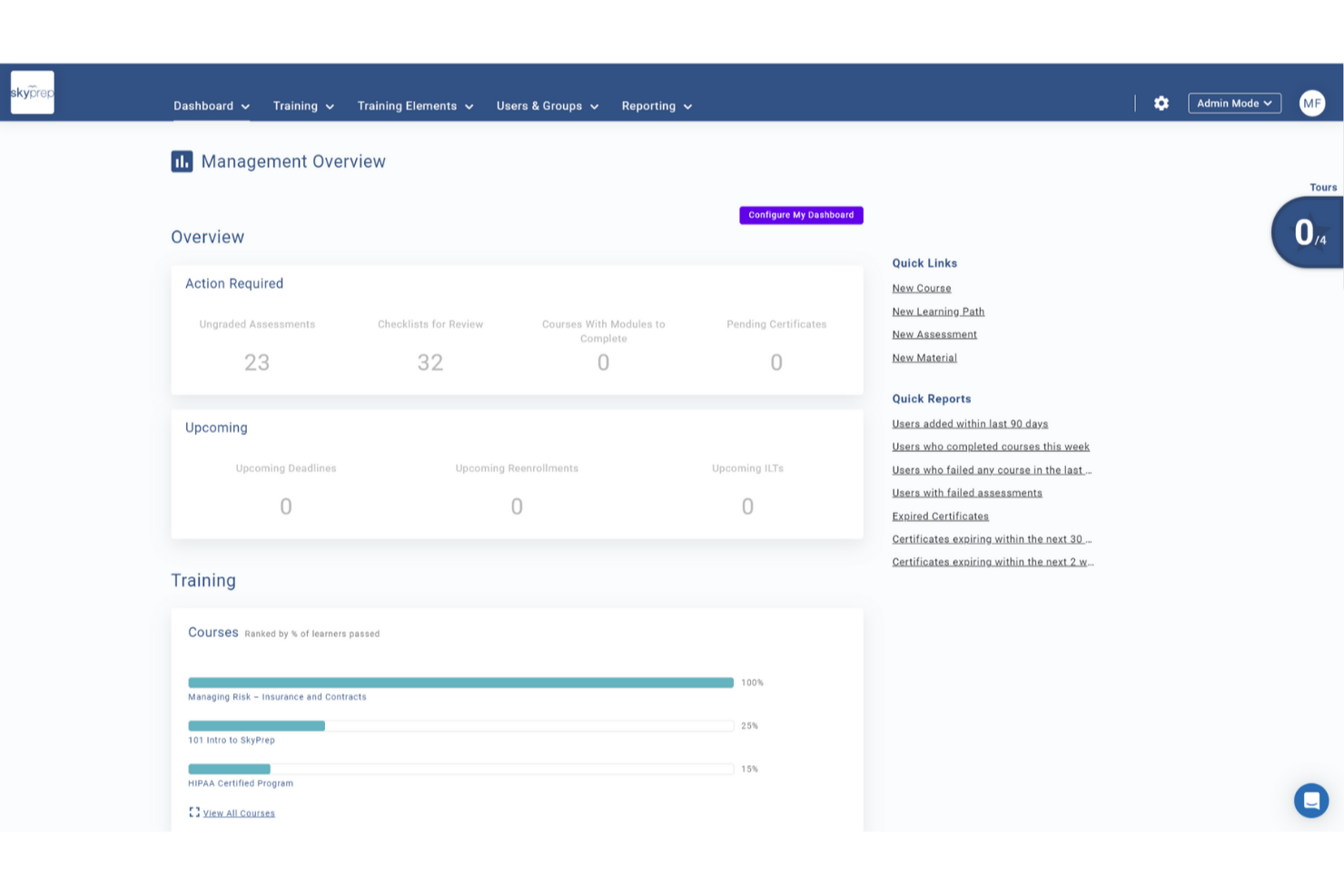
SkyPrep is a cloud-based employee training platform for HR teams and business leaders who deliver, track, and manage workplace learning with customizable courses, automated workflows, and detailed reporting.
Who Is SkyPrep Best For?
SkyPrep is a strong fit for small to mid-sized businesses that need a straightforward LMS without a steep learning curve or heavy IT involvement.
Why I Picked SkyPrep
SkyPrep earns its spot on my shortlist because of how seriously it takes customer support—something that's genuinely rare in the LMS space. When my team runs into a configuration issue or needs help setting up a new training path, SkyPrep's support team responds and resolves the problem. I also like that every plan includes a dedicated customer success manager, so you're not left navigating a help center alone. That level of hands-on support makes a real difference when you're onboarding new hires or rolling out compliance training under a tight deadline.
SkyPrep Key Features
- Course auto-enrollment: Automatically assign courses to learners based on predefined rules, removing the need for manual enrollment.
- Gamification: Add points, badges, and leaderboards to training courses to increase learner engagement.
- Multi-tenant LMS: Create separate, branded training portals for different clients, departments, or branches from a single account.
- Reporting and analytics: Access out-of-the-box reports to track learner progress, course completion rates, and training impact.
SkyPrep Integrations
Integrations include ADP, Workday, BambooHR, Salesforce, HubSpot, Zoom, Microsoft Teams, Paylocity, Stripe, and GoToMeeting.
Pros and Cons
Pros:
- Dedicated Customer Success Manager for setup and ongoing support
- Fast response times and hands-on troubleshooting help
- Very easy navigation reduces learner confusion and support burden
Cons:
- Mobile experience could be improved for larger multimedia courses
- Limited built-in content library compared to some competitors

Absorb
Best for upskilling and reskilling employees
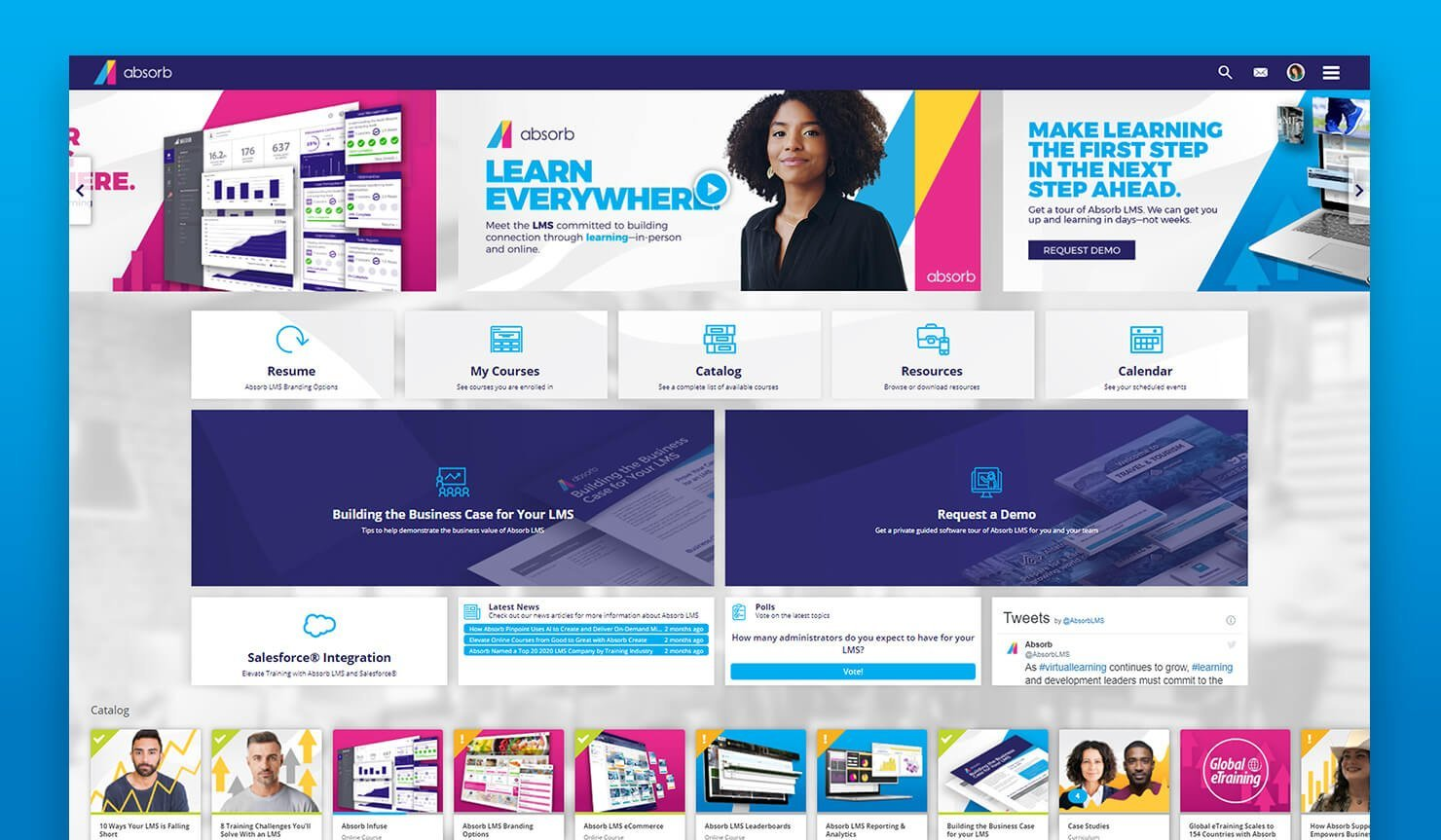
Absorb gives HR teams and learning leaders a flexible platform to deliver, track, and manage employee training programs, making it easier for organizations to build skills, ensure compliance, and support ongoing development at scale.
Who Is Absorb Best For?
Absorb is a strong fit for mid-size to enterprise organizations that need a scalable platform to manage structured learning programs across large or distributed workforces.
Why I Picked Absorb
I've included Absorb in my top picks because of how specifically it's built around the challenge of upskilling and reskilling at scale. What I like most is Absorb Skills, which uses AI to generate personalized learning paths based on each employee's self-assessment against nearly 200 competencies and 10,000 skills. In practice, that means my team can identify exactly where a software engineer or operations lead falls short on a given competency and auto-assign courses to close that gap—without manually curating content for every individual. The 20,000+ pre-tagged courses in the Amplify Max library make it easy to cover everything from digital literacy to leadership development without building content from scratch.
Absorb Key Features
- Compliance training management: Assign, track, and auto-renew mandatory compliance courses with automated reminders and completion records.
- Reporting and analytics dashboard: Monitor learner progress, course completion rates, and training ROI across teams and departments.
- Mobile learning app: Employees can access and complete training on iOS and Android devices, including offline course viewing.
- Instructor-led training (ILT) management: Schedule, manage, and track in-person or virtual instructor-led sessions alongside self-paced online courses.
Absorb Integrations
Integrations include ADP, BambooHR, Salesforce, Zoom, Microsoft Teams, Okta, Workday, LinkedIn Learning, SAP SuccessFactors, and Google Workspace.
Pros and Cons
Pros:
- Competency mapping helps identify and close skill gaps
- Certification rules simplify ongoing reskilling in regulated industries
- Supports SCORM/xAPI content for specialized skill-building modules
Cons:
- Social learning and collaboration features are less developed than some competitors
- Interface customization is somewhat limited
New Product Updates from Absorb
Absorb Expands Instructor-Led Course Session Management
Absorb adds multi-class sessions, recurring classes, conflict indicators, and learner enrollment during setup for instructor-led courses. These updates give admins more control over scheduling and session management. For more information, visit Absorb’s official site.
 .
.
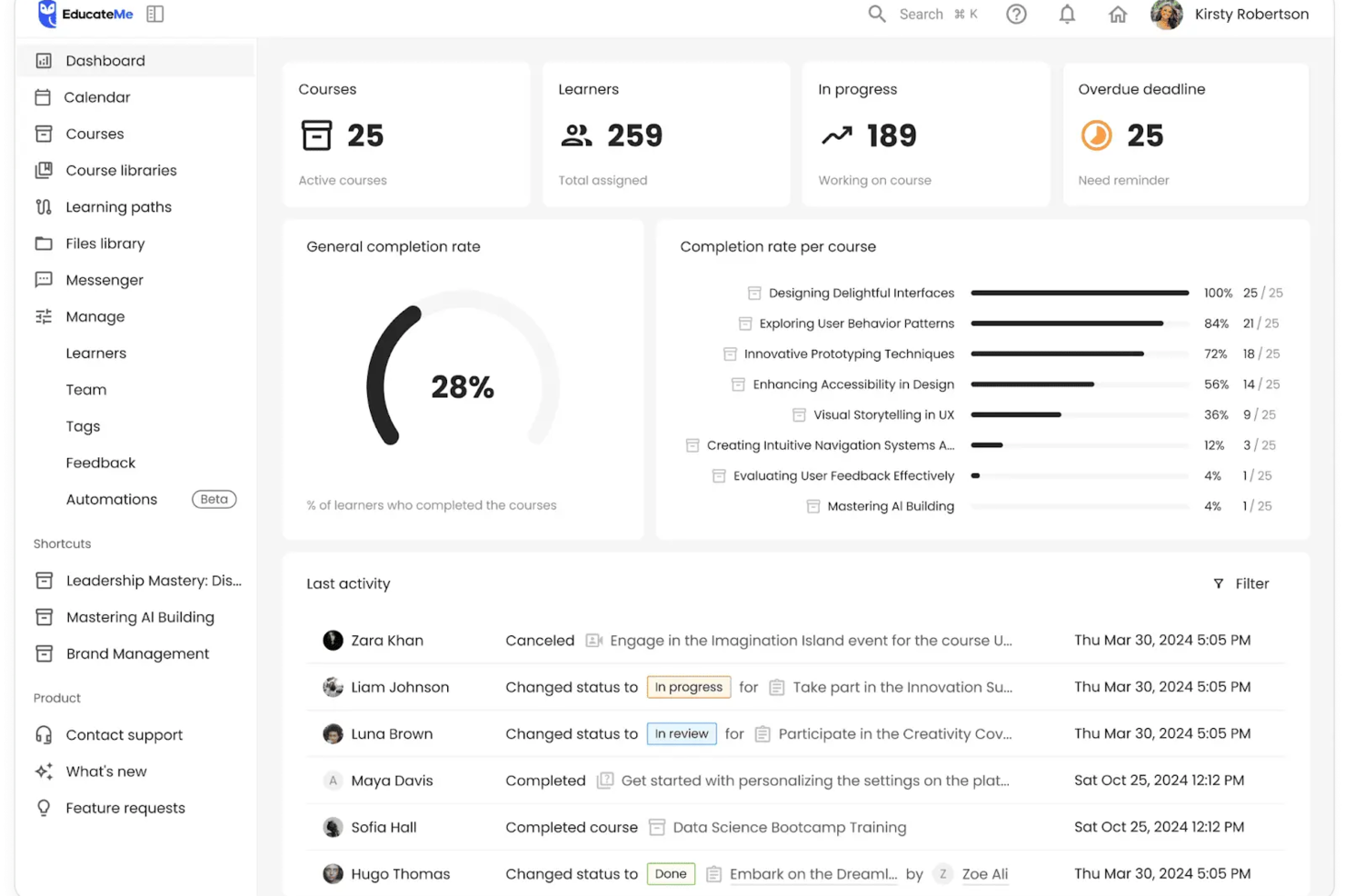
EducateMe LMS is a learning management platform designed for HR teams and business leaders who want to deliver engaging, interactive employee training that adapts to modern workplace needs.
Who Is EducateMe LMS Best For?
EducateMe LMS is a strong fit for mid-sized businesses and growing teams that need a structured, scalable way to build and deliver employee training programs.
Why I Picked EducateMe LMS
I picked EducateMe LMS as one of the best because of how it handles AI-driven practice scenarios for employee training. I like that learners can work through realistic, role-specific simulations that mirror actual workplace situations—like handling a difficult customer conversation or navigating a compliance decision. The AI generates dynamic responses based on learner input, so no two practice runs feel identical. I also use the branching scenario builder to design multi-path exercises that test decision-making without needing a developer to set them up.
EducateMe LMS Key Features
- Course builder: Create structured training courses using a drag-and-drop editor that supports video, quizzes, and text-based content.
- Progress tracking dashboard: Monitor individual and group learner progress, completion rates, and assessment scores in one view.
- Cohort-based learning: Organize learners into groups and deliver training on a shared schedule with collaborative assignments.
- Automated notifications: Send reminders and deadline alerts to learners and managers based on course activity and completion status.
EducateMe LMS Integrations
Integrations include Zoom, Slack, Google Calendar, Outlook Calendar, Stripe, BambooHR, Workday, HiBob, ADP Workforce Now, and Okta.
Pros and Cons
Pros:
- API access and single sign-on
- Supports SCORM-compliant course content
- AI-powered roleplay coaching simulations
Cons:
- Advanced setup may require support
- Minimum user requirement for pricing
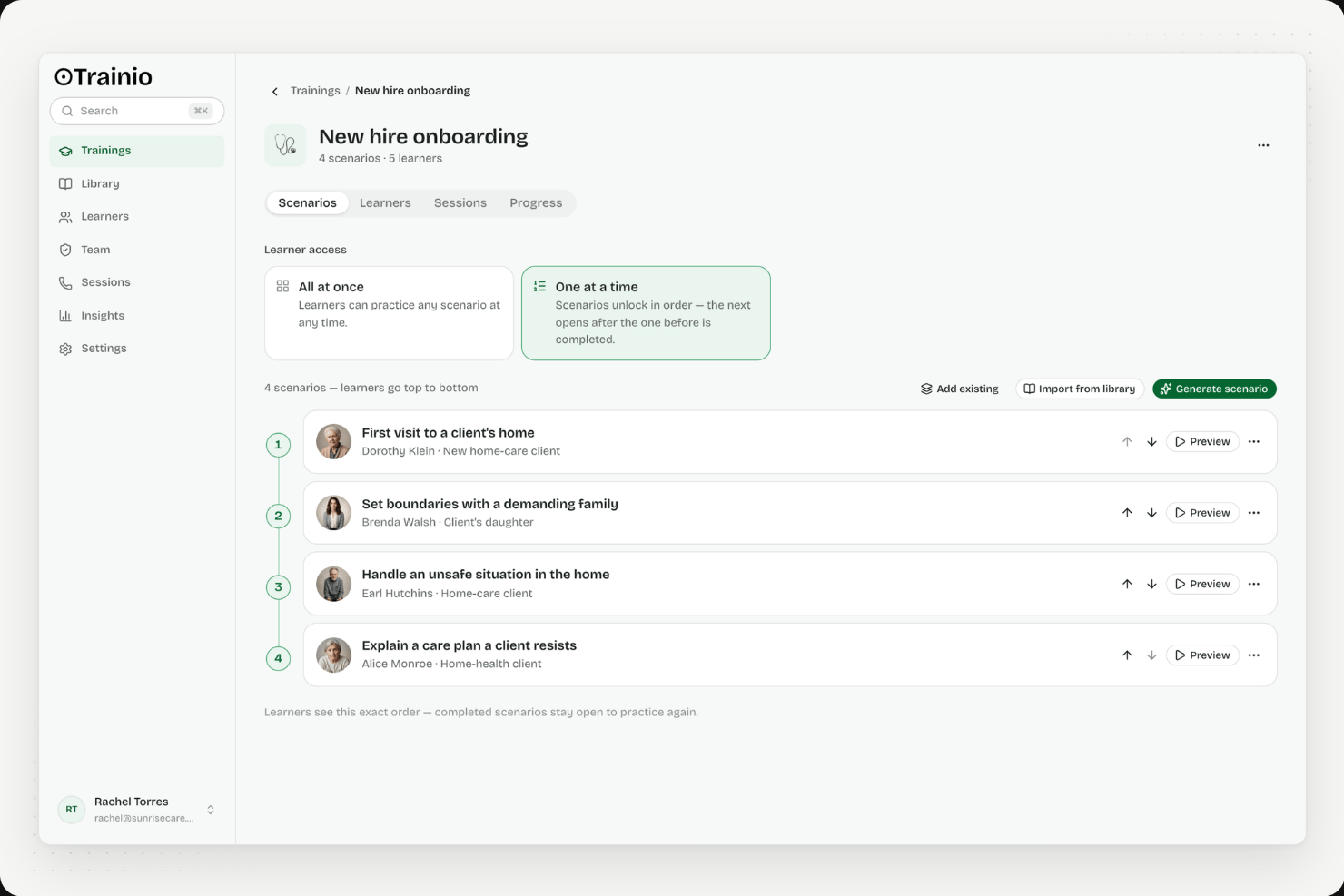
Trainio is an AI voice roleplay training platform purpose-built for healthcare teams, offering scenario-based practice, a knowledge hub, rubric-scored assessments, and learning path management.
Who Is Trainio Best For?
Trainio is a strong fit for healthcare organizations that need to train patient-facing staff on high-stakes conversational skills like de-escalation, patient intake, and crisis communication.
Why I Picked Trainio
I picked Trainio as one of the best because it's the only training platform I've seen purpose-built for the high-stakes conversational situations healthcare staff face every day. The AI voice roleplay engine covers scenarios like de-escalation, patient intake, and crisis communication, with AI personas that shift mood and behavior based on how a learner responds. Rubric-based scoring delivers instant, objective feedback after every session, and those transcripts double as audit-ready evidence for CARF and Joint Commission reviews.
Trainio Key Features
- Knowledge Hub: A central document repository where staff can upload and search SOPs, call scripts, protocols, videos, and PDFs, with an AI chatbot that answers questions using only your organization's uploaded content.
- Role-, team-, and location-based enrollment: Automatically assigns learning paths to staff based on their role, team, or care site, so new hires get the right scenarios from day one without manual setup.
- SCORM import: Brings existing training content into the platform alongside Trainio's native roleplay scenarios, keeping all training in one place.
- Learning path certificates: Issues completion certificates when staff finish a structured learning path, giving managers a trackable record of readiness.
Trainio Integrations
Trainio offers documented integrations with Slack, Zoom, and Google Calendar, plus SCORM import. Enterprise plans add HRIS integration, SSO, API access, and an MCP server, with Zapier also supported.
Pros and Cons
Pros:
- Rubric-based feedback removes trainer subjectivity
- Unlimited AI voice roleplay scenarios included
- Audit-ready transcripts for healthcare accreditation
Cons:
- Not suitable for non-healthcare training needs
- No traditional course or quiz authoring
Other Employee Training Software
Here are a few more employee training programs that are worth checking out if you need a few more options:
- Mitratech
For compliance-focused training
- Groundwork1
For email-based training
- Continu
With multilingual platform support
- LearnWorlds
For white-labeling training materials
- Seismic Learning
For sales-specific training and coaching
- LearnUpon
For educating both internal and external audiences
- Guidde
Training video creator with AI
- Thinkific
For progress and engagement reporting
- Skilljar
For driving product adoption through education
- Kallidus Learn
Employing training gamification & engagement tracking
- Docebo
For delivering AI-powered learning to any audience
- eloomi
With AI-powered features
- Bridge
For advanced course authoring
- Constructor Tech
LMS for its interactive learning approach
- GO1
For accessing a large library of eLearning courses
- Biz Library
For a large collection of business training materials
- Eduflow
For corporate training
- Compass
For interactive training guides
- PitchMonster
For practicing objection handling skills
- Leapsome
For closing the loop between learning, engagement, and performance
- Qooper
For bringing training, upskilling, reskilling and mentoring experience under one platform
- eduMe
For AI-powered content creation
- Mitratech Perform
For multimedia course creation & training
- SAI360
For compliance-focused training
- Synergy Learning
For customized training solutions
- ProProfs Training Maker
For adding quizzes and surveys to easy-to-use courses
- eFront
An enterprise learning management system engineered to support complex learning ecosystems
- Looop
A performance platform that allows learners to easily access support resources when they need them
- Trainual
For automated onboarding
- Tovuti
Offers over 40 different types of interactive and gamified training modules


Related HR Software Reviews
If you still haven't found what you're looking for here, check out these other related tools that we've tested and evaluated:
- HR Software
- Payroll Software
- Recruiting Software
- Employer of Record Services
- Applicant Tracking Systems
- Workforce Management Software
How I Evaluate Employee Training Software
I evaluate each platform on two levels: the baseline it must hit—course authoring, compliance tracking, learner reporting—and the differentiators that make one tool the right fit over another.
Core Functionality (Table Stakes For This List)
When I'm selecting tools for my list, I rank each one on a scale from 0 (does not offer the functionality) to 5 (excels in this area) for each core functionality listed below. Then, I calculate the tool's total score as a percentage. Each tool needs to achieve a minimum total score of 75% to be considered for inclusion.
- Course Authoring & Content Management: I look for native authoring tools that support multiple formats—SCORM, video, quizzes, documents—so your team can build onboarding modules or product training without a separate tool.
- Course Assignment & Learning Paths: Each platform should let you assign courses by role, team, or department and sequence them into structured paths, like a new manager curriculum that builds from fundamentals to advanced topics.
- Progress Tracking & Reporting: I check whether managers and admins can pull completion rates, quiz scores, and learner activity into dashboards or exportable reports that are useful for quarterly business reviews.
- Assessments & Certifications: The platform should support quizzes with pass/fail logic and generate certificates on completion—particularly important when you need to document skills verification for internal promotions or audits.
- Compliance & Recertification Management: I evaluate how each tool handles recurring training deadlines, automated reminders, and audit-ready records, such as annual safety training that requires proof of completion and renewal tracking.
- Employee-Facing Learning Portal: Your learners need a dedicated space to view assigned courses, track their own progress, and browse available training—platforms like Docebo and TalentLMS each approach this differently, but the baseline expectation is a clear, accessible learner experience.
Once I have a list of tools that meet the criteria, I consider what sets each platform apart.
Differentiating Factors (What Sets Vendors Apart)
Here's how I compare and contrast different vendors:
Standout Features
AI-driven personalization matters when you're managing training across hundreds of roles—I look for platforms that adapt learning paths based on skill gaps rather than just manual assignments. Mobile and offline access is a big differentiator for organizations with deskless or field-based workers who can't train at a desktop. I also evaluate whether a platform ties training to a skills and competency framework, which helps L&D teams connect course completions to real career development goals.
Beyond Features
HR tech stack integrations are a priority—I check whether the platform connects natively with your HRIS so employee data syncs automatically and enrollments trigger without manual work. Content library access is another key factor, since platforms that bundle or integrate with providers like Go1 or OpenSesame save your team from building every course from scratch. I also evaluate pricing structure, particularly whether it scales by active users or total headcount, which makes a real difference as your organization grows.
Training isn’t just about compliance. Start by understanding the company’s goals—whether hiring one or two people or scaling up globally—and tailor training to those objectives.
How to Choose Employee Training Software
To help you figure out which employee training software best fits your needs, you need to pinpoint your key users and document their specific challenges.
As you work through your own unique employee training software selection process, keep the following points in mind:
| Key Consideration | Description / What to Do |
|---|---|
| Problem to Solve | Identify the core challenges you’re trying to address to clarify the necessary features and functionality. |
| Users & Access | Determine who will use the software (e.g., HR admins, managers, employees), how many licenses are needed, and prioritize each group’s requirements. |
| Tool Compatibility | List tools to replace, keep, or integrate with (e.g., HRIS, LMS). Decide if integrations or an all-in-one platform make more sense. |
| Desired Outcomes | Define goals and success metrics—e.g., digitizing training, improving mobile access, or engagement—so you can evaluate tools based on outcomes, not just features. |
| Organizational Fit | Assess how the software fits existing workflows and systems, noting what works well and what needs improvement. |
| Final Tip | Every business is different—don’t assume one-size-fits-all; tailor the choice to your unique needs. |
Remember every business is different—don’t assume that an employee training system will work for your organization just because it's popular.
Trends in Employee Training Software
Employee training software has continued to evolve to match the changing needs of businesses and incorporate advances in new technologies such as artificial intelligence (AI), virtual reality (VR), and augmented reality (AR). Here's a quick look at the trends that are impacting training software development currently:
Employees need to see how training benefits them. If they don’t see the value for their own career, they won’t engage. Align training with their personal goals and connect it to the company’s broader strategy.
- Increased Emphasis on Personalized Learning Paths: There's a clear trend towards offering more personalized and adaptive learning experiences. Tools are increasingly leveraging AI to analyze employee performance and learning styles, tailoring content to meet individual needs. This personalization ensures that training is more relevant and engaging, directly addressing the learner's gaps and strengths.
- Integration of AR and VR for Immersive Learning: Augmented Reality (AR) and Virtual Reality (VR) are becoming more prevalent, providing immersive learning experiences that were once novel but are now increasingly in demand. These technologies offer hands-on training simulations which are especially beneficial for technical skills development, safety training, and soft skills enhancement.
- Gamification Elements for Increased Engagement: Gamification remains a key feature, with tools incorporating more sophisticated game-like elements to boost learner engagement and motivation. Badges, leaderboards, and rewards are evolving to be more integrated with the learning content, making them a critical part of the learning experience rather than an afterthought.
- Mobile Learning Capabilities: With remote work still prevalent, mobile accessibility has become a necessity rather than a luxury. Training software is increasingly designed to be mobile-first, ensuring that learners can access training materials anytime, anywhere, and from any device.
- Compliance and Certification Tracking: As regulatory requirements continue to evolve, the demand for features that track and manage compliance training and certifications has grown. This ensures that organizations remain compliant with industry standards and regulations.
These trends reflect a broader shift in the employee training software market towards creating more engaging, personalized, and effective learning experiences.
To help you make sure your learning strategy takes advantage of these growing trends, you may want to brush up on the latest employee learning trends as well.
What is Employee Training Software?
Employee training software is a digital platform that helps HR teams and managers create, deliver, and track employee learning programs.
It’s used to streamline training, improve skills development, and ensure compliance—especially for teams overwhelmed by manual tracking, inconsistent learning experiences, or scattered resources.
Key Features of Employee Training Software
When selecting employee training software, keep an eye out for the following key features:
- Course management: Organize, schedule, and update training materials seamlessly so you can keep content current and your team engaged. This helps you deliver a structured learning experience and quickly roll out new topics or compliance requirements.
- User progress tracking: Monitor each employee’s progress through courses, giving you insight into who’s thriving and who might need a nudge. This lets you personalize support and celebrate milestones every step of the way.
- Assessment tools: Create quizzes, tests, and interactive assignments to gauge learning and retention. These tools make it easier to spot knowledge gaps and measure training effectiveness—without turning feedback into a guessing game.
- Customizable learning paths: Tailor training journeys for different roles, departments, or individual career goals. By letting you adjust the content, employees get a learning experience that actually fits what they do—and what they hope to do next.
- Reporting and analytics: Generate reports on participation, completion rates, and test scores with just a few clicks. Clear analytics let you spot trends, identify improvement opportunities, and prove the real impact of your training investment.
- Content library: Access a built-in repository of training materials, templates, or even industry-specific modules. A rich library means you don’t always have to reinvent the wheel but can adapt high-quality content to suit your needs.
- Mobile accessibility: Enable employees to learn on the go, whether they’re in the field or at home. Mobile-friendly training breaks down barriers and respects the busy, flexible lives your team already leads.
- Integration capabilities: Connect the software with your HR systems, CRMs, or other workplace tools. Integrations help you keep data in sync and automate parts of the training lifecycle, saving you time and reducing manual work.
- Certification programs: Award certificates and badges after course completion. These credentials motivate employees, recognize achievement, and can even help with compliance needs.
Common Employee Training Software AI Features
Beyond the standard employee training software features listed above, many of these solutions are incorporating AI with features like:
Natural language chatbots: Answer employee questions and help troubleshoot issues 24/7, providing instant support and guidance throughout the learning process.
Personalized learning recommendations: Suggest tailored courses and resources based on each employee’s learning history, goals, and performance—so nobody gets stuck with one-size-fits-all training.
Automated content generation: Create quizzes, training modules, or learning materials in moments with AI-powered authoring tools, cutting down development time while keeping content fresh and relevant.
Intelligent skill gap analysis: Instantly analyze workforce data to spot where employees need more support or new skills, helping you build smarter, more targeted training plans.
Adaptive assessments: Adjust quiz difficulty and content in real-time based on how a learner is performing, ensuring that every assessment is engaging and appropriately challenging.
Benefits of Employee Training Software
Investing in technology to enhance your employee training program is a strategic move that can yield substantial benefits for both users and organizations. Here are several benefits you can expect to gain by investing in the best employee training software for your unique needs:
- Centralized Learning Resources: By offering a single repository for all training materials, employee training software simplifies access and organization. This centralization ensures that employees can easily find and utilize resources, saving time and reducing frustration.
- Personalized Learning Paths: Advanced training software allows you to create customized training programs that match the needs and skill levels of individual employees. This level of personalization enhances the learning experience, making it more relevant and effective for each user.
- Enhanced Engagement Through Gamification: Many platforms incorporate gamification elements, such as points, badges, and leaderboards. Gamification increases engagement and motivation, making the learning process more enjoyable and compelling.
- Flexible and Accessible Learning: Employee training software often supports mobile learning, allowing users to access training materials anytime, anywhere. This flexibility accommodates diverse schedules and learning preferences, facilitating continuous learning outside the traditional classroom setting.
- Cost-Effective Training Solutions: By reducing the need for in-person training sessions, travel, and printed materials, employee training software can significantly lower training costs. The efficiency and effectiveness of digital training also contribute to a better return on investment.
As you can see, investing in a training platform can streamline the administrative aspects of training management and enhance the learning experience for employees, leading to improved performance and job satisfaction.
Costs & Pricing for Employee Training Software
Let's be honest. Often it all comes down to price. Since employee training software is modular by design, most of the software vendors in this list only provide pricing details upon request, since they'll customize the software for your needs. To get more details on their pricing plans, I encourage you to visit their website and request a customized quote.
However, to help you get a more realistic idea of how much employee training software will cost, I've put together a summary table that explains the different plans and pricing structures for different organizational needs, sizes, and budgets.
Plan Comparison Table for Employee Training Software
| Plan Type | Average Price | Average Price per User | Common Features |
|---|---|---|---|
| Free | $0 | Access to basic training modules, limited user capacity, and basic progress tracking | |
| Basic | $100 - $500 per month | $2-$10 per user/month | Customizable training programs, analytics and reporting, email support, and up to 50 users |
| Standard | $500 - $1,500 per month | $2-$20 per user/month | Advanced reporting, integration capabilities, phone and chat support, and up to 250 users |
| Premium | $1,500 - $5,000 per month | $2-$20 per user/month | White labeling, advanced integration, dedicated account manager, up to 500 users, and custom development options |
| Enterprise | Custom Pricing | Custom Pricing | Customizable features and integrations, personal customer success manager, unlimited users, on-site training, and priority support |
When evaluating these options, consider both the per-user cost and the overall value each plan offers in terms of features and support. This dual perspective ensures you're not only choosing a cost-effective solution but also one that meets your organization's training needs comprehensively.
I also recommend requesting a free trial or demo of each software too. That way, you can get a hands-on sense of their software before you invest too much time into it.
Frequently Asked Questions
Still wondering how employee training software works and what it has to offer? These answers to frequently asked questions are a good place to start:
What integrations should I look for when choosing employee training software?
When evaluating training platforms, look for integrations with your HRIS, performance management, and communication tools like Slack or Microsoft Teams. These let you sync employee data, automate user provisioning, track learning impact, and streamline reporting. Integration with content libraries or single sign-on can also save your team time and boost adoption.
How secure is employee training data in most platforms?
Employee training platforms usually offer strong security features such as data encryption, secure cloud hosting, and role-based access. Look for platforms with compliance certifications like SOC 2, ISO 27001, or GDPR support if you operate in regulated regions.
Ask vendors about their data privacy policies and how they protect sensitive employee information.
How do employee training platforms support ongoing compliance tracking?
Most leading solutions track course completion, certification renewals, and policy acknowledgments in real time. You can set up automated reminders and generate compliance reports for audits.
For industries with strict regulations, look for customizable compliance dashboards and the ability to attach evidence or certificates.
Can employee training software automate reminders and progress tracking?
Yes, many platforms automate reminders for incomplete courses and notify employees of upcoming deadlines or expiring certifications. Progress tracking dashboards help both learners and managers monitor status, completion rates, and identify gaps. Automation features free HR and L&D teams from manual follow-up.
What types of content formats do employee training tools typically support?
Modern training software supports video, audio, SCORM and xAPI courses, PDFs, quizzes, webinars, and interactive modules. Some tools also allow microlearning, gamification, and the creation of mobile-friendly content. Make sure your chosen platform aligns with your team’s existing materials and future needs.
Can these systems accommodate different languages for global teams?
Yes, most employee training platforms support multiple languages and localization settings. This capability is critical for multinational corporations looking to provide consistent training across diverse geographic locations.
When buying for global teams, check if the software can translate both interface and content, manage regional compliance, and allow for multi-language assessments. Test usability with sample content to ensure accessibility for all users.
Can these platforms be customized for specific industries?
Many platforms offer templates, compliance modules, and content libraries tailored to specific sectors like healthcare, finance, manufacturing, or retail. Beyond that, most systems offer additional customization options, meaning you can adapt courses, simulations, and assessments to reflect industry-specific standards, regulations, and practices.
Ask vendors if they can adapt features and course materials to reflect your industry’s regulations, terminology, and workflows. This level of personalization can enhance learning engagement and effectiveness, ensuring employees receive the most relevant and impactful training possible. It can also accelerate onboarding and compliance for your workforce.
What's the difference between an employee training system and a learning management system?
While the terms are often used interchangeably, employee training software and learning management systems (LMS) serve slightly different purposes.
Employee training systems (sometimes called training management systems) are built for internal teams to organize, deliver, and track mandatory training. These tools focus on compliance, training administration, and scheduling—especially for health and safety courses or onboarding programs that must meet industry regulations.
On the other hand, learning management systems are more learner-centric. They’re designed to support ongoing development and boost engagement by giving employees access to optional, skill-building content. LMS platforms often include interactive features like social learning tools, discussion forums, and self-guided learning paths to create a richer learning experience.