

10 Best Payroll Software for Remote Teams in 2026

Best Payroll Software for Remote Teams Shortlist


Payroll software for remote teams lets you pay employees and contractors across different locations—handling taxes, compliance, and currencies in one system. If you’re supporting a distributed workforce, you need tools that remove the headaches of global payroll, minimize compliance risks, and help you stay organized as your team grows. In this guide, you’ll find expert-vetted payroll solutions that make remote work possible—plus practical picks for specific cross-border and compliance needs. You’ll be able to compare features, see what makes each tool unique, and choose the best platform for your remote team’s success.
Why Trust Our Software Reviews
Our team has been testing and reviewing software since 2012. As HR experts ourselves, we know how difficult—and important—it is to choose the right software.
For this guide, we evaluated tools using hands-on testing and independent research, scoring tools using our selection criteria. We also draw on insights from industry thought leaders and practicing HR experts.
Our reviews reflect our human editorial judgment, not a sales pitch.
Expert reviewers:
Payroll Software for Remote Teams Comparison Table
This comparison table summarizes pricing details for my top payroll software for remote teams selections:
| Tool | Best For | Trial Info | Price | ||
|---|---|---|---|---|---|
| 1 | Best for 24/7 global payroll customer support | Free demo available | From $29/employee/month | Website | |
| 2 | Best for contractor-to-EOR compliance in one plan | Free demo available | From $399/employee/month | Website | |
| 3 | Best automation for cross-border payments | Free demo available | From $579/month | Website | |
| 4 | Best pay cycle flexibility for international teams | Free demo available | Pricing upon request | Website | |
| 5 | Best for global legal entity coverage | Free demo available | Pricing upon request | Website | |
| 6 | Best for proactive labour law monitoring | Free demo available | From $699/user/month | Website | |
| 7 | Best for built-in country-specific documentation | Free demo available | From $599/user/month | Website | |
| 8 | Best for global remote benefits administration | Free demo available | From $699/employee/month | Website | |
| 9 | Best for rapid onboarding in new markets | Free demo available | From $459/user/month (billed annually) | Website | |
| 10 | Best for global entity management | Free demo available | From $399/employee/month | Website |


Best Payroll Software for Remote Teams Reviews
Below are my detailed summaries of the best payroll software for remote teams that made it onto my shortlist. My reviews offer a detailed look at the features, pricing, and integrations of each platform to help you find the best one for you.

Best for 24/7 global payroll customer support
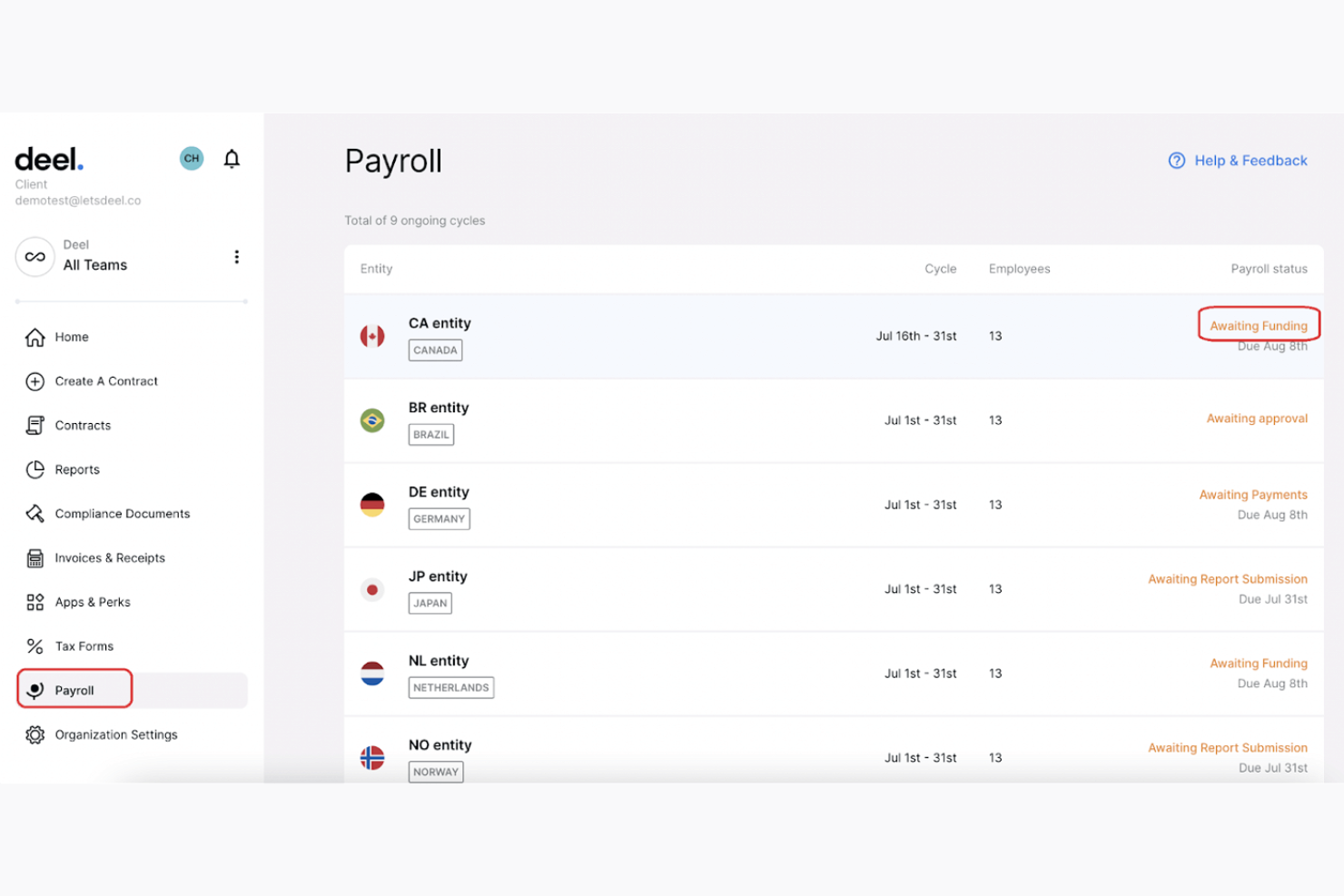
Deel Payroll is a global payroll platform that runs multi-country pay, contractor management, EOR employment, and compliance through a single system built on its own owned legal entities and payroll infrastructure.
Who Is Deel Payroll Best For?
Deel Payroll is a strong fit for globally distributed companies that need to pay both employees and contractors across multiple countries from a single platform.
Why I Picked Deel Payroll
Deel Payroll earns its spot on my shortlist because of how it handles support for globally distributed teams: 91% of issues are resolved at first contact via live chat, and most EOR and contractor issues are closed in around six minutes. That matters when you're processing payroll across a dozen time zones and something breaks at midnight. I also appreciate that the support team is made up of 2,000+ in-house experts across payroll, legal, and compliance, not outsourced generalists.
Deel Payroll Key Features
- Global tax compliance engine: Automates calculations, withholdings, and statutory filings for each worker’s local laws.
- Owned entity payroll infrastructure: Runs payroll through Deel’s legal entities in 150+ countries, not third-party partners.
- Flexible payout options: Supports payments via local bank transfer, Wise, PayPal, and even crypto in select regions.
- Automated contractor classification: Flags compliance risks and generates local-compliant contracts and tax documents during onboarding.
Deel Payroll Integrations
Deel Payroll offers integrations with QuickBooks, Xero, BambooHR, Expensify, NetSuite, Sage Intacct, Greenhouse, Workday, SAP, and ADP, among others available through its app store. It also connects with Zapier and provides an API for custom integrations.
Pros and Cons
Pros:
- Handles EOR, contractors, and payroll in one place
- 24/7 global customer support coverage
- Owned legal entities in 150+ countries
Cons:
- Can feel oversized for very small remote teams
- Complex setup for large multi-country migrations

Best for contractor-to-EOR compliance in one plan
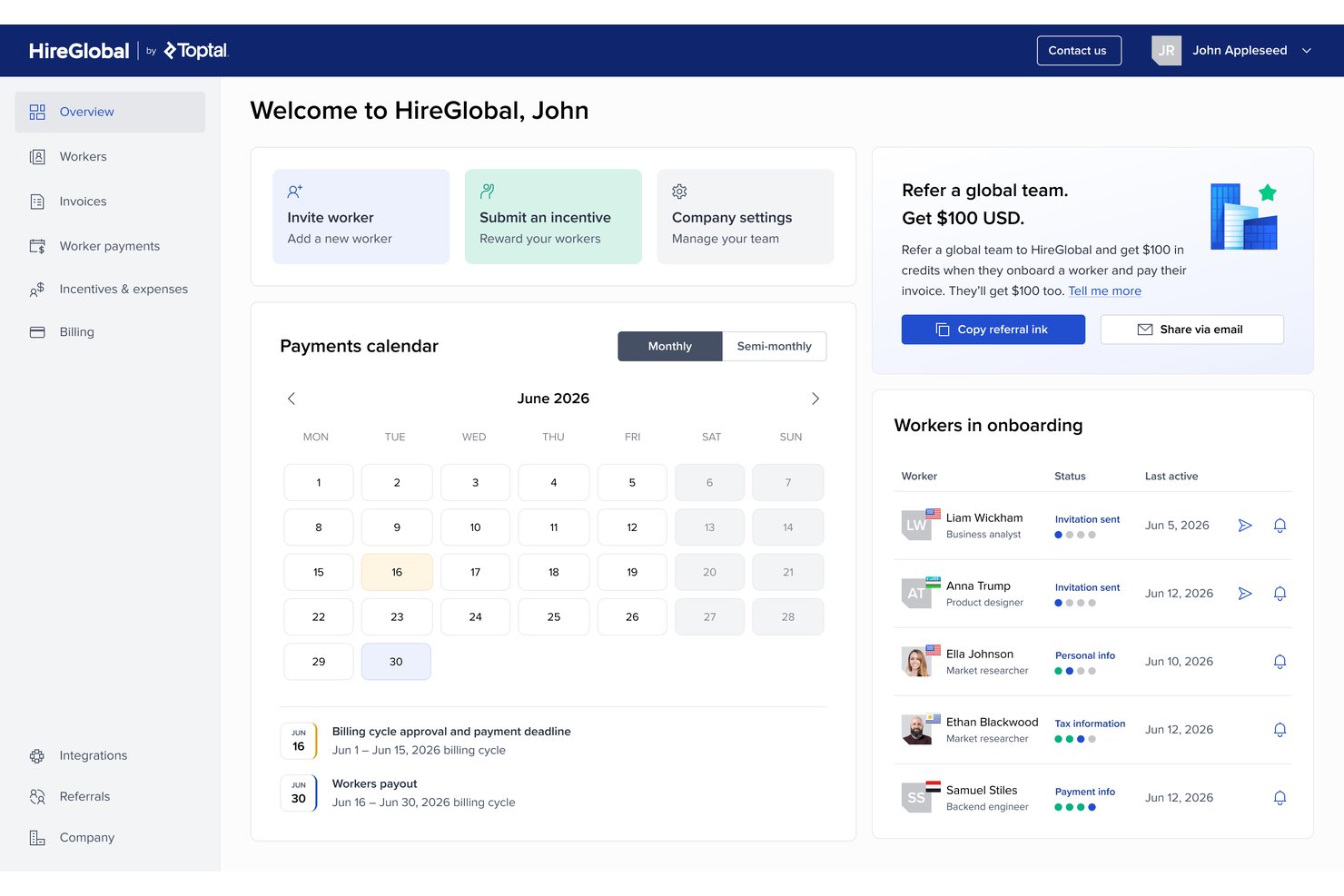
HireGlobal is a global payroll and workforce compliance platform by Toptal that manages contractor payments, multi-currency payroll, and employment across three engagement tiers—Agent of Record, Virtual Employer of Record, and Employer of Record—in 180+ countries.
Who Is HireGlobal Best For?
HireGlobal is a strong fit for remote-first teams that need to manage both contractors and full-time employees across borders without juggling multiple vendors.
Why I Picked HireGlobal
HireGlobal earns its spot on my shortlist because it's the only platform I've seen that moves a worker from contractor to Virtual Employer of Record status within a single plan, without switching vendors. I particularly like the $1 million compliance indemnification per V-EOR worker, which means if a contractor engagement is later flagged as misclassified, HireGlobal covers the legal and financial fallout. The built-in Agent of Record tier also handles compliant contracts and payroll for contractors at $49 per worker per month, so you're not paying EOR rates until the engagement actually warrants it.
HireGlobal Key Features
- Centralized HRIS dashboard: Manage hiring, payroll, benefits, and compliance for contractors and employees across 180+ countries from one platform.
- $1M compliance indemnification: The V-EOR tier covers up to $1 million per worker in legal and financial costs if a classification dispute arises.
- Automated statutory filings: HireGlobal handles country-specific tax filings and compliance updates across all supported jurisdictions automatically.
- 40+ in-house lawyers: A dedicated legal team reviews contracts, monitors regulatory changes, and supports compliance questions across global markets.
HireGlobal Integrations
HireGlobal has a documented integration with TopTracker.
Pros and Cons
Pros:
- Manages contractors and employees in one platform
- $1 million per-worker indemnification for misclassification
- Covers 180+ countries with multi-tier compliance
Cons:
- Limited independent review history since 2025 launch
- No native integrations with major HR tools

Best automation for cross-border payments
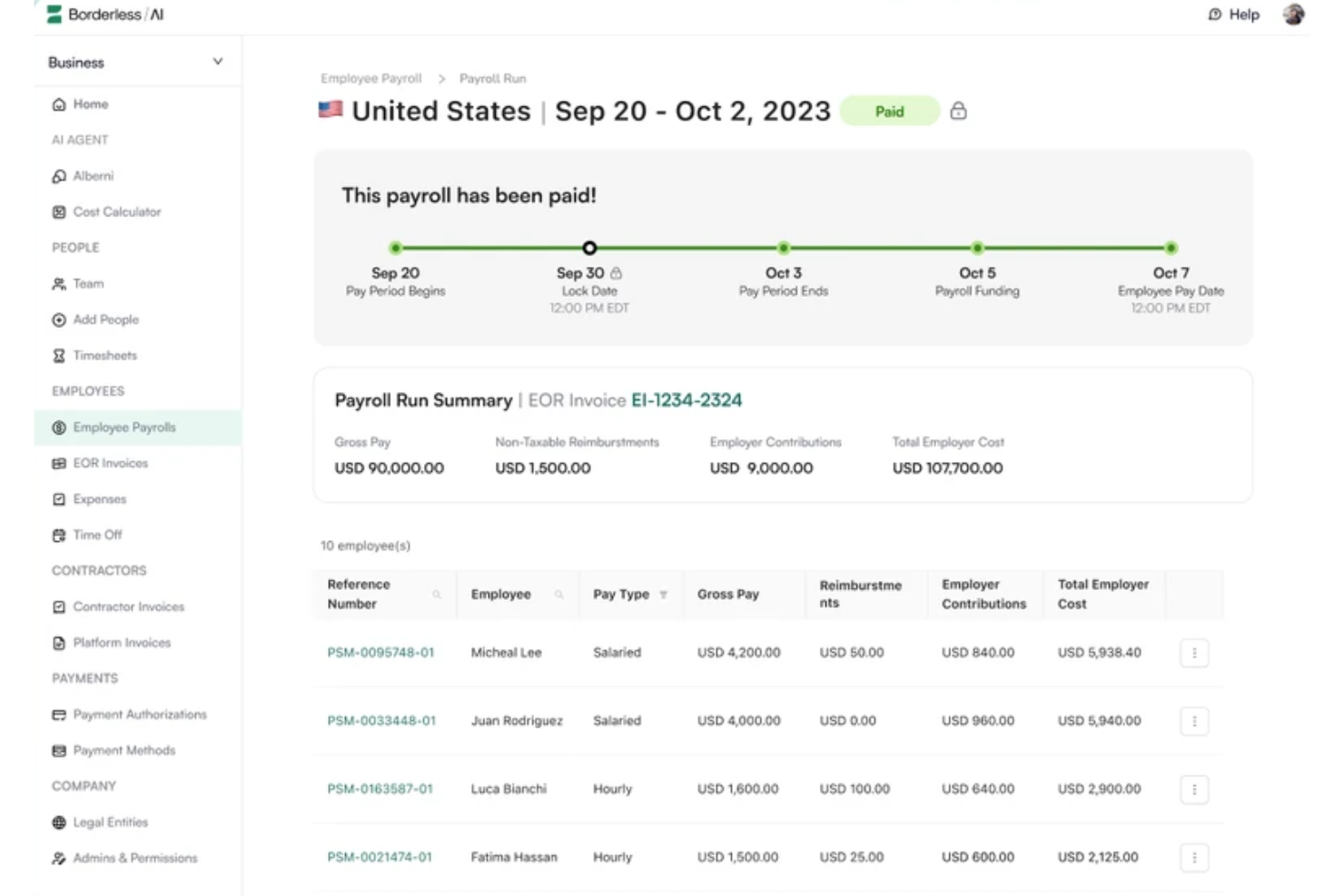
Borderless AI is an AI-native EOR and contractor management platform that handles global hiring, payroll, and compliance across 170+ countries using automated contract generation and built-in AI tools.
Who Is Borderless AI Best For?
Borderless AI is a strong fit for startups and scale-ups hiring contractors and full-time employees across borders who need automated, compliant payroll without manual overhead.
Why I Picked Borderless AI
I've included Borderless AI in my top picks because its cross-border payment automation is genuinely a cut above. Through its Nium partnership, the platform pulls funds from your bank in as little as 20 minutes and disburses payments across 90+ currencies, without requiring salary deposits upfront. I also like how configurable the approval and payment workflows are directly inside the platform, with no custom development needed. That combination makes it one of the most hands-off payroll options for teams running remote talent across multiple countries simultaneously.
Borderless AI Key Features
- AI contract generator: Automatically generates locally compliant employment contracts using AI, based on the worker's country and role type.
- HRGPT: An AI assistant that answers country-specific HR and compliance questions directly within the platform.
- Local benefits administration: Sets up country-specific benefits packages, including health insurance and statutory leave, based on local labour standards.
- 100% owned entity network: Borderless AI holds its own legal entities across all 170+ supported countries, with no third-party partners involved.
Borderless AI Integrations
Borderless AI is live on the ADP Workforce Now Marketplace, with BambooHR and Greenhouse also referenced as active integrations. An open API is available for custom connections, but the native integration ecosystem is still limited compared to larger competitors in the space.
Pros and Cons
Pros:
- Same-day onboarding available in 170+ countries
- Built-in misclassification risk detection tools
- AI agent Alberni automates cross-border payments
Cons:
- Fewer country-specific benefits options available
- Relatively new vendor with limited track record
New Product Updates from Borderless AI
Borderless AI Enhances Nium Onboarding and Payroll Workflows
Borderless AI enhances Nium onboarding, payroll adjustment requests, Cayman Islands payroll support, and actionable document workflows to simplify onboarding and payroll management. For more information, visit Borderless AI's official site.
 .
.
Best pay cycle flexibility for international teams
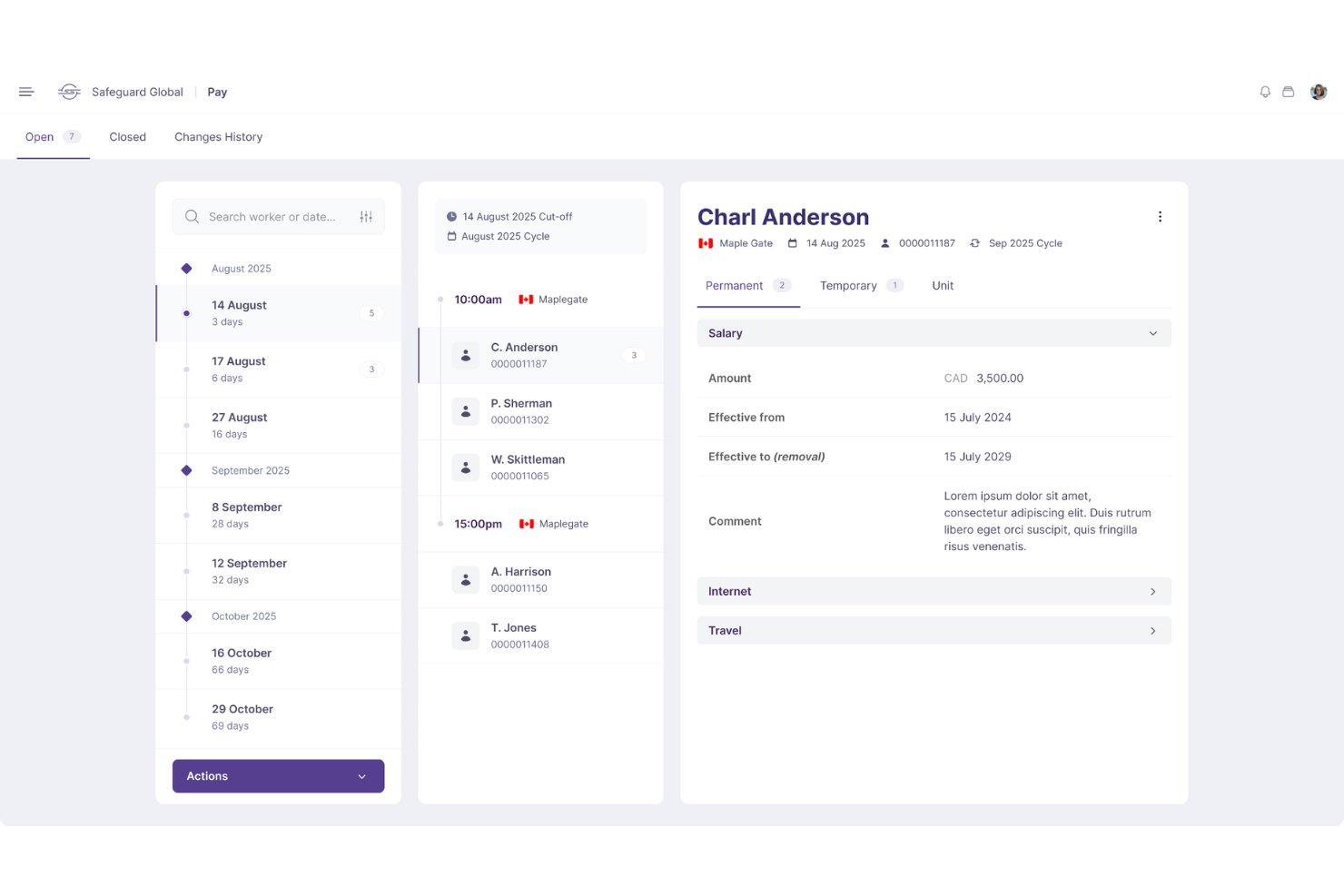
Built for companies with distributed workforces, Safeguard Global handles multi-country payroll, EOR, contractor management, and HR services across 187 countries.
Who Is Safeguard Global Best For?
HR and finance teams managing international payroll across regions with inconsistent pay schedules will get the most value from Safeguard Global.
Why I Picked Safeguard Global
I picked Safeguard Global as one of the best because of how it handles the reality that international teams rarely run on the same pay schedule. Its unified payroll calendar gives you full visibility into every country's pay cycle and cutoff dates, all adjusted to your time zone, which means you're not juggling separate tools or spreadsheets for teams in different regions. I also like that the platform lets you submit payroll changes, track entitlements, and add pay elements like bonuses and salary adjustments at the individual employee level, so you're not locked into one-size-fits-all pay runs. A single dashboard shows you every country's payroll, costs, and deadlines, with instant visibility into headcount spend by country, region, or role.
Safeguard Global Key Features
- EOR services: Safeguard Global acts as the legal employer in 187 countries, managing local contracts, benefits, and tax filings on your behalf.
- Multi-currency payroll: Pay employees in their local currency across multiple countries within a single payroll run.
- Contractor management: Manage contractor onboarding, payments, and compliance documentation from one platform.
- In-country compliance support: Access local experts who handle statutory filings, labour law updates, and year-end reporting per country.
Safeguard Global Integrations
Safeguard Global offers a limited set of native integrations, with Workday as its only clearly documented native integration. An API is available for custom integrations through their partner program.
Pros and Cons
Pros:
- In-country multilingual HR experts on staff
- Over 17 years of global payroll expertise
- Flexible pay cycles tailored per country
Cons:
- Reporting dashboards lack real-time data updates
- No publicly listed pricing on website

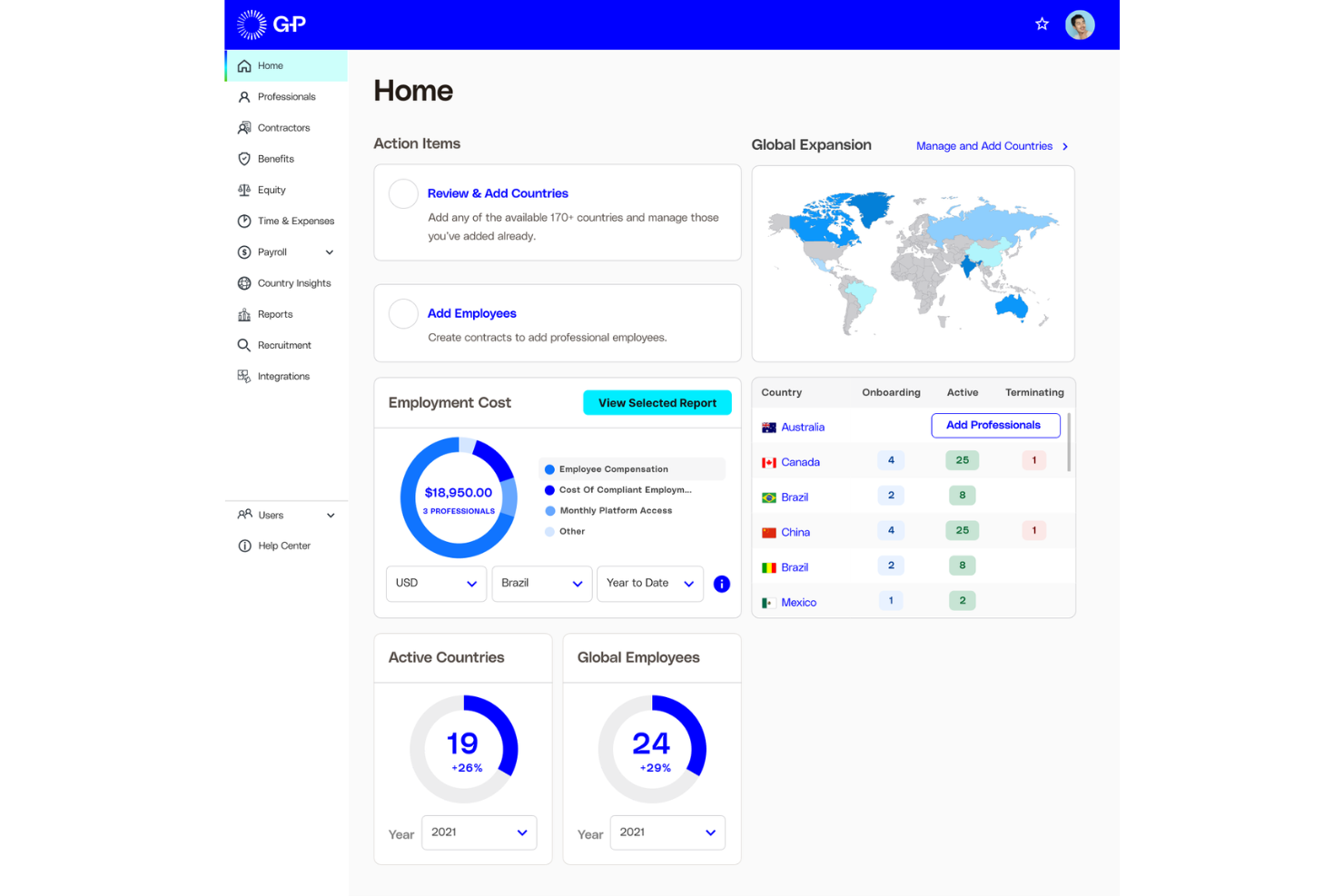
Globalization Partners (G-P) is a global EOR and payroll platform that lets you hire, pay, and manage full-time employees and contractors across more than 180 countries through its own owned legal entities.
Who Is Globalization Partners (G-P) Best For?
G-P is a strong fit for enterprise HR and legal teams that need fully owned legal entities—not partner networks—to hire compliantly across a large number of countries.
Why I Picked Globalization Partners (G-P)
G-P earns its spot on my shortlist because its fully owned legal entity network across 180+ countries is genuinely rare in this space. Most EOR providers rely on in-country partners for at least some regions, but G-P owns the entities directly, which tightens compliance accountability and shortens hiring timelines. I also like that its G-P Meridian platform includes built-in contract generation with locally compliant employment terms, so there's no scrambling to validate documents for a new market.
Globalization Partners (G-P) Key Features
- Global Compliance Engine: G-P's proprietary engine automatically applies local labour laws to contracts, payroll, onboarding, and offboarding across 180+ countries.
- Locally competitive benefits administration: Offer and manage country-specific benefits packages that align with local standards and statutory requirements in each employee's location.
- Reporting and analytics: Access real-time HR data insights and build custom reports to monitor your global workforce operations.
- G-P Gia™: An AI-powered HR assistant that generates compliant contracts, offer letters, and HR documents based on over 100,000 expert-vetted articles.
Globalization Partners (G-P) Integrations
G-P offers native integrations with ADP TotalSource, ADP Workforce Now, Paylocity, BambooHR, HiBob, Personio, SAP SuccessFactors, SAP BTP, TriNet, and UKG Pro, plus Workday, UKG Ready, and SSO connections through Google Workspace, Microsoft Entra ID, and Okta/Auth0. An API is also available for building custom integrations.
Pros and Cons
Pros:
- Centralized dashboard for payroll and contracts
- AI-powered compliance guidance via G-P Gia
- Owned legal entities across 180+ countries
Cons:
- Limited platform customization for local policies
- Lacks automated off-cycle payout
Remote
Best for proactive labour law monitoring
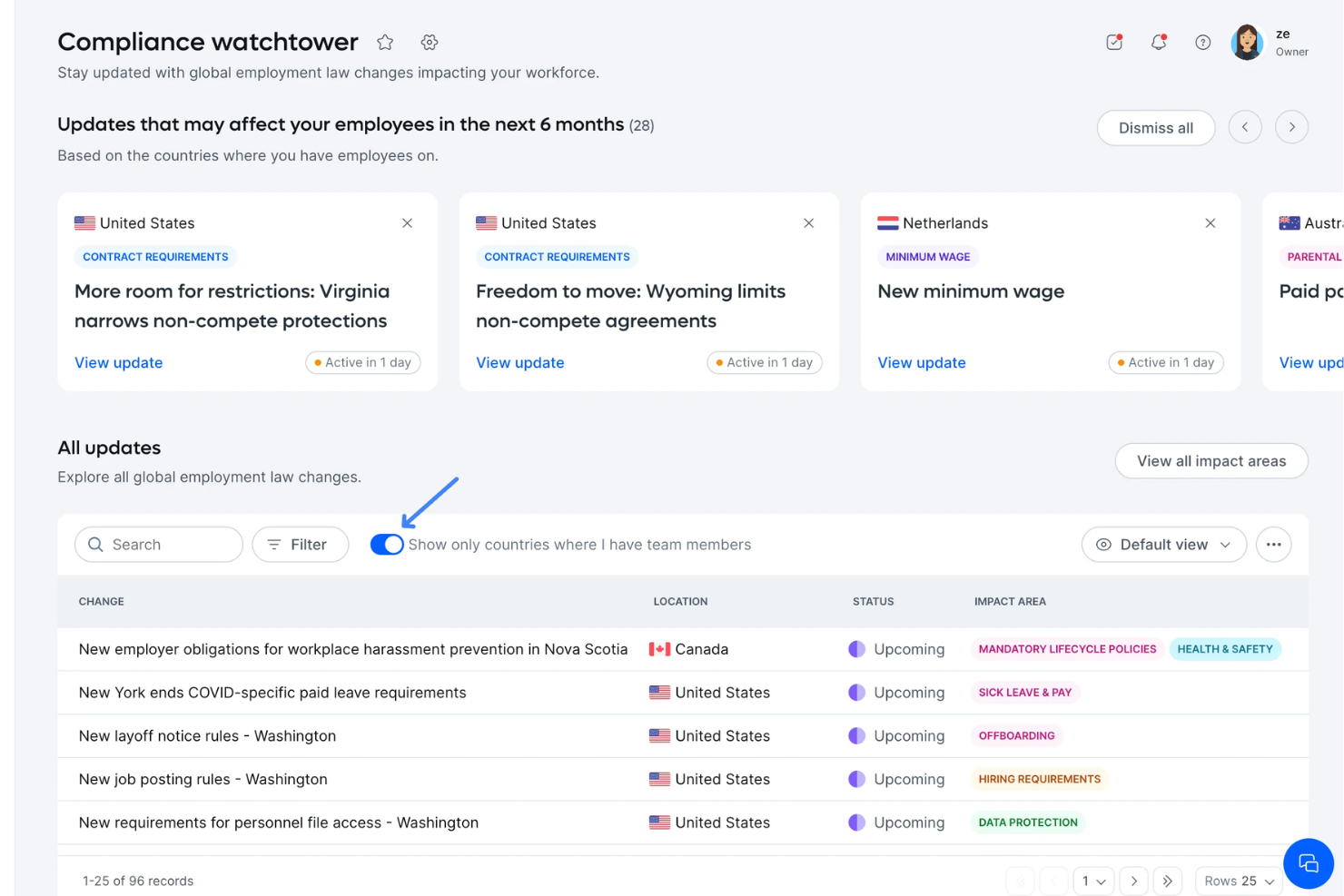
Remote is a global HR and payroll platform that handles full-time employee payroll, contractor payments, employer of record services, and benefits administration across 200+ countries through its own owned legal entities.
Who Is Remote Best For?
Remote is a strong fit for scaling companies that need to hire and pay full-time employees across multiple countries without setting up local legal entities.
Why I Picked Remote
Remote earns its spot on my shortlist because of how it handles labour law changes across countries without requiring my team to track legislation manually. What I like most is Remote's Country Explorer, which documents employment requirements, termination rules, and statutory benefits by country, so I always know what's legally required before making a hire. Remote also pushes automatic compliance updates when local laws change, adjusting employment contracts and payroll calculations accordingly. That level of built-in legal monitoring is hard to replicate without a dedicated in-country legal team.
Remote Key Features
- Global payroll processing: Run payroll for full-time employees across 200+ countries from a single dashboard, with local currency disbursements.
- Contractor management: Onboard and pay international contractors with locally compliant contracts generated directly in the platform.
- Benefits administration: Configure country-specific benefits packages, including health insurance and pension contributions, through Remote's built-in benefits tools.
- Expense management: Employees submit expense reports directly in Remote, and approved reimbursements are processed through the next payroll cycle.
Remote Integrations
Remote offers a smaller set of native integrations compared to some competitors, including BambooHR, Greenhouse, Slack, QuickBooks, Xero, NetSuite, Workday, Gusto, HiBob, and Personio. It connects with Zapier and has an API for custom integrations.
Pros and Cons
Pros:
- Includes comprehensive global health plans
- Built-in IP protection for global hires
- Owns legal entities in most covered countries
Cons:
- Excludes proprietary tax withholding modules
- Benefits customization depth varies by region

Best for built-in country-specific documentation

Atlas HXM is a direct employer of record platform that handles international hiring, EOR payroll, compliance, benefits, and employee onboarding across 160+ countries without requiring a local entity.
Who Is Atlas HXM Best For?
Atlas HXM is a strong fit for mid-sized to enterprise companies hiring full-time employees across multiple countries who need locally compliant documentation built into the process.
Why I Picked Atlas HXM
I've included Atlas HXM in my top picks because its country-specific documentation goes deeper than most EOR platforms I've seen. Each country page covers employment contracts, notice periods, severance rules, public holidays, social security contributions, and visa types in detail, all within the platform. I also like that locally compliant employment contracts are generated in the employee's native language as part of the onboarding flow, which removes a step that typically requires external legal review. That built-in documentation layer makes a real difference when you're hiring across 10+ countries simultaneously and need compliance documentation ready without going outside the platform.
Atlas HXM Key Features
- AI-powered payroll analytics: The platform uses AI to analyze payroll and people data, generating predictions about upcoming business needs and headcount costs.
- Off-cycle payroll processing: Manage, amend, and submit off-cycle payroll requests directly within the platform, alongside standard pay cycle approvals.
- Global employee cost calculator: A built-in tool that calculates the true cost of hiring in a given country, factoring in local taxes, benefits, and contributions.
- Learning and development access: Employees can access 9,000+ courses, professional certificates, and degree programs from within the platform as part of their benefits package.
Atlas HXM Integrations
Atlas HXM offers a smaller set of native integrations compared to competitors like Deel or Rippling, including BambooHR, Workday, and SAP SuccessFactors. An API is available for custom integrations.
Pros and Cons
Pros:
- Dedicated HR consultant assigned to each employee
- EOR model with no third-party dependencies
- Country-specific contracts generated automatically
Cons:
- Lacks automated payroll verification logs
- The platform interface can feel unintuitive

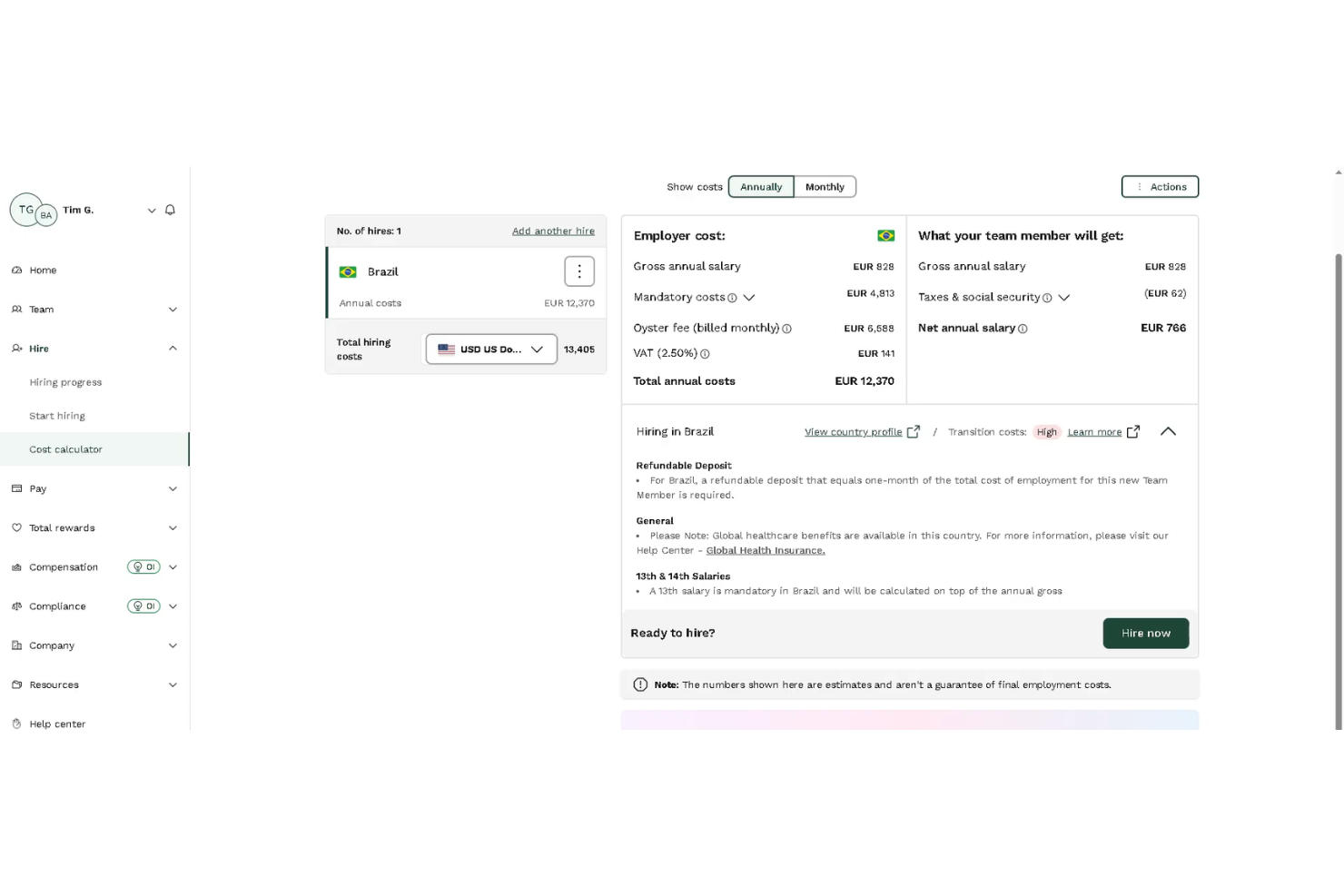
Oyster is a global employer of record and payroll platform that lets companies hire, pay, and manage full-time employees and contractors across 180+ countries without setting up local legal entities.
Who Is Oyster Best For?
Oyster is a good fit for HR teams at remote-first companies that need to offer locally competitive benefits packages to employees spread across multiple countries.
Why I Picked Oyster
I picked Oyster as one of the best because its benefits administration goes well beyond statutory minimums. The Benefits Packages feature lets me browse pre-built, country-specific options and compare each against local benchmarks before enrolling employees directly in the platform. I also like the tiered approach (from statutory to "Gold") so I can match benefit levels to what's competitive in each market without researching local norms manually.
Oyster Key Features
- Automated compliant contracts: Generates locally compliant employment agreements tailored to each country's legal requirements in a single click.
- Payroll changes management: Handles bonuses, allowances, expenses, and salary adjustments directly within the platform without manual workarounds.
- Equity management: Supports in-app equity grant tracking and provides country-specific equity tax guidance for distributed teams.
- Time-off management: Lets employees submit leave requests and automatically calculates vacation balances against local public holidays in real time.
Oyster Integrations
Oyster offers a smaller set of native integrations, including BambooHR, HiBob, Workday, Personio, Humaans, Factorial, Lucca, ADP Workforce Now, Greenhouse, and Workable for HRIS and ATS syncing, plus QuickBooks Online, Xero, and NetSuite for accounting. It also integrates with Slack, Carta, Expensify, Concur, and Okta. It connects with Zapier and has an API for custom integrations.
Pros and Cons
Pros:
- Onboarding in as fast as 48 hours
- Publishes all plan rates openly
- Localized benefits packages per country
Cons:
- Limited reporting customization options
- Monthly cost variance hard to reconcile
Best for rapid onboarding in new markets

Multiplier is a global employer of record and payroll platform that lets companies hire, pay, and manage employees and contractors across 150+ countries, handling compliance, multi-currency payroll, and localized benefits without requiring a local entity.
Who Is Multiplier Best For?
Multiplier is a strong fit for fast-growing companies that need to hire quickly in new international markets without setting up local legal entities first.
Why I Picked Multiplier
I picked Multiplier as one of the best because its onboarding speed is genuinely hard to match in this space. The platform generates locally compliant employment contracts in minutes using pre-built templates across 150+ countries, so I can get a new hire's paperwork done the same day I make an offer. I also like that payroll enrollment happens in the same workflow, so there's no separate setup step before a new employee's first pay cycle runs.
Multiplier Key Features
- Multi-currency payroll: Runs payroll in 120+ currencies, calculating net pay according to each country's tax and deduction rules.
- Expense management: Employees submit expense claims directly in the platform, with approvals and reimbursements processed within the same payroll cycle.
- Contractor management: Onboards and pays international contractors under compliant agreements, separately tracked from full-time employees.
- IP and invention protection: Generates intellectual property assignment clauses tailored to local law as part of each employment agreement.
Multiplier Integrations
Multiplier offers native integrations with BambooHR, HiBob, Workday, Personio, Greenhouse, Workable, QuickBooks, Xero, NetSuite, and Slack. It also connects with Zapier and provides an API for custom integrations.
Pros and Cons
Pros:
- Simplifies multi-currency payment transfers
- Automated local tax and compliance calculations
- Consolidated multi-country payroll dashboard
Cons:
- No built-in applicant tracking features
- Requires separate bank funding accounts

Pebl
Best for global entity management

Pebl is an employer of record and global payroll platform that covers hiring, payroll processing, compliance management, and employee benefits across 185+ countries.
Who Is Pebl Best For?
Pebl is a strong fit for enterprise teams that need to hire and pay employees across a large number of countries without setting up local legal entities in each one.
Why I Picked Pebl
I've included Pebl on my shortlist because its 185+ country coverage is genuinely hard to match in the EOR space. What I find most useful is the built-in total cost calculator, which shows you the full employer cost in any market before you commit to a hire. I also like that Pebl uses its own regional teams rather than third-party brokers, so your account manager handles compliance, contracts, and payroll directly, with no handoffs to local partners that can create gaps in accountability.
Pebl Key Features
- Multi-currency payroll processing: Run payroll across 185+ countries in local currencies through a single invoice and service.
- Global immigration support: In-house specialists manage work visa applications, relocations, and immigration compliance so new hires can start without delays.
- Contractor-to-employee conversion: Convert overseas contractors to full-time employees with locally compliant contracts, keeping the working relationship legally sound.
- Global benefits administration: Configure and manage country-specific employee benefits across all supported markets, with Pebl handling the admin and compliance for each.
Pebl Integrations
Pebl offers 250+ integrations through its Pebl platform, including BambooHR, HiBob, Workday, ADP Workforce Now, Greenhouse, Lever, NetSuite, QuickBooks, Slack, and SAP Concur. An API is also available for custom integrations.
Pros and Cons
Pros:
- Dedicated onboarding manager assigned per account
- Strong APAC regional hiring support
- Built-in contractor misclassification risk checks
Cons:
- No built-in applicant tracking system
- FX markups lack full transparency
Other Payroll Software for Remote Teams
Here are some additional payroll software for remote teams options that didn’t make it onto my shortlist, but are still worth checking out:
- Papaya Global
Multicurrency payroll for distributed teams
- RemoFirst
For managing freelancers on a global scale
- Rippling
Unified platform for HR, IT, and finance
- Gusto
For covering intermediary bank wire fees
- Native Teams
With dedicated native European IBANs
- Payoneer WFM
Onboarding experience in 160+ countries
- ADP GlobalView Payroll
Data integration with enterprise HCM systems
- CloudPay
Real-time payroll visibility dashboard
- Lano
For payroll consolidation across providers


How I Evaluate Payroll Software for Remote Teams
I evaluate these tools in two layers: whether a platform can handle payroll across borders at all, and then what genuinely differentiates the best vendors.
Core Functionality (Table Stakes For This List)
These core capabilities serve as the acceptance criteria for inclusion on my list:
- Multi-country payroll: I check how many countries a platform supports natively and whether it handles local pay cycles and statutory deductions without manual configuration.
- Global tax compliance: Automated tax calculations and filings matter here, especially as local regulations shift—I look for platforms that keep up with changes.
- Contractor and employee payments: I evaluate whether a tool supports both worker types with proper classification workflows and locally compliant documentation built in.
- EOR or local entity support: For teams hiring where they don't have an entity, I look at whether EOR is offered through owned subsidiaries or third-party partners.
- Multi-currency disbursement: I consider the range of supported currencies and payout methods, plus how transparent the platform is about foreign exchange margins.
- HRIS and time integration: A payroll tool that doesn't sync with your existing HR stack creates double entry, so I look for native integrations and API access.
I rank each vendor on a scale from 0 (does not offer the functionality) to 5 (excels in this area) for each criterion.
Vendors need to achieve a minimum average score to be considered for inclusion on my list. From there, I consider what sets each platform apart.
Differentiating Factors (What Sets Vendors Apart)
Once I've curated my list, here's how I compare and contrast different vendors:
Standout Features
A contractor management hub that goes beyond payment matters a lot here. I look for automated contract generation and classification workflows that reduce risk when onboarding across jurisdictions. Localized benefits administration is another area I evaluate closely—remote employees expect packages that match local norms, so platforms that offer country-specific health, pension, and equity options stand out. Flexible payout methods like digital wallets or employee-chosen currencies also make a tangible difference for distributed teams.
Beyond Features
Global compliance coverage is where I start. I evaluate whether a vendor actively monitors regulatory changes and updates tax tables and labour law requirements without admin intervention. Data security also weighs heavily—when you're storing employee PII across borders, I check for SOC 2 Type II certification and country-specific data residency controls. Implementation and multi-timezone support round things out. A platform that only offers business-hours chat in one timezone creates friction for distributed teams that need payroll issues resolved on the spot.
How to Choose Payroll Software for Remote Teams
It’s easy to get bogged down in long feature lists and complex pricing structures. To help you stay focused as you work through your unique software selection process, here’s a checklist of factors to keep in mind:
| Factor | What to Consider |
|---|---|
| Scalability | Will the platform let you add new countries or double global headcount without switching providers or renegotiating contracts? |
| Integrations | Can the software connect directly to the HRIS, time tracking, and finance tools your team already uses, or will it require manual data transfers? |
| Customizability | Are wage types, country labour rules, and payroll approval workflows configurable to your specific processes and roles? |
| Ease of use | Will global admins, local HR, and finance teams all find the interface and workflows straightforward, even for complex, multi-country payroll runs? |
| Implementation and onboarding | How long does it realistically take to complete setup, entity vetting, and employee onboarding? What internal resources does your team need? |
| Cost | Is pricing clear on add-ons, currency conversion, off-cycle payments, and country expansions, or are there unpredictable fees that could add up? |
| Security safeguards | Are data privacy standards documented, and do they meet certifications (e.g. SOC 2 Type II, GDPR) across all operating regions and entities? |
| Compliance requirements | Will the vendor proactively stay current with tax, labour, and reporting laws in the countries you operate, or will you shoulder those updates? |
What Is Payroll Software for Remote Teams?
Payroll software for remote teams is a category of digital platforms designed to automate pay, tax, and compliance for distributed employees and contractors across multiple countries. These platforms help HR and finance teams manage multi-currency disbursement, local tax filings, benefits administration, and documentation, even when team members are based in different regions or working from anywhere.
Features of Payroll Software for Remote Teams
When selecting payroll software for remote teams, keep an eye out for the following key features:
- Multi-country payroll: Processes payroll for employees and contractors in different countries while handling local pay schedules, taxes, and statutory deductions within a single system.
- Compliance automation: Tracks local labour laws, tax rates, and required documentation, ensuring timely filings and adapting automatically as regulations change.
- Employer of record services: Legally hires and pays team members in regions where your company lacks an established entity, covering compliance and onboarding.
- Multi-currency payments: Issue payments in each worker’s local currency, converting funds automatically and offering transparent foreign exchange rates.
- Contractor management: Onboards, classifies, and pays international contractors while generating compliant contracts and managing necessary tax forms.
- Localized benefits administration: Manages country-specific perks like health insurance, pensions, and statutory leave, keeping offerings compliant with local norms.
- Integration capabilities: Connects with HR platforms, accounting tools, and time trackers to sync employee data, hours worked, and financial transactions.
- Customizable approval workflows: Enable tailored approval processes for payroll runs, letting organizations define steps and permissions based on team structure.
- Data security and privacy compliance: Protects sensitive payroll and personal data through encryption, access controls, and adherence to global privacy regulations.
- Employee self-service portal: Allows remote workers to access payslips, tax documents, and benefit details or update personal info, reducing admin work for HR.
Benefits of Payroll Software for Remote Teams
Implementing payroll software for remote teams provides several benefits for your team and your business. Here are a few you can look forward to:
- Accurate global payroll: Automates calculations and local tax withholdings, reducing manual errors and ensuring each worker is paid according to regional laws.
- Compliance peace of mind: Handles shifting employment laws and statutory filings, so your business keeps pace with changing regulations across multiple countries.
- Simplified contractor management: Centralizes contractor onboarding, contract generation, and cross-border payments within a single platform.
- Efficient multi-currency payments: Simplifies payroll runs and pays remote workers in their local currencies, avoiding manual bank processes and hidden conversion fees.
- Simplified benefits administration: Offers and manages country-specific perks, insurance, and statutory benefits for remote employees directly through the platform.
- Improved employee experience: Let your team access payslips, tax forms, and update personal information on demand, reducing back-and-forth with HR.
- Faster global scaling: Supports adding new entities, countries, or team members without major system changes, keeping growth friction low.
Costs and Pricing of Payroll Software for Remote Teams
Selecting payroll software for remote teams requires an understanding of the various pricing models and plans available. Costs vary based on features, team size, add-ons, and more. The table below summarizes common plans, their average prices, and typical features included in payroll software for remote teams solutions:
Plan Comparison Table for Payroll Software for Remote Teams
| Plan Type | Average Price | Common Features |
|---|---|---|
| Free Plan | $0 | Basic payroll calculations, simple contractor payments, limited employee profiles, and email support. |
| Personal Plan | $20-$40/user/month | Multi-country payroll, contractor management, local tax calculations, and self-service employee access. |
| Business Plan | $40-$80/user/month | Automated compliance, integrations with HR or accounting software, localized benefits, and bulk payments. |
| Enterprise Plan | $80-$120+/user/month | Custom workflows, dedicated account manager, advanced security, unlimited seats, and API access. |
Payroll Software for Remote Teams FAQs
Here are some answers to common questions about payroll software for remote teams:
How does payroll software handle different tax laws in each country?
Payroll software for remote teams tracks and updates local tax laws automatically, helping businesses stay compliant with labour laws and payroll tax requirements without needing in-house experts for every region. These tools calculate deductions, filings, and contributions according to each worker’s location.
Can I pay contractors and full-time employees through the same system?
Yes, most all-in-one payroll systems for remote teams let you process payments for both contractors and employees in one place. They provide different onboarding, contract, and tax workflows to match each worker type while supporting day-to-day payroll operations.
What integrations should I look for in payroll software?
Look for integrations with HR tools, accounting platforms, time tracking, and communication tools like Slack or Microsoft Teams. These make it easier to sync data and reduce duplicate work between your people and finance teams.
How secure is payroll data on these platforms?
Leading payroll tools use encryption, role-based access, and certifications like SOC 2 Type II or ISO 27001. You should always confirm their compliance with privacy standards that apply to each country where you operate. Many payroll providers also offer dedicated customer support to help address security and compliance concerns.
How quickly can I implement payroll software for distributed teams?
Implementation timelines vary, but most platforms offer guided setup or self-serve options with a user-friendly experience that can take anywhere from a few days to several weeks. Be prepared to gather business registration info, banking details, worker data, and pay stubs for onboarding. This is especially important for small businesses adopting a new payroll management solution or local payroll process.