

Bordroyu yönetmek, özellikle bütçelerin kısıtlı olduğu durumlarda İK ekipleri için baş ağrıtıcı olabilir. Temel özelliklerden ödün vermeden uygun fiyatlı bir çözüme ihtiyacınız vardır. Ucuz bordro yazılımları tam da bu noktada devreye girer. Bordroyu verimli bir şekilde yönetmenize, zamandan tasarruf etmenize ve hataları azaltmanıza yardımcı olur.
Çeşitli yazılımları test edip incelemek için çok zaman harcadım ve İK dünyasında neyin en iyi şekilde işe yaradığını biliyorum. Bu makalede, bütçe dostu bordro yazılımları arasından en iyi seçimlerimi paylaşacağım. Ekibiniz için bilinçli bir karar verebilmeniz adına özellikler, artılar ve eksiler ile fiyatlandırma hakkında bilgiler bulacaksınız. Bordro yönetimini sizin için daha basit ve uygun maliyetli hâle getirebilecek en iyi seçeneklere göz atalım.
Why Trust Our Software Recommendations
6,700+
Reviews
20
Industry experts
16+
Evaluation factors
14
Years
Our team has been testing and reviewing software since 2012. As HR experts ourselves, we know how difficult—and important—it is to choose the right software.
For this guide, we evaluated tools using hands-on testing and independent research, scoring tools using our selection criteria. We also draw on insights from industry thought leaders and practicing HR experts.
Our reviews reflect our human editorial judgment, not a sales pitch.
Expert reviewers:
- Phil GrayCOO
 Kim BehnkeHR Tech Editor & Analyst
 Josh BarkerPeople Ops Manager

Ucuz Bordro Yazılımları Karşılaştırma Tablosu
Bu karşılaştırma tablosu, en iyi ucuz bordro yazılımı seçimlerim için fiyatlandırma ayrıntılarını özetlemektedir:
Score legend (out of 5)
- Excellent4.5–5
- Good4–4.4
- Average3–3.9
- Below average2–2.9
- Poor1–1.9
Sorted by: Default
| Tool | Starting Price | Website | |||||||
|---|---|---|---|---|---|---|---|---|---|
Best with integrated time tracking tools | 3.7 out of 5 | 3 | 4 | 4 | 4 | 4 | 3 | $79/user/month Free demo available | Book Demo |
Best for moving contractors to EOR employment | Not rated | 2 | 3 | Not rated | 3 | 3 | 2 | $199/user/month Free plan + free demo available | Website |
Best for scheduling hourly shift workers | 3.5 out of 5 | 3 | 3 | 4 | 4 | 3 | 4 | $99/month Free plan + 30-day free trial + free demo available | Website |
Best for small business payroll and compliance | 3.2 out of 5 | 3 | 4 | 3 | 4 | 4 | 1 | Pricing upon request Free demo available | Website |
Best for small POS retailers with hourly staff | 3.8 out of 5 | 3 | 4 | 4 | 4 | 4 | 4 | $35/month + $6/person/month Free demo available | Website |
Best for growing SMBs with HR support | 3.5 out of 5 | 3 | 4 | 3 | 4 | 4 | 3 | Pricing upon request Free demo available | Website |
Best for Wave users syncing payroll and books | 3.5 out of 5 | 3 | 4 | 3 | 3 | 4 | 4 | $46/month 30-day free trial available | Website |
Best for payroll unified with HR and IT | 3.3 out of 5 | 3 | 4 | 4 | 4 | 4 | 1 | $8/user/month Free trial + free demo available | Book Demo |
Best for S-corp payroll with guided election | 3.5 out of 5 | 3 | 4 | 4 | 4 | 4 | 2 | $49/month Free trial + free demo available | Book Demo |
Best for QuickBooks users wanting built-in payroll | 3.7 out of 5 | 4 | 4 | 4 | 4 | 4 | 2 | $50/month Not available | Website |


En İyi Ucuz Bordro Yazılımları İncelemesi
Aşağıda, kısa listeme giren en iyi ucuz bordro yazılımlarının ayrıntılı özetlerini bulabilirsiniz. İncelemelerim, sizin için en iyi aracı bulmanıza yardımcı olmak amacıyla her aracın temel özelliklerine, artılarına ve eksilerine, entegrasyonlarına ve ideal kullanım alanlarına ayrıntılı bir bakış sunmaktadır.
 Best with integrated time tracking tools
- Free demo available
- From $79/user/month
Visit WebsiteCustomer Rating:4.6/5
Payroll processing overview showing processing dates, pay types, pay periods, status, and total debit amounts for completed payroll runs. Justworks is a payroll and HR platform that combines automated payroll processing, compliance support, benefits administration, and time tracking for small businesses seeking affordable payroll software.
Who Is Justworks Best For?
Justworks is a good fit for small to midsize businesses that need affordable payroll and HR tools with built-in compliance support.
Why I Picked Justworks
I picked Justworks as one of the best because I like how it combines payroll with integrated time tracking tools. My team can track employee hours directly in the platform, which syncs with payroll calculations and overtime management. I also use the built-in time tracking to monitor attendance and ensure accurate wage payments without juggling separate systems.
Justworks Key Services
- Automated payroll processing: Run payroll for salaried and hourly employees with automatic tax calculations.
- Multi-state payroll support: Pay employees in multiple states and handle state-specific tax filings.
- Benefits administration: Manage health insurance, 401(k), and other employee benefits from one platform.
- Compliance management: Access built-in tools for labor law compliance, reporting, and document storage.
Justworks Integrations
Native integrations are not clearly documented. The tool supports integrations via API for custom connections.
Pros and Cons
Pros:
- HR document storage and onboarding workflows
- Automated W-2 and 1099 form generation
- Built-in time tracking for hourly workers
Cons:
- No in-app pay advance or earned wage access
- No free plan or trial available
Learn more about Justworks: Best for moving contractors to EOR employment
- Free plan + free demo available
- From $199/user/month
Visit WebsiteCustomer Rating:4.5/5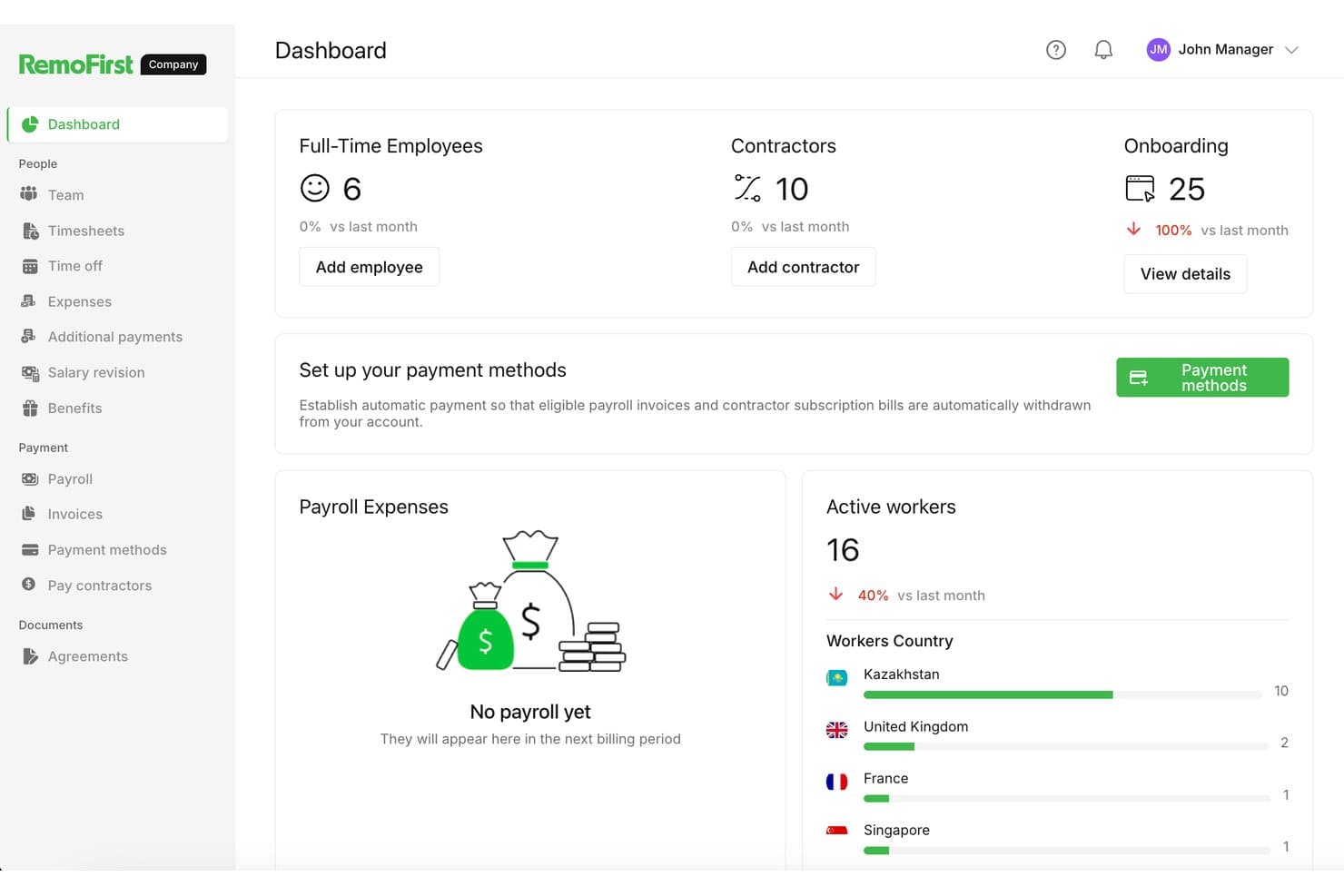
RemoFirst tracks employees, contractors, and payroll across countries. RemoFirst is an employer of record platform that handles international payroll, tax filings, employment contracts, and compliance across 185+ countries—without requiring you to set up a local legal entity.
Who Is RemoFirst Best For?
RemoFirst is a strong fit for companies that want to convert international contractors into full-time employees without setting up a local legal entity.
Why I Picked RemoFirst
I've included RemoFirst in my top picks because it's the clearest path I know for converting international contractors into full-time employees without touching a local entity setup. When a contractor relationship grows into something that needs formal employment status, RemoFirst handles the localized contract creation, payroll, and tax filings in 185+ countries from day one. I also like that onboarding takes days rather than weeks, and that employees can access their payslips and update bank details directly through the platform.
RemoFirst Key Features
- Global payroll and tax filing: RemoFirst calculates and files payroll taxes, pension contributions, and other local requirements across 185+ countries on your behalf.
- Localized employment contracts: The platform generates employment contracts tailored to the labor laws of each employee's country at the start of every hire.
- Employee self-service payslip access: Employees can log in, navigate to the Payments section, and view or download their payslips at any time.
- BambooHR integration: Marking a worker as hired in BambooHR automatically creates a draft onboarding record inside RemoFirst.
RemoFirst Integrations
RemoFirst lists four integrations: BambooHR, Workday, ADP Workforce Now, and GoCardless. BambooHR supports one-way worker data sync, while GoCardless funds payroll and contractor payments through Direct Debit.
Pros and Cons
Pros:
- Employees can find payslips and payment details
- Onboarding checklists help move hires forward
- International hiring avoids local entity setup
Cons:
- Termination disputes can obscure final costs
- Built for cross-border hiring, not domestic payroll
 Best for scheduling hourly shift workers
- Free plan + 30-day free trial + free demo available
- From $99/month (billed annually)
Visit WebsiteCustomer Rating:4.2/5
Homebase combines scheduling, time tracking, payroll, and team communication. Homebase is a payroll and workforce management platform designed for hourly teams. It combines scheduling, time tracking, payroll processing, tax filing, and employee communication tools into a single platform for small businesses.
Who Is Homebase Best For?
Homebase is best suited for small businesses in retail, hospitality, food service, and other hourly workforce environments that need payroll and workforce management without a dedicated HR department.
Why I Picked Homebase
I picked Homebase because its scheduling and payroll tools work together seamlessly. Employee hours flow directly from schedules and timesheets into payroll, eliminating manual data entry and reducing payroll errors. I also like that labor costs update in real time while schedules are being built, helping managers control overtime and staffing costs before payroll is processed.
Homebase Key Features
- Mobile time clock: Employees can clock in and out using mobile devices, tablets, or POS systems with GPS verification.
- Automatic tax filing: Calculates, files, and pays payroll taxes on behalf of employers.
- Time-off management: Employees submit PTO requests directly through the platform.
- New hire onboarding: Sends onboarding documents and payroll forms before an employee's first shift.
Integrations
Homebase integrates with Square, Clover, Toast, Shopify, Lightspeed, GoDaddy, Gusto, QuickBooks, ADP, and Paychex. It also provides API access for custom reporting and integrations.
Pros and Cons
Pros:
- POS-integrated tip tracking for hourly teams
- Free plan available for one location
- Scheduling and payroll work together seamlessly
Cons:
- Advanced features are limited to higher-tier plans
- Payroll requires a separate paid add-on
 Best for small business payroll and compliance
- Free demo available
- Pricing upon request
Visit WebsiteCustomer Rating:4.1/5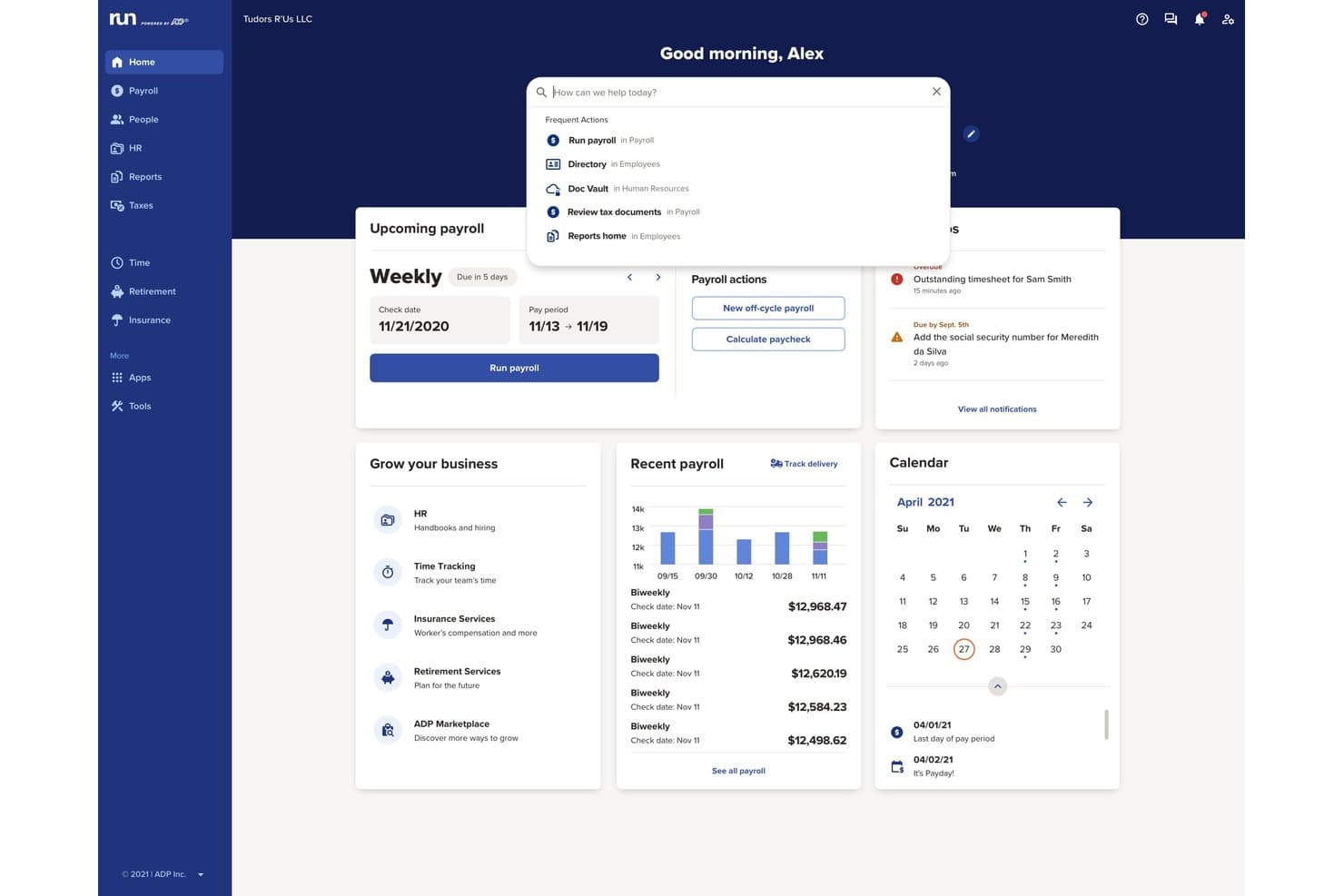
RUN Powered by ADP offers a centralized dashboard with payroll management, notifications, calendar, and a search bar for frequent actions. RUN Powered by ADP is a small business payroll software platform that automates payroll processing, tax filing, direct deposit, employee payments, and year-end reporting for employees and contractors.
Who Is RUN Powered by ADP Best For?
Small business owners and office managers looking for reliable payroll automation and built-in compliance across multiple states.
Why I Picked RUN Powered by ADP
I picked RUN Powered by ADP because I see how it handles complex payroll compliance, taking care of payroll tax calculations and filing for every jurisdiction my business operates in. I rely on its automatic regulatory updates and secure employee self-service portal.
RUN Powered by ADP Key Features
- Built-in new hire onboarding: Add new employees and collect required tax forms within the platform.
- Mobile payroll app: Run payroll and view pay data from iOS and Android devices.
- Custom payroll deductions: Configure garnishments, benefits, or retirement deductions for each pay run.
- Automated year-end tax forms: Generate and distribute W-2 and 1099 forms to employees and contractors.
RUN Powered by ADP Integrations
RUN Powered by ADP offers native integrations with QuickBooks, Xero, Wave, Clover, and Deputy. An API is available for custom integrations.
Pros and Cons
Pros:
- Supports contractor and employee payments
- Robust employee self-service portal
- Automatic tax filing in all states
Cons:
- Initial system setup is time-consuming
- Reporting customization options are highly limited
Learn more about RUN Powered by ADP®: Best for small POS retailers with hourly staff
- Free demo available
- From $35/month + $6/person/month
Visit WebsiteCustomer Rating:4.2/5
Square Payroll supports retail payroll with POS-linked tips and tax automation. Square Payroll is an online payroll solution designed for small and mid-sized businesses, especially in retail and service industries. It handles payroll processing, tax filings, and employee benefits, making it a valuable tool for managing your team’s payroll needs.
Why I picked Square Payroll: Square Payroll caters to small retailers and startups by integrating directly with Square POS, which simplifies payroll for businesses already using Square’s ecosystem. The software also offers automatic tax filings and compliance, allowing you to focus more on your business operations. With features such as direct deposit and tools to run payroll via the Square Dashboard or Team App, it’s tailored to meet the needs of small business owners.
Standout Features and Integrations:
Features include unlimited monthly payroll runs, automated tax filings, and direct tip imports from Square POS. You’ll also find flexible pay management options, allowing for commissions, bonuses, and tips. The software provides live support and onboarding assistance to get you started smoothly.
Integrations include Intuit QuickBooks Online, Square POS, Square Appointments, Square Invoices, Square Online, and more.
Pros and Cons
Pros:
- Retail-focused workflows
- Handles tips automatically
- POS-linked payroll automation
Cons:
- Lacks advanced HR features and reporting
- Dependency on the Square ecosystem
Learn more about Square Payroll: Best for growing SMBs with HR support
- Free demo available
- Pricing upon request
Visit WebsiteCustomer Rating:4.2/5
Paychex scales payroll and tax services for growing businesses. Paychex is a payroll and HR solution designed for small to medium-sized businesses, offering payroll processing and tax services. It simplifies payroll management and provides scalable solutions as your business expands.
Why I picked Paychex: Paychex is ideal for growing businesses because it offers scalable payroll solutions that can adapt as your team grows. It includes features such as automatic payroll tax administration, which helps keep your business compliant. You can manage employee benefits and retirement plans, providing a complete HR solution. The software also offers mobile access, allowing you to manage payroll on the go.
Standout Features and Integrations:
Features include detailed payroll reporting, giving you insights into your payroll expenses. The software provides employee self-service options, enabling your team to access pay stubs and year-end tax forms. Additionally, Paychex offers dedicated customer support to assist with any issues.
Integrations include Intuit QuickBooks, Xero, Sage Intacct, Oracle NetSuite, and more.
Pros and Cons
Pros:
- HR expansion ready
- Automated tax administration
- Supports business growth
Cons:
- Cost increases quickly
- Upselling of unnecessary services
 Best for Wave users syncing payroll and books
- 30-day free trial available
- From $46/month
Visit WebsiteCustomer Rating:4.1/5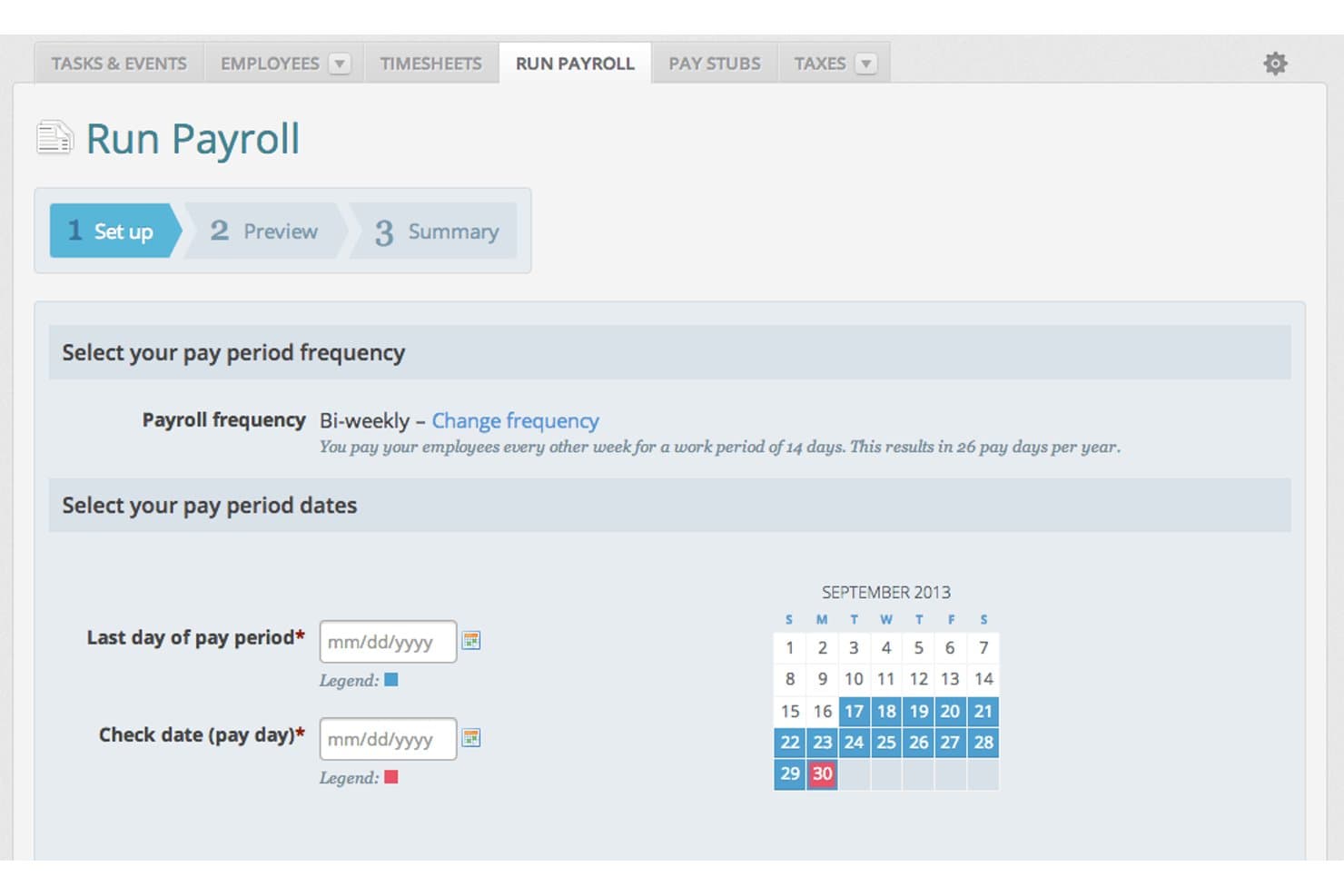
Wave Payroll lets users set pay period dates and frequency easily. Wave Payroll is payroll software for small businesses that handles pay runs for employees and contractors, automates tax calculations and filings, and syncs payroll data directly with Wave's accounting tools.
Who Is Wave Payroll Best For?
Wave Payroll is a natural fit for small business owners who already use Wave for accounting and want payroll to sync with their books automatically.
Why I Picked Wave Payroll
I've included Wave Payroll in my top picks because it's the only tool on this list that automatically posts payroll journal entries directly to Wave's accounting records, so your books update the moment payroll runs. If you're already using Wave for invoicing and accounting, there's no manual data transfer or third-party sync to manage. I also like that automatic tax payments and filings are built into the base subscription, covering both federal and state obligations in the US and CRA remittances in Canada.
Wave Payroll Key Features
- Employee self-service portal: Employees can log in to view pay stubs, access tax forms, and update their personal and banking details independently.
- Payroll tax form generation: Wave produces W-2, W-3, and 1099-NEC forms for US businesses, and T4 and T4A slips and summaries for Canadian businesses.
- Payroll expense reporting: Breaks down payroll expenses by employee and expense type to help you track payroll's impact on cash flow.
- Contractor payment support: Pay independent contractors through direct deposit on the same pay schedule as your employees.
Wave Payroll Integrations
Wave Payroll offers native integrations with Wave Accounting, Wave Invoicing, and Wave Payments. It also provides a public API and webhooks for custom integrations.
Pros and Cons
Pros:
- Tax filings reduce routine payroll administration
- Employees retrieve pay documents independently
- Affordable for straightforward small-team payroll
Cons:
- Users report delayed support resolutions
- Payroll approval needs advance scheduling
Learn more about Wave Payroll: Best for payroll unified with HR and IT
- Free trial + free demo available
- From $8/user/month
Visit WebsiteCustomer Rating:4.9/5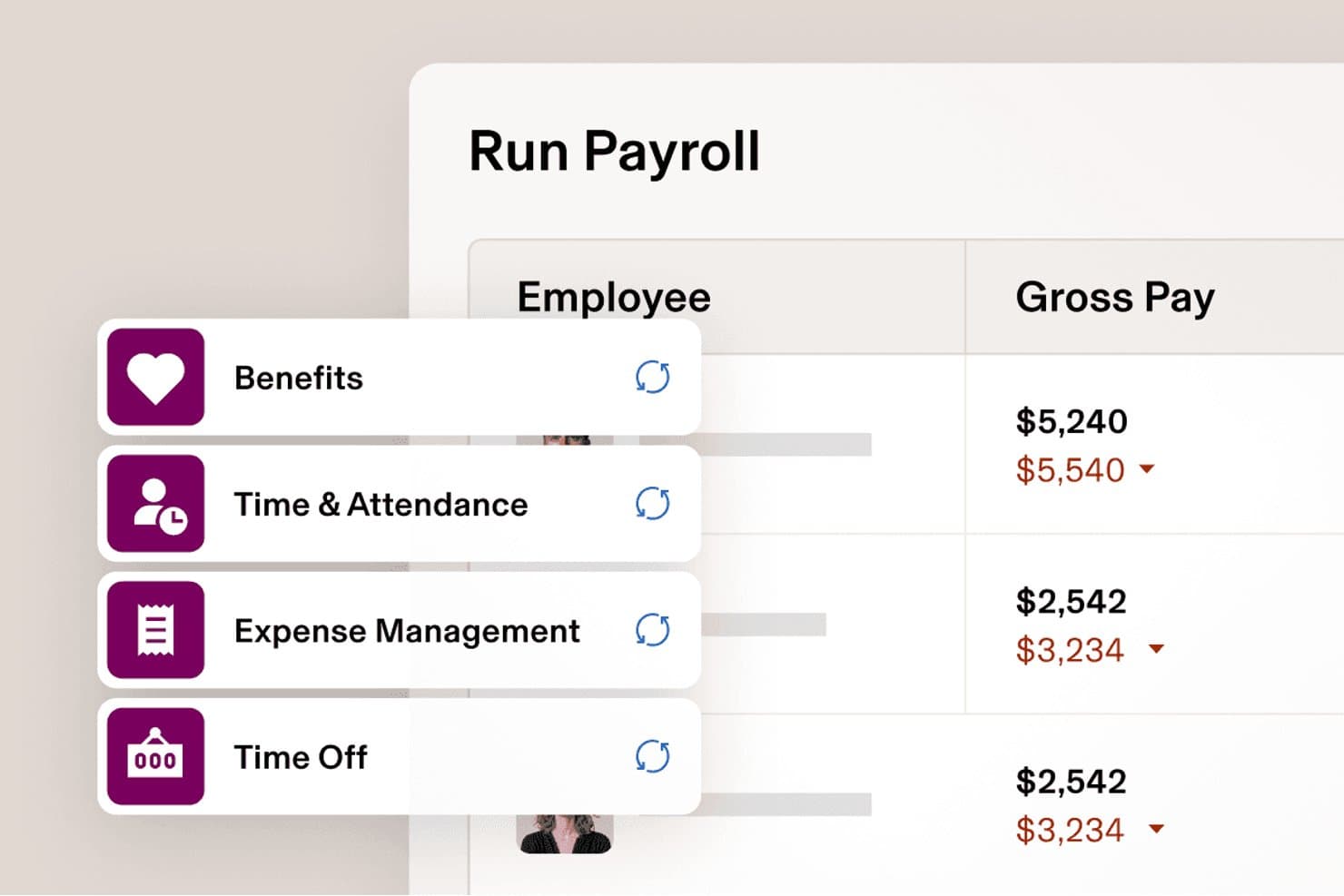
Rippling syncs benefits and time data automatically into payroll. Rippling is a payroll platform that unifies pay runs, automated tax calculation and filing, contractor payments, and employee self-service with HR and IT management in a single system.
Who Is Rippling Best For?
Rippling is a strong fit for fast-growing startups and small businesses that want payroll, HR, and IT managed in one place from day one.
Why I Picked Rippling
I picked Rippling as one of the best because it's the only payroll tool on this list that keeps payroll, HR, and IT in a single system, which means salary changes and benefits deductions flow into payroll automatically without manual re-entry. I especially like that it handles W-2 employees and 1099 contractors in the same platform, with separate schedules and payment types for each. Its one-click pay runs, built-in tax filing across all 50 states, and AI-assisted bonus processing make it a genuinely capable option for fast-growing teams.
Rippling Key Features
- Pay-run comparison: Review changes in gross pay, taxes, and deductions side by side with the previous pay run before approving.
- Multi-state payroll support: Rippling handles tax registration, withholding calculations, and filings across all 50 states at no extra charge.
- Accounting software integrations: Connect payroll to QuickBooks, Xero, or NetSuite to post automated journal entries with general-ledger dimensions.
- AI-assisted bonus processing: Upload a bonus spreadsheet and let Rippling's AI map the data, flag issues, and prepare it for approval before running payroll.
Rippling Integrations
Rippling reports 650+ Payroll integrations, including QuickBooks, Xero, and NetSuite, which can support automated journal entries with general-ledger dimensions.
Pros and Cons
Pros:
- W-2 and 1099 payroll share workflows
- Employee pay records reduce HR requests
- Automated tax handling cuts manual payroll work
Cons:
- Required platform purchase raises total cost
- Unpublished costs complicate budget comparisons
 Best for S-corp payroll with guided election
- Free trial + free demo available
- From $49/month
Visit WebsiteCustomer Rating:4.6/5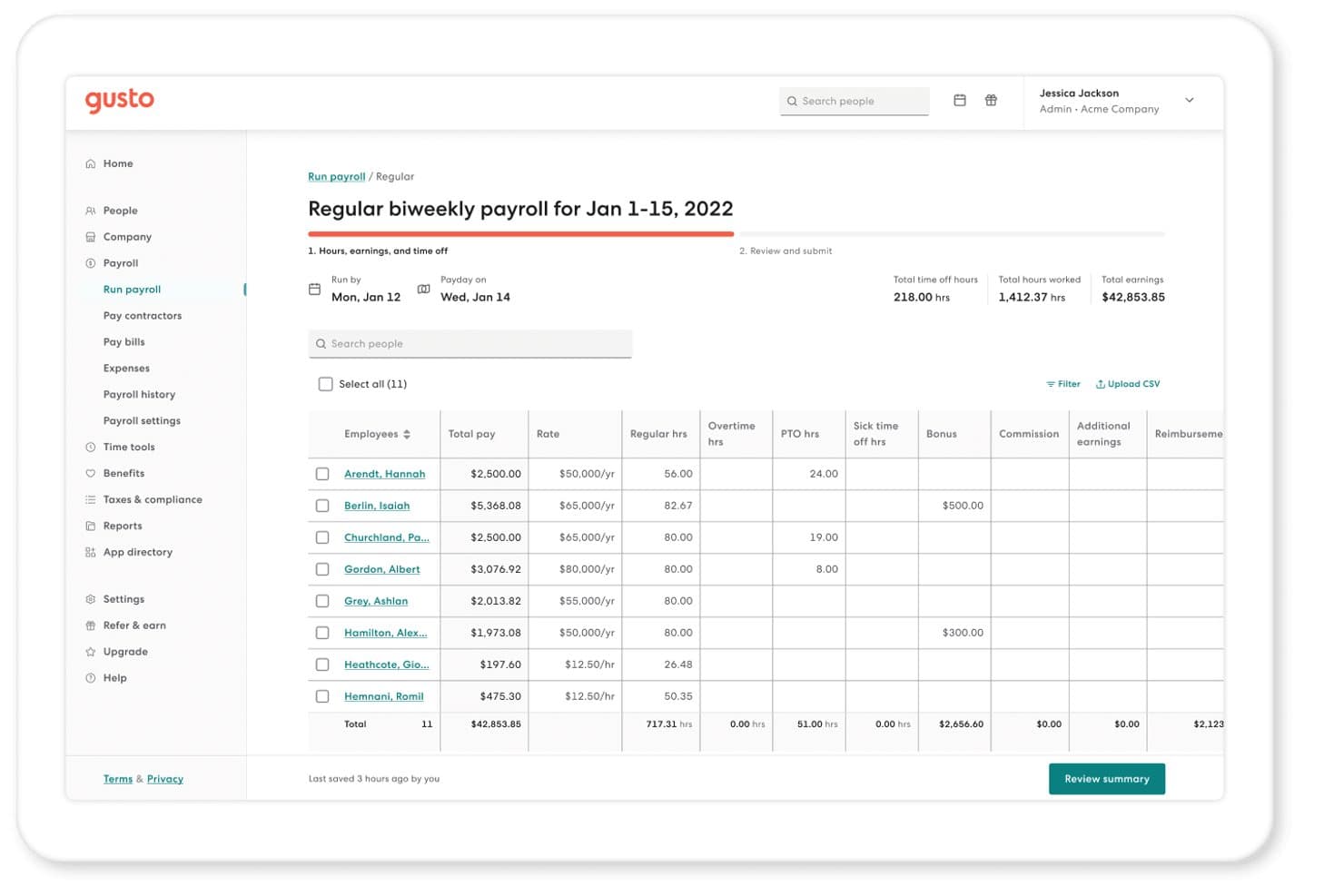
Gusto lets users run biweekly payroll with hours, pay, and bonuses. Gusto is a full-service payroll platform for small businesses that handles automated payroll runs, tax calculations and filings, contractor payments, employee self-service, and benefits administration.
Who Is Gusto Best For?
Gusto is a strong fit for small business owners and startup founders who need automated payroll, tax filings, and S-corp election support in one place.
Why I Picked Gusto
I picked Gusto as one of the best because it's the only platform I've seen that actively walks you through S-corp election with a guided Form 2553 filing built directly into the product. The Gusto Solo plan even includes a reasonable salary calculator to help you set compliant owner compensation before you run your first payroll. I also like that quarterly tax withholdings and filings are automated from day one, so you're not scrambling to meet agency deadlines on your own.
Gusto Key Features
- Payroll on AutoPilot: Schedule payroll to run automatically each pay period without manual submission.
- Employee self-onboarding: Invite new hires to enter their own personal, tax, and direct deposit information before their first payday.
- QuickBooks Online sync: Automatically creates and syncs a detailed payroll journal entry to QuickBooks Online each time payroll runs.
- Domestic contractor payments: Pay US contractors by direct deposit on weekly, biweekly, twice-monthly, or monthly schedules with automatic 1099-NEC filing.
Gusto Integrations
Gusto lists 154 marketplace integrations, including QuickBooks, Xero, Homebase, Clover, and When I Work. It also offers the partner-focused Gusto Embedded payroll API for custom integrations.
Pros and Cons
Pros:
- Straightforward payroll runs earn reviewer praise
- Employees access paystubs without HR requests
- Automated tax filings reduce admin work
Cons:
- Support delays complicate payroll issue resolution
- Faster deposits can add to costs
 Best for QuickBooks users wanting built-in payroll
- Not available
- From $50/month
Visit WebsiteCustomer Rating:4.4/5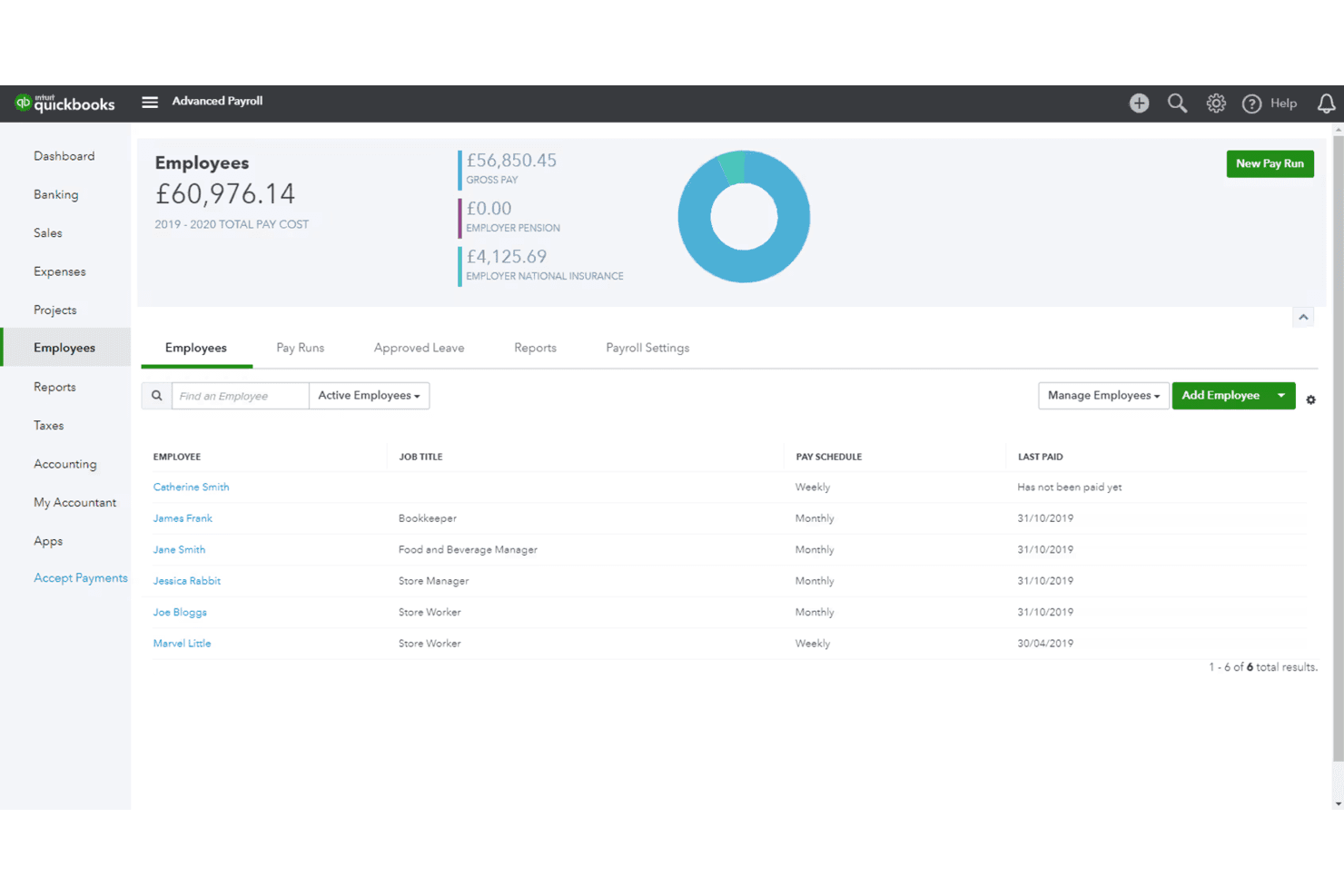
QuickBooks Payroll tracks employee pay schedules and total payroll costs. QuickBooks Workforce is a full-service payroll and workforce management platform that handles automated payroll runs, federal and state tax calculation and filing, direct deposit, contractor payments, employee self-service, and built-in HR and accounting tools.
Who Is QuickBooks Payroll Best For?
QuickBooks Payroll is a natural fit for small business owners and bookkeepers already running their finances in QuickBooks who want payroll built into the same system.
Why I Picked QuickBooks Payroll
QuickBooks Payroll earns its spot on my shortlist because it's the only payroll tool that runs directly inside QuickBooks accounting, so payroll data flows to your ledger without any manual export or reconciliation. I particularly like Auto Payroll, which handles scheduled runs for salaried employees automatically, and the full-service tax filing that calculates and pays federal and state taxes on your behalf.
QuickBooks Payroll Key Features
- Employee self-service portal: Employees access pay stubs, W-2s, and personal tax or bank details through a web portal or mobile app without involving HR.
- Contractor 1099 e-filing: QuickBooks tracks contractor payments and generates and e-files 1099-MISC and 1099-NEC forms directly from the platform.
- Payroll AI: An AI-assisted tool collects time and attendance data, flags inconsistencies, and prepares payroll for administrator review before processing.
- Accounting sync: Payroll transactions, including tax and contractor payments, export to QuickBooks Online with account mapping to your chart of accounts.
QuickBooks Payroll Integrations
QuickBooks Payroll has documented native integrations with QuickBooks Online and QuickBooks Time, plus connections to Allstate, Vestwell, NEXT, Mineral, and Checkr. An API is available for custom integrations.
Pros and Cons
Pros:
- Employee pay records reduce HR requests
- Tax filing cuts manual compliance tasks
- Routine payroll runs reduce administrative work
Cons:
- Support delays complicate urgent payroll fixes
- Per-employee charges raise growth costs
Learn more about QuickBooks Payroll:
Diğer Ucuz Bordro Yazılımları
İşte kısa listeme giremeyen ancak yine de göz atmaya değer bazı ek ucuz bordro yazılımı seçenekleri:
- 11OnPayBest for multi-state filing without extra fees
- 12Patriot PayrollBest for bookkeepers with multiple businesses
- 13Deel PayrollBest for contractor management tools
- 14Zoho PayrollBest for Zoho-based accounting practices
- 15Payroll4free.comBest free payroll service for under 25 employees
- 16EvereeBest for on-demand pay to W-2 and 1099 teams
- 17Toast PayrollBest for restaurant teams with pooled tips
Related Reviews
How I Evaluate Cheap Payroll Software
I split my evaluation into three parts, giving the most weight to core functions: calculate pay, run scheduled payroll, and file payroll taxes. Next, I compare standout features such as time-tracking integrations. Finally, I weigh factors beyond features, including setup help, support access, and total cost as headcount grows.
Core Functionality (Table Stakes For This List)
When I'm selecting tools for my list, I score each one on a scale from 0 (does not offer the functionality) to 5 (excels in this area) for each core functionality listed below. I then convert the total into a percentage to help assess each tool's overall fit, with extra weight on any functionalities I’ve deemed essential.
- Automated Payroll (Essential): I check whether scheduled runs calculate pay, deductions, and net wages for hourly and salaried staff with minimal manual corrections.
- Tax Calculation And Filing (Essential): I look for automatic tax calculations and filing support, including how much review or manual work payroll administrators still need to do.
- Direct Deposit: I assess whether employees can receive pay directly in their bank accounts on a predictable schedule.
- Affordable Pricing: I compare published costs and check whether core payroll features require paid add-ons as a team grows.
- Employee Self-Service: I check whether employees can access pay stubs, tax documents, payment history, and personal details without asking HR.
- Contractor Payments: I look for ways to pay contractors alongside employees and manage payment schedules and related tax documents.
Once I have a list of tools that meet the criteria, I consider what sets each platform apart.
Differentiating Factors (What Sets Vendors Apart)
Here's how I compare and contrast different vendors:
Standout Features
I check whether time tracking syncs directly into payroll runs, since manually re-entering hours for hourly teams invites errors every pay cycle. Multi-state payroll support also matters—I look for automatic tax registration and filing across jurisdictions, which is essential if your team is remote or distributed. Finally, I evaluate accounting software integrations with tools like QuickBooks or Xero, because automatic payroll reconciliation saves your bookkeeper real time each period.
Beyond Features
I check whether a vendor's base price stays affordable as headcount grows, since per-employee fees and add-ons for tax filing or year-end forms can quietly double the real cost. Setup matters too—guided wizards and free data migration from spreadsheets or a prior provider save small teams weeks of manual work. I also look for tax penalty guarantees, because when a non-specialist runs payroll, that safety net reduces real liability.
Ucuz Bordro Yazılımı Nasıl Seçilir?
Uzun özellik listeleri ve karmaşık fiyatlandırma yapıları arasında kaybolmak kolaydır. Bordro yazılımı seçme sürecinde odaklanmanıza yardımcı olmak için göz önünde bulundurmanız gereken faktörleri içeren bir kontrol listesi hazırladım:
| Faktör | Dikkat Edilmesi Gerekenler |
|---|---|
| FaktörÖlçeklenebilirlik | Dikkat Edilmesi GerekenlerYazılım ekibinizle birlikte büyüyecek mi? İşletmeniz büyüdükçe daha fazla çalışanı yönetip yönetemeyeceğini değerlendirin. İhtiyaçlarınıza göre ayarlanabilen esnek fiyatlandırma planları arayın. |
| FaktörEntegrasyonlar | Dikkat Edilmesi GerekenlerMevcut araçlarınızla birlikte çalışıyor mu? Manuel veri girişini önlemek için muhasebe ve İK sistemlerinizle entegre olup olmadığını kontrol edin. |
| FaktörÖzelleştirilebilirlik | Dikkat Edilmesi Gerekenlerİş akışlarınıza uyacak şekilde uyarlayabilir misiniz? İşletme operasyonlarınıza uygun olması için bordro süreçlerinde ve raporlamada düzenlemeler yapılmasına izin verdiğinden emin olun. |
| FaktörKullanım kolaylığı | Dikkat Edilmesi GerekenlerEkibiniz için kullanıcı dostu mu? Eğitim süresini ve hataları azaltmak için sezgisel arayüzler ve anlaşılır gezinme özellikleri arayın. |
| FaktörUygulama ve işe alıştırma | Dikkat Edilmesi GerekenlerBaşlamak ne kadar sürecek? Ekibinizi kurmak ve eğitmek için gereken zamanı ve kaynakları değerlendirin. Rehberli işe alıştırma süreçleri sunan araçları tercih edin. |
| FaktörMaliyet | Dikkat Edilmesi GerekenlerBütçeniz dahilinde mi? Gizli ücretler de dahil olmak üzere fiyatlandırma kademelerini ve toplam maliyetleri karşılaştırın. Özelliklerin masrafı karşılayıp karşılamadığını değerlendirin. |
| FaktörGüvenlik önlemleri | Dikkat Edilmesi GerekenlerVerileriniz ve bordro bilgileriniz korunuyor mu? Şifreleme, düzenli güncellemeler ve veri koruma düzenlemelerine uyumluluk özelliklerini kontrol edin. |
| FaktörUyumluluk gereksinimleri | Dikkat Edilmesi GerekenlerYasal standartları karşılıyor mu? Hukuki sorunlardan kaçınmak için yazılımın yerel, eyalet ve federal bordro düzenlemelerini destekleyip desteklemediğini doğrulayın. |
Ucuz Bordro Yazılımı Nedir?
Uygun fiyatlı bordro yazılımı, bordro süreçlerini yönetmek için uygun maliyetli bir çözümdür. Bu araçlar genellikle küçük işletme sahipleri, İK profesyonelleri ve muhasebeciler tarafından bordro görevlerini verimli bir şekilde yürütmek için kullanılır. Otomatik hesaplamalar, doğrudan ödemeler ve vergi beyannamesi verme özellikleri hataları azaltmaya ve zamandan tasarruf etmeye yardımcı olur. Genel olarak bu araçlar, bordroyu kolayca yönetmek için bütçe dostu bir yol sunar.
Uygun Fiyatlı Bordro Yazılımının Özellikleri
Bütçe dostu bir platform seçerken şu temel bordro yazılımı özelliklerine dikkat edin:
- Otomatik hesaplamalar: Doğru bordro hesaplamaları yapılmasını sağlar, manuel hataları azaltır ve ekibinizin zamandan tasarruf etmesine yardımcı olur.
- Doğrudan ödeme: W-2 çalışanlarının ve yüklenicilerin ücretlerini doğrudan banka hesaplarına almalarını sağlayarak kolaylık ve verimlilik sunar.
- Vergi beyannamesi verme özellikleri: Bordro vergilerinin yönetilmesine ve beyan edilmesine yardımcı olarak yerel ve federal düzenlemelere uyulmasını sağlar.
- Çalışanların kendi işlemlerini yapabildiği portallar: Çalışanların ücret bordrolarına ve vergi formlarına erişmesini sağlayarak İK üzerindeki idari yükü azaltır.
- Özelleştirilebilir raporlar: İhtiyaca göre hazırlanmış raporlama aracılığıyla bordro giderleri hakkında içgörüler sunar; bu da finansal analiz ve karar alma süreçlerine yardımcı olur.
- Muhasebe araçlarıyla entegrasyon: Mevcut muhasebe yazılımına bağlanarak yinelenen veri girişini ortadan kaldırır ve doğruluğu artırır.
- Uyumluluk yönetimi: İş yasalarına ve bordro düzenlemelerine uyulmasını sağlayarak hukuki sorun riskini en aza indirir.
- Mobil erişim: Hareket hâlindeyken bordro yönetimine olanak tanıyarak işletme sahipleri ve İK profesyonelleri için esneklik sunar.
- Esnek bordro takvimleri: Farklı işletme ihtiyaçlarına ve çalışan tercihlerine uyum sağlayarak çeşitli ödeme sıklıklarını destekler.
- Yan hak yönetimi: Genel çalışan deneyimini iyileştirmek için çalışan yan haklarını ve kesintilerini yönetir.
Uygun Fiyatlı Bordro Yazılımının Faydaları
Uygun fiyatlı bordro yazılımını kullanıma almak, ekibiniz ve işletmeniz için çeşitli faydalar sağlar. Yararlanabileceğiniz avantajlardan bazıları şunlardır:
- Maliyet tasarrufu: Manuel bordro süreçleri ve pahalı yazılımlarla ilişkili giderleri azaltarak bütçe dostu bir çözüm sunar.
- Zaman verimliliği: Hesaplamalar ve vergi beyannameleri için bordro otomasyonundan yararlanarak ekibinizin diğer önemli görevlere odaklanması için zaman kazandırır.
- Hataların azaltılması: Otomatik hesaplamalar ve uyumluluk yönetimi sayesinde bordro işlemlerindeki hataları en aza indirir.
- Kolaylık: Doğrudan ödeme ve çalışanların kendi işlemlerini yapabildiği portallar sunarak çalışanların ücret bilgilerine kolayca erişmesini sağlar.
- Düzenlemelere uyumluluk: İş yasalarına ve vergi düzenlemelerine uyulmasını sağlayarak hukuki sorun riskini azaltır.
- Veri doğruluğunun artırılması: Muhasebe araçlarıyla entegre olarak yinelenen veri girişini ortadan kaldırır ve finansal doğruluğu artırır.
- Esneklik: Çeşitli bordro takvimlerini ve mobil erişimi destekleyerek farklı işletme ihtiyaçlarına ve çalışma biçimlerine uyum sağlar.
Uygun Fiyatlı Bordro Yazılımının Maliyetleri ve Fiyatlandırması
Uygun fiyatlı bordro yazılımını seçmek, mevcut çeşitli fiyatlandırma modellerinin ve planların anlaşılmasını gerektirir. Bordro yürütme maliyeti; özelliklere, ekip büyüklüğüne, eklentilere ve daha fazlasına göre değişir. Aşağıdaki tablo, uygun fiyatlı bordro yazılımı çözümlerinde yaygın planları, ortalama fiyatlarını ve genellikle sunulan özellikleri özetlemektedir:
Uygun Fiyatlı Bordro Yazılımı İçin Plan Karşılaştırma Tablosu
| Plan Türü | Ortalama Fiyat | Yaygın Özellikler |
|---|---|---|
| Plan TürüÜcretsiz Plan | Ortalama Fiyat$0 | Yaygın ÖzelliklerTemel bordro işleme, sınırlı raporlama ve temel destek. |
| Plan TürüKişisel Plan | Ortalama Fiyat$5-$40/ay | Yaygın ÖzelliklerOtomatik hesaplamalar, doğrudan ödeme, vergi beyannamesi verme ve çalışanların kendi işlemlerini yapabildiği portallar. |
| Plan Türüİşletme Planı | Ortalama Fiyat$15-$50/ay | Yaygın ÖzelliklerGelişmiş raporlama, muhasebe araçlarıyla entegrasyon, uyumluluk yönetimi ve mobil erişim. |
| Plan TürüKurumsal Plan | Ortalama Fiyat$50+/ay | Yaygın ÖzelliklerÖzelleştirilebilir raporlar, özel hesap yöneticisi, gelişmiş güvenlik özellikleri ve tam destek. |
Uygun Fiyatlı Bordro Yazılımı Hakkında SSS
Uygun fiyatlı bordro yazılımı hakkında sık sorulan soruların bazı yanıtları:
İşletmemin bordro yazılımına ihtiyacı olup olmadığını nasıl anlarım?
Bordroyla ilgili manuel işlemlere çok fazla zaman harcıyor veya sık sık hata yapıyorsanız bordro yazılımını değerlendirmenin zamanı gelmiştir. Bordro yazılımı, vergi hesaplamaları ve doğrudan para yatırma gibi süreçleri otomatikleştirerek zamandan tasarruf etmenize ve hataları azaltmanıza yardımcı olur. Küçük işletmeler için \u003ca href=\u0022https://peoplemanagingpeople.com/tools/best-payroll-software-for-small-businesses/\u0022\u003eküçük işletme bordro yazılımı\u003c/a\u003e bu verimlilik artışını sağlayarak büyümeye odaklanmak için daha fazla zaman ayırmanıza yardımcı olabilir. \u003ca href=\u0022https://peoplemanagingpeople.com/payroll-compensation/how-choose-payroll-software-small-businesses/\u0022\u003eBordro yazılımını değerlendirirken\u003c/a\u003e çalışanların ücretleriyle ilgili sorularının artması veya mevzuat değişikliklerini takip etmekte zorlanmanız gibi işaretlere dikkat edin.
Uygun fiyatlı bordro yazılımı vergi uyumluluğunu sağlayabilir mi?
Evet, uygun fiyatlı bordro yazılımı çözümlerinin çoğu vergi uyumluluğu özelliklerini içerir. Vergileri yerel düzenlemelere göre otomatik olarak hesaplayıp beyan ederek ceza riskini azaltırlar. Seçtiğiniz yazılımın güncel mevzuata uygun olduğundan emin olun. Bazı araçlar vergi son tarihleri için hatırlatmalar da göndererek stres yaşamadan uyumluluğunuzu korumanıza yardımcı olur.
Uygun fiyatlı bordro yazılımı güvenli midir?
Evet, güvenilir ve uygun fiyatlı bordro yazılımı sağlayıcıları güvenliğe öncelik verir. Veri şifreleme ve düzenli güvenlik güncellemeleri gibi özellikleri arayın. Sağlayıcının sektör standartlarına ve düzenlemelere uygun olduğunu her zaman doğrulayın. Verilerinizi daha iyi korumak için güçlü parolalar kullanın ve mevcutsa iki faktörlü kimlik doğrulamayı etkinleştirin.
Ekibim için doğru bordro yazılımını nasıl seçerim?
Ekibinizin, \u003ca href=\u0022https://peoplemanagingpeople.com/tools/best-payroll-software-for-one-employee/\u0022\u003etek çalışan için bordro yazılımına\u003c/a\u003e veya daha büyük bir ekip için desteğe ihtiyaç duyup duymadığınız gibi özel gereksinimlerini ve ihtiyaç duyduğunuz özellikleri değerlendirerek başlayın. Kullanım kolaylığı, ölçeklenebilirlik ve mevcut sistemlerle entegrasyon gibi unsurlara odaklanarak farklı \u003ca href=\u0022https://peoplemanagingpeople.com/tools/best-online-payroll-software/\u0022\u003eçevrim içi bordro seçeneklerini\u003c/a\u003e karşılaştırın. Gerçek hayattaki performans hakkında fikir edinmek için müşteri yorumlarını okuyun. Karar vermeden önce yazılımı test etmek için ücretsiz denemeyle başlamayı değerlendirin.