20 Beste Produktivitäts-Apps & Produktivitäts-Software des Jahres 2026

10 Beste Produktivitäts-Apps Kurzliste


Produktivitäts-Apps sind dafür konzipiert, uns zu helfen, mehr mit weniger Aufwand zu erreichen. Von Freiberuflern über Manager bis hin zu Unternehmern – wenn Sie digital arbeiten, haben Sie wahrscheinlich schon verschiedene Produktivitäts-Tools ausprobiert, um Ihre Arbeit effizienter zu gestalten.
Aber wie setzt man diese Produktivitäts-Apps sinnvoll ein? Je nach Verantwortungsbereich nutzt man in der Regel eine Kombination aus Tools, die am besten zum eigenen Arbeitsstil passen. Daher loggt man sich in ein Tool zur Ressourcenverwaltung ein, wechselt für die Teamkommunikation zu einem anderen und nutzt vielleicht noch ein drittes Tool, um den eigenen Kalender zu verwalten.
Die folgenden Übersichten geben Ihnen weitere Informationen darüber, was diese Tools leisten, und am Ende dieses Artikels erkläre ich, wie Sie Prioritäten setzen und noch produktiver werden. Die von mir erwähnte Eisenhower-Matrix hilft Ihnen, Ihre Zeit und Aktivitäten strategisch zu planen.
Wie ich die besten Produktivitäts-Apps ausgewählt habe
Haben Sie allgemeinere Fragen zur Produktivitätsstrategie? Dann können Sie direkt zu unserem praktischen Leitfaden am Ende der Seite springen. Oder Sie schauen sich gleich die Übersichten der besten Produktivitäts-Apps an, wenn Sie direkt vergleichen möchten.
Falls Sie sich fragen, wie ich die besten Produktivitäts-Apps ausgewählt habe, erkläre ich Ihnen hier mein Vorgehen. Zunächst habe ich Apps mit hohen Nutzerbewertungen und hoher Zufriedenheit berücksichtigt. Mit meiner Erfahrung im Projektmanagement habe ich dann herausgearbeitet, welche Kriterien für Produktivitäts-Software am wichtigsten sind, und verglichen, wie die einzelnen Apps in diesen Bereichen abschneiden. Hier ist eine kurze Übersicht mit den wichtigsten Gründen und Kriterien für meine Auswahl.
Benutzererfahrung
Ist die Oberfläche verständlich und das System der App leicht zu erlernen? Sind die Funktionen sinnvoll oder überladen sie die App nur? Wir haben nur Apps ausgewählt, die wirklich einfach zu bedienen sind und keinen zusätzlichen Aufwand bereiten!
Priorisierung
Gibt es bei To-Do-Listen-Apps ein klares System zum Organisieren und Umorganisieren von Aufgaben? Kann man Prioritäten markieren und die wichtigsten Aufgaben verwalten?
Zugänglichkeit
Ist die App auf mehreren Betriebssystemen verfügbar? Es gibt zum Beispiel einige Mac-Produktivitäts-Apps wie Slite, die nicht auf Android laufen. Wir haben aber darauf geachtet, überwiegend Apps auszuwählen, die auf möglichst vielen Geräten verfügbar sind.
Berichtsfunktionen
Welche Berichtsfunktionen sind enthalten? Können Sie die Zeit für Aufgaben messen, die Produktivität im Zeitverlauf vergleichen oder mit Analysen nachvollziehen, ob die App tatsächlich positive Ergebnisse liefert?
Integrationen
Kann die App mit anderen der besten Organisations-Apps, Erinnerungs-Apps, Produktivitätstracker-Apps usw. verbunden werden? Wir suchen nach Tools, die mit anderen Apps synchronisieren, um Ihr Aufgabenmanagement möglichst weitgehend zu automatisieren.
Preisgestaltung
Steht der Preis im Verhältnis zum Nutzen, den die App bietet? In den meisten Fällen lässt sich eine Freemium-Version für den privaten Gebrauch nutzen; die bezahlpflichtigen Pläne kosten meist ca. $6-10/Benutzer/Monat.
Why Trust Our Software Reviews
We’ve been testing and reviewing HR software systems since 2019. As HR experts ourselves, we know how critical and difficult it is to make the right decision when selecting software.
We invest in deep research to help our audience make better software purchasing decisions. We’ve tested more than 2,000 tools for different HR management use cases and written over 1,000 comprehensive software reviews. Learn how we stay transparent & our software review methodology.
Zusammenfassung der besten Produktivitäts-Apps
| Tool | Best For | Trial Info | Price | ||
|---|---|---|---|---|---|
| 1 | Ideal para vincular recursos y datos financieros | Prueba gratuita de 21 días + demo gratuita disponible | Desde $17.10/usuario/mes (facturado anualmente) | Website | |
| 2 | Am besten geeignet, um die Produktivität durch ein aufgeräumtes E-Mail-Postfach zu steigern | 14-tägige kostenlose Testversion verfügbar | Ab $4.13/Monat (zweijährliche Abrechnung) | Website | |
| 3 | Am besten geeignet für Brainstorming, Ideenfindung und Aufgabenmanagement in einem | Kostenloser Plan verfügbar | Ab $13/Nutzer/Monat (jährliche Abrechnung) | Website | |
| 4 | Am besten für Zusammenarbeit in Echtzeit | 14-tägige kostenlose Testversion verfügbar | Ab $7/Nutzer/Monat (jährliche Abrechnung) | Website | |
| 5 | Am besten geeignet zum Erstellen individueller Produktivitäts-Apps | 30 Tage kostenlos testen | Ab $24/Nutzer/Monat | Website | |
| 6 | Am besten geeignet für kartenbasierte Aufgabenlisten und Kanban-Boards | Kostenlose Testversion + kostenloser Plan verfügbar | Ab $9.99/Benutzer/Monat | Website | |
| 7 | Am besten für detaillierte Zeiterfassung | Kostenloser Plan + kostenlose Testversion verfügbar | Ab $6/Nutzer/Monat (jährlich abgerechnet) | Website | |
| 8 | Bestes Tool, um blitzschnell Antworten aus all Ihren Apps zu finden | Nicht verfügbar | Preisgestaltung auf Anfrage | Website | |
| 9 | Am besten geeignet dank seiner benutzerfreundlichen Oberfläche | Kostenloser Tarif verfügbar | Ab $18/Nutzer/Monat | Website | |
| 10 | Am besten geeignet für unbegrenztes Workflow-Management | 7-tägige kostenlose Testphase verfügbar | Ab $99/Monat (unbegrenzte Nutzer) | Website |


-

Remote People
Visit WebsiteThis is an aggregated rating for this tool including ratings from Crozdesk users and ratings from other sites.5 -
Homebase
Visit WebsiteThis is an aggregated rating for this tool including ratings from Crozdesk users and ratings from other sites.4.2 -
Paycom
Visit WebsiteThis is an aggregated rating for this tool including ratings from Crozdesk users and ratings from other sites.4.3





Beste Produktivitäts-Apps & Produktivitäts-Software im Überblick
Nach meiner Erfahrung gehören diese Produktivitäts-Apps aktuell zu den besten auf dem Markt. Hier finden Sie meine Übersicht dieser Tools:

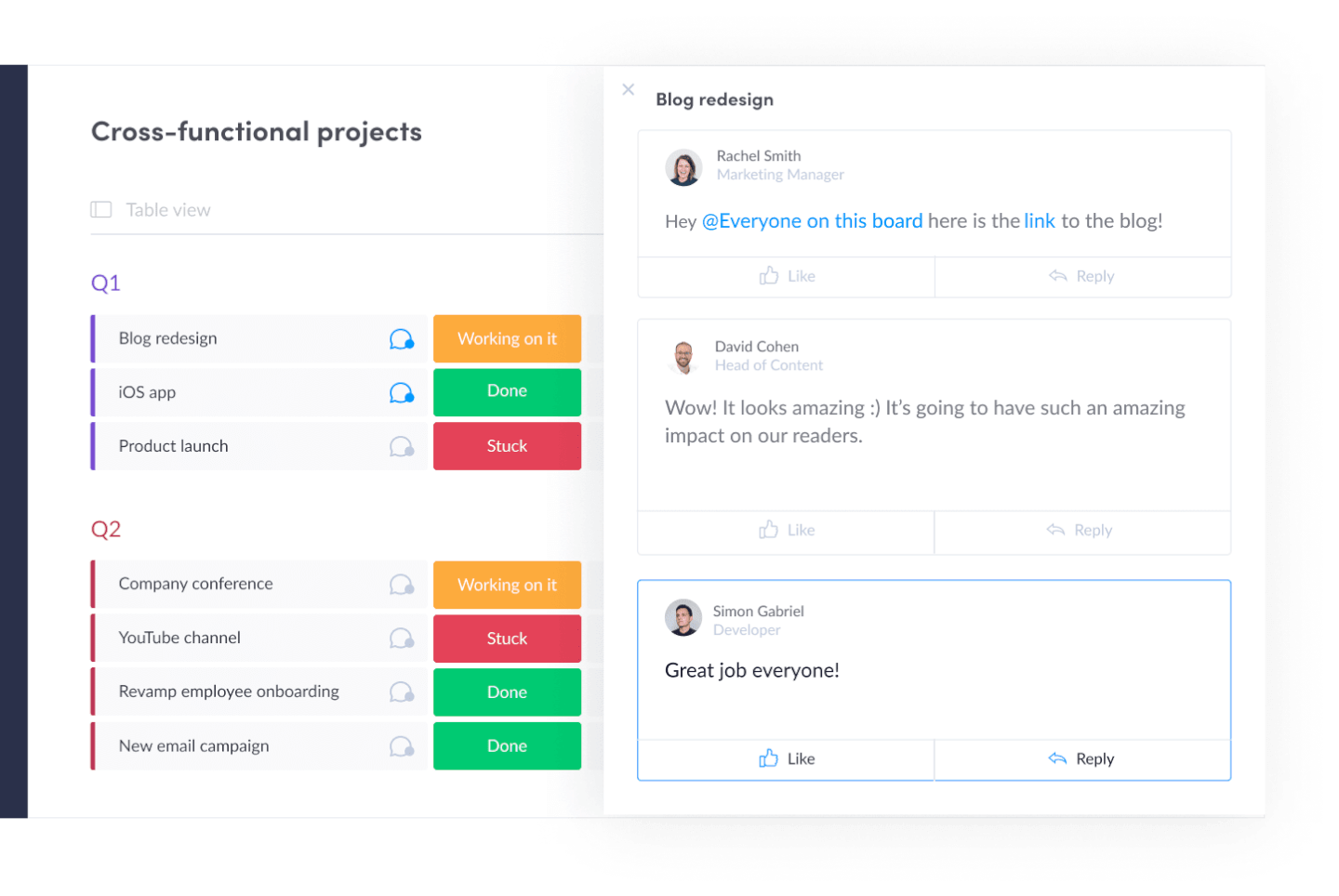
Projectworks es un software de automatización de servicios profesionales que ayuda a las empresas de consultoría y servicios a gestionar proyectos de principio a fin. Combina herramientas para el seguimiento del tiempo, facturación, asignación de recursos e informes en una sola plataforma. Con todo en un solo lugar, obtienes una visibilidad más clara sobre el desempeño de los proyectos y los resultados del negocio.
Por qué elegí Projectworks
Esta herramienta conecta los datos de recursos y financieros en tiempo real. El sistema de planificación de recursos no solo se trata de asignar personas: vincula la utilización y las horas facturables directamente con los presupuestos de los proyectos y las previsiones de la empresa. Sabrás quién está disponible y el impacto financiero de su trabajo a medida que sucede. Esa conexión entre las decisiones de dotación de personal y el rendimiento del negocio es una parte clave de la automatización de servicios profesionales que Projectworks maneja especialmente bien.
Projectworks también gestiona la previsión y los informes, y puede proyectar lo que viene a continuación en ingresos, márgenes y capacidad. Tu equipo podrá anticipar cambios en la demanda, ver cómo las decisiones de contratación afectan la utilización y entender cómo el trabajo actual se relaciona con la salud futura del negocio.
Funciones clave de Projectworks
Projectworks ofrece un conjunto de características adicionales que están diseñadas para la automatización de servicios profesionales.
- Panel de gestión de proyectos: Proporciona una plataforma centralizada donde puedes supervisar los cronogramas del proyecto, las tareas y las asignaciones del equipo, asegurando que todos los elementos estén alineados con tus objetivos estratégicos.
- Campos personalizados: Puedes crear campos únicos para proyectos, personas y empresas, lo que permite un seguimiento e informes personalizados que se adaptan a las necesidades específicas de tu negocio.
- Planificación de capacidad: Te ayuda a prever la disponibilidad de recursos y la demanda de los proyectos, asegurando que tu equipo no esté ni sobrecargado ni infrautilizado.
- Portal del cliente: Incluye un espacio dedicado para que los clientes consulten el progreso del proyecto y los datos financieros, lo que mejora la transparencia y la satisfacción del cliente.
Integraciones de Projectworks
Las integraciones incluyen Xero, QuickBooks, HubSpot, Salesforce, MYOB, Jira y Azure DevOps.
Pros and Cons
Pros:
- Visibilidad de ausencias integrada con la capacidad
- Soporte para órdenes de compra para costes de proveedores
- Previsión de escenarios integrada
Cons:
- Requiere mucho esfuerzo de configuración para ajustarse a la estructura de tu empresa
- Varios tramos de usuarios hacen que escalar sea complejo
New Product Updates from monday.com

monday.com Adds Managed Columns Across Boards
monday.com adds Managed Column to let teams standardize and reuse column labels across multiple boards from a single source of truth. The update helps organizations maintain consistency, clarity, and centralized control at scale. For more information, visit monday.com’s official site.
SaneBox
Am besten geeignet, um die Produktivität durch ein aufgeräumtes E-Mail-Postfach zu steigern
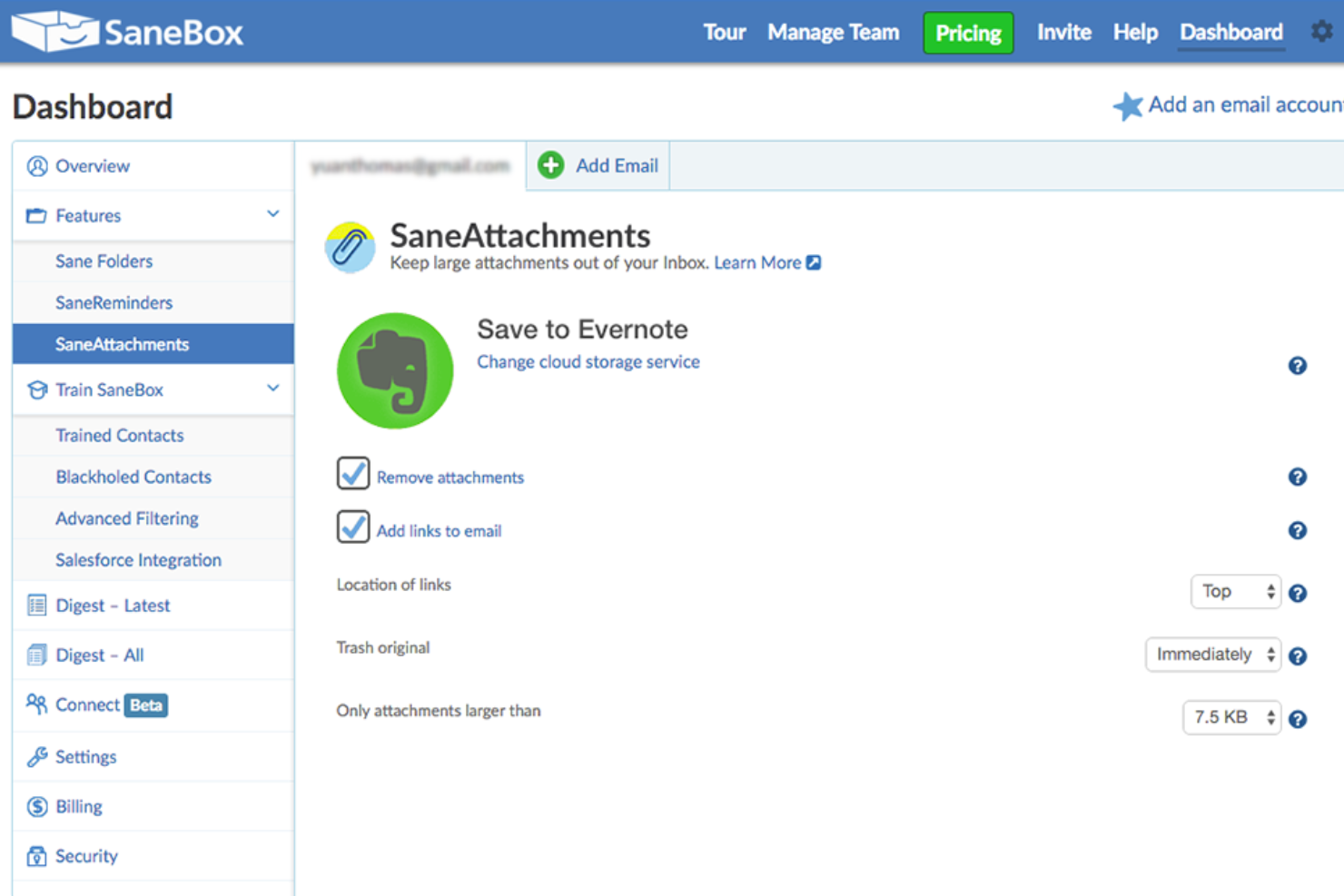
SaneBox ist ein Produktivitätstool, das Ihnen hilft, Ihr E-Mail-Postfach effizienter zu verwalten. Es wurde entwickelt, um Ihnen Zeit zu sparen, indem es unwichtige E-Mails herausfiltert und den Rest in Ordner sortiert, sodass Sie sich auf das Wesentliche konzentrieren können. SaneBox funktioniert mit den meisten E-Mail-Anbietern und Clients, was es zu einer vielseitigen Option für alle macht, die ihr E-Mail-Management verbessern möchten.
Warum ich SaneBox ausgewählt habe: Ich habe SaneBox als eine der besten Produktivitäts-Apps ausgewählt, weil es eine der zeitraubendsten Aufgaben anspricht, mit denen wir täglich konfrontiert sind – die Verwaltung unseres E-Mail-Postfachs. Durch den ständigen Zustrom von E-Mails ist es leicht, den Überblick zu verlieren und wichtige Nachrichten zu verpassen. SaneBox hilft Ihnen, die Kontrolle über Ihr Postfach zurückzugewinnen, sodass Sie sich auf die wirklich wichtigen E-Mails konzentrieren und produktiver arbeiten können.
Hervorstechende Funktionen & Integrationen von SaneBox
Funktionen: Mehrere Funktionen heben SaneBox von anderen E-Mail-Management-Tools ab. Das intelligente Filtersystem sortiert Ihre E-Mails automatisch in verschiedene Ordner je nach Wichtigkeit. Zum Beispiel verschiebt es unwichtige Nachrichten in den Ordner 'SaneLater', damit Sie sich zuerst Ihren wichtigsten E-Mails widmen können. Zudem gibt es einen 'SaneNoReplies' Ordner, der E-Mails auflistet, auf die Sie noch keine Antwort erhalten haben, sodass Sie diese leichter nachverfolgen können.
Ein weiteres praktisches Feature ist der 'SaneBlackHole' Ordner, mit dem Sie sich schnell von unerwünschten Newslettern und Werbe-E-Mails abmelden können. Ziehen Sie einfach die unerwünschte Nachricht in diesen Ordner und SaneBox meldet Sie automatisch vom Verteiler des Absenders ab.
Integrationen: SaneBox lässt sich mit vielen gängigen E-Mail-Anbietern und Clients wie Gmail, Outlook, Apple Mail und mehr verbinden. Das bedeutet, dass Sie SaneBox in Ihre bestehende Umgebung integrieren können, ohne die Plattform wechseln zu müssen. Zusätzlich bietet SaneBox Integrationen mit Produktivitätstools wie Evernote, Todoist und Trello an, sodass Sie Aufgaben erstellen und wichtige E-Mails direkt aus Ihrem Postfach heraus speichern können.

Am besten geeignet für Brainstorming, Ideenfindung und Aufgabenmanagement in einem

MeisterTask ist ein vielseitiges Projektmanagement-Tool, das intuitive Kanban-Boards mit leistungsstarken Kollaborations- und Anpassungsfunktionen kombiniert und sich somit ideal für Teams jeder Größe eignet. Die nahtlose Integration mit MindMeister zum Brainstorming und für die Ideenfindung sowie robuste Aufgabenautomatisierung und Echtzeit-Kommunikationsmöglichkeiten optimieren den Arbeitsablauf und steigern die Produktivität über alle Projekte hinweg.
Warum ich MeisterTask gewählt habe: MeisterTask überzeugt als Produktivitäts-App durch eine übersichtliche, intuitive Oberfläche, die Aufgaben- und Projektmanagement vereinfacht. Es kombiniert anpassbare Kanban-Boards für die visuelle Steuerung von Arbeitsabläufen mit leistungsstarken Funktionen wie Aufgabenautomatisierung, Fälligkeits-Erinnerungen und Zeiterfassung zur Effizienzsteigerung.
Die App ermöglicht nahtlose Zusammenarbeit durch einfaches Teilen von Dateien, Kommentarfunktionen und Aufgabenzuweisungen, sodass Teams immer abgestimmt und fokussiert bleiben. Die Integration mit Tools wie MindMeister für Mind Mapping garantiert einen reibungslosen Übergang vom Brainstorming zur Umsetzung und erleichtert es Nutzern, Ideen in umsetzbare Aufgaben zu verwandeln. Durch den Fokus auf benutzerfreundliches Design und praktische Funktionalität ist MeisterTask ein wertvolles Tool für Einzelpersonen und Teams, die ihre Produktivität steigern und Ziele effizienter erreichen möchten.
Hervorstechende Funktionen und Integrationen von MeisterTask
Funktionen umfassen Kanban-Boards, Aufgabenautomatisierung, Integration mit MindMeister, anpassbare Workflows, Projektvorlagen, Zeiterfassung, Dateianhänge, Erinnerungen an Fälligkeitstermine, Kollaborationstools, Aktivitätsstreams, mobile Apps, sichere Datenverschlüsselung, zahlreiche Integrationen mit anderen Tools, personalisierte Dashboards und flexible Projektansichten.
Integrationen umfassen Slack, Dropbox, Github, Google Drive, Microsoft Teams, Outlook, Trello, Asana, MindMeister und Hunderte weitere über einen kostenpflichtigen Plan mit Zapier.
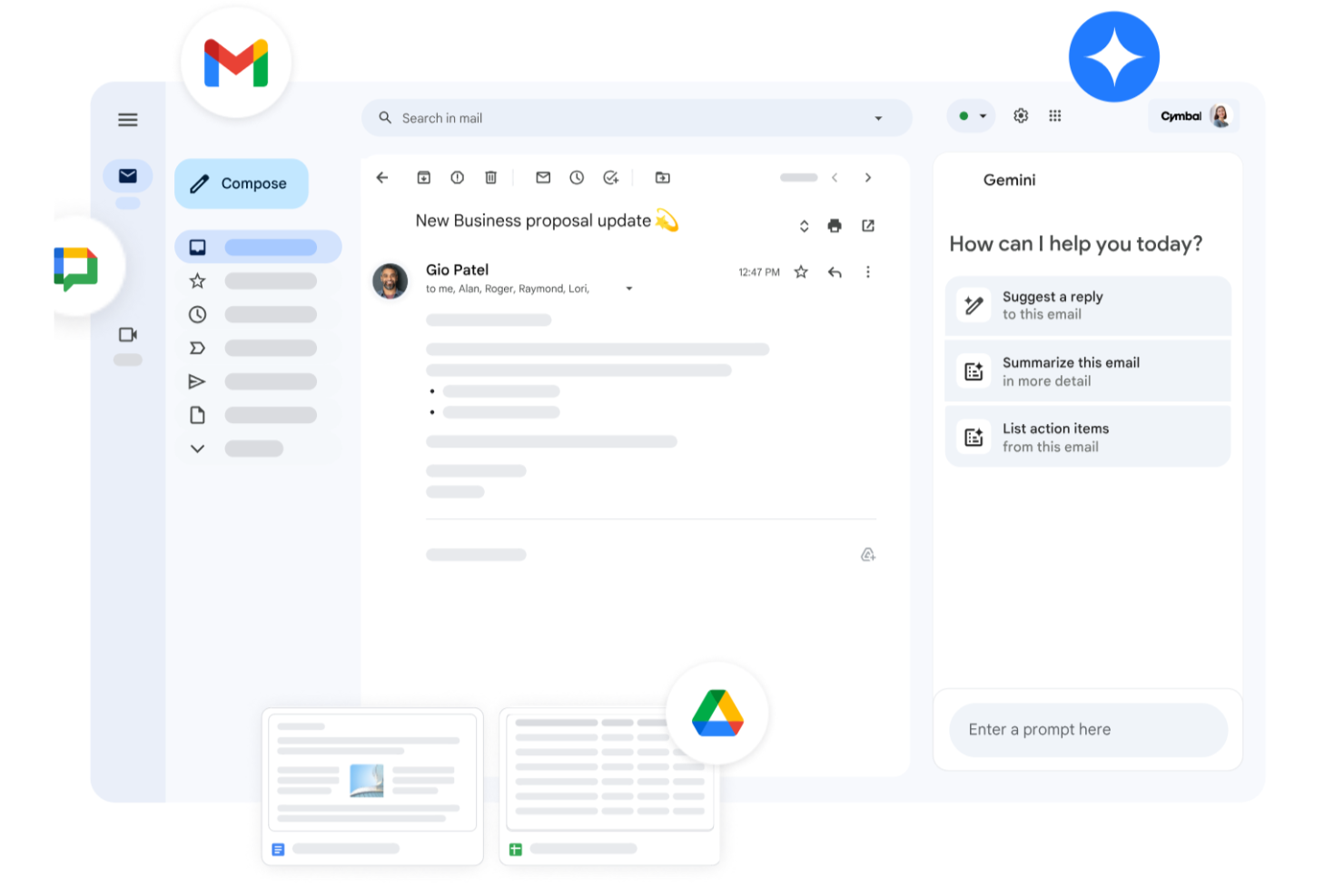
Egal, ob Sie ein kleines Unternehmen führen, ein großes Unternehmen leiten oder im Bildungsbereich tätig sind: Google Workspace bietet eine Suite von Produktivitätswerkzeugen, die auf Ihre vielfältigen Bedürfnisse zugeschnitten ist. Mit Apps wie Gmail, Drive und Meet können Sie Kommunikation, Speicher und virtuelle Meetings nahtlos verwalten, die Zusammenarbeit optimieren und gleichzeitig hohe Sicherheit gewährleisten. Mit Gemini—Googles Premium-KI—die in alle Abos integriert ist, verfassen Sie E-Mails schneller, fassen Dokumente augenblicklich zusammen, generieren Ideen und behalten auf allen Geräten den Überblick. Ob Sie Kundenkommunikation betreuen, Inhalte erstellen oder die tägliche Organisation koordinieren – Workspace steigert Ihre Produktivität und hält Ihr Team in Verbindung.
Warum ich Google Workspace gewählt habe
Ich habe Google Workspace wegen der einzigartigen Kombination aus Echtzeit-Zusammenarbeit, Cloud-Zugänglichkeit und KI-gestützter Assistenz ausgewählt. Tools wie Google Docs und Sheets ermöglichen Ihrem Team das gleichzeitige Arbeiten und beseitigen Versionskonflikte sowie unnötige E-Mail-Ketten. Google Meet bietet bequeme Videokonferenzen, ganz ohne zusätzliche Software, und macht Kommunikation reibungslos. Gemini ist direkt in Apps wie Gmail, Docs, Sheets und Meet integriert und verbessert nicht nur die Zusammenarbeit, sondern aktiv auch Ihre Arbeitsweise. Von der Inhaltserstellung über das Zusammenfassen von Dokumenten bis hin zum Aufgabenmanagement – integrierte KI hilft dabei, effizient, reaktionsschnell und anpassungsfähig zu bleiben.
Wichtige Funktionen von Google Workspace
Zusätzlich zu den Kollaborationsmöglichkeiten bietet Google Workspace weitere Features zur Produktivitätssteigerung:
- Drive: Sicherer Cloud-Speicher mit großzügigen Speicheroptionen – Ihre Dateien sind jederzeit und überall verfügbar.
- Calendar: Einfaches Terminmanagement mit gemeinsamen Kalendern und Buchungsseiten, damit Ihr Team organisiert bleibt.
- Chat: Integrierte Messaging-Plattform für die Kommunikation und Zusammenarbeit Ihres Teams in Echtzeit.
- NotebookLM: Sofortige Einblicke und podcastähnliche Audioüberblicke zur schnelleren Teamweiterbildung und besserem Inhaltsverständnis.
Google Workspace Integrationen
Zu den Integrationen gehören Salesforce, Atlassian, Tableau, SAP, Okta, Microsoft Office 365, Slack, Zoom, Trello und Asana.
Pros and Cons
Pros:
- Nahtlose Integration mit Google-Diensten steigert die Workflow-Effizienz.
- Tools zur Echtzeit-Zusammenarbeit verbessern die Produktivität und Kommunikation im Team.
- Großzügige Cloud-Speicheroptionen erleichtern den Zugriff auf Dateien und das Teilen.
Cons:
- Kompatibilitätsprobleme bei der Zusammenarbeit mit Teams außerhalb von Google, die andere Dateiformate oder Microsoft Office nutzen.
- Freigabeberechtigungen und komplexe Ordnerstrukturen in geteilten Drives können schwer zu verwalten sein, wenn sie nicht sorgfältig angelegt werden.
New Product Updates from Google Workspace

Google Workspace Enhances Email Proofreading In Gmail
Google Workspace introduces enhanced email proofreading in gmail. This update uses gemini to refine drafts for clarity, tone, and conciseness before sending. For more information, visit Google Workspace’s official site.
 .
.
Kintone
Am besten geeignet zum Erstellen individueller Produktivitäts-Apps
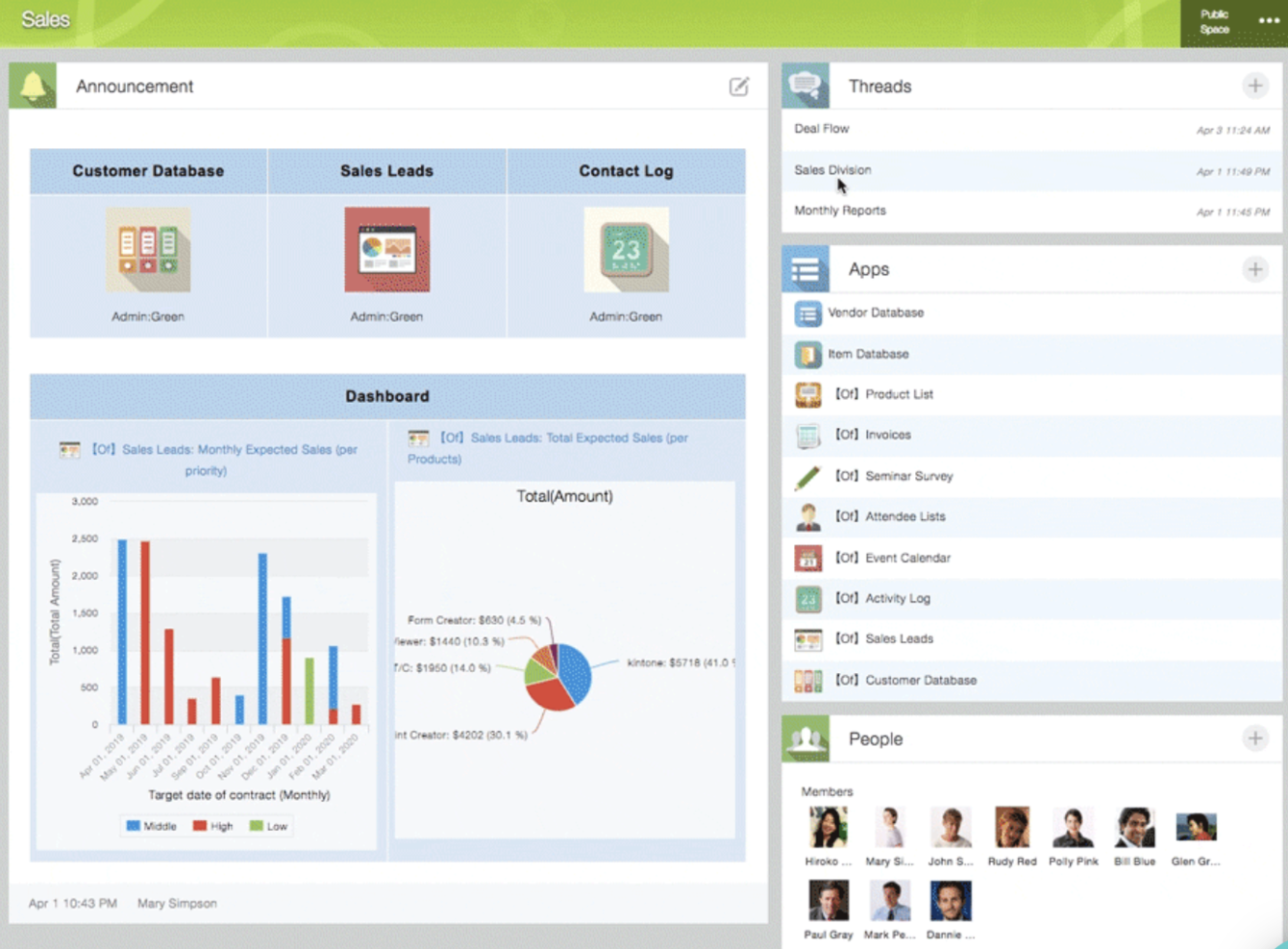
Kintone ist eine anpassbare App-Plattform, die von Teams bei Volvo Trucks North America, Japan Airlines, Shiseido und über 23.000 Organisationen weltweit genutzt wird. Ihr einzigartiger Ansatz ermöglicht es Ihnen, eine Vielzahl anpassbarer 'Apps' entweder von Grund auf, mittels Vorlagen oder aus Ihren bestehenden Tabellenkalkulationen zu erstellen, für Datenmanagement, Geschäftsprozesse und Workflows. Kintone-Apps können individuell angepasst werden für Projektmanagement, Vertriebs-CRM, Kundendatenbanken, Spesenabrechnungen, gemeinsame To-Do-Listen, Geräteverwaltung, Produktfeedback und vieles mehr.
Warum ich Kintone gewählt habe: Mit Kintone können Sie No-Code-Task-Management-Apps bauen, indem Sie per Drag-and-Drop die gewünschten Elemente auf die Seite ziehen: Rich-Text-Felder, Datumsfelder, Dropdown-Menüs, Zahlenfelder mit integrierten Berechnungen, Bereiche für Anhänge, Auswahlmenüs für Benutzer oder Gruppen, verwandte Daten aus anderen Apps, Tabellen und mehr.
Nachdem Sie die gewünschte App erstellt haben, können Sie damit alle Daten und Aufgaben, die Sie und Ihr Team verfolgen müssen, einfacher verwalten. Und mit benutzerdefinierten Benachrichtigungen und Erinnerungen sowie detaillierten Berechtigungseinstellungen kann Ihre Projektverfolgungslösung so aussehen und funktionieren, wie Sie es möchten.
Was Kintone besonders gut für die Projektverfolgung macht, sind die Funktionen zur Filterung und Priorisierung von Aufgaben nach Datenfeldern oder Teammitgliedern, um benutzerdefinierte Berichte oder Dashboard-Ansichten zu erstellen, sowie die Möglichkeit, Erinnerungen und Übergaben zwischen Teammitgliedern für mehrstufige Workflows zu automatisieren.
Kintones integrierte Kommunikationsfunktionen ermöglichen es Teams zudem, Projekte direkt in der App sowie in themen- oder projektbezogenen Threads zu besprechen. Spezielle 'Spaces' organisieren alles, was Ihr Team für Ihr Projekt benötigt, einschließlich Task-Tracking-Apps und durchsuchbaren Konversations-Threads.
Kintone hervorstechende Funktionen & Integrationen
Funktionen umfassen Projektmanagement, Dashboards, Ressourcenmanagement, Analysen, Kalenderverwaltung, Conversion-Tracking, Mitarbeiter-Onboarding, Forecasting, Lead-Scoring, Arbeitszeittabellen, Unterstützung für Zusammenarbeit, Berichte, Pipeline-Management, Budgetierung und Prozessmodellierung.
Integrationen gibt es mit Slack, Gmail, Google Calendar, Outlook, Tableau, Dropbox, Salesforce, HubSpot, Eventbrite, WordPress, QuickBooks, MailChimp und vielen weiteren über einen kostenpflichtigen Plan mit Zapier oder mittels API-Integrationen.
Trello
Am besten geeignet für kartenbasierte Aufgabenlisten und Kanban-Boards
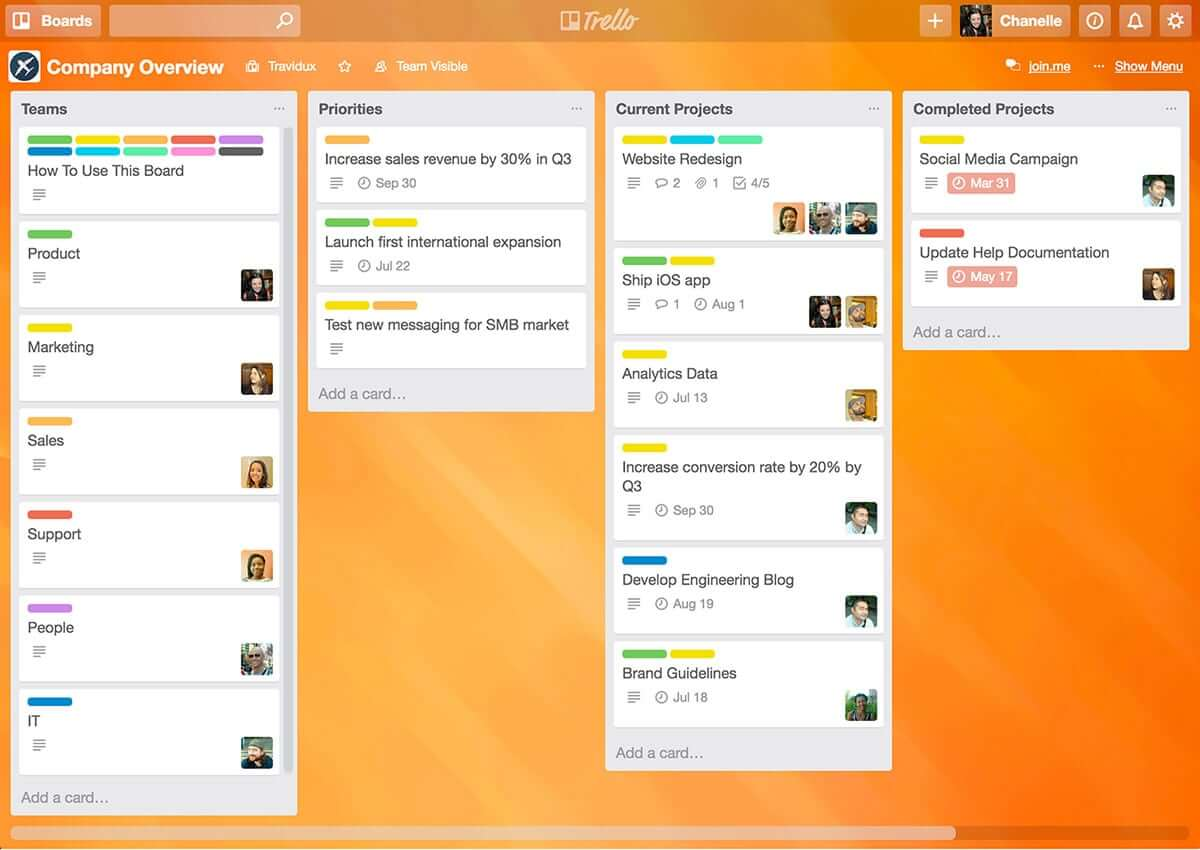
Trello ist eine Kanban-Board-App, mit der Sie Aufgaben visuell organisieren können. Sie ist benutzerfreundlich und verfügt über eine intuitive Drag-and-Drop-Oberfläche, die leicht zu erlernen ist. Dieses beliebte Tool hilft Ihnen dabei, Ihre Fristen, laufende Aufgaben und erledigte Aufgaben zu visualisieren, sodass Sie auf Basis des Gesamtüberblicks fundierte Entscheidungen darüber treffen können, woran Sie als Nächstes arbeiten wollen.
Warum ich Trello ausgewählt habe: Trello ist ein beliebtes Projektmanagement-Tool, das Teams dabei unterstützt, Aufgaben zu organisieren und Projekte visuell sowie intuitiv gemeinsam zu bearbeiten. Es nutzt ein System aus Boards, Listen und Karten zur Darstellung von Aufgaben und Arbeitsabläufen, sodass Teammitglieder leicht erkennen können, was zu tun ist, wer für welche Aufgabe zuständig ist und welchen Status eine Aufgabe hat. Trello lässt sich an unterschiedlichste Projektmanagement-Anforderungen anpassen und bietet Funktionen wie Fälligkeitsdaten, Checklisten, Anhänge und Zuweisungen von Teammitgliedern. Seine Flexibilität und Benutzerfreundlichkeit machen es zu einem großartigen Tool für Teams jeder Größe und Branche, von Start-ups bis zu großen Unternehmen.
Besondere Funktionen & Integrationen von Trello
Funktionen umfassen Boards, To-do-Listen, Aufgabenverwaltung, Workflow-Management, Prioritätsmarkierungen, Fälligkeitsdaten, Dateifreigabe, Kommunikation, eine mobile App und Integrationen/Erweiterungen von Drittanbietern.
Integrationen umfassen über 200 Apps und Tools, die Ihr Team nutzt, wie Slack, Google Drive, Salesforce, Dropbox – diese lassen sich direkt in Ihre Trello-Boards einbinden. (Hinweis: Einige Verbindungen erfordern eine zusätzliche Abogebühr.)


ActiTIME ist ein Tool zur Zeiterfassung und Arbeitsverwaltung, das darauf ausgelegt ist, Teams dabei zu unterstützen, Arbeitsstunden nachzuverfolgen, Aufgaben zu verwalten und die Produktivität zu analysieren.
Warum ich ActiTIME ausgewählt habe: Ich habe ActiTIME gewählt, weil es ermöglicht, die auf verschiedene Aufgaben aufgewendete Zeit zu erfassen, was Ihnen ein klareres Verständnis dafür verschafft, wohin Ihr Arbeitstag geht. Das hilft dabei, Projektzeitpläne effektiver zu verwalten und sicherzustellen, dass Sie Ihre Fristen einhalten. Sie können in ActiTIME auch Projektbudgets verwalten, sodass Sie die Ausgaben im Blick behalten und sicherstellen, dass Projekte nicht das Budget überschreiten.
Die Plattform ermöglicht es zudem, Aufgaben zu erstellen, diese Teammitgliedern zuzuweisen, Fristen zu setzen und den Fortschritt zu überwachen. So bleiben alle auf dem gleichen Stand und es wird gewährleistet, dass die Arbeit rechtzeitig abgeschlossen wird.
Besondere Funktionen & Integrationen von ActiTIME
Funktionen umfassen benutzerdefinierte Workflows, mit denen Sie Prozesse speziell auf Ihre Projektanforderungen zuschneiden können. Zusätzlich bietet ActiTIME ein Abwesenheitsmanagement, das Ihnen hilft, Mitarbeiterausfälle zu verwalten, und automatisiert die Überstundenverwaltung, um Compliance sicherzustellen und die Kapazität der Belegschaft zu verbessern.
Integrationen umfassen ActiPLANS, QuickBooks, Zapier, GitHub, Salesforce, Jira, Trello, Outlook, Evernote, Todoist und Bamboo HR.

Guru
Bestes Tool, um blitzschnell Antworten aus all Ihren Apps zu finden
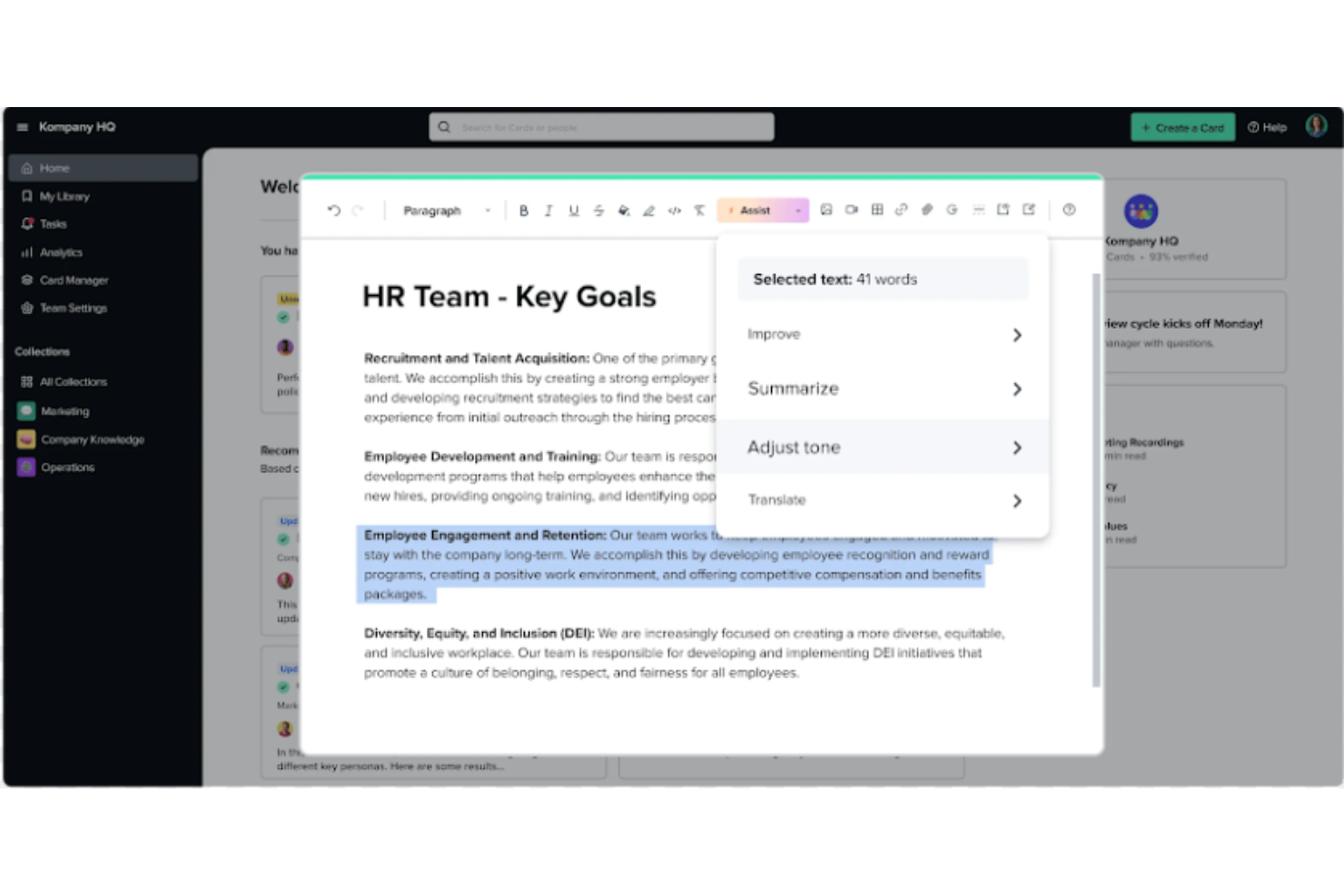
Guru ist eine fortschrittliche Such- und Wissensmanagement-Plattform, die darauf ausgelegt ist, Nutzern dabei zu helfen, relevante Informationen schnell zu finden. Die fortschrittliche, KI-gestützte Suche kann Antworten aus all Ihren Apps, Dokumenten und Slack-#Kanälen finden – entweder direkt in Slack oder über eine Chrome-Erweiterung – sodass Informationen noch schneller auffindbar sind.
Warum ich Guru ausgewählt habe: Guru nutzt KI, um sofortige Antworten im Arbeitsablauf des Nutzers zu liefern, die auf die jeweilige Rolle, den Standort und die Aktivitäten zugeschnitten sind. Das Tool erleichtert zudem den Onboarding-Prozess für neue Mitarbeitende, optimiert das Erstellen, Teilen und Organisieren von Unternehmensdokumentationen und dient als Wissens-Hub zur Verbreitung von Schulungsinhalten und Problemlösungsanleitungen im gesamten Unternehmen. Die Plattform integriert sich außerdem mit einer Vielzahl an Tools und Diensten, sodass Nutzer Antworten finden und zusammenarbeiten können, ohne ihren Arbeitsablauf zu verlassen.
Insgesamt zielt Guru darauf ab, die durch Wissenssilos verursachten Barrieren zu beseitigen und die Produktivität durch automatisierte Informationsbeschaffung zu erhöhen, sodass sich Mitarbeitende auf Aufgaben konzentrieren können, die menschliche Intelligenz erfordern.
Hervorstechende Funktionen & Integrationen von Guru
Funktionen umfassen KI-Unternehmenssuche, Mitarbeiter-Intranet, Firmen-Wiki, KI-Vorschläge und -Unterstützung, Tools für individuelles Branding, Kollaborations- und Feedback-Werkzeuge, mobile Zugänglichkeit sowie Zugriffssteuerung und Berechtigungen.
Integrationen umfassen Trello, Cognito Forms, Jira Software Cloud, Confluence Cloud, HubSpot, Google Chat, Confluence Server und GitHub.

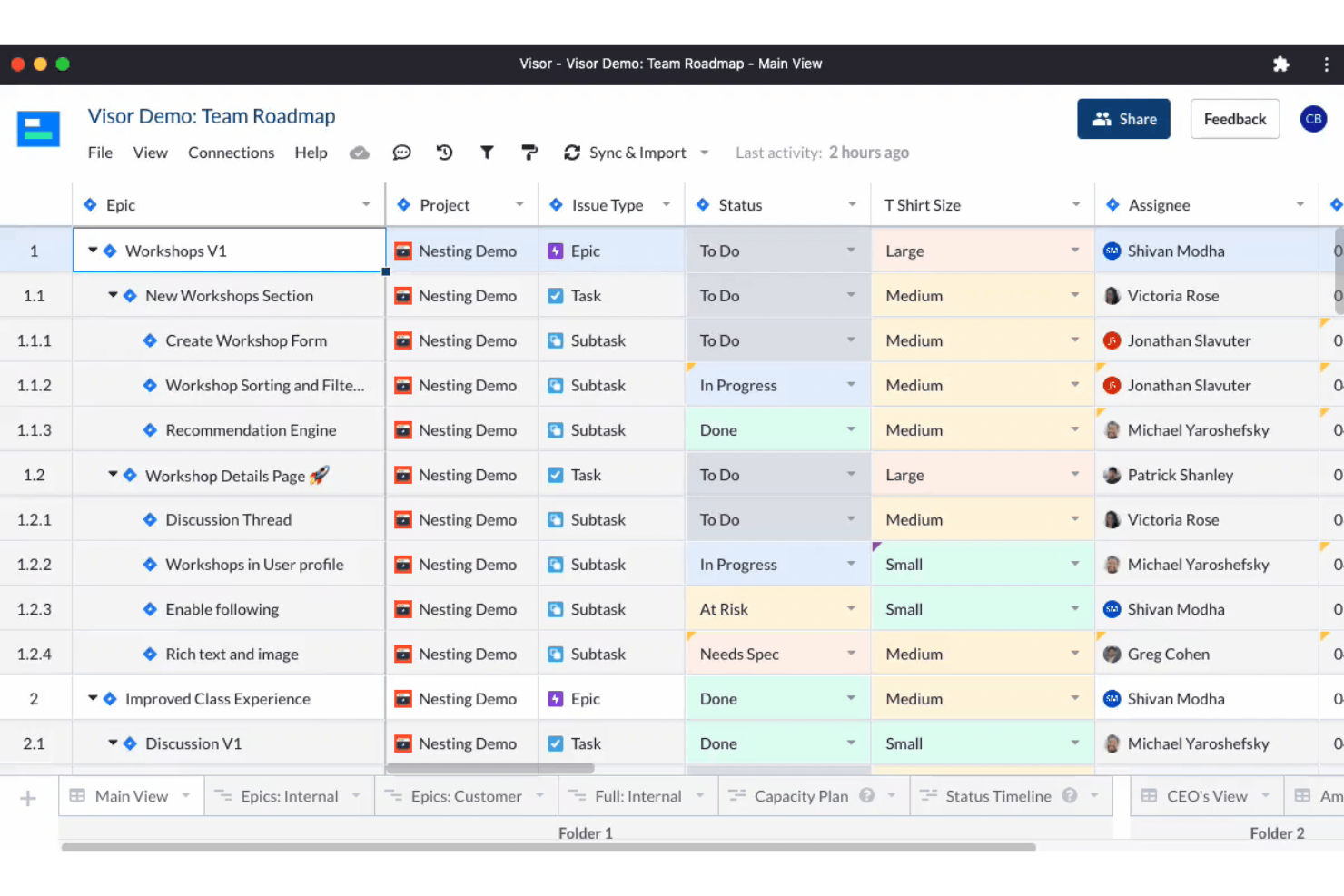
Visor ist ein cloudbasiertes SaaS-Produkt, das darauf abzielt, Einzelpersonen und Unternehmen dabei zu helfen, ihre Zeit und Aufgaben effizienter zu verwalten. Es eignet sich am besten für Einzelpersonen und Teams, die ein umfassendes und benutzerfreundliches Produktivitäts-Tool benötigen, mit dem sie Projekte, Aufgaben und Zeit an einem Ort verwalten können.
Warum ich Visor ausgewählt habe: Ich habe Visor als eine der besten Produktivitätssoftwares ausgewählt, weil es eine All-in-one-Lösung ist, die Aufgabenmanagement, Projektmanagement, Zeiterfassung und Kalenderfunktionen in einer benutzerfreundlichen Oberfläche vereint. Mir gefällt, dass ich alles, was ich erledigen muss, im Blick behalten kann, ohne ständig zwischen verschiedenen Tools oder Apps wechseln zu müssen.
Ein weiteres großartiges Feature sind die Funktionen für die Zusammenarbeit in Echtzeit, mit denen Sie mit Ihren Teammitgliedern an Projekten arbeiten, Aufgaben zuweisen und Fortschritte verfolgen können. Diese Funktion erleichtert die Kommunikation mit Teammitgliedern und hilft, bei all Ihren Projekten den Überblick zu behalten. Außerdem verfügt es über eine intelligente Terminplanungs-Funktion, die auf Basis Ihrer Verfügbarkeit und Auslastung die besten Zeitfenster für einzelne Aufgaben vorschlägt. Diese Funktion ist besonders hilfreich, wenn Sie viele Aufgaben erledigen müssen und Ihre Zeit effektiv priorisieren möchten.
Hervorstechende Funktionen & Integrationen von Visor
Funktionen umfassen API, Dashboards, Datenexport/Datenimport, Datenvisualisierung, externe Integrationen, Gantt-Diagramme, Projektmanagement, Aufgabenplanung/-verfolgung, Ressourcenmanagement und Plugins/Add-ons von Drittanbietern.
Integrationen umfassen Jira, HubSpot und Salesforce.

Am besten geeignet für unbegrenztes Workflow-Management
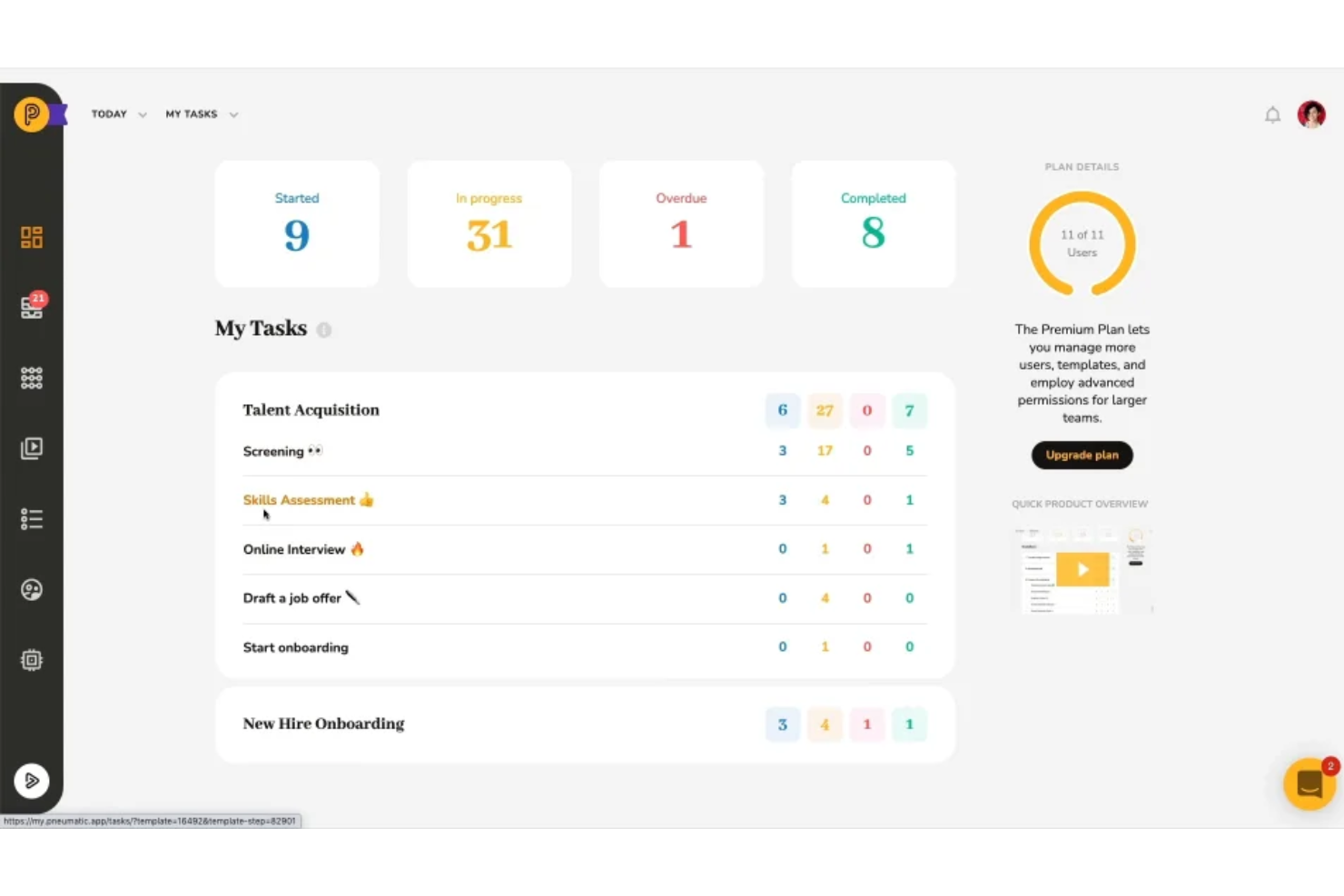
Pneumatic Workflow ist ein umfassendes Workflow-Management-Tool, das Unternehmen dabei unterstützt, ihre Prozesse zu optimieren. Es ermöglicht die visuelle Abbildung von Workflows, automatisiert die Aufgabenverteilung und stellt sicher, dass alle Teammitglieder jederzeit wissen, was zu tun ist.
Warum ich Pneumatic Workflow ausgewählt habe: Die Plattform bietet unbegrenzte Workflows, sodass Unternehmen ihre Prozesse entwickeln, optimieren und weiterentwickeln können, ohne steigende Kosten befürchten zu müssen. Die App enthält zudem eine Vielzahl von Workflow-Vorlagen, die auf verschiedene Unternehmensbereiche wie Personalwesen, Vertrieb, Marketing, Finanzen, Beschaffung, Entwicklung und Kundensupport zugeschnitten sind. Diese Vorlagen können direkt genutzt oder individuell angepasst werden, was es Organisationen erleichtert, schnell wirkungsvolle Workflows bereitzustellen.
Besondere Merkmale & Integrationen von Pneumatic Workflow
Funktionen beinhalten einen KI-gestützten Workflow-Builder, der die Erstellung von Workflows vereinfacht, indem Nutzer beschreiben, welche Art von Workflow sie wünschen, und das System die einzelnen Schritte automatisch generiert. Außerdem bieten die leistungsstarken Dashboards einen Überblick über das gesamte System, mit wichtigen Kennzahlen wie der Anzahl gestarteter, laufender und abgeschlossener Prozesse.
Integrationen umfassen Gmail, Slack, Google Sheets, Trello, Google Docs, PandaDoc, Google Forms, Typeform, HubSpot, Google Calendar, Microsoft Outlook und ClickUp.
Weitere Produktivitäts-Apps
- Collabio Spaces
Am besten für iPhone & Mac
- Focus Booster
Am besten geeignet für die Pomodoro-Produktivitätstechnik
- Slack
E Sofortnachrichten-App für Teams
- Hubstaff
Am besten geeignet für die Verwaltung von Remote- und Außendienstteams
- Hive
Am besten für flexible Projektansichten entsprechend den Teamanforderungen
- Lucidspark
Ideal für Ideensammlungen und Zusammenarbeit auf einer unendlichen Arbeitsfläche
- Wrike
E Produktivitäts-App für Teamzusammenarbeit
- GoodDay
Am besten für Agile- und Wasserfall-Unterstützung


Wie Sie effektiv & produktiv werden – mit der Eisenhower-Matrix
Zu oft betrachten wir Produktivität als eine Frage der Menge: Wie viel schaffe ich und wie schnell? Um echte Wirkung zu erzielen, müssen wir unser Verständnis von Produktivität neu ausrichten – es geht tatsächlich darum, Ihre Zeit besser zu nutzen.
Wie nutzen Sie Ihre Zeit besser?
Zunächst müssen wir herausfinden, auf welche Weise wir unsere Zeit am produktivsten nutzen können. Halten Sie inne und fragen Sie sich:
- Was passiert, wenn ich jetzt nicht diese scheinbar dringende Sache erledige? (Denn diese dringende Sache ist vermutlich gar nicht so wichtig!)
- Was sind meine Aufgaben mit dem größten Mehrwert? Was ist unerlässlich?
- Was kann nur ich tun, das – wenn es gut gemacht wird – wirklich einen Unterschied macht?
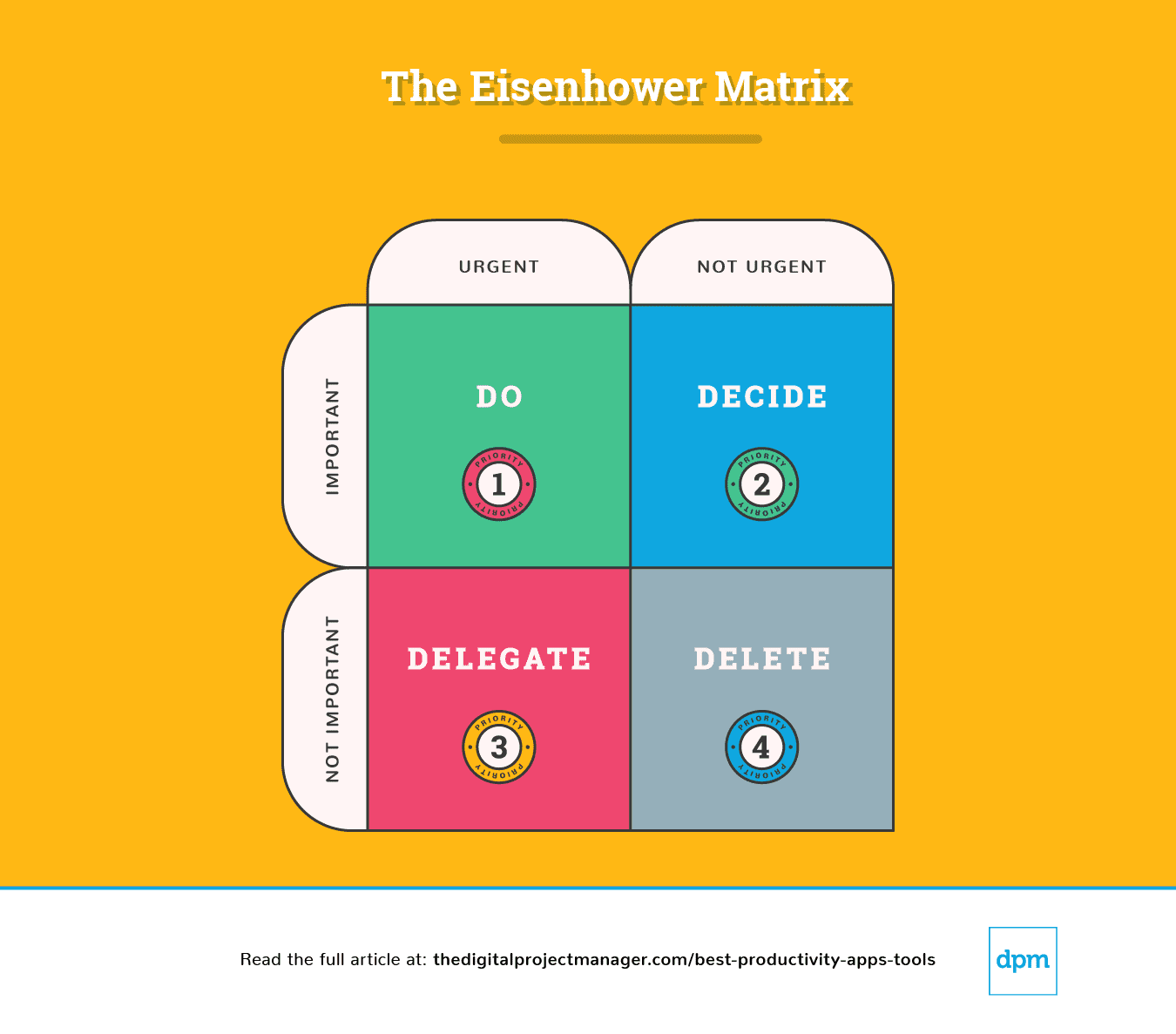
Eine gute Möglichkeit, diese Fragen zu beantworten, ist die Nutzung einer Prioritätenmatrix, um Aufgaben nach ihrem Grad an Dringlichkeit und Wichtigkeit einzuordnen. Ich benutze gerne die folgende Matrix, die auf der Eisenhower-Matrix basiert:
Erläuterung der Eisenhower-Matrix
Eine einfache Aufschlüsselung dieser Grafik zeigt uns, wie wir eine Aufgabe angehen sollten:
Priorität #1: Sie ist dringend und wichtig. Erledigen Sie sie.
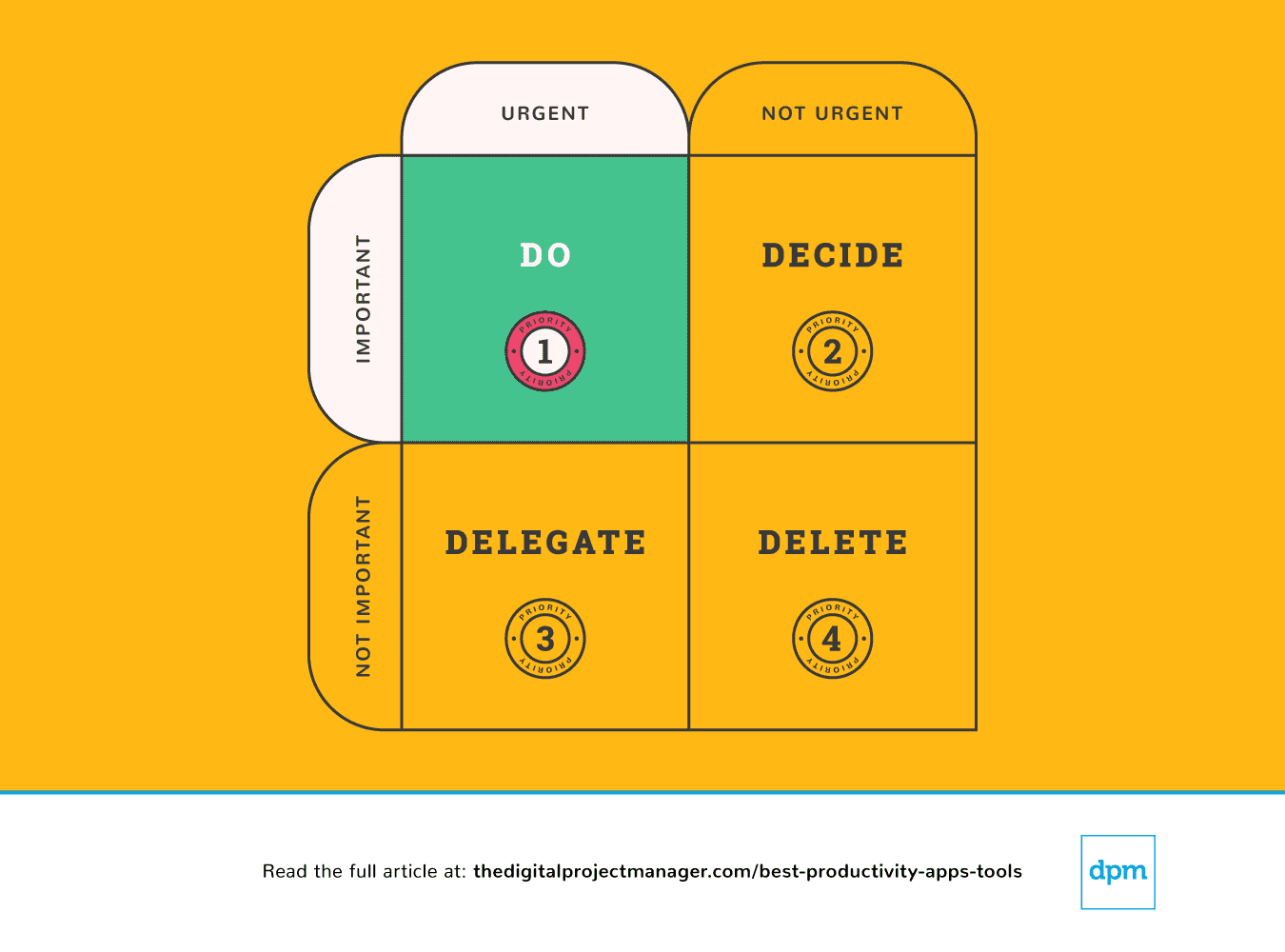 Ihre wichtigsten Aufgaben brauchen die Sofort-Erledigen-Regel. Ähnlich gilt: Wenn Sie eine Aufgabe sehen, für die Sie weniger als 2 Minuten benötigen, erledigen Sie sie einfach sofort (Warum? Weil es mehr Zeit kostet, sie auf die To-Do-Liste zu setzen und dann zu terminieren und priorisieren).
Eine wichtige Aufgabe anzufangen und so lange daran zu arbeiten, bis sie zu 100 % abgeschlossen ist, ist der eigentliche Charaktertest. Es ist nicht leicht, aber so werden Sie wirklich produktiv. Das erfordert Selbstdisziplin, aber wir können es uns mit einigen Produktivitätstools leichter machen.
Priorität #2: Sie ist nicht dringend, aber wichtig. Treffen Sie eine Entscheidung.
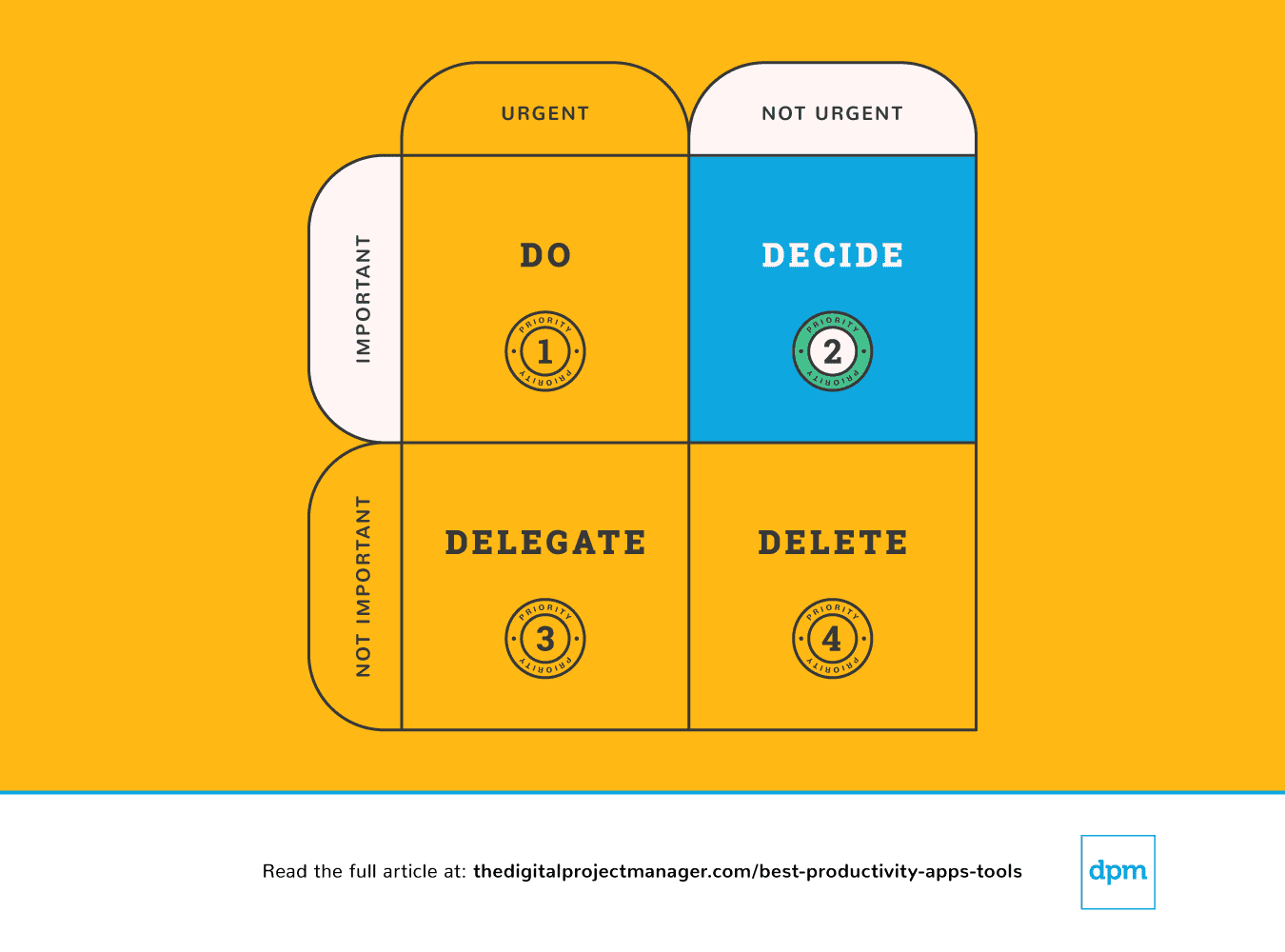 Treffen Sie Entscheidungen in den Punkten, die die Aufgabe am Weiterkommen hindern. Entscheiden Sie über den besten Zeitpunkt, die richtige Person und die Methode zur Durchführung der Aufgabe.
Wenn etwas wichtig, aber nicht unbedingt dringend ist, müssen Sie einen Moment investieren, um einen geeigneten Plan zu machen, wie Sie damit umgehen. Lassen Sie sich nicht ablenken – planen Sie, wie Sie das Wichtige richtig erledigen.
Oft fühlen wir uns völlig überfordert, weil wir an zu vielen Fronten gleichzeitig gefordert sind – wir haben das Gefühl, dass einfach zu viel zu tun ist und wir es unmöglich jedem recht machen können. Um die besten Entscheidungen für uns, unser Team und unsere Projekte treffen zu können, müssen wir einen klaren Überblick über all unsere Aufgaben, Prioritäten und Fortschritte haben.
Folgende Produktivitäts-Apps helfen besonders beim Priorisieren von Aufgaben – um zu prüfen, was ansteht, den Fortschritt zu verfolgen und alle Informationen für fundierte Entscheidungen bei der Organisation unserer Arbeit bereitzustellen.
Priorität #3: Sie ist dringend, aber nicht wichtig. Delegieren Sie sie.
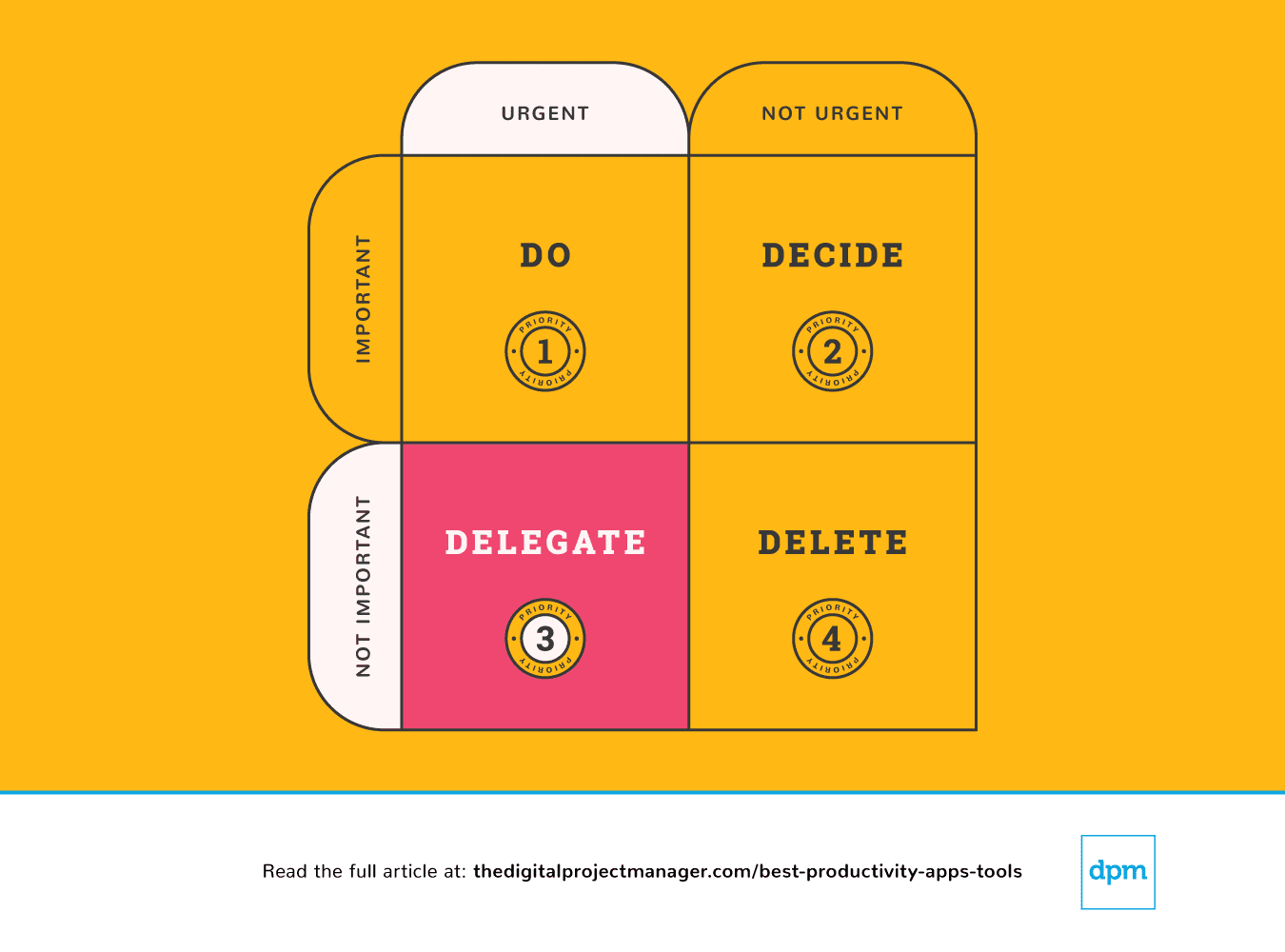 In diesem Fall delegieren wir die Aufgabe an die passende Person, damit Sie sich auf die wichtigen Dinge konzentrieren können.
Manchen Menschen fällt das Delegieren leicht, andere wiederum haben einen starken Impuls, alles selbst erledigen zu wollen. So schwer es auch sein mag, Aufgaben an andere abzugeben – es ist ziemlich einfach, Aufgaben an eine Maschine zu übergeben. Es gibt unzählige Produktivitäts-Apps, mit denen man dank Automatisierung mehr in weniger Zeit schaffen kann, indem der Algorithmus die Routinearbeit übernimmt.
Priorität #4: Sie ist weder dringend noch wichtig. Streichen Sie sie!
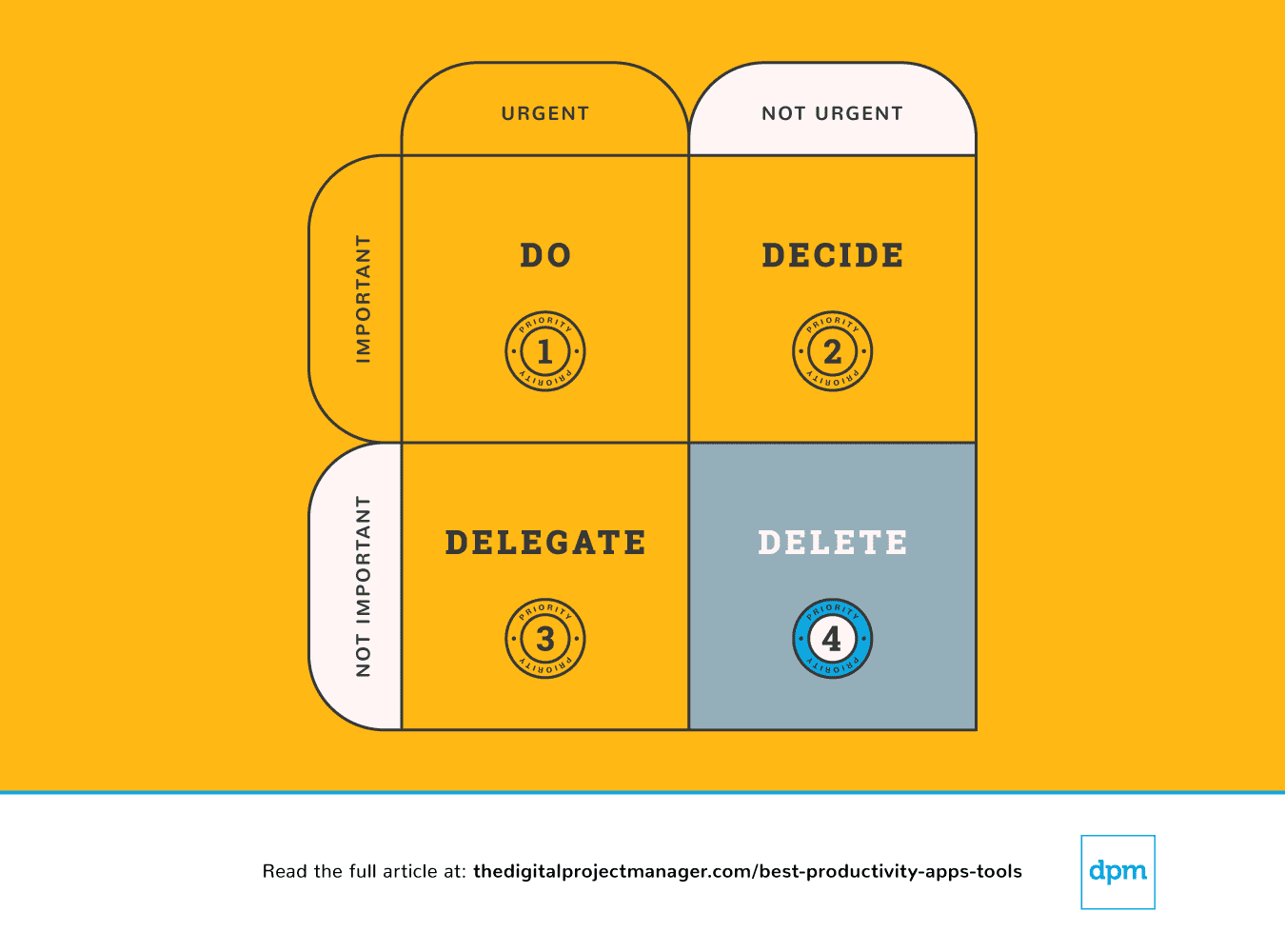 Schließlich können wir manchmal effektiver sein, indem wir weniger tun. Es gibt endlose Möglichkeiten (und viele Produktivitäts-Apps), um „Ja“ zu großartigen Ideen zu sagen. Aber um diese Dinge auch wirklich erledigen zu können, müssen Sie den richtigen Dingen ein „Nein“ entgegensetzen. Lernen Sie, Grenzen zu setzen und „Nein“ zu sagen.
Es ist wunderbar, nett und freundlich zu sein und anderen Menschen zu helfen. Das Problem ist, dass wir nicht immer die Zeit dazu haben. Das führt dazu, dass wir Gefahr laufen, zu wenig zu leisten oder gar nichts zu liefern. Du tust niemandem einen Gefallen, wenn du etwas versprichst, bei dem du am Ende nicht dein Bestes geben kannst.
Und ja, es gibt Produktivitäts-Apps, mit denen du Aufgaben abgeben und Grenzen setzen kannst – indem sie dir ein System dafür geben, einfach mal „nein“ zu sagen.
Am Ende eines jeden Tages solltest du dir 10 Minuten Zeit nehmen und planen, wie der morgige Tag aussehen wird – was wirst du erledigen, entscheiden, delegieren und streichen?
Schau dir dann die Produktivitäts-Apps in dieser Übersicht an. Ich habe solche ausgewählt, die dir dabei helfen können, das Wichtige im Blick zu behalten und deine Zeit effektiv zu nutzen – durch Automatisierung, Nachverfolgung, Synchronisierung und Erinnerungsfunktionen. So bleibt dir mehr Zeit für die Aufgaben, die wirklich zählen, und du erledigst sie effizient!
Wie geht es weiter?
Wenn du gerade dabei bist, Produktivitäts-Apps und -Tools zu recherchieren, lass dich kostenlos von einem SoftwareSelect-Berater beraten und erhalte individuelle Empfehlungen.
Du füllst ein Formular aus und führst ein kurzes Gespräch, in dem deine Bedürfnisse genau analysiert werden. Anschließend bekommst du eine Auswahlliste an Software zur Ansicht. Sie begleiten dich sogar während des gesamten Kaufprozesses – bis hin zu Preisverhandlungen.
Weitere Tool-Listen:
- 15 beste Online-Kollaborationstools für Teams
- 15 beste Projektmanagement-Software, die du brauchst
- Die 10 besten Ressourcenmanagement-Softwares & Tools