

What Is an HRIS? Features, Benefits & Examples


HRIS Defined: Learn what is HRIS and how it centralizes employee data, payroll, and HR processes to streamline operations.
Business Impact: Discover how implementing an HRIS boosts efficiency, reduces compliance risk, but brings costs and data privacy considerations.
Real-World Results: Case studies show HRIS can significantly cut administrative workload, speed up hiring, and improve employee satisfaction.
Core Features: Understand essential HRIS capabilities like employee management, payroll, benefits, compliance tracking, and self-service tools.
Selecting Tools: Compare HRIS with similar systems to determine what is HRIS, how it differs, and which best fits your HR needs.
HRIS is the backbone of modern HR operations—and choosing the wrong one (or none at all) costs teams time, accuracy, and compliance confidence. I've seen HR pros drown in spreadsheets, miss audit deadlines, and lose top candidates to clunky hiring workflows. This guide cuts through that.
You'll get a clear breakdown of core features, real-world examples, and the questions that actually matter when evaluating a system. Whether you're building your HR tech stack from scratch or reconsidering what you have, this is your starting point.
What Is an HRIS?
An HRIS, or human resources information system, is software that stores, organizes, and manages core employee data, payroll, benefits, and HR processes in one place. You use it to track everything from hiring and onboarding to time off and compliance.

HRIS matters because it protects your data, helps you catch errors before they become problems, and makes people management less manual.
How Does an HRIS Work?
An HRIS works by centralizing employee information and connecting common HR processes in one system. Instead of keeping information across spreadsheets, emails, and separate files, HR teams can use the system for employee data management, record-keeping, and routine administrative tasks throughout the employee lifecycle.
Most systems also automate workflows that would otherwise require repeated manual data entry. For example, employee information can flow into payroll processing, while employee self-service features allow workers to update personal details or access documents without relying on HR for every request.
The HR team can then use reporting and analytics to review workforce information and support day-to-day decisions.
HRIS vs HRMS vs HCM: What’s the Difference?
HRIS, HRMS, and HCM are closely related terms, and vendors sometimes use them interchangeably.
An HRIS (Human Resources Information System) typically focuses on core employee records and administrative HR processes such as payroll, benefits, time tracking, and employee data management.
An HRMS (Human Resource Management System) generally includes those capabilities while adding broader workforce management functions such as recruiting, performance management, and scheduling.
HCM (Human Capital Management) is usually the broadest of the three. HCM platforms often combine core HR administration with more strategic functions such as talent management, workforce planning, employee development, and analytics.
In practice, the boundaries are not always clear, so it’s better to compare the actual features and capabilities of each platform rather than choosing based on the label alone.
Examples of HRIS
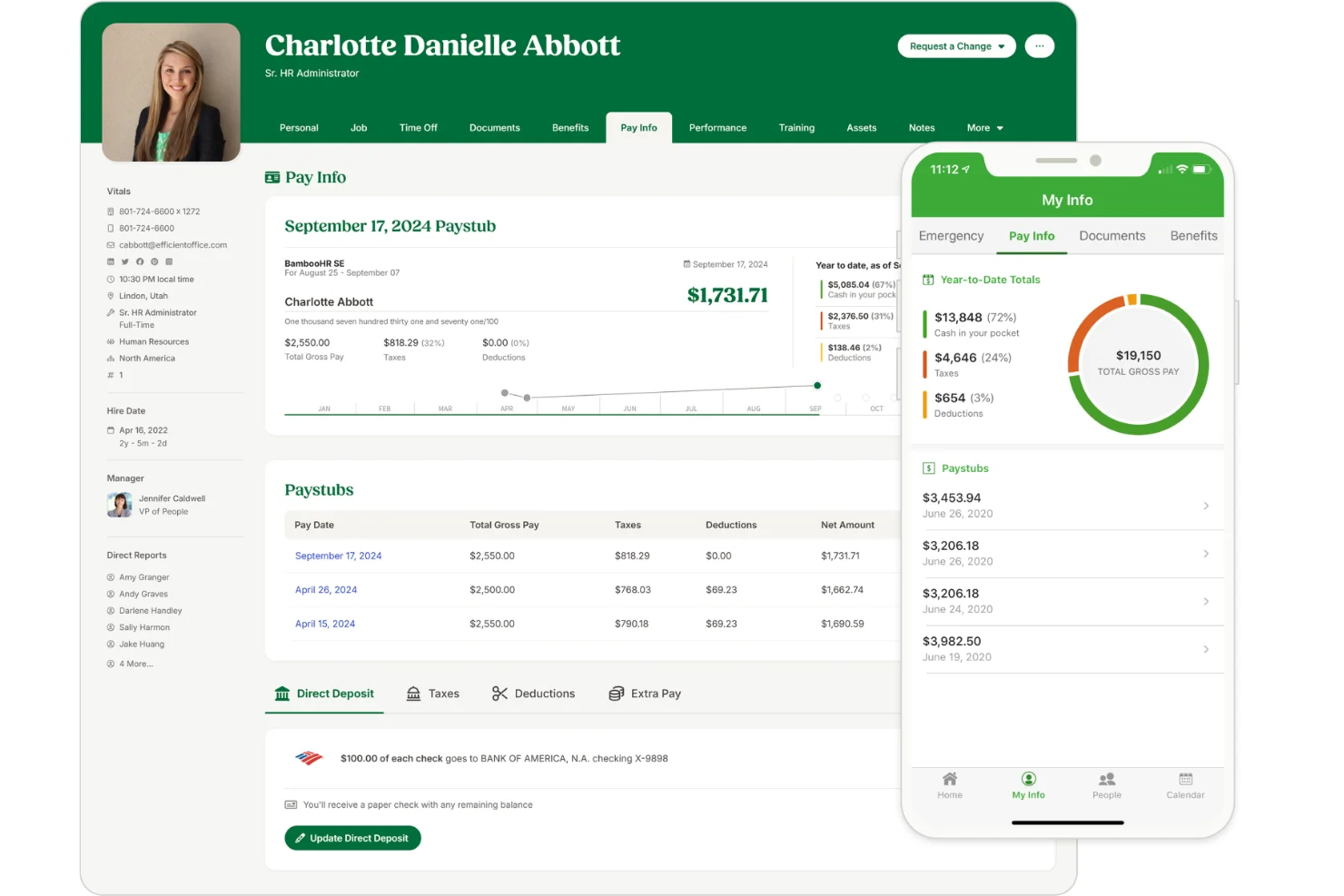
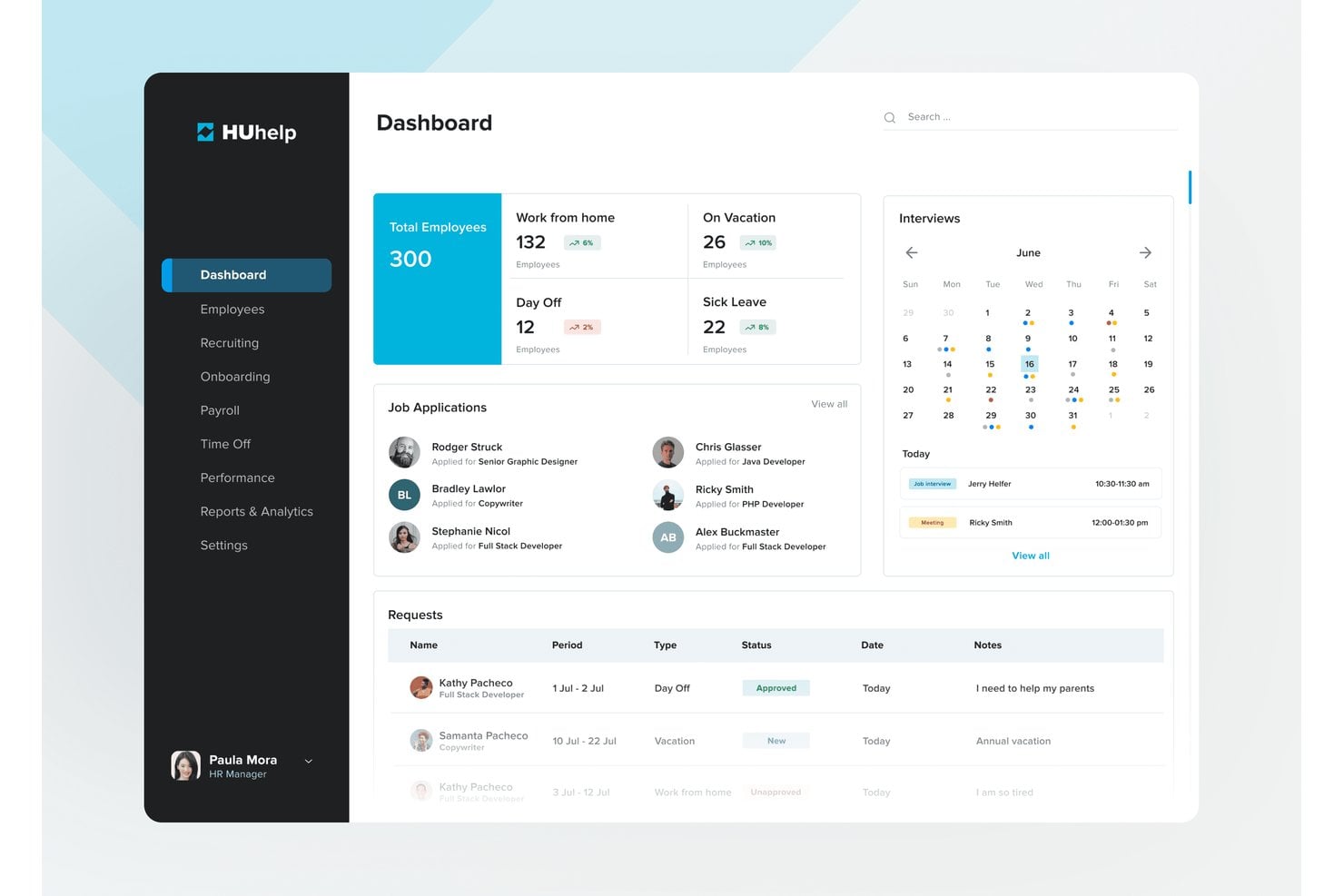
Here are a few visual examples of HRIS dashboards and tools you’ll see in real HR workspaces:
Top HRIS to Consider
Here's my shortlist of the best HRIS solutions:
Clicks on the links below may earn a commission, which supports our independent testing and review of software and services. Learn more about how we stay transparent.


Who Uses HRIS?
You’ll see HRIS used by these types of teams and organizations:
- HR Departments: Centralize and manage employee data, payroll, compliance, and people processes across the workforce.
- Recruiting and Talent Teams: Track candidates, coordinate hiring workflows, and communicate hiring status to the rest of the business.
- Payroll and Benefits Administrators: Maintain pay records, manage benefit enrollments, and ensure accurate deductions and tax reporting.
- Companies With Hourly or Shift-Based Workforces: Monitor attendance, support scheduling, and handle time-off requests in industries like retail or hospitality.
- Mid-Sized to Large Organizations: Support growing headcounts, ensure compliance across locations, and automate complex HR operations.
Key HRIS Benefits & Potential Business Impacts
Adopting an HRIS helps your team boost efficiency, reduce compliance risks, and support better business outcomes by centralizing people processes and data. However, HRIS brings a direct cost and requires careful implementation to avoid data privacy issues or process gaps.
Use this table to weigh the main benefits and risks for HR executives when implementing an HRIS:
| Benefits | Risks |
|---|---|
| Centralizes employee data for easier access | Data migration mistakes can cause loss or corruption |
| Automates core HR processes and routine tasks | Implementation can disrupt existing workflows |
| Improves data accuracy and reduces manual errors | Poor vendor support could delay issue resolution |
| Simplifies compliance tracking and reporting | Insufficient staff training creates adoption barriers |
| Enhances reporting, insights, and decision making | Data privacy and security threats if not managed well |
| Supports efficient multi-location HR management | Integration challenges with legacy systems |
| Streamlines onboarding and offboarding processes | Ongoing costs (licenses, maintenance, upgrades) |
HRIS Case Studies
See how HR teams have transformed their daily work by switching to HRIS. These case studies highlight what changed—from manual headaches to organized, data-driven processes—so you can picture the impact in your own workplace.
Case Study: Valuize's Implementation of BambooHR
Valuize replaced a fragmented, manual HR setup—where three people managed data for just nine employees—with BambooHR, centralizing hiring, onboarding, performance management, and employee satisfaction tracking in one platform. After implementation, Christy Ransom, SVP of Operations, was able to run the entire HR function as a team of one.
Here are the results of Valuize's implementation of HRIS:
- 80% reduction in administrative workload: With BambooHR handling routine HR tasks, fewer people needed to dedicate time to meeting the team's HR needs.
- 70% increase in employee satisfaction: Moving away from manual processes allowed Valuize to focus on collaboration and engagement, using features like 360 peer feedback, quarterly performance check-ins, and skills assessments.
- 50% faster time to hire: Bringing hiring, onboarding, and satisfaction metrics into a single platform made the recruiting process more consistent and significantly reduced the risk of errors or delays with candidates.
Case Study: Community Health System's Implementation of UKG Pro
Community Health System implemented UKG Pro Workforce Management to address a lack of centralized visibility into scheduling operations and the need for specialized capabilities across units, adopting UKG's Basic, Advanced, and EZCall scheduling solutions.
The rollout delivered measurable financial returns alongside improvements in employee wellbeing and satisfaction.
Here are the results of Community Health System's implementation of HRIS:
- 350% ROI with a sub-six-month payback period: The organization recovered its full investment in the technology less than six months after rollout.
- $1.2M+ in annual benefits: Implementing UKG's scheduling solutions led to a significant reduction in absenteeism, FTE leakage, and reliance on external staffing resources.
- Four hours saved per manager per week: Managers spent substantially less time on scheduling compared to previous methods, translating to more than $1.5M in annual savings from the Advanced Scheduling module alone.
- $2.7M in net benefits by year three: The cumulative financial impact of the implementation grew significantly over the first three years of the project.
Core Features & Capabilities of HRIS
Here are the core features you should expect in an HRIS as an HR executive:
- Employee Database: Store, organize, and update all employee records securely in one place.
- Payroll Management: Calculate wages, administer payments, and ensure tax and deduction compliance each pay cycle.
- Benefits Administration: Manage enrollment, track eligibility, and support open enrollment for health, dental, and other employee benefits.
- Time and Attendance Tracking: Monitor attendance, manage time-off requests, and support scheduling for both hourly and salaried staff.
- Recruiting and Onboarding: Track applicants, manage interview steps, and automate documentation for a smoother new-hire experience.
- Performance Management: Set objectives, conduct reviews, collect 360 feedback, and track performance improvement plans.
- Compliance and Reporting: Generate required reports, support audit trails, and alert your team to changes in regulatory requirements.
- Self-Service Portals: Let employees access pay stubs, request time off, and update personal information without bottlenecking HR.
HRIS Use Cases: Typical Processes & Workflows
HRIS handles everything from tracking time and managing payroll to onboarding new hires and monitoring performance. You can replace tedious spreadsheets with automated workflows for hiring, pay, scheduling, reviews, and compliance. That means fewer errors, less double work, and a smoother, more connected employee experience.
Use this table to see how HRIS supports the most important HR executive processes:
| Process | Description | How Software Helps |
|---|---|---|
| Payroll and Benefits | Administer payroll, manage deductions, and track employee benefits. | HRIS automates payroll calculations, tax updates, and manages benefit enrollments and eligibility rules in one place. |
| Talent Acquisition and Onboarding | Recruit candidates, track applicants, and smoothly onboard new hires. | HRIS tracks job postings, candidates, interview steps, and automates onboarding paperwork for consistent new-hire experiences. |
| Performance Management | Set goals, conduct reviews, and monitor employee performance. | HRIS schedules review cycles, collects 360 feedback, and centralizes performance records for quick access and analysis. |
| Time and Attendance Tracking | Monitor employee work hours, attendance, and time-off requests. | HRIS captures clock-ins/outs, flags absenteeism, and manages leave balances and approvals for easier tracking and compliance. |
| Compliance and Reporting | Ensure adherence to labor laws, generate audits, and prepare reports. | HRIS provides audit trails, updates regulatory requirements, and automates reporting to support compliance and reduce risk. |
Types of HRIS & Similar Tools
HRIS sits within a broader ecosystem of HR technology, and several related tools are often grouped together or confused with one another. Here's how to tell them apart:
| Type | Differentiator |
|---|---|
| HRMS (Human Resource Management System) | Covers everything HRIS does, plus deeper operational capabilities like workforce planning and advanced analytics |
| HCM (Human Capital Management) | Focuses on long-term talent strategy—succession planning, workforce development, and employee lifecycle management |
| ATS (Applicant Tracking System) | Recruitment-only tool for managing job postings, candidates, and hiring workflows |
| Payroll software | Handles pay calculations, tax filings, and deductions exclusively, without broader HR data management |
| Workforce management (WFM) software | Specializes in scheduling, shift planning, and labor cost tracking, typically for hourly or shift-based workforces |
| LMS (Learning Management System) | Dedicated to delivering, tracking, and managing employee training and development programs |
How to Choose an HRIS
Choosing the right HRIS starts with identifying which HR processes are creating the most friction for your team.
A smaller organization may mainly need reliable payroll processing, time tracking, and employee records, while a growing company may need a more comprehensive HRIS that also supports talent management, reporting, and workforce planning.
When comparing HR software, consider:
- Core requirements: Identify which functions are essential, such as payroll, benefits administration, recruiting, performance reviews, or employee self-service.
- Integrations: Check whether the system connects with the payroll, accounting, recruiting, and other tools you already use.
- Ease of use: Consider the experience for both HR teams and employees, especially if the platform includes self-service tools or a mobile app.
- Scalability: Make sure the system can support additional employees, locations, and more complex HR processes as the organization grows.
- Data security and compliance: Review how the vendor protects sensitive employee information and supports regulatory compliance.
- Reporting capabilities: Look for reporting and analytics that give HR leaders useful workforce insights rather than simply storing data.
- Implementation and support: Understand how employee data will be migrated, how long setup may take, and what training and vendor support are available.
The best HRIS is not necessarily the platform with the longest feature list. It is the one that solves your current HR challenges while giving your team enough flexibility to support future growth.
Start Comparing HRIS Tools on Your Own Terms
Whether you're evaluating your first HRIS or replacing an outdated system, a free People Managing People membership gives you access to tools, templates, and peer insights to help you make a confident, informed decision.

