

10 Best Affordable HR Software Reviewed in 2026

Best Affordable HR Software Shortlist


Whether you're juggling payroll, compliance, and employee engagement, you're probably also concerned with keeping costs in check. That's where affordable HR software comes in, offering tailored solutions to simplify your workload.
I've spent time testing and reviewing these tools to give you an unbiased look at the best options out there. With my experience in HR management, I know what works and what doesn't.
In this article, I'll walk you through my top picks, highlighting features that address common HR challenges. You'll find insights to help you make the best choice for your team's needs. Let's dive into finding the perfect fit for your organization.

Why Trust Our Software Reviews
Our team has been testing and reviewing software since 2012. As HR experts ourselves, we know how difficult—and important—it is to choose the right software.
For this guide, we evaluated tools using hands-on testing and independent research, scoring tools using our selection criteria. We also draw on insights from industry thought leaders and practicing HR experts.
Our reviews reflect our human editorial judgment, not a sales pitch.
Expert reviewers:
Best Affordable HR Software Summary
This comparison chart summarizes pricing details for my top affordable HR software selections to help you find the best one for your budget and business needs.
| Tool | Best For | Trial Info | Price | ||
|---|---|---|---|---|---|
| 1 | Best with customizable role-based permissions | Free demo available | From $8/user/month | Website | |
| 2 | Best for global HR without per-country add-ons | Free demo available | From $5/employee/month | Website | |
| 3 | Best for payroll integration | Free demo available | Pricing upon request | Website | |
| 4 | Best for recruitment features | Free demo available | From $350/month | Website | |
| 5 | Best for analytics and reporting | Free demo available | Pricing upon request | Website | |
| 6 | Best for time-off tracking | Free plan for 6 months (up to 4 users) + 14-day free trial | From $6/employee/month | Website | |
| 7 | Best for modular features | 30-day free trial | From $6/employee/month | Website | |
| 8 | Best for enterprise-level HR | 30-day free trial | Pricing upon request | Website | |
| 9 | Best for compliance training | Free demo available | Pricing upon request | Website | |
| 10 | Best for small businesses | 30-day free trial + free demo available | From $1.25/user/month (billed annually) | Website |
Best Affordable HR Software Reviews
Below are my detailed summaries of the best affordable HR software that made it onto my shortlist. My reviews offer a detailed look at the key features, pros & cons, integrations, and ideal use cases of each tool to help you find the best one for you.

Best with customizable role-based permissions
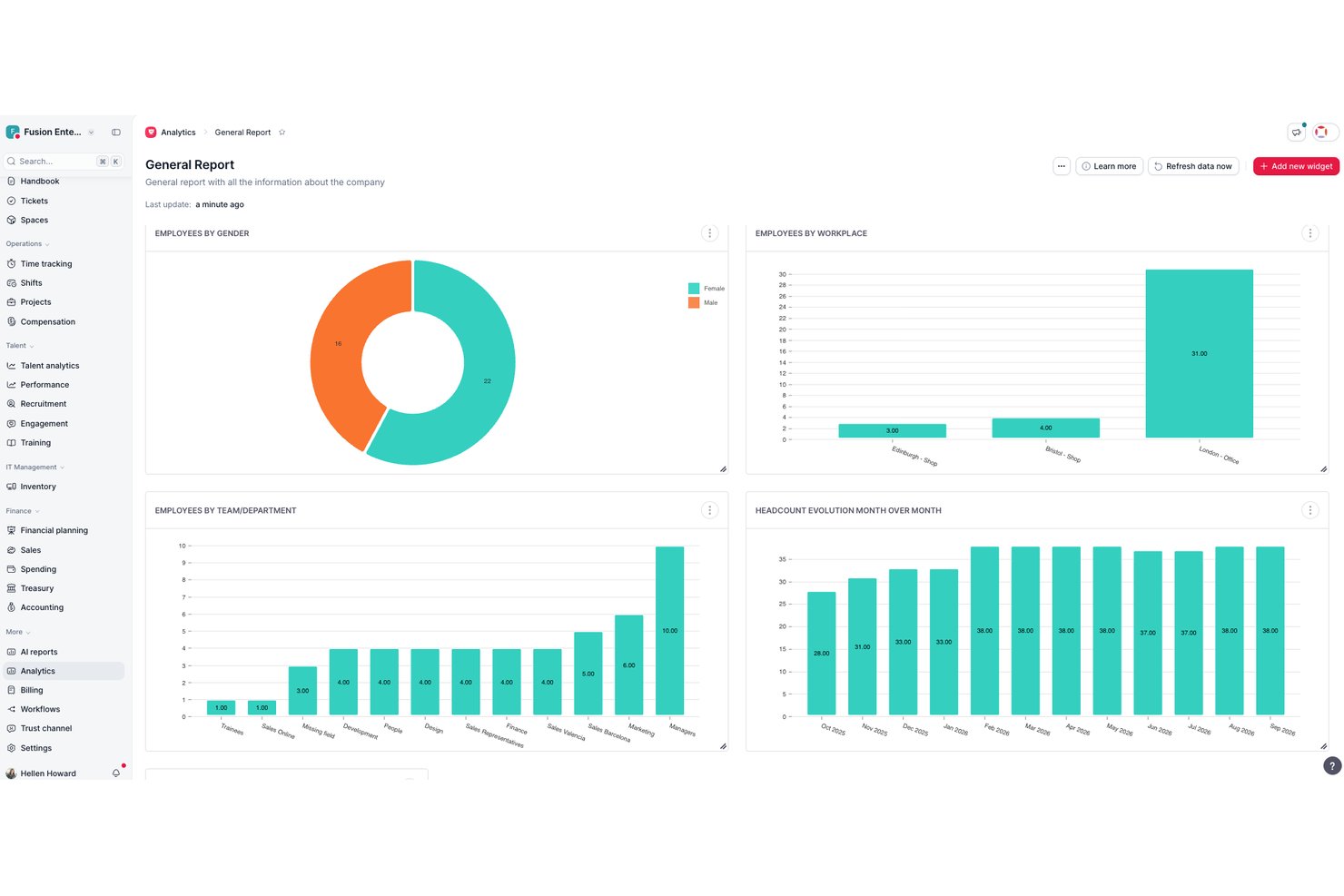
Factorial is a modular HR software platform that combines employee recordkeeping, onboarding, time off management, time tracking, shift scheduling, and talent management into a single system built for small and mid-sized businesses.
Who Is Factorial Best For?
Factorial is a strong fit for small and mid-sized businesses that need a scalable, affordable HR platform without the complexity of enterprise software.
Why I Picked Factorial
Factorial earns its spot on my shortlist because of how granularly you can configure access across your organization. I like that managers can be scoped to shift scheduling and expense approvals while individual contributors see only their own time-off requests and payslips. Multi-step approval workflows let me define exactly who can authorize what, by role, without any custom development work needed.
Factorial Key Features
- Automated onboarding workflows: Create structured new hire processes with task checklists and e-signature collection.
- Unlimited custom PTO policies: Configure and manage multiple leave types, accrual rules, and holiday calendars.
- Mobile app access: Enable employees and managers to handle HR tasks, requests, and approvals from iOS and Android devices.
- Project-based time tracking: Track work hours against projects or clients and sync time logs for payroll and reporting.
Factorial Integrations
Factorial offers native integrations with Slack, Google Workspace, Microsoft 365, Teamtailor, ATS.fi, Personio, and Zapier. An API is available for custom integrations.
Pros and Cons
Pros:
- Onboarding workflows include e-signature collection
- Solid shift scheduling for hourly teams
- Customizable role-based access controls
Cons:
- Custom report building takes time to configure
- Payroll support limited to select countries

Deel HR
Best for global HR without per-country add-ons
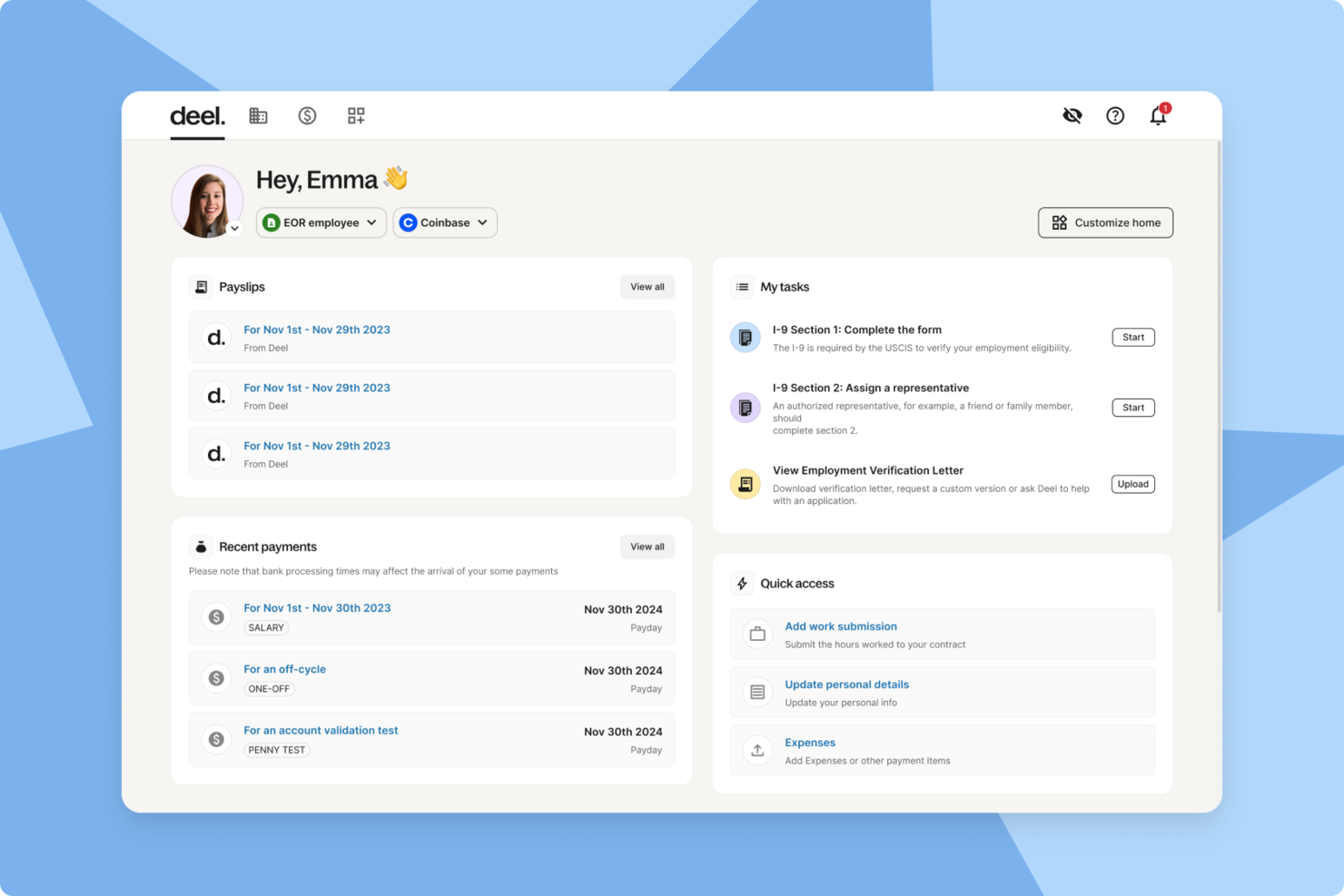
Deel is an all-in-one HR platform with per-country add-ons built for companies hiring and managing global teams. It helps you onboard employees and contractors, run international payroll, and stay compliant with local labor laws in more than 150 countries. If you are expanding a remote workforce, Deel can simplify cross-border hiring and reduce the operational complexity that often comes with global growth.
Why I Picked Deel
I picked Deel because it allows you to manage global payroll and compliance from a single platform, which is essential when you are operating across multiple countries. I was particularly impressed by how it handles localized contracts, tax requirements, and payments, helping you reduce the risk of compliance issues. I also like that onboarding can be completed digitally, which makes it easier for you to bring on international employees and contractors without heavy administrative lift. Together, these capabilities make Deel a practical choice for companies building distributed teams.
Deel Key Features
In addition to its payroll and onboarding capabilities, Deel offers several other features that cater to the needs of businesses seeking affordable HR solutions.
- Compliance Management: Ensures that your team adheres to local labor laws, minimizing legal risks for your company.
- Contractor Management: Simplifies the process of hiring and managing contractors globally, providing flexibility and ease.
- Immigration Support: Offers assistance with visa applications and related documentation, supporting your team's mobility.
- User-Friendly Interface: Provides an intuitive platform that makes navigating HR tasks straightforward for your team.
Deel Integrations
Integrations include QuickBooks, Xero, Netsuite, BambooHR, Greenhouse, Ashby, HiBob, Workable, Lever, and Slack.
Pros and Cons
Pros:
- Integrates with major HR systems
- Built-in compliance and contract management
- Global payroll across 150 countries
Cons:
- Limited directory customization options
- Reporting features lack advanced filtering
New Product Updates from Deel HR

Deel Expands Stablecoin Wallet to 80+ Countries
Deel expands its Stablecoin Wallet to 80+ countries with dollar-backed balances and optional rewards. This gives eligible contractors more ways to hold and manage earnings inside Deel. For more information, visit Deel’s official site.
 .
.
Netchex
Best for payroll integration

Netchex is a cloud-based HR and payroll management solution designed for businesses of all sizes. It offers both payroll processing and HR management capabilities, making it a versatile tool for your team.
Why I picked Netchex: Netchex integrates payroll processing with HR functions, providing a unified platform for managing employee data and payroll tasks. It offers automated tax compliance, ensuring your team stays updated with the latest regulations. The software includes features for employee self-service, enabling your team to access payroll information and manage personal data easily. Its dedicated reporting tools help you make informed decisions by analyzing payroll and HR metrics.
Standout features & integrations:
Features include advanced reporting capabilities, allowing you to create custom reports that suit your business needs. Netchex also offers benefits administration, helping you manage employee benefits efficiently. The software's onboarding tools aid in the process of bringing new hires into your organization.
Integrations include QuickBooks, Xero, ADP, BambooHR, Salesforce, Microsoft Dynamics, Sage, Kronos, Paycor, and Google Workspace.
Pros and Cons
Pros:
- Employee self-service portal
- Automated tax compliance
- Complete payroll features
Cons:
- Limited international payroll support
- May be complex for small teams
JazzHR
Best for recruitment features

JazzHR is a recruitment software designed for businesses of all sizes, focusing on supporting the hiring process. It offers tools for job posting, candidate tracking, and interview scheduling, making recruitment more efficient for your team.
Why I picked JazzHR: JazzHR excels in recruitment features, providing tools to post jobs across multiple platforms with ease. You can track candidates through every stage of the hiring process, ensuring no detail is missed. The software offers customizable workflows, allowing your team to tailor the recruitment process to fit your needs. Its interview scheduling feature reduces the back-and-forth communication, saving time for both you and your candidates.
Standout features & integrations:
Features include a built-in resume parser that extracts candidate details, saving you time on data entry. JazzHR also offers collaborative hiring tools, enabling your team to work together on candidate evaluations. You can create branded career pages to attract top talent and showcase your company culture.
Integrations include LinkedIn, Indeed, Glassdoor, ZipRecruiter, Google Calendar, Microsoft Outlook, Salesforce, BambooHR, ADP, and Slack.
Pros and Cons
Pros:
- Easy interview scheduling
- Branded career pages
- Effective resume parsing
Cons:
- Basic reporting capabilities
- Limited advanced analytics

Workday
Best for analytics and reporting

Workday is a cloud-based enterprise resource planning software designed for large enterprises. It specializes in HR and financial management, offering advanced analytics and reporting capabilities to support strategic decision-making.
Why I picked Workday: Workday provides powerful analytics and reporting tools that help your team gain insights into workforce performance and financial metrics. Its real-time data processing allows for timely and informed decision-making. The software's intuitive dashboards present complex data clearly, helping you track key performance indicators easily. Workday's functionalities support both HR and financial management, making it a versatile choice for large organizations.
Standout features & integrations:
Features include real-time data analytics that give you insights into workforce trends and financial health. Workday also offers talent management tools to help you recruit and develop your team. The software's financial management features provide a detailed view of your organization's financial performance, helping you plan and budget effectively.
Integrations include Salesforce, Microsoft Office 365, Google Workspace, Slack, SAP, Oracle, ADP, Kronos, IBM, and Amazon Web Services.
Pros and Cons
Pros:
- Strong talent management tools
- Real-time data processing
- Advanced reporting capabilities
Cons:
- Requires extensive training
- Complex for smaller teams

HRLocker
Best for time-off tracking

HRLocker is a cloud-based HR management tool designed for small to medium-sized businesses. It focuses on providing solutions for time-off tracking, employee data management, and recruitment processes.
Why I picked HRLocker: HRLocker simplifies time-off tracking with an easy-to-use interface that allows your team to manage leave requests and approvals efficiently. You can customize leave types and policies to fit your organizational needs. The tool also offers timesheet management, which integrates with leave tracking to give you a complete view of employee availability. Its centralized employee records help your team stay organized and informed.
Standout features & integrations:
Features include detailed timesheet management, allowing employees to log hours and track time spent on projects. HRLocker provides performance management features to help you assess and develop your team. The software also supports recruitment management as well as the hiring process, from posting jobs to onboarding new hires.
Integrations include Xero, Sage, QuickBooks, Microsoft Outlook, Google Calendar, Slack, Dropbox, BambooHR, Docusign, and Zapier.
Pros and Cons
Pros:
- Integrated timesheet management
- Centralized employee records
- Customizable leave policies
Cons:
- Basic performance management features
- Limited reporting capabilities
Sage HR
Best for modular features

Sage HR is a flexible HR management software designed for small to medium-sized businesses. It offers a range of modules for various HR functions such as leave management, performance tracking, and recruitment.
Why I picked Sage HR: Sage HR offers modular features, allowing you to select only the tools your team needs. This flexibility helps you tailor the software to fit your specific business requirements. With its intuitive interface, you can manage employee leave and track performance with ease. Sage HR also supports recruitment processes, helping you find and onboard new talent efficiently.
Standout features & integrations:
Features include customizable workflows that adapt to your business processes, ensuring efficiency. Sage HR provides detailed analytics and reporting tools to help you make informed HR decisions. The software also includes a self-service portal, empowering employees to manage their own data and requests.
Integrations include G Suite, Slack, Xero, Zapier, Microsoft Office 365, QuickBooks, BambooHR, Salesforce, Dropbox, and Trello.
Pros and Cons
Pros:
- Detailed analytics and reporting
- Customizable workflows
- Modular design for flexibility
Cons:
- Mainly caters to smaller businesses
- May require setup assistance
Best for enterprise-level HR

SAP SuccessFactors is a cloud-based human capital management suite tailored for large enterprises. It offers a complete range of HR functions, including talent management, workforce planning, and employee engagement.
Why I picked SAP SuccessFactors: SAP SuccessFactors supports enterprise-level HR needs with its extensive suite of features. Its talent management tools help you recruit, develop, and retain top talent efficiently. The software offers workforce planning capabilities, enabling you to align your team with business strategies. Its focus on employee engagement ensures that your team remains motivated and productive.
Standout features & integrations:
Features include advanced analytics that provide insights into workforce trends and performance metrics. SAP SuccessFactors also offers learning management systems to enhance employee development and skill-building. The platform's compensation management tools help you structure and manage employee rewards effectively.
Integrations include SAP S/4HANA, Microsoft Office 365, Salesforce, LinkedIn, Google Workspace, Slack, ADP, Kronos, Oracle, and IBM.
Pros and Cons
Pros:
- Strong employee engagement focus
- Advanced workforce planning features
- Extensive talent management tools
Cons:
- High level of customization needed
- Complex for smaller teams

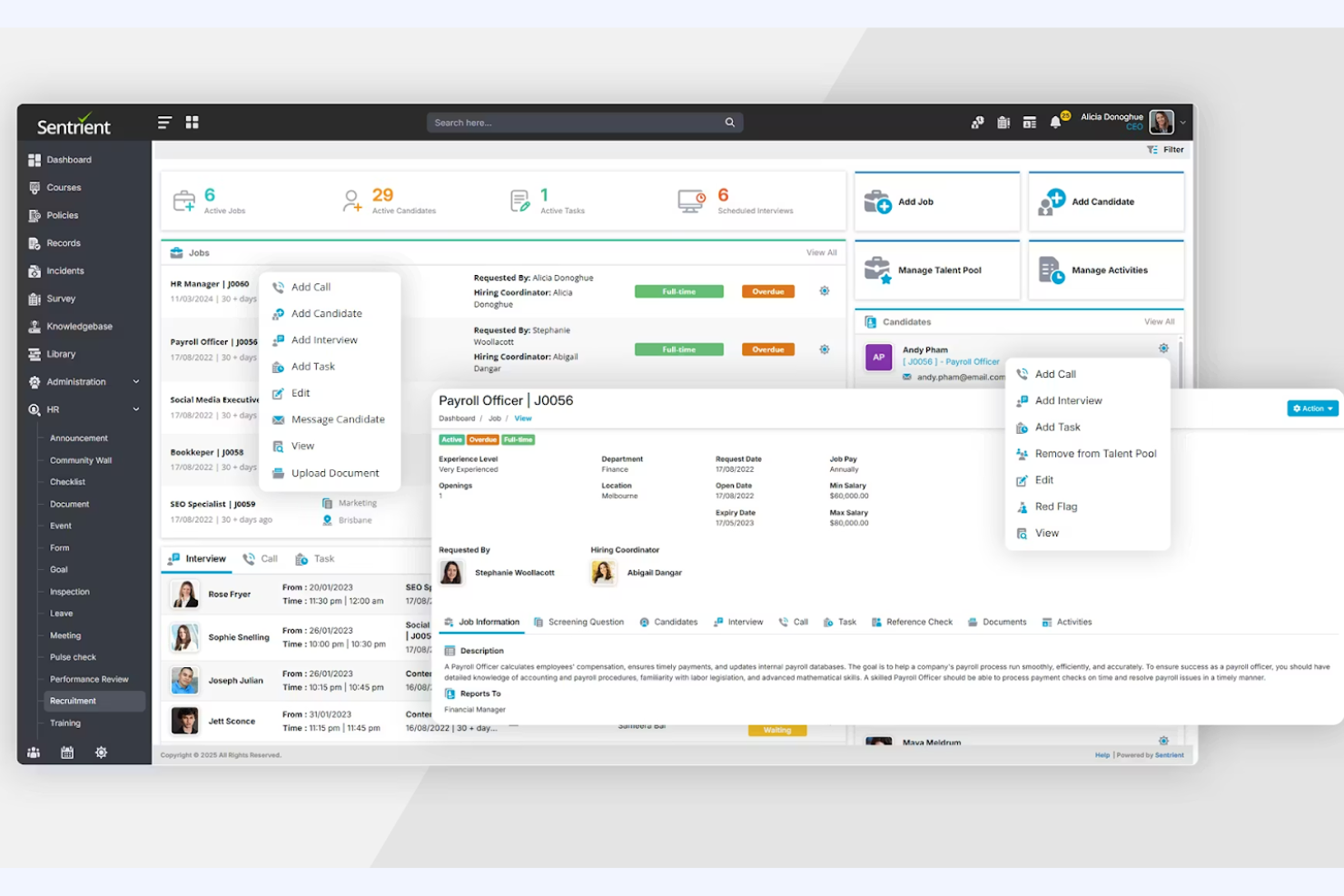
Best for compliance training
Pros and Cons
Pros:
- Streamlined incident reporting
- Automated compliance workflows
- Simplified risk management
Cons:
- Primarily serves Australian market
- Limited international support


Zoho People is a cloud-based HR platform designed mainly for small to medium-sized businesses. It handles core HR functions like employee data management, leave tracking, and performance appraisals.
Why I picked Zoho People: Zoho People is ideal for small businesses due to its affordability and ease of use. It provides essential HR features like time tracking and leave management. The software allows you to customize forms and workflows, making it adaptable to your specific needs. Its employee self-service portal empowers your team to access information easily, reducing your administrative workload.
Standout features & integrations:
Features include an intuitive employee self-service portal that enhances communication within your team. You can customize workflows to match your company’s processes, ensuring flexibility. The software also provides performance appraisals and feedback mechanisms to help you manage employee growth effectively.
Integrations include Zoho CRM, Zoho Projects, QuickBooks, Slack, G Suite, Zapier, Mailchimp, Office 365, Dropbox, and Google Drive.
Pros and Cons
Pros:
- Affordable for small businesses
- Scalable for growing teams
- Customizable workflows
Cons:
- Limited third-party integrations
- Lacks advanced payroll features
Other Affordable HR Software
Here are some additional affordable HR software options that didn’t make it onto my shortlist, but are still worth checking out:
- Gusto
For payroll and benefits
- TriNet
For PEO services
- Ceridian
For global payroll
- Pletox
For data security
- Keka HR
For integrated project & resource management
- Rippling
For device management integration
- WebHR
For social HR features
- ADP Workforce Now
For payroll and compliance
- Greenhouse
For structured hiring processes
- HR Cloud
For employee engagement
- Homebase
For shift scheduling
- Zimyo
For employee wellness programs
- GoCo
For benefits administration
- Paycom
For single-database HR and payroll
- TalentHR
For talent management
- Deel Payroll
For global contractor payments
- BambooHR
For small business HR needs
- Paycor
For HR analytics
- CharlieHR
For startup HR needs


How I Evaluate Affordable HR Software
I evaluate affordable HR software in two layers: the baseline functionality a five-person startup or 50-person nonprofit actually needs, and what sets one tool apart when the basics check out.
Core Functionality (Table Stakes For This List)
When I'm selecting tools for my list, I rank each one on a scale from 0 (does not offer the functionality) to 5 (excels in this area) for each core functionality listed below. Then, I calculate the tool's total score into a percentage. Each tool needs to achieve a minimum total score of 65% to be considered for inclusion.
- Employee Records Management: I look for a centralized database where you can store hire letters, tax forms, and org data—not just a basic contact list bolted onto a spreadsheet.
- Onboarding & Offboarding Workflows: Each tool should let you build repeatable onboarding flows with e-signatures and document collection, so day-one paperwork doesn't live in email threads.
- Time-Off & Attendance Tracking: I evaluate whether employees can submit PTO requests, view balances, and get manager approvals through self-service—tools like BambooHR and Gusto handle this differently.
- Payroll & Benefits Integration: Whether payroll is built in or synced through a partner, I check that employee data flows cleanly into pay runs without manual re-entry of hours or deductions.
- Compliance & Reporting: I look at what standard HR reports ship out of the box and whether the platform helps you stay current with labor law requirements like EEO filings or overtime rules.
- Affordable, Transparent Pricing: Pricing needs to be published and realistic for a 10- or 50-person team, with flexible options like free tiers, monthly billing, or per-employee plans that scale.
Once I have a list of tools that meet the criteria, I consider what sets each platform apart.
Differentiating Factors (What Sets Vendors Apart)
Here's how I compare and contrast different vendors:
Standout Features
A self-service portal makes a real difference when one person handles all of HR—employees can update their own info, pull pay stubs, and submit PTO requests without pinging you. I also look for a native mobile app, especially if your team includes deskless or field workers who need to clock in or approve requests from their phones. Built-in performance management tools are worth noting too, since they let growing teams run review cycles and track goals without buying a separate platform.
Beyond Features
Pricing flexibility matters just as much as the sticker price—I check whether a vendor offers a free tier for very small teams, month-to-month billing, and no hidden setup fees that inflate the real cost. Implementation speed is another big factor, since an office manager juggling HR duties needs self-serve setup and pre-built templates, not a months-long rollout. I also evaluate each tool's integration ecosystem, looking at whether it connects to the payroll and productivity tools your team already uses, like Slack, QuickBooks, or Google Workspace.
How to Choose Affordable HR Tools
It’s easy to get bogged down in long feature lists and complex pricing structures. To help you stay focused as you work through your unique software selection process, here’s a checklist of factors to keep in mind:
| Factor | What to Consider |
|---|---|
| Scalability | Will the software grow with your company? Consider future expansion and whether the tool can handle increased data and user volume without performance issues. |
| Integrations | Does the software connect with your existing tools? Look for compatibility with current systems to avoid data silos and additional manual work. |
| Customizability | Can you tailor the software to fit your processes? Check if you can modify workflows and fields to match your team's needs. |
| Ease of use | Is the software intuitive for all users? Test the interface to ensure it's user-friendly and requires minimal training. |
| Implementation and onboarding | How long will it take to set up? Evaluate the resources needed for a smooth transition, including training materials and support for data migration. |
| Cost | Does the pricing fit your budget? Compare costs against benefits and look for hidden fees or tiered pricing structures that may affect your total spend. |
| Security safeguards | How does the software protect your data? Ensure it complies with industry standards, offers encryption, and has a clear data breach response plan. |
What Is HR Software?
HR software is a solution for managing human resources tasks within organizations. It is typically used by HR professionals, managers, and small business owners to simplify tasks like payroll, benefits administration, and employee data management. Features like employee data management, performance reviews, human resource management, offboarding, time-off management, payroll processing, and compliance support are common. HR tools provide overall value by improving efficiency and reducing the administrative burden on HR teams.
Features
When selecting an affordable HR platform, keep an eye out for the following key features:
- Employee data management: Centralizes employee information, making it easy to access and update records.
- Payroll processing: Automates salary calculations and tax compliance, saving time and reducing errors.
- Compliance support: Ensures adherence to regulations, minimizing the risk of legal issues.
- Time and attendance tracking: Monitors employee hours and attendance, helping manage workforce productivity.
- Benefits administration: Simplifies the management of employee benefits, ensuring accurate and timely enrollments.
- Customizable workflows: Allows you to tailor processes to fit your organization's needs, improving efficiency.
- Analytics and reporting: Provides insights into HR metrics, supporting informed decision-making.
- Employee self-service portal: Empowers employees to manage their own data and requests, reducing HR's administrative burden.
- Onboarding tools: Supports the hiring and integration of new employees, ensuring a smooth transition.
- Integration capabilities: Connects with existing systems to enhance functionality and reduce manual data entry.
Benefits
Implementing an affordable HR system provides several benefits for your team and your business. Here are a few you can look forward to:
- Cost savings: The first, and most obvious benefit, is lower expenses by automating HR tasks like payroll and attendance tracking.
- Improved efficiency: Optimizes HR processes with features like customizable workflows and employee self-service portals.
- Better compliance: Helps you adhere to regulations with compliance support and automated reporting.
- Enhanced data management: Centralizes employee information, making it easier to access and update records.
- Increased employee satisfaction: Provides tools like self-service portals, allowing employees to manage their own data and requests.
- Informed decision-making: Offers analytics and reporting features that give insights into HR metrics.
- Simplified onboarding: Eases the hiring and integration of new employees with dedicated onboarding tools.
Costs & Pricing
Selecting affordable HR software requires an understanding of the various pricing models and plans available. Costs vary based on features, team size, add-ons, and more. The table below summarizes common plans, their average prices, and typical features included in affordable HR software solutions:
Plan Comparison Table for Affordable HR Software
| Plan Type | Average Price | Common Features |
|---|---|---|
| Free Plan | $0 | Basic employee data management, time tracking, and limited reporting. |
| Personal Plan | $5-$15/user/month | Employee data management, payroll processing, compliance support, and email support. |
| Business Plan | $20-$40/user/month | Advanced payroll features, multiple team members and permissions, basic employee management, benefits administration, analytics, and integrations. |
| Enterprise Plan | $45-$70/user/month | Customizable workflows, Advanced features, dedicated account management, advanced security, and full support. |
Affordable HR Software FAQs
Here are some answers to common questions about affordable HR software:
How do I determine which HR software is best for my company?
Start by evaluating your company’s specific needs, such as payroll management, compliance, or employee engagement. Consider your team size, budget, and existing systems. Look for software that integrates well with your current tools and offers the features you need most. Trial periods can be helpful to test usability and fit before committing.
Can I switch HR software providers easily?
Yes, but the ease of switching depends on the software and the data involved. Ensure your new provider offers data migration support and check if your current provider allows easy data export. Plan the switch during a low-activity period to minimize disruptions. Keep stakeholders informed and trained on the new system to ensure a smooth transition.
What should I look for in terms of security?
Look for software that offers data encryption, regular security updates, and compliance with data protection regulations. Your HR software should have clear policies for data breaches and user access controls. Ask the provider about their security certifications and any third-party audits they’ve undergone. Prioritizing security helps protect sensitive employee data.
How important is customer support when choosing HR software?
Customer support is crucial, especially during implementation and troubleshooting. Look for providers offering multiple support channels like chat, email, and phone. Check if they provide resources like FAQs, knowledge bases, and training materials. Reliable support can save your team time and prevent disruptions, so prioritize providers with good reputations for assistance.
What’s Next:
If you're in the process of researching affordable HR software, connect with a SoftwareSelect advisor for free recommendations.
You fill out a form and have a quick chat where they get into the specifics of your needs. Then you'll get a shortlist of software to review. They'll even support you through the entire buying process, including price negotiations.