

I 10 migliori software per l’ottimizzazione della forza lavoro per il 2026

Elenco ristretto dei software per l'ottimizzazione della forza lavoro


Il software per l'ottimizzazione della forza lavoro ti aiuta a gestire la pianificazione dei turni, la produttività e le prestazioni dei tuoi team combinando strumenti per le previsioni, il monitoraggio e l'analisi. Se stai cercando il miglior software per l'ottimizzazione della forza lavoro, probabilmente vuoi risolvere problemi legati ai costi del lavoro, alla conformità e al coinvolgimento dei dipendenti, sostenendo al contempo gli obiettivi aziendali e adattandoti alle esigenze in continua evoluzione del luogo di lavoro. Questo elenco ti aiuterà a confrontare le principali opzioni per il 2026, così potrai scegliere la piattaforma giusta per migliorare la pianificazione della forza lavoro, semplificare le operazioni e supportare il tuo personale.
Perché fidarsi delle nostre recensioni sui software
Il nostro team testa e recensisce software dal 2012. In quanto esperti HR noi stessi, sappiamo quanto sia difficile — e importante — scegliere il software giusto.
Per questa guida, abbiamo valutato gli strumenti attraverso test pratici e ricerche indipendenti, assegnando un punteggio agli strumenti in base ai nostri criteri di selezione. Ci basiamo inoltre sulle competenze di leader di pensiero del settore e di professionisti HR attivi.
Le nostre recensioni riflettono il nostro giudizio editoriale umano, non un discorso di vendita.
Riepilogo dei migliori software per l'ottimizzazione della forza lavoro
Questa tabella comparativa riassume i dettagli dei prezzi delle mie migliori selezioni di software per l’ottimizzazione della forza lavoro, per aiutarti a trovare quello più adatto al tuo budget e alle esigenze della tua azienda.
| Tool | Best For | Trial Info | Price | ||
|---|---|---|---|---|---|
| 1 | Ideale per la centralizzazione dei dati HR globali | Demo gratuita disponibile | Da $5/dipendente/mese | Website | |
| 2 | Ottimo per flussi di lavoro unificati tra HR e paghe | Demo gratuita disponibile | Prezzo su richiesta | Website | |
| 3 | Ideale per il calcolo continuo delle retribuzioni | Demo gratuita disponibile | Prezzo su richiesta | Website | |
| 4 | Ideale per l'ottimizzazione automatizzata dei turni | Demo gratuita disponibile | Prezzi su richiesta | Website | |
| 5 | Ideale per la pianificazione della forza lavoro nelle grandi aziende | Demo gratuita disponibile | Prezzi su richiesta | Website | |
| 6 | Ideale per integrazione ticketing e supporto | Prova gratuita + demo gratuita disponibili | Da $19/agente/mese (fatturazione annuale) | Website | |
| 7 | Ideale per un’accurata previsione della forza lavoro nel retail | Demo gratuita disponibile | Prezzo su richiesta | Website | |
| 8 | Ideale per funzionalità di coaching in tempo reale per gli operatori | Demo gratuita disponibile | Da $75/utente/mese (fatturato annualmente) | Website | |
| 9 | Ideale per l’analisi omnicanale dei contact center | Demo gratuita disponibile | Prezzo su richiesta | Website | |
| 10 | Ideale per approfondimenti sulle prestazioni basati sull'IA | Demo gratuita disponibile | Da $110/agente/mese | Website |
Recensioni dei software per l'ottimizzazione della forza lavoro
Di seguito trovi i miei riepiloghi dettagliati dei software per l’ottimizzazione della forza lavoro inclusi nel mio elenco ristretto. Le mie recensioni offrono una panoramica dettagliata delle funzionalità, dei migliori casi d’uso e delle integrazioni di ciascuna piattaforma, per aiutarti a trovare quella più adatta a te.

Deel HR
Ideale per la centralizzazione dei dati HR globali
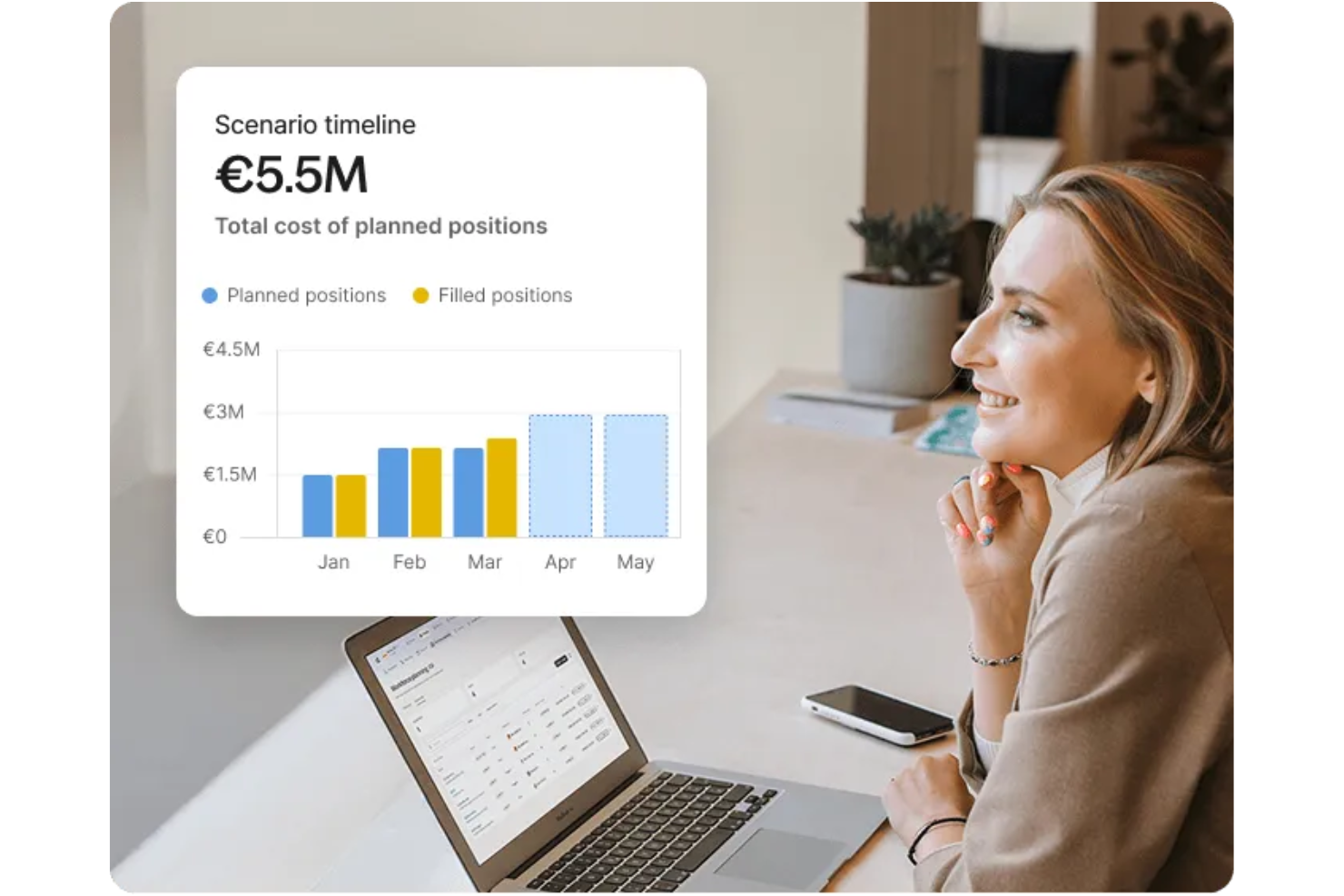
Deel HR è una piattaforma globale per l’ottimizzazione della forza lavoro che riunisce la gestione dei dati HR, l’onboarding internazionale, la conformità dei collaboratori e il payroll per team distribuiti in un unico sistema.
Per chi è ideale Deel HR?
Deel HR è adatto ai team HR di aziende globali che devono gestire dipendenti e collaboratori in più paesi da un’unica piattaforma.
Perché ho scelto Deel HR
Ho scelto Deel HR tra i migliori perché posso centralizzare tutti i dati HR globali in un unico posto, indipendentemente dal numero di paesi in cui opera il mio team. Mi piace poter archiviare contratti, documenti di conformità e dati sia dei dipendenti sia dei collaboratori. Il mio team utilizza Deel HR per accedere rapidamente e aggiornare i record per audit o revisioni interne senza dover gestire più sistemi.
Caratteristiche principali di Deel HR
- Elaborazione automatizzata delle paghe: Gestisci le buste paga di dipendenti e collaboratori in oltre 100 paesi da un’unica dashboard.
- Gestione delle assenze: Traccia e approva le richieste di permessi con politiche personalizzabili per ciascuna sede.
- Gestione delle spese: Invia, revisiona e rimborsa le spese direttamente all’interno della piattaforma.
- Portale self-service per i dipendenti: Consenti ai membri del team di accedere a documenti, buste paga e informazioni personali.
Integrazioni di Deel HR
Deel HR offre integrazioni native con Workday, BambooHR, Greenhouse, HiBob, Lever e Xero. È disponibile un’API per integrazioni personalizzate.
Pros and Cons
Pros:
- Flussi di onboarding integrati per assunzioni internazionali
- Template di contratti localizzati per oltre 150 paesi
- Gestione nativa di paghe e benefit a livello mondiale
Cons:
- Alcune integrazioni richiedono piani di livello superiore
- Occasionali ritardi nell’elaborazione dei pagamenti globali
New Product Updates from Deel HR

Deel Expands Stablecoin Wallet to 80+ Countries
Deel expands its Stablecoin Wallet to 80+ countries with dollar-backed balances and optional rewards. This gives eligible contractors more ways to hold and manage earnings inside Deel. For more information, visit Deel’s official site.
 .
.
Workday
Ottimo per flussi di lavoro unificati tra HR e paghe

Workday riunisce strumenti per la gestione delle risorse umane, delle buste paga e della forza lavoro in un'unica piattaforma, risultando una scelta solida per le organizzazioni che cercano flussi di lavoro unificati. È particolarmente utile per i team HR e i responsabili finanziari che necessitano di una visibilità in tempo reale sui costi del personale e sui dati dei dipendenti. Workday aiuta le aziende a coordinare la pianificazione del personale, automatizzare le paghe e gestire la conformità senza dover passare tra più sistemi.
Perché ho scelto Workday
Ciò che distingue Workday è la capacità di unificare i flussi di lavoro HR e paghe all'interno di un unico sistema. Questo approccio consente ai team HR e finanza di gestire i registri dei dipendenti, la rilevazione delle presenze e l’elaborazione delle buste paga senza dover utilizzare più piattaforme. Ho scelto Workday perché collega la pianificazione delle risorse e i dati della retribuzione, permettendo di prendere decisioni in tempo reale basate su informazioni accurate e sempre aggiornate. Questo flusso di lavoro unificato aiuta le organizzazioni a ridurre gli errori manuali e a mantenere la conformità nei processi HR e paghe.
Caratteristiche principali di Workday
Altre caratteristiche che rendono Workday interessante per la gestione della forza lavoro includono:
- App mobile per la gestione della forza lavoro: dipendenti e manager possono accedere ai turni, approvare le ore e gestire le richieste direttamente dal telefono.
- Gestione automatizzata delle assenze: tracciare, approvare e monitorare le assenze dei dipendenti con il rispetto integrato delle policy.
- Previsione dei costi del lavoro: analizzare e prevedere le spese del personale utilizzando dati in tempo reale e modelli configurabili.
- Dashboard basate sui ruoli: offrire agli utenti visualizzazioni personalizzate di metriche e attività in base alla funzione lavorativa.
Integrazioni di Workday
Le integrazioni includono Salesforce, Microsoft Azure, Slack, Adobe Sign, Okta, ServiceNow, LinkedIn, SAP, Oracle e Google Workspace.
Pros and Cons
Pros:
- Sincronizzazione in tempo reale dei dati paghe e HR
- L’app mobile consente approvazioni ovunque
- Dashboard basate sui ruoli per l’analisi della forza lavoro
Cons:
- Elevata dipendenza da consulenti certificati
- Connettività limitata con app non Workday

Dayforce
Ideale per il calcolo continuo delle retribuzioni
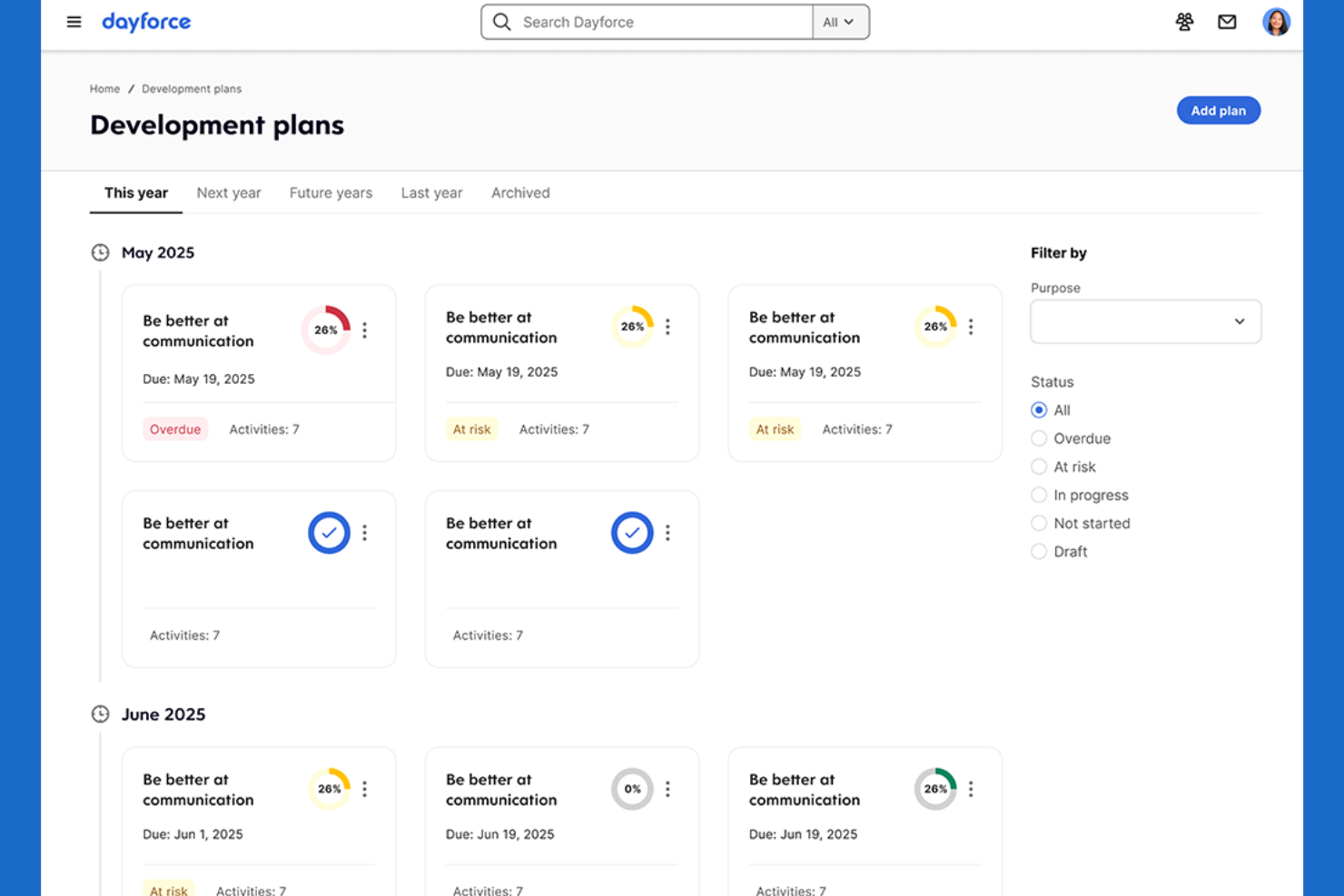
Dayforce offre una piattaforma unica per la gestione delle paghe, delle risorse umane e della forza lavoro, con particolare attenzione al calcolo continuo delle retribuzioni. È particolarmente adatta per le organizzazioni che necessitano di massima precisione nella gestione delle paghe, come quelle con personale a ore o turnista. Dayforce aiuta i team HR e payroll a ridurre errori nei pagamenti e rischi di non conformità aggiornando i dati retributivi in tempo reale.
Perché ho scelto Dayforce
A differenza di molti strumenti per l’ottimizzazione della forza lavoro, Dayforce calcola la retribuzione in modo continuo invece che a lotti, caratteristica particolarmente preziosa per aziende con orari complessi o variabili. Questo calcolo in tempo reale consente di avere dati sulle paghe sempre aggiornati, aiutando i team HR e payroll a individuare errori e affrontare problemi di conformità prima che diventino critici. Ho scelto Dayforce perché integra il monitoraggio del tempo, la pianificazione dei turni e la gestione delle paghe in un unico flusso di lavoro, così puoi vedere immediatamente l’impatto delle variazioni di orario sulla busta paga. Questo approccio è l’ideale per le organizzazioni che hanno bisogno di informazioni retributive precise ed aggiornate in ogni momento.
Caratteristiche principali di Dayforce
Altre funzionalità che rendono Dayforce utile per l’ottimizzazione della forza lavoro includono:
- Monitoraggio automatico della conformità: Il sistema controlla i turni e le regole sulle paghe rispetto alle normative sul lavoro man mano che vengono creati.
- Portale self-service per i dipendenti: Il personale può consultare gli orari, richiedere permessi e aggiornare direttamente le proprie informazioni personali.
- Dashboard di analisi avanzate: Visualizza trend della forza lavoro e indicatori chiave tramite report configurabili.
- App mobile per i manager: Approva i cartellini, gestisci i cambi turno e comunica con i dipendenti da qualsiasi luogo.
Integrazioni di Dayforce
Le integrazioni comprendono Salesforce, Microsoft Dynamics, Workday, SAP, Oracle, ADP, Kronos, QuickBooks, Ceridian e Infor.
Pros and Cons
Pros:
- Aggiorna le paghe in tempo reale
- Controllo automatico di conformità per orari e retribuzioni
- Portale self-service integrato per i dipendenti
Cons:
- Le prestazioni del sistema possono risentirne durante i picchi di utilizzo
- Scarsa trasparenza dei prezzi senza richiesta di preventivo

Legion
Ideale per l'ottimizzazione automatizzata dei turni
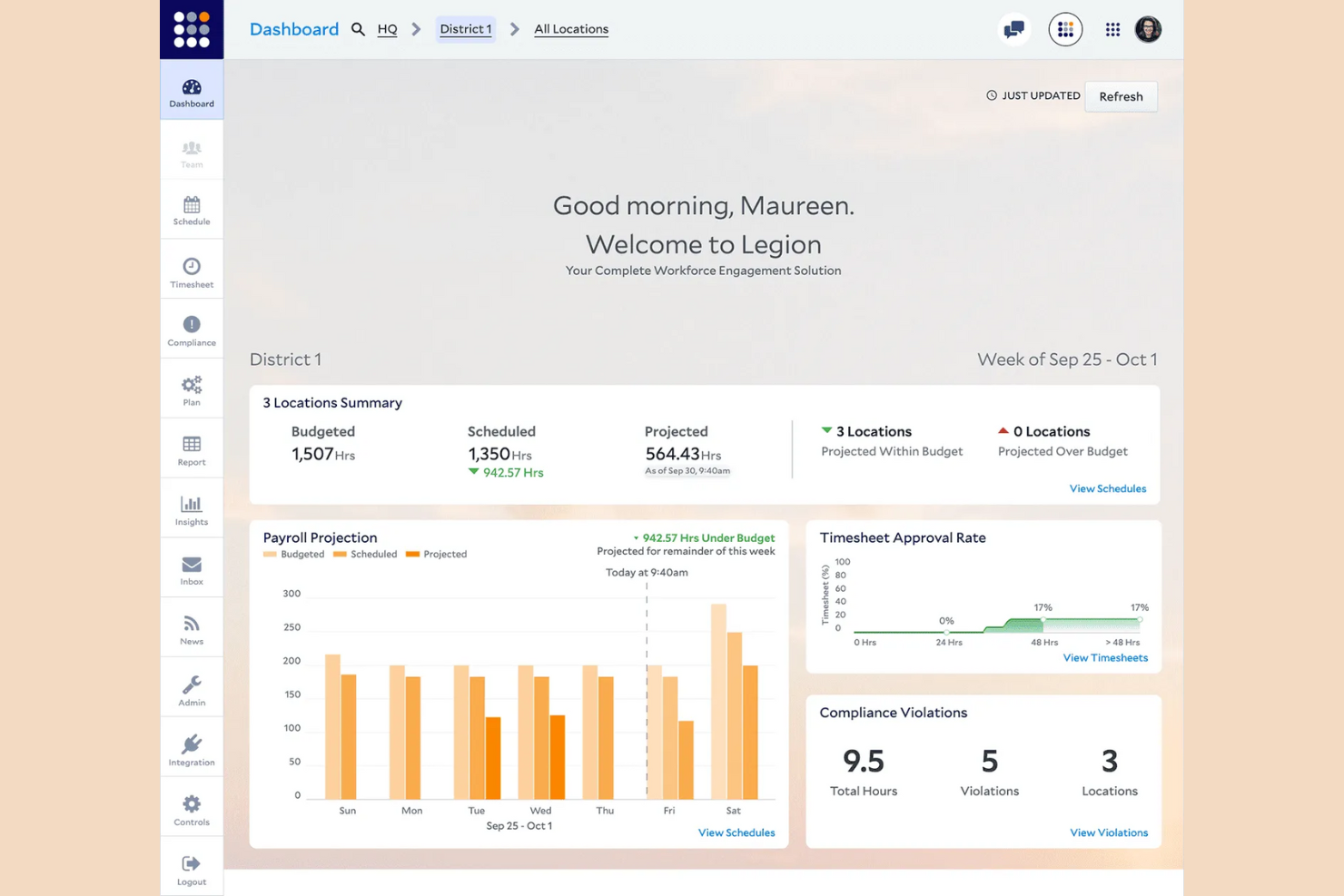
Legion utilizza l'automazione guidata dall'IA per creare turni ottimizzati che soddisfano sia la domanda aziendale sia le preferenze dei dipendenti. È particolarmente utile per i negozi al dettaglio, i ristoranti e altre attività con forza lavoro oraria che devono bilanciare i costi del lavoro con la copertura. Legion aiuta i manager a ridurre il lavoro manuale di pianificazione dei turni e a minimizzare i rischi di non conformità generando automaticamente orari equi basati sulla domanda.
Perché ho scelto Legion
Ciò che distingue Legion è l'attenzione all'ottimizzazione automatizzata dei turni grazie all'IA. La piattaforma analizza la domanda aziendale, la disponibilità dei dipendenti e le regole del lavoro per generare automaticamente orari che soddisfano sia le esigenze operative sia le preferenze dei lavoratori. Ho scelto Legion perché riduce lo sforzo manuale dei responsabili nella pianificazione degli orari, contribuendo al contempo a garantire la conformità alle leggi sul lavoro. Questo lo rende una scelta valida per le organizzazioni che devono adattare rapidamente il personale a una domanda fluttuante senza rinunciare a equità o precisione.
Funzionalità chiave di Legion
Altre funzionalità che rendono Legion prezioso per l'ottimizzazione della forza lavoro includono:
- Motore di previsione della domanda: Prevede le necessità di personale sulla base dei dati storici di vendite e traffico.
- App mobile per dipendenti: Migliora l'esperienza del dipendente con un'app che consente allo staff di visualizzare i turni, scambiarsi i turni e richiedere permessi.
- Monitoraggio automatico della conformità: Segnala potenziali violazioni delle leggi sul lavoro e delle politiche aziendali.
- Aggiornamenti degli orari in tempo reale: Notifica istantaneamente i dipendenti su eventuali cambiamenti nei loro turni.
Integrazioni di Legion
Le integrazioni includono Accu-Time Systems, GT Clocks, HR Path, Phenom, Rebus by Longbow Advantage, RELEX Solutions, RetailNext, SAP SuccessFactors, Synel e YOOBIC.
Pros and Cons
Pros:
- Cambio turno automatizzato tramite app dipendenti
- Pianificazione dei turni con vincoli di budget
- Pool integrato di lavoratori disponibili per i turni scoperti
Cons:
- Limite nelle esportazioni dei dati dei campi personalizzati
- Nessuna modalità offline nativa per mobile

UKG
Ideale per la pianificazione della forza lavoro nelle grandi aziende

UKG è pensato per le grandi aziende che necessitano di funzionalità avanzate di pianificazione e gestione della forza lavoro. Si adatta perfettamente a responsabili HR e team operativi che devono gestire pianificazioni complesse, conformità e previsioni del fabbisogno di personale su più sedi. UKG aiuta le organizzazioni a coordinare la gestione di grandi staff, controllare i costi del lavoro e mantenere la conformità normativa in contesti dinamici.
Perché ho scelto UKG
Per le organizzazioni che gestiscono grandi forze lavoro distribuite, UKG offre strumenti specializzati per la pianificazione della forza lavoro su scala enterprise. La piattaforma supporta pianificazione avanzata dei turni, previsioni del fabbisogno e gestione della conformità, elementi fondamentali per le aziende con esigenze di staffing complesse. Ho scelto UKG perché consente ai team HR di automatizzare l'assegnazione dei turni e monitorare i costi del lavoro su più sedi. Queste capacità lo rendono una scelta vincente per le aziende che desiderano ottimizzare i turni di lavoro e mantenere la conformità normativa su larga scala.
Caratteristiche principali di UKG
Oltre ai punti di forza nella pianificazione della forza lavoro, UKG offre molte altre funzionalità utili alle grandi organizzazioni:
- Portale self-service mobile: I dipendenti possono consultare i turni, richiedere ferie e scambiarsi i turni direttamente dai propri dispositivi mobili.
- Rilevazione automatizzata delle presenze e degli orari: Raccoglie le ore lavorate e i dati di presenza con controlli di conformità integrati.
- Suite di analisi e reportistica: Genera report e dashboard dettagliati sulla forza lavoro per decisioni guidate dai dati.
- Strumenti di gestione dei talenti: Gestione delle performance, definizione degli obiettivi e sviluppo dei dipendenti tutto dalla stessa piattaforma.
Integrazioni UKG
Le integrazioni includono SAP, Oracle, Workday, ADP, Microsoft Dynamics, Salesforce, Ceridian, Infor, Kronos e QuickBooks.
Pros and Cons
Pros:
- Gestisce scenari di pianificazione complessi su più sedi
- Strumenti integrati per la conformità alle normative sul lavoro
- Supporta operazioni HR e paghe di grandi dimensioni
Cons:
- Il processo di implementazione può essere lungo
- Richiede elevate competenze tecniche per i report personalizzati
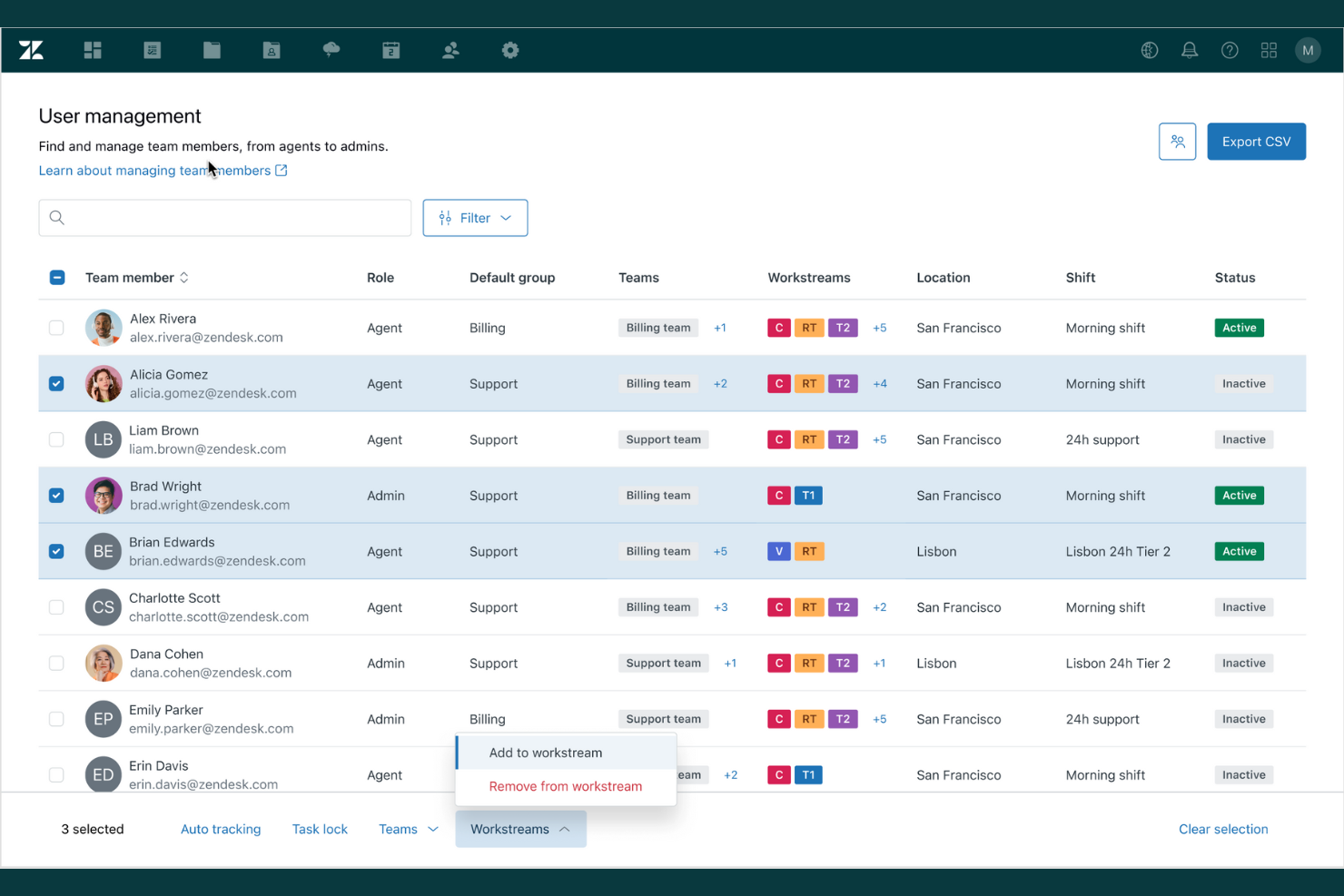
Se il tuo team si affida a flussi di lavoro di ticketing e supporto integrato, Zendesk offre una soluzione di ottimizzazione della forza lavoro costruita attorno a queste esigenze. È particolarmente utile per i team di assistenza clienti che desiderano unificare la gestione dei ticket, il monitoraggio delle prestazioni degli agenti e l'analisi del supporto in un'unica piattaforma. Zendesk ti aiuta a coordinare i carichi di lavoro degli agenti e monitorare la qualità del servizio su più canali.
Perché ho scelto Zendesk
Zendesk si distingue per la profonda integrazione tra ticketing e supporto, fondamentale per l'ottimizzazione della forza lavoro negli ambienti di assistenza clienti. La piattaforma connette la gestione dei ticket con le metriche di performance degli agenti, così puoi monitorare l'efficienza nella risoluzione dei problemi e individuare dove si creano colli di bottiglia. Mi piace che Zendesk offra anche l'instradamento automatico dei ticket e l'escalation, aiutando i team a dare priorità alle richieste urgenti e a bilanciare i carichi di lavoro. Queste caratteristiche lo rendono una scelta ideale per le organizzazioni che devono ottimizzare le operazioni di supporto e mantenere elevati standard di servizio.
Funzionalità principali di Zendesk
Altre funzionalità che rendono Zendesk una scelta valida per l'ottimizzazione della forza lavoro includono:
- Dashboard degli agenti personalizzabili: Offrono ad agenti e manager una visibilità in tempo reale su carichi di lavoro e metriche di performance.
- Knowledge base integrata: Consente agli agenti di accedere e condividere articoli di supporto aggiornati durante le interazioni con i clienti.
- Strumenti di gestione SLA: Imposta, monitora e applica gli accordi sui livelli di servizio per diverse tipologie di ticket.
- Supporto multicanale: Gestione delle conversazioni con i clienti su email, chat, telefono e social media da un'unica piattaforma.
Integrazioni Zendesk
Le integrazioni includono Salesforce, Slack, Shopify, HubSpot, Mailchimp, Trello, Asana, Google Analytics e Microsoft Teams.
Pros and Cons
Pros:
- Monitoraggio in tempo reale delle attività non Zendesk
- Il tracciamento SLA supporta gli obiettivi di qualità del servizio
- Mappatura automatica delle assenze giornaliere
Cons:
- Svuotamento manuale della cache per la sincronizzazione dell'interfaccia
- Nessuna acquisizione automatica dai sistemi HR


La Workcloud Workforce Optimization Suite di Zebra è progettata per i rivenditori che necessitano di una previsione e pianificazione del personale estremamente precisa. Questa piattaforma aiuta i responsabili di negozio e i leader operativi ad allineare il personale con la domanda in tempo reale e le tendenze di vendita. Se cerchi di ridurre i costi del lavoro e migliorare l'accuratezza nella copertura dei turni in un ambiente retail, Zebra offre strumenti specializzati per soddisfare queste esigenze.
Perché ho scelto Zebra
Per l’ottimizzazione della forza lavoro nel retail, ho scelto Zebra perché la sua suite si concentra sull'accuratezza delle previsioni del personale, una preoccupazione centrale per i manager di negozio e i team operativi. Zebra utilizza strumenti di pianificazione basati sulla domanda che analizzano dati di vendita e traffico in negozio per prevedere le esigenze di personale ora per ora. Apprezzo inoltre l’assegnazione automatica dei turni, che aiuta a ridurre sia il sovrannumero sia la carenza di personale nei periodi di punta e in quelli più tranquilli. Queste funzionalità rendono Zebra una scelta solida per i rivenditori che vogliono adattare le risorse di personale alla domanda in tempo reale.
Funzionalità principali di Zebra
Altre funzionalità degne di nota nella Workcloud Workforce Optimization Suite di Zebra includono:
- App di pianificazione mobile: Dipendenti e manager possono visualizzare i turni, scambiarsi i turni e richiedere permessi direttamente dai propri dispositivi mobili.
- Strumenti per la gestione dei compiti: Assegna, traccia e monitora il completamento delle attività in negozio per mantenere i team allineati con le priorità quotidiane.
- Monitoraggio della conformità: I controlli integrati della conformità garantiscono che i turni rispettino la normativa sul lavoro e le policy aziendali.
- Cruscotto analitico: Accesso a informazioni in tempo reale su costi del lavoro, presenze e trend di produttività tra le varie sedi.
Integrazioni di Zebra
Le integrazioni includono SAP, Oracle, Microsoft Dynamics, Kronos, ADP, Salesforce, Workday, Ceridian e Infor.
Pros and Cons
Pros:
- Controlli di conformità integrati per la normativa sul lavoro
- App mobile per gestione e scambio turni
- Gestione integrata delle attività
Cons:
- Richiesto hardware Zebra per la piena funzionalità
- Focus limitato oltre il settore retail
Genesys
Ideale per funzionalità di coaching in tempo reale per gli operatori
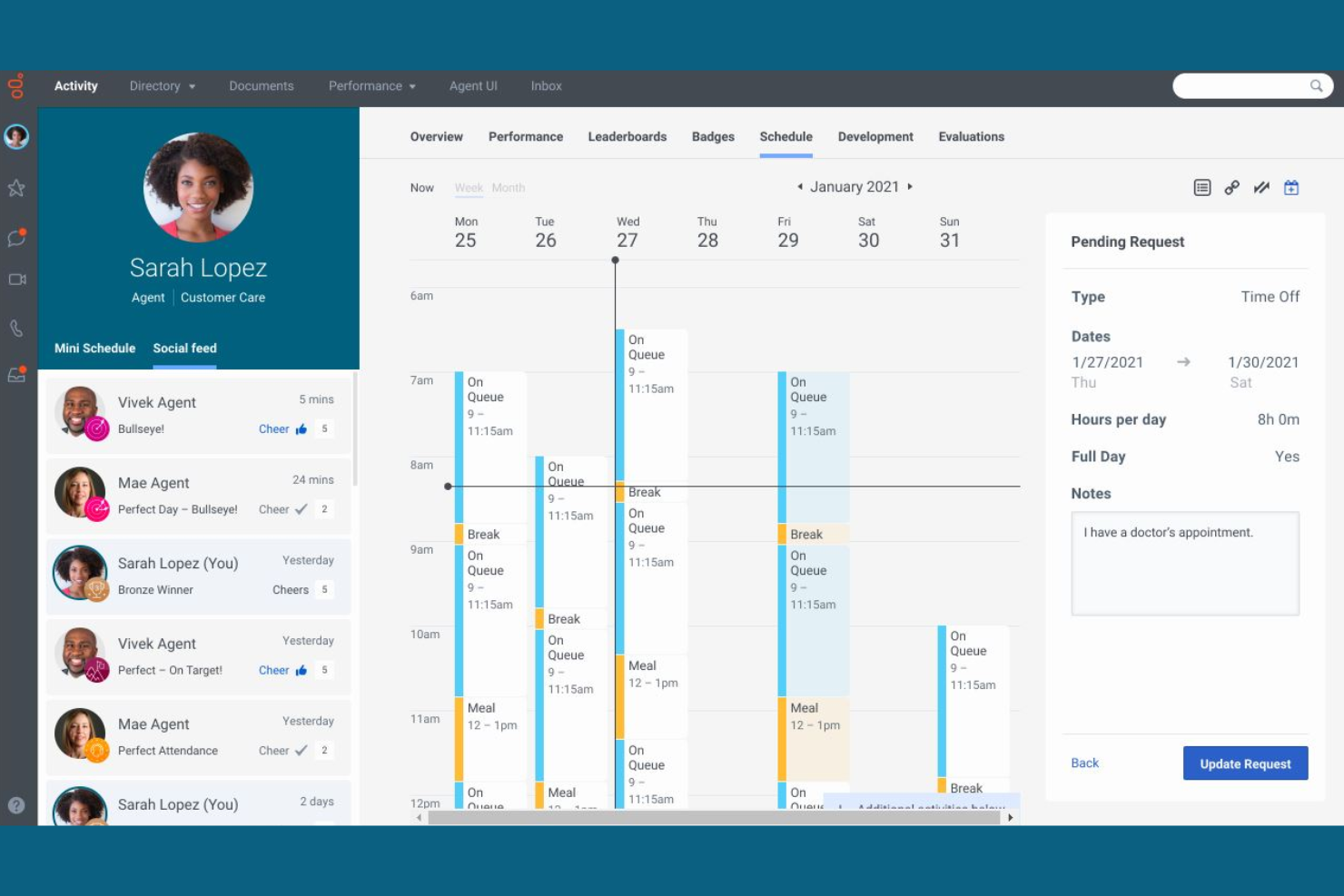
Genesys si distingue per le sue funzionalità di coaching in tempo reale per gli operatori, rendendolo una scelta solida per i contact center e i team di assistenza clienti focalizzati sul miglioramento delle prestazioni dal vivo. Se hai bisogno di supportare gli operatori con feedback e indicazioni istantanee durante le interazioni con i clienti, questa piattaforma offre strumenti pensati per il coaching istantaneo e lo sviluppo delle competenze. L'attenzione al supporto in tempo reale aiuta i manager a garantire che le persone giuste affrontino le problematiche nel momento opportuno.
Perché ho scelto Genesys
Ciò che mi ha attratto di Genesys è il suo forte focus sul coaching in tempo reale degli operatori, un elemento distintivo nelle soluzioni di ottimizzazione della forza lavoro. La piattaforma offre monitoraggio dal vivo e whisper coaching, consentendo ai supervisori di fornire feedback e indicazioni istantanee agli operatori durante le interazioni con i clienti. Apprezzo anche che Genesys includa dashboard delle prestazioni aggiornate in tempo reale, così i manager possono individuare al volo le opportunità di coaching. Queste funzionalità lo rendono una scelta pratica per i team che desiderano migliorare la performance degli operatori sul momento e non solo a posteriori.
Funzionalità principali di Genesys
Altre funzionalità che rendono Genesys un'opzione valida per l'ottimizzazione della forza lavoro includono:
- Instradamento omnicanale: indirizza le richieste dei clienti all'operatore giusto tramite voce, chat, email e canali social.
- Previsione automatica della forza lavoro: prevede le necessità di personale utilizzando dati storici e modelli basati su intelligenza artificiale.
- Strumenti di gestione della qualità: valuta e revisiona le interazioni degli operatori per la conformità e gli standard di servizio.
- Moduli di gamification per i dipendenti: motiva gli operatori con riconoscimenti integrati e tracciamento dei risultati.
Integrazioni Genesys
Le integrazioni includono Salesforce, Microsoft Dynamics, Zendesk, ServiceNow, Oracle, SAP, AWS, Google Cloud, Twilio e Cisco.
Pros and Cons
Pros:
- Coaching in tempo reale con monitoraggio live
- Instradamento omnicanale per le interazioni con i clienti
- Gamification integrata per la motivazione degli operatori
Cons:
- Limite di 100 attività simultanee
- Gestione separata per WFM stand-alone

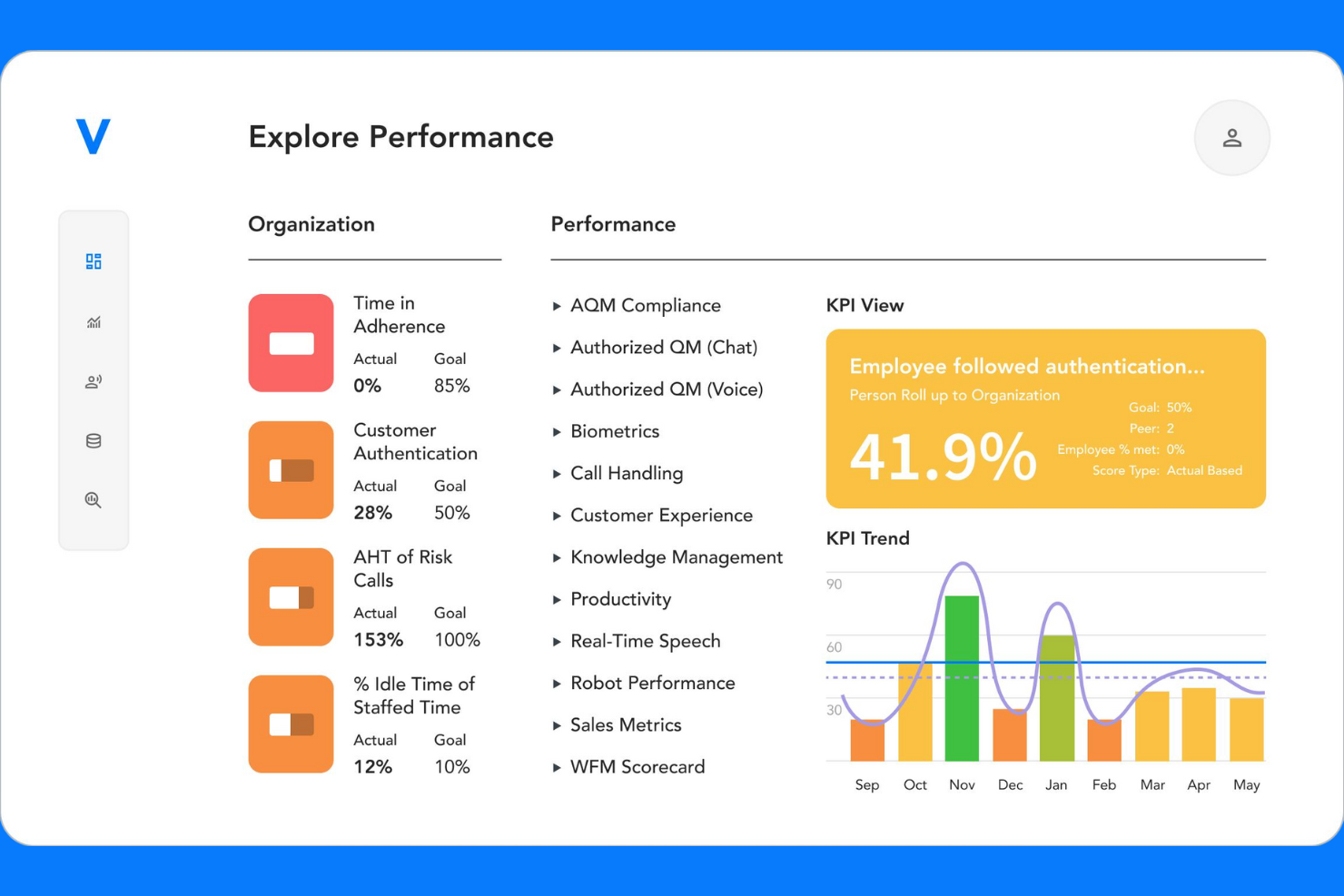
Verint è pensato per i responsabili dei contact center che necessitano di analisi approfondite su voce, chat, email e canali social. Questa piattaforma all-in-one aiuta a unificare la gestione della forza lavoro e il monitoraggio delle prestazioni in ambienti complessi e omnicanale. Se il tuo team ha difficoltà a collegare l’attività degli agenti con le informazioni sull’esperienza cliente, Verint offre strumenti specializzati per colmare questa lacuna.
Perché ho scelto Verint
Ciò che distingue Verint per l’ottimizzazione della forza lavoro è il suo focus sull’analisi omnicanale dei contact center. Ho scelto Verint perché riunisce i dati da voce, chat, email e canali social, offrendo ai responsabili una visione unificata delle prestazioni degli agenti e delle interazioni con i clienti. Il motore di analisi della piattaforma aiuta a individuare tendenze e lacune nella qualità del servizio su ogni canale. Per i team che gestiscono operazioni complesse e multicanale, la capacità di Verint di collegare le metriche della forza lavoro alle informazioni sull’esperienza cliente è particolarmente preziosa.
Caratteristiche principali di Verint
Altre caratteristiche di Verint che meritano attenzione includono:
- Monitoraggio automatico della qualità: Il sistema valuta e assegna automaticamente un punteggio alle interazioni con i clienti a scopo di controllo qualità.
- Motore di previsione e pianificazione: Genera previsioni sul personale e crea orari ottimizzati basandosi su dati storici e in tempo reale.
- Schede di valutazione delle prestazioni: Monitora gli indicatori chiave di prestazione (KPI) degli agenti e i progressi tramite dashboard e schede personalizzabili.
- Moduli di e-learning e coaching: Fornisci formazione mirata e coaching direttamente all’interno della piattaforma per sostenere lo sviluppo degli agenti.
Integrazioni Verint
Le integrazioni includono Salesforce, Microsoft Dynamics e HubSpot. È disponibile un’API per integrazioni personalizzate.
Pros and Cons
Pros:
- Monitoraggio in tempo reale dell’aderenza agli orari
- Moduli integrati di e-learning e coaching
- Schede di valutazione delle prestazioni personalizzabili
Cons:
- Procedura di configurazione complessa per i nuovi utenti
- Le funzionalità avanzate richiedono licenze aggiuntive
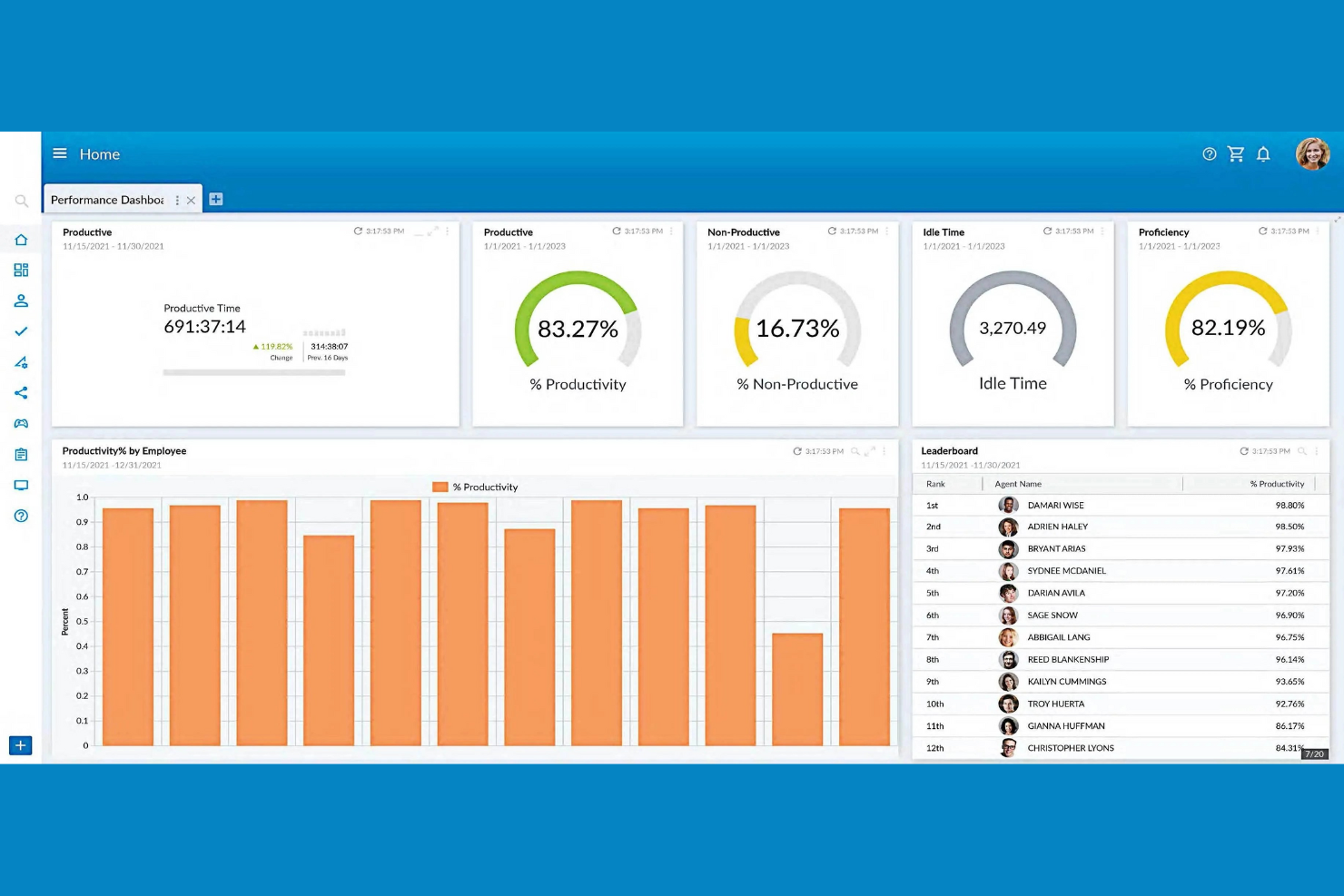
NiCE porta l'analisi potenziata dall'IA nell'ottimizzazione della forza lavoro, risultando una scelta valida per i team focalizzati sul miglioramento delle prestazioni. Se gestisci un contact center o una grande operazione di assistenza, questa piattaforma ti aiuta a individuare informazioni utili dalle interazioni tra dipendenti e clienti. Le sue funzioni avanzate di automazione e feedback in tempo reale sono progettate per supportare il coaching basato sui dati, la fidelizzazione e il miglioramento continuo dei processi.
Perché ho scelto NiCE
Ciò che distingue NiCE come soluzione per la gestione della forza lavoro è il suo focus sulle analisi delle prestazioni guidate dall'IA. La piattaforma utilizza l'IA per analizzare grandi volumi di interazioni tra clienti e dipendenti, facendo emergere tendenze e opportunità di coaching che altrimenti potrebbero passare inosservate. Ho scelto NiCE perché la sua analisi in tempo reale e la gestione automatizzata della qualità aiutano i manager a identificare rapidamente i gap di prestazione e fornire feedback mirati. Queste capacità la rendono particolarmente preziosa per le organizzazioni che desiderano utilizzare i dati per guidare un miglioramento continuo del servizio e della produttività.
Funzionalità chiave di NiCE
Altre funzionalità che rendono NiCE una scelta forte per l'ottimizzazione della forza lavoro includono:
- Registrazione delle interazioni omnicanale: Cattura e revisione delle interazioni con i clienti attraverso voce, chat, email e canali social.
- Motore di pianificazione automatizzata: Genera orari dei dipendenti ottimizzati in base alla domanda prevista e alle regole aziendali.
- Sondaggi di coinvolgimento dei dipendenti: Raccogli feedback in tempo reale dal personale per monitorare sentiment e coinvolgimento.
- Strumenti di gestione della conformità: Monitora e documenta l'aderenza ai requisiti normativi all'interno delle operazioni della forza lavoro.
Integrazioni NiCE
Le integrazioni includono Salesforce, Microsoft Dynamics, SAP, Oracle, Zendesk, Genesys, Avaya, Cisco, Amazon Connect e Twilio.
Pros and Cons
Pros:
- Cicli automatizzati di gara sui turni multi-settimana
- Previsioni della domanda di personale a lungo termine basate sull'IA
- Sondaggi integrati sul coinvolgimento dei dipendenti
Cons:
- Requisiti specifici del browser per i moduli legacy
- Limite concorrente sui lavori di elaborazione in background
Altri software per l'ottimizzazione della forza lavoro
Ecco alcune opzioni aggiuntive di software per l’ottimizzazione della forza lavoro che non sono state incluse nel mio elenco ristretto, ma che vale comunque la pena prendere in considerazione:
- ADP WorkForce Suite
La migliore per la gestione della conformità globale
- Eleveo
Ideale per la pianificazione nei contact center di medie dimensioni
- Oracle Cloud HCM
Ideale con integrazione di analisi avanzate


Come Valuto il Software di Ottimizzazione della Forza Lavoro
Scompongo la mia valutazione in due livelli: le capacità di base come la previsione della domanda e la pianificazione dei turni, che uno strumento deve offrire, e i fattori differenzianti che rendono una piattaforma più adatta rispetto a un'altra.
Funzionalità di Base (Requisiti Fondamentali per Questa Lista)
Quando seleziono gli strumenti per la mia lista, li valuto ciascuno su una scala da 0 (non offre la funzionalità) a 5 (eccelle in quest'area) per ogni funzionalità di base elencata di seguito. Poi, converto il punteggio totale dello strumento in una percentuale. Ogni strumento deve raggiungere un punteggio totale minimo del 75% per essere preso in considerazione per l'inclusione.
- Previsione e Pianificazione della Forza Lavoro: Valuto se lo strumento può prevedere la domanda di personale utilizzando dati storici e driver di business, come la modellazione dei picchi stagionali nel retail o l'aumento dei volumi di pazienti in ambito sanitario.
- Pianificazione dei Turni e Gestione degli Orari: La generazione automatica dei turni è fondamentale, in particolare quanto bene lo strumento tiene conto di competenze, disponibilità e regole sul lavoro dei dipendenti nella creazione dei calendari dei turni.
- Tracciamento di Presenze e Orari: Esamino come la piattaforma registra le ore lavorate, dal timbro tramite smartphone per i team sul campo ai check-in georeferenziati in operazioni multi-sede, e come questi dati sono integrati nell’elaborazione dei salari.
- Analisi delle Prestazioni e della Produttività: I cruscotti che monitorano KPI come aderenza, utilizzo e output per team offrono una vera visibilità ai manager, quindi verifico la presenza di report configurabili e benchmarking.
- Gestione di Competenze e Abilitazioni: Valuto la possibilità di associare certificazioni e skill dei dipendenti alle posizioni aperte o alle esigenze di progetto, incluso se lo strumento segnala credenziali in scadenza.
- Compliance Normativa e Gestione dei Costi del Lavoro: Verifico come la piattaforma applica i limiti agli straordinari, le pause obbligatorie e le normative sui turni, offrendo al contempo ai team amministrativi un monitoraggio in tempo reale dei costi del lavoro rispetto al budget.
Una volta stilata la lista degli strumenti che soddisfano i criteri, considero cosa distingue ogni piattaforma.
Fattori Differenzianti (Cosa Distingue i Fornitori)
Ecco come confronto i diversi fornitori:
Funzionalità Distintive
La modellazione degli scenari è fondamentale per me. Mi piace vedere strumenti che consentono ai responsabili della pianificazione di testare "cosa succede se tagliamo i turni del weekend del 20%" prima di applicare reali modifiche. Le raccomandazioni guidate dall’intelligenza artificiale sono un ulteriore livello, portando alla luce modelli come il rischio di burnout o la probabilità di turnover che un’analisi manuale non individuerebbe. Analizzo anche i portali self-service per i dipendenti, perché le piattaforme che permettono ai lavoratori in prima linea di scambiarsi i turni, coprire slot scoperti e gestire la propria disponibilità dal cellulare riducono sensibilmente la pressione sui responsabili della pianificazione.
Oltre le Funzionalità
Le integrazioni contano molto in questo settore. Verifico se una piattaforma si connette nativamente con i sistemi HRIS e di gestione salari già in uso dal team, poiché uno strumento di pianificazione che non si sincronizza con l’elaborazione salari esistente comporta una doppia immissione dei dati. L’aderenza al settore è altrettanto fondamentale: un contact center con 500 operatori ha esigenze molto diverse rispetto a un ospedale che gestisce turni rotativi di infermieri. Valuto anche i tempi di implementazione e il supporto all’onboarding, poiché i progetti di ottimizzazione della forza lavoro che si protraggono per mesi rischiano di perdere il coinvolgimento proprio dei manager che ne hanno più bisogno.
Come scegliere un software per l'ottimizzazione della forza lavoro
È facile perdersi in lunghi elenchi di funzionalità e strutture tariffarie complesse. Per aiutarti a rimanere concentrato mentre affronti il tuo specifico processo di selezione del software, ecco una lista di controllo dei fattori da tenere a mente:
| Fattore | Cosa considerare |
|---|---|
| Scalabilità | Il software gestirà il numero attuale e futuro di dipendenti, le sedi e la complessità della pianificazione dei turni? Verifica la presenza di limiti al numero di utenti o di sedi. |
| Integrazioni | Si collega nativamente ai sistemi di gestione delle paghe, HRIS e rilevazione delle presenze? Conferma la compatibilità per evitare l'inserimento manuale dei dati. |
| Personalizzazione | Puoi adattare le regole di pianificazione dei turni, le impostazioni di conformità e i report alle politiche e ai flussi di lavoro della tua organizzazione? |
| Facilità d'uso | I manager e i dipendenti lo adotteranno rapidamente? Cerca una navigazione chiara, l'accesso da dispositivi mobili e requisiti di formazione minimi. |
| Implementazione e avviamento | Quanto tempo richiede la configurazione e quali risorse sono necessarie? Informati sul supporto alla migrazione, sulla formazione e sulle tempistiche tipiche per l'avvio. |
| Costo | I livelli tariffari sono trasparenti e prevedibili? Considera il costo totale di proprietà, inclusi componenti aggiuntivi, assistenza e futuri aggiornamenti. |
| Misure di sicurezza | Il fornitore offre la crittografia dei dati, il controllo degli accessi basato sui ruoli e la conformità agli standard pertinenti (come il GDPR o SOC 2)? |
| Requisiti di conformità | Lo strumento può adattarsi alle variazioni delle leggi sul lavoro e delle normative regionali? Cerca avvisi automatici e aggiornamenti periodici sulla conformità. |
Che cos'è un software per l'ottimizzazione della forza lavoro?
Il software per l'ottimizzazione della forza lavoro è una categoria di strumenti digitali che aiutano le organizzazioni a pianificare, gestire e analizzare la programmazione dei dipendenti, le presenze e la produttività. Questi sistemi automatizzano l'assegnazione dei turni, monitorano i costi del lavoro e favoriscono la conformità alle normative sul lavoro. Centralizzando i dati sulla forza lavoro e i processi delle risorse umane, il software per l'ottimizzazione della forza lavoro consente ai team delle risorse umane e ai responsabili di allineare il personale alle esigenze aziendali e migliorare l'efficienza operativa.
Funzionalità del software per l'ottimizzazione della forza lavoro
Quando scegli un software per l'ottimizzazione della forza lavoro, presta attenzione alle seguenti funzionalità chiave:
- Programmazione dei turni: consente ai responsabili di creare, assegnare e modificare i turni dei dipendenti in base alle esigenze aziendali e alla disponibilità del personale.
- Monitoraggio di orari e presenze: registra gli orari di entrata e uscita dei dipendenti, monitora le assenze e contribuisce a garantire un'elaborazione accurata delle buste paga.
- Previsione del fabbisogno di personale: utilizza dati storici e tendenze per prevedere le future esigenze di personale, contribuendo a evitare un eccesso o una carenza di organico.
- Gestione della conformità: monitora i turni e i registri degli orari per segnalare potenziali violazioni delle leggi sul lavoro, delle norme sindacali o delle politiche aziendali.
- Portale self-service per i dipendenti: consente ai dipendenti di visualizzare i turni, richiedere permessi e scambiarsi i turni, riducendo il carico amministrativo dei responsabili.
- Gestione delle assenze: monitora ferie, permessi per malattia e altre assenze, garantendo una maturazione accurata e la visibilità sia per i dipendenti sia per le risorse umane.
- Report e analisi: fornisce dashboard e report personalizzabili sui costi del lavoro, sui modelli di presenza e sull'efficienza della programmazione.
- Integrazione con i sistemi paghe: si collega direttamente ai sistemi paghe per trasferire i dati relativi a orari e presenze, riducendo l'inserimento manuale e gli errori.
- Accesso da dispositivi mobili: offre app mobili o interfacce web adattive, così che responsabili e dipendenti possano gestire turni e richieste ovunque si trovino.
Vantaggi del software per l'ottimizzazione della forza lavoro
L'implementazione di un software per l'ottimizzazione della forza lavoro offre diversi vantaggi al tuo team e alla tua azienda. Eccone alcuni:
- Maggiore accuratezza nella programmazione: l'assegnazione automatizzata dei turni e la previsione del fabbisogno di personale contribuiscono a garantire la copertura adeguata per ogni turno.
- Riduzione del rischio di non conformità: la gestione integrata della conformità segnala potenziali violazioni delle leggi sul lavoro e delle politiche aziendali prima che diventino problemi.
- Riduzione del carico amministrativo: i portali self-service per i dipendenti e il monitoraggio automatizzato degli orari riducono al minimo le attività manuali di programmazione e inserimento dati.
- Migliore controllo dei costi del lavoro: report e analisi in tempo reale offrono ai responsabili visibilità sulla spesa per il personale e sulle tendenze relative agli straordinari.
- Maggiore coinvolgimento dei dipendenti: l'accesso da dispositivi mobili e una programmazione trasparente consentono ai dipendenti di gestire la propria disponibilità e le proprie richieste.
- Inserimento e adozione più rapidi: interfacce intuitive e strumenti guidati per l'inserimento aiutano i team a diventare operativi con il minimo impatto.
- Elaborazione accurata delle buste paga: l'integrazione diretta con i sistemi paghe garantisce il trasferimento dei dati relativi a orari e presenze senza errori o ritardi.
Costi e prezzi del software per l'ottimizzazione della forza lavoro
La scelta di un software per l'ottimizzazione della forza lavoro richiede la comprensione dei diversi modelli di prezzo e dei piani disponibili. I costi variano in base alle funzionalità, alle dimensioni del team, ai componenti aggiuntivi e ad altri fattori. La tabella seguente riassume i piani più comuni, i relativi prezzi medi e le funzionalità generalmente incluse nelle soluzioni software WFM:
Tabella di confronto dei piani per il software di ottimizzazione della forza lavoro
| Tipo di piano | Prezzo medio | Funzionalità comuni |
|---|---|---|
| Piano gratuito | $0 | Programmazione di base dei turni, monitoraggio limitato degli orari e accesso per un numero ridotto di utenti. |
| Piano personale | $5-$15/user/month | Programmazione individuale, monitoraggio di orari e presenze, accesso da dispositivi mobili e report di base. |
| Piano aziendale | $15-$30/user/month | Programmazione del team, gestione delle assenze, monitoraggio della conformità, integrazioni e analisi avanzate. |
| Piano per grandi aziende | $30-$60/user/month | Flussi di lavoro personalizzati, accesso API, sicurezza avanzata, assistenza dedicata e gestione di più sedi. |
Domande frequenti sul software per l'ottimizzazione della forza lavoro
Ecco alcune risposte alle domande frequenti sul software per l’ottimizzazione della forza lavoro:
In che modo il software per l'ottimizzazione della forza lavoro aiuta a garantire la conformità?
Il software per l’ottimizzazione della forza lavoro aiuta a garantire la conformità monitorando i turni e i registri delle ore lavorate per individuare potenziali violazioni delle leggi sul lavoro, degli accordi sindacali e delle politiche aziendali. Molti strumenti forniscono avvisi e report automatici per aiutare i team delle risorse umane a tenere il passo con le modifiche normative ed evitare sanzioni costose.
Il software per l'ottimizzazione della forza lavoro può integrarsi con i sistemi paghe e HR?
Sì, la maggior parte dei software per l’ottimizzazione della forza lavoro può integrarsi con i sistemi paghe e HR. Queste integrazioni consentono il trasferimento automatico dei dati relativi a ore lavorate, presenze e turni, riducendo l’inserimento manuale e minimizzando gli errori durante l’elaborazione delle paghe.
Cosa devo considerare quando scelgo un software per l'ottimizzazione della forza lavoro per un team da remoto o ibrido?
Quando scegli un software per team da remoto o ibridi, cerca l’accesso da dispositivi mobili, la distribuzione basata sul cloud e le funzionalità self-service. Queste funzionalità garantiscono che i dipendenti possano visualizzare i turni, richiedere modifiche e registrare le ore lavorate da qualsiasi luogo, supportando modalità di lavoro flessibili.
Quanto tempo occorre per implementare un software per l'ottimizzazione della forza lavoro?
I tempi di implementazione variano, ma la maggior parte delle organizzazioni può aspettarsi che la configurazione richieda da pochi giorni a diverse settimane. Tra i fattori da considerare rientrano le esigenze di migrazione dei dati, la complessità delle integrazioni e la disponibilità di risorse per l’avvio, come video di formazione e tour del prodotto.
Il software per l'ottimizzazione della forza lavoro è adatto alle piccole imprese?
Sì, molte soluzioni software per l’ottimizzazione della forza lavoro offrono piani e funzionalità pensati per le piccole imprese. Cerca opzioni con configurazione semplice, prezzi trasparenti e funzionalità essenziali per la pianificazione dei turni e il monitoraggio delle ore lavorate, senza complessità superflue.