

10 migliori strumenti di IA per il lavoro recensiti nel 2026

Selezione dei migliori strumenti di IA per il lavoro


Lavorare nelle risorse umane significa trovare costantemente un equilibrio tra persone, prestazioni e produttività, cercando al contempo di prendere decisioni più rapide e consapevoli. Ecco perché gli strumenti di IA stanno cambiando il modo in cui lavorano i team. Gestiscono le attività ripetitive, ricavano informazioni utili dai dati e migliorano la comunicazione, così puoi concentrarti su ciò che conta davvero: le tue persone.
Dopo anni trascorsi a testare e recensire software per le risorse umane, ho visto come gli strumenti di IA giusti possano alleggerire il carico di lavoro e migliorare i risultati. In questo articolo condividerò i migliori strumenti di IA per il lavoro che vale la pena prendere in considerazione, ciò che li distingue e il modo in cui possono aiutare il tuo team a lavorare in modo più efficiente.
Perché fidarsi delle nostre recensioni sui software
Il nostro team testa e recensisce software dal 2012. In quanto esperti HR noi stessi, sappiamo quanto sia difficile — e importante — scegliere il software giusto.
Per questa guida, abbiamo valutato gli strumenti attraverso test pratici e ricerche indipendenti, assegnando un punteggio agli strumenti in base ai nostri criteri di selezione. Ci basiamo inoltre sulle competenze di leader di pensiero del settore e di professionisti HR attivi.
Le nostre recensioni riflettono il nostro giudizio editoriale umano, non un discorso di vendita.
Revisori esperti:
Tabella comparativa degli strumenti di IA per il lavoro
Questa tabella comparativa riassume i dettagli sui prezzi della mia selezione dei migliori strumenti di IA per il lavoro:
| Tool | Best For | Trial Info | Price | ||
|---|---|---|---|---|---|
| 1 | Ideale per la generazione di contenuti tramite IA | Piano gratuito disponibile | Da $79/mese (fatturato annualmente) | Website | |
| 2 | Ideale per la chat di supporto clienti | Prova gratuita di 14 giorni + demo gratuita + piano gratuito disponibile | Da $45/workspace/mese | Website | |
| 3 | Ideale per la modifica dei documenti | Piano gratuito disponibile | Da $21/utente/mese (fatturato annualmente) | Website | |
| 4 | Ideale per la risoluzione di problemi complessi | Piano gratuito + demo gratuita disponibili | Da $20/mese | Website | |
| 5 | Ideale per l'IA conversazionale | Piano gratuito disponibile | Da $8/mese | Website | |
| 6 | Otter.ai | Piano gratuito + demo gratuita disponibile | Da $8.33/utente/mese (fatturazione annuale) | Website | |
| 7 | Ideale per la creazione artistica tramite IA | Prova gratuita disponibile | Da $10/mese | Website | |
| 8 | Ideale per approfondimenti guidati dall’IA | Piano gratuito disponibile | Da $20/mese | Website | |
| 9 | Ideale per prendere appunti sulle chiamate | Piano gratuito + demo gratuita disponibile | Da $10/postazione/mese (fatturazione annuale) | Website | |
| 10 | Ideale per l'automazione dei flussi di lavoro | Piano gratuito disponibile | A partire da $30/mese (fatturazione annuale) | Website |
Recensioni dei migliori strumenti di IA per il lavoro
Di seguito trovi i miei riepiloghi dettagliati dei migliori strumenti di IA per il lavoro inclusi nella mia selezione. Le mie recensioni offrono una panoramica dettagliata delle funzionalità principali, dei pro e dei contro, delle integrazioni e dei casi d’uso ideali di ogni strumento, per aiutarti a trovare quello più adatto a te.

Ideale per la generazione di contenuti tramite IA

WriteSonic è uno strumento di generazione di contenuti tramite intelligenza artificiale rivolto a marketer, scrittori e aziende che desiderano creare contenuti scritti di alta qualità in modo efficiente. Offre valore fornendo assistenza alla scrittura basata su IA per diversi tipi di contenuti, dagli articoli per blog alle didascalie per i social media.
Perché ho scelto WriteSonic: Questo strumento è perfetto per la generazione di contenuti tramite IA, offrendo funzionalità come la scrittura automatica di articoli e la generazione personalizzata di contenuti. Le sue capacità di intelligenza artificiale permettono al tuo team di generare rapidamente contenuti coinvolgenti e pertinenti. Grazie a funzioni come l'ottimizzazione dei contenuti e il supporto linguistico, WriteSonic soddisfa esigenze di scrittura diversificate. Queste caratteristiche lo rendono un'ottima scelta per i team che vogliono migliorare il proprio processo di creazione di contenuti.
Funzionalità e integrazioni principali:
Funzionalità includono scrittura di articoli basata su IA, modelli di contenuti personalizzabili e traduzione linguistica. È utile per scalare la produzione di contenuti e mantenere la coerenza su diverse piattaforme. La funzione di traduzione amplia la tua portata rendendo i contenuti accessibili in più lingue.
Integrazioni includono WordPress, Zapier, HubSpot, Shopify, Google Docs, Trello, Slack, Mailchimp, Asana e Buffer.
Pros and Cons
Pros:
- Genera rapidamente contenuti di alta qualità
- Offre funzioni di ottimizzazione dei contenuti
- Supporta più lingue
Cons:
- Può richiedere apprendimento per la personalizzazione
- Dipendenza eccessiva da prompt specifici per ottenere output di qualità

Crisp
Ideale per la chat di supporto clienti

Crisp è una piattaforma di chat per l'assistenza clienti rivolta alle aziende che desiderano migliorare la comunicazione con i clienti tramite chat dal vivo e messaggi automatizzati. Offre valore fornendo chatbot basati su intelligenza artificiale che aiutano a gestire le richieste dei clienti e i processi di supporto.
Perché ho scelto Crisp: Crisp è pensato per la chat di assistenza clienti, offrendo funzionalità come chat dal vivo e chatbot intelligenti in grado di gestire le domande dei clienti in modo efficiente. La capacità di automatizzare le risposte e fornire supporto in tempo reale lo rende uno strumento prezioso per aumentare la soddisfazione del cliente.
Con funzionalità AI come l'analisi del sentiment e l'instradamento delle chat, il tuo team può garantire che i clienti ricevano rapidamente l'assistenza adeguata. Queste capacità fanno di Crisp una scelta solida per le aziende che vogliono ottimizzare le proprie operazioni di supporto clienti.
Funzionalità principali & Integrazioni:
Funzionalità includono chat dal vivo, messaggistica automatizzata e co-browsing. Il tuo team può interagire direttamente con i clienti sul sito web, offrendo supporto immediato e aumentando il coinvolgimento. La possibilità di co-browsing permette agli operatori di guidare gli utenti in tempo reale, migliorando l'esperienza di supporto.
Integrazioni includono Slack, WordPress, Shopify, Mailchimp, HubSpot, Google Analytics, Facebook Messenger, Telegram, WhatsApp e Twilio.
Pros and Cons
Pros:
- Fornisce supporto clienti in tempo reale
- Offre chatbot basati su intelligenza artificiale
- Include l'analisi del sentiment
Cons:
- Può richiedere impostazioni tecniche
- Funzionalità avanzate limitate

Ideale per la modifica dei documenti

Microsoft Copilot è uno strumento alimentato dall'IA progettato per assistere nella modifica dei documenti e nella creazione di contenuti, rivolto principalmente a professionisti aziendali e team. Migliora la produttività integrando funzionalità di intelligenza artificiale generativa nelle applicazioni Microsoft Office, aiutando gli utenti in attività come la stesura, la modifica e il riassunto dei documenti.
Perché ho scelto Microsoft Copilot: Questo strumento gestisce la modifica dei documenti con facilità, sfruttando l'IA per offrire suggerimenti intelligenti e automatizzare le attività ripetitive. Con funzionalità come i controlli grammaticali e di stile guidati dall'IA, il tuo team può produrre contenuti curati in modo efficiente. La sua capacità di generare riassunti e approfondimenti dai dati lo distingue per chi punta sull'accuratezza e la qualità dei contenuti. Queste funzionalità lo rendono uno strumento essenziale per i team che mirano a migliorare la gestione dei documenti.
Funzionalità principali e integrazioni:
Funzionalità includono suggerimenti su grammatica e stile, sintesi automatica dei contenuti e collaborazione in tempo reale. Il tuo team può beneficiare della capacità di semplificare i flussi di lavoro dei documenti e migliorare la qualità dei testi scritti.
Integrazioni includono Microsoft Word, Excel, PowerPoint, Outlook, OneNote, SharePoint, Teams, OneDrive, Azure e Dynamics 365.
Pros and Cons
Pros:
- Migliora la qualità dei documenti
- Offre suggerimenti intelligenti sui contenuti
- Si integra con la suite Microsoft Office
Cons:
- Limitato all'ecosistema Microsoft
- È necessario apprendere le funzionalità avanzate

Ideale per la risoluzione di problemi complessi

Perplexity AI è uno strumento in stile motore di ricerca che utilizza l'intelligenza artificiale per rispondere alle tue domande in linguaggio naturale e recuperare dati dal web in tempo reale. È pensato per chi ha bisogno di fare ricerche, trovare fatti o approfondire argomenti caricando documenti e ponendo domande successive.
Perché ho scelto Perplexity AI: Perplexity AI ti aiuta a gestire domande complesse combinando il ragionamento dell’IA con le ricerche web live. Ti permette di caricare file come PDF o immagini e analizzarli insieme ai dati in tempo reale. Anche il tuo team può caricare fogli di calcolo o documenti per ottenere rapidamente nuove informazioni. Con la modalità Labs, puoi esplorare argomenti in modo più approfondito e testare diversi modelli. Questo lo rende utile quando hai bisogno di risposte più dettagliate e ragionate.
Funzionalità e integrazioni eccezionali:
Funzionalità comprendono la possibilità di caricare e analizzare documenti come PDF o immagini. Offre la modalità Perplexity Labs, dove puoi sperimentare con query avanzate e diversi modelli di IA. Offre risultati di ricerca web in tempo reale con citazioni, così ottieni risposte che rimandano alle fonti.
Integrazioni includono l'accesso API tramite Sonar e il supporto nativo per applicazioni web, iOS, Android e strumenti aziendali (tramite Enterprise Pro).
Pros and Cons
Pros:
- Gestisce sia i tuoi file che la ricerca web insieme
- Permette al tuo team di scegliere modelli avanzati per un ragionamento più approfondito
- Fornisce risposte con fonti collegate così puoi verificare
Cons:
- I piani di livello superiore diventano costosi per molti utenti
- Potrebbe offrire più di ciò che serve se devi solo fare ricerche di base

ChatGPT
Ideale per l'IA conversazionale

ChatGPT è uno strumento conversazionale basato sull'intelligenza artificiale, utilizzato principalmente da aziende e privati per generare risposte testuali simili a quelle umane. È rivolto a utenti che desiderano migliorare la comunicazione, automatizzare le interazioni di assistenza clienti e supportare attività creative grazie alla sua avanzata capacità di elaborazione del linguaggio.
Perché ho scelto ChatGPT: ChatGPT è particolarmente efficace nel fornire intelligenza artificiale conversazionale, ideale per automatizzare il supporto ai clienti e migliorare il coinvolgimento degli utenti. La sua comprensione del linguaggio naturale consente al tuo team di creare dialoghi coinvolgenti e contestualizzati. Puoi sfruttare la sua capacità di generare contenuti creativi e assistere nelle sessioni di brainstorming. Gli insight guidati dall'IA di questo strumento lo rendono una scelta distintiva per i team focalizzati su comunicazione e creatività.
Funzionalità e integrazioni principali:
Funzionalità includono la capacità di generare testo in base ai prompt, supporto multilingue e opzioni di personalizzazione di tono e stile. Lo troverai utile per creare contenuti, rispondere a domande e persino redigere email, attività che possono far risparmiare tempo e fatica al tuo team.
Integrazioni includono Microsoft Teams, Slack, Zapier, Salesforce, Zendesk, Trello, Asana, HubSpot, Zoom e Google Workspace.
Pros and Cons
Pros:
- Supporta più lingue
- Tono e stile personalizzabili
- Ideale per la generazione di contenuti creativi
Cons:
- Limitato a interazioni vocali e testuali
- Richiede una connessione Internet per l'accesso

Otter.ai
Otter.ai
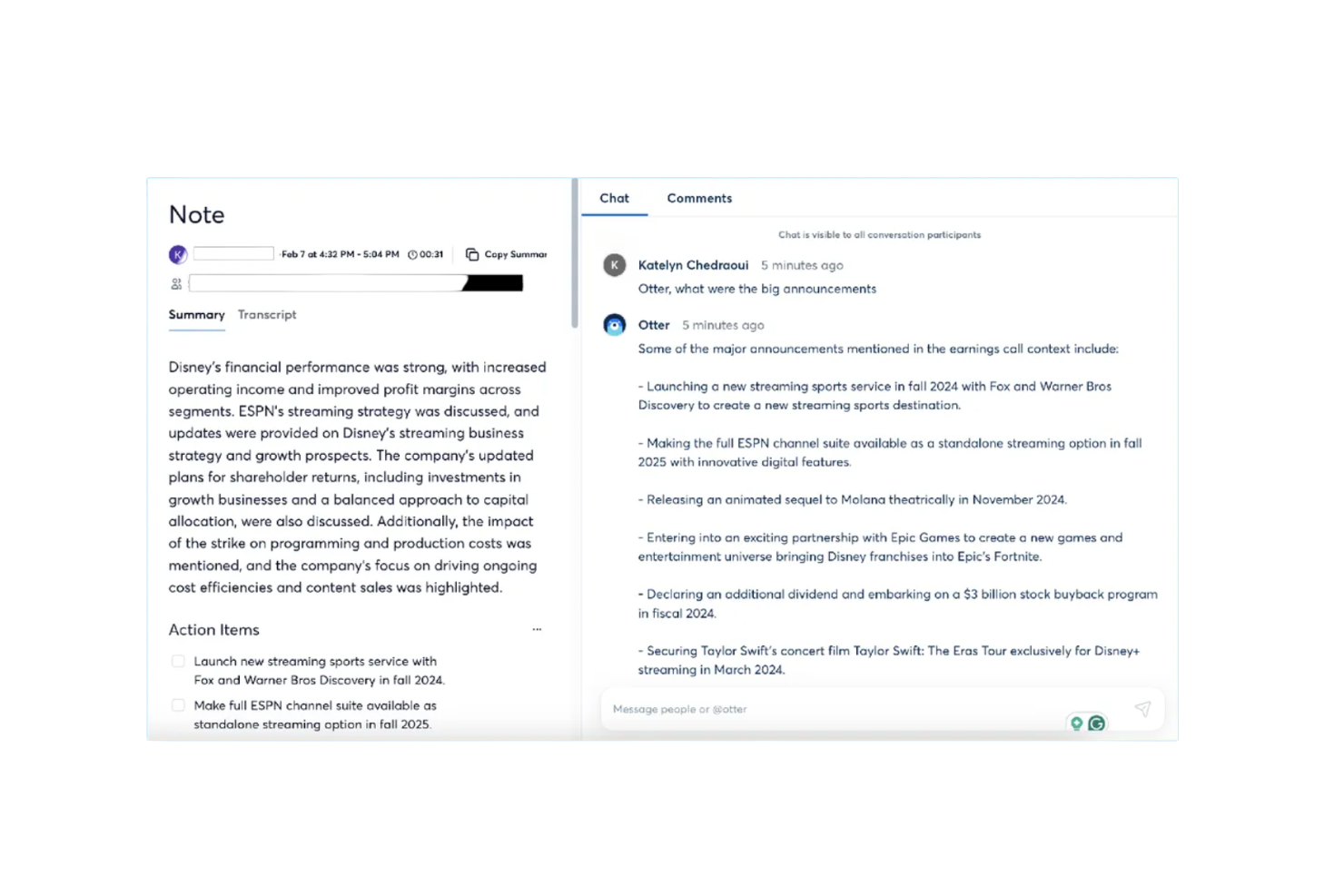
Otter.ai è un assistente per riunioni basato sull'IA che offre trascrizione in tempo reale, riepiloghi automatici e monitoraggio delle azioni da svolgere. Si rivolge principalmente a professionisti e team aziendali che desiderano aumentare la produttività e migliorare la gestione delle riunioni grazie alle sue capacità di intelligenza artificiale.
Perché ho scelto Otter.ai: Questo strumento si distingue per la precisione nelle trascrizioni e nei riepiloghi delle riunioni, rendendolo ideale per i team che necessitano di registrazioni dettagliate. Con funzionalità come la trascrizione in tempo reale e il monitoraggio delle attività, il tuo team può catturare facilmente le idee chiave e i compiti da svolgere. La sua capacità di integrarsi con piattaforme come Zoom ne aumenta l'utilità per le riunioni virtuali. Queste funzionalità lo rendono uno strumento prezioso per migliorare la comunicazione e la gestione dei progetti.
Funzionalità e integrazioni eccezionali:
Funzionalità includono riepiloghi automatici delle riunioni, monitoraggio delle azioni da svolgere e agenti specializzati per settori diversi come vendite e istruzione. Il tuo team trarrà beneficio dalla sua capacità di risparmiare tempo automatizzando la presa di appunti e il riepilogo delle discussioni.
Integrazioni includono Google Meet, Zoom, Dropbox, Google Calendar, Google Docs, HubSpot, Jira, Notion, Salesforce, Slack e Asana.
Pros and Cons
Pros:
- Trascrizioni live precise
- Riepiloghi automatici delle riunioni
- Aumenta la produttività delle riunioni virtuali
Cons:
- Accuratezza della trascrizione variabile con alcuni accenti
- Riconoscimento vocale scarso in riunioni complesse

Ideale per la creazione artistica tramite IA

Midjourney è uno strumento di generazione artistica tramite intelligenza artificiale pensato per artisti, designer e professionisti creativi che desiderano esplorare nuove possibilità visive. Offre valore fornendo capacità avanzate di IA per creare opere d’arte uniche e immaginative con facilità.
Perché ho scelto Midjourney: Midjourney eccelle nella creazione di arte tramite IA, permettendo al tuo team di generare contenuti visivi straordinari senza sforzo. I suoi algoritmi guidati dall’intelligenza artificiale aiutano a produrre design intricati e opere d’arte che rispondono a diverse esigenze creative. Puoi sperimentare con diversi stili e tecniche, rendendolo perfetto per l’esplorazione artistica. Queste caratteristiche lo rendono una scelta eccezionale per chi cerca modi innovativi per valorizzare i propri progetti creativi.
Caratteristiche principali & integrazioni:
Caratteristiche includono stili artistici personalizzabili, la possibilità di generare immagini ad alta risoluzione e un’interfaccia facile da usare. Il tuo team apprezzerà la flessibilità di regolare gli stili ed esplorare diverse espressioni artistiche. L’output ad alta risoluzione garantisce che le tue creazioni siano adatte a svariate applicazioni, dalle esposizioni digitali alla stampa su media tradizionali.
Integrazioni comprendono Adobe Photoshop, Adobe Illustrator, CorelDRAW, Canva, Procreate, Sketch, Figma, Blender, GIMP e Krita.
Pros and Cons
Pros:
- Genera arte di alta qualità
- Offre stili artistici personalizzabili
- Supporta immagini ad alta risoluzione
Cons:
- Può avere una curva di apprendimento
- Difficoltà nella generazione di dettagli precisi

Claude
Ideale per approfondimenti guidati dall’IA

Claude è una piattaforma di intelligenza artificiale conversazionale sviluppata da Anthropic che consente di caricare documenti, immagini o testo per generare approfondimenti, riepiloghi o risposte in linguaggio naturale. È utilizzata da professionisti di diversi settori che devono lavorare con grandi quantità di testo, dati o file e comprenderli rapidamente.
Perché ho scelto Claude: Claude offre capacità di analisi approfondita superiori agli strumenti tradizionali. Propone funzionalità come la comprensione di file, l’analisi di documenti con contesto esteso e diversi modelli di IA (Haiku, Sonnet, Opus) che si adattano ai vari carichi di lavoro. Puoi caricare un PDF o impostare prompt personalizzati e Claude individuerà schemi, collegamenti o riepiloghi che potresti non notare. Grazie a questo approccio orientato al ragionamento avanzato, il tuo team ottiene molto più di una semplice chat: riceve un’IA che aiuta a interpretare contenuti complessi.
Funzionalità e integrazioni principali:
Funzionalità includono la possibilità di caricare e analizzare documenti e immagini. Gestisce contesti testuali molto estesi, quindi non è necessario dividere manualmente i contenuti. Permette di scegliere tra diversi modelli in base alla complessità e alla velocità richiesta dal compito.
Le integrazioni includono Google Workspace, Microsoft 365, Slack, GitHub, Notion, Zoom, Figma, Dropbox e Asana.
Pros and Cons
Pros:
- Grande capacità nell’analisi di documenti lunghi
- Selezione flessibile del modello in base alla complessità
- Ottima capacità di generare approfondimenti oltre a semplici risposte
Cons:
- Alcune funzionalità potrebbero richiedere una configurazione avanzata dal team
- I limiti d’uso possono diventare un vincolo ad alti volumi

Ideale per prendere appunti sulle chiamate

Fireflies.ai è uno strumento basato sull'intelligenza artificiale progettato per trascrivere e analizzare le riunioni, rivolto ad aziende e team che necessitano di prendere appunti e analizzare gli incontri in modo efficiente. Aiuta gli utenti automatizzando il processo di trascrizione e fornendo approfondimenti dalle chiamate registrate, migliorando la produttività e la collaborazione.
Perché ho scelto Fireflies.ai: Fireflies.ai è pensato per prendere appunti di chiamata in modo efficiente, offrendo trascrizione automatica ed estrazione di parole chiave per catturare ogni dettaglio con precisione. Le sue funzionalità AI ti aiutano a registrare, organizzare e riassumere le riunioni senza sforzo manuale. La piattaforma include anche una dashboard di analisi del sentiment e l'evidenziazione dei punti chiave, rendendo più semplice per il tuo team rivedere le discussioni e agire rapidamente. Queste capacità la rendono una soluzione pratica per migliorare la gestione e il follow-up delle riunioni.
Funzionalità e integrazioni di spicco:
Funzionalità includono il riconoscimento vocale, la possibilità di cercare e filtrare le trascrizioni, e modelli di riunione personalizzabili. Lo troverai utile per localizzare rapidamente le informazioni importanti nelle trascrizioni, risparmiando tempo e migliorando l'efficienza.
Integrazioni includono Zoom, Microsoft Teams, Google Meet, Slack, Salesforce, HubSpot, Asana, Trello, Zapier e Dropbox.
Pros and Cons
Pros:
- Automatizza le trascrizioni delle riunioni
- Fornisce analisi del sentiment
- Evidenzia i punti chiave delle riunioni
Cons:
- Funzionalità di collaborazione in tempo reale limitate
- Elaborazione delle trascrizioni potenzialmente lenta

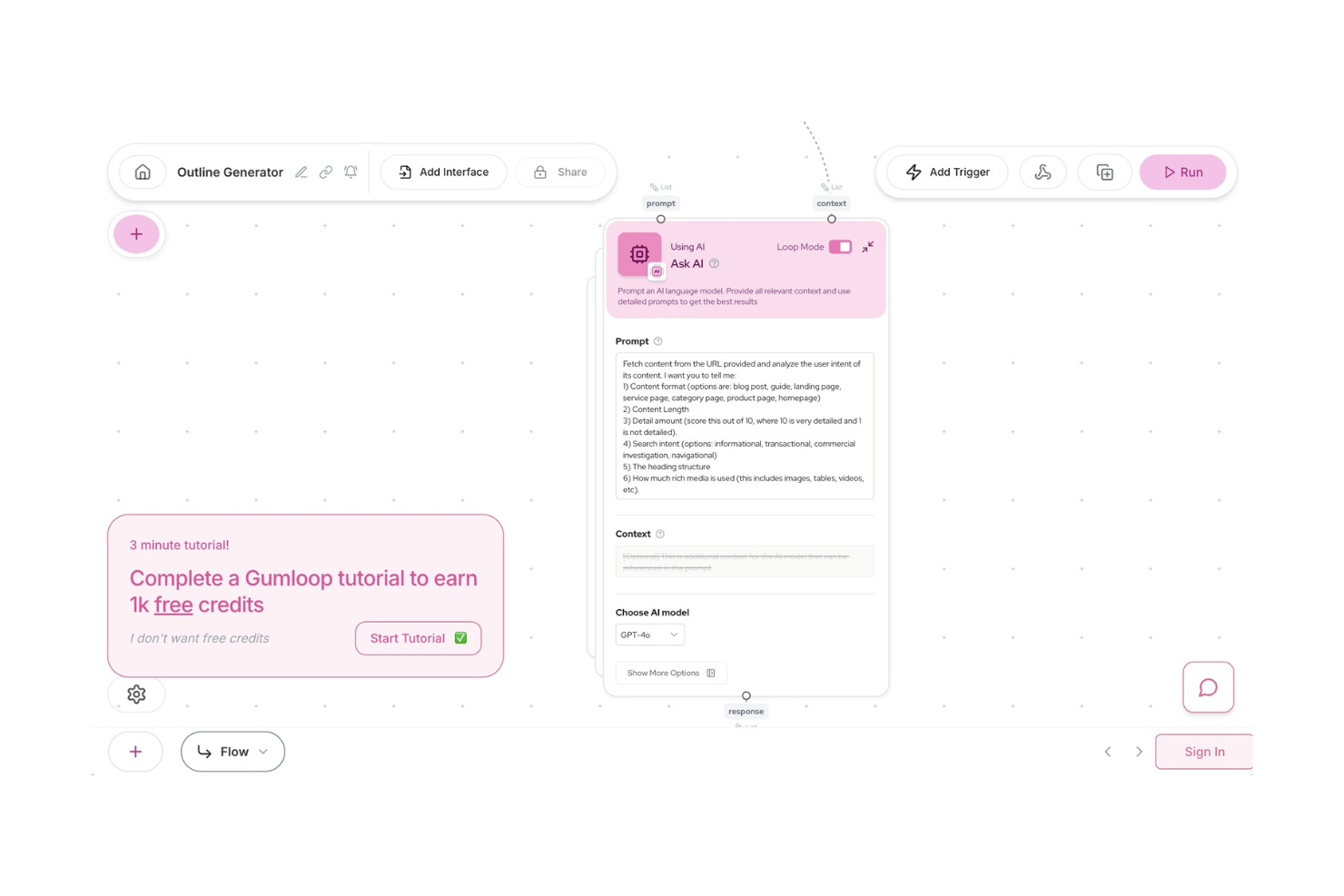
Gumloop è una piattaforma di automazione AI progettata per una vasta gamma di funzioni aziendali, tra cui marketing, vendite, operazioni, ingegneria e supporto. Offre un'interfaccia drag-and-drop che consente agli utenti di automatizzare i flussi di lavoro integrando dati, applicazioni e capacità AI per migliorare la gestione del tempo.
Perché ho scelto Gumloop: Gumloop si dimostra altamente capace nell'automazione dei flussi di lavoro, offrendo un'interfaccia intuitiva per creare flussi complessi senza programmare. La sua capacità di integrarsi con oltre 110 applicazioni lo rende versatile per diverse esigenze aziendali. Le funzionalità AI della piattaforma, come l'estrazione dei dati e il supporto alle decisioni, aiutano a rendere i processi di lavoro efficienti e coerenti. Queste caratteristiche lo rendono uno strumento ideale per i team che desiderano automatizzare attività manuali (come le liste di cose da fare) e migliorare l'efficienza operativa.
Caratteristiche principali e integrazioni:
Caratteristiche includono un'interfaccia drag-and-drop, decisioni guidate dall'intelligenza artificiale e strumenti di gestione dei dati. Il tuo team può automatizzare attività ripetitive e concentrarsi su lavori più strategici. La possibilità della piattaforma di integrarsi con numerose applicazioni permette di migliorare l'automatizzazione dei flussi di lavoro.
Integrazioni includono Google Sheets, Salesforce, HubSpot, Slack, Microsoft Teams, Dropbox, Trello, Asana, Zapier e Mailchimp.
Pros and Cons
Pros:
- Supporta un'ampia gamma di applicazioni
- Interfaccia drag-and-drop intuitiva
- Migliora l'automazione dei flussi di lavoro
Cons:
- Può richiedere tempo per la configurazione iniziale
- Ecosistema di integrazioni più piccolo
Altri strumenti di IA per il lavoro
Ecco alcune ulteriori opzioni di strumenti di IA per il lavoro che non sono entrate nella mia selezione, ma che vale comunque la pena scoprire:
- Zoom AI Companion
Ideale per riunioni virtuali
- AI on Google Search
Ideale per il potenziamento della ricerca
- IBM Watson Discovery
Ideale per l'analisi dei dati potenziata dall'IA


Come Valuto gli Strumenti AI per il Lavoro
Ogni strumento in questa lista deve offrire un reale valore dell'AI—non semplicemente una chatbot aggiunta a una piattaforma classica, ma funzionalità capaci di ridurre effettivamente il carico di lavoro HR e di portare alla luce intuizioni altrimenti sfuggenti. Suddivido la mia valutazione in due livelli: la funzionalità di base che uno strumento deve possedere per essere preso in considerazione (come automazione AI, analisi predittiva e ricerca intelligente) e i fattori differenzianti che separano le buone opzioni da quelle eccellenti.
Funzionalità di Base (Requisiti Minimi per Questa Lista)
Quando seleziono gli strumenti per la mia lista, valuto ciascuno di essi su una scala da 0 (non offre la funzionalità) a 5 (eccelle in quest'area) per ogni funzionalità di base elencata di seguito. Poi calcolo il punteggio totale dello strumento come percentuale. Ogni strumento deve raggiungere almeno un punteggio totale minimo del 65% per essere incluso.
- Assistente AI Generativa: Verifico se lo strumento offre un vero copilot GenAI in grado di redigere descrizioni di lavoro, riassumere cicli di feedback o rispondere a domande sulle policy—non semplicemente un chatbot preimpostato.
- Automazione dei Flussi di Lavoro AI: Lo strumento dovrebbe automatizzare processi HR a più fasi, come sequenze di onboarding o approvazioni delle ferie, utilizzando logiche AI e andando ben oltre le semplici regole if-then.
- Analisi Predittiva & Approfondimenti: Cerco previsioni guidate da ML su metriche come il rischio di dimissioni, colli di bottiglia in fase di assunzione o trend di engagement—semplici dashboard con grafici storici non sono sufficienti.
- Ricerca Intelligente & Recupero della Conoscenza: Verifico se dipendenti e staff HR possono porre domande in linguaggio naturale e ottenere risposte accurate e referenziate, tratte da policy, manuali o documenti relativi ai benefit.
- Integrazioni con Sistemi HR: Ogni strumento dovrebbe poter collegarsi a HRIS, ATS e piattaforme di payroll già utilizzate—strumenti come Workday, BambooHR, Greenhouse o ADP—per consentire all'AI di operare su dati reali della forza lavoro.
- Governance AI di Livello Enterprise: Verifico la presenza di controlli di accesso basati sui ruoli, registri di audit, opzioni di residenza dei dati e policy chiare sulla gestione dei dati AI che rispettino gli standard per la protezione dei dati sensibili dei dipendenti.
Dopo aver selezionato gli strumenti che soddisfano questi criteri, considero cosa distingue ciascuna piattaforma.
Fattori Differenzianti (Cosa Distingue i Fornitori)
Ecco come confronto e metto a paragone i vari fornitori:
Funzionalità Distintive
L’agenticità dell’AI è un fattore importante: cerco strumenti in cui l’AI possa completare in autonomia compiti a più fasi, come programmare l’intero ciclo di colloqui o generare una shortlist di candidati interni per una posizione vacante. È molto rilevante anche l’analisi del sentiment e del coinvolgimento. Alcune piattaforme analizzano risposte a sondaggi pulse e modelli comunicativi per individuare rischi di burnout prima che emergano nei colloqui di uscita. Valuto inoltre se uno strumento include un motore di intelligenza sulle competenze in grado di mappare le skill dei dipendenti su ruoli aperti e percorsi di apprendimento, aggiungendo vero valore ai team focalizzati sulla mobilità interna.
Oltre le Funzionalità
La privacy dei dati e la conformità AI pesano molto in questo ambito. Verifico se i fornitori offrono auditing contro bias nei modelli di assunzione e policy trasparenti su come vengono gestiti i dati dei dipendenti durante l’addestramento AI. È importante anche la velocità di implementazione: alcune piattaforme propongono casi d’uso HR preconfigurati che permettono di essere operativi in poche settimane, mentre altre richiedono mesi di configurazione personalizzata. Infine, verifico la chiarezza dei prezzi, specie se il fornitore addebita per dipendente, per utente o in base al volume d’uso dell’AI, dato che modelli poco trasparenti possono rendere i costi imprevedibili quando la forza lavoro cresce.
Come scegliere gli strumenti di IA per il lavoro
È facile perdersi in lunghi elenchi di funzionalità e strutture tariffarie complesse. Per aiutarti a rimanere concentrato mentre affronti il tuo processo di selezione del software, ecco un elenco dei fattori da tenere a mente:
| Fattore | Cosa considerare |
|---|---|
| Scalabilità | Lo strumento cresce insieme al tuo team? Cerca soluzioni in grado di gestire un aumento dei dati e del numero di utenti senza cali nelle prestazioni. |
| Integrazioni | Si collega ai tuoi sistemi attuali? Verifica la compatibilità con il software che già utilizzi per evitare interruzioni dei flussi di lavoro. |
| Personalizzazione | Puoi adattare lo strumento alle tue esigenze? Assicurati che consenta di modificare impostazioni e flussi di lavoro in base ai tuoi processi. |
| Facilità d'uso | È facile da usare per il tuo team? Considera la curva di apprendimento e se il tuo team può adottare facilmente lo strumento senza una formazione approfondita. |
| Implementazione e avviamento | Quanto velocemente puoi iniziare? Valuta il tempo e le risorse necessari per la configurazione e la formazione, oltre a verificare se il fornitore offre assistenza durante questa fase. |
| Costo | Rientra nel tuo budget? Confronta i modelli tariffari e cerca eventuali costi nascosti. Considera il valore che offre rispetto al costo. |
| Misure di sicurezza | I tuoi dati sono protetti? Assicurati che lo strumento rispetti gli standard di sicurezza e offra funzionalità come la crittografia e i controlli di accesso. |
| Disponibilità dell'assistenza | Avrai aiuto quando ne avrai bisogno? Verifica gli orari e i canali di assistenza del fornitore e considera la qualità e la rapidità del servizio clienti. |
Cosa sono gli strumenti di IA per il lavoro?
Gli strumenti di IA per il lavoro sono soluzioni software che utilizzano l'intelligenza artificiale per migliorare la produttività e l'efficienza negli ambienti aziendali. Questi strumenti sono comunemente utilizzati dai professionisti delle risorse umane, dai manager e dai responsabili dei team per automatizzare le attività, migliorare il processo decisionale e facilitare la comunicazione.
Funzionalità come l'elaborazione del linguaggio naturale, l'analisi dei dati e le capacità predittive aiutano ad automatizzare le attività ripetitive, fornire informazioni utili e migliorare la collaborazione. Nel complesso, questi strumenti offrono un valore significativo facendo risparmiare tempo, riducendo gli errori e migliorando l'efficienza sul posto di lavoro.
Funzionalità
Quando selezioni gli strumenti di IA per l'ambiente di lavoro, presta attenzione alle seguenti funzionalità chiave:
- Elaborazione del linguaggio naturale: consente allo strumento di comprendere e rispondere al linguaggio umano, rendendo più efficace la comunicazione con gli utenti.
- Analisi predittiva: analizza i dati per prevedere tendenze e risultati, contribuendo a migliorare il processo decisionale e la pianificazione.
- Trascrizione automatizzata: converte il linguaggio parlato in testo, facendo risparmiare tempo e migliorando la precisione nei verbali delle riunioni e nella documentazione.
- Integrazione dei dati: consente allo strumento di connettersi ad altri sistemi e database, garantendo un flusso di dati continuo e l'accesso ai dati su diverse piattaforme.
- Analisi del sentiment: valuta il testo per determinare il sentimento che esprime, aiutando gli utenti a comprendere le emozioni dei clienti o dei dipendenti.
- Automazione delle attività: automatizza le attività ripetitive, liberando tempo per consentire agli utenti di concentrarsi su attività più strategiche.
- Informazioni in tempo reale: fornisce informazioni e analisi aggiornate, consentendo di rispondere rapidamente ai cambiamenti e alle opportunità.
- Flussi di lavoro personalizzabili: consente agli utenti di adattare i processi alle proprie esigenze specifiche, migliorando efficienza e produttività.
- Chatbot basati sull'IA: offrono supporto e interazione automatizzati, migliorando il servizio clienti e il coinvolgimento.
- Funzionalità di sicurezza: garantiscono la protezione dei dati e la conformità agli standard del settore, salvaguardando le informazioni sensibili.
Vantaggi
L'implementazione di strumenti di IA per l'ambiente di lavoro offre diversi vantaggi al tuo team e alla tua azienda. Ecco alcuni dei vantaggi che puoi aspettarti:
- Maggiore produttività: l'automazione delle attività ripetitive consente al tuo team di concentrarsi su attività più strategiche, aumentando la produttività complessiva.
- Migliore processo decisionale: l'analisi predittiva e le informazioni in tempo reale forniscono dati preziosi, aiutando il tuo team a prendere rapidamente decisioni informate.
- Comunicazione migliorata: l'elaborazione del linguaggio naturale e i chatbot basati sull'IA facilitano una comunicazione efficace, sia internamente sia con i clienti.
- Risparmio di tempo: la trascrizione automatizzata e l'automazione delle attività fanno risparmiare tempo nelle attività manuali, consentendo al tuo team di gestire il proprio tempo in modo più efficiente.
- Migliore coinvolgimento dei clienti: l'analisi del sentiment e i chatbot basati sull'IA migliorano le interazioni con i clienti, portando a una maggiore soddisfazione e fidelizzazione.
- Flessibilità nella personalizzazione: i flussi di lavoro personalizzabili garantiscono che gli strumenti si adattino alle esigenze specifiche della tua azienda, migliorando l'efficienza operativa.
- Sicurezza dei dati: le funzionalità di sicurezza integrate proteggono le informazioni sensibili, garantendo la conformità agli standard del settore.
Costi e prezzi
La selezione degli strumenti di IA per l'ambiente di lavoro richiede la comprensione dei vari modelli e piani tariffari disponibili. I costi variano in base alle funzionalità, alle dimensioni del team, ai componenti aggiuntivi e ad altri fattori. La tabella seguente riassume i piani più comuni, i relativi prezzi medi e le funzionalità tipicamente incluse nelle soluzioni di strumenti di IA per l'ambiente di lavoro:
Tabella comparativa dei piani per gli strumenti di IA per l'ambiente di lavoro
| Tipo di piano | Prezzo medio | Funzionalità comuni |
|---|---|---|
| Piano gratuito | $0 | Automazione di base delle attività, spazio di archiviazione dei dati limitato e assistenza standard. |
| Piano personale | $5-$25/utente/mese | Automazione avanzata delle attività, analisi predittiva e assistenza via e-mail. |
| Piano aziendale | $30-$75/utente/mese | Flussi di lavoro personalizzati, integrazioni con applicazioni di terze parti e assistenza prioritaria. |
| Piano per grandi aziende | $100-$200/utente/mese | Personalizzazione completa, responsabile account dedicato e funzionalità di sicurezza avanzate. |
Domande frequenti sugli strumenti di IA sul posto di lavoro
Ecco alcune risposte alle domande comuni sugli strumenti di IA sul posto di lavoro:
Più reparti possono usare lo stesso strumento di IA con un unico account?
Sì, la maggior parte delle piattaforme di IA per il lavoro consente a più reparti di operare con un unico account dell’organizzazione. Ogni team può avere un proprio spazio di lavoro per gestire separatamente progetti e dati. Le autorizzazioni basate sui ruoli aiutano a controllare chi può visualizzare, modificare o condividere informazioni specifiche.
Gli strumenti di IA sul posto di lavoro possono migliorare la produttività del team?
Sì, gli strumenti di IA sul posto di lavoro possono migliorare significativamente la produttività del team. Automatizzano le attività ripetitive, forniscono informazioni basate sui dati e facilitano una comunicazione migliore. Riducendo il lavoro manuale, il tuo team può concentrarsi sulle attività strategiche e sul processo decisionale. Per massimizzare i miglioramenti della produttività, cerca strumenti con funzionalità come l’automazione delle attività, l’analisi predittiva e la collaborazione in tempo reale.
Quali misure di sicurezza devo cercare in uno strumento di IA sul posto di lavoro?
Assicurati che lo strumento sia conforme agli standard di sicurezza del settore e offra funzionalità come la crittografia, i controlli degli accessi e aggiornamenti di sicurezza regolari. Verifica se il fornitore dispone di politiche di protezione dei dati e rispetta normative come il GDPR. È essenziale proteggere le informazioni sensibili, quindi scegli uno strumento che dia priorità alla sicurezza e offra pratiche di sicurezza trasparenti.
Come si integrano gli strumenti di IA sul posto di lavoro con gli altri software?
La maggior parte degli strumenti di IA sul posto di lavoro offre funzionalità di integrazione con software diffusi come i sistemi CRM, le piattaforme di comunicazione e gli strumenti di gestione dei progetti. Verifica le opzioni di integrazione dello strumento e la compatibilità con i sistemi già in uso. Un’integrazione fluida garantisce che i dati scorrano senza problemi tra le piattaforme, riducendo l’inserimento manuale dei dati e migliorando l’efficienza complessiva.
Che tipo di assistenza posso aspettarmi dai fornitori di strumenti di IA sul posto di lavoro?
L’assistenza varia a seconda del fornitore, ma in genere puoi aspettarti opzioni come il supporto via e-mail, chat o telefono. Alcuni fornitori offrono assistenza 24 ore su 24, 7 giorni su 7, mentre altri hanno orari limitati. Cerca fornitori che offrano una documentazione completa, risorse formative e un team di assistenza reattivo. Un buon supporto può fare una differenza significativa nell’esperienza del tuo team con lo strumento.