

Med så mange ulike søkersporingssystemer som er tilpasset behovene til små bedrifter, kan det være utfordrende å finne det riktige systemet for deg. Du ønsker kostnadseffektiv programvare som kan hjelpe deg med å analysere kandidatsøknader raskt, men du må finne ut hvilken programvare som er best.
I dette innlegget vil jeg gjøre dette valget enklere ved å dele mine erfaringer med de beste søkersporingssystemene for små bedrifter, basert på min personlige erfaring med rekruttering i et lite selskap som opplevde rask vekst.
Hvorfor du kan stole på våre programvareanbefalinger
6,700+
Reviews
20
Industry experts
16+
Evaluation factors
14
Years
Teamet vårt har testet og anmeldt programvare siden 2012. Vi er selv HR-eksperter, så vi vet hvor vanskelig og hvor viktig det er å velge riktig programvare.
I denne guiden har vi vurdert verktøyene gjennom praktisk testing og uavhengig research og gitt dem poeng ut fra våre utvelgelseskriterier. Vi bygger også på innsikt fra ledende eksperter i bransjen og erfarne HR-eksperter.
Anmeldelsene våre bygger på vår egen redaksjonelle vurdering. De er ikke et salgsargument.
Ekspertanmeldere:
- Phil GrayCOO
 Kim BehnkeHR Tech Editor & Analyst
 Josh BarkerPeople Ops Manager

Sammenligningstabell: Søkersporingssystem for små bedrifter
Denne sammenligningstabellen oppsummerer prisopplysningene for mine beste utvalgte søkersporingssystemer for små bedrifter:
Score legend (out of 5)
- Excellent4.5–5
- Good4–4.4
- Average3–3.9
- Below average2–2.9
- Poor1–1.9
Sorted by: Default
| Tool | Starting Price | Website | |||||||
|---|---|---|---|---|---|---|---|---|---|
Best for innebygd rekrutteringsanalyse | 4.2 out of 5 | 4 | 4 | 4 | 5 | 4 | 4 | $400/måned Gratis demo tilgjengelig | Website |
Best for KI-assisterte rekrutteringsprosesser | 3.0 out of 5 | 3 | 3 | 3 | 3 | 3 | 3 | $8/bruker/måned Gratis prøveperiode + gratis demo tilgjengelig | Website |
Best for å finne mange kvalifiserte kandidater | 3.7 out of 5 | 4 | 4 | 3 | 4 | 3 | 4 | Priser på forespørsel Gratis demonstrasjon tilgjengelig | Website |
Best for automatiserte tilbud | 3.2 out of 5 | 2 | 3 | 4 | 3 | 3 | 4 | Pris på forespørsel Gratis prøveperiode + gratis demo tilgjengelig | Website |
Best for interne team for talentanskaffelse | 3.8 out of 5 | 3 | 4 | 4 | 4 | 4 | 4 | $600/måned ved årlig betaling Gratis demo | Book Demo |
Best for AI-drevet kandidatsamsvar for rekrutteringsbyråer | 3.3 out of 5 | 5 | 2 | 2 | 4 | 4 | 3 | $125 per bruker per måned 14 dagers gratis prøveperiode + gratis demo tilgjengelig | Book Demo |
Best med innebygd immigrasjonsstøtte | 3.2 out of 5 | 2 | 3 | 4 | 3 | 3 | 4 | $5/bruker/måned Gratis demo tilgjengelig | Website |
Best for rekruttering i et alt-i-ett HR-system | Not rated | 2 | 3 | 3 | 4 | Not rated | Not rated | $2/bruker/måned Gratisabonnement + gratis demo tilgjengelig | Website |
Best for AI-rekruttering og kandidatsourcing | 3.5 out of 5 | 4 | 4 | 4 | 4 | 3 | 2 | $15 per bruker per måned 14 dagers gratis prøveperiode + gratis demo | Website |
Best for kombinert ATS og CRM | 3.8 out of 5 | 4 | 3 | 5 | 4 | 4 | 3 | $80/bruker/måned Gratis prøveperiode | Book Demo |


Vurdering av det beste søkersporingssystemet for små bedrifter
Nedenfor finner du mine detaljerte oppsummeringer av de beste søkersporingssystemene for små bedrifter som kom med på kortlisten min. Vurderingene mine gir et detaljert innblikk i de viktigste funksjonene, fordelene u0026amp; ulempene, integrasjonene og ideelle bruksområdene for hvert verktøy, slik at du kan finne det beste for deg.
 Best for rediscovering past candidates
- Free demo available
- From $400/month
Visit WebsiteCustomer Rating:4.4/5
Ashby organizes candidates by pipeline stage for streamlined hiring. Ashby is an all-in-one recruiting platform that combines applicant tracking, candidate CRM, interview scheduling, and analytics into a single system built for structured, full-cycle hiring.
Who Is Ashby Best For?
Ashby is a strong fit for dedicated talent acquisition teams that want sourcing, pipeline management, scheduling, and analytics in one place.
Why I Picked Ashby
I've included Ashby in my top picks because its AI Talent Rediscovery feature is genuinely useful for teams that have been hiring for a while and built up a candidate database worth revisiting. When a new role opens, Ashby surfaces past candidates who already fit, grouped by signal type, so I'm not starting from scratch. Pair that with Boolean-powered candidate search and automated outreach sequences, and re-engaging a warm pipeline becomes a structured process rather than a manual dig through old files.
Ashby Key Features
- Structured candidate pipeline: Organizes candidates into defined stages—Leads, Application Review, Active, Pending Offer, Hired, and Archived—with bulk actions available across all stages.
- Automated interview scheduling: Sends direct-booking links showing live panel availability, with stage-triggered reminders and questionnaires sent automatically as candidates progress.
- Customizable scorecards and feedback forms: Assigns stage-specific feedback forms to interviewers, with candidate reviews tracking individual scores and team averages in one place.
- Full-funnel diversity reporting: Collects anonymous EEOC and diversity survey responses and breaks down pipeline pass-through rates by demographic group across every hiring stage.
Ashby Integrations
Ashby offers 250+ marketplace integrations, including Google Workspace, Microsoft Office 365, Slack, Workday, BambooHR, Checkr, HireRight, and Justifacts. It also provides a public API and lists Zapier.
Pros and Cons
Pros:
- Connects scorecards with recruiting analytics
- Automates interview booking and candidate reminders
- Finds qualified candidates in past pipelines
Cons:
- Hiring-manager access can complicate seat planning
- Initial workflow configuration takes recruiter attention
Learn more about Ashby: Intuitive applicant tracking system with AI-driven recommendations and social media recruitment tools
- 14-day free trial + free demo available
- From $15/user/month (billed annually)
Visit WebsiteCustomer Rating:4.8/5
Manatal’s platform creates a talent pipeline page for each vacant position, making it easy to track where candidates are in the hiring process. Manatal’s applicant tracking system simplifies the hiring process, helping hiring teams of any size manage their talent pools and strengthen their team collaboration. Their system creates individual talent pipelines for each vacant position, making it easy to track and share progress with other hiring managers. To boost the number of candidate applications, Manatal feeds job postings to thousands of free and premium job posting boards following the parameters of your job ad campaigns.
Recruiters dealing with high-volume hiring will appreciate Manatal’s built-in artificial intelligence, which includes AI-driven recommendations for which candidates are the best fit based on extensive candidate scorecards and comparisons of their direct skills against your detailed job descriptions. Rich candidate profiles also capture a candidate’s entire digital presence including their LinkedIn, Twitter, Instagram and Facebook accounts, all within their profile, making social media recruitment simple.
Manatal’s cloud-based SaaS software is fully accessible from their mobile app as well, making it easy to stay on top of activity when you’re away from your desk too. The system also includes integrations with LinkedIn, Gmail, Outlook, Mailchimp and other platforms. Access to their API and Zapier integration are available for customized system configurations too.
Pricing for Manatal starts at $15 USD/user/month. A free demo and a 14-day free trial can also be requested via their website.
 Efficient ATS with auto-populated offer letters and insightful applicant analytics
- 7-day free trial + demo available
- From $10.25/user/month
Visit WebsiteCustomer Rating:3.9/5
Offer letter templates are built right into BambooHR’s applicant tracking system, making it fast and easy to get offers into candidates hands. Efficiency and speed are two core elements of BambooHR’s applicant tracking system, which includes time-saving features like sending multiple email template responses at once, and branded digital offer letters that auto-populate candidate and job details. To improve the candidate experience, electronic signatures also make it fast and easy to accept a new position. Automated reminders also ensure hiring managers communicate with applicants in a timely fashion, ensuring they feel acknowledged and informed throughout the hiring process.
To help with your overall recruitment process, BambooHR also includes useful birds-eye-view applicant information. Their Applicant Sources Report parses out your candidate data to show you where the majority of your applicants are coming from, helping you to either focus your resources on what’s working the best, or address any shortcomings directly. As well, their Applicant Funnel Report digs deeper into your recruitment timeline to pinpoint the slower portions of your process so you can look at ways to speed up those steps.
BambooHR integrates directly with 60+ common HR software solutions including job posting boards like Indeed, Glassdoor, and ZipRecruiter, as well as social media sites like LinkedIn, Twitter and Facebook. They also have a full-feature mobile app so you can stay in touch with candidates from anywhere.
Pricing details for BambooHR are available upon request. A free trial and free demo can also be requested via their website.
 Best as AI for business
- Free trial + Free demo available
- From $8/user/month
Visit WebsiteCustomer Rating:4.4/5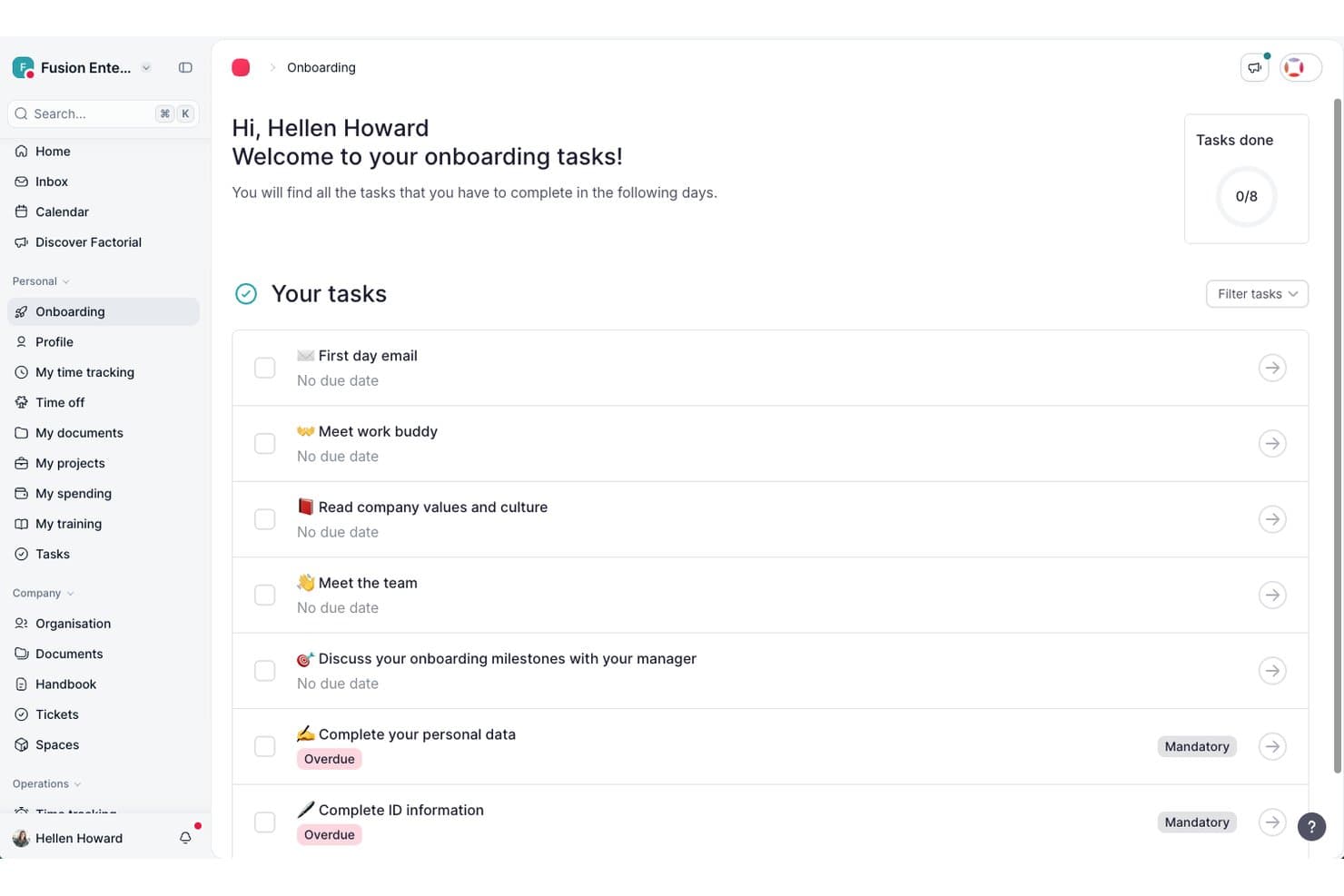
Factorial guides new hires through onboarding tasks in one place. Factorial is an AI-powered HR platform that brings recruiting, time management, performance, and employee data into one place, with AI assistance built into day-to-day tasks like writing job descriptions, summarizing resumes, and managing hiring pipelines.
Who Is Factorial Best For?
Factorial suits HR managers and recruiters at growing companies who want AI woven into daily HR tasks—from drafting job descriptions to generating performance summaries—without juggling separate tools.
Why I Picked Factorial
I picked Factorial as one of the best because its AI runs through the daily work of hiring, not just as a bolt-on. When I'm building out a role, the AI drafts the job description, suggests relevant competencies, and generates resume summaries so I'm not reading every CV cold. I also like how candidate pipeline stages are fully customizable, with automatic emails triggered when applicants move between phases, keeping communication consistent without any manual follow-up.
Factorial Key Features
- Evaluation forms: Rate candidates from 1 to 5 on individual competencies and add a written overall summary for each applicant.
- Automated stage-based emails: Trigger candidate emails automatically when applicants move to a specified hiring phase.
- Role-based hiring team access: Assign recruiter, hiring manager, or reviewer roles with different levels of pipeline visibility and editing permissions.
- Calendar-linked interview scheduling: Connect your calendar to Factorial to schedule candidate interviews directly within the platform.
Factorial Integrations
Factorial offers marketplace integrations with Google Workspace, Slack, LinkedIn, Recruitee, and Microsoft Power BI, plus Zapier. It also provides a public API, webhooks, SDKs, API keys, and OAuth 2.0 for custom integrations.
Pros and Cons
Pros:
- AI resume summaries speed initial review
- Evaluation forms capture competency ratings and notes
- Customizable stages trigger candidate emails
Cons:
- Microbusiness fit can feel oversized
- Resume search and filtering aren't documented
 Best for AI-driven candidate matching
- Free demo available
- Modular pricing, from $6/employee/month (module-dependent)
Visit WebsiteCustomer Rating:4.6/5
This job requisition form in Folks HR allows users to create a new job posting by entering applicant details, job location, opening date, and position title. Folks HR's ATS is an all-in-one applicant tracking system designed to help small and medium-sized businesses manage their recruitment processes more efficiently. You can use it to centralize applications, post to job boards, and simplify how you source, screen, and hire candidates.
I included Folks HR's ATS in this list because it offers an intuitive ATS designed specifically for smaller businesses that may not have a dedicated recruitment team. You can manage applications through a centralized CV library, automate interview communications, and customize your hiring workflows—all from one platform. It also helps you create branded career pages quickly, making it easier to present a polished image to prospective candidates without relying on extra marketing resources.
Other standout features include AI-powered resume parsing to help identify the most qualified applicants faster, detailed recruitment analytics to track time-to-hire and other key metrics, and direct sourcing through LinkedIn to expand your reach. Folks HR's ATS also makes it simple to connect with candidates through automated updates and organized communication tools, keeping your hiring process on track without extra effort.
Integrations are available with platforms like Integrations include ADP, Agendrix, Applauz, Employeur D, Emprez, Evolia, Merinio, Nethris, and Payworks. These integrations support payroll, time tracking, and other ATS processes, helping you manage more of your ATS ecosystem in one place.
Learn more about Folks HR: Best with built-in onboarding automations
- Free plan + free demo available
- From $2/user/month (billed annually)
Visit WebsiteCustomer Rating:4.8/5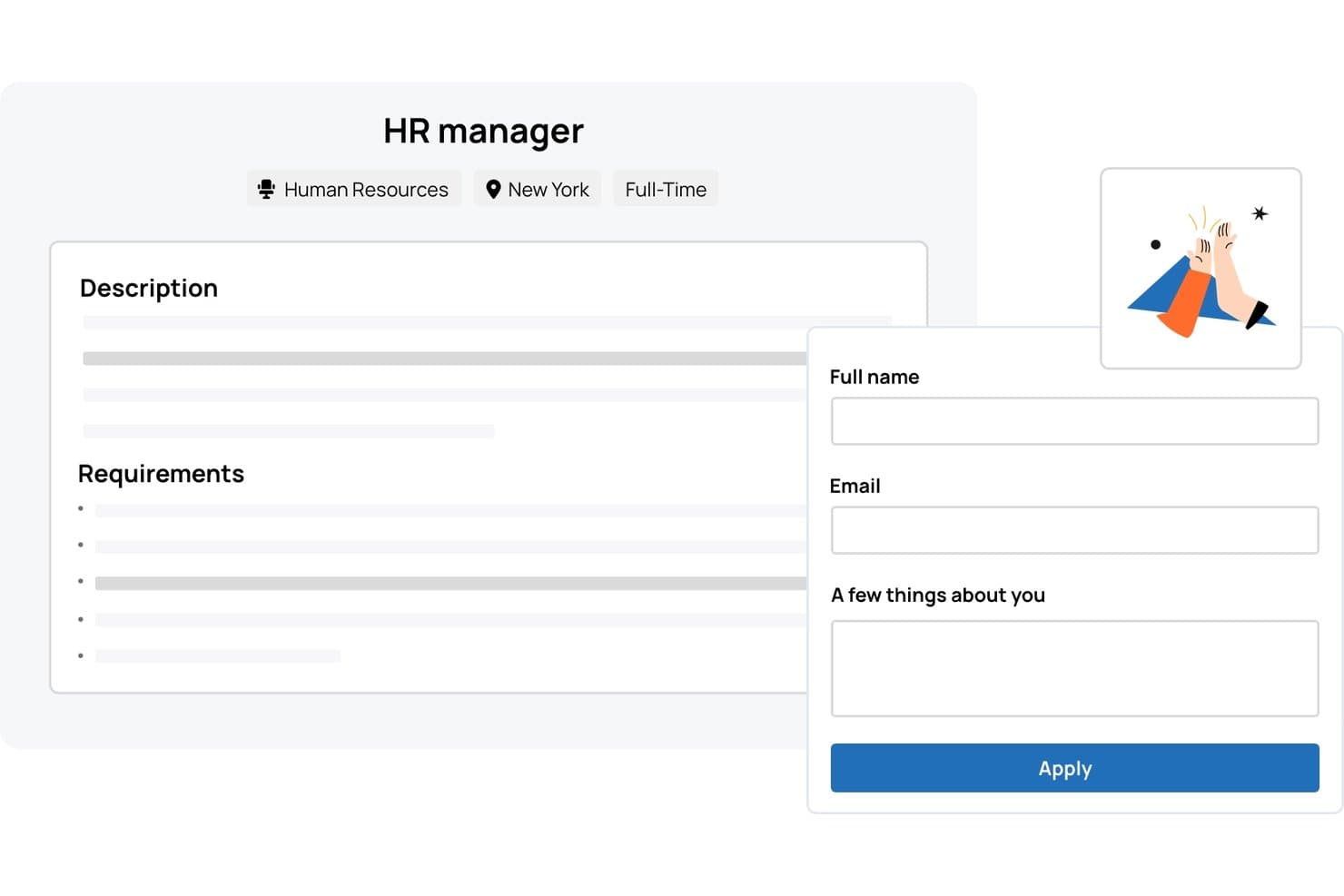
TalentHR offers a job listing page with an integrated application form allowing candidates to submit their name, email, and a brief bio directly. TalentHR is an applicant tracking and HR management platform designed for small businesses, offering digital recruitment workflows, onboarding tools, and built-in HR records management.
Who Is TalentHR Best For?
TalentHR suits small businesses and startups looking for HR software that handles hiring, onboarding, and employee management in one place.
Why I Picked TalentHR
I picked TalentHR as one of the best because the built-in onboarding automation for new hires really speeds up document collection and training assignments. I can set up onboarding workflows that automatically trigger the right forms and tasks for every new starter.
TalentHR Key Features
- Customizable recruitment pipeline: Tailor each hiring stage to match your team's unique workflow.
- Careers page builder: Create and update branded job listings directly from the platform.
- Interview notes tracking: Store and access feedback and evaluations for every candidate.
- Employee records management: Keep all employee documents and information organized in one platform.
TalentHR Integrations
TalentHR offers native integrations with Google Workspace, Microsoft 365, and Slack, and provides an API for custom integrations.
Pros and Cons
Pros:
- Built-in applicant and employee document management
- Customizable recruitment pipeline stages
- Automated onboarding workflows for new hires
Cons:
- Limited candidate sourcing features compared to peers
- No native job board posting support
Learn more about TalentHR: Best for compliant global hiring and payroll management
- Free demo available
- From $125/per employee/month
Visit WebsiteCustomer Rating:4.9/5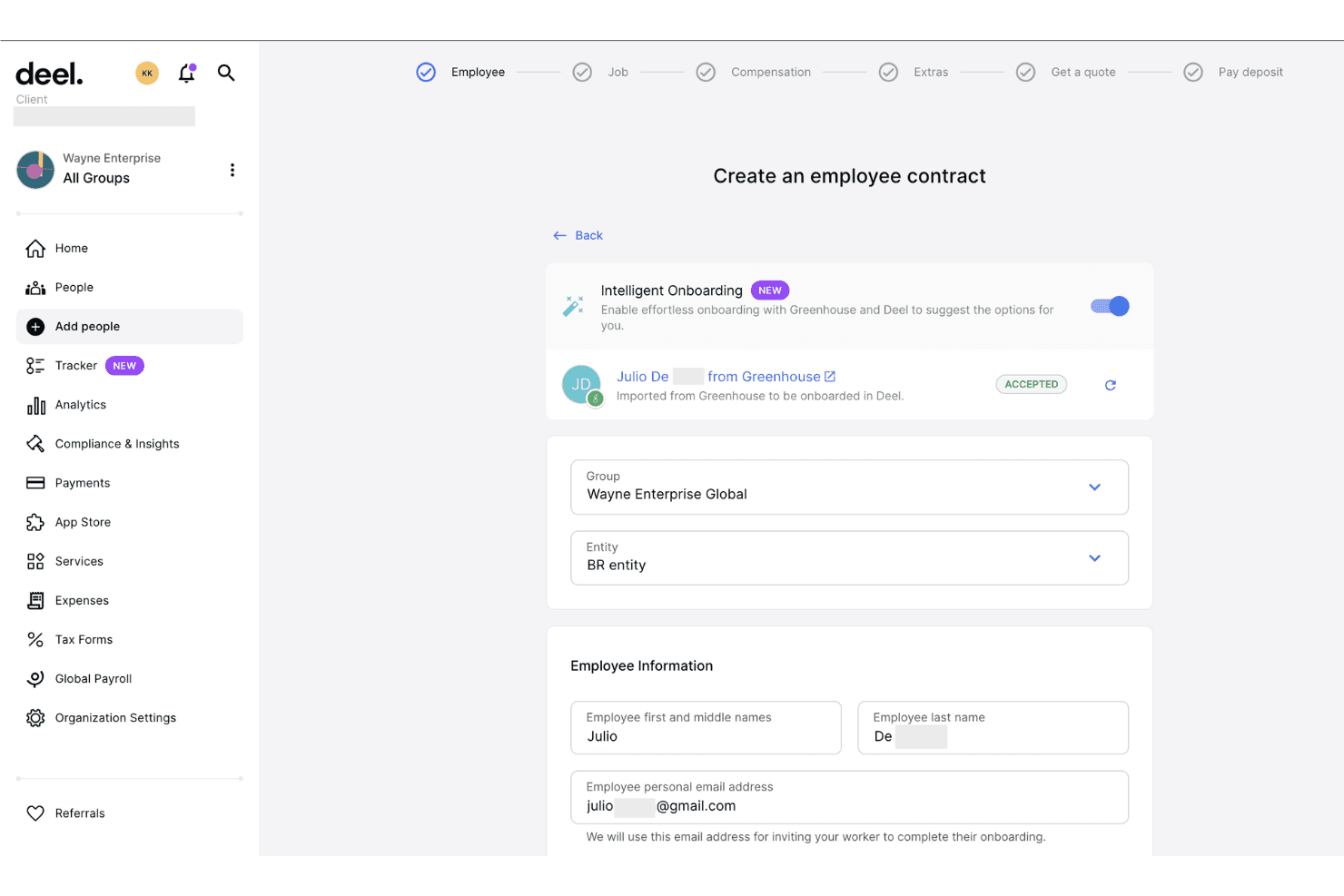
Deel Hire imports candidates from Greenhouse to streamline employee onboarding. Deel Hire is an AI-powered applicant tracking system that combines job board distribution, automated candidate screening, interview scheduling, and built-in compliance tools within Deel's broader HR and payroll platform.
Who Is Deel Hire Best For?
Deel Hire is a strong fit for startups and small businesses hiring across multiple countries who need compliance built directly into their recruiting process.
Why I Picked Deel Hire
Deel Hire earns its spot on my shortlist because compliance is woven into every step of the recruiting workflow, not bolted on afterward. When I use Deel, candidate data flows automatically from the ATS into onboarding and payroll. That matters most when hiring across countries with different legal requirements. The AI screening tools handle first-round candidate reviews based on role criteria, so my team can focus entirely on final-stage decisions.
Deel Hire Key Features
- AI-assisted job posting: Create and post job listings to over 1,000 boards with automated role and compensation suggestions.
- Google Workspace and Microsoft Teams integration: Schedule interviews and sync candidate activities within your existing workflow tools.
- Analytics dashboard: Track hiring metrics such as time-to-hire and pipeline conversion rates in real time.
- Global compliance controls: Manage applicant permissions, data privacy, and hiring documentation tailored to local laws in over 150 countries.
Deel Hire Integrations
Deel Hire offers native integrations with Google Workspace and Microsoft Teams. An API is available for custom integrations.
Pros and Cons
Pros:
- AI screening reduces manual candidate review time
- ATS and payroll housed in one platform
- Built-in compliance across 150+ countries
Cons:
- Reporting less developed than dedicated ATSs
- Overkill for domestic-only small business hiring
Learn more about Deel Hire: Best for flexible workflow visualization
- Free plan + 14-day trial available
- From $9/user/month (billed annually)
Visit WebsiteCustomer Rating:4.6/5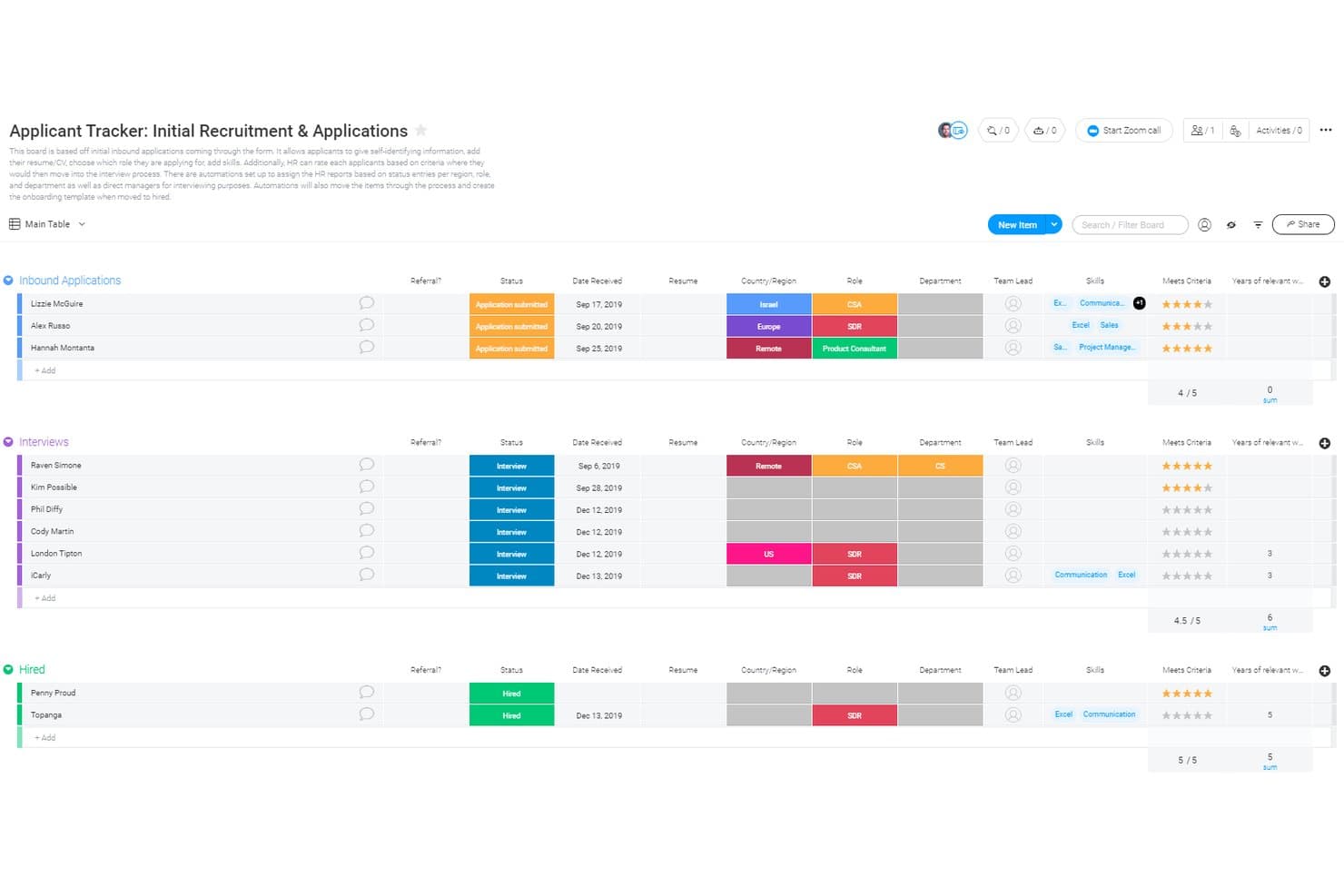
monday AI Workspace offers a structured applicant tracking board with grouped stages—Inbound Applications, Interviews, and Hired—displaying candidate details like status, date, role, department, skills, and rating criteria. monday AI Workspace is a general-purpose work management platform that small businesses can configure as an ATS using customizable boards, WorkForms, automations, and AI-powered workflow tools.
Who Is monday AI Workspace Best For?
It's a strong fit for small business owners and office managers who want to build a custom hiring workflow inside a platform they're already using for broader operations.
Why I Picked monday AI Workspace
I picked monday AI Workspace because no other tool on my shortlist lets you build and visualize a hiring pipeline in as many ways. I can switch between Kanban, Timeline, and Calendar views on the same candidate board, and set automation triggers that move candidates and fire status emails when a stage changes. The Vibe app builder even lets me spin up a custom AI agent to handle initial screening questions.
monday AI Workspace Key Features
- WorkForms: Collect candidate details and applications through customized forms shared via public links.
- AI-powered columns: Use AI columns to extract and summarize information from candidate resumes or application notes.
- Role-based permissions: Control access to boards, automations, and candidate pipelines for different hiring stakeholders.
- Automated email triggers: Send emails automatically to candidates when their pipeline status changes.
monday AI Workspace Integrations
monday AI Workspace offers hundreds of native integrations through its built-in integrations and marketplace, including Slack, Google Workspace, Microsoft 365, Jira, Dropbox, Zoom, HubSpot, Salesforce, GitHub, and Outlook. It also supports Zapier and provides an API for custom integrations.
Pros and Cons
Pros:
- AI tools speed up application review
- Automations reduce repetitive candidate communication tasks
- Highly visual pipeline with multiple board views
Cons:
- Recruiting setup requires significant manual configuration
- No native resume parsing or job posting
Learn more about monday AI Workspace: Best with integrated payroll and time tracking
- Free plan + 30-day free trial + free demo available
- From $99/month (billed annually)
Visit WebsiteCustomer Rating:4.2/5
Homebase applicant tracking and hiring dashboard for managing job postings, candidates, and team scheduling in one platform. Homebase is an applicant tracking system for small businesses that combines hiring tools, employee scheduling, time tracking, payroll, and team communication in one platform.
Who Is Homebase Best For?
Homebase is a good fit for small businesses with hourly teams that need to manage hiring, scheduling, and payroll in one place.
Why I Picked Homebase
I picked Homebase as one of the best because I can manage applicant tracking, payroll, and time tracking all in one place. My team uses the built-in time clock to track hours and syncs that data directly with payroll, which saves us from manual entry. I also like that I can onboard new hires and run payroll without switching between different systems.
Homebase Key Features
- Job posting distribution: Post open positions to multiple job boards directly from the platform.
- Applicant messaging: Communicate with candidates through built-in messaging tools.
- Interview scheduling: Set up and manage interview times with candidates inside the system.
- Document storage: Store and organize candidate documents and onboarding paperwork securely.
Homebase Integrations
Homebase offers native integrations with Square, Clover, Toast, Shopify, PayAnywhere, Talech, Lightspeed, Revel, ADP RUN, Gusto, QuickBooks Online Plus, Paychex, Rippling, Wells Fargo, Bank of America, Heartland, Millennium, SurePayroll, TipHaus, and GoDaddy. It also posts jobs directly to Indeed, Google Jobs, ZipRecruiter, Glassdoor, and Craigslist. An API is available for custom integrations.
Pros and Cons
Pros:
- Shift scheduling links directly to hiring
- Built-in time tracking for hourly roles
- Direct job posting to major job boards
Cons:
- Reporting features are basic for hiring analytics
- No built-in video interview functionality
 Best for reaching a broader range of candidates
- Free demo available
- Pricing upon request
Visit WebsiteCustomer Rating:4.4/5
Post job listings across over 1000 job boards and find the best candidates for the role with the software's smart recommendations. Greenhouse is a recruiting software that offers an 'essential' plan that's well-suited to the needs of small businesses. The platform helps you reach, classify, and nurture talent, and build a robust candidate pipeline and find the best candidates for each available position.
When you're ready to advertise a job opening, you can post on over 1,000 job boards through the software. This includes both niche sites and major job marketplaces, and the software makes recommendations of where you should post based on historical and industry performance. By casting a wider net, you're more likely to find the best people for the role.
A contact database is included in the system, making it easier to keep track of applicant contact information and send personalized follow ups and communications. You can also automate your messaging to reduce your manual workload.
The software allows you to screen candidates anonymously using scorecards you can set up. This helps you both mitigate unconscious bias and ensure you're evaluating people fairly and consistently.
You can connect the platform to other tools including Broadbean, Canditech, Cord, Docusign, Dropbox, FlexJobs, Google Meet, Indeed, Microsoft Teams, Paradox, and Seek. A free demo is available, and pricing information is available upon request.
Andre søkersporingssystemer for små bedrifter
Her er noen flere alternativer for søkersporingssystemer for små bedrifter som ikke kom med på kortlisten min, men som likevel er verdt å undersøke:
- 11Mitratech PerformBest for teams looking for an end-to-end solution
- 12AvaHRBest for small businesses with fewer than 100 employees
- 13WizehireBest for human-powered hiring support
- 14EddyCollaborative candidate tracking tools within a core HR framework
- 15RecruiteeStraightforward recruiting platform with smart campaigns and custom landing pages
- 16JazzHRFull-feature applicant tracking system with enhanced candidate experience functions
- 17Mitratech TalentReefBest applicant tracking system for hiring hourly workers
- 18Unnanu HireBest for AI/ML powered resume scoring feature
- 19GoHireATS system with industry-specific customizations to help businesses scale
- 20PluralBest for integrated performance tools
How I Evaluate Applicant Tracking Systems for Small Business
I split my evaluation into baseline must-haves—like multi-board job posting and candidate pipeline tracking—and the differentiators that separate a good ATS from the right one for a small team.
Core Functionality (Table Stakes For This List)
When I'm selecting tools for my list, I rank each one on a scale from 0 (does not offer the functionality) to 5 (excels in this area) for each core functionality listed below. Then, I calculate the tool's total score into a percentage. Each tool needs to achieve a minimum total score of 65% to be considered for inclusion.
- Job Posting Distribution: I check how many job boards a tool pushes to in a single click—think Indeed, LinkedIn, ZipRecruiter—and whether it supports both free and sponsored listings.
- Candidate Pipeline Management: A clear, visual pipeline where you can drag candidates between stages like "Phone Screen" and "Offer" makes a real difference when you're juggling multiple open roles.
- Resume Parsing & Storage: I evaluate whether the tool reliably extracts candidate details from uploaded resumes and lets you search your talent pool later using filters or keywords.
- Careers Page Builder: I look for a branded, embeddable careers page your team can launch without a developer—something that matches your site and works well on mobile devices.
- Hiring Team Collaboration: Tools like scorecards, @mentions, and role-based permissions matter here, especially when a store manager and an HR lead both need input on the same hire.
- Small Business Pricing & Scalability: I evaluate whether transparent, published pricing exists for teams under 200 employees, including free tiers or per-job plans that fit seasonal hiring patterns.
Once I have a list of tools that meet the criteria, I consider what sets each platform apart.
Differentiating Factors (What Sets Vendors Apart)
Here's how I compare and contrast different vendors:
Standout Features
Interview scheduling automation saves hours when you're coordinating between candidates and busy hiring managers—I look for tools with two-way calendar sync and self-scheduling links. Built-in SMS outreach is another feature I evaluate closely, since texting tends to get faster responses from candidates in hourly or retail roles. I also check whether a platform includes native offer letters with e-signature, which lets small teams close candidates without paying for a separate signing tool.
Beyond Features
Integrations with payroll and HRIS tools like Gusto, BambooHR, or Rippling matter a lot—I evaluate whether candidate data flows into your existing stack without manual re-entry. Time-to-value is another factor I weigh, since most small businesses need to post their first job within a day, not after a weeks-long implementation. Mobile experience counts too. Hiring managers reviewing candidates between meetings need a native app with push notifications, not a clunky mobile browser workaround.
Slik velger du et søkersporingssystem for små bedrifter
Det er lett å sette seg fast i lange funksjonslister og kompliserte prismodeller. For å hjelpe deg med å holde fokus mens du går gjennom den unike prosessen din for valg av programvare, er dette en sjekkliste over faktorer du bør ha i tankene:
| Faktor | Hva du bør vurdere |
|---|---|
| FaktorSkalerbarhet | Hva du bør vurdereVil systemet vokse sammen med bedriften din? Sørg for at det kan håndtere flere brukere eller stillingsannonser etter hvert som teamet ditt vokser, uten betydelige kostnader eller tekniske begrensninger. |
| FaktorIntegrasjoner | Hva du bør vurdereFungerer det med verktøyene du allerede bruker? Kontroller kompatibiliteten med HR-programvare, e-post og kalendere for å holde alt sammenkoblet og redusere manuell dataregistrering. |
| FaktorTilpasningsmuligheter | Hva du bør vurdereKan du tilpasse systemet til arbeidsflytene dine? Se etter muligheter for å justere felt, prosesser og oversikter slik at de passer teamets unike behov. |
| FaktorBrukervennlighet | Hva du bør vurdereEr systemet intuitivt for alle brukere? Sørg for et oversiktlig grensesnitt som minimerer opplæringstiden og gjør det mulig for hele teamet å ta systemet raskt i bruk. |
| FaktorImplementering og introduksjon | Hva du bør vurdereHvor raskt kan du komme i gang? Vurder oppsettsprosessen, tilgjengelig brukerstøtte og ressurser som veiledninger eller guider for å legge til rette for en smidig introduksjon. |
| FaktorKostnad | Hva du bør vurdereHva er de totale eierkostnadene? Se lenger enn den opprinnelige prisen; ta hensyn til vedlikeholdsavgifter, tillegg og eventuelle skjulte kostnader som kan påvirke budsjettet ditt. |
| FaktorSikkerhetstiltak | Hva du bør vurdereEr dataene dine og kandidatenes opplysninger beskyttet? Kontroller at dataene krypteres, at systemet følger personvernlover, og at det finnes tilgangskontroller for brukere. |
| FaktorTilgjengelig brukerstøtte | Hva du bør vurdereHvor lett tilgjengelig er kundestøtten? Du vil ha pålitelig hjelp via flere kanaler, spesielt i kritiske rekrutteringsperioder eller når du opplever tekniske problemer. |
Hva er et søkerhåndteringssystem for små bedrifter?
Et søkerhåndteringssystem for små bedrifter er programvare som er utviklet for å hjelpe med å administrere og organisere ansettelsesprosessen. HR-medarbeidere og rekrutterere bruker vanligvis disse verktøyene til å forenkle sporing av søknader, planlegging av intervjuer og lagring av kandidatdata. Funksjoner som administrasjon av stillingsannonser, kandidatsporing og intervjuplanlegging bidrar til effektivitet og organisering. Disse verktøyene sparer til syvende og sist tid og reduserer kompleksiteten ved ansettelser for små bedrifter.
Funksjoner
Her er de viktigste funksjonene ethvert godt søkerhåndteringssystem for små bedrifter bør ha:
- Administrasjon av stillingsannonser: Gjør det mulig å opprette og administrere stillingsannonser på tvers av flere plattformer, noe som sparer tid og når ut til et bredere publikum.
- Kandidatsporing: Hjelper deg med å følge søkernes fremgang gjennom ansettelsesprosessen, slik at ingen trinn blir oversett.
- Intervjuplanlegging: Gjør det enklere å planlegge intervjuer med kandidater og teammedlemmer, og reduserer kommunikasjon frem og tilbake.
- Tilpassbare arbeidsflyter: Lar deg tilpasse ansettelsesprosessene etter teamets unike behov, noe som forbedrer effektiviteten og organiseringen.
- Integrasjonsmuligheter: Kobler seg til eksisterende verktøy som e-post og kalendere for å effektivisere kommunikasjon og dataregistrering.
- Datasikkerhet: Sikrer at kandidatopplysninger beskyttes med kryptering og overholdelse av personvernlovgivningen.
- Rapportering og analyse: Gir innsikt i ansettelsesmålinger og trender, slik at du kan ta informerte beslutninger.
- Mobiltilgang: Gir mulighet til å administrere ansettelsesoppgaver mens du er på farten, noe som gir travle HR-medarbeidere større fleksibilitet.
- Brukervennlig grensesnitt: Har et intuitivt design som minimerer opplæringstiden og oppmuntrer hele teamet til å ta systemet i bruk.
- Opplæringsressurser: Inkluderer veiledninger og guider som hjelper nye brukere med å lære systemet raskt og bruke det effektivt.
Fordeler
Implementering av et søkerhåndteringssystem for små bedrifter gir flere fordeler for teamet og virksomheten din. Her er noen av fordelene du kan se frem til:
- Tidsbesparelser: Automatiserer gjentakende oppgaver som publisering av stillingsannonser og kandidatsporing, slik at du får mer tid til strategiske aktiviteter.
- Bedre organisering: Holder all kandidat- og ansettelsesinformasjon samlet på ett sted, noe som reduserer risikoen for å miste viktige detaljer.
- Bedre samarbeid: Gjør det enkelt for teammedlemmer å få tilgang til og oppdatere kandidatopplysninger, noe som forbedrer kommunikasjon og beslutningstaking.
- Bedre kandidatopplevelse: Gir søkere oppdateringer og kommunikasjon i tide, noe som forbedrer deres helhetlige opplevelse av virksomheten din.
- Datadrevet innsikt: Tilbyr rapporter og analyser av ansettelsesprosessene, slik at du kan ta informerte beslutninger og forbedre fremtidige rekrutteringsstrategier.
- Skalerbarhet: Vokser med virksomheten din og håndterer flere brukere og stillingsannonser etter hvert som ansettelsesbehovene øker.
- Kostnadseffektivitet: Reduserer behovet for manuelle prosesser og eksterne rekrutteringstjenester, slik at du sparer penger på lang sikt.
Kostnader og priser
Valg av et søkerhåndteringssystem for små bedrifter krever en forståelse av de ulike prismodellene og tilgjengelige abonnementene. Kostnadene varierer basert på funksjoner, teamstørrelse, tillegg og mer. Team med begrensede budsjetter kan også sammenligne gratis ATS-alternativer før de bestemmer seg for om de trenger et betalt abonnement.
Tabellen nedenfor oppsummerer vanlige abonnementer, gjennomsnittsprisene deres og typiske funksjoner som er inkludert i løsninger for søkerhåndteringssystemer for små bedrifter:
Sammenligningstabell for søkerhåndteringssystemer for små bedrifter
| Abonnementstype | Gjennomsnittspris | Vanlige funksjoner |
|---|---|---|
| AbonnementstypeGratisabonnement | Gjennomsnittspris$0 | Vanlige funksjonerGrunnleggende stillingsannonser, kandidatsporing og begrenset rapportering. |
| AbonnementstypePersonlig abonnement | Gjennomsnittspris$5-$25/bruker/måned | Vanlige funksjonerStillingsannonser, CV-tolking, e-postintegrasjon og grunnleggende analyse. |
| AbonnementstypeBedriftsabonnement | Gjennomsnittspris$30-$75/bruker/måned | Vanlige funksjonerAvansert analyse, tilpassbare arbeidsflyter, integrasjoner med HR-verktøy og mobiltilgang. |
| AbonnementstypeAbonnement for større virksomheter | Gjennomsnittspris$80-$150/bruker/måned | Vanlige funksjonerFull tilpasning, dedikert kundestøtte, støtte for flere språk og forbedret sikkerhet. |
Vanlige spørsmål
Her er noen svar på vanlige spørsmål om systemer for søkersporing for små bedrifter:
Hvor lang tid tar det å implementere et system for søkersporing?
Implementeringstiden varierer, men de fleste systemer for søkersporing kan settes opp i løpet av noen dager til noen uker. Varigheten avhenger av hvor komplekse de eksisterende prosessene dine er, og hvor mye tilpasning du trenger. For å fremskynde prosessen bør du samle inn all nødvendig informasjon og alle nødvendige ressurser på forhånd, for eksempel stillingsbeskrivelser, teamroller og nåværende arbeidsflyter. Noen leverandører tilbyr støtte som kan veilede deg gjennom oppsettet og sikre en smidig overgang for teamet ditt.
Kan systemer for søkersporing integreres med andre HR-verktøy?
Ja, de fleste systemer for søkersporing tilbyr integrasjonsmuligheter med andre HR-verktøy, for eksempel lønn, resultatstyring og plattformer for medarbeiderengasjement. Ved å integrere disse verktøyene kan du skape et mer helhetlig HR-økosystem som reduserer manuell dataregistrering og forbedrer kommunikasjonen mellom ulike funksjoner. Før du kjøper, bør du kontrollere om systemet støtter de spesifikke verktøyene teamet ditt allerede bruker.
Er det mulig å migrere data når man bytter system for søkersporing?
Ja, datamigrering er vanligvis mulig når man bytter system, men det krever nøye planlegging. Du bør sørge for at alle kandidatdata, stillingsannonser og historiske oppføringer overføres uten tap. Mange leverandører tilbyr migreringshjelp eller verktøy som kan hjelpe med denne prosessen. Det er lurt å sikkerhetskopiere dataene før du starter migreringen, slik at du beskytter deg mot mulige problemer.
Hvor sikre er systemer for søkersporing?
Systemer for søkersporing tilbyr vanligvis sterke sikkerhetstiltak, inkludert datakryptering, sikker brukertilgang og overholdelse av personvernlover. Når du vurderer et system, bør du spørre om sikkerhetsprotokollene deres og eventuelle sertifiseringer de har. Det er viktig å sørge for at kandidatenes informasjon håndteres på en sikker måte, og at systemet overholder relevante forskrifter i regionen din.