

De beste systemene for søkersporing (ATS) håndterer hele ansettelsesprosessen, fra stillingsannonser og screening av CV-er til planlegging av intervjuer og tilbud. Men to endringer har påvirket hva «best» betyr. AI-screening er nå regulert i mange delstater i USA, i deler av Canada og i EU, så du må vite hvordan et verktøy rangerer kandidater, og om en person gjennomgår avslag. AI-genererte falske søkere er nå så vanlige at svindeloppdagelse begynner å bli en viktig funksjon, ikke bare et tillegg. Nedenfor sammenligner jeg funksjoner, priser og fremtredende egenskaper for å hjelpe deg med å finne det som passer best.
Hvorfor du kan stole på våre programvareanbefalinger
6,700+
Reviews
20
Industry experts
16+
Evaluation factors
14
Years
Teamet vårt har testet og anmeldt programvare siden 2012. Vi er selv HR-eksperter, så vi vet hvor vanskelig og hvor viktig det er å velge riktig programvare.
I denne guiden har vi vurdert verktøyene gjennom praktisk testing og uavhengig research og gitt dem poeng ut fra våre utvelgelseskriterier. Vi bygger også på innsikt fra ledende eksperter i bransjen og erfarne HR-eksperter.
Anmeldelsene våre bygger på vår egen redaksjonelle vurdering. De er ikke et salgsargument.
Ekspertanmeldere:
- Phil GrayCOO
 Kim BehnkeHR Tech Editor & Analyst
 Josh BarkerPeople Ops Manager

Sammenligningstabell for systemer for søkersporing
Sammenlign priser og detaljer side om side for mine beste systemer for søkersporing.
| Tool | Best For | Trial Info | Price | ||
|---|---|---|---|---|---|
| 1 | Best for high-volume hiring | Free demo available | Pricing upon request | Website | |
| 2 | Best for built-in recruiting analytics | Free demo available | From $400/month | Website | |
| 3 | Best for AI-assisted hiring workflows | Free trial + Free demo available | From $8/user/month | Website | |
| 4 | Best for structured hiring | Free demo available | Pricing upon request | Website | |
| 5 | Best for automated offers | Free demo available | From $10/user/month | Website | |
| 6 | Best for in-house talent acquisition teams | Free demo available | Pricing upon request | Website | |
| 7 | Best with built-in immigration support | Free demo available | From $5/user/month | Website | |
| 8 | Best for hiring within an all-in-one HR system | Free plan + free demo available | From $2/user/month (billed annually) | Website | |
| 9 | Best for AI recruitment and candidate sourcing | 14-day free trial + free demo available | From $15/user/month (billed annually) | Website | |
| 10 | Best for combined ATS and CRM | Free demo available | From $79/user/month | Website | |
| 11 | Best for hiring hourly workers | Free plan + 30-day free trial + free demo available | From $99/month (billed annually) | Website | |
| 12 | Best AI-native platform for recruitment agencies | Free demo available | From $599/employee/month | Website | |
| 13 | Best for simplified hiring automation | Free demo available | Pricing upon request | Website | |
| 14 | Best for automated job postings & sourcing | Free demo available | Modular pricing, from $6/employee/month (module-dependent) | Website | |
| 15 | Best for ease of use | Free trial available | From $299/month (billed annually) | Website |


Anmeldelser av de beste systemene for søkersporing
Nedenfor finner du mine detaljerte anmeldelser av hvert system for søkersporing som kom med på listen, inkludert notater om hvorfor jeg valgte dem. Hver anmeldelse gir en detaljert gjennomgang av de viktigste funksjonene, fordeler og ulemper, integrasjoner og ideelle bruksområder for hvert ATS-system, slik at du kan finne det beste alternativet for deg.
 Best for high-volume hiring
- Free demo available
- Pricing upon request
Visit WebsiteCustomer Rating:4.6/5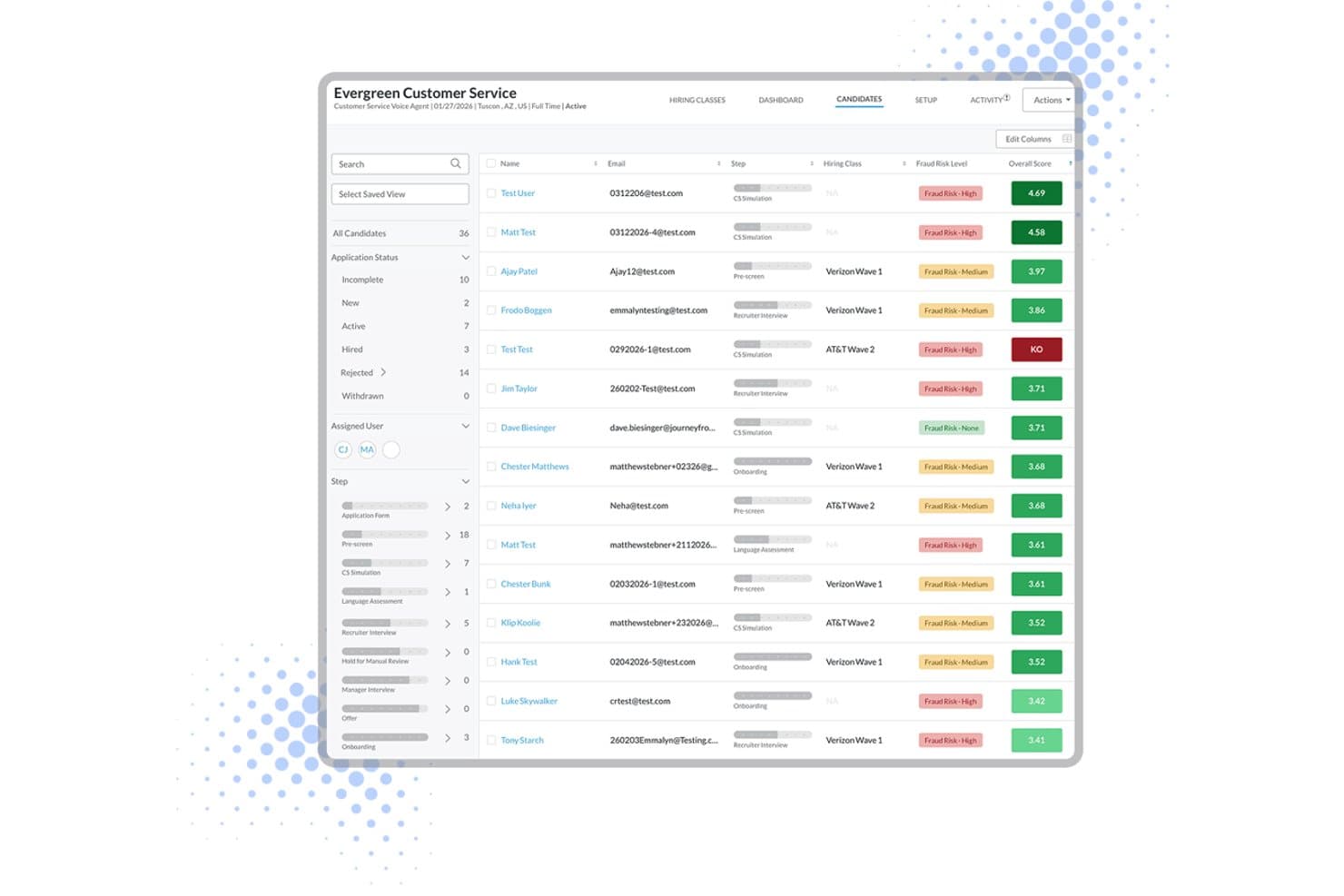
Journeyfront ranks candidates by AI scores and fraud risk levels. Journeyfront is an applicant tracking system that combines job board broadcasting, automated candidate ranking, structured interview tools, and hiring workflow automation built for high-volume recruiting pipelines.
Who Is Journeyfront Best For?
Journeyfront is a strong fit for recruiting teams managing large, continuous applicant volumes—especially those in BPO environments or organizations that hire in cohorts.
Why I Picked Journeyfront
I picked Journeyfront as one of the best because it's purpose-built for recruiting teams that never stop hiring. Its job board broadcasting pushes openings to 200+ boards simultaneously, and class-based hiring lets you run cohort pipelines from a single evergreen requisition, so you're not rebuilding the same workflow every cycle. Automated candidate ranking scores applicants the moment they complete an application, which means your team isn't manually triaging hundreds of submissions before deciding who moves forward.
Journeyfront Key Features
- Omni-channel candidate messaging: Send one-off, bulk, and automated messages to candidates via email, SMS, and WhatsApp from within the platform.
- Structured interview guides: Provide interviewers with standardized questions, scoring rubrics, and instructions for each interview stage.
- Source attribution tracking: Trace every application back to its originating channel to evaluate which job boards and campaigns deliver the best candidates.
- Offer letter management: Create, customize, and send offer letters using templates, with e-signature collection built into the platform.
Journeyfront Integrations
Journeyfront claims 400+ integrations, with documented native integrations for Facebook, Instagram, and TikTok. It also offers an API for custom integrations and mentions connections with Lever, iCIMS, Greenhouse, Workday, and SmartRecruiters.
Pros and Cons
Pros:
- Keeps interview feedback and scorecards centralized
- Broadcasts openings across 200+ job boards
- Handles high-volume cohort hiring pipelines
Cons:
- Scheduling lacks round-robin booking controls
- Resume skill filtering receives user criticism
Learn more about Journeyfront: Best for built-in recruiting analytics
- Free demo available
- From $400/month
Visit WebsiteCustomer Rating:4.4/5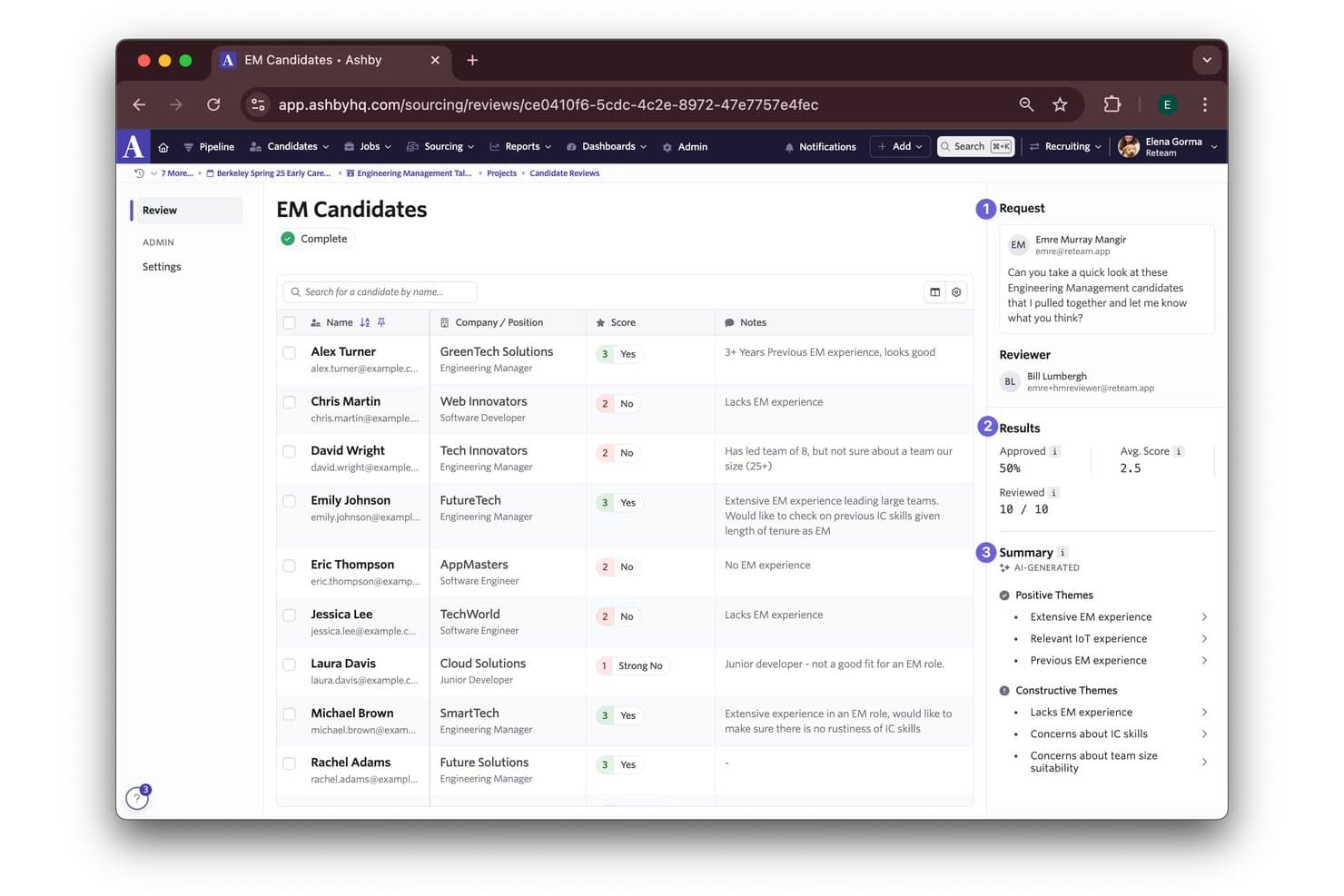
Ashby lets recruiters review and score candidates with AI summaries. Ashby is an all-in-one recruiting platform that combines an ATS, candidate CRM, interview scheduling, and analytics in a single system.
Who Is Ashby Best For?
Ashby suits talent acquisition teams at high-growth tech companies that need deep recruiting analytics alongside their ATS, CRM, and scheduling tools in one place.
Why I Picked Ashby
Ashby earns its spot on my shortlist because its built-in analytics go deeper than what most ATS platforms tack on as an afterthought. I particularly like the recruiting planner, which lets you track hiring-plan progress and forecast the activity needed to hit targets, and the custom dashboards that you can schedule for automatic delivery to stakeholders via email or Slack. AI-generated report interpretations also surface plain-language insights on top of your data, so you're not just staring at charts.
Ashby Key Features
- AI talent rediscovery: Scans your existing candidate database to surface past applicants who match a currently open role, grouped by relevant signals.
- Candidate texting: Sends and receives two-way SMS messages with candidates from a shared company number, with templates and consent handling built in.
- Automated sequences: Runs multi-stage outreach campaigns via email and LinkedIn, with scheduled follow-ups, open and click tracking, and bulk enrollment.
- Approval workflows: Routes job offers, job postings, and headcount openings through configurable multi-step approval chains with conditional steps and assigned approvers.
Ashby Integrations
Ashby offers 250+ integrations, including native Google Workspace, Microsoft 365, and Workday integrations, plus marketplace integrations with LinkedIn, Indeed, Google Jobs, Slack, and Zapier. It also provides an open API for custom integrations.
Pros and Cons
Pros:
- Pipeline automation reduces manual stage updates
- Candidate rediscovery supports targeted sourcing
- Recruiting dashboards expose hiring bottlenecks
Cons:
- AI screening needs manual verification
- Complex reports take time to configure
Learn more about Ashby: Best for AI-assisted hiring workflows
- Free trial + Free demo available
- From $8/user/month
Visit WebsiteCustomer Rating:4.4/5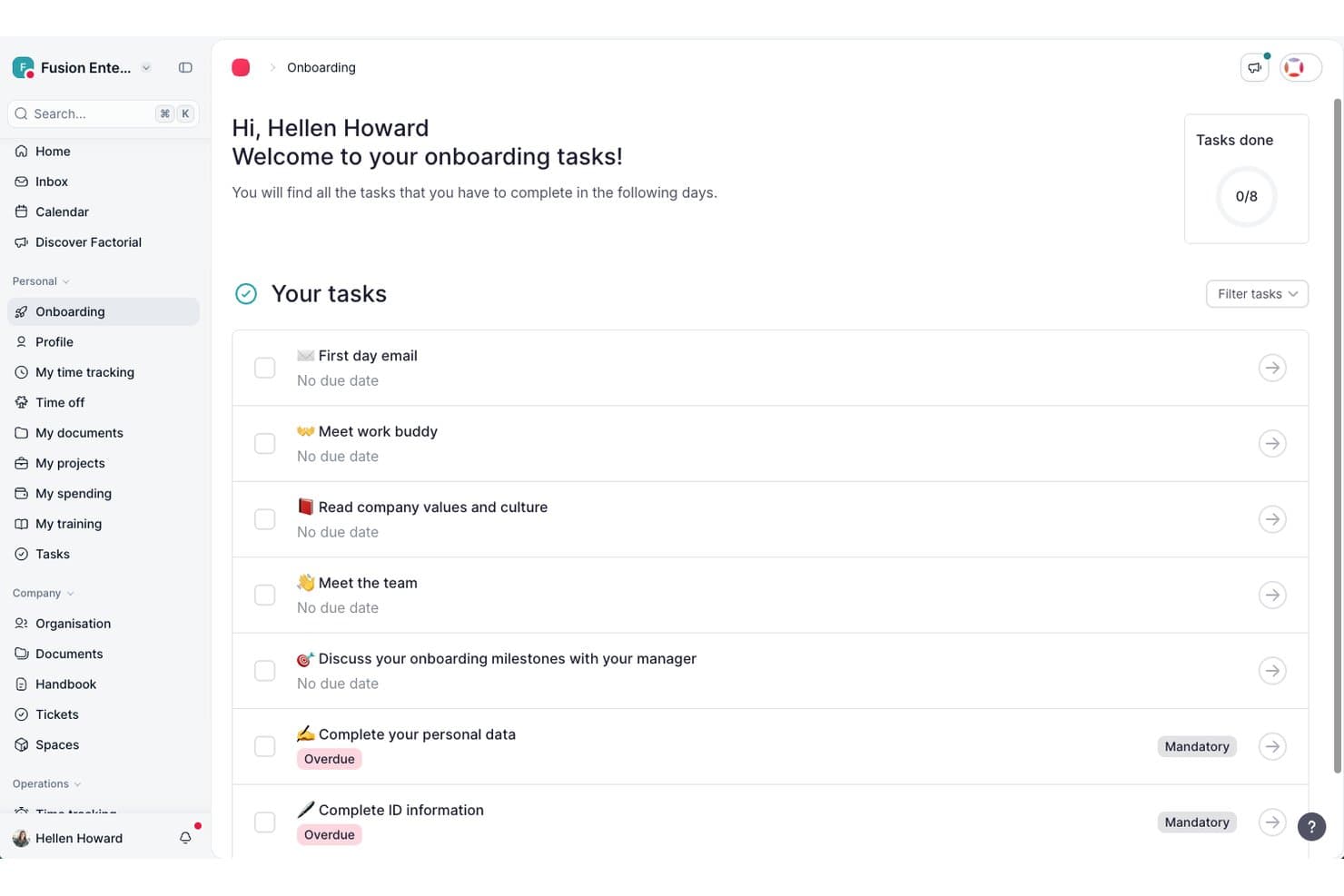
Factorial guides new hires through onboarding tasks in one place. Factorial is an AI-powered HR platform that combines an applicant tracking system with broader people operations tools, including candidate pipeline management, resume parsing, interview scheduling, and hiring team collaboration.
Who Is Factorial Best For?
Factorial suits small and mid-sized businesses that want a single AI-powered platform to handle recruiting alongside everyday operations like scheduling, reporting, and HR policy questions.
Why I Picked Factorial
I've included Factorial in my top picks because it approaches recruiting as part of a broader AI-driven operation, not a standalone function. Its AI can generate job descriptions, parse and summarize CVs, and recommend candidates based on application answers, so your team spends less time on manual review. I also like that the same AI layer handles things like scheduling and reporting across HR, meaning recruiting data doesn't sit in a silo.
Factorial Key Features
- Evaluation forms with ratings: Hiring team members can rate candidates from 1 to 5, add notes, and filter the candidate list by rating.
- Candidate self-scheduling: Candidates choose their own interview slot from times that reflect all interviewers' real-time availability.
- Customizable career page builder: You can build and host a branded careers page directly in Factorial or embed job listings into your existing company site via API.
- Phase-based hiring team access: You can restrict each hiring team member's view to only the recruitment phases they're assigned to work on.
Factorial Integrations
Factorial offers marketplace integrations with LinkedIn, Recruitee, Google Workspace, Slack, and Microsoft Azure. It also provides a public API and connects with hundreds of tools through Zapier.
Pros and Cons
Pros:
- Candidate tracking connects with broader HR workflows
- Structured candidate ratings support shared feedback
- AI CV summaries reduce manual screening
Cons:
- Advanced recruiting reports lack documented depth
- Calendar setup depends on administrator invitations

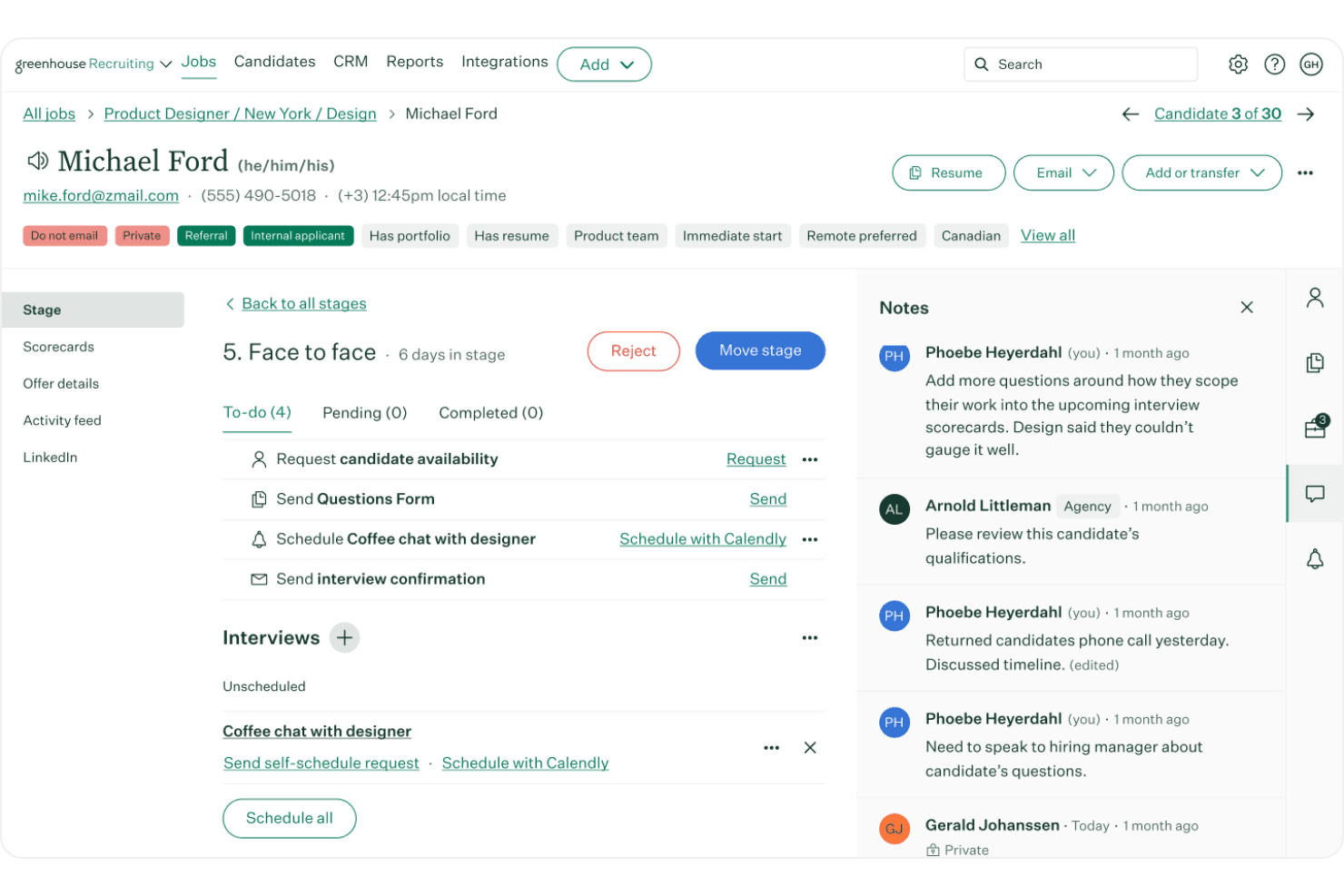
Greenhouse centralizes candidate tracking, notes, and interview scheduling. Greenhouse is an applicant tracking system that covers sourcing, structured interviewing, candidate pipeline management, and onboarding handoffs—with AI-assisted candidate matching and built-in scorecards designed to bring consistency to every stage of hiring.
Who Is Greenhouse Best For?
Greenhouse is a strong fit for recruiting teams and talent acquisition specialists at growth-stage and enterprise companies that want structured, consistent hiring processes across every role.
Why I Picked Greenhouse
Greenhouse earns its spot on my shortlist because structured hiring is genuinely baked into how the product works, not bolted on as an afterthought. Every role gets its own interview kit with scorecards tied to shared criteria, so every interviewer on my team is evaluating candidates against the same benchmarks. I also rely on Talent Matching, which analyzes resume data against job criteria and surfaces matched and missing skills so I can prioritize my review queue before I've opened a single profile.
Greenhouse Key Features
- Candidate self-scheduling: Candidates select their own interview time from available slots based on interviewer calendar availability, automatically confirming the interview for all parties.
- Resume anonymization: Strips identifying details—including names, photos, and contact information—from resumes during Application Review and Hiring Manager Review to reduce bias.
- Visual Candidate Pipeline: Displays active candidates by interview stage in a drag-and-drop kanban view, with filters for priority, time in stage, and last activity.
- Bulk candidate email: Sends personalized email communications to up to 10,000 candidates at once directly from the platform via Greenhouse's built-in Mailgun provider.
Greenhouse Integrations
Greenhouse lists over 400 pre-built integrations, including Zoom, Google Meet, Microsoft Teams, and Spark Hire. It also offers REST, GraphQL, webhooks, and APIs for custom integrations.
Pros and Cons
Pros:
- Self-scheduling cuts interview coordination back-and-forth
- Pipeline stages keep candidate progress visible
- Scorecards keep interviewer feedback comparable
Cons:
- Workflow setup can take dedicated admin time
- Custom reports can require manual work

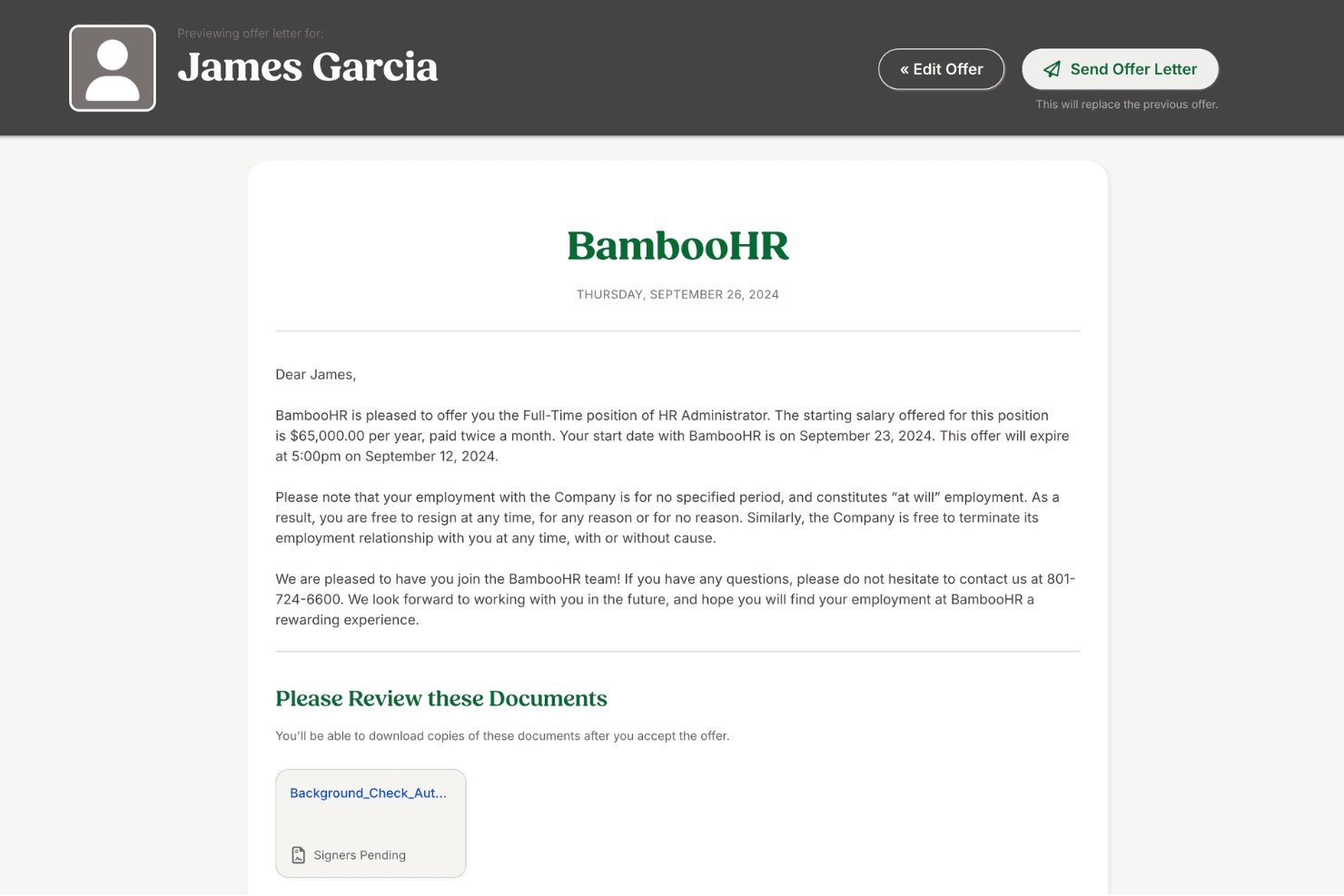
BambooHR lets HR teams preview and send job offer letters to candidates. BambooHR is an HR platform with a built-in applicant tracking system for small and midsize businesses that want to simplify hiring, manage candidates in one place, and improve collaboration between recruiters and hiring managers.
Who Is BambooHR Best For?
BambooHR is a strong fit for small to midsize businesses that need a people-first HR platform with hiring tools built in from the start.
Why I Picked BambooHR
BambooHR is one of the best on my shortlist because it handles the offer stage of hiring well. I like that you can generate offer letters automatically using pre-built templates, then send them for e-signature without leaving the platform. My team also gets significant value from the hiring analytics, which track things like time-to-hire and source effectiveness so we can see exactly where candidates are dropping off in the pipeline.
BambooHR Key Features
- Candidate sources report: Tracks where applicants are coming from across job boards and social channels so you can focus sourcing spend on the best-performing channels.
- Interview self-scheduling: Lets candidates pick from preset time slots you define, with automated confirmations sent to both the candidate and interviewer.
- Collaborative candidate review: Gives hiring team members custom permissions and in-system messaging to share feedback and coordinate decisions without leaving the platform.
- Automatic data transfer to employee records: Moves accepted candidate data directly into employee records at hire, removing the need for manual re-entry.
BambooHR Integrations
BambooHR offers 150+ pre-built integrations including Deel, Papaya Global, Oyster, Lattice, 15Five, Engagedly, BreezyHR, JazzHR, and more.
Pros and Cons
Pros:
- Clear analytics on candidate sources and hiring funnel
- Automated offer letters with built-in e-signature tools
- ATS is connected to onboarding tools for hired candidates
Cons:
- Some analytics features require higher pricing tier
- Reporting dashboards could use more export options
 Best for in-house talent acquisition teams
- Free demo available
- Pricing upon request
Visit WebsiteCustomer Rating:4.7/5
Pinpoint dashboard showing requisition approvals, interview scheduling, candidate metrics, and hiring workflow insights in a centralized ATS interface. Pinpoint is an applicant tracking system built for internal recruitment teams who want to manage hiring, automate workflows, and improve candidate experience with customizable tools and collaborative features.
Who Is Pinpoint Best For?
Pinpoint is a strong fit for mid-sized companies with dedicated in-house recruiting teams who want more control over their hiring process.
Why I Picked Pinpoint
Pinpoint earns its spot on my shortlist because it's purpose-built for in-house talent acquisition teams managing multiple hiring processes at once. I particularly like the hiring workflow management feature, which lets my team run different processes side-by-side—think executive searches running alongside high-volume hourly hiring—without forcing everything into a single rigid pipeline. The AI candidate match score and blind recruitment tools also stand out to me, since they bring structured, bias-aware decision-making directly into the selection process rather than relying on separate tools.
Pinpoint Key Features
- Branded careers website: Build a custom, branded careers site that reflects your employer brand and converts visitors into applicants.
- Candidate experience surveys: Collect structured feedback from candidates at key stages and view results in a built-in report.
- Interview scheduling software: Schedule and manage interviews directly within the platform, without switching between tools.
- Employee onboarding: Manage new hire onboarding tasks and paperwork from within the same platform used for hiring.
Pinpoint Integrations
Pinpoint offers over 100 native integrations, including BambooHR, ADP Workforce Now, UKG, BreatheHR, Oracle, Paycor, Sage People, LinkedIn, Microsoft Teams, and Slack. An open API is also available for custom integrations.
Pros and Cons
Pros:
- Customizable workflows for any department or role type
- Unlimited users—ideal for large in-house recruiting teams
- Exceptional customer success and support
Cons:
- Reporting setup can take time to customize
- Some features only available in the Enterprise tier
Learn more about Pinpoint: Best with built-in immigration support
- Free demo available
- From $5/user/month
Visit WebsiteCustomer Rating:4.8/5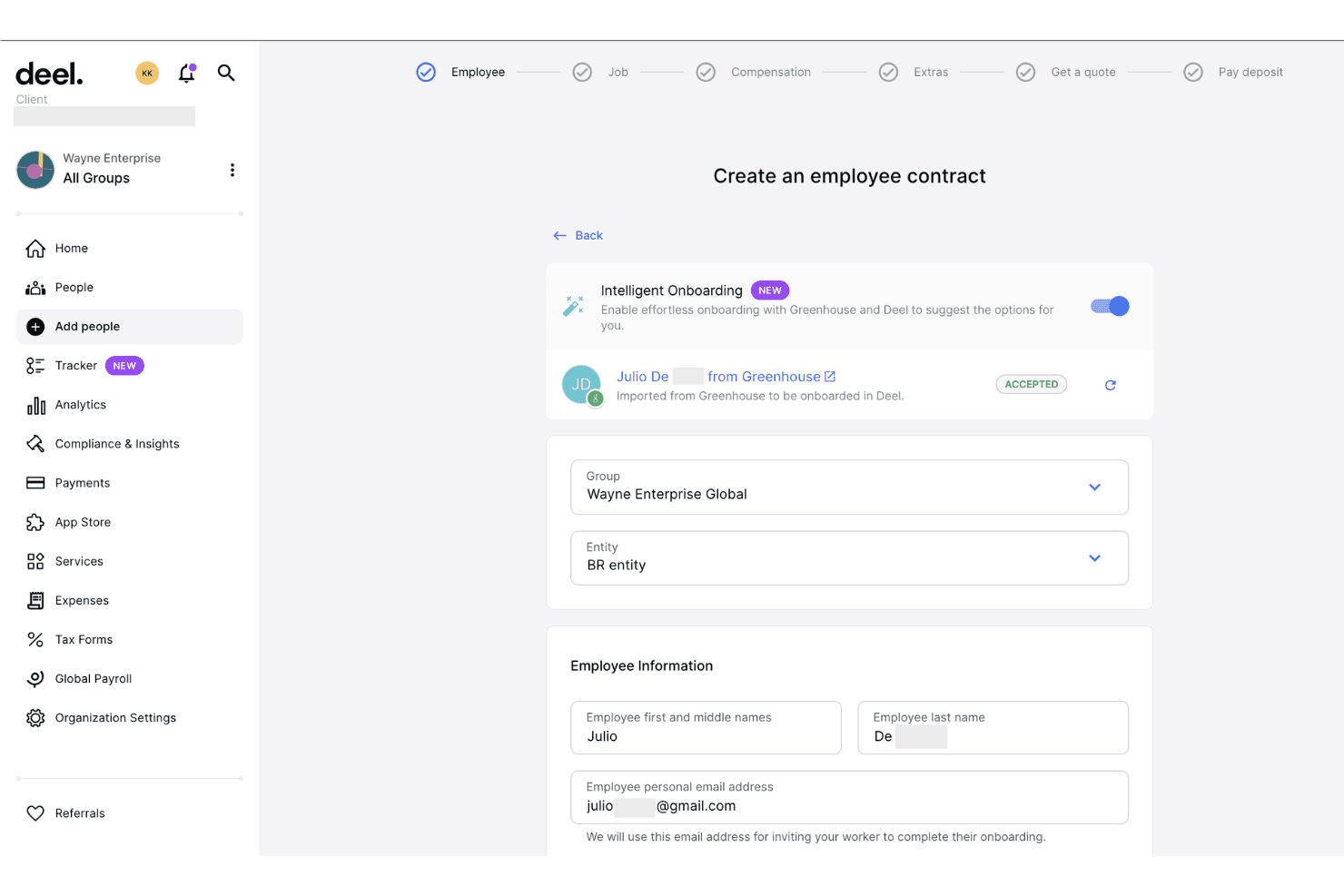
Deel's contract management interface lets users create compliant employee contracts for smoother onboarding. Deel HR supports global businesses and talent teams that need an applicant tracking system capable of handling international hiring, onboarding, and compliance challenges in a single platform.
Who Is Deel HR Best For?
Deel HR is a strong fit for mid-size to enterprise companies hiring across multiple countries who need to manage global recruitment and compliance in one place.
Why I Picked Deel HR
I picked Deel HR as one of the best because it's the only ATS I've come across that has immigration support built directly into the hiring flow. When my team is evaluating a candidate who needs a work visa, I can trigger a free visa eligibility assessment right from within the platform and get results within 48 hours, including a cost breakdown and required documents. From there, Deel's immigration experts handle the visa sponsorship and application process across 70+ countries, so I'm not coordinating between an external law firm and my HR tools. I also like that one-click visa renewals and automated compliance alerts keep things from falling through the cracks once a hire is in place.
Deel HR Key Features
- AI-powered candidate sourcing: Deel HR's ATS uses AI to automatically source candidates and surface relevant applicants for open roles.
- Background checks and identity verification: Run background checks and confirm candidate identity through Remote Worker Verification directly within the hiring flow.
- Localized contract generation: Automatically generate employment contracts that meet local labor laws for the country you're hiring in.
- Workforce planning with live hiring data: Forecast headcount, roles, and costs using real-time workforce and hiring data instead of static spreadsheets.
Deel HR Integrations
Integrations include FaceUp, Snowflake, DefensX, Microsoft Finance, Kintsugi, ReFresh OS, Revo.ai, Keeper, Human Interest, and Everyminute.
Pros and Cons
Pros:
- Integrates onboarding with applicant tracking workflows
- Visualizes candidate pipelines for multiple regions
- Offers automated document collection and reminders
Cons:
- Reporting features are less granular than peers
- Fewer native job board integrations than peers
 Best for hiring within an all-in-one HR system
- Free plan + free demo available
- From $2/user/month (billed annually)
Visit WebsiteCustomer Rating:4.8/5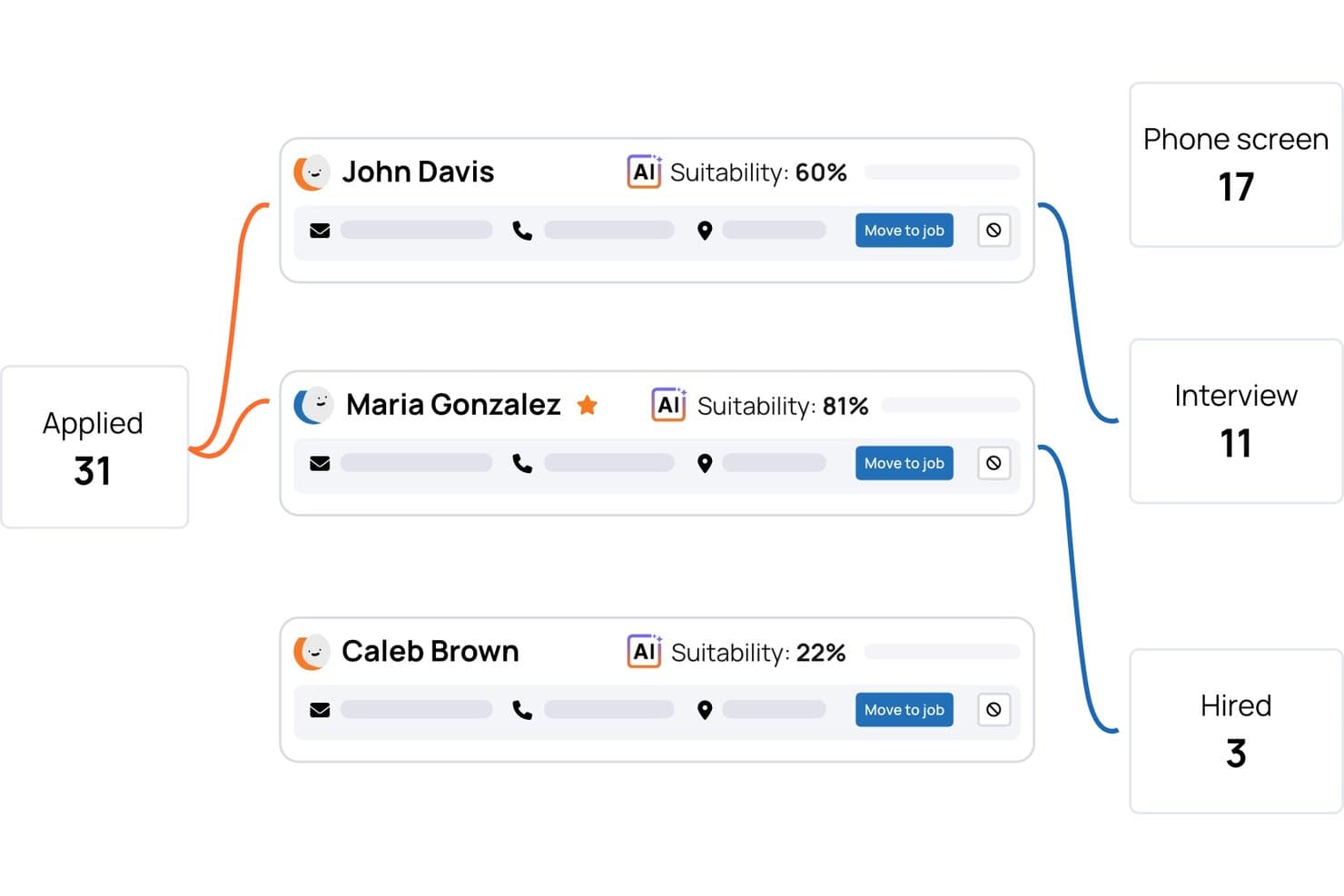
TalentHR tracks applicants through hiring stages with AI suitability scores. TalentHR is an all-in-one HR platform for small and medium businesses that includes an ATS module with candidate pipeline management, AI-assisted resume screening, custom screening questions, and a branded careers page alongside core HR, onboarding, and performance tools.
Who Is TalentHR Best For?
TalentHR is a strong fit for small and mid-sized businesses that want hiring and core HR managed in a single system, without juggling separate tools.
Why I Picked TalentHR
I've included TalentHR in my top picks because it's one of the few ATS options that sits inside a full HR system, so hiring and people management live in the same place. I like that AI suitability scoring breaks down each candidate's CV by individual skill, giving you a transparent read before you move anyone forward. Custom pipeline stages per job let you match your actual hiring process, whether that's a phone screen, a take-home task, or a panel review.
TalentHR Key Features
- Branded careers page: A customizable careers page where candidates apply directly, with editable title, description, and header image.
- Talent pool: Star any candidate to save them to a searchable pool that persists even after a job is archived or filled.
- Custom screening questions: Build reusable application questions in multiple formats—text, multiple choice, date, or link—and mark any as required.
- Excel candidate export: Download each job's applicant list as an .xlsx file, split into active and disqualified tabs, with resume download links included.
TalentHR Integrations
TalentHR offers native integrations with WordPress, Google Calendar, Outlook Calendar, Google Workspace, and TalentLMS. It also provides a public API and Zapier.
Pros and Cons
Pros:
- Custom stages fit different hiring processes
- AI scoring shows individual candidate skills
- Hiring connects directly with core HR
Cons:
- Lacks interview scheduling and scorecards
- No external job board syndication
Learn more about TalentHR: Best for AI recruitment and candidate sourcing
- 14-day free trial + free demo available
- From $15/user/month (billed annually)
Visit WebsiteCustomer Rating:4.8/5
Manatal lets users publish job postings to multiple integrated job boards. Manatal is an applicant tracking system designed for recruiters and HR teams who want to streamline hiring, automate candidate management, and improve collaboration throughout the recruitment process.
Who Is Manatal Best For?
Manatal is a good fit for small to mid-sized businesses and staffing agencies looking for an accessible ATS with built-in AI tools to speed up hiring.
Why I Picked Manatal
Manatal earns its spot as one of the best on my shortlist because of how well its AI-powered features hold up in a real recruiting workflow. I particularly like the AI candidate scoring, which automatically ranks applicants against job requirements, so my team doesn't have to sift through hundreds of resumes to find the strongest matches. The social media enrichment feature also pulls publicly available candidate data from LinkedIn and other platforms directly into candidate profiles, which reduces back-and-forth research. The sourcing tools let my team post to 2,500+ job boards with one click, keeping the top of the funnel full with minimal additional work.
Manatal Key Features
- Customizable recruitment pipeline: Build and adjust hiring stages to match your team's specific recruitment process.
- Candidate portal: Give applicants a branded portal to track their application status and submit documents.
- Hiring team collaboration tools: Leave notes, tag teammates, and share feedback directly on candidate profiles.
- Analytics and reporting dashboard: Track key recruitment metrics like time-to-hire and pipeline activity across all open roles.
Manatal Integrations
Manatal offers native integrations with Indeed, Codility, Mailchimp, Google Suite, Microsoft 365, LinkedIn Premium, ZipRecruiter, Monster, Talent.com, and more.
Pros and Cons
Pros:
- AI-based recommendation of candidates and social media recruitment
- Custom career page builder enhances employer branding
- Drag-and-drop pipelines simplify tracking candidate progress
Cons:
- No mobile app for hiring managers
- Reporting customization options are somewhat limited
 10Best for combined ATS and CRM
Tracker
- Free demo available
- From $79/user/month
Visit WebsiteCustomer Rating:4.7/5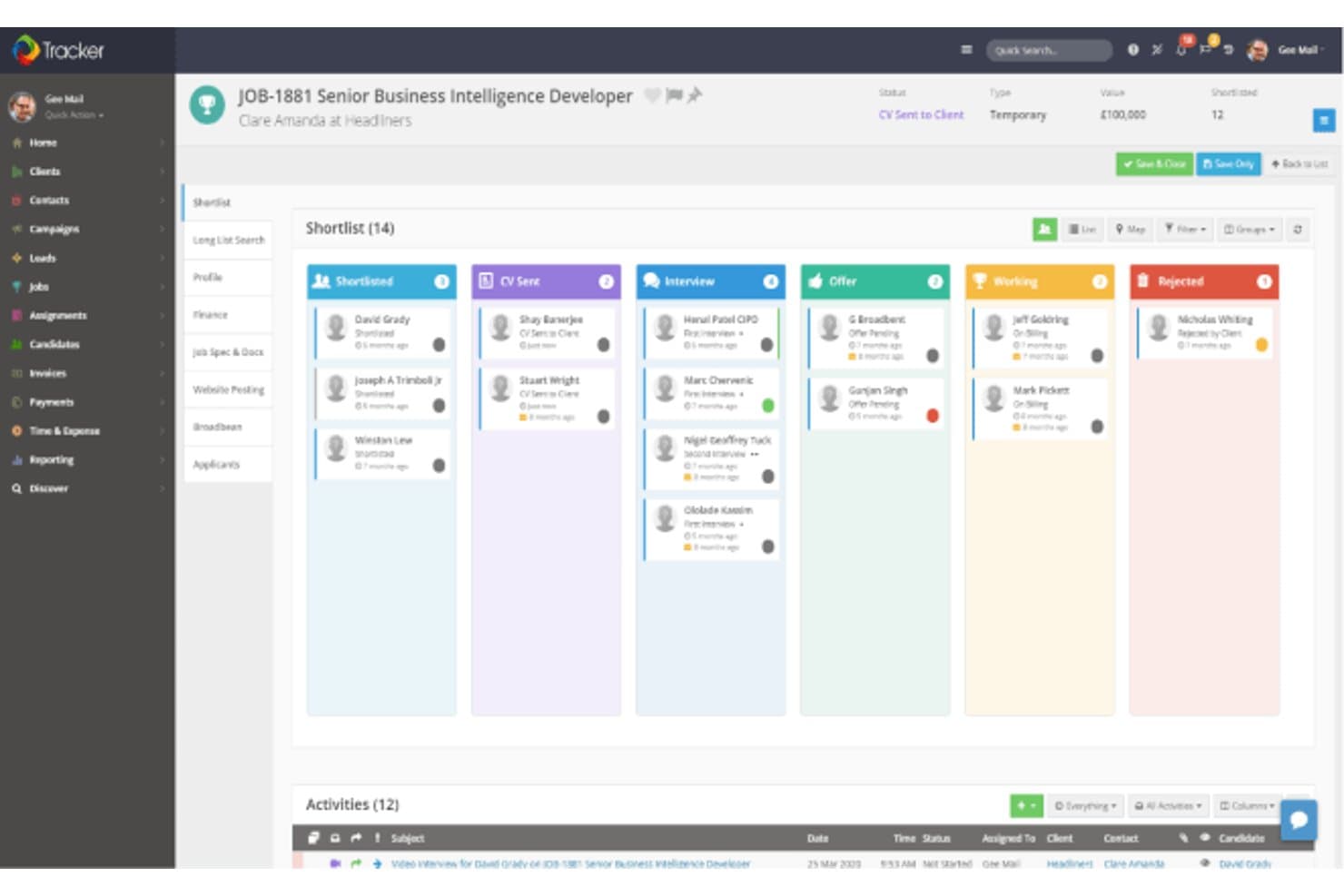
Tracker's ATS platform helps teams visualize recruiting and hiring pipelines on intuitive Kanban boards. Tracker is a recruitment platform designed for staffing agencies and talent acquisition teams who want to manage candidates, clients, and job orders in one place, helping simplify hiring workflows and improve collaboration across the recruitment process.
Who Is Tracker Best For?
Tracker is a strong fit for staffing agencies and recruiting firms that need to manage both candidate pipelines and client relationships without switching between separate tools.
Why I Picked Tracker
I've included Tracker in my top picks because it's one of the few ATS platforms that builds CRM functionality directly into the same system rather than bolting it on as an afterthought. In practice, that means my team can move a qualified lead through the sales pipeline and convert it into an active job order with a single click, without ever leaving the platform. I also like the MANDACT lead qualification methodology built into the CRM, which gives recruiters a structured way to evaluate client opportunities using criteria like budget, authority, and timing. The activity management tools let my team log calls, emails, and meetings in one place, so there's a complete relationship history for every client alongside the candidate pipeline.
Tracker Key Features
- Resume parsing: Automatically extracts candidate details, employment history, skills, and qualifications from any document format to build complete candidate profiles.
- Job board posting and searching: Post to 1,000+ job boards and search multiple boards simultaneously, with de-duplicated, ranked results pulled into a single list.
- Candidate auto-matching: Automatically matches newly added candidates to open jobs based on configurable criteria, so relevant candidates surface without manual searching.
- Onboarding and compliance tools: Build custom onboarding workflows with online forms, eSignature collection, and GDPR/CCPA compliance tools directly within the platform.
Tracker Integrations
Integrations include Broadbean, LogicMelon, Indeed, Monster, Facebook, LinkedIn, Twitter, Office365, Gmail, and Textkernel.
Pros and Cons
Pros:
- Candidate database search handles “millions” of records
- Suitable for both recruiting and sales/client workflows
- Flexible workflows and customization for staffing agencies
Cons:
- Suited to agencies more than in-house teams
- No background check integration
Learn more about Tracker: 11Best for hiring hourly workers
Homebase
- Free plan + 30-day free trial + free demo available
- From $99/month (billed annually)
Visit WebsiteCustomer Rating:4.2/5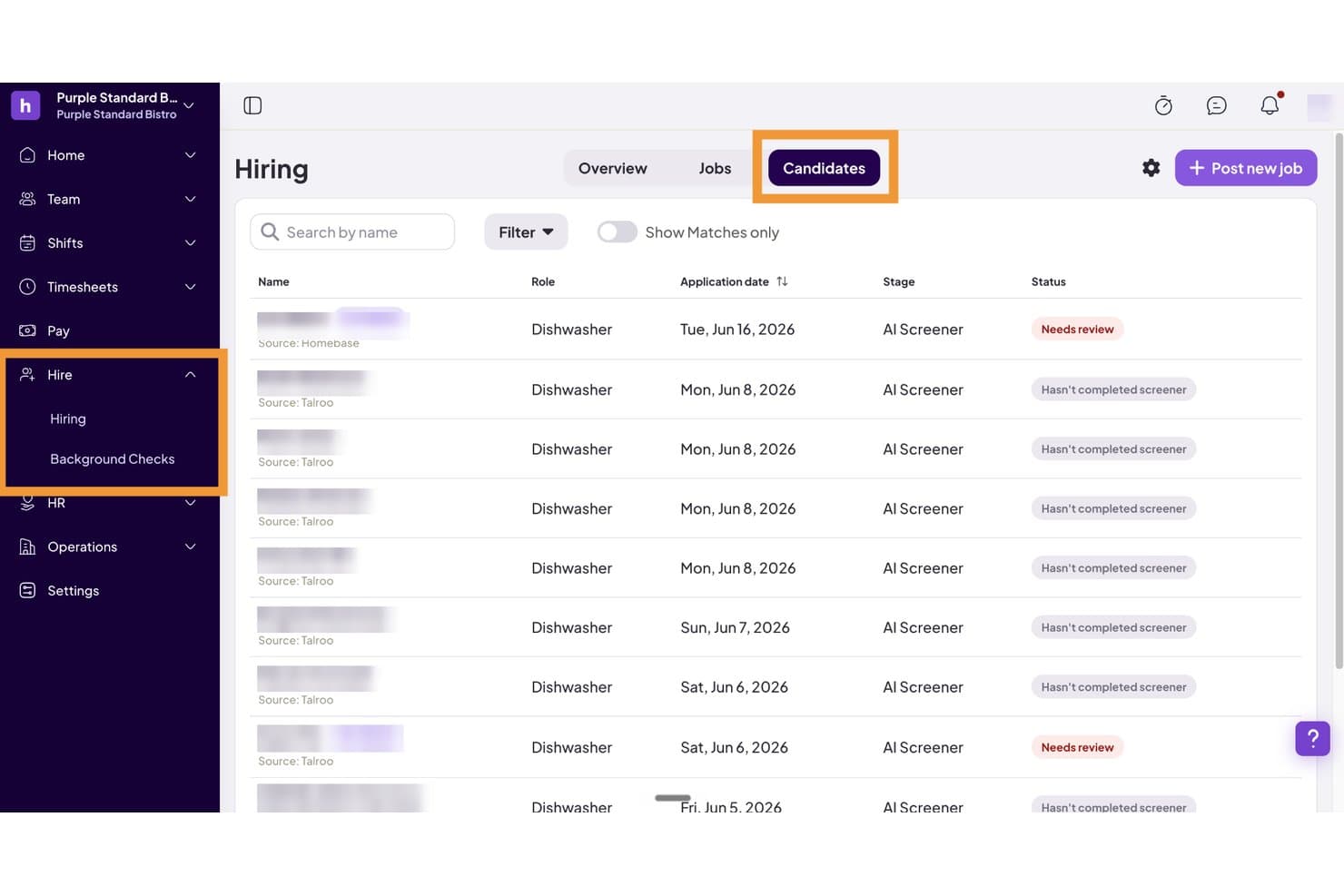
Homebase lets users track all job candidates and their screener statuses. Homebase is an AI-enabled hiring and applicant tracking tool for small businesses that covers job posting to multiple boards, applicant screening, interview scheduling, and new-hire onboarding handoff.
Who Is Homebase Best For?
Homebase is a natural fit for small business owners hiring hourly workers in service-oriented industries like retail, hospitality, and food service.
Why I Picked Homebase
Homebase earns its spot on my shortlist because it's built specifically for the kind of hiring that retail, food service, and hospitality businesses actually do: filling hourly roles fast. I love that its AI Hiring Assistant handles applicant screening with custom questions and smart follow-ups, then automatically surfaces Top Match candidates and books interviews around a manager's availability. That hire-to-roster handoff, where a new hire's details flow directly into Homebase's scheduling and onboarding tools, is something I haven't seen handled this cleanly elsewhere.
Homebase Key Features
- One-click job distribution: Post open roles to Indeed, ZipRecruiter, Google, Facebook, Glassdoor, and JobGet from a single submission.
- Branded careers page: Build a customizable careers page with your company avatar, banner, description, and location, shareable via link or QR code.
- Google Calendar sync: Connect your calendar to automatically hide booked time slots and add confirmed interviews to your schedule.
- Hire-to-roster handoff: Mark a candidate as hired and their application details automatically populate a new team-member profile for onboarding and scheduling.
Homebase Integrations
Homebase connects with Indeed, ZipRecruiter, Google, Facebook, Craigslist, Glassdoor, JobGet, and Google Calendar. It also offers a read-only API for custom integrations on the All-in-One plan.
Pros and Cons
Pros:
- Reviewers value connected scheduling and team communication
- Moves hires into team onboarding and scheduling
- Posts hourly roles across several job boards
Cons:
- No scorecards or structured candidate feedback
- Candidate tracking lacks customizable pipeline stages
 12Best AI-native platform for recruitment agencies
Atlas
- Free demo available
- From $599/employee/month
Visit WebsiteCustomer Rating:4.2/5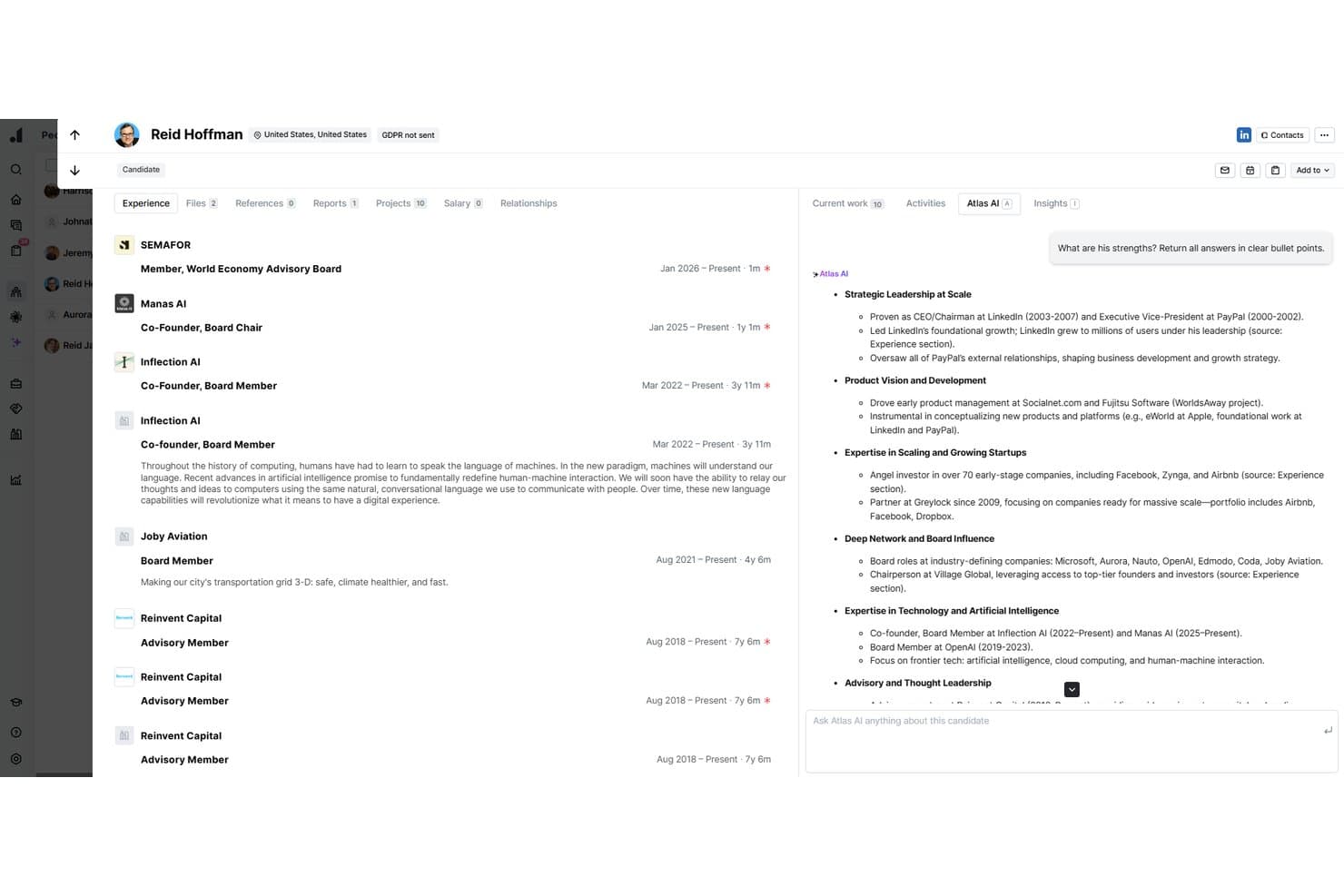
Atlas surfaces AI-generated candidate strengths directly on the profile. Atlas is an AI-native ATS and CRM platform built specifically for recruitment agencies, combining candidate sourcing, pipeline management, communication tracking, and outreach automation in one system.
Who Is Atlas Best For?
Atlas is built for recruitment agencies that want AI to handle candidate search, communication tracking, and outreach automation rather than bolt it on as an afterthought.
Why I Picked Atlas
I picked Atlas as one of the best because it's built AI-first rather than AI-added, which makes a genuine difference in agency recruitment workflows. Magic Search lets me query across resumes, call recordings, emails, and notes in plain language, with ranked results and written reasoning for each match. On top of that, the CRMx captures every candidate touchpoint automatically, so LinkedIn threads, WhatsApp messages, and Outlook emails all surface in one searchable record without manual logging.
Atlas Key Features
- AI applicant grading: Automatically scores incoming applicants against required, preferred, and nice-to-have job criteria, with written reasoning for each grade.
- Multi-step outreach campaigns: Build sequenced outreach flows across email, phone, social, and to-do lists, with AI-drafted, personalized messages you can schedule in advance.
- CandidateGPT: Ask plain-language questions about any candidate record—salary, availability, notice period, or reasons for moving—and get answers drawn from stored data.
- Recruitment analytics dashboards: Track pipeline stages, placements, hires, revenue, and time-to-fill across teams or regions using configurable real-time dashboards.
Atlas Integrations
Atlas offers integrations with idibu, Broadbean, Microsoft Outlook, Zoom, Microsoft Teams, Google Meet, and WhatsApp. It also provides an open API for custom recruitment workflows.
Pros and Cons
Pros:
- Kanban pipelines and campaigns cut admin work
- Candidate conversations become searchable profile history
- AI search ranks candidates with match reasoning
Cons:
- Users report difficulty removing candidates or projects
- Job-board coverage depends on third parties
Learn more about Atlas: 13Best for simplified hiring automation
ClearCo
- Free demo available
- Pricing upon request
Visit WebsiteCustomer Rating:4.5/5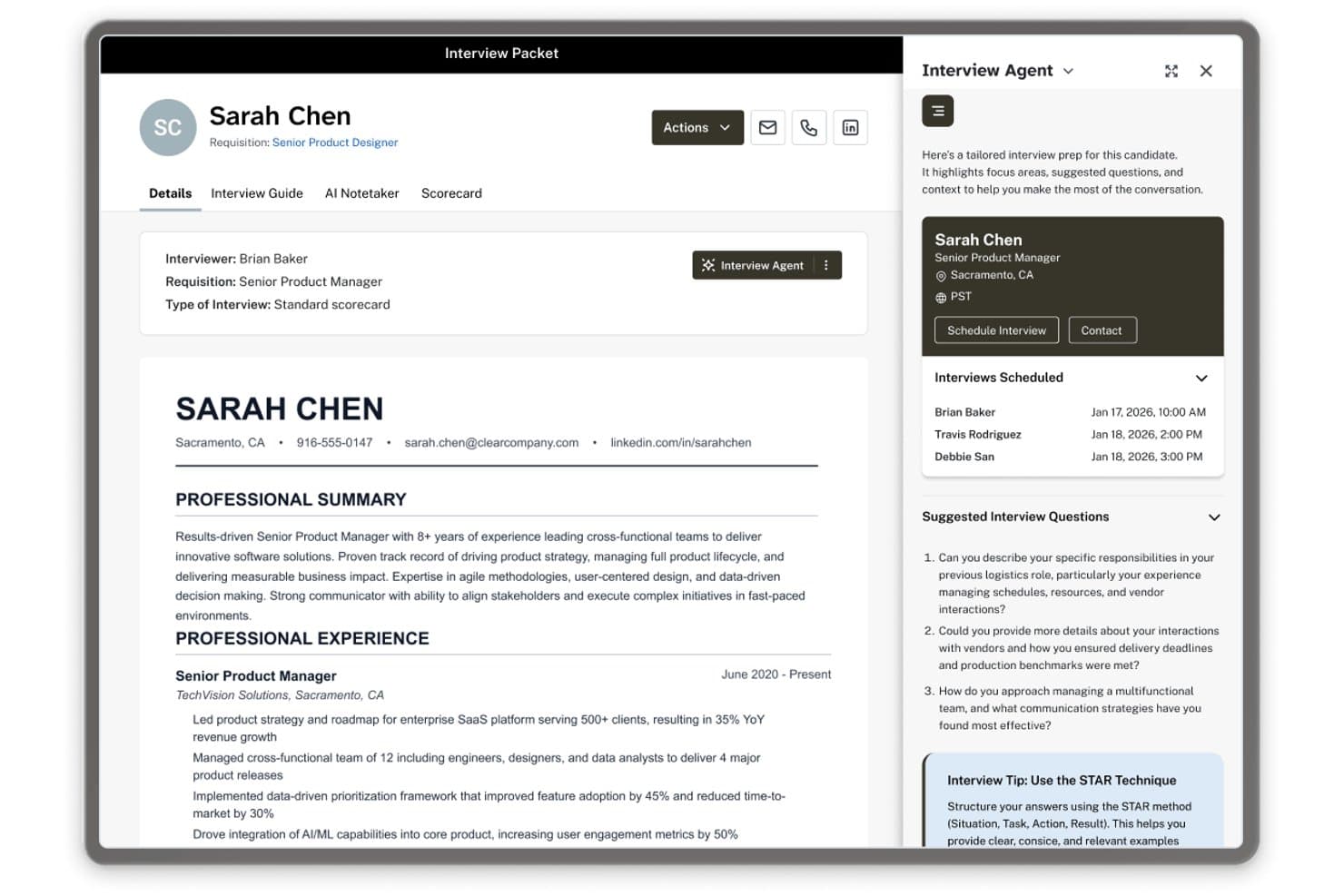
ClearCo offers an AI-powered Interview Agent panel that provides interviewers with tailored prep, suggested questions, and candidate context directly within the interview packet. ClearCo (formerly ClearCompany) is an applicant tracking system designed to help you manage candidate sourcing, automate hiring workflows, and improve collaboration across your recruiting process.
Who Is ClearCo Best For?
ClearCompany is a good fit for mid-sized to enterprise HR teams that need a structured, scalable recruiting process across multiple roles and departments.
Why I Picked ClearCo
I picked ClearCo because it helps reduce delays in hiring by structuring workflows and automating key steps between recruiters and hiring managers. The platform tracks candidates across stages, assigns ownership for each step, and supports approval processes to keep hiring moving. It also includes built-in tools for creating and sending offers with e-signatures, which helps streamline the final stages of hiring. Structured interview guides and scorecards support more consistent candidate evaluations across your team.
ClearCo Key Features
- Structured evaluation: Use interview guides and scorecards to assess candidates consistently across roles.
- Workflow automation: Move candidates through stages with assigned owners and approval steps.
- Reporting and analytics: Access recruiting metrics across roles, pipelines, and hiring activity.
- Offer management: Create, send, and manage offers with built-in e-signature functionality.
ClearCo Integrations
ClearCo offers native integrations with ADP, LinkedIn, onboarding/document management platforms, and more.
Pros and Cons
Pros:
- Provides real-time dashboards you can query using natural language
- Reaches candidates by mobile texting and QR-enabled applications
- Automates candidate sourcing from a large global pool
Cons:
- Some users report slower support responses and account setup complexity
- Advanced report customisation is somewhat limited
Learn more about ClearCo: 14Best for automated job postings & sourcing
Folks HR
- Free demo available
- Modular pricing, from $6/employee/month (module-dependent)
Visit WebsiteCustomer Rating:4.6/5
Folks HR lets users submit job requests with applicant and position details. Folks HR is a Canadian applicant tracking system designed for small and midsize businesses that want to simplify recruiting, centralize candidate management, and automate repetitive hiring tasks.
Who Is Folks HR Best For?
Folks HR is a good fit for small and midsize businesses that need an accessible, all-in-one HR platform with built-in recruiting tools.
Why I Picked Folks HR
I picked Folks HR as one of the best because of how well its automated job posting and LinkedIn sourcing features work together to cut down sourcing time. With Folks ATS, you can post a role to over 2,000 job boards—including Indeed, LinkedIn, Jobillico, and Isarta—directly from the platform, using pre-built job templates to speed up the process. The LinkedIn sourcing plugin lets my team pull candidate profiles from LinkedIn without ever leaving the ATS. The AI-powered resume matchmaker surfaces the most qualified candidates based on required and preferred skills, so I'm not manually sifting through every application.
Folks HR Key Features
- Candidate interview scheduling: Attach documents, assign interviewers, automate confirmations, and check candidate availability directly within the platform.
- Custom career page builder: Generate a branded career page in minutes, with all incoming applications automatically organized in the ATS.
- Recruitment analytics and reports: Track time-to-hire, recruitment costs, and new hire retention rates across 20+ pre-built reports updated in real time.
- Centralized applicant management: Store and search all candidate profiles in one database, with keyword search and saved candidate history for future roles.
Folks HR Integrations
Folks HR offers native integrations with LinkedIn, Indeed, Jobillico, and Isarta; an API supports custom connections.
Pros and Cons
Pros:
- Built for SMBs seeking time-saving automation over manual tracking
- Converts hires to Folks HR profiles without duplicate data
- AI resume parsing highlights top matches for faster sourcing.
Cons:
- Career page customization options can feel limited
- Some integrations require separate accounts (e.g., LinkedIn Recruiter)
Learn more about Folks HR: 15Best for ease of use
Workable
- Free trial available
- From $299/month (billed annually)
Visit WebsiteCustomer Rating:4.5/5
Workable allows users to post jobs across hundreds of channels to reach the right candidates. Workable is an applicant tracking system designed for HR teams and recruiters who want to simplify hiring, automate repetitive tasks, and manage candidate pipelines in one place.
Who Is Workable Best For?
Workable is a good fit for small to mid-sized businesses that need a straightforward ATS their hiring teams can be up and running within hours.
Why I Picked Workable
Workable earns its spot on my shortlist because it's genuinely one of the fastest ATS platforms to set up and start using. I've seen teams go from sign-up to posting live jobs in a matter of hours, not days. The no-code careers page builder is a good example of this—you can create a branded, mobile-friendly careers page without touching a line of code. I also like the candidate self-scheduling feature, which lets candidates book their own interview slots with automatic calendar syncing and time zone detection, cutting out the back-and-forth that slows down so many hiring processes.
Workable Key Features
- AI-powered candidate screening: Get AI-generated match scores and requirement checklists that summarize how well each applicant fits the role.
- One-way video interviews: Screen candidates at scale by sending video interview requests they complete on their own time, replacing early-stage phone screens.
- Anonymized screening: Hide candidate identifying details during resume review to support fair, bias-reduced evaluation.
- Custom hiring pipelines: Build role-specific hiring workflows with tailored stages to match how different teams recruit.
Workable Integrations
Integrations include LinkedIn, Indeed, ADP Workforce Now, Xero, Slack, Google Workspace, Microsoft 365, Zoom, DocuSign, and AssessFirst.
Pros and Cons
Pros:
- Offer-letter templates + e-signatures means fewer manual docs
- Candidates can schedule interviews themselves
- Built-in AI screening cuts time spent reviewing unqualified resumes
Cons:
- Some users report limited customisation on deep search filters
- Premium features (e.g., texting, advanced assessments) cost extra
Learn more about Workable:
Andre systemer for søkersporing
Her er noen flere ATS-verktøy for rekruttering som ikke kom med på listen over de beste systemene for søkersporing:
- 16LeverBest for integrated recruitment CRM capabilities
- 17RecruiterflowBest for executive search firms
- 18Teamtailor Best for advanced candidate search
- 19AvaHRBest for small businesses
- 20GemBest for unified recruitment pipeline views
Relaterte anmeldelser av HR-programvare
Hvis du fortsatt ikke har funnet det du leter etter her, kan du se nærmere på disse andre verktøyene som er relatert til systemer for søkersporing, og som vi har testet og evaluert.
- HR-programvare
- Lønnssystemer
- Tjenester for registrert arbeidsgiver
- Programvare for arbeidsstyring
- Læringsstyringssystemer
How I Evaluate Applicant Tracking Systems
I split my evaluation into three parts, giving the most weight to core tasks: move candidates through stages and post jobs across channels. Next, I consider differentiators like AI candidate matching. Finally, I weigh beyond-feature factors such as onboarding support and pricing that fits hiring volume.
Core Functionality (Table Stakes For This List)
When I'm selecting tools for my list, I score each one on a scale from 0 (does not offer the functionality) to 5 (excels in this area) for each core functionality listed below. I then convert the total into a percentage to help assess each tool's overall fit, with extra weight on any functionalities I’ve deemed essential.
- Candidate Pipeline (Essential): I look for customizable stages and clear status views, so recruiters can move applicants from review to interview across several open roles.
- Job Posting (Essential): I assess whether teams can create a requisition once, distribute it across job boards and a career site, and track applicant sources.
- Resume Parsing & Search: I check whether parsed details and practical filters help recruiters find candidates with relevant skills or experience in the existing database.
- Interview Scheduling: I look for calendar coordination and candidate-facing scheduling options that can handle panel interviews without lengthy availability exchanges.
- Hiring Team Collaboration: I assess whether interviewers can add stage-specific scorecards, ratings, and notes to a shared candidate record.
- Candidate Communication: I check whether emails, templates, and candidate replies are logged together, so coordinators can follow up without searching separate inboxes.
Once I have a list of tools that meet the criteria, I consider what sets each platform apart.
Differentiating Factors (What Sets Vendors Apart)
Here's how I compare and contrast different vendors:
Standout Features
I evaluate whether a platform offers AI candidate matching that actually ranks applicants against job requirements—not just keyword filters. When a role pulls in hundreds of applications, that distinction saves hours of manual screening. I also look at CRM and talent pool tools, since nurturing passive candidates between openings is how teams avoid starting from scratch every requisition. Career site builders matter too; I check whether hiring teams can launch branded pages without waiting on a developer.
Beyond Features
I check whether a platform's integration ecosystem covers HRIS, payroll, and background-check vendors my team already uses—migrating candidate data into a disconnected system creates more work than it solves. Compliance tooling matters just as much, especially built-in reporting for regulated hiring and role-based access controls that keep sensitive candidate records locked down. I also evaluate total cost of ownership, since per-seat pricing that looks affordable at five users can balloon when you scale a recruiting team across regions.
Slik velger du et system for søkersporing
Det riktige systemet avhenger mindre av hvor mange kandidater det kan inneholde, og mer av hvordan ansettelsesteamet ditt faktisk flytter kandidater fra søknad til tilbud. Den største feilen er å kjøpe en plattform som er utviklet for en stor virksomhet når du har ansettelsesbehov som en oppstartsbedrift (eller omvendt), eller å velge et funksjonsrikt verktøy som rekrutterere og ansettelsesledere nekter å ta i bruk.
| Faktor | Hva du bør vurdere |
|---|---|
| FaktorUtfordringer ved ansettelser | Hva du bør vurdereIdentifiser de nåværende utfordringene i rekrutteringen. Hvis det tar for mye tid å planlegge intervjuer, bør du prioritere systemer med kalenderintegrasjoner og lenker for selvbetjent planlegging. |
| FaktorBrukertilgang og roller | Hva du bør vurdereKartlegg hvor mange som trenger tilgang, og sjekk om prisen beregnes per bruker, per stilling eller som en fast pris. Se etter enkle tillatelser basert på rolle og sted, slik at rekrutterere, ledere og samarbeidspartnere bare ser det de trenger, og sensitive data holdes sikre. |
| FaktorIntegrasjonsbehov | Hva du bør vurdereSjekk om plattformen synkroniserer direkte med HRIS, verktøy for onboarding eller programvare for bakgrunnssjekker. Spør deg selv om dette nye systemet kan samle oppsettet ditt og erstatte flere verktøy for enkeltformål. |
| FaktorSkalerbarhet | Hva du bør vurderePass på at plattformen støtter langsiktig vekst i ansettelser med fleksible prisnivåer. Hvis du planlegger å ansette internasjonalt, bør du sjekke om den har funksjoner for samsvar i flere land, språkvalg og publisering av stillinger på internasjonale jobbportaler. |
| FaktorArbeidsflytkompatibilitet | Hva du bør vurdereVelg et system som passer med hvordan teamet ditt faktisk jobber fra dag til dag. Se gjennom hva som fungerer i det nåværende oppsettet, og hva som ikke fungerer, og unngå å velge et verktøy bare fordi det er populært – fokuser på det som passer teamet og prosessene dine. |
| FaktorPersonvern | Hva du bør vurdereKrev innebygd støtte for EEO/OFCCP-sporing, GDPR-kontroller, SOC 2-samsvar og lover om åpenhet rundt lønn på delstatsnivå. Dette gjør deg klar for revisjon uten å skape ekstra administrativt arbeid. |

Tips fra forfatteren
Innhent synspunkter fra interessentene dine (IT og økonomi er alltid nyttige) og bruk tilbakemeldingene deres til å skrive brukstilfeller og lage en matrise som sammenligner hva som er viktig for hver interessentgruppe.
Slik vurderer du kortlisten
- Kjør en reell rekvisisjon gjennom prøveperioden: Publiser én ledig stilling, flytt fem testkandidater fra søknad til tilbud, og tell hvor mange klikk en ansettelsesleder må bruke for å gi tilbakemelding.
- Be om dokumentet for feltkobling til HRIS: Spør hvilke felt som overføres ved ansettelse, og om synkroniseringen er innebygd eller går gjennom en tredjepartskobling med et eget gebyr.
- Få vilkårene for eksport skriftlig: Bekreft at du kan eksportere alle kandidatoppføringer, notater og vedlegg som CSV innen 30 dager etter oppsigelse, uten ekstra kostnad.
- Be om en gjennomgang av oppbevaring i sanntid: Be representanten vise deg på en fungerende konto hvordan en kandidatoppføring slettes etter den fastsatte oppbevaringsperioden, og hvor slettingsloggen ligger.
- Spør hva som skjer med flaggede søkere: Bekreft at mistenkt svindel og automatiske avslag sendes til en person for vurdering, og ikke direkte til en avslags-e-post.
- Bestem hva du vil prioritere: HR-pakker med innebygd rekruttering gjør overgangen fra ansettelse til onboarding enklere, mens frittstående kandidatsporingssystemer gir rekrutterere mer kontroll over kandidatflyt og oppfølging. Velg derfor basert på hvor teamet ditt bruker mest tid i dag.
Hva er et kandidatsporingssystem?
Det er programvare som håndterer hele ansettelsesprosessen i en virksomhet på ett sted – fra publisering av ledige stillinger til mottak av søknader, planlegging av intervjuer og utsending av tilbud.
I sin enkleste form fungerer det som et sentralt knutepunkt for rekruttering. I stedet for å følge opp kandidater i uoversiktlige e-postinnbokser, regneark og klistrelapper, samler et kandidatsporingssystem alle søkernes data i ett system der rekrutterere og ansettelsesledere kan samarbeide, gå gjennom CV-er og følge kandidatene gjennom hvert trinn i ansettelsesprosessen.
Hvordan fungerer et kandidatsporingssystem?
Et kandidatsporingssystem fungerer ved å samle inn søkerdata og føre kandidatene gjennom en trinnvis ansettelsesprosess. Slik fungerer prosessen fra start til slutt:
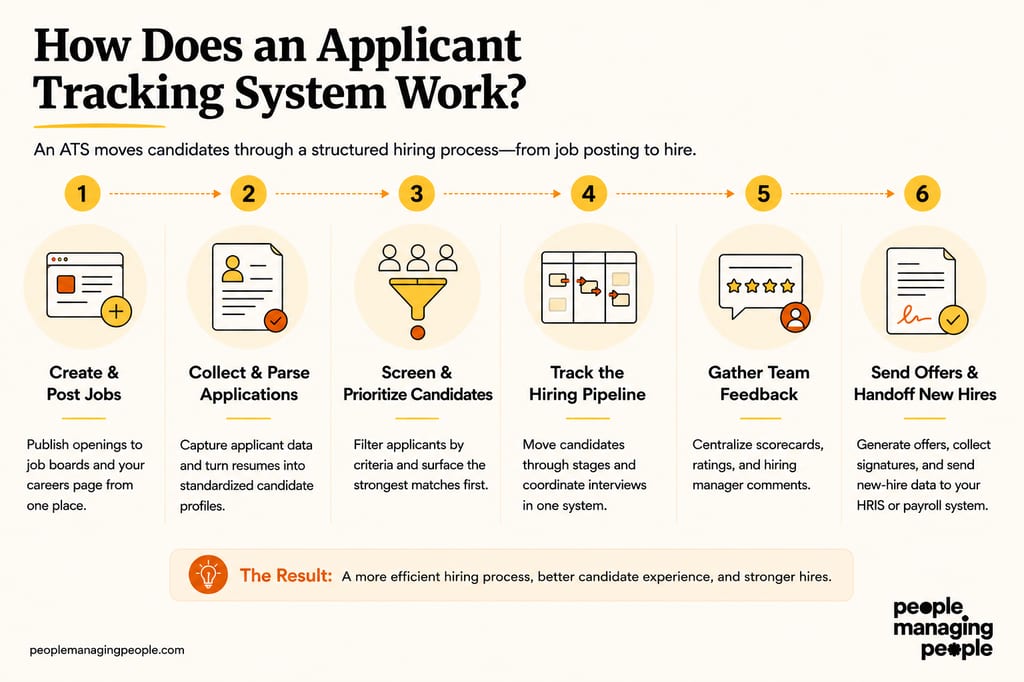
Funksjoner
De beste systemene for kandidatsporing automatiserer administrative oppgaver for rekrutterere, holder ansettelsesansvarlige engasjert og samler kandidatdata i ett søkbart system. Når du vurderer plattformer, bør du fokusere på disse sentrale funksjonene i et kandidatsporingssystem:
- Administrasjon av stillingsannonser: Publiser ledige stillinger på flere jobbportaler med noen få klikk for å utvide kandidatbasen uten manuell registrering på nytt.
- CV-parsing & kandidatdatabase: Hent automatisk ut kandidatopplysninger til standardiserte, søkbare profiler for å bygge kandidatbaser for nåværende og fremtidige stillinger.
- Automatisert planlegging & meldinger: Synkroniser intervjueres kalendere slik at kandidater kan planlegge intervjuer selv, samtidig som e-poster og SMS-oppdateringer samles i én enkelt tråd.
- Samarbeid i team & vurderingsskjemaer: Samle tilbakemeldinger fra intervjuer, kandidatskårer og private notater på ett sted for å fremskynde beslutningstakingen i ansettelsesteamene.
- Arbeidsflytautomatisering & samsvar: Utløs automatisk trinnendringer og bekreftelsesmeldinger i bakgrunnen, samtidig som regulatoriske data, som EEO/OFCCP-krav, spores direkte fra start.
Den største feilen organisasjoner gjør, er å kjøpe en plattform som er bygget for en stor virksomhet når de har behov for rekruttering i en oppstartsbedrift (eller omvendt), eller å velge et funksjonsrikt verktøy som rekrutterere og ansettelsesansvarlige nekter å ta i bruk.
AI-funksjoner
I tillegg til standardverktøy for kandidatsporing inkluderer mange plattformer nå innebygde AI-funksjoner for å redusere manuelt arbeid for rekrutterere. Her er de viktigste du bør se etter:
- Automatisert kandidatscreening: Skanner innkommende CV-er opp mot viktige stillingskrav og rangerer de beste søkerne, slik at du kan kontakte kvalifiserte personer først.
- Smart kandidatsamsvar: Fremhever tidligere søkere i databasen din hvis ferdigheter samsvarer med nye stillingsbeskrivelser, slik at sterke kandidater du kanskje hadde glemt, blir synlige.
- Prediktiv innsikt i ansettelser: Analyserer historiske ansettelsesdata for å fremheve kandidater som samsvarer med profilene til de beste medarbeiderne dine, eller som har størst sannsynlighet for å takke ja til et tilbud.
- Chatbot for kandidatengasjement: Svarer på grunnleggende spørsmål fra søkere på karrieresiden din, samler inn søknadsopplysninger og hjelper kandidater med å velge intervjutidspunkt døgnet rundt.
- Verktøy for å redusere skjevhet: Marker automatisk kjønnet eller ekskluderende språk i stillingsbeskrivelser, og lar deg skjule navn, bilder eller eksamensår fra CV-er for en mer rettferdig førstegangsvurdering.
Fordeler
Å håndtere flere ledige stillinger samtidig krever at du følger med på ulike ferdighetssett, intervjustadier og kandidatkommunikasjon på samme tid. Ved å bruke et kandidatsporingssystem samles alle disse bevegelige delene i én organisert plattform, noe som gir virksomheten din tydelige driftsmessige og økonomiske fordeler:
- Fyller stillinger raskere: Funksjoner som selvbetjent kalenderplanlegging og raske oppdateringer stanser den endeløse frem-og-tilbake-kommunikasjonen på e-post og hjelper deg med å ansette folk flere uker tidligere.
- Reduserer rekrutteringskostnadene: En søkbar kandidatdatabase lar deg kontakte tidligere søkere på nytt i stedet for å betale eksterne byråer eller kjøpe flere jobbportalannonser.
- Fører til bedre ansettelser: Enkle vurderingsskjemaer oppmuntrer ledere til å vurdere kandidater ut fra faktiske ferdigheter i jobben, snarere enn bare magefølelsen, noe som bidrar til bedre langsiktig fastholdelse.
- Holder kandidatene fornøyde: Automatiserte oppdateringer sørger for at søkere ikke blir gående uten svar, og gir folk et langt bedre inntrykk av virksomheten din.
- Håndterer vekst enkelt: Systemet håndterer rekrutteringsbølger og sesongmessige topper, slik at teamet ditt ikke drukner i ekstra papirarbeid når ansettelsestakten øker.
- Gir datadrevet innsikt: Ta bedre datadrevne beslutninger ved å få innsikt i resultatmålinger og ansettelsestrender.
Priser
Generelt koster systemer for kandidatsporing vanligvis mellom $10 og $100 per bruker, per måned, selv om noen systemer i stedet bruker en fast prismodell. Enkelte systemer inkluderer også et engangsgebyr for oppsett.
Plattformer for kandidatsporing tilbyr vanligvis abonnementer for ulike organisasjonsstørrelser og rekrutteringsbehov, fra gratis alternativer for kandidatsporing for små bedrifter og oppstartsbedrifter til mer funksjonsrike pakker for store virksomheter.
Å forstå disse alternativene vil hjelpe deg med å velge en plan som samsvarer med rekrutteringsmålene, budsjettet og omfanget av ansettelsesarbeidet ditt.
Sammenligningstabell for priser og planer
| Plantype | Gjennomsnittlig avgift per bruker | Gjennomsnittlig fast avgift | Vanlige funksjoner |
|---|---|---|---|
| PlantypeGratis | Gjennomsnittlig avgift per bruker$0 | Gjennomsnittlig fast avgift$0 | Vanlige funksjonerGrunnleggende stillingsannonser, begrenset kandidatsporing, e-postvarsler og enkel rapportering |
| PlantypeGrunnleggende | Gjennomsnittlig avgift per bruker$10 til $20 per bruker per måned | Gjennomsnittlig fast avgift$50 - $100/måned | Vanlige funksjonerForbedret publisering av stillingsannonser på flere plattformer, CV-tolkning, grunnleggende CRM, e-postintegrasjon og grunnleggende analyse |
| PlantypeProfesjonell | Gjennomsnittlig avgift per bruker$50 til $100 per bruker per måned | Gjennomsnittlig fast avgift$200 - $500/måned | Vanlige funksjonerAvanserte CRM-funksjoner, masseutsending av e-post, avansert analyse, integrasjon med HR-systemer og tilpassbare arbeidsflyter |
| PlantypeBedrift | Gjennomsnittlig avgift per brukerTilpasset pris | Gjennomsnittlig fast avgiftTilpasset pris | Vanlige funksjonerKomplett funksjonspakke, inkludert KI-drevet analyse, dedikert brukerstøtte, forbedret sikkerhet og ubegrenset publisering av stillingsannonser |
En oversikt over plantyper, kostnader og funksjoner for systemer for sporing av søkere.
Når bør du oppgradere ATS?
Gratis ATS-alternativer gir vanligvis en smakebit på systemets funksjonalitet, noe som gjør dem ideelle for svært små bedrifter eller virksomheter som er i de første stadiene av å skalere driften.
Hvis ansettelsesbehovene dine er begrensede, kan du kanskje begynne med en gratis eller grunnleggende plan. Det finnes imidlertid mange grunner til at du kan ønske å velge en mer avansert plan, blant annet:
- Økt ansettelsesvolum: Hvis bedriften din opplever en økning i antall ledige stillinger, kan en mer avansert plan hjelpe deg med å håndtere det høyere antallet søkere gjennom avanserte funksjoner som KI-basert CV-screening.
- Avansert analyse: Hvis du trenger dypere innsikt i rekrutteringsmålingene dine, tilbyr avanserte planer robuste analyseverktøy for å spore og optimalisere ansettelsesstrategiene dine.
- Arbeidsgiverprofilering: For å hjelpe deg med å skille deg ut i et konkurransepreget arbeidsmarked inkluderer avanserte planer ofte funksjoner for rekrutteringsmarkedsføring som øker bedriftens synlighet og attraktivitet overfor de beste talentene.
- Integrasjonsmuligheter: Grunnleggende planer mangler ofte integrasjonsmuligheter, så du må oppgradere for å låse opp denne funksjonen. Avanserte planer tilbyr vanligvis sømløs integrasjon med andre HR-verktøy og -systemer, slik at du får en samlet arbeidsflyt.
Til syvende og sist er det viktig å sikre seg en plan som tilbyr funksjonene du trenger for å dekke de nåværende behovene dine og løse utfordringene dine uten å overskride budsjettet.
Vanlige spørsmål
Her er noen svar på vanlige spørsmål du kanskje har om søkerhåndteringssystemer og hvordan de fungerer:
Hva er forskjellen mellom et ATS og et CRM?
Et søkerhåndteringssystem er utviklet for å håndtere aktive søkere som søker på en ledig stilling, mens et system for kandidatrelasjonshåndtering (CRM) er utviklet for å pleie passive talenter for fremtidige rekrutteringsbehov.
\u003cul data-path-to-node=\u00222\u0022\u003e
\t\u003cli\u003e
\u003cp data-path-to-node=\u00222,0,0\u0022\u003e\u003cb data-path-to-node=\u00222,0,0\u0022 data-index-in-node=\u00220\u0022\u003eEt ATS er for aktive søkere:\u003c/b\u003e Det følger kandidater gjennom den offisielle rekrutteringsprosessen – gjennomgang av CV-er, planlegging av intervjuer, innhenting av tilbakemeldinger og utsendelse av tilbudsbrev. Det er transaksjonsbasert, operasjonelt og rettet mot å fylle umiddelbare bemanningsbehov.\u003c/p\u003e
\u003c/li\u003e
\t\u003cli\u003e
\u003cp data-path-to-node=\u00222,1,0\u0022\u003e\u003cstrong\u003eEt CRM er for passive talenter:\u003c/strong\u003e Et CRM inneholder potensielle kandidater som ikke nødvendigvis har søkt på en bestemt stilling ennå – for eksempel tidligere søkere, kandidater som kom på andreplass i tidligere intervjuer, eller potensielle kandidater funnet på LinkedIn.\u003c/p\u003e
\u003c/li\u003e
\u003c/ul\u003e
Hva er forskjellen mellom et ATS og et HRIS?
Et ATS håndterer rekruttering før ansettelse, inkludert å tiltrekke kandidater, tolke CV-er og planlegge intervjuer. Et HRIS (informasjonssystem for personaladministrasjon) håndterer derimot ansattdata etter ansettelse, som lønn, administrasjon av personalgoder og medarbeidersamtaler. Mange HRIS-systemer tilbyr innebygde ATS-moduler og funksjoner for rekruttering.
Hvordan fungerer CV-vurdering i et ATS?
\u003cp data-path-to-node=\u00223\u0022\u003eEt ATS rangerer CV-er ved å sammenligne dem direkte med stillingsbeskrivelsens nøkkelord, nødvendige ferdigheter, arbeidshistorikk og utdanning. CV-er med nøyaktige treff på nøkkelord og tydelig formatering får høyere poengsum, slik at rekrutterere raskt kan finne de beste søkerne.\u003c/p\u003e
Hvis du prøver å forstå hvordan din egen CV kan bli vurdert, kan du få noen svar ved å teste ut programvare for CV-vurdering for å se hvordan CV-en din blir vurdert. Be interessentene dine (IT og økonomi er alltid nyttige) om innspill, og bruk tilbakemeldingene deres til å skrive brukstilfeller og lage en matrise som sammenligner hva som er viktig for hver interessentgruppe.
Hva er de viktigste begrensningene ved et søkerhåndteringssystem?
\u003cp data-path-to-node=\u00221\u0022\u003eEt ATS kan sile bort kvalifiserte kandidater på grunn av rigid nøkkelordmatching, feiltolke komplekse CV-formater og skape en robotaktig kandidatopplevelse hvis automatiserte svar brukes for mye. Her er de viktigste ulempene du bør være oppmerksom på:\u003c/p\u003e
\u003cul data-path-to-node=\u00223\u0022\u003e
\t\u003cli\u003e
\u003cp data-path-to-node=\u00223,0,0\u0022\u003e\u003cb data-path-to-node=\u00223,0,0\u0022 data-index-in-node=\u00220\u0022\u003eOverdreven avhengighet av nøyaktige nøkkelord:\u003c/b\u003e CV-tolkerne ser etter bestemte formuleringer. Kvalifiserte søkere som bruker synonymer, andre stillingstitler eller uvanlige begreper, kan bli rangert lavere eller filtrert bort.\u003c/p\u003e
\u003c/li\u003e
\t\u003cli\u003e
\u003cp data-path-to-node=\u00223,1,0\u0022\u003e\u003cb data-path-to-node=\u00223,1,0\u0022 data-index-in-node=\u00220\u0022\u003eFormateringsfølsomhet:\u003c/b\u003e Komplekse CV-oppsett – som maler med flere kolonner, tabeller eller grafikk – kan forvirre tolken og føre til at søkerdata mangler eller blir blandet sammen.\u003c/p\u003e
\u003c/li\u003e
\t\u003cli\u003e
\u003cp data-path-to-node=\u00223,2,0\u0022\u003e\u003cb data-path-to-node=\u00223,2,0\u0022 data-index-in-node=\u00220\u0022\u003eMangel på menneskelig kontekst:\u003c/b\u003e Et ATS vurderer ord på en side, ikke faktisk kompetanse, personlige ferdigheter eller potensial i den virkelige verden.\u003c/p\u003e
\u003c/li\u003e
\t\u003cli\u003e
\u003cp data-path-to-node=\u00223,3,0\u0022\u003e\u003cb data-path-to-node=\u00223,3,0\u0022 data-index-in-node=\u00220\u0022\u003eUpersonlig kandidatopplevelse:\u003c/b\u003e Overdreven bruk av automatiske avslag og statusoppdateringer kan få rekrutteringsprosessen til å virke upersonlig og skade arbeidsgivermerkevaren.\u003c/p\u003e
\u003c/li\u003e
\t\u003cli\u003e
\u003cp data-path-to-node=\u00223,4,0\u0022\u003e\u003cb data-path-to-node=\u00223,4,0\u0022 data-index-in-node=\u00220\u0022\u003eRisiko for algoritmisk skjevhet:\u003c/b\u003e Automatiserte rangeringsverktøy kan videreføre tidligere skjevheter i ansettelser hvis kriteriene ikke jevnlig gjennomgås av faktiske rekrutterere.\u003c/p\u003e
\u003c/li\u003e
\u003c/ul\u003e
Hvordan oppdager søkerhåndteringssystemer falske kandidater?
\u003cp data-path-to-node=\u00221\u0022\u003eDe fleste ATS-plattformer oppdager falske kandidater ved å flagge varselsignaler i søknader, som dupliserte eller nesten identiske CV-er, uoverensstemmende kontakt- eller stedsopplysninger og mønstre i AI-generert tekst. Noen bekrefter også identiteten før eller under intervjuer, eller kobler seg til verktøy for bakgrunnssjekk, slik at alt mistenkelig sendes til en person for gjennomgang før et tilbud gis.\u003c/p\u003e
Stemmer det at et ATS automatisk kan avvise kvalifiserte kandidater?
Ja, selv om dette ikke er en primærfunksjon, kan ATS-systemer bidra til at kvalifiserte kandidater avvises ved å filtrere bort søkere basert på nøkkelord, feil formatering eller parametere satt av arbeidsgiveren som utilsiktet kan utelukke kvalifiserte personer. Oppfatningen om at et ATS tar den endelige avvisningsbeslutningen, er en myte, ettersom systemet først og fremst organiserer og søker gjennom søknader, mens den endelige avgjørelsen tas av menneskelige rekrutterere. Systemets utforming og oppsett kan imidlertid føre til at kvalifiserte kandidater blir oversett eller avvist uten at et menneske gjennomgår hele profilen deres.
Hvilke integrasjoner bør jeg prioritere når jeg velger et ATS?
ATS-plattformer tilbyr vanligvis abonnementer for ulike organisasjonsstørrelser og rekrutteringsbehov, fra kostnadsfrie ATS-alternativer for små bedrifter og oppstartsbedrifter til mer omfattende og funksjonsrike pakker for store virksomheter. Prioriter ATS-integrasjoner med verktøy teamet ditt allerede bruker, som HRIS, bakgrunnssjekk, videointervjuer, kalender- og e-postplattformer. Integrasjon med stillingsportaler og vurderingsverktøy kan også effektivisere søk og evaluering. Enkle integrasjoner sparer deg for manuell dataregistrering og forbedrer arbeidsflyten.
Hvordan håndterer et ATS stillingsannonser?
\u003cp data-path-to-node=\u00221\u0022\u003eEt ATS lar deg skrive en stillingsbeskrivelse én gang og publisere den på flere stillingsportaler – som LinkedIn, Indeed og Glassdoor – samt på virksomhetens karriereside med ett enkelt klikk.\u003c/p\u003e
\u003cp data-path-to-node=\u00222\u0022\u003eNår du redigerer en stillingsbeskrivelse eller avslutter en rekruttering, oppdaterer eller fjerner ATS-et automatisk annonsen på alle plattformene samtidig. Det legger også til sporingslenker i hvert innlegg, slik at du vet nøyaktig hvilken stillingsportal som gir deg de beste søkerne.\u003c/p\u003e
Hvordan fungerer søke- og filtreringsfunksjonene i et ATS?
Et ATS lar rekrutterere filtrere store søkerutvalg ved hjelp av nøkkelord- og boolske søk etter bestemte ferdigheter eller stillingstitler. Det begrenser også kandidatene basert på sted eller erfaring, bruker utsilingsspørsmål til å diskvalifisere uegnede søkere umiddelbart og merker profiler for å fremheve de beste treffene for ledige stillinger.