

10 beste verktøy for personalanalyse i 2026

Kortliste over den beste programvaren for personalanalyse


Føler du deg overveldet av den enorme mengden data HR-teamet ditt håndterer hver dag? Programvare for personalanalyse kan være akkurat det du trenger. Den omformer rådata til handlingsrettet innsikt og hjelper deg med å ta informerte beslutninger om ansettelser, medarbeiderbevaring og medarbeidertilfredshet.
Etter min erfaring møter HR-profesjonelle et konstant press om å optimalisere arbeidsstyrken. Du trenger verktøy som forenkler prosessen og gir tydelige resultater. Det er her programvare for personalanalyse kommer inn.
Jeg har testet og vurdert en rekke alternativer for å gi deg en objektiv og grundig undersøkt liste over de beste tilgjengelige løsningene. Du kan stole på at vurderingene mine fokuserer på det som virkelig betyr noe for deg og teamet ditt. La oss se nærmere på de beste alternativene som kan utgjøre en forskjell i HR-strategien din.
Why Trust Our Software Recommendations
Our team has been testing and reviewing software since 2012. As HR experts ourselves, we know how difficult—and important—it is to choose the right software.
For this guide, we evaluated tools using hands-on testing and independent research, scoring tools using our selection criteria. We also draw on insights from industry thought leaders and practicing HR experts.
Our reviews reflect our human editorial judgment, not a sales pitch.
Expert reviewers:
Sammenligningstabell for programvare for personalanalyse
Tabellen nedenfor sammenligner priser, tilgjengelighet av gratis prøveperioder og demomuligheter for mine beste utvalgte programmer for personalanalyse.
| Tool | Best For | Trial Info | Price | ||
|---|---|---|---|---|---|
| 1 | Best for integrated payroll and compliance support | Not available | From $599/employee/month | Website | |
| 2 | Best for global workforce management | Free demo available | From $5/user/month | Website | |
| 3 | Best for actionable workforce insights | Free demo available | Pricing upon request | Website | |
| 4 | Best for user behavior insights | Free demo available | Pricing upon request | Website | |
| 5 | Best people analytics software for unlimited workforce contextual data sources | Free demo available | Pricing upon request | Website | |
| 6 | Best for visualizing pay equity and total rewards | Free demo available | Pricing upon request | Website | |
| 7 | Best people analytics software for HR data visualization | 14-day free trial | Pricing upon request | Website | |
| 8 | Best people analytics software for democratizing insights | Free demo available | Pricing upon request | Website | |
| 9 | Best people analytics software for eNPS tracking | Free demo available | From $4.50-$11.70/employee/month | Website | |
| 10 | Best for transforming feedback into insights | Free demo available | From $4,999/year | Website |

Den beste programvaren for personalanalyse
Her er en kort beskrivelse av hver programvare for personalanalyse, med fokus på det beste bruksområdet for hvert verktøy, de mest bemerkelsesverdige funksjonene samt noen fordeler & ulemper. Jeg har også tatt med skjermbilder for å gi deg et innblikk i brukergrensesnittet deres.

Best for integrated payroll and compliance support
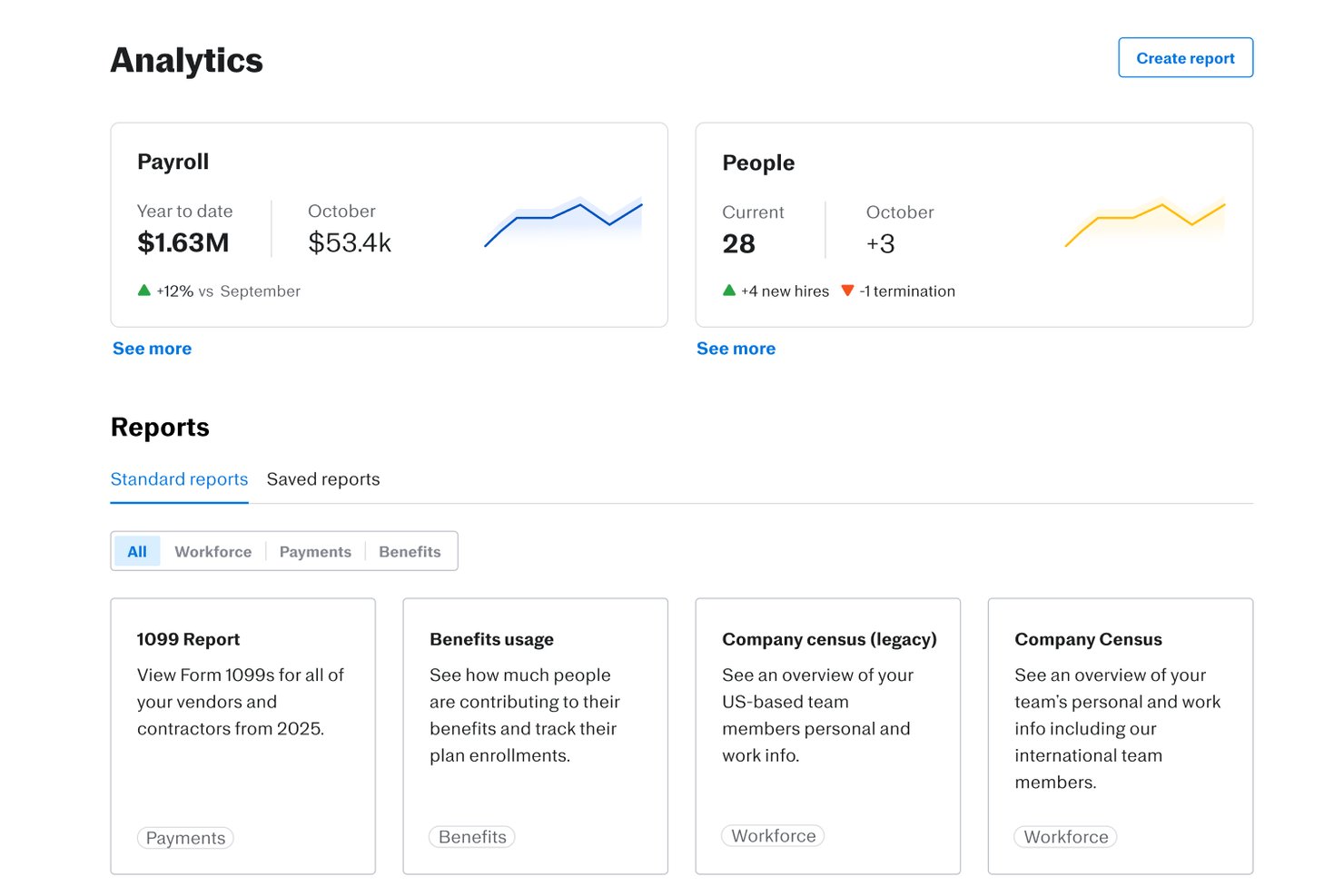
Justworks is a cloud-based HR and payroll platform designed to help organizations manage workforce data, employee onboarding, benefits, time tracking, compliance, and basic people analytics within a unified system.
Who Is Justworks Best For?
Small to midsize companies seeking an all-in-one platform to manage payroll, HR, and compliance in the US.
Why I Picked Justworks
I picked Justworks as one of the best because I can rely on its unified payroll, compliance, and basic analytics to track headcount changes, employment trends, and risk data from a single platform. Payroll and compliance are always current without manual updates.
Justworks Key Features
- Custom report builder: Create and export people data reports tailored to your workforce analysis needs.
- Employee directory: Access a searchable list of employee profiles with roles, teams, and key workforce details.
- Time and attendance tracking: Monitor employee hours, paid time off, and attendance patterns in one dashboard.
- Document management: Store and organize HR policies, compliance forms, and employee contracts for easy access.
Justworks Integrations
Justworks offers 20+ integrations, including QuickBooks, Xero, NetSuite, Sage Intacct, Greenhouse, JazzHR, Lever, 15Five, Leapsome, Carta, Brex, and Vanta.
Pros and Cons
Pros:
- Payroll data easily surfaced for analysis
- Automated workforce headcount and turnover reports
- Compliance tracking built into analytics dashboards
Cons:
- Limited custom analytics beyond core metrics
- No predictive analytic features

Deel HR
Best for global workforce management
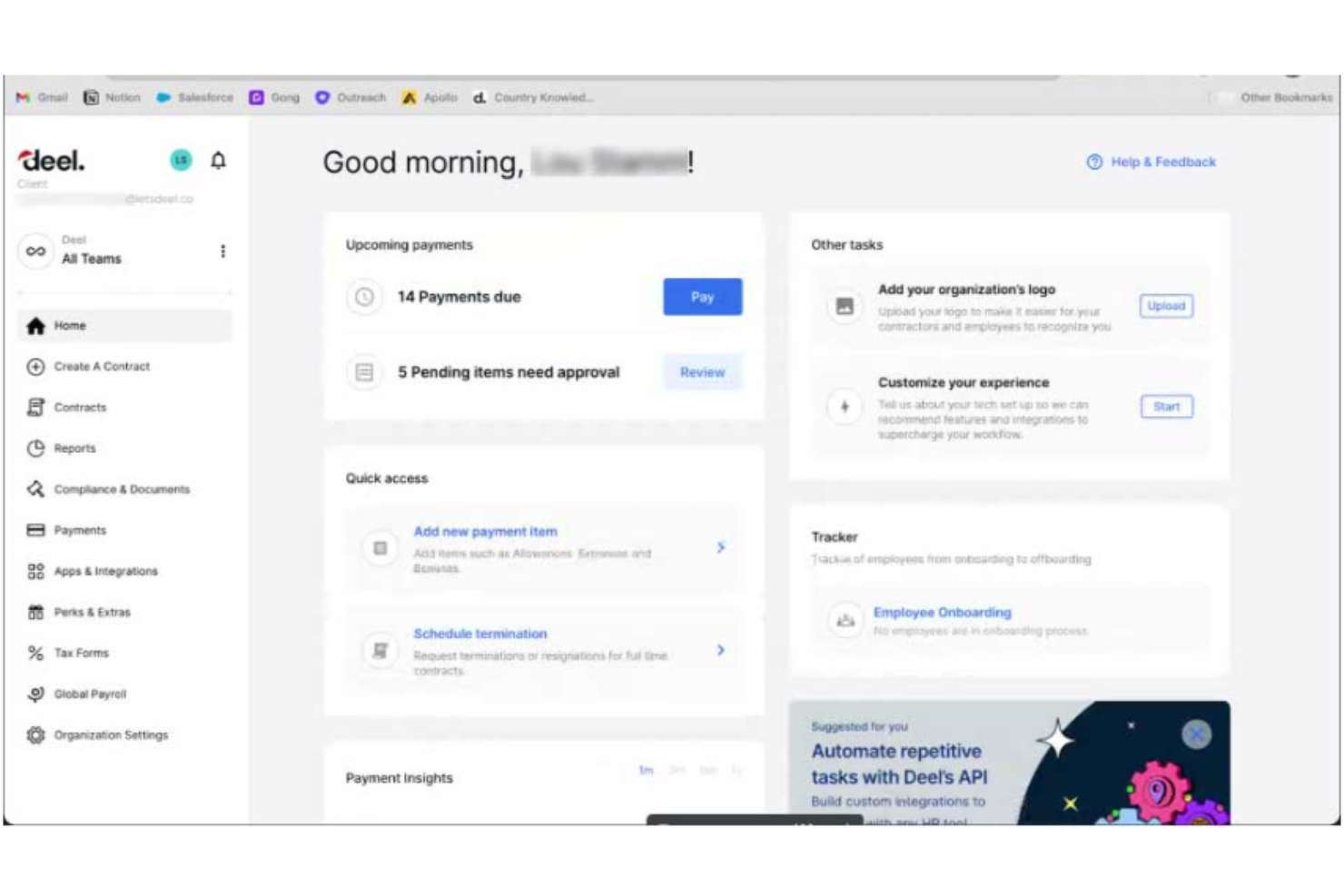
Deel is a global HR platform designed to assist businesses in managing payroll, compliance, and HR services across more than 150 countries. It caters to both employees and contractors, aiming to simplify the hiring and management of global teams.
Why I picked Deel: Deel's platform is designed to assist HR teams in leveraging people analytics to make data-driven decisions that impact business outcomes. It provides a suite of tools that enable the measurement and analysis of HR initiatives and projects, with a focus on improving efficiency and identifying areas for improvement within an organization.
Deel's analytics capabilities include descriptive and diagnostic analysis, as well as predictive and prescriptive analytics, which help in understanding employee turnover, optimizing hiring processes, and improving onboarding. The platform also supports global hiring, payroll, and compliance, and integrates with finance, legal, and hiring tools, ensuring that HR teams can manage a decentralized workforce effectively. Additionally, Deel emphasizes real-time insights, headcount planning, cost optimization, and data privacy, offering security measures to protect sensitive employee data.
Deel Standout Features and Integrations
Features include contractor management features, including tools for managing contracts, payments, and compliance, as well as benefits and insurance options for global team members.
The tool is also designed to help users maintain compliance with local laws by providing necessary documentation and knowledge of local regulations. This feature is intended to prevent mistakes and fines that can arise from non-compliance.
Integrations include Xero, Bob, Okta, Expensify, BambooHR, Workday, QuickBooks, NetSuite.
Pros and Cons
Pros:
- Convenient withdrawal methods for contractors
- One-click payments in different currencies
- Easy-to-navigate interface
Cons:
- Some inefficiencies in the portal for uploading documents
- Some delays in visa processing for employees
New Product Updates from Deel HR

Deel Expands Stablecoin Wallet to 80+ Countries
Deel expands its Stablecoin Wallet to 80+ countries with dollar-backed balances and optional rewards. This gives eligible contractors more ways to hold and manage earnings inside Deel. For more information, visit Deel’s official site.
 .
.
Best for actionable workforce insights

Paylocity is a human capital management platform that equips HR teams with real-time, AI-powered insights to improve workforce decisions across the employee lifecycle. From performance and engagement to turnover and compensation, it helps transform people data into strategic action.
Why I picked Paylocity: I selected Paylocity for its standout people analytics capabilities that span recruitment, onboarding, performance, and talent development. Its Modern Workforce Index (MWI) delivers predictive modeling and actionable recommendations on workforce trends like attrition risk, labor costs, and Diversity, Equity, Inclusion, and Accessibility (DEIA) representation—giving HR leaders a clear roadmap for proactive decision-making.
Unlike tools that simply display metrics, Paylocity’s analytics suite guides you with next steps—whether that’s closing skills gaps, budgeting smarter, or improving retention.
Paylocity Standout Features and Integrations
Features include real-time dashboards, performance tracking, predictive insights, and compensation modeling. It also supports benefits administration, employee self-service, succession planning, and compliance automation.
Integrations include Salesforce, NetSuite, BambooHR, Greenhouse, Oracle HCM, Workday, Criteria Corp, The Predictive Index, and others—enabling unified data across your HR ecosystem.
Pros and Cons
Pros:
- Tailored workflows and reports
- On demand payment options
- Includes tax compliance services
Cons:
- Limited customization options in certain modules
- Setup can be time consuming
New Product Updates from Paylocity

Paylocity Expands Expense and Purchase Request Tools
Paylocity adds connected personal cards, smarter expense categorization, and a streamlined purchase request experience. This reduces manual entry and helps finance teams manage expenses and approvals more efficiently. For more information, visit Paylocity’s official site.
 .
.
Teramind
Best for user behavior insights

Teramind is a comprehensive platform designed to address cybersecurity, compliance management, insider risk management, data loss prevention, and productivity.
Why I picked Teramind: I like its user behavior analytics. This feature lets you track and understand what your team is up to, offering insights into their actions and productivity levels. It's not just about keeping tabs, but about understanding the workflow and identifying areas for improvement. With user behavior analysis, you can see how time is being used and make informed decisions to boost productivity.
Another important feature of Teramind is its advanced data telemetry capabilities. This provides you with enriched insights into how your employees are performing and interacting with their environments. With advanced data telemetry, you can dive deep into metrics that matter, like how resources are being utilized and where there might be bottlenecks in processes.
Teramind Standout Features and Integrations
Features include session recording and playback, email monitoring, file transfer tracking, print job tracking, clipboard monitoring, network activity monitoring, policy and rules management, remote desktop control, risk analysis, compliance management, productivity analysis, and active versus idle time tracking.
Integrations include Google Cloud BigQuery, Splunk Cloud Platform, Jira, Zendesk, Redmine, Microsoft Power BI, IBM Security QRadar, LogRhythm, ArcSight, McAfee Business Protection, Microsoft Entra ID, and ServiceNow.
Pros and Cons
Pros:
- Supports both cloud-based and on-premises deployments
- Real-time alerts and automated responses to policy violations
- Detailed user behavior analytics to detect anomalies
Cons:
- Limited support for mobile device monitoring
- Minimum of 5 seats

Best people analytics software for unlimited workforce contextual data sources
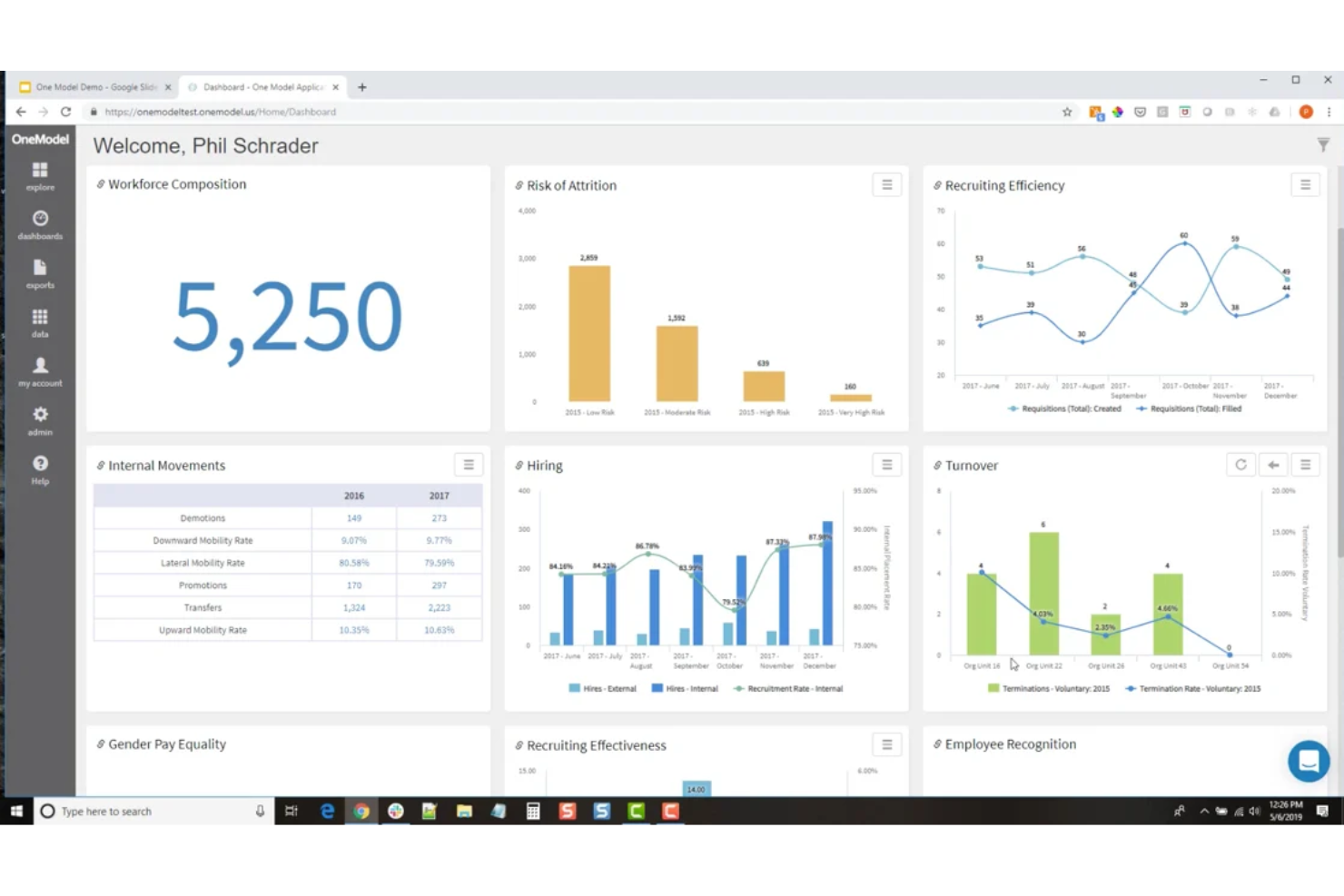
One Model is a comprehensive people analytics platform that's designed to help businesses make sense of their workforce data. It's a tool that's all about taking the mountains of data that businesses generate and turning it into something useful.
Why I picked One Model: One Model offers unlimited workforce contextual data sources, meaning you can integrate with and pull data from sources for financial, sales, labor market, and customer experience, as well as everything they offer for people analytics. They have a huge list of third-party integrations to support this, and you can even connect to form and survey tools to collect your own self-led data.
Another thing that sets One Model apart is its focus on collaboration. It's not just about crunching numbers; it's about helping your team make better decisions. You can share reports, create dashboards, and even set up alerts to keep everyone in the loop. It's a great way to make sure everyone is on the same page and working towards the same goals.
One Model Standout Features and Integrations
Features include easy data modeling, pre-defined metrics, analytics, and storyboards. These are all designed to get you up and running quickly without fiddling with building your own systems from scratch.
They also offer AI-embedded analytics, which leverages advanced algorithms and machine learning techniques to extract valuable patterns and predictions from HR data, enabling more accurate workforce planning and talent management.
Integrations include SuccessFactors, Workday, ADP, Ultimate Software, SAP, Oracle, PeopleSoft, BambooHR, Fairsail, Namely, Deltek, Cornerstone, Azure, Snowflake, AWS, Google Cloud, CultureAmp, Waggl, ModernSurvey, Glint, Maritz, Confirmit, Reflektive, Qualtrix, and others for LMS, payroll, and ATS.
Pros and Cons
Pros:
- Range of integrstions offered
- AI-powered insights
- Comprehensive plan modeling
Cons:
- May not be appropriate for SMEs/startups
- ORG charts locked to highest plan

Workleap
Best for visualizing pay equity and total rewards

Barley helps HR and People teams make smart, proactive, efficient compensation decisions using real-time data analytics and insights. It unifies all your comp needs while spotlighting important KPIs within pay equity, pay distribution, and compensation health. Barley improves efficiency by automating comp/merit workflows and identifies risk areas across your company so that you can focus your priorities on what (and who) matters most.
Why I picked Barley: Barley offers comprehensive compensation management software with features such as pay band management, cohort analysis, compensation analytics, pay equity analysis, and global benchmarking data (powered by Mercer). This software allows organizations to effectively manage and analyze their compensation data, ensuring fair and competitive pay practices while also providing valuable insights for talent acquisition and retention. It also helps HR and People teams manage their compensation processes, make data-driven and equitable decisions, reduce compensation cycle time, allocate spend efficiently, and cut overspending.
Additionally, Barley offers integrations with various HRIS and ATS systems and has received positive feedback for its intuitive interface, automation of processes, and ability to provide valuable context and analysis for compensation decisions. Overall, Barley helps organizations manage and visualize their compensation data in one platform.
Barley Standout Features and Integrations
Features include Total Rewards which helps employees understand the full value of their compensation package through a personalized portal, which includes salary, equity, pay transparency, and benefits. Additionally, candidate benchmarking, configurable permissions for security, and automated compensation reviews are other notable features Barley offers.
Integrations include BambooHR, Lever, Paylocity, HiBob, Namely, ADP Workforce Now, Ceridian Dayforce, and UKG Pro.
Pros and Cons
Pros:
- Helps increase pay transparency
- Responsive customer support services
- High levels of customization
Cons:
- Relies on external benchmarking data
- Initial set-up can be time-consuming
Tableau
Best people analytics software for HR data visualization
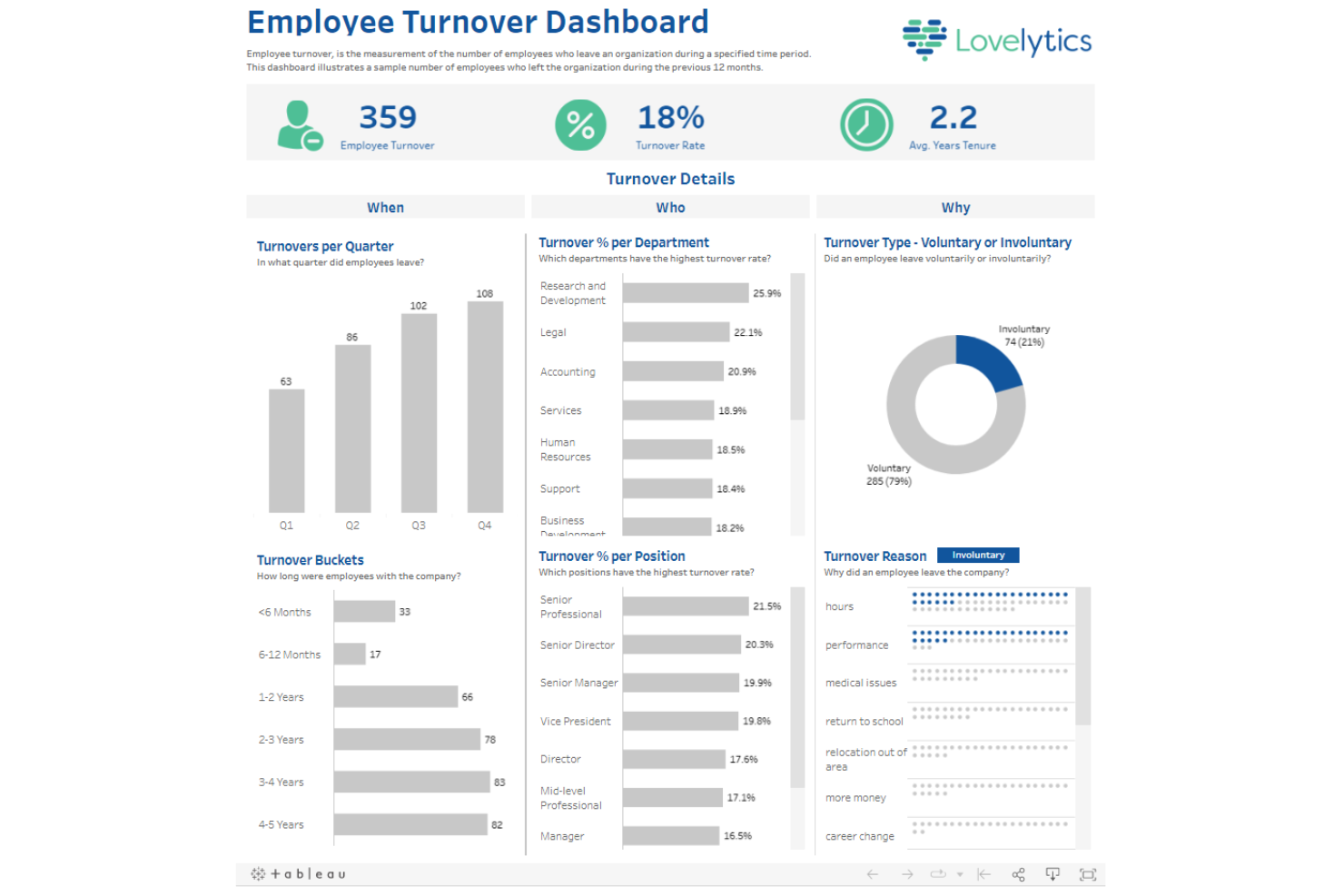
Tableau is a people analytics software that helps HR professionals visualize data in shareable dashboards.
Why I picked Tableau: Tableau collects and tracks your HR data in real-time. The software enables you to create detailed dashboards from ready-built templates. The templates are customizable, so you can tailor them to your business needs.
Tableau’s reporting features make it easy to spot trends and make data a crucial part of your decision-making. The software’s graphs highlight anomalies, allowing you to draw insights from your workforce data and present them to stakeholders. The software’s ability to slice and dice large sets of data makes it ideal for large organizations.
Tableau Standout Features and Integrations
Features include dashboard templates, real-time data tracking, self-service data preparation, and survey and NPS tracking.
Integrations are available natively with Amazon Redshift, Google Analytics, Google Sheets, IBM BigInsights, Microsoft Excel, OneDrive, Oracle, Presto, Salesforce, SAP HANA, and others.
Pros and Cons
Pros:
- Tracks and interprets huge sets of data
- Customizable dashboards
- Simple implementation
Cons:
- Some advanced features have a steep learning curve
- Can respond slowly on low-end devices
Crunchr
Best people analytics software for democratizing insights

Crunchr is an innovative software that utilizes people analytics to help organizations better understand their workforce. It helps companies make better-informed decisions regarding talent management, succession planning, and employee retention.
Why I picked Crunchr: The software integrates all your data sources (from your HR information systems, recruitment systems, compensation systems, and employee surveys) and aggregates and visualizes it for more convenient and effective data analysis. You can use rich visualizations like dashboards, visuals, graphs, and measurements, to identify workforce trends and performance gaps, making informed, data-driven decisions.
Crunchr employs predictive analytics to forecast workforce trends and outcomes based on historical data. The platform uses artificial intelligence to identify associations and causal relationships between the workforce and organizational objectives, enabling managers to make informed decisions based on data insights.
Its competency analytics help managers assess employee skills and competencies, identifying opportunities for employee development and promotion. Managers can also develop customized learning plans and track their employees' progress, ensuring they remain engaged and motivated.
Crunchr Standout Features and Integrations
Features include the ability to segment your workforce into various categories based on demographics, skills, performance, and retention intentions. You can also easily identify influential factors behind employee attrition, enabling managers to create targeted retention strategies.
Crunchr includes a benchmarking option where you can compare your company's workforce details to competitors, industry norms, or segmented groups. Using benchmarks, you can establish how various groups are performing within your company and identify the root cause of any gaps.
Crunchr complies with industry-standard security and privacy regulations, and includes robust privacy and user management features, giving you granular control over who has access to your sensitive workforce data.
Integrations are available with numerous software systems, including performance management, engagement, recruitment, and learning & development systems, as well as HR systems like Oracle, SAP, and Workday.
Pros and Cons
Pros:
- Data can help improve succession plans and uncover employees at a flight risk
- Predictive analytics can help with workforce planning
- Visualization tools make data easy to understand
Cons:
- No free trial available
- Pricing details are not transparent
Best people analytics software for eNPS tracking

intelliHR is an all-in-one human capital management (HCM) platform that helps businesses assess employee satisfaction with qualitative and quantitative data.
Why I picked intelliHR: intelliHR enables HR teams to measure an organization’s employee net promoter score (eNPS) with customized pulse surveys and AI-driven sentiment analysis. The tool helps you keep track of employee satisfaction keywords so you can identify trends early on and take corrective action when necessary.
intelliHR’s analytics tool increases the transparency of your employee data by creating easy-to-interpret reports. The software helps you understand how changes in headcount or remuneration can lead to changes in satisfaction, so its insights can help you improve your business processes. Thanks to its ability to track employee satisfaction, this tool is ideal for businesses with high attrition rates.
intelliHR Standout Features and Integrations
Features include report templates, automated workflows, actionable insights, employee onboarding, talent retention, and compliance tracking.
Integrations are available natively with Bonusly, Go1, Greenhouse, Lever, PandaDoc, Perkbox, Talos, Teamtailor, Workable, Xero, and others.
Pros and Cons
Pros:
- Easy to track goals
- Employee engagement tracking
- 30+ pre-made report templates
Cons:
- Some users may experience a steep learning curve due to customization and integrations
- Training materials not easily available

Workleap
Best for transforming feedback into insights
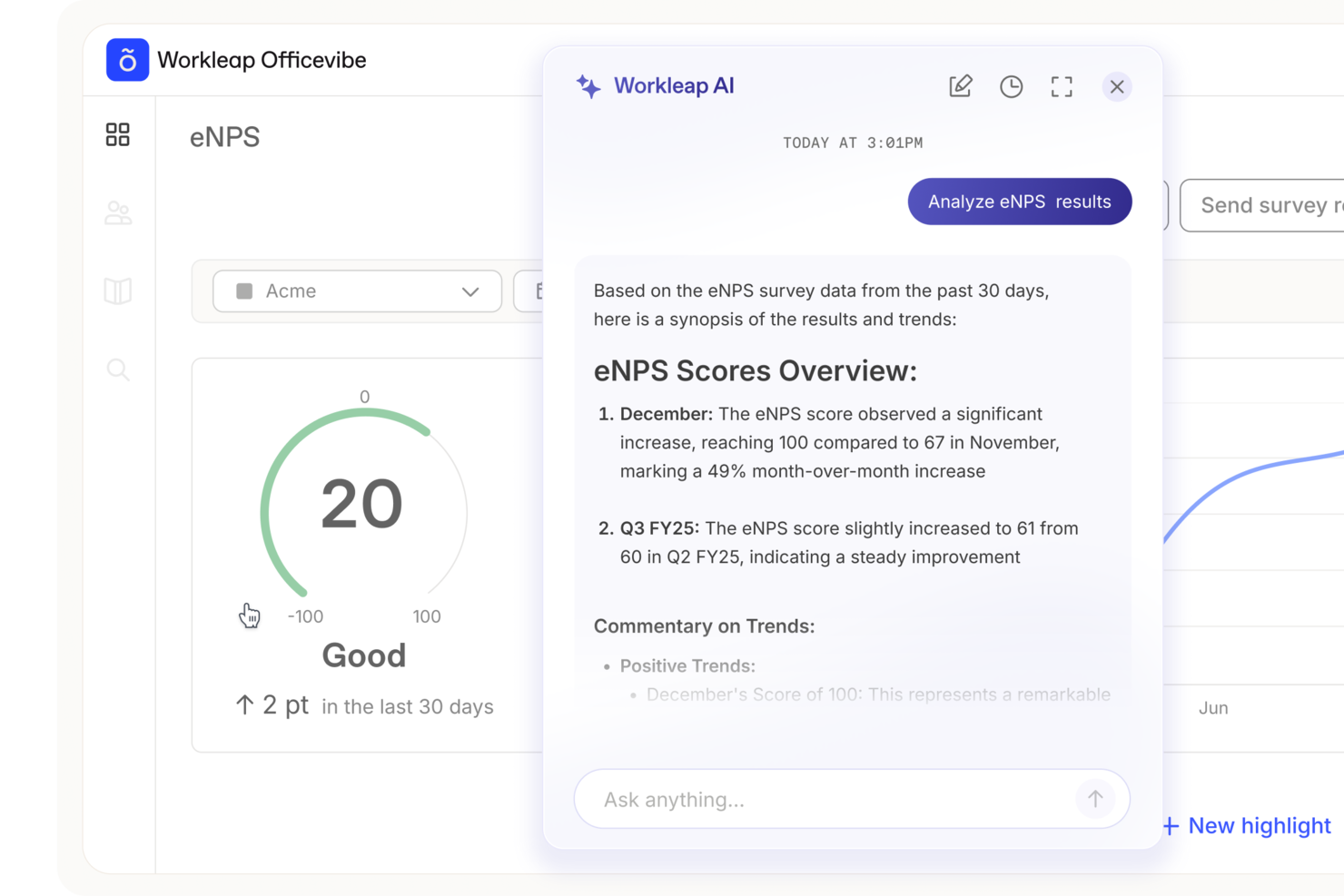
Navigating employee engagement can be difficult, but Workleap is built to address those challenges directly. It’s designed for organizations that want to improve workplace culture, especially HR professionals and team leaders who need clearer insight into team dynamics. By emphasizing anonymous feedback and peer recognition, Workleap supports more open communication and consistent recognition across teams.
Why I Picked Workleap
I picked Workleap for its ability to turn employee feedback into actionable insights, which is a core requirement for people analytics software. Its customizable surveys let you focus on specific issues within your organization, while anonymous feedback helps employees share honest opinions without hesitation. The AI-powered insights then translate that data into practical recommendations, helping you make informed decisions to improve employee engagement.
Workleap Key Features
In addition to its core capabilities, Workleap offers other features that can significantly benefit your team:
- Pulse Surveys: Regularly gather employee sentiment to stay up to date on team morale.
- Good Vibes Cards: Encourage peer-to-peer recognition by allowing employees to celebrate each other's achievements.
- Integration with Slack and Teams: Seamlessly incorporate Workleap into your existing communication tools for better engagement tracking.
- Structured Conversations: Facilitate continuous feedback and development through planned discussions.
Workleap Integrations
Integrations include Slack, Microsoft Teams, and an API for custom integrations.
Pros and Cons
Pros:
- Real-time analytics provide actionable insights
- Anonymous feedback encourages honest insights
- Customizable surveys enable targeted feedback
Cons:
- Learning curve for new users
- Limited advanced reporting capabilities available
Annen programvare for personalanalyse
Her er noen flere gode alternativer som ikke kom med på listen over den beste programvaren for personalanalyse:
- SAP Analytics Cloud
People analytics software for predictive analytics
- Visier
People analytics software for businesses with hourly workers
- ChartHop
People analytics software for headcount forecasting
- UKG Pro
People analytics software for talent tracking
- Orgvue
People analytics software for workforce planning
- Compass
For monitoring digital adoption
- Nakisa
People analytics software for simple organizational design
- SplashHR
People analytics software for DE&I tracking
- Knoetic
People analytics software for custom dashboards
- Peoplebox.ai
People analytics software for engagement and performance trends
- Agentnoon
For headcount + compensation analytics
- Intelogos
For AI-driven team analytics
- Qlik
People analytics software for proactive analysts
- Workday
People analytics software for attrition gap detection
- Compport
People analytics software for compensation analysis
- Darwinbox
People analytics software for risk identification
- EDLIGO
People analytics software for learning analytics
- HRForecast
People analytics software for big data breakdowns
- Sisense Fusion Analytics
People analytics software for holistic data analysis
- Orgnostic
People analytics software for qualitative data analysis


Related Reviews
If you still haven’t found what you’re looking for here, check out these other tools that we’ve tested and evaluated:
How I Evaluate People Analytics Software
I evaluate people analytics tools in two layers: baseline requirements like Workday integration and attrition modeling, and the differentiators that separate a CHRO-level tool from an HR ops platform.
Core Functionality (Table Stakes For This List)
When I'm selecting tools for my list, I rank each one on a scale from 0 (does not offer the functionality) to 5 (excels in this area) for each core functionality listed below. Then, I calculate the tool's total score into a percentage. Each tool needs to achieve a minimum total score of 65% to be considered for inclusion.
- Workforce Data Integration: I check whether a platform can pull from HRIS, ATS, payroll, and performance systems so HR teams aren't manually exporting CSVs from five different tools.
- Pre-Built HR Metrics & KPIs: Each tool should surface ready-to-use metrics like turnover rate, time-to-fill, and diversity ratios without requiring analysts to build formulas from scratch.
- Custom Dashboards & Reporting: I look for drag-and-drop builders that let an HR ops manager create a retention dashboard for leadership and a headcount view for finance from the same dataset.
- Predictive & Advanced Analytics: Tools should offer models that flag attrition risk or forecast hiring needs, not just display historical trends in a chart.
- Segmentation & Drill-Down Analysis: I evaluate whether you can slice data by department, tenure, location, and demographic attributes to compare, say, new-hire turnover across regions.
- Data Security & Compliance Controls: Role-based access, data anonymization thresholds, and compliance support for regulations like GDPR matter when you're handling sensitive employee records.
Once I have a list of tools that meet this criteria, I consider what sets each platform apart.
Differentiating Factors (What Sets Vendors Apart)
Here's how I compare and contrast different vendors:
Standout Features
Pay equity analysis is a big one for me. A tool that can model compensation gaps across demographic segments gives DEI leaders actionable data, not just awareness. I also look for external benchmarking, which lets you compare turnover or engagement scores against industry peers instead of operating in a vacuum. Natural language querying is increasingly valuable too. When an HRBP can type "show me voluntary attrition for managers hired last year" and get a real answer, adoption across the team jumps fast.
Beyond Features
HR tech stack compatibility matters a lot here. I check whether a platform has native connectors to the HRIS, ATS, and payroll systems your team already runs. A tool with great dashboards means little if it can't pull data from your Workday or BambooHR instance. Implementation speed is another factor I weigh. Some platforms need months of professional services before you see a single insight, while others ship pre-built templates that get HR teams to their first attrition report within weeks. For multinational teams, I also evaluate data residency options and anonymization controls.
Slik velger du programvare for personalanalyse
Det er lett å gå seg vill i lange funksjonslister og kompliserte prismodeller. For å hjelpe deg med å holde fokus mens du går gjennom den unike prosessen din for valg av programvare, får du her en sjekkliste over faktorer du bør ha i tankene:
| Faktor | Hva bør vurderes |
|---|---|
| Skalerbarhet | Kan programvaren vokse sammen med organisasjonen din? Vurder om den støtter økende datamengder og antall brukere uten betydelige kostnadsøkninger. |
| Integrasjoner | Kan den kobles til de eksisterende HR-systemene dine? Kontroller kompatibiliteten med verktøy som HRIS, lønnssystemer og rekrutteringsprogramvare for å unngå forstyrrelser i arbeidsflyten. |
| Tilpasningsmuligheter | Kan du tilpasse programvaren etter behovene dine? Se etter muligheter til å justere dashbord, rapporter og måltall slik at de samsvarer med teamets spesifikke krav. |
| Brukervennlighet | Er grensesnittet intuitivt for alle brukere? Sørg for at både teknologivante og mindre teknologivante teammedlemmer kan navigere i systemet uten frustrasjon. |
| Implementering og oppstart | Hvor raskt kan teamet komme i gang? Vurder hvor mye tid og hvilke ressurser som trengs til konfigurering, opplæring og å gjøre teamet kjent med systemet. |
| Kostnad | Er prisplanene tydelige og innenfor budsjettet ditt? Ta hensyn til de totale kostnadene, inkludert skjulte gebyrer for ekstra funksjoner eller brukere, for å unngå uventede utgifter. |
| Sikkerhetstiltak | Prioriterer leverandøren databeskyttelse? Kontroller at de overholder bransjestandarder og tilbyr funksjoner som kryptering og tilgangskontroller. |
| Tilgjengelig kundestøtte | Får du tilgang til hjelp når du trenger det? Se etter kundestøtte døgnet rundt, og vurder hvor raskt leverandørens kundeserviceteam svarer. |
Hva er programvare for personalanalyse?
Programvare for personalanalyse er et verktøy som hjelper organisasjoner med å analysere medarbeiderdata for å forbedre HR-beslutninger og -strategier. HR-medarbeidere, ledere og dataanalytikere bruker vanligvis disse verktøyene for å få innsikt i trender i arbeidsstyrken og medarbeidernes prestasjoner. Funksjoner for rapportering, datavisualisering og prediktiv analyse bidrar til å ta informerte beslutninger, følge opp prestasjoner og planlegge. Alt i alt gir disse verktøyene verdifull innsikt som forbedrer personalstyringen og øker organisasjonens effektivitet.
Funksjoner
Når du velger programvare for personalanalyse, bør du se etter følgende viktige funksjoner:
- Analyse av medarbeiderdata: Gir innsikt i trender i arbeidsstyrken og bidrar til datadrevne HR-beslutninger.
- Planlegging av arbeidsstyrken: Bidrar til å forutsi bemanningsbehov og tilpasse ressursene til virksomhetens mål.
- Oppfølging av prestasjoner: Overvåker måltall for medarbeidernes prestasjoner for å identifisere styrker og forbedringsområder.
- Prognoser for medarbeideravgang: Analyserer mønstre for å forutsi medarbeideravgang og støtte strategier for å beholde medarbeidere.
- Måltall for mangfold og inkludering: Følger opp mangfoldsdata for å støtte initiativer for en inkluderende arbeidsplass.
- Muligheter for prediktiv analyse: Tilbyr prognoser og trender som kan veilede fremtidige HR-strategier.
- Tilpassbare dashbord: Lar brukerne tilpasse visninger og rapporter etter spesifikke behov og preferanser.
- Integrasjon med HRIS-systemer: Sikrer sømløs dataflyt mellom eksisterende HR-verktøy for en helhetlig analyse.
- Dataoppdateringer i sanntid: Gir oppdatert informasjon slik at beslutninger kan tas i tide.
- Avanserte verktøy for datavisualisering: Gir bedre forståelse av komplekse data gjennom tydelige grafiske fremstillinger.
Fordeler
Implementering av programvare for personalanalyse gir flere fordeler for teamet og virksomheten din. Her er noen av fordelene du kan se frem til:
- Bedre beslutningstaking: Tilgang til nøyaktige data og prediktiv analyse hjelper deg med å ta informerte HR-beslutninger.
- Forbedret planlegging av arbeidsstyrken: Prognoseverktøy støtter strategisk bemanning og ressursfordeling.
- Økt andel medarbeidere som blir værende: Funksjoner for å forutsi medarbeideravgang gjør det mulig å identifisere og håndtere risiko for høy utskifting.
- Bedre prestasjonsstyring: Oppfølging av prestasjoner hjelper deg med å overvåke og forbedre medarbeidernes produktivitet.
- Støtte til mangfoldsinitiativer: Måltall for mangfold og inkludering gir innsikt som bidrar til å skape en inkluderende arbeidsplass.
- Kostnadsbesparelser: Effektiv ressursplanlegging og redusert medarbeideravgang kan føre til økonomiske besparelser.
- Innsikt i sanntid: Oppdaterte data gjør det mulig å reagere raskt på trender og endringer i arbeidsstyrken.
Kostnader og priser
Når du velger programvare for personalanalyse, må du forstå de ulike prismodellene og planene som er tilgjengelige. Kostnadene varierer avhengig av funksjoner, teamstørrelse, tillegg og mer. Tabellen nedenfor oppsummerer vanlige planer, gjennomsnittsprisene deres og typiske funksjoner som er inkludert i programvareløsninger for personalanalyse:
Tabell over abonnementsplaner for programvare for personalanalyse
| Plantype | Gjennomsnittspris | Vanlige funksjoner |
|---|---|---|
| Gratisabonnement | $0 | Grunnleggende dataanalyse, begrensede rapporter og støtte fra fellesskapet. |
| Personlig abonnement | $5-$25/bruker/måned | Avansert datavisualisering, brukervennlige dashbord og kundestøtte via e-post. |
| Bedriftsabonnement | $30-$75/bruker/måned | Tilpassbare rapporter, integrasjon med HRIS og prioritert kundestøtte. |
| Virksomhetsabonnement | $100+/bruker/måned | Prediktiv analyse, en egen kundeansvarlig og full integrasjon med alle HR-systemer. |
Programvare for personalanalyse: Ofte stilte spørsmål
Her er noen svar på vanlige spørsmål du kanskje har om programvare for personalanalyse og hvordan den fungerer.
Hvordan integreres programvare for personalanalyse med eksisterende HR-systemer?
Ja, programvare for personalanalyse integreres ofte med eksisterende HR-systemer. Integrasjon gjør det mulig å effektivisere dataflyten mellom plattformer som HRIS, lønnssystemer og verktøy for rekruttering. Dette sikrer konsekvente data på tvers av alle systemer og reduserer manuell dataregistrering. Før du kjøper, bør du kontrollere om programvaren støtter integrasjon med systemene du bruker i dag, for å unngå kompatibilitetsproblemer.
Hvordan fungerer systemer for programvare for personalanalyse?
Programvare for personalanalyse henter data fra flere kilder, for eksempel HCM-er, HRIS eller andre HR-løsninger, og tolker dem. Disse verktøyene gir en tydelig oversikt over ulike HR-måltall, med det endelige målet å gjøre det enkelt å forstå hvordan disse måltallene kan påvirke ulike forretningsresultater.
Hvordan kan personalanalyse hjelpe meg med å forbedre HR-prosessene mine?
Virksomheter bruker personalanalyse fordi det hjelper ledere med å se HR-data i riktig sammenheng. Dette hjelper dem med å finne ut hva som påvirker HR-måltallene, og hvordan disse måltallene påvirker ulike forretningsresultater. Ved å forstå medarbeiderdataene dine kan du forbedre virksomhetens evne til å tiltrekke seg og beholde de beste medarbeiderne. Du vil også forbedre virksomhetskulturen, slik at du kan tilby en bedre medarbeideropplevelse, og mer.